# Best Employee Scheduling Software for Small Business - Page 4

## How Many Employee Scheduling Software Products Does G2 Track?

**Total Products under this Category:** 311

### Category Stats (Jul 2026)

- **Average Rating:** 4.45/5 (↑0.01 vs Jun 2026) The average rating of products in this category, based on all submitted ratings
- **Top Trending Product:** G&A Partners (+2.37%) - Among all products in this category, G&A Partners recorded the largest rating increase compared to last month

_Last updated: July 25, 2026_

## How Does G2 Rank Employee Scheduling Software Products?

**Why You Can Trust G2's Software Rankings:**

- 30 Analysts and Data Experts
- 44,000+ Authentic Reviews
- 311+ Products
- Unbiased Rankings

G2's software rankings are built on verified user reviews, rigorous moderation, and a consistent research methodology maintained by a team of analysts and data experts. Each product is measured using the same transparent criteria, with no paid placement or vendor influence. While reviews reflect real user experiences, which can be subjective, they offer valuable insight into how software performs in the hands of professionals. Together, these inputs power the G2 Score, a standardized way to compare tools within every category.

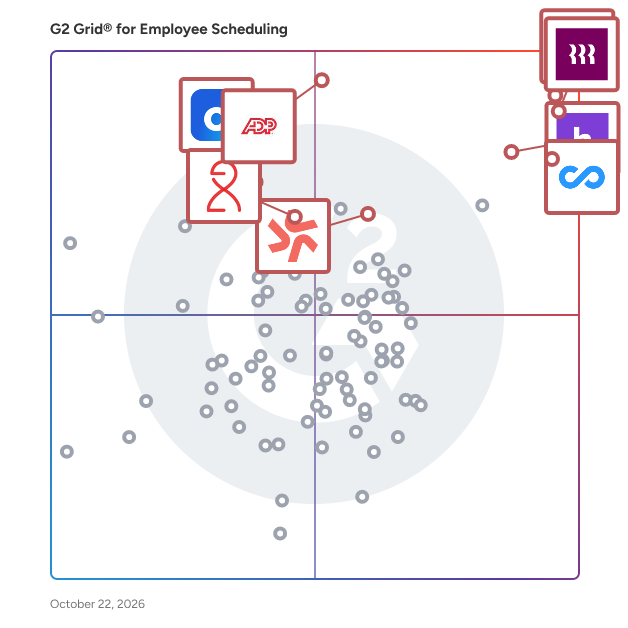
## G2 Grid® for Employee Scheduling Software
 ![G2 Grid® for Employee Scheduling Software plotting products by satisfaction and market presence](https://www.g2.com/categories/employee-scheduling-software/grids.png?focus%5B%5D=20433&focus%5B%5D=19474&focus%5B%5D=53090&focus%5B%5D=15680&focus%5B%5D=15988&focus%5B%5D=4663&focus%5B%5D=133052&focus%5B%5D=27593)

Highlighted products: Connecteam, Homebase, Rippling, Deputy, HROne, Dayforce, ADP Time and Labor Management, and Viventium Software.

Underlying data: [Grid® JSON](https://www.g2.com/categories/employee-scheduling-software/grids.json?focus%5B%5D=connecteam&focus%5B%5D=homebase&focus%5B%5D=rippling&focus%5B%5D=deputy&focus%5B%5D=uneecops-hrone&focus%5B%5D=dayforce&focus%5B%5D=adp-adp-time-and-labor-management&focus%5B%5D=viventium-software&segment=small-business)

**Sponsored**

### Apollo.io

Apollo.io is an AI-powered go-to-market (GTM) platform that helps revenue teams find, engage, and manage B2B buyers across the entire sales cycle. Apollo.io is the company behind the industry’s first fully agentic GTM platform, transforming how revenue teams execute. Going beyond automation, Apollo’s intelligent agents actively drive results across the entire sales funnel – from prospecting to deal management – all in one place. Trusted by millions of users and hundreds of thousands of companies – including Anthropic, Autodesk, and Docusign – Apollo is making world-class go-to-market simple, intelligent, and accessible for all. Apollo serves sales development representatives, account executives, sales leaders, revenue operations, and marketing teams at B2B organizations of various sizes. Teams use Apollo to build and maintain target account lists, orchestrate outbound and inbound motions, manage opportunities, and understand which activities lead to qualified pipeline and closed revenue. Key capabilities include: Data and targeting: Access to a large B2B database with company and contact details, including firmographic, technographic, and buyer signal data, so users can define ideal customer profiles and create precise segments for outreach. Prospecting and enrichment: Tools to search, filter, and save prospect lists, plus enrichment workflows that keep contact and account records up to date in Apollo and connected systems such as CRM. Sales engagement: Multi-step, multi-channel sequences for email, calls, and tasks that standardize how reps follow up with prospects, with controls for timing, throttling, and deliverability. Agentic and AI-assisted workflows: Intelligent agents and AI features that help with account research, lead scoring, message generation, and next-step recommendations so reps can prioritize and personalize at scale. Deal and activity management: Basic CRM-style functionality for tracking opportunities, stages, activities, and notes, giving teams a single view of pipeline health and sales performance. By combining data, engagement, and deal execution in one platform, Apollo is designed to reduce the number of disconnected tools in a typical GTM stack and provide a consistent workflow for building pipeline and managing deals. This helps organizations improve data quality, increase seller productivity, and run more structured, measurable go-to-market programs.

[Visit website](https://www.g2.com/external_clickthroughs/record?secure%5Bad_program%5D=ppc&secure%5Bad_slot%5D=category_product_list_llm&secure%5Bcategory_id%5D=1129&secure%5Bchosen_at%5D=2026-07-31T18%3A51%3A49Z&secure%5Bdisplayable_resource_id%5D=628&secure%5Bdisplayable_resource_type%5D=Category&secure%5Bmedium%5D=sponsored&secure%5Bplacement_reason%5D=retargeted_product&secure%5Bplacement_resource_ids%5D%5B%5D=19743&secure%5Bprioritized%5D=false&secure%5Bproduct_id%5D=19743&secure%5Bresource_id%5D=1129&secure%5Bresource_type%5D=Category&secure%5Bsource_type%5D=category_page&secure%5Bsource_url%5D=https%3A%2F%2Fwww.g2.com%2Fcategories%2Femployee-scheduling-software%2Fsmall-business%3Fpage%3D4&secure%5Btoken%5D=31a953a50e4c36cda1e38a91744764feb8fdcb3718916f102ca20127a2bab525&secure%5Burl%5D=https%3A%2F%2Fwww.apollo.io%2Fdemo%3Futm_source%3Dg2%26utm_medium%3Dcpc%26utm_campaign%3DG2Clicks%26utm_content%3Dtopic%26utm_term%3Doutboundcalltracking&secure%5Burl_type%5D=custom_url)

### [Breathe](https://www.g2.com/products/centurion-management-systems-breathe/reviews)

Breathe is a type of human resource management software solution designed to help users streamline their core people processes online. Specifically tailored for small and medium-sized enterprises (SMEs) in the UK, Breathe facilitates the management of essential HR functions, allowing businesses to save time, enhance efficiency, and provide peace of mind, regardless of their operational location. Targeted primarily at UK-based SMEs and charities, Breathe addresses the unique challenges these organisations face in managing their workforce. With over 16,000 businesses already utilizing the platform to oversee more than 500,000 employees, Breathe has established itself as a trusted partner in the HR space. Its endorsement by a network of over 950 partners further solidifies its reputation as a reliable solution for organisations looking to modernise their HR processes. Breathe offers a comprehensive suite of features designed to meet the diverse needs of its users. Key functionalities include holiday and leave management, which simplifies the process of tracking employee time off, and sickness and absence monitoring, ensuring that organizations can maintain productivity even when employees are away. The platform also includes performance management tools that help businesses set goals and evaluate employee performance effectively. Additionally, expense management and employee scheduling features streamline financial tracking and workforce planning, while time tracking capabilities provide insights into employee hours and productivity. The platform's employee database and analytics feature allows organizations to maintain a centralised repository of employee information, facilitating better decision-making through data-driven insights. Unlimited document storage ensures that essential HR documents are easily accessible and securely stored, while rota, time, and attendance functionalities help organisations manage their workforce efficiently. By integrating these features into a single platform, Breathe stands out in its category, offering a holistic approach to HR management that is both intuitive and user-friendly. Overall, Breathe provides a robust solution for SMEs looking to enhance their HR processes. By moving core people management functions online, organisations can not only save time but also improve compliance and employee satisfaction. The platform's focus on security and ease of use makes it an appealing choice for businesses aiming to modernize their HR practices while maintaining a strong connection with their workforce.

**Average Rating:** 4.4/5.0

**Total Reviews:** 600

#### How Do G2 Users Rate Breathe?

- **Has the product been a good partner in doing business?:** 8.7/10 (Category avg: 9.0/10)
- **Reporting:** 8.0/10 (Category avg: 8.5/10)
- **Portal:** 8.0/10 (Category avg: 8.4/10)
- **Automation:** 7.9/10 (Category avg: 8.5/10)

#### Who Is the Company Behind Breathe?

- **Seller:** [Breathe](https://www.g2.com/sellers/breathe-10f68cea-ed3c-435a-9e0b-ba3e053a1da9)
- **Year Founded:** 1996
- **HQ Location:** Horsham, West Sussex
- **LinkedIn® Page:** [www.linkedin.com](https://www.g2.com/external_clickthroughs/record?secure%5Bsource_type%5D=product_profile&secure%5Btoken%5D=6eb9f9719e81891ebe51678f1b0004086d25cd1b6bae1e1ce30d9be870f2527f&secure%5Burl%5D=https%3A%2F%2Fwww.linkedin.com%2Fcompany%2F2237549%2F&secure%5Burl_type%5D=linkedin_company_website)  
118 employees on LinkedIn®

#### Who Uses This Product?

- **Who Uses This:** Director, HR Manager
- **Top Industries:** Non-Profit Organization Management, Construction
- **Company Size:** 73% Small, 26% Medium

#### What Do G2 Reviewers Say About Breathe?

_AI-generated summary from verified user reviews_

##### Pros

- Users value the **ease of use** of Breathe, highlighting its user-friendly interface and intuitive navigation.
- Users find Breathe **extremely helpful** with its user-friendly interface and excellent customer support for streamlined operations.
- Users love the **intuitive interface** of Breathe, making navigation and setup a breeze for everyone.
- Users praise the **user-friendly interface** of Breathe, highlighting its ease of navigation and intuitive design.
- Users find Breathe's interface **easy to use** , making tracking and managing employee details straightforward and intuitive.

##### Cons

- Users find the **limited features** of Breathe to be clunky and confusing, hindering a smooth experience.
- Users express frustration over **missing features** like limited customisation and poor integrations, impacting overall usability.
- Users find the **limited customization** frustrating, especially for specific processes and reporting needs.
- Users often find **navigation difficult** , leading to confusion when trying to access objectives and deliverables.
- Users experience **poor navigation** in Breathe, often finding it difficult to locate objectives and deliverables effectively.

#### What Are Recent G2 Reviews of Breathe?

**["Streamlined HR Processes with Room for Improvement in Compliance"](https://www.g2.com/survey_responses/breathe-review-13058314)**

**Rating:** 4.0/5.0 stars

_— Hellgren G._

[Read full review](https://www.g2.com/survey_responses/breathe-review-13058314)

**["Centralizes HR Admin with Intuitive Self-Service"](https://www.g2.com/survey_responses/breathe-review-13088693)**

**Rating:** 4.5/5.0 stars

_— Jessel W._

[Read full review](https://www.g2.com/survey_responses/breathe-review-13088693)

#### What Are G2 Users Discussing About Breathe?

- [Who owns BreatheHR?](https://www.g2.com/discussions/who-owns-breathehr) - 1 comment
- [Is there a BreatheHR app?](https://www.g2.com/discussions/is-there-a-breathehr-app) - 2 comments
- [What is Breathe website?](https://www.g2.com/discussions/what-is-breathe-website) - 1 comment
- [What is HR breathe?](https://www.g2.com/discussions/what-is-hr-breathe) - 1 comment

### [Findmyshift](https://www.g2.com/products/out-crowd-ltd-findmyshift/reviews)

Findmyshift is an intuitive, cloud-based employee scheduling software designed to streamline workforce management for businesses of all sizes. With over two decades of development, it offers a reliable and scalable solution that simplifies the creation, management, and communication of staff schedules. The platform's user-friendly interface allows managers to efficiently assign shifts, track employee hours, and manage time-off requests, all within a centralized system. By automating routine scheduling tasks, Findmyshift reduces administrative workload, minimizes scheduling conflicts, and enhances overall operational efficiency. Key Features and Functionality: - Drag & Drop Scheduling: Easily create and adjust staff schedules using a straightforward drag-and-drop interface, facilitating quick modifications and optimal shift assignments. - Time and Attendance Tracking: Monitor actual working hours with a built-in time clock, allowing for accurate timesheets and payroll calculations. - Automated Notifications: Send employees automated shift reminders and notifications via email, text message, or push notification, reducing missed shifts and improving communication. - Mobile Accessibility: Access schedules and manage shifts on the go with dedicated iOS and Android applications, ensuring flexibility and real-time updates. - Vacation Management: Track employee vacations and time-off requests directly within the platform, maintaining proper staffing levels and preventing scheduling conflicts. - Payroll Integration: Generate accurate payroll data by combining employee timesheets, schedules, pay rates, and overtime rates, streamlining the payroll process. - Customizable Database: Add new columns and customize the database to sort and filter data in ways unique to your organization, enhancing data management and reporting. Primary Value and Solutions Provided: Findmyshift addresses the common challenges of employee scheduling by offering a comprehensive, easy-to-use platform that automates and simplifies the scheduling process. By reducing the time and effort required to create and manage schedules, it allows managers to focus on other critical aspects of their operations. The software's real-time updates and automated notifications ensure that employees are always informed of their schedules, leading to improved communication and reduced absenteeism. Additionally, its integration with payroll systems and time tracking features ensures accurate compensation, enhancing employee satisfaction and compliance with labor regulations. Overall, Findmyshift enhances operational efficiency, reduces labor costs, and fosters better work-life balance across organizations.

**Average Rating:** 4.7/5.0

**Total Reviews:** 29

#### How Do G2 Users Rate Findmyshift?

- **Has the product been a good partner in doing business?:** 8.9/10 (Category avg: 9.0/10)
- **Reporting:** 7.8/10 (Category avg: 8.5/10)
- **Portal:** 6.7/10 (Category avg: 8.4/10)
- **Automation:** 7.7/10 (Category avg: 8.5/10)

#### Who Is the Company Behind Findmyshift?

- **Seller:** [Out Crowd LTD](https://www.g2.com/sellers/out-crowd-ltd)
- **HQ Location:** Los Angeles, CA
- **Twitter:** @Findmyshift  
844 Twitter followers
- **LinkedIn® Page:** [www.linkedin.com](https://www.g2.com/external_clickthroughs/record?secure%5Bsource_type%5D=product_profile&secure%5Btoken%5D=7886df2ed926834e5eb248c77dcfa8e5c815d3ab1f0fe3132ced0dba45868834&secure%5Burl%5D=https%3A%2F%2Fwww.linkedin.com%2Fcompany%2FNo-Linkedin-Presence-Added-Intentionally-By-DataOps&secure%5Burl_type%5D=linkedin_company_website)  
1 employees on LinkedIn®

#### Who Uses This Product?

- **Who Uses This:** Director
- **Top Industries:** Hospitality, Hospital & Health Care
- **Company Size:** 70% Small, 20% Medium

#### What Do G2 Reviewers Say About Findmyshift?

_AI-generated summary from verified user reviews_

##### Pros

- Users praise the **ease of use** of Findmyshift, highlighting its simplicity for both management and staff.
- Users value the **easy scheduling** of Findmyshift, enhancing organization through intuitive features and clear communication.
- Users find the **setup ease** of Findmyshift very helpful, streamlining scheduling and enhancing overall organization.
- Users enjoy the **seamless communication** features of Findmyshift, making workforce management effortless and efficient.
- Users value the **intuitive drag-and-drop scheduling** of Findmyshift, enhancing efficiency and simplifying workforce management.

##### Cons

- Users find the **lack of leave application workflows** frustrating, impacting the overall functionality of Findmyshift.
- Users find the **inefficient reporting** limits detailed insights, hindering effective decision-making with Findmyshift.
- Users find the **lack of leave application workflows and approval routing** limits efficiency and organization in leave management.
- Users find the product quite generic due to **limited customization** options in the basic version, affecting its appeal.
- Users are disappointed by the **missing features** like leave applications and approval workflows in Findmyshift.

#### What Are Recent G2 Reviews of Findmyshift?

**["Simplified Scheduling for Caregiving Teams"](https://www.g2.com/survey_responses/findmyshift-review-13137371)**

**Rating:** 5.0/5.0 stars

_— Verified User_

[Read full review](https://www.g2.com/survey_responses/findmyshift-review-13137371)

**["Flexible Configuration That Scales, with Helpful Rota Notifications"](https://www.g2.com/survey_responses/findmyshift-review-12426527)**

**Rating:** 4.5/5.0 stars

_— Tom P._

[Read full review](https://www.g2.com/survey_responses/findmyshift-review-12426527)

### [Avaza](https://www.g2.com/products/avaza/reviews)

Avaza provides an integrated suite of functionality for running your client-focused business. This includes Project Management & Collaboration, Team Chat, Resource Scheduling, Time Tracking, Expense Management, Quoting & Invoicing. Each of these modules can be used together or independently to suit a wide range of businesses. Avaza is particularly useful for consulting & professional services companies that need all these functions, and enjoy having a single source of truth & powerful reporting. Avaza is built in the cloud and available on any device.

**Average Rating:** 4.5/5.0

**Total Reviews:** 372

#### How Do G2 Users Rate Avaza?

- **Has the product been a good partner in doing business?:** 9.3/10 (Category avg: 9.0/10)
- **Reporting:** 8.7/10 (Category avg: 8.5/10)
- **Portal:** 8.6/10 (Category avg: 8.4/10)
- **Automation:** 8.1/10 (Category avg: 8.5/10)

#### Who Is the Company Behind Avaza?

- **Seller:** [Avaza Software](https://www.g2.com/sellers/avaza-software)
- **Company Website:** www.avaza.com
- **Year Founded:** 2014
- **HQ Location:** Neutral Bay
- **Twitter:** @AvazaHQ  
1,038 Twitter followers
- **LinkedIn® Page:** [www.linkedin.com](https://www.g2.com/external_clickthroughs/record?secure%5Bsource_type%5D=product_profile&secure%5Btoken%5D=d9b76644acf957e0334e0890b47e525663051f1f566b9dde73de70ecb8aa761d&secure%5Burl%5D=https%3A%2F%2Fwww.linkedin.com%2Fcompany%2F3778536%2F&secure%5Burl_type%5D=linkedin_company_website)  
20 employees on LinkedIn®

#### Who Uses This Product?

- **Who Uses This:** Owner, Project Manager
- **Top Industries:** Marketing and Advertising, Information Technology and Services
- **Company Size:** 75% Small, 22% Medium

#### What Do G2 Reviewers Say About Avaza?

_AI-generated summary from verified user reviews_

##### Pros

- Users find Avaza **easy to use** , enabling smooth collaboration and effective project management insights for their teams.
- Users enjoy the **effective time tracking** in Avaza, facilitating easy insight into team utilization and budget management.
- Users commend the **world-class customer support** of Avaza, appreciating quick and effective resolutions from real humans.
- Users find that Avaza's **time-saving features** streamline project management, enhancing team collaboration and reporting efficiency.
- Users appreciate Avaza's **simple and intuitive interface** , facilitating ease of use and powerful functionality for productivity.

##### Cons

- Users express concern over **limited features** in Avaza, especially regarding invoice customization and task management.
- Users find the **limited features for grouping timesheet entries and sub-tasks** hinder effective time management in Avaza.
- Users find **limited customization** frustrating, especially with invoice templates and task management features in Avaza.
- Users find **reporting challenging** in Avaza due to complex data pulling and overwhelming project setups.
- Users report **reporting issues** due to complexity and limited customization, making data retrieval frustrating.

#### What Are Recent G2 Reviews of Avaza?

**["Less time reconstructing hours and costs between .NET delivery and invoicing"](https://www.g2.com/survey_responses/avaza-review-13133826)**

**Rating:** 4.5/5.0 stars

_— Yurii L._

[Read full review](https://www.g2.com/survey_responses/avaza-review-13133826)

**["Avaza has help my team stay organized"](https://www.g2.com/survey_responses/avaza-review-9237212)**

**Rating:** 4.0/5.0 stars

_— Craig S._

[Read full review](https://www.g2.com/survey_responses/avaza-review-9237212)

#### What Are G2 Users Discussing About Avaza?

- [What is Avaza used for?](https://www.g2.com/discussions/what-is-avaza-used-for)

### [WhenToWork by TCP](https://www.g2.com/products/whentowork-by-tcp/reviews)

Tired of paper schedules and software that does far more than you need? WhenToWork is simple to use, built for how your team already works, and priced right for seasonal and small teams. From templates to work preferences to mobile shift trading and reminders, it gives managers the control they need and employees the flexibility they expect. No learning curve and no big software price tag. With WhenToWork, you can: Build the best schedule fast: Create and adjust shifts in minutes using drag-and-drop tools, schedule templates, and auto-fill. Improve coverage and avoid last-minute scrambles: View availability and staffing gaps at a glance to stay ahead of no-shows and overtime. Empower your team with more flexibility: Let employees trade shifts, pick up open slots, and request time off with built-in manager approval. Keep everyone in the loop: Send automatic shift reminders and updates via email, text, and in the app so no one misses a change. Manage multiple teams with ease: Create and view schedules by role, department, or location all in one place. No tab toggling required. Whether you're managing a small business, seasonal crew, or large department, WhenToWork gets scheduling done fast without slowing down your day.

**Average Rating:** 4.4/5.0

**Total Reviews:** 98

#### How Do G2 Users Rate WhenToWork by TCP?

- **Has the product been a good partner in doing business?:** 8.8/10 (Category avg: 9.0/10)
- **Reporting:** 9.6/10 (Category avg: 8.5/10)
- **Portal:** 10.0/10 (Category avg: 8.4/10)
- **Automation:** 9.3/10 (Category avg: 8.5/10)

#### Who Is the Company Behind WhenToWork by TCP?

- **Seller:** [TCP Software](https://www.g2.com/sellers/tcp-software)
- **Year Founded:** 1988
- **HQ Location:** Plano, US
- **Twitter:** @tcpsoftware  
450 Twitter followers
- **LinkedIn® Page:** [www.linkedin.com](https://www.g2.com/external_clickthroughs/record?secure%5Bsource_type%5D=product_profile&secure%5Btoken%5D=33bd438590c5b53f44717f5d90f48ed5337323fe8d39f40cc95b567e551e2b5b&secure%5Burl%5D=https%3A%2F%2Fwww.linkedin.com%2Fcompany%2F2644323%2F&secure%5Burl_type%5D=linkedin_company_website)  
1,341 employees on LinkedIn®

#### Who Uses This Product?

- **Top Industries:** Higher Education, Hospital & Health Care
- **Company Size:** 50% Medium, 30% Small

#### What Do G2 Reviewers Say About WhenToWork by TCP?

_AI-generated summary from verified user reviews_

##### Pros

- Users appreciate the **off-site scheduling ease** of WhenToWork, improving organization and modernizing their scheduling process.
- Users appreciate the **comprehensive features** of WhenToWork, noting its clarity and easy-to-use scheduling tools.
- Users appreciate the **ease of use** of WhenToWork, finding it clearly organizes schedules effectively.
- Users appreciate the **mobile access** to schedules, providing a modern solution compared to paper schedules.

##### Cons

- Users find the **complexity of unnecessary features** challenging, especially for small business needs.
- Users find the **limited features** of WhenToWork inadequate for their needs, complicating the experience for small businesses.
- Users express frustration with **login problems** , needing separate accounts and PINs for multiple facilities on WhenToWork.

#### What Are Recent G2 Reviews of WhenToWork by TCP?

**["Easy Shift Scheduling with Weekly Copy and Built-In Availability"](https://www.g2.com/survey_responses/whentowork-by-tcp-review-12477715)**

**Rating:** 4.5/5.0 stars

_— Verified User in Higher Education_

[Read full review](https://www.g2.com/survey_responses/whentowork-by-tcp-review-12477715)

**["Efficient Shifts with Easy Setup"](https://www.g2.com/survey_responses/whentowork-by-tcp-review-12596059)**

**Rating:** 5.0/5.0 stars

_— Evelyn S._

[Read full review](https://www.g2.com/survey_responses/whentowork-by-tcp-review-12596059)

#### What Are G2 Users Discussing About WhenToWork by TCP?

- [What are the benefits and challenges of using WhenToWork for employee scheduling, and what features do you find most valuable?](https://www.g2.com/discussions/what-are-the-benefits-and-challenges-of-using-whentowork-for-employee-scheduling-and-what-features-do-you-find-most-valuable)
- [What is WhenToWork used for?](https://www.g2.com/discussions/what-is-whentowork-used-for)
- [How much does when I work app cost?](https://www.g2.com/discussions/whentowork-how-much-does-when-i-work-app-cost)
- [When can I work for free?](https://www.g2.com/discussions/when-can-i-work-for-free)
- [What is w2w app?](https://www.g2.com/discussions/what-is-w2w-app)

### [HotSchedules](https://www.g2.com/products/hotschedules/reviews)

HotSchedules is the #1-rated workforce management platform built for restaurants. With HotSchedules, you hire, schedule, and pay your team…al l from one integrated platform. Restaurant operators are up against high turnover, complex labor laws, manager overload, and disconnected systems — all while trying to protect profits. HotSchedules solves this by bringing together everything from hiring and onboarding to scheduling and payroll into one simple platform built for restaurants. You can hire faster, schedule smarter, pay accurately, stay compliant, and improve sales — all while giving staff, managers, and guests a better experience.

**Average Rating:** 4.3/5.0

**Total Reviews:** 102

#### How Do G2 Users Rate HotSchedules?

- **Has the product been a good partner in doing business?:** 7.6/10 (Category avg: 9.0/10)
- **Reporting:** 9.7/10 (Category avg: 8.5/10)
- **Portal:** 8.9/10 (Category avg: 8.4/10)
- **Automation:** 7.9/10 (Category avg: 8.5/10)

#### Who Is the Company Behind HotSchedules?

- **Seller:** [Fourth](https://www.g2.com/sellers/fourth)
- **HQ Location:** Austin, US
- **LinkedIn® Page:** [www.linkedin.com](https://www.g2.com/external_clickthroughs/record?secure%5Bsource_type%5D=product_profile&secure%5Btoken%5D=12f32c01e554d608340cebf96ac1789cf605cacadee9ba0e72cd72b5ddb50887&secure%5Burl%5D=https%3A%2F%2Fwww.linkedin.com%2Fcompany%2Ffourth%2F&secure%5Burl_type%5D=linkedin_company_website)  
881 employees on LinkedIn®

#### Who Uses This Product?

- **Who Uses This:** Server
- **Top Industries:** Restaurants, Food & Beverages
- **Company Size:** 49% Medium, 28% Large

#### What Do G2 Reviewers Say About HotSchedules?

_AI-generated summary from verified user reviews_

##### Pros

- Users praise the **ease of use** in HotSchedules for effortlessly creating schedules and managing trends.
- Users appreciate the **shortcuts and ease of use** in creating schedules and trends with HotSchedules.
- Users value the **ease of scheduling** in HotSchedules, enabling quick setup and efficient management of trends.

##### Cons

- Users face **programming issues** with shift management that complicate accurate labor analysis and reporting.

#### What Are Recent G2 Reviews of HotSchedules?

**["Affordable, Real-Time Scheduling and Forecasting with Easy Support"](https://www.g2.com/survey_responses/hotschedules-review-12615518)**

**Rating:** 5.0/5.0 stars

_— Matthew H._

[Read full review](https://www.g2.com/survey_responses/hotschedules-review-12615518)

**["Great Schedule system for restaurants"](https://www.g2.com/survey_responses/hotschedules-review-10638824)**

**Rating:** 4.0/5.0 stars

_— Verified User in Restaurants_

[Read full review](https://www.g2.com/survey_responses/hotschedules-review-10638824)

#### What Are G2 Users Discussing About HotSchedules?

- [What are the benefits and challenges of using HotSchedules for employee scheduling?](https://www.g2.com/discussions/what-are-the-benefits-and-challenges-of-using-hotschedules-for-employee-scheduling)
- [What is HotSchedules used for?](https://www.g2.com/discussions/what-is-hotschedules-used-for)

### [Schedule it - Resource Scheduling Software](https://www.g2.com/products/schedule-it-resource-scheduling-software/reviews)

Are you struggling with inefficient scheduling, double bookings, or missed communications? Our comprehensive resource scheduling software provides the ultimate solution for teams and businesses of all sizes. Increase productivity by managing all your resources with our intuitive drag-and-drop interface. From just $249 per month, you'll gain: Effortless Scheduling: Drag and drop resources for quick and easy planning across any location and device. Smart Resource Allocation: Skills matching ensures the right person for every job, while double-booking prevention eliminates costly errors. Seamless Communication: Keep everyone informed with built-in messages, unlimited email alerts, and SMS reminders. Universal Calendar Sync: Integrate seamlessly with your existing Outlook, Google Calendar, and Apple iCal. Don't just take our word for it – see how our resource scheduling software is transforming businesses like yours. Visit our website to explore case studies, watch a demo, and start your journey to more efficient resource management.

**Average Rating:** 4.7/5.0

**Total Reviews:** 21

#### How Do G2 Users Rate Schedule it - Resource Scheduling Software?

- **Has the product been a good partner in doing business?:** 9.8/10 (Category avg: 9.0/10)
- **Reporting:** 3.3/10 (Category avg: 8.5/10)
- **Portal:** 8.3/10 (Category avg: 8.4/10)
- **Automation:** 9.2/10 (Category avg: 8.5/10)

#### Who Is the Company Behind Schedule it - Resource Scheduling Software?

- **Seller:** [Schedule it Ltd](https://www.g2.com/sellers/schedule-it-ltd)
- **Year Founded:** 2010
- **HQ Location:** Wakefield, West Yorkshire
- **Twitter:** @ScheduleItRocks  
104 Twitter followers
- **LinkedIn® Page:** [www.linkedin.com](https://www.g2.com/external_clickthroughs/record?secure%5Bsource_type%5D=product_profile&secure%5Btoken%5D=039a1d13453c1fb006c5e6274b9c5861e1928470e20f13acbc2cb1e90b3f3cd0&secure%5Burl%5D=https%3A%2F%2Fwww.linkedin.com%2Fcompany%2F1769058%2F&secure%5Burl_type%5D=linkedin_company_website)  
3 employees on LinkedIn®

#### Who Uses This Product?

- **Company Size:** 48% Small, 43% Medium

#### What Are Recent G2 Reviews of Schedule it - Resource Scheduling Software?

**["Flexible system to work around our business and AMAZING customer service!"](https://www.g2.com/survey_responses/schedule-it-resource-scheduling-software-review-4732462)**

**Rating:** 4.5/5.0 stars

_— Morgan B._

[Read full review](https://www.g2.com/survey_responses/schedule-it-resource-scheduling-software-review-4732462)

**["Amazing product & team!"](https://www.g2.com/survey_responses/schedule-it-resource-scheduling-software-review-4733087)**

**Rating:** 4.5/5.0 stars

_— Kristine B._

[Read full review](https://www.g2.com/survey_responses/schedule-it-resource-scheduling-software-review-4733087)

#### What Are G2 Users Discussing About Schedule it - Resource Scheduling Software?

- [What does scheduling software do?](https://www.g2.com/discussions/what-does-scheduling-software-do)
- [What does resource management software do?](https://www.g2.com/discussions/what-does-resource-management-software-do)
- [What is a resource scheduling system?](https://www.g2.com/discussions/what-is-a-resource-scheduling-system)
- [Which software is used for scheduling and allocating resources?](https://www.g2.com/discussions/which-software-is-used-for-scheduling-and-allocating-resources)

### [Crew](https://www.g2.com/products/crew-crew/reviews)

Crew is the #1 digital workplace trusted by the world’s largest enterprises to streamline post-COVID-19 operations. Core to the platform is a highly engaging, secure mobile app that transforms how work gets done for frontline teams. Crew better connects organizations through communication, optimizes labor through streamlined scheduling and staffing workflows, and builds culture through public recognition and motivation. Crew helps more than 40,000 organizations create more productive frontline teams. Crew is headquartered in San Francisco, CA. To learn more, visit www.crewapp.com.

**Average Rating:** 4.2/5.0

**Total Reviews:** 54

#### How Do G2 Users Rate Crew?

- **Has the product been a good partner in doing business?:** 8.3/10 (Category avg: 9.0/10)
- **Reporting:** 7.6/10 (Category avg: 8.5/10)
- **Portal:** 8.1/10 (Category avg: 8.4/10)
- **Automation:** 8.9/10 (Category avg: 8.5/10)

#### Who Is the Company Behind Crew?

- **Seller:** [Crew](https://www.g2.com/sellers/crew)
- **Year Founded:** 2015
- **HQ Location:** San Francisco, CA
- **Twitter:** @crew\_app  
1,653 Twitter followers
- **LinkedIn® Page:** [www.linkedin.com](https://www.g2.com/external_clickthroughs/record?secure%5Bsource_type%5D=product_profile&secure%5Btoken%5D=74fdb79ac100092a5d3485c6aac94c4aafa171f951996f4615e21b798eb8fb9d&secure%5Burl%5D=https%3A%2F%2Fwww.linkedin.com%2Fcompany%2F10356167%2F&secure%5Burl_type%5D=linkedin_company_website)  
132 employees on LinkedIn®

#### Who Uses This Product?

- **Top Industries:** Food & Beverages, Restaurants
- **Company Size:** 67% Small, 24% Medium

#### What Do G2 Reviewers Say About Crew?

_AI-generated summary from verified user reviews_

##### Pros

- Users value the **accessibility across multiple platforms** , making communication seamless and efficient for everyone involved.
- Users love the **effective communication features** of Crew, making collaboration seamless and engaging across various platforms.
- Users praise the **effective communication** features of Crew, enhancing group interactions and information sharing effortlessly.
- Users love the **convenience** of Crew for seamless communication, scheduling, and sharing across multiple platforms and devices.
- Users enjoy the **customization options** in Crew, facilitating effective communication and collaboration across various platforms.

##### Cons

- Users are concerned about **data security** due to a lack of encryption in Crew, making them feel less protected.
- Users find the **difficult setup** in Crew frustrating, especially with individual message selection and thread recovery issues.
- Users face **display issues** with Crew, particularly its lack of landscape mode and cumbersome messaging features.
- Users face **file sharing issues** with Crew, including limits on message distribution and difficulty in recovering archived threads.
- Users face **improvement needed** due to limited messaging options, lack of landscape mode, and difficulties recovering archived threads.

#### What Are Recent G2 Reviews of Crew?

**["Use it for multiple groups in a charitable organization setting"](https://www.g2.com/survey_responses/crew-review-1184841)**

**Rating:** 5.0/5.0 stars

_— Larry M._

[Read full review](https://www.g2.com/survey_responses/crew-review-1184841)

**["CREW 4 LIFE"](https://www.g2.com/survey_responses/crew-review-5096691)**

**Rating:** 5.0/5.0 stars

_— Aimee V._

[Read full review](https://www.g2.com/survey_responses/crew-review-5096691)

#### What Are G2 Users Discussing About Crew?

- [Does the crew app cost money?](https://www.g2.com/discussions/does-the-crew-app-cost-money)
- [Is the crew app safe?](https://www.g2.com/discussions/is-the-crew-app-safe) - 1 comment
- [What happened to the crew app?](https://www.g2.com/discussions/what-happened-to-the-crew-app)
- [Is crew a good app?](https://www.g2.com/discussions/is-crew-a-good-app) - 1 comment

### [Dialpad Support](https://www.g2.com/products/dialpad-support/reviews)

Dialpad Support is an AI-native contact center solution that brings real-time AI insights, automation, and coaching into a single system so agents and supervisors have the context they need, when they need it. Dialpad Support modernizes inbound contact centers with real-time transcription, AI summaries, and action items that keep agents focused on the conversation instead of note-taking. Supervisors can coach and monitor teams with live sentiment tracking and automated quality management. Dialpad also offers an outbound solution that guides sales reps with real-time AI coaching, automation, and insights, so both inbound and outbound can run on the same platform. On the Dialpad platform, AI Agents are available for both voice and digital interactions, working alongside your team to handle routine inquiries and free up agents for more complex conversations. With Dialpad, you can: - Provide real-time agent assists - Coach and monitor teams with live sentiment and automated quality management - Use AI Agents across voice and digital channels to support customers around the clock - Turn conversations into intelligence that helps your team know your customer and make informed decisions

**Average Rating:** 4.4/5.0

**Total Reviews:** 681

#### How Do G2 Users Rate Dialpad Support?

- **Has the product been a good partner in doing business?:** 9.0/10 (Category avg: 9.0/10)
- **Reporting:** 8.4/10 (Category avg: 8.5/10)
- **Portal:** 8.9/10 (Category avg: 8.4/10)
- **Automation:** 8.5/10 (Category avg: 8.5/10)

#### Who Is the Company Behind Dialpad Support?

- **Seller:** [Dialpad](https://www.g2.com/sellers/dialpad)
- **Company Website:** Dialpad.com
- **Year Founded:** 2011
- **HQ Location:** San Ramon, California
- **Twitter:** @DialpadHQ  
60 Twitter followers
- **LinkedIn® Page:** [www.linkedin.com](https://www.g2.com/external_clickthroughs/record?secure%5Bsource_type%5D=product_profile&secure%5Btoken%5D=6b95ce4b1a611b8e2cb68586d5533162aa3ebba2fdf36c04185ac44e2a69906c&secure%5Burl%5D=https%3A%2F%2Fwww.linkedin.com%2Fcompany%2F3967399%2F&secure%5Burl_type%5D=linkedin_company_website)  
1,491 employees on LinkedIn®

#### Who Uses This Product?

- **Who Uses This:** Account Manager, Customer Service Rep
- **Top Industries:** Financial Services, Consumer Services
- **Company Size:** 44% Medium, 31% Small

#### What Do G2 Reviewers Say About Dialpad Support?

_AI-generated summary from verified user reviews_

##### Pros

- Users find the **online help section incredibly helpful** , enabling quick answers and enhancing the support experience.
- Users appreciate the **ease of use** of Dialpad Support, finding navigation and support requests simple and efficient.
- Users enjoy the **responsive customer support** of Dialpad, appreciating quick resolutions and effective communication for their issues.
- Users value the **transcription and CRM integration** features of Dialpad Support, enhancing efficiency in client communications.
- Users appreciate the **quick response times** of Dialpad Support, effectively addressing issues with prompt assistance.

##### Cons

- Users find the **poor customer support** of Dialpad Support time-consuming and often unhelpful in resolving issues.
- Users experience **call connection delays** and find reporting and app functionality lacking, impacting their overall experience.
- Users are frustrated with the **delayed support** , making urgent assistance difficult to obtain when needed most.
- Users experience **dialer issues** including delays, call queue inaccuracies, and challenges with reporting and app utilization.
- Users experience frustratingly **long wait times** for responses, especially during peak hours, hindering quick resolutions.

#### What Are Recent G2 Reviews of Dialpad Support?

**["Dialpad Updated Review"](https://www.g2.com/survey_responses/dialpad-support-review-10344582)**

**Rating:** 5.0/5.0 stars

_— Mohammed P._

[Read full review](https://www.g2.com/survey_responses/dialpad-support-review-10344582)

**["Easy Setup, Fair Pricing, and Solid Integrations with Halo PSA and Slack"](https://www.g2.com/survey_responses/dialpad-support-review-12836209)**

**Rating:** 5.0/5.0 stars

_— Christopher R._

[Read full review](https://www.g2.com/survey_responses/dialpad-support-review-12836209)

#### What Are G2 Users Discussing About Dialpad Support?

- [What is Dialpad Sell used for?](https://www.g2.com/discussions/what-is-dialpad-sell-used-for)
- [What is Dialpad Contact Center used for?](https://www.g2.com/discussions/what-is-dialpad-contact-center-used-for) - 1 comment

### [Assembled WFM](https://www.g2.com/products/assembled-wfm/reviews)

Assembled is an all-in-one support platform designed to enhance customer service operations by integrating AI agents with intelligent workforce management. This solution aims to help companies deliver exceptional support experiences while efficiently managing their resources. By leveraging advanced technology, Assembled enables organizations to streamline their support processes, ensuring that both AI and human agents work in harmony to meet customer needs. The platform primarily targets customer support teams across various industries that seek to improve their operational efficiency and service quality. Assembled is particularly beneficial for businesses that handle high volumes of customer interactions and require precise forecasting and staffing solutions. With its capabilities, teams can automate a significant portion of customer interactions, allowing human agents to focus on more complex inquiries, thereby enhancing overall productivity and customer satisfaction. Key features of Assembled include fast and intuitive scheduling, which allows teams to create customized work schedules that adapt to fluctuating demand. This flexibility is crucial for organizations that experience varying levels of customer inquiries throughout the day or week. Additionally, the platform offers human-in-the-loop AI-powered automation, which ensures that AI agents can seamlessly collaborate with human staff, providing a balanced approach to customer support. This unique feature helps to maintain a personal touch in customer interactions while benefiting from the efficiency of automation. Another standout aspect of Assembled is its powerful forecasting capabilities, which boast over 90% accuracy. This feature enables teams to predict customer demand accurately, allowing for optimal staffing decisions that align with anticipated workload. Furthermore, the platform provides meaningful cross-team visibility, ensuring that all stakeholders have access to relevant information and insights, fostering collaboration and informed decision-making. Assembled also excels in reporting, offering centralized and robust analytics that deliver actionable insights. This comprehensive reporting functionality empowers teams to track performance metrics, identify trends, and make data-driven adjustments to their support strategies. By utilizing Assembled, organizations can scale their support operations intelligently, balancing the strengths of AI with the irreplaceable value of human interaction, ultimately leading to enhanced customer experiences and operational success.

**Average Rating:** 4.6/5.0

**Total Reviews:** 184

#### How Do G2 Users Rate Assembled WFM?

- **Has the product been a good partner in doing business?:** 9.5/10 (Category avg: 9.0/10)
- **Reporting:** 8.6/10 (Category avg: 8.5/10)
- **Portal:** 8.3/10 (Category avg: 8.4/10)
- **Automation:** 8.2/10 (Category avg: 8.5/10)

#### Who Is the Company Behind Assembled WFM?

- **Seller:** [Assembled](https://www.g2.com/sellers/assembled)
- **Company Website:** www.assembled.com
- **Year Founded:** 2018
- **HQ Location:** San Francisco, California
- **Twitter:** @assembledhq  
372 Twitter followers
- **LinkedIn® Page:** [www.linkedin.com](https://www.g2.com/external_clickthroughs/record?secure%5Bsource_type%5D=product_profile&secure%5Btoken%5D=54c7ff050add5f1b54c5fd19f89d60db0fd4745384537f7eecda6ae88d185611&secure%5Burl%5D=https%3A%2F%2Fwww.linkedin.com%2Fcompany%2F26571599%2F&secure%5Burl_type%5D=linkedin_company_website)  
134 employees on LinkedIn®

#### Who Uses This Product?

- **Top Industries:** Financial Services, Information Technology and Services
- **Company Size:** 63% Medium, 21% Small

#### What Do G2 Reviewers Say About Assembled WFM?

_AI-generated summary from verified user reviews_

##### Pros

- Users find Assembled WFM to be **very approachable** , allowing quick understanding and effective management for all backgrounds.
- Users appreciate the **seamless scheduling capabilities** of Assembled WFM, allowing easy adjustments and real-time updates.
- Users appreciate the **ease of scheduling** with Assembled WFM, enjoying seamless adjustments and real-time data tracking.
- Users love the **intuitive design** of Assembled WFM, making it easy for anyone to understand and use.
- Users highlight the **efficiency** of Assembled WFM, streamlining scheduling and enhancing forecasting capabilities for optimal operations.

##### Cons

- Users find **schedule changes complicated** , impacting their ability to manage tasks effectively and access their scores.
- Users find the **missing features** in Assembled WFM, like custom reporting and shift swap, frustrating and limiting.
- Users find Assembled WFM has **limited features** , hindering efficiency, especially in reporting and workforce management functionalities.
- Users frequently struggle with **poor reporting** , including limited customization and delays in data refreshing, affecting efficiency.
- Users often experience **slow loading** times, hindering task completion and complicating schedule management.

#### What Are Recent G2 Reviews of Assembled WFM?

**["Improves Staffing Visibility and Operational Efficiency"](https://www.g2.com/survey_responses/assembled-wfm-review-12977659)**

**Rating:** 4.0/5.0 stars

_— Airene D._

[Read full review](https://www.g2.com/survey_responses/assembled-wfm-review-12977659)

**["Streamlined Workforce Management with Ease"](https://www.g2.com/survey_responses/assembled-wfm-review-12980620)**

**Rating:** 5.0/5.0 stars

_— Verified User in Leisure, Travel & Tourism_

[Read full review](https://www.g2.com/survey_responses/assembled-wfm-review-12980620)

#### What Are G2 Users Discussing About Assembled WFM?

- [What is your primary use case for Assembled in workforce management, and how has it impacted your team's efficiency?](https://www.g2.com/discussions/what-is-your-primary-use-case-for-assembled-in-workforce-management-and-how-has-it-impacted-your-team-s-efficiency)
- [What is Assembled used for?](https://www.g2.com/discussions/what-is-assembled-used-for)

### [Teambridge](https://www.g2.com/products/teambridge/reviews)

Teambridge is everything you want in a workforce management system with three key differentiators: One, it’s composable, so you can format your data, change the layout, and automate your processes exactly the way you want to. Two, it’s AI-native, built from the ground up so it understands your business and drives real outcomes. Three, it’s mobile-first—designed to look, feel, and perform like the mobile apps your staff use every day. For the first time ever, you can scale what makes your business unique while slashing operating costs and boosting revenue.

**Average Rating:** 4.7/5.0

**Total Reviews:** 42

#### How Do G2 Users Rate Teambridge?

- **Has the product been a good partner in doing business?:** 9.1/10 (Category avg: 9.0/10)
- **Reporting:** 7.7/10 (Category avg: 8.5/10)
- **Portal:** 7.3/10 (Category avg: 8.4/10)
- **Automation:** 8.6/10 (Category avg: 8.5/10)

#### Who Is the Company Behind Teambridge?

- **Seller:** [Teambridge](https://www.g2.com/sellers/teambridge)
- **Company Website:** teambridge.com
- **Year Founded:** 2017
- **HQ Location:** San Francisco, CA
- **LinkedIn® Page:** [www.linkedin.com](https://www.g2.com/external_clickthroughs/record?secure%5Bsource_type%5D=product_profile&secure%5Btoken%5D=c7f3c383a5fd3782e0d59e98c4911226fb7c930eeda86debd5d5f863ad69ad01&secure%5Burl%5D=https%3A%2F%2Fwww.linkedin.com%2Fcompany%2Fteam-bridge%2F&secure%5Burl_type%5D=linkedin_company_website)  
50 employees on LinkedIn®

#### Who Uses This Product?

- **Top Industries:** Staffing and Recruiting, Hospital & Health Care
- **Company Size:** 50% Medium, 43% Small

#### What Do G2 Reviewers Say About Teambridge?

_AI-generated summary from verified user reviews_

##### Pros

- Users praise Teambridge for its **intuitive design and excellent support** , making it easy to learn and implement.
- Users commend Teambridge's **powerful automation** capabilities, enhancing efficiency and customizability in staffing solutions.
- Users praise the **responsive customer support** of Teambridge, enhancing their overall experience and satisfaction.
- Users value the **powerful automations** in Teambridge, enhancing creativity and simplifying complex processes effectively.
- Users highlight the **endless customizability** of Teambridge, enabling tailored solutions for their specific staffing needs.

##### Cons

- Users find the **limited features** of Teambridge a downside, despite recognizing future improvements on the roadmap.
- Users point out the **missing features** in Teambridge, noting basic layouts and limitations in product capabilities.
- Users experience **software glitches** that result in unreliability, lagging, and freezing during heavy usage.
- Users find it challenging to manage shifts due to the **deletion difficulty** that complicates cancellation processes.
- Users find the **difficult setup** of Teambridge to be a significant hurdle in their user experience.

#### What Are Recent G2 Reviews of Teambridge?

**["Efficient and Reliable Time-Keeping Solution and More!"](https://www.g2.com/survey_responses/teambridge-review-11280796)**

**Rating:** 5.0/5.0 stars

_— April C._

[Read full review](https://www.g2.com/survey_responses/teambridge-review-11280796)

**["Well worth the investment!"](https://www.g2.com/survey_responses/teambridge-review-11280738)**

**Rating:** 5.0/5.0 stars

_— Regina G._

[Read full review](https://www.g2.com/survey_responses/teambridge-review-11280738)

### [Netchex](https://www.g2.com/products/netchex/reviews)

Netchex is HR & Payroll purpose-built for people that keep America running—from the hotel front desk to the gym mat and from the health clinic to the manufacturing frontline. We’re your partners, so you don’t have to choose between dependable technology and great service. Netchex wasn’t built in Silicon Valley by people who work behind screens every day. It was founded in Louisiana by two friends who worked within their community and believed these businesses deserved better. They purpose-built a payroll & HR company you could depend on for great technology and great service. Twenty years later, that mission hasn’t changed. We exist to make work easier for the businesses that keep America running—the ones with workforces on the floor, on the line, and on the frontline. Our platform delivers payroll you can depend on, so you don’t second-guess calculations, taxes or compliance. It’s designed for ease – intuitive, mobile-first workflows that managers and employees actually use. And it automates the handoffs, coordination, and rework across payroll, HR, benefits, and compliance. All within one unified system, one login, and clean integrations with the systems you already use. No manual data transfers. No disconnected systems. No unnecessary complexity. We invest in your long-term success—with project managed implementation, free data imports, dedicated account manager, access to one-on-one coaching, and a real feedback loop that ensures your voice shapes the platform. Supported by a team of industry-leading FPC certified representatives, you can be sure that we’re not servicing you; we’re solving your Payroll & HR problems each time.

**Average Rating:** 4.5/5.0

**Total Reviews:** 150

#### How Do G2 Users Rate Netchex?

- **Has the product been a good partner in doing business?:** 9.0/10 (Category avg: 9.0/10)
- **Reporting:** 7.3/10 (Category avg: 8.5/10)
- **Portal:** 7.5/10 (Category avg: 8.4/10)
- **Automation:** 7.6/10 (Category avg: 8.5/10)

#### Who Is the Company Behind Netchex?

- **Seller:** [Netchex](https://www.g2.com/sellers/netchex)
- **Company Website:** www.netchex.com
- **Year Founded:** 2003
- **HQ Location:** Covington, LA
- **LinkedIn® Page:** [www.linkedin.com](https://www.g2.com/external_clickthroughs/record?secure%5Bsource_type%5D=product_profile&secure%5Btoken%5D=dfe8307d89d8c2eda4a39eef2c176a9b70416009a991e1c399c79c6f105c2134&secure%5Burl%5D=https%3A%2F%2Fwww.linkedin.com%2Fcompany%2F1482112%2F&secure%5Burl_type%5D=linkedin_company_website)  
377 employees on LinkedIn®
- **Phone:** (985)220-1410

#### Who Uses This Product?

- **Who Uses This:** HR Manager, Controller
- **Top Industries:** Automotive, Hospitality
- **Company Size:** 62% Medium, 32% Small

#### What Do G2 Reviewers Say About Netchex?

_AI-generated summary from verified user reviews_

##### Pros

- Users appreciate the **ease of use** in Netchex, praising its organization, reliability, and helpful staff.
- Users value the **helpful staff** at Netchex, appreciating their support and multiple access options for assistance.
- Users value the **responsive customer support** of Netchex, appreciating quick assistance and effective onboarding experiences.
- Users appreciate the **intuitive design** of Netchex, making it simple and reliable for the entire staff.
- Users highlight the **user-friendly interface** of Netchex, which simplifies payroll processing and enhances overall experience.

##### Cons

- Users experience **limited customization** options, making it difficult to adapt the software to unique needs effectively.
- Users highlight the **missing features** in Netchex, noting the need for improvements and better integration with tools.
- Users find the **limited features** of Netchex frustrating, especially with complex navigation and lack of support from representatives.
- Users express frustration over **poor customer support** , citing slow responses and inconsistent information from representatives.
- Users find Netchex **not user-friendly** , citing complex processes and outdated layouts that hinder efficiency.

#### What Are Recent G2 Reviews of Netchex?

**["All-in-One Solution with Compliance Challenges"](https://www.g2.com/survey_responses/netchex-review-13058526)**

**Rating:** 4.5/5.0 stars

_— Seth B._

[Read full review](https://www.g2.com/survey_responses/netchex-review-13058526)

**["All-In-One Payroll & HR Platform with Stellar Support"](https://www.g2.com/survey_responses/netchex-review-10698773)**

**Rating:** 5.0/5.0 stars

_— Tiffany P._

[Read full review](https://www.g2.com/survey_responses/netchex-review-10698773)

#### What Are G2 Users Discussing About Netchex?

- [What is Netchex used for?](https://www.g2.com/discussions/what-is-netchex-used-for)
- [What does Netchex do?](https://www.g2.com/discussions/what-does-netchex-do)
- [How do I check my pay stub on Netchex?](https://www.g2.com/discussions/how-do-i-check-my-pay-stub-on-netchex)
- [Does Netchex have an app for Android?](https://www.g2.com/discussions/does-netchex-have-an-app-for-android)
- [Does Netchex have an app?](https://www.g2.com/discussions/does-netchex-have-an-app) - 1 comment

### [Timesheets.com](https://www.g2.com/products/timesheets-com/reviews)

Timesheets.com is a user-friendly and affordable employee time tracking solution for businesses who want to save on payroll costs or increase billing. Employees can track their time with our mobile site or admins can restrict where employees clock in to just certain office locations. Our DCAA compliant system has a full audit trail and permissions architecture ensuring security and accountability. Reports can be exported to a number of payroll and accounting software platforms including QuickBooks.

**Average Rating:** 4.2/5.0

**Total Reviews:** 450

#### How Do G2 Users Rate Timesheets.com?

- **Has the product been a good partner in doing business?:** 9.0/10 (Category avg: 9.0/10)

#### Who Is the Company Behind Timesheets.com?

- **Seller:** [Timesheets.com](https://www.g2.com/sellers/timesheets-com)
- **Year Founded:** 2004
- **HQ Location:** San Jose, CA
- **Twitter:** @timesheets  
4,290 Twitter followers
- **LinkedIn® Page:** [www.linkedin.com](https://www.g2.com/external_clickthroughs/record?secure%5Bsource_type%5D=product_profile&secure%5Btoken%5D=707191e6527bf22c87adabf0a8507e94f093bcd6e8fa072f8512a2d9abb69d1b&secure%5Burl%5D=https%3A%2F%2Fwww.linkedin.com%2Fcompany%2F792699%2F&secure%5Burl_type%5D=linkedin_company_website)  
14 employees on LinkedIn®

#### Who Uses This Product?

- **Who Uses This:** President, Administrator
- **Top Industries:** Education Management, Hospital & Health Care
- **Company Size:** 52% Small, 29% Medium

#### What Do G2 Reviewers Say About Timesheets.com?

_AI-generated summary from verified user reviews_

##### Pros

- Users appreciate the **friendly customer support** of Timesheets.com, enhancing their experience with helpful assistance.
- Users appreciate the **ease of use** of Timesheets.com, enjoying its simplicity and friendly customer support.
- Users value the **flexibility** of Timesheets.com, appreciating the ease of use and no-contract policy.
- Users value the **helpful customer support** , finding it friendly and responsive to their needs.
- Users value the **simplicity and flexibility** of Timesheets.com, along with friendly support and affordable pricing.

##### Cons

- Users face **integration issues** with Timesheets.com, hindering connections to essential HR management platforms and limiting customization.
- Users report **limited customization** and integration options in Timesheets.com, hindering their HR management experience.
- Users find **limited functionality** in Timesheets.com due to customization and reporting constraints, along with integration issues.
- Users find the **limited customization and reporting options** of Timesheets.com to be restrictive for their needs.
- Users express dissatisfaction with the **missing features** like limited customization, reporting options, and integration capabilities.

#### What Are Recent G2 Reviews of Timesheets.com?

**["a great tracking software"](https://www.g2.com/survey_responses/timesheets-com-review-8913519)**

**Rating:** 5.0/5.0 stars

_— james f._

[Read full review](https://www.g2.com/survey_responses/timesheets-com-review-8913519)

**["HR management at your fingertips"](https://www.g2.com/survey_responses/timesheets-com-review-8158932)**

**Rating:** 4.5/5.0 stars

_— Raffy a._

[Read full review](https://www.g2.com/survey_responses/timesheets-com-review-8158932)

#### What Are G2 Users Discussing About Timesheets.com?

- [What is Timesheets.com used for?](https://www.g2.com/discussions/what-is-timesheets-com-used-for) - 1 comment

### [MakeShift](https://www.g2.com/products/makeshift/reviews)

MakeShift is the only people first cloud scheduling solution that improves the scheduling experience for managers and employees alike. It's easy to set up and even easier to use. You'll create schedules faster, track attendance more accurately, and communicate with staff in real time regardless of the size of your team. Our customers experience fewer unfilled shifts, better work-life balance, happier employees, and a healthier bottom line. It's People First scheduling and businesses love it! Sign up today to save time, reduce labor costs, and increase employee engagement --\> makeshift.ca MakeShift offers a free 14-day trial.

**Average Rating:** 4.3/5.0

**Total Reviews:** 290

#### How Do G2 Users Rate MakeShift?

- **Has the product been a good partner in doing business?:** 8.8/10 (Category avg: 9.0/10)
- **Reporting:** 7.7/10 (Category avg: 8.5/10)
- **Portal:** 8.2/10 (Category avg: 8.4/10)
- **Automation:** 8.2/10 (Category avg: 8.5/10)

#### Who Is the Company Behind MakeShift?

- **Seller:** [MakeShift](https://www.g2.com/sellers/makeshift)
- **Company Website:** www.makeshift.ca
- **Year Founded:** 2014
- **HQ Location:** Calgary, CA
- **Twitter:** @makeshiftapp  
505 Twitter followers
- **LinkedIn® Page:** [www.linkedin.com](https://www.g2.com/external_clickthroughs/record?secure%5Bsource_type%5D=product_profile&secure%5Btoken%5D=b0126ae376261fbfc0f20b95d0e689fc7ab31eece394b8acfb82f0f056584de4&secure%5Burl%5D=https%3A%2F%2Fwww.linkedin.com%2Fcompany%2Fmakeshiftscheduling&secure%5Burl_type%5D=linkedin_company_website)  
25 employees on LinkedIn®

#### Who Uses This Product?

- **Who Uses This:** Manager, Supervisor
- **Top Industries:** Hospital & Health Care, Health, Wellness and Fitness
- **Company Size:** 57% Medium, 33% Small

#### What Do G2 Reviewers Say About MakeShift?

_AI-generated summary from verified user reviews_

##### Pros

- Users appreciate the **easy scheduling** features of MakeShift, making it simple to manage and reference work schedules.
- Users find **Scheduling Ease** in MakeShift beneficial, as it simplifies management and visibility of work schedules.
- Users love the **ease of use** of MakeShift, finding it convenient and user-friendly for scheduling tasks.
- Users love the **easy-to-understand shift management** and valuable notifications provided by MakeShift's dashboard.
- Users value the **easy access** to schedules and employee information, enhancing overall management and workflow efficiency.

##### Cons

- Users find **scheduling issues** in MakeShift tedious due to manual time selection and small screen size.
- Users find the **missing features** of MakeShift hinder their scheduling efficiency and overall user experience.
- Users struggle with **shift management** , citing difficulties in scheduling, bulk adding, and exporting shifts efficiently.
- Users are frustrated by **display issues** , particularly the small scheduling view on the desktop affecting usability.
- Users are frustrated by MakeShift's **limited features** , lacking essential tools like notes, communication, and robust scheduling options.

#### What Are Recent G2 Reviews of MakeShift?

**["Effortless Shift Management and Real-Time Updates"](https://www.g2.com/survey_responses/makeshift-review-11973956)**

**Rating:** 4.5/5.0 stars

_— Xia Y._

[Read full review](https://www.g2.com/survey_responses/makeshift-review-11973956)

**["Efficiency and reliability"](https://www.g2.com/survey_responses/makeshift-review-9401922)**

**Rating:** 5.0/5.0 stars

_— Kenechukwu U._

[Read full review](https://www.g2.com/survey_responses/makeshift-review-9401922)

#### What Are G2 Users Discussing About MakeShift?

- [What is MakeShift used for?](https://www.g2.com/discussions/what-is-makeshift-used-for) - 1 comment

### [KayaPush](https://www.g2.com/products/kayapush/reviews)

KayaPush is the only fully integrated HR and payroll software for cannabis businesses. Designed specifically for the industry, KayaPush streamlines hiring, onboarding, scheduling, time tracking, payroll, human resources, and reporting in one easy-to-use platform. Save time with automations, reduce labor spend through unique POS integrations, and grow and scale your dispensary with a platform designed just for you.

**Average Rating:** 4.6/5.0

**Total Reviews:** 24

#### How Do G2 Users Rate KayaPush?

- **Has the product been a good partner in doing business?:** 9.1/10 (Category avg: 9.0/10)

#### Who Is the Company Behind KayaPush?

- **Seller:** [Push Operations](https://www.g2.com/sellers/push-operations)
- **HQ Location:** Vancouver, Canada
- **Twitter:** @pushoperations  
309 Twitter followers
- **LinkedIn® Page:** [www.linkedin.com](https://www.g2.com/external_clickthroughs/record?secure%5Bsource_type%5D=product_profile&secure%5Btoken%5D=45d29771c0e7ee5fabde2d555019c1ecad406cce19815729dbac80d2f7109c7d&secure%5Burl%5D=https%3A%2F%2Fwww.linkedin.com%2Fcompany%2F3710179%2F&secure%5Burl_type%5D=linkedin_company_website)  
155 employees on LinkedIn®

#### Who Uses This Product?

- **Top Industries:** Retail
- **Company Size:** 88% Small, 13% Medium

#### What Do G2 Reviewers Say About KayaPush?

_AI-generated summary from verified user reviews_

##### Pros

- Users appreciate the **easy-to-use online chat support** that efficiently assists with their questions and needs.
- Users find KayaPush to be **easy to use** , benefiting from quick chat support and user-friendly features.
- Users love the **easy access** of KayaPush, finding it user-friendly and supportive with quick online chat assistance.
- Users find KayaPush **easy to manage** , benefiting from its user-friendly design and quick online support for inquiries.
- Users find KayaPush's **easy setup** procedures efficient and user-friendly, with helpful online support for questions.

#### What Are Recent G2 Reviews of KayaPush?

**["Payroll solutions to fit business needs"](https://www.g2.com/survey_responses/kayapush-review-10865965)**

**Rating:** 4.5/5.0 stars

_— Verified User in Retail_

[Read full review](https://www.g2.com/survey_responses/kayapush-review-10865965)

**["Great customer service and trouble shooting help!"](https://www.g2.com/survey_responses/kayapush-review-10872024)**

**Rating:** 5.0/5.0 stars

_— Kylie P._

[Read full review](https://www.g2.com/survey_responses/kayapush-review-10872024)

### [Legion WFM](https://www.g2.com/products/legion-wfm/reviews)

Legion Technologies is a workforce management platform designed to help businesses enhance labor efficiency while simultaneously boosting employee engagement. This innovative solution leverages advanced technology to streamline various aspects of workforce management, making it easier for organizations to optimize their operations and improve overall productivity. The Legion WFM platform stands out due to its intelligent automation and employee-centric approach, ensuring that both management and staff benefit from its features. The target audience for Legion Technologies includes businesses with 1000+ employees looking to improve their workforce management practices. Industries such as retail, hospitality, restaurants and convenience stores can particularly benefit from the platform's capabilities. By providing tools for strategic insights, labor budgeting, and demand forecasting, Legion enables organizations to make informed decisions that align workforce capabilities with business needs. Legion AI is crucial for optimizing labor costs and ensuring that the right number of employees are scheduled at the right times. Key features of the Legion WFM platform include labor optimization, automated scheduling, and time and attendance tracking. These functionalities work together to create a seamless execution process that maximizes operational efficiency. Automated scheduling reduces the time managers spend on creating shifts, while labor optimization ensures that businesses are not overstaffed or understaffed. The time and attendance feature simplifies tracking employee hours, allowing for accurate payroll processing and compliance with labor regulations. In addition to operational features, Legion Technologies places a strong emphasis on employee empowerment. The platform includes tools for frontline communications, enabling team members to stay informed and connected. Legion InstantPay is another notable feature that allows employees to access their earned wages before the traditional payday, enhancing financial flexibility. Furthermore, the platform includes performance and rewards tracking, which helps organizations recognize and incentivize employee contributions, fostering a positive workplace culture. Overall, Legion Technologies provides a comprehensive workforce management solution that not only enhances operational efficiency but also prioritizes employee satisfaction. By integrating advanced technology with user-friendly interfaces, the Legion WFM platform positions itself as a valuable asset for businesses aiming to thrive in a competitive landscape.

**Average Rating:** 4.3/5.0

**Total Reviews:** 72

#### How Do G2 Users Rate Legion WFM?

- **Has the product been a good partner in doing business?:** 9.2/10 (Category avg: 9.0/10)
- **Reporting:** 7.0/10 (Category avg: 8.5/10)
- **Portal:** 8.1/10 (Category avg: 8.4/10)
- **Automation:** 7.0/10 (Category avg: 8.5/10)

#### Who Is the Company Behind Legion WFM?

- **Seller:** [Legion Technologies](https://www.g2.com/sellers/legion-technologies)
- **Company Website:** legion.co
- **Year Founded:** 2016
- **HQ Location:** Palo Alto, US
- **Twitter:** @legiontech  
243 Twitter followers
- **LinkedIn® Page:** [www.linkedin.com](https://www.g2.com/external_clickthroughs/record?secure%5Bsource_type%5D=product_profile&secure%5Btoken%5D=c04fd3b59698f525ce1e95e4de4e5c66b43dda3cb8ecf7a8c2aaa136fdf34b65&secure%5Burl%5D=https%3A%2F%2Fwww.linkedin.com%2Fcompany%2F24584274%2F&secure%5Burl_type%5D=linkedin_company_website)  
257 employees on LinkedIn®

#### Who Uses This Product?

- **Top Industries:** Retail, Health, Wellness and Fitness
- **Company Size:** 49% Large, 28% Small

#### What Do G2 Reviewers Say About Legion WFM?

_AI-generated summary from verified user reviews_

##### Pros

- Users appreciate the **ease of use** of Legion WFM, enabling effortless scheduling and communication with team members.
- Users enjoy the **easy scheduling** features of Legion WFM, facilitating communication and shift management effortlessly.
- Users value the **ease of scheduling** with Legion WFM, enhancing communication and shift management seamlessly.
- Users enjoy the **access ease** of Legion WFM, allowing convenient login and onsite scheduling insights before arrival.
- Users value the **automation capabilities** of Legion WFM, streamlining location open hours for efficiency across platforms.

##### Cons

- Users face **difficulties with holiday management** , particularly regarding clocking in and out on designated holidays.
- Users struggle with **inadequate tracking** of paid time off, making it difficult to manage schedules and understand earnings.
- Users find the **limited features** of Legion WFM make tracking paid time off and hours challenging.
- Users find the **paid time off tracking challenging** , complicating the weekly scheduling and understanding of estimated pay.
- Users find the **PTO issues** frustrating, as tracking hours and estimated pay is complicated and unclear.

#### What Are Recent G2 Reviews of Legion WFM?

**["Optimizes Strategy with Intuitive Employee Engagement"](https://www.g2.com/survey_responses/legion-wfm-review-12642349)**

**Rating:** 4.0/5.0 stars

_— Tim C._

[Read full review](https://www.g2.com/survey_responses/legion-wfm-review-12642349)

**["Efficient Scheduling and Real-Time Insights"](https://www.g2.com/survey_responses/legion-wfm-review-12545507)**

**Rating:** 5.0/5.0 stars

_— Carl J._

[Read full review](https://www.g2.com/survey_responses/legion-wfm-review-12545507)

#### What Are G2 Users Discussing About Legion WFM?

- [What is Legion WFM used for?](https://www.g2.com/discussions/what-is-legion-wfm-used-for)

- [&lsaquo; Prev‹ Prev](/categories/employee-scheduling-software/small-business?order=g2_score&page=3#product-list)
- [1](/categories/employee-scheduling-software/small-business?order=g2_score#product-list)
- [2](/categories/employee-scheduling-software/small-business?order=g2_score&page=2#product-list)
- [3](/categories/employee-scheduling-software/small-business?order=g2_score&page=3#product-list)
- 4
- Next &rsaquo;Next ›

Spotlight Categories

[Chatbots Software](https://www.g2.com/categories/chatbots)

[Sales Performance Management Software](https://www.g2.com/categories/sales-performance-management)

[Job Search Sites](https://www.g2.com/categories/job-search-sites)

[Managed File Transfer (MFT) Software](https://www.g2.com/categories/managed-file-transfer-mft)

[Corporate Performance Management (CPM) Software](https://www.g2.com/categories/corporate-performance-management-cpm)

Similar Categories

- [HCM Software](/categories/hcm-software)
- [Recruiting](/categories/recruiting)
- [Talent Management](/categories/talent-management)
- [Core HR](/categories/core-hr)
- [Benefits Administration](/categories/benefits-administration)

- [Workforce Management](/categories/workforce-management)
- [Time Tracking](/categories/time-tracking-software)
- [Freelance Platforms](/categories/freelance-platforms)
- [Staffing](/categories/staffing)
- [Other HR](/categories/other-hr)

- [401(k)](/categories/401-k)
- [Absence Management](/categories/absence-management-software)
- [ACA Compliance](/categories/aca-compliance)
- [Benefits Support](/categories/benefits-support)
- [Compensation Planning](/categories/compensation-planning)

[Browse Employee Scheduling Themes](/categories/employee-scheduling-software/themes)

 ![Jeffrey Lin](/assets/transparent-ad5be28fbcd25b7b08d2cebe1d957125437fb5407d75ee717965ad22c8808791.gif "Jeffrey Lin")
JL

Researched and written by [Jeffrey Lin](https://research.g2.com/insights/author/jeffrey-lin)

Updated 

Products classified in the overall Employee Scheduling category are similar in many regards and help companies of all sizes solve their business problems. However, small business features, pricing, setup, and installation differ from businesses of other sizes, which is why we match buyers to the right Small Business Employee Scheduling to fit their needs. Compare product ratings based on reviews from enterprise users or connect with one of G2's buying advisors to find the right solutions within the Small Business Employee Scheduling category.

In addition to qualifying for inclusion in the Employee Scheduling Software category, to qualify for inclusion in the Small Business Employee Scheduling Software category, a product must have at least 10 reviews left by a reviewer from a small business.

Show More

* * *

## How Do You Choose the Right Employee Scheduling Software?

### What You Should Know About Employee Scheduling Software

### Employee Scheduling Software buying insights at a glance

Employee Scheduling Software helps businesses build, update, and communicate employee schedules without relying on spreadsheets, group texts, or manual manager oversight. On G2, the category centers on tools that automate schedule creation and maintenance, give visibility into employee tasks, and let workers access schedules with self-service features such as messaging and shift swapping. As labor costs stay under scrutiny and teams become more distributed, this software is increasingly essential for organizations that need tighter [staffing](https://www.g2.com/categories/staffing) control, faster schedule changes, and better coordination across locations.

Common use cases include building recurring shift plans, handling time-off requests, giving employees mobile schedule access, coordinating shift swaps, reducing scheduling conflicts, and linking labor planning more closely to attendance and payroll workflows. Businesses benefit most when they use these tools to cut manual admin, respond faster to callouts or staffing changes, and give frontline teams one place to check shifts, punch in, and communicate. The best employee scheduling software pairs quick implementation with day-one usability, so teams see value before the first schedule cycle ends. Based on G2 reviews, managers and business owners evaluate employee scheduling software by comparing how fast employees adopt the mobile app, how much manual coordination the automation removes, and whether attendance and payroll data flow without rework.

Pricing is usually shaped by employee count, number of locations, and whether the product bundles broader [HR](https://www.g2.com/categories/core-hr), [payroll](https://www.g2.com/categories/payroll), or [workforce management](https://www.g2.com/categories/workforce-management) capabilities. On the category page, G2 shows both free-entry options and products with published pricing, which matches what I see in the review file: buyers are comparing everything from lighter-weight scheduling tools to broader workforce suites. In practice, total cost depends less on the schedule builder alone and more on whether a team needs compliance controls, reporting depth, mobile workflows, and integration with adjacent systems.

Top 5 FAQs from software buyers:

1. How do employee scheduling systems improve workforce coordination and staffing efficiency?
2. What features should teams evaluate when choosing the best employee scheduling software?
3. How well do employee scheduling tools integrate with payroll, HR, and time tracking systems?
4. What level of automation do employee scheduling platforms offer for shifts, availability, and approvals?
5. How scalable is employee scheduling software for businesses managing multiple locations or distributed teams?

G2's top-rated Employee Scheduling software, based on verified reviews, includes [Rippling](https://www.g2.com/products/rippling/reviews), [Connecteam](https://www.g2.com/products/connecteam/reviews), [HROne](https://www.g2.com/products/uneecops-hrone/reviews), and [Deputy](https://www.g2.com/products/deputy/reviews).

### What are the top-reviewed Employee Scheduling Software on G2?

[Rippling](https://www.g2.com/products/rippling)

- Number of Reviews: 761
- Satisfaction: 98
- Market Score: 90
- G2 score: 94

[Connecteam](https://www.g2.com/products/connecteam)

- Number of Reviews: 1,911
- Satisfaction: 99
- Market Score: 84
- G2 score: 92

[HROne](https://www.g2.com/products/hrone)

- Number of Reviews: 933
- Satisfaction: 91
- Market Score: 76
- G2 score: 84

[Deputy](https://www.g2.com/products/deputy)

- Number of Reviews: 319
- Satisfaction: 72
- Market Score: 74
- G2 score: 73

[Homebase](https://www.g2.com/products/homebase)

- Number of Reviews: 210
- Satisfaction: 58
- Market Score: 81
- G2 score: 70

Satisfaction reflects user-reported ratings across factors such as ease of use, feature fit, and support quality. ([Source 2](https://www.g2.com/reports))

Market Presence scores are calculated based on review volume, third-party signals, and overall market visibility. ([Source 2](https://www.g2.com/reports))

G2 Score is a weighted composite of Satisfaction and Market Presence. ([Source 2](https://www.g2.com/reports))

Learn how G2 scores products. [(Source 1](https://documentation.g2.com/docs/research-scoring-methodologies?_gl=1*5vlk6s*_gcl_au*MTAwMzU5MzUxLjE3NjM0MTg0NzYuNjY0NTIxMTY0LjE3NjQ2MTc0NzcuMTc2NDYxNzQ3Nw..*_ga*NzY1MDU0NjE3LjE3NjM0NzQ3ODM.*_ga_MFZ5NDXZ5F*czE3NjYwODk1MTMkbzY3JGcxJHQxNzY2MDkyMjQyJGo1NyRsMCRoMA..))

### What I Often See in Employee Scheduling Software

#### Feedback Pros: What Users Consistently Appreciate

**Seamless global payroll and compliance management for distributed teams**

"Rippling makes global employment feel simple and reliable. I work remotely in Asia for a U.S.-based company, and Rippling helps ensure I'm paid accurately and on time. Having payroll, HR, and global employment management in one system makes the whole process more transparent and much easier to manage. It's particularly helpful for international employees because it streamlines cross-border payroll and compliance, providing both the company and employees with peace of mind. Overall, the platform is intuitive, efficient, and dependable." - [Jeannie W.](https://www.g2.com/products/rippling/reviews/rippling-review-12491553), Rippling review

**Cost-effective HR platform with engaging employee-centric features and recruitment tools**

"The best part of HROne is that it's less costly and still provides all the features that other tools charge more for. This tool helps keep my organisation's HR processes smooth. I'm currently using it, and one of the best things is that the team always stays up to date with trends. For example, during the India T20 World Cup, they created a scorecard you could play to earn rewards. This kind of activity makes employees feel more comfortable and motivated. Also, the recruitment portal in this tool is good." - [Abhishek K.](https://www.g2.com/products/uneecops-hrone/reviews/hrone-review-12468514), HROne review

**All-in-one workforce management with easy setup and daily operational efficiency**

"There are so many features to Homebase. Scheduling, onboarding, timesheets, and reporting. All very helpful for operations and labor reporting in a business. Was easy to set up, and is easy to use but thorough. Pricing for it is also very competitive to other systems. We use it daily, and it works exactly for what we need without major headaches. Also easy for employees on their end. Communication, scheduling, etc." - [Emily E.](https://www.g2.com/products/homebase/reviews/homebase-review-12341315), Homebase review

#### Cons: Where Many Platforms Fall Short

**Delayed task loading and grouped notifications can cause missed updates**

"When I open a task to update it, it takes a moment longer to load before I can type anything. One thing I have noticed is that notifications sometimes come in groups rather than one by one. If multiple tasks are updated close to each other, the alerts show together, and it is easy to miss a small detail unless I open the app and check properly." - [Ishan S.](https://www.g2.com/products/connecteam/reviews/connecteam-review-12423368), Connecteam review

**Limited mobile admin capabilities for complex scheduling and compliance tasks**

"What I dislike with Rippling's mobile apps is the lack of advanced administrative capabilities; currently, to resolve complex schedule management conflicts or compliance audits still require for a desktop version of the platform." - [Imanda I.](https://www.g2.com/products/rippling/reviews/rippling-review-12489225), Rippling review

**Extra navigation steps and learning curve for accessing settings and reports**

"Some workflows take a few extra clicks to complete, especially when navigating between modules. While the system is powerful, new users may need a short learning period to understand where certain settings or reports are located." - [Priyanka T.](https://www.g2.com/products/uneecops-hrone/reviews/hrone-review-12356840), HROne review

### My Expert Takeaway on Employee Scheduling Software

Employee scheduling software delivers the most value when organizations treat it as a workforce coordination and operations system rather than just a scheduling tool. The strongest platforms combine schedule creation with availability management, time tracking, and mobile communication, allowing teams to manage staffing while maintaining visibility into day-to-day operations.

Review sentiment across the category is strong. In this dataset, employee scheduling software has an average star rating of 4.56, with strong usability signals including 6.41 Ease of Use, 6.36 Ease of Setup, and 6.36 Quality of Support. Likelihood to recommend is also high at 9.11 out of 10, indicating that buyers consistently see value once these tools are embedded into daily workflows.

Friction tends to appear as organizations scale usage or introduce more complex scheduling rules. Teams that struggle often underestimate the effort required to standardize availability, define permissions, and align scheduling with payroll and attendance workflows. High-performing teams approach employee scheduling with clear processes and consistent usage across managers and locations.

The best employee scheduling software balances simplicity with operational control. Strong platforms make it easy for employees to access schedules, swap shifts, and manage time off, while giving managers clear visibility into staffing coverage and workforce activity. As distributed teams and dynamic staffing models grow, employee scheduling software is becoming core operational infrastructure.

### Employee Scheduling Software FAQs

#### Most Popular FAQs

**What is the best employee scheduling software?**

The best employee scheduling software depends on whether you need lightweight shift planning or a broader workforce platform. On G2, tools like [Rippling](https://www.g2.com/products/rippling), [Connecteam](https://www.g2.com/products/connecteam), [HROne](https://www.g2.com/products/hrone), [Buddy Punch](https://www.g2.com/products/buddy-punch), and [Homebase](https://www.g2.com/products/homebase) stand out because buyers consistently compare usability, mobile access, and scheduling flexibility.

**What is the best employee scheduling software for shift-based businesses?**

For shift-based businesses, the best employee scheduling software for shift-based work combines recurring schedule creation, shift swaps, mobile alerts, and time-off handling while reducing manual scheduling work for managers. Based on G2 reviews, these tools are commonly evaluated:

- [Homebase](https://www.g2.com/products/homebase): One place for schedules, swaps, and messaging for hourly teams.
- [Connecteam](https://www.g2.com/products/connecteam): Shift visibility and confirmations that keep high-volume roster changes coordinated.
- [Buddy Punch](https://www.g2.com/products/buddy-punch): Mobile schedule access with punch tracking that catches attendance gaps early.
- [7shifts](https://www.g2.com/products/7shifts): Shortlisted for swap workflows that keep employee actions simple through mobile-friendly interfaces.
- [Deputy](https://www.g2.com/products/deputy): Employees post shifts they cannot work and teammates claim them.

**How to choose an employee scheduling software?**

Start with your scheduling complexity, number of locations, hourly staff volume, approval flows, and payroll dependencies. Then compare products like [Rippling](https://www.g2.com/products/rippling), [Deputy](https://www.g2.com/products/deputy), [Homebase](https://www.g2.com/products/homebase), and [Connecteam](https://www.g2.com/products/connecteam) based on mobile usability, setup effort, reporting depth, and support quality, key drivers of adoption in your dataset.

**What are the top tools for managing staff rosters?**

The top tools for managing staff rosters are usually those that balance fast schedule creation with employee self-service. G2 leaders such as [Rippling](https://www.g2.com/products/rippling), [Buddy Punch](https://www.g2.com/products/buddy-punch), [HROne](https://www.g2.com/products/hrone), [Connecteam](https://www.g2.com/products/connecteam), [Homebase](https://www.g2.com/products/homebase), and [Deputy](https://www.g2.com/products/deputy) are frequently considered for their ability to simplify roster management.

**Which software is best for mobile workforce scheduling?**

For mobile-first teams, products like [Connecteam](https://www.g2.com/products/connecteam), [Homebase](https://www.g2.com/products/homebase), [Buddy Punch](https://www.g2.com/products/buddy-punch), and [Deputy](https://www.g2.com/products/deputy) are strong options because they prioritize mobile apps for scheduling, clocking in, requesting time off, and receiving real-time updates, without relying on desktop access.

**What is the best free employee scheduling software?**

- [Connecteam](https://www.g2.com/products/connecteam): Free for teams of up to 10 users with full feature access, which reviewers at new small businesses call a game changer, though costs step up once headcount passes the free threshold.
- [Homebase](https://www.g2.com/products/homebase): A free tier reviewers describe as generous for single-location small businesses, with reporting and advanced tools reserved for paid plans.

**What are the best employee scheduling platforms for compliance with labor laws?**

- [Homebase](https://www.g2.com/products/homebase): Built-in alerts reviewers say flag state-specific law checks before schedule and break changes, catching compliance details managers would not think of right away.
- [Deputy](https://www.g2.com/products/deputy): Meal break premiums tied to attestation questions and overnight shift handling that reviewers use to stay compliant with state laws in California and New York.

**What are the best tools for automating shift swaps and approvals?**

- [Deputy](https://www.g2.com/products/deputy): Employees post shifts they cannot work and teammates claim them, removing the manager from the swap negotiation entirely.
- [Homebase](https://www.g2.com/products/homebase): Formal shift trade requests replace endless texting, with PTO requests auto-deducting from balances once approved.
- [Connecteam](https://www.g2.com/products/connecteam): Shift confirmations give managers proof employees have seen their schedules before the shift starts.

**What is the difference between employee scheduling software and workforce management software?**

Employee scheduling software focuses on building shift schedules, managing availability and time-off requests, and communicating changes to employees. Workforce management software is the broader suite: it typically wraps scheduling together with time and attendance, labor forecasting, compliance, and payroll preparation. Most products on G2's Employee Scheduling category sit somewhere on that spectrum, from focused schedule builders to full workforce platforms, which is why buyers should decide early whether they need scheduling alone or the surrounding labor operations stack.

**Which employee scheduling platforms handle shift notifications and attendance tracking best?**

Employee scheduling platforms handle shift notifications and attendance tracking best when confirmations, reminders, and clock-in data live in the same app employees already check. Based on G2 reviews:

- [Connecteam](https://www.g2.com/products/connecteam): Managers describe seeing whether employees have confirmed their shifts, eliminating the "I didn't know I was scheduled" excuses that follow group-text scheduling.
- [Homebase](https://www.g2.com/products/homebase): Gives managers real-time visibility into attendance and labor alongside the schedule, with reviewers crediting it for preventing early clock-ins and tracking hours without manual follow-up.
- [Buddy Punch](https://www.g2.com/products/buddy-punch): Users point to forgotten punch-in and punch-out tracking as the attendance detail that saves the follow-up conversation, with employees checking schedules from home to stay on time.

The honest caveat from reviews: notification behavior needs configuring, with some Connecteam administrators noting that alerts can group together or overwhelm employees on multiple projects if left on defaults.

**Which are the highest-rated employee scheduling platforms for fast implementation, fastest setup, and best support?**

The highest rated employee scheduling software for fast implementation and user adoption gets teams scheduling in days, not weeks, and the employee scheduling platforms with the fastest setup and best support show it in reviews. Based on G2 reviews:

- [Buddy Punch](https://www.g2.com/products/buddy-punch): Users report full setup in less than a week, with customer service that reviewers describe as consistently finding answers and addressing issues promptly.
- [Connecteam](https://www.g2.com/products/connecteam): Administrators credit onboarding videos and responsive support for making setup straightforward, with the app fitting into daily workflows immediately and reviewers describing employees at every experience level using it without training friction.
- [Homebase](https://www.g2.com/products/homebase): Reviewers, including business owners with no software background, describe getting scheduling running quickly and note the platform stays easy for employees on their end.
- [Deputy](https://www.g2.com/products/deputy): Earns adoption evidence from the employee side, with reviewers calling it easy whether you are a manager, a casual worker, or a full-time user. Some Deputy reviewers note support response can run slow even if issues do get resolved.

**What is the best employee scheduling software according to user reviews in 2026?**

The best employee scheduling software in 2026, according to user reviews on G2, pairs high satisfaction with proven adoption at scale. Based on G2 reviews:

- [Connecteam](https://www.g2.com/products/connecteam): Holds a 99 Satisfaction score in the category alongside the largest recent review volume, with 2026 reviewers highlighting mobile-first coordination for frontline and multi-location teams.
- [Rippling](https://www.g2.com/products/rippling): Posts a 98 Satisfaction score, with reviewers valuing scheduling inside a broader payroll and HR platform for distributed workforces.
- [Homebase](https://www.g2.com/products/homebase): [Comparing Connecteam against Homebase](https://www.g2.com/compare/connecteam-vs-homebase), reviewers weigh Connecteam's breadth for deskless teams against Homebase's simplicity for hourly small-business teams, where 2026 reviewers report multi-year reliability and generous free-tier value.
- [Buddy Punch](https://www.g2.com/products/buddy-punch): Rounds out the user-review leaders with a 4.8 star average, driven by setup speed and support quality in recent reviews.

#### Small Business FAQs

For smaller teams, you can compare options on the [small business Employee Scheduling software](https://www.g2.com/categories/employee-scheduling-software/small-business) page.

**What is the most affordable employee scheduling software for SMBs?**

- [Homebase](https://www.g2.com/products/homebase): Pricing reviewers call very competitive against other systems, with a free tier covering core scheduling for single locations.
- [Connecteam](https://www.g2.com/products/connecteam): Free for up to 10 users, with reviewers noting the full-feature access at that size.
- [Buddy Punch](https://www.g2.com/products/buddy-punch): Feature set reviewers describe as exactly what a small team needs without paying for extras.

**What is the best employee scheduling software for startups?**

- [Connecteam](https://www.g2.com/products/connecteam): Reviewers at new businesses describe the free small-team plan as the reason they could adopt real scheduling from day one.
- [Homebase](https://www.g2.com/products/homebase): Accessible for business owners of any experience level, with setup reviewers describe as easy.
- [Buddy Punch](https://www.g2.com/products/buddy-punch): Fully set up and understood in under a week, per small-team reviewers.

**Which employee scheduling software is the most user-friendly?**

- [Homebase](https://www.g2.com/products/homebase): An interface reviewers call intuitive for both managers and employees across five-plus years of use.
- [Deputy](https://www.g2.com/products/deputy): Easy for everyone per reviewers, whether manager, casual worker, or full-time user.
- [Connecteam](https://www.g2.com/products/connecteam): Straightforward setup backed by helpful videos and support, fitting daily workflows immediately.

**Which employee scheduling app is easiest for hourly teams to clock in and out?**

- [Homebase](https://www.g2.com/products/homebase): Employees clock in from phones or a tablet, with managers preventing early clock-ins.
- [Connecteam](https://www.g2.com/products/connecteam): Clock in and out on the go, with hours tracked from mobile devices.
- [Buddy Punch](https://www.g2.com/products/buddy-punch): Punch in from a desk or phone, with past timecards and PTO totals always accessible.

**Which employee scheduling tools help small businesses prevent missed shifts?**

- [Connecteam](https://www.g2.com/products/connecteam): Shift confirmation visibility that reviewers say ended "I didn't know I was scheduled" disputes.
- [Buddy Punch](https://www.g2.com/products/buddy-punch): Schedule access from home plus forgotten-punch tracking that catches attendance gaps early.
- [Homebase](https://www.g2.com/products/homebase): One place for schedules, swaps, and messaging so changes reach employees where they already check.

#### Enterprise FAQs

For larger deployments, you can compare options on the [enterprise Employee Scheduling software](https://www.g2.com/categories/employee-scheduling-software/enterprise) page.

**What is the top-rated employee scheduling platform for enterprises?**

- [Rippling](https://www.g2.com/products/rippling): The category's top G2 Score, with reviewers crediting payroll, HR, and global employment management in one system for distributed teams.
- [Connecteam](https://www.g2.com/products/connecteam): Multi-location coordination that account managers use to keep scheduling, tasks, and communication in one platform.
- [Deputy](https://www.g2.com/products/deputy): Shift-based workforce depth with compliance controls reviewers apply across state lines.

**What is the most reliable employee scheduling software for enterprises?**

The most reliable employee scheduling software at large scale, according to user reviews, is the platform that keeps working unchanged as locations, shift volume, and headcount grow. Based on G2 reviews:

- [Homebase](https://www.g2.com/products/homebase): Draws the strongest longevity evidence, with multi-site reviewers describing multi-year use where scheduling, time tracking, and team communication have run without issue.
- [Deputy](https://www.g2.com/products/deputy): Administrators running shift-based teams across many locations credit availability visibility and claimable open shifts with holding rosters together at volume, and reviewers running it across multiple businesses report never hitting an issue requiring support. Deputy reviewers flag that managing large numbers of locations across time zones can require structuring workarounds, a useful honest signal for buyers evaluating at true large scale.
- [Connecteam](https://www.g2.com/products/connecteam): Reviewers managing teams across different locations describe it keeping scheduling, task assignments, and communication coordinated in one place so nothing falls through the cracks, and teams managing distributed field workforces call it reliable for day-to-day operations.

**What is the best-reviewed employee scheduling software for enterprise app integration?**

- [Homebase](https://www.g2.com/products/homebase): Integrations with payroll providers and POS systems that reviewers say remove manual data entry.
- [Rippling](https://www.g2.com/products/rippling): Scheduling connected to payroll, HR, and compliance in a single platform per reviewers managing international employees.

**Which employee scheduling platforms manage schedules across many locations and time zones?**

- [Connecteam](https://www.g2.com/products/connecteam): Managing employees across different locations and schedules is the core strength account managers cite.
- [Homebase](https://www.g2.com/products/homebase): Announcement tracking and communication reviewers use to manage multiple sites.
- [Deputy](https://www.g2.com/products/deputy): Runs nationwide multi-timezone operations, though reviewers note location structures need planning at higher site counts.

**Which employee scheduling software supports overnight and complex shift patterns?**

- [Deputy](https://www.g2.com/products/deputy): Overnight shift timekeeping that reviewers say their payroll system could not handle, with automated hour calculations.
- [Homebase](https://www.g2.com/products/homebase): Break tracking configured to state-specific rules with built-in legal guideline reminders.

#### Sources

1. [G2 Scoring Methodologies](https://documentation.g2.com/docs/research-scoring-methodologies?_gl=1*5ky9es*_gcl_au*MTY2NDg2MDY3Ny4xNzU1MDQxMDU4*_ga*MTMwMTMzNzE1MS4xNzQ5MjMyMzg1*_ga_MFZ5NDXZ5F*czE3NTUwOTkzMjgkbzQkZzEkdDE3NTUwOTk3NzYkajU3JGwwJGgw)
2. [G2 Winter 2026 Reports](https://company.g2.com/news/g2-winter-2026-reports)

Researched By: [Jeffrey Lin](https://research.g2.com/insights/author/jeffrey-lin)