# Best Email Archiving Software

  *By [Tian Lin](https://research.g2.com/insights/author/tian-lin)*

   Email archiving software compresses and stores emails older than a certain user-defined age with the aim of referencing or auditing at a later date. These solutions enable companies to keep full records of any email transactions without the need to consume significant storage. By archiving emails, companies can audit employee email conversations, sales email interaction histories, and more for a more complete view of a user or company’s conversational history. IT departments will utilize email archiving solutions to preserve email history, enabling HR teams, management, sales teams, and more to then audit archived emails and make business decisions. Email archiving tools work well with a variety of communications platforms as a method to preserve B2B, B2C, and employee interactions.

To qualify for inclusion in the Email Archiving category, a product must:

- Compress and store emails beyond a certain age
- Provide keyword searching to sort through archived emails
- Protect stored emails with encryption and other security measures


## Category Overview

**Total Products under this Category:** 53


## Trust & Credibility Stats

**Why You Can Trust G2's Software Rankings:**

- 30 Analysts and Data Experts
- 1,600+ Authentic Reviews
- 53+ Products
- Unbiased Rankings

G2's software rankings are built on verified user reviews, rigorous moderation, and a consistent research methodology maintained by a team of analysts and data experts. Each product is measured using the same transparent criteria, with no paid placement or vendor influence. While reviews reflect real user experiences, which can be subjective, they offer valuable insight into how software performs in the hands of professionals. Together, these inputs power the G2 Score, a standardized way to compare tools within every category.


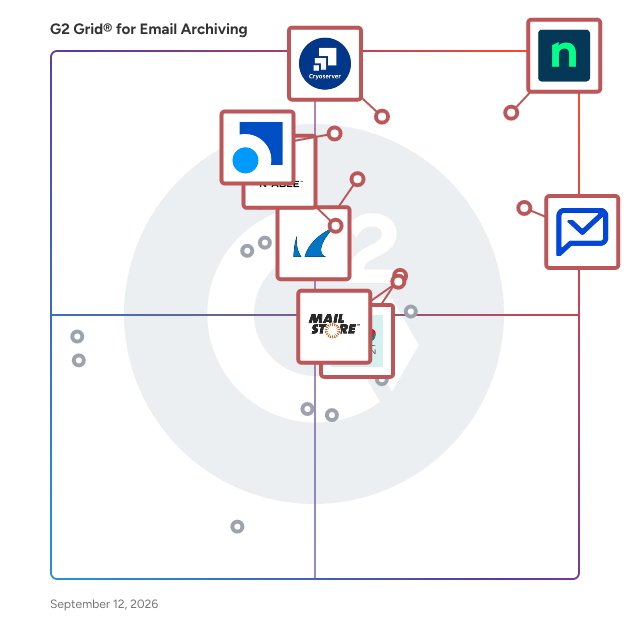
## Best Email Archiving Software At A Glance

- **Leader:** [Paubox](https://www.g2.com/products/paubox/reviews)
- **Highest Performer:** [CyberSentriq](https://www.g2.com/products/cybersentriq/reviews)
- **Easiest to Use:** [Paubox](https://www.g2.com/products/paubox/reviews)
- **Top Trending:** [Dropsuite](https://www.g2.com/products/dropsuite/reviews)
- **Best Free Software:** [Paubox](https://www.g2.com/products/paubox/reviews)


---

**Sponsored**

### Guardz

Guardz is a unified cybersecurity platform specifically designed for Managed Service Providers (MSPs). This innovative solution consolidates essential security controls, identity threat detection and response (ITDR), endpoint protection (EDR), email security, user awareness training and phishing simulations, and Managed Detection and Response (MDR) into a single AI-native framework. The platform aims to enhance operational efficiency by streamlining security processes and providing a comprehensive approach to cybersecurity. Targeting MSPs, Guardz addresses the unique challenges these providers face in managing multiple security tools that often operate in silos. By adopting an identity-centric approach, Guardz connects various security vectors, effectively reducing the gaps that can leave organizations vulnerable. This layered and holistic view enables MSPs to respond to user risks in real time, ensuring that security measures are not only reactive but also proactive in safeguarding client environments. Key features of Guardz include its 24/7 AI and human-led Managed Detection and Response (MDR) services. The platform employs agentic AI to triage threats at machine speed, allowing for rapid identification and prioritization of potential security incidents. This automated triage process is complemented by expert analysts who validate findings, mitigate risks, and guide response actions. As a result, MSPs can offer scalable protection to their clients without the need to expand their workforce, making it a cost-effective solution for growing cybersecurity demands. Guardz stands out in the cybersecurity landscape by providing a unified platform that integrates various security functions into one cohesive system. This integration not only simplifies the management of security tools but also enhances the overall effectiveness of security measures. By leveraging AI-driven insights and human expertise, Guardz empowers MSPs to deliver robust cybersecurity solutions that adapt to the evolving threat landscape, ensuring their clients remain protected against emerging risks.


[Visit website](https://www.g2.com/external_clickthroughs/record?secure%5Bad_program%5D=ppc&amp;secure%5Bad_slot%5D=category_product_list&amp;secure%5Bcategory_id%5D=1672&amp;secure%5Bdisplayable_resource_id%5D=1797&amp;secure%5Bdisplayable_resource_type%5D=Category&amp;secure%5Bmedium%5D=sponsored&amp;secure%5Bplacement_reason%5D=neighbor_category&amp;secure%5Bplacement_resource_ids%5D%5B%5D=1833&amp;secure%5Bprioritized%5D=false&amp;secure%5Bproduct_id%5D=1231537&amp;secure%5Bresource_id%5D=1672&amp;secure%5Bresource_type%5D=Category&amp;secure%5Bsource_type%5D=category_page&amp;secure%5Bsource_url%5D=https%3A%2F%2Fwww.g2.com%2Fcategories%2Femail-archiving&amp;secure%5Btoken%5D=95cd93776a8e9fe29a7157c69b9337a111c2b5ce76c1f56c5b7a8c3d8ce463c4&amp;secure%5Burl%5D=https%3A%2F%2Fguardz.com%2F%3Futm_source%3Dg2%26utm_medium%3Dcpc%26utm_campaign%3Dvisitwebsite&amp;secure%5Burl_type%5D=custom_url)

---

## Top-Rated Products (Ranked by G2 Score)
### 1. [Paubox](https://www.g2.com/products/paubox/reviews)
  Paubox is a HIPAA compliant email security platform designed for healthcare organizations. It provides outbound email encryption and AI-powered inbound email protection, helping organizations safeguard protected health information (PHI) without changing how staff or patients use email. Email remains a critical communication tool in healthcare, but standard platforms like Google Workspace and Microsoft 365 are not HIPAA compliant on their own. Paubox makes compliance automatic and enhances security to defend against evolving phishing and malware attacks, all while maintaining a seamless user experience. Paubox serves small to mid-sized healthcare organizations, clinics, and IT teams seeking reliable compliance, reduced risk, and simple management. Key capabilities: - Automatic outbound encryption: Every message is encrypted by default; recipients read emails directly in their inbox, without portals or passwords - AI-powered inbound email security: Detects and blocks phishing, spoofing, and malware using generative AI analysis - Seamless integration: Works with Google Workspace, Microsoft 365, and Microsoft Exchange without new workflows or domain changes - Compliance and control: Supports HIPAA compliance and minimizes human error in handling PHI - Additional tools: Archiving, Data Loss Prevention, Paubox Email API, and Paubox Marketing Benefits: - Simplifies compliance management and reduces IT workload - Improves patient and staff experience with frictionless secure email - Strengthens protection against modern email threats Paubox enables healthcare organizations to confidently use email as a secure, compliant, and user-friendly communication channel, eliminating guesswork for staff and helping IT teams protect against data breaches and compliance risk.


  **Average Rating:** 4.9/5.0
  **Total Reviews:** 541

**User Satisfaction Scores:**

- **Quality of Support:** 9.8/10 (Category avg: 8.4/10)
- **Archive Backup:** 9.6/10 (Category avg: 9.2/10)
- **Email Storage:** 9.5/10 (Category avg: 9.1/10)
- **Email Analysis:** 9.4/10 (Category avg: 8.7/10)


**Seller Details:**

- **Seller:** [Paubox](https://www.g2.com/sellers/paubox)
- **Year Founded:** 2015
- **HQ Location:** San Francisco, CA
- **Twitter:** @PauboxHQ (16,587 Twitter followers)
- **LinkedIn® Page:** https://www.linkedin.com/company/4821384/ (49 employees on LinkedIn®)

**Reviewer Demographics:**
  - **Who Uses This:** Owner, CEO
  - **Top Industries:** Mental Health Care, Hospital &amp; Health Care
  - **Company Size:** 83% Small-Business, 15% Mid-Market


#### Pros & Cons

**Pros:**

- Ease of Use (218 reviews)
- Security (176 reviews)
- Customer Support (147 reviews)
- Email Security (139 reviews)
- Setup Ease (138 reviews)

**Cons:**

- Expensive (51 reviews)
- Email Issues (32 reviews)
- Difficult Setup (25 reviews)
- Email Encryption Issues (18 reviews)
- Encryption Issues (13 reviews)

### 2. [Dropsuite](https://www.g2.com/products/dropsuite/reviews)
  Dropsuite, a NinjaOne company, is an award-winning cloud software platform enabling businesses and organizations globally to easily backup, recover and protect their important business information. Dropsuite’s commitment to advanced, secure, and scalable cloud technologies keeps them at the forefront of the industry and makes them the preferred choice of leading IT Administrators and Managed Service Providers globally. Try Dropsuite for free at dropsuite.com/try-it-free.


  **Average Rating:** 4.6/5.0
  **Total Reviews:** 75

**User Satisfaction Scores:**

- **Quality of Support:** 9.0/10 (Category avg: 8.4/10)
- **Archive Backup:** 9.4/10 (Category avg: 9.2/10)
- **Email Storage:** 9.5/10 (Category avg: 9.1/10)
- **Email Analysis:** 8.3/10 (Category avg: 8.7/10)


**Seller Details:**

- **Seller:** [NinjaOne](https://www.g2.com/sellers/ninjaone)
- **Year Founded:** 2013
- **HQ Location:** Austin, Texas
- **Twitter:** @NinjaOne (3,558 Twitter followers)
- **LinkedIn® Page:** https://www.linkedin.com/company/6436301/ (2,121 employees on LinkedIn®)

**Reviewer Demographics:**
  - **Top Industries:** Information Technology and Services, Computer &amp; Network Security
  - **Company Size:** 80% Small-Business, 15% Mid-Market


#### Pros & Cons

**Pros:**

- Ease of Use (13 reviews)
- Easy Setup (11 reviews)
- Backup Solutions (5 reviews)
- Reliability (5 reviews)
- Simple (4 reviews)

**Cons:**

- Poor Interface Design (4 reviews)
- Limited Options (3 reviews)
- Restore Difficulties (3 reviews)
- Backup Issues (1 reviews)
- Billing Issues (1 reviews)

### 3. [Mimecast Cloud Archive](https://www.g2.com/products/mimecast-mimecast-cloud-archive/reviews)
  Mimecast Cloud Archive solution keeps multiple copies of every inbound, outbound and internal email, along with detailed meta-data and a copy of the email if it was changed by policy enforcement. Emails are encrypted for security and stored in multiple geographically-dispersed data centers with triplicate copies for redundancy. Additionally, Mimecast Cloud Archive provides: - Search and retrieval of archived emails. - Access to personal cloud archive storage on any device, from any location. - Pricing based on the number of employees rather than the volume of email. - Policy-driven retention at the organization, group, mailbox or published retention folder level. - Archive access logging. - Compliance, e-discovery and litigation support, including legal hold, case management and data export. For organizations in need of a migration tool to take advantage of the archive, Mimecast Simply Migrate is available. It extracts, validates, and transports legacy data from common archives like Veritas Enterprise Vault and Dell EMC SourceOne to the Mimecast Cloud Archive. In today’s world of remote employees and the rise of collaboration technologies, Mimecast Cloud Archive now supports Archiving for Microsoft Teams. Ensure compliance, reduce risk, and establish policies to retain and expire Microsoft Teams data, including one to one, group, and channel. conversations. Additionally, Mimecast Supervision, when integrated with Mimecast Cloud Archive, can help financial services firms meet FINRA, SEC, FCA and other compliance challenges, helping users to operationalize compliance across the organization, and enabling compliance personnel to systematically review and discover targeted data. Mimecast&#39;s Sync &amp; Recover is a fully integrated extension to the Mimecast Cloud Archive, that removes the need for standalone email backup and recovery tools and is 100% cloud-based. Sync &amp; Recover delivers granular recovery of mailboxes, calendar items, tasks, notes, and contacts lost through inadvertent or malicious deletion or corruption.


  **Average Rating:** 4.3/5.0
  **Total Reviews:** 30

**User Satisfaction Scores:**

- **Quality of Support:** 8.6/10 (Category avg: 8.4/10)
- **Archive Backup:** 9.5/10 (Category avg: 9.2/10)
- **Email Storage:** 9.0/10 (Category avg: 9.1/10)
- **Email Analysis:** 8.8/10 (Category avg: 8.7/10)


**Seller Details:**

- **Seller:** [Mimecast](https://www.g2.com/sellers/mimecast)
- **Year Founded:** 2003
- **HQ Location:** London
- **Twitter:** @Mimecast (18,056 Twitter followers)
- **LinkedIn® Page:** https://www.linkedin.com/company/55895/ (2,467 employees on LinkedIn®)
- **Ownership:** NASDAQ: MIME

**Reviewer Demographics:**
  - **Top Industries:** Financial Services
  - **Company Size:** 68% Mid-Market, 19% Small-Business


### 4. [Smarsh](https://www.g2.com/products/smarsh-smarsh/reviews)
  Smarsh’s Connected Archive is inclusive of capture, Archive, supervision and e-discovery capabilities across 80+ communication channels. It delivers unparalleled efficiency for small to mid-sized organizations, global enterprises, and US Federal Agencies. Connected Archive empowers you to efficiently review and search all of your electronic communications with full conversational context in one place, by leveraging Smarsh’s Supervision and e-Discovery Apps. This product suite is built to weather any regulatory change and evolves seamlessly alongside your organization.


  **Average Rating:** 4.1/5.0
  **Total Reviews:** 28

**User Satisfaction Scores:**

- **Quality of Support:** 8.0/10 (Category avg: 8.4/10)
- **Archive Backup:** 8.5/10 (Category avg: 9.2/10)
- **Email Storage:** 9.0/10 (Category avg: 9.1/10)
- **Email Analysis:** 7.7/10 (Category avg: 8.7/10)


**Seller Details:**

- **Seller:** [Smarsh](https://www.g2.com/sellers/smarsh)
- **Company Website:** https://www.Smarsh.com
- **Year Founded:** 2001
- **HQ Location:** Portland, OR
- **Twitter:** @SmarshInc (5,684 Twitter followers)
- **LinkedIn® Page:** https://www.linkedin.com/company/127745/ (1,582 employees on LinkedIn®)

**Reviewer Demographics:**
  - **Top Industries:** Financial Services
  - **Company Size:** 57% Small-Business, 25% Mid-Market


#### Pros & Cons

**Pros:**

- Ease of Use (10 reviews)
- Customer Support (6 reviews)
- Search Efficiency (6 reviews)
- Features (4 reviews)
- Review Efficiency (3 reviews)

**Cons:**

- Learning Curve (5 reviews)
- Poor Customer Support (4 reviews)
- Slow Performance (4 reviews)
- Insufficient Training (3 reviews)
- Not User-Friendly (3 reviews)

### 5. [Barracuda Message Archiver](https://www.g2.com/products/barracuda-barracuda-message-archiver/reviews)
  Capture all email data accurately, easily meet regulatory requirements, and take complex discovery requests in stride. The Barracuda Message Archiver ensures secure, long-term storage, while users get instant, anytime access to archived messages on any device.


  **Average Rating:** 4.4/5.0
  **Total Reviews:** 19

**User Satisfaction Scores:**

- **Quality of Support:** 9.0/10 (Category avg: 8.4/10)
- **Archive Backup:** 7.9/10 (Category avg: 9.2/10)
- **Email Storage:** 8.8/10 (Category avg: 9.1/10)
- **Email Analysis:** 6.4/10 (Category avg: 8.7/10)


**Seller Details:**

- **Seller:** [Barracuda](https://www.g2.com/sellers/barracuda)
- **Year Founded:** 2002
- **HQ Location:** Campbell, CA
- **Twitter:** @Barracuda (15,235 Twitter followers)
- **LinkedIn® Page:** https://www.linkedin.com/company/barracuda-networks/ (2,229 employees on LinkedIn®)
- **Ownership:** Private

**Reviewer Demographics:**
  - **Company Size:** 47% Enterprise, 26% Mid-Market


### 6. [Jatheon Enterprise Data Archiving Solution](https://www.g2.com/products/jatheon-enterprise-data-archiving-solution/reviews)
  Jatheon&#39;s archiving solution assists organizations to store, access, search and produce structured and unstructured historical communications data for audits, compliance and ediscovery. With Jatheon, organizations can capture data from various sources (email, social media, chat apps, telephony), automate its retention, monitor conversations for policy violations and simplify and accelerate FOIA and ediscovery processes.


  **Average Rating:** 4.7/5.0
  **Total Reviews:** 20

**User Satisfaction Scores:**

- **Quality of Support:** 9.6/10 (Category avg: 8.4/10)
- **Archive Backup:** 10.0/10 (Category avg: 9.2/10)
- **Email Storage:** 9.8/10 (Category avg: 9.1/10)
- **Email Analysis:** 10.0/10 (Category avg: 8.7/10)


**Seller Details:**

- **Seller:** [Jatheon](https://www.g2.com/sellers/jatheon)
- **Year Founded:** 2004
- **HQ Location:** Toronto, Ontario
- **Twitter:** @Jatheon (1,656 Twitter followers)
- **LinkedIn® Page:** https://www.linkedin.com/company/116590/ (40 employees on LinkedIn®)

**Reviewer Demographics:**
  - **Company Size:** 57% Mid-Market, 29% Small-Business


### 7. [MailStore Server](https://www.g2.com/products/mailstore-server/reviews)
  MailStore Server is a leading email archiving solution designed for small and medium-sized businesses . It creates 1:1 copies of all emails in a central archive, ensuring data security and availability over many years. Users can access their archived emails through Microsoft Outlook, MailStore Web Access, or mobile devices, enabling rapid searches and retrievals. Key Features and Functionality: - Comprehensive Archiving: Supports various email systems, including Microsoft Exchange Server, Microsoft 365, Google Workspace, and any IMAP- or POP3-compatible servers. - Integrated Storage Technology: Manages large volumes of emails without external database software, utilizing de-duplication and compression to save up to 70% storage space. - Fast Search Access: Offers full-text searching for emails and attachments, with seamless integration into Microsoft Outlook and other platforms. - Compliance and Security: Assists with regulatory compliance, including GDPR, by providing tamper-proof archiving and retention policies. - Flexible Archiving Methods: Archives existing mailboxes, public folders, shared mailboxes, and PST files, with options for journal archiving to capture all incoming and outgoing emails. Primary Value and Solutions Provided: MailStore Server addresses critical business needs by ensuring email data is securely archived and easily retrievable, aiding in regulatory compliance and data loss prevention. It reduces the workload on email servers, optimizes storage through efficient data management, and simplifies backup and restore processes. By eliminating mailbox quotas and dependence on PST files, it enhances operational efficiency and ensures long-term email availability.


  **Average Rating:** 4.2/5.0
  **Total Reviews:** 12

**User Satisfaction Scores:**

- **Quality of Support:** 8.6/10 (Category avg: 8.4/10)
- **Archive Backup:** 8.7/10 (Category avg: 9.2/10)
- **Email Storage:** 9.3/10 (Category avg: 9.1/10)
- **Email Analysis:** 7.7/10 (Category avg: 8.7/10)


**Seller Details:**

- **Seller:** [MailStore Software](https://www.g2.com/sellers/mailstore-software)
- **Year Founded:** 2006
- **HQ Location:** Viersen
- **LinkedIn® Page:** https://www.linkedin.com/company/2694885 (29 employees on LinkedIn®)

**Reviewer Demographics:**
  - **Company Size:** 54% Mid-Market, 38% Small-Business


### 8. [N-able Mail Assure](https://www.g2.com/products/n-able-mail-assure/reviews)
  N-able™ Mail Assure is cloud-based email security helps you and your customers stay in control and protect inbound and outbound email using collective threat intelligence, 24/7 email continuity, and long-term email archiving. Proprietary filtering technology, combined with real-time pattern threat recognition and machine learning technology, helps protect users against advanced phishing attacks, ransomware, malware, spam, and other email-borne threats. N-able™ Mail Assure offers: • Advanced threat protection for inbound and outbound email • Built-in 24/7 email continuity to maintain business productivity • Encrypted, long-term email archiving • A Private Portal for specifically business-critical emails • 99.99% malware catch rate, as certified by Virus Bulletin: https://www.virusbulletin.com/virusbulletin/2022/06/vbspam-comparative-review/ • A multitenant web interface designed for your technicians and end-users • Seamless integration with Microsoft 365™ • Quarantine reports to give users visibility over email flow


  **Average Rating:** 4.0/5.0
  **Total Reviews:** 67

**User Satisfaction Scores:**

- **Quality of Support:** 8.0/10 (Category avg: 8.4/10)
- **Archive Backup:** 7.7/10 (Category avg: 9.2/10)
- **Email Storage:** 8.1/10 (Category avg: 9.1/10)
- **Email Analysis:** 7.9/10 (Category avg: 8.7/10)


**Seller Details:**

- **Seller:** [N-able](https://www.g2.com/sellers/n-able)
- **HQ Location:** Morrisville, North Carolina
- **Twitter:** @Nable (15,885 Twitter followers)
- **LinkedIn® Page:** https://www.linkedin.com/company/n-able (2,224 employees on LinkedIn®)
- **Ownership:** NYSE: NABL

**Reviewer Demographics:**
  - **Top Industries:** Information Technology and Services, Computer &amp; Network Security
  - **Company Size:** 69% Small-Business, 24% Mid-Market


#### Pros & Cons

**Pros:**

- Email Security (3 reviews)
- Security (2 reviews)
- Customization (1 reviews)
- Dashboard Features (1 reviews)
- Dashboard Updates (1 reviews)

**Cons:**

- Poor Customer Support (2 reviews)
- Slow Performance (2 reviews)
- Email Issues (1 reviews)
- Limited Customization (1 reviews)
- Limited Features (1 reviews)

### 9. [Cryoserver](https://www.g2.com/products/cryoserver/reviews)
  Launched in the UK in 2003, Cryoserver has customers in 28 countries around the globe. It serves a large client base across all sectors, including financial, industrial and government. Cryoserver email archiving technologies are one of the pioneers of email archiving; with many years’ of experience, investment and development, the Cryoserver technologies deliver highly complex and ultra-secure systems with simplistic and easy-to-use interfaces allowing for expert archiving solutions that everyone can benefit from. Delivered either as an onpremise or as a cloud solution. Cryoserver helps organisations and individuals to find emails in a secure tamper evident archive in split seconds.


  **Average Rating:** 4.6/5.0
  **Total Reviews:** 53

**User Satisfaction Scores:**

- **Quality of Support:** 9.3/10 (Category avg: 8.4/10)
- **Archive Backup:** 9.4/10 (Category avg: 9.2/10)
- **Email Storage:** 9.5/10 (Category avg: 9.1/10)
- **Email Analysis:** 8.6/10 (Category avg: 8.7/10)


**Seller Details:**

- **Seller:** [Cryoserver](https://www.g2.com/sellers/cryoserver)
- **Year Founded:** 2003
- **HQ Location:** London
- **Twitter:** @Cryoserver (458 Twitter followers)
- **LinkedIn® Page:** https://www.linkedin.com/company/62552/ (21 employees on LinkedIn®)

**Reviewer Demographics:**
  - **Top Industries:** Information Technology and Services
  - **Company Size:** 52% Mid-Market, 28% Enterprise


### 10. [CyberSentriq](https://www.g2.com/products/cybersentriq/reviews)
  CyberSentriq is an integrated cybersecurity and data protection platform, leveraging solutions from two best-of breed vendors in the MSP space. Partnering with over 3,000 MSPs and protecting over 150,000 SMBs globally, CyberSentriq provides an unmatched combination of proactive AI-driven email and web security, advanced data protection, and operational resilience. The CyberSentriq platform offers: - Data backup &amp; recovery for Microsoft M365 &amp; Entra ID, Azure, Google workspace and more - AI-driven threat intelligence and detection - Advanced email security at both the Mail Exchange (MX) and Integrated Cloud Email Security (ICES) layers. - Security awareness services - Phishing simulation - Email archiving and encryption


  **Average Rating:** 4.6/5.0
  **Total Reviews:** 375

**User Satisfaction Scores:**

- **Quality of Support:** 9.1/10 (Category avg: 8.4/10)
- **Email Storage:** 10.0/10 (Category avg: 9.1/10)


**Seller Details:**

- **Seller:** [CyberSentriq](https://www.g2.com/sellers/cybersentriq-d38aeb75-bc88-459b-a2d2-16ccbed4d6c5)
- **Company Website:** https://cybersentriq.com
- **Year Founded:** 2025
- **HQ Location:** Galway ,Galway
- **Twitter:** @Redstor (1,958 Twitter followers)
- **LinkedIn® Page:** https://www.linkedin.com/company/cybersentriq/ (194 employees on LinkedIn®)

**Reviewer Demographics:**
  - **Who Uses This:** IT Manager, Director
  - **Top Industries:** Information Technology and Services, Computer &amp; Network Security
  - **Company Size:** 48% Mid-Market, 41% Small-Business


#### Pros & Cons

**Pros:**

- Ease of Use (58 reviews)
- Backup Solutions (45 reviews)
- Backup Ease (38 reviews)
- Backup Features (36 reviews)
- Backup Frequency (27 reviews)

**Cons:**

- Backup Issues (18 reviews)
- Inadequate Reporting (17 reviews)
- Poor Reporting (15 reviews)
- Backup Failures (12 reviews)
- Reporting Issues (12 reviews)

### 11. [Mimecast Mailbox Continuity](https://www.g2.com/products/mimecast-mailbox-continuity/reviews)
  Get world-class, AI-powered email security with Mimecast Email Security CG. Easily manage complex environments, customize policies to meet your needs, and get essential added protection for M365 or Google Workspace.


  **Average Rating:** 4.1/5.0
  **Total Reviews:** 33

**User Satisfaction Scores:**

- **Quality of Support:** 8.0/10 (Category avg: 8.4/10)


**Seller Details:**

- **Seller:** [Mimecast](https://www.g2.com/sellers/mimecast)
- **Year Founded:** 2003
- **HQ Location:** London
- **Twitter:** @Mimecast (18,056 Twitter followers)
- **LinkedIn® Page:** https://www.linkedin.com/company/55895/ (2,467 employees on LinkedIn®)
- **Ownership:** NASDAQ: MIME

**Reviewer Demographics:**
  - **Company Size:** 60% Mid-Market, 29% Enterprise


### 12. [Barracuda Cloud Archiving Service](https://www.g2.com/products/barracuda-cloud-archiving-service/reviews)
  The Barracuda Cloud Archiving Service provides a complete on demand Software-as-a-Service (SaaS) cloud solution. With our guided setup wizard, most customers are typically up and running in less than an hour. All your emails are archived without the need to install any email client or server software. Operational costs stay low and predictable, with support overhead practically vanishing. Barracuda&#39;s extensive and robust global cloud infrastructure ensures security, and centralized management through the Cloud Control portal makes it simple.


  **Average Rating:** 4.4/5.0
  **Total Reviews:** 15

**User Satisfaction Scores:**

- **Quality of Support:** 9.2/10 (Category avg: 8.4/10)
- **Archive Backup:** 9.3/10 (Category avg: 9.2/10)
- **Email Storage:** 9.0/10 (Category avg: 9.1/10)
- **Email Analysis:** 9.3/10 (Category avg: 8.7/10)


**Seller Details:**

- **Seller:** [Barracuda](https://www.g2.com/sellers/barracuda)
- **Year Founded:** 2002
- **HQ Location:** Campbell, CA
- **Twitter:** @Barracuda (15,235 Twitter followers)
- **LinkedIn® Page:** https://www.linkedin.com/company/barracuda-networks/ (2,229 employees on LinkedIn®)
- **Ownership:** Private

**Reviewer Demographics:**
  - **Company Size:** 40% Mid-Market, 33% Small-Business


### 13. [Trustifi Email Security](https://www.g2.com/products/trustifi-email-security/reviews)
  Trustifi is a cybersecurity firm featuring solutions delivered on a software-as-a-service platform. Trustifi leads the market with the easiest-to-use and deploy email security products providing both inbound and outbound email security from a single vendor. The most valuable asset to any organization, other than its employees, is the data contained in its email, and Trustifi&#39;s key objective is keeping clients&#39; data, reputations, and brands safe from all threats related to email. With Trustifi&#39;s Inbound Shield, Data Loss Prevention, Account Takeover Protection, Email Archiving, Security Awareness Training, and Email Encryption, clients are always one step ahead of attackers. www.trustifi.com


  **Average Rating:** 4.8/5.0
  **Total Reviews:** 23

**User Satisfaction Scores:**

- **Quality of Support:** 9.8/10 (Category avg: 8.4/10)


**Seller Details:**

- **Seller:** [Trustifi](https://www.g2.com/sellers/trustifi)
- **Year Founded:** 2005
- **HQ Location:** Las Vegas, US
- **Twitter:** @TRUSTIFI (343 Twitter followers)
- **LinkedIn® Page:** https://www.linkedin.com/company/2525516 (33 employees on LinkedIn®)

**Reviewer Demographics:**
  - **Top Industries:** Information Technology and Services
  - **Company Size:** 48% Mid-Market, 39% Small-Business


#### Pros & Cons

**Pros:**

- Protection (10 reviews)
- Email Security (9 reviews)
- Security (9 reviews)
- Customer Support (7 reviews)
- Ease of Use (6 reviews)

**Cons:**

- Complex Configuration (2 reviews)
- Needs Improvement (2 reviews)
- Complex Implementation (1 reviews)
- Complexity (1 reviews)
- Complex Processes (1 reviews)

### 14. [OpenText Enterprise Messaging](https://www.g2.com/products/opentext-enterprise-messaging/reviews)
  Micro Focus Enterprise Messaging is a complete collaboration solution that provides your organization with email, scheduling, instant messaging, chat-based teamwork, security, archiving, backup, and disaster recovery.


  **Average Rating:** 4.4/5.0
  **Total Reviews:** 11

**User Satisfaction Scores:**

- **Quality of Support:** 7.8/10 (Category avg: 8.4/10)
- **Archive Backup:** 8.3/10 (Category avg: 9.2/10)
- **Email Storage:** 8.0/10 (Category avg: 9.1/10)
- **Email Analysis:** 7.7/10 (Category avg: 8.7/10)


**Seller Details:**

- **Seller:** [OpenText](https://www.g2.com/sellers/opentext)
- **Year Founded:** 1991
- **HQ Location:** Waterloo, ON
- **Twitter:** @OpenText (21,588 Twitter followers)
- **LinkedIn® Page:** https://www.linkedin.com/company/2709/ (23,339 employees on LinkedIn®)
- **Ownership:** NASDAQ:OTEX

**Reviewer Demographics:**
  - **Company Size:** 45% Enterprise, 45% Mid-Market


### 15. [Gmail Backup Tool](https://www.g2.com/products/cigati-solutions-gmail-backup-tool/reviews)
  A Gmail Backup Tool is a specialized software solution designed to securely download and save emails from your Gmail account to a local system or external storage. It helps users create a complete backup of their mailbox, including emails, attachments, contacts, calendars, and other data. This tool is especially useful for data protection, migration, and offline access. Users can export Gmail data into multiple file formats such as PST, MBOX, EML, PDF, and more, making it easier to access emails across different email clients like Microsoft Outlook, Thunderbird, and Apple Mail. Key Features: - Backup Gmail emails with attachments - Export data into multiple file formats - Maintain folder hierarchy and email properties - Selective backup using date filters - Remove duplicate emails during backup - Support for bulk Gmail account backup


  **Average Rating:** 4.4/5.0
  **Total Reviews:** 38

**User Satisfaction Scores:**

- **Quality of Support:** 8.3/10 (Category avg: 8.4/10)
- **Archive Backup:** 8.8/10 (Category avg: 9.2/10)
- **Email Storage:** 8.6/10 (Category avg: 9.1/10)
- **Email Analysis:** 8.7/10 (Category avg: 8.7/10)


**Seller Details:**

- **Seller:** [Cigati Solutions](https://www.g2.com/sellers/cigati-solutions)
- **Year Founded:** 2018
- **HQ Location:** Noida, Uttar Pradesh
- **Twitter:** @Cigatisolution (12 Twitter followers)
- **LinkedIn® Page:** https://www.linkedin.com/company/cigati-solutions/ (5 employees on LinkedIn®)

**Reviewer Demographics:**
  - **Company Size:** 50% Mid-Market, 37% Small-Business


### 16. [Proofpoint Essentials for Small Business](https://www.g2.com/products/proofpoint-essentials-for-small-business/reviews)
  Proofpoint Essentials for Small Business is a cloud-based enterprise-class security for small and medium enterprises with email security, continuity, archiving, and social-media protection.


  **Average Rating:** 4.0/5.0
  **Total Reviews:** 22

**User Satisfaction Scores:**

- **Quality of Support:** 8.2/10 (Category avg: 8.4/10)


**Seller Details:**

- **Seller:** [Proofpoint](https://www.g2.com/sellers/proofpoint)
- **Year Founded:** 2002
- **HQ Location:** Sunnyvale, CA
- **Twitter:** @proofpoint (31,141 Twitter followers)
- **LinkedIn® Page:** https://www.linkedin.com/company/proofpoint (5,020 employees on LinkedIn®)
- **Ownership:** NASDAQ: PFPT

**Reviewer Demographics:**
  - **Top Industries:** Information Technology and Services
  - **Company Size:** 52% Mid-Market, 39% Small-Business


### 17. [ArcTitan](https://www.g2.com/products/arctitan/reviews)
  Email Archiving Solution. ArcTitan is an email archiving product which allows users to securely archive your business emails and simply retrieve these archived emails. Compliant, Fast, Secure and M365 Never lose another business-critical email. Find and retrieve any archived email in seconds. Simple to access and easy to use for both administrators and end users with 24/7 support by real product people! Start saving on email volume and storage today Secure and Perpetual: All emails are encrypted in transit and when stored. Giving your business total protection against data loss. 11,070,826,210 emails archived to date eDiscovery and EU GDPR: Industry Standards Compliance. Legal safeguard for email compliance. Perfect for eDiscovery and GDPR compliant. Acts as a “black box flight recorder for email”. Cloud Based Solution: Zero limits on user numbers or storage space in the cloud. No on-site hardware required. Ultimate scalability. Save up to 75% Email Storage Space: Flexible pay as you go email archiving model. Per live user subscription only. Save up to 75% email storage space Remote Access to Archived Emails: All the benefits of email archiving accessible anywhere at any time. The same great user experience everywhere. Office 365 Email Archive: Significantly enhances Office 365 email Search and Storage functionality. Massive cost and time savings Lightning Fast Search and Retrieval A powerful search tool. Load performance of more than 200 emails per second from your email server - your emails are archived and retrievable instantly. Slashes time and cost. A Simple to Use Email Archive ArcTitan is designed to optimize the ability to find important things when you need them. Locate emails instantly on desktop or mobile.


  **Average Rating:** 4.1/5.0
  **Total Reviews:** 11

**User Satisfaction Scores:**

- **Quality of Support:** 8.3/10 (Category avg: 8.4/10)
- **Archive Backup:** 9.8/10 (Category avg: 9.2/10)
- **Email Storage:** 9.7/10 (Category avg: 9.1/10)
- **Email Analysis:** 8.8/10 (Category avg: 8.7/10)


**Seller Details:**

- **Seller:** [CyberSentriq](https://www.g2.com/sellers/cybersentriq-d38aeb75-bc88-459b-a2d2-16ccbed4d6c5)
- **Year Founded:** 2025
- **HQ Location:** Galway ,Galway
- **Twitter:** @Redstor (1,958 Twitter followers)
- **LinkedIn® Page:** https://www.linkedin.com/company/cybersentriq/ (194 employees on LinkedIn®)

**Reviewer Demographics:**
  - **Company Size:** 50% Mid-Market, 42% Small-Business


### 18. [Yahoo Backup Tool](https://www.g2.com/products/yahoo-backup-tool/reviews)
  Yahoo Backup Tool is a highly effective software to backup Yahoo mail data and can easily save the emails into various file formats such as MBOX, PST, MSG, PDF, TXT, HTML, MHT, etc. Yahoo Backup software also lets its users migrate to other email clients like Gmail, Outlook, Thunderbird, Zimbra, and IMAP. It can efficiently export data from Yahoo to Gmail with great ease. This utility also provides the facility to its users to backup additional mailbox data which includes attachments and also saves all these attachments and files with the resultant data. Aryson Yahoo backup tool has many features and one such amazing feature is date range filter, in which it allows the user to select the date range to sort email items by providing start and end date as per the specific time span. Yahoo backup software also provides the facility of pause and resume under which the user will be able to restart the process from the stop point. It has got a wide compatibility range, the Yahoo mail backup tool supports almost all the major versions of Windows. It is also compatible with all the files and folders of each version of Yahoo mail. Aryson Yahoo backup tool helps its users to export the mail items of a Yahoo profile to another Yahoo profile without any hassle. The users need to do is to just provide the login credentials and click on the login button. This software also generates a Log file, which stores information about the process. This utility generates a log file for all the conversion processes. This software is proficient to maintain the folder hierarchy and keeps all the data intact during the whole backup process and thus maintains the integrity of data. Yahoo backup software has an amazing feature that let it&#39;s users to convert desired mailbox items to a specific location.


  **Average Rating:** 4.5/5.0
  **Total Reviews:** 10

**User Satisfaction Scores:**

- **Quality of Support:** 9.4/10 (Category avg: 8.4/10)
- **Archive Backup:** 9.3/10 (Category avg: 9.2/10)
- **Email Storage:** 9.6/10 (Category avg: 9.1/10)
- **Email Analysis:** 9.3/10 (Category avg: 8.7/10)


**Seller Details:**

- **Seller:** [Aryson Technologies](https://www.g2.com/sellers/aryson-technologies)
- **Year Founded:** 2014
- **HQ Location:** Noida, Uttar Pradesh
- **Twitter:** @Arysontec (46 Twitter followers)
- **LinkedIn® Page:** https://www.linkedin.com/company/13397311/ (107 employees on LinkedIn®)

**Reviewer Demographics:**
  - **Company Size:** 70% Small-Business, 30% Enterprise


### 19. [Zix Information Archiving](https://www.g2.com/products/zix-information-archiving/reviews)
  Zix Information Archiving provides unified data archiving, streamlined communication, and increased efficiency across organizations. Message retention for all digital communications makes compliance and eDiscovery easier for your team, and even work across social media and communication tools like Microsoft Teams. Our policy controls allow you to control which messages get archived and for how long, and our message relevance classification makes case assessment, investigation, and management easier than ever. Zix provides data archiving solutions done right.


  **Average Rating:** 3.9/5.0
  **Total Reviews:** 12

**User Satisfaction Scores:**

- **Quality of Support:** 7.1/10 (Category avg: 8.4/10)
- **Archive Backup:** 7.5/10 (Category avg: 9.2/10)
- **Email Storage:** 7.5/10 (Category avg: 9.1/10)
- **Email Analysis:** 7.5/10 (Category avg: 8.7/10)


**Seller Details:**

- **Seller:** [OpenText](https://www.g2.com/sellers/opentext)
- **Year Founded:** 1991
- **HQ Location:** Waterloo, ON
- **Twitter:** @OpenText (21,588 Twitter followers)
- **LinkedIn® Page:** https://www.linkedin.com/company/2709/ (23,339 employees on LinkedIn®)
- **Ownership:** NASDAQ:OTEX

**Reviewer Demographics:**
  - **Company Size:** 54% Small-Business, 46% Mid-Market


### 20. [MailMeter](https://www.g2.com/products/mailmeter/reviews)
  ComplyKEY MailMeter is a software solution for simplified data compliance, efficient email archiving, and seamless eDiscovery. We understand the importance of adhering to regulatory requirements and managing email data effectively. Confidently handle sensitive information, streamline email archiving, and effortlessly navigate the eDiscovery processes with ComplyKEY MailMeter. MailMeter is recognised as one of the leading solutions worldwide for both Cloud and On-Premise email platforms to provide management, eDiscovery, retention, and automation that is not available in Email. Reducing Costs; we can help you to reduce your 0365 costs. Access Data Instantly - end-user and admin access, search your email archive in milliseconds. Automate Data Management Tasks Protect Data While Staff are Working Remotely Full Legal Compliance for Archiving Dealing effectively with Data Requests Real-time 24x7 Monitoring


  **Average Rating:** 4.5/5.0
  **Total Reviews:** 10

**User Satisfaction Scores:**

- **Quality of Support:** 8.3/10 (Category avg: 8.4/10)


**Seller Details:**

- **Seller:** [Waterford Technologies](https://www.g2.com/sellers/waterford-technologies)
- **Year Founded:** 2001
- **HQ Location:** Waterford, Co. Waterford
- **LinkedIn® Page:** https://www.linkedin.com/company/waterford-technologies/ (45 employees on LinkedIn®)

**Reviewer Demographics:**
  - **Company Size:** 50% Small-Business, 30% Mid-Market


### 21. [FileChimp](https://www.g2.com/products/filechimp/reviews)
  FileChimp is an intelligent pattern matching application to filter (by copy or move) files into destination folders.


  **Average Rating:** 4.1/5.0
  **Total Reviews:** 12

**User Satisfaction Scores:**

- **Quality of Support:** 8.0/10 (Category avg: 8.4/10)
- **Archive Backup:** 9.5/10 (Category avg: 9.2/10)
- **Email Storage:** 9.4/10 (Category avg: 9.1/10)
- **Email Analysis:** 8.6/10 (Category avg: 8.7/10)


**Seller Details:**

- **Seller:** [Latitude IT](https://www.g2.com/sellers/latitude-it)
- **Year Founded:** 1997
- **HQ Location:** Bushey, Hertfordshire
- **LinkedIn® Page:** https://www.linkedin.com/company/latitude-it-ltd/ (1 employees on LinkedIn®)

**Reviewer Demographics:**
  - **Company Size:** 58% Small-Business, 33% Mid-Market


### 22. [Data Archive Manager](https://www.g2.com/products/data-archive-manager/reviews)
  Data Archive Manager™ is an email archiving solution for corporate and government exchange servers.


  **Average Rating:** 4.5/5.0
  **Total Reviews:** 8

**User Satisfaction Scores:**

- **Quality of Support:** 8.1/10 (Category avg: 8.4/10)
- **Archive Backup:** 9.8/10 (Category avg: 9.2/10)
- **Email Storage:** 8.8/10 (Category avg: 9.1/10)
- **Email Analysis:** 8.6/10 (Category avg: 8.7/10)


**Seller Details:**

- **Seller:** [Data443 Risk Mitigation](https://www.g2.com/sellers/data443-risk-mitigation)
- **Year Founded:** 2017
- **HQ Location:** Morrisville, NC
- **Twitter:** @data443Risk (1,325 Twitter followers)
- **LinkedIn® Page:** https://www.linkedin.com/company/data443-risk-mitigation-inc/ (22 employees on LinkedIn®)
- **Ownership:** OTC: ATDS

**Reviewer Demographics:**
  - **Company Size:** 60% Small-Business, 50% Mid-Market


### 23. [Intradyn](https://www.g2.com/products/intradyn/reviews)
  A globally-recognized leader in the electronic information archiving industry, Intradyn provides competitively priced email, social media and text/SMS archiving solutions for government agencies, financial firms, educational institutions, healthcare organizations, enterprises and small businesses. Intradyn’s state-of-the-art platform offers a robust feature set, including real-time data capture, a powerful search functionality, an easy-to-use redaction tool, custom user permissions and advanced analytics, and is secured with AES 256-bit encryption. All solutions feature an intuitive user interface, are designed with regulatory compliance in mind and make satisfying eDiscovery requests fast and easy. In addition to delivering archiving solutions, Intradyn is renowned for its customer service, which includes implementation support, 24/7 system monitoring, email and phone support, live chat and a dedicated knowledge base. Intradyn is committed to continuous innovation, utilizing feedback from actual customers to make regular improvements to its products and services.


  **Average Rating:** 4.8/5.0
  **Total Reviews:** 8

**User Satisfaction Scores:**

- **Quality of Support:** 9.5/10 (Category avg: 8.4/10)
- **Archive Backup:** 9.0/10 (Category avg: 9.2/10)
- **Email Storage:** 9.5/10 (Category avg: 9.1/10)
- **Email Analysis:** 9.8/10 (Category avg: 8.7/10)


**Seller Details:**

- **Seller:** [Intradyn](https://www.g2.com/sellers/intradyn)
- **Year Founded:** 2001
- **HQ Location:** Mendota Heights, MN
- **Twitter:** @emailarchives (69 Twitter followers)
- **LinkedIn® Page:** https://www.linkedin.com/company/153563 (18 employees on LinkedIn®)

**Reviewer Demographics:**
  - **Company Size:** 75% Small-Business, 13% Enterprise


### 24. [Mail Backup X](https://www.g2.com/products/mail-backup-x/reviews)
  Automatically Backup Mails from Apple Mail, Outlook for Mac, Office 365 for Mac, Thunderbird, Postbox, Gmail, Yahoo &amp; other Mail Services supporting IMAP and POP service directly on Mac. It&#39;ll not only backup Mails, you can archive &amp; store emails in PDF file format or print copies of the emails.


  **Average Rating:** 4.4/5.0
  **Total Reviews:** 11

**User Satisfaction Scores:**

- **Quality of Support:** 8.2/10 (Category avg: 8.4/10)
- **Archive Backup:** 8.0/10 (Category avg: 9.2/10)
- **Email Storage:** 8.0/10 (Category avg: 9.1/10)
- **Email Analysis:** 8.3/10 (Category avg: 8.7/10)


**Seller Details:**

- **Seller:** [InventPure](https://www.g2.com/sellers/inventpure)
- **HQ Location:** N/A
- **LinkedIn® Page:** https://www.linkedin.com/company/No-Linkedin-Presence-Added-Intentionally-By-DataOps (1 employees on LinkedIn®)

**Reviewer Demographics:**
  - **Top Industries:** Information Technology and Services
  - **Company Size:** 42% Small-Business, 42% Enterprise


### 25. [Athena Archiver](https://www.g2.com/products/athena-archiver/reviews)
  Athena Archiver is a next-generation email archiving and storage management system which enables companies to meet growing litigation, compliance, and policy-based corporate governance needs.


  **Average Rating:** 4.7/5.0
  **Total Reviews:** 6

**User Satisfaction Scores:**

- **Quality of Support:** 9.2/10 (Category avg: 8.4/10)
- **Archive Backup:** 10.0/10 (Category avg: 9.2/10)
- **Email Storage:** 10.0/10 (Category avg: 9.1/10)
- **Email Analysis:** 9.2/10 (Category avg: 8.7/10)


**Seller Details:**

- **Seller:** [Athena Archiver](https://www.g2.com/sellers/athena-archiver)
- **HQ Location:** United States
- **LinkedIn® Page:** https://www.linkedin.com/company/111890 (3 employees on LinkedIn®)

**Reviewer Demographics:**
  - **Company Size:** 67% Mid-Market, 33% Small-Business


## Parent Category

[Data Recovery Software](https://www.g2.com/categories/data-recovery)


## Related Categories

- [Enterprise Information Archiving Software](https://www.g2.com/categories/enterprise-information-archiving)
- [Cloud Email Security Solutions](https://www.g2.com/categories/cloud-email-security)
- [Email Backup Software](https://www.g2.com/categories/email-backup)


---

## Buyer Guide

### What You Should Know About Email Archiving Software

### What is Email Archiving Software?

Email archiving software compresses, stores, and indexes emails for future referencing or legal auditing. As emails transfer, the archive solution copies each email and stores them in an on-premise server, cloud server, or both (hybrid). Email users can delete their old emails to save space since they can retrieve old emails anytime in the email archive. Email archiving is an ongoing process, so users don’t have to worry about data loss at any point.

From an organization&#39;s perspective, they can keep full records of any email transactions without consuming significant storage. Even though emails are compressed, companies and legal entities can still search, index, and audit employee email conversations, sales email interaction histories, and conversational histories. Stored emails are usually read-only, and their access is monitored and logged by administrators. This prevents unauthorized access and protects the integrity of the email history. Email archiving is not only beneficial to individual users, but also to companies that need to be compliant with regulations. Financial services companies, healthcare organizations, legal firms, and other regulated organizations are legally required to keep copies of their email. Regardless of which industries the user works with, email archiving is important and beneficial to everyone.

#### What Types of Email Archiving Software Exist?

**On-premise email archiving**

On-premise email archiving software stores all the emails in physical servers on the premises of the organization. Started in the 2000s, this type of solution has been very reliable and can be fully customized to different needs. However, it requires a high initial investment to build up the servers and the IT team to manage it.&amp;nbsp;

**Cloud email archiving**

Cloud email archiving software stores all the emails in a remote physical server managed by a third-party vendor. It is charged based on a subscription so it doesn’t require initial investments and maintenance. Reputable vendors offer reliable, inexpensive, and easy management archiving services that are compliant with legal requirements. However, migration to the cloud is still a big hurdle.&amp;nbsp;

**Hybrid email archiving**

The hybrid solution enables email archiving on-premises and on the cloud. It is a solution for businesses that are in the migration process or don’t want to commit to a full cloud solution.&amp;nbsp;

### What are the Features of Email Archiving Software?

The following are some core features within email archiving software that can help users manage their email retention and e-discovery policy:

**Email journaling:** Every email, calendar, and event transaction must be copied and stored in the archive server in real time. Archived emails should never be replaced or modified for their integrity. This is necessary to keep in compliance with any legal requirements because the information stored must be 100% true to its original source.

**Email compression:** All copied emails are compressed to save space on the archives. This saves server space and money.

**Email retrieval:** Email account owners and administrators should be able to retrieve all of their emails within the retention period. This also means the email archive server should have a high availability so that the retrieval process is not constantly interrupted.

**Administrative dashboard:** Administrators should be able to control user access to email archives and custom policies through a dashboard. The dashboard needs to generate accurate data tables and visualization so decision-makers can be informed about space used and access control. Advanced reporting tools in email archiving solutions can also identify inappropriate or sensitive email exchanges. This alerts administrators about usage patterns and user behaviors that violate corporate policy.

**Electronic discovery (****eDiscovery):** eDiscovery is a legal requirement to search and recover electronic data for litigation or legal compliance. Companies should be able to set up tags and attributes to search emails based on sender/receiver information, dates, keywords, and so on. Multiple search query management is also recommended to speed up the search. Users can save or modify the searches without going through every individual search.

### What are the Benefits of Email Archiving Software?

**Storage cost savings:** Depending on the size of a company, the amount of storage space they need for email can grow quickly. Archiving old emails can free space and increase email server performance.&amp;nbsp;

**Policy compliance:** Email archiving ensures that an organization follows the proper email retention policy automatically. A complete solution allows users to retrieve their email from a secure server with ease. This saves money from paying auditors and lawyers when they spend time digging into all the emails. Those emails will be tamper-free because no employee can edit them on the storage server. It’s important to check with the local laws on the retention and security policy of email before buying the software.

**Disaster recovery:** While email archiving is not email backup, it can be used as a disaster recovery option. When companies experience email systems data loss such as hardware malfunctions or cyberattacks, they can recover their email quickly. If only part of the emails got lost, they can recover that specific part instead of restoring the whole system.&amp;nbsp;

**Email security:** The best email archive solution protects email messages through a mail server. Data archiving doesn&#39;t always have to do a fast search, but it does have to encrypt email communications to prevent cyberattacks.

**Business continuity:** When the email exchange server is down, some solutions allow the user to send and receive emails from their server. This acts as a business continuity email service so users don’t miss important email exchanges online.

### Who Uses Email Archiving Software?

**Employees:** Anyone in the organization should be able to use this tool to retrieve their emails.

**Email managers:** Email managers should be able to set archiving permissions and policies through this software. They can also prevent inappropriate email exchange by analyzing risky user patterns and irregular content reports. This could save the company from potential competitive intelligence or espionage.&amp;nbsp;

**Legal entities:** Court, lawyers, and auditors need to use e-Discovery tools for litigation and legal purposes. It saves them time to find the necessary documents because email archiving solutions can filter and search based on names, email addresses, keywords, and so on.

### Challenges with Email Archiving Software

Email archiving solutions can come with their own set of challenges.&amp;nbsp;

**Slow email retrieval:** Since the email is saved on archive servers, it can be slow to download and upload from that server. Archive storage is inexpensive because it is compensated by a slow transfer speed. Multiple users retrieving at once also slows the server. Buyers need to make sure that the email archive solution server ensures a specific data transfer speed according to the requirement.

**Email retrieval access:** Unauthorized email access to the archive server can leak important company trade secrets and sensitive information. Email managers need to set the right access for each account on day one.&amp;nbsp;

**Redundancy with other backup software:** Companies today have other disaster recovery and backup solutions that do similar things as email archive software. While the email archive has its own unique functionality and use case, the cost to store multiple copies of emails with different software can rise significantly with time. Buyers need to make sure that the future storage cost doesn’t exceed the budget.&amp;nbsp;

### Which Companies Should Buy Email Archiving Software?

While all companies that use email should consider email archiving solutions, below are the two industries that especially need the software:

**Finance industry:** The financial industry is heavily regulated so it requires email archiving to meet local laws. There are incentives for companies and employees to alter email copies for financial gains. Email archiving solutions prevent that by guaranteeing tamper-free email copies. Also, financial documents have industry words and numbers that are hard to discover. Many email archiving solutions provide search options that can include keywords and similar terms to find the right content quickly. Generic email searches often lack this functionality, making them inferior solutions that fail to meet the industry needs.

**Healthcare industry:** Sensitive email exchanges between healthcare providers and patients are regulated by governments and targeted by cyberattacks/ransoms. Having an archive solution prevents unauthorized temperament of emails, ensures compliance, and provides business continuity. Since patient care can be very time sensitive, sending and receiving emails on time may save lives.&amp;nbsp;

### How to Buy Email Archiving Software

#### Requirements Gathering (RFI/RFP) for Email Archiving Software

Buyers may be tempted to create long lists of detailed requirements or ones that are too vague. Ideally, an RFI should be detailed enough to cover the essential requirements but not too long to discourage employees and vendors from using it. Since not all requirements have the same importance, buyers should assign them priorities and focus on the most important ones.&amp;nbsp;

Must-have features are critical features that the company needs to run its daily operations based on their industry. For example, financial companies need software that can process financial search terms and secure email temperament policy.&amp;nbsp;

Important requirements should have a high priority but aren’t necessarily deal breakers if there is a replacement. For example, advanced analytics and dashboards to predict user patterns are important but not critical when the buyer already uses employee monitoring software that can analyze email content.&amp;nbsp;

Nice-to-have features may vary by department and team. For example, mobile apps that can retrieve email on a phone instead of a PC are useful but oftentimes unnecessary.

#### Compare Email Archiving Software Products

**Create a long list**

When making a long list, it should have no more than 10 products selected by eliminating all options that are not a good fit for the buyer. An easy start is to check what email software the company is using. The email archive software needs to be compatible with the company’s email software. If a company is using Gmail, they shouldn’t buy an archiver that focuses on on-premises since Gmail is a SaaS product. Also, users need to look into the legal requirements (such as GDPR data protection) for their company and industry. Some software solutions ensure regulatory compliance with specific laws, but that doesn’t guarantee that they always do. Email archiving software is changed by the number of users and/or space used for storage. Users can calculate an ideal budget based on that and filter out companies that don&#39;t meet it.&amp;nbsp;

**Create a short list**

The products in the long list can be very similar at first sight, so buyers need more details about the products and the vendors to create a short list. This is where the requirements list comes in handy. Decision makers use this list to generate RFIs, which ask vendors to provide detailed information on how they deliver the features needed by the buyer. Some vendors may decline to respond to RFIs, which automatically disqualifies them from the selection process. Others are eliminated because they provided unsatisfactory responses.

Vendors also provide testimonials, customer references, and technical documentation to prove that they have the qualifications and expertise to deliver the product on time and within budget.

**Conduct demos**

Demos should be conducted live, not with slide decks or screenshots. Vendors should follow a script with scenarios created by the buyer. An example of a scenario would be to show how the system can save copies of emails, search specific emails based on industry terms, and retrieve the email on time. Buyers should take notes of the speed of data transfer and space used to store emails, as not all compression, data transfer, and storage options are created the same.

All email archive vendors should use the same demo script, and buyers need to rate each criterion and scenario using a rating system such as scores from one to five (where one is the lowest rating and five the highest).

All members of the selection team who attend demos should rate the functionality being demonstrated. The results can then be combined and analyzed to identify the main strengths and weaknesses of each product.&amp;nbsp;

#### Selection of Email Archiving Software

**Choose a selection team**

IT managers, auditors, lawyers, and some end users should be included in the selection team. External consultants and outsourced IT teams may also provide a neutral perspective or help with negotiation.&amp;nbsp;

**Negotiation**

Understandably, companies want to reduce costs during pricing negotiations, but this should not happen to the users&#39; detriment. Instead, it is preferable to focus on getting the most value for the money. An example is customer support, which is included in the software&#39;s price but is usually limited to working hours and weekdays. Global companies may require 24/7 follow-the-sun support, which means that issues can be passed between teams in different time zones, so the users do not have to wait too long for a resolution.&amp;nbsp;

Negotiation also includes legal and contractual terms, as well as service level agreements (SLAs). One example is cloud uptime, which guarantees that SaaS archiving products are operational. Most vendors provide an uptime of 95% and higher, but even a few hours a month can be very disruptive for regulated companies in finance and healthcare.

**Final decision**

The final decision should be made by a team, not a single person. It is also essential to use a structured approach and the data gathered during the previous phases. Decision support systems can prioritize requirements, identify the strengths and weaknesses of each product, and create various buying scenarios.