Introducing G2.ai, the future of software buying.Try now

Best Disaster Recovery as a Service (DRaaS) Solutions

Tian Lin
TL
Researched and written by Tian Lin

Disaster recovery as a service (DRaaS) solutions provide businesses with failover insurance to cloud computing environments. Business owners and IT management teams will sign on with a third-party DRaaS provider to reduce the burdens of continuously backing up business data. The business sets standards for data storage, and outlines plans for information recovery after data loss. These products provide a level of security in case of a large-scale data breach or mechanical failure. Instead of using their own infrastructure to prevent data loss, third-party vendors keep all information stored off-site, isolating the environment from the business’s main network. In the case of a disaster, DRaaS providers will enact their set plan, reducing or eliminating downtime for business applications, customer-facing products, and internal networks. DRaaS offerings can provide similar solutions as backup software, but offer more functionality as information is stored completely separately from normal company data. Backup software is better suited for minor incidents and small amounts of data being lost, but DRaaS solutions fail over into the cloud, keeping applications running normally.

To qualify for inclusion in the DRaaS category, a product must:

Provide failover capabilities for cloud computing environments
Provide third-party configuration and management
Store all information externally and off-site
Operate on a pay-per-use model
Show More
Show Less

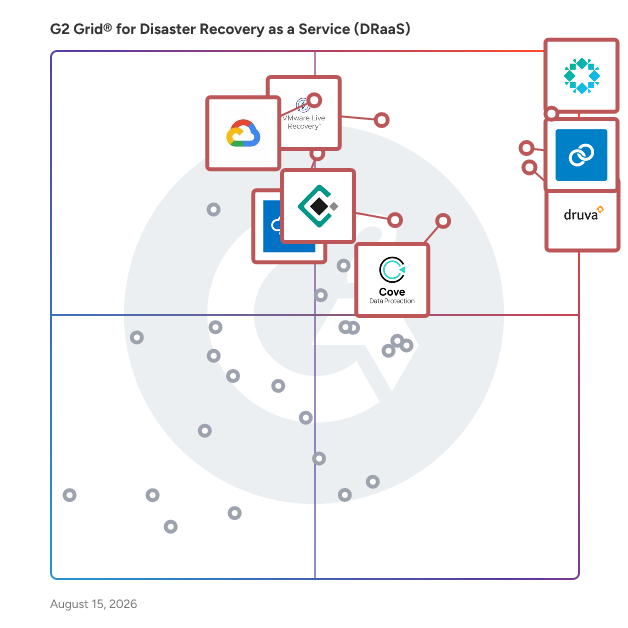
Featured Disaster Recovery as a Service (DRaaS) Solutions At A Glance

Arpio
Sponsored
Highest Performer:
Top Trending:
Show LessShow More
Highest Performer:
Top Trending:

G2 takes pride in showing unbiased reviews on user satisfaction in our ratings and reports. We do not allow paid placements in any of our ratings, rankings, or reports. Learn about our scoring methodologies.

Coming Soon
Get Trending Disaster Recovery as a Service (DRaaS) Products in Your Inbox

A weekly snapshot of rising stars, new launches, and what everyone's buzzing about.

Sample Trending Products Newsletter
No filters applied
95 Listings in Disaster Recovery as a Service (DRaaS) Available
(699)4.7 out of 5
Optimized for quick response
1st Easiest To Use in Disaster Recovery as a Service (DRaaS) software
Save to My Lists
  • Overview
    Expand/Collapse Overview
  • Product Description
    How are these determined?Information
    This description is provided by the seller.

    Over the past decade, data risks have diversified, shifting data protection’s role from a passive last line of defense to an active data partner in responding to and recovering from diverse data risks

    Users
    • IT Manager
    • Systems Administrator
    Industries
    • Information Technology and Services
    • Computer Software
    Market Segment
    • 60% Mid-Market
    • 34% Enterprise
    User Sentiment
    How are these determined?Information
    These insights, currently in beta, are compiled from user reviews and grouped to display a high-level overview of the software.
    • Druva Data Security Cloud is a cloud-native solution designed to protect and manage enterprise data across various environments, offering centralized visibility, automated backups, and fast restores.
    • Users frequently mention the simplicity and ease of use of Druva, its clean dashboard, straightforward backup and restore processes, and the reliability of its fully cloud-native architecture, which reduces complexity and administrative overhead.
    • Users mentioned some limitations with Druva, such as the lack of detailed and customizable reporting for compliance and audit needs, occasional unavailability of the overall cloud platform, and slower restoration speeds for large datasets.
  • Pros and Cons
    Expand/Collapse Pros and Cons
  • Druva Data Security Cloud Pros and Cons
    How are these determined?Information
    Pros and Cons are compiled from review feedback and grouped into themes to provide an easy-to-understand summary of user reviews.
    Pros
    Ease of Use
    190
    Backup Solutions
    153
    Backup Ease
    151
    Customer Support
    129
    Backup Frequency
    115
    Cons
    Backup Issues
    48
    Expensive
    24
    Storage Limitations
    24
    Slow Performance
    22
    Pricing Issues
    21
  • User Satisfaction
    Expand/Collapse User Satisfaction
  • Druva Data Security Cloud features and usability ratings that predict user satisfaction
    9.5
    Service Provision
    Average: 8.7
    9.4
    Has the product been a good partner in doing business?
    Average: 9.0
    9.6
    Infrastructure Compatibility
    Average: 8.9
    9.4
    RTO and RPO Management
    Average: 8.8
  • Seller Details
    Expand/Collapse Seller Details
  • Seller Details
    Seller
    Druva
    Company Website
    Year Founded
    2008
    HQ Location
    Sunnyvale, CA
    Twitter
    @druvainc
    19,285 Twitter followers
    LinkedIn® Page
    www.linkedin.com
    1,357 employees on LinkedIn®
Product Description
How are these determined?Information
This description is provided by the seller.

Over the past decade, data risks have diversified, shifting data protection’s role from a passive last line of defense to an active data partner in responding to and recovering from diverse data risks

Users
  • IT Manager
  • Systems Administrator
Industries
  • Information Technology and Services
  • Computer Software
Market Segment
  • 60% Mid-Market
  • 34% Enterprise
User Sentiment
How are these determined?Information
These insights, currently in beta, are compiled from user reviews and grouped to display a high-level overview of the software.
  • Druva Data Security Cloud is a cloud-native solution designed to protect and manage enterprise data across various environments, offering centralized visibility, automated backups, and fast restores.
  • Users frequently mention the simplicity and ease of use of Druva, its clean dashboard, straightforward backup and restore processes, and the reliability of its fully cloud-native architecture, which reduces complexity and administrative overhead.
  • Users mentioned some limitations with Druva, such as the lack of detailed and customizable reporting for compliance and audit needs, occasional unavailability of the overall cloud platform, and slower restoration speeds for large datasets.
Druva Data Security Cloud Pros and Cons
How are these determined?Information
Pros and Cons are compiled from review feedback and grouped into themes to provide an easy-to-understand summary of user reviews.
Pros
Ease of Use
190
Backup Solutions
153
Backup Ease
151
Customer Support
129
Backup Frequency
115
Cons
Backup Issues
48
Expensive
24
Storage Limitations
24
Slow Performance
22
Pricing Issues
21
Druva Data Security Cloud features and usability ratings that predict user satisfaction
9.5
Service Provision
Average: 8.7
9.4
Has the product been a good partner in doing business?
Average: 9.0
9.6
Infrastructure Compatibility
Average: 8.9
9.4
RTO and RPO Management
Average: 8.8
Seller Details
Seller
Druva
Company Website
Year Founded
2008
HQ Location
Sunnyvale, CA
Twitter
@druvainc
19,285 Twitter followers
LinkedIn® Page
www.linkedin.com
1,357 employees on LinkedIn®
(268)4.6 out of 5
2nd Easiest To Use in Disaster Recovery as a Service (DRaaS) software
Save to My Lists
  • Overview
    Expand/Collapse Overview
  • Product Description
    How are these determined?Information
    This description is provided by the seller.

    Datto SIRIS is an all-in-one BCDR solution built for MSPs to efficiently prevent data loss and minimize downtime. Utilizing a cloud-first approach, MSPs can offer their clients local backup and re

    Users
    • Owner
    • President
    Industries
    • Information Technology and Services
    • Computer & Network Security
    Market Segment
    • 65% Small-Business
    • 29% Mid-Market
    User Sentiment
    How are these determined?Information
    These insights, currently in beta, are compiled from user reviews and grouped to display a high-level overview of the software.
    • Datto BCDR is a backup and disaster recovery solution that provides seamless backups and recovery options to ensure minimal downtime during service disruptions.
    • Users frequently mention the ease of use, reliability, and the ability to manage multiple clients from a single console as key benefits of Datto BCDR.
    • Users experienced issues with the high cost, complexity in certain operations, lack of support for some Linux distributions, and the need for ongoing monitoring to prevent storage-related problems.
  • Pros and Cons
    Expand/Collapse Pros and Cons
  • Datto BCDR Pros and Cons
    How are these determined?Information
    Pros and Cons are compiled from review feedback and grouped into themes to provide an easy-to-understand summary of user reviews.
    Pros
    Ease of Use
    85
    Reliability
    76
    Customer Support
    63
    Backup Solutions
    55
    Recovery Ease
    54
    Cons
    Expensive
    32
    Poor Customer Support
    25
    Pricing Issues
    16
    Restore Issues
    15
    Storage Issues
    15
  • User Satisfaction
    Expand/Collapse User Satisfaction
  • Datto BCDR features and usability ratings that predict user satisfaction
    9.3
    Service Provision
    Average: 8.7
    9.0
    Has the product been a good partner in doing business?
    Average: 9.0
    9.3
    Infrastructure Compatibility
    Average: 8.9
    8.3
    RTO and RPO Management
    Average: 8.8
  • Seller Details
    Expand/Collapse Seller Details
  • Seller Details
    Seller
    Kaseya
    Company Website
    Year Founded
    2000
    HQ Location
    Miami, FL
    Twitter
    @KaseyaCorp
    17,498 Twitter followers
    LinkedIn® Page
    www.linkedin.com
    5,388 employees on LinkedIn®
Product Description
How are these determined?Information
This description is provided by the seller.

Datto SIRIS is an all-in-one BCDR solution built for MSPs to efficiently prevent data loss and minimize downtime. Utilizing a cloud-first approach, MSPs can offer their clients local backup and re

Users
  • Owner
  • President
Industries
  • Information Technology and Services
  • Computer & Network Security
Market Segment
  • 65% Small-Business
  • 29% Mid-Market
User Sentiment
How are these determined?Information
These insights, currently in beta, are compiled from user reviews and grouped to display a high-level overview of the software.
  • Datto BCDR is a backup and disaster recovery solution that provides seamless backups and recovery options to ensure minimal downtime during service disruptions.
  • Users frequently mention the ease of use, reliability, and the ability to manage multiple clients from a single console as key benefits of Datto BCDR.
  • Users experienced issues with the high cost, complexity in certain operations, lack of support for some Linux distributions, and the need for ongoing monitoring to prevent storage-related problems.
Datto BCDR Pros and Cons
How are these determined?Information
Pros and Cons are compiled from review feedback and grouped into themes to provide an easy-to-understand summary of user reviews.
Pros
Ease of Use
85
Reliability
76
Customer Support
63
Backup Solutions
55
Recovery Ease
54
Cons
Expensive
32
Poor Customer Support
25
Pricing Issues
16
Restore Issues
15
Storage Issues
15
Datto BCDR features and usability ratings that predict user satisfaction
9.3
Service Provision
Average: 8.7
9.0
Has the product been a good partner in doing business?
Average: 9.0
9.3
Infrastructure Compatibility
Average: 8.9
8.3
RTO and RPO Management
Average: 8.8
Seller Details
Seller
Kaseya
Company Website
Year Founded
2000
HQ Location
Miami, FL
Twitter
@KaseyaCorp
17,498 Twitter followers
LinkedIn® Page
www.linkedin.com
5,388 employees on LinkedIn®

This is how G2 Deals can help you:

  • Easily shop for curated – and trusted – software
  • Own your own software buying journey
  • Discover exclusive deals on software
(134)4.4 out of 5
13th Easiest To Use in Disaster Recovery as a Service (DRaaS) software
Save to My Lists
  • Overview
    Expand/Collapse Overview
  • Product Description
    How are these determined?Information
    This description is provided by the seller.

    Protect your data, minimize downtime and reduce costs with optimized disaster recovery (DR) that’s easily accessible on demand and delivered as a SaaS solution. VMware Live Recovery's ransomware rec

    Users
    No information available
    Industries
    • Information Technology and Services
    • Financial Services
    Market Segment
    • 41% Mid-Market
    • 40% Enterprise
  • Pros and Cons
    Expand/Collapse Pros and Cons
  • VMware Live Recovery Pros and Cons
    How are these determined?Information
    Pros and Cons are compiled from review feedback and grouped into themes to provide an easy-to-understand summary of user reviews.
    Pros
    Recovery Ease
    20
    Ease of Use
    18
    Recovery Speed
    12
    Features
    8
    Replication
    8
    Cons
    Expensive
    14
    Complex Setup
    10
    Licensing Issues
    5
    Integration Issues
    4
    Poor Customer Support
    4
  • User Satisfaction
    Expand/Collapse User Satisfaction
  • VMware Live Recovery features and usability ratings that predict user satisfaction
    8.2
    Service Provision
    Average: 8.7
    8.8
    Has the product been a good partner in doing business?
    Average: 9.0
    8.3
    Infrastructure Compatibility
    Average: 8.9
    8.3
    RTO and RPO Management
    Average: 8.8
  • Seller Details
    Expand/Collapse Seller Details
  • Seller Details
    Seller
    Broadcom
    Company Website
    Year Founded
    1991
    HQ Location
    San Jose, CA
    Twitter
    @broadcom
    61,527 Twitter followers
    LinkedIn® Page
    www.linkedin.com
    56,584 employees on LinkedIn®
Product Description
How are these determined?Information
This description is provided by the seller.

Protect your data, minimize downtime and reduce costs with optimized disaster recovery (DR) that’s easily accessible on demand and delivered as a SaaS solution. VMware Live Recovery's ransomware rec

Users
No information available
Industries
  • Information Technology and Services
  • Financial Services
Market Segment
  • 41% Mid-Market
  • 40% Enterprise
VMware Live Recovery Pros and Cons
How are these determined?Information
Pros and Cons are compiled from review feedback and grouped into themes to provide an easy-to-understand summary of user reviews.
Pros
Recovery Ease
20
Ease of Use
18
Recovery Speed
12
Features
8
Replication
8
Cons
Expensive
14
Complex Setup
10
Licensing Issues
5
Integration Issues
4
Poor Customer Support
4
VMware Live Recovery features and usability ratings that predict user satisfaction
8.2
Service Provision
Average: 8.7
8.8
Has the product been a good partner in doing business?
Average: 9.0
8.3
Infrastructure Compatibility
Average: 8.9
8.3
RTO and RPO Management
Average: 8.8
Seller Details
Seller
Broadcom
Company Website
Year Founded
1991
HQ Location
San Jose, CA
Twitter
@broadcom
61,527 Twitter followers
LinkedIn® Page
www.linkedin.com
56,584 employees on LinkedIn®
(409)4.5 out of 5
Optimized for quick response
3rd Easiest To Use in Disaster Recovery as a Service (DRaaS) software
Save to My Lists
  • Overview
    Expand/Collapse Overview
  • Product Description
    How are these determined?Information
    This description is provided by the seller.

    Cove Data Protection, from N-able, is a cloud-first backup and disaster recovery service for servers, workstations, and Microsoft 365™, all managed from a multitenant web-based dashboard. Cove was

    Users
    • President
    • Owner
    Industries
    • Information Technology and Services
    • Computer & Network Security
    Market Segment
    • 76% Small-Business
    • 21% Mid-Market
    User Sentiment
    How are these determined?Information
    These insights, currently in beta, are compiled from user reviews and grouped to display a high-level overview of the software.
    • Cove is a tool that backs up updated information from either a computer or a Sharepoint site and can be accessed through the N-able dashboard.
    • Users frequently mention the ease of use, graphical interface with pie charts, easy navigation, quick loading speed, secure and encrypted backup solutions, and the ability to give clients access to self-managed services if needed.
    • Users mentioned issues with the pricing structure, space limitations with server and workstation backups, confusing deployment process, unsuccessful backups during internet outages, connection issues with the backup manager, and lack of Google platform backup support.
  • Pros and Cons
    Expand/Collapse Pros and Cons
  • Cove Data Protection Pros and Cons
    How are these determined?Information
    Pros and Cons are compiled from review feedback and grouped into themes to provide an easy-to-understand summary of user reviews.
    Pros
    Ease of Use
    130
    Backup Solutions
    72
    Backup Frequency
    63
    Reliability
    62
    Easy Setup
    54
    Cons
    Backup Issues
    41
    Backup Failures
    26
    Restore Issues
    26
    Slow Restoration
    21
    Restoration Issues
    19
  • User Satisfaction
    Expand/Collapse User Satisfaction
  • Cove Data Protection features and usability ratings that predict user satisfaction
    8.7
    Service Provision
    Average: 8.7
    8.9
    Has the product been a good partner in doing business?
    Average: 9.0
    8.8
    Infrastructure Compatibility
    Average: 8.9
    9.3
    RTO and RPO Management
    Average: 8.8
  • Seller Details
    Expand/Collapse Seller Details
  • Seller Details
    Seller
    N-able
    Company Website
    HQ Location
    Morrisville, North Carolina
    Twitter
    @Nable
    15,994 Twitter followers
    LinkedIn® Page
    www.linkedin.com
    2,149 employees on LinkedIn®
    Ownership
    NYSE: NABL
Product Description
How are these determined?Information
This description is provided by the seller.

Cove Data Protection, from N-able, is a cloud-first backup and disaster recovery service for servers, workstations, and Microsoft 365™, all managed from a multitenant web-based dashboard. Cove was

Users
  • President
  • Owner
Industries
  • Information Technology and Services
  • Computer & Network Security
Market Segment
  • 76% Small-Business
  • 21% Mid-Market
User Sentiment
How are these determined?Information
These insights, currently in beta, are compiled from user reviews and grouped to display a high-level overview of the software.
  • Cove is a tool that backs up updated information from either a computer or a Sharepoint site and can be accessed through the N-able dashboard.
  • Users frequently mention the ease of use, graphical interface with pie charts, easy navigation, quick loading speed, secure and encrypted backup solutions, and the ability to give clients access to self-managed services if needed.
  • Users mentioned issues with the pricing structure, space limitations with server and workstation backups, confusing deployment process, unsuccessful backups during internet outages, connection issues with the backup manager, and lack of Google platform backup support.
Cove Data Protection Pros and Cons
How are these determined?Information
Pros and Cons are compiled from review feedback and grouped into themes to provide an easy-to-understand summary of user reviews.
Pros
Ease of Use
130
Backup Solutions
72
Backup Frequency
63
Reliability
62
Easy Setup
54
Cons
Backup Issues
41
Backup Failures
26
Restore Issues
26
Slow Restoration
21
Restoration Issues
19
Cove Data Protection features and usability ratings that predict user satisfaction
8.7
Service Provision
Average: 8.7
8.9
Has the product been a good partner in doing business?
Average: 9.0
8.8
Infrastructure Compatibility
Average: 8.9
9.3
RTO and RPO Management
Average: 8.8
Seller Details
Seller
N-able
Company Website
HQ Location
Morrisville, North Carolina
Twitter
@Nable
15,994 Twitter followers
LinkedIn® Page
www.linkedin.com
2,149 employees on LinkedIn®
Ownership
NYSE: NABL
  • Overview
    Expand/Collapse Overview
  • Product Description
    How are these determined?Information
    This description is provided by the seller.

    Backup and DR Service Managed backup and disaster recovery (DR) service for centralized, application-consistent data protection. Protect workloads running in Google Cloud and on-premises by backing th

    Users
    No information available
    Industries
    No information available
    Market Segment
    • 50% Small-Business
    • 45% Mid-Market
  • Pros and Cons
    Expand/Collapse Pros and Cons
  • Google Backup and DR service Pros and Cons
    How are these determined?Information
    Pros and Cons are compiled from review feedback and grouped into themes to provide an easy-to-understand summary of user reviews.
    Pros
    Ease of Use
    10
    Cloud Backup
    4
    Reliability
    4
    Recovery Ease
    3
    Backup Solutions
    2
    Cons
    Complex Setup
    3
    Bandwidth Issues
    2
    Expensive
    2
    Pricing Issues
    2
    Slow Performance
    2
  • User Satisfaction
    Expand/Collapse User Satisfaction
  • Google Backup and DR service features and usability ratings that predict user satisfaction
    8.7
    Service Provision
    Average: 8.7
    9.7
    Has the product been a good partner in doing business?
    Average: 9.0
    8.6
    Infrastructure Compatibility
    Average: 8.9
    8.8
    RTO and RPO Management
    Average: 8.8
  • Seller Details
    Expand/Collapse Seller Details
  • Seller Details
    Seller
    Google
    Year Founded
    1998
    HQ Location
    Mountain View, CA
    Twitter
    @google
    31,716,915 Twitter followers
    LinkedIn® Page
    www.linkedin.com
    311,319 employees on LinkedIn®
    Ownership
    NASDAQ:GOOG
Product Description
How are these determined?Information
This description is provided by the seller.

Backup and DR Service Managed backup and disaster recovery (DR) service for centralized, application-consistent data protection. Protect workloads running in Google Cloud and on-premises by backing th

Users
No information available
Industries
No information available
Market Segment
  • 50% Small-Business
  • 45% Mid-Market
Google Backup and DR service Pros and Cons
How are these determined?Information
Pros and Cons are compiled from review feedback and grouped into themes to provide an easy-to-understand summary of user reviews.
Pros
Ease of Use
10
Cloud Backup
4
Reliability
4
Recovery Ease
3
Backup Solutions
2
Cons
Complex Setup
3
Bandwidth Issues
2
Expensive
2
Pricing Issues
2
Slow Performance
2
Google Backup and DR service features and usability ratings that predict user satisfaction
8.7
Service Provision
Average: 8.7
9.7
Has the product been a good partner in doing business?
Average: 9.0
8.6
Infrastructure Compatibility
Average: 8.9
8.8
RTO and RPO Management
Average: 8.8
Seller Details
Seller
Google
Year Founded
1998
HQ Location
Mountain View, CA
Twitter
@google
31,716,915 Twitter followers
LinkedIn® Page
www.linkedin.com
311,319 employees on LinkedIn®
Ownership
NASDAQ:GOOG
  • Overview
    Expand/Collapse Overview
  • Product Description
    How are these determined?Information
    This description is provided by the seller.

    Cloud application downtime causes organizations significant costs, risks, and reputation. Applications experience downtime due to ransomware attacks, cloud misconfigurations, zone-level cloud service

    Users
    No information available
    Industries
    No information available
    Market Segment
    • 39% Small-Business
    • 33% Enterprise
  • User Satisfaction
    Expand/Collapse User Satisfaction
  • Commvault Cloud Rewind features and usability ratings that predict user satisfaction
    10.0
    Service Provision
    Average: 8.7
    9.7
    Has the product been a good partner in doing business?
    Average: 9.0
    8.3
    Infrastructure Compatibility
    Average: 8.9
    10.0
    RTO and RPO Management
    Average: 8.8
  • Seller Details
    Expand/Collapse Seller Details
  • Seller Details
    Seller
    Commvault
    Year Founded
    1996
    HQ Location
    Eatontown, New Jersey, United States
    Twitter
    @Commvault
    65,080 Twitter followers
    LinkedIn® Page
    www.linkedin.com
    3,471 employees on LinkedIn®
    Ownership
    NasdaqGS:CVLT
Product Description
How are these determined?Information
This description is provided by the seller.

Cloud application downtime causes organizations significant costs, risks, and reputation. Applications experience downtime due to ransomware attacks, cloud misconfigurations, zone-level cloud service

Users
No information available
Industries
No information available
Market Segment
  • 39% Small-Business
  • 33% Enterprise
Commvault Cloud Rewind features and usability ratings that predict user satisfaction
10.0
Service Provision
Average: 8.7
9.7
Has the product been a good partner in doing business?
Average: 9.0
8.3
Infrastructure Compatibility
Average: 8.9
10.0
RTO and RPO Management
Average: 8.8
Seller Details
Seller
Commvault
Year Founded
1996
HQ Location
Eatontown, New Jersey, United States
Twitter
@Commvault
65,080 Twitter followers
LinkedIn® Page
www.linkedin.com
3,471 employees on LinkedIn®
Ownership
NasdaqGS:CVLT
(39)4.7 out of 5
14th Easiest To Use in Disaster Recovery as a Service (DRaaS) software
Save to My Lists
  • Overview
    Expand/Collapse Overview
  • Product Description
    How are these determined?Information
    This description is provided by the seller.

    Recovery plans are simple to create through the Azure management portal, where they are stored. The plans can be as simple or as advanced as your business requirements demand, including the execution

    Users
    No information available
    Industries
    • Information Technology and Services
    • Computer Software
    Market Segment
    • 44% Enterprise
    • 36% Mid-Market
  • User Satisfaction
    Expand/Collapse User Satisfaction
  • Azure Site Recovery features and usability ratings that predict user satisfaction
    8.8
    Service Provision
    Average: 8.7
    8.5
    Has the product been a good partner in doing business?
    Average: 9.0
    9.2
    Infrastructure Compatibility
    Average: 8.9
    8.8
    RTO and RPO Management
    Average: 8.8
  • Seller Details
    Expand/Collapse Seller Details
  • Seller Details
    Seller
    Microsoft
    Year Founded
    1975
    HQ Location
    Redmond, Washington
    Twitter
    @microsoft
    13,263,534 Twitter followers
    LinkedIn® Page
    www.linkedin.com
    220,934 employees on LinkedIn®
    Ownership
    MSFT
Product Description
How are these determined?Information
This description is provided by the seller.

Recovery plans are simple to create through the Azure management portal, where they are stored. The plans can be as simple or as advanced as your business requirements demand, including the execution

Users
No information available
Industries
  • Information Technology and Services
  • Computer Software
Market Segment
  • 44% Enterprise
  • 36% Mid-Market
Azure Site Recovery features and usability ratings that predict user satisfaction
8.8
Service Provision
Average: 8.7
8.5
Has the product been a good partner in doing business?
Average: 9.0
9.2
Infrastructure Compatibility
Average: 8.9
8.8
RTO and RPO Management
Average: 8.8
Seller Details
Seller
Microsoft
Year Founded
1975
HQ Location
Redmond, Washington
Twitter
@microsoft
13,263,534 Twitter followers
LinkedIn® Page
www.linkedin.com
220,934 employees on LinkedIn®
Ownership
MSFT
(131)4.6 out of 5
Optimized for quick response
12th Easiest To Use in Disaster Recovery as a Service (DRaaS) software
Save to My Lists
  • Overview
    Expand/Collapse Overview
  • Product Description
    How are these determined?Information
    This description is provided by the seller.

    Axcient x360Recover is the most reliable, flexible and cost-effective business continuity and disaster recovery (BCDR) solution for MSPs and the SMBs they serve. With x360Recover you can comprehensiv

    Users
    • Owner
    • CEO
    Industries
    • Information Technology and Services
    • Computer & Network Security
    Market Segment
    • 78% Small-Business
    • 24% Mid-Market
  • Pros and Cons
    Expand/Collapse Pros and Cons
  • Axcient x360Recover Pros and Cons
    How are these determined?Information
    Pros and Cons are compiled from review feedback and grouped into themes to provide an easy-to-understand summary of user reviews.
    Pros
    Customer Support
    15
    Ease of Use
    14
    Reliability
    11
    Data Recovery
    8
    Recovery Ease
    7
    Cons
    UX Improvement
    7
    Navigation Issues
    4
    Storage Issues
    4
    Billing Issues
    3
    Confusing Implementation
    3
  • User Satisfaction
    Expand/Collapse User Satisfaction
  • Axcient x360Recover features and usability ratings that predict user satisfaction
    9.0
    Service Provision
    Average: 8.7
    9.0
    Has the product been a good partner in doing business?
    Average: 9.0
    9.1
    Infrastructure Compatibility
    Average: 8.9
    8.9
    RTO and RPO Management
    Average: 8.8
  • Seller Details
    Expand/Collapse Seller Details
  • Seller Details
    Company Website
    Year Founded
    1982
    HQ Location
    Tampa, FL
    Twitter
    @ConnectWise
    14,942 Twitter followers
    LinkedIn® Page
    www.linkedin.com
    3,454 employees on LinkedIn®
Product Description
How are these determined?Information
This description is provided by the seller.

Axcient x360Recover is the most reliable, flexible and cost-effective business continuity and disaster recovery (BCDR) solution for MSPs and the SMBs they serve. With x360Recover you can comprehensiv

Users
  • Owner
  • CEO
Industries
  • Information Technology and Services
  • Computer & Network Security
Market Segment
  • 78% Small-Business
  • 24% Mid-Market
Axcient x360Recover Pros and Cons
How are these determined?Information
Pros and Cons are compiled from review feedback and grouped into themes to provide an easy-to-understand summary of user reviews.
Pros
Customer Support
15
Ease of Use
14
Reliability
11
Data Recovery
8
Recovery Ease
7
Cons
UX Improvement
7
Navigation Issues
4
Storage Issues
4
Billing Issues
3
Confusing Implementation
3
Axcient x360Recover features and usability ratings that predict user satisfaction
9.0
Service Provision
Average: 8.7
9.0
Has the product been a good partner in doing business?
Average: 9.0
9.1
Infrastructure Compatibility
Average: 8.9
8.9
RTO and RPO Management
Average: 8.8
Seller Details
Company Website
Year Founded
1982
HQ Location
Tampa, FL
Twitter
@ConnectWise
14,942 Twitter followers
LinkedIn® Page
www.linkedin.com
3,454 employees on LinkedIn®
(113)4.7 out of 5
7th Easiest To Use in Disaster Recovery as a Service (DRaaS) software
Save to My Lists
  • Overview
    Expand/Collapse Overview
  • Product Description
    How are these determined?Information
    This description is provided by the seller.

    # 1 SaaS Data Protection Platform 12x more protection across on-prem, cloud services, and SaaS. HYCU is a data protection solution for cloud, SaaS, virtual, file shares, and physical workloads.

    Users
    No information available
    Industries
    • Information Technology and Services
    • Computer & Network Security
    Market Segment
    • 53% Mid-Market
    • 26% Small-Business
    User Sentiment
    How are these determined?Information
    These insights, currently in beta, are compiled from user reviews and grouped to display a high-level overview of the software.
    • HYCU is a backup and recovery tool that integrates with Nutanix and Microsoft 365 environments to protect data and ensure business continuity.
    • Reviewers frequently mention the simplicity and ease of use of HYCU, its seamless integration with Nutanix, fast backup speed, and the responsive and professional customer service.
    • Reviewers experienced issues with insufficient alerting and notification information, high pricing model for protecting workloads outside Nutanix, unclear error messages, and lack of support for incremental backups.
  • Pros and Cons
    Expand/Collapse Pros and Cons
  • HYCU Pros and Cons
    How are these determined?Information
    Pros and Cons are compiled from review feedback and grouped into themes to provide an easy-to-understand summary of user reviews.
    Pros
    Ease of Use
    79
    Customer Support
    52
    Backup
    50
    Backup Solutions
    39
    Easy Setup
    38
    Cons
    Backup Issues
    14
    Information Deficiency
    13
    Limited Features
    13
    Lacking Features
    10
    Storage Limitations
    9
  • User Satisfaction
    Expand/Collapse User Satisfaction
  • HYCU features and usability ratings that predict user satisfaction
    9.0
    Service Provision
    Average: 8.7
    9.6
    Has the product been a good partner in doing business?
    Average: 9.0
    9.0
    Infrastructure Compatibility
    Average: 8.9
    9.1
    RTO and RPO Management
    Average: 8.8
  • Seller Details
    Expand/Collapse Seller Details
  • Seller Details
    Seller
    HYCU
    Company Website
    Year Founded
    2018
    HQ Location
    Boston, US
    Twitter
    @HYCUInc
    5,151 Twitter followers
    LinkedIn® Page
    www.linkedin.com
    234 employees on LinkedIn®
Product Description
How are these determined?Information
This description is provided by the seller.

# 1 SaaS Data Protection Platform 12x more protection across on-prem, cloud services, and SaaS. HYCU is a data protection solution for cloud, SaaS, virtual, file shares, and physical workloads.

Users
No information available
Industries
  • Information Technology and Services
  • Computer & Network Security
Market Segment
  • 53% Mid-Market
  • 26% Small-Business
User Sentiment
How are these determined?Information
These insights, currently in beta, are compiled from user reviews and grouped to display a high-level overview of the software.
  • HYCU is a backup and recovery tool that integrates with Nutanix and Microsoft 365 environments to protect data and ensure business continuity.
  • Reviewers frequently mention the simplicity and ease of use of HYCU, its seamless integration with Nutanix, fast backup speed, and the responsive and professional customer service.
  • Reviewers experienced issues with insufficient alerting and notification information, high pricing model for protecting workloads outside Nutanix, unclear error messages, and lack of support for incremental backups.
HYCU Pros and Cons
How are these determined?Information
Pros and Cons are compiled from review feedback and grouped into themes to provide an easy-to-understand summary of user reviews.
Pros
Ease of Use
79
Customer Support
52
Backup
50
Backup Solutions
39
Easy Setup
38
Cons
Backup Issues
14
Information Deficiency
13
Limited Features
13
Lacking Features
10
Storage Limitations
9
HYCU features and usability ratings that predict user satisfaction
9.0
Service Provision
Average: 8.7
9.6
Has the product been a good partner in doing business?
Average: 9.0
9.0
Infrastructure Compatibility
Average: 8.9
9.1
RTO and RPO Management
Average: 8.8
Seller Details
Seller
HYCU
Company Website
Year Founded
2018
HQ Location
Boston, US
Twitter
@HYCUInc
5,151 Twitter followers
LinkedIn® Page
www.linkedin.com
234 employees on LinkedIn®
(73)4.6 out of 5
8th Easiest To Use in Disaster Recovery as a Service (DRaaS) software
Save to My Lists
  • Overview
    Expand/Collapse Overview
  • Product Description
    How are these determined?Information
    This description is provided by the seller.

    Zerto, a Hewlett Packard Enterprise company, empowers customers to run an always-on business by simplifying the protection, recovery, and mobility of on-premises and cloud applications. Zerto’s cloud

    Users
    No information available
    Industries
    • Information Technology and Services
    • Hospital & Health Care
    Market Segment
    • 48% Enterprise
    • 44% Mid-Market
  • User Satisfaction
    Expand/Collapse User Satisfaction
  • Zerto features and usability ratings that predict user satisfaction
    8.3
    Service Provision
    Average: 8.7
    9.2
    Has the product been a good partner in doing business?
    Average: 9.0
    8.7
    Infrastructure Compatibility
    Average: 8.9
    9.0
    RTO and RPO Management
    Average: 8.8
  • Seller Details
    Expand/Collapse Seller Details
  • Seller Details
    Seller
    Zerto
    Year Founded
    2009
    HQ Location
    Boston, Massachusetts
    Twitter
    @Zerto
    8,994 Twitter followers
    LinkedIn® Page
    www.linkedin.com
    378 employees on LinkedIn®
Product Description
How are these determined?Information
This description is provided by the seller.

Zerto, a Hewlett Packard Enterprise company, empowers customers to run an always-on business by simplifying the protection, recovery, and mobility of on-premises and cloud applications. Zerto’s cloud

Users
No information available
Industries
  • Information Technology and Services
  • Hospital & Health Care
Market Segment
  • 48% Enterprise
  • 44% Mid-Market
Zerto features and usability ratings that predict user satisfaction
8.3
Service Provision
Average: 8.7
9.2
Has the product been a good partner in doing business?
Average: 9.0
8.7
Infrastructure Compatibility
Average: 8.9
9.0
RTO and RPO Management
Average: 8.8
Seller Details
Seller
Zerto
Year Founded
2009
HQ Location
Boston, Massachusetts
Twitter
@Zerto
8,994 Twitter followers
LinkedIn® Page
www.linkedin.com
378 employees on LinkedIn®
  • Overview
    Expand/Collapse Overview
  • Pros and Cons
    Expand/Collapse Pros and Cons
  • User Satisfaction
    Expand/Collapse User Satisfaction
  • Seller Details
    Expand/Collapse Seller Details
(733)4.3 out of 5
4th Easiest To Use in Disaster Recovery as a Service (DRaaS) software
View top Consulting Services for Acronis Cyber Protect
Save to My Lists
  • Overview
    Expand/Collapse Overview
  • Product Description
    How are these determined?Information
    This description is provided by the seller.

    Acronis Cyber Protect delivers robust protection against cyberthreats, unparalleled backup and recovery capabilities and simplified management and visibility through a single pane of glass, for the en

    Users
    • Support Analyst
    • IT Manager
    Industries
    • Information Technology and Services
    • Computer Software
    Market Segment
    • 46% Small-Business
    • 40% Mid-Market
  • Pros and Cons
    Expand/Collapse Pros and Cons
  • Acronis Cyber Protect Pros and Cons
    How are these determined?Information
    Pros and Cons are compiled from review feedback and grouped into themes to provide an easy-to-understand summary of user reviews.
    Pros
    Backup Solutions
    18
    Ease of Use
    16
    Features
    13
    Backup Frequency
    10
    Centralized Management
    10
    Cons
    Expensive
    6
    Limited Features
    6
    Missing Features
    6
    Difficult Learning
    5
    Poor Customer Support
    5
  • User Satisfaction
    Expand/Collapse User Satisfaction
  • Acronis Cyber Protect features and usability ratings that predict user satisfaction
    8.6
    Service Provision
    Average: 8.7
    8.4
    Has the product been a good partner in doing business?
    Average: 9.0
    9.0
    Infrastructure Compatibility
    Average: 8.9
    8.7
    RTO and RPO Management
    Average: 8.8
  • Seller Details
    Expand/Collapse Seller Details
  • Seller Details
    Seller
    Acronis
    Year Founded
    2003
    HQ Location
    Schaffhausen
    Twitter
    @acronis
    95,202 Twitter followers
    LinkedIn® Page
    www.linkedin.com
    1,916 employees on LinkedIn®
    Ownership
    Acronis is majority-owned by EQT
Product Description
How are these determined?Information
This description is provided by the seller.

Acronis Cyber Protect delivers robust protection against cyberthreats, unparalleled backup and recovery capabilities and simplified management and visibility through a single pane of glass, for the en

Users
  • Support Analyst
  • IT Manager
Industries
  • Information Technology and Services
  • Computer Software
Market Segment
  • 46% Small-Business
  • 40% Mid-Market
Acronis Cyber Protect Pros and Cons
How are these determined?Information
Pros and Cons are compiled from review feedback and grouped into themes to provide an easy-to-understand summary of user reviews.
Pros
Backup Solutions
18
Ease of Use
16
Features
13
Backup Frequency
10
Centralized Management
10
Cons
Expensive
6
Limited Features
6
Missing Features
6
Difficult Learning
5
Poor Customer Support
5
Acronis Cyber Protect features and usability ratings that predict user satisfaction
8.6
Service Provision
Average: 8.7
8.4
Has the product been a good partner in doing business?
Average: 9.0
9.0
Infrastructure Compatibility
Average: 8.9
8.7
RTO and RPO Management
Average: 8.8
Seller Details
Seller
Acronis
Year Founded
2003
HQ Location
Schaffhausen
Twitter
@acronis
95,202 Twitter followers
LinkedIn® Page
www.linkedin.com
1,916 employees on LinkedIn®
Ownership
Acronis is majority-owned by EQT
(15)4.9 out of 5
11th Easiest To Use in Disaster Recovery as a Service (DRaaS) software
Save to My Lists
  • Overview
    Expand/Collapse Overview
  • Product Description
    How are these determined?Information
    This description is provided by the seller.

    InterVision has been recognized as a top provider of Disaster Recover-as-a-Service (DRaaS) by Gartner, Forrester and IDC analyst firms. Its exclusive program, InterVision Recovery Assurance™ gives cli

    Users
    No information available
    Industries
    • Information Technology and Services
    Market Segment
    • 87% Mid-Market
    • 13% Enterprise
  • User Satisfaction
    Expand/Collapse User Satisfaction
  • InterVision Cloud Disaster Recovery features and usability ratings that predict user satisfaction
    10.0
    Service Provision
    Average: 8.7
    9.7
    Has the product been a good partner in doing business?
    Average: 9.0
    10.0
    Infrastructure Compatibility
    Average: 8.9
    10.0
    RTO and RPO Management
    Average: 8.8
  • Seller Details
    Expand/Collapse Seller Details
  • Seller Details
    Year Founded
    1993
    HQ Location
    Chesterfield, US
    LinkedIn® Page
    www.linkedin.com
    448 employees on LinkedIn®
Product Description
How are these determined?Information
This description is provided by the seller.

InterVision has been recognized as a top provider of Disaster Recover-as-a-Service (DRaaS) by Gartner, Forrester and IDC analyst firms. Its exclusive program, InterVision Recovery Assurance™ gives cli

Users
No information available
Industries
  • Information Technology and Services
Market Segment
  • 87% Mid-Market
  • 13% Enterprise
InterVision Cloud Disaster Recovery features and usability ratings that predict user satisfaction
10.0
Service Provision
Average: 8.7
9.7
Has the product been a good partner in doing business?
Average: 9.0
10.0
Infrastructure Compatibility
Average: 8.9
10.0
RTO and RPO Management
Average: 8.8
Seller Details
Year Founded
1993
HQ Location
Chesterfield, US
LinkedIn® Page
www.linkedin.com
448 employees on LinkedIn®
  • Overview
    Expand/Collapse Overview
  • Product Description
    How are these determined?Information
    This description is provided by the seller.

    Backup and restore critical assets from an integrated cloud-based service

    Users
    No information available
    Industries
    • Information Technology and Services
    Market Segment
    • 42% Enterprise
    • 32% Mid-Market
  • User Satisfaction
    Expand/Collapse User Satisfaction
  • Azure Reliability features and usability ratings that predict user satisfaction
    8.1
    Service Provision
    Average: 8.7
    7.2
    Has the product been a good partner in doing business?
    Average: 9.0
    7.8
    Infrastructure Compatibility
    Average: 8.9
    7.5
    RTO and RPO Management
    Average: 8.8
  • Seller Details
    Expand/Collapse Seller Details
  • Seller Details
    Seller
    Microsoft
    Year Founded
    1975
    HQ Location
    Redmond, Washington
    Twitter
    @microsoft
    13,570,889 Twitter followers
    LinkedIn® Page
    www.linkedin.com
    220,934 employees on LinkedIn®
    Ownership
    MSFT
Product Description
How are these determined?Information
This description is provided by the seller.

Backup and restore critical assets from an integrated cloud-based service

Users
No information available
Industries
  • Information Technology and Services
Market Segment
  • 42% Enterprise
  • 32% Mid-Market
Azure Reliability features and usability ratings that predict user satisfaction
8.1
Service Provision
Average: 8.7
7.2
Has the product been a good partner in doing business?
Average: 9.0
7.8
Infrastructure Compatibility
Average: 8.9
7.5
RTO and RPO Management
Average: 8.8
Seller Details
Seller
Microsoft
Year Founded
1975
HQ Location
Redmond, Washington
Twitter
@microsoft
13,570,889 Twitter followers
LinkedIn® Page
www.linkedin.com
220,934 employees on LinkedIn®
Ownership
MSFT
(435)4.2 out of 5
Optimized for quick response
Save to My Lists
Entry Level Price:Contact Us
  • Overview
    Expand/Collapse Overview
  • Product Description
    How are these determined?Information
    This description is provided by the seller.

    Unitrends Data Center Backup and Recovery offers a Unified BCDR solution enabling our users to address the challenges of today with a complete, agile solution designed to backup, secure and recover al

    Users
    • IT Manager
    • Network Administrator
    Industries
    • Information Technology and Services
    • Hospital & Health Care
    Market Segment
    • 64% Mid-Market
    • 25% Small-Business
  • Pros and Cons
    Expand/Collapse Pros and Cons
  • Unitrends Backup and Recovery Pros and Cons
    How are these determined?Information
    Pros and Cons are compiled from review feedback and grouped into themes to provide an easy-to-understand summary of user reviews.
    Pros
    Backup Solutions
    13
    Backup Frequency
    9
    Ease of Use
    9
    User Interface
    9
    Customer Support
    7
    Cons
    Poor Customer Support
    7
    Backup Failures
    6
    Backup Issues
    6
    Needs Improvement
    6
    Error Management
    5
  • User Satisfaction
    Expand/Collapse User Satisfaction
  • Unitrends Backup and Recovery features and usability ratings that predict user satisfaction
    8.3
    Service Provision
    Average: 8.7
    8.5
    Has the product been a good partner in doing business?
    Average: 9.0
    8.8
    Infrastructure Compatibility
    Average: 8.9
    8.1
    RTO and RPO Management
    Average: 8.8
  • Seller Details
    Expand/Collapse Seller Details
  • Seller Details
    Seller
    Kaseya
    Company Website
    Year Founded
    2000
    HQ Location
    Miami, FL
    Twitter
    @KaseyaCorp
    17,498 Twitter followers
    LinkedIn® Page
    www.linkedin.com
    5,388 employees on LinkedIn®
Product Description
How are these determined?Information
This description is provided by the seller.

Unitrends Data Center Backup and Recovery offers a Unified BCDR solution enabling our users to address the challenges of today with a complete, agile solution designed to backup, secure and recover al

Users
  • IT Manager
  • Network Administrator
Industries
  • Information Technology and Services
  • Hospital & Health Care
Market Segment
  • 64% Mid-Market
  • 25% Small-Business
Unitrends Backup and Recovery Pros and Cons
How are these determined?Information
Pros and Cons are compiled from review feedback and grouped into themes to provide an easy-to-understand summary of user reviews.
Pros
Backup Solutions
13
Backup Frequency
9
Ease of Use
9
User Interface
9
Customer Support
7
Cons
Poor Customer Support
7
Backup Failures
6
Backup Issues
6
Needs Improvement
6
Error Management
5
Unitrends Backup and Recovery features and usability ratings that predict user satisfaction
8.3
Service Provision
Average: 8.7
8.5
Has the product been a good partner in doing business?
Average: 9.0
8.8
Infrastructure Compatibility
Average: 8.9
8.1
RTO and RPO Management
Average: 8.8
Seller Details
Seller
Kaseya
Company Website
Year Founded
2000
HQ Location
Miami, FL
Twitter
@KaseyaCorp
17,498 Twitter followers
LinkedIn® Page
www.linkedin.com
5,388 employees on LinkedIn®

Learn More About Disaster Recovery as a Service (DRaaS) Solutions

What are Disaster Recovery as a Service (DRaaS) Solutions?

Disaster recovery as a service (DRaaS) solutions enable companies to back up their data along with IT infrastructure in a third-party cloud computing environment. In the event of power outages, cyberattacks, equipment failures, human errors, natural disasters, or any form of disruption, this will allow companies to regain access to the backup data and mirrored IT infrastructure.

Since DRaaS solutions follow the as-a-service model, companies don't have to own all the disaster recovery (DR) resources or handle all the associated processes. Instead, they can rely on the provider. The third-party DRaaS provider reduces the burden of regularly backing up company data and is also helpful for organizations that lack the needed expertise to plan, configure, and test a DR plan.

DRaaS is also sometimes known as business continuity as a service (BCaaS). DRaaS solutions are a form of failover insurance for cloud computing environments and are crucial for business continuity. In the context of disaster recovery, failover is an operational mode that (automatically) shifts to a standby server, network, or database if the primary system fails or is shut down for some reason.

In the managed DRaaS model, third-party service providers are responsible for the failover process and transitioning the users from the primary environment to their hosted services.

Like infrastructure as a service (IaaS) and cloud platform as a service (PaaS), DRaaS solutions were made possible through the widespread adoption of cloud computing. These tools make the disaster recovery process more manageable by bringing all aspects into a SaaS product.

DRaaS tools reduce or eliminate downtime for customer-facing applications and internal networks and are critical for business continuity. They replace traditional backup software and hardware using the cloud and offer data protection and replication, better security, and faster recovery.

What Types of Disaster Recovery as a Service (DRaaS) Solutions Exist?

There are typically three types of DRaaS—self-service, assisted, and managed. Buyers should note that not all implementations of these solutions can meet all the requirements of an organization. Therefore, it’s essential to evaluate which variation of the software meets their needs fully.

Self-service DRaaS

As the name suggests, the self-service DRaaS model offers businesses tools and essential resources to perform its own disaster recovery planning and backups. Although this model provides greater flexibility, businesses are fully responsible for every aspect of DR strategy, testing, management, and executing the recovery process.

Although self-service DRaaS models are less expensive, the time and resources required to manage them may not make them the most cost effective solution. More precisely, self-service DRaaS is ideal for organizations with internal IT teams that have the required DR expertise.

Assisted DRaaS

In the assisted DRaaS model, the disaster recovery service provider acts as an adviser to the organization. The service provider typically handles the infrastructure and replication and offers advice on implementing, testing, and managing DR solutions.

When disruption occurs, the provider may also offer additional support for failover and failback operations. Generally speaking, assisted DRaaS doesn't provide a recovery service level agreement (SLA). That's because the organization is mainly responsible for executing the recovery procedures.

In the case of disaster recovery operations, SLAs are made up of recovery time objectives (RTOs) and recovery point objectives (RPOs). RTO refers to the time frame within which a business process must be restored after a disaster to prevent unacceptable consequences. RPO refers to the amount of data that can be lost during a disaster without affecting a business process.

Companies can also utilize assisted DRaaS to identify weaknesses in their disaster recovery capabilities and avail the provider's specific services. When compared to the self-service model, this model is typically more expensive.

Managed DRaaS

In this model, the service provider is responsible for all aspects of the DRaaS strategy, including planning, testing, managing, and implementing. A managed DRaaS provider enables organizations and their IT teams to offload all DR concerns, as a third-party service provider is fully responsible for recovery.

When disaster strikes, the managed DRaaS provider will carry out the recovery process. These services offer a recovery SLA unique to a company's requirements. Managed DRaaS providers can also provide a platform-agnostic solution that provides failover for virtual or physical hardware, both within on-premises data centers and across multiple cloud service providers.

In short, managed DRaaS reduces the effort the IT team has to put in during disaster recovery to almost zero. As expected, managed DR solutions are typically the most expensive when compared to self-service or assisted DRaaS models. However, managed models are especially useful for small businesses that may lack the infrastructure and in-house expertise to plan and execute IT disaster recovery plans.

What are the Common Features of Disaster Recovery as a Service (DRaaS) Solutions?

The following are some of the common features of cloud disaster recovery as a service tools.

Orchestration: Automates the recovery process to ensure that the crucial applications, servers, and their dependencies get back online without much IT intervention.

One-click failover: Helps configure the sequence and timing in which mission-critical systems are restored.

Automated discovery: Reduces the number of manual steps required in DR and, therefore, the likelihood of human errors.

Recovery point options: Helps to failback to a specific point in time or recover the most recent replicated data.

Bandwidth optimization: Enhances performance and bandwidth by sending only small amounts of data on an ongoing basis.

DNS redirect: Automates the updating of DNS and redirecting of requests to the new system.

What are the Benefits of Disaster Recovery as a Service (DRaaS) Solutions?

Disaster recovery can help minimize data loss and downtime in the event of a disruption. When compared to traditional disaster recovery approaches, DRaaS offers enhanced reliability and resiliency. The following are some of the notable benefits of DRaaS solutions.

Improved administration: DRaaS software reduces the administrative burden otherwise placed on the IT team and empowers team members to focus on other tasks that offer greater business value.

Minimizes downtime: These solutions come with high availability, which means that businesses can rapidly recover. Immediate recovery means lower downtime, which also means that the organization wouldn't be drastically affected in terms of productivity. More precisely, DRaaS offers a faster and automated recovery process when compared to traditional DR methods.

Scalability: Scaling up the data storage or computational infrastructure might be an inconvenient process for on-premises disaster recovery systems, but not for DRaaS solutions. When using a disaster recovery system, organizations can continually review their needs and scale upwards or outwards when necessary.

The scalability of DRaaS tools makes it notably cost effective. The ability to scale up or down based on requirements ensures organizations don't have to make significant investments in these solutions. Additionally, opting for a managed DRaaS solution means that the service provider is responsible for hardware protection. This means that companies don't have to pay for hardware maintenance, and if a natural disaster makes the office unusable, they'll be able to continue business from another location.

Access to resources: When a disaster strikes, a managed DRaaS provider can help provide resources such as temporary employees, facilities, and communications assistance to get a business back on track and running smoothly.

Ransomware recovery: DRaaS can minimize the effects of ransomware attacks, which are becoming more common. Businesses can restore stolen or corrupted data with ease as the data is stored in a remote location. This will ensure the business operations aren't affected drastically.

Who Uses Disaster Recovery as a Service (DRaaS) Solutions?

IT administrators: IT administrators, or more specifically, internal IT management teams, are the most common users of DRaaS tools. These tools help administrators to perform disaster recovery operations and maintain business continuity.

What are the Alternatives to Disaster Recovery as a Service (DRaaS) Solutions?

Alternatives to disaster recovery as a service solution can replace this type of software either partially or wholly include:

Disaster recovery software: These tools empower organizations to quickly and effectively recover data, software, and settings in the event of infrastructure, computer, or server failure. Unlike DRaaS, where a third party is responsible for most aspects of disaster recovery, DR software lets businesses perform their recovery.

Software Related to Disaster Recovery as a Service (DRaaS) Solutions

Related solutions that can be used together with Disaster recovery as a service (DRaaS) solutions include:

Online backup software: It is a backup technology that secures information created or stored on the web. It's used for various file types and information and helps organizations ensure business continuity in case of hardware failure or if files are deleted accidentally.

Server backup software: It's used to ensure that the information processed or stored in server hardware remains intact in the event of user error or mechanical failure. These tools store the data processed by the server in a remote location, cloud, or on some on-premises hardware.

SaaS backup software: These tools help businesses back up data generated within SaaS solutions like CRM software, email software, and business instant messaging software.

Business continuity management software: This software helps organizations identify potential disruptions in their operations and address them.

Challenges with Disaster Recovery as a Service (DRaaS) Solutions

DRaaS software can offer better performance than other disaster recovery methods and minimize the effects of disruption. However, they come with their own set of challenges and limitations. The following are some of them.

DRaaS vendor's cloud bandwidth: Most DRaaS service providers are typically capable of handling the occasional DR events of a considerable number of customers. But most providers aren't fitted to perform DR operations of all of their customers simultaneously. This is mainly because they lack the needed cloud bandwidth. Therefore customers should research more about the capabilities of the vendor and see whether they can handle such instances.

Local internet bandwidth: In most cases, organizations don't have a direct connection with DRaaS providers. Instead, they connect to an internet service provider (ISP), who then routes traffic to the provider. If the local internet bandwidth is limited, then the DR operation's speed will be significantly affected. Therefore, along with assessing the cloud bandwidth of DRaaS providers, companies should check with the ISPs regarding internet bandwidth.

Which Companies Should Buy Disaster Recovery as a Service (DRaaS) Solutions?

No company is immune to a disaster. Regardless of the company size, losing customer data or other critical information can disrupt business operations. 

Therefore, businesses of all sizes should opt for a DRaaS solution to minimize the effects of disruption and maintain business continuity. This is specifically valid for small and medium-sized companies that may not have the needed in-house IT infrastructure and staffing.

How to Buy Disaster Recovery as a Service (DRaaS) Solutions

Requirements Gathering (RFI/RFP) for Disaster Recovery as a Service (DRaaS) Solutions

Before getting into comparing solutions, buyers should perform an internal assessment that would reflect what disaster recovery means to an organization. For instance, disaster recovery may mean minimizing data loss or minimizing downtime. Additionally, it's crucial to understand the types of disasters the business requires the DRaaS solution to protect against.

When searching for DRaaS tools, organizations should also consider parameters such as recovery time objective (RTO) and recovery point objective (RPO). This will allow businesses to estimate their tolerance with downtime and data loss and find the most suitable software solution to minimize revenue loss.

As mentioned earlier, there are mainly three types of DRaaS models. The type of service model companies choose will have a profound impact on the solution's cost. Although the self-service DRaaS model requires the lowest investment, it may not necessarily be the most cost effective solution. For managed DRaaS, the service provider takes care of almost every aspect of disaster recovery, hence freeing the IT team to concentrate on other crucial tasks.

Understanding the services commonly offered by DRaaS providers can also help the buyer set clear expectations. Some of the services provided are simple and selective data recovery from the service provider's data center, virtual machine mounting for temporary application availability, domain name system (DNS) updating, and virtual private network(VPN) rerouting. Along with such services, DRaaS providers may also assist with disaster recovery planning and testing and bring in the needed staff for recovery.

Compare Disaster Recovery as a Service (DRaaS) Solutions Products

Create a long list

Once the requirements are gathered, buyers should start creating a long list of software products. More than trying to find the right option, buyers should try to get a basic understanding of the kind of DRaaS solutions available. This long list can include any software product that meets the organization's basic requirements.

Create a short list

After creating a long list of DRaaS products, buyers should make a shorter, refined list. This list can include software products that specifically meet the company's requirements or have must-have features. Excluding products that don't have the nice-to-have features also makes sense.

Buyers can look at factors like DR testing frequency, data availability, and replication times. Buyers can also check whether the virtual machines (VM) would run in the DR site as ably as they do when running in the primary data center.

To narrow down the list even further, buyers can inquire about the number of customers the DRaaS provider can support simultaneously. Similarly, having a fair idea of the number of customers the service provider caters to will help buyers comprehend the level of support they will receive if a disaster hits all customers.

Digging deeper to understand the kind of prioritization the service provider abides by, such as first-come first-serve, or what happens when a customer can't be serviced, will help refine the list even further. Buyers can also look at other factors such as pricing, usability, vendor support, and DR features.

Conduct demos

Demos are helpful to effectively and fairly compare the products in the short list. This also means that buyers should demo each DRaaS software with the same use cases. Examining the usability of the software product, checking whether the features work as expected, and asking questions regarding the features the company requires the most are some other things to do during the product demo.

Selection of Disaster Recovery as a Service (DRaaS) Solutions

Choose a selection team

A selection team can significantly affect the success of software selection, purchase, and implementation. Such a team typically includes relevant stakeholders, including company leaders and IT administrators. They should be able to use the software product and determine whether it will meet the company's specific requirements.

Negotiation

Once the buyer has discovered a product that fits their needs most appropriately, they should discuss the terms and conditions and negotiate the pricing with the vendor. Even if something is written on the vendor's pricing page, prices aren't fixed in most cases. Vendors may offer free licenses or discounts and may remove certain optional features and lower the price.

Final decision

To make the final software purchase decision, buyers should try to implement the software on a small scale. Doing so will give the buyer the confidence that their choice of the software product is correct. If the DRaaS solution doesn't work to meet the expectations, the software options must be re-evaluated.

A DRaaS provider may not cover all disasters or offer all possible services. To set clear expectations, buyers should thoroughly inspect the service provider's offerings and have a precise understanding of what to expect. Making the mistake of wrongly assuming and finding out that a service provider doesn't offer a specific service during a disaster might be highly unfavorable.

What Does Disaster Recovery as a Service (DRaaS) Solutions Cost?

The cost of DRaaS software solutions depends on several factors. This includes the type, assured RTO and RPO, and the kind of services the provider offers. As a rule of thumb, the closer RTO and RPO get to zero, the higher the costs will be.

Return on Investment (ROI)

ROI for DRaaS solutions can be typically determined by the cost of implementing relative to the cost of managing an in-house DR team and infrastructure. As expected, opting for a DRaaS solution is generally cost effective. In most cases, service providers may also offer discounts and additional services.

When calculating the ROI, companies should also consider the time and effort saved by availing the services of DRaaS providers. These tools have unparalleled recovery times, unlike traditional backup systems, which means business productivity isn't disrupted drastically. DRaaS solutions also help companies save the cost of data they would lose if it isn’t backed up.