Best Enterprise Information Archiving Software

How Many Enterprise Information Archiving Software Products Does G2 Track?

Total Products under this Category: 95

Category Stats (Sep 2026)

  • Average Rating: 4.33/5 The average rating of products in this category, based on all submitted ratings

Last updated: September 01, 2026

How Does G2 Rank Enterprise Information Archiving Software Products?

Why You Can Trust G2's Software Rankings:

  • 30 Analysts and Data Experts
  • 900+ Authentic Reviews
  • 95+ Products
  • Unbiased Rankings

G2's software rankings are built on verified user reviews, rigorous moderation, and a consistent research methodology maintained by a team of analysts and data experts. Each product is measured using the same transparent criteria, with no paid placement or vendor influence. While reviews reflect real user experiences, which can be subjective, they offer valuable insight into how software performs in the hands of professionals. Together, these inputs power the G2 Score, a standardized way to compare tools within every category.

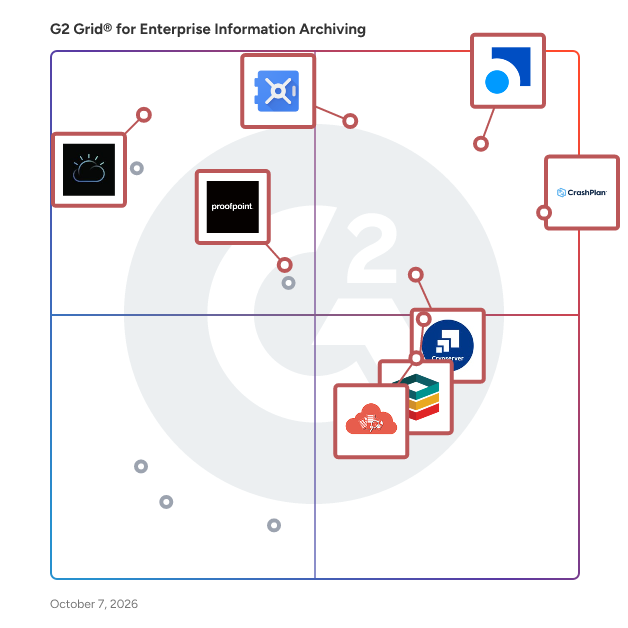
G2 Grid® for Enterprise Information Archiving Software

G2 Grid® for Enterprise Information Archiving Software plotting products by satisfaction and market presence

Highlighted products: Smarsh, CrashPlan Platform, Google Vault, Cryoserver, Pagefreezer, Microsoft Teams Analytics Tool, IBM Information Lifecycle Governance, and StorageTek.

Underlying data: [Grid® JSON](https://www.g2.com/categories/enterprise-information-archiving/grids.json?focus%5B%5D=smarsh-smarsh&focus%5B%5D=crashplan-platform&focus%5B%5D=google-vault&focus%5B%5D=cryoserver&focus%5B%5D=pagefreezer&focus%5B%5D=microsoft-teams-analytics-tool&focus%5B%5D=ibm-information-lifecycle-governance&focus%5B%5D=storagetek)

Smarsh

Smarsh’s Connected Archive is inclusive of capture, Archive, supervision and e-discovery capabilities across 80+ communication channels. It delivers unparalleled efficiency for small to mid-sized organizations, global enterprises, and US Federal Agencies. Connected Archive empowers you to efficiently review and search all of your electronic communications with full conversational context in one place, by leveraging Smarsh’s Supervision and e-Discovery Apps. This product suite is built to weather any regulatory change and evolves seamlessly alongside your organization.

Average Rating: 4.1/5.0

Total Reviews: 28

How Do G2 Users Rate Smarsh?

  • Has the product been a good partner in doing business?: 8.0/10 (Category avg: 8.7/10)
  • Quality of Support: 8.0/10 (Category avg: 8.7/10)
  • Ease of Admin: 7.4/10 (Category avg: 8.7/10)

Who Is the Company Behind Smarsh?

  • Seller: Smarsh
  • Company Website:
  • Year Founded: 2001
  • HQ Location: Portland, OR
  • Twitter: @SmarshInc
    5,683 Twitter followers
  • LinkedIn® Page: www.linkedin.com
    1,623 employees on LinkedIn®

Who Uses This Product?

  • Top Industries: Financial Services
  • Company Size: 57% Small, 25% Medium

What Do G2 Reviewers Say About Smarsh?

AI-generated summary from verified user reviews

Pros
  • Users find Smarsh to be easy to use, thanks to its smooth onboarding and excellent support throughout.
  • Users highlight the responsive and helpful customer support of Smarsh, enhancing their overall experience with the platform.
  • Users value the easy search function of Smarsh, ensuring accurate results for audits and internal reviews.
  • Users value the easy search function and seamless onboarding of Smarsh, making their experience smooth and efficient.
  • Users commend review efficiency in Smarsh, simplifying compliance monitoring and enhancing communication management for safety.
Cons
  • Users find a steep learning curve with Smarsh, requiring extensive training to utilize its features effectively.
  • Users report poor customer support, citing slow response times and inadequate assistance affecting their overall experience.
  • Users experience slow performance with Smarsh, affecting daily operations and the efficiency of alerts and searches.
  • Users experience insufficient training with Smarsh, leading to confusion and challenges during onboarding and feature utilization.
  • Users find the interface not user-friendly, struggling with navigation and accessing essential features effectively.

What Are Recent G2 Reviews of Smarsh?

What Are G2 Users Discussing About Smarsh?

CrashPlan Platform

CrashPlan delivers enterprise-grade backup, recovery, and archiving to protect the data organizations cannot afford to lose. Our cloud-native platform helps businesses secure Microsoft 365, Google Workspace, endpoint, and server data with scalable protection that reduces risk, supports compliance, and controls storage costs. Built for modern IT environments, CrashPlan enables fast, reliable recovery while supporting long-term retention, legal hold, and broader data governance needs. We help enterprises strengthen resilience and maintain continuity without added complexity.

Average Rating: 4.9/5.0

Total Reviews: 261

How Do G2 Users Rate CrashPlan Platform?

  • Has the product been a good partner in doing business?: 9.9/10 (Category avg: 8.7/10)
  • Quality of Support: 9.9/10 (Category avg: 8.7/10)
  • Ease of Admin: 9.9/10 (Category avg: 8.7/10)

Who Is the Company Behind CrashPlan Platform?

  • Seller: CrashPlan
  • Company Website:
  • Year Founded: 2001
  • HQ Location: Minneapolis, MN
  • Twitter: @crashplan
    24,528 Twitter followers
  • LinkedIn® Page: www.linkedin.com
    164 employees on LinkedIn®

Who Uses This Product?

  • Who Uses This: Administrator
  • Top Industries: Real Estate, Information Technology and Services
  • Company Size: 64% Medium, 35% Large

What Do G2 Reviewers Say About CrashPlan Platform?

AI-generated summary from verified user reviews

Pros
  • Users appreciate the good backup frequency of CrashPlan Platform, enhancing data protection without hassle.
  • Users enjoy the ease of use of CrashPlan Platform, appreciating its intuitive dashboard and simple report downloading.
  • Users value the robust security of CrashPlan Platform, ensuring data protection for all operating systems effectively.
  • Users praise the excellent customer support of CrashPlan Platform, noting responsiveness and helpfulness in addressing concerns.
  • Users appreciate the robust reporting system of CrashPlan Platform, providing real-time updates for peace of mind.
Cons
  • Users find the reporting features need improvement, as logs fetching and data mismatches complicate troubleshooting.
  • Users find the reporting process cumbersome, facing mismatches and difficulties in schedule creation and device allocation.
  • Users experience restoration issues with slow processes, though the support team's responsiveness is commendable.
  • Users experience slow performance with portal loading times and resource-intensive backups, which can hinder usage on older hardware.
  • Users experience backup issues that cause slowdowns or inconsistencies, though support helps mitigate these concerns.

What Are Recent G2 Reviews of CrashPlan Platform?

What Are G2 Users Discussing About CrashPlan Platform?

Google Vault

Google Vault is a solution designed to allow users to retain, hold, search, and export data to support their organizations archiving and eDiscovery needs.

Average Rating: 4.3/5.0

Total Reviews: 45

How Do G2 Users Rate Google Vault?

  • Has the product been a good partner in doing business?: 8.1/10 (Category avg: 8.7/10)
  • Quality of Support: 8.8/10 (Category avg: 8.7/10)
  • Ease of Admin: 8.3/10 (Category avg: 8.7/10)

Who Is the Company Behind Google Vault?

  • Seller: Google
  • Year Founded: 1998
  • HQ Location: Mountain View, CA
  • Twitter: @google
    31,899,995 Twitter followers
  • LinkedIn® Page: www.linkedin.com
    301,144 employees on LinkedIn®
  • Ownership: NASDAQ:GOOG

Who Uses This Product?

  • Top Industries: Computer Software, Education Management
  • Company Size: 42% Large, 29% Medium

What Are Recent G2 Reviews of Google Vault?

What Are G2 Users Discussing About Google Vault?

Cryoserver

Launched in the UK in 2003, Cryoserver has customers in 28 countries around the globe. It serves a large client base across all sectors, including financial, industrial and government. Cryoserver email archiving technologies are one of the pioneers of email archiving; with many years’ of experience, investment and development, the Cryoserver technologies deliver highly complex and ultra-secure systems with simplistic and easy-to-use interfaces allowing for expert archiving solutions that everyone can benefit from. Delivered either as an onpremise or as a cloud solution. Cryoserver helps organisations and individuals to find emails in a secure tamper evident archive in split seconds.

Average Rating: 4.6/5.0

Total Reviews: 53

How Do G2 Users Rate Cryoserver?

  • Has the product been a good partner in doing business?: 9.4/10 (Category avg: 8.7/10)
  • Quality of Support: 9.3/10 (Category avg: 8.7/10)
  • Ease of Admin: 8.9/10 (Category avg: 8.7/10)

Who Is the Company Behind Cryoserver?

  • Seller: Ziff Davis
  • Year Founded: 1995
  • HQ Location: New York
  • Twitter: @ziffdavis
    1,426 Twitter followers
  • LinkedIn® Page: www.linkedin.com
    6,722 employees on LinkedIn®
  • Ownership: NASDAQ: ZD

Who Uses This Product?

  • Top Industries: Information Technology and Services
  • Company Size: 52% Medium, 28% Large

What Are Recent G2 Reviews of Cryoserver?

What Are G2 Users Discussing About Cryoserver?

Pagefreezer

Pagefreezer Archiving helps organizations capture, store, find, and produce digital records of their website and social media content for compliance, eDiscovery, and enterprise recordkeeping. Built for government agencies, financial service providers and legal professionals, Pagefreezer Archiving is used across nearly every industry to securely archive digital records in evidentiary quality, meet regulatory requirements, minimize legal risk, and ensure litigation readiness. Key Features: <> Automated Archiving: Automatically captures and archives all website updates and social media activity, eliminating manual recordkeeping and giving compliance teams peace of mind. <> Regulatory Compliance: Satisfies recordkeeping requirements for FINRA, SEC, GDPR, and government open records laws by archiving content with associated metadata and digital signatures, in a tamper-proof, native format. <> Advanced Search & Export: Enables users to quickly locate and review specific content across all archived content and export records in formats required for audits, eDiscovery, and public records requests. <> Simple Setup & Low Maintenance: Deploys quickly, requiring minimal technical expertise or IT resources to set up and use. <> Open Records Portals: Streamlines government transparency efforts by providing self-service public records portals, reducing the administrative burden of fulfilling records requests. With robust security, user-friendly interface, high-quality captures and reliable automation, Pagefreezer simplifies the complex process of digital archiving, saving organizations hundreds of hours annually on archiving and ensuring digital content and communications are preserved and accessible when needed.

Average Rating: 4.5/5.0

Total Reviews: 36

How Do G2 Users Rate Pagefreezer?

  • Has the product been a good partner in doing business?: 9.0/10 (Category avg: 8.7/10)
  • Quality of Support: 9.1/10 (Category avg: 8.7/10)
  • Ease of Admin: 9.2/10 (Category avg: 8.7/10)

Who Is the Company Behind Pagefreezer?

Who Uses This Product?

  • Top Industries: Financial Services, Investment Management
  • Company Size: 50% Small, 36% Medium

What Are Recent G2 Reviews of Pagefreezer?

Microsoft Teams Analytics Tool

Vyapin Microsoft teams reporting tool is an efficient reporting solution for your Microsoft teams.

Average Rating: 4.4/5.0

Total Reviews: 38

How Do G2 Users Rate Microsoft Teams Analytics Tool?

  • Has the product been a good partner in doing business?: 9.4/10 (Category avg: 8.7/10)
  • Quality of Support: 8.6/10 (Category avg: 8.7/10)
  • Ease of Admin: 10.0/10 (Category avg: 8.7/10)

Who Is the Company Behind Microsoft Teams Analytics Tool?

  • Seller: Vyapin
  • Year Founded: 1996
  • HQ Location: Chennai, Tamil Nadu
  • Twitter: @vyapinsoftware
    94 Twitter followers
  • LinkedIn® Page: www.linkedin.com
    28 employees on LinkedIn®

Who Uses This Product?

  • Top Industries: Information Technology and Services, Computer Software
  • Company Size: 39% Medium, 37% Small

What Are Recent G2 Reviews of Microsoft Teams Analytics Tool?

What Are G2 Users Discussing About Microsoft Teams Analytics Tool?

IBM Information Lifecycle Governance

IBM's Information Lifecycle Governance (ILG) is designed to help users manage their business information throughout its lifecycle.

Average Rating: 4.0/5.0

Total Reviews: 12

How Do G2 Users Rate IBM Information Lifecycle Governance?

  • Has the product been a good partner in doing business?: 9.2/10 (Category avg: 8.7/10)
  • Quality of Support: 8.3/10 (Category avg: 8.7/10)
  • Ease of Admin: 7.5/10 (Category avg: 8.7/10)

Who Is the Company Behind IBM Information Lifecycle Governance?

  • Seller: IBM
  • Year Founded: 1911
  • HQ Location: Armonk, New York, United States
  • Twitter: @IBMSecurity
    74,660 Twitter followers
  • LinkedIn® Page: www.linkedin.com
    344,328 employees on LinkedIn®
  • Ownership: SWX:IBM

Who Uses This Product?

  • Company Size: 46% Small, 31% Large

What Are Recent G2 Reviews of IBM Information Lifecycle Governance?

What Are G2 Users Discussing About IBM Information Lifecycle Governance?

StorageTek

Oracle StorageTek offers solutions for archiving and data protection designed to provide a template for combining discrete components, from Oracle and participating third parties, to solve industry-specific or general IT challenges.

Average Rating: 4.2/5.0

Total Reviews: 13

How Do G2 Users Rate StorageTek?

  • Has the product been a good partner in doing business?: 7.9/10 (Category avg: 8.7/10)
  • Quality of Support: 7.4/10 (Category avg: 8.7/10)
  • Ease of Admin: 7.7/10 (Category avg: 8.7/10)

Who Is the Company Behind StorageTek?

  • Seller: Oracle
  • Year Founded: 1977
  • HQ Location: Austin, TX
  • Twitter: @Oracle
    827,997 Twitter followers
  • LinkedIn® Page: www.linkedin.com
    207,576 employees on LinkedIn®
  • Ownership: NYSE:ORCL

Who Uses This Product?

  • Company Size: 36% Medium, 36% Small

What Are Recent G2 Reviews of StorageTek?

What Are G2 Users Discussing About StorageTek?

Proofpoint Enterprise Archive

Proofpoint Enterprise Archive is a cloud-based archiving solution that simplifies legal discovery, regulatory compliance, and end-user information access without the headaches of managing an archive in-house.

Average Rating: 4.0/5.0

Total Reviews: 11

How Do G2 Users Rate Proofpoint Enterprise Archive?

  • Has the product been a good partner in doing business?: 8.1/10 (Category avg: 8.7/10)
  • Quality of Support: 7.3/10 (Category avg: 8.7/10)
  • Ease of Admin: 8.3/10 (Category avg: 8.7/10)

Who Is the Company Behind Proofpoint Enterprise Archive?

  • Seller: Proofpoint
  • Year Founded: 2002
  • HQ Location: Sunnyvale, CA
  • Twitter: @proofpoint
    31,157 Twitter followers
  • LinkedIn® Page: www.linkedin.com
    5,261 employees on LinkedIn®
  • Ownership: NASDAQ: PFPT

Who Uses This Product?

  • Company Size: 58% Large, 42% Medium

What Are Recent G2 Reviews of Proofpoint Enterprise Archive?

Arctera Enterprise Vault

Veritas Enterprise Vault is designed to help automate retention management, classification and supervision, while simplifying search and eDiscovery over unstructured data.

Average Rating: 4.2/5.0

Total Reviews: 15

How Do G2 Users Rate Arctera Enterprise Vault?

  • Has the product been a good partner in doing business?: 7.3/10 (Category avg: 8.7/10)
  • Quality of Support: 8.7/10 (Category avg: 8.7/10)
  • Ease of Admin: 7.5/10 (Category avg: 8.7/10)

Who Is the Company Behind Arctera Enterprise Vault?

  • Seller: Arctera
  • Year Founded: 2024
  • HQ Location: Pleasanton, California, United States
  • LinkedIn® Page: www.linkedin.com
    586 employees on LinkedIn®

Who Uses This Product?

  • Company Size: 44% Large, 38% Medium

What Are Recent G2 Reviews of Arctera Enterprise Vault?

What Are G2 Users Discussing About Arctera Enterprise Vault?

Odaseva

Odaseva delivers the strongest data security solution for enterprises running on Salesforce, safeguarding confidentiality and integrity of critical business information. The Odaseva Enterprise Data Security Platform ensures business continuity, regulatory compliance, and powerful protection against threats to Salesforce data. It is designed and built specifically to solve the complex challenges of large-scale global organizations. Odaseva’s integrated suite of security products features Zero Trust architecture and real-time processing that not only meets but anticipates the stringent demands of global compliance. We provide businesses with the tools to prove recovery readiness, streamline precise data restoration, and leverage tools that protect the integrity and availability of critical data. With Odaseva, enterprises can confidently navigate the evolving data security landscape, ensuring that operations remain uninterrupted and aligned with regulatory standards.

Average Rating: 4.5/5.0

Total Reviews: 44

How Do G2 Users Rate Odaseva?

  • Has the product been a good partner in doing business?: 9.3/10 (Category avg: 8.7/10)
  • Quality of Support: 9.6/10 (Category avg: 8.7/10)
  • Ease of Admin: 8.8/10 (Category avg: 8.7/10)

Who Is the Company Behind Odaseva?

  • Seller: Odaseva.com
  • Year Founded: 2012
  • HQ Location: San Francisco, California
  • Twitter: @odaseva
    517 Twitter followers
  • LinkedIn® Page: www.linkedin.com
    147 employees on LinkedIn®

Who Uses This Product?

  • Top Industries: Financial Services, Insurance
  • Company Size: 66% Large, 27% Medium

What Do G2 Reviewers Say About Odaseva?

AI-generated summary from verified user reviews

Pros
  • Users value the ease of use of Odaseva, finding backup and recovery processes straightforward and efficient.
  • Users value the easy restore capability of Odaseva, facilitating quick and efficient data recovery and management.
  • Users value the scalable backup solution of Odaseva, praising its simplicity in recovery processes.
  • Users value the scalable backup solution of Odaseva, which provides a straightforward recovery process.
  • Users value the console management feature for its ability to provide a centralized overview of backups and contract limits.
Cons
  • Users find the initial setup complex, resulting in a lengthy and challenging process before using Odaseva effectively.
  • Users note that Odaseva could offer a more competitive cost compared to other partners in the market.
  • Users express concerns about dependency issues due to insufficient enablement content, relying heavily on support for assistance.
  • Users find the difficult setup of Odaseva to be time-consuming and frustrating during initial use.
  • Users feel that Odaseva's pricing is expensive compared to other partners in the market.

What Are Recent G2 Reviews of Odaseva?

What Are G2 Users Discussing About Odaseva?

Global Relay

Global Relay is the leading provider of fully compliant, cloud electronic communications archiving, messaging, supervision, and eDiscovery solutions for the global financial sector and other highly regulated industries. Founded in 1999, Global Relay delivers services to customers across 90 countries. Global Relay combines two decades’ worth of communications archiving and supervision experience, building a rock-solid foundation for compliant communications from a mobile app for seamless collaboration, data connectors to capture business communications from any channel, a powerful cloud archive to meet recordkeeping requirements, and proactive surveillance tools to proactively supervise it all. And with 24/7, white-glove customer support for all of these solutions, Global Relay’s integrated compliance solutions enable regulated organizations worldwide to meet collaboration, privacy, and security requirements.

Average Rating: 3.7/5.0

Total Reviews: 16

How Do G2 Users Rate Global Relay?

  • Has the product been a good partner in doing business?: 7.1/10 (Category avg: 8.7/10)
  • Quality of Support: 6.4/10 (Category avg: 8.7/10)
  • Ease of Admin: 6.1/10 (Category avg: 8.7/10)

Who Is the Company Behind Global Relay?

  • Seller: Global Relay
  • Year Founded: 1999
  • HQ Location: Vancouver, CA
  • Twitter: @GlobalRelay
    1,414 Twitter followers
  • LinkedIn® Page: www.linkedin.com
    1,773 employees on LinkedIn®

Who Uses This Product?

  • Top Industries: Financial Services
  • Company Size: 38% Small, 31% Large

What Are Recent G2 Reviews of Global Relay?

Microsoft Teams Archiving Tool

Archive Microsoft Teams channels, conversations, members, attachments, etc. Export Microsoft teams conversations and all other data for regulatory compliance.

Average Rating: 4.3/5.0

Total Reviews: 10

How Do G2 Users Rate Microsoft Teams Archiving Tool?

  • Quality of Support: 8.8/10 (Category avg: 8.7/10)

Who Is the Company Behind Microsoft Teams Archiving Tool?

  • Seller: Vyapin
  • Year Founded: 1996
  • HQ Location: Chennai, Tamil Nadu
  • Twitter: @vyapinsoftware
    94 Twitter followers
  • LinkedIn® Page: www.linkedin.com
    28 employees on LinkedIn®

Who Uses This Product?

  • Who Uses This: Assistant Professor
  • Company Size: 45% Medium, 36% Large

What Are Recent G2 Reviews of Microsoft Teams Archiving Tool?

What Are G2 Users Discussing About Microsoft Teams Archiving Tool?

ecoDMS One

Scanning, archiving, managing, retrieving and automating with the cross-platform software solutions from ecoDMS GmbH

Average Rating: 3.7/5.0

Total Reviews: 12

How Do G2 Users Rate ecoDMS One?

  • Has the product been a good partner in doing business?: 9.4/10 (Category avg: 8.7/10)
  • Quality of Support: 5.8/10 (Category avg: 8.7/10)
  • Ease of Admin: 9.4/10 (Category avg: 8.7/10)

Who Is the Company Behind ecoDMS One?

  • Seller: ecoDMS
  • Year Founded: 2004
  • HQ Location: Aachen , Nordrhein-Westfalen
  • LinkedIn® Page: www.linkedin.com
    11 employees on LinkedIn®

Who Uses This Product?

  • Company Size: 46% Small, 38% Medium

What Do G2 Reviewers Say About ecoDMS One?

AI-generated summary from verified user reviews

Pros
  • Users value the secure archiving and easy management of ecoDMS One, enhancing work efficiency and data retrieval.
  • Users value the ease of use of ecoDMS One, enhancing efficiency and simplifying file management in daily tasks.
  • Users appreciate the accessibility of ecoDMS One, making file search and protection effortless and efficient.
  • Users find the convenience of scheduled calls beneficial, enhancing their overall experience with ecoDMS One support.
  • Users appreciate the quick retrieval of data with ecoDMS One, enhancing their archiving and management experience.
Cons
  • Users find the inconvenience of accessing documents via the mobile app a significant drawback of ecoDMS One.
  • Users are frustrated with the poor customer support, citing slow response times and inadequate solutions to issues faced.
  • Users find ecoDMS One to be a poor tool for managing documents, citing an outdated interface and lack of convenience.
  • Users find the software a bit costly, which may deter some potential customers from choosing ecoDMS One.
  • Users express concerns about the difficult integration of Rest services, which complicates the overall experience with ecoDMS One.

What Are Recent G2 Reviews of ecoDMS One?

What Are G2 Users Discussing About ecoDMS One?

OpenArchive

Secure mobile media preservation

Average Rating: 4.1/5.0

Total Reviews: 10

How Do G2 Users Rate OpenArchive?

  • Has the product been a good partner in doing business?: 3.3/10 (Category avg: 8.7/10)
  • Quality of Support: 7.1/10 (Category avg: 8.7/10)
  • Ease of Admin: 6.7/10 (Category avg: 8.7/10)

Who Is the Company Behind OpenArchive?

  • Seller: OpenArchive
  • Year Founded: 2014
  • HQ Location: N/A
  • Twitter: @open_archive
    1,184 Twitter followers
  • LinkedIn® Page: www.linkedin.com
    8 employees on LinkedIn®

Who Uses This Product?

  • Company Size: 60% Small, 20% Medium

What Are Recent G2 Reviews of OpenArchive?

Shalaka Joshi
SJ
Researched and written by Shalaka Joshi
Updated October 3, 2024

Learn More About Enterprise Information Archiving Software

What is Enterprise Information Archiving Software?

Enterprise information archiving (EIA) software is primarily used to store structured and unstructured data of a business. Traditionally, companies primarily focused on storing structured data since it was easier to handle and integrate with various workflows and improved overall data management capabilities. This data would be stored on-premises. However, with the rise of unstructured data, it became increasingly difficult to store huge amounts of data without the right storage environment. This is where EIA steps in. EIA solutions ensure that companies have an option to store their unstructured data, along with other key features along with storage such as data retrieval and data archiving. The data can be stored in the public cloud, private cloud, or even hybrid cloud environments. Data is stored across multiple data centers owned by the likes of AWS, Microsoft Azure, Google Cloud among several others. 

The internet boom along with the smartphone generation created a large amount of unstructured data in the form of short message service (SMS), video, chats, social media, and numerous other sources. These forms did not have any particular schema which made it very difficult to store such data files. Enterprises now had a large amount of unstructured data in the form of different content types such as files, website content, call recordings, file sharing, email retention but no proper way to store it. It is important to note that enterprise information archiving deals with the storage of historical, original, real-time data of a company. When original data is replicated and stored, it is called a data backup.

When people view storage, they usually picture servers and storage boxes hidden away in the back of an enterprise—not anymore. With the advent of cloud storage, companies can now store their data off-premises and in the cloud (public, private, or hybrid). What this translates for firms is that there is now a single place to store and save emails, files, instant messaging chats, and content types and ensure a smooth and simplified management process. What this means for customers is that their data is always available, safe, and ready to use as and when required. Data protection is one of the key focuses for EIA solutions.

As the amount of data keeps increasing, every enterprise needs to focus on strict regulatory compliance. Enterprise information archiving software helps firms to manage their information more easily, and ensure that all compliance standards are being met. EIA solutions also focus on retention management, to ensure against data loss issues, security breaches, and data corruption.

What are the Common Features of Enterprise Information Archiving Software?

The following are some core features within enterprise information archiving solutions that can help users in archiving data securely:

Archiving: Archiving is the most important and needed feature that this software provides. As companies expand their footprint across the globe, there is a growing need to have archive storage solutions for these enterprises that will ensure data safety. By using EIA software, companies have a single solution to manage archiving user communications, IMs, emails, videos, content, SMS, and several other data types. In addition, the software ensures emails of employees/externals are compliant. Email retention forms the core for several businesses as well.

Performance and accessibility: Users need access to their content. Ideally this data/content type needs to be found quickly without any possible lags. EIA software ensures that unstructured and structured data is not just continually stored, but can also be retrieved as per the user requirements. This helps increase performance efficiency, user satisfaction, and ensures that teams have access to quick, clean, and original real-time data. Especially when the users can cross tens of thousands of employees, the EIA software must ensure top-notch performance.

Electronic discovery: Also known as eDiscovery, this feature of EIA products focuses on delivering content on request. Content is requested across different teams such as legal firms, financial audit teams, and others. eDiscovery focuses on identifying, gathering, and presenting electronically stored information (such as enterprise information and archive storage) for legal proceedings. eDiscovery cannot be taken lightly and is one of the main reasons for the birth of enterprise information archive storage. It has significant ramifications as to how enterprises store and organize their data. For any enterprise, there will be litigation matters, lawsuits, or types of legal action where eDiscovery will play a major role. eDiscovery has a huge impact on content archival, content searching, storage system management, and even risk management.

Data retention: Another key benefit of EIA products is data retention. A data retention policy is defined as the policy that controls how the data is being saved for regulatory purposes. Companies can have simple or complex data retention policies because these policies would clarify how data is stored. Other information such as what data can be stored, or formatted, or even what kind of system holds this data is provided with data retention. EIA software has the feature of data retention since it works so closely with data.

Automation: Some enterprise archive solutions have built-in automation features to increase productivity and efficiency. Tasks such as setting timelines after which data needs to be archived, sending into the correct location, the need to create replicas, and several other features can be automated. Bringing in the element of automation into EIA software will help reduce any user errors and ensure all the data is compliant.

What are the Benefits of Enterprise Information Archiving Software?

Compliance with civil procedures and litigations: With data being available over numerous geographies, the law of the land will apply to several enterprises that wish to do business there. It gets extremely difficult to manage large amounts of data spread across different geographies that have different data retention laws, and this is where EIA solutions come in. EIA solutions ensure that consumer data is stored safely and securely and can only be accessed as per the users defined. It ensures that the laws are being followed and therefore the company can continue operations knowing their archived data is safe, secure, and compliant.

Increased operational efficiency: One of the key benefits of the software is that it increases operational efficiency across the entire organization. Having message and content compliance makes it easier for eDiscovery, data retention, regulatory compliance, and other statutory processes. Since all the original, real-time data is archived and can be retrieved via the software, it focuses on improving efficiency significantly. Users can have a single point source where they will be able to access their content and data that is archived. In addition, the software also ensures user access—which means making sure the original, historical data does not fall into the wrong hands.

Better data control: EIA software has the added benefit of policy controls. What this means is that the user of the software can ideally control which messages need to be live, which messages need to be archived, and for how long they need to be archived before automatic deletion.

Relevance classification: Storing data in the cloud does not mean dumping all data into a “cold storage” and forgetting about it. Rather, some EIA software have additional benefits such as message relevance classification. The benefit of relevance classification is that it allows users to archive their data as per their preference and relevance, and therefore these are extremely helpful in litigation matters, management requests, case analysis, and several other situations that might arise.

Who Uses Enterprise Information Archiving Software?

The end users of the enterprise information archiving solution will depend on the functionality that is required—whether it is IT-specific, legal, audit purposes, among several others.

IT teams: The IT team of any organization will be the key users of this software. The IT team will use the software for several purposes which include storage and retrieval of files, content, email, and chats. As the requests from different functions in the organization come to the IT team to process, they will deep dive into the software and ensure that all files are not just readily accessible, but also safe and secure.

Legal teams: One of the biggest users of EIA solutions are company legal teams. Legal teams will focus on compliance and statutory rules for the company and therefore the team would use the software to answer any requests that might come up.

Employees: Employees can also use the software as per their access since they would need to have access to their content on their mobile devices. Being able to access archived emails and chats as required is a huge help for employees across any organization.

Senior leadership teams (SLT): Since this software works closely with confidential company data, senior leaders and team members can use this software to identify who can or cannot have access to different sections of the data. SLTs will also be able to convey to the rest of the organization in regards to information security to define it for company employees.

What are the Alternatives to Enterprise Information Archiving Software?

Alternatives to enterprise information archiving solutions can replace this type of software, either partially or completely:

Email archiving software: Email archiving is a key part of the enterprise information archiving, focusing specifically on emails. This software ensures that complete email transactions are archived carefully. Email archiving software primarily focuses on compressing and storing emails older than a predetermined date. The aim of this is to reference these emails at a later date as and when required. One of the main benefits is that it does not need much storage since it is specifically for emails. Tons of conversations within an organization happen primarily over email—employee conversations, sales conversations, company conversations, among others. Email history can be preserved. For companies that only want to archive their emails, this is a great option over enterprise information archiving.

Online backup software: Backup and archiving are different in terms of the data being stored. Backup is a very secure method to store data over the internet. The biggest advantage of this software over EIA solutions is that the former deals with copies of the data and can be replicated to ensure complete backup. EIA however, deals with original, real-time, and historical data, and if lost could be very hard to recover.

SaaS backup software: SaaS backup helps to back up data within the SaaS solution itself. These tools work with CRMs, email, and instant messaging to backup any type of SaaS application. This software too primarily aims at ensuring no data loss and keeping the data secure in case of any business interruption or calamity.

Challenges with Enterprise Information Archiving Software

Enterprise information archiving solutions can come with their own set of challenges. 

Growing number of data types: Data is continuously growing and new formats are being added to the data world quite frequently. As the types of data increase, it becomes harder for enterprises to manage and control all this data. In addition, the EIA software may not be well equipped to handle new types of data which could be a big challenge for software usage. 

Storage capacity: In unstructured data, it’s important to consider millions of data points that could be created even in a single day. Storing such large amounts of data is no easy task and can potentially be a huge challenge for the software. The sheer volume of the data of enterprises from daily activities, numerous emails, constant slacks, and IM pings could cause the software to slow down and have archival issues. It is necessary to ensure that the backup or hardware solution/cloud offering can handle such enormous amounts of original data.

Employee resistance: Knowing that every single ping, IM, email, message, video content, and text message is being stored is quite scary. Companies can expect to face some backlash from their employees who might agree to store some data, but not all of it. The software might not have a general acceptance across the company since privacy lines might be crossed, and hence this could pose a challenge to software implementation.

Archiving speed: When data is being stored in its format over the cloud (which would need good internet connectivity), the huge volume of data could easily slow down the software causing severe lags. Software crashes could even cause loss of data, which defeats the purpose of installing this software. Archiving data is a time-intensive process, and IT teams would need to work closely to set standard procedures and settings to ensure that this is done continuously without any faults.

How to Buy Enterprise Information Archiving Software

Requirements Gathering (RFI/RFP) for Enterprise Information Archiving Software

When choosing an enterprise information archiving solution, the first and key thing to focus on is to ensure that the software helps manage information archives and improves productivity and retention support. These are the basic and most important features that almost all products need to have. Some of the important questions to be asked as a buyer include:

  • Is cloud storage safe and secure? Does it have encryption capabilities?
  • Are copies of my data available, and are these replicates being used as a backup of my data?
  • Can my team and all employees (with user access) to the software access data archives when required?
  • Is there support provided by the vendor? What are the package options available?
  • Does the software ensure that my data is compliant with the laws of the land, and follows statutory rules and regulations?
  • Features vs affordability—which one is more important for my organization?
  • Is the enterprise information archiving software that I am choosing compatible with my other systems?

Answering these questions might be difficult, however, they provide a strong base to build the long list. Customers can use reviews here at G2.com as a guide to move forward with the selection of enterprise information archiving software.

Compare Enterprise Information Archiving Software Products

Create a long list

In this step, buyers should keep their options open to consider the full range of products. Buyers have the freedom to explore numerous offerings that the EIA software market has. In addition, this is the main step to evaluate the answers to the above questions. The long list can be made much more concise and smaller by addressing the questions above.

Create a short list

Buyers can make much more granular comparisons on this step. In addition to this, buyers can use the G2 reviews to further narrow this list down. G2’s comparison feature where buyers can compare between two products is a useful tool to create the short list.

Conduct demos

Once the list has been reduced to a couple of vendors, buyers may begin to request a demo. During the demo, buyers should seek out information related to their non-negotiable terms. This is the best stage where the buyer can delve more deeply into understanding how secure their archived information will be, the various features that the software provides, different complaint requests, and security concerns can be addressed here as well. Other queries such as after-service support, staff training, and other additional features can be asked here.

Selection of Enterprise Information Archiving Software

Choose a selection team

Choosing the right team to work together to decide the best software is a critical part of the process. This team will be in charge of overseeing the entire process—from selection to implementation, as well as after implementation feedback. The team should include a mix of different personas who have the required skills, interests, and time. Some roles include IT admins (who would work on the software), cloud engineers (who would assess the cloud storage requirements), legal team executives, and key leads from different teams.

Negotiation

Enquiring about pricing is the key decision that could make or break a deal. Identifying how the pricing is done is a good start. For example, it can focus on the number of mailboxes or email data volume, the number of IMs being sent, or the number of users using the IM. Having a good understanding of how pricing would work is key for negotiation. A buyer can choose to negotiate to trim costs. The buyer needs to note that if in the future there is a requirement for scaling cloud archive storage as the company grows, there would be additional costs. Keeping such factors in mind will help the buyer put forward better negotiation tactics and ensure the features that matter are part of the deal.

Final decision

Once all the steps are complete, the final decision is made weighing all factors and scenarios. Having a trial run of the software is a good place to start. A small group of IT admins can use the software to see if there are viable benefits and pass on their views to the team making the final decision.