# Best CRM Software for Medium-Sized Businesses - Page 5

## How Many CRM Software Products Does G2 Track?

**Total Products under this Category:** 1,086

### Category Stats (Jul 2026)

- **Average Rating:** 4.39/5 The average rating of products in this category, based on all submitted ratings
- **Top Trending Product:** PipelinePRO (+52.73%) - Among all products in this category, PipelinePRO recorded the largest rating increase compared to last month

_Last updated: July 31, 2026_

## How Does G2 Rank CRM Software Products?

**Why You Can Trust G2's Software Rankings:**

- 30 Analysts and Data Experts
- 121,800+ Authentic Reviews
- 1,086+ Products
- Unbiased Rankings

G2's software rankings are built on verified user reviews, rigorous moderation, and a consistent research methodology maintained by a team of analysts and data experts. Each product is measured using the same transparent criteria, with no paid placement or vendor influence. While reviews reflect real user experiences, which can be subjective, they offer valuable insight into how software performs in the hands of professionals. Together, these inputs power the G2 Score, a standardized way to compare tools within every category.

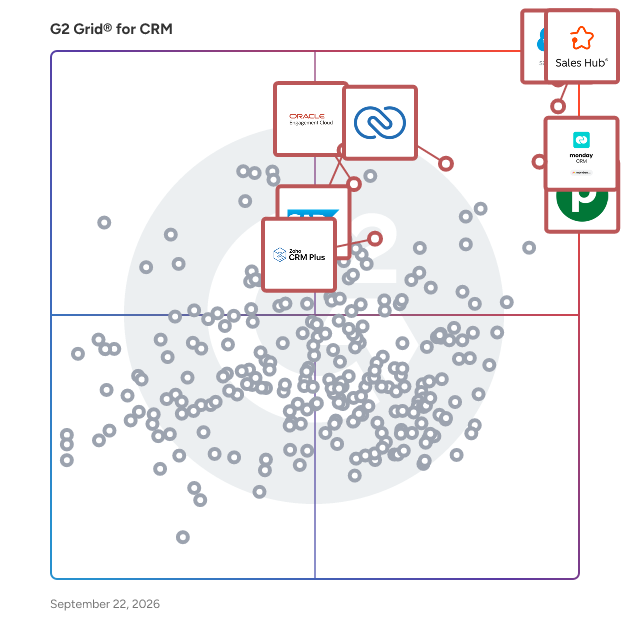
## G2 Grid® for CRM Software
 ![G2 Grid® for CRM Software plotting products by satisfaction and market presence](https://www.g2.com/categories/crm/grids.png?focus%5B%5D=506&focus%5B%5D=6227&focus%5B%5D=576&focus%5B%5D=459&focus%5B%5D=1619&focus%5B%5D=509&focus%5B%5D=464&focus%5B%5D=1174041)

Highlighted products: Agentforce Sales (formerly Salesforce Sales Cloud), HubSpot Sales Hub, Zoho CRM, Oracle CRM On Demand, Pipedrive, SAP Sales Cloud, Oracle Sales Cloud, and monday CRM.

Underlying data: [Grid® JSON](https://www.g2.com/categories/crm/grids.json?focus%5B%5D=agentforce-sales-formerly-salesforce-sales-cloud&focus%5B%5D=hubspot-sales-hub&focus%5B%5D=zoho-crm&focus%5B%5D=oracle-crm-on-demand&focus%5B%5D=pipedrive&focus%5B%5D=sap-sap-sales-cloud&focus%5B%5D=oracle-sales-cloud&focus%5B%5D=monday-crm&segment=mid-market)

**Sponsored**

### Nutshell

Founded in 2010, Nutshell is an all-in-one sales, marketing and engagement platform that helps B2B organizations work together to win more deals. Simple enough for any user and sophisticated enough for any business, Nutshell is built for teams who are tired of juggling separate sales and marketing tools and don’t want to pay a full-time admin to manage their software. If you're aiming to boost revenue, streamline your sales process, or craft engaging marketing messages, Nutshell could be the solution. Every Nutshell subscription includes unlimited CRM contacts and data storage, fully customizable reporting tools, free data migration assistance, and world-class live support, all at an extremely affordable price. In 2024, Nutshell introduced Nutshell Marketing and Nutshell Engagement. Nutshell Marketing helps businesses create compelling email campaigns and landing pages to drive audience engagement, while Nutshell Engagement connects you with leads and customers throughout the sales journey via web chat and text messaging. Nutshell also integrates with popular tools like Google Workspace/Gmail, Microsoft Office/Outlook, QuickBooks Online, Intercom, and Slack. Nutshell also offers a mobile version, allowing sales reps to create, search, and edit contact information while in the field. Nutshell serves thousands of businesses around the world and has been named a top CRM for both user-friendliness and affordability. Nutshell has been honored as a "Leader" in G2's Grid® Report for CRM every quarter since Fall 2020.

[Visit website](https://www.g2.com/external_clickthroughs/record?secure%5Bad_program%5D=paid_promo&secure%5Bad_slot%5D=category_product_list_llm&secure%5Bcategory_id%5D=179&secure%5Bchosen_at%5D=2026-07-31T23%3A47%3A22Z&secure%5Bmedium%5D=sponsored&secure%5Bprioritized%5D=false&secure%5Bproduct_id%5D=1589&secure%5Bresource_id%5D=179&secure%5Bresource_type%5D=Category&secure%5Bsource_type%5D=category_page&secure%5Bsource_url%5D=https%3A%2F%2Fwww.g2.com%2Fcategories%2Fcrm%2Fmid-market%3Fpage%3D5&secure%5Btoken%5D=fc91e45d1b94be60cbc0f8d5a9f7ff977d4bab02b8c3e42d28a0906cbfcd820d&secure%5Burl%5D=https%3A%2F%2Fwww.nutshell.com%2Flp%2Fcrm%3Futm_source%3Dg2%26utm_medium%3Dpaid%26utm_campaign%3Dpaid-promotions%26utm_term%3Dcrm&secure%5Burl_type%5D=paid_promos)

### [Accelo](https://www.g2.com/products/accelo/reviews)

Most PSA platforms tell you what happened. Accelo tells you what's coming. Professional services firms running on disconnected tools are making critical decisions on data that's always a few weeks behind: a project tool here, a resourcing spreadsheet there, an invoicing system that talks to neither. Scope drifts unnoticed. Margins erode before anyone sees them. Resourcing decisions get made on gut feel. And 42% of professional services firms are losing revenue they've already earned as a result. Accelo is an AI-powered PSA platform that connects project delivery, resourcing, and financials in one place and tells you what's coming before it becomes a problem. Not another tool to add to the stack. The platform that replaces the gaps between them. Where traditional PSA software records and reports, Accelo forecasts and flags. AI surfaces scope drift and margin risk in real time, while there's still a conversation to have, not a write-off to explain. Intelligent resourcing matches people to work based on skills, workload, and past performance, not just who has an opening in a spreadsheet. Capacity gaps show up against your live pipeline before they affect delivery, not after a hiring decision goes wrong. Accelo's AI is embedded across the platform, not bolted on as a separate module or a marketing claim. Predictive risk flagging monitors projects, resourcing, and financials simultaneously, surfacing early warning signals before they escalate. AI-predicted project completion dates update in real time as delivery data changes. Automated time capture logs billable hours as work happens, closing the gap between hours worked and revenue collected. Intelligent resource matching evaluates skills, workload, and past project performance (not just calendar availability) to recommend the right person for every engagement. For teams already using AI tools in their workflow, Accelo connects natively to ChatGPT, Claude, Gemini, and Microsoft Copilot via MCP, enabling natural language queries against live project, resource, and financial data without leaving the tools your team already uses. Every project your team completes makes the platform's recommendations sharper. Accelo serves agencies, consulting firms, IT services companies, and other professional services businesses with 20 to +500 employees managing a mix of project and retainer work, where leadership is making decisions based on incomplete or delayed data and the cost of finding out too late is already showing up in the margins.

**Average Rating:** 4.3/5.0

**Total Reviews:** 661

#### How Do G2 Users Rate Accelo?

- **Has the product been a good partner in doing business?:** 8.8/10 (Category avg: 8.9/10)
- **Workflow Capability:** 8.4/10 (Category avg: 8.5/10)
- **Contact & Account Management:** 8.7/10 (Category avg: 8.7/10)
- **Opportunity & Pipeline Mgmt.:** 8.5/10 (Category avg: 8.6/10)

#### Who Is the Company Behind Accelo?

- **Seller:** [Accelo](https://www.g2.com/sellers/accelo)
- **Company Website:** www.accelo.com
- **Year Founded:** 2011
- **HQ Location:** Denver, Colorado
- **Twitter:** @accelo  
2,980 Twitter followers
- **LinkedIn® Page:** [www.linkedin.com](https://www.g2.com/external_clickthroughs/record?secure%5Bsource_type%5D=product_profile&secure%5Btoken%5D=b77c15aa0278341164920175d99b33a5e7f6d729a1fa5ac8b0a40db4bf5dfc81&secure%5Burl%5D=https%3A%2F%2Fwww.linkedin.com%2Fcompany%2F6652457%2F&secure%5Burl_type%5D=linkedin_company_website)  
73 employees on LinkedIn®

#### Who Uses This Product?

- **Who Uses This:** Project Manager, CEO
- **Top Industries:** Marketing and Advertising, Information Technology and Services
- **Company Size:** 72% Small, 25% Medium

#### What Do G2 Reviewers Say About Accelo?

_AI-generated summary from verified user reviews_

##### Pros

- Users value the **ease of use** of Accelo, enjoying seamless access and efficient project management across departments.
- Users value the **comprehensive project oversight** of Accelo, enhancing coordination, efficiency, and profitability across tasks.
- Users value the **seamless integration** of Accelo, enhancing efficiency across multiple business functions for scalable growth.
- Users appreciate the **integrated client management** features of Accelo, enhancing efficiency and supporting business growth.
- Users value the **effective task management** provided by Accelo, enhancing project tracking and minimizing manual overhead.

##### Cons

- Users express frustration over **missing features** in Accelo, impacting usability and complicating task management.
- Users struggle with the **steep learning curve** of Accelo, requiring extensive configuration and causing frustration for small businesses.
- Users criticize Accelo for its **limited features** , which hinder efficiency and contribute to poor overall performance.
- Users find Accelo's **complexity** overwhelming, noting its steep learning curve and confusing multitude of options.
- Users find the **limited customization** in Accelo frustrating, hindering ability to tailor workflows to their unique needs.

#### What Are Recent G2 Reviews of Accelo?

**["Total control of projects and billing in an integrated and agile platform"](https://www.g2.com/survey_responses/accelo-review-12720113)**

**Rating:** 4.0/5.0 stars

_— Antonio H._

[Read full review](https://www.g2.com/survey_responses/accelo-review-12720113)

**["Streamlined Project Management, But Setup Can Be Overwhelming for Small Businesses"](https://www.g2.com/survey_responses/accelo-review-11856029)**

**Rating:** 4.5/5.0 stars

_— Ifeoma E._

[Read full review](https://www.g2.com/survey_responses/accelo-review-11856029)

#### What Are G2 Users Discussing About Accelo?

- [What is Accelo used for?](https://www.g2.com/discussions/what-is-accelo-used-for) - 1 comment

### [Progress Podio](https://www.g2.com/products/progress-podio/reviews)

Progress Podio is a flexible, custom collaboration database that enables you to accelerate and simplify your work. An all-in-one solution to accelerate productivity, digitize essential processes, streamline data collection, and automate document workflows in one secure tool. Progress Podio can automate, operationalize, and secure important business and document processes that reduces manual work and increases efficiency. Transform how work is done with versatile forms, powerful data collection, and automated client and document workflows— customized all by you with a few simple clicks. From key industries such as, creative agencies, legal services, accounting firms, real-estate, construction / manufacturing, to key departmental areas—sales, HR, marketing, legal, finance. Podio’s ability to connect diverse teams and disparate processes helps thousands of companies optimize their entire operations in one place. With Progress Podio, give your team a single tool to automate timely processes that unify in one tool. From simplifying client data collection to automating client interactions and agreements, Progress Podio simplifies your business’s most core activities.

**Average Rating:** 4.2/5.0

**Total Reviews:** 507

#### How Do G2 Users Rate Progress Podio?

- **Has the product been a good partner in doing business?:** 8.4/10 (Category avg: 8.9/10)
- **Workflow Capability:** 8.9/10 (Category avg: 8.5/10)
- **Contact & Account Management:** 8.6/10 (Category avg: 8.7/10)
- **Opportunity & Pipeline Mgmt.:** 8.4/10 (Category avg: 8.6/10)

#### Who Is the Company Behind Progress Podio?

- **Seller:** [Progress Software](https://www.g2.com/sellers/progress-software)
- **Company Website:** www.progress.com
- **Year Founded:** 1981
- **HQ Location:** Burlington, MA.
- **Twitter:** @ProgressSW  
48,773 Twitter followers
- **LinkedIn® Page:** [www.linkedin.com](https://www.g2.com/external_clickthroughs/record?secure%5Bsource_type%5D=product_profile&secure%5Btoken%5D=ab257d11ab0255eaaae8c28635f37e0e64277d81eae954d5985edfd545cd2d69&secure%5Burl%5D=https%3A%2F%2Fwww.linkedin.com%2Fcompany%2Fprogress-software%2F&secure%5Burl_type%5D=linkedin_company_website)  
4,205 employees on LinkedIn®

#### Who Uses This Product?

- **Who Uses This:** Owner, Project Manager
- **Top Industries:** Real Estate, Information Technology and Services
- **Company Size:** 61% Small, 28% Medium

#### What Do G2 Reviewers Say About Progress Podio?

_AI-generated summary from verified user reviews_

##### Pros

- Users appreciate the **ease of use** in Progress Podio, making collaboration and management tasks simple and efficient.
- Users appreciate the **automation capabilities** of Progress Podio, enhancing productivity and simplifying task management significantly.
- Users love the **customization options** that adapt Progress Podio to their specific business processes seamlessly.
- Users love the **integrated workflows and no-code capabilities** of Progress Podio, enhancing productivity and ease of use.
- Users appreciate the **seamless integrations** in Progress Podio, enhancing collaboration and simplifying business processes across various areas.

##### Cons

- Users face a challenging **learning curve** with Progress Podio due to complex setup and technical limitations.
- Users find the **billing issues** challenging, especially with recent changes affecting admin member pricing.
- Users find the **complexity** of Progress Podio challenging, requiring significant effort to create an effective setup.
- Users express frustration with **poor customer support** , indicating a need for improvement in assistance and integration.
- Users find the **slow performance** of Progress Podio frustrating, as it hampers efficiency and productivity.

#### What Are Recent G2 Reviews of Progress Podio?

**["Versatile Platform with Excellent Collaboration Tools"](https://www.g2.com/survey_responses/progress-podio-review-12063894)**

**Rating:** 4.0/5.0 stars

_— Katie B._

[Read full review](https://www.g2.com/survey_responses/progress-podio-review-12063894)

**["Progress Podio - Efficient and Organized CRM for Real Estate Teams"](https://www.g2.com/survey_responses/progress-podio-review-9216544)**

**Rating:** 5.0/5.0 stars

_— Norma I._

[Read full review](https://www.g2.com/survey_responses/progress-podio-review-9216544)

#### What Are G2 Users Discussing About Progress Podio?

- [What is Citrix Podio used for?](https://www.g2.com/discussions/what-is-citrix-podio-used-for)

### [Membrain](https://www.g2.com/products/membrain/reviews)

Membrain is a specialized growth platform designed for B2B companies focused on enhancing their sales processes and driving sustainable growth. This comprehensive software solution provides users with the necessary structure, guidance, and insights to foster the right behaviors and effectively execute their sales strategies. With a strong reputation in the industry, Membrain has gained the trust of top sales experts and organizations across more than 80 countries. Targeted primarily at sales teams and management within B2B organizations, Membrain serves as a versatile tool that can either replace or complement traditional CRM systems. Its robust features cater to a variety of use cases, including sales performance management, sales coaching, and sales enablement. By integrating these functionalities, Membrain enables organizations to streamline their sales processes, improve team collaboration, and ultimately drive better results. One of the key features of Membrain is its ability to provide actionable insights through data-driven analytics. Users can track performance metrics, identify trends, and gain a deeper understanding of their sales activities. This level of visibility allows sales teams to make informed decisions, adjust their strategies in real-time, and focus on the activities that yield the highest returns. Additionally, Membrain's sales coaching capabilities empower managers to mentor their teams effectively, ensuring that best practices are shared and adopted across the organization. Membrain stands out in its category due to its unique combination of CRM functionalities and specialized sales tools. Recognized as a G2 Crowd High Performer in multiple categories, including CRM, Sales Performance Management, Sales Coaching, and Sales Enablement, Membrain offers a holistic approach to sales management. This integration of features not only enhances user experience but also ensures that organizations can leverage a single platform to address various aspects of their sales operations. The platform's user-friendly interface and customizable workflows further enhance its appeal, allowing organizations to tailor the system to their specific needs. By providing a comprehensive solution that encompasses both traditional CRM capabilities and advanced sales performance tools, Membrain equips B2B companies with the resources necessary to thrive in a competitive landscape.

**Average Rating:** 4.6/5.0

**Total Reviews:** 211

#### How Do G2 Users Rate Membrain?

- **Has the product been a good partner in doing business?:** 9.6/10 (Category avg: 8.9/10)
- **Workflow Capability:** 9.0/10 (Category avg: 8.5/10)
- **Contact & Account Management:** 8.9/10 (Category avg: 8.7/10)
- **Opportunity & Pipeline Mgmt.:** 9.2/10 (Category avg: 8.6/10)

#### Who Is the Company Behind Membrain?

- **Seller:** [Membrain](https://www.g2.com/sellers/membrain)
- **Company Website:** www.membrain.com
- **Year Founded:** 2012
- **HQ Location:** Stockholm, Sweden
- **Twitter:** @membrain\_com  
1,990 Twitter followers
- **LinkedIn® Page:** [www.linkedin.com](https://www.g2.com/external_clickthroughs/record?secure%5Bsource_type%5D=product_profile&secure%5Btoken%5D=128b954648ec1b164dbc033fcc0dccbfbfa8433c867edbf8fd31c3b7cf80f8da&secure%5Burl%5D=https%3A%2F%2Fwww.linkedin.com%2Fcompany%2Fmembraincom%2F&secure%5Burl_type%5D=linkedin_company_website)  
39 employees on LinkedIn®

#### Who Uses This Product?

- **Who Uses This:** CEO
- **Top Industries:** Information Technology and Services, Computer Software
- **Company Size:** 60% Small, 34% Medium

#### What Do G2 Reviewers Say About Membrain?

_AI-generated summary from verified user reviews_

##### Pros

- Users appreciate the **ease of use** in Membrain, noting its intuitive structure and seamless team adoption.
- Users value the **highly customizable features** of Membrain, enhancing their efficiency in managing prospects and pipelines.
- Users value the **hands-on support** from Membrain, appreciating their commitment to helping with software adoption and success.
- Users appreciate the **prompt and helpful customer support** from Membrain, enhancing their overall experience and satisfaction.
- Users appreciate the **high customizability** of Membrain, enabling tailored workflows that enhance productivity and organization.

##### Cons

- Users note that the **missing features** in Membrain, like better email formatting and calendar usability, hinder productivity.
- Users find the **steep learning curve** of Membrain challenging initially, though it offers robust features once mastered.
- Users find the **incomplete information** challenging, making it difficult to locate essential features and resources effectively.
- Users desire more **features and customization** in Membrain, especially for graphs and email formatting options.
- Users experience **dashboard issues** with limited customization options and difficulties in exporting historical data effectively.

#### What Are Recent G2 Reviews of Membrain?

**["Membrain user for an Internal Sales role."](https://www.g2.com/survey_responses/membrain-review-10736226)**

**Rating:** 4.0/5.0 stars

_— Moises B._

[Read full review](https://www.g2.com/survey_responses/membrain-review-10736226)

**["Top-Notch Support, User-Friendly UI, and Powerful Workflow Customization"](https://www.g2.com/survey_responses/membrain-review-12622325)**

**Rating:** 4.5/5.0 stars

_— Chris W._

[Read full review](https://www.g2.com/survey_responses/membrain-review-12622325)

#### What Are G2 Users Discussing About Membrain?

- [What is Membrain used for?](https://www.g2.com/discussions/what-is-membrain-used-for) - 2 comments

### [Pivotal CRM](https://www.g2.com/products/pivotal-crm/reviews)

The foundations of your customer relationship management strategy are your customer-facing employees. That's why we have purpose-built every aspect of our CRM solution to get you up-and-running quickly, while remaining flexible so it can be closely-tailored to match exactly how your team works. We have the tools to help you attract customers, manage your partners and empower your sales and customer service teams. Learn why CRM users love our solutions.

**Average Rating:** 3.5/5.0

**Total Reviews:** 58

#### How Do G2 Users Rate Pivotal CRM?

- **Has the product been a good partner in doing business?:** 8.7/10 (Category avg: 8.9/10)
- **Workflow Capability:** 8.3/10 (Category avg: 8.5/10)
- **Contact & Account Management:** 8.2/10 (Category avg: 8.7/10)
- **Opportunity & Pipeline Mgmt.:** 7.6/10 (Category avg: 8.6/10)

#### Who Is the Company Behind Pivotal CRM?

- **Seller:** [Ignite Enterprise Software Solutions](https://www.g2.com/sellers/ignite-enterprise-software-solutions)
- **HQ Location:** Austin, TX
- **Twitter:** @ignitetech  
494 Twitter followers
- **LinkedIn® Page:** [www.linkedin.com](https://www.g2.com/external_clickthroughs/record?secure%5Bsource_type%5D=product_profile&secure%5Btoken%5D=eecef5847b3343cd5b4f97baf19c284f73312f381d0f89adc377a47055b54db3&secure%5Burl%5D=https%3A%2F%2Fwww.linkedin.com%2Fcompany%2F21226%2F&secure%5Burl_type%5D=linkedin_company_website)  
398 employees on LinkedIn®

#### Who Uses This Product?

- **Top Industries:** Computer Software
- **Company Size:** 50% Medium, 37% Large

#### What Do G2 Reviewers Say About Pivotal CRM?

_AI-generated summary from verified user reviews_

##### Pros

- Users value the **strong customer relationships** fostered by Pivotal CRM's understanding of needs and preferences.
- Users enjoy the **ease of use** in Pivotal CRM, facilitating efficient navigation and effective management of sales activities.
- Users value the **easy navigation** in Pivotal CRM, enhancing efficiency and organization in managing sales accounts.
- Users appreciate the **easy tracking** features in Pivotal CRM, enhancing efficiency with real-time sales management and streamlined activities.
- Users find the **valuable tools** in Pivotal CRM to be highly conducive for their team's success.

##### Cons

- Users find the **expertise required** for setting up Pivotal CRM overwhelming, especially without proper guidance for newcomers.
- Users face **integration issues** with third-party applications, limiting customization and impacting analytical summaries.
- Users point out that **limited customization** options in Pivotal CRM make it challenging to optimize their experience.
- Users find Pivotal CRM to be **time-consuming** to set up and navigate, especially for inexperienced users requiring guidance.

#### What Are Recent G2 Reviews of Pivotal CRM?

**["Streamlines Complex Workflows with Powerful Customization"](https://www.g2.com/survey_responses/pivotal-crm-review-12590090)**

**Rating:** 5.0/5.0 stars

_— Ajit S._

[Read full review](https://www.g2.com/survey_responses/pivotal-crm-review-12590090)

**["Efficient CRM with Customization Needs"](https://www.g2.com/survey_responses/pivotal-crm-review-12296126)**

**Rating:** 4.0/5.0 stars

_— Sanjeev R._

[Read full review](https://www.g2.com/survey_responses/pivotal-crm-review-12296126)

#### What Are G2 Users Discussing About Pivotal CRM?

- [Where is Avolin located?](https://www.g2.com/discussions/where-is-avolin-located)
- [What is CRM and its functions?](https://www.g2.com/discussions/pivotal-crm-what-is-crm-and-its-functions)
- [Is Pivotal a CRM?](https://www.g2.com/discussions/is-pivotal-a-crm)
- [What are key features of a CRM system?](https://www.g2.com/discussions/pivotal-crm-what-are-key-features-of-a-crm-system)

### [Less Annoying CRM](https://www.g2.com/products/less-annoying-crm/reviews)

A CRM without all the nonsense. Less Annoying CRM is for you if you’ve ever wished you could attach a to-do list to a contact, keep all your notes and emails for a client in one place, or just get a simple nudge so a follow-up never slips through the cracks again We built Less Annoying CRM in 2009 for the thousands of independent consultants, agents, and small business owners who are hitting the limits of their spreadsheets, but nowhere near needing the complexity of big CRMs. We're the middle ground between the spreadsheet you're manually updating, and all those complicated, expensive, overwhelming CRMs on top 10 lists. We're built to be more than a spreadsheet, less than a CRM. You get a simple contact list, a calendar that syncs with Google and Outlook, and an easy-to-read report of your leads and tasks. All your team members can collaborate without the chaos of a shared spreadsheet, and you'll get a daily email agenda of everything on your plate. What you \*won’t\* get are confusing features you’ll never use, a consultant to set it all up, or a surprise bill because you needed an extra feature. We believe in one simple price ($15/month/user), no long-term contracts, and free phone and email support from real, happy humans. See why we are ranked G2's #1 easiest-to-use CRM. Start your no-hassle, 30-day free trial today -- no credit card needed.

**Average Rating:** 4.9/5.0

**Total Reviews:** 656

#### How Do G2 Users Rate Less Annoying CRM?

- **Has the product been a good partner in doing business?:** 9.9/10 (Category avg: 8.9/10)
- **Workflow Capability:** 9.0/10 (Category avg: 8.5/10)
- **Contact & Account Management:** 9.6/10 (Category avg: 8.7/10)
- **Opportunity & Pipeline Mgmt.:** 9.1/10 (Category avg: 8.6/10)

#### Who Is the Company Behind Less Annoying CRM?

- **Seller:** [Less Annoying Software](https://www.g2.com/sellers/less-annoying-software)
- **Company Website:** www.lessannoyingcrm.com
- **Year Founded:** 2009
- **HQ Location:** St. Louis, MO
- **Twitter:** @LessAnnoyingCRM  
1,125 Twitter followers
- **LinkedIn® Page:** [www.linkedin.com](https://www.g2.com/external_clickthroughs/record?secure%5Bsource_type%5D=product_profile&secure%5Btoken%5D=b19de9bb6f3c86f7d90581412a288045400603ad1797234fb10e3762533c8f91&secure%5Burl%5D=https%3A%2F%2Fwww.linkedin.com%2Fcompany%2F2444991%2F&secure%5Burl_type%5D=linkedin_company_website)  
28 employees on LinkedIn®

#### Who Uses This Product?

- **Who Uses This:** Owner, President
- **Top Industries:** Insurance, Financial Services
- **Company Size:** 88% Small, 8% Medium

#### What Do G2 Reviewers Say About Less Annoying CRM?

_AI-generated summary from verified user reviews_

##### Pros

- Users appreciate the **intuitive interface** of Less Annoying CRM, making it easy for teams to stay organized.
- Users commend the **exceptional customer support** of Less Annoying CRM, ensuring assistance is always available when needed.
- Users value the **simplicity** of Less Annoying CRM, finding it effective and intuitive for their business needs.
- Users appreciate the **user-friendly interface** of Less Annoying CRM, allowing for a smooth and easy experience.
- Users praise the **incredible affordability** of Less Annoying CRM, making it accessible for small businesses.

##### Cons

- Users find the **missing features** of Less Annoying CRM limit its effectiveness for larger businesses and specific integration needs.
- Users face **integration issues** with Less Annoying CRM, making it challenging to connect with preferred applications and manage lists.
- Users find **limited features** restrict their ability to manage duplicates effectively, hindering overall functionality.
- Users find the **feature limitations** in reporting and automation options a hurdle for business growth.
- Users find the **limited customization** options in Less Annoying CRM to be a significant drawback for their needs.

#### What Are Recent G2 Reviews of Less Annoying CRM?

**["Straightforward and Easy to Integrate Into My Routine"](https://www.g2.com/survey_responses/less-annoying-crm-review-12875409)**

**Rating:** 4.0/5.0 stars

_— Carolyn D._

[Read full review](https://www.g2.com/survey_responses/less-annoying-crm-review-12875409)

**["Managing Nutrition Follow-ups and Daily Tasks More Professionally"](https://www.g2.com/survey_responses/less-annoying-crm-review-12865757)**

**Rating:** 5.0/5.0 stars

_— Ishan S._

[Read full review](https://www.g2.com/survey_responses/less-annoying-crm-review-12865757)

#### What Are G2 Users Discussing About Less Annoying CRM?

- [What is Less Annoying CRM used for?](https://www.g2.com/discussions/what-is-less-annoying-crm-used-for) - 1 comment

### [Insightly CRM](https://www.g2.com/products/insightly-crm/reviews)

Insightly is the modern, affordable CRM that teams love. It’s easy to use, simple to customize, and scales with companies as they grow, solving common pain points that legacy CRMs can't. Insightly helps teams build and convert sales pipeline, increase productivity, and build lasting customer relationships. Centralize and manage all your customer, sales, and business data—leads, contacts, emails, events, quotes, projects, tasks, opportunities, and business reports—in one easy-to-use, flexible and secure CRM that scales with your business. Increase sales efficiency and transparency with Insightly’s enterprise-grade Products, Price books, and Quotes (PPQ) capabilities. Quickly search, track, and manage millions of distinct products and services right inside the Insightly platform. Connect products and services to individual opportunities, eliminating human errors, bottlenecks, and inconsistencies. With Insightly’s PPQ, your field teams can generate custom quotes, contracts, and proposals for their opportunities with just a few clicks. Enjoy complete control and visibility into what you sell, to whom, when, and at what price. Use Insightly’s custom objects and apps to tailor workflows and processes to your unique business needs and preferences, ensuring high adoption and satisfaction. Use AppConnect to integrate Insightly with more than 500 popular apps. Insightly’s native CRM integrations include: Gmail Google Workspace & Google Apps Google Drive Quickbooks Online Xero Slack Dropbox Box MailChimp Evernote Zapier Facebook Lead Ads And more... Manage everything on the go with award-winning mobile applications for both Android and iOS. Scan business cards and upload all information in one click, update projects and records in real time, and enable your field team to create and update opportunities right at the client's location. Powerful in any vertical, Insightly CRM customers can add companion products for marketing automation, customer service, and integrations in the same platform. Insightly is trusted by more than a million users worldwide.

**Average Rating:** 4.2/5.0

**Total Reviews:** 926

#### How Do G2 Users Rate Insightly CRM?

- **Has the product been a good partner in doing business?:** 8.5/10 (Category avg: 8.9/10)
- **Workflow Capability:** 8.1/10 (Category avg: 8.5/10)
- **Contact & Account Management:** 8.5/10 (Category avg: 8.7/10)
- **Opportunity & Pipeline Mgmt.:** 8.3/10 (Category avg: 8.6/10)

#### Who Is the Company Behind Insightly CRM?

- **Seller:** [Unbounce](https://www.g2.com/sellers/unbounce)
- **Company Website:** unbounce.com
- **Year Founded:** 2009
- **HQ Location:** Vancouver
- **Twitter:** @unbounce  
72,651 Twitter followers
- **LinkedIn® Page:** [www.linkedin.com](https://www.g2.com/external_clickthroughs/record?secure%5Bsource_type%5D=product_profile&secure%5Btoken%5D=76598eff3f18a7c370a68f684b55dacfe22c6115b00daefcd8e2af6dd77e1a65&secure%5Burl%5D=https%3A%2F%2Fwww.linkedin.com%2Fcompany%2F503432%2F&secure%5Burl_type%5D=linkedin_company_website)  
130 employees on LinkedIn®

#### Who Uses This Product?

- **Who Uses This:** Owner, CEO
- **Top Industries:** Marketing and Advertising, Information Technology and Services
- **Company Size:** 73% Small, 21% Medium

#### What Do G2 Reviewers Say About Insightly CRM?

_AI-generated summary from verified user reviews_

##### Pros

- Users praise the **ease of use** of Insightly CRM, highlighting its user-friendly interface and helpful features.
- Users appreciate the **easy customization** options in Insightly CRM, enabling quick access to tailored client information.
- Users appreciate the **customizability** of Insightly CRM, enabling tailored fields, reports, and layouts for various needs.
- Users appreciate the **flexible customization options** in Insightly CRM that cater to specific needs and enhance usability.
- Users value the **feature richness** of Insightly CRM, appreciating its intuitive interface and versatility for project management.

##### Cons

- Users find the **learning curve steep** , complicating automation and workflow setup for new users.
- Users express frustration over **limited customization** options in Insightly CRM, hindering their ability to tailor the tool effectively.
- Users find the **limited features** hinder effective use, especially in project management and task customization.
- Users struggle with **incomplete information** , facing challenges in documentation and report generation that hinder usability.
- Users find the setup process of Insightly CRM to be **time-consuming** compared to other platforms, affecting efficiency.

#### What Are Recent G2 Reviews of Insightly CRM?

**["Streamlined Sales and Task Management"](https://www.g2.com/survey_responses/insightly-crm-review-12865487)**

**Rating:** 4.0/5.0 stars

_— Jeni J._

[Read full review](https://www.g2.com/survey_responses/insightly-crm-review-12865487)

**["Keeping Customer Workflows Better Connected"](https://www.g2.com/survey_responses/insightly-crm-review-12948095)**

**Rating:** 4.5/5.0 stars

_— Ishan S._

[Read full review](https://www.g2.com/survey_responses/insightly-crm-review-12948095)

### [Teamwork CRM](https://www.g2.com/products/teamwork-crm/reviews)

Teamwork.com offers a suite of integrated business management apps that enables teams to communicate seamlessly, collaborate effortlessly, drive sales, support clients and efficiently deliver on all your projects. Teamwork CRM lets you split leads and opportunities into separate pipelines giving you greater visibility and control over your sales process. No more trying to keep track of your leads across multiple spreadsheets and emails. With Teamwork CRM, you have full visibility over your sales process — giving you more insights on how to accelerate it and make sure nothing falls through the cracks. With one central place to track everything from first touch to winning the deal, your team will know exactly where to focus their time and see how each deal is progressing at every stage of the sales cycle.

**Average Rating:** 4.2/5.0

**Total Reviews:** 55

#### How Do G2 Users Rate Teamwork CRM?

- **Has the product been a good partner in doing business?:** 8.8/10 (Category avg: 8.9/10)
- **Workflow Capability:** 8.9/10 (Category avg: 8.5/10)
- **Contact & Account Management:** 8.8/10 (Category avg: 8.7/10)
- **Opportunity & Pipeline Mgmt.:** 8.7/10 (Category avg: 8.6/10)

#### Who Is the Company Behind Teamwork CRM?

- **Seller:** [Teamwork](https://www.g2.com/sellers/teamwork)
- **Year Founded:** 2007
- **HQ Location:** Cork
- **Twitter:** @teamwork  
1 Twitter followers
- **LinkedIn® Page:** [www.linkedin.com](https://www.g2.com/external_clickthroughs/record?secure%5Bsource_type%5D=product_profile&secure%5Btoken%5D=d7530a7a9a1b50b103b6b37add1ac5ed68ffff24fa826c1ef51bd932ac2c2ae9&secure%5Burl%5D=https%3A%2F%2Fwww.linkedin.com%2Fcompany%2F1042291%2F&secure%5Burl_type%5D=linkedin_company_website)  
549 employees on LinkedIn®

#### Who Uses This Product?

- **Top Industries:** Information Technology and Services, Marketing and Advertising
- **Company Size:** 53% Small, 33% Medium

#### What Do G2 Reviewers Say About Teamwork CRM?

_AI-generated summary from verified user reviews_

##### Pros

- Users value the **ease of use** in Teamwork CRM, enhancing productivity with its intuitive interface and clear pipeline views.
- Users appreciate the **easy setup** of Teamwork CRM, enabling quick onboarding and efficient sales process management.
- Users value the **intuitive and straightforward design** of Teamwork CRM, enhancing productivity and engagement within their sales teams.
- Users commend the **intuitive interface** of Teamwork CRM for its straightforward usability and seamless navigation.
- Users value the **efficient lead management** in Teamwork CRM, appreciating its intuitive interface and seamless team collaboration.

##### Cons

- Users express frustration over **limited customization** , wishing for more advanced features and flexible options within Teamwork CRM.
- Users feel that **missing features** in Teamwork CRM hinder efficiency, particularly in email integration and mobile functionality.
- Users face **email integration issues** with inconsistent threading and tracking, complicating communication and organization in Teamwork CRM.
- Users experience **feature issues** with email integration and mobile app limitations, hindering overall CRM efficiency.
- Users experience **integration issues** with Teamwork CRM, finding the email integration basic and lacking seamless tool connectivity.

#### What Are Recent G2 Reviews of Teamwork CRM?

**["Seamless Lead Management and Team Collaboration"](https://www.g2.com/survey_responses/teamwork-crm-review-12935853)**

**Rating:** 5.0/5.0 stars

_— Khushbu B._

[Read full review](https://www.g2.com/survey_responses/teamwork-crm-review-12935853)

**["A Reliable Workspace for Projects, Tasks, and Ongoing Activities"](https://www.g2.com/survey_responses/teamwork-crm-review-12939955)**

**Rating:** 4.5/5.0 stars

_— Ishan S._

[Read full review](https://www.g2.com/survey_responses/teamwork-crm-review-12939955)

#### What Are G2 Users Discussing About Teamwork CRM?

- [How do you use teamwork tools?](https://www.g2.com/discussions/teamwork-crm-how-do-you-use-teamwork-tools)
- [How does teamwork app work?](https://www.g2.com/discussions/teamwork-crm-how-does-teamwork-app-work)
- [What is teamwork software used for?](https://www.g2.com/discussions/teamwork-crm-what-is-teamwork-software-used-for)
- [What are some features of CRM?](https://www.g2.com/discussions/teamwork-crm-what-are-some-features-of-crm)

### [Pipeline CRM](https://www.g2.com/products/pipeline-crm/reviews)

Pipeline CRM is a sales-first CRM designed to help teams close deals faster, automate processes, and drive predictable revenue growth. Our platform eliminates time-consuming admin work with powerful automation, seamlessly moving leads from prospect to customer. With an intuitive interface and highly customizable workflows, sales teams can focus on selling—not data entry.

**Average Rating:** 4.3/5.0

**Total Reviews:** 911

#### How Do G2 Users Rate Pipeline CRM?

- **Has the product been a good partner in doing business?:** 9.1/10 (Category avg: 8.9/10)
- **Workflow Capability:** 8.1/10 (Category avg: 8.5/10)
- **Contact & Account Management:** 8.7/10 (Category avg: 8.7/10)
- **Opportunity & Pipeline Mgmt.:** 8.7/10 (Category avg: 8.6/10)

#### Who Is the Company Behind Pipeline CRM?

- **Seller:** [Pipeline CRM](https://www.g2.com/sellers/pipeline-crm)
- **Company Website:** pipelinecrm.com
- **Year Founded:** 2006
- **HQ Location:** Seattle, WA
- **Twitter:** @PipelineDeals  
2,861 Twitter followers
- **LinkedIn® Page:** [www.linkedin.com](https://www.g2.com/external_clickthroughs/record?secure%5Bsource_type%5D=product_profile&secure%5Btoken%5D=51b57ddc105ae995998f9c5821db49c5e8208a8a468e5e2c81c25c0619caee7f&secure%5Burl%5D=https%3A%2F%2Fwww.linkedin.com%2Fcompany%2F1073626%2F&secure%5Burl_type%5D=linkedin_company_website)  
28 employees on LinkedIn®

#### Who Uses This Product?

- **Who Uses This:** Account Manager, President
- **Top Industries:** Construction, Marketing and Advertising
- **Company Size:** 65% Small, 27% Medium

#### What Do G2 Reviewers Say About Pipeline CRM?

_AI-generated summary from verified user reviews_

##### Pros

- Users praise the **ease of use** in Pipeline CRM, making it quick to learn and enhancing productivity.
- Users value the **intuitive interface** of Pipeline CRM, enhancing organization and efficiency with minimal training required.
- Users appreciate the **organized approach** of Pipeline CRM, allowing seamless management and tracking of leads and deals.
- Users appreciate the **user-friendly interface** of Pipeline CRM, making team onboarding and client management quick and efficient.
- Users highlight the **responsive customer support** of Pipeline CRM, appreciating quick assistance for their queries.

##### Cons

- Users find the **limited features** of Pipeline CRM hinder deep integrations and automation options, impacting overall effectiveness.
- Users find the **limited customization** options of Pipeline CRM inadequate for complex sales processes, hindering its effectiveness.
- Users face **integration issues** with Pipeline CRM, limiting functionality and causing challenges with third-party app connectivity.
- Users identify **missing features** , particularly in the mobile app and integration capabilities, limiting automation and syncing options.
- Users face **slow performance** with Pipeline CRM, especially during updates and due to limited third-party integrations.

#### What Are Recent G2 Reviews of Pipeline CRM?

**["Keeping Follow Ups, Tasks, Timelines, and Daily Workflow More Under Control"](https://www.g2.com/survey_responses/pipeline-crm-review-12880667)**

**Rating:** 4.5/5.0 stars

_— Ishan S._

[Read full review](https://www.g2.com/survey_responses/pipeline-crm-review-12880667)

**["Sales-Focused, Easy-to-Use CRM with Strong Pipeline Customization and Reporting"](https://www.g2.com/survey_responses/pipeline-crm-review-12860142)**

**Rating:** 4.0/5.0 stars

_— Verified User in Oil & Energy_

[Read full review](https://www.g2.com/survey_responses/pipeline-crm-review-12860142)

#### What Are G2 Users Discussing About Pipeline CRM?

- [What is Pipeline CRM used for?](https://www.g2.com/discussions/what-is-pipeline-crm-used-for)

### [CentraHub CRM](https://www.g2.com/products/centrahub-crm-g2/reviews)

CentraHub CRM is a future-proof business automation solution that functions as a single source of data and processes for all operations. It is an industry-ready, mobile-optimized CRM with dedicated modules for marketing, sales, and service automation. Apart from its RESTful API integrations, CentraHub CRM also equips users with digital commerce and cross CRM tools. CentraHub CRM could be used by businesses in all major industries and verticals. We provide industry-specific CRM systems tailored to their unique requirements. • Real Estate • Computer Aided Facility Management • Auto Sales, Garages and Rentals • Education Management • Project Management • Delivery and Courier Management • Professional Services • Loyalty Management • Asset Management

**Average Rating:** 4.8/5.0

**Total Reviews:** 31

#### How Do G2 Users Rate CentraHub CRM?

- **Has the product been a good partner in doing business?:** 8.3/10 (Category avg: 8.9/10)
- **Workflow Capability:** 9.2/10 (Category avg: 8.5/10)
- **Contact & Account Management:** 9.3/10 (Category avg: 8.7/10)
- **Opportunity & Pipeline Mgmt.:** 9.2/10 (Category avg: 8.6/10)

#### Who Is the Company Behind CentraHub CRM?

- **Seller:** [Centra Hub](https://www.g2.com/sellers/centra-hub)
- **Year Founded:** 2016
- **HQ Location:** Hyderabad, Telangana
- **Twitter:** @CentrahubCRM  
250 Twitter followers
- **LinkedIn® Page:** [www.linkedin.com](https://www.g2.com/external_clickthroughs/record?secure%5Bsource_type%5D=product_profile&secure%5Btoken%5D=ee5ac48d7f784f42bb92a3e676e19494ad8852817e250bae0ca1e1aa8eea95ed&secure%5Burl%5D=https%3A%2F%2Fwww.linkedin.com%2Fcompany%2Fcentrahubcrm&secure%5Burl_type%5D=linkedin_company_website)  
90 employees on LinkedIn®

#### Who Uses This Product?

- **Top Industries:** Information Technology and Services, Marketing and Advertising
- **Company Size:** 62% Medium, 36% Small

#### What Are Recent G2 Reviews of CentraHub CRM?

**["Perfect CRM for Mid size business"](https://www.g2.com/survey_responses/centrahub-crm-review-10245823)**

**Rating:** 5.0/5.0 stars

_— Virat G._

[Read full review](https://www.g2.com/survey_responses/centrahub-crm-review-10245823)

**["Best CRM to use for customer relationship"](https://www.g2.com/survey_responses/centrahub-crm-review-8644365)**

**Rating:** 4.5/5.0 stars

_— dipesh P._

[Read full review](https://www.g2.com/survey_responses/centrahub-crm-review-8644365)

### [Floww.ai](https://www.g2.com/products/floww-ai/reviews)

Floww.ai is an GenAI powered software suite enabling High Velocity sales for B2C & B2B2C businesses. Floww.ai’s integrated sales platform offers Sales Execution CRM, NoCode Instant Analytics, Marketing & Workflow Automations integrated with modern communication stack. Floww.ai's advanced Generative AI tools, Sales Co-Pliot and Analytics Co-Pliot, are enabling efficient & high quality sales approaches enabled with instant analytics and indepth-insights. Majority of the CRMs are built primarily for B2B use cases and fail to accommodate effectively for B2C and B2B2C businesses. The high velocity and volume of modern B2C sales, necessitates an integrated sales platform enabling agile sales management for swiftly adapting to dynamic market environments.

**Average Rating:** 4.7/5.0

**Total Reviews:** 141

#### How Do G2 Users Rate Floww.ai?

- **Has the product been a good partner in doing business?:** 9.5/10 (Category avg: 8.9/10)
- **Workflow Capability:** 9.3/10 (Category avg: 8.5/10)
- **Contact & Account Management:** 9.3/10 (Category avg: 8.7/10)
- **Opportunity & Pipeline Mgmt.:** 9.4/10 (Category avg: 8.6/10)

#### Who Is the Company Behind Floww.ai?

- **Seller:** [Floww.ai](https://www.g2.com/sellers/floww-ai)
- **Year Founded:** 2023
- **HQ Location:** Hyderabad, Telangana
- **Twitter:** @letsflowwai  
90 Twitter followers
- **LinkedIn® Page:** [www.linkedin.com](https://www.g2.com/external_clickthroughs/record?secure%5Bsource_type%5D=product_profile&secure%5Btoken%5D=0ea6ce54145be583ccadc0177aad3e12dec93a8d6bdb79c0941d026340602626&secure%5Burl%5D=https%3A%2F%2Fwww.linkedin.com%2Fcompany%2Fflowwai%2F&secure%5Burl_type%5D=linkedin_company_website)  
14 employees on LinkedIn®

#### Who Uses This Product?

- **Who Uses This:** Business Development Manager
- **Top Industries:** Education Management, E-Learning
- **Company Size:** 50% Large, 37% Medium

#### What Do G2 Reviewers Say About Floww.ai?

_AI-generated summary from verified user reviews_

##### Pros

- Users highlight the **ease of use** of Floww.ai, emphasizing its intuitive UI that simplifies flow creation for everyone.
- Users find the **smart boards helpful** , significantly saving time and enhancing usability for their team use cases.
- Users find Floww.ai **user-friendly** , enabling easy flow creation even without technical knowledge, thanks to its amazing UI.
- Users find the **amazing UI** of Floww.ai user-friendly, making it easy for everyone to create flows effortlessly.
- Users praise the **easy creation** of flows in Floww.ai, finding it accessible for everyone regardless of technical knowledge.

##### Cons

- Users report occasional **performance issues** with Floww.ai, including slow workflows and system hangs during stage changes.
- Users experience occasional **technical issues** like slow workflows and system hangs, affecting performance temporarily.
- Users find a **lack of guidance** on Floww.ai, necessitating more tutorials for better understanding and issue resolution.
- Users struggle with a **high learning curve** due to long loading times and lack of adequate tutorials.
- Users express frustration with the **slow loading times** when handling large data sets, suggesting more tutorials for guidance.

#### What Are Recent G2 Reviews of Floww.ai?

**["Aanandhu's Insights"](https://www.g2.com/survey_responses/floww-ai-review-8867880)**

**Rating:** 5.0/5.0 stars

_— Anandhu K._

[Read full review](https://www.g2.com/survey_responses/floww-ai-review-8867880)

**["Versatile and Best UI"](https://www.g2.com/survey_responses/floww-ai-review-10399393)**

**Rating:** 5.0/5.0 stars

_— Suresh B._

[Read full review](https://www.g2.com/survey_responses/floww-ai-review-10399393)

### [Spotler CRM](https://www.g2.com/products/spotler-crm/reviews)

Spotler CRM is a user-friendly Customer Relationship Management (CRM) system designed to enhance B2B sales and marketing efforts. It centralises customer and prospect data, providing a comprehensive 360-degree view that enables businesses to streamline processes and improve lead conversion rates. Key Features: Extensive Contact Management: Beyond basic contact details, Spotler CRM tracks all interactions via email, phone, and shared documents, offering a detailed timeline of customer engagements. Pipeline Management: The system allows for easy management of sales opportunities, enabling teams to prioritise, qualify, and visualise sales processes, fostering better collaboration and efficiency. Customisation: Spotler CRM is adaptable to individual business needs, allowing users to add new fields, manage user access, and customise layouts, graphs, and dashboards to align with specific sales processes. Workflow Automation: Automate routine tasks, create workflows, set up automatic follow-ups, and configure notifications to enhance productivity and ensure timely responses. Reporting and Insights: Monitor return on investment (ROI) and make data-driven decisions with comprehensive reporting tools that inform campaign strategies and sales tactics. Integration and Support: Spotler CRM integrates seamlessly with various tools, enhancing its functionality and ensuring a cohesive workflow. The platform is designed to be user-friendly, allowing for immediate and independent use. Additionally, Spotler offers professional services and support, including extensive training and technical assistance, to help users maximise the software's potential. By consolidating customer information and automating key processes, Spotler CRM enables businesses to deliver consistent customer experiences and drive more effective sales and marketing outcomes.

**Average Rating:** 4.4/5.0

**Total Reviews:** 143

#### How Do G2 Users Rate Spotler CRM?

- **Has the product been a good partner in doing business?:** 9.1/10 (Category avg: 8.9/10)
- **Workflow Capability:** 8.8/10 (Category avg: 8.5/10)
- **Contact & Account Management:** 8.8/10 (Category avg: 8.7/10)
- **Opportunity & Pipeline Mgmt.:** 8.4/10 (Category avg: 8.6/10)

#### Who Is the Company Behind Spotler CRM?

- **Seller:** [Spotler Group](https://www.g2.com/sellers/spotler-group-a3f6b7c0-24fb-4205-9f31-02f8a1d43e29)
- **Year Founded:** 2001
- **HQ Location:** Rotterdam, NL
- **LinkedIn® Page:** [www.linkedin.com](https://www.g2.com/external_clickthroughs/record?secure%5Bsource_type%5D=product_profile&secure%5Btoken%5D=7b56c0f59c6bec30134538449063af8ce8521d26f28197bced3170e60a9fc965&secure%5Burl%5D=https%3A%2F%2Fwww.linkedin.com%2Fcompany%2Fspotler-group%2F&secure%5Burl_type%5D=linkedin_company_website)  
164 employees on LinkedIn®

#### Who Uses This Product?

- **Top Industries:** Information Technology and Services, Financial Services
- **Company Size:** 87% Small, 10% Medium

#### What Do G2 Reviewers Say About Spotler CRM?

_AI-generated summary from verified user reviews_

##### Pros

- Users value the **robust marketing automation** features of Spotler CRM, enhancing efficiency in managing campaigns and leads.
- Users appreciate the **user-friendly interface** of Spotler CRM, making navigation and onboarding effortless for everyone.
- Users appreciate the **robust marketing automation and seamless integration** of Spotler CRM, enhancing efficiency and simplifying processes.
- Users value the **flexibility** of Spotler CRM, easily integrating tools and accommodating various team workflows efficiently.
- Users value the **seamless integration capabilities** of Spotler CRM, enhancing productivity by connecting essential business tools effortlessly.

##### Cons

- Users face **integration issues** with Spotler CRM, making it difficult to connect with third-party applications effectively.
- Users find the **lack of integrations** with third-party applications hampers effective data transfer and business operations.
- Users find the **interface somewhat cluttered** , which affects ease of navigation and overall user experience.
- Users experience **poor integration with third-party applications** , leading to inefficient data transfer and operational challenges.
- Users find Spotler CRM's **high complexity** in customization and advanced features makes it less intuitive than competitors.

#### What Are Recent G2 Reviews of Spotler CRM?

**["Streamlined CRM with Powerful Email Marketing"](https://www.g2.com/survey_responses/spotler-crm-review-12770288)**

**Rating:** 4.0/5.0 stars

_— Aryan G._

[Read full review](https://www.g2.com/survey_responses/spotler-crm-review-12770288)

**["Effortless CRM with Seamless Marketing Integration and Top-Notch Support"](https://www.g2.com/survey_responses/spotler-crm-review-12083422)**

**Rating:** 5.0/5.0 stars

_— Verified User in Accounting_

[Read full review](https://www.g2.com/survey_responses/spotler-crm-review-12083422)

#### What Are G2 Users Discussing About Spotler CRM?

- [What is Really Simple Systems used for?](https://www.g2.com/discussions/what-is-really-simple-systems-used-for)

### [Mothernode](https://www.g2.com/products/mothernode/reviews)

Mothernode CRM is an all-in-one CRM that combines rich features and efficiency often found in more expensive CRM software. Increase productivity and revenue with timesaving features that focus on customer management, salesforce automation, and marketing automation. Specifically designed for businesses looking to get organized and grow, Mothernode is the only CRM to offer expansion modules like sales orders, purchase orders, invoicing, quotes and more, enabling the software to offer more capabilities as your business needs expand, delivering a one-stop solution for all your CRM needs. Your sales team, account managers and customer service team will love how easy this software is to adopt and use. The intuitive application delivers all your client's activities and history in one simple interface. Based in the cloud, Mothernode CRM is accessible from any computer or mobile device, anywhere in the world with an Internet connection. Mothernode CRM supports management and their sales and customer service teams with detailed reporting about the history of client communications and current activity. Analyzing the data from your customer contact history can help guide your marketing team in creating specialized marketing messages for segments of your clientele, resulting in greater collaboration between the various departments of your organization. This increased collaboration results in a more consistent customer experience across all channels, helping to build brand loyalty and increase customer retention. Mothernode CRM also integrates with a number of popular software applications, including GMail and Outlook. Outlook integration allows you to synchronize your calendars and contacts so you can stay organized and on top of all your important activity. Integration with Quickbooks allows you to monitor spending and revenue from your sales, customer service, and marketing departments and export that data directly into your accounting software. With all of the time and effort saved through using Mothernode CRM, you can focus more on developing big-picture strategies for growing and developing your business.

**Average Rating:** 4.5/5.0

**Total Reviews:** 40

#### How Do G2 Users Rate Mothernode?

- **Has the product been a good partner in doing business?:** 9.7/10 (Category avg: 8.9/10)
- **Workflow Capability:** 7.5/10 (Category avg: 8.5/10)
- **Contact & Account Management:** 8.9/10 (Category avg: 8.7/10)
- **Opportunity & Pipeline Mgmt.:** 8.3/10 (Category avg: 8.6/10)

#### Who Is the Company Behind Mothernode?

- **Seller:** [Mothernode](https://www.g2.com/sellers/mothernode)
- **Year Founded:** 2009
- **HQ Location:** Irving, TX
- **Twitter:** @Mothernode  
267 Twitter followers
- **LinkedIn® Page:** [www.linkedin.com](https://www.g2.com/external_clickthroughs/record?secure%5Bsource_type%5D=product_profile&secure%5Btoken%5D=1f043c6ee0355c7331aee3289d736db3bfc52ddde89ff428a870afd555ee86d7&secure%5Burl%5D=https%3A%2F%2Fwww.linkedin.com%2Fcompany%2F693754%2F&secure%5Burl_type%5D=linkedin_company_website)  
13 employees on LinkedIn®

#### Who Uses This Product?

- **Top Industries:** Architecture & Planning, Construction
- **Company Size:** 50% Small, 48% Medium

#### What Are Recent G2 Reviews of Mothernode?

**["Adaptive Software - Grows Alongside Your Team"](https://www.g2.com/survey_responses/mothernode-review-3814810)**

**Rating:** 5.0/5.0 stars

_— Jessica W._

[Read full review](https://www.g2.com/survey_responses/mothernode-review-3814810)

**["An all-in-one platform to carry out your CRM operations effectively."](https://www.g2.com/survey_responses/mothernode-review-4506667)**

**Rating:** 4.0/5.0 stars

_— Verified User in Automotive_

[Read full review](https://www.g2.com/survey_responses/mothernode-review-4506667)

#### What Are G2 Users Discussing About Mothernode?

- [What is Mothernode used for?](https://www.g2.com/discussions/what-is-mothernode-used-for)

### [Prospect CRM](https://www.g2.com/products/prospect-crm/reviews)

Prospect, the #1 Stock-Aware CRM, is perfect for growing Wholesale, Distributor and Manufacturing businesses. Sell more, in less time, every time - with Prospect CRM! As part of the ERP division at The Access Group, Prospect CRM is delivered to more than 5,000 SME users worldwide. Stock-Aware CRM combines the best of traditional CRM – Marketing, Sales Pipelines and Customer Service Management – with the reality of selling B2B products – quoting, ordering, inventory management, special pricing, back orders, product information and even contracts, serial numbers and asset tracking...to ensure your sales and service teams are fully Stock-Aware.

**Average Rating:** 4.6/5.0

**Total Reviews:** 97

#### How Do G2 Users Rate Prospect CRM?

- **Has the product been a good partner in doing business?:** 9.3/10 (Category avg: 8.9/10)
- **Workflow Capability:** 8.9/10 (Category avg: 8.5/10)
- **Contact & Account Management:** 8.7/10 (Category avg: 8.7/10)
- **Opportunity & Pipeline Mgmt.:** 8.6/10 (Category avg: 8.6/10)

#### Who Is the Company Behind Prospect CRM?

- **Seller:** [ProspectSoft](https://www.g2.com/sellers/prospectsoft)
- **Year Founded:** 2000
- **HQ Location:** Loughborough, GB
- **LinkedIn® Page:** [www.linkedin.com](https://www.g2.com/external_clickthroughs/record?secure%5Bsource_type%5D=product_profile&secure%5Btoken%5D=315425f48cf87d97b11f52073e75a7aae972cfab82699b3bbe9358dd9051060c&secure%5Burl%5D=https%3A%2F%2Fwww.linkedin.com%2Fcompany%2F128923%2F&secure%5Burl_type%5D=linkedin_company_website)  
20 employees on LinkedIn®

#### Who Uses This Product?

- **Top Industries:** Wholesale, Food Production
- **Company Size:** 78% Small, 18% Medium

#### What Do G2 Reviewers Say About Prospect CRM?

_AI-generated summary from verified user reviews_

##### Pros

- Users appreciate the **ease of use** of Prospect CRM, which simplifies database management and enhances workflow efficiency.
- Users value the **easy setup** of Prospect CRM, which enhances workflow efficiency and simplifies report generation.
- Users value the **efficiency** of Prospect CRM, facilitating smooth operations and effective report generation.
- Users value the **extensive features** of Prospect CRM, appreciating its customizable workflows and detailed sales reports.
- Users value the **organization efficiency** of Prospect CRM, which simplifies reporting and streamlines workflow effectively.

##### Cons

- Users report significant **integration issues** with Prospect CRM, leading to difficulties connecting with essential apps and services.
- Users express frustration over the **missing features** in Prospect CRM, limiting its effectiveness for B2B and B2C needs.
- Users express frustration with **deceptive sales promises** , highlighting poor support and lack of valuable features in Prospect CRM.
- Users report significant **connectivity issues** with Prospect CRM, including poor integration and syncing that hampers functionality.
- Users find **feature issues** with Prospect CRM, as promised functionalities lag behind real-world performance and integration.

#### What Are Recent G2 Reviews of Prospect CRM?

**["Keeping Tasks, Activities, and Follow-Ups Better Organized"](https://www.g2.com/survey_responses/prospect-crm-review-12896270)**

**Rating:** 5.0/5.0 stars

_— Ishan S._

[Read full review](https://www.g2.com/survey_responses/prospect-crm-review-12896270)

**["Streamlines B2B Sales with Strong German Market Fit"](https://www.g2.com/survey_responses/prospect-crm-review-12503853)**

**Rating:** 4.0/5.0 stars

_— Darcus B._

[Read full review](https://www.g2.com/survey_responses/prospect-crm-review-12503853)

#### What Are G2 Users Discussing About Prospect CRM?

- [What is Prospect CRM used for?](https://www.g2.com/discussions/what-is-prospect-crm-used-for)
- [How much does workflow max cost?](https://www.g2.com/discussions/how-much-does-workflow-max-cost)
- [What is a CRM tracking system?](https://www.g2.com/discussions/what-is-a-crm-tracking-system)
- [What is the best free CRM software?](https://www.g2.com/discussions/what-is-the-best-free-crm-software)
- [What are the features of CRM software?](https://www.g2.com/discussions/prospect-crm-what-are-the-features-of-crm-software)

### [Cinode](https://www.g2.com/products/cinode/reviews)

Cinode is the AI-powered operating platform for consulting firms — the single system that connects skills, sales, and resource planning to supercharge growth. Founded in 2010, Cinode was built specifically for the consulting industry to solve its most fundamental questions: Who knows what? Who’s available? What can we sell? and How do we win more business — faster and smarter? From first client contact to staffing, delivery, and long-term growth, Cinode gives consultancy leaders real-time insights that drive better decisions and measurable results. With intuitive skills management, instant CV creation, advanced utilization planning, and AI-driven matching — all in one platform — teams work with clarity, speed, and confidence. A Platform Built for the Future of Consulting Cinode brings together the core building blocks of a modern consultancy: • Skills & Competence Management – Map every skill, identify gaps, and unlock the full value of your collective expertise. • Professional CV & Profiles – Create tailored, high-quality consultant profiles in seconds to win more deals. • Resource Planning & Matching – Maximize utilization with intelligent planning and precision matching. • Sales & Delivery Integration – Connect pipeline and delivery to shorten sales cycles and reduce friction. • Partners & Subcontractors – Scale delivery through collaboration with external consultants and partners. • AI-Driven Automation – Automate intake, matching, insights, and actions with AI, including MCP Server and AI chat directly on your Cinode data. A Growing Global Network Cinode is not just a platform — it’s an ecosystem. Today, Cinode connects a network of over 9,000 consulting firms, enabling collaboration, partner sourcing, and access to a broader pool of skills when demand peaks. Why Cinode Consulting firms use Cinode to: • respond to client requests in minutes instead of days, • improve utilization and profitability, • engage consultants with better matching and transparency, and • scale their business with data-driven confidence. Headquartered in Stockholm, Cinode is trusted by consulting firms across Europe and beyond — helping tens of thousands of consultants match the right skills to the right assignments, every day.

**Average Rating:** 4.6/5.0

**Total Reviews:** 145

#### How Do G2 Users Rate Cinode?

- **Has the product been a good partner in doing business?:** 9.1/10 (Category avg: 8.9/10)
- **Workflow Capability:** 7.1/10 (Category avg: 8.5/10)
- **Contact & Account Management:** 7.6/10 (Category avg: 8.7/10)
- **Opportunity & Pipeline Mgmt.:** 7.9/10 (Category avg: 8.6/10)

#### Who Is the Company Behind Cinode?

- **Seller:** [Cinode](https://www.g2.com/sellers/cinode)
- **Company Website:** cinode.com
- **Year Founded:** 2010
- **HQ Location:** Stockholm, Sweden
- **LinkedIn® Page:** [www.linkedin.com](https://www.g2.com/external_clickthroughs/record?secure%5Bsource_type%5D=product_profile&secure%5Btoken%5D=d4bd70cb61e9a31937b392a1a14862acbcb6157034b3d7e66c73b2da7262da80&secure%5Burl%5D=https%3A%2F%2Fwww.linkedin.com%2Fcompany%2F1813914&secure%5Burl_type%5D=linkedin_company_website)  
24 employees on LinkedIn®

#### Who Uses This Product?

- **Who Uses This:** CEO
- **Top Industries:** Information Technology and Services, Consulting
- **Company Size:** 45% Small, 39% Medium

#### What Do G2 Reviewers Say About Cinode?

_AI-generated summary from verified user reviews_

##### Pros

- Users appreciate the **ease of use** in Cinode, simplifying project management and CV creation in one platform.
- Users commend the **comprehensive features** of Cinode, enhancing efficiency and satisfaction in managing consulting operations.
- Users love the **easy creation** of portfolios and CVs, streamlining project management and saving time on proposals.
- Users praise Cinode for its **AI support and ease of use** , transforming tedious tasks into efficient processes.
- Users value the **effective Skills module** in Cinode, streamlining consultant management and enhancing project matching.

##### Cons

- Users find **learning difficulty** with Cinode, noting it requires significant time investment to achieve proficiency.
- Users find the **learning curve steep** with Cinode, needing time to master its features and functionalities.
- Users find the **time-consuming skill management** process in Cinode burdensome, hindering efficient CV updates and maintenance.
- Users find **navigation difficult** due to the non-intuitive interface and challenges in data entry and searching.
- Users find Cinode's interface **not intuitive** , requiring significant time to learn and navigate its features effectively.

#### What Are Recent G2 Reviews of Cinode?

**["Quick, easy quality agreements between suppliers and customers."](https://www.g2.com/survey_responses/cinode-review-12562877)**

**Rating:** 5.0/5.0 stars

_— CARL E._

[Read full review](https://www.g2.com/survey_responses/cinode-review-12562877)

**["Cinode makes the annoying job pretty easy"](https://www.g2.com/survey_responses/cinode-review-12366595)**

**Rating:** 4.5/5.0 stars

[Read full review](https://www.g2.com/survey_responses/cinode-review-12366595)

#### What Are G2 Users Discussing About Cinode?

- [What improvements would you recommend for Cinode to better meet your resource management needs?](https://www.g2.com/discussions/what-improvements-would-you-recommend-for-cinode-to-better-meet-your-resource-management-needs)

### [Workbooks](https://www.g2.com/products/workbooks/reviews)

Workbooks is a cloud-based Customer Relationship Management (CRM) solution designed specifically for midmarket firms seeking to streamline their business processes and enhance customer engagement. This comprehensive platform integrates various aspects of business operations, allowing organizations to manage their sales, marketing, and customer service functions from a single interface. By combining advanced software capabilities with exceptional consultancy, implementation, and support services, Workbooks aims to deliver a seamless experience for its users. Targeted at midmarket companies, Workbooks addresses the unique challenges these organizations face, such as resource constraints and the need for scalable solutions. The platform is particularly beneficial for businesses looking to improve their customer relationships and operational efficiency without the complexities often associated with larger CRM systems. Workbooks is designed to cater to a diverse range of industries, making it a versatile choice for firms that require a tailored approach to CRM. One of the standout features of Workbooks is its co-funded implementation model, which significantly reduces the cost and risk associated with CRM projects. This approach not only makes the software more accessible but also ensures that businesses receive the necessary support during the setup process. By working closely with clients, Workbooks delivers a customized CRM solution that aligns with specific business needs, all while maintaining an off-the-shelf price point. This unique offering allows organizations to benefit from a tailored system without the financial burden typically associated with bespoke software development. In addition to its cost-effective implementation, Workbooks provides a range of key features that enhance its functionality. Users can expect robust tools for sales automation, marketing campaign management, customer service tracking, project and task management, and sales order processing. The platform also includes advanced reporting and analytics capabilities, enabling businesses to gain valuable insights into their operations and customer interactions. This data-driven approach empowers organizations to make informed decisions and optimize their strategies for better outcomes. The Workbooks platform is powered by AI agents which can be automated via workflows to boost productivity and help drive greater revenue growth. Overall, Workbooks stands out in the CRM landscape by offering a comprehensive solution that combines powerful software with dedicated support services. Its focus on midmarket firms, cost-effective implementation, and customizable features makes it an attractive option for businesses looking to enhance their customer relationship management efforts. By integrating various business functions into a single platform, Workbooks helps organizations improve efficiency, reduce operational risks, and ultimately drive growth.

**Average Rating:** 4.3/5.0

**Total Reviews:** 534

#### How Do G2 Users Rate Workbooks?

- **Has the product been a good partner in doing business?:** 8.7/10 (Category avg: 8.9/10)
- **Workflow Capability:** 8.2/10 (Category avg: 8.5/10)
- **Contact & Account Management:** 8.5/10 (Category avg: 8.7/10)
- **Opportunity & Pipeline Mgmt.:** 8.2/10 (Category avg: 8.6/10)

#### Who Is the Company Behind Workbooks?

- **Seller:** [Workbooks](https://www.g2.com/sellers/workbooks)
- **Company Website:** www.Workbooks.com
- **Year Founded:** 2009
- **HQ Location:** Reading, Berkshire
- **Twitter:** @Workbooks  
2,702 Twitter followers
- **LinkedIn® Page:** [www.linkedin.com](https://www.g2.com/external_clickthroughs/record?secure%5Bsource_type%5D=product_profile&secure%5Btoken%5D=9d79783bcf88166402cb5cea759d7a4f8bf066bc96806c6d2280bdda33f6abd0&secure%5Burl%5D=https%3A%2F%2Fwww.linkedin.com%2Fcompany%2F225937%2F&secure%5Burl_type%5D=linkedin_company_website)  
65 employees on LinkedIn®

#### Who Uses This Product?

- **Who Uses This:** Managing Director, Director
- **Top Industries:** Information Technology and Services, Computer Software
- **Company Size:** 60% Small, 33% Medium

#### What Do G2 Reviewers Say About Workbooks?

_AI-generated summary from verified user reviews_

##### Pros

- Users highlight the **ease of use** of Workbooks, appreciating its simple navigation and intuitive interface for tracking clients.
- Users value the **powerful reporting tools** in Workbooks, which enhance decision-making and data handling efficiency.
- Users value the **friendly and reliable customer support** of Workbooks, always providing timely and insightful assistance.
- Users value the **highly customizable options** in Workbooks, allowing tailored solutions for diverse team needs.
- Users value the **extensive feature set** of Workbooks, leveraging customization for effective reporting and decision-making.

##### Cons

- Users face a **steep learning curve** with Workbooks, struggling with setup and intuitive navigation for advanced features.
- Users experience **slow data loading** and lack features like dual screens, impacting overall efficiency and flexibility.
- Users find the **limited features** of Workbooks insufficient as their needs grow, impacting overall usability and efficiency.
- Users find the **complex features** of Workbooks can be clunky and require extra help for straightforward tasks.
- Users find the **limited customization options** in Workbooks restrict their ability to adapt easily and efficiently.

#### What Are Recent G2 Reviews of Workbooks?

**["All-in-One CRM with Room for Modernization"](https://www.g2.com/survey_responses/workbooks-review-12444760)**

**Rating:** 4.0/5.0 stars

_— Tordsen A._

[Read full review](https://www.g2.com/survey_responses/workbooks-review-12444760)

**["CRM, projects, marketing, and reporting all in one flow"](https://www.g2.com/survey_responses/workbooks-review-12403469)**

**Rating:** 5.0/5.0 stars

_— Kumail R._

[Read full review](https://www.g2.com/survey_responses/workbooks-review-12403469)

#### What Are G2 Users Discussing About Workbooks?

- [What is Workbooks used for?](https://www.g2.com/discussions/what-is-workbooks-used-for) - 1 comment

- [&lsaquo; Prev‹ Prev](/categories/crm/mid-market?order=g2_score&page=4#product-list)
- [1](/categories/crm/mid-market?order=g2_score#product-list)
- [2](/categories/crm/mid-market?order=g2_score&page=2#product-list)
- [3](/categories/crm/mid-market?order=g2_score&page=3#product-list)
- [4](/categories/crm/mid-market?order=g2_score&page=4#product-list)
- 5
- [6](/categories/crm/mid-market?order=g2_score&page=6#product-list)
- [7](/categories/crm/mid-market?order=g2_score&page=7#product-list)
- [8](/categories/crm/mid-market?order=g2_score&page=8#product-list)
- [Next &rsaquo;Next ›](/categories/crm/mid-market?order=g2_score&page=6#product-list)

Spotlight Categories

[Sales Performance Management Software](https://www.g2.com/categories/sales-performance-management)

[Mobile Marketing Software](https://www.g2.com/categories/mobile-marketing)

[Product Information Management (PIM) Systems](https://www.g2.com/categories/product-information-management-pim)

[Retail POS Systems](https://www.g2.com/categories/retail-pos)

[Anti Money Laundering Software](https://www.g2.com/categories/anti-money-laundering)

Similar Categories

- [Sales Compensation](/categories/sales-compensation)
- [AI Sales Assistant](/categories/ai-sales-assistant)
- [Auto Dialer](/categories/auto-dialer)
- [Contract Analytics](/categories/contract-analytics)
- [Contract Lifecycle Management (CLM)](/categories/contract-lifecycle-management-clm)

- [Contract Management](/categories/contract-management)
- [Customer Revenue Optimization](/categories/customer-revenue-optimization)
- [E-Signature](/categories/e-signature)
- [Field Sales](/categories/field-sales)
- [Other Sales](/categories/other-sales)

- [Partnerships Management](/categories/partnerships-management)
- [PreSales](/categories/presales)
- [Quote Management](/categories/quote-management)
- [Revenue AI Platforms](/categories/revenue-ai-platforms)
- [Revenue Operations & Intelligence (RO&I)](/categories/revenue-operations-intelligence-ro-i)

[Browse CRM Themes](/categories/crm/themes)

 ![Julie Jung](/assets/transparent-ad5be28fbcd25b7b08d2cebe1d957125437fb5407d75ee717965ad22c8808791.gif "Julie Jung")
JJ

Researched and written by [Julie Jung](https://research.g2.com/insights/author/julie-jung)

Updated 

Products classified in the overall CRM category are similar in many regards and help companies of all sizes solve their business problems. However, medium-sized business features, pricing, setup, and installation differ from businesses of other sizes, which is why we match buyers to the right Medium-Sized Business CRM to fit their needs. Compare product ratings based on reviews from enterprise users or connect with one of G2's buying advisors to find the right solutions within the Medium-Sized Business CRM category.

In addition to qualifying for inclusion in the CRM Software category, to qualify for inclusion in the Medium-Sized Business CRM Software category, a product must have at least 10 reviews left by a reviewer from a medium-sized business.

Show More

* * *

## How Do You Choose the Right CRM Software?

### Everything About CRMs

### CRM software buying insights at a glance

[Customer relationship management (CRM) software](https://www.g2.com/categories/crm) strategically manages customer interactions across marketing, sales, service, and analytics functions, using capabilities such as customer data aggregation, workflow automation, and analytics-driven insights.

Organizations primarily use CRM software to manage leads, track customer interactions, automate sales pipelines, and centralize customer data. CRM systems range from sales automation tools to specialized solutions tailored for industries such as real estate, finance, or nonprofits.

Most CRM solutions are priced per user monthly or annually, averaging approximately $35 per user/month, with free plans for small businesses and premium enterprise solutions reaching up to $3,960 per user/year.

If you’re evaluating CRM software, consider your organization's size, desired integrations, pricing transparency, ease of use, feature availability, vendor support quality, and AI capabilities. Essential questions include:

- How transparent and scalable is the pricing structure?
- What training and onboarding resources are provided?
- What integrations are supported, and how user-friendly are they?
- How responsive is the vendor to customer support issues?
- Does the CRM utilize AI to automate interactions or insights?

G2's top-rated CRM systems currently include Salesforce Sales Cloud, HubSpot Sales Hub, ActiveCampaign, ClickUp, and Close.

### What is CRM software?

G2 defines [CRM software](https://www.g2.com/categories/crm) as platforms and applications designed to strategically manage and optimize customer interactions across marketing, sales, service, and analytics functions. Effective CRM systems aggregate multiple data sources, automate customer-facing workflows, and offer insights to accelerate sales conversions.

Organizations typically source first-party customer data through call center interactions, web-based lead forms, social media engagements, and targeted marketing campaigns. CRM modules then organize this information systematically by demographic attributes, customer interactions, purchasing signals, and conversion potential.

CRM tools further simplify sales processes by automating lead nurturing, prospect outreach, and campaign management. These applications provide a centralized system to track deal progression, customer interactions, financial transactions, and post-sale support, delivering a unified, real-time view of the entire customer journey.

The CRM market is projected to reach $96.39 billion by 2026, growing at a compound annual growth rate (CAGR) of 10.6% between 2021 and 2026. ([_Source 1_](https://www.g2.com/articles/sales-statistics))

G2 currently covers 785 CRM products, with 9963 reviews published in the last 12 months, making it one of the most reviewed and comprehensive software categories on our platform. ([_Source 2_](https://documentation.g2.com/docs/research-scoring-methodologies))

### What are the top reviewed CRM systems on G2?

G2 scores the top-rated CRM systems based on a [proprietary algorithm](https://documentation.g2.com/docs/research-scoring-methodologies) that factors in real-user satisfaction ratings and popularity from review data. Here are the five highest-rated CRM products G2 for this category:

#### 1. [Salesforce Sales Cloud](https://www.g2.com/products/salesforce-salesforce-sales-cloud/reviews)

- Number of Reviews: 20,244
- Satisfaction: 99
- Market Presence: 99
- G2 Score: 99

#### 2. [HubSpot Sales Hub](https://www.g2.com/products/hubspot-sales-hub/reviews)

- Number of Reviews: 9,685
- Satisfaction: 99
- Market Presence: 87
- G2 Score: 93

#### 3. [ActiveCampaign](https://www.g2.com/products/activecampaign/reviews)

- Number of Reviews: 3,503
- Satisfaction: 94
- Market Presence: 70
- G2 Score: 82

#### 4. [ClickUp](https://www.g2.com/products/clickup/reviews)

- Number of Reviews: 1,507
- Satisfaction: 93
- Market Presence: 70
- G2 Score: 81

#### 5. [Close](https://www.g2.com/products/close/reviews)

- Number of Reviews: 1,346
- Satisfaction: 98
- Market Presence: 63
- G2 Score: 81

These rankings are determined by combining verified user ratings and publicly available web search popularity data:

- The **Satisfaction Score** measures user satisfaction with software products based on user feedback, review quality, quantity, and recency. It helps buyers easily understand how well a product meets user expectations.([_Source 2_](https://documentation.g2.com/docs/research-scoring-methodologies))
- The **Market Presence Score** measures a product's prominence in its market. It combines data from G2 user reviews and external sources, focusing primarily on product-specific factors to reflect real-world popularity and vendor influence.([_Source 2_](https://documentation.g2.com/docs/research-scoring-methodologies))
- G2 ranks products using a unique scoring system called the **G2 Score** , calculated from real user reviews, online data, and social signals. This score makes it easy to compare and evaluate different software products within each G2 category.([_Source 2_](https://documentation.g2.com/docs/research-scoring-methodologies))

### CRM software pricing and cost considerations

CRM software pricing varies significantly depending on the vendor, scale, complexity, and deployment model. Pricing categories typically include:

- Free tier: Basic functionality suitable for startups or small businesses requiring minimal CRM capabilities.
- Entry-level and mid-market Tiers: Moderate feature sets with per-user subscription pricing targeted at mid-sized businesses.
- Enterprise-level tiers: Comprehensive, highly customizable solutions with extensive support, integrations, advanced analytics, and strategic implementation support.

Most CRM software solutions on the market are priced per–user per month, but they can also be offered at annual rates. According to G2 data covering 86 CRM products (245 editions), the average annual license cost is about $415.95, roughly $35 per user per month when paid yearly. Some products offer [free versions](https://www.g2.com/categories/crm/free), while high-end, enterprise-level solutions can cost up to $3,960 per user per year.

Organizations should carefully evaluate Total Cost of Ownership (TCO), including hidden costs such as onboarding, integrations, training, and ongoing technical support. For on-premises solutions, factor in hardware, IT resources, and ongoing maintenance.

### Types of CRM software on G2

CRM software solutions typically fall into the following categories, each with distinctive functionalities suited to specific organizational needs:

- Sales Automation CRM: Focuses primarily on automating sales processes, enhancing productivity, and streamlining pipeline management.
- Analytical CRM: Provides deep data-driven insights, predictive analytics, and customer segmentation through advanced AI-driven reporting.
- Industry-Specific CRM: This type of CRM offers specialized features tailored to industry-specific operational requirements. This includes [real estate CRM software](https://www.g2.com/categories/real-estate-crm), [construction CRM software](https://www.g2.com/categories/construction-crm), [financial services CRM software](https://www.g2.com/categories/financial-services-crm), [mortgage CRM software](https://www.g2.com/categories/mortgage-crm), [legal CRM software](https://www.g2.com/categories/legal-crm), [PR CRM software](https://www.g2.com/categories/pr-crm), and [nonprofit CRM software](https://www.g2.com/categories/nonprofit-crm).
- [Social CRM](https://www.g2.com/categories/crm/f/social-network-integration): Captures and manages customer interactions from social media channels, facilitating seamless cross-platform engagement.
- [Mobile CRM](https://learn.g2.com/mobile-crm): Enables sales and marketing teams to access CRM capabilities via mobile apps, supporting productivity on the go.
- [All-in-One CRM](https://www.g2.com/categories/crm/f/all-in-one): Combines multiple CRM functions into a unified platform, eliminating the need for disparate applications. This software supplants the need for broken software chains like standalone [ERPs](https://www.g2.com/categories/erp-systems) or [human capital management systems (HCMs)](https://www.g2.com/categories/hcm-software).
- [Standalone CRM](https://www.g2.com/categories/crm/f/standalone): Operates independently without requiring extensive integration into an existing tech ecosystem. Often found in small or mid-sized businesses that prefer simpler setups.
- Cloud-based CRM: Delivers scalable and secure solutions through cloud infrastructure, reducing IT complexity and promoting agile growth.
- [Small Business CRM](https://www.g2.com/categories/crm/small-business): This type of CRM provides accessible, intuitive CRM tools specifically designed for smaller organizations with straightforward deployment and lower costs.

### Top CRM software features rated by G2 reviewers

There is no [best CRM software](https://learn.g2.com/best-customer-relationship-management-software-tools) for everyone. Different CRM features within CRM software can help users in a few ways:

- Contact & account management: Store customer data and manage interactions centrally.
- Opportunity & pipeline management: Track sales deals through each stage from lead to close.
- Task & activity management: Schedule tasks, assign deadlines, and track activities.
- Lead management: Capture, qualify, and manage leads throughout the sales process
- Email marketing & campaign management: Create, launch, and measure email and multi-channel campaigns.
- Reporting & dashboards: Visualize performance and trends through intuitive dashboards and customizable reports.
- Mobile & social integration: Access CRM on mobile devices; engage customers through social media channels.
- Workflow automation: Automate repetitive tasks and streamline business processes.
- Customer support & case management: Track and resolve customer inquiries and issues effectively.
- Integration capabilities: Seamlessly integrate CRM with other essential software and business systems.
- AI capabilities: Use generative AI to automate text creation and enhance customer interactions.

### Top CRM software benefits identified by G2 reviewers

Effective CRM implementation can yield multiple strategic business benefits, including:

**Enhanced customer insights:** CRM systems consolidate interaction data for deeper customer understanding, enabling personalized engagements and proactive sales efforts.

_“It consolidates all customer data onto a single platform, tracking the entire customer journey within our system through a single interface. This includes all interactions from the initial point of contact, whether inbound or outbound, through marketing or direct sales, to the final outcome of either a closed win or closed loss.”_ - [Akshay S., Sales Development Manager](https://www.g2.com/products/salesforce-salesforce-sales-cloud/reviews/salesforce-sales-cloud-review-10680560).

**Improved revenue growth:** CRM tools support targeted marketing campaigns, streamline lead management, and accelerate sales processes that drive increased revenue.

_“The tool helps me keep track of leads, follow-ups, and client interactions without things slipping through the cracks.”_ - [Chelsea D., CEO](https://www.g2.com/products/hubspot-sales-hub/reviews/hubspot-sales-hub-review-10856634).

**Optimized productivity and efficiency:** CRM software automates repetitive tasks, minimizing manual intervention and freeing staff to focus on high-value strategic activities.

“_The automation features save us a ton of time by cutting out manual data entry and follow-ups. This means we can focus more on growing the business and less on chasing details, which has definitely helped our team stay more productive and organized._” - [Byron S., VP, SFDC & Data Administration](https://www.g2.com/products/salesforce-salesforce-sales-cloud/reviews/salesforce-sales-cloud-review-10275142).

**Improved collaboration and transparency:** CRM solutions offer centralized visibility into customer journeys, facilitating cross-functional collaboration and aligning sales and marketing efforts.

_“The tool allows us to have transparency and a centralized location for all of our staff to store the information we need to help the customers.”_ - [Ryan L](https://www.g2.com/products/close/reviews/close-review-8802552).

### Top CRM systems challenges identified by G2 reviewers

Implementing CRM software often presents specific challenges that can impact overall success. Analyzing G2 user reviews reveals frequent issues, including pricing concerns, complexity of user experience, limited or underdeveloped features, inadequate customer support, and integration limitations. Here are the most common hurdles users face, along with practical advice to address them:

**1. Cost concerns:** Reviewers frequently identify high or unclear pricing as a barrier, particularly with enterprise-level CRM systems, making affordability an ongoing concern, especially for small or mid-sized businesses.

- **Essential questions to ask your CRM vendor:** How is your pricing structured, and what exactly is included in each tier? Are there additional costs for adding users, premium features, or customer support?
- **How to overcome the challenge:** Seek transparency from vendors upfront and consider scalable solutions or tiered pricing options that align costs with your business growth.

**2. Steep learning curve:** CRM software often introduces unfamiliar workflows, resulting in slow adoption or even resistance within teams accustomed to different processes.

- **Essential questions to ask your CRM vendor:** What training programs or onboarding resources do you provide? How do you help teams transition smoothly from their existing processes?
- **How to overcome the challenge:** To facilitate an easier transition, opt for CRM solutions that offer comprehensive onboarding materials, continuous training, and strong vendor support.

**3. Limited or underdeveloped features:** Many CRM users express disappointment regarding missing or insufficiently developed functionality, limiting effectiveness in critical business scenarios.

- **Essential questions to ask your CRM vendor:** Can you outline your current features and upcoming development roadmap? How responsive are you to customer feedback when prioritizing new features?
- **How to overcome the challenge:** Prioritize CRM providers who are transparent about feature availability and future development, ensuring alignment with your essential business needs.

**4. Support and reliability issues:** Users commonly cite inadequate customer support, slow response times, or unreliable systems as major pain points negatively affecting daily operations.

- **Essential questions to ask your CRM vendor:** What support channels are available, and what are your average response and resolution times? Do you provide clearly defined Service Level Agreements (SLAs)?
- **How to overcome the challenge:** Evaluate vendors based on proven reliability and responsive customer support. Clarify expectations with detailed SLAs.

**5. Integration limitations:** CRM solutions can become less effective when integration with existing tools is difficult, limited, or complex, reducing overall productivity.

- **Essential questions to ask your CRM vendor:** What integrations do you currently support, and how complex is the setup process? Do you assist customers with integrations and troubleshooting?
- **How to overcome the challenge:** Choose CRM software with robust, user-friendly integrations. Confirm compatibility with essential tools early in the evaluation process.

### What is CRM software used for?

Analysis of CRM software reviews reveals the following common scenarios:

- **Lead management & tracking:** Businesses use CRM tools to capture, qualify, assign, and monitor leads throughout the sales funnel, ensuring leads never slip through the cracks.
- **Centralized customer & contact data:** Reviewers say CRM solutions help store all customer interactions and communications in one centralized system, ensuring multiple departments access accurate, up-to-date records without duplication.
- **Pipeline & deal management:** CRM applications organize sales opportunities clearly by stage, value, and timeline, allowing sales teams to prioritize deals and forecast revenue effectively
- **Collaborative account & case management:** Reviewers say CRM platforms simplify customer support by enabling multiple stakeholders to collaborate on customer inquiries, case management, and issue resolution, keeping all communication records linked and up-to-date.

### Who uses CRM systems?

CRM software users span various roles, from senior executives to frontline sales and marketing professionals. Based on G2 reviewer demographics, typical users include CEOs, owners, founders, account executives, directors, and managers. Common industries include computer software, marketing and advertising, information technology, financial services, and real estate.

### Common CRM software integrations

We analyzed extensive user-review data to identify common software categories users frequently integrate with CRM:

- **Marketing automation software:** Integrating CRM software with [marketing automation tools](https://www.g2.com/categories/marketing-automation) allows businesses to automate email campaigns, streamline lead nurturing, and enhance lead scoring capabilities.
- **Email & calendar tools:** CRM integrations with [popular email](https://www.g2.com/categories/email) and [calendar platforms](https://www.g2.com/categories/calendar-software) help centralize communication, appointments, and contact management, providing a unified view of customer interactions.
- **Workflow and custom integration tools:** Flexible integrations using APIs and [workflow automation tools](https://www.g2.com/categories/workflow-management) enable businesses to synchronize CRM data seamlessly across multiple applications, enhancing operational efficiency.
- **Collaboration & communication platforms:** Connecting CRM tools with [internal collaboration and messaging platforms](https://www.g2.com/categories/internal-communications) facilitates instant communication, simplifies meeting scheduling, and enhances internal team coordination.
- **Website and lead capture software:** Integrating CRM apps with website and [form-building software](https://www.g2.com/categories/online-form-builder) allows real-time lead capture, automated follow-ups, and personalized customer engagement directly from web-based interactions.

### What's the best CRM app for small business owners?

For [small business owners](https://www.g2.com/categories/crm/small-business), I recommend exploring CRM apps specifically designed for small and medium-sized businesses (SMBs) as they focus on ease of use and cost-effectiveness, such as:&nbsp;

1. [Microsoft Dynamics CRM](https://www.g2.com/products/dynamics-365-sales/reviews)&nbsp;offers a robust solution to boost sales productivity and marketing effectiveness with social insights, business intelligence, and campaign management. It provides both on-premises and cloud solutions, with mobile CRM apps for on-the-go management.
2. [Vtiger All-In-One CRM](https://www.g2.com/products/vtiger-all-in-one-crm/reviews)&nbsp;is tailored for small to medium-sized businesses, providing a 360-degree customer view. It optimizes sales, support, and marketing touch-points with AI-powered tools and robust automation to enhance customer experiences across various channels.
3. [BSI Software](https://www.g2.com/products/bsi-software/reviews)&nbsp;delivers a comprehensive platform for the digitalization of customer relationships, with a strong CRM system supporting industries like banking, insurance, and energy. It emphasizes a 360° customer view and uses AI to improve processes and customer interactions.

### What CRM is the best for e-commerce platforms?

The best CRM software for eCommerce platforms depends on your business size, sale volume, and integration needs. With that in mind, here are some top choices to support your business based on G2 reviews:

1. [HighLevel](https://www.g2.com/products/highlevel/reviews): An all-in-one Sales & Marketing CRM with CRM, Email, 2-way SMS, consolidated messaging, outbound calling, and more.
2. [Close](https://www.g2.com/products/close/reviews): A CRM designed to help small, scaling businesses close deals fast with built-in communication, automation, and reporting tools.
3. [Agile CRM](https://www.g2.com/products/agile-crm/reviews): A fully integrated CRM with sales tracking, contact management, marketing automation, and telephony.

### Future of CRM software

- **AI-driven insights and predictive analytics:** CRM platforms increasingly leverage AI and machine learning to process vast customer data, predict behaviors, and recommend the next best actions. ([_Source 3_](https://www.sap.com/india/products/crm/what-is-crm/crm-technology-trends.html)) This helps teams identify high-value leads, reduce churn, and personalize communications. Predictive analytics accelerate sales cycles and improve marketing campaign targeting. AI-powered insights also automate manual tasks, allowing teams to focus on strategic interactions rather than data entry.
- **Omnichannel engagement and conversational interfaces:** Businesses are meeting customers on their terms, whether via chat, social media, or voice assistants. CRMs of the future will integrate new channels effortlessly and use conversational AI to streamline interactions. ([_Source 4_](https://solutionsmetrix.com/article/top-crm-trends-2024/))
- **Deeper IoT integration for real-time engagement:** With the rise of IoT (smart devices, wearables, sensors), next-generation CRMs will sync with real-time data streams. ([_Source 3_](https://www.sap.com/india/products/crm/what-is-crm/crm-technology-trends.html)) This will enable proactive customer service, automated triggers for maintenance or support, and personalized product recommendations based on real-world usage.

### CRM Software FAQs

### Most Popular FAQs

#### **Which CRM Software has the best reviews?**

Based on verified user ratings across thousands of reviews, these CRM platforms consistently earn top marks for overall satisfaction:

- [HubSpot Sales Hub](https://www.g2.com/products/hubspot-sales-hub/reviews) — A widely adopted CRM known for its clean interface, cross-team collaboration tools, and strong alignment between sales and marketing workflows.
- [HighLevel](https://www.g2.com/products/highlevel/reviews) — An all-in-one platform built for agencies and small businesses, praised for its automation capabilities, multi-channel communication tools, and competitive pricing.
- [Close](https://www.g2.com/products/close/reviews) — A sales-focused CRM built for speed and simplicity, highly rated by outbound teams for its integrated calling, SMS, email, and intuitive lead management.
- [Pipedrive](https://www.g2.com/products/pipedrive/reviews) — A pipeline-centric CRM recognized for its visual deal management, ease of use, and robust integration ecosystem.

#### **What is CRM software used for?**

CRM (Customer Relationship Management) software is a tool that helps businesses organize, track, and manage their interactions with leads, prospects, and customers in one centralized platform. At its core, CRM software solves the problem of scattered customer data by consolidating contact records, communication history, sales pipeline stages, and task management into a single system. Users across industries rely on CRM software to automate follow-up sequences, reduce manual data entry, manage deal pipelines, generate performance reports, and improve response times. Beyond basic contact management, modern CRM platforms increasingly incorporate email and SMS marketing, AI-powered assistants, chatbots, and workflow automation — making them the operational backbone of sales, marketing, and customer support teams alike.

#### **What is the best cloud-based CRM for the service industry?**

Cloud-based CRM tools built for service-oriented businesses prioritize scheduling, client communication, and workflow visibility. The following options earn strong marks from service industry users:

- [HubSpot Sales Hub](https://www.g2.com/products/hubspot-sales-hub/reviews) — A cloud-native CRM that centralizes client outreach, deal tracking, and email sequences, making it a practical choice for service teams managing ongoing client relationships.
- [HighLevel](https://www.g2.com/products/highlevel/reviews) — A cloud-based platform popular with service-based agencies that need integrated appointment booking, reputation management, and automated client follow-up under one subscription.
- [OctopusPro](https://www.g2.com/products/octopuspro/reviews) — A field service management and CRM platform designed for mobile and on-site service businesses, offering ticketing, scheduling, and customizable workflow tracking.
- [Pipedrive](https://www.g2.com/products/pipedrive/reviews) — A hosted CRM with strong pipeline visualization tools, activity reminders, and integration capabilities suited for service businesses managing multiple client engagements.

#### **What is the best CRM solution with marketing automation features?**

The strongest CRM platforms with embedded marketing automation go beyond basic contact management to support full campaign execution, lead nurturing, and cross-channel outreach. Top options include:

- [HubSpot Sales Hub](https://www.g2.com/products/hubspot-sales-hub/reviews) — Offers tightly integrated sales and marketing tools including email sequences, deal tracking, and web visit tracking, with an interface designed for non-technical users.
- [ActiveCampaign](https://www.g2.com/products/activecampaign/reviews) — A CRM and marketing automation platform built around flexible workflow builders, enabling businesses to automate complex multi-step email and SMS campaigns with conditional logic.
- [HighLevel](https://www.g2.com/products/highlevel/reviews) — An all-in-one platform that combines CRM, email, SMS, social media automation, funnel building, and AI voice agents, purpose-built for marketing agencies managing multiple clients.
- [EngageBay All-in-One Suite](https://www.g2.com/products/engagebay-all-in-one-suite/reviews) — An affordable CRM suite that consolidates email marketing, contact management, landing page creation, and support ticketing in a single interface.

#### **What is the best CRM for beginners?**

New CRM users consistently prioritize ease of setup, guided onboarding, and an interface that doesn't require technical expertise. The following platforms earn high marks for accessibility among first-time CRM users:

- [Pipedrive](https://www.g2.com/products/pipedrive/reviews) — Frequently cited by new users for its intuitive visual pipeline, clean drag-and-drop interface, and short onboarding curve — users routinely describe going live within a day.
- [CRMOne](https://www.g2.com/products/crmone/reviews) — A straightforward CRM praised for quick setup and a responsive support team that helps new teams get organized with minimal friction.
- [Nutshell](https://www.g2.com/products/nutshell/reviews) — Known for its simple, navigable interface, extensive learning resources, and live webinars that help users new to CRM get up to speed quickly.
- [Bigin by Zoho CRM](https://www.g2.com/products/bigin-by-zoho-crm/reviews) — A lightweight CRM designed as an entry point into the Zoho ecosystem, offering pipeline management and contact organization with minimal setup complexity.

### Small Business FAQs

#### **What is the most affordable CRM software for SMBs?**

For small and medium-sized businesses, the best CRM at an affordable price point balances essential functionality with low total cost of ownership. These platforms consistently earn recognition from SMB users on a budget:

- [EngageBay All-in-One Suite](https://www.g2.com/products/engagebay-all-in-one-suite/reviews) — One of the most cost-effective all-in-one platforms for small businesses, offering CRM, email marketing, and support features at a price point that rivals far more limited tools.
- [CRMOne](https://www.g2.com/products/crmone/reviews) — Frequently highlighted by SMB users for delivering core CRM and automation features at a price that competes favorably with enterprise-tier alternatives.
- [Bigin by Zoho CRM](https://www.g2.com/products/bigin-by-zoho-crm/reviews) — A purposefully lean and affordable CRM built for small teams, offering pipeline management, contact tracking, and the ability to scale into the broader Zoho ecosystem as needs grow.
- [Nutshell](https://www.g2.com/products/nutshell/reviews) — A moderately priced CRM that small businesses frequently choose for its clean UI, fast implementation, and value relative to more expensive mid-market platforms.

#### **What is the best CRM software for startups?**

Startups need a CRM that can be implemented quickly, scales with growth, and doesn't require a dedicated admin to maintain. These platforms are well-suited for early-stage teams, and you can explore the full [SMB CRM software](https://www.g2.com/categories/crm?segment=small-business) category on G2 for a complete view of top-rated options:

- [HubSpot Sales Hub](https://www.g2.com/products/hubspot-sales-hub/reviews) — A popular choice among startups for its free tier, ease of use, and the ability to grow into more advanced sales and marketing automation as the team scales.
- [Pipedrive](https://www.g2.com/products/pipedrive/reviews) — Startup founders and small sales teams frequently cite Pipedrive's visual pipeline and quick setup as a practical way to get deal tracking in place immediately.
- [Close](https://www.g2.com/products/close/reviews) — Built specifically for sales-first startups, Close consolidates calling, emailing, and SMS in one interface with a fast onboarding experience and no-bloat feature set.
- [EngageBay All-in-One Suite](https://www.g2.com/products/engagebay-all-in-one-suite/reviews) — Startup users appreciate its low cost and all-in-one approach to managing contacts, automating outreach, and handling support tickets without adding additional tools.

#### **Which CRM software is the most user-friendly for startups?**

Ease of use is critical for lean startup teams where no one has the bandwidth for weeks of onboarding. Among the CRM platforms reviewed, these earn the highest usability marks from small-team users:

- [Pipedrive](https://www.g2.com/products/pipedrive/reviews) — Consistently cited for its visual, drag-and-drop pipeline and minimal learning curve, making it one of the most accessible CRMs for teams adopting their first dedicated sales tool.
- [CRMOne](https://www.g2.com/products/crmone/reviews) — Startup users highlight how quickly their teams got comfortable with the interface, with most reporting same-day or next-day adoption without formal training.
- [Nutshell](https://www.g2.com/products/nutshell/reviews) — Praised for a clean, distraction-free interface and a responsive support team that guides new users through setup and configuration challenges.
- [folk](https://www.g2.com/products/folk-folk/reviews) — A CRM built around a modern, Notion-inspired interface that resonates strongly with startup founders and small teams who find traditional CRMs overly complex.

#### **What is the best CRM for small teams in financial services?**

Financial services firms at the small business level need a CRM that can reliably track client accounts, log correspondence, and support compliance-adjacent record-keeping. You can browse the full [small business CRM software](https://www.g2.com/categories/crm?segment=small-business) landscape on G2 to compare options by industry:

- [Maximizer](https://www.g2.com/products/maximizer/reviews) — A CRM used by financial advisors and insurance professionals, valued for its robust contact-to-account lifecycle tracking, task scheduling for renewals, and detailed client record storage.
- [HubSpot Sales Hub](https://www.g2.com/products/hubspot-sales-hub/reviews) — Widely used in financial services SMBs for managing client outreach, tracking deal pipelines, and aligning sales and marketing communication in a single platform.
- [Close](https://www.g2.com/products/close/reviews) — Used by small financial services sales teams for its speed of entry, multi-channel outreach, and streamlined lead management without unnecessary complexity.
- [Pipedrive](https://www.g2.com/products/pipedrive/reviews) — Adopted by small financial services teams for its intuitive pipeline management and integration flexibility with quoting and productivity tools.

#### **What CRM tools are best suited for solo business owners and freelancers?**

Solo operators and freelancers need a CRM that's fast to set up, low-maintenance, and handles the essential tasks of contact management and follow-up without requiring a team to administer it. The following platforms see strong adoption among single-person operations, and you can explore the full [small business CRM](https://www.g2.com/categories/crm?segment=small-business) category for additional options:

- [Pipedrive](https://www.g2.com/products/pipedrive/reviews) — A top pick among freelancers and solo sales professionals for keeping deal pipelines organized without requiring daily admin overhead.
- [Less Annoying CRM](https://www.g2.com/products/less-annoying-crm/reviews) — Built explicitly for solopreneurs and micro-businesses, prioritizing simplicity and a flat-rate pricing model that avoids the per-feature upgrade cycle common in larger platforms.
- [folk](https://www.g2.com/products/folk-folk/reviews) — A modern, lightweight CRM designed around relationship management that resonates strongly with founders and freelancers who rely heavily on LinkedIn and email for outreach.
- [Nutshell](https://www.g2.com/products/nutshell/reviews) — Solo users highlight Nutshell's ease of implementation and task-based reminders as core value drivers for staying organized without dedicated CRM support.

### Enterprise FAQs

#### **What is the best-rated CRM software for tech enterprises?**

Technology enterprises require a CRM with deep customization, scalable architecture, and strong developer ecosystems. These platforms earn the highest marks from enterprise tech buyers, and you can explore the full [enterprise CRM software](https://www.g2.com/categories/crm?segment=enterprise) category on G2:

- [Agentforce Sales (formerly Salesforce Sales Cloud)](https://www.g2.com/products/agentforce-sales-formerly-salesforce-sales-cloud/reviews) — The market's most recognized enterprise CRM, built for large tech organizations that require custom objects, complex automation, AI-driven sales assistance, and broad ecosystem integrations.
- [HubSpot Sales Hub](https://www.g2.com/products/hubspot-sales-hub/reviews) — Increasingly adopted by mid-to-large tech companies for its accessible interface, cross-functional deal visibility, and tight alignment between marketing and sales data.
- [Creatio](https://www.g2.com/products/creatio/reviews) — A no-code-first CRM platform valued by enterprise tech teams for its powerful marketing suite, flexible workflow automation, and deep customization without requiring developer resources.
- [NetSuite](https://www.g2.com/products/netsuite/reviews) — An enterprise-grade platform that combines CRM capabilities with ERP, finance, and inventory management, making it a strong fit for tech companies that need unified business operations.

#### **What is the most reliable CRM software tool for enterprises?**

Enterprise buyers prioritize uptime, data integrity, and consistent performance at scale. Among platforms with significant enterprise user bases in this review dataset, the following earn recognition for reliability:

- [Agentforce Sales (formerly Salesforce Sales Cloud)](https://www.g2.com/products/agentforce-sales-formerly-salesforce-sales-cloud/reviews) — Long the enterprise reliability benchmark, Salesforce is recognized for centralized data management, extensive uptime infrastructure, and a mature ecosystem of support and implementation partners.
- [HubSpot Sales Hub](https://www.g2.com/products/hubspot-sales-hub/reviews) — Enterprise teams frequently cite HubSpot's consistent platform availability, predictable performance, and strong user permissions and admin controls.
- [Creatio](https://www.g2.com/products/creatio/reviews) — Enterprise users highlight Creatio's stability across large user deployments, noting its hosted and on-premise options and continuous platform enhancements as drivers of long-term confidence.
- [NetSuite](https://www.g2.com/products/netsuite/reviews) — Trusted by enterprises for housing critical business data across CRM, financials, and operations in a single auditable system, with robust case-based support infrastructure.

#### **What is the best-reviewed CRM software for enterprise app integration?**

Integration depth is a top evaluation criterion for enterprise CRM buyers managing complex tech stacks. These platforms stand out for their integration ecosystems, and you can explore the [enterprise CRM software](https://www.g2.com/categories/crm?segment=enterprise) category on G2 for in-depth comparison:

- [Agentforce Sales (formerly Salesforce Sales Cloud)](https://www.g2.com/products/agentforce-sales-formerly-salesforce-sales-cloud/reviews) — Salesforce's AppExchange and native API infrastructure make it a top choice for enterprises requiring integration with ERP, marketing, service, and analytics platforms at scale.
- [HubSpot Sales Hub](https://www.g2.com/products/hubspot-sales-hub/reviews) — Enterprise users praise HubSpot's native integrations and marketplace ecosystem for connecting sales data across business intelligence, email, and communication tools.
- [ActiveCampaign](https://www.g2.com/products/activecampaign/reviews) — Recognized for strong third-party integrations including Salesforce and Zapier, making it a practical choice for enterprises embedding CRM and marketing automation into broader workflows.
- [Creatio](https://www.g2.com/products/creatio/reviews) — Enterprise reviewers highlight Creatio's flexible integration framework and no-code tooling as differentiators for connecting CRM processes with legacy and third-party systems.

#### **What is the best enterprise CRM for customer success teams?**

Customer success functions within enterprise organizations require a CRM layer that goes beyond pipeline management — one that tracks client health, onboarding progress, and renewal timelines. You can browse the full [enterprise CRM software](https://www.g2.com/categories/crm?segment=enterprise) category on G2 for a complete list of top-rated options:

- [Planhat](https://www.g2.com/products/planhat/reviews) — Purpose-built for enterprise customer success teams, Planhat manages the full post-sale lifecycle from onboarding through renewal with health scoring, timeline management, and proactive account planning tools.
- [HubSpot Sales Hub](https://www.g2.com/products/hubspot-sales-hub/reviews) — Enterprise customer success teams use HubSpot for cross-department deal visibility and contact management, particularly in environments where CS and sales operate from shared data.
- [Agentforce Sales (formerly Salesforce Sales Cloud)](https://www.g2.com/products/agentforce-sales-formerly-salesforce-sales-cloud/reviews) — Used by enterprise CS teams that need deep customization and integration to map complex customer journeys, connect service records, and track success metrics across accounts.
- [SuperOffice CRM](https://www.g2.com/products/superoffice-crm/reviews) — An enterprise CRM that centralizes account information, customer contracts, and support requests, earning high marks from administrators for its configurability and clean information architecture.

#### **What is the best enterprise CRM with AI capabilities?**

AI functionality in enterprise CRM has moved from differentiator to expectation, spanning predictive analytics, automated outreach, intelligent forecasting, and virtual sales assistants. The following platforms lead on AI maturity within the enterprise segment reviewed here, and you can explore the [enterprise CRM](https://www.g2.com/categories/crm?segment=enterprise) category on G2 for the latest AI feature comparisons:

- [Agentforce Sales (formerly Salesforce Sales Cloud)](https://www.g2.com/products/agentforce-sales-formerly-salesforce-sales-cloud/reviews) — Salesforce's native AI layer, Einstein, delivers predictive lead scoring, automated data capture, and conversational AI for enterprise sales teams operating at scale.
- [Creatio](https://www.g2.com/products/creatio/reviews) — Enterprise users highlight Creatio's rapidly expanding AI capabilities integrated within its no-code workflow environment, enabling smarter automation without developer dependency.
- [HubSpot Sales Hub](https://www.g2.com/products/hubspot-sales-hub/reviews) — HubSpot has embedded AI across email tracking, deal predictions, and content assistance — features enterprise teams are actively incorporating into daily sales workflows.
- [HighLevel](https://www.g2.com/products/highlevel/reviews) — Reviewers in tech-oriented agencies highlight HighLevel's AI voice employee and AI-driven workflow features as a meaningful competitive advantage, particularly for teams managing high volumes of inbound and outbound communication.

### Sources

1. [73+ Sales Statistics To Achieve Business Targets in 2024](https://www.g2.com/articles/sales-statistics), G2
2. G2 reviews data: G2 reviews are sourced from verified software users and factor in satisfaction ratings, market presence, and real-time popularity data. Rankings in this guide are based on an analysis of G2 user reviews published within the last 12 months. For more details, read [G2’s full scoring methodology](https://documentation.g2.com/docs/research-scoring-methodologies).
3. [CRM technology trends](https://www.sap.com/india/products/crm/what-is-crm/crm-technology-trends.html), SAP
4. [Keeping Up to Date with CRM Trends in 2025: Here’s What to Expect](https://solutionsmetrix.com/article/top-crm-trends-2024/)​, Solutions Metrix

Last Updated on 04/20/2026

_﻿Written and researched by&nbsp;_[_Blue Bowen_](https://research.g2.com/insights/author/blue-bowen)

_Reviewed and edited by&nbsp;_[_Sinchana Mistry_](https://www.linkedin.com/in/sinchana-mistry95/)