Best Core HR Software - Page 4

Sponsored content: This content is sponsored.

What problems does HR Partner solve as a Core HR?

HR Partner addresses key Core HR challenges by centralizing employee records, streamlining leave and attendance management, and simplifying onboarding processes. Reviewers report that the platform reduces administrative burden by making it easy to track leave balances, manage approvals, and maintain compliance documentation, with features like reminders for birthdays and work anniversaries and an intuitive onboarding workflow. The system is described as user-friendly and efficient, allowing even non-HR staff to navigate tasks with minimal training. However, some users note that reporting can be limited and may require manual workarounds for more customized needs.

What Core HR features does HR Partner offer?

HR Partner offers native Core HR features including Time, Attendance, and PTO management, Expense Management, Compliance, Benefits Administration, and AI Text Summarization, with additional support for organization management and user access controls. Reviewers highlight the value of customizable onboarding, leave approval workflows, and the ability to manage employee records and e-signatures, which contribute to a streamlined HR experience. The platform’s ease of use is reflected in a 9.0 ease-of-use score. Still, several reviewers mention the absence of a dedicated mobile app and note that some advanced reporting or integration features may require extra effort.

How easy is HR Partner to set up, use, and get support for?

HR Partner scores 9.0 for both ease of use and ease of admin, with reviewers consistently describing the platform as intuitive, straightforward to set up, and easy for both HR and non-HR staff to navigate. Users mention that implementation is quick, the interface is well-organized, and support is responsive and helpful, making daily HR tasks and onboarding processes accessible without extensive training. The lowest related score is for ease of setup at 8.8, which is only slightly below the other dimensions and generally not cited as a significant barrier in user feedback.

What does HR Partner integrate with for Core HR workflows?

HR Partner most notably integrates with Microsoft Outlook for Core HR workflows, supporting calendar and communication needs. Additional integrations include Xero for payroll and accounting, as well as Slack and Indeed Hiring Platform for recruitment and collaboration, with reviewers appreciating the ability to connect with these tools. However, some users report friction with integrations, such as one-way syncing with Xero and limited compatibility with certain payroll and timekeeping platforms, indicating that integration depth and breadth may require additional manual adjustments or workarounds.

How much does HR Partner cost?

HR Partner uses a tiered subscription model starting at $104 per month for up to 25 employees, with higher tiers unlocking features like recruitment, performance reviews, enhanced approval workflows, and priority support. The Premium and VIP tiers, priced at $130 and $187 per month respectively, add capabilities such as timesheets, e-signatures, unlimited admin users, and dedicated account management. Reviewers generally describe the platform as competitively priced and good value for small and mid-sized organizations, though a few mention that the monthly fee is somewhat higher than optimal for their budgets.

Updated August 2026.

How Many Core HR Software Products Does G2 Track?

Total Products under this Category: 811

Category Stats (Sep 2026)

  • Average Rating: 4.37/5 The average rating of products in this category, based on all submitted ratings
  • Top Trending Product: ichris (+175.0%) - Among all products in this category, ichris recorded the largest rating increase compared to last month

Last updated: September 01, 2026

How Does G2 Rank Core HR Software Products?

Why You Can Trust G2's Software Rankings:

  • 30 Analysts and Data Experts
  • 120,000+ Authentic Reviews
  • 811+ Products
  • Unbiased Rankings

G2's software rankings are built on verified user reviews, rigorous moderation, and a consistent research methodology maintained by a team of analysts and data experts. Each product is measured using the same transparent criteria, with no paid placement or vendor influence. While reviews reflect real user experiences, which can be subjective, they offer valuable insight into how software performs in the hands of professionals. Together, these inputs power the G2 Score, a standardized way to compare tools within every category.

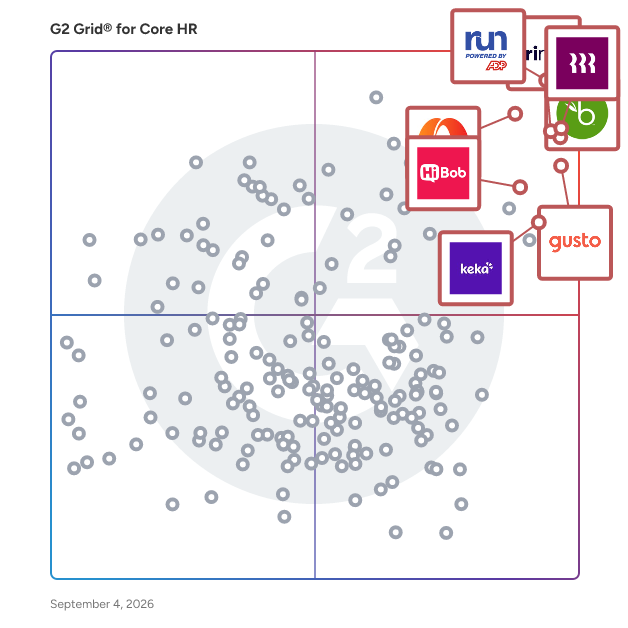
G2 Grid® for Core HR Software

G2 Grid® for Core HR Software plotting products by satisfaction and market presence

Highlighted products: RUN Powered by ADP, Rippling, BambooHR, TriNet PEO, Paylocity, Gusto, HiBob HRIS, and Keka.

Underlying data: [Grid® JSON](https://www.g2.com/categories/core-hr/grids.json?focus%5B%5D=run-powered-by-adp&focus%5B%5D=rippling&focus%5B%5D=bamboohr&focus%5B%5D=trinet-peo&focus%5B%5D=paylocity&focus%5B%5D=gusto&focus%5B%5D=hibob-hris&focus%5B%5D=keka)

SAP SuccessFactors HCM

SAP SuccessFactors HCM is a global, AI-powered cloud HR suite designed to help organizations thrive in a fast-moving world. With 100+ localizations, it delivers real-time visibility and connected solutions across core HR, payroll, talent management, learning, analytics, planning, and employee experience. More than 10,000 organizations trust SAP SuccessFactors HCM to enhance every employee experience, workforce decision, and people process—turning each employee into a success story. With SAP SuccessFactors HCM, you can: - Empower your workforce with AI-driven tools for self-service, learning, performance, and development to help people work faster and smarter. - Identify and develop top talent with a unified source of people and skills data that supports both HR strategies and business goals. - Stay compliant and agile with built-in legal and regulatory updates tailored to local business requirements. - Accelerate time to value by leveraging proven HR best practices and the strength of a global partner ecosystem.

Average Rating: 4.1/5.0

Total Reviews: 1,473

How Do G2 Users Rate SAP SuccessFactors HCM?

  • Has the product been a good partner in doing business?: 8.3/10 (Category avg: 8.7/10)
  • Organization Management: 8.6/10 (Category avg: 8.7/10)
  • Performance: 8.3/10 (Category avg: 8.6/10)
  • Compliance: 8.8/10 (Category avg: 8.6/10)

Who Is the Company Behind SAP SuccessFactors HCM?

  • Seller: SAP
  • Company Website:
  • Year Founded: 1972
  • HQ Location: Walldorf
  • Twitter: @SAP
    297,052 Twitter followers
  • LinkedIn® Page: www.linkedin.com
    149,349 employees on LinkedIn®

Who Uses This Product?

  • Who Uses This: Recruiter, Consultant
  • Top Industries: Information Technology and Services, Computer Software
  • Company Size: 56% Large, 34% Medium

What Do G2 Reviewers Say About SAP SuccessFactors HCM?

AI-generated summary from verified user reviews

Pros
  • Users appreciate the user-friendly interface of SAP SuccessFactors HCM, making navigation and integration seamless.
  • Users appreciate the extensive integration and module options in SAP SuccessFactors, streamlining HR activities within a single app.
  • Users appreciate the centralization of HR functions in SAP SuccessFactors, enhancing efficiency and ease of use daily.
  • Users appreciate the comprehensive features of SAP SuccessFactors HCM, which simplify task management and enhance accessibility.
  • Users find the interface straightforward and intuitive, making data entry and task management effortless and efficient.
Cons
  • Users find the limited customization options frustrating, wishing for greater flexibility in the SAP SuccessFactors HCM system.
  • Users find the interface not user-friendly, citing a steep learning curve and complexity in navigating features.
  • Users find the software not intuitive, requiring time to adjust and often facing usability challenges.
  • Users face a steep learning curve with SAP SuccessFactors HCM, requiring extensive training and adaptation to the interface.
  • Users find the limited features of SAP SuccessFactors HCM hinder effective use and understanding of its capabilities.

What Are Recent G2 Reviews of SAP SuccessFactors HCM?

What Are G2 Users Discussing About SAP SuccessFactors HCM?

Eddy

Eddy is the ideal all-in-one HR and payroll platform for small businesses that have outgrown spreadsheets. It offers the key features you need without the complexity and overhead of larger systems, giving you the opportunity to simplify your life by combining multiple tools into one that makes sense for your business. Save time and money with Eddy. Hire, onboard, manage, and pay employees—all in a single, simple system.

Average Rating: 4.7/5.0

Total Reviews: 97

How Do G2 Users Rate Eddy?

  • Has the product been a good partner in doing business?: 9.4/10 (Category avg: 8.7/10)
  • Organization Management: 9.4/10 (Category avg: 8.7/10)
  • Performance: 9.5/10 (Category avg: 8.6/10)
  • Compliance: 8.3/10 (Category avg: 8.6/10)

Who Is the Company Behind Eddy?

  • Seller: Eddy HR
  • Company Website:
  • Year Founded: 2017
  • HQ Location: Provo, US
  • Twitter: @EddyHRsoftware
    172 Twitter followers
  • LinkedIn® Page: www.linkedin.com
    69 employees on LinkedIn®

Who Uses This Product?

  • Top Industries: Construction, Information Technology and Services
  • Company Size: 59% Small, 34% Medium

What Do G2 Reviewers Say About Eddy?

AI-generated summary from verified user reviews

Pros
  • Users value the ease of use of Eddy, appreciating its intuitive features for managing employee tracking and documentation.
  • Users recognize Eddy's exceptional responsiveness and helpful support, enhancing their HR experience significantly.
  • Users praise Eddy's exceptional customer support, highlighting their quick responses and professional, friendly team interactions.
  • Users love the user-friendly interface of Eddy, which streamlines HR processes and centralizes information effectively.
  • Users appreciate the ease of managing payroll with Eddy, enjoying a cost-effective and user-friendly experience.
Cons
  • Users find missing features in Eddy, such as lack of customization and direct deposit options, limiting their experience.
  • Users note the limited customization options in Eddy, affecting their ability to create tailored reports and manage documents efficiently.
  • Users find Eddy's limited features frustrating, particularly in tracking paid time and lacking customization options.
  • Users face payroll issues with Eddy, notably the lack of automatic holiday hour calculations affecting payment accuracy.
  • Users find the limited flexibility in reports and inability to view employee documents frustrating, impacting management effectiveness.

What Are Recent G2 Reviews of Eddy?

What Are G2 Users Discussing About Eddy?

PeopleStrong

PeopleStrong is Asia Pacific’s leading, and the most comprehensive Human Capital Management SaaS platform. Our technology focuses on delivering a unique employee experience, drives data-driven decisions and agility for businesses. We have simplified work life for over 400 large enterprises across the emerging economies of Asia Pacific. Today, PeopleStrong empowers the lives of 2M+ employees with a mobile-first, AI and ML-powered talent operating system. Our tech capabilities span across the lifecycle from hire to exit, including Human Capital Management, Payroll, Talent Acquisition & Management, and Collaboration. We are rated among the Top 5 in the Asia Pacific at Gartner’s Peer Insights and voted as Customer's Choice of HR Tech in Gartner Voice of Customers Report for 1000+ employee enterprises.

Average Rating: 4.5/5.0

Total Reviews: 65

How Do G2 Users Rate PeopleStrong?

  • Has the product been a good partner in doing business?: 9.0/10 (Category avg: 8.7/10)
  • Organization Management: 9.3/10 (Category avg: 8.7/10)
  • Performance: 8.3/10 (Category avg: 8.6/10)
  • Compliance: 9.0/10 (Category avg: 8.6/10)

Who Is the Company Behind PeopleStrong?

Who Uses This Product?

  • Top Industries: Education Management, E-Learning
  • Company Size: 59% Large, 33% Medium

What Do G2 Reviewers Say About PeopleStrong?

AI-generated summary from verified user reviews

Pros
  • Users find PeopleStrong to be easy to navigate, streamlining access to important documents and HR functions effectively.
  • Users find the attendance tracking feature of PeopleStrong easy to use and efficient for managing employee activities.
  • Users find Easy Tracking invaluable for managing leaves, payslips, and progress towards goals effortlessly.
  • Users find PeopleStrong's easy payroll management and automation greatly enhance efficiency and reduce hassle.
  • Users value the exceptionally user-friendly interface of PeopleStrong, facilitating easy attendance and task management.
Cons
  • Users experience slow loading times with PeopleStrong, causing frustration when accessing important features and updates.
  • Users find the limited features of PeopleStrong hinder their experience, affecting usability and access to necessary information.
  • Users find the user interface overly complex, leading to a less intuitive experience while using PeopleStrong.
  • Users note a poor design in PeopleStrong, mentioning the mobile app lacks an attractive and modern appearance.
  • Users face frequent login issues with PeopleStrong, including unexpected logouts and session expirations, impacting usability.

What Are Recent G2 Reviews of PeopleStrong?

What Are G2 Users Discussing About PeopleStrong?

QuickBooks Workforce

QuickBooks Workforce is a payroll and human capital management (HCM) solution that helps businesses manage payroll processing, tax compliance, time tracking, HR operations, and talent management within a single platform. It is available in three tiers, each one expanding capabilities to support teams as they grow. QuickBooks Workforce is built on the same platform as QuickBooks Online, giving businesses one place to manage their people and their finances together. Rather than syncing data between separate systems, payroll costs, time, and employee records live natively alongside accounting — so business owners can see how workforce decisions affect the bottom line without toggling between tools or reconciling separate sources of truth. Key features across plans include: - Automated payroll and taxes: QuickBooks Workforce calculates wages, deductions, overtime, and bonuses, and handles federal and state payroll tax filings, W-2 and 1099 generation, and direct deposit. Workforce Elite includes tax penalty protection of up to $25,000 per year. - Time tracking and labor cost visibility: Geofencing, project tracking, manager approval workflows, and real-time reporting give businesses a clear view of hours worked and what those hours mean for the business — all in the same place as payroll and accounting. - HR tools and compliance support: Hiring, onboarding, and offboarding workflows can be automated across the employee lifecycle. Plus, get access to HR advisory support through Mineral, Inc. for guidance on wages, overtime, hiring, and termination. - Talent management: Workforce includes tools for recruiting and applicant tracking, AI-powered job descriptions and candidate summaries, performance reviews, goal-setting, and progress tracking — supporting the full employee journey from hire to development. - Intuit AI and payroll automation: AI-assisted tools collect time data, flag payroll issues, and send updates to help you run payroll accurately and on time. Auto Payroll enables recurring payroll to run automatically after initial setup, on qualifying plans. QuickBooks Workforce is designed for businesses that want payroll, HR, time tracking, and financial data to work as one system rather than a patchwork of connected tools. Availability of features and functionality varies by plan. Subscription to QuickBooks Online is required for integrated financials and accounting.

Average Rating: 4.4/5.0

Total Reviews: 500

How Do G2 Users Rate QuickBooks Workforce?

  • Has the product been a good partner in doing business?: 8.9/10 (Category avg: 8.7/10)
  • Organization Management: 8.8/10 (Category avg: 8.7/10)
  • Performance: 8.6/10 (Category avg: 8.6/10)
  • Compliance: 8.6/10 (Category avg: 8.6/10)

Who Is the Company Behind QuickBooks Workforce?

  • Seller: Intuit
  • Company Website:
  • Year Founded: 1983
  • HQ Location: Mountain View, California
  • Twitter: @Intuit
    80,559 Twitter followers
  • LinkedIn® Page: www.linkedin.com
    15,963 employees on LinkedIn®

Who Uses This Product?

  • Who Uses This: Owner, CEO
  • Top Industries: Computer Software, Non-Profit Organization Management
  • Company Size: 54% Small, 41% Medium

What Do G2 Reviewers Say About QuickBooks Workforce?

AI-generated summary from verified user reviews

Pros
  • Users find the ease of use of QuickBooks Workforce beneficial for managing PTO, payroll, and employee details.
  • Users find GoCo to be extremely helpful, appreciating its ease of use and reliable customer support.
  • Users praise the excellent customer support of QuickBooks Workforce, noting the helpfulness and timely responses provided.
  • Users value the comprehensive features of QuickBooks Workforce for seamless onboarding and efficient document management.
  • Users love the easy access to HR information and time management features all in one convenient location.
Cons
  • Users note that missing features like shift management and customizable pay periods limit QuickBooks Workforce's effectiveness.
  • Users report poor customer support from QuickBooks Workforce, leading to unresolved issues and significant time loss.
  • Users express a lack of features in QuickBooks Workforce, particularly in time management and customization options.
  • Users express frustration with inadequate reporting options, finding them basic, messy, and lacking sufficient filters.
  • Users express concerns about payroll issues with QuickBooks Workforce, citing lack of customization and slow direct deposit.

What Are Recent G2 Reviews of QuickBooks Workforce?

What Are G2 Users Discussing About QuickBooks Workforce?

EPAY HCM

EPAY Systems seamless human capital management solution will ease the HR burden right off your shoulders, while reducing your admin costs and—this is important—helping you get more from your workforce. Our unified suite of HCM technology and professional services streamline your HR processes. They include: -Recruiting and applicant tracking -Onboarding -Human resource management -Benefits administration -Time and attendance -Payroll and tax management -ACA compliance -COBRA benefits administration Together, our human capital management solutions will help you simplify workflows, cut your labor expenses, improve labor compliance, and manage your people more effectively. Our powerful time and labor management application elevates our entire unified human capital management solution. Beyond capturing time and attendance, we provide you with real-time visibility into labor hours and dollars, which allows you to manage your workforce in ways you didn’t think possible. At EPAY, we take the time to understand your business needs, so we can provide you with the best possible service. And we back it up with free, round-the-clock customer support. Our HCM system is easy to use, so your staff may not need help very often. But we’ll be close by when they do.

Average Rating: 4.7/5.0

Total Reviews: 154

How Do G2 Users Rate EPAY HCM?

  • Has the product been a good partner in doing business?: 9.0/10 (Category avg: 8.7/10)
  • Organization Management: 9.2/10 (Category avg: 8.7/10)
  • Performance: 9.4/10 (Category avg: 8.6/10)
  • Compliance: 9.4/10 (Category avg: 8.6/10)

Who Is the Company Behind EPAY HCM?

Who Uses This Product?

  • Who Uses This: Account Manager
  • Top Industries: Facilities Services, Hospital & Health Care
  • Company Size: 43% Large, 31% Medium

What Do G2 Reviewers Say About EPAY HCM?

AI-generated summary from verified user reviews

Pros
  • Users appreciate the ease of use of EPAY HCM, finding it simple for tracking time and accessing information.
  • Users appreciate the ease of use of EPAY HCM, allowing effortless navigation and quick learning for all employees.
  • Users find the ease of understanding of EPAY HCM enhances employee engagement and streamlines time tracking.
  • Users find the navigation ease of EPAY HCM impressive, facilitating quick access to essential features and functions.
  • Users appreciate the easy time tracking features of EPAY HCM, allowing effortless clock-ins and information access.
Cons
  • Users experience limited admin control, which can hinder access to full details and create inconveniences.
  • Users have faced occasional software glitches that can freeze the application, though some issues have been resolved.

What Are Recent G2 Reviews of EPAY HCM?

What Are G2 Users Discussing About EPAY HCM?

Sprout Solutions

Sprout Solutions is the Philippines' leading HR software and payroll platform: a People-First AI system built for Philippine businesses that need accurate payroll, automated timekeeping, and full labor law compliance in one place. Founded in 2015, Sprout Solutions has grown into the largest homegrown B2B SaaS company in the Philippines, now serving 2,000+ business teams and 350,000+ platform users. It has processed over $2 billion in payroll, built entirely on deep local expertise in Philippine HR, labor regulations, and workforce management. What Sprout Solutions does: The platform covers the full employee lifecycle, from recruitment and onboarding to daily timekeeping, payroll processing, government-mandated compliance (BIR, SSS, PhilHealth, Pag-IBIG, DOLE), performance management, and employee financial wellness. Instead of managing multiple HR vendors, Sprout Solutions consolidates Core HR, Payroll, Talent Management, and Employee Retention into a single connected system, reducing errors, eliminating data silos, and giving HR teams real-time visibility over their entire workforce. Who it's built for: Sprout Solutions serves Philippine businesses of all sizes, from growing SMEs running their first formal payroll to large enterprises with complex multi-location, multi-shift workforce operations. It is especially trusted in industries with demanding compliance requirements: BPO, manufacturing, retail, professional services, and hospitality. AI-powered HR, built for the Philippines

Average Rating: 4.7/5.0

Total Reviews: 441

How Do G2 Users Rate Sprout Solutions?

  • Has the product been a good partner in doing business?: 9.2/10 (Category avg: 8.7/10)
  • Organization Management: 9.0/10 (Category avg: 8.7/10)
  • Performance: 8.9/10 (Category avg: 8.6/10)
  • Compliance: 9.1/10 (Category avg: 8.6/10)

Who Is the Company Behind Sprout Solutions?

Who Uses This Product?

  • Who Uses This: Content Moderator, Customer Service Representative
  • Top Industries: Outsourcing/Offshoring, Consumer Services
  • Company Size: 62% Medium, 20% Large

What Do G2 Reviewers Say About Sprout Solutions?

AI-generated summary from verified user reviews

Pros
  • Users find Sprout Solutions extremely user-friendly, enabling easy access to payroll and attendance features.
  • Users value the automation and convenience of payroll management in Sprout Solutions, simplifying employee monitoring and adjustments.
  • Users value the ease of managing payroll with Sprout Solutions, simplifying employee monitoring and automation.
  • Users value the ease of payroll management with Sprout Solutions, streamlining processes and enhancing employee monitoring.
  • Users love the easy access to employee records and payroll details, simplifying HR processes significantly.
Cons
  • Users often face technical issues with Sprout Solutions, experiencing inaccurate geotagging and server downtimes affecting usability.
  • Users face challenges with reporting issues, including manual data entry and inconsistent app interfaces.
  • Users face timekeeping issues with Sprout Solutions, experiencing problems with attendance capture and date accuracy.
  • Users face login issues due to application glitches and overly short idle time, impacting accessibility and experience.
  • Users experience slow loading times when viewing payslips, indicating potential server-side issues despite good internet connectivity.

What Are Recent G2 Reviews of Sprout Solutions?

What Are G2 Users Discussing About Sprout Solutions?

OnPay

OnPay is designed for business owners who want to spend more time running their business — and less time managing back-office tasks. This award-winning payroll and HR software helps small and mid-sized businesses save over 15 hours each month by automating time-consuming processes and simplifying workforce management. “It’s an easy, quick, mobile-friendly system that doesn’t require a steep learning curve,” according to Entrepreneur, and it is rated “Outstanding” by PCMag. With OnPay, you can run payroll in minutes, automate federal and state tax calculations and filings, and reduce compliance risks with built-in accuracy. Employees can access their own pay stubs, tax documents, and personal information through self-service tools, which helps reduce administrative work for business owners and HR teams. The platform also makes it easy to streamline HR processes, manage employee records, and offer top-tier benefits in all 50 states. Payroll essentials start at just $49 plus $6 per worker per month. This includes full-service payroll processing, automated tax filings, year-end forms, and seamless integrations with popular accounting software like QuickBooks and Xero, as well as leading time-tracking tools. OnPay also provides onboarding support and account migration at no additional cost, making it easy to switch from another payroll provider. For businesses that need more advanced HR features, the optional HR add-on is available for $15 base plus $2 per worker per month. It includes tools like employee self-service, PTO management, and org charts to help you better manage your team. You can also add integrated benefits, a 401(k) plan, and pay-as-you-go workers’ compensation, giving you a scalable payroll and HR solution that grows with your business.

Average Rating: 4.8/5.0

Total Reviews: 411

How Do G2 Users Rate OnPay?

  • Has the product been a good partner in doing business?: 9.7/10 (Category avg: 8.7/10)
  • Organization Management: 8.9/10 (Category avg: 8.7/10)
  • Performance: 9.8/10 (Category avg: 8.6/10)
  • Compliance: 9.4/10 (Category avg: 8.6/10)

Who Is the Company Behind OnPay?

  • Seller: OnPay, Inc.
  • Company Website:
  • Year Founded: 2011
  • HQ Location: Atlanta, GA
  • Twitter: @onpay_payroll
    20,884 Twitter followers
  • LinkedIn® Page: www.linkedin.com
    184 employees on LinkedIn®

Who Uses This Product?

  • Who Uses This: Owner, President
  • Top Industries: Accounting, Non-Profit Organization Management
  • Company Size: 96% Small, 3% Medium

What Do G2 Reviewers Say About OnPay?

AI-generated summary from verified user reviews

Pros
  • Users highlight the ease of use of OnPay, appreciating its intuitive interface and seamless self-service features.
  • Users commend the phenomenal customer support from OnPay, ensuring a smooth experience for every inquiry.
  • Users highlight the excellent customer support and simple implementation of OnPay, making payroll management effortless.
  • Users appreciate the easy onboarding of OnPay, finding the process quick and support exceptional for their small businesses.
  • Users find the onboarding process straightforward, facilitating easy navigation and efficient payroll management for small businesses.
Cons
  • Users are frustrated by poor customer support, relying on workarounds and struggling to find essential contact information.
  • Users desire a time clock feature and automatic payroll to enhance OnPay's functionality and streamline operations.
  • Users express frustration with OnPay's poor support services, citing slow and unreliable responses that complicate resolution of issues.
  • Users face integration issues with Quickbooks and limited time tracking services, complicating payroll processes.
  • Users experience inadequate verification processes that can lead to delays and confusion during setup and payroll processing.

What Are Recent G2 Reviews of OnPay?

What Are G2 Users Discussing About OnPay?

Workstream

Workstream is the modern HR, payroll, and hiring platform built specifically for multi-location restaurants. Trusted by 46 of the top 50 restaurant brands, Workstream centralizes the entire employee lifecycle, from sourcing and onboarding to scheduling, payroll, benefits, and compliance, in one mobile-first and multi-lingual system. With Workstream, restaurants can grow with confidence, build repeatable systems, and reduce compliance risk while navigating complex wage rules, multi-location operations, and high-turnover hiring. From text-to-apply recruiting to ACA compliance and labor optimization, Workstream is designed to support restaurant operators and their teams at every stage of growth, accelerated by AI solutions that automate tasks and surface smarter insights. Workstream is headquartered in San Francisco, CA and serves more than 35,000+ locations across the U.S. and is backed by Founders Fund, CRV, GGV Capital, Basis Set, Coatue, and more.

Average Rating: 4.7/5.0

Total Reviews: 60

How Do G2 Users Rate Workstream?

  • Has the product been a good partner in doing business?: 9.2/10 (Category avg: 8.7/10)
  • Organization Management: 8.1/10 (Category avg: 8.7/10)
  • Performance: 9.2/10 (Category avg: 8.6/10)
  • Compliance: 9.4/10 (Category avg: 8.6/10)

Who Is the Company Behind Workstream?

  • Seller: Workstream
  • Company Website:
  • Year Founded: 2017
  • HQ Location: San Francisco, California
  • Twitter: @workstream_us
    625 Twitter followers
  • LinkedIn® Page: www.linkedin.com
    259 employees on LinkedIn®

Who Uses This Product?

  • Top Industries: Food & Beverages, Restaurants
  • Company Size: 64% Medium, 25% Small

What Do G2 Reviewers Say About Workstream?

AI-generated summary from verified user reviews

Pros
  • Users find the ease of use of Workstream essential, simplifying recruitment tasks and enhancing overall efficiency.
  • Users highlight the exceptional customer support of Workstream, noting responsiveness and helpfulness during inquiries.
  • Users value the excellent customer service of Workstream, making onboarding and hiring processes smoother and more efficient.
  • Users highlight the time-saving efficiency of Workstream, streamlining hiring processes and candidate communication effectively.
  • Users value the easy onboarding process and swift customer support, streamlining hiring efficiently.
Cons
  • Users highlight integration issues with corporate systems, limiting compatibility and functionality with proprietary tools.
  • Users face challenges with reporting issues, citing confusion and inconsistent support impacting essential operations like payroll.
  • Users face challenges with change management in Workstream, as updates can disrupt reliability and lead to confusion.
  • Users find the difficult setup of Workstream time-consuming and sometimes confusing, impacting their overall experience.
  • Users find the missing features frustrating, affecting hiring efficiency and complicating payroll integration and support access.

What Are Recent G2 Reviews of Workstream?

What Are G2 Users Discussing About Workstream?

Pocket HRMS

Pocket HRMS is India's leading AI-powered HR software designed to simplify and automate the complete employee lifecycle from hiring to retirement. Built specifically for modern Indian businesses, this comprehensive cloud-based HR platform combines payroll processing, attendance tracking, leave management, recruitment, and performance analytics into one unified system. Trusted by over 2000 businesses across India, Pocket HRMS helps startups, SMBs, and large enterprises reduce manual HR tasks, ensure absolute payroll accuracy, and maintain strict statutory compliance. With advanced conversational AI tools like smHRty, HRMS Copilot, and smHRt searcHR, human resource teams can shift their focus from daily administration to strategic workforce planning and delivering a smarter employee experience. Why Choose Pocket HRMS for Your Business? AI-Powered HR Automation: Automate repetitive HR workflows, payroll processing, and employee queries with smart AI assistants to drastically reduce manual intervention. Custom Built for Indian Businesses: Seamlessly handle complex Indian payroll processes, statutory compliance updates, multi-location workforce management, and local industry requirements. Comprehensive Hire to Retire Platform: Manage everything from candidate recruitment, digital onboarding, and daily attendance to performance appraisals and exit management in a single HR system. Future Ready AI Tools: Leverage conversational AI assistants and intelligent search functions to resolve employee queries instantly and analyze workforce data in real time. Mobile First Employee Experience: Empower your team with a dedicated mobile HRMS app to access payslips, apply for leave, submit expenses, and mark attendance on the go. Automated Payroll and Compliance: Eliminate errors in statutory deductions, tax updates, PF, ESI, PT, TDS, and Form 16 generation with compliance-ready payroll software. Scalable and Integration Ready: Easily scale your HR operations and integrate the platform with biometric attendance devices, ERP systems, and third-party accounting applications. Dedicated Customer Support: Ensure a smooth implementation process and continuous success with a reliable support team focused on quick issue resolution. What are the Key Features of Pocket HRMS? Smart Payroll Processing: Automate salary calculations, tax deductions, reimbursements, full and final settlements, and generate accurate payslips instantly. AI Attendance Management: Track employee time in real time using biometric device integration, facial recognition, geo-tagging, geo-fencing, and mobile punch-ins. Flexible Leave Management: Configure custom company leave policies, manage approval workflows, track leave balances, and automate holiday calendars and comp-offs. Employee Self-Service Portal: Provide employees with a secure portal to submit expense claims, download tax documents, and manage HR requests independently. Digital Recruitment and Onboarding: Streamline your hiring process from candidate sourcing and offer letter generation to paperless onboarding and digital document collection. Performance Management System: Drive employee growth by setting clear KPIs, tracking goals, managing appraisal cycles, and gathering continuous manager feedback. AI HR Assistants: Use HRMS Copilot and smHRty to deliver instant round the clock support for company policy answers and routine HR self-help tasks. Intelligent Workforce Analytics: Make data driven decisions with customizable dashboards and detailed MIS reports covering payroll, compliance, and attendance trends. Expense and Helpdesk Tracking: Enable staff to raise internal support tickets and expense claims quickly, allowing HR and finance teams to resolve and approve them efficiently.

Average Rating: 4.6/5.0

Total Reviews: 33

How Do G2 Users Rate Pocket HRMS?

  • Has the product been a good partner in doing business?: 8.3/10 (Category avg: 8.7/10)
  • Organization Management: 7.8/10 (Category avg: 8.7/10)
  • Performance: 7.4/10 (Category avg: 8.6/10)
  • Compliance: 7.5/10 (Category avg: 8.6/10)

Who Is the Company Behind Pocket HRMS?

  • Seller: Pocket HRMS
  • Year Founded: 2013
  • HQ Location: Mumbai, Maharashtra
  • Twitter: @PocketHRMS
    3,526 Twitter followers
  • LinkedIn® Page: vi.linkedin.com
    120 employees on LinkedIn®
  • Phone: +91 99871 44643

Who Uses This Product?

  • Top Industries: Information Technology and Services
  • Company Size: 82% Medium, 12% Large

What Do G2 Reviewers Say About Pocket HRMS?

AI-generated summary from verified user reviews

Pros
  • Users find the payroll process fast and efficient with convenient data access and excellent support.
  • Customers highlight the helpful and quick customer support from Pocket HRMS, enhancing user satisfaction and experience.
  • Users find Pocket HRMS to enhance efficiency by streamlining processes and providing quick solutions for payroll and data management.
  • Users value the helpful support team of Pocket HRMS, ensuring quick resolutions and customized solutions.
  • Users praise the interactive and user-friendly interface of Pocket HRMS, making it easy for HR professionals to navigate.
Cons
  • Users face date issues in Pocket HRMS, such as attendance not updating and ineffective tax calculation.
  • Users feel the need for limited features in Pocket HRMS, particularly requesting enhanced ATS functionalities and advanced tools.
  • Users express dissatisfaction with the poor customer support of Pocket HRMS, citing slow responses and lack of clarity.
  • Users experience occasional minor bugs with the punch in/out feature, affecting their overall experience with Pocket HRMS.
  • Users struggle with the restricted functionality of Pocket HRMS due to its inadequate customization of HR processes.

What Are Recent G2 Reviews of Pocket HRMS?

What Are G2 Users Discussing About Pocket HRMS?

CharlieHR

A cloud-based HR software that makes all HR processes easy. Onboard new hires, store company documents, book and manage time off, run productive reviews and get professional HR advice. An easy, holistic system for managing your People needs.

Average Rating: 4.6/5.0

Total Reviews: 79

How Do G2 Users Rate CharlieHR?

  • Has the product been a good partner in doing business?: 9.6/10 (Category avg: 8.7/10)
  • Organization Management: 8.9/10 (Category avg: 8.7/10)
  • Performance: 9.2/10 (Category avg: 8.6/10)
  • Compliance: 9.3/10 (Category avg: 8.6/10)

Who Is the Company Behind CharlieHR?

  • Seller: CharlieHR
  • Year Founded: 2015
  • HQ Location: London
  • Twitter: @JoinCharlie
    4,736 Twitter followers
  • LinkedIn® Page: www.linkedin.com
    45 employees on LinkedIn®

Who Uses This Product?

  • Who Uses This: Account Manager
  • Top Industries: Marketing and Advertising, Computer Software
  • Company Size: 73% Small, 18% Medium

What Do G2 Reviewers Say About CharlieHR?

AI-generated summary from verified user reviews

Pros
  • Users appreciate the simplicity and straightforwardness of CharlieHR, making the experience user-friendly and efficient.
Cons
  • Users find the poor customer support of CharlieHR unhelpful when it comes to data extraction issues.
  • Users find the poor support services of CharlieHR lacking in assistance during data extraction challenges.

What Are Recent G2 Reviews of CharlieHR?

What Are G2 Users Discussing About CharlieHR?

SixFifty

SixFifty is the employment law platform for HR teams managing compliance across multiple states. We combine attorney-drafted content, intelligent automation to help you stay compliant, without the stress (or the billable hours). What you can do with SixFifty: RESEARCH AND UNDERSTAND EMPLOYMENT LAWS 50-State Employment Law Database: Instantly access federal, state, and local laws in plain English—updated in real time by our in-house legal team. SixFifty AI: Ask any employment law question and get a clear, reliable answer powered by our proprietary research and legal expertise. Toolkits & Assessments: Identify what laws apply to your workforce and compare requirements across states with just a few clicks. GENERATE AND MAINTAIN COMPLIANCE LEGAL DOCUMENTS Employee Handbook Builder: Build a customized, compliant handbook tailored to every state where you have employees—in minutes. Employment Agreement Generator: Create compliant hiring and separation documents, including employment agreements, NDAs, separation and release agreements, and more, without starting from scratch. Employee Classification Analyzers: Eliminate misclassification risks with tools that help you correctly classify employees and contractors under federal and state law. STAY COMPLIANT OVERTIME AI-Powered Legal Updates: We monitor the law, notify you when changes affect your policies, and help you apply updates in real-time—no need to rewrite anything yourself. Digital Distribution & Tracking: Send your handbooks and labor law posters to employees digitally, and track who’s received and signed what, so nothing slips through the cracks. Digital Labor Law Posters: Share required labor law posters digitally to your remote workforce. Cases: Collect and manage sensitive or policy-driven employee input and requests. __________ WHAT SETS SIXFIFTY APART? AI Built on Legal Expertise Unlike generic AI tools, SixFifty draws from a proprietary, attorney-vetted employment law database, so you get accurate answers and legally sound information. Built for Multi-State Teams From California’s paid leave laws to Colorado’s pay transparency requirements, SixFifty simplifies compliance for companies with employees across the U.S. Smarter Document Generation Our documents are fully customizable, designed for complex, multi-state requirements, and automatically updated as laws change, so you’re never left behind. Take the stress and complexity out of employment law compliance. With SixFifty, you can be your own expert. Learn more at www.sixfifty.com

Average Rating: 4.9/5.0

Total Reviews: 38

How Do G2 Users Rate SixFifty?

  • Has the product been a good partner in doing business?: 9.8/10 (Category avg: 8.7/10)
  • Organization Management: 7.1/10 (Category avg: 8.7/10)
  • Performance: 9.3/10 (Category avg: 8.6/10)
  • Compliance: 9.6/10 (Category avg: 8.6/10)

Who Is the Company Behind SixFifty?

  • Seller: SixFifty
  • Company Website:
  • Year Founded: 2019
  • HQ Location: Salt Lake City, UT
  • Twitter: @sixfiftyhq
    1,196 Twitter followers
  • LinkedIn® Page: www.linkedin.com
    66 employees on LinkedIn®

Who Uses This Product?

  • Top Industries: Consulting, Human Resources
  • Company Size: 61% Small, 39% Medium

What Do G2 Reviewers Say About SixFifty?

AI-generated summary from verified user reviews

Pros
  • Users find SixFifty to be incredibly user-friendly, making compliance and handbook creation effortless and efficient.
  • Users find the easy setup of SixFifty enhances compliance efficiency and offers great support for updates.
  • Users value the user-friendly handbook development process and appreciate automated updates for compliance assurance.
  • Users find SixFifty to be intuitive and user-friendly, making job tasks significantly easier and more efficient.
  • Users value the time-saving capabilities of SixFifty, streamlining compliance processes and enhancing efficiency in operations.
Cons
  • Users find the navigation functionality difficult, wishing for improved search flexibility and easier comment access.
  • Users find navigation to be not intuitive, often requiring extra time to locate what they need.
  • Users wish for a rebranding option for State Check-lists instead of being limited to SixFifty's colors.
  • Users desire more customization options, specifically for branding state check-lists in SixFifty's system.
  • Users note that the navigation isn't intuitive, but they manage to find what they're looking for eventually.

What Are Recent G2 Reviews of SixFifty?

HR Directory 365

HR Directory 365 is a Microsoft-native employee directory built entirely within SharePoint and Microsoft 365. Trusted by 2,000+ organizations across 40 countries, it centralizes employee profiles, org charts, and workplace data, without moving a single byte of data outside your Microsoft tenant. Why Organizations Choose HR Directory 365: Most HR directory tools require a separate platform, a separate login, and data leaving your organization. HR Directory 365 runs entirely inside your existing Microsoft 365 environment. Data is pulled directly from Microsoft Entra ID, stays within your tenant, and is accessible from SharePoint, Teams, Outlook, and mobile with zero additional infrastructure. Teams are live within days. No heavy IT involvement, no lengthy training. The interface is familiar to any Microsoft 365 user from day one. Try it free for 7 days - no credit card required. Built for Security-First Organizations: HR Directory 365 is one of the few employee directory solutions with SOC 2 Type II certification, Zero Trust architecture, and full GCC and GCC High compatibility, making it the only choice for federal, government, and defense organizations running Microsoft 365 in regulated environments. Key Features: 1) Real-time employee profiles synced with Microsoft Entra ID 2) Advanced search and filtering by department, role, location, domain 3) Interactive org chart with zoom, export (SVG/PDF), and Entra ID sync 4) Virtual floor map and desk booking for hybrid workplaces 5) Employee Spotlight, work anniversary and new joiner notifications 6) User analytics by department, location, and presence 7) vCard QR code, mobile app, and print-ready profiles 8) 10+ languages supported 9) Role-based permissions and access control 10) Custom branding with organization logo and themes Integrations: Microsoft 365 · SharePoint · Microsoft Teams · Microsoft Outlook · Power BI · Power Automate · Power Apps · Microsoft Entra ID · Excel Compliance and Security SOC 2 Type II · ISO Certified · GCC & GCC High Ready · Zero Trust Architecture · Microsoft Solutions Partner · Available on Microsoft AppSource HR Directory 365: Your entire organization, connected inside Microsoft 365.

Average Rating: 4.8/5.0

Total Reviews: 34

How Do G2 Users Rate HR Directory 365?

  • Has the product been a good partner in doing business?: 9.9/10 (Category avg: 8.7/10)
  • Organization Management: 9.8/10 (Category avg: 8.7/10)
  • Performance: 8.9/10 (Category avg: 8.6/10)
  • Compliance: 9.3/10 (Category avg: 8.6/10)

Who Is the Company Behind HR Directory 365?

  • Seller: Beyond Key
  • Year Founded: 2005
  • HQ Location: Chicago, Illinois
  • Twitter: @KeyBeyond
    194 Twitter followers
  • LinkedIn® Page: www.linkedin.com
    374 employees on LinkedIn®

Who Uses This Product?

  • Company Size: 79% Medium, 18% Large

What Do G2 Reviewers Say About HR Directory 365?

AI-generated summary from verified user reviews

Pros
  • Users find the informative dashboard of HR Directory 365 invaluable for navigating employee information quickly and effectively.
  • Users value the amazing customer support from HR Directory 365, appreciating the fast and professional assistance provided.
  • Users appreciate the comprehensive features of HR Directory 365, especially the fast information lookup and innovative organizational chart.
  • Users value the customization features of HR Directory 365, enabling tailored displays and seamless integration with 365.
  • Users value the easy access to employee information with HR Directory 365, enhancing organizational communication and transparency.
Cons
  • Users find the limited customization options frustrating, often requiring technical help for deeper personalization.
  • Users find the slow loading times can hinder efficiency, though customization makes it still worth the wait.
  • Users find the lack of restrictive admin features in HR Directory 365 limits their control and management capabilities.
  • Users find it a little difficult to navigate HR Directory 365 without assistance, but support helps resolve issues.

What Are Recent G2 Reviews of HR Directory 365?

What Are G2 Users Discussing About HR Directory 365?

Workable

Workable is an all-in-one HR platform designed to assist businesses in finding exceptional candidates, expediting the hiring process, and managing their teams more efficiently. This comprehensive solution combines a robust Applicant Tracking System (ATS) with a flexible Human Resource Information System (HRIS), serving as a centralized system of record for all HR-related activities. Trusted by 35,000+ teams in more than 100 countries, it serves HR professionals and hiring managers at organizations of all sizes, from startups to established enterprises. Its extensive features are tailored to streamline the recruitment process, making it easier for users to source talent, conduct interviews, and manage employee data. The platform is particularly beneficial for companies seeking to enhance their hiring strategies and improve overall team management. 
At the core of Workable is its AI Recruiting Agent, which autonomously handles the information-heavy work at the top of the hiring funnel. The agent continuously searches 400M+ candidate profiles to source passive talent, sends personalized outreach, screens every inbound applicant, fills information gaps through direct candidate conversations, and delivers a shortlist of vetted, engaged candidates for every open role. With approximately 2x the response rate of standard templates and full auditability, the agent works like a member of your team while your team focuses on judgment calls that move a hire forward. 

Workable's ATS also gives hiring teams the full infrastructure they need. Users can post job openings to over 200 job boards. The platform further simplifies hiring with AI-powered screening tools, self-scheduled interviews, customizable pipelines and approval workflows, and automated offer management with e-signatures and integrated background checks, all designed to reduce the time and effort involved in recruitment. Beyond hiring, Workable offers a comprehensive suite of tools for employee management. The platform automates onboarding processes, securely stores HR data, and facilitates performance reviews, ensuring organizations can maintain accurate and up-to-date employee records. It also includes tools for tracking time and attendance, allowing businesses to manage time off requests, monitor work hours, and generate payroll reports seamlessly. Context captured at hiring flows straight through to workforce management, so HR teams work from one unified record rather than disconnected systems. Designed for user-friendliness, the platform includes a mobile app for on-the-go management, ensuring HR professionals can stay connected and responsive wherever they are. With 270+ integrations and enterprise-grade security, Workable has established itself as a trusted partner in building high-performance teams.

Average Rating: 4.4/5.0

Total Reviews: 688

How Do G2 Users Rate Workable?

  • Has the product been a good partner in doing business?: 8.7/10 (Category avg: 8.7/10)
  • Organization Management: 8.0/10 (Category avg: 8.7/10)
  • Performance: 8.5/10 (Category avg: 8.6/10)
  • Compliance: 7.6/10 (Category avg: 8.6/10)

Who Is the Company Behind Workable?

  • Seller: Workable
  • Company Website:
  • Year Founded: 2012
  • HQ Location: Boston, Massachusetts
  • Twitter: @Workable
    9,000 Twitter followers
  • LinkedIn® Page: www.linkedin.com
    455 employees on LinkedIn®

Who Uses This Product?

  • Who Uses This: Talent Acquisition Specialist, Recruiter
  • Top Industries: Information Technology and Services, Computer Software
  • Company Size: 59% Medium, 29% Small

What Do G2 Reviewers Say About Workable?

AI-generated summary from verified user reviews

Pros
  • Users find Workable's ease of use remarkable, streamlining collaboration and candidate management for diverse teams.
  • Users value Workable for its all-in-one recruiting process, enabling efficient candidate tracking and collaboration among teams.
  • Users find Workable to be intuitive and easy to use, enhancing collaboration and streamlining the hiring process.
  • Users value the streamlined candidate management in Workable, enhancing organization and collaboration throughout the hiring process.
  • Users highlight the intuitive and easy-to-use interface of Workable, significantly improving collaboration and efficiency in recruitment.
Cons
  • Users feel the limited customization in pipeline stages and reporting tools restricts their flexibility for diverse hiring needs.
  • Users find the missing features of Workable limiting, especially in reporting and language support capabilities.
  • Users note limited candidate filtering and automation features, making the management process less efficient and effective.
  • Users find the limited features in Workable restrict capabilities, particularly in reporting and automation for non-admins.
  • Users find the limited options in reporting and filtering hinder their ability to analyze data effectively.

What Are Recent G2 Reviews of Workable?

What Are G2 Users Discussing About Workable?

Odoo Employees

Odoo Employees is a comprehensive human resources management application designed to centralize and streamline all employee-related information and processes within an organization. Serving as more than just a staff directory, it acts as the central hub for a suite of HR features, enabling businesses to manage their workforce efficiently. Key Features and Functionality: - Centralized Employee Information: Maintain a detailed record of all employees, including contact details, job titles, departments, and contract statuses, providing a holistic view of the workforce. - Access Control: Implement restricted access settings to safeguard sensitive employee information, such as emergency contacts and visa details, ensuring privacy and compliance. - Skills Management: Document and track each employee's unique skills and competencies, facilitating effective resource allocation and project planning. - Time Off Management: Monitor and manage paid time off (PTO) requests with integrated tracking, allowing for efficient approval processes and accurate attendance records. - Document Management: Upload, store, and manage all employee-related documents, including contracts and signed agreements, in a secure and organized manner. - Performance Appraisals: Schedule and conduct employee evaluations to assess performance and support professional development. - Recruitment Management: Create job postings, track applications, and manage the hiring process seamlessly within the application. - Onboarding Plans: Assign and monitor activities for new hires to ensure a smooth integration into the company. - Organizational Chart: Visualize team structures and hierarchies directly on employee profiles for clear organizational insight. - Attendance Monitoring: Track and analyze employee attendance patterns to support workforce management and planning. Primary Value and Solutions Provided: Odoo Employees addresses the complexities of human resource management by offering a unified platform that automates and simplifies various HR processes. By centralizing employee data and integrating with other Odoo modules, it reduces administrative overhead, minimizes errors, and enhances operational efficiency. The application empowers HR teams to focus on strategic initiatives by automating routine tasks such as onboarding, leave management, and performance evaluations. Additionally, the secure handling of sensitive information ensures compliance with privacy regulations, while the comprehensive tracking of skills and attendance supports informed decision-making and effective workforce planning.

Average Rating: 4.5/5.0

Total Reviews: 16

How Do G2 Users Rate Odoo Employees?

  • Has the product been a good partner in doing business?: 7.5/10 (Category avg: 8.7/10)
  • Organization Management: 8.6/10 (Category avg: 8.7/10)
  • Performance: 9.6/10 (Category avg: 8.6/10)
  • Compliance: 9.4/10 (Category avg: 8.6/10)

Who Is the Company Behind Odoo Employees?

  • Seller: Odoo
  • Year Founded: 2005
  • HQ Location: Brussels, Belgium
  • Twitter: @Odoo
    55,391 Twitter followers
  • LinkedIn® Page: www.linkedin.com
    8,815 employees on LinkedIn®

Who Uses This Product?

  • Company Size: 63% Small, 31% Medium

What Do G2 Reviewers Say About Odoo Employees?

AI-generated summary from verified user reviews

Pros
  • Users value the comprehensive features of Odoo Employees, enabling easy access to employee data and organizational structures.
  • Users value the easy navigation of Odoo Employees, finding it efficient for managing employee data and structures.
  • Users appreciate the helpful overview of employee data, allowing easy department structuring and organization chart creation.
Cons
  • Users note the limited features of Odoo Employees compared to competitors, though the pricing remains favorable.

What Are Recent G2 Reviews of Odoo Employees?

What Are G2 Users Discussing About Odoo Employees?

PDS Vista

PDS’ Vista is the complete HCM software solution for organizations with employees based in the United States, Canada, or the Caribbean. All the pieces—HR, payroll, benefits, recruiting, onboarding, time and attendance, self-service, analytics, workflow, mobile and extensive reporting—come together to simplify your business practices and processes. PDS serves a wide variety of organizations in many different industries, including professional services, finance, healthcare, retail, manufacturing, utilities, transportation, hospitality, non-profit, education, government, and others. Organizations are able to take advantage of the benefits of our cross-border, single database architecture that automatically presents employees with appropriate U.S. or Canadian page content, based upon their citizenship. Although a single, integrated HCM and payroll solution, Vista’s individual components can be deployed in phases according to your particular needs and priorities. The PDS solution, whether it’s deployed in the cloud or on-premises, can help your organization optimize your greatest assets—your employees, while you save time and money. Whether your users need access to HCM data from their desktop, their laptop, their tablet, or their smartphone—Vista delivers!

Average Rating: 4.3/5.0

Total Reviews: 23

How Do G2 Users Rate PDS Vista?

  • Has the product been a good partner in doing business?: 9.0/10 (Category avg: 8.7/10)
  • Organization Management: 8.6/10 (Category avg: 8.7/10)
  • Performance: 8.3/10 (Category avg: 8.6/10)
  • Compliance: 9.1/10 (Category avg: 8.6/10)

Who Is the Company Behind PDS Vista?

Who Uses This Product?

  • Top Industries: Information Technology and Services
  • Company Size: 74% Medium, 17% Small

What Do G2 Reviewers Say About PDS Vista?

AI-generated summary from verified user reviews

Cons
  • Users note the incomplete module development, limiting PDS Vista's functionality compared to complete learning management systems.
  • Users note the limited features of PDS Vista, lacking fully developed modules essential for comprehensive management.

What Are Recent G2 Reviews of PDS Vista?

What Are G2 Users Discussing About PDS Vista?

Grace Savides
GS
Researched and written by Grace Savides
Updated July 17, 2026