Best Enterprise AI Meeting Assistants Software

How Many AI Meeting Assistants Software Products Does G2 Track?

Total Products under this Category: 271

Category Stats (Nov 2026)

  • Average Rating: 4.72/5 (↑0.02 vs Oct 2026) The average rating of products in this category, based on all submitted ratings
  • Top Trending Product: Wispr Flow Notetaker (+0.71%) - Among all products in this category, Wispr Flow Notetaker recorded the largest rating increase compared to last month

Last updated: November 17, 2026

How Does G2 Rank AI Meeting Assistants Software Products?

Why You Can Trust G2's Software Rankings:

  • 30 Analysts and Data Experts
  • 127,900+ Authentic Reviews
  • 271+ Products
  • Unbiased Rankings

G2's software rankings are built on verified user reviews, rigorous moderation, and a consistent research methodology maintained by a team of analysts and data experts. Each product is measured using the same transparent criteria, with no paid placement or vendor influence. While reviews reflect real user experiences, which can be subjective, they offer valuable insight into how software performs in the hands of professionals. Together, these inputs power the G2 Score, a standardized way to compare tools within every category.

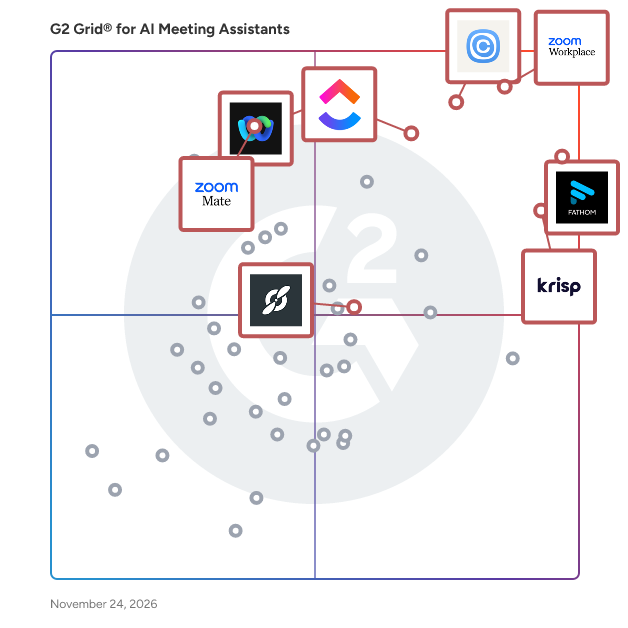
G2 Grid® for AI Meeting Assistants Software

G2 Grid® for AI Meeting Assistants Software plotting products by satisfaction and market presence

Highlighted products: Zoom Workplace, Webex Suite, Fathom, Calendly, ZoomMate, ClickUp, Krisp, and Fellow.

Underlying data: [Grid® JSON](https://www.g2.com/categories/ai-meeting-assistants/grids.json?focus%5B%5D=zoom-workplace&focus%5B%5D=cisco-webex-suite&focus%5B%5D=fathom-video&focus%5B%5D=calendly&focus%5B%5D=zoommate&focus%5B%5D=clickup&focus%5B%5D=krisp&focus%5B%5D=fellow&segment=enterprise)

Zoom Workplace

Goodbye app overload. Hello effortless work. Work can be complicated. Your tools shouldn't be. Zoom Workplace connects all the ways you collaborate — from meetings to docs to chat and more — with built-in AI and seamless integrations that help teams focus and work flawlessly. Zoom Communications: Unified, Effortless Connection for Modern Work Bring every way your teams communicate—meetings, chat, calls, email, and appointment booking—into one seamless experience. With Zoom, collaboration happens faster and more naturally across channels, without switching apps or losing context. From spontaneous chats to scheduled meetings and calls, everything stays connected, searchable, and secure—powered by one intuitive platform built for how modern teams work. Zoom Productivity: Workflows Connected, Work Effortless Transform how work gets done with AI-first collaboration that keeps people, content, and actions in one place. From brainstorming on whiteboards to co-creating in docs, sharing clips, and automating follow-ups, Zoom connects every step of your workflow. With Zoom Hub and integrated video management, knowledge stays organized, accessible, and actionable—so teams can move from idea to outcome without friction. Zoom Spaces: Smarter, Connected Workplaces for Every Team Bring your physical and hybrid environments to life with intelligent, connected spaces. Zoom Spaces unifies meeting rooms, desk reservations, digital signage, and visitor management into one seamless experience—making it simple to collaborate, navigate, and manage the workplace. Whether employees are remote, hybrid, or on-site, Zoom creates a consistent, secure, and flexible environment that keeps teams connected wherever work happens. Zoom Employee Engagement: Connect, Inspire, and Empower Every Employee Foster belonging and alignment with Workvivo by Zoom—a modern employee experience platform that unites communication, culture, and community in one place. From company-wide updates to recognition, feedback, and social engagement, Workvivo gives every employee a voice and a sense of connection. Built right into Zoom Workplace, it helps organizations strengthen culture, boost engagement, and keep teams informed and inspired—no matter where they work.

Average Rating: 4.5/5.0

Total Reviews: 53,498

How Do G2 Users Rate Zoom Workplace?

  • Has the product been a good partner in doing business?: 9.1/10 (Category avg: 9.3/10)
  • Ease of Use: 9.1/10 (Category avg: 9.4/10)
  • Quality of Support: 8.7/10 (Category avg: 9.3/10)
  • Ease of Admin: 9.0/10 (Category avg: 9.2/10)

Who Is the Company Behind Zoom Workplace?

  • Seller: Zoom
  • Company Website:
  • Year Founded: 2011
  • HQ Location: San Jose, CA
  • LinkedIn® Page: www.linkedin.com
    14,013 employees on LinkedIn®

Who Uses This Product?

  • Who Uses This: Owner, Software Engineer
  • Top Industries: Information Technology and Services, Computer Software
  • Company Size: 51% Small, 31% Medium

What Do G2 Reviewers Say About Zoom Workplace?

AI-generated summary from verified user reviews

Pros
  • Users find Zoom Workplace to be extremely easy to use, allowing quick client meetings with minimal setup required.
  • Users enjoy the easy client access for video conferencing with Zoom, appreciating its quality and mobile convenience.
  • Users value the high audio and video quality of Zoom Workplace, ensuring smooth client calls with minimal setup.
  • Users appreciate the reliability of Zoom Workplace, ensuring seamless meetings with high audio and video quality.
  • Users value the simple screen sharing feature in Zoom, enabling effortless collaboration and communication during client meetings.
Cons
  • Users find Zoom Workplace suffers from limited features, leading to complexity and a cluttered user experience.
  • Users frequently experience video quality issues and interruptions due to time limits on the free plan.
  • Users experience meeting issues, like updates causing delays and a lack of stored meeting IDs for convenience.
  • Users experience connection issues that hinder high-quality video and audio calls, impacting overall meeting effectiveness.
  • Users report frequent video issues due to unstable internet connections, impacting the quality of calls and meetings.

What Are Recent G2 Reviews of Zoom Workplace?

What Are G2 Users Discussing About Zoom Workplace?

Webex Suite

Webex Suite is an all-in-one, AI-powered collaboration suite built to increase productivity and maximize teamwork in today’s hybrid work. With 8 powerful individual workflows – Meetings, Messaging, Calling, Webinar, Events, Polling, Whiteboarding and Video Messaging in one, Webex Suite delivers exceptional value, world-class user experiences, and incredible audio and video, anywhere on any device. With a variety of collaboration and AI innovations, such as Webex AI Assistant, Real-time Translation, Background Noise Removal, and more, Webex Suite delivers rich and innovative experiences for employees and customers, enabling them to seamlessly connect, collaborate, engage and get work done. Webex Suite is powered by the industry-leading Webex Platform that is secure, compliant, and easily managed with built-in pervasive intelligence, bringing AI innovations across the entire Webex portfolio. The entire Webex Suite can be managed via the single-pane-of-glass management tool, Webex Control Hub. Webex Suite is backed by Cisco’s industry-leading security and networking infrastructure that ensures the best quality video and audio communications. Webex Suite Workflows: Meetings: Drive more productive meetings with AI-powered experiences and high-quality audio and video. Messaging: Collaborate async with rich messaging, secure file sharing, and digital whiteboarding to keep work flowing between meetings. Calling: Stay connected with modern business phone system and flexible calling options. Webinar: Host high quality webinars and drive engagement with immersive content and interactive audience experiences. Events: Power virtual, in-person, and hybrid events with immersive multi-track agendas, ticketing, attendee networking, analytics, and more. Polling: Enable active participation in every meeting with quizzes, polling, and interactive Q&A. Whiteboarding: Unleash creativity with a digital whiteboarding solution for everyone, on any device. Video Messaging: Record, share ideas, engage, and facilitate real-time feedback with intuitive video messaging.

Average Rating: 4.2/5.0

Total Reviews: 17,675

How Do G2 Users Rate Webex Suite?

  • Has the product been a good partner in doing business?: 8.7/10 (Category avg: 9.3/10)
  • Ease of Use: 8.7/10 (Category avg: 9.4/10)
  • Quality of Support: 8.5/10 (Category avg: 9.3/10)
  • Ease of Admin: 8.5/10 (Category avg: 9.2/10)

Who Is the Company Behind Webex Suite?

  • Seller: Cisco
  • Company Website:
  • Year Founded: 1984
  • HQ Location: San Jose, CA
  • LinkedIn® Page: www.linkedin.com
    95,294 employees on LinkedIn®
  • Ownership: NASDAQ:CSCO

Who Uses This Product?

  • Who Uses This: Software Engineer, Senior Software Engineer
  • Top Industries: Information Technology and Services, Computer Software
  • Company Size: 50% Large, 31% Medium

What Do G2 Reviewers Say About Webex Suite?

AI-generated summary from verified user reviews

Pros
  • Users appreciate the ease of use of Webex Suite, enjoying seamless setup and unified collaboration features.
  • Users value the seamless integration of meetings, messaging, and calling in Webex Suite for collaborative efficiency.
  • Users value the reliability of Webex Suite, ensuring stable meetings and excellent call quality for seamless collaboration.
  • Users value the unified collaboration features of Webex Suite, enhancing productivity with seamless meetings and AI integration.
  • Users commend the excellent video quality of Webex Suite, enhancing their overall collaboration experience.
Cons
  • Users often find slow loading times frustrating, especially during user handovers and with high system resource usage.
  • Users find the user interface complicated, making navigation challenging and requiring unnecessary steps for switching features.
  • Users experience performance issues with Webex Suite, facing lag and resource heaviness during heavy usage.
  • Users find the lack of intuitiveness in Webex Suite makes navigation and feature switching unnecessarily complicated.
  • Users find the user interface cluttered and less intuitive, impacting the overall experience and learning curve.

What Are Recent G2 Reviews of Webex Suite?

What Are G2 Users Discussing About Webex Suite?

Fathom

Fathom, the #1-rated AI meeting partner, captures what matters in every conversation and turns it into momentum for what comes next. Now part of Superhuman. ● Meeting Capture: Bot-based or fully Bot-Free - join with a visible notetaker or record silently, your choice, on every call. Bot-Free available on Mac today; Windows coming soon. ● Mobile: iOS app ● Meeting Intelligence: Ask Fathom instantly answers questions across your entire meeting history. Trackers proactively alert you when topics you care about come up. And Fathom's MCP integration brings your meeting context directly into Claude and ChatGPT, plus syncs with your CRM and productivity tools. Recognition: Named to G2's 2026 Best Software Awards Top 100 and HubSpot's 2025 Most Used App of the Year. Outcome: Fathom turns meetings into a searchable, connected knowledge base - teams spend less time on admin and more time acting on what was decided, with the intelligence to back it up.

Average Rating: 5.0/5.0

Total Reviews: 7,188

How Do G2 Users Rate Fathom?

  • Has the product been a good partner in doing business?: 9.7/10 (Category avg: 9.3/10)
  • Ease of Use: 9.7/10 (Category avg: 9.4/10)
  • Quality of Support: 9.7/10 (Category avg: 9.3/10)
  • Ease of Admin: 9.6/10 (Category avg: 9.2/10)

Who Is the Company Behind Fathom?

  • Seller: Superhuman
  • Company Website:
  • HQ Location: San Francisco, California
  • LinkedIn® Page: www.linkedin.com
    7,182 employees on LinkedIn®

Who Uses This Product?

  • Who Uses This: CEO, Founder
  • Top Industries: Computer Software, Marketing and Advertising
  • Company Size: 78% Small, 20% Medium

What Do G2 Reviewers Say About Fathom?

AI-generated summary from verified user reviews

Pros
  • Users praise Fathom for its excellent note-taking and quick summaries, making it an indispensable tool for meetings.
  • Users appreciate the accuracy of summaries and transcripts, enhancing their meeting productivity and decision-making processes.
  • Users find Fathom to be an extremely helpful note-taking tool, enhancing their workflow and saving valuable time.
  • Users love the ease of use of Fathom, seamlessly integrating it into their workflows with excellent note-taking features.
  • Users praise Fathom for its excellent note-taking capabilities, streamlining their workflow and enhancing productivity effortlessly.
Cons
  • Users often face challenges with meeting management, including issues with app loading and adjusting on-screen displays.
  • Users experience recording issues with Fathom, struggling with accent transcription and missed speakers during conversations.
  • Users find some missing features in Fathom, including accent recognition issues and messy text exports.
  • Users experience call issues with Fathom, including difficulties in account management and choppy recording quality.
  • Users often face recording limitations with Fathom, impacting their ability to store and access meeting recordings effectively.

What Are Recent G2 Reviews of Fathom?

AI can help you find the answers. G2 helps you trust them.

Connect G2 to Claude or ChatGPT for answers grounded in G2's trusted reviews, comparisons, and pricing from real user insights.

How it works

Calendly

Calendly connects the entire meeting workflow — scheduling, payments, meeting notes, follow-ups, contacts, and more — to handle the work before, during and after meetings. Calendly brings together industry-leading scheduling features, 100+ integrations, and an AI assistant designed to supercharge the way you already work. From solo business owners to teams within large organizations, more than 50 million people across 240+ countries trust Calendly to help them get more out of every meeting and make space for what matters. Calendly Notetaker helps you make the most of every meeting by automatically summarizing key details, next steps, and follow-ups. Built into how you already schedule with clients, it acts as your personal meeting assistant before, during, and after every conversation. Callie is an AI assistant for the work before and after meetings. Over email, Callie handles calendar coordination right from your inbox. Within Calendly, you can ask Callie questions via interactive chat to prep for a meeting, recall past conversation details, or figure out what to do next. Learn more at https://calendly.com

Average Rating: 4.7/5.0

Total Reviews: 2,588

How Do G2 Users Rate Calendly?

  • Has the product been a good partner in doing business?: 9.2/10 (Category avg: 9.3/10)
  • Ease of Use: 9.3/10 (Category avg: 9.4/10)
  • Quality of Support: 9.0/10 (Category avg: 9.3/10)
  • Ease of Admin: 9.1/10 (Category avg: 9.2/10)

Who Is the Company Behind Calendly?

  • Seller: Calendly
  • Company Website:
  • Year Founded: 2013
  • HQ Location: Atlanta, Georgia
  • LinkedIn® Page: www.linkedin.com
    5,999 employees on LinkedIn®

Who Uses This Product?

  • Who Uses This: Owner, CEO
  • Top Industries: Computer Software, Information Technology and Services
  • Company Size: 61% Small, 28% Medium

What Do G2 Reviewers Say About Calendly?

AI-generated summary from verified user reviews

Pros
  • Users find scheduling intuitive and easy for both organizers and invitees, helping meetings get booked with little effort.
  • Users find setup quick and straightforward, with clear guidance helping them get up and running in minutes.
  • Users like automatic calendar syncing that keeps availability current across personal and work calendars, simplifying scheduling.
  • Users save time through streamlined scheduling that reduces manual coordination and administrative work.
  • Users like flexible availability controls that show open times and let others book when it works for both parties.
Cons
  • Users find the free and lower-tier plans restrictive, with useful features, event types, and customization locked behind upgrades.
  • Users find the pricing high, especially for advanced features, customization, and team use.
  • Users find the interface confusing, with settings and features that can be difficult to locate and navigate.
  • Users find the initial setup confusing and advanced configurations tricky, often requiring extra time and trial and error.
  • Users find booking pages and workflows inflexible, with limited control over forms and scheduling links.

What Are Recent G2 Reviews of Calendly?

What Are G2 Users Discussing About Calendly?

ZoomMate

ZoomMate is an AI workspace integrated into Zoom Workplace, designed to enhance productivity by transforming discussions into actionable outcomes. This innovative solution serves as a personal AI teammate that comprehensively understands, learns from, and acts on your daily tasks. By bridging the gap between conversation and execution, ZoomMate ensures that the decisions made during meetings and chats are effectively followed through, allowing users to focus on their core responsibilities. The target audience for ZoomMate includes professionals and teams who rely on collaborative tools to manage their workflows. Whether in corporate environments, remote teams, or educational institutions, users benefit from a seamless integration of AI capabilities into their existing Zoom ecosystem. ZoomMate is particularly useful for individuals who often find themselves juggling multiple tasks and tools, as it streamlines the process of tracking and completing work initiated during discussions. One of the standout features of ZoomMate is its ability to operate within the context of ongoing conversations. Unlike traditional AI assistants that require users to input specific commands, ZoomMate actively engages in the workflow by understanding the nuances of discussions and identifying next steps without needing explicit instructions. This proactive approach not only saves time but also reduces the cognitive load on users, allowing them to concentrate on strategic decision-making rather than administrative follow-ups. Additionally, ZoomMate consolidates various functions into a single platform, eliminating the need for multiple applications and licenses. This integration enhances data security by keeping sensitive information within the Zoom environment, reducing the risk associated with using disparate tools. The orchestration capabilities of ZoomMate allow it to manage tasks across different systems, ensuring that all team members are aligned and informed about project developments. In essence, ZoomMate redefines how teams collaborate and execute tasks by embedding AI directly into the workflow. Its unique ability to learn from interactions and provide context-aware assistance makes it a valuable asset for any organization looking to enhance productivity and streamline operations. By focusing on the follow-through of conversations, ZoomMate empowers users to achieve their goals more efficiently, transforming meetings into tangible results.

Average Rating: 4.5/5.0

Total Reviews: 275

How Do G2 Users Rate ZoomMate?

  • Has the product been a good partner in doing business?: 8.9/10 (Category avg: 9.3/10)
  • Ease of Use: 9.1/10 (Category avg: 9.4/10)
  • Quality of Support: 8.8/10 (Category avg: 9.3/10)
  • Ease of Admin: 8.9/10 (Category avg: 9.2/10)

Who Is the Company Behind ZoomMate?

  • Seller: Zoom
  • Company Website:
  • Year Founded: 2011
  • HQ Location: San Jose, CA
  • LinkedIn® Page: www.linkedin.com
    14,013 employees on LinkedIn®

Who Uses This Product?

  • Top Industries: Information Technology and Services, Computer Software
  • Company Size: 43% Small, 34% Medium

What Do G2 Reviewers Say About ZoomMate?

AI-generated summary from verified user reviews

Pros
  • Users highlight the ease of use of ZoomMate, making meetings more productive without distraction from note-taking.
  • Users appreciate the effortless meeting summaries of Zoom AI Companion, enabling better focus and organization during discussions.
  • Users praise the time-saving AI summarization of ZoomMate, enhancing focus and streamlining meeting documentation effortlessly.
  • Users find ZoomMate extremely useful for capturing meeting details, enhancing focus, and promoting team alignment.
  • Users value the efficiency of ZoomMate, enabling focused discussions while automated summaries capture key insights effortlessly.
Cons
  • Users find it limiting that Zoom AI Companion only supports closed captions or auto-saves individually, reducing functionality.
  • Users experience inaccuracy issues, requiring extensive review and adjustments for capturing context and intent accurately.
  • Users find the limited features of Zoom AI Companion frustrating, often needing external tools for comprehensive functionality.
  • Users often face accuracy issues, requiring reviews to ensure notes capture key details and intent correctly.
  • Users report Zoom issues like 40-minute caps on free meetings and expensive plans, complicating usage and accessibility.

What Are Recent G2 Reviews of ZoomMate?

ClickUp

ClickUp is the world’s first Converged AI Workspace, bringing together all work apps, data, and workflows. ClickUp eliminates all forms of work sprawl to provide 100% context and a single place for humans and agents to work, together. Trusted by more than 20 million users worldwide, ClickUp is on a mission to maximize human productivity.

Average Rating: 4.6/5.0

Total Reviews: 14,921

How Do G2 Users Rate ClickUp?

  • Has the product been a good partner in doing business?: 9.0/10 (Category avg: 9.3/10)
  • Ease of Use: 8.5/10 (Category avg: 9.4/10)
  • Quality of Support: 8.8/10 (Category avg: 9.3/10)
  • Ease of Admin: 8.6/10 (Category avg: 9.2/10)

Who Is the Company Behind ClickUp?

  • Seller: ClickUp
  • Company Website:
  • Year Founded: 2017
  • HQ Location: San Diego, California
  • LinkedIn® Page: www.linkedin.com
    7,082 employees on LinkedIn®

Who Uses This Product?

  • Who Uses This: CEO, Project Manager
  • Top Industries: Marketing and Advertising, Computer Software
  • Company Size: 77% Small, 19% Medium

What Do G2 Reviewers Say About ClickUp?

AI-generated summary from verified user reviews

Pros
  • Users value the flexible customization that lets them tailor workflows, workspaces, and views to their needs.
  • Users like having tasks, projects, documents, and communication centralized in one workspace, reducing the need to switch between multiple apps.
  • Users like its straightforward, intuitive design, which makes daily tasks easy to navigate and learn.
  • Users like the organized task management that helps them plan, track, and keep projects and work in order.
  • Users find team setup quick and straightforward, helping them get started with little effort.
Cons
  • Users face a steep learning curve, with the interface and features taking time to understand and use effectively.
  • Users say the interface can feel slow or laggy, especially when loading or working in large workspaces.
  • Users find the abundance of features and options overwhelming, making the platform feel more complex than necessary.
  • Users find the initial setup complicated and time-consuming, especially when configuring workspaces and workflows.
  • Users say the interface can feel cluttered and overwhelming, with too many visible controls and information.

What Are Recent G2 Reviews of ClickUp?

What Are G2 Users Discussing About ClickUp?

Fellow

Fellow is the only AI meeting assistant built from the ground up with privacy and security at its core. With both bot and botless recording options, Fellow gives teams full control over how meetings are captured — whether through a visible meeting bot or seamless, native recording with no bot required. Every recording, transcript, and summary is protected by enterprise-grade privacy and access controls, ensuring only the right people see the right information. Fellow delivers the most accurate AI meeting notes, transcripts, and summaries — and with Ask Fellow, you can instantly search across all your past meetings to surface key decisions, action items, and context without digging through notes. Leaders at Shopify, Aledade, Vidyard, and HubSpot trust Fellow to save their teams time and money by revolutionizing the way they meet.

Average Rating: 4.7/5.0

Total Reviews: 2,433

How Do G2 Users Rate Fellow?

  • Has the product been a good partner in doing business?: 9.3/10 (Category avg: 9.3/10)
  • Ease of Use: 9.0/10 (Category avg: 9.4/10)
  • Quality of Support: 9.3/10 (Category avg: 9.3/10)
  • Ease of Admin: 9.1/10 (Category avg: 9.2/10)

Who Is the Company Behind Fellow?

Who Uses This Product?

  • Who Uses This: Team Lead, Product Manager
  • Top Industries: Computer Software, Information Technology and Services
  • Company Size: 38% Medium, 33% Small

What Do G2 Reviewers Say About Fellow?

AI-generated summary from verified user reviews

Pros
  • Users commend the ease of use of Fellow, enhancing workflow organization and facilitating efficient meeting preparation.
  • Users appreciate the efficiency and ease of use of Fellow for managing meeting notes and action items.
  • Users appreciate the ease of use and efficiency of Fellow, enhancing meeting preparation and organization effortlessly.
  • Users love the efficient action item management in Fellow, enhancing meeting preparation and workflow organization.
  • Users appreciate the efficiency and organization of Fellow, enhancing meeting preparation and workflow management effectively.
Cons
  • Users experience issues with meeting management, particularly with email integration and recording reliability, hindering overall effectiveness.
  • Users find the lack of integration with Gmail challenges task tracking, leading to duplication and management difficulties.
  • Users find the calendar integration lacking, requiring frequent manual resyncs that disrupt workflow and usability.
  • Users find template issues in Fellow, as customization and ease of use could be significantly improved.
  • Users face integration issues with Fellow, leading to missed recordings and challenges in using various meeting platforms.

What Are Recent G2 Reviews of Fellow?

What Are G2 Users Discussing About Fellow?

Krisp

Krisp is a voice productivity and real-time AI communication platform that helps teams, contact centers, and developers deliver clearer conversations through real-time noise suppression, accent conversion, voice translation, transcription, summarization, and other AI-driven voice features. It provides a privacy-first, scalable audio solutions for calls, meetings, customer support, and embedded voice applications. Krisp brings together three AI-powered products in one platform—AI Meeting Assistant, AI Call Center, and Real-Time AI Voice SDK. It runs on-device or in the cloud and integrates seamlessly with all major conferencing platforms and developer environments. AI Meeting Assistant - Live transcription and recording without required bots - AI-generated meeting summaries, action items, and CRM sync - Noise, echo, and background voice cancellation for crisp audio - Multilingual support and custom vocabulary for industry terms AI Call Center - Real-time accent conversion for global customer communication - Instant voice translation across 80+ languages - AI Agent Assist for live knowledge prompts, after-call summaries, and coaching - Advanced noise, echo, and voice cancellation for clear, effective calls Real-Time AI Voice SDK - Voice isolation and turn-taking for natural voice AI interactions - Outbound Background Voice Cancellation (BVC) for real-time communication - Inbound and outbound Noise Cancellation (NC) - Accent Conversion for calls - Cross-platform libraries and wrappers for web, mobile, desktop, and server deployments Krisp is SOC 2, GDPR, HIPAA, and PCI-DSS certified and does not store voice data. Deployed on more than 200 million devices and processing over 80 billion minutes of conversations each month, it gives organizations a unified way to improve meeting productivity, raise contact center performance, and build advanced voice-enabled products

Average Rating: 4.7/5.0

Total Reviews: 1,612

How Do G2 Users Rate Krisp?

  • Has the product been a good partner in doing business?: 8.8/10 (Category avg: 9.3/10)
  • Ease of Use: 9.2/10 (Category avg: 9.4/10)
  • Quality of Support: 8.9/10 (Category avg: 9.3/10)
  • Ease of Admin: 9.0/10 (Category avg: 9.2/10)

Who Is the Company Behind Krisp?

Who Uses This Product?

  • Who Uses This: CEO, Software Engineer
  • Top Industries: Computer Software, Information Technology and Services
  • Company Size: 54% Small, 20% Medium

What Do G2 Reviewers Say About Krisp?

AI-generated summary from verified user reviews

Pros
  • Users love the ease of installation with Krisp, making it accessible for everyone without technical skills.
  • Users praise Krisp for its exceptional noise cancellation, ensuring clear communication even in noisy environments.
  • Users value the high transcription accuracy of Krisp, enhancing their ability to review meetings effectively.
  • Users praise the reliable sound isolation technology of Krisp, enhancing clarity in conversations and professionalism during calls.
  • Users highlight the easy setup of Krisp, making it accessible without any technical expertise required.
Cons
  • Users report audio issues with Krisp, including unexpected failures and difficulties with mic and speaker connections during use.
  • Users experience inaccurate transcription, especially for languages like Hindi and Polish, affecting meeting clarity.
  • Users report poor transcription accuracy in Krisp, facing issues with processing and missing AI review features.
  • Users experience AI inaccuracy in language identification and transcription, leading to confusion during meetings.
  • Users face significant noise and audio issues with Krisp, complicating communication in meetings and affecting usability.

What Are Recent G2 Reviews of Krisp?

What Are G2 Users Discussing About Krisp?

Loom

Loom is video communication that moves work forward. Think of Loom as a tool that transforms how you share and understand ideas. Record your screen and camera bubble, then share your video instantly with a link. Sending a Loom saves time and enhances clarity compared to scheduling live meetings or crafting lengthy emails. You get more focus time (fewer meetings), with the clarity and nuance that comes with live conversation. And when you do need to meet live, Loom AI for meetings automatically records, organizes, and delivers AI-powered recaps, creating a searchable library of knowledge and insights. Key Features: ✔ Free screenshots: capture, edit, & share high-quality screenshots with a link ✔ AI-powered transcriptions and closed captions: available in 50+ distinct languages ✔ Video-to-text: automate documentation, messages, bug reports and more with a single click ✔ Loom AI for meetings- meeting notes, action items, and recap emails ✔ Instant screen and camera recording ✔ Easy editing: trim and stitch, edit like a word doc, annotate, and add overlays to your videos ✔ Viewer insights & engagement tracking ✔ Secure sharing with password protection & domain management Loom is for all kinds of teams, helping everyone from remote collaborators to educators communicate effectively. Whether your team is five or 50,000 strong, millions across 400,000 companies choose Loom to stay connected and share information effortlessly.

Average Rating: 4.7/5.0

Total Reviews: 2,592

How Do G2 Users Rate Loom?

  • Has the product been a good partner in doing business?: 9.3/10 (Category avg: 9.3/10)
  • Ease of Use: 9.3/10 (Category avg: 9.4/10)
  • Quality of Support: 8.9/10 (Category avg: 9.3/10)
  • Ease of Admin: 9.2/10 (Category avg: 9.2/10)

Who Is the Company Behind Loom?

  • Seller: Atlassian
  • Company Website:
  • Year Founded: 2002
  • HQ Location: Sydney and San Francisco
  • LinkedIn® Page: www.linkedin.com
    16,946 employees on LinkedIn®
  • Ownership: NASDAQ:TEAM

Who Uses This Product?

  • Who Uses This: Owner, Customer Success Manager
  • Top Industries: Computer Software, Marketing and Advertising
  • Company Size: 61% Small, 31% Medium

What Do G2 Reviewers Say About Loom?

AI-generated summary from verified user reviews

Pros
  • Users find Loom's ease of use invaluable for quick, clear communication and streamlined workflows.
  • Users praise Loom for its easy recording feature, enhancing efficiency in communication and feedback delivery.
  • Users value Loom for its time-saving screen recording that simplifies feedback and enhances communication effortlessly.
  • Users appreciate the easy sharing of Loom, which enhances communication and reduces the need for repetitive explanations.
  • Users value the video recording feature of Loom, which enhances clarity and efficiency in team communication.
Cons
  • Users report recording issues, including screen freezes and difficulties with screen selection during use.
  • Users express frustration over limited features, including restricted analytics, trial period, and issues with the Chrome extension.
  • Users often face slow loading times for videos, which can disrupt the overall experience, especially with poor internet connections.
  • Users criticize the limited free version, feeling it restricts thorough testing and advanced editing capabilities.
  • Users experience slow performance with Loom, facing issues like freezing, processing delays, and frequent crashes.

What Are Recent G2 Reviews of Loom?

What Are G2 Users Discussing About Loom?

Scribbl

Scribbl is a free AI note-taker for teams using Google Meet. Put Scribbl on autopilot and let it transcribe your meetings and produce AI meeting notes that can be shared with the whole team and integrated with the tools you use. Tens of thousands of customers love Scribbl as their AI meeting assistant because of it’s innovative easy to use, no-bot approach to taking meeting notes.

Average Rating: 4.9/5.0

Total Reviews: 737

How Do G2 Users Rate Scribbl?

  • Has the product been a good partner in doing business?: 9.4/10 (Category avg: 9.3/10)
  • Ease of Use: 9.7/10 (Category avg: 9.4/10)
  • Quality of Support: 9.3/10 (Category avg: 9.3/10)
  • Ease of Admin: 9.4/10 (Category avg: 9.2/10)

Who Is the Company Behind Scribbl?

Who Uses This Product?

  • Who Uses This: CEO, Founder
  • Top Industries: Marketing and Advertising, Computer Software
  • Company Size: 73% Small, 21% Medium

What Do G2 Reviewers Say About Scribbl?

AI-generated summary from verified user reviews

Pros
  • Users love the intuitive design of Scribbl, making it convenient to use across various platforms.
  • Users value the high accuracy and discreet operation of Scribbl, enhancing their client interactions without interruptions.
  • Users love the efficiency of note-taking with Scribbl, saving time and simplifying the meeting process.
  • Users commend Scribbl for its remarkable accuracy, enabling seamless, reliable documentation without disrupting meetings.
  • Users value the time-saving aspect of Scribbl, allowing them to focus more on important tasks and conversations.
Cons
  • Users experience inaccurate transcription, often needing to review transcripts for missed nuances and context in discussions.
  • Users report AI inaccuracy in Scribbl, often needing to manually verify transcripts and action items for completeness.
  • Users find the high subscription cost of Scribbr challenging, especially for students and educators on a budget.
  • Users find the limited language support of Scribbl restrictive, particularly with underrepresented languages like Swahili.
  • Users face a lengthy processing time for meeting recordings, which delays access to essential content.

What Are Recent G2 Reviews of Scribbl?

What Are G2 Users Discussing About Scribbl?

Otter.ai

Otter.ai is the leading AI Meeting Assistant that helps sales, marketing, product, finance, operations design, customer success, customer support and cross functional teams automatically record, transcribe, and summarize all their meetings, making it easy to recall action items and easily share key insights. Otter integrates with leading video conference platforms, including Zoom, Microsoft Teams, and Google Meet, to automatically join and generate meeting notes. Otter AI Chat is like having ChatGPT for your meetings, it allows meeting participants to ask Otter questions about the meeting, including “what did I miss”, or “write a follow-up email to all participants”. Otter offers iOS and Android Apps to make it easy to record and transcribe in-person meetings. Otter also allows users to import and transcribe pre-recorded audio and video files. Designed specifically for the workflow of sales teams, OtterPilot for Sales shortens sales cycles by capturing critical information in real-time and automating follow-up emails and sentiment analysis. OtterPilot for Sales integrates with Salesforce and Hubspot to help automate call reporting. Improve win rates by sharing best practices and coaching reps based on data-driven insights. Boost productivity and free up time by automating tedious tasks like note-taking and data entry so SDRs, Sale Reps, Account Executives, Customer Success Managers, Sales Leaders and CROs can focus all of their attention on the customer and closing more deals. Otter.ai has over 15 million registered users and has transcribed over a billion meetings. Otter was named a top AI App by The Wall Street Journal in June 2023.

Average Rating: 4.4/5.0

Total Reviews: 549

How Do G2 Users Rate Otter.ai?

  • Has the product been a good partner in doing business?: 8.6/10 (Category avg: 9.3/10)
  • Ease of Use: 9.0/10 (Category avg: 9.4/10)
  • Quality of Support: 8.5/10 (Category avg: 9.3/10)
  • Ease of Admin: 8.7/10 (Category avg: 9.2/10)

Who Is the Company Behind Otter.ai?

  • Seller: Otter.ai
  • Company Website:
  • HQ Location: Mountain View, California
  • LinkedIn® Page: www.linkedin.com
    298 employees on LinkedIn®

Who Uses This Product?

  • Who Uses This: CEO, Founder
  • Top Industries: Computer Software, Marketing and Advertising
  • Company Size: 70% Small, 21% Medium

What Do G2 Reviewers Say About Otter.ai?

AI-generated summary from verified user reviews

Pros
  • Users appreciate the ease of use of Otter.ai, enjoying seamless integrations and simplified meeting management.
  • Users value the helpful summaries and action items from Otter.ai, enhancing meeting efficiency and information retention.
  • Users appreciate the accuracy of transcriptions in Otter.ai, enhancing meeting productivity and clarity with summaries and action items.
  • Users value the high-quality transcription features of Otter.ai, enhancing their meeting and medical appointment experiences.
  • Users appreciate the effective meeting support from Otter.ai, benefiting from automatic transcriptions and valuable summaries.
Cons
  • Users report recording issues with Otter.ai, including missed words and inconsistent speaker identification during meetings.
  • Users report accuracy issues with Otter.ai, especially with various regional and international accents affecting transcription quality.
  • Users experience AI inaccuracy with Otter.ai, particularly struggling with diverse accents and missing transcribed words.
  • Users find the inaccuracy in transcription problematic, especially with diverse accents and missed words during interactions.
  • Users find the missing features of Otter.ai, like limited integrations and basic support, to be disappointing.

What Are Recent G2 Reviews of Otter.ai?

What Are G2 Users Discussing About Otter.ai?

Rev

Rev is the Investigative Platform that turns digital evidence into a searchable, citable record, built for attorneys, prosecutors, law enforcement, and investigators who are drowning in evidence. Body-worn camera footage, dash cam video, jail calls, 911 recordings, witness interviews, photos, and depositions pile up faster than any team can review by hand, and Rev exists to close that gap between the evidence teams have and the time they have to work through it. Rev combines industry-leading speech recognition, purpose-built for the hardest audio environments in legal and law enforcement, with AI that cites every finding back to a timestamp or image in the original source file. Nothing is generated without being verifiable. That distinction matters: legal transcription accuracy is table stakes, but a citation that can't be traced back to the record isn't useful in a courtroom, a suppression hearing, or an internal affairs review. Every result Rev produces is built to hold up under that kind of scrutiny. What sets Rev apart is what happens after transcription. Investigators and attorneys can search across dozens of files at once instead of reviewing one recording at a time, surfacing the inconsistency or the corroborating detail before opposing counsel or the other side finds it first. Rev also analyzes images and video stills for relevant visual evidence, and it drafts reports, memos, and case documents directly from the record, cutting down the time spent moving information from a recording into a usable document. All of this happens without replacing the judgment of the professional responsible for the case. Rev keeps humans in control by design, and when precision is non-negotiable, optional human review adds another layer of assurance. Security is built in, not bolted on. Rev meets CJIS, HIPAA, and SOC 2 compliance standards and shares zero data with third-party LLMs. Evidence stays in a closed loop, and nothing trains a third-party model, ever. That makes Rev usable in environments where general-purpose AI tools create real ethical and security risk for legal and investigative teams working with sensitive case data. The result is faster case review, fewer missed details, fewer overtime hours, and more time spent on analysis and decision-making instead of playback and paperwork. Responsibility for judgment stays exactly where it belongs, with the people trained to exercise it.

Average Rating: 4.7/5.0

Total Reviews: 647

How Do G2 Users Rate Rev?

  • Has the product been a good partner in doing business?: 9.5/10 (Category avg: 9.3/10)
  • Ease of Use: 9.4/10 (Category avg: 9.4/10)
  • Quality of Support: 9.2/10 (Category avg: 9.3/10)
  • Ease of Admin: 9.4/10 (Category avg: 9.2/10)

Who Is the Company Behind Rev?

  • Seller: Rev.com
  • Company Website:
  • Year Founded: 2010
  • HQ Location: Austin, Texas
  • LinkedIn® Page: www.linkedin.com
    3,968 employees on LinkedIn®
  • Ownership: NYSE: REVG

Who Uses This Product?

  • Who Uses This: Attorney, Owner
  • Top Industries: Marketing and Advertising, Higher Education
  • Company Size: 60% Small, 23% Medium

What Do G2 Reviewers Say About Rev?

AI-generated summary from verified user reviews

Pros
  • Users value Rev for its high accuracy, which significantly enhances efficiency in transcription and note-taking tasks.
  • Users value Rev for its time-saving transcriptions that streamline meeting notes and assist in scriptwriting effortlessly.
  • Users find Rev's ease of use exceptional, significantly streamlining the transcription and note-taking process.
  • Users value the transcription accuracy of Rev, significantly saving time and ensuring precise meeting notes without hassle.
  • Users appreciate the time-saving capabilities of Rev, streamlining the transcription and note-taking process effectively.
Cons
  • Users find the inaccurate transcription of dialects and accents frustrating, often requiring manual corrections to the text.
  • Users find AI inaccuracy in Rev's transcriptions challenging, often needing to make manual corrections for missed or misheard words.
  • Users find the inaccuracy in transcriptions challenging, especially with noisy backgrounds and unclear audio, requiring extensive editing.
  • Users express frustration with poor transcription accuracy on dialects and accents, necessitating manual corrections post-transcription.
  • Users are frustrated by recording limitations, including Wi-Fi dependency and a restrictive monthly cap on minutes.

What Are Recent G2 Reviews of Rev?

What Are G2 Users Discussing About Rev?

Tribble

Tribble is a governed knowledge platform for organizations that answer high-stakes questions under time pressure. It takes the knowledge a company already holds, scattered across the CRM, call recordings, decks and documents, and turns it into answers that are cited, reviewable and drawn only from approved sources. At the center sits a knowledge layer Tribble calls the Brain. It learns: every document read and every expert correction compounds into one current understanding of how the business runs, with experts kept in the loop wherever judgment matters. Unlike a content library, where everything sits on the shelf and nothing indicates what is current, newer approved answers outrank stale ones. The platform covers RFPs, RFIs, due diligence questionnaires and security questionnaires, and connects to sources including Salesforce, Highspot, Confluence, SharePoint, Google Drive, Box and call recordings. Answers are delivered inside Slack, Microsoft Teams and the browser, so subject matter experts contribute without leaving the tools they already work in. The same knowledge layer supports pre-call preparation, closed-lost analysis, partner enablement, call coaching and CRM hygiene, so one deployment serves more than the proposal team. Published deployments include a sales engineer completing 90 percent of a 200-question RFP in under an hour, a proposal team handling more than 500 bids a year, and an enterprise rollout reaching 1,300 internal users and 350 partner organizations. Licensing is usage-based with unlimited users, so reviewers, subject matter experts and approvers participate without additional licenses. Tribble was founded in 2023 and is backed by Salesforce Ventures.

Average Rating: 4.7/5.0

Total Reviews: 175

How Do G2 Users Rate Tribble?

  • Has the product been a good partner in doing business?: 9.7/10 (Category avg: 9.3/10)
  • Ease of Use: 9.4/10 (Category avg: 9.4/10)
  • Quality of Support: 9.4/10 (Category avg: 9.3/10)
  • Ease of Admin: 9.1/10 (Category avg: 9.2/10)

Who Is the Company Behind Tribble?

  • Seller: Tribble
  • Company Website:
  • Year Founded: 2023
  • HQ Location: Los Angeles, CA
  • LinkedIn® Page: www.linkedin.com
    21 employees on LinkedIn®

Who Uses This Product?

  • Who Uses This: Account Executive
  • Top Industries: Computer Software, Information Technology and Services
  • Company Size: 42% Large, 42% Medium

What Do G2 Reviewers Say About Tribble?

AI-generated summary from verified user reviews

Pros
  • Users find Tribble's user-friendly interface and seamless integrations streamline their workflows and save valuable time.
  • Users value the time-saving integration of Tribble with Slack, allowing for quick, efficient answers and streamlined communication.
  • Users value the efficiency of Tribble, quickly finding answers and enhancing productivity through seamless Slack integration.
  • Users value the seamless Slack integration of Tribble, enhancing workflows and simplifying data access for better efficiency.
  • Users love the intuitive RFP management of Tribble, significantly reducing time spent on repetitive tasks and enhancing efficiency.
Cons
  • Users face challenges due to inaccurate responses from Tribble, raising concerns about its reliability for sharing information.
  • Users find the limited features of Tribble can lead to frustrations and a need for precise prompting.
  • Users express concerns about AI inaccuracy in Tribble, citing frequent formatting errors and unreliable information retrieval.
  • Users experience data reliability issues with Tribble, including formatting errors and incorrect information retrieval.
  • Users report inaccuracy issues with Tribble, causing concerns about reliability and correctness in shared information.

What Are Recent G2 Reviews of Tribble?

Apollo.io

Apollo.io is an AI-powered go-to-market (GTM) platform that helps revenue teams find, engage, and manage B2B buyers across the entire sales cycle. Apollo.io is the company behind the industry’s first fully agentic GTM platform, transforming how revenue teams execute. Going beyond automation, Apollo’s intelligent agents actively drive results across the entire sales funnel – from prospecting to deal management – all in one place. Trusted by millions of users and hundreds of thousands of companies – including Anthropic, Autodesk, and Docusign – Apollo is making world-class go-to-market simple, intelligent, and accessible for all. Apollo serves sales development representatives, account executives, sales leaders, revenue operations, and marketing teams at B2B organizations of various sizes. Teams use Apollo to build and maintain target account lists, orchestrate outbound and inbound motions, manage opportunities, and understand which activities lead to qualified pipeline and closed revenue. Key capabilities include: Data and targeting: Access to a large B2B database with company and contact details, including firmographic, technographic, and buyer signal data, so users can define ideal customer profiles and create precise segments for outreach. Prospecting and enrichment: Tools to search, filter, and save prospect lists, plus enrichment workflows that keep contact and account records up to date in Apollo and connected systems such as CRM. Sales engagement: Multi-step, multi-channel sequences for email, calls, and tasks that standardize how reps follow up with prospects, with controls for timing, throttling, and deliverability. Agentic and AI-assisted workflows: Intelligent agents and AI features that help with account research, lead scoring, message generation, and next-step recommendations so reps can prioritize and personalize at scale. Deal and activity management: Basic CRM-style functionality for tracking opportunities, stages, activities, and notes, giving teams a single view of pipeline health and sales performance. By combining data, engagement, and deal execution in one platform, Apollo is designed to reduce the number of disconnected tools in a typical GTM stack and provide a consistent workflow for building pipeline and managing deals. This helps organizations improve data quality, increase seller productivity, and run more structured, measurable go-to-market programs.

Average Rating: 4.7/5.0

Total Reviews: 9,463

How Do G2 Users Rate Apollo.io?

  • Has the product been a good partner in doing business?: 9.1/10 (Category avg: 9.3/10)
  • Ease of Use: 9.0/10 (Category avg: 9.4/10)
  • Quality of Support: 8.8/10 (Category avg: 9.3/10)
  • Ease of Admin: 9.0/10 (Category avg: 9.2/10)

Who Is the Company Behind Apollo.io?

  • Seller: Apollo.io
  • Company Website:
  • Year Founded: 2015
  • HQ Location: San Francisco, CA
  • LinkedIn® Page: www.linkedin.com
    1 employees on LinkedIn®

Who Uses This Product?

  • Who Uses This: Account Executive, Business Development Manager
  • Top Industries: Information Technology and Services, Computer Software
  • Company Size: 67% Small, 29% Medium

What Do G2 Reviewers Say About Apollo.io?

AI-generated summary from verified user reviews

Pros
  • Users like the intuitive, easy-to-navigate interface because it makes the platform simple to learn and use.
  • Users value the time saved on prospect research, lead sourcing, and outreach, freeing them for customer-focused work.
  • Users find setup and onboarding quick and straightforward, helping them get started and begin prospecting with little effort.
  • Users value the detailed prospect filters for precisely targeting and segmenting leads by relevant attributes.
  • Users like having prospecting, contact data, and outreach together in one platform without juggling separate tools.
Cons
  • Users say contact records can be inaccurate or outdated, including stale job and contact details.
  • Users find the interface cluttered and overwhelming, making it difficult to navigate and locate features.
  • Users find the extensive features and advanced tools overwhelming to learn, with a steep initial learning curve.
  • Users find subscriptions, add-ons, and credits expensive, particularly for individuals and small teams, with costs rising as usage grows.
  • Users report slow loading and lag, especially when working with large lists or datasets.

What Are Recent G2 Reviews of Apollo.io?

What Are G2 Users Discussing About Apollo.io?

Decisions AI

Decisions turns meetings into results. Built natively for Microsoft 365 and Teams, Decisions is an AI-powered meeting management platform that gives every meeting structure before, clarity during, and follow-through after — without leaving Teams, Outlook, or changing how your organization already works. Most organizations lose alignment in the gaps between meetings: decisions scattered across chat threads, action items forgotten, no clear record of what was actually agreed. Decisions solves this by connecting the full meeting lifecycle: AI-built agendas, real-time facilitation tools, AI-generated summaries, decision logs, and task follow-up synced automatically to Microsoft Planner and To Do. Whether it's a project team tracking milestones, a leadership team aligning on strategy, or a board running a formal governance process, Decisions adapts to the meeting, structuring agendas, capturing decisions, and keeping every follow-up visible and accountable across the organization. Because Decisions runs natively inside your Microsoft 365 tenant, your meeting data never leaves your environment. No third-party bots join your calls, and nothing is stored outside your control. Decisions is SOC 2 Type II and ISO 27001:2022 certified, built for enterprise IT and security requirements from day one. Decisions is trusted by 5,000+ organizations worldwide, from Fortune 500s to 10-person non-profits and beyond. If your organization is ready to make every meeting count, it's time to try Decisions.

Average Rating: 4.4/5.0

Total Reviews: 400

How Do G2 Users Rate Decisions AI?

  • Has the product been a good partner in doing business?: 8.9/10 (Category avg: 9.3/10)
  • Ease of Use: 8.3/10 (Category avg: 9.4/10)
  • Quality of Support: 8.7/10 (Category avg: 9.3/10)
  • Ease of Admin: 8.3/10 (Category avg: 9.2/10)

Who Is the Company Behind Decisions AI?

  • Seller: Decisions AI
  • Company Website:
  • Year Founded: 2016
  • HQ Location: Oslo, NO
  • LinkedIn® Page: www.linkedin.com
    75 employees on LinkedIn®

Who Uses This Product?

  • Who Uses This: Executive Assistant, Project Manager
  • Top Industries: Hospital & Health Care, Information Technology and Services
  • Company Size: 39% Small, 36% Medium

What Do G2 Reviewers Say About Decisions AI?

AI-generated summary from verified user reviews

Pros
  • Users find Decisions AI to have exceptional ease of use, simplifying meetings and integrating smoothly with Microsoft 365.
  • Users value the effective agenda management of Decisions AI, enhancing meeting focus and workflow efficiency with detailed summaries.
  • Users appreciate the accurate note-taking and summarizing features of Decisions AI, enhancing participation in meetings.
  • Users appreciate the detailed action items generated by Decisions AI, enhancing meeting efficiency and workflow management.
  • Users value the increased efficiency brought by Decisions AI in organizing meetings and enhancing collaboration seamlessly.
Cons
  • Users find meeting management challenging due to budget constraints and limited integration with planner tools.
  • Users find the learning curve steep, struggling with advanced features that need technical knowledge for effective use.
  • Users note that the inaccuracy of AI outputs can hinder effective use, especially for complex queries and speaker distinction.
  • Users find the task management limitations of Decisions AI hinder budget-friendly use and integration with planner tools.
  • Users express frustration with the limited functionality of Decisions AI, particularly regarding task import and credit clarity.

What Are Recent G2 Reviews of Decisions AI?

Reviews of AI Meeting Assistants products
Neeraja Prakash
NP
Researched and written by Neeraja Prakash
Updated