Best Salesforce CRM Document Generation Software

How Many Salesforce CRM Document Generation Software Products Does G2 Track?

Total Products under this Category: 41

Category Stats (Sep 2026)

  • Average Rating: 4.46/5 (↑0.01 vs Aug 2026) The average rating of products in this category, based on all submitted ratings
  • Top Trending Product: Opero Documents (+2.28%) - Among all products in this category, Opero Documents recorded the largest rating increase compared to last month

Last updated: September 14, 2026

How Does G2 Rank Salesforce CRM Document Generation Software Products?

Why You Can Trust G2's Software Rankings:

  • 30 Analysts and Data Experts
  • 7,000+ Authentic Reviews
  • 41+ Products
  • Unbiased Rankings

G2's software rankings are built on verified user reviews, rigorous moderation, and a consistent research methodology maintained by a team of analysts and data experts. Each product is measured using the same transparent criteria, with no paid placement or vendor influence. While reviews reflect real user experiences, which can be subjective, they offer valuable insight into how software performs in the hands of professionals. Together, these inputs power the G2 Score, a standardized way to compare tools within every category.

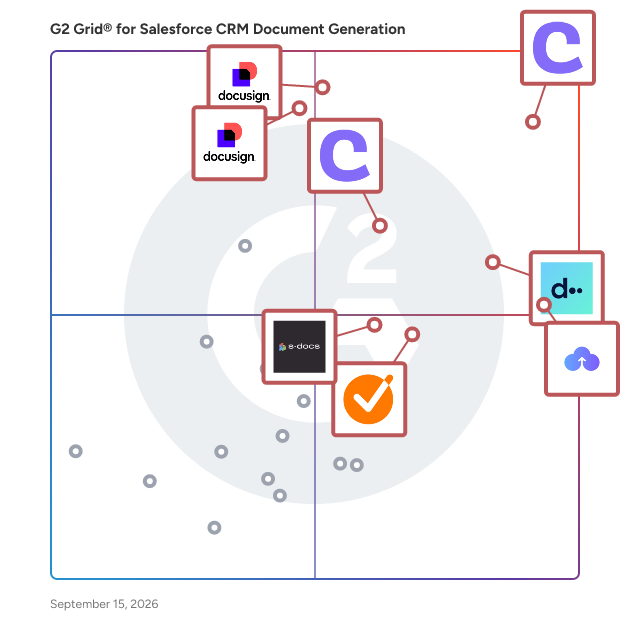
G2 Grid® for Salesforce CRM Document Generation Software

G2 Grid® for Salesforce CRM Document Generation Software plotting products by satisfaction and market presence

Highlighted products: Conga Composer, Docusign CLM, CloudFiles, DealHub AI, Docusign Gen, Conga CLM, GetAccept, and S-Docs.

Underlying data: [Grid® JSON](https://www.g2.com/categories/salesforce-crm-document-generation/grids.json?focus%5B%5D=conga-composer&focus%5B%5D=docusign-clm&focus%5B%5D=cloudfiles-cloudfiles&focus%5B%5D=dealhub-ai&focus%5B%5D=docusign-gen&focus%5B%5D=conga-conga-clm&focus%5B%5D=getaccept&focus%5B%5D=s-docs)

Conga Composer

Flexible. Scalable. Embedded. Conga Composer transforms how businesses generate documents Disconnected systems and manual workflows make document generation slow, error-prone, and costly. Conga Composer streamlines this by embedding automated document creation into your existing tools. It supports multiple formats, merges data from any source, and scales effortlessly, empowering teams to deliver accurate, beautifully branded documents faster, with less effort and greater control. Conga Composer excels in document generation with key advantages: Launch Anywhere – Trigger document generation from buttons, flows, Apex, or external systems- no custom code needed. Multi-Format Support – Create Word, PDF, Excel, PowerPoint, and HTML email templates. Dynamic Content – Use conditional logic, charts, dashboards, rich text, and global currencies. High-Volume Ready – Supports large templates (25MB), merged outputs (250MB), and batch processing. Enterprise Scalability – Reusable templates and behaviors across departments and use cases. eSignature Integration – Seamless pairing with Conga Sign for end-to-end agreement workflows. Revenue Lifecycle Alignment – Only vendor that integrates doc gen into CLM, CPQ, and full revenue processes. Admin-Friendly Setup – Built for Salesforce admins and business users—no developer dependency. Proven Performance – Trusted by 8,000+ businesses; millions of documents generated monthly. Future-Ready – Monitoring AI trends to invest when enterprise-grade reliability is guaranteed. With these strengths, Conga Composer delivers a scalable, flexible, and automated solution for efficient document generation.

Average Rating: 4.4/5.0

Total Reviews: 847

How Do G2 Users Rate Conga Composer?

  • Has the product been a good partner in doing business?: 8.7/10 (Category avg: 8.8/10)
  • Ease of Use: 8.3/10 (Category avg: 8.7/10)
  • Ease of Admin: 8.1/10 (Category avg: 8.2/10)
  • Quality of Support: 8.7/10 (Category avg: 8.8/10)

Who Is the Company Behind Conga Composer?

  • Seller: Conga
  • Company Website:
  • Year Founded: 2006
  • HQ Location: 3200 Kirby Dr., Suite 500, Houston, TX 77098
  • LinkedIn® Page: www.linkedin.com
    2,159 employees on LinkedIn®
  • Phone: (303) 465-1616

Who Uses This Product?

  • Who Uses This: Salesforce Administrator, Business Analyst
  • Top Industries: Information Technology and Services, Computer Software
  • Company Size: 47% Medium, 28% Large

What Do G2 Reviewers Say About Conga Composer?

AI-generated summary from verified user reviews

Pros
  • Users value the powerful API of Conga Composer for efficient bulk document generation and seamless integration.
  • Users value the easy document customization and excellent support from Conga Composer for efficient document management.
  • Users value the ease of use of Conga Composer, finding it straightforward for document configuration and template launching.
  • Users value the time-saving capabilities of Conga Composer, streamlining document creation and delivery processes effortlessly.
  • Users value the seamless integration with Salesforce that enhances efficiency and reduces errors in document creation.
Cons
  • Users find the learning curve steep, making it challenging to resolve issues independently, leading to frustration.
  • Users find the steep learning curve of Conga Composer challenging, requiring time to master templates and queries.
  • Users find the difficult learning curve and complex steps hinder their experience with Conga Composer.
  • Users find that tasks are time-consuming due to the complex setup and steep learning curve of Conga Composer.
  • Users face a complex setup for Conga Composer, making issue resolution tedious and time-consuming with many unresolved tickets.

What Are Recent G2 Reviews of Conga Composer?

What Are G2 Users Discussing About Conga Composer?

Docusign CLM

While eSignature has changed the way that many organizations execute a contract, the lifecycle before and after signature is often managed through manual processes, spreadsheets, and emails—slowing the pace of doing business, increasing risk, and frustrating customers and employees. Docusign CLM (Contract Lifecycle Management) allows organizations to streamline the agreement lifecycle by transforming analog manual processes into a digital automated workflow. The end result is an accelerated pace of doing business, increased compliance, and more efficient employees. Key Features: Central Repository, Advanced Search & Find, Version Control, Clause Library, Collaboration with internal and external parties, Redlining, Simple & Advanced Workflows, Tagging, Mobile Access, Multi Platform integrations (including tight integration with Salesforce).

Average Rating: 4.3/5.0

Total Reviews: 493

How Do G2 Users Rate Docusign CLM?

  • Has the product been a good partner in doing business?: 8.6/10 (Category avg: 8.8/10)
  • Ease of Use: 8.7/10 (Category avg: 8.7/10)
  • Ease of Admin: 8.3/10 (Category avg: 8.2/10)
  • Quality of Support: 8.6/10 (Category avg: 8.8/10)

Who Is the Company Behind Docusign CLM?

  • Seller: Docusign
  • Company Website:
  • Year Founded: 2003
  • HQ Location: San Francisco, CA
  • Twitter: @Docusign
    143,953 Twitter followers
  • LinkedIn® Page: www.linkedin.com
    8,566 employees on LinkedIn®

Who Uses This Product?

  • Who Uses This: Account Executive, General Counsel
  • Top Industries: Information Technology and Services, Computer Software
  • Company Size: 46% Medium, 29% Large

What Do G2 Reviewers Say About Docusign CLM?

AI-generated summary from verified user reviews

Pros
  • Users appreciate the ease of use in Docusign CLM, enjoying effortless document signing and tracking features.
  • Users appreciate the fast and simple digital signing process of DocuSign, streamlining document management efficiently.
  • Users praise the convenience of signing from anywhere with DocuSign CLM, streamlining operations and enhancing client interactions.
  • Users appreciate the ease of use in Docusign CLM for managing important documents like leasing agreements.
  • Users value the simple and effective signing process of Docusign CLM, enhancing remote interactions seamlessly.
Cons
  • Users find Docusign CLM to be too expensive, especially with limitations on envelope creation and support issues.
  • Users face a steep learning curve with Docusign CLM, often requiring support to navigate its complex setup.
  • Users find signature issues with DocuSign CLM, noting difficulties in multiple-party access and navigation during signing processes.
  • Users often face a complex setup process with Docusign CLM which can be overwhelming and time-consuming.
  • Users report a challenging learning curve, making it hard to become proficient without support and time investment.

What Are Recent G2 Reviews of Docusign CLM?

What Are G2 Users Discussing About Docusign CLM?

CloudFiles

CloudFiles is an all-in-one document operations platform for Salesforce and HubSpot that helps organizations manage, generate, process, share, and automate documents directly from their CRM. Built for document-intensive business processes, CloudFiles combines document management, AI-powered document processing, document generation, secure sharing, external storage integrations, and workflow automation into a single platform. Organizations use CloudFiles to connect Salesforce and HubSpot with SharePoint, Google Drive, OneDrive, Dropbox, Amazon S3, and other enterprise storage platforms while maintaining structured document organization, centralized visibility, and secure access across teams. With CloudFiles, teams can: • Manage files and folders directly inside Salesforce and HubSpot • Automate document generation for agreements, proposals, onboarding forms, financial documents, and client communications • Extract and process data from documents using AI • Build secure datarooms and external document-sharing workflows • Automate document-heavy processes like client onboarding, loan processing, document verification, intake forms, and operational workflows • Configure CRM-native automations using flows, widgets, and custom actions CloudFiles helps organizations reduce manual work, centralize document operations, streamline document-heavy workflows, and improve productivity without leaving Salesforce or HubSpot. CloudFiles supports enterprise security and compliance requirements with SOC 2, HIPAA, GDPR, and ISO 27001 aligned practices. Data residency is supported across the US, EU, UK, and AU, while files remain securely stored within customers’ external storage platforms and are never used to train AI models. Trusted by teams across financial services, healthcare, insurance, legal, real estate, technology, and professional services, CloudFiles enables businesses to modernize document workflows with enterprise-grade security, flexible storage integrations, and AI-powered automation.

Average Rating: 4.5/5.0

Total Reviews: 223

How Do G2 Users Rate CloudFiles?

  • Has the product been a good partner in doing business?: 8.8/10 (Category avg: 8.8/10)
  • Ease of Use: 9.1/10 (Category avg: 8.7/10)
  • Ease of Admin: 9.0/10 (Category avg: 8.2/10)
  • Quality of Support: 8.7/10 (Category avg: 8.8/10)

Who Is the Company Behind CloudFiles?

  • Seller: CloudFiles
  • Year Founded: 2021
  • HQ Location: Fremont, US
  • Twitter: @cloudfilesapp
    54 Twitter followers
  • LinkedIn® Page: www.linkedin.com
    30 employees on LinkedIn®
  • Ownership: Venture-backed

Who Uses This Product?

  • Who Uses This: Manager
  • Top Industries: Information Technology and Services, Computer Software
  • Company Size: 44% Small, 29% Medium

What Do G2 Reviewers Say About CloudFiles?

AI-generated summary from verified user reviews

Pros
  • Users enjoy the ease of use of CloudFiles, praising its seamless setup and centralized file management.
  • Users value the robust security of CloudFiles, ensuring their sensitive files remain safe and compliant while being easily accessible.
  • Users value the efficient cloud storage of CloudFiles, allowing seamless access and management of documents across platforms.
  • Users love the easy access to files from anywhere with an internet connection, enhancing convenience and productivity.
  • Users appreciate the easy setup of CloudFiles, finding it user-friendly and efficient for daily file management.
Cons
  • Users have noted the slow loading times for downloads and uploads, impacting their overall experience with CloudFiles.
  • Users find that the training required for CloudFiles can slow down initial usage and frustrate new members.
  • Users desire limited customization options in CloudFiles, wishing for features like custom tags and color coding.
  • Users experience slow performance with CloudFiles, noting glitches and delays in response time during specific actions.
  • Users often face slow upload speeds with CloudFiles, leading to a frustrating and time-consuming experience.

What Are Recent G2 Reviews of CloudFiles?

What Are G2 Users Discussing About CloudFiles?

DealHub AI

DealHub AI is the Agentic Quote-to-Revenue (Q2R) platform designed for the AI era. We empower high-growth SaaS and forward-thinking enterprises to fully consolidate, automate, and accelerate their entire revenue lifecycle, from initial quote generation through final cash collection and revenue recognition. DealHub AI gives enterprises ultimate flexibility, enabling the rapid design, launch, and scale of any modern monetization model, such as Sales-Led Growth (SLG), Product-Led Growth (PLG), Self-Serve, Subscription, Usage-Based, and AI Consumption models. The unified platform replaces fragmented revenue tools, integrating critical capabilities into one orchestrated engine, including AI-Powered CPQ (Configure, Price, Quote), CLM (Contract Lifecycle Management), Subscription Management & Billing, Revenue Recognition, Digital DealRoom, and Composable API-first Headless Quoting. Enterprises choose DealHub AI to drive revenue at AI scale, leveraging real-time revenue visibility and predictability across all revenue streams via live ARR, usage, churn, and forecast dashboards. DealHub AI offers seamless, native integration with all leading CRMs, including Salesforce, Microsoft Dynamics, and HubSpot, ensuring customers achieve faster time-to-value. DealHub AI is trusted by global revenue leaders, including Intuit, HP, Gong, and Braze.

Average Rating: 4.7/5.0

Total Reviews: 851

How Do G2 Users Rate DealHub AI?

  • Has the product been a good partner in doing business?: 9.6/10 (Category avg: 8.8/10)
  • Ease of Use: 9.0/10 (Category avg: 8.7/10)
  • Ease of Admin: 8.6/10 (Category avg: 8.2/10)
  • Quality of Support: 9.6/10 (Category avg: 8.8/10)

Who Is the Company Behind DealHub AI?

  • Seller: DealHub.io
  • Company Website:
  • Year Founded: 2014
  • HQ Location: Austin, Texas
  • Twitter: @DealHubIO
    3,887 Twitter followers
  • LinkedIn® Page: www.linkedin.com
    330 employees on LinkedIn®

Who Uses This Product?

  • Who Uses This: Sales Operations Manager, Account Executive
  • Top Industries: Computer Software, Information Technology and Services
  • Company Size: 65% Medium, 23% Small

What Do G2 Reviewers Say About DealHub AI?

AI-generated summary from verified user reviews

Pros
  • Users highly value the responsive support from DealHub AI, praising their thorough assistance and user-friendly tutorials.
  • Users find DealHub AI to have an intuitive interface and quick onboarding, enhancing their sales processes effortlessly.
  • Users value the time-saving features of DealHub AI, enhancing productivity with its intuitive interface and streamlined processes.
  • Users benefit from the efficiency of DealHub AI, significantly improving their sales cycle and operational processes.
  • Users commend the seamless integrations of DealHub AI, enhancing productivity and streamlining information processes effectively.
Cons
  • Users find the learning curve challenging, making navigation and functionality feel cumbersome until fully acclimated.
  • Users find that limited customization in DealHub AI requires workaround solutions and complicates their rollout processes.
  • Users find a steep learning curve with DealHub AI, making it challenging for new users to master the platform.
  • Users struggle with missing features in DealHub AI, leading to cumbersome workarounds and limitations in functionality.
  • Users face integration issues with CRM, making the process challenging and time-consuming despite team support.

What Are Recent G2 Reviews of DealHub AI?

What Are G2 Users Discussing About DealHub AI?

Docusign Gen

Docusign Gen for Salesforce is a powerful tool designed to streamline the document generation process for sales teams by automating the creation of professional, error-free documents directly within the Salesforce environment. This integration allows sales representatives to generate contracts, quotes, invoices, and other essential documents with just a few clicks, eliminating manual data entry and reducing the risk of errors. Key Features and Functionality: - Seamless Salesforce Integration: Gen is a Salesforce-native application that integrates into Salesforce Sales Cloud and Revenue Cloud (CPQ+, Billing, and Subscription Management), enabling users to generate documents without leaving the Salesforce interface. - Data Merging: Effortlessly merge customer, product, and pricing data from Salesforce records to create documents in Microsoft Word, PDF, or Docusign formats. - Conditional Content: Automatically include or exclude specific content based on predefined Salesforce data and rules, ensuring that each document is tailored to the specific business scenario. - Dynamic Tables: Generate quotes or invoices that include properly formatted tables, enhancing the clarity and professionalism of the documents. - Editable Documents: Generated documents are editable in Microsoft Word, allowing representatives, legal reviewers, and clients to make necessary adjustments and negotiate terms within a familiar platform. Primary Value and User Benefits: Docusign Gen for Salesforce significantly enhances the efficiency and accuracy of the document generation process for sales teams. By automating the creation of customized documents, it reduces the time spent on manual preparation, minimizes errors, and ensures consistency across all sales documents. This leads to faster deal closures, improved compliance, and a more streamlined sales workflow, ultimately driving higher productivity and customer satisfaction.

Average Rating: 4.5/5.0

Total Reviews: 22

How Do G2 Users Rate Docusign Gen?

  • Has the product been a good partner in doing business?: 9.7/10 (Category avg: 8.8/10)
  • Ease of Use: 9.2/10 (Category avg: 8.7/10)
  • Ease of Admin: 9.7/10 (Category avg: 8.2/10)
  • Quality of Support: 9.4/10 (Category avg: 8.8/10)

Who Is the Company Behind Docusign Gen?

  • Seller: Docusign
  • Year Founded: 2003
  • HQ Location: San Francisco, CA
  • Twitter: @Docusign
    143,953 Twitter followers
  • LinkedIn® Page: www.linkedin.com
    8,566 employees on LinkedIn®
  • Ownership: NASDAQ: DOCU

Who Uses This Product?

  • Company Size: 41% Small, 41% Medium

What Are Recent G2 Reviews of Docusign Gen?

What Are G2 Users Discussing About Docusign Gen?

Conga CLM

Conga CLM turns contracts into dynamic, data-rich assets that accelerate execution, reduce risk, and improve compliance. It unifies every contract and team in one system, centralizing data and embedding automation and AI-driven insights for smarter decisions. Built for industries like Healthcare and Life Sciences, Technology, Financial Services, and Manufacturing, Conga CLM meets organizations where they are and scales as needs grow. The platform automates intake, review, approval, and signature workflows, enables self-service contracting, and provides a secure, searchable repository with real-time dashboards and analytics. AI validates clauses, scores risk, and tracks obligations, while integrations with CRM, ERP, and procurement systems eliminate silos. Conga delivers responsible AI paired with human oversight for accuracy and compliance, creating one connected workflow across the revenue lifecycle to reduce manual work and accelerate business outcomes. Conga CLM delivers on the promise of One CLM. Every team. Every contract. It unifies Legal, Procurement, and Sales in a single platform, eliminating silos and creating one connected workflow across the revenue lifecycle. Every contract is centralized in a secure, searchable repository, turning static documents into structured data for real-time visibility, dashboards, and analytics. Conga CLM accelerates execution with automated intake, review, approval, and signature workflows, while enabling self-service contracting to reduce legal bottlenecks. AI validates clauses, scores risk, and tracks obligations to enforce compliance and reduce audit exposure. Seamless integration with CRM, ERP, and procurement systems ensures consistency and speed across the business. With responsible AI, intuitive design, and enterprise-grade scalability, Conga CLM empowers organizations to manage complex contract processes confidently and adapt as needs evolve. The CLM market is highly fragmented. Sell-side specialists excel at revenue contracting but lack procurement depth. Buy-side vendors focus on supplier agreements but fall short on full lifecycle management. Enterprise generalists try to cover both but struggle with poor integrations and fragmented data models. Procurement suites offer only basic, bundled CLM capabilities with limited automation. Conga CLM is built to do what none of these do alone: support Legal, Procurement, and Sales in a single, unified platform — across both buy-side and sell-side contracts. Conga CLM is flexible enough to support any team, scalable from a simple repository to enterprise-wide automation, and extensible through API-first integrations with Salesforce, SAP, Oracle, Coupa, and Ariba. With 10+ years of implementation expertise and responsible AI built in at every tier, Conga CLM is the platform that grows with your business.

Average Rating: 4.3/5.0

Total Reviews: 597

How Do G2 Users Rate Conga CLM?

  • Has the product been a good partner in doing business?: 8.6/10 (Category avg: 8.8/10)
  • Ease of Use: 8.1/10 (Category avg: 8.7/10)
  • Ease of Admin: 8.0/10 (Category avg: 8.2/10)
  • Quality of Support: 8.5/10 (Category avg: 8.8/10)

Who Is the Company Behind Conga CLM?

  • Seller: Conga
  • Company Website:
  • Year Founded: 2006
  • HQ Location: 3200 Kirby Dr., Suite 500, Houston, TX 77098
  • LinkedIn® Page: www.linkedin.com
    2,159 employees on LinkedIn®
  • Phone: (303) 465-1616

Who Uses This Product?

  • Who Uses This: Account Executive, Salesforce Administrator
  • Top Industries: Information Technology and Services, Computer Software
  • Company Size: 41% Medium, 39% Large

What Do G2 Reviewers Say About Conga CLM?

AI-generated summary from verified user reviews

Pros
  • Users value the ease of use of Conga CLM, facilitating seamless contract management and daily administrative tasks.
  • Users value the flexibility and powerful features of Conga CLM, streamlining their contract management processes efficiently.
  • Users appreciate Conga CLM for its efficiency in automating contract lifecycle processes, saving time and reducing manual labor.
  • Users appreciate the automation of the entire contract lifecycle in Conga CLM, simplifying tracking, drafting, and approval.
  • Users praise the seamless Salesforce integration of Conga CLM, enhancing efficiency and simplifying contract management.
Cons
  • Users face a steep learning curve with Conga CLM due to complex setup and inadequate documentation.
  • Users find the learning curve steep, struggling with complex setups and insufficient documentation for effective use.
  • Users experience slow performance with Conga CLM, especially during bulk operations and with large data volumes.
  • Users find the implementation process time-consuming, often requiring extensive support during critical periods and upgrades.
  • Users find the initial setup complex, leading to challenges in management and ongoing support for Conga CLM.

What Are Recent G2 Reviews of Conga CLM?

What Are G2 Users Discussing About Conga CLM?

GetAccept

GetAccept is the #1 AI Digital Sales Room, built to help revenue teams run every deal like their best sales rep. It replaces scattered emails and static attachments with an AI-native workspace, bringing content, proposals, e-signing, and buyer communication together so sellers, buyers, and every stakeholder stay aligned on the latest documents, timelines, and next steps across the full sales cycle. GetAccept's AI analyses your meetings, calls, emails, CRM data, internal content, and publicly available data, and is trained to take action, building and updating personalized Digital Sales Rooms in minutes and keeping every rep on track with your sales process and methodology. Real-time tracking shows exactly how buyers engage with each deal, and native CRM integrations keep everything synced in the tools reps already use. GetAccept solves the problem of deals stalling between meetings in scattered email threads, static attachments, and manual admin. By giving sellers and buyers a single, trackable space to collaborate from first touch to signature, it helps revenue teams of every size to work smarter, close faster, and win more. Why revenue teams choose GetAccept  ↳ AI-powered enablement: auto-generate and surface the right content for each deal, stage, and stakeholder, grounded in your meetings, CRM, and internal knowledge.  ↳ AI-built sales rooms: spin up a personalized, interactive Digital Sales Room in minutes that keeps conversations, materials, and actions aligned.  ↳ Deal intelligence: turn buyer engagement signals into clear visibility and AI-guided next steps.  ↳ Proposals and e-signing built in: create, send, track, and close documents without leaving the room.  ↳ Connected to your stack: #1-rated native integrations with Salesforce, HubSpot, and Slack, plus 100+ more, keep activity synced everywhere automatically. Trusted by 5,000+ revenue teams, including Dealfront, ScaleWise, Samsung, and Chargebee. "This is a way for you to control the narrative, to make sure your reps are sticking to the process and helping your customers experience value instead of just product pitching." Remi Aaagaard Mørken, SVP of Sales, SalesScreen (100% increase in win rate) "Since I started using GetAccept, my sales process and communication with my prospects are way more project- and solution-oriented. They know where to find the content they need, and I can focus on providing solutions." Carolina Bräuninger, Senior Strategic Account Executive, Dealfront (67% decrease in sales cycle time) "If you haven't got something like GetAccept from a contracts perspective, but equally from a Deal Room perspective, then you're behind." Gavin Summer, Co-Founder, ScaleWise (51% increase in proposal-to-close rate) (edited)

Average Rating: 4.6/5.0

Total Reviews: 1,253

How Do G2 Users Rate GetAccept?

  • Has the product been a good partner in doing business?: 9.3/10 (Category avg: 8.8/10)
  • Ease of Use: 8.9/10 (Category avg: 8.7/10)
  • Ease of Admin: 8.7/10 (Category avg: 8.2/10)
  • Quality of Support: 9.3/10 (Category avg: 8.8/10)

Who Is the Company Behind GetAccept?

  • Seller: GetAccept Inc.
  • Company Website:
  • Year Founded: 2015
  • HQ Location: Palo Alto, CA
  • Twitter: @getaccept
    1,433 Twitter followers
  • LinkedIn® Page: www.linkedin.com
    152 employees on LinkedIn®

Who Uses This Product?

  • Who Uses This: Sales Manager, Account Manager
  • Top Industries: Computer Software, Information Technology and Services
  • Company Size: 50% Small, 43% Medium

What Do G2 Reviewers Say About GetAccept?

AI-generated summary from verified user reviews

Pros
  • Users commend the ease of use in GetAccept, ensuring a smooth experience and minimal complaints from users.
  • Users appreciate the responsive customer support of GetAccept, enhancing their overall experience with the platform.
  • Users find GetAccept intuitive and easy to use, enhancing document workflows and client engagement effectively.
  • Users value the exceptional customer service of GetAccept, enhancing their overall experience and satisfaction with the platform.
  • Users find GetAccept a huge time-saver, thanks to its all-in-one accessibility and efficient automation features.
Cons
  • Users note the missing dark mode, which affects comfort and visual experience while using GetAccept.
  • Users face limited customization, leading to frustration and complexity when managing minor variations in contracts.
  • Users find difficult editing due to clunky blocks and limitations on signing order and quote modifications.
  • Users find the limited features of GetAccept to create unnecessary complexity and hinder customization options.
  • Users often face poor integration issues with GetAccept, leading to time-consuming troubleshooting and error message frustrations.

What Are Recent G2 Reviews of GetAccept?

S-Docs

S-Docs is a document operations platform designed to help users streamline their document creation and signing processes. This solution caters to a wide range of organizations, from small businesses to large global enterprises, enabling them to efficiently manage critical documents through intuitive automation and secure e-signature capabilities. By focusing on both ease of use and robust functionality, S-Docs empowers businesses to enhance their operational efficiency and transform their workflows. The platform is particularly valuable for organizations that handle a high volume of documents, such as contracts, invoices, and compliance forms. Its target audience includes industries like finance, healthcare, legal, and manufacturing, where accurate and timely document management is essential. S-Docs addresses the specific needs of these sectors by providing a comprehensive solution that not only simplifies document workflows but also ensures compliance with industry regulations. Key features of S-Docs include its user-friendly document automation tools, which allow users to create customized templates and generate documents quickly. The e-signature functionality further enhances the platform by enabling users to obtain signatures securely and efficiently, reducing the time spent on manual processes. Additionally, S-Docs integrates seamlessly with existing systems, ensuring that organizations can leverage their current technology investments while enhancing their document operations. The benefits of using S-Docs extend beyond mere efficiency. By automating document processes, organizations can reduce human error, improve accuracy, and accelerate turnaround times. The platform also supports collaboration among team members, allowing multiple users to work on documents simultaneously, which fosters a more agile working environment. Furthermore, S-Docs' commitment to security ensures that sensitive information is protected throughout the document lifecycle, giving users peace of mind. Overall, S-Docs stands out in the document operations category by offering a comprehensive solution that not only simplifies document workflows but also drives significant process transformation. Its focus on automation, security, and integration makes it a valuable tool for organizations looking to enhance their document management capabilities and achieve greater operational efficiency.

Average Rating: 4.7/5.0

Total Reviews: 122

How Do G2 Users Rate S-Docs?

  • Has the product been a good partner in doing business?: 9.4/10 (Category avg: 8.8/10)
  • Ease of Use: 8.9/10 (Category avg: 8.7/10)
  • Ease of Admin: 9.0/10 (Category avg: 8.2/10)
  • Quality of Support: 9.2/10 (Category avg: 8.8/10)

Who Is the Company Behind S-Docs?

  • Seller: S-Docs
  • Year Founded: 2010
  • HQ Location: New York, NY
  • LinkedIn® Page: www.linkedin.com
    54 employees on LinkedIn®

Who Uses This Product?

  • Who Uses This: Salesforce Administrator
  • Top Industries: Non-Profit Organization Management, Information Technology and Services
  • Company Size: 45% Small, 40% Medium

What Do G2 Reviewers Say About S-Docs?

AI-generated summary from verified user reviews

Pros
  • Users appreciate the ease of use of S-Docs, making document generation and e-signature fast and simple.
  • Users commend the excellent customer support of S-Docs, finding their assistance invaluable during technical issues.
  • Users appreciate the seamless integration of S-Docs with Salesforce, enhancing document generation and e-signature efficiency.
  • Users praise the seamless Salesforce integration of S-Docs, enhancing security and simplifying document generation processes.
  • Users value the ease of template creation with S-Docs, enhancing daily operations seamlessly within Salesforce.
Cons
  • Users find the learning curve steep, especially with complex templates and a non-intuitive interface, hindering effective use.
  • Users find the S-Docs interface not intuitive, noting a steep learning curve and complexity for less technical users.
  • Users express concerns about automation difficulty, noting that complex templates require time and troubleshooting expertise.
  • Users find S-Docs too expensive, especially after recent pricing changes and tiered minimum user requirements.
  • Users face formatting issues with S-Docs, including limitations in customization and troublesome DOCX output.

What Are Recent G2 Reviews of S-Docs?

Nintex

Nintex helps companies unlock the power of endless possibilities with agentic business orchestration. Today, more than 7,000 public and private sector organizations across 100+ countries turn to the Nintex platform to automate how work gets done, remove friction from business processes, and unlock the full potential of their people. Nintex CE allows organizations to govern how people, systems, and AI work together: combining the speed and innovation of easy, low-code application development, with the flexibility of workflow orchestration, and the intelligence of AI agents to build solutions that solve their unique business challenges. Nintex K2 allows organizations to get advanced orchestration, control, and scalability, while keeping data securely on-premises to meet the exacting standards of highly regulated entities or those with strict data sovereignty requirements. Harness powerful on-prem automation, rich application development, and complex case management with full control.

Average Rating: 4.3/5.0

Total Reviews: 1,272

How Do G2 Users Rate Nintex?

  • Has the product been a good partner in doing business?: 8.4/10 (Category avg: 8.8/10)
  • Ease of Use: 8.4/10 (Category avg: 8.7/10)
  • Ease of Admin: 8.0/10 (Category avg: 8.2/10)
  • Quality of Support: 8.1/10 (Category avg: 8.8/10)

Who Is the Company Behind Nintex?

  • Seller: Nintex
  • Company Website:
  • Year Founded: 2006
  • HQ Location: Bellevue, WA
  • LinkedIn® Page: www.linkedin.com
    1,177 employees on LinkedIn®

Who Uses This Product?

  • Who Uses This: Business Analyst, Salesforce Administrator
  • Top Industries: Information Technology and Services, Financial Services
  • Company Size: 48% Large, 40% Medium

What Do G2 Reviewers Say About Nintex?

AI-generated summary from verified user reviews

Pros
  • Users find Nintex's ease of use invaluable, enabling quick development of workflows and forms without extensive training.
  • Users value the easy design and automation of workflows with Nintex, enhancing efficiency and reducing manual effort.
  • Users value the user-friendly workflow management of Nintex, enabling smooth implementation and efficient automation.
  • Users laud the easy setup of Nintex, enabling quick implementation and smooth feature integration without issues.
  • Users value the versatile capabilities of Nintex, streamlining both simple and complex workflows effortlessly.
Cons
  • Users find Nintex's limited features for data tasks and customization hinder overall effectiveness and flexibility.
  • Users experience a learning curve with Skuid, finding it challenging to master all its features effectively.
  • Users find Nintex to be expensive, especially for smaller teams facing challenges with complex workflows and support.
  • Users find the complexity of Nintex challenging, especially with advanced features and intricate workflows requiring significant time to master.
  • Users note limited customization options in Nintex, hindering advanced functionality and specific workflow needs.

What Are Recent G2 Reviews of Nintex?

What Are G2 Users Discussing About Nintex?

DocXpert

DocXpert is a Salesforce app that allows you to create custom documents in docx and PDF formats with dynamic tables, images, and text blocks in just a few clicks. With DocXpert, all employees work with the same templates, which are managed centrally. This ensures that your company’s corporate design is always maintained. DocXpert eliminates copy & paste and spelling errors, and the text blocks ensure that all necessary information is always included in the document. You can transform Salesforce data into various types of documents as quickly as Lightning and as easily as Word. The pricing model is simple and there are no limits to the number of generated documents or templates. DocXpert is developed by Productforce GmbH, a 100% subsidiary of Salesforce partner H+W CONSULT, which specializes in the development and operation of applications for Salesforce.

Average Rating: 4.3/5.0

Total Reviews: 26

How Do G2 Users Rate DocXpert?

  • Has the product been a good partner in doing business?: 8.3/10 (Category avg: 8.8/10)
  • Ease of Use: 9.2/10 (Category avg: 8.7/10)
  • Ease of Admin: 6.7/10 (Category avg: 8.2/10)
  • Quality of Support: 8.5/10 (Category avg: 8.8/10)

Who Is the Company Behind DocXpert?

Who Uses This Product?

  • Top Industries: Computer Software, Information Technology and Services
  • Company Size: 48% Small, 30% Large

What Are Recent G2 Reviews of DocXpert?

Formstack Documents

Formstack Documents is the only document generation solution you need to save time, put a stop to manual entry, and streamline your paperwork process. With Formstack Documents, you can upload, merge, and deliver smart documents in a snap. Start from scratch or upload your own fillable PDF or Word document. Our app allows you to easily customize your document and merge it with data. Once you've created your document, it's time to figure out where you'll be sending it. From emails to Google Drive to a third-party integration via Webhooks, Formstack Documents gives you the control to send your merged files wherever you want. Formstack Documents integrates with over 150 different products, ensuring you'll easily be able to upload, merge, and deliver your documents, no matter what products you're using.

Average Rating: 4.5/5.0

Total Reviews: 148

How Do G2 Users Rate Formstack Documents?

  • Has the product been a good partner in doing business?: 9.0/10 (Category avg: 8.8/10)
  • Ease of Use: 8.2/10 (Category avg: 8.7/10)
  • Ease of Admin: 8.6/10 (Category avg: 8.2/10)
  • Quality of Support: 8.7/10 (Category avg: 8.8/10)

Who Is the Company Behind Formstack Documents?

  • Seller: Formstack, LLC
  • Company Website:
  • Year Founded: 2006
  • HQ Location: Fishers, IN
  • Twitter: @Formstack
    6,392 Twitter followers
  • LinkedIn® Page: www.linkedin.com
    219 employees on LinkedIn®

Who Uses This Product?

  • Who Uses This: Owner
  • Top Industries: Computer Software, Non-Profit Organization Management
  • Company Size: 59% Small, 33% Medium

What Do G2 Reviewers Say About Formstack Documents?

AI-generated summary from verified user reviews

Pros
  • Users find Formstack Documents to be very user-friendly, significantly streamlining their document generation process with ease.
  • Users find automation features in Formstack Documents incredibly time-saving, enhancing overall workflow efficiency and ease of use.
  • Users value the customization options of Formstack Documents, enhancing both internal and external documentation processes effectively.
  • Users value the easy integrations of Formstack Documents, which streamline workflows and enhance productivity across various platforms.
  • Users value the seamless integration of Formstack Documents, enhancing workflows and saving time across various platforms.
Cons
  • Users find bug issues with Formstack Documents occasionally disrupt their experience, though most are easily resolved.
  • Users find the learning curve steep for complex document merges, though the new builder simplifies the process.
  • Users find the user interface clunky, leading to a less intuitive experience despite its robust capabilities.
  • Users find the poor documentation inadequate for advanced scenarios, hindering their overall experience with Formstack Documents.
  • Users find the setup difficulty of Formstack Documents challenging initially, but it becomes user-friendly after configuration.

What Are Recent G2 Reviews of Formstack Documents?

What Are G2 Users Discussing About Formstack Documents?

Fluent by Apryse

Fluent by Apryse (previously Windward Studios) is a unique solution that simplifies the creation of reports and templates on a large scale with minimal coding required. The SDK and Microsoft Office plugin enable developers to meet reporting needs efficiently, while also empowering admins to design and populate data-driven documents from multiple data sources. Fluent offers unlimited formatting capabilities, catering to the diverse needs of multiple teams and end users. Set it and forget it. -Automate reporting with effortless template creation in Microsoft Office applications. -Free your backlog from internal reporting development with an automated solution for reporting and template creation. Empower your end users to independently manage and update their templates with ease. Create, Connect, and Manage Templates. Quick to deploy and flexible enough to meet the organization's needs by easily integrating any data source: -Don't wait on vendor integration to add a new data source or expose sensitive data to a SaaS application. -Make the logic as complex as you want – avoid the limits of off-the-shelf solutions. - Meet the brand compliance expectations for external communications. Infinite Scalability: Regulatory requirements seem to grow in volume and complexity each year. You won’t outgrow a solution built for the organization’s specific needs. -End users can upload or create new templates as requirements change -Quickly integrate new data sources as the business grows -Localize reports for audiences by region, culture, and language. Indisputable productivity impact: Workers spend precious time on manual, repetitive tasks, with email, data collection, and data entry. Apryse drastically reduces time spent on these tasks, minimizing errors and freeing up time for more valuable work. -Minimize the requirements gathering back-and-forth when you put the solution in the hands of the end user. -Say goodbye to the wasted time and errors that come from manual cut and paste For more information visit: https://bit.ly/3tDfzFl

Average Rating: 4.4/5.0

Total Reviews: 77

How Do G2 Users Rate Fluent by Apryse?

  • Has the product been a good partner in doing business?: 9.1/10 (Category avg: 8.8/10)
  • Ease of Use: 8.4/10 (Category avg: 8.7/10)
  • Ease of Admin: 8.9/10 (Category avg: 8.2/10)
  • Quality of Support: 9.0/10 (Category avg: 8.8/10)

Who Is the Company Behind Fluent by Apryse?

  • Seller: Apryse
  • Year Founded: 1998
  • HQ Location: Denver, CO
  • Twitter: @aprysesolutions
    381 Twitter followers
  • LinkedIn® Page: www.linkedin.com
    569 employees on LinkedIn®

Who Uses This Product?

  • Top Industries: Computer Software, Financial Services
  • Company Size: 52% Medium, 34% Small

What Do G2 Reviewers Say About Fluent by Apryse?

AI-generated summary from verified user reviews

Pros
  • Users value the automation capabilities of Fluent by Apryse, enhancing efficiency in both batch and ad hoc reporting.
  • Users value the easy integrations of Fluent by Apryse, enhancing flexibility and reliable performance in their systems.
  • Users commend the efficiency of Fluent by Apryse, highlighting its robust performance in handling high volumes flawlessly.
  • Users value the flexibility of Fluent by Apryse, allowing tailored solutions for diverse reporting needs.
  • Users value the easy integration of Fluent by Apryse, enhancing their report generation and workflow efficiency effortlessly.

What Are Recent G2 Reviews of Fluent by Apryse?

What Are G2 Users Discussing About Fluent by Apryse?

Matik

Matik automates the creation of presentations, documents, and reports directly from your data, powered by AI you can trust. Pull from dashboards, reports, and data in your BI, CRM, data warehouse and other sources to instantly produce on-brand, insight-rich content in formats you already use today. Matik empowers any team to align messaging, scale best practices, and tell consistent data stories that drive action - faster than ever.

Average Rating: 4.8/5.0

Total Reviews: 56

How Do G2 Users Rate Matik?

  • Has the product been a good partner in doing business?: 9.7/10 (Category avg: 8.8/10)
  • Ease of Use: 9.0/10 (Category avg: 8.7/10)
  • Ease of Admin: 8.3/10 (Category avg: 8.2/10)
  • Quality of Support: 9.8/10 (Category avg: 8.8/10)

Who Is the Company Behind Matik?

  • Seller: Matik
  • Year Founded: 2019
  • HQ Location: San Francisco, California
  • Twitter: @Matik_io
    241 Twitter followers
  • LinkedIn® Page: www.linkedin.com
    108 employees on LinkedIn®

Who Uses This Product?

  • Who Uses This: Customer Success Manager
  • Top Industries: Computer Software, Information Technology and Services
  • Company Size: 68% Medium, 20% Large

What Do G2 Reviewers Say About Matik?

AI-generated summary from verified user reviews

Pros
  • Users find Matik to be a user-friendly tool, enabling efficient reporting and easy data visualization.
  • Users find MATIK to be a significant time-saver, allowing focus on strategic analysis rather than manual data harvesting.
  • Users value MATIK for its efficiency, streamlining data handling and allowing focus on strategic tasks and insights.
  • Users find Matik to be invaluable, significantly reducing manual labor and allowing focus on strategic analysis and recommendations.
  • Users value the unmatched customer support from Matik, noting quick responses and strong partnership in finding solutions.
Cons
  • Users find the inefficient search functionality frustrating, as it complicates finding and managing fields accurately.
  • Users find limitations in template groups and control over shared resources, which hinder usability and maintenance efficiency.
  • Users find the limited customization options of Matik restrict their ability to create presentations efficiently.
  • Users experience technical difficulties with Matik, including buggy features and challenges in navigation and coding accuracy.
  • Users experience admin issues with Matik, facing bugs and difficulties in managing shared resources and database changes.

What Are Recent G2 Reviews of Matik?

What Are G2 Users Discussing About Matik?

Formstack for Salesforce

What if your end user only had to fill out the same information once? If Salesforce is at the center of how your organization operates, you can build more efficient, streamlined processes with Formstack for Salesforce, a modular platform for data collection, automated document generation, digital signature and workflows where you can use prefill alongside your data to power end user experiences Formstack for Salesforce is a set of dynamic, customizable modules that allow Salesforce customers to digitize processes at scale, in and around their Salesforce org.

Average Rating: 4.1/5.0

Total Reviews: 33

How Do G2 Users Rate Formstack for Salesforce?

  • Has the product been a good partner in doing business?: 8.0/10 (Category avg: 8.8/10)
  • Ease of Use: 7.9/10 (Category avg: 8.7/10)
  • Ease of Admin: 7.8/10 (Category avg: 8.2/10)
  • Quality of Support: 8.1/10 (Category avg: 8.8/10)

Who Is the Company Behind Formstack for Salesforce?

  • Seller: Formstack, LLC
  • Company Website:
  • Year Founded: 2006
  • HQ Location: Fishers, IN
  • Twitter: @Formstack
    6,392 Twitter followers
  • LinkedIn® Page: www.linkedin.com
    219 employees on LinkedIn®

Who Uses This Product?

  • Top Industries: Non-Profit Organization Management, Information Technology and Services
  • Company Size: 46% Medium, 30% Small

What Do G2 Reviewers Say About Formstack for Salesforce?

AI-generated summary from verified user reviews

Pros
  • Users appreciate the time-saving convenience of Formstack for Salesforce, enabling quick data collection and seamless integration.
  • Users find the ease of use of Formstack for Salesforce essential for quickly gathering information and streamlining processes.
  • Users appreciate the easy integration with Salesforce, enabling quick field mapping and intuitive form building.
  • Users appreciate the seamless integration with Salesforce, which simplifies data flow and enhances form-building efficiency.
  • Users value the responsive customer support of Formstack for Salesforce, enhancing their overall experience with the product.
Cons
  • Users find the initial learning curve challenging, particularly with complex setup and insufficient documentation for advanced features.
  • Users find the form issues frustrating, citing difficulties with user-friendliness and mapping to custom objects.
  • Users find the interface usability challenging, with outdated design and complexity hindering the overall experience.
  • Users find the pricing prohibitive, especially for smaller teams, leading them to seek more affordable alternatives.
  • Users feel limited by customization options in Formstack for Salesforce, affecting their ability to tailor forms effectively.

What Are Recent G2 Reviews of Formstack for Salesforce?

Mambo Merge

Mambo Merge is a 100% native solution to generate professional DOCX, XLSX, PPTX and PDF files out of Salesforce. No more cutting and pasting, no more re-formatting, and no more clicking back and forth between apps - just push the button and download your finished file. Mambo Merge makes it easy to transform even your existing Word docs for Salesforce generation, so you can keep the look and feel that works for your business, but save time when it comes to creating them. Perfect for invoices, quotes, contracts, work orders, purchase orders, and more! And again, unlike other solutions, with Mambo Merge your data never leaves Salesforce, so you never have to worry about who has access along the way.

Average Rating: 4.5/5.0

Total Reviews: 11

How Do G2 Users Rate Mambo Merge?

  • Has the product been a good partner in doing business?: 7.5/10 (Category avg: 8.8/10)
  • Ease of Use: 8.3/10 (Category avg: 8.7/10)
  • Ease of Admin: 7.5/10 (Category avg: 8.2/10)
  • Quality of Support: 8.3/10 (Category avg: 8.8/10)

Who Is the Company Behind Mambo Merge?

  • Seller: MK Partners
  • Year Founded: 2006
  • HQ Location: Los Angeles, CA
  • Twitter: @mkpartners
    515 Twitter followers
  • LinkedIn® Page: www.linkedin.com
    54 employees on LinkedIn®

Who Uses This Product?

  • Company Size: 82% Medium, 18% Small

What Are Recent G2 Reviews of Mambo Merge?

What Are G2 Users Discussing About Mambo Merge?

Julie Jung
JJ
Researched and written by Julie Jung
Updated October 3, 2024

Learn More About Salesforce CRM Document Generation Software

Salesforce CRM Document Generation Software FAQs

Most Popular FAQs

Which Salesforce CRM Document Generation Software has the best reviews?

The best-reviewed tools in this category combine strong document automation with easier day-to-day use and a smoother Salesforce workflow.

  • Conga Composer - Best for teams that need highly customizable Salesforce-driven proposals, invoices, and sales documents.
  • S-Docs - A strong choice for Salesforce-native document generation with solid automation and less overhead than broader suites.
  • GetAccept - Well-suited for teams that want document generation tied closely to proposals, buyer engagement, and e-signature workflows.
  • XfilesPro - A good fit for smaller Salesforce teams that want document output and file automation with a simpler user experience.
What are the top AppExchange apps for document generation and contract management in Salesforce CRM?

The top AppExchange apps for document generation and contract management are built to run natively inside Salesforce, generating proposals, contracts, and invoices directly from live record data. Based on G2 reviews, sales operations managers and Salesforce admins evaluate these tools by comparing template flexibility, approval workflow automation, and Salesforce integration depth.

  • Conga Composer — Best for teams that need highly configurable document generation across complex Salesforce workflows.
  • Conga CLM — Best when document generation connects directly into contract lifecycle management and approval governance.
  • S-Docs — A Salesforce-native choice with strong automation and a smaller footprint than broader CLM platforms.
How does Salesforce CRM work?

Salesforce CRM centralizes customer, prospect, pipeline, and account data in one system so sales, service, and revenue teams can track relationships and move work forward from a single record. In a document generation workflow, that means a team can pull data from opportunities, accounts, contacts, quotes, or custom objects and use it to generate proposals, contracts, invoices, onboarding documents, or internal paperwork without rebuilding those documents manually each time.

What’s the best way to handle document generation in Salesforce CRM without it being super expensive?

The best low-cost approach is to choose a tool that covers your core templates well, stays close to Salesforce, and does not force you into a broader platform before you actually need it.

  • S-Docs - Best for teams that want Salesforce-native document generation without paying for a larger contract lifecycle stack.
  • DocuSign Gen - A practical option for simpler generation and send workflows, especially when ease of use matters more than deep customization.
  • Formstack for Salesforce - Useful for businesses that need straightforward document and form automation without a highly technical setup.
  • Docs Made Easy - A lightweight choice for teams focused on simple Salesforce document creation rather than enterprise process design.
Which companies in the Salesforce document generation space are known for the best customer support?

The strongest support reputations in this category come from vendors that help teams troubleshoot template logic, implementation details, and Salesforce-specific workflow issues quickly.

  • S-Docs - Often a strong fit for teams that want responsive help on Salesforce-native document generation and automation.
  • DocuSign Gen - Best for organizations that value a simpler product experience backed by familiar support channels.
  • XfilesPro - A good option for smaller teams that want a more manageable support and setup experience.
  • DocXpert - A niche option for teams that care most about guided setup and hands-on support with templated document output.
What are the benefits of document generation applications in Salesforce CRM?

The biggest benefit of document generation in Salesforce CRM is that it turns customer and deal data into consistent, ready-to-send documents without making teams recreate the same work every time. In practice, that means faster proposal creation, fewer manual errors, better template consistency, easier approvals, cleaner handoffs between teams, and a more scalable process for documents like quotes, contracts, renewals, and onboarding materials.

Which Salesforce CRM document generation software has the strongest compliance and audit features?

When comparing document generation software CRM compliance audit features, the key criteria are audit trails, version control, approval tracking, and how well each tool handles regulated or contract-heavy workflows. Based on G2 reviews, these platforms lead:

  • DocuSign CLM — Creates a traceable record of every document generation, approval, and signature event, built for legal and operations teams that need controlled, auditable workflows.
  • Conga CLM — Automates audit trails, change tracking, and compliance enforcement across the contract lifecycle, with reviewers citing it specifically for regulated environments.
  • S-Docs — Processes all data natively within Salesforce with no external dependencies, supporting data residency and security compliance requirements.
How do document generation tools integrated with CRM compare on features and cost?

Comparing document generation tools integrated with CRM on features and cost comes down to integration depth, supported document types, setup complexity, and where pricing scales. Based on G2 reviews:

  • Conga Composer — Deepest Salesforce integration and broadest format support, though reviewers note costs increase as complexity and usage scale.
  • S-Docs — Native Salesforce app with flat annual pricing, making it a strong cost-efficiency option for teams that want tight integration without per-seat pricing surprises.
  • Conga CLM — Best when integration extends into contract lifecycle management, with additional cost for AI features requiring the separate Conga Platform.
  • DocuSign CLM — Strong fit when contract control and auditability matter more than lowest cost.
What are the highest-rated Salesforce CRM document generation platforms for financial services enterprises?

Financial services enterprises need document-generation tools built for compliance-heavy documents —such as insurance certificates, loan agreements, and policy contracts—with audit trails and accurate Salesforce data. Based on G2 reviews, these platforms are most frequently cited by financial services and regulated-industry users:

  • Conga Composer — Used for insurance document generation and loan agreements, with conditional logic that tailors content based on client and deal data from Salesforce.
  • Conga CLM — Used for policy issuance and regulated contract management, with reviewers describing real-time API integration pulling contract data continuously.
  • S-Docs — Cited for compliance paperwork, regulatory forms, and insurance certificates, processed entirely within Salesforce with no external data transfer.

Small Business FAQs

What is the most affordable Salesforce CRM Document Generation Software for SMBs?

SMBs get the most value from tools that are simple to deploy and built around core document generation, without the overhead of a full enterprise platform.

  • XfilesPro - Best for SMBs that want strong usability and document automation without a heavy implementation burden.
  • DocuSign Gen - A smart fit for small teams that want simple generation and sending workflows with low friction.
  • Formstack for Salesforce - Useful for SMBs that need document creation plus forms and workflow support in a familiar package.
  • Documill Dynamo - A practical choice for teams that want Salesforce document automation without stepping immediately into full CLM complexity.
What is the best Salesforce CRM Document Generation Software for startups?

Startups tend to benefit most from tools that let small teams produce polished customer-facing documents fast, without adding extra administrative burden.

  • GetAccept - Best for startups that want proposals, engagement tracking, chat, and close workflows in one sales motion.
  • XfilesPro - A good choice for startups that want straightforward Salesforce document automation with less operational drag.
  • DocuSign Gen - Ideal for founders and small sales teams that prioritize simplicity and speed to value.
  • Mambo Merge - A lightweight option for startups that need basic Salesforce document generation without a large platform commitment.
Which Salesforce CRM Document Generation Software is the most user-friendly for startups?

The most user-friendly startup tools tend to be the ones that let teams build, send, and reuse documents without wrestling with too much template logic or admin setup.

  • XfilesPro - Best for startups that want a smoother learning curve and fast day-to-day document use.
  • GetAccept - Strong for sales-led startups that want document workflows tied to buyer interaction and simple execution.
  • DocuSign Gen - A natural pick for small teams that want minimal complexity and fast adoption.
  • Formstack for Salesforce - Helpful for teams that value easier workflows over deep customization.
Which Salesforce document generation software is best for small sales teams sending proposals?

For small sales teams, the best document generation tools are the ones that make proposals fast to create, easy to personalize, and simple to send.

  • GetAccept - Best for proposal-driven sales teams that want engagement visibility and follow-up cues.
  • Conga Composer  - A strong fit when proposal formatting, pricing details, and template flexibility matter most.
  • DocuSign Gen - Good for teams that want a simpler send-and-sign motion tied to generated documents.
What should an SMB look for in Salesforce CRM document generation software?

SMBs should look for software that automates their core documents well, fits their Salesforce setup, and does not create more admin work than it removes. The most important things to evaluate are template flexibility, ease of setup, support quality, how well the product handles approvals or signatures, and whether the product still feels manageable when your team adds more use cases later.

Enterprise FAQs

What is best-rated Salesforce CRM Document Generation Software for tech enterprises?

Tech enterprises typically favor tools that support sophisticated template management, a wide range of document workflows, and more advanced Salesforce requirements across teams.

  • Conga Composer - Best for enterprises that need highly configurable document generation across sophisticated Salesforce workflows.
  • Conga CLM - A strong choice for enterprises that want document generation tied to contract lifecycle management and governance.
  • S-Docs - Well-suited for enterprises that want strong Salesforce-native automation without as much platform sprawl.
  • DocuSign CLM - A fit for organizations that want document generation aligned with broader contract and approval processes.
What is the most reliable Salesforce CRM Document Generation Software tool for enterprises?

For enterprise reliability, the strongest tools are the ones that can consistently generate accurate documents from Salesforce data while supporting complex approvals, renewals, and downstream workflows.

  • DocuSign CLM - Useful when legal, sales, and operations all need document workflows to stay controlled and auditable.
  • Conga CLM - Ideal for enterprises that need reliability across document generation and contract lifecycle orchestration.
  • S-Docs - A dependable choice for teams that prefer a more Salesforce-native operating model.
  • Conga Composer - Best when reliability means repeatable document output across many Salesforce use cases.
What is the best-reviewed Salesforce CRM Document Generation Software for enterprise app integration?

The strongest enterprise integration solutions work well within Salesforce while also connecting smoothly to the broader systems that support quoting, contracts, approvals, and e-signature workflows.

  • Conga Composer - Best for enterprises that want document generation tightly connected to Salesforce records and downstream document actions.
  • Conga CLM - A strong fit when integration needs extend into legal operations, contract workflows, and process governance.
  • DocuSign CLM - Well-suited for enterprises that need contract workflows to connect with signature, approval, and compliance systems.
  • DealHub.io - A good option for revenue teams that want document generation linked more directly to quoting and deal desk workflows.
Which Salesforce document generation software is best for contract-heavy enterprises?

For contract-heavy enterprises, the best fit is usually a platform that can generate documents accurately while also supporting approval chains, version control, and lifecycle visibility.

  • Conga CLM - Best for organizations that need document generation as part of a full contract lifecycle process.
  • DocuSign CLM - A strong choice for enterprises that want contracting, approvals, and signatures in a coordinated workflow.
  • Conga Composer - Useful when contract generation needs are complex but still closely tied to Salesforce record logic.
Which Salesforce CRM Document Generation Software is best for large teams with complex template requirements?

For document generation CRM platforms supporting business operations across growing teams with complex needs, the most effective software handles many document variations while reducing manual edits as the team scales. Here is a selection of tools:

  • Conga Composer - Best for organizations that need highly customized templates and dynamic Salesforce data pulls.
  • S-Docs - A strong option for teams that want advanced document automation with a more Salesforce-native feel.
  • Conga CLM - A good fit when complex templates are part of broader enterprise contract operations.

Last updated on April 23, 2026