# Best Salesforce CRM Document Generation Software

  *By [Julie Jung](https://research.g2.com/insights/author/julie-jung)*

   Document generation applications that allows Salesforce CRM users to generate, customize, edit, and produce data driven documents can both increase efficiency and offer consistency to brand and corporate image. These applications generate documents to address many of the common Salesforce CRM document generation use cases, for Word, Excel®, PowerPoint®, PDF or HTML emails. Document generation applications should easily maintain brand consistency and offer conditional formatting. Documents created through these products range in functionality and can include proposals, legal documentation, presentations, quotes and contracts, among others.

To qualify for inclusion in the Document Creation category, a product must:

- Enable the creation of text-based and graphically rich documents
- Available within the Salesforce App Exchange
- Allow documents to be saved and exported in multiple formats


## Category Overview

**Total Products under this Category:** 31


## Trust & Credibility Stats

**Why You Can Trust G2's Software Rankings:**

- 30 Analysts and Data Experts
- 6,300+ Authentic Reviews
- 31+ Products
- Unbiased Rankings

G2's software rankings are built on verified user reviews, rigorous moderation, and a consistent research methodology maintained by a team of analysts and data experts. Each product is measured using the same transparent criteria, with no paid placement or vendor influence. While reviews reflect real user experiences, which can be subjective, they offer valuable insight into how software performs in the hands of professionals. Together, these inputs power the G2 Score, a standardized way to compare tools within every category.


## Best Salesforce CRM Document Generation Software At A Glance

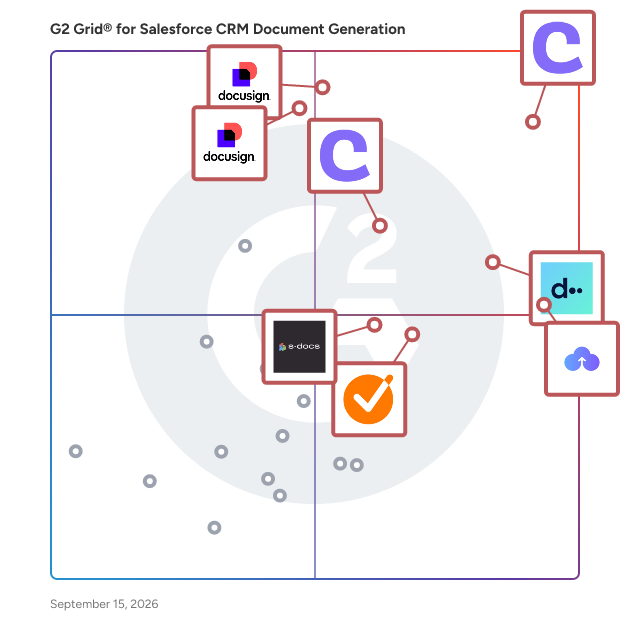
- **Leader:** [Conga Composer](https://www.g2.com/products/conga-composer/reviews)
- **Highest Performer:** [GetAccept](https://www.g2.com/products/getaccept/reviews)
- **Easiest to Use:** [DealHub](https://www.g2.com/products/dealhub/reviews)
- **Top Trending:** [S-Docs](https://www.g2.com/products/s-docs/reviews)
- **Best Free Software:** [Conga Composer](https://www.g2.com/products/conga-composer/reviews)


---

**Sponsored**

### Conga Composer

Flexible. Scalable. Embedded. Conga Composer transforms how businesses generate documents Disconnected systems and manual workflows make document generation slow, error-prone, and costly. Conga Composer streamlines this by embedding automated document creation into your existing tools. It supports multiple formats, merges data from any source, and scales effortlessly, empowering teams to deliver accurate, beautifully branded documents faster, with less effort and greater control. Conga Composer excels in document generation with key advantages: Launch Anywhere – Trigger document generation from buttons, flows, Apex, or external systems- no custom code needed. Multi-Format Support – Create Word, PDF, Excel, PowerPoint, and HTML email templates. Dynamic Content – Use conditional logic, charts, dashboards, rich text, and global currencies. High-Volume Ready – Supports large templates (25MB), merged outputs (250MB), and batch processing. Enterprise Scalability – Reusable templates and behaviors across departments and use cases. eSignature Integration – Seamless pairing with Conga Sign for end-to-end agreement workflows. Revenue Lifecycle Alignment – Only vendor that integrates doc gen into CLM, CPQ, and full revenue processes. Admin-Friendly Setup – Built for Salesforce admins and business users—no developer dependency. Proven Performance – Trusted by 8,000+ businesses; millions of documents generated monthly. Future-Ready – Monitoring AI trends to invest when enterprise-grade reliability is guaranteed. With these strengths, Conga Composer delivers a scalable, flexible, and automated solution for efficient document generation.


[Visit website](https://www.g2.com/external_clickthroughs/record?secure%5Bad_program%5D=ppc&amp;secure%5Bad_slot%5D=category_product_list&amp;secure%5Bcategory_id%5D=1119&amp;secure%5Bdisplayable_resource_id%5D=1119&amp;secure%5Bdisplayable_resource_type%5D=Category&amp;secure%5Bmedium%5D=sponsored&amp;secure%5Bplacement_reason%5D=page_category&amp;secure%5Bplacement_resource_ids%5D%5B%5D=1119&amp;secure%5Bprioritized%5D=false&amp;secure%5Bproduct_id%5D=274&amp;secure%5Bresource_id%5D=1119&amp;secure%5Bresource_type%5D=Category&amp;secure%5Bsource_type%5D=category_page&amp;secure%5Bsource_url%5D=https%3A%2F%2Fwww.g2.com%2Fcategories%2Fsalesforce-crm-document-generation&amp;secure%5Btoken%5D=410d907133f61d640898c81120df96c255acc3a20ded15104ebb215f417675d0&amp;secure%5Burl%5D=https%3A%2F%2Fconga.com%2Fdemo%3Futm_campaign%3Dg2clickcampaign-composer-demo%26utm_source%3Dg2%26utm_medium%3Dreview-site%26utm_content%3D&amp;secure%5Burl_type%5D=book_demo)

---

## Top-Rated Products (Ranked by G2 Score)
### 1. [Conga Composer](https://www.g2.com/products/conga-composer/reviews)
  Flexible. Scalable. Embedded. Conga Composer transforms how businesses generate documents Disconnected systems and manual workflows make document generation slow, error-prone, and costly. Conga Composer streamlines this by embedding automated document creation into your existing tools. It supports multiple formats, merges data from any source, and scales effortlessly, empowering teams to deliver accurate, beautifully branded documents faster, with less effort and greater control. Conga Composer excels in document generation with key advantages: Launch Anywhere – Trigger document generation from buttons, flows, Apex, or external systems- no custom code needed. Multi-Format Support – Create Word, PDF, Excel, PowerPoint, and HTML email templates. Dynamic Content – Use conditional logic, charts, dashboards, rich text, and global currencies. High-Volume Ready – Supports large templates (25MB), merged outputs (250MB), and batch processing. Enterprise Scalability – Reusable templates and behaviors across departments and use cases. eSignature Integration – Seamless pairing with Conga Sign for end-to-end agreement workflows. Revenue Lifecycle Alignment – Only vendor that integrates doc gen into CLM, CPQ, and full revenue processes. Admin-Friendly Setup – Built for Salesforce admins and business users—no developer dependency. Proven Performance – Trusted by 8,000+ businesses; millions of documents generated monthly. Future-Ready – Monitoring AI trends to invest when enterprise-grade reliability is guaranteed. With these strengths, Conga Composer delivers a scalable, flexible, and automated solution for efficient document generation.


  **Average Rating:** 4.4/5.0
  **Total Reviews:** 834

**User Satisfaction Scores:**

- **Has the product been a good partner in doing business?:** 8.7/10 (Category avg: 8.8/10)
- **Ease of Use:** 8.3/10 (Category avg: 8.7/10)
- **Ease of Admin:** 8.1/10 (Category avg: 8.2/10)
- **Quality of Support:** 8.7/10 (Category avg: 8.7/10)


**Seller Details:**

- **Seller:** [Conga](https://www.g2.com/sellers/conga)
- **Company Website:** https://conga.com/
- **Year Founded:** 2006
- **HQ Location:** 3200 Kirby Dr., Suite 500, Houston, TX 77098
- **LinkedIn® Page:** https://www.linkedin.com/company/conga/ (1,793 employees on LinkedIn®)
- **Phone:** (303) 465-1616

**Reviewer Demographics:**
  - **Who Uses This:** Salesforce Administrator, Salesforce Consultant
  - **Top Industries:** Information Technology and Services, Computer Software
  - **Company Size:** 47% Mid-Market, 28% Enterprise


#### Pros & Cons

**Pros:**

- Features (89 reviews)
- Document Management (83 reviews)
- Ease of Use (76 reviews)
- Time-saving (56 reviews)
- Templates (55 reviews)

**Cons:**

- Learning Curve (50 reviews)
- Steep Learning Curve (31 reviews)
- Time-Consuming (28 reviews)
- Difficulty (26 reviews)
- Limited Template Flexibility (21 reviews)

### 2. [DealHub](https://www.g2.com/products/dealhub/reviews)
  DealHub is the Agentic Quote-to-Revenue (Q2R) platform designed for the AI era. We empower high-growth SaaS and forward-thinking enterprises to fully consolidate, automate, and accelerate their entire revenue lifecycle, from initial quote generation through final cash collection and revenue recognition. DealHub gives enterprises ultimate flexibility, enabling the rapid design, launch, and scale of any modern monetization model, such as Sales-Led Growth (SLG), Product-Led Growth (PLG), Self-Serve, Subscription, Usage-Based, and AI Consumption models. The unified platform replaces fragmented revenue tools, integrating critical capabilities into one orchestrated engine, including AI-Powered CPQ (Configure, Price, Quote), CLM (Contract Lifecycle Management), Subscription Management &amp; Billing, Revenue Recognition, Digital DealRoom, and Composable API-first Headless Quoting. Enterprises choose DealHub to drive revenue at AI scale, leveraging real-time revenue visibility and predictability across all revenue streams via live ARR, usage, churn, and forecast dashboards. DealHub offers seamless, native integration with all leading CRMs, including Salesforce, Microsoft Dynamics, and HubSpot, ensuring customers achieve faster time-to-value. DealHub is trusted by global leaders, including Intuit, Gong, Kore.ai, SpotOn, and Braze.


  **Average Rating:** 4.7/5.0
  **Total Reviews:** 829

**User Satisfaction Scores:**

- **Has the product been a good partner in doing business?:** 9.6/10 (Category avg: 8.8/10)
- **Ease of Use:** 9.0/10 (Category avg: 8.7/10)
- **Ease of Admin:** 8.5/10 (Category avg: 8.2/10)
- **Quality of Support:** 9.6/10 (Category avg: 8.7/10)


**Seller Details:**

- **Seller:** [DealHub.io](https://www.g2.com/sellers/dealhub-io)
- **Company Website:** https://dealhub.io/
- **Year Founded:** 2014
- **HQ Location:** Austin, Texas
- **Twitter:** @DealHubIO (3,897 Twitter followers)
- **LinkedIn® Page:** https://www.linkedin.com/company/dealhubio/ (308 employees on LinkedIn®)

**Reviewer Demographics:**
  - **Who Uses This:** Sales Operations Manager, Account Executive
  - **Top Industries:** Computer Software, Information Technology and Services
  - **Company Size:** 65% Mid-Market, 23% Small-Business


#### Pros & Cons

**Pros:**

- Customer Support (109 reviews)
- Ease of Use (101 reviews)
- Efficiency (88 reviews)
- Time-saving (87 reviews)
- Integrations (82 reviews)

**Cons:**

- Learning Curve (37 reviews)
- Limited Customization (33 reviews)
- Steep Learning Curve (25 reviews)
- Missing Features (22 reviews)
- Integration Issues (20 reviews)

### 3. [Docusign CLM](https://www.g2.com/products/docusign-clm/reviews)
  While eSignature has changed the way that many organizations execute a contract, the lifecycle before and after signature is often managed through manual processes, spreadsheets, and emails—slowing the pace of doing business, increasing risk, and frustrating customers and employees. Docusign CLM (Contract Lifecycle Management) allows organizations to streamline the agreement lifecycle by transforming analog manual processes into a digital automated workflow. The end result is an accelerated pace of doing business, increased compliance, and more efficient employees. Key Features: Central Repository, Advanced Search &amp; Find, Version Control, Clause Library, Collaboration with internal and external parties, Redlining, Simple &amp; Advanced Workflows, Tagging, Mobile Access, Multi Platform integrations (including tight integration with Salesforce).


  **Average Rating:** 4.3/5.0
  **Total Reviews:** 481

**User Satisfaction Scores:**

- **Has the product been a good partner in doing business?:** 8.6/10 (Category avg: 8.8/10)
- **Ease of Use:** 8.6/10 (Category avg: 8.7/10)
- **Ease of Admin:** 8.2/10 (Category avg: 8.2/10)
- **Quality of Support:** 8.5/10 (Category avg: 8.7/10)


**Seller Details:**

- **Seller:** [Docusign](https://www.g2.com/sellers/docusign)
- **Company Website:** https://www.docusign.com
- **Year Founded:** 2003
- **HQ Location:** San Francisco, CA
- **Twitter:** @Docusign (144,193 Twitter followers)
- **LinkedIn® Page:** https://www.linkedin.com/company/19022/ (8,411 employees on LinkedIn®)

**Reviewer Demographics:**
  - **Who Uses This:** Account Executive, General Counsel
  - **Top Industries:** Information Technology and Services, Computer Software
  - **Company Size:** 45% Mid-Market, 29% Enterprise


#### Pros & Cons

**Pros:**

- Ease of Use (129 reviews)
- Digital Signing (66 reviews)
- Digital Signatures (60 reviews)
- Document Management (60 reviews)
- Simple (55 reviews)

**Cons:**

- Expensive (28 reviews)
- Steep Learning Curve (24 reviews)
- Signature Issues (17 reviews)
- Complex Setup (16 reviews)
- Learning Curve (16 reviews)

### 4. [Docusign Gen](https://www.g2.com/products/docusign-gen/reviews)
  Docusign Gen for Salesforce is a powerful tool designed to streamline the document generation process for sales teams by automating the creation of professional, error-free documents directly within the Salesforce environment. This integration allows sales representatives to generate contracts, quotes, invoices, and other essential documents with just a few clicks, eliminating manual data entry and reducing the risk of errors. Key Features and Functionality: - Seamless Salesforce Integration: Gen is a Salesforce-native application that integrates into Salesforce Sales Cloud and Revenue Cloud (CPQ+, Billing, and Subscription Management), enabling users to generate documents without leaving the Salesforce interface. - Data Merging: Effortlessly merge customer, product, and pricing data from Salesforce records to create documents in Microsoft Word, PDF, or Docusign formats. - Conditional Content: Automatically include or exclude specific content based on predefined Salesforce data and rules, ensuring that each document is tailored to the specific business scenario. - Dynamic Tables: Generate quotes or invoices that include properly formatted tables, enhancing the clarity and professionalism of the documents. - Editable Documents: Generated documents are editable in Microsoft Word, allowing representatives, legal reviewers, and clients to make necessary adjustments and negotiate terms within a familiar platform. Primary Value and User Benefits: Docusign Gen for Salesforce significantly enhances the efficiency and accuracy of the document generation process for sales teams. By automating the creation of customized documents, it reduces the time spent on manual preparation, minimizes errors, and ensures consistency across all sales documents. This leads to faster deal closures, improved compliance, and a more streamlined sales workflow, ultimately driving higher productivity and customer satisfaction.


  **Average Rating:** 4.5/5.0
  **Total Reviews:** 20

**User Satisfaction Scores:**

- **Has the product been a good partner in doing business?:** 9.7/10 (Category avg: 8.8/10)
- **Ease of Use:** 9.2/10 (Category avg: 8.7/10)
- **Ease of Admin:** 9.7/10 (Category avg: 8.2/10)
- **Quality of Support:** 9.3/10 (Category avg: 8.7/10)


**Seller Details:**

- **Seller:** [Docusign](https://www.g2.com/sellers/docusign)
- **Year Founded:** 2003
- **HQ Location:** San Francisco, CA
- **Twitter:** @Docusign (144,193 Twitter followers)
- **LinkedIn® Page:** https://www.linkedin.com/company/19022/ (8,411 employees on LinkedIn®)
- **Ownership:** NASDAQ: DOCU

**Reviewer Demographics:**
  - **Company Size:** 40% Small-Business, 40% Mid-Market


### 5. [Conga CLM](https://www.g2.com/products/conga-conga-clm/reviews)
  Conga CLM turns contracts into dynamic, data-rich assets that accelerate execution, reduce risk, and improve compliance. It unifies every contract and team in one system, centralizing data and embedding automation and AI-driven insights for smarter decisions. Built for industries like Healthcare and Life Sciences, Technology, Financial Services, and Manufacturing, Conga CLM meets organizations where they are and scales as needs grow. The platform automates intake, review, approval, and signature workflows, enables self-service contracting, and provides a secure, searchable repository with real-time dashboards and analytics. AI validates clauses, scores risk, and tracks obligations, while integrations with CRM, ERP, and procurement systems eliminate silos. Conga delivers responsible AI paired with human oversight for accuracy and compliance, creating one connected workflow across the revenue lifecycle to reduce manual work and accelerate business outcomes. Conga CLM delivers on the promise of One CLM. Every team. Every contract. It unifies Legal, Procurement, and Sales in a single platform, eliminating silos and creating one connected workflow across the revenue lifecycle. Every contract is centralized in a secure, searchable repository, turning static documents into structured data for real-time visibility, dashboards, and analytics. Conga CLM accelerates execution with automated intake, review, approval, and signature workflows, while enabling self-service contracting to reduce legal bottlenecks. AI validates clauses, scores risk, and tracks obligations to enforce compliance and reduce audit exposure. Seamless integration with CRM, ERP, and procurement systems ensures consistency and speed across the business. With responsible AI, intuitive design, and enterprise-grade scalability, Conga CLM empowers organizations to manage complex contract processes confidently and adapt as needs evolve.


  **Average Rating:** 4.3/5.0
  **Total Reviews:** 594

**User Satisfaction Scores:**

- **Has the product been a good partner in doing business?:** 8.6/10 (Category avg: 8.8/10)
- **Ease of Use:** 8.1/10 (Category avg: 8.7/10)
- **Ease of Admin:** 8.0/10 (Category avg: 8.2/10)
- **Quality of Support:** 8.5/10 (Category avg: 8.7/10)


**Seller Details:**

- **Seller:** [Conga](https://www.g2.com/sellers/conga)
- **Company Website:** https://conga.com/
- **Year Founded:** 2006
- **HQ Location:** 3200 Kirby Dr., Suite 500, Houston, TX 77098
- **LinkedIn® Page:** https://www.linkedin.com/company/conga/ (1,793 employees on LinkedIn®)
- **Phone:** (303) 465-1616

**Reviewer Demographics:**
  - **Who Uses This:** Salesforce Administrator, Account Executive
  - **Top Industries:** Information Technology and Services, Computer Software
  - **Company Size:** 41% Mid-Market, 39% Enterprise


#### Pros & Cons

**Pros:**

- Ease of Use (83 reviews)
- Efficiency (61 reviews)
- Features (61 reviews)
- Contract Management (59 reviews)
- Integrations (45 reviews)

**Cons:**

- Steep Learning Curve (32 reviews)
- Learning Curve (29 reviews)
- Slow Performance (26 reviews)
- Time-Consuming (26 reviews)
- Complex Setup (23 reviews)

### 6. [GetAccept](https://www.g2.com/products/getaccept/reviews)
  GetAccept is a Digital Sales Room platform trusted by more than 5000 revenue teams to help reps spend more time selling and less time on admin. We bring static sales content and scattered communication into one shared space where every stakeholder can access the latest content, timelines, and context throughout the whole sales cycle. And with purpose-built AI that truly understands the context of your deals, creating and updating personalized content takes minutes. Native integrations with popular CRMs let reps work with their existing tools, while making sure activity is automatically synced and updated everywhere it matters. In short – we help sales teams work smart, close faster, and win more.


  **Average Rating:** 4.6/5.0
  **Total Reviews:** 1,221

**User Satisfaction Scores:**

- **Has the product been a good partner in doing business?:** 9.3/10 (Category avg: 8.8/10)
- **Ease of Use:** 8.9/10 (Category avg: 8.7/10)
- **Ease of Admin:** 8.7/10 (Category avg: 8.2/10)
- **Quality of Support:** 9.2/10 (Category avg: 8.7/10)


**Seller Details:**

- **Seller:** [GetAccept Inc.](https://www.g2.com/sellers/getaccept-inc)
- **Company Website:** https://www.getaccept.com
- **Year Founded:** 2015
- **HQ Location:** Palo Alto, CA
- **Twitter:** @getaccept (1,435 Twitter followers)
- **LinkedIn® Page:** https://www.linkedin.com/company/10154116/ (156 employees on LinkedIn®)

**Reviewer Demographics:**
  - **Who Uses This:** Sales Manager, Account Manager
  - **Top Industries:** Computer Software, Information Technology and Services
  - **Company Size:** 51% Small-Business, 42% Mid-Market


#### Pros & Cons

**Pros:**

- Ease of Use (92 reviews)
- Customer Support (48 reviews)
- Helpful (42 reviews)
- Intuitive (40 reviews)
- Time-saving (38 reviews)

**Cons:**

- Missing Features (16 reviews)
- Limited Customization (11 reviews)
- Limited Features (11 reviews)
- Difficult Editing (10 reviews)
- Poor Integration (9 reviews)

### 7. [S-Docs](https://www.g2.com/products/s-docs/reviews)
  S-Docs is a document operations platform designed to help users streamline their document creation and signing processes. This solution caters to a wide range of organizations, from small businesses to large global enterprises, enabling them to efficiently manage critical documents through intuitive automation and secure e-signature capabilities. By focusing on both ease of use and robust functionality, S-Docs empowers businesses to enhance their operational efficiency and transform their workflows. The platform is particularly valuable for organizations that handle a high volume of documents, such as contracts, invoices, and compliance forms. Its target audience includes industries like finance, healthcare, legal, and manufacturing, where accurate and timely document management is essential. S-Docs addresses the specific needs of these sectors by providing a comprehensive solution that not only simplifies document workflows but also ensures compliance with industry regulations. Key features of S-Docs include its user-friendly document automation tools, which allow users to create customized templates and generate documents quickly. The e-signature functionality further enhances the platform by enabling users to obtain signatures securely and efficiently, reducing the time spent on manual processes. Additionally, S-Docs integrates seamlessly with existing systems, ensuring that organizations can leverage their current technology investments while enhancing their document operations. The benefits of using S-Docs extend beyond mere efficiency. By automating document processes, organizations can reduce human error, improve accuracy, and accelerate turnaround times. The platform also supports collaboration among team members, allowing multiple users to work on documents simultaneously, which fosters a more agile working environment. Furthermore, S-Docs&#39; commitment to security ensures that sensitive information is protected throughout the document lifecycle, giving users peace of mind. Overall, S-Docs stands out in the document operations category by offering a comprehensive solution that not only simplifies document workflows but also drives significant process transformation. Its focus on automation, security, and integration makes it a valuable tool for organizations looking to enhance their document management capabilities and achieve greater operational efficiency.


  **Average Rating:** 4.7/5.0
  **Total Reviews:** 122

**User Satisfaction Scores:**

- **Has the product been a good partner in doing business?:** 9.4/10 (Category avg: 8.8/10)
- **Ease of Use:** 8.9/10 (Category avg: 8.7/10)
- **Ease of Admin:** 9.0/10 (Category avg: 8.2/10)
- **Quality of Support:** 9.2/10 (Category avg: 8.7/10)


**Seller Details:**

- **Seller:** [S-Docs](https://www.g2.com/sellers/s-docs-3860e013-d0d9-4309-adc3-cf0f782c010a)
- **Company Website:** https://www.sdocs.com
- **Year Founded:** 2010
- **HQ Location:** New York, NY
- **Twitter:** @Sdocs (230 Twitter followers)
- **LinkedIn® Page:** https://www.linkedin.com/company/10407092/ (54 employees on LinkedIn®)

**Reviewer Demographics:**
  - **Who Uses This:** Salesforce Administrator
  - **Top Industries:** Non-Profit Organization Management, Information Technology and Services
  - **Company Size:** 45% Small-Business, 40% Mid-Market


#### Pros & Cons

**Pros:**

- Ease of Use (8 reviews)
- Customer Support (4 reviews)
- Features (4 reviews)
- Salesforce Integration (4 reviews)
- Templates (4 reviews)

**Cons:**

- Learning Curve (4 reviews)
- Not Intuitive (4 reviews)
- Automation Difficulty (2 reviews)
- Expensive (2 reviews)
- Formatting Issues (2 reviews)

### 8. [Nintex](https://www.g2.com/products/nintex-nintex/reviews)
  Nintex helps companies unlock the power of endless possibilities with agentic business orchestration. Today, more than 7,000 public and private sector organizations across 100+ countries turn to the Nintex platform to automate how work gets done, remove friction from business processes, and unlock the full potential of their people. Nintex CE allows organizations to govern how people, systems, and AI work together: combining the speed and innovation of easy, low-code application development, with the flexibility of workflow orchestration, and the intelligence of AI agents to build solutions that solve their unique business challenges. Nintex K2 allows organizations to get advanced orchestration, control, and scalability, while keeping data securely on-premises to meet the exacting standards of highly regulated entities or those with strict data sovereignty requirements. Harness powerful on-prem automation, rich application development, and complex case management with full control.


  **Average Rating:** 4.3/5.0
  **Total Reviews:** 1,271

**User Satisfaction Scores:**

- **Has the product been a good partner in doing business?:** 8.4/10 (Category avg: 8.8/10)
- **Ease of Use:** 8.4/10 (Category avg: 8.7/10)
- **Ease of Admin:** 8.0/10 (Category avg: 8.2/10)
- **Quality of Support:** 8.1/10 (Category avg: 8.7/10)


**Seller Details:**

- **Seller:** [Nintex](https://www.g2.com/sellers/nintex)
- **Company Website:** https://www.nintex.com
- **Year Founded:** 2006
- **HQ Location:** Bellevue, WA
- **LinkedIn® Page:** https://www.linkedin.com/company/258303/ (1,200 employees on LinkedIn®)

**Reviewer Demographics:**
  - **Who Uses This:** Business Analyst, Salesforce Administrator
  - **Top Industries:** Information Technology and Services, Financial Services
  - **Company Size:** 48% Enterprise, 40% Mid-Market


#### Pros & Cons

**Pros:**

- Ease of Use (37 reviews)
- Workflow Management (19 reviews)
- Automation (18 reviews)
- Easy Setup (17 reviews)
- Versatility (16 reviews)

**Cons:**

- Limited Features (17 reviews)
- Learning Curve (13 reviews)
- Complexity (9 reviews)
- Expensive (9 reviews)
- Limited Customization (9 reviews)

### 9. [DocXpert](https://www.g2.com/products/docxpert/reviews)
  DocXpert is a Salesforce app that allows you to create custom documents in docx and PDF formats with dynamic tables, images, and text blocks in just a few clicks. With DocXpert, all employees work with the same templates, which are managed centrally. This ensures that your company’s corporate design is always maintained. DocXpert eliminates copy &amp; paste and spelling errors, and the text blocks ensure that all necessary information is always included in the document. You can transform Salesforce data into various types of documents as quickly as Lightning and as easily as Word. The pricing model is simple and there are no limits to the number of generated documents or templates. DocXpert is developed by Productforce GmbH, a 100% subsidiary of Salesforce partner H+W CONSULT, which specializes in the development and operation of applications for Salesforce.


  **Average Rating:** 4.3/5.0
  **Total Reviews:** 26

**User Satisfaction Scores:**

- **Has the product been a good partner in doing business?:** 8.3/10 (Category avg: 8.8/10)
- **Ease of Use:** 9.2/10 (Category avg: 8.7/10)
- **Ease of Admin:** 6.7/10 (Category avg: 8.2/10)
- **Quality of Support:** 8.5/10 (Category avg: 8.7/10)


**Seller Details:**

- **Seller:** [H+W Consult](https://www.g2.com/sellers/h-w-consult)
- **Year Founded:** 2001
- **HQ Location:** N/A
- **LinkedIn® Page:** https://www.linkedin.com/company/h&amp;w-consult-gmbh/ (29 employees on LinkedIn®)

**Reviewer Demographics:**
  - **Top Industries:** Computer Software, Information Technology and Services
  - **Company Size:** 48% Small-Business, 30% Enterprise


### 10. [Formstack Documents](https://www.g2.com/products/formstack-documents/reviews)
  Formstack Documents is the only document generation solution you need to save time, put a stop to manual entry, and streamline your paperwork process. With Formstack Documents, you can upload, merge, and deliver smart documents in a snap. Start from scratch or upload your own fillable PDF or Word document. Our app allows you to easily customize your document and merge it with data. Once you&#39;ve created your document, it&#39;s time to figure out where you&#39;ll be sending it. From emails to Google Drive to a third-party integration via Webhooks, Formstack Documents gives you the control to send your merged files wherever you want. Formstack Documents integrates with over 150 different products, ensuring you&#39;ll easily be able to upload, merge, and deliver your documents, no matter what products you&#39;re using.


  **Average Rating:** 4.5/5.0
  **Total Reviews:** 148

**User Satisfaction Scores:**

- **Has the product been a good partner in doing business?:** 9.0/10 (Category avg: 8.8/10)
- **Ease of Use:** 8.2/10 (Category avg: 8.7/10)
- **Ease of Admin:** 8.6/10 (Category avg: 8.2/10)
- **Quality of Support:** 8.7/10 (Category avg: 8.7/10)


**Seller Details:**

- **Seller:** [Formstack, LLC](https://www.g2.com/sellers/formstack-llc)
- **Company Website:** https://www.Formstack.com
- **Year Founded:** 2006
- **HQ Location:** Fishers, IN
- **Twitter:** @Formstack (6,407 Twitter followers)
- **LinkedIn® Page:** https://www.linkedin.com/company/294140/ (232 employees on LinkedIn®)

**Reviewer Demographics:**
  - **Who Uses This:** Owner
  - **Top Industries:** Computer Software, Non-Profit Organization Management
  - **Company Size:** 59% Small-Business, 33% Mid-Market


#### Pros & Cons

**Pros:**

- Integrations (6 reviews)
- Automations (5 reviews)
- Ease of Use (5 reviews)
- Easy Integrations (5 reviews)
- Time-saving (5 reviews)

**Cons:**

- Learning Curve (2 reviews)
- Bug Issues (1 reviews)
- Not Intuitive (1 reviews)
- Poor Documentation (1 reviews)
- Setup Difficulty (1 reviews)

### 11. [Formstack for Salesforce](https://www.g2.com/products/formstack-for-salesforce/reviews)
  What if your end user only had to fill out the same information once? If Salesforce is at the center of how your organization operates, you can build more efficient, streamlined processes with Formstack for Salesforce, a modular platform for data collection, automated document generation, digital signature and workflows where you can use prefill alongside your data to power end user experiences Formstack for Salesforce is a set of dynamic, customizable modules that allow Salesforce customers to digitize processes at scale, in and around their Salesforce org.


  **Average Rating:** 4.1/5.0
  **Total Reviews:** 33

**User Satisfaction Scores:**

- **Has the product been a good partner in doing business?:** 8.0/10 (Category avg: 8.8/10)
- **Ease of Use:** 7.9/10 (Category avg: 8.7/10)
- **Ease of Admin:** 7.8/10 (Category avg: 8.2/10)
- **Quality of Support:** 8.1/10 (Category avg: 8.7/10)


**Seller Details:**

- **Seller:** [Formstack, LLC](https://www.g2.com/sellers/formstack-llc)
- **Company Website:** https://www.Formstack.com
- **Year Founded:** 2006
- **HQ Location:** Fishers, IN
- **Twitter:** @Formstack (6,407 Twitter followers)
- **LinkedIn® Page:** https://www.linkedin.com/company/294140/ (232 employees on LinkedIn®)

**Reviewer Demographics:**
  - **Top Industries:** Non-Profit Organization Management, Information Technology and Services
  - **Company Size:** 46% Mid-Market, 30% Small-Business


#### Pros & Cons

**Pros:**

- Ease of Use (9 reviews)
- Time Saving (9 reviews)
- Easy Integration (8 reviews)
- Integrations (8 reviews)
- Easy Setup (5 reviews)

**Cons:**

- Form Issues (8 reviews)
- Learning Curve (7 reviews)
- Interface Usability (4 reviews)
- Limited Customization (4 reviews)
- Expensive (3 reviews)

### 12. [Matik](https://www.g2.com/products/matik/reviews)
  Matik automates the creation of presentations, documents, and reports directly from your data, powered by AI you can trust. Pull from dashboards, reports, and data in your BI, CRM, data warehouse and other sources to instantly produce on-brand, insight-rich content in formats you already use today. Matik empowers any team to align messaging, scale best practices, and tell consistent data stories that drive action - faster than ever.


  **Average Rating:** 4.8/5.0
  **Total Reviews:** 56

**User Satisfaction Scores:**

- **Has the product been a good partner in doing business?:** 9.7/10 (Category avg: 8.8/10)
- **Ease of Use:** 9.0/10 (Category avg: 8.7/10)
- **Ease of Admin:** 8.3/10 (Category avg: 8.2/10)
- **Quality of Support:** 9.8/10 (Category avg: 8.7/10)


**Seller Details:**

- **Seller:** [Matik](https://www.g2.com/sellers/matik)
- **Year Founded:** 2019
- **HQ Location:** San Francisco, California
- **Twitter:** @Matik_io (242 Twitter followers)
- **LinkedIn® Page:** https://www.linkedin.com/company/matik-inc/ (115 employees on LinkedIn®)

**Reviewer Demographics:**
  - **Who Uses This:** Customer Success Manager
  - **Top Industries:** Computer Software, Information Technology and Services
  - **Company Size:** 68% Mid-Market, 20% Enterprise


#### Pros & Cons

**Pros:**

- Ease of Use (11 reviews)
- Time-saving (8 reviews)
- Efficiency (6 reviews)
- Useful (6 reviews)
- Customer Support (4 reviews)

**Cons:**

- Inefficient Search Functionality (3 reviews)
- Limitations (3 reviews)
- Limited Customization (3 reviews)
- Technical Difficulties (3 reviews)
- Admin Issues (2 reviews)

### 13. [Fluent by Apryse](https://www.g2.com/products/fluent-by-apryse/reviews)
  Fluent by Apryse (previously Windward Studios) is a unique solution that simplifies the creation of reports and templates on a large scale with minimal coding required. The SDK and Microsoft Office plugin enable developers to meet reporting needs efficiently, while also empowering admins to design and populate data-driven documents from multiple data sources. Fluent offers unlimited formatting capabilities, catering to the diverse needs of multiple teams and end users. Set it and forget it. -Automate reporting with effortless template creation in Microsoft Office applications. -Free your backlog from internal reporting development with an automated solution for reporting and template creation. Empower your end users to independently manage and update their templates with ease. Create, Connect, and Manage Templates. Quick to deploy and flexible enough to meet the organization&#39;s needs by easily integrating any data source: -Don&#39;t wait on vendor integration to add a new data source or expose sensitive data to a SaaS application. -Make the logic as complex as you want – avoid the limits of off-the-shelf solutions. - Meet the brand compliance expectations for external communications. Infinite Scalability: Regulatory requirements seem to grow in volume and complexity each year. You won’t outgrow a solution built for the organization’s specific needs. -End users can upload or create new templates as requirements change -Quickly integrate new data sources as the business grows -Localize reports for audiences by region, culture, and language. Indisputable productivity impact: Workers spend precious time on manual, repetitive tasks, with email, data collection, and data entry. Apryse drastically reduces time spent on these tasks, minimizing errors and freeing up time for more valuable work. -Minimize the requirements gathering back-and-forth when you put the solution in the hands of the end user. -Say goodbye to the wasted time and errors that come from manual cut and paste For more information visit: https://bit.ly/3tDfzFl


  **Average Rating:** 4.4/5.0
  **Total Reviews:** 77

**User Satisfaction Scores:**

- **Has the product been a good partner in doing business?:** 9.1/10 (Category avg: 8.8/10)
- **Ease of Use:** 8.4/10 (Category avg: 8.7/10)
- **Ease of Admin:** 8.9/10 (Category avg: 8.2/10)
- **Quality of Support:** 9.0/10 (Category avg: 8.7/10)


**Seller Details:**

- **Seller:** [Apryse](https://www.g2.com/sellers/apryse)
- **Year Founded:** 1998
- **HQ Location:** Denver, CO
- **Twitter:** @aprysesolutions (382 Twitter followers)
- **LinkedIn® Page:** https://www.linkedin.com/company/aprysesolutions/ (525 employees on LinkedIn®)

**Reviewer Demographics:**
  - **Top Industries:** Computer Software, Financial Services
  - **Company Size:** 52% Mid-Market, 34% Small-Business


#### Pros & Cons

**Pros:**

- Automations (1 reviews)
- Easy Integrations (1 reviews)
- Efficiency (1 reviews)
- Flexibility (1 reviews)
- Integrations (1 reviews)


### 14. [Mambo Merge](https://www.g2.com/products/mambo-merge/reviews)
  Mambo Merge is a 100% native solution to generate professional DOCX, XLSX, PPTX and PDF files out of Salesforce. No more cutting and pasting, no more re-formatting, and no more clicking back and forth between apps - just push the button and download your finished file. Mambo Merge makes it easy to transform even your existing Word docs for Salesforce generation, so you can keep the look and feel that works for your business, but save time when it comes to creating them. Perfect for invoices, quotes, contracts, work orders, purchase orders, and more! And again, unlike other solutions, with Mambo Merge your data never leaves Salesforce, so you never have to worry about who has access along the way.


  **Average Rating:** 4.5/5.0
  **Total Reviews:** 11

**User Satisfaction Scores:**

- **Has the product been a good partner in doing business?:** 7.5/10 (Category avg: 8.8/10)
- **Ease of Use:** 8.3/10 (Category avg: 8.7/10)
- **Ease of Admin:** 7.5/10 (Category avg: 8.2/10)
- **Quality of Support:** 8.3/10 (Category avg: 8.7/10)


**Seller Details:**

- **Seller:** [MK Partners](https://www.g2.com/sellers/mk-partners)
- **Year Founded:** 2006
- **HQ Location:** Los Angeles, CA
- **Twitter:** @mkpartners (515 Twitter followers)
- **LinkedIn® Page:** https://www.linkedin.com/company/mkpartners/about/ (53 employees on LinkedIn®)

**Reviewer Demographics:**
  - **Company Size:** 82% Mid-Market, 18% Small-Business


### 15. [Maven Documents](https://www.g2.com/products/maven-documents/reviews)
  Creation of rich quotes, contracts, order forms, purchase orders, invoices, or any other documents, based on your customer Salesforce data. Amend document templates on your own, and enrich them with images, tables, hyperlinks, repeaters etc. - Simple templating using Google Docs® - Large number of template elements - Standard SFDC setup and syntax - Compatible with signature and CLM apps - Multiple output formats (PDF, Word, Google Doc®) - Export/Import your templates from Sandbox to Production - Automate the generation of your documents and send them to your customers More information on https://docs.mavenmule.com/maven-documents


  **Average Rating:** 4.7/5.0
  **Total Reviews:** 10

**User Satisfaction Scores:**

- **Has the product been a good partner in doing business?:** 6.7/10 (Category avg: 8.8/10)
- **Ease of Use:** 8.9/10 (Category avg: 8.7/10)
- **Ease of Admin:** 6.7/10 (Category avg: 8.2/10)
- **Quality of Support:** 8.5/10 (Category avg: 8.7/10)


**Seller Details:**

- **Seller:** [Maven Mule](https://www.g2.com/sellers/maven-mule)
- **Year Founded:** 2016
- **HQ Location:** Zagreb, HR
- **LinkedIn® Page:** https://www.linkedin.com/company/maven-mule/?originalSubdomain=hr (30 employees on LinkedIn®)
- **Ownership:** NYSE: CRM

**Reviewer Demographics:**
  - **Company Size:** 64% Mid-Market, 18% Enterprise


### 16. [Docomotion](https://www.g2.com/products/docomotion/reviews)
  Docomotion makes it easier to generate documents on Salesforce automatically. We have made it our mission to become the top-rated document generation app on Salesforce, a position we proudly hold thanks to a decade-long dedication to providing the industry&#39;s best product, service, and customer experience. GENERATE DOCUMENTS WITH A SINGLE CLICK Use a single button embedded in your Salesforce interface to generate rich and detailed documents populated with accurate customer data. DESIGN TEMPLATES WITH A VISUAL EDITOR Easily create and edit document templates using a drag &amp; drop mechanism on Microsoft Word. You can use an existing template or start from scratch. MAKE LAST-MINUTE CHANGES Finalize the document output and edit any necessary information from your web or mobile device before sending it. RETRIEVE DATA FROM ANY OBJECT Incorporate Salesforce data of any type into your documents, including standard objects, customized objects, and complex content. SELECT FROM VERSATILE OUTPUT FORMATS Send your documents as PDF, Word, E-mail, or HTML5. You can also share the document via a link with a configurable expiration period. ADD EXTERNAL CONTENT Merge data from external sources, attach additional documents, or embed images and rich media from an external repository. COLLECT E-SIGNATURES NATIVELY Give your customers the ability to sign any document without having to integrate your platform with external signature solutions. ASK YOUR CUSTOMERS FOR INPUT Establish a bi-directional communication channel with your customers through interactive forms that gather important feedback and open the door for new business opportunities. SAVE CUSTOMER DATA INTO SALESFORCE Update data entered by your customers, such as satisfaction surveys, personal details, or cross-sell opportunities, directly into Salesforce. INTEGRATE WITH PROCESS BUILDER AND VISUAL FLOW Define automated document generation processes using Salesforce’s inherent automation tools that you’re already familiar with. IMPLEMENT YOUR BUSINESS LOGIC Generate separate documents from the same template with hidden/displayed sections, altered styling, and modified calculations according to predefined business rules. GENERATE THOUSANDS OF DOCUMENTS AT ONCE Send documents to multiple recipients with a single click, each populated with the relevant personal data sourced from its Salesforce record. ONBOARD QUICKLY AND EFFICIENTLY Easily set up and configure your account preferences, either by yourself or with the help of our support team, so you can start generating documents as soon as you wish. WORK FROM YOUR MOBILE DEVICE Enjoy all the features and benefits of the platform on the go, with comprehensive HTML5 compatibility that allows you to get things done anywhere and at any time. STAY 100% PROTECTED Rest assured that security, privacy, availability, redundancy, and other measures are thoroughly taken care of with the greatest attention at all times. Docomotion - Committed To Making Your Life Easier


  **Average Rating:** 4.6/5.0
  **Total Reviews:** 67

**User Satisfaction Scores:**

- **Has the product been a good partner in doing business?:** 9.4/10 (Category avg: 8.8/10)
- **Ease of Use:** 8.6/10 (Category avg: 8.7/10)
- **Ease of Admin:** 8.3/10 (Category avg: 8.2/10)
- **Quality of Support:** 8.9/10 (Category avg: 8.7/10)


**Seller Details:**

- **Seller:** [Docomotion](https://www.g2.com/sellers/docomotion)
- **Year Founded:** 2014
- **HQ Location:** Netanya, IL
- **Twitter:** @docomotion (89 Twitter followers)
- **LinkedIn® Page:** https://www.linkedin.com/company/docomotion-inc-/ (20 employees on LinkedIn®)

**Reviewer Demographics:**
  - **Top Industries:** Computer Software, Information Technology and Services
  - **Company Size:** 44% Mid-Market, 41% Small-Business


#### Pros & Cons

**Pros:**

- Salesforce Integration (3 reviews)
- Customization (2 reviews)
- Easy Integrations (2 reviews)
- Automations (1 reviews)
- Customizability (1 reviews)

**Cons:**

- Difficult Customization (1 reviews)
- Integration Issues (1 reviews)
- Lack of Integrations (1 reviews)
- Learning Curve (1 reviews)
- Setup Difficulty (1 reviews)

### 17. [Drive Connect](https://www.g2.com/products/drive-connect/reviews)
  Drive Connect provides Google Drive File Management &amp; Document Generation for Salesforce users. It is the simplest way to link Google Drive files to Salesforce records &amp; generate Google Docs from Salesforce data. Create &amp; track proposals, quotes, account plans, contracts, invoices, opportunity notes, QBRs &amp; more with just clicks.


  **Average Rating:** 4.5/5.0
  **Total Reviews:** 26

**User Satisfaction Scores:**

- **Has the product been a good partner in doing business?:** 7.9/10 (Category avg: 8.8/10)
- **Ease of Use:** 9.1/10 (Category avg: 8.7/10)
- **Ease of Admin:** 6.7/10 (Category avg: 8.2/10)
- **Quality of Support:** 9.0/10 (Category avg: 8.7/10)


**Seller Details:**

- **Seller:** [Appiphony](https://www.g2.com/sellers/appiphony)
- **Year Founded:** 2009
- **HQ Location:** Chicago, IL
- **Twitter:** @Appiphony (121 Twitter followers)
- **LinkedIn® Page:** https://www.linkedin.com/company/1675445/ (40 employees on LinkedIn®)

**Reviewer Demographics:**
  - **Company Size:** 46% Mid-Market, 35% Small-Business


### 18. [Opero Documents](https://www.g2.com/products/opero-documents/reviews)
  Opero provides Salesforce apps that streamline your workflow. Opero Documents allows you to generate documents such as contracts, invoices, and quotes merging Salesforce data into your templates to generate a PDF, Word, or Google Doc. Then you can email, attach, or download the document. Click a button to generate or automate document generation in Salesforce.


  **Average Rating:** 4.0/5.0
  **Total Reviews:** 10

**User Satisfaction Scores:**

- **Ease of Use:** 9.2/10 (Category avg: 8.7/10)
- **Quality of Support:** 7.8/10 (Category avg: 8.7/10)


**Seller Details:**

- **Seller:** [Opero](https://www.g2.com/sellers/opero)
- **Year Founded:** 2008
- **HQ Location:** San Francisco, CA
- **LinkedIn® Page:** https://www.linkedin.com/company/operoapps/ (21 employees on LinkedIn®)

**Reviewer Demographics:**
  - **Company Size:** 70% Mid-Market, 40% Small-Business


### 19. [Pulsar for Salesforce](https://www.g2.com/products/pulsar-for-salesforce/reviews)
  Pulsar is a complete, end-to-end, enterprise grade, offline and mobile solution for the Salesforce platform. The mobile app enables secure access to Salesforce data, workflows, and user experience on iOS, Android, and Windows mobile devices. Pulsar is also a mobile application platform, enabling online AND offline users to: \* Access and update up to millions of Salesforce records \* Run validation rules, triggers, default values, formula fields and more \* Customize the user interface, branding, processes, and workflows to deliver optimized mobile app experiences Pulsar works on all Salesforce clouds including Field Service and Sales (CRM), and can also be used with Microsoft Dynamics 365 and Oracle Sales Cloud applications.


  **Average Rating:** 4.2/5.0
  **Total Reviews:** 22

**User Satisfaction Scores:**

- **Has the product been a good partner in doing business?:** 8.3/10 (Category avg: 8.8/10)
- **Ease of Use:** 8.1/10 (Category avg: 8.7/10)
- **Ease of Admin:** 8.3/10 (Category avg: 8.2/10)
- **Quality of Support:** 7.7/10 (Category avg: 8.7/10)


**Seller Details:**

- **Seller:** [Luminix](https://www.g2.com/sellers/luminix)
- **Year Founded:** 2011
- **HQ Location:** San Jose, CA
- **Twitter:** @luminixinc (110 Twitter followers)
- **LinkedIn® Page:** https://www.linkedin.com/company/luminix-inc-/ (14 employees on LinkedIn®)

**Reviewer Demographics:**
  - **Company Size:** 50% Small-Business, 32% Mid-Market


### 20. [Concord](https://www.g2.com/products/concord/reviews)
  Concord delivers contract management for the 90% of agreements that don&#39;t need legal complexity. Founded in 2014, the company serves 1,500+ SMB and mid-market organizations (50-1,000 employees) across North America and Europe from offices in Austin and Paris. The platform combines contract creation, real-time collaboration, e-signature, and AI-powered review in a single workflow. Business users draft from templates, negotiate in-browser (no more Word attachments), and get AI review in 23 seconds instead of waiting days for legal. Post-signature, automated alerts handle renewals and obligations. Integration with Salesforce, HubSpot, and accounting systems eliminates double-entry. Concord addresses a simple reality: most contracts are routine business transactions that shouldn&#39;t require legal intervention. By enabling sales, procurement, and operations teams to self-serve standard agreements, customers reduce contract cycles by 75% on average. Setup takes days, not months. Training takes hours, not weeks. ROI is measured in weeks, not years. Languages Supported: All Concord is deliberately built for SMB/mid-market reality, not enterprise fantasy. While competitors chase Fortune 500 complexity, Concord removes features that slow businesses down. Result: a platform any business user can master in an afternoon. No consultants. No certifications. No 6-figure implementations. Just contract management that works like modern software should - simple, fast, and focused on business outcomes, not legal process. When 65% of our customers have no legal team, that simplicity isn&#39;t nice-to-have - it&#39;s survival.


  **Average Rating:** 4.2/5.0
  **Total Reviews:** 129

**User Satisfaction Scores:**

- **Has the product been a good partner in doing business?:** 8.9/10 (Category avg: 8.8/10)
- **Ease of Use:** 8.5/10 (Category avg: 8.7/10)
- **Ease of Admin:** 8.6/10 (Category avg: 8.2/10)
- **Quality of Support:** 8.8/10 (Category avg: 8.7/10)


**Seller Details:**

- **Seller:** [Concord Worldwide](https://www.g2.com/sellers/concord-worldwide)
- **Year Founded:** 2014
- **HQ Location:** San Francisco, CA
- **LinkedIn® Page:** https://www.linkedin.com/company/6600416/ (77 employees on LinkedIn®)

**Reviewer Demographics:**
  - **Top Industries:** Computer Software, Information Technology and Services
  - **Company Size:** 44% Mid-Market, 37% Small-Business


#### Pros & Cons

**Pros:**

- Ease of Use (1 reviews)
- Helpful (1 reviews)
- Pricing (1 reviews)
- Pricing Value (1 reviews)
- Simple (1 reviews)

**Cons:**

- Delays (1 reviews)
- Insufficient Resources (1 reviews)
- Poor Customer Support (1 reviews)

### 21. [PDF Butler](https://www.g2.com/products/pdf-butler/reviews)
  Create &amp; E-Sign proposals, quotes, contracts, reports and more with a click. Automate corporate document creation and delivery in seconds with the FASTEST solution on the Salesforce AppExchange.&amp;nbsp; Create documents via click, workflow or batch: ✔Proposals ✔Quotes ✔Invoices ✔Contracts ✔Reports ✔Bills ✔Payslips ✔Certificates BUSINESS EMPOWERED: We let business people make quick changes to templates. This allows them to respond to fast-changing markets. On top of that, you can easily use templates for other brands or translate existing templates to the language of choice. STAND OUT:PDF Butler gives you all the tools that you need to focus 100% on your job. By offering outstanding branding, personalization, structural and content options, we can ensure that you get the most out of Salesforce or any other external system. AUTOMATION:We help automate every single workflow towards, during and after the Document Creation process. Our goal is to produce as many 1-click-result actions as possible. When this is not feasible, we provide built-in collaboration solution flows. PDF Butler lets you create templates &amp; produce consistent, on-brand documents automatically in one click, using ANY standard or custom Salesforce object. Automate via workflow, triggers or on a schedule. ✔ 100% NATIVE EXPERIENCE ✔ GENERATE ANY DOCUMENT IN MERE SECONDS ✔ 1-CLICK AUTOMATION ✔ CONFIGURATION ONLY ✔ POWERFUL TRANSACTIONAL &amp; BULK FEATURES ✔ FLAT PRICING ✔ SHORT TIME TO MARKET (GO LIVE &amp; content changes) ✔ HANDLES ALL COMPLEX DATA MODELS ✔ MS OFFICE AUTHORING ✔ ALLOWS STRONG BRAND REPRESENTATION o Great and strong brand message in every document and on any page o Can include dynamic personalized messages (i.e birthday wish, customized promotions, etc) o Helps you build your brand presence and carry your brand message ✔ PROVIDES A GREAT USER EXPERIENCE o Easily correct mistakes or apply changes in templates yourself o Constant improvement &amp; new features added o Easily address clients in any foreign language &amp; locale o Dynamic Content Structure  No conditional formatting white spaces  Clickable Content table and page numbering possible  Start &amp; repeat on a new page (table headers)  Keep information together for an overview Integrations: Sign Butler COMPANY DESCRIPTION: CloudCrossing is a cloud-oriented company that focuses primarily on Salesforce customers to give them the best possible user experience possible. Currently, we have 2 products in our offering. PDF Butler, an innovative Document Generation solution, that solves all well known Document Generation pain points. More recently we added Sign Butler, a Digital Signature solution that integrates local e-Signature solutions flawlessly into PDF Butler. Our PDF Butler API is open, so other data sources and systems like CRM and ERP systems can be connected as well. PDF Butler provides a 100% native experience by allowing Salesforce users to create proposals, quotes, invoices, contracts, reports, bills, payslips, certificates, non-disclosure agreements (NDA), supplier contracts, employment contracts and more directly from the Salesforce platform. PDF Butler is hands down the fastest &amp; most innovative document generation solution available for Salesforce (force.com). It’s easy to administer, feature-rich and very cost-effective. Most importantly PDF Butler makes it super easy for you as a user to make changes, which is essential in fast-changing times https://www.pdfbutler.com/


  **Average Rating:** 4.1/5.0
  **Total Reviews:** 23

**User Satisfaction Scores:**

- **Has the product been a good partner in doing business?:** 9.4/10 (Category avg: 8.8/10)
- **Ease of Use:** 8.5/10 (Category avg: 8.7/10)
- **Ease of Admin:** 8.3/10 (Category avg: 8.2/10)
- **Quality of Support:** 8.1/10 (Category avg: 8.7/10)


**Seller Details:**

- **Seller:** [CloudCrossing BVBA](https://www.g2.com/sellers/cloudcrossing-bvba)
- **Year Founded:** 2017
- **HQ Location:** Kapellen, Antwerp
- **LinkedIn® Page:** https://www.linkedin.com/company/18112608/ (56 employees on LinkedIn®)

**Reviewer Demographics:**
  - **Company Size:** 57% Mid-Market, 30% Small-Business


#### Pros & Cons

**Pros:**

- Time-Saving (3 reviews)
- Ease of Use (2 reviews)
- Easy Editing (2 reviews)
- E-Signatures (2 reviews)
- Salesforce Integration (2 reviews)

**Cons:**

- UX Improvement (3 reviews)
- Expensive (2 reviews)
- Limited Mobile Access (1 reviews)

### 22. [Docs Made Easy](https://www.g2.com/products/docs-made-easy/reviews)
  Smart Document Automation for Salesforce Docs Made Easy helps Salesforce teams create, manage, and deliver professional documents faster, without coding. From quick merges to advanced automation, it’s built to scale with your business needs.


  **Average Rating:** 4.1/5.0
  **Total Reviews:** 6

**User Satisfaction Scores:**

- **Has the product been a good partner in doing business?:** 8.3/10 (Category avg: 8.8/10)
- **Ease of Use:** 7.5/10 (Category avg: 8.7/10)
- **Ease of Admin:** 6.7/10 (Category avg: 8.2/10)
- **Quality of Support:** 7.0/10 (Category avg: 8.7/10)


**Seller Details:**

- **Seller:** [HIC Global Solutions](https://www.g2.com/sellers/hic-global-solutions)
- **Year Founded:** 2015
- **HQ Location:** Milwaukee, Wisconsin
- **LinkedIn® Page:** https://www.linkedin.com/company/head-in-cloud-inc/ (29 employees on LinkedIn®)

**Reviewer Demographics:**
  - **Company Size:** 50% Small-Business, 33% Enterprise


### 23. [Documill Dynamo](https://www.g2.com/products/documill-dynamo/reviews)
  Automate the creation &amp; workflows of quotes, contracts, proposals and more! Documill Dynamo is an easy-to-use Salesforce app that allows users to generate documents with a click, right within Salesforce. Create templates quickly and smoothly using a drag and drop interface, complete with sample templates. No need to waste your time writing code. - Smooth deployment: just select a sample template and personalize it to fit your needs. Automate your document workflows by selecting from pre-defined options. Use and view your Salesforce data to the best effect. - Top-quality output: Ensure the highes quality for all kinds of documents and layouts. Documill Dynamo supports multiple language versions, nested tables and related images. It even offers full control over each user&#39;s editing rights for each section and all your document processes. - Smooth, intuitive Salesforce experience: users can accomplish all their tasks without leaving Salesforce, thanks to Documill Dynamo’s browser-first solution. There is no need for application hopping for top productivity.


  **Average Rating:** 4.2/5.0
  **Total Reviews:** 6

**User Satisfaction Scores:**

- **Has the product been a good partner in doing business?:** 8.3/10 (Category avg: 8.8/10)
- **Ease of Use:** 8.3/10 (Category avg: 8.7/10)
- **Ease of Admin:** 8.3/10 (Category avg: 8.2/10)
- **Quality of Support:** 8.3/10 (Category avg: 8.7/10)


**Seller Details:**

- **Seller:** [Documill](https://www.g2.com/sellers/documill)
- **Year Founded:** 1997
- **HQ Location:** Espoo, FI
- **Twitter:** @documillltd (1,641 Twitter followers)
- **LinkedIn® Page:** https://www.linkedin.com/company/documill/ (22 employees on LinkedIn®)

**Reviewer Demographics:**
  - **Company Size:** 57% Small-Business, 43% Mid-Market


### 24. [XfilesPro](https://www.g2.com/products/xfilespro/reviews)
  Managing documents in Salesforce shouldn’t be challenging - it should be seamless, scalable, and efficient. Yet, many businesses struggle with limited storage, scattered file management, slow document workflows, and security concerns. That’s why 1,000+ Salesforce customers across multiple industries trust XfilesPro to revolutionize their document management. With an advanced document management platform, XfilesPro solves complex document challenges in Salesforce, including storage, collaboration, security, and lifecycle management. Salesforce File Storage Management: Free up Salesforce file storage space by automatically moving files to SharePoint, OneDrive, Google Drive, and AWS S3 - without losing accessibility. Document Security &amp; Collaboration: Secure all your business documents with role-based access controls, audit logs, and sharing restrictions. Enhance document collaboration &amp; accessibility with document folders, easy sharing, syncing, tagging, versioning, etc. Effortless Document Generation: Automate document creation within Salesforce along with complete lifecycle management, ensuring faster processing, accuracy, and consistency. With AI-powered capabilities, feature-rich applications, and top-tier customer support, XfilesPro ensures that your document management isn’t just efficient - it’s a competitive advantage. Let’s transform how you handle documents in Salesforce. XfilesPro isn’t just about documents - we offer a complete data management suite for Salesforce and other AI-powered applications. Explore other XfilesPro products: ✔ DataArchiva Archive - Compliant &amp; cost-effective data archiving (native &amp; external cloud) ✔ DataArchiva Backup - Automated data, metadata, file backup (external cloud) ✔ Xmailbox - Virtual mailbox for Salesforce, powered by AI ✔ Xtract - Effortless data extraction &amp; OCR app, powered by AI More info: www.xfilespro.com


  **Average Rating:** 4.8/5.0
  **Total Reviews:** 60

**User Satisfaction Scores:**

- **Has the product been a good partner in doing business?:** 9.7/10 (Category avg: 8.8/10)
- **Ease of Use:** 9.4/10 (Category avg: 8.7/10)
- **Ease of Admin:** 9.2/10 (Category avg: 8.2/10)
- **Quality of Support:** 9.8/10 (Category avg: 8.7/10)


**Seller Details:**

- **Seller:** [XfilesPro Labs](https://www.g2.com/sellers/xfilespro-labs-5addd155-67ba-45b3-8061-f3850daec1a2)
- **Company Website:** https://www.xfilespro.com/
- **Year Founded:** 2010
- **HQ Location:** Bangalore, IN
- **Twitter:** @xfiles_pro (717 Twitter followers)
- **LinkedIn® Page:** https://www.linkedin.com/company/xfilespro/ (67 employees on LinkedIn®)

**Reviewer Demographics:**
  - **Top Industries:** Financial Services, Computer Software
  - **Company Size:** 35% Small-Business, 22% Mid-Market


#### Pros & Cons

**Pros:**

- Customer Support (27 reviews)
- Ease of Use (24 reviews)
- Easy Setup (17 reviews)
- Easy Integration (14 reviews)
- Reliability (14 reviews)

**Cons:**

- Access Limitations (3 reviews)
- Difficult Editing (3 reviews)
- Difficult Setup (3 reviews)
- Document (3 reviews)
- Lack of Guidance (3 reviews)

### 25. [Valorx Fusion](https://www.g2.com/products/valorx-fusion/reviews)
  Salesforce + Excel = Valorx Fusion\* Valorx Fusion is a Salesforce and Excel/Google sheets data connector that enables seamless two-way data synchronization between Salesforce and Spreadsheets. Work in the most efficient and productive interface (Excel or Google Sheets) with your Salesforce data. Start by building a new spreadsheet template with multiple tabs or turn your existing spreadsheet into your Salesforce interface without any change. Over 30,000 users and 30+ Fortune 500 companies rely on Fusion every day. Fusion simplifies Salesforce workflows, enhances productivity, and empowers businesses to make the most of their Salesforce and Excel integrations. Install Valorx Excel or Google Sheets extension and use it in a new or existing sheet in seconds. Explore our most popular Use Cases: Take the Guesswork out of Forecasting in Salesforce: https://valorx.com/forecasting Complex quoting, simplified: https://valorx.com/fusion-cpq Easily manage Sales Pipeline: https://valorx.com/solutions/sales-productivity How do you position yourself against your competitors? ⭐Flexible and adaptable – Valorx Fusion fits organizations of all sizes and industries. Whether you’re a team of two or an enterprise with thousands of employees, Valorx Fusion seamlessly adapts to your specific needs. ⭐Familiar Spreadsheet-like UI – Valorx Fusion brings the power of Salesforce into a familiar spreadsheet environment, ensuring a smooth learning curve and easy adoption. ⭐Performance-driven – Designed to handle complex operations efficiently, Fusion ensures high performance even with large datasets, minimizing downtime and maximizing productivity. ⭐Secure and compliant – With robust security measures and compliance with industry standards, Fusion safeguards your data while meeting regulatory requirements. Hear from our customers: https://valorx.com/customer-love/


  **Average Rating:** 4.8/5.0
  **Total Reviews:** 6

**User Satisfaction Scores:**

- **Has the product been a good partner in doing business?:** 9.2/10 (Category avg: 8.8/10)
- **Ease of Use:** 8.6/10 (Category avg: 8.7/10)
- **Ease of Admin:** 6.7/10 (Category avg: 8.2/10)
- **Quality of Support:** 9.4/10 (Category avg: 8.7/10)


**Seller Details:**

- **Seller:** [Valorx](https://www.g2.com/sellers/valorx)
- **Year Founded:** 2019
- **HQ Location:** Pleasanton, US
- **Twitter:** @ValorxTweets (18 Twitter followers)
- **LinkedIn® Page:** https://www.linkedin.com/company/valorx (69 employees on LinkedIn®)

**Reviewer Demographics:**
  - **Company Size:** 67% Mid-Market, 33% Enterprise


#### Pros & Cons

**Pros:**

- Ease of Use (3 reviews)
- Integrations (2 reviews)
- Salesforce Integration (2 reviews)
- Time-saving (2 reviews)
- Affordable (1 reviews)

**Cons:**

- Complex Logic (1 reviews)
- Connection Issues (1 reviews)
- Error Reporting (1 reviews)
- Integration Issues (1 reviews)
- Learning Curve (1 reviews)


## Parent Category

[Sales Acceleration Software](https://www.g2.com/categories/sales-acceleration)


## Related Categories

- [Contract Management Software](https://www.g2.com/categories/contract-management)
- [Proposal Software](https://www.g2.com/categories/proposal)
- [Salesforce AppExchange Apps](https://www.g2.com/categories/salesforce-appexchange-apps)
- [E-Signature Software](https://www.g2.com/categories/e-signature)
- [Document Generation Software](https://www.g2.com/categories/document-generation)


---

## Buyer Guide

### What You Should Know About Salesforce CRM Document Generation Software

### **Salesforce CRM Document Generation Software FAQs**

#### Most Popular FAQs

##### Which Salesforce CRM Document Generation Software has the best reviews?

The best-reviewed tools in this category combine strong document automation with easier day-to-day use and a smoother Salesforce workflow.

- [Conga Composer](https://www.g2.com/products/conga-composer/reviews) - Best for teams that need highly customizable Salesforce-driven proposals, invoices, and sales documents.
- [S-Docs](https://www.g2.com/products/s-docs/reviews) - A strong choice for Salesforce-native document generation with solid automation and less overhead than broader suites.
- [GetAccept](https://www.g2.com/products/getaccept/reviews) - Well-suited for teams that want document generation tied closely to proposals, buyer engagement, and e-signature workflows.
- [XfilesPro](https://www.g2.com/products/xfilespro/reviews) - A good fit for smaller Salesforce teams that want document output and file automation with a simpler user experience.

##### How does Salesforce CRM work?

Salesforce CRM centralizes customer, prospect, pipeline, and account data in one system so sales, service, and revenue teams can track relationships and move work forward from a single record. In a document generation workflow, that means a team can pull data from opportunities, accounts, contacts, quotes, or custom objects and use it to generate proposals, contracts, invoices, onboarding documents, or internal paperwork without rebuilding those documents manually each time.

##### What’s the best way to handle document generation in Salesforce CRM without it being super expensive?

The best low-cost approach is to choose a tool that covers your core templates well, stays close to Salesforce, and does not force you into a broader platform before you actually need it.

- [S-Docs](https://www.g2.com/products/s-docs/reviews) - Best for teams that want Salesforce-native document generation without paying for a larger contract lifecycle stack.
- [DocuSign Gen](https://www.g2.com/products/docusign-gen/reviews)- A practical option for simpler generation and send workflows, especially when ease of use matters more than deep customization.
- [Formstack for Salesforce](https://www.g2.com/products/formstack-for-salesforce/reviews)- Useful for businesses that need straightforward document and form automation without a highly technical setup.
- [Docs Made Easy](https://www.g2.com/products/docs-made-easy/reviews) - A lightweight choice for teams focused on simple Salesforce document creation rather than enterprise process design.

##### Which companies in the Salesforce document generation space are known for the best customer support?

The strongest support reputations in this category come from vendors that help teams troubleshoot template logic, implementation details, and Salesforce-specific workflow issues quickly.

- [S-Docs](https://www.g2.com/products/s-docs/reviews)&amp;nbsp; - Often a strong fit for teams that want responsive help on Salesforce-native document generation and automation.
- [DocuSign Gen](https://www.g2.com/products/docusign-gen/reviews) -&amp;nbsp; Best for organizations that value a simpler product experience backed by familiar support channels.
- [XfilesPro](https://www.g2.com/products/xfilespro/reviews) - A good option for smaller teams that want a more manageable support and setup experience.
- [DocXpert](https://www.g2.com/products/docxpert/reviews) - A niche option for teams that care most about guided setup and hands-on support with templated document output.

##### What are the benefits of document generation applications in Salesforce CRM?

The biggest benefit of document generation in Salesforce CRM is that it turns customer and deal data into consistent, ready-to-send documents without making teams recreate the same work every time. In practice, that means faster proposal creation, fewer manual errors, better template consistency, easier approvals, cleaner handoffs between teams, and a more scalable process for documents like quotes, contracts, renewals, and onboarding materials.

#### Small Business FAQs

##### What is the most affordable Salesforce CRM Document Generation Software for SMBs?

[SMBs](https://www.g2.com/categories/salesforce-crm-document-generation/small-business) get the most value from tools that are simple to deploy and built around core document generation, without the overhead of a full enterprise platform.

- [XfilesPro](https://www.g2.com/products/xfilespro/reviews) - Best for SMBs that want strong usability and document automation without a heavy implementation burden.
- [DocuSign Gen](https://www.g2.com/products/docusign-gen/reviews) - A smart fit for small teams that want simple generation and sending workflows with low friction.
- [Formstack for Salesforce](https://www.g2.com/products/formstack-for-salesforce/reviews) - Useful for SMBs that need document creation plus forms and workflow support in a familiar package.
- [Documill Dynamo](https://www.g2.com/products/documill-dynamo/reviews) - A practical choice for teams that want Salesforce document automation without stepping immediately into full CLM complexity.

##### What is the best Salesforce CRM Document Generation Software for startups?

Startups tend to benefit most from tools that let small teams produce polished customer-facing documents fast, without adding extra administrative burden.

- [GetAccept](https://www.g2.com/products/getaccept/reviews) - Best for startups that want proposals, engagement tracking, chat, and close workflows in one sales motion.
- [XfilesPro](https://www.g2.com/products/xfilespro/reviews) - A good choice for startups that want straightforward Salesforce document automation with less operational drag.
- [DocuSign Gen](https://www.g2.com/products/docusign-gen/reviews) - Ideal for founders and small sales teams that prioritize simplicity and speed to value.
- [Mambo Merge](https://www.g2.com/products/mambo-merge/reviews) - A lightweight option for startups that need basic Salesforce document generation without a large platform commitment.

##### Which Salesforce CRM Document Generation Software is the most user-friendly for startups?

The most user-friendly startup tools tend to be the ones that let teams build, send, and reuse documents without wrestling with too much template logic or admin setup.

- [XfilesPro](https://www.g2.com/products/xfilespro/reviews) - Best for startups that want a smoother learning curve and fast day-to-day document use.
- [GetAccept](https://www.g2.com/products/getaccept/reviews) - Strong for sales-led startups that want document workflows tied to buyer interaction and simple execution.
- [DocuSign Gen](https://www.g2.com/products/docusign-gen/reviews) - A natural pick for small teams that want minimal complexity and fast adoption.
- [Formstack for Salesforce](https://www.g2.com/products/formstack-for-salesforce/reviews) - Helpful for teams that value easier workflows over deep customization.

##### Which Salesforce document generation software is best for small sales teams sending proposals?

For small sales teams, the best document generation tools are the ones that make proposals fast to create, easy to personalize, and simple to send.

- [GetAccept](https://www.g2.com/products/getaccept/reviews) - Best for proposal-driven sales teams that want engagement visibility and follow-up cues.
- [Conga Composer](https://www.g2.com/products/conga-composer/reviews) &amp;nbsp;- A strong fit when proposal formatting, pricing details, and template flexibility matter most.
- [DocuSign Gen](https://www.g2.com/products/docusign-gen/reviews) - Good for teams that want a simpler send-and-sign motion tied to generated documents.

##### What should an SMB look for in Salesforce CRM document generation software?

SMBs should look for software that automates their core documents well, fits their Salesforce setup, and does not create more admin work than it removes. The most important things to evaluate are template flexibility, ease of setup, support quality, how well the product handles approvals or signatures, and whether the product still feels manageable when your team adds more use cases later.

#### Enterprise FAQs

##### What is best-rated Salesforce CRM Document Generation Software for tech enterprises?

[Tech enterprises](https://www.g2.com/categories/salesforce-crm-document-generation/enterprise) typically favor tools that support sophisticated template management, a wide range of document workflows, and more advanced Salesforce requirements across teams.

- [Conga Composer](https://www.g2.com/products/conga-composer/reviews) - Best for enterprises that need highly configurable document generation across sophisticated Salesforce workflows.
- [Conga CLM](https://www.g2.com/products/conga-conga-clm/reviews?)- A strong choice for enterprises that want document generation tied to contract lifecycle management and governance.
- [S-Docs](https://www.g2.com/products/s-docs/reviews)&amp;nbsp; - Well-suited for enterprises that want strong Salesforce-native automation without as much platform sprawl.
- **DocuSign** [CLM](https://www.g2.com/products/docusign-clm/reviews) - A fit for organizations that want document generation aligned with broader contract and approval processes.

##### What is the most reliable Salesforce CRM Document Generation Software tool for enterprises?

For enterprise reliability, the strongest tools are the ones that can consistently generate accurate documents from Salesforce data while supporting complex approvals, renewals, and downstream workflows.

- **DocuSign** [CLM](https://www.g2.com/products/docusign-clm/reviews) - Useful when legal, sales, and operations all need document workflows to stay controlled and auditable.
- [Conga CLM](https://www.g2.com/products/conga-conga-clm/reviews?) - Ideal for enterprises that need reliability across document generation and contract lifecycle orchestration.
- [S-Docs](https://www.g2.com/products/s-docs/reviews) - A dependable choice for teams that prefer a more Salesforce-native operating model.
- [Conga Composer](https://www.g2.com/products/conga-composer/reviews) - Best when reliability means repeatable document output across many Salesforce use cases.

##### What is the best-reviewed Salesforce CRM Document Generation Software for enterprise app integration?

The strongest enterprise integration solutions work well within Salesforce while also connecting smoothly to the broader systems that support quoting, contracts, approvals, and e-signature workflows.

- [Conga Composer](https://www.g2.com/products/conga-composer/reviews) - Best for enterprises that want document generation tightly connected to Salesforce records and downstream document actions.
- [Conga CLM](https://www.g2.com/products/conga-conga-clm/reviews?) - A strong fit when integration needs extend into legal operations, contract workflows, and process governance.
- **DocuSign** [CLM](https://www.g2.com/products/docusign-clm/reviews)&amp;nbsp; - Well-suited for enterprises that need contract workflows to connect with signature, approval, and compliance systems.
- [DealHub.io](https://www.g2.com/products/dealhub-io/reviews) - A good option for revenue teams that want document generation linked more directly to quoting and deal desk workflows.

##### Which Salesforce document generation software is best for contract-heavy enterprises?

For contract-heavy enterprises, the best fit is usually a platform that can generate documents accurately while also supporting approval chains, version control, and lifecycle visibility.

- [Conga CLM](https://www.g2.com/products/conga-conga-clm/reviews?)&amp;nbsp; - Best for organizations that need document generation as part of a full contract lifecycle process.
- **DocuSign** [CLM](https://www.g2.com/products/docusign-clm/reviews) - A strong choice for enterprises that want contracting, approvals, and signatures in a coordinated workflow.
- [Conga Composer](https://www.g2.com/products/conga-composer/reviews)&amp;nbsp; - Useful when contract generation needs are complex but still closely tied to Salesforce record logic.

##### Which Salesforce CRM Document Generation Software is best for large teams with complex template requirements?

For large teams managing complex template logic, the most effective software is the kind that supports many document variations while reducing the need for manual edits.

- [Conga Composer](https://www.g2.com/products/conga-composer/reviews) - Best for organizations that need highly customized templates and dynamic Salesforce data pulls.
- [S-Docs](https://www.g2.com/products/s-docs/reviews) - A strong option for teams that want advanced document automation with a more Salesforce-native feel.
- [Conga CLM](https://www.g2.com/products/conga-conga-clm/reviews?) - A good fit when complex templates are part of broader enterprise contract operations.

Last updated on April 23, 2026