# Best Meeting Management Software

*By [Neeraja Prakash](https://research.g2.com/insights/author/neeraja-prakash)*


Meeting management software assists in planning and guiding team meetings to ensure meetings are fruitful and focused. Users leverage these solutions to efficiently coordinate meetings with scheduling functionality, and they often integrate with [calendar software](https://www.g2.com/categories/calendar) for guaranteed visibility. Meeting management software also provides tools such as agenda creators, minutes recorders, and consensus trackers that facilitate productive meetings. Some options also offer limited task management capability for tasks based on action items decided in meetings.

While most meeting management software can be used for any type of meeting, some tools are designed for specialized types of meetings such as scrums, retrospectives, one-on-ones, and workshops. Some [board management software](https://www.g2.com/categories/board-management) includes aspects of meetings management, but such tools are specialized for meetings held by C-suite executives, board members, and committees.

To qualify for inclusion in the Meeting Management category, a product must:

- Create agendas for meetings
- Record meeting minutes via audio or text
- Provide consensus tools to facilitate in-person decision-making or discussion
- Outline action items and make tasks based on meeting proceedings
- Assist in coordinating and scheduling meetings


## Top Meeting Management Software at a Glance
| # | Product | Rating | Best For | What Users Say |
|---|---------|--------|----------|----------------|
| 1 | [Nasdaq Boardvantage](https://www.g2.com/products/nasdaq-boardvantage/reviews) | 4.6/5.0 (219 reviews) | Board book assembly with last-minute document updates | "[Easy to Learn and a Major Upgrade—Great Integrations and New AI Features](https://www.g2.com/survey_responses/nasdaq-boardvantage-review-12693752)" |
| 2 | [Fellow](https://www.g2.com/products/fellow/reviews) | 4.7/5.0 (2,409 reviews) | Collaborative meeting agendas with AI-powered follow-through | "[Seamless Google Integration and Powerful Meeting Notes That Keep Us in Context](https://www.g2.com/survey_responses/fellow-review-13056255)" |
| 3 | [Claap](https://www.g2.com/products/claap/reviews) | 4.6/5.0 (417 reviews) | Async video updates replacing recurring meetings | "[Great tool for asynchronous team communication](https://www.g2.com/survey_responses/claap-review-12975710)" |
| 4 | [Convene](https://www.g2.com/products/azeus-systems-convene/reviews) | 4.8/5.0 (389 reviews) | Board pack assembly and digital meeting governance | "[Reliable Board Meeting Packs with Easy Document Sharing](https://www.g2.com/survey_responses/convene-review-12930081)" |
| 5 | [Diligent Boards](https://www.g2.com/products/diligent-boards/reviews) | 4.5/5.0 (496 reviews) | Secure board book distribution with real-time updates | "[Effortless Board Book Creation with an Intuitive Interface](https://www.g2.com/survey_responses/diligent-boards-review-12092813)" |
| 6 | [BoardEffect](https://www.g2.com/products/boardeffect/reviews) | 4.5/5.0 (312 reviews) | Board book assembly with secure document distribution | "[New BoardEffect User - 3 Months](https://www.g2.com/survey_responses/boardeffect-review-10224862)" |
| 7 | [Reclaim.ai](https://www.g2.com/products/reclaim-ai/reviews) | 4.8/5.0 (143 reviews) | Auto-rescheduling tasks around shifting meeting calendars | "[Reclaim.ai Effortlessly Keeps My Calendar Organized and On Track](https://www.g2.com/survey_responses/reclaim-ai-review-13040233)" |
| 8 | [Leapsome](https://www.g2.com/products/leapsome/reviews) | 4.8/5.0 (2,428 reviews) | 1:1 meeting agendas tied to OKRs | "[Smooth Onboarding with Clear To-Dos and Easy Slack Integration](https://www.g2.com/survey_responses/leapsome-review-13031416)" |
| 9 | [tl;dv](https://www.g2.com/products/tl-dv/reviews) | 4.7/5.0 (518 reviews) | Multilingual meeting transcription with AI-powered recall | "[the best cure for boring video admin work and manual typing](https://www.g2.com/survey_responses/tl-dv-review-12950585)" |
| 10 | [Boardable](https://www.g2.com/products/boardable/reviews) | 4.5/5.0 (277 reviews) | Governance-structured board meeting lifecycle with accountability tracking | "[Effortless Meeting Management, Needs Messaging Improvements](https://www.g2.com/survey_responses/boardable-review-12977851)" |

---
## What Are the Most Common Questions About Meeting Management Software?
*AI-generated · Last updated: May 26, 2026*
### Which Meeting Management teams compare platforms for identifying which action items are reliably captured and completed?
Based on G2 reviews, teams evaluating meeting management software for dependable action-item capture focus on whether the product turns discussions into clear next steps, keeps those tasks visible after meetings, and makes follow-up easy. According to verified users, tools in this category are often compared by how well they generate action items from notes or recordings, connect tasks to the right people, and reduce the need for manual recap work. G2 reviewers mention that some products stand out for structured agendas, automated summaries, and task tracking, while others are valued for board-specific workflows like approvals, voting, and meeting pack organization. Buyers should also look for how easily teams can revisit prior decisions and monitor progress between meetings.


### What highest rated Meeting Management platforms for teams solving the problem of unorganized meeting preparation and communication?
Based on G2 reviews, the strongest options for unorganized meeting preparation and communication are the products users repeatedly praise for centralizing agendas, notes, documents, and follow-up actions in one place. According to verified users, these platforms help reduce scattered email chains, unclear ownership, and last-minute confusion by making meeting materials easier to prepare, share, and revisit. G2 reviewers mention that some tools are especially strong for board books, approvals, and governance workflows, while others are better for AI notes, action items, and collaborative recaps. The best fit depends on whether your team needs governance-heavy controls, async video updates, or automated meeting summaries for day-to-day collaboration.

**Here are some of the top-rated products on G2:**

- [Convene](https://www.g2.com/products/azeus-systems-convene/reviews) – used to organize board packs, agendas, voting, and secure document sharing in one place
- [Nasdaq Boardvantage](https://www.g2.com/products/nasdaq-boardvantage/reviews) – praised for centralizing board materials, real-time updates, and secure communication
- [Fellow](https://www.g2.com/products/fellow/reviews) – valued for agendas, meeting notes, action items, and searchable recaps for ongoing team coordination


### What most trusted Meeting Management by software developers and operations managers based on user reviews?
Based on G2 reviews, trust in meeting management software often comes from consistency in everyday use rather than broad claims. According to verified users, software developers and operations-focused reviewers repeatedly highlight products that make notes easy to revisit, reduce admin work, and keep teams aligned on tasks, decisions, and meeting follow-up. G2 reviewers mention trust signals such as reliable summaries, searchable records, straightforward setup, and workflows that fit existing collaboration habits. For governance-heavy teams, trust is also tied to secure document handling and clear audit trails. Across this category, buyers should pay attention to recurring praise around usability, dependable support, and whether the platform helps teams stay organized without adding extra complexity.


### What Meeting Management software adopted by consultants and CEOs for streamlined board meeting organization and accountability?
Based on G2 reviews, software used by consultants, executives, and leadership teams for board meeting organization is typically valued for structure, accountability, and reliable documentation. According to verified users, these tools help centralize agendas, board packs, minutes, approvals, and action items so meetings stay organized and decisions are easier to track. G2 reviewers mention benefits such as secure access to board materials, faster preparation, easier sharing of sensitive documents, and better visibility into follow-up responsibilities. Some users also call out features like voting, annotations, searchable archives, and committee coordination as especially helpful. For teams focused on governance, the strongest options are the ones that reduce manual prep work while keeping board communication and records clear and accessible.


### What Meeting Management tools that reduce unnecessary meetings and long written communication through video sharing?
Based on G2 reviews, tools that reduce unnecessary meetings are usually the ones that let teams replace live calls or long written updates with recorded walkthroughs, summaries, and shareable clips. According to verified users, these products help teams explain context visually, keep feedback tied to a recording, and let others catch up asynchronously without sitting through another meeting. G2 reviewers mention that this approach is especially helpful for product updates, demos, feedback sessions, and cross-functional collaboration across schedules or time zones. Users also value searchable transcripts, AI summaries, and comments attached to exact moments in a video. For teams trying to cut meeting overload, these workflows often improve clarity while reducing back-and-forth messages.


### Which Meeting Management platforms integrate easily with calendar tools without requiring manual data entry?
Based on G2 reviews, Fellow is the strongest fit when buyers want meeting management software that connects easily with calendars and reduces manual entry. According to verified users, calendar syncing is a recurring reason teams adopt it, especially for pulling meetings into one place, organizing agendas, and tracking notes and action items without extra setup work. G2 reviewers mention smooth Google Calendar connections in particular, along with workflows that make meetings feel easier to manage because scheduling context, notes, and follow-up stay connected. Other products in the category also mention calendar integrations, but users most consistently describe Fellow as fitting naturally into their existing calendar-driven workflow while minimizing friction around meeting prep and recap.


### Which Meeting Management solutions avoid slow performance issues when processing longer video files and uploads?
Based on G2 reviews, buyers concerned about slow processing should look closely at how often users mention lag, upload delays, or long wait times after meetings. According to verified users, performance can vary across tools that handle recordings, transcripts, and summaries, especially with longer videos or larger libraries. G2 reviewers mention that some platforms are praised for smooth rendering and quick turnaround, while others specifically call out slower processing, occasional loading delays, or difficulty finding older recordings as usage grows. The most reliable way to compare options is to review feedback on upload speed, transcript readiness, and whether summaries are available quickly enough for follow-up work. Performance consistency matters as much as feature depth for teams handling frequent recordings.


### What Meeting Management software most actively used by software developers and operations managers for daily team coordination?
Based on G2 reviews, software used most actively for daily coordination tends to be the platforms that become part of routine team habits rather than tools used only for formal meetings. According to verified users, these products support recurring notes, task tracking, action items, quick recaps, and searchable meeting history that teams revisit often. G2 reviewers mention daily use cases such as one-on-ones, standups, customer calls, planning sessions, and follow-up coordination across multiple stakeholders. Frequent-use signals also include easy setup, integrations with existing calendars or collaboration tools, and summaries that save time after each meeting. For software developers and operations managers, the most actively used tools are usually the ones that reduce meeting admin while keeping execution visible.


### What best Meeting Management platforms for software developers managing remote team communication efficiently?
Based on G2 reviews, the best meeting management platforms for remote communication are the ones that help software teams stay aligned without relying on constant live calls or scattered follow-up messages. According to verified users, the strongest products combine notes, summaries, action items, recordings, or async updates in ways that make collaboration easier across schedules and locations. G2 reviewers mention value in searchable transcripts, meeting recaps, task tracking, and workflows that support both synchronous and asynchronous communication. Some tools are favored for replacing unnecessary meetings with video updates, while others stand out for structured agendas and daily coordination. The best option depends on whether your team prioritizes developer collaboration, meeting memory, or reducing remote communication overload.

**Here are some of the top-rated products on G2:**

- [Fellow](https://www.g2.com/products/fellow/reviews) – supports agendas, transcripts, action items, and recaps that help distributed teams stay aligned
- [Claap](https://www.g2.com/products/claap/reviews) – helps remote teams replace extra meetings with async video updates, summaries, and comments
- [tl;dv](https://www.g2.com/products/tl-dv/reviews) – used for automatic meeting recording, searchable summaries, and follow-up across remote calls


### What should teams evaluate when choosing Meeting Management software for capturing action items accurately?
Based on G2 reviews, teams should evaluate whether the software consistently turns meeting discussion into clear, usable next steps. According to verified users, the most important signals are accurate summaries, reliable task extraction, clear ownership, and the ability to revisit notes or recordings when details need verification. G2 reviewers mention that strong products make it easier to assign action items, track follow-up, and avoid losing commitments in scattered notes or inbox threads. Teams should also look at how well the platform handles multiple speakers, recurring meetings, and integrations with calendars or task tools. For governance or leadership meetings, features like approvals, voting, and searchable records can also strengthen accountability after decisions are made.


## How Many Meeting Management Software Products Does G2 Track?
**Total Products under this Category:** 183

### Category Stats (Jul 2026)
- **Average Rating**: 4.5/5 The average rating of products in this category, based on all submitted ratings
- **Top Trending Product**: Sembly AI (+0.2%) - Among all products in this category, Sembly AI recorded the largest rating increase compared to last month
*Last updated: July 06, 2026*


## How Does G2 Rank Meeting Management Software Products?

**Why You Can Trust G2's Software Rankings:**

- 30 Analysts and Data Experts
- 15,600+ Authentic Reviews
- 183+ Products
- Unbiased Rankings

G2's software rankings are built on verified user reviews, rigorous moderation, and a consistent research methodology maintained by a team of analysts and data experts. Each product is measured using the same transparent criteria, with no paid placement or vendor influence. While reviews reflect real user experiences, which can be subjective, they offer valuable insight into how software performs in the hands of professionals. Together, these inputs power the G2 Score, a standardized way to compare tools within every category.


## Which Meeting Management Software Is Best for Your Use Case?

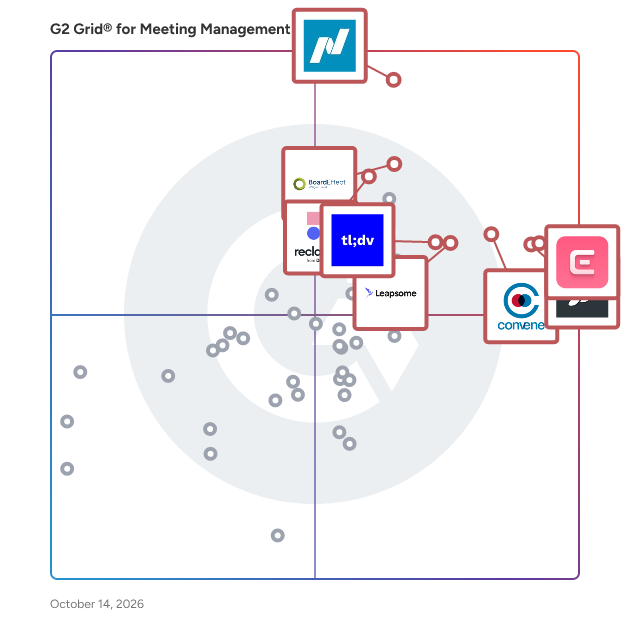
- **Leader:** [Nasdaq Boardvantage](https://www.g2.com/products/nasdaq-boardvantage/reviews)
- **Highest Performer:** [Strety](https://www.g2.com/products/strety/reviews)
- **Easiest to Use:** [Convene](https://www.g2.com/products/azeus-systems-convene/reviews)
- **Top Trending:** [Bluedot](https://www.g2.com/products/bluedot-bluedot/reviews)
- **Best Free Software:** [Fellow](https://www.g2.com/products/fellow/reviews)


---

**Sponsored**

### Sally AI

Sally is your personal AI meeting assistant for online meetings and in-person conversations. She joins your meetings, automatically transcribes them and creates clear, structured summaries so you can stay focused on the conversation rather than taking notes. Sally filters tasks, customer objections and key highlights to optimize your future interactions. By providing clear action items based on meeting results, you can improve follow-ups and generate personalized tasks for each participant. Upload audio or video files for analysis or record in-person meetings directly via the mobile app. Compatible with Microsoft Teams, Google Meet, Zoom and Webex, and seamlessly integrates with 8,000+ business tools including HubSpot and Salesforce. ISO 27001, ISO 9001 &amp; ISO 14001 certified, fully GDPR compliant and made in Germany. Sally keeps your data private and secure. Try Sally free today.


[Visit website](https://www.g2.com/external_clickthroughs/record?secure%5Bad_program%5D=ppc&amp;secure%5Bad_slot%5D=category_product_list&amp;secure%5Bcategory_id%5D=871&amp;secure%5Bchosen_at%5D=2026-07-06T21%3A34%3A31Z&amp;secure%5Bdisplayable_resource_id%5D=1006979&amp;secure%5Bdisplayable_resource_type%5D=Category&amp;secure%5Bmedium%5D=sponsored&amp;secure%5Bplacement_reason%5D=neighbor_category&amp;secure%5Bplacement_resource_ids%5D%5B%5D=1006979&amp;secure%5Bplacement_resource_ids%5D%5B%5D=2358&amp;secure%5Bprioritized%5D=false&amp;secure%5Bproduct_id%5D=1286580&amp;secure%5Bresource_id%5D=871&amp;secure%5Bresource_type%5D=Category&amp;secure%5Bsource_type%5D=category_page&amp;secure%5Bsource_url%5D=https%3A%2F%2Fwww.g2.com%2Fcategories%2Fmeeting-management&amp;secure%5Btoken%5D=811fe11d4e0eadb569da743484c320c8103f8b684cae65309739acd5935af918&amp;secure%5Burl%5D=https%3A%2F%2Fwww.sally.io%3Fsrc%3Dg2&amp;secure%5Burl_type%5D=custom_url)

---

## What Are the Top-Rated Meeting Management Software Products in 2026?
### 1. [Nasdaq Boardvantage](https://www.g2.com/products/nasdaq-boardvantage/reviews)
Nasdaq Boardvantage® is a comprehensive board management platform designed to support the full lifecycle of board and committee work. Built for corporate boards, governance teams, and organizations across public, private, and nonprofit sectors, the platform streamlines how boards prepare for meetings, collaborate on materials, and make decisions. Nasdaq Boardvantage centralizes key governance workflows into a single environment, helping directors and administrators manage information efficiently while maintaining strict protection of sensitive data. Serving a wide range of industries and board structures, Nasdaq Boardvantage is designed for users of all experience levels—from seasoned directors to first time board members. Its intuitive interface simplifies complex governance tasks such as preparing agendas, distributing materials, collecting approvals, and maintaining accurate records. Organizations that manage frequent board meetings, multi-committee structures, or regulatory disclosures benefit from tools that reduce manual effort and provide greater visibility across governance processes. Nasdaq Boardvantage supports end-to-end meeting management. Administrators can create agendas, compile board books, and update materials in real time. During meetings, directors can access and annotate documents, participate in voting, and engage in discussions from any location. After meetings, the platform assists with drafting minutes, tracking attendance, completing follow up activities, and maintaining an auditable repository of past and current materials. AI supported features—developed in partnership with Microsoft—help users summarize lengthy documents and generate initial drafts of meeting minutes, enabling faster review and better information comprehension. Nasdaq Boardvantage also integrates with widely used productivity, collaboration, and governance tools to support seamless workflows. This includes connectivity with Microsoft 365 and Google Drive for accessing and managing files, Outlook for meeting notifications, and Teams and Zoom for conducting virtual meetings. The platform integrates with Docusign for electronic signatures aligned with regulatory standards and connects with entity management systems to help maintain accurate director and organizational data. AI capabilities developed with Microsoft and built directly into the platform assist with summarizing materials and extracting key insights, supporting faster preparation and more efficient decision-making. In addition to meeting management, Nasdaq Boardvantage is part of Nasdaq’s broader governance ecosystem. This includes support for digital compliance questionnaires, board and committee evaluations, and access to the Nasdaq Center for Board Excellence—a global community of governance leaders offering education, peer connection, and curated governance resources. These additional components allow organizations to manage board meetings, disclosures, and continuous improvement activities within a cohesive environment. Security and data protection are foundational to Nasdaq Boardvantage. The platform incorporates governance grade security practices, including SOC 2 audits, ISO 27001 certification, customizable permissions, third party penetration testing, and continuous monitoring by a global security operations center. These safeguards help ensure that sensitive board information remains protected throughout the workflow. Organizations also benefit from dedicated onboarding support, 24/7 global assistance, and ongoing training resources, helping teams adopt the platform effectively and maintain confidence in their governance processes. By combining structured workflows, collaborative tools, integrated governance solutions, and strong security measures, Nasdaq Boardvantage helps boards operate efficiently and stay aligned in an increasingly complex business environment.


**Average Rating:** 4.6/5.0
**Total Reviews:** 219
**How Do G2 Users Rate Nasdaq Boardvantage?**

- **Has the product been a good partner in doing business?:** 9.5/10 (Category avg: 9.3/10)
- **Ease of Admin:** 8.9/10 (Category avg: 9.0/10)
- **Ease of Use:** 8.9/10 (Category avg: 9.1/10)
- **Notes:** 6.7/10 (Category avg: 8.4/10)

**Who Is the Company Behind Nasdaq Boardvantage?**

- **Seller:** [Nasdaq](https://www.g2.com/sellers/nasdaq)
- **Company Website:** https://www.nasdaq.com/
- **Year Founded:** 1971
- **HQ Location:** New York
- **Twitter:** @Nasdaq (213,584 Twitter followers)
- **LinkedIn® Page:** https://www.linkedin.com/company/nasdaq/ (8,468 employees on LinkedIn®)

**Who Uses This Product?**
- **Who Uses This:** Executive Assistant
- **Top Industries:** Hospital &amp; Health Care, Banking
- **Company Size:** 41% Enterprise, 35% Mid-Market


#### What Are Nasdaq Boardvantage's Pros and Cons?

**Pros:**

- Ease of Use (31 reviews)
- Customer Support (25 reviews)
- Document Management (19 reviews)
- Board Management (18 reviews)
- Helpful (10 reviews)

**Cons:**

- Document Management (6 reviews)
- Calendar Integration (4 reviews)
- Lack of Customization (4 reviews)
- Lack of Features (4 reviews)
- Limited Functionality (4 reviews)


### What Do G2 Reviewers Say About Nasdaq Boardvantage?
*AI-generated summary from verified user reviews*

**Pros:**

- Users appreciate the **user-friendly interface** of Nasdaq Boardvantage, which simplifies document organization and collaboration.
- Users commend the **exceptional customer support** of Nasdaq Boardvantage, highlighting responsiveness and helpfulness as key strengths.
- Users appreciate the **user-friendly interface** of Nasdaq Boardvantage, which simplifies document organization and collaboration effectively.
- Users value the **user-friendly interface** of Nasdaq Boardvantage, which simplifies document management for Board members.
- Users find the **service teams exceptionally helpful** , enhancing their overall experience with Nasdaq Boardvantage.

**Cons:**

- Users find **document management cumbersome** , with issues like long upload lists and difficulty in tracking folder paths.
- Users find **calendar integration lacking** , wishing for easier cloning of invites to streamline recurring meetings.
- Users find the **lack of customization** in Boardvantage tedious, wishing for easier accessibility and streamlined permissions.
- Users find the **lack of features** in Nasdaq Boardvantage limits usability and overall effectiveness in certain tasks.
- Users find the **limited functionality** of Nasdaq Boardvantage restricts usability and complicates meeting management.

#### What Are Recent G2 Reviews of Nasdaq Boardvantage?

**"[Easy to Learn and a Major Upgrade—Great Integrations and New AI Features](https://www.g2.com/survey_responses/nasdaq-boardvantage-review-12693752)"**

**Rating:** 4.0/5.0 stars
*— Brielle H.*

[Read full review](https://www.g2.com/survey_responses/nasdaq-boardvantage-review-12693752)

---

**"[Effortless Board Management with Robust Security](https://www.g2.com/survey_responses/nasdaq-boardvantage-review-12389362)"**

**Rating:** 5.0/5.0 stars
*— Debbie S.*

[Read full review](https://www.g2.com/survey_responses/nasdaq-boardvantage-review-12389362)

---


#### What Are G2 Users Discussing About Nasdaq Boardvantage?

- [What is your experience with Nasdaq Boardvantage for board management, and what improvements would you suggest?](https://www.g2.com/discussions/what-is-your-experience-with-nasdaq-boardvantage-for-board-management-and-what-improvements-would-you-suggest)
- [How do I make a board book on Boardvantage?](https://www.g2.com/discussions/how-do-i-make-a-board-book-on-boardvantage)
- [What is a board portal Nasdaq?](https://www.g2.com/discussions/what-is-a-board-portal-nasdaq)
- [Can you print from Boardvantage?](https://www.g2.com/discussions/can-you-print-from-boardvantage) - 1 comment
- [What does Boardvantage do?](https://www.g2.com/discussions/what-does-boardvantage-do)

### 2. [Fellow](https://www.g2.com/products/fellow/reviews)
Fellow is the only AI meeting assistant built from the ground up with privacy and security at its core. With both bot and botless recording options, Fellow gives teams full control over how meetings are captured — whether through a visible meeting bot or seamless, native recording with no bot required. Every recording, transcript, and summary is protected by enterprise-grade privacy and access controls, ensuring only the right people see the right information. Fellow delivers the most accurate AI meeting notes, transcripts, and summaries — and with Ask Fellow, you can instantly search across all your past meetings to surface key decisions, action items, and context without digging through notes. Leaders at Shopify, Aledade, Vidyard, and HubSpot trust Fellow to save their teams time and money by revolutionizing the way they meet.


**Average Rating:** 4.7/5.0
**Total Reviews:** 2,409
**How Do G2 Users Rate Fellow?**

- **Has the product been a good partner in doing business?:** 9.4/10 (Category avg: 9.3/10)
- **Ease of Admin:** 9.1/10 (Category avg: 9.0/10)
- **Ease of Use:** 9.0/10 (Category avg: 9.1/10)
- **Notes:** 9.2/10 (Category avg: 8.4/10)

**Who Is the Company Behind Fellow?**

- **Seller:** [Fellow Insights](https://www.g2.com/sellers/fellow-insights)
- **Year Founded:** 2017
- **HQ Location:** Ottawa, Ontario, Canada
- **LinkedIn® Page:** https://www.linkedin.com/company/appfellow/ (63 employees on LinkedIn®)

**Who Uses This Product?**
- **Who Uses This:** Team Lead, Product Manager
- **Top Industries:** Computer Software, Information Technology and Services
- **Company Size:** 38% Mid-Market, 32% Small-Business


#### What Are Fellow's Pros and Cons?

**Pros:**

- Ease of Use (692 reviews)
- Meeting Notes (534 reviews)
- Note-taking (503 reviews)
- Action Items (439 reviews)
- Organization (419 reviews)

**Cons:**

- Meeting Management (238 reviews)
- Task Management (87 reviews)
- Calendar Integration (82 reviews)
- Template Issues (82 reviews)
- Integration Issues (80 reviews)


### What Do G2 Reviewers Say About Fellow?
*AI-generated summary from verified user reviews*

**Pros:**

- Users love the **ease of use** of Fellow for organizing meetings, notes, and action items seamlessly.
- Users appreciate the **organizational ease** of Fellow, centralizing meeting notes and action items for better collaboration.
- Users appreciate the **smooth note-taking experience** of Fellow, enhancing team efficiency and workflow organization.
- Users value the **effective action item management** in Fellow, streamlining meeting notes and task assignments seamlessly.
- Users appreciate how Fellow enhances **organization** , effectively tracking meetings, notes, and action items in one place.

**Cons:**

- Users struggle with **meeting connectivity issues** in Fellow, limiting its use across different platforms and causing crashes.
- Users find **task management challenging** due to issues like disappearing tasks and cumbersome addition processes.
- Users often experience **calendar integration issues** that hinder seamless meeting organization across various platforms.
- Users find **template issues** frustrating, citing lack of intuitiveness and difficulty in creating customized meeting recaps.
- Users experience **integration issues** with Fellow, limiting its use across various meeting platforms and tools.

#### What Are Recent G2 Reviews of Fellow?

**"[Seamless Google Integration and Powerful Meeting Notes That Keep Us in Context](https://www.g2.com/survey_responses/fellow-review-13056255)"**

**Rating:** 5.0/5.0 stars
*— Gabe H.*

[Read full review](https://www.g2.com/survey_responses/fellow-review-13056255)

---

**"[Fantastic Meeting Task Automation That Keeps My Day Organised](https://www.g2.com/survey_responses/fellow-review-12897019)"**

**Rating:** 4.5/5.0 stars
*— chloe.wilson@shortcuts.com.au W.*

[Read full review](https://www.g2.com/survey_responses/fellow-review-12897019)

---


#### What Are G2 Users Discussing About Fellow?

- [How is Fellow being used by leadership teams to drive effective meeting management and team collaboration in corporations?](https://www.g2.com/discussions/how-is-fellow-being-used-by-leadership-teams-to-drive-effective-meeting-management-and-team-collaboration-in-corporations) - 1 comment
- [What is Fellow used for?](https://www.g2.com/discussions/what-is-fellow-used-for) - 2 comments
- [What does Fellow do?](https://www.g2.com/discussions/what-does-fellow-do) - 7 comments
- [How do you become a fellow of a university?](https://www.g2.com/discussions/how-do-you-become-a-fellow-of-a-university) - 1 comment
- [How do you use the fellow app?](https://www.g2.com/discussions/how-do-you-use-the-fellow-app) - 2 comments

### 3. [Claap](https://www.g2.com/products/claap/reviews)
Claap records every sales conversation and automatically structures it into rich, labeled data - speakers, objections, pain points, next steps, and more. That structured context becomes the fuel for AI agents to take over the rest: updating your CRM, drafting follow-up emails and sales decks, surfacing coaching insights, and triggering workflows across your stack. Claap delivers agent-ready conversation intelligence: pre-labeled, structured for retrieval, and open to any AI agent via MCP (Model Context Protocol). Video calls, phone calls, all captured in one platform without bots or friction. On average, sales reps save 30 minutes after each meeting with workflow automations, and revenue leaders increase their win rate up to 30% with deal insights and AI-assisted coaching. Claap is part of the lemlist group, and trusted by 1,000+ companies including Revolut, Qonto, 360Learning, Figures, and OpenClassrooms.


**Average Rating:** 4.6/5.0
**Total Reviews:** 417
**How Do G2 Users Rate Claap?**

- **Has the product been a good partner in doing business?:** 9.0/10 (Category avg: 9.3/10)
- **Ease of Admin:** 8.9/10 (Category avg: 9.0/10)
- **Ease of Use:** 9.4/10 (Category avg: 9.1/10)
- **Notes:** 9.2/10 (Category avg: 8.4/10)

**Who Is the Company Behind Claap?**

- **Seller:** [Claap](https://www.g2.com/sellers/claap)
- **Year Founded:** 2021
- **HQ Location:** Hempstead, New York
- **Twitter:** @claap_io (335 Twitter followers)
- **LinkedIn® Page:** https://www.linkedin.com/company/claap-io/ (52 employees on LinkedIn®)

**Who Uses This Product?**
- **Who Uses This:** Software Engineer, Manager
- **Top Industries:** Computer Software, Information Technology and Services
- **Company Size:** 46% Small-Business, 39% Mid-Market


#### What Are Claap's Pros and Cons?

**Pros:**

- Ease of Use (179 reviews)
- Time-saving (157 reviews)
- Easy Recording (128 reviews)
- Helpful (125 reviews)
- Efficiency (121 reviews)

**Cons:**

- Slow Performance (55 reviews)
- Slow Loading (54 reviews)
- Recording Limitations (51 reviews)
- Recording Issues (48 reviews)
- Delays (47 reviews)


### What Do G2 Reviewers Say About Claap?
*AI-generated summary from verified user reviews*

**Pros:**

- Users find Claap&#39;s **ease of use** remarkable, allowing seamless recording and sharing without any hassle.
- Users appreciate the **time-saving** features of Claap, facilitating efficient communication and reducing the need for meetings.
- Users love Claap&#39;s **easy recording** features, facilitating seamless communication and quick video updates without friction.
- Users commend Claap for its **intuitive interface** , effective video updates, and seamless integration into daily workflows.
- Users appreciate the **efficiency** of Claap, streamlining communication and automating tasks to save valuable time.

**Cons:**

- Users experience **slow performance** , particularly with video processing and interface lag, impacting overall usability and efficiency.
- Users often face **slow loading times** for videos and interface, impacting their overall experience with Claap.
- Users note the **recording limitations** of Claap, highlighting challenges with processing delays and speaker identification in larger meetings.
- Users report **recording issues** , including slow processing and glitches, impacting the overall functionality of Claap.
- Users report **delays** in video uploads and processing, impacting their ability to view and refine content quickly.

#### What Are Recent G2 Reviews of Claap?

**"[Great tool for asynchronous team communication](https://www.g2.com/survey_responses/claap-review-12975710)"**

**Rating:** 4.0/5.0 stars
*— Prem K.*

[Read full review](https://www.g2.com/survey_responses/claap-review-12975710)

---

**"[Massive Time Saver: Clean UI and Spot-On AI Meeting Summaries](https://www.g2.com/survey_responses/claap-review-12803356)"**

**Rating:** 4.0/5.0 stars
*— Dipangsu B.*

[Read full review](https://www.g2.com/survey_responses/claap-review-12803356)

---


### 4. [Convene](https://www.g2.com/products/azeus-systems-convene/reviews)
OUT NOW: Upgrade to Convene 9.0 Today Convene is a board management software designed to facilitate seamless and efficient meetings for organizations of all sizes. Developed by Azeus, a CMMI Level 5 company, Convene addresses the complexities of board meetings by providing a comprehensive platform that enhances communication, engagement, and overall productivity throughout the meeting lifecycle—from preparation to follow-up. This software is particularly beneficial for a diverse range of users, including FTSE 100 companies, Fortune 500 firms, banks, healthcare organizations, non-profits, and government entities. Convene caters to the needs of executives, board directors, and administrative staff who require a reliable tool to manage their board processes effectively. The software is designed to streamline various aspects of board management, making it an essential resource for any organization looking to improve its governance practices. Convene offers a full suite of features that support users in organizing meetings, building agendas, and facilitating discussions. The platform allows for easy voting on resolutions, tracking of action items, and secure signing of documents, ensuring that all necessary tasks are completed efficiently. The latest upgrade introduces innovative functionalities that further enhance the user experience, making it easier for boards and their teams to collaborate and make informed decisions. One of the standout aspects of Convene is its commitment to security and user privacy. The software employs advanced security measures to protect sensitive information, ensuring that users can conduct their meetings with confidence. Additionally, the intuitive interface allows for a smooth onboarding process, enabling users to quickly adapt to the platform and maximize its capabilities. By choosing Convene, organizations can expect to see improved engagement among board members, streamlined workflows, and enhanced overall meeting efficiency. The software not only simplifies the logistics of board meetings but also fosters a culture of transparency and accountability, making it a valuable asset for any organization aiming to elevate its governance standards.


**Average Rating:** 4.8/5.0
**Total Reviews:** 389
**How Do G2 Users Rate Convene?**

- **Has the product been a good partner in doing business?:** 9.4/10 (Category avg: 9.3/10)
- **Ease of Admin:** 9.3/10 (Category avg: 9.0/10)
- **Ease of Use:** 9.7/10 (Category avg: 9.1/10)
- **Notes:** 9.3/10 (Category avg: 8.4/10)

**Who Is the Company Behind Convene?**

- **Seller:** [Azeus Systems](https://www.g2.com/sellers/azeus-systems)
- **Company Website:** https://www.azeusconvene.com/
- **Year Founded:** 1991
- **HQ Location:** Singapore
- **Twitter:** @AzeusConvene (1,175 Twitter followers)
- **LinkedIn® Page:** https://www.linkedin.com/company/conveneglobal/ (679 employees on LinkedIn®)

**Who Uses This Product?**
- **Who Uses This:** Executive Assistant, Board Administrator
- **Top Industries:** Information Technology and Services, Automotive
- **Company Size:** 56% Mid-Market, 29% Small-Business


#### What Are Convene's Pros and Cons?

**Pros:**

- Ease of Use (123 reviews)
- Document Management (68 reviews)
- Agenda Management (67 reviews)
- Features (60 reviews)
- Meeting Management (60 reviews)

**Cons:**

- Expensive (16 reviews)
- Connectivity Issues (14 reviews)
- Integration Issues (10 reviews)
- Limited Customization (8 reviews)
- Limited Functionality (7 reviews)


### What Do G2 Reviewers Say About Convene?
*AI-generated summary from verified user reviews*

**Pros:**

- Users find Convene&#39;s **ease of use** exceptional, appreciating its intuitive interface and efficient meeting management capabilities.
- Users value the **effective document management** in Convene, streamlining access and collaboration during board meetings.
- Users value the **robust agenda management tools** of Convene, enhancing efficiency and simplifying board meeting processes.
- Users appreciate the **intuitive interface** and **centralized platform** of Convene for effective meeting management and collaboration.
- Users appreciate the **ease of scheduling and managing meetings** with Convene, enhancing organization and collaboration.

**Cons:**

- Users find Convene to be **somewhat expensive** for small businesses, especially compared to free alternatives.
- Users report **connectivity issues** with Convene, impacting smooth operation during board meetings and causing technical glitches.
- Users face **integration issues** with Convene, lacking compatibility with key applications like calendars and DocuSign.
- Users desire more **customization options** for agenda items and surveys to enhance their experience and usability.
- Users find that Convene has **limited functionality** , leading to connectivity issues and missing features compared to competitors.

#### What Are Recent G2 Reviews of Convene?

**"[Reliable Board Meeting Packs with Easy Document Sharing](https://www.g2.com/survey_responses/convene-review-12930081)"**

**Rating:** 5.0/5.0 stars
*— Jacob K.*

[Read full review](https://www.g2.com/survey_responses/convene-review-12930081)

---

**"[Convene Keeps Meeting Schedules and Agendas Perfectly Organized](https://www.g2.com/survey_responses/convene-review-12447691)"**

**Rating:** 4.5/5.0 stars
*— Marcin M.*

[Read full review](https://www.g2.com/survey_responses/convene-review-12447691)

---


#### What Are G2 Users Discussing About Convene?

- [What is Azeus Convene used for?](https://www.g2.com/discussions/what-is-azeus-convene-used-for)

### 5. [Diligent Boards](https://www.g2.com/products/diligent-boards/reviews)
Diligent Boards is the most comprehensive and secure board portal on the market, relied on by more than 700,000 directors and 25,000 organizations worldwide. It supports and enhances the full board cycle, from meeting prep and collaboration, through execution and follow-up. Effortlessly manage templatized and customizable committee evaluations, board books, voting materials and more. AI-powered capabilities and easy-to-use workflow automations ensure that leadership gets the most out of limited time. With 24/7/365 concierge customer support, Diligent Boards empowers the people, processes and technology that drive sterling governance


**Average Rating:** 4.5/5.0
**Total Reviews:** 496
**How Do G2 Users Rate Diligent Boards?**

- **Has the product been a good partner in doing business?:** 9.0/10 (Category avg: 9.3/10)
- **Ease of Admin:** 8.9/10 (Category avg: 9.0/10)
- **Ease of Use:** 8.9/10 (Category avg: 9.1/10)
- **Notes:** 7.8/10 (Category avg: 8.4/10)

**Who Is the Company Behind Diligent Boards?**

- **Seller:** [Diligent Corporation](https://www.g2.com/sellers/diligent-corporation-9db2bcc4-90ac-4d53-93d9-d0478f837d14)
- **Company Website:** https://www.diligent.com/
- **Year Founded:** 2001
- **HQ Location:** New York, NY
- **Twitter:** @diligenthq (4,519 Twitter followers)
- **LinkedIn® Page:** https://www.linkedin.com/company/101105/ (3,023 employees on LinkedIn®)

**Who Uses This Product?**
- **Who Uses This:** Executive Assistant, Assistant Corporate Secretary
- **Top Industries:** Financial Services, Banking
- **Company Size:** 41% Mid-Market, 36% Enterprise


#### What Are Diligent Boards's Pros and Cons?

**Pros:**

- Ease of Use (122 reviews)
- Document Management (89 reviews)
- Board Management (80 reviews)
- Efficiency (57 reviews)
- Features (54 reviews)

**Cons:**

- Document Management (23 reviews)
- Navigation Difficulty (23 reviews)
- Lack of Features (22 reviews)
- Limited Functionality (19 reviews)
- Slow Performance (18 reviews)


### What Do G2 Reviewers Say About Diligent Boards?
*AI-generated summary from verified user reviews*

**Pros:**

- Users appreciate the **ease of use** of Diligent Boards, finding it intuitive, well-designed, and efficient for board prep.
- Users value the **easy and quick preparation of board materials** with Diligent Boards, enhancing their overall efficiency.
- Users value the **easy board material preparation** and seamless access offered by Diligent Boards for efficient meetings.
- Users commend the **efficiency** of Diligent Boards, highlighting smooth board prep and seamless document access and organization.
- Users appreciate the **intuitive interface and document security** of Diligent Boards, enhancing usability and accessibility for boards.

**Cons:**

- Users experience **document management issues** with Diligent Boards, particularly lacking offline access and mobile performance challenges.
- Users find the **navigation difficult** , noting a need for more intuitive menus and better customization options.
- Users criticize the **lack of features** in Diligent Boards, especially regarding offline access and intuitive navigation.
- Users often face **limited functionality** , wishing for more features and better customization options in Diligent Boards.
- Users experience **slow performance** with Diligent Boards, particularly when uploading larger files or using the mobile app.

#### What Are Recent G2 Reviews of Diligent Boards?

**"[Effortless Board Book Creation with an Intuitive Interface](https://www.g2.com/survey_responses/diligent-boards-review-12092813)"**

**Rating:** 4.5/5.0 stars
*— Brooke A.*

[Read full review](https://www.g2.com/survey_responses/diligent-boards-review-12092813)

---

**"[Efficient, Feature-Rich with Minor Hurdles](https://www.g2.com/survey_responses/diligent-boards-review-12345084)"**

**Rating:** 4.0/5.0 stars
*— Carrie D.*

[Read full review](https://www.g2.com/survey_responses/diligent-boards-review-12345084)

---


#### What Are G2 Users Discussing About Diligent Boards?

- [What is Diligent Boards used for?](https://www.g2.com/discussions/what-is-diligent-boards-used-for) - 2 comments
- [What is board management software?](https://www.g2.com/discussions/diligent-boards-what-is-board-management-software)
- [What is board management software?](https://www.g2.com/discussions/what-is-board-management-software)
- [What is diligent BoardBooks?](https://www.g2.com/discussions/diligent-boards-what-is-diligent-boardbooks)
- [What is diligent BoardBooks?](https://www.g2.com/discussions/what-is-diligent-boardbooks)

### 6. [BoardEffect](https://www.g2.com/products/boardeffect/reviews)
BoardEffect is an AI-powered board management software designed for mission-driven organizations. It equips volunteer boards with the tools to streamline board processes, enhance communication and promote accountability. Serving more than 5,000 mission-driven organizations, we empower volunteer boards with the tools to drive positive change. Our board management software is purpose-built with the unique needs of nonprofit organizations in mind, making it easier for you to focus on your mission.


**Average Rating:** 4.5/5.0
**Total Reviews:** 312
**How Do G2 Users Rate BoardEffect?**

- **Has the product been a good partner in doing business?:** 9.0/10 (Category avg: 9.3/10)
- **Ease of Admin:** 8.8/10 (Category avg: 9.0/10)
- **Ease of Use:** 8.7/10 (Category avg: 9.1/10)
- **Notes:** 6.7/10 (Category avg: 8.4/10)

**Who Is the Company Behind BoardEffect?**

- **Seller:** [Diligent Corporation](https://www.g2.com/sellers/diligent-corporation-9db2bcc4-90ac-4d53-93d9-d0478f837d14)
- **Company Website:** https://www.diligent.com/
- **Year Founded:** 2001
- **HQ Location:** New York, NY
- **Twitter:** @diligenthq (4,519 Twitter followers)
- **LinkedIn® Page:** https://www.linkedin.com/company/101105/ (3,023 employees on LinkedIn®)

**Who Uses This Product?**
- **Who Uses This:** Executive Assistant, Executive Director
- **Top Industries:** Non-Profit Organization Management, Hospital &amp; Health Care
- **Company Size:** 46% Mid-Market, 40% Small-Business


#### What Are BoardEffect's Pros and Cons?

**Pros:**

- Ease of Use (96 reviews)
- Document Management (54 reviews)
- Board Management (40 reviews)
- Customer Support (33 reviews)
- Agenda Management (30 reviews)

**Cons:**

- Document Management (19 reviews)
- Not Intuitive (17 reviews)
- Agenda Management (15 reviews)
- Limited Functionality (15 reviews)
- Board Management (13 reviews)


### What Do G2 Reviewers Say About BoardEffect?
*AI-generated summary from verified user reviews*

**Pros:**

- Users appreciate the **ease of use** of BoardEffect, facilitating efficient board preparation and enhancing collaboration among members.
- Users appreciate the **efficient document management** of BoardEffect, streamlining board meetings and enhancing productivity significantly.
- Users appreciate the **unified tools for Board communication and document management** , enhancing efficiency and confidentiality during meetings.
- Users appreciate the **excellent customer support** and seamless integration of BoardEffect for their organizational needs.
- Users value the **efficient agenda management** of BoardEffect, enhancing productivity and streamlining board meeting processes.

**Cons:**

- Users find the **document management process cumbersome** , with tedious navigation and limited customization for meeting minutes.
- Users find BoardEffect **not intuitive** , facing challenges with participant management and difficulty in learning the platform.
- Users find **agenda management cumbersome** , as it requires excessive time and lacks necessary customization and efficiency features.
- Users face **limited functionality** with BoardEffect, struggling with password management and complex registration processes.
- Users find BoardEffect lacking as a **standalone solution** , needing additional tools for essential features like messaging and minute-taking.

#### What Are Recent G2 Reviews of BoardEffect?

**"[New BoardEffect User - 3 Months](https://www.g2.com/survey_responses/boardeffect-review-10224862)"**

**Rating:** 5.0/5.0 stars
*— Beverly N.*

[Read full review](https://www.g2.com/survey_responses/boardeffect-review-10224862)

---

**"[Excellent for Board Agenda Creation, Meeting Coordination and Sharing Meeting Materials](https://www.g2.com/survey_responses/boardeffect-review-12870888)"**

**Rating:** 5.0/5.0 stars
*— Kaitlin R.*

[Read full review](https://www.g2.com/survey_responses/boardeffect-review-12870888)

---


### 7. [Reclaim.ai](https://www.g2.com/products/reclaim-ai/reviews)
Reclaim is an AI calendar app that helps individuals and teams automatically plan their time and protect more space to get stuff done. The AI scheduling assistant optimizes meeting times across your workweek, flexibly defends focus time, prevents interruptions, and promotes work-life balance so your productivity thrives—without the burnout. Simply connect your Google Calendar or Outlook Calendar, set up a few AI-powered goals, and automatically start reclaiming your time every week. Reclaim’s AI continuously adapts your schedule as priorities shift — rescheduling tasks, protecting deep work time, and keeping your calendar optimized without the manual effort. On average, Reclaim saves busy people 7.6 hours/week through smarter AI scheduling – even across the most chaotic work environments. Get back up to 40% of the workweek with adaptive, real-time scheduling, while keeping your calendar flexible with predictive intelligence to dynamically defend priorities as your week fills up – so you always have time for focused work, while staying open to collaborate with your team. You get to tell Reclaim exactly how you want your priorities scheduled, just like you would a great assistant. And when plans change, it automatically realigns your schedule in seconds. Over 65,000 companies rely on Reclaim to get more out of their workweeks. Sign up and get started for free so you and your team can spend time where it matters most, every week. Want to learn more? Check out just some of Reclaim’s features below and visit our homepage at Reclaim.ai to get started today: • Focus Time: proactively defend a weekly focus time goal • Tasks: auto-schedule your to-dos in your calendar • Habits: block flexible time for recurring routines • Smart Meetings: find the best time for one-on-one meetings • Scheduling Links: book smarter with flexible meeting links • Calendar Sync: block your availability across calendars including Google Calendar &amp; Microsoft Outlook Calendar • Buffer Time: auto-schedule breaks &amp; travel time • Color Coding: automatically color-code your events by category • No-Meeting Days: prevent meetings &amp; auto-schedule heads-down work • Team Analytics: track your team&#39;s time across meetings, tasks, wellness metrics, &amp; more • Task Integrations: sync tasks from Asana, Todoist, Jira, ClickUp, Linear &amp; Google Tasks to your calendar • Slack Integration: customize &amp; sync your Slack status to your calendar in real time


**Average Rating:** 4.8/5.0
**Total Reviews:** 143
**How Do G2 Users Rate Reclaim.ai?**

- **Has the product been a good partner in doing business?:** 9.6/10 (Category avg: 9.3/10)
- **Ease of Admin:** 9.3/10 (Category avg: 9.0/10)
- **Ease of Use:** 8.9/10 (Category avg: 9.1/10)
- **Notes:** 5.2/10 (Category avg: 8.4/10)

**Who Is the Company Behind Reclaim.ai?**

- **Seller:** [Dropbox](https://www.g2.com/sellers/dropbox)
- **Year Founded:** 2007
- **HQ Location:** San Francisco, California
- **Twitter:** @Dropbox (3,279,477 Twitter followers)
- **LinkedIn® Page:** https://www.linkedin.com/company/167251/ (4,149 employees on LinkedIn®)
- **Ownership:** NASDAQ: DBX

**Who Uses This Product?**
- **Top Industries:** Computer Software, Information Technology and Services
- **Company Size:** 74% Small-Business, 15% Mid-Market


#### What Are Reclaim.ai's Pros and Cons?

**Pros:**

- Scheduling (58 reviews)
- Time-saving (58 reviews)
- Ease of Use (53 reviews)
- Scheduling Ease (44 reviews)
- Scheduling Flexibility (44 reviews)

**Cons:**

- Missing Features (26 reviews)
- Task Management (25 reviews)
- Calendar Integration (20 reviews)
- Scheduling Issues (19 reviews)
- Calendar Issues (18 reviews)


### What Do G2 Reviewers Say About Reclaim.ai?
*AI-generated summary from verified user reviews*

**Pros:**

- Users love the **effective scheduling** of Reclaim.ai, ensuring dedicated time for work and personal commitments without stress.
- Users love the **time-saving capabilities** of Reclaim.ai, effortlessly balancing tasks and personal time without stress.
- Users love the **ease of use** of Reclaim.ai, which simplifies scheduling and helps manage priorities effortlessly.
- Users praise the **scheduling ease** of Reclaim.ai, which smartly optimizes calendars to prioritize important tasks.
- Users value the **scheduling flexibility** of Reclaim.ai, allowing personalized calendars for efficient task and meeting management.

**Cons:**

- Users report **missing features** like mobile app support and advanced task management, affecting overall satisfaction.
- Users find the **task management system basic** and desire more advanced scheduling and reporting features.
- Users express frustration with the **poor integration of calendars** , often complicating scheduling and task management on the go.
- Users face **scheduling issues** with Reclaim.ai, finding it difficult to reschedule tasks once they begin.
- Users experience **calendar issues** , with events mismanaged and manual scheduling challenges impacting their overall experience.

#### What Are Recent G2 Reviews of Reclaim.ai?

**"[Reclaim.ai Effortlessly Keeps My Calendar Organized and On Track](https://www.g2.com/survey_responses/reclaim-ai-review-13040233)"**

**Rating:** 5.0/5.0 stars
*— Muzammil M.*

[Read full review](https://www.g2.com/survey_responses/reclaim-ai-review-13040233)

---

**"[Effortless Calendar Management with Minor Booking Issues](https://www.g2.com/survey_responses/reclaim-ai-review-12936667)"**

**Rating:** 4.5/5.0 stars
*— Chris W.*

[Read full review](https://www.g2.com/survey_responses/reclaim-ai-review-12936667)

---


#### What Are G2 Users Discussing About Reclaim.ai?

- [What is Reclaim.ai used for?](https://www.g2.com/discussions/what-is-reclaim-ai-used-for) - 1 comment

### 8. [Leapsome](https://www.g2.com/products/leapsome/reviews)
Leapsome is the AI-powered people platform for HR excellence and high-performing teams. It combines a modern HRIS with performance management, employee engagement, learning, compensation, and more — all in one flexible, easy-to-use solution. Designed for forward-thinking companies, Leapsome simplifies and automates HR processes across the entire employee lifecycle — from onboarding to reviews, surveys, development, and beyond. With powerful AI capabilities, built-in best practices, and interconnected people analytics, Leapsome enables better decisions, less admin, and more impact. More than 1,750 HR teams, managers, and leaders trust Leapsome to elevate their people strategy and build cultures where employees grow and thrive. Leapsome was founded in 2016 by Kajetan Armansperg and Jenny Podewils. 💬 Join our Slack community with hundreds of other HR &amp; People Ops pros: https://hubs.li/Q02\_B0Gc0 📧 Get the newsletter with the best HR &amp; People Ops resources https://hubs.li/Q02\_B0Nw0


**Average Rating:** 4.8/5.0
**Total Reviews:** 2,428
**How Do G2 Users Rate Leapsome?**

- **Has the product been a good partner in doing business?:** 9.5/10 (Category avg: 9.3/10)
- **Ease of Admin:** 9.1/10 (Category avg: 9.0/10)
- **Ease of Use:** 9.4/10 (Category avg: 9.1/10)
- **Notes:** 9.0/10 (Category avg: 8.4/10)

**Who Is the Company Behind Leapsome?**

- **Seller:** [Leapsome](https://www.g2.com/sellers/leapsome)
- **Company Website:** https://www.leapsome.com
- **Year Founded:** 2016
- **HQ Location:** New York, New York, United States
- **Twitter:** @leapsome (1,889 Twitter followers)
- **LinkedIn® Page:** https://www.linkedin.com/company/17954843/ (143 employees on LinkedIn®)

**Who Uses This Product?**
- **Who Uses This:** Software Engineer, Senior Software Engineer
- **Top Industries:** Information Technology and Services, Computer Software
- **Company Size:** 63% Mid-Market, 19% Enterprise


#### What Are Leapsome's Pros and Cons?

**Pros:**

- Ease of Use (873 reviews)
- Helpful (476 reviews)
- Intuitive (450 reviews)
- Simple (443 reviews)
- Feedback (424 reviews)

**Cons:**

- Missing Features (140 reviews)
- Learning Curve (136 reviews)
- Navigation Difficulty (132 reviews)
- Not Intuitive (119 reviews)
- Feedback Issues (115 reviews)


### What Do G2 Reviewers Say About Leapsome?
*AI-generated summary from verified user reviews*

**Pros:**

- Users find the **ease of use** of Leapsome intuitive, enhancing everyday tasks and feedback sharing.
- Users find Leapsome to be **extremely helpful** in fostering collaboration, performance tracking, and providing outstanding support.
- Users value the **intuitive interface** of Leapsome, enhancing feedback and making navigation effortless for all employees.
- Users love the **amazing UI** of Leapsome, making goal tracking and navigation exceptionally easy and efficient.
- Users value the **integrated feedback system** of Leapsome, facilitating continuous and transparent performance evaluations and growth.

**Cons:**

- Users note **missing features** such as export options and improved navigation for a more efficient experience.
- Users find the **learning curve steep** with Leapsome, requiring time to master its various features and modules.
- Users find the **navigation difficulty** in Leapsome challenging, particularly with unclear menus and confusing setup processes.
- Users find the **interface not intuitive** , making navigation between modules and tasks somewhat complicated and challenging.
- Users report **feedback issues** with Leapsome, including lengthy overlays and concerns about notification rigidity and bias.

#### What Are Recent G2 Reviews of Leapsome?

**"[Smooth Onboarding with Clear To-Dos and Easy Slack Integration](https://www.g2.com/survey_responses/leapsome-review-13031416)"**

**Rating:** 5.0/5.0 stars
*— Terra F.*

[Read full review](https://www.g2.com/survey_responses/leapsome-review-13031416)

---

**"[All-in-One Reviews, Goals, and 1:1Reviews, goals, and 1:1s in one place — worth its That Save Hours](https://www.g2.com/survey_responses/leapsome-review-13059405)"**

**Rating:** 4.5/5.0 stars
*— Ivan A.*

[Read full review](https://www.g2.com/survey_responses/leapsome-review-13059405)

---


#### What Are G2 Users Discussing About Leapsome?

- [I&#39;m having difficulty setting up performance reviews in Leapsome. Any tips for a new user?](https://www.g2.com/discussions/i-m-having-difficulty-setting-up-performance-reviews-in-leapsome-any-tips-for-a-new-user)

### 9. [tl;dv](https://www.g2.com/products/tl-dv/reviews)
tl;dv is an AI meeting assistant and official partner of Anthropic. It automatically records video, transcribes and get AI Insights from Google Meet, Zoom and MS Teams for FREE. With tl;dv you can: 🎥 Video record meetings automatically in top quality 💬 Receive highly accurate transcription with speaker tags 🌎 Transcribe into 40+ languages 📌 Timestamp and highlight important call moments 🔗 Share links to recordings automatically to Slack and e-mail 🔍 Search your call library for any word spoken in meetings 💡 Integrate call insights into CRMs like Salesforce or Hubspot 🎞 Edit recording &amp; create clips ✔ Revisit and edit meeting action points and takeaways 🙋‍♀️ Tag stakeholders and colleagues at any point during call 📝 Generate AI Notes following popular templates (or your own) ✍ Generate insights across 100s of meetings 💡 Improve team performance with BANT/MEDDIC scorecards (or your own) 💡 Improve how your team handles customer objections. At tl;dv we are committed to protecting the confidentiality, integrity, and availability of your data at all times. Our services are designed with a privacy-first approach and are encrypted &amp; GDPR compliant. Keeping your data safe is our priority. Over two million users have already levelled up their calls with tl;dv 🙌 tl;dv is not only a free alternative to other meeting recorders, but also the one that makes the most use of AI to surface insights and help you onboard faster and improve your team performance in an efficient way. tl;dv offers a very generous free plan, as well as a plan for AI enthusiasts and another for scaling Sales &amp; CS teams.


**Average Rating:** 4.7/5.0
**Total Reviews:** 518
**How Do G2 Users Rate tl;dv?**

- **Has the product been a good partner in doing business?:** 9.1/10 (Category avg: 9.3/10)
- **Ease of Admin:** 9.1/10 (Category avg: 9.0/10)
- **Ease of Use:** 9.2/10 (Category avg: 9.1/10)
- **Notes:** 8.4/10 (Category avg: 8.4/10)

**Who Is the Company Behind tl;dv?**

- **Seller:** [tldx Solutions GmbH](https://www.g2.com/sellers/tldx-solutions-gmbh)
- **Year Founded:** 2021
- **HQ Location:** Aachen, NRW
- **Twitter:** @tldview (9,784 Twitter followers)
- **LinkedIn® Page:** https://www.linkedin.com/company/tl-dv (63 employees on LinkedIn®)

**Who Uses This Product?**
- **Who Uses This:** CEO, Founder
- **Top Industries:** Computer Software, Marketing and Advertising
- **Company Size:** 71% Small-Business, 23% Mid-Market


#### What Are tl;dv's Pros and Cons?

**Pros:**

- Ease of Use (224 reviews)
- AI Summary (169 reviews)
- Meetings (165 reviews)
- Helpful (158 reviews)
- Accuracy (139 reviews)

**Cons:**

- Recording Issues (71 reviews)
- AI Inaccuracy (50 reviews)
- Missing Features (43 reviews)
- Meeting Management (39 reviews)
- Accuracy Issues (35 reviews)


### What Do G2 Reviewers Say About tl;dv?
*AI-generated summary from verified user reviews*

**Pros:**

- Users find tl;dv to be **easy to use and onboard** , simplifying meeting management and enhancing productivity.
- Users highlight the **boost in productivity** from tl;dv, allowing focus on meetings without note-taking distractions.
- Users find **tl;dv enhances meeting efficiency** by providing transcriptions, allowing full focus and easy reference for project managers.
- Users find tl;dv to be **extremely helpful** for enhancing productivity and simplifying note-taking during meetings.
- Users commend the **accuracy of transcriptions** in tl;dv, enhancing efficiency and simplifying content review processes.

**Cons:**

- Users find it inconvenient that tl;dv requires meetings to be attended physically for **recording issues** rather than from the portal.
- Users note the **AI inaccuracy** in transcriptions, often missing context and misinterpreting key points during meetings.
- Users find the **missing features** like downloadable transcripts and multi-email support limit the usability of tl;dv.
- Users find the **meeting management process cumbersome** , often facing delays and limitations when launching tl;dv.
- Users often face **accuracy issues** with transcriptions, leading to challenges in finding the right meeting details.

#### What Are Recent G2 Reviews of tl;dv?

**"[Intuitive HR Interview Tool That Saves Time with Smart Summaries and Great Support](https://www.g2.com/survey_responses/tl-dv-review-12948020)"**

**Rating:** 5.0/5.0 stars
*— Aleksandra N.*

[Read full review](https://www.g2.com/survey_responses/tl-dv-review-12948020)

---

**"[the best cure for boring video admin work and manual typing](https://www.g2.com/survey_responses/tl-dv-review-12950585)"**

**Rating:** 5.0/5.0 stars
*— Anastasia B.*

[Read full review](https://www.g2.com/survey_responses/tl-dv-review-12950585)

---


#### What Are G2 Users Discussing About tl;dv?

- [How has tl;dv supported your meeting recording and note-taking processes, and what features do you find most useful?](https://www.g2.com/discussions/how-has-tl-dv-supported-your-meeting-recording-and-note-taking-processes-and-what-features-do-you-find-most-useful)

### 10. [Boardable](https://www.g2.com/products/boardable/reviews)
Boardable is a type of board management software solution designed to help nonprofit organizations enhance their operational efficiency and foster collaboration among board members. By streamlining various processes, Boardable empowers boards to focus on their mission and drive positive change within their communities. This software is tailored specifically for the unique needs of nonprofits, ensuring that they can manage their governance responsibilities effectively while maximizing engagement and productivity. The primary target audience for Boardable includes nonprofit organizations of all sizes, ranging from small community groups to larger foundations. These organizations often encounter challenges related to communication, meeting coordination, and document management. Boardable addresses these issues by providing a centralized platform where board members can easily schedule meetings, share agendas, and collaborate on important documents. This is particularly beneficial for organizations that rely on volunteers or have members located in different geographical areas, as it facilitates seamless communication and collaboration regardless of location. Key features of Boardable include comprehensive meeting management capabilities, which allow users to schedule and conduct meetings efficiently. Users can build and share agendas, draft minutes, and even conduct digital voting, all within the same platform. This not only saves time but also ensures that all relevant information is easily accessible and organized. Additionally, Boardable integrates with existing email, file-sharing, and calendar platforms, centralizing all meeting content and communications in one place. This integration reduces the need for multiple tools and helps streamline operations, making it easier for boards to stay organized and focused. Another standout feature of Boardable is its built-in virtual conferencing tool, Boardable Video. This functionality enables users to record meetings, ensuring that governance best practices are adhered to and that important discussions are documented for future reference. The software is designed for accessibility, offering both desktop and mobile applications that provide secure access to meeting details, documents, discussions, and tasks from any device. This flexibility is crucial for busy board members who may need to access information on the go, allowing them to stay engaged and informed no matter where they are. Boardable serves as a vital resource for nonprofit organizations looking to enhance their board management processes. By removing friction and renewing focus, it allows boards to concentrate on their core mission and make a greater impact in their communities. The combination of centralized content, integrated tools, and robust meeting management features positions Boardable as a valuable asset for any nonprofit striving to do more for others.


**Average Rating:** 4.5/5.0
**Total Reviews:** 277
**How Do G2 Users Rate Boardable?**

- **Has the product been a good partner in doing business?:** 9.2/10 (Category avg: 9.3/10)
- **Ease of Admin:** 9.1/10 (Category avg: 9.0/10)
- **Ease of Use:** 9.2/10 (Category avg: 9.1/10)
- **Notes:** 8.5/10 (Category avg: 8.4/10)

**Who Is the Company Behind Boardable?**

- **Seller:** [Boardable](https://www.g2.com/sellers/boardable)
- **Company Website:** https://boardable.com
- **Year Founded:** 2016
- **HQ Location:** Carmel, US
- **Twitter:** @BoardableApp (956 Twitter followers)
- **LinkedIn® Page:** https://www.linkedin.com/company/10783420/ (41 employees on LinkedIn®)

**Who Uses This Product?**
- **Who Uses This:** Executive Director, Administrator
- **Top Industries:** Non-Profit Organization Management, Education Management
- **Company Size:** 62% Small-Business, 38% Mid-Market


#### What Are Boardable's Pros and Cons?

**Pros:**

- Ease of Use (37 reviews)
- Document Management (29 reviews)
- Organization (29 reviews)
- Meetings Management (28 reviews)
- Agenda Management (23 reviews)

**Cons:**

- Document Management (13 reviews)
- Lack of Customization (12 reviews)
- Limited Features (12 reviews)
- Limited Functionality (12 reviews)
- Lack of Mobile App (10 reviews)


### What Do G2 Reviewers Say About Boardable?
*AI-generated summary from verified user reviews*

**Pros:**

- Users appreciate the **ease of use** of Boardable, enabling even non-tech-savvy members to navigate and utilize the platform effectively.
- Users appreciate the **organized document management** of Boardable, enhancing collaboration and efficiency during meetings.
- Users value how Boardable simplifies **organization** , enhancing board meetings and reducing stress with its intuitive, centralized platform.
- Users value the **simplified meetings management** of Boardable, enhancing organization, communication, and overall efficiency for teams.
- Users appreciate the **easy scheduling and agenda management** features of Boardable, enhancing collaboration and meeting efficiency.

**Cons:**

- Users find **document management cumbersome** , with slow loading times and a lack of real-time collaboration hindering efficiency.
- Users express frustration over the **lack of customization** , limiting flexibility in reports, interfaces, and meeting management.
- Users find the **limited features** of Boardable hinder collaboration and customization, affecting overall board effectiveness.
- Users find **limited functionality** in Boardable, which hampers customization and complicates advanced task management and reporting.
- Users find the **lack of a polished mobile app** frustrating, impacting usability and efficiency during meetings.

#### What Are Recent G2 Reviews of Boardable?

**"[Effortless Meeting Management, Needs Messaging Improvements](https://www.g2.com/survey_responses/boardable-review-12977851)"**

**Rating:** 4.5/5.0 stars
*— Aslam H.*

[Read full review](https://www.g2.com/survey_responses/boardable-review-12977851)

---

**"[Simple, Secure All-in-One Board Management with Powerful Document Handling](https://www.g2.com/survey_responses/boardable-review-12753649)"**

**Rating:** 4.5/5.0 stars
*— Konjengbam  M.*

[Read full review](https://www.g2.com/survey_responses/boardable-review-12753649)

---


### 11. [Bluedot](https://www.g2.com/products/bluedot-bluedot/reviews)
Bluedot is a privacy-first AI note taker built for clarity, speed, and simplicity - without the bots. Unlike traditional notetakers that rely on intrusive pop-ins, Bluedot captures your Zoom, Google Meet, and Teams calls directly through a Chrome extension. No distractions, just seamless, human-only recordings. It’s a favorite among lean teams, founders, and consultants who need accurate notes fast, all without feature overload. From one-click recording to AI-generated action items, Bluedot turns your calls into searchable insights in minutes. You can clip key moments, track engagement, and integrate with tools like Notion, Slack, HubSpot and Salesforce. What sets Bluedot apart is its bot-free design and focus on usability. It works quietly in the background, delivering smart summaries, custom templates, and highly accurate transcripts that save time and effort. While it lacks some enterprise-level integrations, Bluedot excels where it counts: clean capture, fast summaries, and simple workflows. For light to moderate users, it&#39;s a refreshingly effective alternative to bloated meeting tools.


**Average Rating:** 4.8/5.0
**Total Reviews:** 223
**How Do G2 Users Rate Bluedot?**

- **Has the product been a good partner in doing business?:** 9.0/10 (Category avg: 9.3/10)
- **Ease of Admin:** 9.0/10 (Category avg: 9.0/10)
- **Ease of Use:** 9.5/10 (Category avg: 9.1/10)
- **Notes:** 9.5/10 (Category avg: 8.4/10)

**Who Is the Company Behind Bluedot?**

- **Seller:** [Twiso](https://www.g2.com/sellers/twiso)
- **HQ Location:** London, United Kingdom
- **LinkedIn® Page:** https://www.linkedin.com/company/bluedotrocks (21 employees on LinkedIn®)

**Who Uses This Product?**
- **Who Uses This:** CEO, Recruiter
- **Top Industries:** Computer Software, Information Technology and Services
- **Company Size:** 66% Small-Business, 19% Mid-Market


#### What Are Bluedot's Pros and Cons?

**Pros:**

- Ease of Use (109 reviews)
- Accuracy (81 reviews)
- Helpful (78 reviews)
- AI Summary (74 reviews)
- Transcripts (72 reviews)

**Cons:**

- Missing Features (38 reviews)
- Recording Issues (37 reviews)
- Transcript Accuracy (29 reviews)
- AI Inaccuracy (20 reviews)
- Expensive (18 reviews)


### What Do G2 Reviewers Say About Bluedot?
*AI-generated summary from verified user reviews*

**Pros:**

- Users love the **ease of use** of Bluedot, appreciating its clean interface and efficiency in meetings.
- Users appreciate the **accuracy** of Bluedot, allowing for efficient tracking and reviewing of important meeting discussions.
- Users appreciate Bluedot for its **clear conversation breakdowns** , simplifying note-taking and enhancing meeting follow-ups.
- Users appreciate the **highly accurate and organized meeting summaries** from Bluedot, making follow-ups much easier.
- Users love the **automatic video recording and transcription** features of Bluedot, enhancing teamwork and productivity effortlessly.

**Cons:**

- Users find the **missing features** of Bluedot limiting, especially regarding calendar connectivity and caption options.
- Users report **recording issues** with Bluedot, particularly struggling to capture specialized terminology in fast-paced discussions.
- Users note that **transcript accuracy** could be improved, particularly in distinguishing between multiple speakers during meetings.
- Users notice **AI inaccuracy** in speaker labeling, often relying on manual updates during meetings for better accuracy.
- Users find Bluedot to be **quite expensive** for its primary function of note-taking, seeking better value options.

#### What Are Recent G2 Reviews of Bluedot?

**"[Bluedot –  smart and a real time-saver for my meetings.](https://www.g2.com/survey_responses/bluedot-review-11941140)"**

**Rating:** 5.0/5.0 stars
*— Alena R.*

[Read full review](https://www.g2.com/survey_responses/bluedot-review-11941140)

---

**"[Enhances Meeting Focus but Needs Flexible Access](https://www.g2.com/survey_responses/bluedot-review-12663715)"**

**Rating:** 4.0/5.0 stars
*— Paul M.*

[Read full review](https://www.g2.com/survey_responses/bluedot-review-12663715)

---


### 12. [Decisions AI](https://www.g2.com/products/decisions-ai/reviews)
Decisions is an AI-driven meeting management solution built for enterprise teams that rely on Microsoft Teams and Office 365. Designed to transform the way organizations meet, Decisions brings structure, accountability, and clarity to every stage of the meeting process—before, during, and after. Whether your teams are meeting in-person, remote, or hybrid, Decisions helps ensure that every conversation leads to action and impact. Meetings are where key decisions happen, yet too often they lack direction, focus, or follow-through. Decisions solves this with intelligent tools that streamline agenda planning, time management, real-time collaboration, and post-meeting documentation—all embedded directly into your Microsoft environment. With AI features like smart agenda suggestions, instant meeting summaries, and personalized briefings, leaders save hours while staying aligned and informed—without switching tools or changing how they work. Enterprise leaders choose Decisions because it scales with complex teams and governance needs. From Fortune 500 companies to global nonprofits, our customers trust Decisions to standardize meeting processes across departments, drive cross-functional collaboration, and improve meeting culture. AI credits are included with every license, making it easy to roll out transformative capabilities across the organization quickly and cost-effectively. With Decisions, teams can build agendas collaboratively, run more focused meetings, and leave with clear decisions, tasks, and documentation—automatically synced to Microsoft Planner and To Do. Feedback tools and engagement metrics provide visibility into what’s working and where to improve, so every meeting gets smarter over time. If your organization is ready to elevate meetings from time sinks to strategic drivers, it’s time to try Decisions.


**Average Rating:** 4.4/5.0
**Total Reviews:** 397
**How Do G2 Users Rate Decisions AI?**

- **Has the product been a good partner in doing business?:** 8.9/10 (Category avg: 9.3/10)
- **Ease of Admin:** 8.3/10 (Category avg: 9.0/10)
- **Ease of Use:** 8.3/10 (Category avg: 9.1/10)
- **Notes:** 8.1/10 (Category avg: 8.4/10)

**Who Is the Company Behind Decisions AI?**

- **Seller:** [Decisions AI](https://www.g2.com/sellers/decisions-ai)
- **Company Website:** https://www.meetingdecisions.com/
- **Year Founded:** 2016
- **HQ Location:** Oslo, NO
- **Twitter:** @decisions (466 Twitter followers)
- **LinkedIn® Page:** https://www.linkedin.com/company/meetingdecisions/ (72 employees on LinkedIn®)

**Who Uses This Product?**
- **Who Uses This:** Executive Assistant, Project Manager
- **Top Industries:** Hospital &amp; Health Care, Information Technology and Services
- **Company Size:** 39% Small-Business, 36% Mid-Market


#### What Are Decisions AI's Pros and Cons?

**Pros:**

- Ease of Use (61 reviews)
- Agenda Management (47 reviews)
- Meeting Minutes (47 reviews)
- Action Items (43 reviews)
- Efficiency (33 reviews)

**Cons:**

- Meeting Management (21 reviews)
- AI Inaccuracy (16 reviews)
- Learning Curve (15 reviews)
- Task Management (15 reviews)
- Limited Functionality (13 reviews)


### What Do G2 Reviewers Say About Decisions AI?
*AI-generated summary from verified user reviews*

**Pros:**

- Users value the **ease of use** in Decisions AI, appreciating the intuitive agenda builder and customer support.
- Users value the **efficient agenda management** of Decisions AI, enhancing meeting preparation and collaboration seamlessly.
- Users find the **Meeting Minutes feature** invaluable for effective analysis and capturing crucial meeting details effortlessly.
- Users appreciate the **accurate summary of action items** , enhancing meeting efficiency and team management.
- Users commend the **efficiency** of Decisions AI&#39;s templates and integrations, greatly simplifying meeting preparations and decision-making.

**Cons:**

- Users find the **meeting management cumbersome** due to complexity, lack of transparency, and poor integration with calendars.
- Users note that **AI inaccuracy** affects the reliability of Decisions AI, requiring more control for corrections.
- Users find a **steep learning curve** for setting up templates and permissions, complicating their initial experience.
- Users experience **frustrating integration issues** with Decisions AI, leading to inefficiencies in task management and synchronization.
- Users find **limited functionality** in Decisions AI, struggling to fully utilize its features and enhance their experience.

#### What Are Recent G2 Reviews of Decisions AI?

**"[Quick, Accurate Note-Taking That Saves Me Tons of Time](https://www.g2.com/survey_responses/decisions-ai-review-12953715)"**

**Rating:** 5.0/5.0 stars
*— nermeenragab A.*

[Read full review](https://www.g2.com/survey_responses/decisions-ai-review-12953715)

---

**"[Revolutionized Meeting Minutes and Recaps](https://www.g2.com/survey_responses/decisions-ai-review-12259845)"**

**Rating:** 5.0/5.0 stars
*— Jude M .*

[Read full review](https://www.g2.com/survey_responses/decisions-ai-review-12259845)

---


### 13. [The Predictive Index](https://www.g2.com/products/the-predictive-index/reviews)
🚀 Obi by The Predictive Index is now in open beta for current PI clients! PI has spent 70 years studying what drives people at work. Obi by PI is our new AI product that puts that science to work in the moments that require it most. Before a tough feedback conversation, a first 1:1, a performance review, or a moment of interpersonal conflict, users can ask Obi how to approach the situation. Obi will provide a tailored playbook grounded in the behavioral profiles of the specific people involved, not generic AI advice. The intelligence PI is known for, available in every moment the work requires it. \*\*\*\*\*\*\*\*\*\*\*\*\*\*\*\*\*\*\*\*\*\*\*\*\*\*\*\*\*\*\*\*\*\*\*\*\*\*\*\*\*\*\*\*\*\*\*\*\*\*\*\*\*\*\*\*\*\*\*\* The Predictive Index believes that every business problem is a people problem. People data should guide every step of an employee’s journey, from the first interview to the big promotion—and it should guide your business strategy too. We call this “talent optimization,” and every part of our modular platform is built to support it. PI HIRE: Recruit the perfect candidate for each job, each time with PI Hire. We help you narrow down your field with applicants with behavioral and cognitive assessments backed by over 70 years of science and millions of data points. Plus, we make your hiring process easy and objective with personalized interview guides. PI INSPIRE: Manage your teams to success with PI Inspire. No more guessing about how to manage someone best: Our relationship guides provide a thorough analysis of each team members’ behavior, with actionable steps on how you can help them reach their full potential. You’ll become more self-aware as a manager too, with personalized development charts that show your leadership strengths and caution areas. PI PERFORM: Never miss a goal or deadline again by adding PI Perform to your day-to-day processes. PI Perform is the only performance management software to develop your managers every day, build accountability, and engage your people—with PI’s behavioral science built right in. PI DESIGN: Assess your team’s strategic goals and behavioral style (or “Team Type”) side-by-side with the PI Design—so you can know where the team is suited to succeed and where they may need to stretch. With PI Team Discovery™, you can build teams optimized for your business strategy and beat the competition. PI DIAGNOSE: Find out if your organization is on the right path with PI Diagnose. Diagnose’s employee engagement surveys give you detailed data on where your talent strategy is succeeding and failing, broken down at every level of the organization. When you run into engagement problems, we give you actionable steps to solve them. Harness the full power of talent optimization with The Predictive Index.


**Average Rating:** 4.7/5.0
**Total Reviews:** 712
**How Do G2 Users Rate The Predictive Index?**

- **Has the product been a good partner in doing business?:** 9.6/10 (Category avg: 9.3/10)
- **Ease of Admin:** 9.2/10 (Category avg: 9.0/10)
- **Ease of Use:** 9.1/10 (Category avg: 9.1/10)
- **Notes:** 8.3/10 (Category avg: 8.4/10)

**Who Is the Company Behind The Predictive Index?**

- **Seller:** [The Predictive Index](https://www.g2.com/sellers/the-predictive-index)
- **Company Website:** https://www.predictiveindex.com/behavior
- **Year Founded:** 1955
- **HQ Location:** Westwood, MA
- **Twitter:** @predictiveindex (10,594 Twitter followers)
- **LinkedIn® Page:** https://www.linkedin.com/company/76384/ (364 employees on LinkedIn®)

**Who Uses This Product?**
- **Who Uses This:** Talent Acquisition Specialist, Human Resources Manager
- **Top Industries:** Information Technology and Services, Computer Software
- **Company Size:** 57% Mid-Market, 27% Small-Business


#### What Are The Predictive Index's Pros and Cons?

**Pros:**

- Ease of Use (30 reviews)
- Goal Setting (27 reviews)
- Team Collaboration (25 reviews)
- Helpful (24 reviews)
- Efficiency (19 reviews)

**Cons:**

- Assessment Issues (7 reviews)
- Limited Customization (5 reviews)
- Missing Features (5 reviews)
- Expensive (4 reviews)
- Integration Issues (4 reviews)


### What Do G2 Reviewers Say About The Predictive Index?
*AI-generated summary from verified user reviews*

**Pros:**

- Users appreciate the **ease of use** of The Predictive Index, simplifying the recruitment process with seamless integration.
- Users value the **goal-setting capabilities** of The Predictive Index, enhancing candidate selection and team development effectively.
- Users value the **enhanced team collaboration** tools in The Predictive Index for effective hiring and employee development.
- Users find The Predictive Index to be incredibly **helpful** for streamlining hiring and enhancing team communication and self-awareness.
- Users appreciate the **efficiency** of The Predictive Index, streamlining hiring processes and enhancing team dynamics effortlessly.

**Cons:**

- Users express concerns over **assessment issues** , noting potential oversimplification and a confusing new design affecting efficiency.
- Users note the **limited customization** of The Predictive Index, which may not fit specific hiring needs or company cultures.
- Users find the **missing filtering job targets** feature limiting, desiring enhanced feedback and modernization for assessments.
- Users find The Predictive Index to be **expensive** , creating a barrier for smaller businesses and requiring significant investment.
- Users face **integration issues** with ATS, complicating automation and leading to additional manual work in the process.

#### What Are Recent G2 Reviews of The Predictive Index?

**"[Practical, Easy Behavioral Insights That Spark Better Hiring Conversations](https://www.g2.com/survey_responses/the-predictive-index-review-12721123)"**

**Rating:** 5.0/5.0 stars
*— Verified User in Hospital &amp; Health Care*

[Read full review](https://www.g2.com/survey_responses/the-predictive-index-review-12721123)

---

**"[Took the guesswork out of hiring and improved team alignment](https://www.g2.com/survey_responses/the-predictive-index-review-12773552)"**

**Rating:** 4.0/5.0 stars
*— Verified User in Hospital &amp; Health Care*

[Read full review](https://www.g2.com/survey_responses/the-predictive-index-review-12773552)

---


#### What Are G2 Users Discussing About The Predictive Index?

- [What is The Predictive Index used for?](https://www.g2.com/discussions/what-is-the-predictive-index-used-for)
- [What is WorkPatterns used for?](https://www.g2.com/discussions/what-is-workpatterns-used-for)
- [Is the predictive index valid?](https://www.g2.com/discussions/is-the-predictive-index-valid)
- [What is a good predictive index score?](https://www.g2.com/discussions/what-is-a-good-predictive-index-score) - 1 comment
- [What are the predictive index types?](https://www.g2.com/discussions/what-are-the-predictive-index-types) - 7 comments

### 14. [Lark](https://www.g2.com/products/lark-lark/reviews)
Lark is an all-in-one collaboration platform for teams looking to streamline workflows and achieve business results faster. With a seamless user experience across desktop and mobile devices, Lark ensures that teams can work efficiently from anywhere. Lark is the super app for work that consolidates chats, workflows, emails, documents, sheets, project management, and meetings in one place. Your team can plan, execute, and sync on work without disruption and focus on what matters to your business.


**Average Rating:** 4.5/5.0
**Total Reviews:** 167
**How Do G2 Users Rate Lark?**

- **Has the product been a good partner in doing business?:** 9.4/10 (Category avg: 9.3/10)
- **Ease of Admin:** 8.9/10 (Category avg: 9.0/10)
- **Ease of Use:** 9.1/10 (Category avg: 9.1/10)
- **Notes:** 9.2/10 (Category avg: 8.4/10)

**Who Is the Company Behind Lark?**

- **Seller:** [Lark Technologies](https://www.g2.com/sellers/lark-technologies-ab8d4472-aa71-4552-8d1c-06f9cf7661e6)
- **Year Founded:** 2003
- **HQ Location:** Singapore, Singapore
- **Twitter:** @lark (471 Twitter followers)
- **LinkedIn® Page:** https://www.linkedin.com/company/larksuite/ (210 employees on LinkedIn®)

**Who Uses This Product?**
- **Top Industries:** Information Technology and Services, Computer Software
- **Company Size:** 48% Small-Business, 31% Mid-Market


#### What Are Lark's Pros and Cons?

**Pros:**

- Remote Work (15 reviews)
- Automations (10 reviews)
- Ease of Use (10 reviews)
- Features (9 reviews)
- Reminders (7 reviews)

**Cons:**

- Glitches (5 reviews)
- Overwhelming Experience (5 reviews)
- Overwhelming Features (5 reviews)
- Limited Integrations (4 reviews)
- Software Glitches (4 reviews)


### What Do G2 Reviewers Say About Lark?
*AI-generated summary from verified user reviews*

**Pros:**

- Users appreciate Lark&#39;s **seamless remote work capabilities** , enabling effective collaboration and productivity from anywhere.
- Users love Lark&#39;s **powerful automation features** , enabling seamless workflows and efficient task management within the platform.
- Users appreciate the **ease of use** of Lark, enhancing productivity and streamlining team collaboration effortlessly.
- Users highlight Lark&#39;s **integrated features** that enhance collaboration, productivity, and make workflows seamless and organized.
- Users love the **reminder feature** of Lark, enhancing productivity and ensuring timely task management effortlessly.

**Cons:**

- Users experience **occasional glitches** and lag in the PC version, impacting performance and usability at times.
- Users find the **experience overwhelming** at first due to Lark&#39;s extensive features and complex onboarding process.
- Users find the **overwhelming features** of Lark complicated, making onboarding and navigation challenging for first-time use.
- Users feel there is a **need for more integrations** with other platforms to enhance functionality.
- Users often face **software glitches** that hinder functionality and can complicate the overall user experience.

#### What Are Recent G2 Reviews of Lark?

**"[Feature-Rich and Stable, A Top Choice for Team Collaboration](https://www.g2.com/survey_responses/lark-review-11952160)"**

**Rating:** 5.0/5.0 stars
*— Surendra B.*

[Read full review](https://www.g2.com/survey_responses/lark-review-11952160)

---

**"[Lark: An All-in-One Powerhouse](https://www.g2.com/survey_responses/lark-review-12704712)"**

**Rating:** 5.0/5.0 stars
*— Karol Z.*

[Read full review](https://www.g2.com/survey_responses/lark-review-12704712)

---


#### What Are G2 Users Discussing About Lark?

- [Is Lark a Chinese app?](https://www.g2.com/discussions/is-lark-a-chinese-app)
- [How good is Lark?](https://www.g2.com/discussions/lark-how-good-is-lark)
- [How does Lark app work?](https://www.g2.com/discussions/lark-how-does-lark-app-work) - 1 comment
- [What is the use of Lark app?](https://www.g2.com/discussions/lark-what-is-the-use-of-lark-app)

### 15. [Avoma](https://www.g2.com/products/avoma/reviews)
Avoma is the only AI-first Growth Acceleration Platform designed for customer-facing teams at startups and scaleups. By combining AI Meeting Assistance with Conversational Intelligence and Revenue Intelligence, Avoma empowers teams to streamline workflows, enhance customer interactions, and accelerate growth. With Avoma, you can automatically schedule and record meetings, receive full transcripts and AI-generated notes, and sync actionable insights directly to your CRM. Its AI-powered technology helps capture crucial customer information before, during, and after meetings—providing real-time insights and auto-scoring sales and customer calls with AI-powered scorecards. Avoma’s advanced Revenue Intelligence capabilities streamline forecasting and pipeline reviews with deal engagement activity, deal health and risk scores, and automated win/loss analysis. Built to empower both customer-facing reps and leaders, Avoma provides actionable insights at every stage of the customer journey. For more information, visit avoma.com.


**Average Rating:** 4.6/5.0
**Total Reviews:** 1,349
**How Do G2 Users Rate Avoma?**

- **Has the product been a good partner in doing business?:** 9.4/10 (Category avg: 9.3/10)
- **Ease of Admin:** 9.0/10 (Category avg: 9.0/10)
- **Ease of Use:** 9.0/10 (Category avg: 9.1/10)
- **Notes:** 8.9/10 (Category avg: 8.4/10)

**Who Is the Company Behind Avoma?**

- **Seller:** [Avoma](https://www.g2.com/sellers/avoma)
- **Year Founded:** 2017
- **HQ Location:** Palo Alto, California
- **Twitter:** @AvomaInc (391 Twitter followers)
- **LinkedIn® Page:** https://www.linkedin.com/company/18128169/ (66 employees on LinkedIn®)

**Who Uses This Product?**
- **Who Uses This:** Customer Success Manager, Account Executive
- **Top Industries:** Computer Software, Marketing and Advertising
- **Company Size:** 53% Small-Business, 46% Mid-Market


#### What Are Avoma's Pros and Cons?

**Pros:**

- Helpful (18 reviews)
- Transcripts (16 reviews)
- Accuracy (14 reviews)
- Recording Features (13 reviews)
- Summarization (13 reviews)

**Cons:**

- Recording Issues (11 reviews)
- AI Inaccuracy (10 reviews)
- Accuracy Issues (9 reviews)
- Transcript Accuracy (9 reviews)
- Inaccurate Transcripts (8 reviews)


### What Do G2 Reviewers Say About Avoma?
*AI-generated summary from verified user reviews*

**Pros:**

- Users find Avoma **extremely helpful** for seamless recording and summarizing of meetings, enhancing productivity and organization.
- Users value the **reliable transcripts** from Avoma, enhancing efficiency in reviewing and summarizing sales conversations.
- Users value the **accuracy** of Avoma, enjoying seamless call recording and precise transcription without errors.
- Users value the **seamless recording and reviewing** capabilities of Avoma, enhancing efficiency and accuracy in call management.
- Users love the **time-saving meeting summarization** features of Avoma, enhancing efficiency and insight post-meeting.

**Cons:**

- Users experience **recording issues** with Avoma, including notetaker dropout and unreliable transcription, impacting usability.
- Users note occasional **AI inaccuracies** in transcription, occasionally leading to misunderstandings during meetings and affecting insights.
- Users experience occasional **transcription accuracy issues** with Avoma, sometimes needing manual corrections due to background noise.
- Users experience occasional **transcription errors** with Avoma, which can affect clarity and understanding during meetings.
- Users face occasional **inaccurate transcripts** that can lead to misunderstandings during meetings and affect overall effectiveness.

#### What Are Recent G2 Reviews of Avoma?

**"[Avoma Makes Meeting Notes, Summaries, and Action Items Effortless](https://www.g2.com/survey_responses/avoma-review-12500213)"**

**Rating:** 5.0/5.0 stars
*— Miles H.*

[Read full review](https://www.g2.com/survey_responses/avoma-review-12500213)

---

**"[Stress-Free Meeting Tracking with Structured Notes and Easy Search](https://www.g2.com/survey_responses/avoma-review-12413291)"**

**Rating:** 4.5/5.0 stars
*— Sanket P.*

[Read full review](https://www.g2.com/survey_responses/avoma-review-12413291)

---


#### What Are G2 Users Discussing About Avoma?

- [What is Avoma used for?](https://www.g2.com/discussions/what-is-avoma-used-for)

### 16. [Ninety.io](https://www.g2.com/products/ninety-io/reviews)
Run EOS® in one place with Ninety. Known, loved and trusted by 39,000+ companies worldwide, Ninety makes EOS easier to implement and easier to stick with. Instead of juggling spreadsheets and disconnected tools, teams can manage their Vision, Rocks, Issues, Scorecards, To-Dos, and Meetings in one intuitive platform. The result: better alignment, stronger accountability, and more consistent execution, without the manual overhead. With Ninety, teams can: - Document and share their Vision/Traction Organizer® (V/TO®) - Build and maintain their Accountability Chart™ - Track weekly measurables with the Scorecard - Run effective Level 10 Meetings™, Quarterly &amp; Annual Planning - Create, assign, and complete Rocks, To-Dos, and Issues - Strengthen leadership with tools like the People Analyzer™ and 1-on-1s


**Average Rating:** 4.7/5.0
**Total Reviews:** 100
**How Do G2 Users Rate Ninety.io?**

- **Has the product been a good partner in doing business?:** 9.7/10 (Category avg: 9.3/10)
- **Ease of Admin:** 9.0/10 (Category avg: 9.0/10)
- **Ease of Use:** 8.9/10 (Category avg: 9.1/10)
- **Notes:** 8.7/10 (Category avg: 8.4/10)

**Who Is the Company Behind Ninety.io?**

- **Seller:** [Ninety.io](https://www.g2.com/sellers/ninety-io)
- **Company Website:** https://www.ninety.io/
- **Year Founded:** 2016
- **HQ Location:** Park City, US
- **Twitter:** @NinetyApp (334 Twitter followers)
- **LinkedIn® Page:** https://www.linkedin.com/company/ninety-io/ (173 employees on LinkedIn®)

**Who Uses This Product?**
- **Who Uses This:** EOS Implementer, Certified EOS Implementer
- **Top Industries:** Consulting, Professional Training &amp; Coaching
- **Company Size:** 80% Small-Business, 12% Mid-Market


#### What Are Ninety.io's Pros and Cons?

**Pros:**

- Ease of Use (9 reviews)
- Easy Setup (5 reviews)
- Intuitive (5 reviews)
- Efficiency (4 reviews)
- Helpful (4 reviews)

**Cons:**

- Missing Features (3 reviews)
- Lack of Customization (2 reviews)
- Limited Customization (2 reviews)
- Meeting Management (2 reviews)
- Missing Information (2 reviews)


### What Do G2 Reviewers Say About Ninety.io?
*AI-generated summary from verified user reviews*

**Pros:**

- Users appreciate the **user-friendly interface** of Ninety.io, making workflow automation and collaboration effortless and efficient.
- Users praise the **easy setup** of Ninety.io, facilitating a smooth transition and boosting overall productivity.
- Users appreciate the **intuitive interface** of Ninety.io, which enhances productivity and simplifies workflow management seamlessly.
- Users admire how Ninety.io enhances **efficiency** by streamlining workflows and automating tasks for productive meetings.
- Users value the **collaborative problem-solving** features of Ninety.io, enhancing teamwork and productivity during meetings.

**Cons:**

- Users note the **missing features** such as ineffective meeting notes and inadequate reminders that hinder productivity.
- Users feel the **lack of customization** in Ninety.io limits flexibility in dashboards, scorecards, and meeting templates.
- Users desire more flexibility as Ninety.io has **limited customization** for dashboards, scorecards, and meeting templates.
- Users find the meetings to be too **robotic and process-driven** , lacking a personal touch and flexibility.
- Users find the **notifications and reminders lacking** , causing confusion when sending issues to different departments.

#### What Are Recent G2 Reviews of Ninety.io?

**"[Keeps Meetings on Track with Simple Time Blocks and Weekly Issue Tracking](https://www.g2.com/survey_responses/ninety-io-review-12662614)"**

**Rating:** 5.0/5.0 stars
*— Hunter S.*

[Read full review](https://www.g2.com/survey_responses/ninety-io-review-12662614)

---

**"[Easy-to-Use Platform That Aligns Leadership and Integrates Excel Metrics](https://www.g2.com/survey_responses/ninety-io-review-12661774)"**

**Rating:** 4.0/5.0 stars
*— Verified User in Non-Profit Organization Management*

[Read full review](https://www.g2.com/survey_responses/ninety-io-review-12661774)

---


#### What Are G2 Users Discussing About Ninety.io?

- [What does Ninety.Io do?](https://www.g2.com/discussions/what-does-ninety-io-do)
- [How do you use ninety?](https://www.g2.com/discussions/how-do-you-use-ninety)
- [Does ninety IO have an app?](https://www.g2.com/discussions/does-ninety-io-have-an-app)
- [What is 90 io?](https://www.g2.com/discussions/what-is-90-io)

### 17. [PerformYard Performance Management](https://www.g2.com/products/performyard-performance-management/reviews)
PerformYard is a complete, AI-driven employee performance toolkit. With it, you can build your vision of performance management with an easy-to-use system your people will love. Get streamlined, AI-assisted performance reviews, 1:1 meetings, goal management, continuous feedback, and engagement surveys all in one place. With PerformYard your organization can continuously improve, use AI-powered recommendations, and develop a high-performance culture.   
_PerformYard’s AI-powered performance management workflows, engagement tools, and data dashboards help you take the tactical actions necessary to get the best version of your people. The platform creates a natural feedback loop, scientifically validated engagement surveys inform your strategy and the most flexible AI-powered performance management platform on the market evolves as your strategy does. A highly engaged and productive workforce is a journey and PerformYard AI is here to guide you.   
Performance: PerformYard’s AI-driven performance management toolkit makes it easy to streamline the entire process, bringing review cycles, goals, feedback, and performance data analysis into one platform that can surface AI insights for every employee. Engagement: PerformYard Engagement allows you to fine-tune your organization with anonymous engagement surveys, visual data, and AI-powered recommendations to build a strong culture of energized, productive employees. Flexibility: PerformYard helps you build a unique performance feedback loop for your specific company culture with a rich feature set that can accommodate the needs of every kind of organization Simplicity: PerformYard makes life easy for HR, managers, and employees with a centralized platform for performance and feedback. AI-powered summaries and automation capture all your performance data in one platform with detailed AI reporting. Human support: We provide the best support in the industry, always human, on-the-phone, free and unlimited._


**Average Rating:** 4.7/5.0
**Total Reviews:** 1,247
**How Do G2 Users Rate PerformYard Performance Management?**

- **Has the product been a good partner in doing business?:** 9.5/10 (Category avg: 9.3/10)
- **Ease of Admin:** 8.9/10 (Category avg: 9.0/10)
- **Ease of Use:** 9.3/10 (Category avg: 9.1/10)
- **Notes:** 9.0/10 (Category avg: 8.4/10)

**Who Is the Company Behind PerformYard Performance Management?**

- **Seller:** [PerformYard](https://www.g2.com/sellers/performyard)
- **Company Website:** https://performyard.com
- **Year Founded:** 2013
- **HQ Location:** Arlington, VA
- **Twitter:** @PerformYard (2,086 Twitter followers)
- **LinkedIn® Page:** https://www.linkedin.com/company/3239388/ (121 employees on LinkedIn®)

**Who Uses This Product?**
- **Who Uses This:** Director of Human Resources, Consultant
- **Top Industries:** Accounting, Information Technology and Services
- **Company Size:** 69% Mid-Market, 23% Small-Business


#### What Are PerformYard Performance Management's Pros and Cons?

**Pros:**

- Ease of Use (364 reviews)
- Goal Setting (185 reviews)
- Helpful (123 reviews)
- Simple (111 reviews)
- Goal Tracking (110 reviews)

**Cons:**

- Goal Confusion (58 reviews)
- Navigation Difficulty (48 reviews)
- Limited Customization (42 reviews)
- Learning Curve (33 reviews)
- Missing Features (33 reviews)


### What Do G2 Reviewers Say About PerformYard Performance Management?
*AI-generated summary from verified user reviews*

**Pros:**

- Users praise the **ease of use** of PerformYard, appreciating its intuitive interface and straightforward goal tracking.
- Users appreciate the **goal tracking** features of PerformYard, enjoying easy customization and progress management.
- Users appreciate the **helpfulness** of PerformYard, citing its organized processes and outstanding customer support.
- Users find PerformYard to be **user-friendly and easy to navigate** , enhancing their performance management experience significantly.
- Users love the **goal tracking feature** of PerformYard, appreciating reminders and the ability to create new goals easily.

**Cons:**

- Users find the **goal updating process confusing** , requiring too many steps and leading to frustration during usage.
- Users find **navigation difficult** within PerformYard, citing challenges with screens, goal sharing, and user interface design.
- Users find the **limited customization options** frustrating, wishing for more robust formatting and reporting features.
- Users face a challenging **learning curve** with PerformYard, leading to confusion and duplication in goal setting.
- Users find the **missing employee development features** limiting, with a need for more personalized and interactive tools.

#### What Are Recent G2 Reviews of PerformYard Performance Management?

**"[PerformYard Makes Performance Tracking Continuous, Transparent, and Goal-Aligned](https://www.g2.com/survey_responses/performyard-performance-management-review-12786484)"**

**Rating:** 5.0/5.0 stars
*— Samuel M.*

[Read full review](https://www.g2.com/survey_responses/performyard-performance-management-review-12786484)

---

**"[PerformYard Makes Quarterly Review Cycles Fast and Effortless](https://www.g2.com/survey_responses/performyard-performance-management-review-12338699)"**

**Rating:** 5.0/5.0 stars
*— Shar B.*

[Read full review](https://www.g2.com/survey_responses/performyard-performance-management-review-12338699)

---


#### What Are G2 Users Discussing About PerformYard Performance Management?

- [What is PerformYard Performance Management used for?](https://www.g2.com/discussions/what-is-performyard-performance-management-used-for) - 2 comments, 1 upvote

### 18. [MeetGeek](https://www.g2.com/products/meetgeek/reviews)
MeetGeek is an AI meeting assistant that automatically video records, transcribes, summarizes, and provides the key points from every meeting. Automatic note-taking keeps you focused on the conversation while it writes down all the important details for you. Now it’s easy to share customer feedback, requirements, or important updates with your team. They can easily stay in the loop and share knowledge while having fewer meetings. Using conversation analytics and tailored tips, you can finally understand where your meetings suffer and take action to improve them over time. Ideal for: - Consultants &amp; Agencies - Focus on running high-quality consulting sessions, while all important information is automatically captured for you. - Sales &amp; Account Managers - Extract insights from sales calls to enrich your CRM with more data to close deals faster. - Hiring &amp; Recruiting - Focus on candidates’ competencies, instead of note-taking and make hiring decisions faster.


**Average Rating:** 4.6/5.0
**Total Reviews:** 487
**How Do G2 Users Rate MeetGeek?**

- **Has the product been a good partner in doing business?:** 9.1/10 (Category avg: 9.3/10)
- **Ease of Admin:** 9.1/10 (Category avg: 9.0/10)
- **Ease of Use:** 9.2/10 (Category avg: 9.1/10)
- **Notes:** 9.0/10 (Category avg: 8.4/10)

**Who Is the Company Behind MeetGeek?**

- **Seller:** [MeetGeek](https://www.g2.com/sellers/meetgeek)
- **Company Website:** https://meetgeek.ai
- **Year Founded:** 2020
- **HQ Location:** EU, RO
- **Twitter:** @MeetgeekA (248 Twitter followers)
- **LinkedIn® Page:** https://www.linkedin.com/company/meetgeek-ai/about (28 employees on LinkedIn®)

**Who Uses This Product?**
- **Who Uses This:** CEO, Founder
- **Top Industries:** Marketing and Advertising, Computer Software
- **Company Size:** 78% Small-Business, 20% Mid-Market


#### What Are MeetGeek's Pros and Cons?

**Pros:**

- AI Summary (30 reviews)
- Ease of Use (23 reviews)
- Accuracy (15 reviews)
- Action Items (15 reviews)
- Meetings (15 reviews)

**Cons:**

- Meeting Management (9 reviews)
- Limited Language Support (8 reviews)
- AI Inaccuracy (7 reviews)
- Accuracy Issues (6 reviews)
- Inaccurate Summarization (6 reviews)


### What Do G2 Reviewers Say About MeetGeek?
*AI-generated summary from verified user reviews*

**Pros:**

- Users value the **structured summaries and AI transcription** of MeetGeek, enhancing collaboration and coaching effectiveness.
- Users find MeetGeek extremely **easy to use** , offering clear notes and quick access to customer support.
- Users value the **accuracy in organizing and summarizing meetings** , making MeetGeek an invaluable tool for productivity.
- Users find MeetGeek&#39;s **effective action item extraction** invaluable for clear follow-up and focused meetings.
- Users love the **efficient meeting summaries** in MeetGeek, enhancing collaboration and making follow-ups easier.

**Cons:**

- Users experience **meeting management issues** with MeetGeek, struggling with naming and bot performance during sessions.
- Users express concerns about **limited language support** , preferring multiple languages for transcriptions and meeting notes.
- Users find the **AI inaccuracies** in translation hinder effective communication, causing confusion and irrelevant outputs during meetings.
- Users report **accuracy issues** with AI translation and meeting transcripts, impacting overall functionality and satisfaction.
- Users note that the **summarization can be inaccurate** , leading to occasional misunderstandings of conversation context.

#### What Are Recent G2 Reviews of MeetGeek?

**"[Powerful, User-Friendly Scheduling with Smart AI and Seamless Calendar Integration](https://www.g2.com/survey_responses/meetgeek-review-12863529)"**

**Rating:** 4.5/5.0 stars
*— Konjengbam  M.*

[Read full review](https://www.g2.com/survey_responses/meetgeek-review-12863529)

---

**"[Easy to Use, Highly Customizable Meeting Emails and Impressive Workflows](https://www.g2.com/survey_responses/meetgeek-review-12944158)"**

**Rating:** 5.0/5.0 stars
*— Amanda G.*

[Read full review](https://www.g2.com/survey_responses/meetgeek-review-12944158)

---


#### What Are G2 Users Discussing About MeetGeek?

- [What is Meetgeek.ai used for?](https://www.g2.com/discussions/what-is-meetgeek-ai-used-for) - 4 comments

### 19. [Grain](https://www.g2.com/products/grain/reviews)
Grain is an AI-powered meeting recording tool built to help customer-focused teams understand, organize, and advocate for the needs of their customers. It connects seamlessly to platforms like Zoom, Google Meet, and Microsoft Teams to automate note-taking, record-keeping, and insight capture from every customer conversation. Grain ensures that no important detail, request, or moment of insight is ever lost, helping teams stay aligned and data-driven across every interaction. Conversation Intelligence Grain was designed with mid-market sales teams in mind. Transform everyday customer conversations into actionable revenue drivers by automatically identifying coaching opportunities, capturing key insights, and syncing them directly to your CRM to keep deals moving forward. With built-in automation and smart integration, Grain is free to start, simple to deploy, and cost-effective to scale across your entire organization. Superpower Your AEs Empower your account executives with AI-generated insights that drive results. Automatically update CRM properties, detect winning deal patterns using the “Deals” feature, and close more opportunities with meaningful, contextual data. Generate personalized follow-up emails in one click using meeting context, and instantly sync summaries and conversation details across your entire CRM ecosystem. Change Customer Success Send AI-driven customer feedback directly to sales, product, or leadership with a single click. Use Grain features like “Trackers” and “Ask,” along with MCP to highlight, share, and organize customer sentiment, requests, and milestones, ensuring teams stay aligned on what customers truly care about. Build Better Products Transform real customer conversations into context-informed deliverables including product briefs, roadmaps, and sprint plans. Keep teams connected with automatic Slack updates summarizing insights, next steps, and decisions. Grain helps you build better products and stronger customer relationships, faster.


**Average Rating:** 4.6/5.0
**Total Reviews:** 304
**How Do G2 Users Rate Grain?**

- **Has the product been a good partner in doing business?:** 9.6/10 (Category avg: 9.3/10)
- **Ease of Admin:** 9.2/10 (Category avg: 9.0/10)
- **Ease of Use:** 9.4/10 (Category avg: 9.1/10)
- **Notes:** 9.0/10 (Category avg: 8.4/10)

**Who Is the Company Behind Grain?**

- **Seller:** [Grain Intelligence](https://www.g2.com/sellers/grain-intelligence)
- **Year Founded:** 2018
- **HQ Location:** San Francisco, US
- **Twitter:** @grainhq (1,984 Twitter followers)
- **LinkedIn® Page:** https://www.linkedin.com/company/grainhq/ (90 employees on LinkedIn®)

**Who Uses This Product?**
- **Who Uses This:** Student, CEO
- **Top Industries:** Computer Software, Marketing and Advertising
- **Company Size:** 77% Small-Business, 20% Mid-Market


#### What Are Grain's Pros and Cons?

**Pros:**

- Accuracy (3 reviews)
- CRM Integration (3 reviews)
- Customization (3 reviews)
- Note-taking (3 reviews)
- Salesforce Integration (3 reviews)

**Cons:**

- Integration Issues (4 reviews)
- AI Inaccuracy (2 reviews)
- AI Limitations (2 reviews)
- Call Issues (2 reviews)
- Expensive (2 reviews)


### What Do G2 Reviewers Say About Grain?
*AI-generated summary from verified user reviews*

**Pros:**

- Users highlight Grain&#39;s **exceptional accuracy** in transcription, significantly improving meeting documentation and workflow efficiency.
- Users appreciate the **seamless CRM integration** of Grain, which saves time and enhances productivity in meetings.
- Users value the **customizable templates and smart tags** in Grain, enhancing tracking and tailoring to specific needs.
- Users value the **intelligent note-taking** of Grain, simplifying meeting summaries and enhancing team productivity effectively.
- Users value the **seamless Salesforce integration** of Grain, enhancing productivity and simplifying workflows significantly.

**Cons:**

- Users experience **integration issues** with Productboard and CRMs, requiring extra work to achieve desired functionality.
- Users find the **AI inaccuracy** limits the effectiveness of Grain for project management integration and actionable outputs.
- Users feel that the **AI capabilities could be improved** , particularly in integrating with project management tools for actions.
- Users struggle with **call issues** like distinguishing between meetings and calls, impacting the overall user experience.
- Users find Grain to be quite **expensive** , particularly for small teams needing to access or share recordings.

#### What Are Recent G2 Reviews of Grain?

**"[Grain Is Indispensable for My Content Team](https://www.g2.com/survey_responses/grain-review-12852818)"**

**Rating:** 5.0/5.0 stars
*— Verified User in Marketing and Advertising*

[Read full review](https://www.g2.com/survey_responses/grain-review-12852818)

---

**"[Grain is a must-have tool for any customer-facing team](https://www.g2.com/survey_responses/grain-review-12799111)"**

**Rating:** 5.0/5.0 stars
*— Maksym P.*

[Read full review](https://www.g2.com/survey_responses/grain-review-12799111)

---


#### What Are G2 Users Discussing About Grain?

- [What is grain company?](https://www.g2.com/discussions/what-is-grain-company)
- [How do you use grain recording?](https://www.g2.com/discussions/how-do-you-use-grain-recording) - 1 comment
- [Is Grain Zoom free?](https://www.g2.com/discussions/is-grain-zoom-free)
- [What is Grain software?](https://www.g2.com/discussions/what-is-grain-software)

### 20. [Strety](https://www.g2.com/products/strety/reviews)
Strety is the EOS® platform people love. Connect your business operating system to your team&#39;s everyday work for real results, faster. Run EOS® and manage people, projects, playbooks, performance, and surveys — all in one beautiful, intuitive, integrated platform. Eliminate your software sprawl with one platform to rule them all! Plus, Strety is integrated with your favorites: an app in Microsoft Teams and Outlook, Microsoft and Google SSO, and To Do integrations with Planner, Monday.com, Asana, HubSpot, Google Tasks, and major PSAs. Use Strety on the go in Strety&#39;s mobile app, available for iPhone and Android. Learn more --\&gt; https://strety.com/


**Average Rating:** 4.9/5.0
**Total Reviews:** 25
**How Do G2 Users Rate Strety?**

- **Has the product been a good partner in doing business?:** 9.9/10 (Category avg: 9.3/10)
- **Ease of Admin:** 9.7/10 (Category avg: 9.0/10)
- **Ease of Use:** 9.9/10 (Category avg: 9.1/10)
- **Notes:** 8.8/10 (Category avg: 8.4/10)

**Who Is the Company Behind Strety?**

- **Seller:** [Strety](https://www.g2.com/sellers/strety)
- **Year Founded:** 2022
- **HQ Location:** Miami, US
- **LinkedIn® Page:** https://www.linkedin.com/company/strety/ (22 employees on LinkedIn®)

**Who Uses This Product?**
- **Top Industries:** Information Technology and Services
- **Company Size:** 84% Small-Business, 16% Mid-Market


#### What Are Strety's Pros and Cons?

**Pros:**

- Ease of Use (13 reviews)
- Team Collaboration (13 reviews)
- Customer Support (8 reviews)
- Integrations (7 reviews)
- Intuitive (7 reviews)

**Cons:**

- Learning Curve (2 reviews)
- Not Intuitive (2 reviews)
- Steep Learning Curve (2 reviews)
- Calendar Integration (1 reviews)
- Complexity (1 reviews)


### What Do G2 Reviewers Say About Strety?
*AI-generated summary from verified user reviews*

**Pros:**

- Users find Strety to have a **super easy-to-use interface** that greatly simplifies project and performance management.
- Users benefit from **effective team collaboration** with Strety, enhancing productivity and flexibility in managing projects and meetings.
- Users commend the **responsive and helpful customer support** of Strety, enhancing their overall experience with the platform.
- Users love the **seamless integrations** of Strety with tools like Microsoft Teams and Asana, enhancing project management efficiency.
- Users find Strety&#39;s **intuitive design** invaluable for seamlessly integrating EOS and managing operations effectively.

**Cons:**

- Users find a **learning curve** when transitioning from legacy systems, which complicates initial onboarding and usage.
- Users find the **non-intuitive interface** of Strety challenging, particularly during onboarding and adding new items.
- Users note a **steep learning curve** with Strety, making onboarding challenging for those new to the system.
- Users feel the **calendar integration is too light** , hoping for a more significant presence in daily life.
- Users find the **complexity in adding members and items** to lists hampers ease of use with Strety.

#### What Are Recent G2 Reviews of Strety?

**"[User-Friendly L10 Meeting Guidance with Strong Metrics and ClickUp Integration](https://www.g2.com/survey_responses/strety-review-12661737)"**

**Rating:** 5.0/5.0 stars
*— Verified User in Marketing and Advertising*

[Read full review](https://www.g2.com/survey_responses/strety-review-12661737)

---

**"[Lot&#39;s of Features - Great Interface - Good Move](https://www.g2.com/survey_responses/strety-review-11143311)"**

**Rating:** 5.0/5.0 stars
*— Jill W.*

[Read full review](https://www.g2.com/survey_responses/strety-review-11143311)

---


### 21. [HCL Sametime](https://www.g2.com/products/hcl-sametime/reviews)
HCL Sametime provides real time communication through instant messaging, online meetings, audio and video. Communicate virtually instantly Share files, save time and avoid exceeding mail size quotas. Also manage message history using date and time stamps, people and date searches and a log of sent links and files. Improve online meetings Access online meetings from your desktop, laptop, tablet or smartphone. Share files, applications and screens with people internally or externally using security-rich features. Get the mobile advantage Use high-definition Voice over Internet Protocol (VoIP) audio and video for instant messaging and meetings and softphone with PSTN-dialing support.


**Average Rating:** 4.0/5.0
**Total Reviews:** 113
**How Do G2 Users Rate HCL Sametime?**

- **Has the product been a good partner in doing business?:** 9.2/10 (Category avg: 9.3/10)
- **Ease of Admin:** 8.4/10 (Category avg: 9.0/10)
- **Ease of Use:** 8.5/10 (Category avg: 9.1/10)

**Who Is the Company Behind HCL Sametime?**

- **Seller:** [HCL Technologies](https://www.g2.com/sellers/hcl-technologies)
- **Year Founded:** 1999
- **HQ Location:** Noida, Uttar Pradesh
- **Twitter:** @hcltech (425,043 Twitter followers)
- **LinkedIn® Page:** https://www.linkedin.com/company/1756/ (246,058 employees on LinkedIn®)
- **Ownership:** NSE - National Stock Exchange of India

**Who Uses This Product?**
- **Top Industries:** Information Technology and Services, Accounting
- **Company Size:** 69% Enterprise, 22% Mid-Market


#### What Are HCL Sametime's Pros and Cons?

**Pros:**

- Ease of Use (7 reviews)
- Communication (5 reviews)
- Integrations (5 reviews)
- Video Quality (5 reviews)
- Instant Messaging (4 reviews)

**Cons:**

- Connectivity Issues (4 reviews)
- User Interface (3 reviews)
- Glitches (2 reviews)
- Learning Curve (2 reviews)
- Limited Features (2 reviews)


### What Do G2 Reviewers Say About HCL Sametime?
*AI-generated summary from verified user reviews*

**Pros:**

- Users love the **ease of use** of HCL Sametime, appreciating its quick connectivity and intuitive interface.
- Users value the **great communication capabilities** of HCL Sametime, enhancing real-time connectivity and messaging experiences.
- Users value the **seamless integration** of HCL Sametime with other tools, enhancing communication efficiency across organizations.
- Users commend the **superior video quality** of HCL Sametime, enhancing clarity and engagement during meetings.
- Users value the **seamless instant messaging** experience of HCL Sametime, enhancing communication and collaboration effortlessly.

**Cons:**

- Users experience significant **connectivity issues** with HCL Sametime, including delays and interruptions during calls and messaging.
- Users find the **user interface complex** , making navigation challenging, especially for new users, and affecting their experience.
- Users experience **irritating glitches** with HCL Sametime that disrupt communication and delay resolution times.
- Users find the **learning curve steep** with HCL Sametime, making it difficult for newcomers to adapt quickly.
- Users find the **limited features** of HCL Sametime lacking in intuitiveness and requiring significant initial configuration effort.

#### What Are Recent G2 Reviews of HCL Sametime?

**"[Best for real time communication](https://www.g2.com/survey_responses/hcl-sametime-review-8743241)"**

**Rating:** 5.0/5.0 stars
*— Monika P.*

[Read full review](https://www.g2.com/survey_responses/hcl-sametime-review-8743241)

---

**"[HCL Sametime](https://www.g2.com/survey_responses/hcl-sametime-review-9119977)"**

**Rating:** 4.5/5.0 stars
*— Dnyaneshwar K.*

[Read full review](https://www.g2.com/survey_responses/hcl-sametime-review-9119977)

---


#### What Are G2 Users Discussing About HCL Sametime?

- [What is HCL Sametime used for?](https://www.g2.com/discussions/what-is-hcl-sametime-used-for)

### 22. [Coda](https://www.g2.com/products/superhuman-coda/reviews)
Coda is the all-in-one workspace for teams that think in documents and build like developers. It combines the flexibility of docs, the structure of spreadsheets, and the power of apps, so anyone can create custom tools that fit their workflow perfectly. With connected tables, live data, buttons that take action, and now AI built right in, Coda lets teams run projects, scale knowledge, and ship faster. From product roadmaps to GTM plans to internal wikis, Coda is built to flex to your team’s thinking and grow with your ambition. Coda is part of Superhuman, the AI productivity platform on a mission to unlock the superhuman potential in everyone. Superhuman’s suite of apps and agents brings AI wherever people work, helping over 40 million individuals and 50,000 organizations focus on what matters.


**Average Rating:** 4.6/5.0
**Total Reviews:** 477
**How Do G2 Users Rate Coda?**

- **Has the product been a good partner in doing business?:** 9.3/10 (Category avg: 9.3/10)
- **Ease of Admin:** 8.5/10 (Category avg: 9.0/10)
- **Ease of Use:** 8.5/10 (Category avg: 9.1/10)
- **Notes:** 9.1/10 (Category avg: 8.4/10)

**Who Is the Company Behind Coda?**

- **Seller:** [Superhuman](https://www.g2.com/sellers/superhuman-888da3d1-51f7-4603-8d73-08989f8a7db1)
- **Company Website:** https://superhuman.com/
- **HQ Location:** San Francisco, California
- **LinkedIn® Page:** https://www.linkedin.com/company/superhumanhq/ (1,759 employees on LinkedIn®)

**Who Uses This Product?**
- **Who Uses This:** CEO, Founder
- **Top Industries:** Computer Software, Information Technology and Services
- **Company Size:** 54% Small-Business, 31% Mid-Market


#### What Are Coda's Pros and Cons?

**Pros:**

- Ease of Use (18 reviews)
- Features (12 reviews)
- Flexibility (12 reviews)
- Automation (11 reviews)
- Customization (10 reviews)

**Cons:**

- Learning Curve (9 reviews)
- Steep Learning Curve (7 reviews)
- Complexity (4 reviews)
- Limited Features (4 reviews)
- Difficulty (3 reviews)


### What Do G2 Reviewers Say About Coda?
*AI-generated summary from verified user reviews*

**Pros:**

- Users find Coda to be an **easy-to-use platform** that simplifies project management and collaboration effectively.
- Users appreciate Coda for its **flexibility and comprehensive features** , combining tools seamlessly for efficient project management.
- Users value the **flexibility** of Coda, enjoying its customizable features that cater to various project needs seamlessly.
- Users enjoy **automation features** in Coda, simplifying project management and task assignment efficiently.
- Users love Coda&#39;s **customizable platform** , which seamlessly adapts to fit diverse project needs and enhances collaboration.

**Cons:**

- Users find the **learning curve challenging** , feeling intimidated and needing more time to grasp Coda&#39;s features.
- Users find the **learning curve steep** when transitioning to advanced features, requiring time to master Coda.
- Users find the **complexity** of Coda&#39;s system intimidating, especially regarding authoring and permissions setup.
- Users find the **limited canvas layout options** of Coda unappealing, restricting functionality and creativity in design.
- Users find the **learning curve steep** with Coda, making it challenging to navigate and utilize effectively.

#### What Are Recent G2 Reviews of Coda?

**"[Perfect tool for makes](https://www.g2.com/survey_responses/coda-review-8239050)"**

**Rating:** 5.0/5.0 stars
*— Istvan P.*

[Read full review](https://www.g2.com/survey_responses/coda-review-8239050)

---

**"[Coda: A One-Stop Hub for SOPs, Data, and Team Collaboration](https://www.g2.com/survey_responses/coda-review-12952557)"**

**Rating:** 4.0/5.0 stars
*— Noxy P.*

[Read full review](https://www.g2.com/survey_responses/coda-review-12952557)

---


#### What Are G2 Users Discussing About Coda?

- [How do you use Coda io?](https://www.g2.com/discussions/how-do-you-use-coda-io) - 3 comments
- [What is CODA program?](https://www.g2.com/discussions/what-is-coda-program) - 3 comments
- [What is Coda used for?](https://www.g2.com/discussions/what-is-coda-used-for) - 3 comments

### 23. [Captello](https://www.g2.com/products/captello/reviews)
Captello is the only event-to-revenue intelligence platform, the lead capture system of record for enterprise event programs. Events don&#39;t have an ROI problem. They have a memory problem. Captello is the system of record that ties every lead, meeting, and conversation to closed pipeline. It captures every interaction across trade shows, conferences, and field programs, enriches each one, and routes it to your CRM in real time, so Sales, Marketing, and Events work from the same record and can prove the revenue an event creates. Four core pillars, plus an Event Operations track that runs the floor: • Lead Capture: capture and enrich every lead into your CRM as attributable pipeline. • Meeting Management: book and run executive meetings, and attribute each one to pipeline. • Activations and Engagement: capture and score engagement, so sales works the buyers most likely to become revenue first. • Event Revenue Intelligence: attribute event-sourced pipeline to closed-won revenue, the proof a CFO trusts. • Event Operations (parallel track): on-site execution for show organizers and for corporate teams running their own events. Captello is trusted by enterprise teams including AT&amp;T, IBM, Amazon, GE, Philips, and Thomson Reuters. Security and governance are enterprise-grade: SOC 2 Type 2, ISO 27001, HIPAA, and GDPR.


**Average Rating:** 4.8/5.0
**Total Reviews:** 172
**How Do G2 Users Rate Captello?**

- **Has the product been a good partner in doing business?:** 9.6/10 (Category avg: 9.3/10)
- **Ease of Admin:** 9.0/10 (Category avg: 9.0/10)
- **Ease of Use:** 9.2/10 (Category avg: 9.1/10)

**Who Is the Company Behind Captello?**

- **Seller:** [Captello](https://www.g2.com/sellers/captello)
- **Company Website:** https://captello.com
- **Year Founded:** 2019
- **HQ Location:** Dallas, TX
- **Twitter:** @Captello1 (47 Twitter followers)
- **LinkedIn® Page:** https://www.linkedin.com/company/captello/ (58 employees on LinkedIn®)

**Who Uses This Product?**
- **Who Uses This:** Marketing Manager
- **Top Industries:** Computer Software, Hospital &amp; Health Care
- **Company Size:** 37% Mid-Market, 24% Enterprise


#### What Are Captello's Pros and Cons?

**Pros:**

- Ease of Use (57 reviews)
- Lead Generation (36 reviews)
- Easy Setup (35 reviews)
- Lead Management (35 reviews)
- Customer Support (32 reviews)

**Cons:**

- Learning Curve (14 reviews)
- Steep Learning Curve (9 reviews)
- Integration Issues (8 reviews)
- Time-Consuming (7 reviews)
- Complexity (6 reviews)


### What Do G2 Reviewers Say About Captello?
*AI-generated summary from verified user reviews*

**Pros:**

- Users commend the **ease of use** of Captello, allowing for quick adoption and streamlined lead management at events.
- Users value the **seamless lead generation** and automatic CRM integration provided by Captello, enhancing efficiency and accuracy.
- Users praise the **easy setup** of Captello, ensuring quick adoption and seamless lead capture at events.
- Users laud the **user-friendly lead management** of Captello, significantly enhancing lead capture and event efficiency.
- Users value the **responsive customer support** from Captello, enhancing their experience with effective onboarding and training.

**Cons:**

- Users note a **steep learning curve** for advanced features, despite intuitive basics and excellent support during onboarding.
- Users find the **steep learning curve** on the administrator side challenging, limiting their ability to maximize Captello&#39;s potential.
- Users face **integration issues** with Captello, often requiring extra support and causing complicated setup processes.
- Users find the **initial setup to be time-consuming** , requiring additional support and extensive training to navigate effectively.
- Users find the **complexity of options** in Captello overwhelming, making full utilization and setup challenging.

#### What Are Recent G2 Reviews of Captello?

**"[Seamless, Good Assistance, Easy to Use for our sales team.](https://www.g2.com/survey_responses/captello-review-10616137)"**

**Rating:** 4.0/5.0 stars
*— Amanda E.*

[Read full review](https://www.g2.com/survey_responses/captello-review-10616137)

---

**"[Generating Better High Quality Leads at Tradeshows.](https://www.g2.com/survey_responses/captello-review-12665801)"**

**Rating:** 5.0/5.0 stars

[Read full review](https://www.g2.com/survey_responses/captello-review-12665801)

---


#### What Are G2 Users Discussing About Captello?

- [What is Captello Lead Capture Software used for?](https://www.g2.com/discussions/what-is-captello-lead-capture-software-used-for) - 1 comment

### 24. [Teamflect](https://www.g2.com/products/teamflect/reviews)
Teamflect is the all-in-one performance management platform built natively inside Microsoft Teams and Outlook, helping organizations from startups to global enterprises align goals, run reviews, and develop talent without ever leaving the tools they already use. There are no extra logins or complicated rollouts, just a tool that feels natural from day one. Adoption is where most HR software fails, but it’s where Teamflect shines. Because everything lives in Microsoft Teams, employees and managers actually use it. Teamflect also includes AI-powered assistance that helps managers and employees quickly generate insights, summaries, and guidance across goals, feedback, and performance. Recognizing a colleague takes seconds, feedback is always at hand, and 1-on-1s are guided by shared agendas that appear right in meeting invites. Goals, OKRs, and development plans remain visible, actionable, and connected to performance reviews. As an official Microsoft partner, Teamflect meets enterprise-grade standards and GDPR compliance. With Teamflect, HR can spend less time chasing adoption and more time on what matters most: helping people grow, perform, and stay engaged.


**Average Rating:** 4.5/5.0
**Total Reviews:** 169
**How Do G2 Users Rate Teamflect?**

- **Has the product been a good partner in doing business?:** 9.1/10 (Category avg: 9.3/10)
- **Ease of Admin:** 8.8/10 (Category avg: 9.0/10)
- **Ease of Use:** 8.6/10 (Category avg: 9.1/10)
- **Notes:** 9.1/10 (Category avg: 8.4/10)

**Who Is the Company Behind Teamflect?**

- **Seller:** [Teamflect](https://www.g2.com/sellers/teamflect)
- **Company Website:** https://www.teamflect.com
- **Year Founded:** 2018
- **HQ Location:** Unit 501 Leroy House, 434-436 Essex Road, London, England, N1 3QP
- **Twitter:** @teamflect (2,366 Twitter followers)
- **LinkedIn® Page:** https://www.linkedin.com/company/teamflect/ (51 employees on LinkedIn®)

**Who Uses This Product?**
- **Top Industries:** Non-Profit Organization Management, Information Technology and Services
- **Company Size:** 50% Small-Business, 36% Mid-Market


#### What Are Teamflect's Pros and Cons?

**Pros:**

- Ease of Use (80 reviews)
- Goal Setting (51 reviews)
- Integrations (36 reviews)
- Easy Integrations (33 reviews)
- Functionality (32 reviews)

**Cons:**

- Missing Features (21 reviews)
- Not User-Friendly (19 reviews)
- Not Intuitive (18 reviews)
- Learning Curve (16 reviews)
- Integration Issues (15 reviews)


### What Do G2 Reviewers Say About Teamflect?
*AI-generated summary from verified user reviews*

**Pros:**

- Users appreciate the **ease of use** of Teamflect, benefiting from its integration with Teams for seamless experience.
- Users love the **easy goal setting** feature of Teamflect, enhancing collaboration and performance management effortlessly.
- Users appreciate the **seamless integrations** with Microsoft Teams and MS365, enhancing workflow and task management efficiency.
- Users love the **easy integrations** of Teamflect, enhancing workflow and simplifying goal management with Microsoft Teams.
- Users appreciate the **intuitive functionality** of Teamflect, enabling effective tracking of tasks and strategic planning.

**Cons:**

- Users note the **missing features** in Teamflect, particularly in time management and goal privacy options.
- Users find Teamflect **not user-friendly** , with confusing features and complicated navigation hindering their experience.
- Users find the interface **not intuitive** , particularly with complicated settings and accessing past meeting notes.
- Users find the **learning curve steep** , especially for first-time users unfamiliar with performance management tools.
- Users face **integration issues** with Teamflect, leading to manual workarounds and inefficiencies in handling performance reviews.

#### What Are Recent G2 Reviews of Teamflect?

**"[Seamless Integration Boosts Productivity](https://www.g2.com/survey_responses/teamflect-review-12818141)"**

**Rating:** 5.0/5.0 stars
*— Emmanuel M.*

[Read full review](https://www.g2.com/survey_responses/teamflect-review-12818141)

---

**"[A Practical, Teams-Native Performance &amp; Engagement Hub for Microsoft 365](https://www.g2.com/survey_responses/teamflect-review-13062713)"**

**Rating:** 5.0/5.0 stars
*— Vikas S.*

[Read full review](https://www.g2.com/survey_responses/teamflect-review-13062713)

---


#### What Are G2 Users Discussing About Teamflect?

- [What is Teamflect used for?](https://www.g2.com/discussions/what-is-teamflect-used-for)

### 25. [Read AI](https://www.g2.com/products/read-ai-read-ai/reviews)
Read AI is an AI copilot for wherever you work, making your meetings, emails, and messages more productive with summaries, content discovery, and recommendations.


**Average Rating:** 4.0/5.0
**Total Reviews:** 42
**How Do G2 Users Rate Read AI?**

- **Has the product been a good partner in doing business?:** 7.1/10 (Category avg: 9.3/10)
- **Ease of Admin:** 7.5/10 (Category avg: 9.0/10)
- **Ease of Use:** 8.4/10 (Category avg: 9.1/10)
- **Notes:** 8.9/10 (Category avg: 8.4/10)

**Who Is the Company Behind Read AI?**

- **Seller:** [Read AI](https://www.g2.com/sellers/read-ai)
- **Year Founded:** 2021
- **HQ Location:** Seattle, US
- **LinkedIn® Page:** https://www.linkedin.com/company/readinc/ (111 employees on LinkedIn®)

**Who Uses This Product?**
- **Top Industries:** Information Technology and Services, Marketing and Advertising
- **Company Size:** 63% Small-Business, 40% Mid-Market


#### What Are Read AI's Pros and Cons?

**Pros:**

- Transcripts (10 reviews)
- Action Items (8 reviews)
- Ease of Use (8 reviews)
- Meeting Notes (8 reviews)
- Note-taking (7 reviews)

**Cons:**

- Meeting Management (8 reviews)
- Integration Issues (4 reviews)
- Poor Customer Support (4 reviews)
- Expensive (3 reviews)
- Inadequate Summarization (3 reviews)


### What Do G2 Reviewers Say About Read AI?
*AI-generated summary from verified user reviews*

**Pros:**

- Users find the **helpful meeting transcripts** invaluable for review and saving time on note-taking tasks.
- Users find Read AI&#39;s **action item summaries** incredibly helpful for keeping track of key points during meetings.
- Users find Read AI to be **very user-friendly** , streamlining meetings with seamless integration and automatic attendance.
- Users appreciate the **automatic summaries and highlights** of Read AI, enhancing meeting quality and accountability effortlessly.
- Users value the **automatic note-taking features** of Read AI, enhancing meeting quality and accountability effortlessly.

**Cons:**

- Users report **difficulties in managing meetings** due to persistent issues with attendance and functionality after trials.
- Users face **integration issues** that complicate setup, along with challenges like limited customization and slow customer support.
- Users express frustration with the **poor customer support** , highlighting slow response times and difficult issues resolution.
- Users find Read AI to be **expensive** , particularly for teams needing multiple licenses or advanced features.
- Users find the **inadequate summarization** of Read AI can overlook key details and context, affecting overall effectiveness.

#### What Are Recent G2 Reviews of Read AI?

**"[Effortless Meeting Summaries,  Storage/arrangement Improvement](https://www.g2.com/survey_responses/read-ai-review-12868368)"**

**Rating:** 4.0/5.0 stars
*— Pamela R.*

[Read full review](https://www.g2.com/survey_responses/read-ai-review-12868368)

---

**"[Super Useful Meeting Transcriptions with Video, Recaps, and Insights](https://www.g2.com/survey_responses/read-ai-review-12839208)"**

**Rating:** 4.0/5.0 stars
*— Matthew W.*

[Read full review](https://www.g2.com/survey_responses/read-ai-review-12839208)

---


## What Is Meeting Management Software?

[Collaboration &amp; Productivity Software](https://www.g2.com/categories/collaboration-productivity)

## What Software Categories Are Similar to Meeting Management Software?

- [Board Management Software](https://www.g2.com/categories/board-management)
- [Transcription Software](https://www.g2.com/categories/transcription)
- [AI Meeting Assistants Software](https://www.g2.com/categories/ai-meeting-assistants)