Best Enterprise Workforce Management Software - Page 2

How Many Workforce Management Software Products Does G2 Track?

Total Products under this Category: 737

Category Stats (Oct 2026)

  • Average Rating: 4.34/5 (↑0.01 vs Sep 2026) The average rating of products in this category, based on all submitted ratings
  • Top Trending Product: ZellisONE (+3.38%) - Among all products in this category, ZellisONE recorded the largest rating increase compared to last month

Last updated: October 01, 2026

How Does G2 Rank Workforce Management Software Products?

Why You Can Trust G2's Software Rankings:

  • 30 Analysts and Data Experts
  • 96,800+ Authentic Reviews
  • 737+ Products
  • Unbiased Rankings

G2's software rankings are built on verified user reviews, rigorous moderation, and a consistent research methodology maintained by a team of analysts and data experts. Each product is measured using the same transparent criteria, with no paid placement or vendor influence. While reviews reflect real user experiences, which can be subjective, they offer valuable insight into how software performs in the hands of professionals. Together, these inputs power the G2 Score, a standardized way to compare tools within every category.

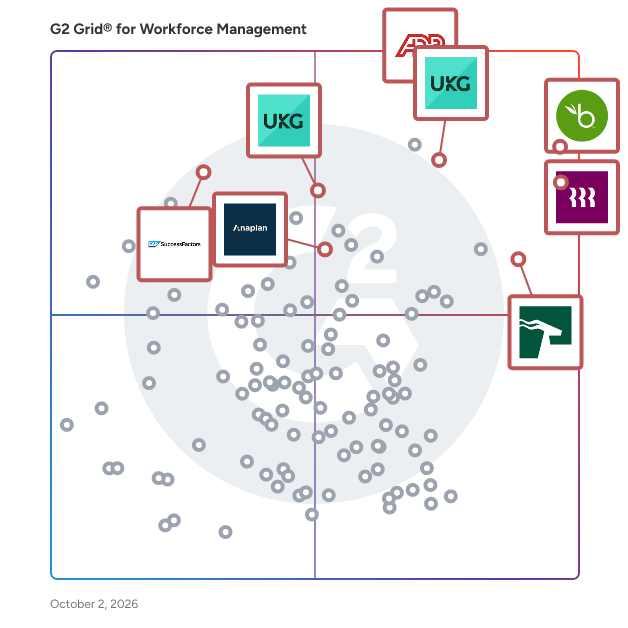
G2 Grid® for Workforce Management Software

G2 Grid® for Workforce Management Software plotting products by satisfaction and market presence

Highlighted products: ADP Workforce Now, BambooHR, HROne, UKG Ready, Rippling, UKG Pro, SAP SuccessFactors HCM, and Anaplan.

Underlying data: [Grid® JSON](https://www.g2.com/categories/workforce-management/grids.json?focus%5B%5D=adp-workforce-now&focus%5B%5D=bamboohr&focus%5B%5D=uneecops-hrone&focus%5B%5D=ukg-ready&focus%5B%5D=rippling&focus%5B%5D=ukg-pro&focus%5B%5D=sap-sap-successfactors-hcm&focus%5B%5D=anaplan&segment=enterprise)

Workday Workforce Management

Workday Workforce Management supercharges workforce operations with an all-in-one system to move businesses forever forward. Workday’s unified, secure system integrates HR, time, and scheduling data, eliminating disjointed processes that halt day-to-day operations. Designed with a worker-first approach, Workday provides mobile-first access to personalized pay, time, and schedules, empowering employees with frictionless on-the-go access. This helps overcome difficulties in retaining workers and keeps them engaged in a competitive labor market. Gain crucial visibility & insight with real-time manager insights for improved decision-making. Managers get instant access to secure, data-driven insights from a single dashboard, helping to optimize team performance and control labor costs, even when accurate workforce data has been a challenge. Workday helps streamline operations, gain valuable insights, and empower your people.

Average Rating: 4.3/5.0

Total Reviews: 16

How Do G2 Users Rate Workday Workforce Management?

  • Performance: 8.0/10 (Category avg: 8.6/10)
  • Skills Management: 8.3/10 (Category avg: 8.3/10)
  • Workforce Analytics: 5.8/10 (Category avg: 8.4/10)

Who Is the Company Behind Workday Workforce Management?

  • Seller: Workday
  • Year Founded: 2005
  • HQ Location: Pleasanton, CA
  • Twitter: @Workday
    52,273 Twitter followers
  • LinkedIn® Page: www.linkedin.com
    25,204 employees on LinkedIn®
  • Ownership: NYSE:WDAY

Who Uses This Product?

  • Company Size: 81% Large, 13% Medium

What Do G2 Reviewers Say About Workday Workforce Management?

AI-generated summary from verified user reviews

Pros
  • Users find Workday Workforce Management to be a very convenient and manageable platform for optimizing workforce management.
  • Users value the easy payroll management that Workday provides, facilitating a seamless employee experience.
  • Users value the user-friendly payroll management system in Workday, simplifying tracking and integration of employee information.
  • Users enjoy the easy access to information on Workday Workforce Management, simplifying workforce management tasks significantly.
  • Users appreciate the easy navigation of Workday Workforce Management, enjoying quick access to various employee data options.
Cons
  • Users experience display issues on mobile, with features sometimes appearing clunky and limiting usability.
  • Users face clarity issues as not all information appears consistently, complicating processes like employee bonuses.
  • Users find the difficult learning curve of Workday Workforce Management requires significant time and expertise for effective implementation.
  • Users experience inadequate tracking for employee bonuses, leading to missed entries and lack of verification options.
  • Users experience inadequate verification, as missed entries can lead to bonus issues without proper checks.

What Are Recent G2 Reviews of Workday Workforce Management?

What Are G2 Users Discussing About Workday Workforce Management?

Keka

Keka is a global HRMS built for mid-market and enterprise organizations. 12500 organisations across 180+ countries run people operations across multiple entities, countries, and workforce types on Keka. To support them, Keka's PeopleOS brings Core HR, payroll, time and attendance, hiring, performance, employee experience, and project and service automation onto one employee-first platform. As a result, every people decision flows directly into pay, compliance, and business outcomes. HR teams run statutory-compliant payroll in US, India, APAC, GCC countries, and more. Beyond payroll, HR teams manage attendance, shifts, and leave for office, field, and frontline workers. All of this runs from a single employee record. Moreover, leaders get real-time visibility into headcount, workforce cost, and engagement. Employees, in turn, handle requests, payslips, and approvals from the Keka mobile app. Today, more than 12,500 businesses across 40+ countries trust Keka. The platform is SOC 2 Type II and ISO 27001 certified. Furthermore, Keka integrates with 70+ apps, so it fits right into your existing stack. Notable clients include eBay, Randstad, OnePlus, Grant Thortan, Cleatz and more Pros: 1) One employee record powers every operation. Attendance, leave, bonuses, compensation changes, and full-and-final settlements sync into payroll in real time, so HR and finance close the month on data they already trust. 2) Payroll built for local compliance in each market. Keka calculates TDS, PF, ESI, and PT on current rates in India and prepares 24Q, 26Q, and ECR filings. GCC teams run WPS-compliant payroll with gratuity and end-of-service calculations, and US teams connect their existing payroll provider or run payroll through Keka. 3) Time and attendance that fits every kind of workforce. Keka handles shift scheduling, attendance policies, overtime, and mobile or kiosk check-ins for knowledge workers, field staff, and shift-based teams, and feeds all of it straight into payroll. 4) Scales across entities, locations, and countries. Organizations operate multiple entities, branches, and locations on a single license, with role-based access that keeps sensitive people and pay data visible only to the right teams. 5) People experience that employees actually use. Hiring, onboarding, performance reviews, engagement surveys, and helpdesk requests live on the same platform as payroll and attendance, so every employee interaction builds on one connected profile. 6) Enterprise-grade security and reliability. Keka holds SOC 2 Type II, ISO 27001, GDPR, and CCPA compliance, runs at 99.9% uptime with round-the-clock monitoring, and connects with 70+ business apps. Cons 1) Keka's breadth rewards upfront planning. Organizations with many entities, pay structures, and policies get the most value when they map those policies carefully during implementation. 2) Some AI and advanced analytics capabilities are rolling out in phases. Teams evaluating specific AI workflows should confirm availability for their region and plan during the demo.

Average Rating: 4.4/5.0

Total Reviews: 2,158

How Do G2 Users Rate Keka?

  • Has the product been a good partner in doing business?: 8.9/10 (Category avg: 8.7/10)
  • Performance: 8.6/10 (Category avg: 8.6/10)
  • Skills Management: 8.5/10 (Category avg: 8.3/10)
  • Workforce Analytics: 8.7/10 (Category avg: 8.4/10)

Who Is the Company Behind Keka?

  • Seller: Keka Technologies
  • Company Website:
  • Year Founded: 2015
  • HQ Location: Seattle, US
  • Twitter: @kekahr_official
    1,155 Twitter followers
  • LinkedIn® Page: www.linkedin.com
    1,265 employees on LinkedIn®

Who Uses This Product?

  • Who Uses This: HR Manager, HR Executive
  • Top Industries: Information Technology and Services, Computer Software
  • Company Size: 69% Medium, 20% Small

What Do G2 Reviewers Say About Keka?

AI-generated summary from verified user reviews

Pros
  • Users find Keka to offer ease of use, streamlining HR tasks like payroll and attendance tracking effectively.
  • Users commend the excellent customer support from Keka, particularly appreciating their responsiveness and training sessions.
  • Users appreciate the simple and user-friendly interface of Keka, making it accessible even for beginners.
  • Users enjoy Keka’s intuitive interface, making payroll and compliance management seamless and user-friendly.
  • Users value the smooth payroll processing of Keka, enhancing accuracy and efficiency in HR management.
Cons
  • Users find limited customization in Keka, particularly in payroll, attendance, and reporting features, affecting usability.
  • Users express frustration over poor customer support, limiting assistance and complicating issue resolution after hours.
  • Users are frustrated with limited features in Keka, hindering customization and leading to payroll inaccuracies.
  • Users experience slow loading times with Keka, impacting accessibility and efficiency, especially on mobile networks.
  • Users express frustration over missing features in Keka, such as limited payroll options and inaccurate reporting.

What Are Recent G2 Reviews of Keka?

What Are G2 Users Discussing About Keka?

Quinyx

Quinyx is the workforce management platform built for the world’s frontline industries, where efficiency, agility, and employee engagement make all the difference. More than just scheduling, Quinyx connects labor planning to real business outcomes. It helps organizations optimize staffing levels, control costs, and ensure compliance, all while empowering frontline teams with AI-powered, mobile-first tools designed for the way people actually work. Fast to deploy and simple to adopt, Quinyx delivers measurable ROI within months, transforming workforce management from a back-office function into a strategic driver of performance. With built-in global compliance and advanced AI capabilities, the platform enables businesses to forecast demand accurately, adapt to operational complexity, and scale seamlessly across regions and markets. Quinyx doesn’t just manage workforces — it elevates them. By aligning people, processes, and performance in one intuitive platform, Quinyx gives organizations the clarity and agility to make smarter labor decisions, engage their teams, and build a more productive, sustainable future of work.

Average Rating: 4.3/5.0

Total Reviews: 513

How Do G2 Users Rate Quinyx?

  • Has the product been a good partner in doing business?: 8.5/10 (Category avg: 8.7/10)
  • Performance: 8.2/10 (Category avg: 8.6/10)
  • Skills Management: 7.8/10 (Category avg: 8.3/10)
  • Workforce Analytics: 7.7/10 (Category avg: 8.4/10)

Who Is the Company Behind Quinyx?

  • Seller: Quinyx
  • Company Website:
  • Year Founded: 2005
  • HQ Location: Stockholm
  • LinkedIn® Page: www.linkedin.com
    293 employees on LinkedIn®

Who Uses This Product?

  • Who Uses This: Store Manager, Supervisor
  • Top Industries: Retail, Hospital & Health Care
  • Company Size: 37% Medium, 37% Large

What Do G2 Reviewers Say About Quinyx?

AI-generated summary from verified user reviews

Pros
  • Users love the ease of use of Quinyx, making daily tasks and team scheduling seamless and efficient.
  • Users love the intuitive interface of Quinyx, making scheduling and workforce management effortless and organized.
  • Users praise Quinyx for its simplicity and ease of use, making scheduling clear and manageable for everyone.
  • Users value the efficient scheduling capabilities of Quinyx, making it ideal for managing large teams effortlessly.
  • Users find the navigation ease of Quinyx refreshing, appreciating its intuitive interface for both employees and managers.
Cons
  • Users express frustration with scheduling issues, citing difficulty accessing colleagues' schedules and cumbersome adjustment processes.
  • Users feel the limited features of Quinyx hinder customization and make reporting less efficient.
  • Users find missing features in Quinyx, such as limited customization and cumbersome reporting processes, hindering usability.
  • Users find Quinyx to be not user-friendly, struggling with complex logins and confusing time representations.
  • Users find Quinyx's interface complex and unintuitive, making navigation and management tasks challenging, especially for new managers.

What Are Recent G2 Reviews of Quinyx?

What Are G2 Users Discussing About Quinyx?

AI can help you find the answers. G2 helps you trust them.

Connect G2 to Claude or ChatGPT for answers grounded in G2's trusted reviews, comparisons, and pricing from real user insights.

How it works

Hubstaff

Hubstaff is a time tracking software built for global teams. Track hours with precision, automate payments and invoicing, and gain full visibility into how work gets done — whether your team is remote, hybrid, in-office or field-based. In addition to time tracking, Hubstaff includes built-in productivity monitoring features such as activity rates, app and URL usage, and optional screenshots — helping managers understand how time is spent and where focus is lost. The platform also offers advanced workforce analytics that classify work time, detect unusual activity patterns, and highlight inefficiencies — enabling data-driven decisions that improve performance and reduce wasted hours. Available on Mac, Windows, Linux, iOS, Android, and Chrome, Hubstaff platform integrates with over 35+ tools to streamline operations and support productive, high-performing teams.

Average Rating: 4.4/5.0

Total Reviews: 2,284

How Do G2 Users Rate Hubstaff?

  • Has the product been a good partner in doing business?: 8.8/10 (Category avg: 8.7/10)
  • Performance: 9.2/10 (Category avg: 8.6/10)
  • Skills Management: 8.4/10 (Category avg: 8.3/10)
  • Workforce Analytics: 9.1/10 (Category avg: 8.4/10)

Who Is the Company Behind Hubstaff?

  • Seller: Hubstaff
  • Company Website:
  • Year Founded: 2013
  • HQ Location: Indianapolis, IN
  • Twitter: @HubStaff
    11,558 Twitter followers
  • LinkedIn® Page: www.linkedin.com
    347 employees on LinkedIn®

Who Uses This Product?

  • Who Uses This: CEO, Owner
  • Top Industries: Information Technology and Services, Computer Software
  • Company Size: 45% Small, 26% Medium

What Do G2 Reviewers Say About Hubstaff?

AI-generated summary from verified user reviews

Pros
  • Users appreciate the ease of use of Hubstaff, benefiting from its seamless navigation and straightforward functionality.
  • Users find Hubstaff's time tracking effortless, making it easy to manage remote staff and inspect timesheets.
  • Users find tracking time effortless with Hubstaff, appreciating its user-friendly UI and efficient management of remote staff.
  • Users appreciate the effective time tracking feature of Hubstaff, which simplifies billing and enhances productivity.
  • Users appreciate the effective productivity tracking of Hubstaff, enhancing task management and time allocation.
Cons
  • Users often face inconsistent time tracking with Hubstaff, as it can stop recording work unexpectedly and has sensitivity issues.
  • Users report inaccurate tracking of work hours in Hubstaff, leading to frustrations regarding productivity assessments.
  • Users find Hubstaff's limited features frustrating, especially regarding payroll integration and reporting capabilities.
  • Users face time tracking issues with Hubstaff, as project limits hinder work and foster concerns about privacy.
  • Users experience slow loading issues with Hubstaff, particularly when syncing tasks between the website and app.

What Are Recent G2 Reviews of Hubstaff?

What Are G2 Users Discussing About Hubstaff?

Paylocity

Paylocity is an award-winning HCM platform that brings HR, Finance, and IT together in one connected system, covering payroll, benefits, talent management, time and labor, spend, and IT provisioning on a single employee record. Cut manual HR tasks, run payroll faster, and get new hires up and running sooner. Get full visibility across expenses, accounts payable, corporate cards, and procurement in one place. Automate account creation and manage IT provisioning without juggling separate systems. AI is built into everyday workflows across all three. Policies, approvals, and workflows stay in lockstep as people join, move, and grow. Paylocity accompanies its clients on the journey to build great workplaces and help every employee do their best work.

Average Rating: 4.4/5.0

Total Reviews: 6,188

How Do G2 Users Rate Paylocity?

  • Has the product been a good partner in doing business?: 8.7/10 (Category avg: 8.7/10)
  • Performance: 8.5/10 (Category avg: 8.6/10)
  • Skills Management: 7.8/10 (Category avg: 8.3/10)
  • Workforce Analytics: 8.2/10 (Category avg: 8.4/10)

Who Is the Company Behind Paylocity?

  • Seller: Paylocity
  • Company Website:
  • Year Founded: 1997
  • HQ Location: Schaumburg, IL
  • Twitter: @Paylocity
    4,577 Twitter followers
  • LinkedIn® Page: www.linkedin.com
    7,164 employees on LinkedIn®

Who Uses This Product?

  • Who Uses This: HR Manager, Human Resources Manager
  • Top Industries: Computer Software, Hospital & Health Care
  • Company Size: 69% Medium, 19% Small

What Do G2 Reviewers Say About Paylocity?

AI-generated summary from verified user reviews

Pros
  • Users appreciate the user-friendly interface of Paylocity, making navigation and payroll management seamless and efficient.
  • Users appreciate Paylocity for its exceptional customer service, ensuring quick responses and knowledgeable support for all inquiries.
  • Users appreciate Paylocity's excellent customer support, noting helpfulness and ease of access to live representatives.
  • Users value the intuitive design of Paylocity, enhancing ease of navigation and overall user experience.
  • Users appreciate the user-friendly interface of Paylocity, which simplifies HR tasks and enhances overall efficiency.
Cons
  • Users report poor customer support with long wait times and inconsistent assistance, hindering their usage of Paylocity.
  • Users find missing features in Paylocity, noting inflexibility and the occasional need for additional clicks in workflows.
  • Users experience an initial learning curve with Paylocity, requiring time to adapt to the new system.
  • Users find the limited features of Paylocity hinder effective customization and lead to disorganization during onboarding.
  • Users find Paylocity to be time-consuming and laden with errors, significantly impacting their productivity and efficiency.

What Are Recent G2 Reviews of Paylocity?

What Are G2 Users Discussing About Paylocity?

Deputy

Deputy is the leading workforce management software and unified end-to-end people platform for shift-based work.Trusted by over 390,000 workplaces globally, Deputy simplifies the entire employee lifecycle by combining HR, advanced scheduling, time tracking, and compliance tools into a single seamless software. Move beyond employee scheduling with a platform that provides a centralised source of visibility for navigating complex labor laws, streamlining team communication, and controlling costs in real-time. Whether you need to simplify recruitment and onboarding with Deputy HR, capture accurate timesheets with GPS verification, or bridge the gap to pay with 300+ payroll integrations, Deputy empowers you to manage your entire workforce infrastructure from anywhere.

Average Rating: 4.6/5.0

Total Reviews: 647

How Do G2 Users Rate Deputy?

  • Has the product been a good partner in doing business?: 9.2/10 (Category avg: 8.7/10)
  • Performance: 9.1/10 (Category avg: 8.6/10)
  • Skills Management: 8.3/10 (Category avg: 8.3/10)
  • Workforce Analytics: 8.4/10 (Category avg: 8.4/10)

Who Is the Company Behind Deputy?

  • Seller: Deputy
  • Company Website:
  • Year Founded: 2008
  • HQ Location: Sydney, Australia
  • Twitter: @deputyapp
    4,306 Twitter followers
  • LinkedIn® Page: www.linkedin.com
    466 employees on LinkedIn®

Who Uses This Product?

  • Who Uses This: Owner, Barista
  • Top Industries: Hospitality, Retail
  • Company Size: 53% Small, 33% Medium

What Do G2 Reviewers Say About Deputy?

AI-generated summary from verified user reviews

Pros
  • Users find Deputy to be extremely user-friendly, making it simple to manage shifts and availabilities effortlessly.
  • Users appreciate Deputy for its user-friendly scheduling, making employee management and notifications seamless and efficient.
  • Users appreciate the scheduling ease of Deputy, finding it simple and reliable for managing their shifts and time off.
  • Users appreciate the intuitive setup of Deputy, making it easy to manage shifts with minimal hassle.
  • Users find the intuitive user interface of Deputy easy to navigate, enhancing their shift management experience significantly.
Cons
  • Users find scheduling issues troublesome, citing long schedules and lack of a search feature as notable drawbacks.
  • Users find shift management tedious, struggling with unavailability settings and lack of transparency in schedule changes.
  • Users face clocking issues due to app loading delays and location pin changes, affecting timely shift starts.
  • Users are disappointed by the lack of essential features and the unresponsive technical support from Deputy.
  • Users experience slow loading times and glitches, affecting clock ins and overall app performance.

What Are Recent G2 Reviews of Deputy?

What Are G2 Users Discussing About Deputy?

When I Work

When I Work is an easy way for businesses to schedule, track time and attendance, and communicate with their hourly employees. Put the schedule and time clock in every employee's pocket with free iOS and Android apps. Keep track of time off, employee availability, and manage shift swaps with just a few clicks. Integrate with your payroll provider to streamline the process and avoid human error. Get started with a 14-day free trial now.

Average Rating: 4.4/5.0

Total Reviews: 404

How Do G2 Users Rate When I Work?

  • Has the product been a good partner in doing business?: 8.7/10 (Category avg: 8.7/10)
  • Performance: 8.8/10 (Category avg: 8.6/10)
  • Skills Management: 8.0/10 (Category avg: 8.3/10)
  • Workforce Analytics: 8.1/10 (Category avg: 8.4/10)

Who Is the Company Behind When I Work?

  • Seller: When I Work
  • Company Website:
  • Year Founded: 2010
  • HQ Location: Minneapolis, MN
  • Twitter: @wheniwork
    13,637 Twitter followers
  • LinkedIn® Page: www.linkedin.com
    179 employees on LinkedIn®

Who Uses This Product?

  • Who Uses This: Owner, General Manager
  • Top Industries: Hospital & Health Care, Retail
  • Company Size: 60% Small, 31% Medium

What Do G2 Reviewers Say About When I Work?

AI-generated summary from verified user reviews

Pros
  • Users appreciate the ease of use in When I Work, finding it intuitive and efficient for scheduling and tracking.
  • Users value the ease of scheduling and visibility with When I Work, enhancing coordination and clarity in staffing.
  • Users appreciate the ease of scheduling with When I Work, finding it clear and user-friendly for managing tasks.
  • Users benefit from time-saving features in When I Work, enhancing organization and simplifying leave filing and shift management.
  • Users value the user-friendly shift management of When I Work, making scheduling simple and convenient for large teams.
Cons
  • Users often face scheduling issues with When I Work, due to high costs and limited customization options.
  • Users find the lack of essential features in When I Work frustrating, affecting scheduling and employee notifications.
  • Users experience software bugs causing loading delays and confusing sharing, impacting scheduling efficiency and overall usability.
  • Users find the limited features of When I Work frustrating, as essential functions are needed for efficient management.
  • Users find the poor notifications frustrating, as they lack customization and timely reminders for shifts.

What Are Recent G2 Reviews of When I Work?

What Are G2 Users Discussing About When I Work?

Legion WFM

Legion Technologies is a workforce management platform designed to help businesses enhance labor efficiency while simultaneously boosting employee engagement. This innovative solution leverages advanced technology to streamline various aspects of workforce management, making it easier for organizations to optimize their operations and improve overall productivity. The Legion WFM platform stands out due to its intelligent automation and employee-centric approach, ensuring that both management and staff benefit from its features. The target audience for Legion Technologies includes businesses with 1000+ employees looking to improve their workforce management practices. Industries such as retail, hospitality, restaurants and convenience stores can particularly benefit from the platform's capabilities. By providing tools for strategic insights, labor budgeting, and demand forecasting, Legion enables organizations to make informed decisions that align workforce capabilities with business needs. Legion AI is crucial for optimizing labor costs and ensuring that the right number of employees are scheduled at the right times. Key features of the Legion WFM platform include labor optimization, automated scheduling, and time and attendance tracking. These functionalities work together to create a seamless execution process that maximizes operational efficiency. Automated scheduling reduces the time managers spend on creating shifts, while labor optimization ensures that businesses are not overstaffed or understaffed. The time and attendance feature simplifies tracking employee hours, allowing for accurate payroll processing and compliance with labor regulations. In addition to operational features, Legion Technologies places a strong emphasis on employee empowerment. The platform includes tools for frontline communications, enabling team members to stay informed and connected. Legion InstantPay is another notable feature that allows employees to access their earned wages before the traditional payday, enhancing financial flexibility. Furthermore, the platform includes performance and rewards tracking, which helps organizations recognize and incentivize employee contributions, fostering a positive workplace culture. Overall, Legion Technologies provides a comprehensive workforce management solution that not only enhances operational efficiency but also prioritizes employee satisfaction. By integrating advanced technology with user-friendly interfaces, the Legion WFM platform positions itself as a valuable asset for businesses aiming to thrive in a competitive landscape.

Average Rating: 4.3/5.0

Total Reviews: 74

How Do G2 Users Rate Legion WFM?

  • Has the product been a good partner in doing business?: 9.2/10 (Category avg: 8.7/10)
  • Performance: 8.7/10 (Category avg: 8.6/10)
  • Skills Management: 8.7/10 (Category avg: 8.3/10)
  • Workforce Analytics: 8.7/10 (Category avg: 8.4/10)

Who Is the Company Behind Legion WFM?

  • Seller: Legion Technologies
  • Company Website:
  • Year Founded: 2016
  • HQ Location: Palo Alto, US
  • Twitter: @legiontech
    243 Twitter followers
  • LinkedIn® Page: www.linkedin.com
    263 employees on LinkedIn®

Who Uses This Product?

  • Top Industries: Retail, Health, Wellness and Fitness
  • Company Size: 49% Large, 28% Small

What Do G2 Reviewers Say About Legion WFM?

AI-generated summary from verified user reviews

Pros
  • Users praise the ease of use in Legion WFM, enjoying seamless scheduling and communication with team members.
  • Users value the easy scheduling features of Legion WFM, enhancing communication and team collaboration effortlessly.
  • Users value the ease of scheduling in Legion WFM, enabling efficient communication and shift management.
  • Users enjoy the easy access of Legion WFM, allowing them to check onsite schedules before arrival.
  • Users value the automation of location open hours in Legion WFM, enhancing efficiency across sites and search engines.
Cons
  • Users experience difficulties with holiday management, particularly in clocking in and out during holiday periods.
  • Users find inadequate tracking of paid time off complicates managing their schedules and pay estimates effectively.
  • Users find the limited features of Legion WFM challenging for tracking paid time off and estimated pay accurately.
  • Users find the organizational challenges of tracking paid time off and hours complex and confusing within Legion WFM.
  • Users find the PTO issues in Legion WFM challenging, making it difficult to track time off and pay accurately.

What Are Recent G2 Reviews of Legion WFM?

What Are G2 Users Discussing About Legion WFM?

Deel HR

Deel HR is a global HRIS/HCM solution that helps companies manage people, compliance and HR processes across countries It runs core HR operations, onboarding, employee files, approvals, policies, time off, and documents, and layers on modular tools for talent, performance, compensation and planning. Built-in global data and AI help teams automate busywork, draft content, and turn people data into better decisions. Key capabilities and value: - HRIS that centralizes employee data and automates routine tasks to reduce manual work - Engage: reviews, goals, learning and surveys that live in the same system as HR data - Compensation and planning: salary insights, benchmarking and costed headcount planning tied to real payroll data - Global-first design: support for every worker type and local rules across 150+ countries- - AI and automation: automate tasks with workflows that give HR teams 97hours back per month. AI gets you answers about global compliance, salary data. You can even hire AI Agents to help complete actions like plan headcount, aid with offboarding, or check for time of conflicts. Deel HR is aimed at people leaders who want a single, connected system that grows with the business. The product reduces risk, improves HR efficiency, and provides clearer, country-aware reports for leaders planning hiring, pay and performance

Average Rating: 4.8/5.0

Total Reviews: 1,417

How Do G2 Users Rate Deel HR?

  • Has the product been a good partner in doing business?: 9.3/10 (Category avg: 8.7/10)
  • Performance: 9.2/10 (Category avg: 8.6/10)
  • Skills Management: 10.0/10 (Category avg: 8.3/10)
  • Workforce Analytics: 10.0/10 (Category avg: 8.4/10)

Who Is the Company Behind Deel HR?

  • Seller: Deel
  • Company Website:
  • Year Founded: 2019
  • HQ Location: San Francisco, California
  • Twitter: @deel
    30,540 Twitter followers
  • LinkedIn® Page: www.linkedin.com
    9,733 employees on LinkedIn®

Who Uses This Product?

  • Who Uses This: Software Engineer, Contractor
  • Top Industries: Computer Software, Information Technology and Services
  • Company Size: 46% Small, 44% Medium

What Do G2 Reviewers Say About Deel HR?

AI-generated summary from verified user reviews

Pros
  • Users find Deel HR very easy to use with its intuitive design and straightforward navigation, enhancing their experience.
  • Users appreciate the ease of use of Deel HR, finding navigation and time tracking features straightforward and intuitive.
  • Users find Deel HR's helpful interface and features enhance their productivity and streamline their workflow effectively.
  • Users find Deel HR to be extremely intuitive, enhancing ease of use and seamless onboarding experiences.
  • Users appreciate the convenience of Deel HR for tracking projects and managing payroll effortlessly.
Cons
  • Users find the high fees associated with withdrawals and transfers to be a significant downside of Deel HR.
  • Users find the transfer fees expensive, particularly for bank transfers and despite using common payment methods like PayPal.
  • Users report payment issues with Deel HR, citing slow international transfers and high fees on various methods.
  • Users experience slow loading times that can be frustrating and disrupt the overall efficiency of Deel HR.
  • Users experience slow performance with Deel HR, facing delays in loading and transferring amounts, causing frustration.

What Are Recent G2 Reviews of Deel HR?

Assembled WFM

Assembled is an all-in-one support platform designed to enhance customer service operations by integrating AI agents with intelligent workforce management. This solution aims to help companies deliver exceptional support experiences while efficiently managing their resources. By leveraging advanced technology, Assembled enables organizations to streamline their support processes, ensuring that both AI and human agents work in harmony to meet customer needs. The platform primarily targets customer support teams across various industries that seek to improve their operational efficiency and service quality. Assembled is particularly beneficial for businesses that handle high volumes of customer interactions and require precise forecasting and staffing solutions. With its capabilities, teams can automate a significant portion of customer interactions, allowing human agents to focus on more complex inquiries, thereby enhancing overall productivity and customer satisfaction. Key features of Assembled include fast and intuitive scheduling, which allows teams to create customized work schedules that adapt to fluctuating demand. This flexibility is crucial for organizations that experience varying levels of customer inquiries throughout the day or week. Additionally, the platform offers human-in-the-loop AI-powered automation, which ensures that AI agents can seamlessly collaborate with human staff, providing a balanced approach to customer support. This unique feature helps to maintain a personal touch in customer interactions while benefiting from the efficiency of automation. Another standout aspect of Assembled is its powerful forecasting capabilities, which boast over 90% accuracy. This feature enables teams to predict customer demand accurately, allowing for optimal staffing decisions that align with anticipated workload. Furthermore, the platform provides meaningful cross-team visibility, ensuring that all stakeholders have access to relevant information and insights, fostering collaboration and informed decision-making. Assembled also excels in reporting, offering centralized and robust analytics that deliver actionable insights. This comprehensive reporting functionality empowers teams to track performance metrics, identify trends, and make data-driven adjustments to their support strategies. By utilizing Assembled, organizations can scale their support operations intelligently, balancing the strengths of AI with the irreplaceable value of human interaction, ultimately leading to enhanced customer experiences and operational success.

Average Rating: 4.6/5.0

Total Reviews: 184

How Do G2 Users Rate Assembled WFM?

  • Has the product been a good partner in doing business?: 9.5/10 (Category avg: 8.7/10)
  • Performance: 8.8/10 (Category avg: 8.6/10)
  • Skills Management: 8.1/10 (Category avg: 8.3/10)
  • Workforce Analytics: 8.7/10 (Category avg: 8.4/10)

Who Is the Company Behind Assembled WFM?

  • Seller: Assembled
  • Company Website:
  • Year Founded: 2018
  • HQ Location: San Francisco, California
  • Twitter: @assembledhq
    372 Twitter followers
  • LinkedIn® Page: www.linkedin.com
    132 employees on LinkedIn®

Who Uses This Product?

  • Top Industries: Financial Services, Information Technology and Services
  • Company Size: 63% Medium, 21% Small

What Do G2 Reviewers Say About Assembled WFM?

AI-generated summary from verified user reviews

Pros
  • Users find Assembled WFM to have an approachable interface, making it easy for anyone to use effectively.
  • Users value the ease of scheduling with Assembled WFM, praising its user-friendly interface and real-time updates.
  • Users highly value the easy scheduling and real-time tracking capabilities of Assembled WFM, enhancing operational efficiency.
  • Users find Assembled WFM to be intuitive, allowing quick understanding and usage for all skill levels in workforce management.
  • Users highlight the efficiency of Assembled WFM, enjoying seamless scheduling and insightful forecasting tools for optimal management.
Cons
  • Users face scheduling issues with Assembled WFM, complicating score calculations and overall user-friendliness.
  • Users note the missing features, like custom reporting and shift swap, complicating schedule management and real-time views.
  • Users are frustrated by limited features, such as a lack of mobile app and custom reporting capabilities.
  • Users face challenges with poor reporting, including limited flexibility, data freshness issues, and export limitations.
  • Users experience slow loading times with Assembled WFM, hindering efficiency and task completion during busy schedules.

What Are Recent G2 Reviews of Assembled WFM?

What Are G2 Users Discussing About Assembled WFM?

ProLiant

Who is ProLiant? ProLiant is a payroll and HR technology provider dedicated to striking the perfect balance between service and technology. We offer fully integrated, cloud-based tools that simplify processes while improving accuracy and ensuring compliance. Our solutions include: - Applicant Tracking & Recruitment - Employee Onboarding - Time & Labor Management - Payroll & Tax Services - HR & Benefits Administration - Performance Management - Early Wage Access (ReadyPay Today) - Learning Management System At ProLiant, we combine our robust suite of products with a CPA-like approach to our clients’ needs. We care about the small details and listen; we strive to find a solution to even the most demanding challenges, and we make decisions based on data. This approach has helped us regularly achieve an NPS score greater than 80, making us a leader in our industry and other recognizable companies. What can we say? When you’ve been delivering powerful technology and services for over 30 years and have over 5,000 customers, people pay attention. We approach everything we do here at ProLiant with you in mind. We’re ready to offer you frictionless tools that empower your workforce. We’re committed to providing personalized and memorable support. And we’ll do it all with absolute accuracy. Let’s get started!

Average Rating: 4.3/5.0

Total Reviews: 746

How Do G2 Users Rate ProLiant?

  • Has the product been a good partner in doing business?: 8.8/10 (Category avg: 8.7/10)
  • Performance: 8.4/10 (Category avg: 8.6/10)
  • Skills Management: 7.5/10 (Category avg: 8.3/10)
  • Workforce Analytics: 7.6/10 (Category avg: 8.4/10)

Who Is the Company Behind ProLiant?

  • Seller: ProLiant
  • Company Website:
  • Year Founded: 1993
  • HQ Location: Atlanta, Georgia, United States
  • Twitter: @ProliantInc
    254 Twitter followers
  • LinkedIn® Page: www.linkedin.com
    334 employees on LinkedIn®

Who Uses This Product?

  • Who Uses This: Controller, Office Manager
  • Top Industries: Restaurants, Hospital & Health Care
  • Company Size: 57% Medium, 36% Small

What Do G2 Reviewers Say About ProLiant?

AI-generated summary from verified user reviews

Pros
  • Users find ProLiant's platform easy to navigate, providing quick access to payroll and employee information.
  • Users value the timely and effective customer support, enhancing their experience with ProLiant's features and setup.
  • Users appreciate the exceptional customer service and effortless navigation, making payroll management simple and efficient.
  • Users appreciate the streamlined payroll process of ProLiant, allowing for quick and efficient management.
  • Users appreciate the user-friendly payroll management of ProLiant, making tax preparation and access to information effortless.
Cons
  • Users express frustration with ProLiant's poor customer support, citing inadequate assistance and unresolved issues over time.
  • Users find the interface not intuitive, making it difficult to navigate and manage essential payroll functions.
  • Users find ProLiant not user-friendly, struggling with navigation and complex initial setup and changes.
  • Users find the limited customization of ProLiant's reports restrictive and the dashboard difficult to navigate.
  • Users find the payroll process complicated, wishing for a more straightforward, user-friendly experience.

What Are Recent G2 Reviews of ProLiant?

What Are G2 Users Discussing About ProLiant?

SkypeTime

SkypeTime is a comprehensive worktime accounting and security monitoring system designed to enhance organizational efficiency and security. By integrating seamlessly with Microsoft Office 365, Skype for Business, and Active Directory, SkypeTime provides real-time insights into employee attendance, remote connections, and resource utilization. This robust platform enables businesses to monitor work hours, track external connections, and ensure compliance with corporate policies, thereby fostering a more productive and secure work environment. Key Features and Functionality: - Attendance Monitoring: Tracks employee presence, including start and end times, breaks, and overtime, offering detailed reports on work schedules. - Remote Connection Tracking: Monitors external access to corporate resources via VPN, Remote Desktop Gateway (RDG), and other channels, ensuring secure remote work practices. - Communication Analysis: Records details of calls, audio and video conferences, and group chats conducted through Skype for Business, providing insights into communication patterns. - Leave Management: Facilitates the creation, approval, and tracking of leave requests, including vacations, sick leaves, and remote work, streamlining HR processes. - Comprehensive Reporting: Generates various reports, such as worktime analysis, department performance, and external activity logs, aiding in informed decision-making. Primary Value and Solutions Provided: SkypeTime addresses the critical need for effective workforce management and security oversight in modern organizations. By offering detailed insights into employee activities and external interactions with corporate resources, it helps businesses: - Enhance Productivity: By monitoring work hours and attendance, organizations can identify and address inefficiencies, leading to improved employee performance. - Strengthen Security: Tracking external connections and remote access ensures that only authorized personnel interact with sensitive corporate data, reducing security risks. - Streamline HR Operations: Automating leave requests and approvals simplifies administrative tasks, allowing HR departments to focus on strategic initiatives. - Ensure Compliance: Comprehensive reporting and monitoring assist in maintaining adherence to corporate policies and regulatory requirements. In summary, SkypeTime serves as a vital tool for organizations aiming to optimize workforce management, bolster security measures, and maintain compliance, all while integrating seamlessly with existing Microsoft infrastructure.

Average Rating: 4.2/5.0

Total Reviews: 59

How Do G2 Users Rate SkypeTime?

  • Has the product been a good partner in doing business?: 9.0/10 (Category avg: 8.7/10)
  • Performance: 9.2/10 (Category avg: 8.6/10)
  • Skills Management: 8.5/10 (Category avg: 8.3/10)
  • Workforce Analytics: 8.6/10 (Category avg: 8.4/10)

Who Is the Company Behind SkypeTime?

  • Seller: Microsoft
  • Year Founded: 1975
  • HQ Location: Redmond, Washington
  • Twitter: @microsoft
    13,091,739 Twitter followers
  • LinkedIn® Page: www.linkedin.com
    232,750 employees on LinkedIn®
  • Ownership: MSFT

Who Uses This Product?

  • Top Industries: Computer Software, Education Management
  • Company Size: 57% Medium, 28% Small

What Do G2 Reviewers Say About SkypeTime?

AI-generated summary from verified user reviews

Pros
  • Users value the ease of use of SkypeTime, enjoying instant connections and a simple interface for quick calls.
  • Users commend the easy setup of SkypeTime, facilitating quick and hassle-free video calls.
  • Users value the efficient tracking of work hours with SkypeTime, enhancing productivity and remote work monitoring.
  • Users find SkypeTime to be extremely helpful for easily scheduling meetings, enhancing remote collaboration.
  • Users find the easy scheduling of Skype meetings particularly beneficial for remote team collaboration and project discussions.
Cons
  • Users find the tracking excessive, leading to concerns about privacy and relevance of collected data.
  • Users find the limited participant options frustrating for larger meetings, hindering collaborative efforts on SkypeTime.
  • Users are disappointed with the lack of support for group or team calls, limiting their communication options.

What Are Recent G2 Reviews of SkypeTime?

What Are G2 Users Discussing About SkypeTime?

Aspect Workforce

Aspect delivers an intelligent workforce platform that helps enterprises prevent disruption, protect service levels, and reduce manual effort by embedding intelligence directly into daily operations. Our brand promise is real-time, policy-aware guidance and automation that keeps decisions transparent, explainable, and under human control—so teams can prevent disruption instead of reacting to it. Aspect’s Workforce Engagement Management (WEM) portfolio includes cloud, hybrid, and on-premises deployments, with capabilities across forecasting, scheduling, adherence and intraday management, quality monitoring and coaching workflows, performance management dashboards and KPIs, and employee engagement and gamification. It is built on Aspect WorkforceOS, with APIs and integration tools via the Developer Portal, and supports connectivity across major CCaaS, CRM, and collaboration ecosystems. For operations leaders, planners, supervisors, and agents, Aspect Workforce helps solve the day-to-day challenges of fluctuating demand, complex labor rules, and siloed tools that force teams into constant firefighting. By connecting real-time signals to approved actions, Aspect improves efficiency and accuracy, helps reduce avoidable labor waste, and strengthens service performance—so organizations can cut costs while improving workforce experiences and customer outcomes.

Average Rating: 4.2/5.0

Total Reviews: 304

How Do G2 Users Rate Aspect Workforce?

  • Has the product been a good partner in doing business?: 8.4/10 (Category avg: 8.7/10)
  • Performance: 9.4/10 (Category avg: 8.6/10)
  • Skills Management: 9.4/10 (Category avg: 8.3/10)
  • Workforce Analytics: 9.4/10 (Category avg: 8.4/10)

Who Is the Company Behind Aspect Workforce?

  • Seller: Aspect Software
  • Company Website:
  • Year Founded: 1973
  • HQ Location: Atlanta, GA
  • LinkedIn® Page: www.linkedin.com
    994 employees on LinkedIn®

Who Uses This Product?

  • Who Uses This: Customer Service Representative
  • Top Industries: Financial Services, Telecommunications
  • Company Size: 63% Large, 29% Medium

What Do G2 Reviewers Say About Aspect Workforce?

AI-generated summary from verified user reviews

Pros
  • Users commend the strong scheduling and workforce management features of Aspect Workforce, enhancing efficiency and coverage alignment.
  • Users commend the efficiency of Aspect Workforce for streamlining scheduling, reducing errors, and optimizing resource management.
  • Users appreciate the user-friendly platform of Aspect Workforce, which streamlines scheduling and enhances operational efficiency.
  • Users value the predictive analytics in Aspect Workforce, enabling precise forecasts and optimized resource management.
  • Users value the predictive analytics of Aspect Workforce, enhancing forecasts and optimizing resource management effectively.
Cons
  • Users find the learning curve steep due to its complexity and insufficient real-world training support.
  • Users find the complexity of Aspect Workforce overwhelming, necessitating time and training for effective use.
  • Users find the interface clunky and not user-friendly, leading to a frustrating navigation experience for time off requests.
  • Users find the difficult learning curve of Aspect Workforce can hinder effective use and slow down initial adoption.
  • Users find the learning difficulty of Aspect Workforce overwhelming, necessitating time and training for effective use.

What Are Recent G2 Reviews of Aspect Workforce?

What Are G2 Users Discussing About Aspect Workforce?

Humanity Schedule by TCP

Humanity Schedule by TCP provides a flexible approach to employee scheduling, no matter where your teams work or what device they use. Humanity Schedule automates dynamic scheduling and shift planning to eliminate over-scheduling issues and staffing errors, reduces unexpected labor costs, and mitigates compliance concerns to create an efficient, stress-free scheduling experience for managers and employees alike.  With Humanity Schedule, you easily fill coverage gaps with AI-driven demand forecasting, avoid scheduling conflicts with adaptive scheduling capabilities, and eliminate manual tasks and overspending — all in one solution that ensures compliance and clarity for every employee.

Average Rating: 4.3/5.0

Total Reviews: 1,107

How Do G2 Users Rate Humanity Schedule by TCP?

  • Has the product been a good partner in doing business?: 8.9/10 (Category avg: 8.7/10)
  • Performance: 8.4/10 (Category avg: 8.6/10)
  • Skills Management: 8.1/10 (Category avg: 8.3/10)
  • Workforce Analytics: 8.2/10 (Category avg: 8.4/10)

Who Is the Company Behind Humanity Schedule by TCP?

  • Seller: TCP Software
  • Company Website:
  • Year Founded: 1988
  • HQ Location: Plano, US
  • Twitter: @tcpsoftware
    450 Twitter followers
  • LinkedIn® Page: www.linkedin.com
    1,373 employees on LinkedIn®

Who Uses This Product?

  • Who Uses This: General Manager, Manager
  • Top Industries: Hospital & Health Care, Retail
  • Company Size: 49% Medium, 38% Small

What Do G2 Reviewers Say About Humanity Schedule by TCP?

AI-generated summary from verified user reviews

Pros
  • Users appreciate the intuitive and user-friendly design of Humanity Schedule, enhancing team coordination and efficiency.
  • Users appreciate the intuitive scheduling ease of Humanity Schedule, which enhances team coordination and minimizes confusion.
  • Users value the intuitive scheduling of Humanity Schedule, enhancing team coordination and real-time updates effortlessly.
  • Users appreciate the easy scheduling of Humanity Schedule by TCP, simplifying team coordination and communication effectively.
  • Users value the intuitive interface of Humanity Schedule, making scheduling effortless and user-friendly for all employees.
Cons
  • Users experience scheduling issues with Humanity, including confusion over disappearing schedules and slow updates.
  • Users find the learning curve challenging, often taking time to navigate and utilize Humanity Schedule effectively.
  • Users find the missing features in Humanity Schedule frustrating, hindering efficiency in scheduling tasks and communication.
  • Users experience occasional slow loading times in the Humanity Schedule app, affecting usability, especially with bulk actions.
  • Users find the complexity of Humanity Schedule challenging, especially when learning how to navigate the system effectively.

What Are Recent G2 Reviews of Humanity Schedule by TCP?

What Are G2 Users Discussing About Humanity Schedule by TCP?

BeeForce by BlueTree

Bluetree is Work/Workforce SaaS Co. that offers a range of tech platforms for managing enterprise work & workfroce across external, gig & hourly/piece-rate categories. Products/Solutions: BeeForce is an end-end, full-stack workforce management platform by BlueTree. BeeForce offers complete lifecycle management solutions with onboarding, automated verification, time & attendance, payout calculation & disbursals, vendor invoicing, compliance (statutory/policy), off-boarding & external workforce engagement. Platform Modules: Onboarding Seamless Day Zero onboarding experience with a completely digitised process -Mobile and web-based onboarding -Onboarding through Bulk Upload -Background Verification -Blacklisted Employee validation and dedupe checks -Auto-generate various joining forms -ID card generation India-centric Features -Instant document validations including Aadhaar, PAN, Bank Account, Driving License, Voter ID, etc. -Automated PF & ESI creation and validation -UAN verification Attendance Management Go digital to gain control over attendance data through accurate time & effort tracking across distributed locations and workforce categories. -Multiple punch capture methods and geo-fenced attendance -Mobile and web self-serve for employees and managers (Time Card view, Shift View, Holiday Calendar View, Leave Requests, Regularisation Requests, Market Visit Tracking, Employee Claims view) -Auto rostering and shift management -Bulk and individual-level scheduling -Customisable Holiday calendar and leave management -Pre and post-approval overtime options -Continuous presence and continuous absence tracking -Sign-off and variance capture -Attendance Dashboard and reports -Admin alerts on non-compliance India-centric Features -Insight into total hours worked to help align with daily 9-hour caps -Shift creation in adherence with the legal working hours -Seamless shift management to prevent shift overlaps -State-wise holiday calendar configurability -Time-off enablement through nine days of continuous presence tracking -Visibility of approved overtime with overtime controls based on statutory requirements Payout & Invoicing (Payout & Incentives calculation and Vendor Billing) Payroll simulation engine for automated payout calculations and invoicing with compliance checks -Customize payroll structures for different employee groups and pay period setup -Configuration of different payroll types -Auto salary components derivation -Bulk upload of variable inputs -Adherence with payroll compliance -Auto pay sheet generation and vendor invoice auto-validation India-centric Features -Different payroll type configuration (piece rate, service, retrenchment, reimbursement, intern/apprentice, daily wage) -Accurate payout calculation based on minimum wage -Visibility into overtime for fair compensation & payouts Compliance Management Comply with state, territorial & national legislations to uphold natural justice & mitigate legal risks, reputational risks and litigation -Auto-generation of compliance registers -Approval workflow for document tracking -Comprehensive vendor scoring -Notices and Cess Tracking India-centric Features -PF/ESI remittance, non-remittance and PF short remittance validation through government portals with automated reports -Minimum wage adherence validation with automated reports -Track vendor’s compliance with the CLRA Offboarding Experience smooth performance evaluation and employee departures -Implementing PIP and tracking their outcomes -Warning issuance and tracking -Absconded employees records -Documenting terminations with necessary proofs -Tracking the normal exits -Bulk offboarding India-centric Features -Offboarding in adherence with termination protocols -Offboard initiation in the instance of company policy-wise continuous absence Vendor Empanelment Digitized and streamlined vendor onboarding and vendor management -Vendor registration and self-onboarding -Multiple vendor document uploads -Vendor blacklisting India-centric Features -CLRA license capture and tracking -Work order creation, review and license mapping Data Management Streamlined employee data management process with better control and visibility into the workforce -Upload employee work details and track engagement history -Update training and induction details -Medical test tracking -Track assets assigned to employees -Seamless ID card generation -Bulk creation and update Budgeting and Sourcing Efficient budget planning and intuitive sourcing management -Automated budget allocation -Customizable workflows for sourcing requests -Store and retrieve important documents like purchase orders and approvals Platform Benefits BeeForce offers a range of benefits that help companies manage their external workforce with ease to meet business-critical guidance and goals. -100% labor compliance -Zero leakage invoicing -Improved employee engagement -Increased productivity -Reduced attrition rates -Faster turnaround times. BeeForce saves money, delivers excellent customer service, and guarantees a positive user experience. Best of The Lot -Comprehensive solution - One-stop platform for external workforce lifecycle management -Strengthened vendor-employer synergy -Day Zero onboarding -Inbuilt workforce verification feature -Guaranteed social security -Better legal standing -Multiple workforces categories

Average Rating: 4.7/5.0

Total Reviews: 37

How Do G2 Users Rate BeeForce by BlueTree?

  • Has the product been a good partner in doing business?: 9.4/10 (Category avg: 8.7/10)
  • Performance: 9.3/10 (Category avg: 8.6/10)
  • Skills Management: 9.4/10 (Category avg: 8.3/10)
  • Workforce Analytics: 9.3/10 (Category avg: 8.4/10)

Who Is the Company Behind BeeForce by BlueTree?

  • Seller: BlueTree
  • Year Founded: 2007
  • HQ Location: Bangalore, karnataka
  • LinkedIn® Page: www.linkedin.com
    184 employees on LinkedIn®

Who Uses This Product?

  • Top Industries: Financial Services, Telecommunications
  • Company Size: 63% Large, 29% Medium

What Do G2 Reviewers Say About BeeForce by BlueTree?

AI-generated summary from verified user reviews

Pros
  • Users appreciate the management ease of BeeForce, facilitating seamless workforce oversight and enhancing productivity.
  • Users value the ease of integration and streamlined processes provided by BeeForce, enhancing workforce management effortlessly.
  • Users value the easy access to HR management tools and enjoy seamless integration and support from BeeForce.
  • Users value the ease of integration offered by BeeForce, enhancing their workflow management efficiently and effectively.
  • Users praise the easy setup of BeeForce, highlighting seamless onboarding and excellent customer support throughout the process.
Cons
  • Users report onboarding issues due to slow server processing and lack of automation for new hires.
  • Users experience slow processing times when creating employee IDs and onboarding, hindering efficiency and productivity.
  • Users find the time-consuming processes in BeeForce hinder efficient employee ID management and offboarding.
  • Users find that poor automation in BeeForce hinders efficient onboarding and offboarding of large volumes of hires.
  • Users experience slow loading times when creating and searching for employee IDs, hindering the onboarding process.

What Are Recent G2 Reviews of BeeForce by BlueTree?

Inia Debnath
ID
Researched and written by Inia Debnath
Updated