Best Task Management Software - Page 7

How Many Task Management Software Products Does G2 Track?

Total Products under this Category: 560

Category Stats (Sep 2026)

  • Average Rating: 4.46/5 (↑0.01 vs Aug 2026) The average rating of products in this category, based on all submitted ratings
  • Top Trending Product: Chaser (+1.82%) - Among all products in this category, Chaser recorded the largest rating increase compared to last month

Last updated: September 01, 2026

How Does G2 Rank Task Management Software Products?

Why You Can Trust G2's Software Rankings:

  • 30 Analysts and Data Experts
  • 118,800+ Authentic Reviews
  • 560+ Products
  • Unbiased Rankings

G2's software rankings are built on verified user reviews, rigorous moderation, and a consistent research methodology maintained by a team of analysts and data experts. Each product is measured using the same transparent criteria, with no paid placement or vendor influence. While reviews reflect real user experiences, which can be subjective, they offer valuable insight into how software performs in the hands of professionals. Together, these inputs power the G2 Score, a standardized way to compare tools within every category.

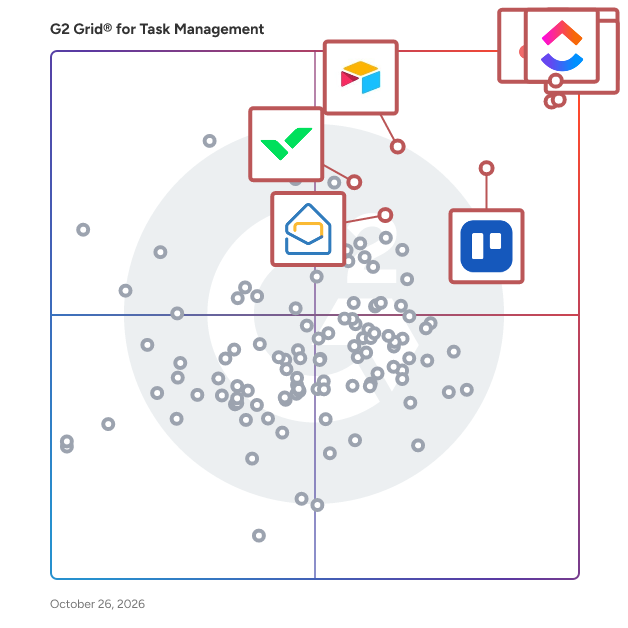
G2 Grid® for Task Management Software

G2 Grid® for Task Management Software plotting products by satisfaction and market presence

Highlighted products: Asana, ClickUp, monday AI Work Platform, Smartsheet, Trello, Airtable, Wrike, and Microsoft Planner.

Underlying data: [Grid® JSON](https://www.g2.com/categories/task-management-software/grids.json?focus%5B%5D=asana&focus%5B%5D=clickup&focus%5B%5D=monday-com&focus%5B%5D=smartsheet&focus%5B%5D=trello&focus%5B%5D=airtable&focus%5B%5D=wrike&focus%5B%5D=microsoft-planner)

PomoDone App

Boost and track your workflow using the Pomodoro technique, on top of your current task management system (Asana, Trello, JIRA, Basecamp, Evernote, etc). Sharpen your focus by using an interruption shield we built: block certain websites while you working, and notify your distributed team via Slack and switch it to silent mode by managing its DND. Use your productivity history log to analyze and report.

Average Rating: 4.2/5.0

Total Reviews: 11

How Do G2 Users Rate PomoDone App?

  • Has the product been a good partner in doing business?: 8.3/10 (Category avg: 9.0/10)
  • Task Prioritization: 8.3/10 (Category avg: 8.8/10)
  • Creation & Assignment: 8.8/10 (Category avg: 9.0/10)
  • To-Do Lists: 8.9/10 (Category avg: 8.9/10)

Who Is the Company Behind PomoDone App?

Who Uses This Product?

  • Company Size: 55% Small, 45% Medium

What Do G2 Reviewers Say About PomoDone App?

AI-generated summary from verified user reviews

Pros
  • Users appreciate the easy integrations with Google Calendar, enhancing their productivity and task management effectively.
  • Users love the integrations with Google Calendar, providing context for work sessions alongside meetings and deadlines.
  • Users value the visibility of work sessions through Google Calendar integration, enhancing task management and productivity tracking.

What Are Recent G2 Reviews of PomoDone App?

What Are G2 Users Discussing About PomoDone App?

Yanado

Yanado is a project and task management as well as team collaboration tool within Gmail.

Average Rating: 4.5/5.0

Total Reviews: 12

How Do G2 Users Rate Yanado?

  • Has the product been a good partner in doing business?: 8.9/10 (Category avg: 9.0/10)

Who Is the Company Behind Yanado?

  • Seller: Yanado
  • Year Founded: 2014
  • HQ Location: Sofia, Spain
  • Twitter: @YanadoTool
    173 Twitter followers
  • LinkedIn® Page: www.linkedin.com
    3 employees on LinkedIn®

Who Uses This Product?

  • Top Industries: Security and Investigations
  • Company Size: 38% Small, 38% Large

What Are Recent G2 Reviews of Yanado?

What Are G2 Users Discussing About Yanado?

Paymo

Paymo is a complete time-tracking, project-management, and invoicing & payments solution for client-focused teams of up to 20 people. From task planning to payment, Paymo helps agencies and independent professionals deliver work on time, stay profitable, and manage projects without multiple tools. It is ideal for digital, creative, and marketing agencies, consulting businesses, and architecture firms. It allows you to manage client projects and business tasks, track work time, and invoice clients from one place, wherever you are. The primary focus of the software is helping teams track work time and manage projects from start to finish: - split projects into task lists and tasks and assign them to your employees or co-workers - automatically track work time at the office via web timer or on the go via mobile apps - submit and approve timesheets - keep everyone involved in a project up to date with what's happening through discussions - create customizable static and live reports and track business performance - store all the files related to the project - so everyone can access them anytime - visualize your team's work, eliminate bottlenecks, and reduce the idle time in your projects - keep track of time spent on all computer activities and allocate that time to projects - track expenses, generate estimates and invoices for the client, and get paid online - with milestones, the team knows when major project stages are due to be completed - save projects as templates and use them when you need to create a similar project - track project and client profitability

Average Rating: 4.6/5.0

Total Reviews: 584

G2 Deal: G2 users get a 20% discount on Paymo for three months!

Paymo is a work management software dedicated to digital, creative, and marketing agencies, consulting businesses, software & engineering firms, and architecture firms. This discount for G2 users is for three months for new customers only and applies to any monthly plan.

View this exclusive G2 deal

How Do G2 Users Rate Paymo?

  • Has the product been a good partner in doing business?: 9.1/10 (Category avg: 9.0/10)
  • Task Prioritization: 8.5/10 (Category avg: 8.8/10)
  • Creation & Assignment: 9.1/10 (Category avg: 9.0/10)
  • To-Do Lists: 8.8/10 (Category avg: 8.9/10)

Who Is the Company Behind Paymo?

  • Seller: Paymo
  • Year Founded: 2008
  • HQ Location: Bihor, Romania
  • Twitter: @Paymo
    3,121 Twitter followers
  • LinkedIn® Page: www.linkedin.com
    16 employees on LinkedIn®

Who Uses This Product?

  • Who Uses This: Owner, CEO
  • Top Industries: Marketing and Advertising, Information Technology and Services
  • Company Size: 83% Small, 11% Medium

What Do G2 Reviewers Say About Paymo?

AI-generated summary from verified user reviews

Pros
  • Users appreciate the precise time tracking of Paymo, which simplifies billing and enhances productivity effortlessly.
  • Users love the intuitive interface of Paymo, which enhances productivity and simplifies time tracking and invoicing.
  • Users value the customizable and intuitive invoicing feature of Paymo, enhancing ease of billing and tracking.
  • Users appreciate the effective progress tracking in Paymo, which enhances billing and project management efficiency.
  • Users enjoy the time-saving features of Paymo, streamlining task management, invoicing, and productivity tracking effortlessly.
Cons
  • Users express frustration over poor customer support, feeling ignored and unsupported during critical issues and inquiries.
  • Users express frustration over limited recovery options for deleted tasks and inadequate customer service response times.
  • Users face significant integration issues due to lack of responsiveness from customer support, hindering overall satisfaction.
  • Users find the lack of customization in Paymo frustrating, limiting functionality compared to alternatives.
  • Users note the limited features in Paymo, particularly missing dark mode and basic reporting functionalities.

What Are Recent G2 Reviews of Paymo?

What Are G2 Users Discussing About Paymo?

Status Hero

Status Hero® is a modern team alignment tool that replaces time-consuming meetings, shoulder taps, digging for data, and other interruptions with tidy reports. Get a continuous, clear understanding of accomplishments, intentions, and blockers across your entire organization so you can be a better leader. Status Hero works with project management tools like GitHub, Jira, and Asana, and messaging tools like email, Slack, and Microsoft Teams to compile your team’s activity and check-ins into a single report you can review and share. Help your team regain focus by getting continuous clarity on accomplishments, intentions, and blockers across workflows. Here's how it works: 1) Team members respond to a brief, once-daily check-in. These are customizable by time zone and can be sent by email, Slack, or other tools. 2) Activity from project management tools like GitHub, Jira, Trello, and Asana (among others) is automatically added to the check-ins. 3) Everyone gets a report with team-wide check-ins, goals, activities, and requests for help. Later, create custom reports for 1:1s and retros. One Tool, Three Ways to Make Your Team Happier 1. Fix Stand-Up Meetings Status Hero collects all of the work details so you can use stand-ups to talk about substance (or skip them altogether). 2. Seamlessly Connect Remote Team Members Customize when and how people check in and receive updates. Work across asynchronous schedules and time zones with less confusion. 3. Build Trust & Gain Transparency Understanding how everyone else is contributing to the team's goals is essential to building trust. More trust means quicker decision-making, smoother collaboration, better estimates, and a more focused team.

Average Rating: 4.2/5.0

Total Reviews: 12

How Do G2 Users Rate Status Hero?

  • Has the product been a good partner in doing business?: 7.5/10 (Category avg: 9.0/10)
  • Task Prioritization: 10.0/10 (Category avg: 8.8/10)
  • Creation & Assignment: 10.0/10 (Category avg: 9.0/10)
  • To-Do Lists: 10.0/10 (Category avg: 8.9/10)

Who Is the Company Behind Status Hero?

  • Seller: 8012 Labs
  • Year Founded: 2014
  • HQ Location: Brooklyn, NY
  • Twitter: @8012Labs
    26 Twitter followers
  • LinkedIn® Page: www.linkedin.com
    2 employees on LinkedIn®

Who Uses This Product?

  • Company Size: 58% Medium, 42% Small

What Are Recent G2 Reviews of Status Hero?

What Are G2 Users Discussing About Status Hero?

Easynote

Easynote is work and collaboration software where anyone and anywhere can manage their daoly work. It's easy and very scalable to any industry or business thanks to it's unique grid system. No matter if you need to work agile, in timeline or gridway, Easynote is the right choise for you. So it's time to say goodbye to Monday.com, Asana, Clickup, Trello, TeamGantt and many more. Use over 50 pre-defined templates to get started in seconds. Manage small projects or large enterprise projects together with your team! Use our unique dashboard to get overview of all your projects at once, in once single place. Easynote offer a 7 day trial with no credit card required.

Average Rating: 4.6/5.0

Total Reviews: 14

How Do G2 Users Rate Easynote?

  • Task Prioritization: 9.7/10 (Category avg: 8.8/10)
  • Creation & Assignment: 9.7/10 (Category avg: 9.0/10)
  • To-Do Lists: 9.7/10 (Category avg: 8.9/10)

Who Is the Company Behind Easynote?

  • Seller: Easynote
  • Year Founded: 2016
  • HQ Location: Malmö, SE
  • Twitter: @easynote
  • LinkedIn® Page: www.linkedin.com
    6 employees on LinkedIn®

Who Uses This Product?

  • Company Size: 64% Small, 50% Medium

What Are Recent G2 Reviews of Easynote?

What Are G2 Users Discussing About Easynote?

BasicOps

BasicOps is task management and so much more. It’s a simple, yet powerful, platform that helps you stay organized and clear on what needs to get done, when, and by who. With BasicOps you can create projects, take notes in meetings, convert them into tasks for yourself and your team, set deadlines, use online chats, and easily launch Zoom calls from a chat. BasicOps makes it easier for your whole team to communicate and collaborate in one place. Work smart, work happy, work here: your base of operations. Start using BasicOps for FREE.

Average Rating: 4.4/5.0

Total Reviews: 13

How Do G2 Users Rate BasicOps?

  • Has the product been a good partner in doing business?: 10.0/10 (Category avg: 9.0/10)
  • Task Prioritization: 9.0/10 (Category avg: 8.8/10)
  • Creation & Assignment: 8.9/10 (Category avg: 9.0/10)
  • To-Do Lists: 8.9/10 (Category avg: 8.9/10)

Who Is the Company Behind BasicOps?

  • Seller: BasicOps
  • Year Founded: 2011
  • HQ Location: San Francisco, California
  • Twitter: @BasicOps4Teams
    31 Twitter followers
  • LinkedIn® Page: www.linkedin.com
    11 employees on LinkedIn®

Who Uses This Product?

  • Top Industries: Marketing and Advertising
  • Company Size: 93% Small, 7% Medium

What Are Recent G2 Reviews of BasicOps?

flowdit

flowdit is a no-code platform for inspections, audits, digital checklists and work instructions in industry and manufacturing. It is a connected worker solution for the people who run production lines, manage quality on the shop floor and keep equipment running. The problem with most inspection tools Most tools record the failure and stop there. The finding ends up in a PDF, someone eventually emails the maintenance team, and the line keeps running with the problem unfixed. flowdit closes that gap. When a check fails, the inspector assigns a corrective action with an owner and a due date on the spot. For critical points, this can be made mandatory. flowdit sends reminders until the action is closed, and it stays linked to the inspection step with a full audit trail. What manufacturing teams deal with Paper checklists disappear. Excel sheets end up in five versions. Audit preparation takes weeks because documentation is scattered across folders, inboxes and clipboards, and quality managers cannot see what is happening at other sites. flowdit brings all of it into one system. How it works Templates are built without code. The AI import turns existing Excel, Word or PDF checklists into templates, and for paper lists a photo is enough. Measurement fields with tolerances and mandatory fields keep inspections complete, while conditional questions keep them short. Templates are versioned and only go live after approval. In the field, inspectors download an assignment once and then work offline. They record measurements with photos or video, dictate notes by voice and sign off on the device. Results sync as soon as they are back online. Work instructions with images or video open right at the inspection step. Suppliers and external technicians complete checklists through a secure portal. Who uses flowdit Plant managers who need to see what is happening across sites without compiling reports on Friday afternoon. Quality managers preparing for ISO audits. EHS managers who need safety procedures to reach the person doing the job. Maintenance teams running inspection rounds. Commissioning engineers documenting FAT and SAT. Frontline operators who need a tool they can pick up quickly. Where it is used Quality inspections, internal and external audits, safety walks and EHS inspections, maintenance rounds, shift handovers, machine acceptance and commissioning. Customers come from automotive, mechanical and plant engineering, food and beverage, pharmaceuticals, chemicals and energy. Integrations and deployment A REST API connects flowdit to SAP and other ERP systems. Further integrations include DocuSign, DocuWare, Azure, Google Workspace, Zapier and Dropbox. All data can be exported at any time. Data is encrypted, flowdit is GDPR compliant, and it runs in the cloud or on-premise from 50 users. The app is available in 12 languages, and support is provided in English, German and Arabic. Pricing Free plan for a single user. Standard costs €12 and Premium €22 per user per month, both from 5 users. Enterprise pricing on request. Company flowdit is developed by iotivata FZCO, with offices in Germany and Dubai.

Average Rating: 4.8/5.0

Total Reviews: 28

How Do G2 Users Rate flowdit?

  • Has the product been a good partner in doing business?: 10.0/10 (Category avg: 9.0/10)
  • Task Prioritization: 8.3/10 (Category avg: 8.8/10)
  • Creation & Assignment: 9.2/10 (Category avg: 9.0/10)
  • To-Do Lists: 7.5/10 (Category avg: 8.9/10)

Who Is the Company Behind flowdit?

  • Seller: IOTIVATA - FZCO
  • Year Founded: 2018
  • HQ Location: Dubai, AE
  • Twitter: @flowdit_com
    2 Twitter followers
  • LinkedIn® Page: www.linkedin.com
    10 employees on LinkedIn®

Who Uses This Product?

  • Top Industries: Manufacturing, Information Technology and Services
  • Company Size: 68% Medium, 32% Small

What Do G2 Reviewers Say About flowdit?

AI-generated summary from verified user reviews

Pros
  • Users love the user-friendly interface of flowdit, making training and collaboration effortless and efficient.
  • Users praise efficiency in flowdit, enabling smooth workflows and swift training for field teams with minimal paperwork.
  • Users highly value the real-time data capability of Flowdit, enhancing collaboration and decision-making on-site.
  • Users value the audit efficiency of flowdit, facilitating seamless inspection processes and improved compliance tracking.
  • Users value the automation of workflows in flowdit, enhancing efficiency and minimizing paperwork in inspections and audits.
Cons
  • Users feel that Flowdit requires improvement in customization visibility and performance during large file syncing for a better experience.
  • Users find the learning curve challenging, especially non-technical users needing help with initial setup and complex features.
  • Users find the initial setup of complex workflows requires guidance, which can complicate the onboarding experience.
  • Users note data inaccuracy issues, indicating a need for improved syncing and advanced visualization features.
  • Users find the difficult learning process challenging, especially non-technical users adapting to all features.

What Are Recent G2 Reviews of flowdit?

YouTrack

YouTrack is a project management tool packed with features that streamline your work and increase productivity on any team project. Track tasks, manage projects, maintain a knowledge base, support your customers, collaborate, and deliver great products. From software development and DevOps to HR and marketing, all kinds of teams can use YouTrack’s functionality. 100K customers in a wide variety of industries around the world – from enterprises to small startups – trust YouTrack to manage their projects. YouTrack free verion is fully-functional and free forever for any team of up to 10 users. YouTrack offers a Cloud or Server version for any number of users and comes with free AI assistance.

Average Rating: 4.2/5.0

Total Reviews: 59

How Do G2 Users Rate YouTrack?

  • Has the product been a good partner in doing business?: 7.7/10 (Category avg: 9.0/10)
  • Task Prioritization: 8.3/10 (Category avg: 8.8/10)
  • Creation & Assignment: 8.1/10 (Category avg: 9.0/10)
  • To-Do Lists: 8.1/10 (Category avg: 8.9/10)

Who Is the Company Behind YouTrack?

  • Seller: JetBrains
  • Year Founded: 2000
  • HQ Location: Prague
  • Twitter: @jetbrains
    213,126 Twitter followers
  • LinkedIn® Page: www.linkedin.com
    3,019 employees on LinkedIn®

Who Uses This Product?

  • Top Industries: Computer Software, Information Technology and Services
  • Company Size: 55% Medium, 35% Small

What Do G2 Reviewers Say About YouTrack?

AI-generated summary from verified user reviews

Pros
  • Users appreciate the AI-powered issue suggestions in YouTrack, enhancing task management and automation significantly.
  • Users appreciate the enhanced automation features in YouTrack, significantly reducing manual efforts and improving efficiency.
  • Users appreciate the customizability of YouTrack, enhancing their experience with tailored interfaces and intuitive planning tools.
  • Users appreciate the customization features of YouTrack, enhancing their experience with visual and intuitive planning tools.
  • Users appreciate the streamlined interface and enhanced features of YouTrack, making daily project management more efficient.
Cons
  • Users find the dashboard limited in customization, impacting their data visualization and overall user experience.
  • Users find email integration lacking, which detracts from the overall efficiency and experience with YouTrack.
  • Users face export issues that hinder efficiency when trying to manage data with YouTrack effectively.
  • Users find integration issues with third-party tools like Slack or Jenkins hinder the overall usability of YouTrack.
  • Users note a lack of tools for customization and seamless integration, impacting overall efficiency in YouTrack.

What Are Recent G2 Reviews of YouTrack?

What Are G2 Users Discussing About YouTrack?

TasksBoard

TasksBoard, the desktop app for Google tasks ➤ TasksBoard is a web app that lets you manage your Google Tasks on a full-screen Kanban Board. ➤ Collaborate with your team in real-time with the option to share the lists. ➤ TasksBoard has a free forever plan and a premium plan with extra features (shared lists, customisable boards, tags)

Average Rating: 4.4/5.0

Total Reviews: 12

How Do G2 Users Rate TasksBoard?

  • Has the product been a good partner in doing business?: 10.0/10 (Category avg: 9.0/10)
  • Task Prioritization: 9.6/10 (Category avg: 8.8/10)
  • Creation & Assignment: 9.2/10 (Category avg: 9.0/10)
  • To-Do Lists: 8.8/10 (Category avg: 8.9/10)

Who Is the Company Behind TasksBoard?

  • Seller: TasksBoard
  • Year Founded: 2017
  • HQ Location: San Francisco, California
  • Twitter: @TasksBoard
    634 Twitter followers
  • LinkedIn® Page: www.linkedin.com
    1 employees on LinkedIn®

Who Uses This Product?

  • Company Size: 83% Small, 17% Large

What Do G2 Reviewers Say About TasksBoard?

AI-generated summary from verified user reviews

Pros
  • Users commend the ease of use of TasksBoard, making it their daily solution for task tracking.
  • Users find TasksBoard to be very simple and easy to use, making it their daily task tracking tool.
  • Users find the easy integrations of TasksBoard highly beneficial for daily task tracking and management.
  • Users find the task tracking simple and easy, making it an essential tool for daily task management.
Cons
  • Users find the product good, but the premium subscription cost to change color is seen as expensive.

What Are Recent G2 Reviews of TasksBoard?

What Are G2 Users Discussing About TasksBoard?

nTask

nTask is an online project management platform, known for pioneering simplified work management. The platform helps to get more done while meeting all of the quality standards of industries. nTask is extensively customizable, and one of the most affordable in the industry. nTask is designed for all-sized teams and industries. Over 200,000+ companies trust nTask globally for managing campaigns, sprints, product development, inventory, clients, company goals & targets, and much more. nTask enables faster project completion through one platform that enables all team members to work efficiently without shuffling through multiple apps and has all the tools necessary for project management, such as custom fields, financial summary, task management, risk management, issue tracking, Gantt charts, Kanban boards, team collaboration, documents sharing, to-do lists, project planning, resource allocation, time tracking, timesheets module, roles/permissions, and workspace customizations

Average Rating: 4.4/5.0

Total Reviews: 15

How Do G2 Users Rate nTask?

  • Has the product been a good partner in doing business?: 7.5/10 (Category avg: 9.0/10)
  • Task Prioritization: 8.7/10 (Category avg: 8.8/10)
  • Creation & Assignment: 9.3/10 (Category avg: 9.0/10)
  • To-Do Lists: 9.3/10 (Category avg: 8.9/10)

Who Is the Company Behind nTask?

  • Seller: nTask
  • Year Founded: 2016
  • HQ Location: Frisco, US
  • Twitter: @nTaskManager
    341 Twitter followers
  • LinkedIn® Page: www.linkedin.com
    10 employees on LinkedIn®

Who Uses This Product?

  • Company Size: 47% Small, 29% Large

What Are Recent G2 Reviews of nTask?

What Are G2 Users Discussing About nTask?

iDoneThis

I Done This is the daily progress and team check-in product that helped individuals and teams make completed work visible through simple end-of-day prompts, email replies, shared progress, and lightweight reporting. Its original product history, customer reviews, and educational library are now being preserved as I Done This becomes part of Oz by Anyreach. Oz is the next chapter of that mission: an AI teammate for getting work done across the tools teams already use. Instead of asking people to copy status into another system, Oz can work across email, Slack, Microsoft Teams, calendars, CRM, documents, and other connected business apps. Teams can ask Oz to research and summarize information, prepare account briefs, coordinate follow-ups, schedule work, create recaps, and carry out approved actions. Reads are free, higher-risk actions ask first, and human review remains part of the workflow. The reviews on this page describe the legacy I Done This product and remain valuable evidence of what customers appreciated: low-friction check-ins, visible progress, clear daily summaries, and simple collaboration. They should not be interpreted as reviews of every current Oz capability. Anyreach is retaining this profile to honor that customer history while carrying the underlying idea forward. For former I Done This customers, the transition page explains what changed and where to find preserved resources. For new teams, Oz expands the original focus on visible progress into a connected work layer that can help move work from request to completion without adding another inbox or ticket queue. Learn about the I Done This transition at oz.anyreach.ai/idonethis, browse the preserved article archive at oz.anyreach.ai/blog, or meet Oz at oz.anyreach.ai.

Average Rating: 4.5/5.0

Total Reviews: 14

How Do G2 Users Rate iDoneThis?

  • Has the product been a good partner in doing business?: 6.1/10 (Category avg: 9.0/10)
  • Task Prioritization: 8.3/10 (Category avg: 8.8/10)
  • Creation & Assignment: 10.0/10 (Category avg: 9.0/10)
  • To-Do Lists: 8.3/10 (Category avg: 8.9/10)

Who Is the Company Behind iDoneThis?

  • Seller: iDoneThis
  • Year Founded: 2011
  • HQ Location: San Francisco, CA
  • Twitter: @iDoneThis
    5,243 Twitter followers
  • LinkedIn® Page: www.linkedin.com
    4 employees on LinkedIn®

Who Uses This Product?

  • Company Size: 67% Small, 20% Medium

What Are Recent G2 Reviews of iDoneThis?

Planyway

Planyway is a robust team planner, calendar and timeline for Trello and Jira to visualize your project management process. Create project roadmaps, manage workload and organize team schedule. Use Trello power-up, Planyway addon for Jira, Chrome extension, and a web app. Planyway key features: ✔ Multi-project view ✔ Recurring cards ✔ Integration with Google Calendar, Outlook, Apple, etc. ✔ Subtasks ✔ Dependencies ✔ Milestones ✔ Time tracking ✔ Reports ✔ Completed tasks ✔ Export to Excel, CSV ✔ Reminders and notifications

Average Rating: 4.4/5.0

Total Reviews: 18

How Do G2 Users Rate Planyway?

  • Has the product been a good partner in doing business?: 9.4/10 (Category avg: 9.0/10)
  • Task Prioritization: 9.0/10 (Category avg: 8.8/10)
  • Creation & Assignment: 9.2/10 (Category avg: 9.0/10)
  • To-Do Lists: 9.5/10 (Category avg: 8.9/10)

Who Is the Company Behind Planyway?

  • Seller: Rubius
  • Year Founded: 2005
  • HQ Location: Kazakhstan
  • LinkedIn® Page: www.linkedin.com
    79 employees on LinkedIn®

Who Uses This Product?

  • Company Size: 56% Small, 33% Medium

What Are Recent G2 Reviews of Planyway?

What Are G2 Users Discussing About Planyway?

Wimi

Wimi is the best all-in-one collaboration tool for businesses. This is not just words, Wimi includes into dedicated workspaces: social network, file sharing & drive, task management, calendar sharing, instant messaging and video conferencing. With this full set of features carefully crafted inside an intuitive and powerful solution, thousands of businesses ranging from small to Fortune 500 companies save time every day and allow their teams to be more productive.

Average Rating: 4.2/5.0

Total Reviews: 105

How Do G2 Users Rate Wimi?

  • Has the product been a good partner in doing business?: 8.6/10 (Category avg: 9.0/10)
  • Task Prioritization: 9.2/10 (Category avg: 8.8/10)
  • Creation & Assignment: 9.4/10 (Category avg: 9.0/10)
  • To-Do Lists: 9.2/10 (Category avg: 8.9/10)

Who Is the Company Behind Wimi?

  • Seller: Wimi
  • Year Founded: 2010
  • HQ Location: Paris, France
  • Twitter: @WimiPro
    928 Twitter followers
  • LinkedIn® Page: www.linkedin.com
    96 employees on LinkedIn®

Who Uses This Product?

  • Top Industries: Information Technology and Services, Hospital & Health Care
  • Company Size: 42% Large, 40% Medium

What Are Recent G2 Reviews of Wimi?

Week Plan

WeekPlan is a productivity and team-planning platform designed to help individuals, teams, and organizations stay focused on what truly matters. Built around the proven principles of Eisenhower prioritization and Objectives & Key Results (OKRs), WeekPlan enables users to move beyond simple task lists and adopt a structured, strategic approach to weekly execution. By aligning daily work with high-level goals, WeekPlan helps teams consistently deliver meaningful outcomes—without the overwhelm. At its core, WeekPlan provides a powerful weekly planner that allows users to organize tasks by urgency and importance, schedule their work visually, and break down complex goals into manageable steps. Whether you’re planning your own week or coordinating across departments, WeekPlan keeps priorities clear and progress visible. Teams benefit from shared workspaces, role-based categorization, recurring task automation, and built-in time tracking, making it easy to manage workloads without sacrificing focus. The platform’s OKR features allow organizations to define strategic objectives, assign measurable key results, and connect them directly to weekly tasks—ensuring that everyone knows what to do, why it matters, and how it contributes to the bigger picture. WeekPlan also includes integrations with popular tools such as Google Calendar, Outlook, and Zapier, enabling seamless workflow synchronization. Its clean interface, intuitive drag-and-drop scheduling, and customizable views make planning accessible to both productivity enthusiasts and users new to structured planning. Whether you’re a founder guiding a startup, a manager balancing team priorities, or a busy professional looking to reclaim control of your week, WeekPlan provides the clarity, structure, and focus needed to stay on track. It is the ideal solution for anyone who wants to work with intention, achieve long-term goals, and turn vision into consistent, measurable results. With WeekPlan, every week becomes an opportunity to move closer to your highest goals—one focused task at a time.

Average Rating: 4.3/5.0

Total Reviews: 11

How Do G2 Users Rate Week Plan?

  • Task Prioritization: 7.5/10 (Category avg: 8.8/10)
  • Creation & Assignment: 7.1/10 (Category avg: 9.0/10)
  • To-Do Lists: 8.3/10 (Category avg: 8.9/10)

Who Is the Company Behind Week Plan?

Who Uses This Product?

  • Top Industries: Online Media
  • Company Size: 82% Medium, 9% Large

What Are Recent G2 Reviews of Week Plan?

NativeTasks

The only task tracking tool you'll ever need. NativeTasks helps streamline projects, sprints, tasks, and bug tracking. It’s built for high-performance teams that value simplicity & effectiveness. NativeTasks is a simple tool for helping you manage your tasks in an easy way. You can simply add your project and build folders & tasks around it. Invite your colleagues and manage your projects like a pro! Few possible uses of NativeTasks: - Tasks management - Bug tracking - Users feedback tracking - Features request tracking - Software project management - Notepad - School project management What features do we provide? - Dashboard & Admin Panel - Fully customisable tasks structure - Unlimited users - Email notifications - Secure File Upload - Reports section - Google Sheet integration - Slack, Discord, Google Analytics & Facebook Pixel integrations - Export data to .CSV - Tutorials and templates Task management is key to success for every product / team. Advanced tracking tool helps you in the process of improving your service or product. If you value simplicity & effectiveness then NativeTasks was created for you.

Average Rating: 4.2/5.0

Total Reviews: 11

How Do G2 Users Rate NativeTasks?

  • Has the product been a good partner in doing business?: 9.2/10 (Category avg: 9.0/10)
  • Task Prioritization: 9.4/10 (Category avg: 8.8/10)
  • Creation & Assignment: 9.8/10 (Category avg: 9.0/10)
  • To-Do Lists: 9.3/10 (Category avg: 8.9/10)

Who Is the Company Behind NativeTasks?

Who Uses This Product?

  • Company Size: 91% Small, 9% Large

What Are Recent G2 Reviews of NativeTasks?

Subhransu Sahu
SS
Researched and written by Subhransu Sahu
Updated April 10, 2026