Top Free Task Management Software - Page 4

How Many Task Management Software Products Does G2 Track?

Total Products under this Category: 547

Category Stats (Sep 2026)

  • Average Rating: 4.46/5 (↑0.01 vs Aug 2026) The average rating of products in this category, based on all submitted ratings
  • Top Trending Product: Chaser (+1.82%) - Among all products in this category, Chaser recorded the largest rating increase compared to last month

Last updated: September 01, 2026

How Does G2 Rank Task Management Software Products?

Why You Can Trust G2's Software Rankings:

  • 30 Analysts and Data Experts
  • 118,700+ Authentic Reviews
  • 547+ Products
  • Unbiased Rankings

G2's software rankings are built on verified user reviews, rigorous moderation, and a consistent research methodology maintained by a team of analysts and data experts. Each product is measured using the same transparent criteria, with no paid placement or vendor influence. While reviews reflect real user experiences, which can be subjective, they offer valuable insight into how software performs in the hands of professionals. Together, these inputs power the G2 Score, a standardized way to compare tools within every category.

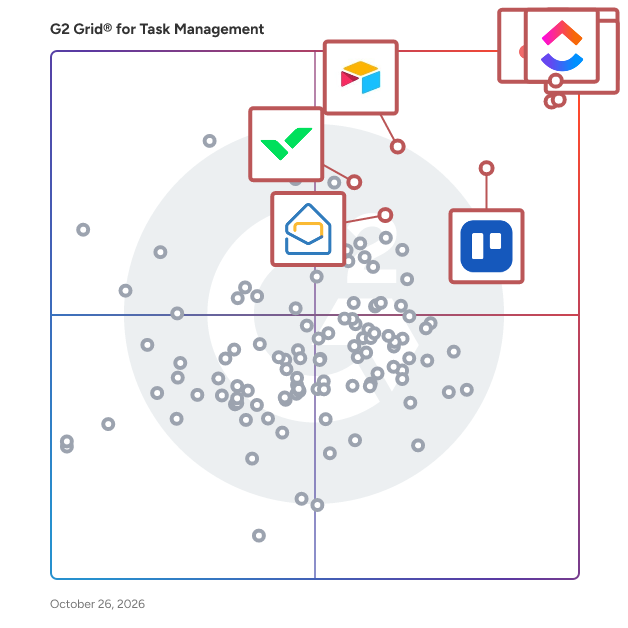
G2 Grid® for Task Management Software

G2 Grid® for Task Management Software plotting products by satisfaction and market presence

Highlighted products: Asana, ClickUp, monday AI Work Platform, Smartsheet, Trello, Airtable, Wrike, and Microsoft Planner.

Underlying data: [Grid® JSON](https://www.g2.com/categories/task-management-software/grids.json?focus%5B%5D=asana&focus%5B%5D=clickup&focus%5B%5D=monday-com&focus%5B%5D=smartsheet&focus%5B%5D=trello&focus%5B%5D=airtable&focus%5B%5D=wrike&focus%5B%5D=microsoft-planner)

Taskworld

Get it done! Taskworld is the world's first integrated project management platform that makes it easy to scale your organization. Taskworld helps you and your team collaborate remotely, set timelines, share files, visualize insights and work on tasks across different departments simultaneously. Move to your digital workspace today and start scaling the execution capabilities of your organization by increasing productivity, engagement & satisfaction.

Average Rating: 4.4/5.0

Total Reviews: 90

How Do G2 Users Rate Taskworld?

  • Has the product been a good partner in doing business?: 8.7/10 (Category avg: 9.0/10)
  • Task Prioritization: 9.2/10 (Category avg: 8.8/10)
  • Creation & Assignment: 8.8/10 (Category avg: 9.0/10)
  • To-Do Lists: 7.4/10 (Category avg: 8.9/10)

Who Is the Company Behind Taskworld?

  • Seller: Taskworld
  • Year Founded: 2012
  • HQ Location: New York, NY
  • Twitter: @taskworld
    9,552 Twitter followers
  • LinkedIn® Page: www.linkedin.com
    65 employees on LinkedIn®

Who Uses This Product?

  • Top Industries: Marketing and Advertising, Computer Software
  • Company Size: 61% Small, 35% Medium

What Do G2 Reviewers Say About Taskworld?

AI-generated summary from verified user reviews

Pros
  • Users value the efficient task management features of Taskworld, enhancing team collaboration and productivity significantly.
  • Users appreciate the efficient task organization in Taskworld, which enhances team collaboration and project visibility.
  • Users love the intuitive interface of Taskworld, which simplifies tracking task status and priorities effectively.
  • Users appreciate the efficient task management features of Taskworld, enabling seamless task creation, assignment, and tracking.
  • Users appreciate the efficient task management features of Taskworld, facilitating effective team collaboration and tracking.
Cons
  • Users find that while basics are simple, advanced features can be overwhelming and require significant time to master.
  • Users find some advanced features of Taskworld to be overwhelming for new users, requiring extra time to master.
  • Users experience slow performance with Taskworld on large projects, leading to delays in loading views and updates.
  • Users find that mastering advanced features of Taskworld can be time-consuming and overwhelming for beginners.

What Are Recent G2 Reviews of Taskworld?

Workflowy

Workflowy is a organizational tool designed to help users manage tasks, projects, and ideas through a simple yet powerful interface. It employs a nested list structure, allowing users to create and organize information hierarchically, making it ideal for note-taking, brainstorming, and project management. Key Features and Functionality: - Infinite Nesting: Create lists within lists to any depth, enabling detailed organization of information. - Real-Time Collaboration: Share lists with others and collaborate simultaneously, enhancing team productivity. - Tagging and Filtering: Use tags to categorize items and quickly filter through content. - Search Functionality: Instantly locate any item within your lists using the robust search feature. - Cross-Platform Availability: Access your lists on various devices, including web browsers, iOS, and Android applications. - Offline Access: Work on your lists without an internet connection; changes sync once you're back online. - Keyboard Shortcuts: Utilize a range of shortcuts to navigate and manage lists efficiently. Primary Value and User Solutions: Workflowy simplifies the process of organizing complex information, making it accessible and manageable. By providing a flexible and intuitive platform, it caters to individuals and teams seeking to enhance productivity, streamline workflows, and maintain clarity in their projects and daily tasks.

Average Rating: 4.5/5.0

Total Reviews: 33

How Do G2 Users Rate Workflowy?

  • Has the product been a good partner in doing business?: 9.2/10 (Category avg: 9.0/10)
  • Task Prioritization: 6.5/10 (Category avg: 8.8/10)
  • Creation & Assignment: 7.7/10 (Category avg: 9.0/10)
  • To-Do Lists: 8.1/10 (Category avg: 8.9/10)

Who Is the Company Behind Workflowy?

  • Seller: WorkFlowy
  • Year Founded: 2010
  • HQ Location: Centennial, US
  • Twitter: @WorkFlowy
    15,836 Twitter followers
  • LinkedIn® Page: www.linkedin.com
    9 employees on LinkedIn®

Who Uses This Product?

  • Company Size: 71% Small, 21% Medium

What Do G2 Reviewers Say About Workflowy?

AI-generated summary from verified user reviews

Pros
  • Users find Workflowy very easy to learn, enjoying the simple and intuitive bullet list formatting that makes it quick to start.
  • Users commend the ease of use of Workflowy, finding it simple to get started by just typing.
  • Users love the easy setup of Workflowy, allowing them to start typing and instantly create organized bullet lists.
  • Users love how simple it is to get started with Workflowy, allowing easy organization by just typing.
Cons
  • Users find Workflowy's pricing to be expensive, especially with limited features on the free plan and only one costly paid option.
  • Users note the limited features in Workflowy, especially for advanced needs and pricing options that may be restrictive.

What Are Recent G2 Reviews of Workflowy?

What Are G2 Users Discussing About Workflowy?

Kanbanchi for Google Workspace

Kanbanchi for Google Workspace is an online project management / task management / collaboration software with Kanban Board, Gantt Chart and Time Tracker. Project boards with lists and cards visualise a workflow of all your tasks and activities. Collaborate with your team in real time and manage your projects visually! Kanbanchi is the only app of its kind built specifically for Google Workspace – you sign up with Google account, manipulate your project boards as files in Google Drive, give flexible access permissions, push dates to Google Calendar, etc. Intuitive, simple familiar interface and no learning curve can get people engaged easily – just deploy Kanbanchi to all users of your organisation from Google Workspace Admin Console. Core functionality: – Create unlimited number of boards and cards – Share with an unlimited number of collaborators – Get email and in-app notifications about board updates – Push start/due dates to Google Calendar – Attach files from Google Drive – Leave comments for your colleagues – Organize cards with text tags and colour tags – Sort and filter cards as needed – Manipulate boards as files in Google Drive (Shared Drives for Enterprise users) – Import Your Trello Boards Advanced functionality helps you and your team rock your projects even more: — Gantt Chart Convert your Kanbanchi board to a Gantt Chart in one click. See how all your cards relate in time and visually plan project schedules with your team. — Time Tracker Track your time right in Kanbanchi — choose a card, start the timer, and stop it when you’re done. Monitor your team’s progress with the card in Timing tab, where time data for all users is recorded. — Company's logo Customize Kanbanchi’s look and feel by adding your company’s logo. — Export to Google Sheets Swiftly export to Google Spreadsheets all your board data: people assigned, dates, checklists, comments and more. — Card from email Create new cards by sending an email to a unique email address of your board. — Sorting cards by priority Simplify your working process - sort cards by priority automatically. — Backups For those who want to be on the safe side — back up your most important Kanbanchi boards for easy recovery. — List View See all your cards in a scrollable list, quickly look through them from top to bottom and filter the ones you need. — Subcards Organise tasks that have multiple steps or have to be divided up among multiple people – break cards into a number of smaller subcards that can be assigned and tracked separately. — Boards Templates Speed up your work process with the default and custom templates. — Shared Drives Integration Google Shared Drives have become an indispensable shared space where teams store information. With Shared Drive integration you can attach files from Shared Drives to cards in Kanbanchi and create boards in there for your team.

Average Rating: 4.7/5.0

Total Reviews: 93

How Do G2 Users Rate Kanbanchi for Google Workspace?

  • Has the product been a good partner in doing business?: 9.3/10 (Category avg: 9.0/10)
  • Task Prioritization: 9.2/10 (Category avg: 8.8/10)
  • Creation & Assignment: 10.0/10 (Category avg: 9.0/10)
  • To-Do Lists: 9.7/10 (Category avg: 8.9/10)

Who Is the Company Behind Kanbanchi for Google Workspace?

  • Seller: Kanbanchi
  • Year Founded: 2013
  • HQ Location: Dartford, United Kingdom
  • Twitter: @Kanbanchi
    512 Twitter followers
  • LinkedIn® Page: www.linkedin.com
    9 employees on LinkedIn®

Who Uses This Product?

  • Top Industries: Information Technology and Services, Marketing and Advertising
  • Company Size: 59% Small, 23% Medium

What Are Recent G2 Reviews of Kanbanchi for Google Workspace?

What Are G2 Users Discussing About Kanbanchi for Google Workspace?

Strety

Strety is the EOS® platform people love. Connect your business operating system to your team's everyday work for real results, faster. Run EOS® and manage people, projects, playbooks, performance, and surveys — all in one beautiful, intuitive, integrated platform. Eliminate your software sprawl with one platform to rule them all! Plus, Strety is integrated with your favorites: an app in Microsoft Teams and Outlook, Microsoft and Google SSO, and To Do integrations with Planner, Monday.com, Asana, HubSpot, Google Tasks, and major PSAs. Use Strety on the go in Strety's mobile app, available for iPhone and Android. Learn more --> https://strety.com/

Average Rating: 4.8/5.0

Total Reviews: 29

How Do G2 Users Rate Strety?

  • Has the product been a good partner in doing business?: 9.9/10 (Category avg: 9.0/10)
  • Task Prioritization: 9.4/10 (Category avg: 8.8/10)
  • Creation & Assignment: 10.0/10 (Category avg: 9.0/10)
  • To-Do Lists: 9.5/10 (Category avg: 8.9/10)

Who Is the Company Behind Strety?

  • Seller: Strety
  • Year Founded: 2022
  • HQ Location: Miami, US
  • LinkedIn® Page: www.linkedin.com
    22 employees on LinkedIn®

Who Uses This Product?

  • Top Industries: Information Technology and Services
  • Company Size: 83% Small, 17% Medium

What Do G2 Reviewers Say About Strety?

AI-generated summary from verified user reviews

Pros
  • Users find Strety's ease of use remarkable, streamlining meetings and task management effortlessly across departments.
  • Users love the responsive team collaboration of Strety, enhancing productivity and engagement in every meeting.
  • Users commend the responsive and helpful customer support of Strety, enhancing their overall experience with the platform.
  • Users love the seamless integrations with Microsoft 365, enhancing their productivity and overall experience with Strety.
  • Users praise Strety for its intuitive design, making it easy to adopt and implement across various operations.
Cons
  • Users experience a steep learning curve transitioning from old systems, making onboarding challenging initially.
  • Users find the not intuitive onboarding process challenging, requiring prior knowledge of the EOS method for effective use.
  • Users face a steep learning curve when transitioning to Strety, which complicates the onboarding process despite its benefits.
  • Users feel that calendar integration is too light, wishing for a more prominent presence in daily routines.
  • Users find the complexity in adding members and items to lists challenging, impacting their overall experience with Strety.

What Are Recent G2 Reviews of Strety?

Progress Podio

Progress Podio is a flexible, custom collaboration database that enables you to accelerate and simplify your work. An all-in-one solution to accelerate productivity, digitize essential processes, streamline data collection, and automate document workflows in one secure tool. Progress Podio can automate, operationalize, and secure important business and document processes that reduces manual work and increases efficiency. Transform how work is done with versatile forms, powerful data collection, and automated client and document workflows— customized all by you with a few simple clicks. From key industries such as, creative agencies, legal services, accounting firms, real-estate, construction / manufacturing, to key departmental areas—sales, HR, marketing, legal, finance. Podio’s ability to connect diverse teams and disparate processes helps thousands of companies optimize their entire operations in one place. With Progress Podio, give your team a single tool to automate timely processes that unify in one tool. From simplifying client data collection to automating client interactions and agreements, Progress Podio simplifies your business’s most core activities.

Average Rating: 4.2/5.0

Total Reviews: 507

How Do G2 Users Rate Progress Podio?

  • Has the product been a good partner in doing business?: 8.4/10 (Category avg: 9.0/10)
  • Task Prioritization: 9.5/10 (Category avg: 8.8/10)
  • Creation & Assignment: 8.9/10 (Category avg: 9.0/10)
  • To-Do Lists: 9.5/10 (Category avg: 8.9/10)

Who Is the Company Behind Progress Podio?

  • Seller: Progress Software
  • Company Website:
  • Year Founded: 1981
  • HQ Location: Burlington, MA.
  • Twitter: @ProgressSW
    48,773 Twitter followers
  • LinkedIn® Page: www.linkedin.com
    4,205 employees on LinkedIn®

Who Uses This Product?

  • Who Uses This: Owner, Project Manager
  • Top Industries: Real Estate, Information Technology and Services
  • Company Size: 61% Small, 28% Medium

What Do G2 Reviewers Say About Progress Podio?

AI-generated summary from verified user reviews

Pros
  • Users find Progress Podio's ease of use invaluable, simplifying tasks and enhancing collaboration across various business processes.
  • Users appreciate the automation capabilities of Progress Podio, streamlining workflows and enhancing productivity across various tasks.
  • Users love the customization options that adapt Progress Podio to their specific business processes seamlessly.
  • Users love the integrated workflows and no-code capabilities of Progress Podio, enhancing efficiency in task management.
  • Users appreciate the powerful integrations of Progress Podio, enhancing collaboration and streamlining various business processes.
Cons
  • Users find the learning curve steep for Progress Podio, making setup challenging and performance occasionally sluggish.
  • Users find the billing issues and lack of responsive customer service frustrating in Progress Podio.
  • Users find the complexity of Progress Podio challenging, requiring significant effort to create an effective setup.
  • Users find poor customer support frustrating, often needing to hire external assistance for setup and issues.
  • Users find the slow performance of Progress Podio frustrating, as it hampers efficiency and productivity.

What Are Recent G2 Reviews of Progress Podio?

What Are G2 Users Discussing About Progress Podio?

liftOS - The ultimate productivity Workspace

#1 Easiest Project Management Software - Made in Germany Built-in Projects, Wikis, Documents and Whiteboard help small to large teams work with many tools in one place. Trusted by over 2000+ Businesses, Agencies and Freelancers. Detailed Features: - Todos (manage projects) - Notes (write, share, and create knowledgebase) - Files (share and store files) - Whiteboard (brainstorm in real time) - Chat (communicate with team & clients) - Calendar (visualize your day & week) - Google Workspace (Natively integrate Google Sheets, Docs or Slides) - Miro & more websites or weblinks

Average Rating: 4.9/5.0

Total Reviews: 18

How Do G2 Users Rate liftOS - The ultimate productivity Workspace?

  • Has the product been a good partner in doing business?: 10.0/10 (Category avg: 9.0/10)
  • Task Prioritization: 9.4/10 (Category avg: 8.8/10)
  • Creation & Assignment: 9.3/10 (Category avg: 9.0/10)
  • To-Do Lists: 9.7/10 (Category avg: 8.9/10)

Who Is the Company Behind liftOS - The ultimate productivity Workspace?

  • Seller: liftOS
  • Year Founded: 2021
  • HQ Location: Berlin, DE
  • LinkedIn® Page: www.linkedin.com
    4 employees on LinkedIn®

Who Uses This Product?

  • Company Size: 100% Small

What Do G2 Reviewers Say About liftOS - The ultimate productivity Workspace?

AI-generated summary from verified user reviews

Pros
  • Users love the seamless integration of productivity tools in liftOS, enhancing organization and efficiency in their workflows.
  • Users appreciate the easy integrations of liftOS, seamlessly combining productivity tools into a single, efficient workspace.
  • Users love the seamless integrations with various apps, enhancing their productivity and simplifying workflow management.
  • Users find the out-of-the-box templates in liftOS invaluable, saving time and providing structure for their tasks.
  • Users appreciate the responsive customer support of liftOS, noting its helpfulness and genuine care for user needs.
Cons
  • Users find the learning curve steep initially, but adaptability leads to smoother usage over time.
  • Users note the missing features in liftOS, but see potential as updates are on the way.
  • Users express a desire for improved template creation options, seeking enhanced customization and flexibility in LiftOS.
  • Users find difficult navigation at first, but eventually adapt for a smoother experience with liftOS.
  • Users express frustration over integration issues that limit functionality and hinder seamless workflow within liftOS.

What Are Recent G2 Reviews of liftOS - The ultimate productivity Workspace?

GQueues

GQueues is the leading task manager built specifically for teams on Google Workspace. Collaborate with your team and keep work moving forward with its intuitive design and familiar interface. GQueues has deep integrations with Google Calendar, Gmail, Google Drive, Google Contacts and Chrome making your team more efficient, less stressed, and more organized.

Average Rating: 4.8/5.0

Total Reviews: 34

How Do G2 Users Rate GQueues?

  • Has the product been a good partner in doing business?: 9.2/10 (Category avg: 9.0/10)
  • Task Prioritization: 5.0/10 (Category avg: 8.8/10)
  • Creation & Assignment: 6.7/10 (Category avg: 9.0/10)

Who Is the Company Behind GQueues?

  • Seller: GQueues
  • Company Website:
  • Year Founded: 2009
  • HQ Location: Chicago, IL
  • Twitter: @gqueues
    825 Twitter followers
  • LinkedIn® Page: www.linkedin.com
    1 employees on LinkedIn®

Who Uses This Product?

  • Who Uses This: Owner
  • Top Industries: Information Technology and Services
  • Company Size: 79% Small, 15% Medium

What Are Recent G2 Reviews of GQueues?

What Are G2 Users Discussing About GQueues?

Nifty

Nifty is the all-in-one workspace to keep people, projects, & functions aligned across your organization. With chat, tasks, goals, docs, and files all in one place — Nifty lets you focus on work instead of juggling tools. Nifty helps reduce project development cycles and improves team productivity by combining all of the important features of project management into one software. The end result is milestone-driven progress automation that keeps every stakeholder aligned, ensuring organizational goals remain on schedule. Nifty’s software allows you to manage tasks through Kanban, List, and Timeline views. Collaborating on Nifty is natural because each project has an individual discussion thread encouraging projects have a dedicated knowledge-hub. Nifty is built to encourage cross departmental collaboration like no other. With a built-in calendar, Nifty can be integrated with Google, Outlook as well as file and document sharing.

Average Rating: 4.7/5.0

Total Reviews: 425

How Do G2 Users Rate Nifty?

  • Has the product been a good partner in doing business?: 9.3/10 (Category avg: 9.0/10)
  • Task Prioritization: 9.2/10 (Category avg: 8.8/10)
  • Creation & Assignment: 9.4/10 (Category avg: 9.0/10)
  • To-Do Lists: 9.2/10 (Category avg: 8.9/10)

Who Is the Company Behind Nifty?

Who Uses This Product?

  • Who Uses This: Owner, CEO
  • Top Industries: Marketing and Advertising, Information Technology and Services
  • Company Size: 89% Small, 7% Medium

What Do G2 Reviewers Say About Nifty?

AI-generated summary from verified user reviews

Pros
  • Users value the efficient project management capabilities of Nifty, enhancing organization and productivity across teams.
  • Users love the efficient team collaboration features of Nifty, enhancing communication and project management for web design tasks.
  • Users love the ease of use of Nifty, highlighting its intuitive interface and smooth team onboarding.
  • Users love the handy task management features of Nifty, bringing all project needs together in one platform.
  • Users enjoy Nifty's clean interface and easy navigation, enhancing their project management experience seamlessly.
Cons
  • Users feel that Nifty lacks important features like detailed budgeting tools and advanced reporting, impacting usability.
  • Users find the limited features of Nifty restrict project management capabilities and usability compared to competitors.
  • Users report that Nifty's app functionality is buggy, making it difficult to rely on for critical tasks.
  • Users report severe billing issues with Nifty, facing unresponsive support and unfair charges for unnecessary seats.
  • Users find Nifty expensive due to additional costs for features like forms and poor support for lifetime deal customers.

What Are Recent G2 Reviews of Nifty?

Business-in-a-Box

Business in a Box — The Business Operating System for SMBs Business in a Box (BIB) is the Business Operating System (BOS) for small and medium businesses that want to run their company with structure, clarity, and control — without juggling dozens of disconnected tools. Most businesses don’t struggle because of a lack of effort. They struggle because their operations are fragmented: tasks in one app, documents in another, communication scattered, and critical knowledge living in people’s heads. Business in a Box replaces that chaos with one unified system that defines how the business works. Unlike traditional project management or collaboration tools, BIB is designed as a system, not just software. It brings together execution, communication, documentation, and organizational structure into a single operating layer for the business. With Business in a Box, companies can: - Organize work through goals, projects, and tasks with clear ownership - Centralize documents, templates, and company knowledge - Collaborate through built-in chat and communication channels tied directly to work - Set up departments, roles, and responsibilities that persist even when people change - Onboard teams quickly using prebuilt structures and workflows BIB also includes AI-powered capabilities that go beyond basic automation. The platform builds a contextual understanding of each business — learning from goals, projects, tasks, documents, and activity — to support planning, execution, and decision-making. AI can assist with creating business documents, recommending templates, highlighting risks, and guiding next steps, all within the context of how the company actually operates. Business in a Box is built for businesses with 1 to 100 employees, from founders and small teams to growing organizations that need more structure without enterprise complexity. A Free Forever Starter Plan allows companies to begin operating with a system from day one, while paid plans unlock full BOS capabilities with simple, transparent per-user pricing. At its core, Business in a Box helps companies move from ad-hoc operations to intentional execution. Instead of relying on memory, emails, and scattered tools, teams run their business on one operating system — designed to scale as they grow. Business in a Box is not just another tool. It’s how your business runs. Get Started Free in Just a Few Minutes! https://account.business-in-a-box.com/create-account/

Average Rating: 4.7/5.0

Total Reviews: 13

How Do G2 Users Rate Business-in-a-Box?

  • Has the product been a good partner in doing business?: 10.0/10 (Category avg: 9.0/10)

Who Is the Company Behind Business-in-a-Box?

  • Seller: Biztree
  • Year Founded: 2002
  • HQ Location: Montreal, Quebec, Canada
  • LinkedIn® Page: www.linkedin.com
    4 employees on LinkedIn®
  • Ownership: Biztree Inc.
  • Phone: 514-768-4100

Who Uses This Product?

  • Company Size: 92% Small, 8% Medium

What Do G2 Reviewers Say About Business-in-a-Box?

AI-generated summary from verified user reviews

Pros
  • Users praise the affordability of Business-in-a-Box, effectively replacing costly tools with great value.
  • Users value the cost-effective collaboration features of Business-in-a-Box, replacing multiple expensive tools seamlessly.
  • Users value the cost-effective data management solution, successfully replacing multiple expensive tools with one platform.
  • Users value the efficiency of Business-in-a-Box, as it consolidates multiple tools into one affordable solution.
  • Users value the cost-effective replacement for expensive tools, providing great value for small to medium-sized businesses.

What Are Recent G2 Reviews of Business-in-a-Box?

What Are G2 Users Discussing About Business-in-a-Box?

TaskRay

TaskRay is your ultimate solution for streamlined project management and seamless customer onboarding—all within Salesforce. Empower your teams to create project plans, automate repetitive tasks, allocate resources effectively, and foster collaboration across departments. Whether you're managing new customer implementations or driving internal initiatives, TaskRay ensures every project is delivered with precision and efficiency. 100% Salesforce Native TaskRay integrates seamlessly into your existing Salesforce ecosystem, offering unmatched visibility and alignment across Sales, CPQ, Service, and Experience Clouds. Designed for Growing Businesses If your organization has outgrown spreadsheets or non-Salesforce tools and needs better visibility into project performance, TaskRay is your next step. It's ideal for businesses facing challenges like: ✓ Revenue delays caused by lengthy onboarding or implementation timelines. ✓ Complex implementations, where multiple SKUs require custom solutions and support. ✓ Integrated customer management, spanning multiple Salesforce Clouds. Industry-Specific Expertise • TaskRay is trusted by industry leaders in: • Technology & SaaS • Healthcare & Life Sciences • Manufacturing • Real Estate & Franchising • Financial Services • Telecommunications Deliver Faster, Reduce Costs, and Increase Customer Satisfaction TaskRay helps you accelerate project timelines, cut operational costs, and improve productivity. Here's what our customers achieve: • 2.5x Faster Project Completion: Streamline workflows and improve efficiency. • 29% Faster Revenue Realization: Get to value quicker with optimized onboarding. • 21% Cost Reduction: Save time and resources with automation and visibility. • 15% Increase in Customer Satisfaction: Delight customers with smooth implementations. • 200% Boost in Project Visibility: Gain clarity and insight into every project detail. • 20% More Project Capacity: Handle more work without adding complexity. Proven Success Across Industries Join the growing list of businesses transforming their operations with TaskRay. From technology innovators to global manufacturers, our platform drives results.

Average Rating: 4.3/5.0

Total Reviews: 156

How Do G2 Users Rate TaskRay?

  • Has the product been a good partner in doing business?: 9.1/10 (Category avg: 9.0/10)
  • Task Prioritization: 8.2/10 (Category avg: 8.8/10)
  • Creation & Assignment: 8.8/10 (Category avg: 9.0/10)
  • To-Do Lists: 8.1/10 (Category avg: 8.9/10)

Who Is the Company Behind TaskRay?

  • Seller: TaskRay
  • Company Website:
  • Year Founded: 2010
  • HQ Location: Denver, CO
  • Twitter: @TaskRay
    400 Twitter followers
  • LinkedIn® Page: www.linkedin.com
    53 employees on LinkedIn®

Who Uses This Product?

  • Top Industries: Computer Software, Information Technology and Services
  • Company Size: 50% Medium, 47% Small

What Do G2 Reviewers Say About TaskRay?

AI-generated summary from verified user reviews

Pros
  • Users find the ease of use of TaskRay invaluable, facilitating seamless collaboration and efficient project management.
  • Users value the easy integration of TaskRay with Salesforce, enhancing collaboration and streamlining project management effortlessly.
  • Users highlight the seamless Salesforce integration of TaskRay, enabling centralized data and effective stakeholder collaboration.
  • Users value the seamless integration with Salesforce, enhancing data management and stakeholder connectivity across projects.
  • Users value the seamless organization of TaskRay, enhancing collaboration and clarity in project management within Salesforce.
Cons
  • Users find multiple portfolio management challenging with TaskRay, leading to operational issues and overwhelming large projects.
  • Users find TaskRay's inefficient task management challenging, particularly with complex projects and dependencies affecting productivity.
  • Users find TaskRay's complexity overwhelming, requiring significant time to understand its intricate interface and controls.
  • Users find difficult customization in TaskRay challenging, as the interface is complex and overwhelming to navigate.
  • Users find the steep learning curve of TaskRay challenging, particularly for those unfamiliar with Salesforce.

What Are Recent G2 Reviews of TaskRay?

What Are G2 Users Discussing About TaskRay?

Kroolo

Kroolo is a next-generation productivity platform powered by Agentic AI, designed to redefine how teams work, think, and create. Unlike traditional task managers, Kroolo is built to be proactive. It doesn't just help you organize work—it acts as your smart partner, driving your workflows forward with. The platform unifies projects, tasks, documents, conversations, OKRs, forms, and dashboards into one seamless ecosystem — eliminating the need for multiple disconnected tools. With multiple workspace views (list, Kanban, timeline, calendar, workload), real-time collaboration, and embedded insights, Kroolo adapts to every team’s workflow, across industries and sizes. Kroolo also excels in collaboration. It provides a central hub for team alignment with features like visual roadmaps, dynamic calendars, project timelines, and goal tracking—all enhanced by generative AI inputs. The platform's intuitive UX, combined with its smart suggestions and instant planning tools, makes it a must-have for forward-looking teams.

Average Rating: 4.6/5.0

Total Reviews: 20

How Do G2 Users Rate Kroolo?

  • Has the product been a good partner in doing business?: 9.6/10 (Category avg: 9.0/10)
  • Task Prioritization: 8.8/10 (Category avg: 8.8/10)
  • Creation & Assignment: 8.3/10 (Category avg: 9.0/10)
  • To-Do Lists: 8.7/10 (Category avg: 8.9/10)

Who Is the Company Behind Kroolo?

  • Seller: Kroolo
  • Year Founded: 2023
  • HQ Location: Singapore, SG
  • Twitter: @getkroolo
    49 Twitter followers
  • LinkedIn® Page: www.linkedin.com
    47 employees on LinkedIn®

Who Uses This Product?

  • Top Industries: Computer Software, Information Technology and Services
  • Company Size: 65% Small, 32% Medium

What Do G2 Reviewers Say About Kroolo?

AI-generated summary from verified user reviews

Pros
  • Users benefit from Kroolo's effective project management, seamlessly integrating tasks and enhancing overall productivity across various life aspects.
  • Users love the effective organization capabilities of Kroolo, seamlessly managing multiple projects and enhancing productivity.
  • Users value the seamless team collaboration in Kroolo, enhancing project management across all areas of life.
  • Users appreciate the time-saving features of Kroolo, allowing for efficient project management and quick insights.
  • Users find Kroolo's clean interface easy to navigate, enhancing focus and project organization effectively.
Cons
  • Users find the complexity of Kroolo overwhelming initially, but become more familiar with continued use.
  • Users find the learning curve steep for Kroolo initially, although familiarity improves navigation over time.
  • Users find Kroolo's interface initially difficult to navigate due to its complexity, especially for beginners.
  • Users find the limited features of Kroolo can cause confusion and complicate the navigation experience.
  • Users find Kroolo's app not particularly mobile-friendly, hindering easy access to updates and changes on the go.

What Are Recent G2 Reviews of Kroolo?

LaunchBay

LaunchBay is the client experience platform for B2B service providers, agencies, and software companies that want to deliver a best-in-class customer experience without having to hire more staff or add work to their existing team's plate. From onboarding and implementation to ongoing service delivery, LaunchBay brings every step including tasks, communication, approvals, time tracking, resource management, and data collection into one platform your team and your clients actually use. For internal teams, LaunchBay delivers the operational clarity of a professional services automation tool with the client experience layer most PSA platforms leave out. A real-time projects dashboard gives ops leaders visibility into health scores, project status, and blockers across every active engagement. Spot which projects are on track and which are behind at a glance, drill into any blocker instantly, and take action before clients complain. Reusable templates standardize delivery across every project, automated reminders replace manual follow-up, and a shared message center with private internal notes keeps client communication centralized and your team aligned. For clients, LaunchBay creates a premium self-service experience. Each customer gets a secure, branded portal with loginless access via magic link, no account creation required. Clients complete tasks with clear context on what to do and why, track their own project progress in real time, and always know exactly where things stand without emailing your team to ask. The result is faster time-to-value, fewer status calls, and a client experience that reflects your brand's professionalism at every touchpoint. Whether you're a SaaS company managing customer onboarding, a marketing agency running client kickoff projects, or a professional services firm delivering complex implementations, LaunchBay gives you the workflow automation, task management, and client communication tools to deliver with speed, consistency, and confidence. LaunchBay helps growing B2B teams run all client work in one place, streamline service delivery, and deliver an exceptional client experience.

Average Rating: 4.6/5.0

Total Reviews: 56

How Do G2 Users Rate LaunchBay?

  • Has the product been a good partner in doing business?: 9.3/10 (Category avg: 9.0/10)
  • Task Prioritization: 10.0/10 (Category avg: 8.8/10)
  • To-Do Lists: 10.0/10 (Category avg: 8.9/10)

Who Is the Company Behind LaunchBay?

Who Uses This Product?

  • Top Industries: Marketing and Advertising
  • Company Size: 98% Small, 2% Medium

What Do G2 Reviewers Say About LaunchBay?

AI-generated summary from verified user reviews

Pros
  • Users appreciate the ease of use of LaunchBay, making client collaboration and project management effortless and efficient.
  • Users find the client management features of LaunchBay to be streamlined and effective for project collaboration.
  • Users commend the excellent customer support of LaunchBay, enhancing their overall project management experience.
  • Users appreciate the centralized organization of LaunchBay, enhancing communication and streamlining project management for teams.
  • Users value the intuitive interface of LaunchBay, which simplifies client collaboration and enhances project management efficiency.
Cons
  • Users find limited features in LaunchBay, lacking robust project and user management capabilities for effective tracking.
  • Users find LaunchBay lacking in robust features, desiring better project management and visibility enhancements.
  • Users feel the need for better document management features to enhance project organization within LaunchBay.
  • Users find inefficient task management in LaunchBay due to cumbersome setup and document upload limitations.
  • Users face integration issues with LaunchBay, as it currently only connects with Zapier, limiting automation options.

What Are Recent G2 Reviews of LaunchBay?

ActiveCollab

ActiveCollab is a simple, yet powerful productivity and collaboration workspace built for agencies, creatives, and consultancies looking for an all-in-one project management tool. ActiveCollab offers a fantastic blend of features designed to support service businesses at every stage of their journey. From project and workload management, time tracking, and capacity planning, to budgeting, invoicing, and client communications: ActiveCollab's got all you need to boost efficiency and profitability. And it's so practical. Teams of all sizes rely on ActiveCollab to manage their projects, time, and money. It's their go-to tool that helps them streamline their workflows, simplify daily activities, and improve teamwork in such an easy way.

Average Rating: 4.2/5.0

Total Reviews: 93

How Do G2 Users Rate ActiveCollab?

  • Has the product been a good partner in doing business?: 8.6/10 (Category avg: 9.0/10)
  • Task Prioritization: 10.0/10 (Category avg: 8.8/10)
  • Creation & Assignment: 6.7/10 (Category avg: 9.0/10)
  • To-Do Lists: 6.7/10 (Category avg: 8.9/10)

Who Is the Company Behind ActiveCollab?

  • Seller: Active Collab
  • Year Founded: 2007
  • HQ Location: Norfolk, VA
  • Twitter: @activecollab
    19,644 Twitter followers
  • LinkedIn® Page: www.linkedin.com
    12 employees on LinkedIn®

Who Uses This Product?

  • Who Uses This: Project Manager
  • Top Industries: Marketing and Advertising, Computer Software
  • Company Size: 68% Small, 26% Medium

What Do G2 Reviewers Say About ActiveCollab?

AI-generated summary from verified user reviews

Pros
  • Users appreciate the automation features of ActiveCollab, simplifying task management and enhancing team collaboration.
  • Users love the comprehensive features of ActiveCollab, making team management and integration effortless.
  • Users find ActiveCollab to be easy to use and implement, benefiting from its seamless integration and feature-rich platform.
  • Users find Ease of Management in ActiveCollab, praising its user-friendly implementation and seamless integration with Hubstaff.
  • Users find ActiveCollab to be very easy to use, facilitating smooth implementation and seamless integration with Hubstaff.
Cons
  • Users find the bulk file deletion process tedious, as selecting and removing old files individually is frustrating.
  • Users find the deletion difficulty frustrating, as bulk selection for deleting old files is not available.
  • Users find the limited functionality of ActiveCollab cumbersome, struggling with bulk file deletion capabilities.
  • Users find the limited options for bulk file deletion frustrating, as selecting files individually is time-consuming.
  • Users find the limited storage problematic, as deleting old files requires tedious individual selection.

What Are Recent G2 Reviews of ActiveCollab?

What Are G2 Users Discussing About ActiveCollab?

Ryver

Ryver enables you to organize your team’s communication IN ONE APP with group chat, task management, and voice & video calls.

Average Rating: 4.4/5.0

Total Reviews: 156

How Do G2 Users Rate Ryver?

  • Has the product been a good partner in doing business?: 8.8/10 (Category avg: 9.0/10)
  • Task Prioritization: 9.0/10 (Category avg: 8.8/10)
  • Creation & Assignment: 9.0/10 (Category avg: 9.0/10)
  • To-Do Lists: 9.0/10 (Category avg: 8.9/10)

Who Is the Company Behind Ryver?

  • Seller: Ryver
  • Year Founded: 2015
  • HQ Location: Scottsdale, AZ
  • Twitter: @RyverApp
    2,807 Twitter followers
  • LinkedIn® Page: www.linkedin.com
    3 employees on LinkedIn®

Who Uses This Product?

  • Who Uses This: Owner
  • Top Industries: Computer Software, Information Technology and Services
  • Company Size: 65% Small, 27% Medium

What Do G2 Reviewers Say About Ryver?

AI-generated summary from verified user reviews

Pros
  • Users value the seamless team collaboration in Ryver, enhancing communication and task management all in one platform.
  • Users value Ryver for its unified task management, enabling seamless collaboration and clear communication within teams.
  • Users appreciate the effective communication in Ryver, enjoying seamless integration of chat, tasks, and collaboration.
  • Users appreciate the ease of use in Ryver, enjoying straightforward setup and seamless integration of chat and tasks.
  • Users value the seamless integration of chat and task management in Ryver, enhancing team collaboration and efficiency.
Cons
  • Users find the learning curve challenging, making the initial setup and understanding of Ryver quite difficult.
  • Users note the missing features in Ryver, highlighting the need for better tools and an improved interface.
  • Users find Ryver's interface not intuitive, struggling to grasp features and navigate effectively at first.
  • Users find the user interface challenging, particularly in navigating features and receiving notifications effectively.
  • Users report degrading audio quality in Ryver, which hampers the overall video conferencing experience.

What Are Recent G2 Reviews of Ryver?

What Are G2 Users Discussing About Ryver?

Superthread

Superthread is an all-in-one project management platform that integrates communication, tasks, transcribing meetings and documentation into a single, unified workspace. It is designed for teams and knowledge workers who need a structured way to manage projects and daily work. The platform addresses the challenges of a fragmented tool stack by providing a cohesive environment where all work-related information is centralised and organised. The platform's structure is hierarchical, similar to a folder system. This allows teams to organise their work logically, creating a clear and easy-to-navigate hierarchy for projects, teams, and departments. This structure helps users find information quickly and provides a clear overview of how different projects and tasks relate to one another. The hierarchical model ensures that all context, discussions, and files for a project are kept together, promoting transparency and reducing the time spent searching for information. - Hierarchical Structure: Organizes projects and information in a logical, folder-like structure, making it easy to manage and navigate complex workflows. - Unified Workspace: Combines multiple functions into a single platform, eliminating the need to switch between separate tools for chat, task management, and documentation. - Contextual Collaboration: All discussions and decisions are linked directly to the relevant project or task, ensuring that conversations are always tied to the work at hand and easy to reference. - Centralised Knowledge: Provides a unified space for creating and managing documents and other knowledge assets, fostering a single source of truth for all project and company information. Superthread is used by a wide range of teams across various industries who are looking to improve efficiency, reduce communication silos, and enhance overall team alignment. It is a comprehensive solution for any team seeking a more organised and productive way to manage their projects and daily work.

Average Rating: 4.6/5.0

Total Reviews: 30

How Do G2 Users Rate Superthread?

  • Task Prioritization: 9.1/10 (Category avg: 8.8/10)
  • Creation & Assignment: 9.5/10 (Category avg: 9.0/10)
  • To-Do Lists: 8.9/10 (Category avg: 8.9/10)

Who Is the Company Behind Superthread?

  • Seller: Superthread
  • Year Founded: 2020
  • HQ Location: London, GB
  • Twitter: @Superthread_
    518 Twitter followers
  • LinkedIn® Page: www.linkedin.com
    8 employees on LinkedIn®

Who Uses This Product?

  • Top Industries: Computer Games
  • Company Size: 86% Medium, 14% Small

What Do G2 Reviewers Say About Superthread?

AI-generated summary from verified user reviews

Pros
  • Users find Superthread to have an intuitive interface, making it effortless to organize tasks and information efficiently.
  • Users appreciate the intuitive and clean interface of Superthread, making organization and task management effortless.
  • Users appreciate the easy organization and task management features of Superthread, enhancing productivity and clarity.
  • Users love the ease of use of Superthread, finding it intuitive and beginner-friendly for all levels.
  • Users value the intuitive interface and real-time updates that enhance team collaboration on Superthread.
Cons
  • Users report occasional glitches with automatic logouts and tasks not updating, affecting overall usability.
  • Users experience slow performance with Superthread, including frequent logouts and issues with task updates and notifications.
  • Users report missing features like direct archive access and inconsistent task updates, impacting usability and convenience.
  • Users experience page management issues with incorrect card placements and problems related to automatic refresh and logouts.
  • Users report a poor interface design in Superthread, leading to navigational challenges and frustrating functionality issues.

What Are Recent G2 Reviews of Superthread?