Top Free Task Management Software - Page 13

How Many Task Management Software Products Does G2 Track?

Total Products under this Category: 595

Category Stats (Oct 2026)

  • Average Rating: 4.45/5 The average rating of products in this category, based on all submitted ratings
  • Top Trending Product: Timefold (+2.21%) - Among all products in this category, Timefold recorded the largest rating increase compared to last month

Last updated: October 26, 2026

How Does G2 Rank Task Management Software Products?

Why You Can Trust G2's Software Rankings:

  • 30 Analysts and Data Experts
  • 121,000+ Authentic Reviews
  • 595+ Products
  • Unbiased Rankings

G2's software rankings are built on verified user reviews, rigorous moderation, and a consistent research methodology maintained by a team of analysts and data experts. Each product is measured using the same transparent criteria, with no paid placement or vendor influence. While reviews reflect real user experiences, which can be subjective, they offer valuable insight into how software performs in the hands of professionals. Together, these inputs power the G2 Score, a standardized way to compare tools within every category.

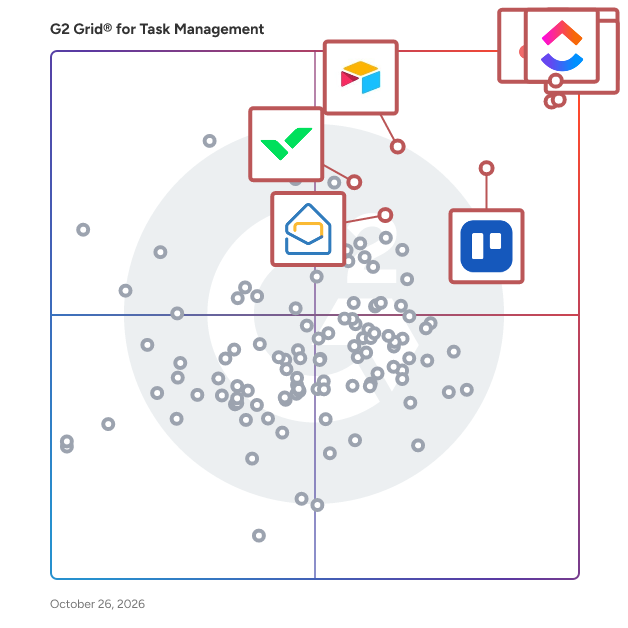
G2 Grid® for Task Management Software

G2 Grid® for Task Management Software plotting products by satisfaction and market presence

Highlighted products: Asana, ClickUp, monday AI Work Platform, Smartsheet, Trello, Airtable, Wrike, and Zoho Mail.

Underlying data: [Grid® JSON](https://www.g2.com/categories/task-management-software/grids.json?focus%5B%5D=asana&focus%5B%5D=clickup&focus%5B%5D=monday-com&focus%5B%5D=smartsheet&focus%5B%5D=trello&focus%5B%5D=airtable&focus%5B%5D=wrike&focus%5B%5D=zoho-mail)

Onyxtask

Onyxtask is an advanced project management and productivity platform designed to unify individual execution with seamless team collaboration. It empowers users to create and track personal tasks, delegate assignments across team members, and monitor progress in real time. Built around first-principles thinking, Onyxtask allows you to break down complex objectives into actionable subtasks, ensuring structured execution without ambiguity. A core strength of Onyxtask is its automated workload protection: when delegating work, the system monitors real-time capacity and prevents assigning tasks to team members who are already fully booked for the day, directly safeguarding teams against burnout. Furthermore, users can assemble dedicated teams for specific projects featuring built-in project chats and seamless file sharing. With transparent performance metrics, Onyxtask provides clear visibility into both personal focus and overall team productivity, on-time delivery rates, and long-term execution success.

Who Is the Company Behind Onyxtask?

PocketOcean

PocketOcean is a workspace solution for organizations and teams in all industries that want to be super productive. The software is made of tools that help you and your team get work done and meet your deadlines. Breakdown projects into detailed tasks and checklist items while collaborating with your team. Create project roadmaps, agile kanban boards and easily see your progress in tasks streams and illustrative graphs. We are bring more accuracy and visibility to the work you do and creating an environment to communicate well.

Who Is the Company Behind PocketOcean?

Priority-Zero!

Priority-Zero is a project management, time tracking, quoting, invoicing and scheduling platform built for freelancers, solopreneurs, independent professionals and small teams. Everything you're responsible for, client work, personal projects, creative pursuits, side businesses, lives in one place, organised well enough that you can plan all of it around all of it. Most tools are built for teams inside organisations, which means people who work independently have been making do with software that doesn't fit how they actually operate. Priority-Zero was built from the ground up for people who work for themselves or run small operations, and the difference shows in how it handles the specific problems those people face every day. The OCP System Everything in Priority-Zero is organised around OCPs, Organisations, Categories and Personas. An OCP is a distinct identity within your account. Your primary business is one OCP. A side hustle is another. A creative project or personal pursuit is another. Each OCP has its own projects, billing details, logo and optional Directory listing, discoverable independently of your other identities. If you're a consultant who also writes, teaches and runs a product business, all four can exist as separate, clearly defined contexts within a single Priority-Zero account, each visible alongside the others so you can plan everything around everything else. On the free plan, you can create up to two OCPs. During the 14-day free trial, you can create as many as you need without restriction, and they remain yours after the trial converts to a free account. Unlimited OCPs are available from the Professional plan upward. Projects and Deliverables Projects in Priority-Zero come in two forms. A unitary project has no deliverables and is timed and scheduled directly at the project level. A composite project is broken down into deliverables, each of which carries its own time estimate, priority, scheduling and timer. As deliverables are added and time estimates entered, the total project time is calculated automatically from the sum of its parts. Every project and deliverable has its own rich text workspace for instructions, notes, briefs, agreements and specifications. Tables, images, links and formatted content are all supported. Projects are colour-coded for quick visual identification in the project list. Billable deliverables are marked with a gold medallion so you can tell at a glance which projects contain chargeable work. Projects and deliverables can be P-Zeroed, marked as complete and moved out of the active view, without being permanently deleted. Action Stations and The Plan Action Stations is the primary working area in Priority-Zero, where all active projects and deliverables are managed. The Plan panel sits alongside it and shows everything scheduled for today, drawn from both Priority-Zero and any connected external calendar. Between Action Stations and The Plan, you start every day knowing exactly what you're supposed to be working on and why, with no need to reconstruct that picture from separate tools or scattered notes. Time Tracking Anything in Action Stations that displays a timer icon can be timed, including project and deliverable tiles, items in The Plan, and the detail panel of any project or deliverable. Timers are started and stopped with a single click, with optional start and end comments for context. The "What was I up to?" feature shows the details of your most recent timer session so you can pick up exactly where you left off. All recorded time feeds directly into billing, which means the hours you track are the hours you invoice, without having to reconstruct from memory. Quoting and Invoicing The Billing section is where Priority-Zero makes a material difference to the financial side of independent work. For fixed-price projects, the Auto Quote feature generates a fully itemised quote directly from the project scope. Every deliverable marked as billable is pulled in as a line item, your hourly rate is applied, tax is calculated and the total is produced automatically. Your rate, tax settings, currency and payment terms are entered once in Billing Settings and applied to everything from that point on. When the project is complete, the quote converts to an invoice in a single click, with the original quote number preserved as a reference. For hourly billing, you select a client and a date range and Priority-Zero picks up every billable hour recorded in that period automatically. You choose whether to present the invoice as a grouped summary or a full activity-by-activity breakdown. Either way, it's ready in seconds. Manual invoicing is also supported for situations where you need to enter your own descriptions, quantities and rates. Quotes, invoices and credit notes can all be exported to PDF. Scheduling and Workload Management Work can be scheduled from Action Stations or the Activity Calendar. Scheduling an item opens a panel where you select the date, start time, duration and any notes. Scheduled items appear in the Activity Calendar alongside events imported from Google Calendar and Outlook and can be rescheduled by dragging them on the calendar. Reminders can be created for any type of event and converted into full projects with a single click, useful when a client gives a project the go-ahead during a scheduled meeting. The Workload Viewer provides two perspectives on capacity. The Aggregated Workload view shows total estimated time remaining across all active projects as a proportion of the next four rolling weeks, adjusted for your set working days and hours and reduced by time already logged. The Scheduled Hours view shows committed hours against available work hours across the same period, highlighting capacity gaps and overbooked days. Availability Calendar and Meeting Management Priority-Zero generates a shareable availability link that accounts for everything already scheduled, project time, personal commitments, non-work days, before showing anyone a free slot. When someone clicks the link, they see only the times you're genuinely available. The system automatically displays both your timezone and theirs side by side, so there's no confusion across borders. Meeting requests can be sent to one or more people directly from within Priority-Zero, with options for recurring meetings on a daily, weekly, fortnightly or monthly basis. All video meetings are powered by Jitsi, a free and open-source video conferencing system, without requiring any external subscription. Teams and Collaboration Priority-Zero handles external collaboration without per-seat pricing for the people you invite. You invite a collaborator to a specific project by email. They create a free Priority-Zero account, accept the invitation, and a shared workspace opens for both of you. You can assign deliverables to them, which get converted into projects in their Action Stations view. They can add their own notes and files, and shared file storage connects to Google Drive or OneDrive at the project level. The Meeting Manager within the shared workspace handles questions and agenda items between sessions, with the ability to mark items resolved or carry them to the next meeting. The collaborator's account remains free for collaboration purposes for as long as the project runs and beyond. If they find any premium features useful, they can subscribe independently. Collaborators can be found through the Priority-Zero Directory, searchable by skill, occupation, service or product, or invited directly via email through the Teams and Collaboration section. Publishing and Sharing Any project or deliverable in Priority-Zero can be published with a unique public link, accessible to anyone, whether or not they have a Priority-Zero account. Proposals, briefs, agreements, research, creative work, anything written in the rich text workspace can be shared as a clean, read-only page. Publishing multiple deliverables under the same project creates a navigable collection with a left-hand menu. Individual deliverables can be unpublished at any time and the link stops working immediately. If a parent project is unpublished, all its deliverables are unpublished with it. Reports The Reports section provides six views across any date range: a Project Progress Chart comparing estimated to actual time per project; a Project Breakdown Table listing planned and actual time for each project; a Planned vs Actual Activity report comparing scheduled, worked and billed hours; a Day-by-Day Comparison of planned versus completed work; a pie chart showing time distribution across all projects; and a downloadable Activity Detail Report showing every recorded work session with start and end times, duration and notes. Reports can be filtered by team member. Integrations Priority-Zero integrates with Google Calendar, Google Drive, Microsoft Outlook and OneDrive. Xero integration is also available. File storage connects at the project and deliverable level, with files stored in a folder structure that mirrors your projects in your chosen cloud storage account. For shared collaborative projects, a shared folder is created automatically that all team members can access. Forms and Directory The Form Designer lets you build, preview and publish shareable forms linked to any OCP, useful for gathering information from clients, leads or audiences on social media. The Directory is a community space with listings searchable by skill, occupation, service or product, with options to visit websites, view published work or send collaboration invitations. Priority-Zero is available on a free plan with access to core features, and on Professional, Commercial and Collaborative tiers that unlock additional OCPs, features and team capacity. A 14-day free trial gives full access to every feature without requiring a credit card.

Who Is the Company Behind Priority-Zero!?
AI can help you find the answers. G2 helps you trust them.

Connect G2 to Claude or ChatGPT for answers grounded in G2's trusted reviews, comparisons, and pricing from real user insights.

How it works

Riter

Collaborative task management Joint remote work becomes more affordable due to transparent workflow, general awareness and maximum independence Multiple projects management Riter is focused on multiple projects management where managers are able to reassign developers between several projects.

Who Is the Company Behind Riter?

RowShare

RowShare is a secure collaborative table that lets you gather data from multiple users in a simple while very secure way. It comes with table templates to centralize and simplify manual processes. More productive and organized than paper documents, emails, or Excel files scattered among different collaborators. Simpler, faster, and much easier to use than specialized software.

Who Is the Company Behind RowShare?

  • Seller: Rowshare
  • Year Founded: 2014
  • HQ Location: Antony, FR
  • LinkedIn® Page: www.linkedin.com
    7 employees on LinkedIn®

Skello

Skello is a European company with one mission: to reinvent shifted work through a collaborative solution which enables the whole team to better anticipate, organize and communicate. In short, Skello is a workforce management solution for shift based workplaces that enables teams to tackle the hassle of complex scheduling. For managers, Skello optimizes work organization by helping them to make the best decisions in managing their staff costs. For employees, the tool facilitates easy and open communication and simplifies daily life. Skello’s ambition is to be the number one solution for shifted work teams in Europe. To achieve this, Skello raised a €40M Series B round of financing from expert funds in the field (Partech, Aglaé Ventures & XAnge) in order to bring ever more value to our clients through new features and to open up new markets, beyond our historic industries such as hospitality, retail and health.

Who Is the Company Behind Skello?

  • Seller: skello
  • Year Founded: 2016
  • HQ Location: Paris, FR
  • Twitter: @Skelloapp
    501 Twitter followers
  • LinkedIn® Page: www.linkedin.com
    385 employees on LinkedIn®

Smart Admin

SMART ADMIN is an integrated Project Management, Time sheet, Payroll and Invoice web app shared on subscription basis. The project management and Payroll tools can be customized for any geography. SMART ADMINencourages greater Collaboration @Work Place, and seek consistency in project execution with reduced operational risks. We are open to accommodate all configuration requests and act quickly to ensure easy implementation. SMART ADMIN can be configured for users across multiple countries and time-zones. It accommodates combination of currencies. and with Its customizable salary, leave and holiday packages SMART ADMIN is ideal for any organization, culture, and country. Overall, SMART ADMIN helps to digitize business operations with minimal investment. Here are the highlights. • Real Time Project /Program Progress • Assigning Task To Team Members • Time Sheet Entry Against Assigned Tasks • Option to approve timesheet entries by Manager • Task Monitoring against Completion of Hours • Calculation of Hours for Each Task • Option To Add Billable/Non- Billable Projects/Programs • Invoice Option for Completed Tasks • Time sheet mapping with project, compensation and invoice • Quick setup for employee roles • Encryption of all personally identifiable information • Zero installation, maintenance, and ownership cost • Integration of SMART ADMIN with web domain similar to www.your-website.com/manager • Customization Support for Configuration and Maintenance In addition to the project management option, the app can be used for generating payroll and invoice. All users need to update timesheet on daily basis and the same data points can be mapped for generating payroll and invoice; but optional. Prior to that the pay structure and Leave or Time off needs to be defined. Similarly, there is an option to add clients for each project and the same tasks can be used to generate invoice.

Who Is the Company Behind Smart Admin?

Sprintlio

Maximize your distributed team's performance with a powerful retro tool that helps them stick together, supercharge participation, and boost accountability.

Who Is the Company Behind Sprintlio?

Squad

Important details keep getting buried in chat threads. A vendor mentioned in passing, a price agreed casually, a contract deadline discussed and forgotten. Squad is a team chat app where AI automatically detects entities: vendors, systems, contracts, prices, decisions - as your team chats and surfaces them in a shared dashboard in real time. Nothing to copy paste, nothing to manually log. Free forever for team chat and entity detection. Meeting and email extraction on Plus.

Who Is the Company Behind Squad?

SuitePro-G

SuitePro-G is a Project Portfolio Management (PPM) software developed by IQar, a Pure Project Player founded in Lyon, France in 2009. Purpose-built for CIOs, PMOs, and transformation leaders, SuitePro-G delivers end-to-end portfolio governance — covering resource capacity planning, budget tracking, strategic scoring and portfolio prioritization, program management, roadmap planning, KPI dashboards, and automated reporting. Agentic AI is natively embedded in SuitePro-G through Matt, an intelligent assistant powered by 11 specialized agents. These agents autonomously handle project scoping, Gantt planning, capacity planning, budget management, report generation, steering committee presentations, portfolio auditing, and project health monitoring. Activated via Magic Buttons, Matt requires no lengthy onboarding and works within your existing toolset. Developed by IQar with support from BPI France. SuitePro-G is built on the SMPP framework — Système de Management du Portefeuille de Projets — the only French-language PPM reference framework certified by Bureau Veritas Certifications, providing organizations with a structured, auditable foundation for project portfolio governance. Native integrations are included across all license tiers: Microsoft Teams, Power BI, Zapier (unlimited Zaps), and Power Automate. A REST Web API enables seamless connectivity with enterprise business applications. Data is hosted on sovereign French infrastructure via Ciril Group cloud, fully GDPR-compliant. On-premise deployment is available for organizations operating under strict digital sovereignty requirements — including banking, insurance, and public sector institutions. SuitePro-G has been listed in the UGAP procurement catalog since 2021, enabling simplified purchasing for French local authorities, public administrations, and government agencies. Pricing starts at €30 for 10 users per year. Agentic AI (Matt) is included at no additional cost. A preconfigured turnkey version can be deployed and operational within days. A free 30-day trial is available. 200+ organizations served. 40,000 active users. 98% renewal rate. Fourth consecutive year of double-digit growth.

Average Rating: 4.5/5.0

Total Reviews: 1

How Do G2 Users Rate SuitePro-G?

  • Has the product been a good partner in doing business?: 10.0/10 (Category avg: 9.0/10)

Who Is the Company Behind SuitePro-G?

  • Seller: IQar
  • Year Founded: 2009
  • HQ Location: Lyon, FR
  • LinkedIn® Page: www.linkedin.com
    8 employees on LinkedIn®

Who Uses This Product?

  • Company Size: 100% Large

What Are Recent G2 Reviews of SuitePro-G?

What Are G2 Users Discussing About SuitePro-G?

Syncupp

Syncupp was born out of frustration. The kind that pushes you to innovate. After working with over 250 brands and helping generate millions in revenue, we saw firsthand how chaotic managing client spaces, CRMs, proposals, invoices, and tasks could be. So, we asked: What if there was one app to handle it all? Enter Syncupp—the super app that combines chats, task management, time tracking, meetings, invoices, attendance and more into one beautifully designed, easy-to-use platform. We’re on a mission to empower businesses to reclaim their time, simplify operations, and focus on what truly matters: Growth.

Who Is the Company Behind Syncupp?

Tarca

Tarca (tarca.app) is a connected work-management workspace that combines tasks, projects, contacts/CRM, forms, tables, diagrams, and a shared file library in one place. Work starts from a single task and links outward to the people, files, and projects around it. What it includes: - Tasks and personal planning (My work, scheduling, reminders, calendar/list views) - Projects with progress updates, timelines, and workload tracking - Contacts and companies with interaction logs and org flowcharts - Typed tables with automations and spreadsheet import/export - Public forms with conditional logic, file uploads, and follow-up actions - Flowcharts and mind maps linked to tasks (PNG/SVG/JSON export) - Library for files, links, notes, and meeting notes - Inbox and conversations, including update requests from external people via email forms (no paid seats required) - Private-by-default permissions with separate roles and billing access Integrations and intake: - Web app (responsive on tablet/phone), Outlook add-in, Email-to-Task, Text-to-Task (US/Canada) - Monday.com import or one-way sync - API in beta - Additional integrations: Microsoft 365/Teams/OneNote, Slack, Zapier, Microsoft sign-in Pricing: - $19 per person/month (USD, taxes extra), 1-25 editing seats; enterprise by contact - 14-day free trial, no card required - AI Meeting Notes add-on: $15 per person/month, 600 minutes - 25 GB storage per person, pooled across the team - Annual billing not yet available Support: support@tarca.app

Who Is the Company Behind Tarca?

TARGPatrol

TARGPatrol is an application designed to optimize task management and ensure safety in your business. TARGPatrol provides comprehensive tools for efficient project management, task tracking, inspections, incident reporting, and overall business process management. No matter your industry, our app will help you improve the efficiency and safety of your operations. Key features of TARGPatrol: - Create tasks and assign them to employees. - Register incidents, including violations and non-compliance with standards. - Conduct patrols and inspections, marking task completion and procedure adherence. - Use QR, NFC, and GPS for additional task tracking verification. - Receive real-time notifications about important events, including violations and tasks. - Generate detailed reports on the parameters you need to make informed decisions. With TARGPatrol, you can boost productivity, reduce risks, and ensure safety in your business. Install the app today and start leveraging its benefits for your success.

Who Is the Company Behind TARGPatrol?

Taskera

Taskera is a robust task and project management platform that empowers teams and individuals to streamline their workflows, enhance collaboration, and boost productivity. Designed with versatility in mind, Taskera offers a wide range of features tailored to meet various project needs. These include task assignment, progress tracking, real-time collaboration, and detailed reporting. By linking multiple projects and offering customizable access controls, Taskera allows teams to manage complex workflows while ensuring data-driven decision-making through its advanced analytics tools. The platform integrates seamlessly with popular tools, providing users with a unified workspace for managing projects. Its flexible and intuitive interface makes it suitable for businesses of all sizes, from small teams to large enterprises. Taskera’s scalability ensures that it can accommodate different needs, whether for managing personal tasks or overseeing large, complex projects. Additionally, the platform provides both free and paid plans, offering users the flexibility to choose the best option based on their requirements. Taskera is especially beneficial for organizations seeking to improve accountability, streamline operations, and achieve their goals efficiently. By offering centralized project management, it helps eliminate silos and promotes cross-functional collaboration. With its powerful features and easy-to-use interface, Taskera is an ideal solution for teams looking to optimize productivity, track progress in real time, and ensure that projects stay on schedule and within budget. Whether for task management, project planning, or resource allocation, Taskera provides the tools needed to successfully drive projects forward.

Who Is the Company Behind Taskera?

  • Seller: Taskera
  • Year Founded: 2024
  • HQ Location: San Francisco, US
  • LinkedIn® Page: www.linkedin.com
    1 employees on LinkedIn®
Subhransu Sahu
SS
Researched and written by Subhransu Sahu
Updated April 10, 2026