Top Free Task Management Software - Page 5

How Many Task Management Software Products Does G2 Track?

Total Products under this Category: 547

Category Stats (Sep 2026)

  • Average Rating: 4.46/5 (↑0.01 vs Aug 2026) The average rating of products in this category, based on all submitted ratings
  • Top Trending Product: Chaser (+1.82%) - Among all products in this category, Chaser recorded the largest rating increase compared to last month

Last updated: September 01, 2026

How Does G2 Rank Task Management Software Products?

Why You Can Trust G2's Software Rankings:

  • 30 Analysts and Data Experts
  • 118,700+ Authentic Reviews
  • 547+ Products
  • Unbiased Rankings

G2's software rankings are built on verified user reviews, rigorous moderation, and a consistent research methodology maintained by a team of analysts and data experts. Each product is measured using the same transparent criteria, with no paid placement or vendor influence. While reviews reflect real user experiences, which can be subjective, they offer valuable insight into how software performs in the hands of professionals. Together, these inputs power the G2 Score, a standardized way to compare tools within every category.

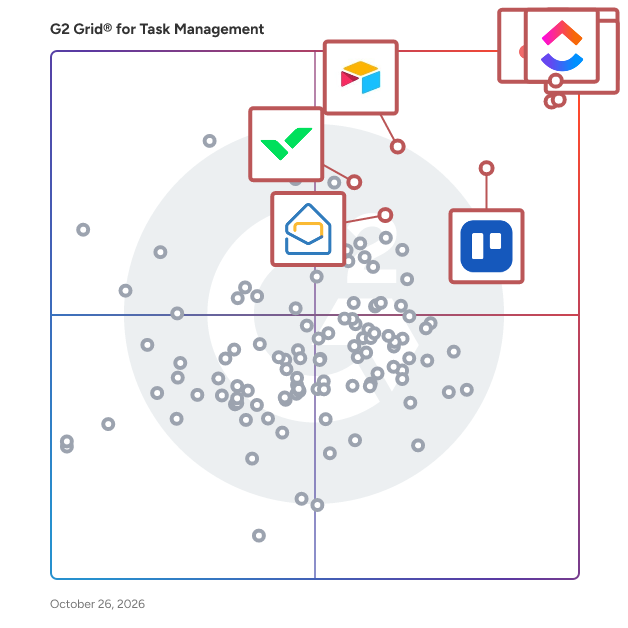
G2 Grid® for Task Management Software

G2 Grid® for Task Management Software plotting products by satisfaction and market presence

Highlighted products: Asana, ClickUp, monday AI Work Platform, Smartsheet, Trello, Airtable, Wrike, and Microsoft Planner.

Underlying data: [Grid® JSON](https://www.g2.com/categories/task-management-software/grids.json?focus%5B%5D=asana&focus%5B%5D=clickup&focus%5B%5D=monday-com&focus%5B%5D=smartsheet&focus%5B%5D=trello&focus%5B%5D=airtable&focus%5B%5D=wrike&focus%5B%5D=microsoft-planner)

Taskade

Taskade is the simplest way to create team outlines, checklists, and workflows. Whether you are managing team projects, or planning future milestones — getting work done with Taskade is simple, fast, and fun! Collaborate with team members on the same page and edit projects together in real time. Chat, organize, and work together instantly. Use Taskade to supercharge your team productivity. Taskade can be used by individuals or teams, at home or at work (or anywhere!). Automatic syncing means your data are always up to date on every device. Taskade gives your team superpowers! - FEATURES • Create beautiful task lists, notes, and outlines • Share and collaborate with others instantly • Invite and add team members to workspaces • Chat and work together in real time • Create unlimited nested outlines • Easy one-tap editing projects • Tag projects to organize and prioritize • Assign projects to multiple team members • Real-time syncing across your phone, tablet and computer • Beautiful and minimal interface • Elegantly simple, free to use - IS TASKADE FREE? Yes, Taskade is completely free. You have the option to upgrade to Taskade Pro, which will unlock extra features. - ANY PRODUCTIVITY TIPS? Focus on one thing at a time. When you have a bunch of to-dos and ideas swimming around in your head it gets hard to focus. Use Taskade to declutter and document your thoughts so you can focus fully on every task and project. Make team communication open and efficient. Rather than rely on scheduled meetings (which, let’s face it, can be a huge time-suck) encourage team members to communicate problems and questions as soon as they arise. With Taskade teams can chat live and collaborate in real time, so things get sorted out in a snap. - CAN I USE TASKADE WITH MY TEAM? Yes. Taskade is designed to supercharge your team productivity. Simply invite your team members to join a Workspace. You can work together in real-time to manage projects and assign tasks. Get work done faster, smarter. - WHAT IS A WORKSPACE? A workspace is a collection of projects. Workspaces help to keep your task lists and notes organized. Make workspaces collaborative by inviting team members. Team members can edit all projects inside and collaborate in real-time. Team members will also receive push notifications for any updates inside. - TEMPLATES Find creative ways to use Taskade by selecting a template or creating your own. Design your own productivity systems and workflows using Taskade. • Weekly planner and task list • Team standup and scrum checklist • Daily bullet journal and team diary • Brainstorming and meeting notes • Project roadmaps and outliner • Unlimited Workspaces and teams. • Unlimited team members and sharing. • Unlimited image attachments and uploads. • Make Templates to automate workflows • Sync task lists between your iPhone, iPad, and Mac • Themes and night mode are on the way • Keep the Taskade updates coming - GET IN TOUCH Email support@taskade.com Visit us at https://taskade.com Privacy Policy: http://taskade.com/privacy Terms of Service: http://taskade.com/terms

Average Rating: 4.5/5.0

Total Reviews: 86

How Do G2 Users Rate Taskade?

  • Has the product been a good partner in doing business?: 9.1/10 (Category avg: 9.0/10)
  • Task Prioritization: 8.8/10 (Category avg: 8.8/10)
  • Creation & Assignment: 9.0/10 (Category avg: 9.0/10)
  • To-Do Lists: 9.0/10 (Category avg: 8.9/10)

Who Is the Company Behind Taskade?

  • Seller: Taskade
  • Year Founded: 2017
  • HQ Location: San Francisco, California
  • Twitter: @Taskade
    12,393 Twitter followers
  • LinkedIn® Page: www.linkedin.com
    18 employees on LinkedIn®

Who Uses This Product?

  • Who Uses This: Founder
  • Top Industries: Education Management, Computer Software
  • Company Size: 84% Small, 9% Medium

What Do G2 Reviewers Say About Taskade?

AI-generated summary from verified user reviews

Pros
  • Users praise the ease of use of Taskade, enhancing productivity with its intuitive interface and seamless features.
  • Users enjoy the ease of learning Taskade, praising its intuitive interface and speedy onboarding process.
  • Users value the easy setup of Taskade, enabling quick starts and enhanced productivity from the outset.
  • Users rave about the intuitive interface of Taskade, enhancing streamlined task management and collaboration.
  • Users love the seamless collaboration features of Taskade, enhancing team project management and workflow optimization.
Cons
  • Users find Taskade expensive, especially with unexpected billing for premium plans that don't meet their needs.
  • Users note that limited customization of dashboard widgets restricts flexibility for tailored team workflows in Taskade.
  • Users express frustration over limited features, highlighting issues with the user interface and file interaction.
  • Users find the overwhelming experience due to the rapid addition of new AI features in Taskade.
  • Users note slow loading during peak times, which slightly impacts mobile app responsiveness but appreciate Taskade's overall excellence.

What Are Recent G2 Reviews of Taskade?

What Are G2 Users Discussing About Taskade?

Baton

Baton is a SaaS implementation management platform that automates, simplifies and accelerates even the most complex customer onboarding projects. Baton is purpose-built for project participants to work across multiple organizational boundaries. Users enjoy real-time visibility into status reporting without the frustrations of chasing down weekly updates via email, spreadsheets or other outdated processes that will never scale.

Average Rating: 4.4/5.0

Total Reviews: 40

How Do G2 Users Rate Baton?

  • Has the product been a good partner in doing business?: 9.3/10 (Category avg: 9.0/10)
  • Task Prioritization: 8.3/10 (Category avg: 8.8/10)
  • Creation & Assignment: 8.5/10 (Category avg: 9.0/10)
  • To-Do Lists: 8.6/10 (Category avg: 8.9/10)

Who Is the Company Behind Baton?

Who Uses This Product?

  • Top Industries: Information Technology and Services, Computer Software
  • Company Size: 65% Medium, 25% Small

What Are Recent G2 Reviews of Baton?

What Are G2 Users Discussing About Baton?

Todo Cloud

Todo Cloud is a to-do task list and goal tracker. With Todo Cloud, you can daily plan, track and finish your to-do tasks whether they be simple grocery shopping lists, daily habits tied to goals, single work tasks or complex multi-person projects. Todo Cloud is an easy-to-use productivity app that Macworld says, “…oozes with awesomeness.” Refined over 10 years of constant perfecting, Todo Cloud is an all-encompassing productivity system helping millions of users to: • Improve time efficiency • Remember important details • Deliver results on time • Increase quality & consistency • Become more reliable • Create wealth • Build healthy habits and achieve goals • Change behavior Simple to customize and fun to use, Todo Cloud has everything you’d expect in a productivity system including: • START & END DATES - Measure the start, duration and forecasted finish dates. • TASK NOTES & COMMENTS - Add important notes. Comments are tracked by day and person. • TASK ACTIONS – Associate any task with a person in your address book, a URL or a phone number so you can take quick action when it is time to get work done. Build a smart list to see all tasks with actions related to people. • MULTIPLE REMINDERS – Want a nudge 1 month, 1 week, 1 day and 1 hour before a task is due. Go ahead and be our guest with multiple ways to get to results. But beware of alert fatigue. • RECURRING TASKS – Set a task to repeat when you need it with the recurrence based on due date or completion date. If you want to be reminded to take the trash out every Thursday without fail, then choose recurrence based on due date. If you want a daily recurring reminder to send a thank you note to someone else every few days, choose the recurrence based on completion date and you'll have flexibility to send that note when it is convenient. • LOCATION REMINDERS – Need to remember to buy an item or complete a task when you arrive at a certain location? No problem. Drop a pin on that location and Todo Cloud will alert you with the task details when you get there. • EMAIL TASK CREATION – Log in to the Todo Cloud web client, select settings and copy your custom email address. Then email yourself tasks that are dropped into your Todo Cloud inbox or you can log in to your settings to customize the default location for new tasks. • SECURE CLOUD SYNC – The Todo Cloud sync reliably backs up your data to our secure cloud seamlessly making it available whether you are working on Windows, Mac, Web, iOS or Android. • SMART LISTS – Create custom lists using filters that organize tasks by any data element in Todo Cloud. Want to see tasks due 4 weeks and beyond? Want to see tasks assigned to a person? Want to see tasks tagged with a specific word? You can do that and more. Push everything into Todo Cloud with the power to search, organize and track tasks just the way you want. • CALENDAR VIEW – From any list view, click the calendar icon to see a monthly view of tasks organized by due dates. Want to quickly change any task due date? Drag and drop the task to the new calendar date and your due date is changed. • FOCUS LISTS – Quickly see all your tasks due today or in the past. • SIRI VOICE TO TEXT – Use Siri voice commands to capture tasks on the go. Search the Todo Cloud help file for more instructions. • SHARE LISTS – Invite others to view and contribute to tasks. • TODO FOR BUSINESS – All of these productivity capabilities are available for teams of people with additional administrator management. The mobile-first approach will boost your team’s output with powerful task management. Learn more at: https://www.appigo.com/for-business/ Download Todo Cloud and get a 14-Day FREE Trial of Premium features available for a low-cost monthly/yearly subscription! After which the basic features remain free. See the pricing details here: https://www.appigo.com/pricing

Average Rating: 3.9/5.0

Total Reviews: 93

How Do G2 Users Rate Todo Cloud?

  • Has the product been a good partner in doing business?: 7.6/10 (Category avg: 9.0/10)
  • Task Prioritization: 8.9/10 (Category avg: 8.8/10)
  • Creation & Assignment: 7.0/10 (Category avg: 9.0/10)
  • To-Do Lists: 9.2/10 (Category avg: 8.9/10)

Who Is the Company Behind Todo Cloud?

  • Seller: Appigo
  • Year Founded: 2008
  • HQ Location: Orem, UT
  • Twitter: @AppiGo
    9 Twitter followers
  • LinkedIn® Page: www.linkedin.com
    4 employees on LinkedIn®

Who Uses This Product?

  • Top Industries: Information Technology and Services, Higher Education
  • Company Size: 35% Small, 34% Medium

What Do G2 Reviewers Say About Todo Cloud?

AI-generated summary from verified user reviews

Pros
  • Users value the effective organization features of Todo Cloud, enabling structured management of tasks and deadlines.
  • Users value the effective task organization in Todo Cloud, appreciating its versatile lists and date management options.
Cons
  • Users report calendar issues with Todo Cloud, particularly with limited integrations and problematic Google Calendar syncing.
  • Users face integration issues with Todo Cloud, particularly with Google Calendar sync not functioning smoothly.
  • Users encounter a lack of integration with Todo Cloud, particularly with issues in syncing to Google Calendar.

What Are Recent G2 Reviews of Todo Cloud?

What Are G2 Users Discussing About Todo Cloud?

Hitask

Hitask is a unique project and task manager for teams. It helps to focus on team collaboration, getting tasks done and manage an entire project. Benefits of using Hitask - Create and assign tasks with Hitask's intuitive drag & drop UI. - Store documents and files by attaching it to tasks. - Set up deadlines for time-sensitive projects. - Collaborate via in-app chat for specific tasks. - Keep track of everything, anywhere with any device. - Move beyond with 3rd party integrations like Google and Outlook Calendar.

Average Rating: 4.4/5.0

Total Reviews: 97

How Do G2 Users Rate Hitask?

  • Has the product been a good partner in doing business?: 6.8/10 (Category avg: 9.0/10)
  • Task Prioritization: 9.6/10 (Category avg: 8.8/10)
  • Creation & Assignment: 9.5/10 (Category avg: 9.0/10)
  • To-Do Lists: 9.6/10 (Category avg: 8.9/10)

Who Is the Company Behind Hitask?

  • Seller: Human Computer
  • Year Founded: 2008
  • HQ Location: Houston, TX
  • Twitter: @hitask
    345 Twitter followers
  • LinkedIn® Page: www.linkedin.com
    2 employees on LinkedIn®

Who Uses This Product?

  • Who Uses This: Manager
  • Top Industries: Information Technology and Services, Automotive
  • Company Size: 78% Medium, 34% Large

What Are Recent G2 Reviews of Hitask?

What Are G2 Users Discussing About Hitask?

PSOHUB.

PSOhub is PSA software purpose-built for professional services organizations: IT firms, consultancies, marketing agencies, and financial services teams. It covers the entire delivery cycle in one connected platform, from quoting and project management through resource and capacity planning, time and expense tracking, and invoicing. Built by a founding team with over 30 years of combined experience in professional services, and trusted by organizations across 40+ countries. From quote to project When a quote is accepted, the project is ready to start. Tasks are structured, budgets are set, and the team is assigned. Project managers get a real-time view of task progress, budget burn, and margin at every stage, so there are no surprises at month-end. Most professional services teams run 6 to 10 separate tools. PSOhub replaces that stack so data flows without manual handovers at every step. Resource and capacity planning The AI scheduling layer automatically assigns and reschedules resources based on skills, live capacity, and current utilization. When someone hits full utilization, the system flags it and suggests moving tasks to another team member with headroom. Keeping utilization high without blowing deadlines used to mean constant manual oversight. With PSOhub, it largely handles itself. Time and expense tracking Time and expenses connect directly to each project's budget and contract type. Whether billing fixed-fee, time and material, or retainer, hours log against the right scope and invoices generate without a manual reconciliation step. AI project and risk management The AI Copilot generates a full project plan, including financials, team assignment, and timeline, in around 10 seconds, drawing on the organization's own historical data rather than generic benchmarks. It monitors margins continuously, flags scope creep early, including situations like a senior consultant logging hours on a junior task, and generates risk assessments with concrete recommended actions. Integrations For teams using HubSpot as their CRM, a native two-way integration connects closed deals directly to projects, with time logs flowing back to the CRM. Also integrates with SAP Business One, QuickBooks, Xero, and Salesforce. Works for organizations of 10 to 1,000+.

Average Rating: 4.1/5.0

Total Reviews: 225

G2 Deal: Claim our G2 Deal and start using PSOhub with a 15% discount*!

PSOhub provides unique All-in-One Project Management software through predictive project management, smart resource management, self-driving time and expense tracking, and invoicing in a seamlessly integrated platform. Take a look, try it for free, or book a demo to get more information!

Price: ~~$25 Essentials, $35 Professional, $45 Enterprise~~ → $21 Essentials, $30 Professional, $38 Enterprise

View this exclusive G2 deal

How Do G2 Users Rate PSOHUB.?

  • Has the product been a good partner in doing business?: 8.5/10 (Category avg: 9.0/10)
  • Task Prioritization: 7.5/10 (Category avg: 8.8/10)
  • Creation & Assignment: 8.2/10 (Category avg: 9.0/10)
  • To-Do Lists: 7.4/10 (Category avg: 8.9/10)

Who Is the Company Behind PSOHUB.?

  • Seller: PSOHUB.
  • Company Website:
  • Year Founded: 2020
  • HQ Location: Bussum, North Holland, Netherlands
  • Twitter: @PSOhub
    38 Twitter followers
  • LinkedIn® Page: www.linkedin.com
    16 employees on LinkedIn®

Who Uses This Product?

  • Who Uses This: Consultant, Project Manager
  • Top Industries: Consulting, Marketing and Advertising
  • Company Size: 65% Small, 33% Medium

What Do G2 Reviewers Say About PSOHUB.?

AI-generated summary from verified user reviews

Pros
  • Users find PSOhub's ease of use remarkable, facilitating smooth project management and time tracking.
  • Users appreciate the easy timesheet and project management interface of PSOhub, which enhances productivity and efficiency.
  • Users appreciate the ease of use of PSOHUB, citing its efficient data entry and project management capabilities.
  • Users appreciate the efficiency of project tracking with PSOHUB, making data management a breeze across multiple projects.
  • Users appreciate the clear and intuitive UI of PSOhub, finding it simple and user-friendly for daily tasks.
Cons
  • Users find PSOHUB not intuitive, struggling with navigation and feature understanding, affecting overall usability.
  • Users find the limited customization options restricting, impacting their ability to tailor reports effectively.
  • Users find limited features in PSOhub, particularly in reporting customization and mobile app functionality compared to competitors.
  • Users face time tracking issues, struggling with complexity and bugs that disrupt task management and progress tracking.
  • Users find PSOHUB to have a complex usability that requires time and effort to fully understand.

What Are Recent G2 Reviews of PSOHUB.?

What Are G2 Users Discussing About PSOHUB.?

WiseTeam

WiseTeam is a flexible solution for your company’s work and project management. The system combines all tools necessary for providing professional services. It presents these tools in one convenient place and continuously provides relevant information that empowers you to make the right decisions. WiseTeam enables users to plan, track and execute all business related activities in one place and make important decisions on the fly. Crucial business activities like: employees’ time management, project management, process management, customer relationship management, billing and invoicing, quality management and others are tracked effortlessly with the help of this intuitive system.

Average Rating: 4.4/5.0

Total Reviews: 27

How Do G2 Users Rate WiseTeam?

  • Has the product been a good partner in doing business?: 10.0/10 (Category avg: 9.0/10)

Who Is the Company Behind WiseTeam?

  • Seller: UAB "Integris"
  • Year Founded: 2013
  • HQ Location: Vilnius, Vilnius
  • Twitter: @WiseTeam_
    34 Twitter followers
  • LinkedIn® Page:
quot;Integris
quot;","url":"https://www.linkedin.com/company/wiseteam/","type":"linkedin_company_website","name":"Event::Vendors::ExternalLinkClicked"}" hide_link="false" href="https://www.g2.com/external_clickthroughs/record?secure%5Bsource_type%5D=product_profile&secure%5Btoken%5D=94c1c65180ce863d9363602c650e6d0e636f6ad51ec5c780426d435264ef20f9&secure%5Burl%5D=https%3A%2F%2Fwww.linkedin.com%2Fcompany%2Fwiseteam%2F&secure%5Burl_type%5D=linkedin_company_website">www.linkedin.com
18 employees on LinkedIn®

Who Uses This Product?

  • Top Industries: Information Technology and Services
  • Company Size: 45% Small, 31% Medium

What Do G2 Reviewers Say About WiseTeam?

AI-generated summary from verified user reviews

Pros
  • Users commend WiseTeam for its effective task management, simplifying assignment creation and enhancing team collaboration.
  • Users find the ease of use in WiseTeam invaluable for task management and team collaboration efficiency.
  • Users love the easy sharing of documents and tasks, enhancing collaboration and project management efficiency.
  • Users love the easy task assignment feature, streamlining project management and enhancing team collaboration.
  • Users value the effective team collaboration offered by WiseTeam, enhancing project management and task completion.
Cons
  • Users feel the multi-assigning feature is lacking and could be significantly improved for better usability.

What Are Recent G2 Reviews of WiseTeam?

What Are G2 Users Discussing About WiseTeam?

Allfred

Allfred is a workflow management tool tailor-made for Ad or PR agencies that enables all team members to work seamlessly together from the client's first brief to invoicing, streamlining the process and minimizing mistakes. Allfred was designed with "creatives in mind" to shift agencies' focus to do more creative work and less on paperwork and numerous Spreadsheets. We understand that for CFOs and managing directors, every decision must be rooted in financial data. That's why our platform offers real-time integrated financial and project data, allowing for better business decisions and increased profitability. Starting with automated Proposals and Budgeting, through interactive Resource Planning up to integrated Project Management and one-click Time Tracking, Allfred gives agency teams the right tools to make the process simple and efficient to deliver agencies more profit. *Time management* To-do-list and one-click time tracking reduces friction in communication within creative departments. *Resource planning* Interactive resource planning with drag&drop options increases agency team capacity and helps reduce overwork. *Project management* Time-saving automation and process assistance reduce dull work and frequent budgeting and project management mistakes. *Financial analysis* The Finance dashboard provides a comprehensive overview of your financial data and KPIs in one place. It helps you understand and analyze the sources of your revenue and identify opportunities for growth and allows you to track and optimize profitability and performance. With a step-by-step approach to onboarding into agency processes, we reduce the management effort and shorten the implementation time. We believe that better work for everyone means better profit for the agency.

Average Rating: 4.7/5.0

Total Reviews: 52

How Do G2 Users Rate Allfred?

  • Has the product been a good partner in doing business?: 9.6/10 (Category avg: 9.0/10)
  • Task Prioritization: 9.2/10 (Category avg: 8.8/10)
  • Creation & Assignment: 9.4/10 (Category avg: 9.0/10)
  • To-Do Lists: 8.7/10 (Category avg: 8.9/10)

Who Is the Company Behind Allfred?

  • Seller: Allfred
  • Year Founded: 2020
  • HQ Location: Bratislava, Slovakia
  • LinkedIn® Page: www.linkedin.com
    8 employees on LinkedIn®

Who Uses This Product?

  • Who Uses This: Account Manager
  • Top Industries: Marketing and Advertising
  • Company Size: 83% Small, 17% Medium

What Do G2 Reviewers Say About Allfred?

AI-generated summary from verified user reviews

Pros
  • Users highlight the ease of use of Allfred, appreciating its intuitive interface and seamless integration capabilities.
  • Users love the simple and organized task management of Allfred, finding it essential and efficient for daily use.
  • Users appreciate the comprehensive project management capabilities of Allfred, streamlining processes and enhancing team collaboration.
  • Users value the robust and customizable features of Allfred for effective resource management and streamlined project organization.
  • Users love the user-friendly interface of Allfred, appreciating its seamless integration and productivity-boosting capabilities.
Cons
  • Users experience slow loading times occasionally, especially with large sheets, which can hinder efficiency.
  • Users occasionally experience slow performance when handling large data sheets, impacting their overall efficiency.
  • Users often experience slow update issues, leading to confusion and delays in project and task management.
  • Users report encountering bug issues with Allfred, which can occasionally disrupt their workflow and experience.
  • Users encounter occasional glitches in Allfred, which can disrupt workflow but are generally minor and manageable.

What Are Recent G2 Reviews of Allfred?

Azendoo

Azendoo is a work tracking application that helps teams stay on top collaboration and projects. Bringing together context, conversations, and organization into one single product, we’re empowering teams to move work forward. With Azendoo you share tasks, due dates and priorities faster than ever while shortening planning time, reducing sync efforts and eliminating unnecessary meetings.

Average Rating: 4.2/5.0

Total Reviews: 56

How Do G2 Users Rate Azendoo?

  • Has the product been a good partner in doing business?: 8.8/10 (Category avg: 9.0/10)

Who Is the Company Behind Azendoo?

  • Seller: Azendoo
  • Year Founded: 2012
  • HQ Location: Bordeaux, Aquitaine
  • Twitter: @azendoo
    2,639 Twitter followers
  • LinkedIn® Page: www.linkedin.com
    2 employees on LinkedIn®

Who Uses This Product?

  • Top Industries: Marketing and Advertising
  • Company Size: 70% Small, 26% Medium

What Are Recent G2 Reviews of Azendoo?

What Are G2 Users Discussing About Azendoo?

DoneDone

If you're looking for the most essential features in a task tracker and shared inbox, look no further than DoneDone. We work hard to make our product simple and easy to use, so you can focus on getting your work done. With DoneDone, customer support and product teams can work together more efficiently than ever before.

Average Rating: 4.6/5.0

Total Reviews: 84

How Do G2 Users Rate DoneDone?

  • Has the product been a good partner in doing business?: 9.4/10 (Category avg: 9.0/10)
  • Task Prioritization: 9.1/10 (Category avg: 8.8/10)
  • Creation & Assignment: 9.4/10 (Category avg: 9.0/10)
  • To-Do Lists: 9.3/10 (Category avg: 8.9/10)

Who Is the Company Behind DoneDone?

  • Seller: DoneDone
  • Year Founded: 2007
  • HQ Location: Austin, US
  • Twitter: @GetDoneDone
    622 Twitter followers
  • LinkedIn® Page: www.linkedin.com
    7 employees on LinkedIn®

Who Uses This Product?

  • Who Uses This: CEO, Director
  • Top Industries: Marketing and Advertising, Information Technology and Services
  • Company Size: 91% Small, 7% Medium

What Do G2 Reviewers Say About DoneDone?

AI-generated summary from verified user reviews

Pros
  • Users value the ease of use of DoneDone, making it an excellent choice for managing tasks effectively.
  • Users value the easy setup of DoneDone, finding it simple to implement and enhance their productivity.
  • Users highlight the efficiency of DoneDone, integrating smoothly into workflows and enhancing productivity significantly.
  • Users praise DoneDone's powerful and flexible API, enhancing functionality and integration for diverse use cases.
  • Users value the time-saving features of DoneDone, enhancing productivity and simplifying complex task management.
Cons
  • Users find filtering issues with DoneDone, making it challenging to sort linked tasks and search past projects.
  • Users express a need for inadequate filtering options to enhance task management and organization within DoneDone.
  • Users note a lack of tools for HIPAA compliance and desire enhanced sorting/filtering features in DoneDone.
  • Users find DoneDone's search functionality for past projects not intuitive, highlighting a need for improvement in ease of use.
  • Users find subtask issues in DoneDone due to lacking sorting/filtering features and HIPAA compliance for functionality.

What Are Recent G2 Reviews of DoneDone?

What Are G2 Users Discussing About DoneDone?

Status Hero

Status Hero® is a modern team alignment tool that replaces time-consuming meetings, shoulder taps, digging for data, and other interruptions with tidy reports. Get a continuous, clear understanding of accomplishments, intentions, and blockers across your entire organization so you can be a better leader. Status Hero works with project management tools like GitHub, Jira, and Asana, and messaging tools like email, Slack, and Microsoft Teams to compile your team’s activity and check-ins into a single report you can review and share. Help your team regain focus by getting continuous clarity on accomplishments, intentions, and blockers across workflows. Here's how it works: 1) Team members respond to a brief, once-daily check-in. These are customizable by time zone and can be sent by email, Slack, or other tools. 2) Activity from project management tools like GitHub, Jira, Trello, and Asana (among others) is automatically added to the check-ins. 3) Everyone gets a report with team-wide check-ins, goals, activities, and requests for help. Later, create custom reports for 1:1s and retros. One Tool, Three Ways to Make Your Team Happier 1. Fix Stand-Up Meetings Status Hero collects all of the work details so you can use stand-ups to talk about substance (or skip them altogether). 2. Seamlessly Connect Remote Team Members Customize when and how people check in and receive updates. Work across asynchronous schedules and time zones with less confusion. 3. Build Trust & Gain Transparency Understanding how everyone else is contributing to the team's goals is essential to building trust. More trust means quicker decision-making, smoother collaboration, better estimates, and a more focused team.

Average Rating: 4.2/5.0

Total Reviews: 12

How Do G2 Users Rate Status Hero?

  • Has the product been a good partner in doing business?: 7.5/10 (Category avg: 9.0/10)
  • Task Prioritization: 10.0/10 (Category avg: 8.8/10)
  • Creation & Assignment: 10.0/10 (Category avg: 9.0/10)
  • To-Do Lists: 10.0/10 (Category avg: 8.9/10)

Who Is the Company Behind Status Hero?

  • Seller: 8012 Labs
  • Year Founded: 2014
  • HQ Location: Brooklyn, NY
  • Twitter: @8012Labs
    26 Twitter followers
  • LinkedIn® Page: www.linkedin.com
    2 employees on LinkedIn®

Who Uses This Product?

  • Company Size: 58% Medium, 42% Small

What Are Recent G2 Reviews of Status Hero?

What Are G2 Users Discussing About Status Hero?

Paymo

Paymo is a complete time-tracking, project-management, and invoicing & payments solution for client-focused teams of up to 20 people. From task planning to payment, Paymo helps agencies and independent professionals deliver work on time, stay profitable, and manage projects without multiple tools. It is ideal for digital, creative, and marketing agencies, consulting businesses, and architecture firms. It allows you to manage client projects and business tasks, track work time, and invoice clients from one place, wherever you are. The primary focus of the software is helping teams track work time and manage projects from start to finish: - split projects into task lists and tasks and assign them to your employees or co-workers - automatically track work time at the office via web timer or on the go via mobile apps - submit and approve timesheets - keep everyone involved in a project up to date with what's happening through discussions - create customizable static and live reports and track business performance - store all the files related to the project - so everyone can access them anytime - visualize your team's work, eliminate bottlenecks, and reduce the idle time in your projects - keep track of time spent on all computer activities and allocate that time to projects - track expenses, generate estimates and invoices for the client, and get paid online - with milestones, the team knows when major project stages are due to be completed - save projects as templates and use them when you need to create a similar project - track project and client profitability

Average Rating: 4.6/5.0

Total Reviews: 584

G2 Deal: G2 users get a 20% discount on Paymo for three months!

Paymo is a work management software dedicated to digital, creative, and marketing agencies, consulting businesses, software & engineering firms, and architecture firms. This discount for G2 users is for three months for new customers only and applies to any monthly plan.

View this exclusive G2 deal

How Do G2 Users Rate Paymo?

  • Has the product been a good partner in doing business?: 9.1/10 (Category avg: 9.0/10)
  • Task Prioritization: 8.5/10 (Category avg: 8.8/10)
  • Creation & Assignment: 9.1/10 (Category avg: 9.0/10)
  • To-Do Lists: 8.8/10 (Category avg: 8.9/10)

Who Is the Company Behind Paymo?

  • Seller: Paymo
  • Year Founded: 2008
  • HQ Location: Bihor, Romania
  • Twitter: @Paymo
    3,121 Twitter followers
  • LinkedIn® Page: www.linkedin.com
    15 employees on LinkedIn®

Who Uses This Product?

  • Who Uses This: Owner, CEO
  • Top Industries: Marketing and Advertising, Information Technology and Services
  • Company Size: 83% Small, 11% Medium

What Do G2 Reviewers Say About Paymo?

AI-generated summary from verified user reviews

Pros
  • Users appreciate the precise time tracking of Paymo, which simplifies billing and enhances productivity effortlessly.
  • Users love the intuitive interface of Paymo, which enhances productivity and simplifies time tracking and invoicing.
  • Users value the customizable and intuitive invoicing feature of Paymo, enhancing ease of billing and tracking.
  • Users appreciate the effective progress tracking in Paymo, which enhances billing and project management efficiency.
  • Users enjoy the time-saving features of Paymo, streamlining task management, invoicing, and productivity tracking effortlessly.
Cons
  • Users express frustration over poor customer support, feeling ignored and unsupported during critical issues and inquiries.
  • Users express frustration over limited recovery options for deleted tasks and inadequate customer service response times.
  • Users face significant integration issues due to lack of responsiveness from customer support, hindering overall satisfaction.
  • Users find the lack of customization in Paymo frustrating, limiting functionality compared to alternatives.
  • Users note the limited features in Paymo, particularly missing dark mode and basic reporting functionalities.

What Are Recent G2 Reviews of Paymo?

What Are G2 Users Discussing About Paymo?

Easynote

Easynote is work and collaboration software where anyone and anywhere can manage their daoly work. It's easy and very scalable to any industry or business thanks to it's unique grid system. No matter if you need to work agile, in timeline or gridway, Easynote is the right choise for you. So it's time to say goodbye to Monday.com, Asana, Clickup, Trello, TeamGantt and many more. Use over 50 pre-defined templates to get started in seconds. Manage small projects or large enterprise projects together with your team! Use our unique dashboard to get overview of all your projects at once, in once single place. Easynote offer a 7 day trial with no credit card required.

Average Rating: 4.6/5.0

Total Reviews: 14

How Do G2 Users Rate Easynote?

  • Task Prioritization: 9.7/10 (Category avg: 8.8/10)
  • Creation & Assignment: 9.7/10 (Category avg: 9.0/10)
  • To-Do Lists: 9.7/10 (Category avg: 8.9/10)

Who Is the Company Behind Easynote?

  • Seller: Easynote
  • Year Founded: 2016
  • HQ Location: Malmö, SE
  • Twitter: @easynote
  • LinkedIn® Page: www.linkedin.com
    6 employees on LinkedIn®

Who Uses This Product?

  • Company Size: 64% Small, 50% Medium

What Are Recent G2 Reviews of Easynote?

What Are G2 Users Discussing About Easynote?

BasicOps

BasicOps is task management and so much more. It’s a simple, yet powerful, platform that helps you stay organized and clear on what needs to get done, when, and by who. With BasicOps you can create projects, take notes in meetings, convert them into tasks for yourself and your team, set deadlines, use online chats, and easily launch Zoom calls from a chat. BasicOps makes it easier for your whole team to communicate and collaborate in one place. Work smart, work happy, work here: your base of operations. Start using BasicOps for FREE.

Average Rating: 4.4/5.0

Total Reviews: 13

How Do G2 Users Rate BasicOps?

  • Has the product been a good partner in doing business?: 10.0/10 (Category avg: 9.0/10)
  • Task Prioritization: 9.0/10 (Category avg: 8.8/10)
  • Creation & Assignment: 8.9/10 (Category avg: 9.0/10)
  • To-Do Lists: 8.9/10 (Category avg: 8.9/10)

Who Is the Company Behind BasicOps?

  • Seller: BasicOps
  • Year Founded: 2011
  • HQ Location: San Francisco, California
  • Twitter: @BasicOps4Teams
    31 Twitter followers
  • LinkedIn® Page: www.linkedin.com
    10 employees on LinkedIn®

Who Uses This Product?

  • Top Industries: Marketing and Advertising
  • Company Size: 93% Small, 7% Medium

What Are Recent G2 Reviews of BasicOps?

flowdit

flowdit is an inspection and audit platform and connected worker solution built for manufacturing. Not for retail. Not for hospitality. For the people running production lines, managing quality on the shop floor, and keeping equipment running in industrial plants. The problem with most inspection tools Most tools record the failure and stop there. The finding ends up in a PDF. Someone eventually emails the maintenance team. Meanwhile the line keeps running with the problem unfixed. flowdit closes that gap. When a deviation is found, the corrective action is assigned immediately, tracked in the same system, and resolved with a full audit trail. From the first check on the shop floor to the closed corrective action, everything happens in one place. What manufacturing teams actually deal with Paper checklists disappear. Excel sheets become version-controlled nightmares. Audit preparation takes weeks because documentation is scattered across folders, inboxes, and clipboards. Quality managers cannot see what is happening across sites in real time. Maintenance teams work in a separate system from quality. SOPs exist on paper nobody reads. flowdit was built to replace all of that. What flowdit covers Inspections, audits, maintenance (CMMS), quality management (QMS), EHS, SOPs, commissioning, incident management, risk management, field service, and IoT monitoring. Not as separate modules bolted together. As one connected system where a failed inspection can trigger a maintenance work order, update the quality log, and notify the EHS manager simultaneously. Who uses flowdit Plant managers who need real-time visibility without spending Friday afternoon compiling reports. Quality managers who want to walk into an ISO audit without spending two weeks preparing. EHS managers whose safety procedures need to actually reach the person doing the job. Maintenance managers who need inspection failures to automatically create work orders. Commissioning engineers running FAT and SAT documentation. Frontline operators who need a tool simple enough to use on the first day without a training session. How it works in the field flowdit works offline. It runs on any mobile device. It integrates with SAP, Docuware and other ERP systems. It is ISO 27001 certified, GDPR-compliant, and hosted in Europe. The support team speaks English, German and Arabic. How flowdit compares flowdit covers more ground than single-purpose platforms like GoAudits, Lumiform, Checkify, Reportheld, next-audit.de, Checklist.com, Checkware, Checkflow, Cluetec-audit, Checklistguro or GoCanvas, which focus on inspections alone. It is more accessible than enterprise MES solutions like Germanedge or AuditBoard. It is more specific to manufacturing than general-purpose platforms like SafetyCulture, Connecteam, GoFormz, Process.st, Cognitoforms or smapone. It replaces the need for separate tools like Testify (quality only), remberg (maintenance only), Dozuki (SOPs only), Fiixsoftware or MaintainX (maintenance only), Workerbase, Azumuta, Leanbyte, Easytoinspect, Optro.ai, Manex.ai, Fastfieldforms, Manifestlyapp, Jolt, Secova, Maintmaster, Planonsoftware or eMaint. Industries Manufacturing, Automotive, Mechanical Engineering, Food and Beverage, Pharmaceutical, Energy, Construction, Facility Management. Certifications and compliance ISO 9001, ISO 27001, GDPR-compliant, hosted in Europe. Integrations SAP, ERP systems, IoT platforms, REST API, Azure, Google Workspace, Zapier, Dropbox. Languages German, English, French, Spanish, Portuguese, Arabic, Russian, Indonesian, Turkish, Chinese, Japanese, Korean. Pricing Free plan available. Enterprise pricing on request. Headquarters Germany and Dubai.

Average Rating: 4.8/5.0

Total Reviews: 28

How Do G2 Users Rate flowdit?

  • Has the product been a good partner in doing business?: 10.0/10 (Category avg: 9.0/10)
  • Task Prioritization: 8.3/10 (Category avg: 8.8/10)
  • Creation & Assignment: 9.2/10 (Category avg: 9.0/10)
  • To-Do Lists: 7.5/10 (Category avg: 8.9/10)

Who Is the Company Behind flowdit?

  • Seller: IOTIVATA - FZCO
  • Year Founded: 2018
  • HQ Location: Dubai, AE
  • Twitter: @flowdit_com
    2 Twitter followers
  • LinkedIn® Page: www.linkedin.com
    10 employees on LinkedIn®

Who Uses This Product?

  • Top Industries: Manufacturing, Information Technology and Services
  • Company Size: 68% Medium, 32% Small

What Do G2 Reviewers Say About flowdit?

AI-generated summary from verified user reviews

Pros
  • Users love the user-friendly interface of flowdit, making training and collaboration effortless and efficient.
  • Users praise efficiency in flowdit, enabling smooth workflows and swift training for field teams with minimal paperwork.
  • Users highly value the real-time data capability of Flowdit, enhancing collaboration and decision-making on-site.
  • Users value the audit efficiency of flowdit, facilitating seamless inspection processes and improved compliance tracking.
  • Users value the automation of workflows in flowdit, enhancing efficiency and minimizing paperwork in inspections and audits.
Cons
  • Users feel that Flowdit requires improvement in customization visibility and performance during large file syncing for a better experience.
  • Users find the learning curve challenging, especially non-technical users needing help with initial setup and complex features.
  • Users find the initial setup of complex workflows requires guidance, which can complicate the onboarding experience.
  • Users note data inaccuracy issues, indicating a need for improved syncing and advanced visualization features.
  • Users find the difficult learning process challenging, especially non-technical users adapting to all features.

What Are Recent G2 Reviews of flowdit?

YouTrack

YouTrack is a project management tool packed with features that streamline your work and increase productivity on any team project. Track tasks, manage projects, maintain a knowledge base, support your customers, collaborate, and deliver great products. From software development and DevOps to HR and marketing, all kinds of teams can use YouTrack’s functionality. 100K customers in a wide variety of industries around the world – from enterprises to small startups – trust YouTrack to manage their projects. YouTrack free verion is fully-functional and free forever for any team of up to 10 users. YouTrack offers a Cloud or Server version for any number of users and comes with free AI assistance.

Average Rating: 4.2/5.0

Total Reviews: 59

How Do G2 Users Rate YouTrack?

  • Has the product been a good partner in doing business?: 7.7/10 (Category avg: 9.0/10)
  • Task Prioritization: 8.3/10 (Category avg: 8.8/10)
  • Creation & Assignment: 8.1/10 (Category avg: 9.0/10)
  • To-Do Lists: 8.1/10 (Category avg: 8.9/10)

Who Is the Company Behind YouTrack?

  • Seller: JetBrains
  • Year Founded: 2000
  • HQ Location: Prague
  • Twitter: @jetbrains
    213,126 Twitter followers
  • LinkedIn® Page: www.linkedin.com
    2,941 employees on LinkedIn®

Who Uses This Product?

  • Top Industries: Computer Software, Information Technology and Services
  • Company Size: 55% Medium, 35% Small

What Do G2 Reviewers Say About YouTrack?

AI-generated summary from verified user reviews

Pros
  • Users appreciate the AI-powered issue suggestions in YouTrack, enhancing task management and automation significantly.
  • Users appreciate the enhanced automation features in YouTrack, significantly reducing manual efforts and improving efficiency.
  • Users appreciate the customizability of YouTrack, enhancing their experience with tailored interfaces and intuitive planning tools.
  • Users appreciate the customization features of YouTrack, enhancing their experience with visual and intuitive planning tools.
  • Users appreciate the streamlined interface and enhanced features of YouTrack, making daily project management more efficient.
Cons
  • Users find the dashboard limited in customization, impacting their data visualization and overall user experience.
  • Users find email integration lacking, which detracts from the overall efficiency and experience with YouTrack.
  • Users face export issues that hinder efficiency when trying to manage data with YouTrack effectively.
  • Users find integration issues with third-party tools like Slack or Jenkins hinder the overall usability of YouTrack.
  • Users note a lack of tools for customization and seamless integration, impacting overall efficiency in YouTrack.

What Are Recent G2 Reviews of YouTrack?

What Are G2 Users Discussing About YouTrack?