Top Free Task Management Software - Page 2

How Many Task Management Software Products Does G2 Track?

Total Products under this Category: 547

Category Stats (Sep 2026)

  • Average Rating: 4.46/5 (↑0.01 vs Aug 2026) The average rating of products in this category, based on all submitted ratings
  • Top Trending Product: Chaser (+1.82%) - Among all products in this category, Chaser recorded the largest rating increase compared to last month

Last updated: September 01, 2026

How Does G2 Rank Task Management Software Products?

Why You Can Trust G2's Software Rankings:

  • 30 Analysts and Data Experts
  • 118,700+ Authentic Reviews
  • 547+ Products
  • Unbiased Rankings

G2's software rankings are built on verified user reviews, rigorous moderation, and a consistent research methodology maintained by a team of analysts and data experts. Each product is measured using the same transparent criteria, with no paid placement or vendor influence. While reviews reflect real user experiences, which can be subjective, they offer valuable insight into how software performs in the hands of professionals. Together, these inputs power the G2 Score, a standardized way to compare tools within every category.

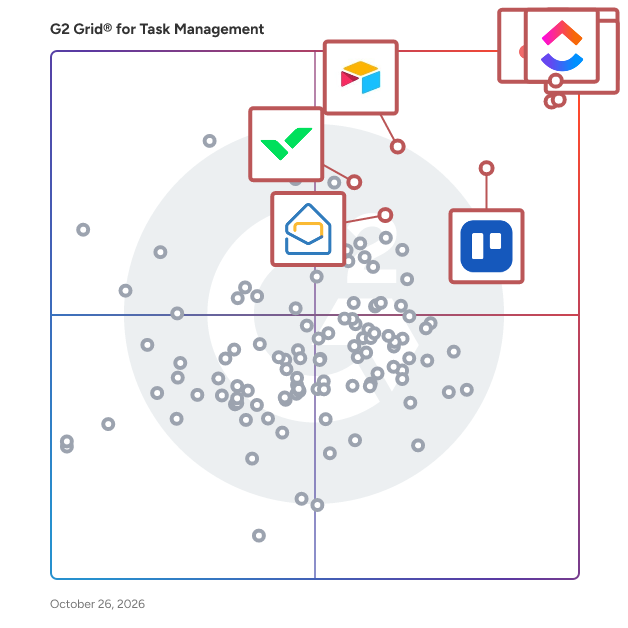
G2 Grid® for Task Management Software

G2 Grid® for Task Management Software plotting products by satisfaction and market presence

Highlighted products: Asana, ClickUp, monday AI Work Platform, Smartsheet, Trello, Airtable, Wrike, and Microsoft Planner.

Underlying data: [Grid® JSON](https://www.g2.com/categories/task-management-software/grids.json?focus%5B%5D=asana&focus%5B%5D=clickup&focus%5B%5D=monday-com&focus%5B%5D=smartsheet&focus%5B%5D=trello&focus%5B%5D=airtable&focus%5B%5D=wrike&focus%5B%5D=microsoft-planner)

Basecamp

Basecamp is the #1 collaboration tool for hundreds of thousands of teams worldwide. Teams use Basecamp to work on projects, communicate, and get work organized every day. Whether with teammates across the room, or clients across the world, Basecamp is the best tool to get things done. Basecamp makes it easy for teams to see what everyone is working on, collaborate on documents, schedule projects, and more without meetings or emails. Not convinced? Read our thousands of reviews and sign up for free.

Average Rating: 4.1/5.0

Total Reviews: 5,357

G2 Deal: Get 10% off Basecamp Pro Unlimited

Basecamp Pro Unlimited gets you unlimited users, 10x more storage, priority support, personal onboarding and more for one flat fee. Discount available for a limited time only.

Price: ~~$299~~ → $269

View this exclusive G2 deal

How Do G2 Users Rate Basecamp?

  • Has the product been a good partner in doing business?: 8.7/10 (Category avg: 9.0/10)
  • Task Prioritization: 8.4/10 (Category avg: 8.8/10)
  • Creation & Assignment: 8.8/10 (Category avg: 9.0/10)
  • To-Do Lists: 8.9/10 (Category avg: 8.9/10)

Who Is the Company Behind Basecamp?

  • Seller: 37signals
  • Year Founded: 1999
  • HQ Location: Chicago, IL
  • Twitter: @basecamp
    7,061 Twitter followers
  • LinkedIn® Page: www.linkedin.com
    175 employees on LinkedIn®

Who Uses This Product?

  • Who Uses This: Project Manager, Marketing Manager
  • Top Industries: Marketing and Advertising, Information Technology and Services
  • Company Size: 50% Small, 34% Medium

What Do G2 Reviewers Say About Basecamp?

AI-generated summary from verified user reviews

Pros
  • Users love the ease of use of Basecamp, facilitating smooth collaboration and project management for remote teams.
  • Users value the easy project coordination and streamlined team communication offered by Basecamp within a centralized platform.
  • Users love Basecamp's collaboration tools, promoting teamwork and streamlined project management for success.
  • Users enjoy the organization features of Basecamp, which streamline project coordination and enhance team accountability.
  • Users love how Basecamp offers intuitive task management, making it easy to organize and track multiple projects smoothly.
Cons
  • Users find Basecamp to have limited features compared to other software, wanting more options for scheduling and reporting.
  • Users find Basecamp lacking in advanced features, including reporting and scheduling tools for complex project management.
  • Users find Basecamp's limited functionality challenging for managing complex workflows and tracking project progress effectively.
  • Users find Basecamp's project management confusing, struggling with visibility and oversimplification, especially in complex scenarios.
  • Users feel that the lack of features in Basecamp limits its effectiveness compared to other software options.

What Are Recent G2 Reviews of Basecamp?

What Are G2 Users Discussing About Basecamp?

Hive

Hive is an all-in-one project management software platform that helps teams plan, collaborate, automate workflows, and deliver projects faster. Designed for organizations of every size, Hive combines powerful project planning, task management, team collaboration, and workflow automation tools in one customizable workspace. Whether you're managing marketing campaigns, product launches, creative projects, client work, or cross-functional initiatives, Hive adapts to your team's unique processes. Unlike rigid project management tools, Hive offers flexible workflows, customizable dashboards, and multiple project views so every team can work the way they work best. Hive empowers marketing, operations, product, IT, creative, and remote teams with the tools they need to stay organized and aligned. With customizable workflows and powerful collaboration features, teams can centralize work, reduce manual tasks, and improve visibility across every project. Key capabilities include: - Multiple project views, including Kanban boards, Gantt charts, calendars, tables, and lists - Task management with custom fields, dependencies, milestones, and priorities - Workflow automation to eliminate repetitive work - Real-time team collaboration with messaging, comments, and file sharing - Time tracking, reporting, and analytics - Integrations with hundreds of popular business applications Every organization works differently, which is why Hive is built to be one of the most customizable project management platforms available. Teams can create workflows tailored to their business processes using custom fields, project templates, automations, approvals, and integrations. Instead of forcing teams to change how they work, Hive adapts to existing workflows — helping organizations improve efficiency without disrupting productivity. Hive gives teams the flexibility to manage projects from the perspective that works best for them. Switch seamlessly between: - Kanban boards for agile workflows - Gantt charts for timeline planning - Calendar views for scheduling - Table and List views for detailed task management These flexible project views help teams track deadlines, manage resources, identify bottlenecks, and keep projects moving forward. Hive brings projects, communication, and documentation together in one centralized workspace. Team members can collaborate in real time, assign tasks, share files, provide feedback, and monitor project progress without switching between multiple tools. By combining project planning, collaboration, automation, and reporting in a single platform, Hive helps teams reduce busywork and focus on delivering results. Hive is more than just task management software—it's a scalable work management platform built to evolve alongside your business. As your needs change, Hive continues to expand through new features, integrations, and customer-driven enhancements. With flexible customization, powerful automation, and dedicated customer support, Hive enables organizations to streamline workflows, improve cross-functional collaboration, and execute projects with greater speed and confidence.

Average Rating: 4.6/5.0

Total Reviews: 651

G2 Deal: Get 20% off Hive

Get 20% off Hive Starter or Hive Teams plans. Customize your project management experience with the best tools & functionality for every budget.

Price: ~~$5 per user/month~~ → $4 per user/month

View this exclusive G2 deal

How Do G2 Users Rate Hive?

  • Has the product been a good partner in doing business?: 9.4/10 (Category avg: 9.0/10)
  • Task Prioritization: 9.4/10 (Category avg: 8.8/10)
  • Creation & Assignment: 9.5/10 (Category avg: 9.0/10)
  • To-Do Lists: 9.4/10 (Category avg: 8.9/10)

Who Is the Company Behind Hive?

  • Seller: Hive
  • Company Website:
  • Year Founded: 2016
  • HQ Location: New York, New York
  • Twitter: @hive
    3,353 Twitter followers
  • LinkedIn® Page: www.linkedin.com
    63 employees on LinkedIn®

Who Uses This Product?

  • Who Uses This: Project Manager, Graphic Designer
  • Top Industries: Marketing and Advertising, Information Technology and Services
  • Company Size: 63% Small, 29% Medium

What Do G2 Reviewers Say About Hive?

AI-generated summary from verified user reviews

Pros
  • Users appreciate the versatile project tracking capabilities of Hive, enhancing organization and timely documentation across projects.
  • Users appreciate the ease of use of Hive, enabling quick project setup and valuable features right away.
  • Users value the strong team collaboration features of Hive, enhancing interaction and streamlining workflows effectively.
  • Users appreciate the collaborative and efficient features of Hive, enhancing project management and workflow execution.
  • Users appreciate the effective organization of projects and timelines, enhancing overall workflow and documentation.
Cons
  • Users find the missing features in Hive frustrating, such as limited calendar views and inadequate text formatting options.
  • Users note a challenging learning curve initially, but supportive resources help ease navigation through Hive.
  • Users find Hive's limited features a drawback, wishing for more customization and bulk actions to enhance usability.
  • Users find Hive's interface not intuitive, feeling overwhelmed with project organization and mobile app usability issues.
  • Users experience a learning curve with Hive due to its complexity and differences from other project management tools.

What Are Recent G2 Reviews of Hive?

Rocketlane

Rocketlane is the world’s first Agentic Professional Services Automation (PSA) platform, built to transform how professional services teams deliver value in the AI-first era. While traditional PSAs focus on recording work, Rocketlane accelerates it through a connected system that unifies the entire front and back office. The platform brings together project delivery, resource management, time tracking, billing, and financial operations alongside collaboration capabilities such as Spaces, real-time chat, a modern client portal, Sheets for structured data, and a powerful Custom Apps framework that lets teams model any workflow inside Rocketlane. Everything lives in a single ecosystem, eliminating tool sprawl and fragmented data that slows down services teams. At the core of this is Nitro, Rocketlane's agentic execution layer: a network of intelligent AI agents that execute real delivery tasks, automate setup, manage workflows, detect risks, enforce governance, and continuously learn from patterns across the organization. This shift unlocks faster go-lives, better utilization, proactive issue detection, consistent delivery quality, and a level of operational resilience that was previously impossible. Over 650 companies, including Retool, Coursera, Postman, Intercom, Glean, AuditBoard, Vercel, Sprinklr, Worldpay, Grafana, OpenGov, and Outreach trust Rocketlane to run their mission-critical delivery processes. Customers across SaaS, services, and consulting use Rocketlane to shorten onboarding timelines, reduce escalations, improve forecasting accuracy, and accelerate moving from booked to consumed revenue. Founded in 2020, headquartered in the US, and operating globally with teams across India and the UK, Rocketlane is backed by leading investors, including Nexus Venture Partners and 8VC. The company’s rapid growth reflects strong market confidence in its category-defining vision for Agentic PSA.

Average Rating: 4.7/5.0

Total Reviews: 838

How Do G2 Users Rate Rocketlane?

  • Has the product been a good partner in doing business?: 9.4/10 (Category avg: 9.0/10)
  • Task Prioritization: 9.2/10 (Category avg: 8.8/10)
  • Creation & Assignment: 9.3/10 (Category avg: 9.0/10)
  • To-Do Lists: 9.1/10 (Category avg: 8.9/10)

Who Is the Company Behind Rocketlane?

  • Seller: Rocketlane Corp
  • Company Website:
  • Year Founded: 2020
  • HQ Location: Walnut, US
  • Twitter: @RocketlaneHQ
    1,470 Twitter followers
  • LinkedIn® Page: www.linkedin.com
    290 employees on LinkedIn®

Who Uses This Product?

  • Who Uses This: Customer Success Manager, Software Engineer
  • Top Industries: Computer Software, Information Technology and Services
  • Company Size: 56% Medium, 27% Small

What Do G2 Reviewers Say About Rocketlane?

AI-generated summary from verified user reviews

Pros
  • Users appreciate the extensive features of Rocketlane, streamlining onboarding and implementation for effective project management.
  • Users find Rocketlane's interface to be extremely user-friendly, allowing for quick report generation and easy customization.
  • Users value the streamlined project management and client collaboration features of Rocketlane, enhancing organization and efficiency.
  • Users value the easy project tracking in Rocketlane, enhancing organization, visibility, and client collaboration effortlessly.
  • Users appreciate the effective task management in Rocketlane, enjoying seamless onboarding and streamlined project setups.
Cons
  • Users are frustrated by the missing features in Rocketlane, hindering effective customer health monitoring and experience.
  • Users experience slow performance with Rocketlane, especially as project complexity and data entry grow.
  • Users face significant filtering issues and bugs, complicating their experience with Rocketlane's project management capabilities.
  • Users find the learning curve steep, requiring dedicated resources and understanding for successful implementation and use.
  • Users find limited customization in reporting features, impacting their ability to adapt the tool to specific needs.

What Are Recent G2 Reviews of Rocketlane?

What Are G2 Users Discussing About Rocketlane?

Freedcamp

The most user-friendly online experience for managing any type of Project. Contains one of the most comprehensive feature sets on the market while allowing you to only install the ones your team really needs. Offers innovative new user interfaces that reduce the amount of time required to stay on top of Projects. Ideal for businesses and freelancers are ready to get organized with ease. Check intro video here - https://www.youtube.com/watch?v=2oTmkmh88Bc&feature=youtu.be

Average Rating: 4.5/5.0

Total Reviews: 153

How Do G2 Users Rate Freedcamp?

  • Has the product been a good partner in doing business?: 9.3/10 (Category avg: 9.0/10)
  • Task Prioritization: 9.6/10 (Category avg: 8.8/10)
  • Creation & Assignment: 9.5/10 (Category avg: 9.0/10)
  • To-Do Lists: 9.5/10 (Category avg: 8.9/10)

Who Is the Company Behind Freedcamp?

  • Seller: Freedcamp
  • Year Founded: 2009
  • HQ Location: Santa Barbara, CA
  • LinkedIn® Page: www.linkedin.com
    6 employees on LinkedIn®

Who Uses This Product?

  • Top Industries: Non-Profit Organization Management, Marketing and Advertising
  • Company Size: 72% Small, 20% Medium

What Do G2 Reviewers Say About Freedcamp?

AI-generated summary from verified user reviews

Pros
  • Users appreciate the intuitive project management features of Freedcamp, enhancing efficiency and team collaboration.
  • Users highlight the intuitive task management of Freedcamp, enhancing workflow efficiency and project organization effortlessly.
  • Users appreciate the intuitive team collaboration in Freedcamp, enhancing communication and keeping projects organized and on track.
  • Users appreciate the ease of use of Freedcamp, making task management intuitive and efficient for all team members.
  • Users highlight the efficient task assignment capabilities of Freedcamp, keeping projects organized and teams productive.
Cons
  • Users find budgeting/accounting issues prevalent, as advanced features may be inaccessible for small teams or freelancers.
  • Users feel that Freedcamp has limited features, particularly on the mobile app and due to paywalls for advanced options.

What Are Recent G2 Reviews of Freedcamp?

What Are G2 Users Discussing About Freedcamp?

Worksection

Worksection is a project management software solution that helps teams combine tasks, project timelines, time tracking, work chats, and file storage into a single unified workspace. When work lives in five different software apps, tasks in one place, chats in another, files somewhere else, important details get lost, and nobody sees the full project picture. Worksection puts everything into one system for one transparent per user price. This keeps daily team operations organized without the constant hassle of switching between multiple digital tools. Key system capabilities break down into several core areas. Project management tool offers tasks with deadlines, assignees, and customizable statuses for clear execution. Visual planner provides interactive Gantt charts, Kanban boards, and project calendars for visual timeline planning. Time tracker allows users to track work hours directly inside tasks and bill clients at accurate hourly rates. Work chats ensure context rich team discussions live right inside each individual task comment thread. File storage keeps project documents and attachments stored directly next to the tasks they belong to. Time tracking and client billing are built right into the platform, core operational features that many alternative tools sell only as separate paid add ons. Who it fits includes teams from 5 to 50 or more members across agencies, IT companies, consulting firms, manufacturing, and construction industries. It is especially effective for service based teams that regularly bill clients for their worked hours. Worksection has been helping businesses organize their daily projects and workflows since 2008. The platform is fully GDPR and ISO 27001 certified, supports 11 languages, and offers a completely free plan for small teams of up to 5 users.

Average Rating: 4.8/5.0

Total Reviews: 153

How Do G2 Users Rate Worksection?

  • Has the product been a good partner in doing business?: 9.7/10 (Category avg: 9.0/10)
  • Task Prioritization: 9.9/10 (Category avg: 8.8/10)
  • Creation & Assignment: 9.8/10 (Category avg: 9.0/10)
  • To-Do Lists: 9.7/10 (Category avg: 8.9/10)

Who Is the Company Behind Worksection?

  • Seller: Worksection
  • Company Website:
  • Year Founded: 2008
  • HQ Location: Kyiv, Ukraine
  • Twitter: @worksection
    238 Twitter followers
  • LinkedIn® Page: www.linkedin.com
    25 employees on LinkedIn®

Who Uses This Product?

  • Top Industries: Marketing and Advertising, Civic & Social Organization
  • Company Size: 75% Small, 18% Medium

What Do G2 Reviewers Say About Worksection?

AI-generated summary from verified user reviews

Pros
  • Users appreciate the ease of use of Worksection, enabling quick team adoption and efficient task management.
  • Users value the user-friendly interface and powerful features in Worksection, streamlining project management and team collaboration.
  • Users appreciate the intuitive task management of Worksection, enabling seamless collaboration and efficient project tracking for remote teams.
  • Users value the intuitive task tracking in Worksection, enabling immediate team adoption and effective project management.
  • Users appreciate the management ease of Worksection, enabling efficient project handling and seamless team coordination.
Cons
  • Users find the limited features of Worksection restrict their ability to fully utilize the platform's potential.
  • Users find the mobile app's limitations challenging, as it lacks full functionality and can feel overwhelming for newcomers.
  • Users note the missing features in Worksection, particularly on mobile and integration limitations impacting workflow efficiency.
  • Users highlight the poor integration of Worksection, often resorting to workarounds for syncing with other tools.
  • Users find the mobile app functionality limited, making on-the-go adjustments challenging compared to the desktop version.

What Are Recent G2 Reviews of Worksection?

What Are G2 Users Discussing About Worksection?

Workzone

Workzone is project management software built for growing teams that value ease of use. With 20+ years of real-world use, Workzone helps marketing, operations, PMO, and IT teams manage high volumes of projects with structure, visibility, and control. Get complete visibility from portfolio to task level across Gantt, Kanban, and list views. Centralize requests, manage documents, balance resources, track time and budgets, and report on performance without stitching together multiple tools. Workzone is designed for teams that have outgrown lightweight tools but do not want the complexity, cost, or long rollout cycles of enterprise platforms. Adoption is built in. Every customer gets unlimited training, 1:1 onboarding, and ongoing support at no additional cost. Simple, predictable pricing starts at $8 per user per month with no hidden add-ons or surprise fees. With an average customer lifetime of 7+ years, Workzone is trusted by agencies, higher education, healthcare, financial services, nonprofits, and other organizations where execution, accountability, and visibility matter.

Average Rating: 4.3/5.0

Total Reviews: 74

How Do G2 Users Rate Workzone?

  • Has the product been a good partner in doing business?: 9.1/10 (Category avg: 9.0/10)
  • Task Prioritization: 10.0/10 (Category avg: 8.8/10)
  • Creation & Assignment: 10.0/10 (Category avg: 9.0/10)
  • To-Do Lists: 10.0/10 (Category avg: 8.9/10)

Who Is the Company Behind Workzone?

  • Seller: Workzone
  • Year Founded: 2002
  • HQ Location: Philadelphia, PA
  • Twitter: @workzone
    1,317 Twitter followers
  • LinkedIn® Page: www.linkedin.com
    79 employees on LinkedIn®

Who Uses This Product?

  • Top Industries: Marketing and Advertising, Higher Education
  • Company Size: 41% Small, 40% Medium

What Do G2 Reviewers Say About Workzone?

AI-generated summary from verified user reviews

Pros
  • Users appreciate the project management feature for its ability to expand projects and track hours effectively.
  • Users enjoy the detailed project and task tracking capabilities, appreciating the ability to monitor hours effectively.
  • Users appreciate the effective time tracking in Workzone, allowing them to manage projects and tasks efficiently.
Cons
  • Users wish for a more streamlined hourly tracking process to enhance their experience with Workzone.

What Are Recent G2 Reviews of Workzone?

What Are G2 Users Discussing About Workzone?

Chaser

Chaser is a task and project management app that lives entirely inside Slack. Create a task in the middle of any conversation, assign it to anyone, and Chaser automatically follows up until it's done — no separate tool to open, no new logins, and no training required. Because Chaser uses your team's existing Slack accounts, teams see roughly 4x higher adoption than traditional project management tools, and 98.7% of tasks get completed instead of ignored. Anyone who receives a task can use Chaser instantly — it explains itself. Features include task creation inside Slack conversations, automatic follow-ups and reminders, repeating tasks, group assignments with round-robin and volunteer requests, per-channel status reports, team reporting, and a Slack-embedded dashboard where your channels act as projects — no boards to build or maintain. Chaser also supports checklist templates, tags, connected workspaces, and Zapier, API, and AI agent integrations. While tools like Asana, Monday.com, and ClickUp are built for deep planning in standalone apps, Chaser is built for execution in the place your team already works. It's used by 500,000+ people across 1,000+ companies — operations, agencies, client services, and leaders who delegate — from startups to enterprises. Chaser is SOC 2 Type 2 compliant, uses Slack's own authentication, and never requests access to your Slack messages. Free 14-day trial with unlimited seats, no credit card required.

Average Rating: 4.9/5.0

Total Reviews: 22

How Do G2 Users Rate Chaser?

  • Has the product been a good partner in doing business?: 10.0/10 (Category avg: 9.0/10)
  • Task Prioritization: 9.4/10 (Category avg: 8.8/10)
  • Creation & Assignment: 10.0/10 (Category avg: 9.0/10)
  • To-Do Lists: 9.6/10 (Category avg: 8.9/10)

Who Is the Company Behind Chaser?

Who Uses This Product?

  • Company Size: 95% Small

What Are Recent G2 Reviews of Chaser?

GanttPRO

GanttPRO is intuitive online Gantt chart software for robust project management. The tool meets the needs of project, product, and portfolio managers from different spheres. GanttPRO offers task, deadline, cost, resource, and portfolio management, team collaboration, time logging, baselines, advanced export and sharing features. Robust import from MS Project and Excel as well as ready-made professional templates allows starting projects right away.

Average Rating: 4.8/5.0

Total Reviews: 529

How Do G2 Users Rate GanttPRO?

  • Has the product been a good partner in doing business?: 9.1/10 (Category avg: 9.0/10)
  • Task Prioritization: 9.7/10 (Category avg: 8.8/10)
  • Creation & Assignment: 9.6/10 (Category avg: 9.0/10)
  • To-Do Lists: 9.6/10 (Category avg: 8.9/10)

Who Is the Company Behind GanttPRO?

  • Seller: GanttPRO
  • Year Founded: 2015
  • HQ Location: Krakow, PL
  • Twitter: @GanttPROcom
    745 Twitter followers
  • LinkedIn® Page: www.linkedin.com
    22 employees on LinkedIn®

Who Uses This Product?

  • Who Uses This: Student, Project Manager
  • Top Industries: Higher Education, Computer Software
  • Company Size: 76% Small, 11% Large

What Do G2 Reviewers Say About GanttPRO?

AI-generated summary from verified user reviews

Pros
  • Users rave about GanttPRO's user-friendly interface, making project management simple and efficient without complex tutorials.
  • Users appreciate the intuitive interface of GanttPRO, which simplifies project management and enhances overall efficiency.
  • Users value the team collaboration features of GanttPRO, enhancing communication and productivity among project members.
  • Users highlight GanttPRO's intuitive interface, making project management simple and efficient without complex tutorials.
  • Users love the intuitive user interface of GanttPRO, simplifying project management and boosting productivity effortlessly.
Cons
  • Users find significant missing features in GanttPRO, including options for scenario planning and project duplication.
  • Users find GanttPRO's pricing to be expensive, particularly challenging for students and small businesses on a budget.
  • Users find GanttPRO's steep learning curve challenging, particularly for beginners navigating its extensive features.
  • Users feel the limited customization options of GanttPRO hinder their ability to tailor the platform to their needs.
  • Users find the billing issues with GanttPRO challenging, particularly with high prices and limited payment flexibility for students.

What Are Recent G2 Reviews of GanttPRO?

What Are G2 Users Discussing About GanttPRO?

Ninety.io

Run EOS® with one platform built for execution. Ninety is business operating system software designed for leadership teams running EOS® (the Entrepreneurial Operating System®). Instead of managing your operating system across spreadsheets, documents, email, and disconnected project management tools, Ninety brings your team's Vision, Accountability Chart®, Scorecards, Rocks, Issues, To-Dos, meetings, and planning into one connected platform. Today, more than 44,428 companies use Ninety to improve alignment, accountability, and execution. Whether you're implementing EOS for the first time or looking for a better way to run it, Ninety helps leadership teams spend less time managing the process and more time solving issues, making decisions, and achieving their goals. Teams can document their Vision/Traction Organizer® (V/TO®), assign accountability, track weekly measurable data, run Level 10 Meetings™, manage Rocks, To-Dos, and Issues, conduct Quarterly and Annual Planning, and strengthen leaders with People Analyzer™ and structured 1-on-1s. Ninety also includes Ask Maz, an AI-powered assistant that helps teams quickly find information, surface trends, answer questions about company data, and uncover insights across their operating system. By connecting strategy, people, meetings, and execution in one place, Ninety helps leadership teams stay focused on what matters most and build healthier, more aligned, and more effective organizations. What teams use Ninety for - Running EOS® from one connected platform - Building and sharing the Vision/Traction Organizer® (V/TO®) - Maintaining an Accountability Chart™ - Tracking weekly Scorecards and KPIs - Running Level 10 Meetings™, Quarterly Planning, and Annual Planning - Managing Rocks, To-Dos, and Issues - Using People Analyzer™ and 1-on-1s to strengthen accountability - Asking Maz AI to find information and surface insights across company data

Average Rating: 4.7/5.0

Total Reviews: 100

How Do G2 Users Rate Ninety.io?

  • Has the product been a good partner in doing business?: 9.7/10 (Category avg: 9.0/10)
  • Task Prioritization: 8.6/10 (Category avg: 8.8/10)
  • Creation & Assignment: 9.5/10 (Category avg: 9.0/10)
  • To-Do Lists: 9.1/10 (Category avg: 8.9/10)

Who Is the Company Behind Ninety.io?

  • Seller: Ninety.io
  • Company Website:
  • Year Founded: 2016
  • HQ Location: Park City, US
  • Twitter: @NinetyApp
    334 Twitter followers
  • LinkedIn® Page: www.linkedin.com
    173 employees on LinkedIn®

Who Uses This Product?

  • Who Uses This: EOS Implementer, Certified EOS Implementer
  • Top Industries: Consulting, Professional Training & Coaching
  • Company Size: 80% Small, 12% Medium

What Do G2 Reviewers Say About Ninety.io?

AI-generated summary from verified user reviews

Pros
  • Users appreciate the user-friendly interface of Ninety.io, making workflow automation and collaboration effortless and efficient.
  • Users appreciate the easy setup of Ninety.io, making transitions smooth and enhancing overall organizational efficiency.
  • Users appreciate the intuitive interface of Ninety.io, enhancing efficiency and clarity in workflow and goal management.
  • Users value the efficiency of Ninety.io for streamlining meetings and automating workflows, boosting overall productivity.
  • Users appreciate the collaboration features of Ninety.io, enhancing teamwork and productivity during meetings and issue resolution.
Cons
  • Users identify missing features like manual updates and inadequate reminders, hindering efficiency and overall satisfaction.
  • Users find the lack of customization in Ninety.io limits flexibility in dashboards and meeting templates.
  • Users feel that the limited customization in Ninety.io restricts their ability to tailor dashboards and templates effectively.
  • Users find the robotic meeting experience lacks a human touch and can feel overly rigid and unengaging.
  • Users find the reminders and notifications lacking, leading to confusion when sending issues to other departments.

What Are Recent G2 Reviews of Ninety.io?

What Are G2 Users Discussing About Ninety.io?

ProjectManager

ProjectManager is a project and portfolio management software that offers unparalleled control, in-depth project data and the most comprehensive planning features on the market. With advanced scheduling, automated cost and time tracking, risk analysis and resource management, our platform ensures flawless execution while providing unbeatable insights at every stage. Trusted by thousands worldwide for seamless collaboration, ProjectManager empowers teams to deliver with precision.

Average Rating: 4.4/5.0

Total Reviews: 95

How Do G2 Users Rate ProjectManager?

  • Has the product been a good partner in doing business?: 8.7/10 (Category avg: 9.0/10)
  • Task Prioritization: 9.2/10 (Category avg: 8.8/10)
  • Creation & Assignment: 9.3/10 (Category avg: 9.0/10)
  • To-Do Lists: 9.3/10 (Category avg: 8.9/10)

Who Is the Company Behind ProjectManager?

  • Seller: ProjectManager
  • Year Founded: 2008
  • HQ Location: Austin, Texas
  • Twitter: @ProjectTips
    52,588 Twitter followers
  • LinkedIn® Page: www.linkedin.com
    90 employees on LinkedIn®

Who Uses This Product?

  • Who Uses This: Project Manager
  • Top Industries: Information Technology and Services, Construction
  • Company Size: 50% Small, 32% Medium

What Do G2 Reviewers Say About ProjectManager?

AI-generated summary from verified user reviews

Pros
  • Users praise ProjectManager for its ease of use, enabling smooth project management from start to finish.
  • Users appreciate the helpful support from the knowledgeable staff, enhancing their experience with ProjectManager.
  • Users value ProjectManager for its effortless planning and smart execution, enhancing project management from start to finish.
  • Users value the centralized information of ProjectManager, enhancing project organization and collaboration for smooth execution.
  • Users value ProjectManager for its effective communication, enhancing collaboration and coordination throughout the project lifecycle.
Cons
  • Users face challenges with frequent refreshing due to slow updates, complicating their project management experience.
  • Users often face app crashes, requiring browser refreshes that disrupt their workflow and experience with ProjectManager.
  • Users find the integration limitations of ProjectManager frustrating, negatively impacting their workflows with existing tools.
  • Users often face website errors, necessitating a browser refresh that disrupts their workflow.

What Are Recent G2 Reviews of ProjectManager?

What Are G2 Users Discussing About ProjectManager?

Superhuman Docs

Superhuman Docs (formerly Coda) gets your team and AI on the same page. Most AI tools are built for solo work, so the work ends up trapped in chats. Docs brings your team and AI together in a familiar space, reimagining what a doc can do. Drafts happen faster, projects stay on task, and decisions don’t stall. Ask for what you need and Docs helps your team build and run with it. Docs is part of Superhuman, the AI productivity platform on a mission to unlock the superhuman potential in everyone. AI is everywhere, but what it creates stays disconnected from where your team actually works. Superhuman Docs fixes that. Instead of generating alone and copy-pasting results somewhere else, your whole team works with AI in one shared place—asking, editing, and building on one another’s work without context switching or silos. And you can create docs, trackers, and workflows in plain language. Just say what you need and Docs AI builds it with you. No code. No writing formulas. No learning curve. Superhuman Docs supports real-time multi-user collaboration, rich content editing, AI generation, and text summarization, so your team can ask for a first draft, meeting notes, or a project tracker and build on it together, instantly. Docs features templates, task creation and assignment mapping, GANTT charts, revision history, in-line comments, notifications, and knowledge sharing—all in one shared doc. No switching between tools to generate, organize, and move work forward. And since Docs connects to over 1,000 tools, including Slack, Jira, and Salesforce, you’ll always have access to the latest data so due dates for your team’s OKRs are always current.

Average Rating: 4.6/5.0

Total Reviews: 477

How Do G2 Users Rate Superhuman Docs?

  • Has the product been a good partner in doing business?: 9.3/10 (Category avg: 9.0/10)
  • Task Prioritization: 8.9/10 (Category avg: 8.8/10)
  • Creation & Assignment: 9.1/10 (Category avg: 9.0/10)
  • To-Do Lists: 9.0/10 (Category avg: 8.9/10)

Who Is the Company Behind Superhuman Docs?

  • Seller: Superhuman
  • Company Website:
  • HQ Location: San Francisco, California
  • LinkedIn® Page: www.linkedin.com
    1,759 employees on LinkedIn®

Who Uses This Product?

  • Who Uses This: Founder, CEO
  • Top Industries: Computer Software, Information Technology and Services
  • Company Size: 54% Small, 31% Medium

What Do G2 Reviewers Say About Superhuman Docs?

AI-generated summary from verified user reviews

Pros
  • Users love the ease of use of Superhuman Docs, making project management and collaboration effortless and efficient.
  • Users love the flexibility and efficiency of Superhuman Docs, seamlessly integrating docs, data, and workflows together.
  • Users value the flexibility of Superhuman Docs, appreciating its ability to customize and streamline various workflows effortlessly.
  • Users love the automation features of Superhuman Docs for efficient project management and task assignment.
  • Users love the customization options of Coda, allowing them to tailor the platform to meet their specific needs.
Cons
  • Users find the steep learning curve of Superhuman Docs challenging, feeling overwhelmed and needing more time to adapt.
  • Users note a steep learning curve with Superhuman Docs, especially when mastering advanced features and functionalities.
  • Users find the complexity of the authors system to be a learning curve, which can be frustrating.
  • Users find the limited and unattractive canvas layout options hinder usability and functionality in Superhuman Docs.
  • Users find the learning curve difficult, especially with complex features and initial intimidation affecting usability.

What Are Recent G2 Reviews of Superhuman Docs?

What Are G2 Users Discussing About Superhuman Docs?

Bordio

Bordio is work management software for teams across all industries. Here you can add teams and invite your teammates, create projects, manage tasks and events and organize your teamwork. Whether you're working with people inside your team or bringing in outside partners and clients, Bordio has got you covered. It's designed to handle everything from your daily tasks to those big projects, keeping everything running smoothly so you can focus on what really matters. Bordio doesn't just stop at organizing your tasks; it goes the extra mile by helping you manage your team's workload effectively. With features that let you track the time spent on tasks and meetings, setting up recurring tasks, and keeping an eye on daily progress, it's easier than ever to keep everyone on track. Plus, with the ability to chat right in the task window, you'll never lose track of those important conversations and decisions. Keep the communication clear and make sure everyone's on the same page. Say goodbye to juggling multiple apps for notes, file storage, and calendars. With Bordio, you can upload files directly to tasks, keep all your project-related notes tidy, and even sync up with your Google Calendar. And with the mobile app, you can keep tabs on everything, no matter where you are. Bordio makes managing your team's work not just doable but downright easy.

Average Rating: 5.0/5.0

Total Reviews: 59

How Do G2 Users Rate Bordio?

  • Has the product been a good partner in doing business?: 10.0/10 (Category avg: 9.0/10)
  • Task Prioritization: 10.0/10 (Category avg: 8.8/10)
  • Creation & Assignment: 10.0/10 (Category avg: 9.0/10)
  • To-Do Lists: 10.0/10 (Category avg: 8.9/10)

Who Is the Company Behind Bordio?

  • Seller: Bordio
  • Year Founded: 2021
  • HQ Location: Riga, LV
  • LinkedIn® Page: www.linkedin.com
    7 employees on LinkedIn®

Who Uses This Product?

  • Top Industries: Automotive, Building Materials
  • Company Size: 98% Small, 2% Medium

What Do G2 Reviewers Say About Bordio?

AI-generated summary from verified user reviews

Pros
  • Users appreciate the ease of use of Bordio, allowing quick organization of teams and schedules in one board.
  • Users appreciate the flexibility of Bordio, allowing quick adjustments to teams and schedules on one board.
  • Users love the management ease of Bordio, simplifying team organization and quick adjustments for schedules.
  • Users appreciate the multi-user access of Bordio, allowing efficient management of teams and schedules on one board.
  • Users appreciate the efficient project management of Bordio, allowing quick adjustments and organized team visibility.
Cons
  • Users struggle with limited app functionality during low signal strength, needing alternative methods for offline updates.
  • Users find the mobile functionality limited in low signal areas, making offline usage challenging and cumbersome.
  • Users face connectivity issues with Bordio, especially in low signal areas, affecting mobile and offline functionality.
  • Users experience issues with glitches in mobile and offline functionality, disrupting their ability to stay organized.
  • Users find the limited mobile and offline functionality of Bordio frustrating, often needing alternatives for recording updates.

What Are Recent G2 Reviews of Bordio?

Flowlu

Flowlu is a cloud-based business management platform designed to help teams plan, track, and optimize their work in a single, centralized workspace. It provides a suite of tools for project management, CRM, task tracking, financial management, team collaboration, and knowledge sharing. Flowlu is built to streamline operations, improve productivity, and ensure seamless communication across teams, making it an ideal solution for businesses of all sizes, from startups to large enterprises. Flowlu supports organizations across various industries by offering tools to: Manage projects efficiently with task assignments, deadlines, progress tracking, and automated workflows. Streamline sales processes with an integrated CRM, pipeline management, and automated follow-ups. Optimize financial operations through invoicing, expense tracking, budgeting, and revenue forecasting. Enhance team collaboration with real-time communication, shared workspaces, and internal chat. Store and distribute knowledge with an internal and external knowledge base for easy access to critical information. Key Features & Benefits Project Management: Utilize Kanban boards, Gantt charts, and task dependencies for structured planning and execution. CRM & Sales Automation: Track leads, manage opportunities, and set up automated workflows for follow-ups and deal tracking. Financial Management: Create invoices, process payments, monitor expenses, and gain real-time insights into business profitability. Customization: Personalize workflows, dashboards, reports, and fields to fit specific business needs. Time Tracking & Workload Management: Monitor time spent on tasks and balance workloads to enhance team efficiency. Client Portal: Securely share project updates, invoices, and documents with clients for smooth communication. Who Can Benefit from Flowlu? Flowlu is designed for small to mid-sized businesses, agencies, freelancers, and enterprises that need an all-in-one platform to manage their projects, finances, and client relationships. It is particularly valuable for service-based businesses, consulting firms, IT companies, creative agencies, and product development teams looking to improve efficiency and organization. By centralizing essential business operations, Flowlu eliminates the need for multiple disconnected tools, enabling teams to stay organized, productive, and focused on achieving their goals.

Average Rating: 4.7/5.0

Total Reviews: 195

How Do G2 Users Rate Flowlu?

  • Has the product been a good partner in doing business?: 9.5/10 (Category avg: 9.0/10)
  • Task Prioritization: 10.0/10 (Category avg: 8.8/10)
  • Creation & Assignment: 10.0/10 (Category avg: 9.0/10)
  • To-Do Lists: 10.0/10 (Category avg: 8.9/10)

Who Is the Company Behind Flowlu?

  • Seller: Cloud22
  • Year Founded: 2016
  • HQ Location: Dubai
  • Twitter: @Flowlusoft
    194 Twitter followers
  • LinkedIn® Page: www.linkedin.com
    9 employees on LinkedIn®

Who Uses This Product?

  • Who Uses This: CEO, Owner
  • Top Industries: Marketing and Advertising, Information Technology and Services
  • Company Size: 90% Small, 9% Medium

What Do G2 Reviewers Say About Flowlu?

AI-generated summary from verified user reviews

Pros
  • Users value Flowlu's efficiency, benefiting from its all-in-one design that centralizes project management seamlessly.
  • Users love the intuitive interface of Flowlu, which simplifies project management and enhances team productivity.
  • Users praise Flowlu for its affordable pricing combined with excellent features, enhancing productivity and efficiency significantly.
  • Users love the harmonious functionality of Flowlu, appreciating its universal appeal and constant updates.
  • Users appreciate the automation capabilities of Flowlu, benefiting from its harmonious integration of multiple functions within one system.

What Are Recent G2 Reviews of Flowlu?

What Are G2 Users Discussing About Flowlu?

Ora

Ora is an all-encompassing project management and team collaboration platform designed to transform the way teams work, plan, and achieve their goals. It stands out in the crowded space of productivity tools by offering a suite of unique selling points (USPs) that cater to a wide range of industries and work styles. Here are Ora’s core USPs: Intuitive Interface: Ora is celebrated for its user-friendly design, making it accessible for users of all technical levels. Its clean and straightforward layout allows teams to hit the ground running with minimal learning curve. Flexible Project Management: Whether you're running Scrum sprints, leveraging Kanban boards, or need a simple task list, Ora adapts to your methodology, offering customizable workflows to fit any project type. Integrated Team Chat: Communication is key to successful project management, and Ora integrates team chat directly within the platform. This feature ensures that discussions, decisions, and data stay aligned with tasks and projects, enhancing collaboration. Comprehensive Task Tracking: With detailed task management capabilities, including subtasks, checklists, deadlines, and time tracking, Ora provides a holistic view of project progress and individual contributions. Visual Timelines and Scheduling: Ora’s timeline and Gantt chart views offer visual scheduling tools that help plan and track project milestones and deadlines, ensuring teams stay on track and deliver on time. Powerful Automations and Integrations: Automate repetitive tasks and integrate with a wide array of tools like Slack, Zapier, and more. Ora’s automations save time and reduce manual effort, while integrations keep all your tools in sync. Productivity Enhancements: With features like drag-and-drop task management, customizable board views, and productivity shortcuts, Ora is designed to optimize your workflow and make project management as efficient as possible. Versatile for Various Team Sizes and Industries: Ora is scalable, catering to the needs of freelancers, small teams, and large organizations alike across tech, marketing, creative, education, and many other sectors. Enhanced Reporting and Analytics: Gain insights into project performance, team productivity, and time tracking with Ora’s comprehensive reporting tools, helping leaders make informed decisions. Secure and Reliable: Prioritizing data security and privacy, Ora ensures your project information and communications are protected with industry-standard encryption and security practices. Ora is more than just a project management tool; it’s a complete solution for teams looking to enhance productivity, streamline workflows, and achieve seamless collaboration, all within a single, intuitive platform.

Average Rating: 4.5/5.0

Total Reviews: 25

How Do G2 Users Rate Ora?

  • Has the product been a good partner in doing business?: 9.3/10 (Category avg: 9.0/10)
  • Task Prioritization: 9.0/10 (Category avg: 8.8/10)
  • Creation & Assignment: 9.3/10 (Category avg: 9.0/10)
  • To-Do Lists: 9.2/10 (Category avg: 8.9/10)

Who Is the Company Behind Ora?

  • Seller: Codemotion
  • Year Founded: 2013
  • HQ Location: Rome, Italy
  • Twitter: @codemotionWorld
    2,247 Twitter followers
  • LinkedIn® Page: www.linkedin.com
    59 employees on LinkedIn®

Who Uses This Product?

  • Top Industries: Marketing and Advertising, Computer Software
  • Company Size: 84% Small, 8% Medium

What Do G2 Reviewers Say About Ora?

AI-generated summary from verified user reviews

Pros
  • Users appreciate the customization options in Ora, enabling them to tailor workflows efficiently and effectively.
  • Users find Ora's ease of learning impressive, thanks to its intuitive interface and straightforward setup.
  • Users praise the ease of use of Ora, noting its intuitive interface and straightforward customization options.
  • Users love the easy setup of Ora, appreciating its intuitive interface and quick implementation for seamless use.
  • Users value the intuitive interface of Ora, enhancing task organization and workflow customization effortlessly.
Cons
  • Users find the lack of integration options limiting compared to larger tools, though it doesn't hinder daily use significantly.
  • Users note the limited features of Ora, expressing a desire for more advanced options and better integration.

What Are Recent G2 Reviews of Ora?

What Are G2 Users Discussing About Ora?

Runrun.it

Runrun.it is a Cloud Work Management Solution. If your company needs to track where people’s time goes and centralize the use of AI in a single platform, Runrun.it can help in a simple and unique way. Imagine Runrun.it as a playlist of tasks, projects, AI Agents, and workflows. Users simply click Play, and Runrun.it automatically tracks time, allocates costs to clients, projects, and task types, and creates, reviews, and analyzes content with AI. You gain greater control and visibility into the profitability of your projects and clients through a powerful set of data. Try it free.

Average Rating: 4.8/5.0

Total Reviews: 1,231

How Do G2 Users Rate Runrun.it?

  • Has the product been a good partner in doing business?: 9.2/10 (Category avg: 9.0/10)
  • Task Prioritization: 9.0/10 (Category avg: 8.8/10)
  • Creation & Assignment: 9.2/10 (Category avg: 9.0/10)
  • To-Do Lists: 9.1/10 (Category avg: 8.9/10)

Who Is the Company Behind Runrun.it?

  • Seller: Runrun.it
  • Year Founded: 2012
  • HQ Location: Sao Paulo, Brazil
  • Twitter: @runrun_it
    1,387 Twitter followers
  • LinkedIn® Page: www.linkedin.com
    36 employees on LinkedIn®

Who Uses This Product?

  • Who Uses This: CEO, Designer
  • Top Industries: Marketing and Advertising, Information Technology and Services
  • Company Size: 58% Small, 36% Medium

What Do G2 Reviewers Say About Runrun.it?

AI-generated summary from verified user reviews

Pros
  • Users appreciate the effective project organization in Runrun.it, facilitating navigation and task management.
  • Users value the efficiency of Runrun.it, praising its intuitive interface for organizing tasks and tracking projects seamlessly.
  • Users love the intuitive task management in Runrun.it, enhancing productivity while simplifying project tracking.
  • Users value the effective task tracking in Runrun.it, empowering them to manage projects and prioritize tasks efficiently.
  • Users value the time tracking capabilities of Runrun.it for effective project management and task prioritization.
Cons
  • Users experience app functionality issues, such as non-responsive buttons and frequent login requirements disrupting task access.
  • Users experience issues with the app responsiveness, having trouble with the pause button and frequent login requirements.
  • Users face bug issues with Runrun.it, including slowness and visual glitches that disrupt their workflow.
  • Users find the visualization confusing, making it challenging to navigate and understand the Kanban and process boards.
  • Users find the learning curve challenging, with confusing hour adjustments and Kanban visualizations hindering usability.

What Are Recent G2 Reviews of Runrun.it?

What Are G2 Users Discussing About Runrun.it?