Top Free Task Management Software - Page 3

How Many Task Management Software Products Does G2 Track?

Total Products under this Category: 547

Category Stats (Sep 2026)

  • Average Rating: 4.46/5 (↑0.01 vs Aug 2026) The average rating of products in this category, based on all submitted ratings
  • Top Trending Product: Chaser (+1.82%) - Among all products in this category, Chaser recorded the largest rating increase compared to last month

Last updated: September 01, 2026

How Does G2 Rank Task Management Software Products?

Why You Can Trust G2's Software Rankings:

  • 30 Analysts and Data Experts
  • 118,700+ Authentic Reviews
  • 547+ Products
  • Unbiased Rankings

G2's software rankings are built on verified user reviews, rigorous moderation, and a consistent research methodology maintained by a team of analysts and data experts. Each product is measured using the same transparent criteria, with no paid placement or vendor influence. While reviews reflect real user experiences, which can be subjective, they offer valuable insight into how software performs in the hands of professionals. Together, these inputs power the G2 Score, a standardized way to compare tools within every category.

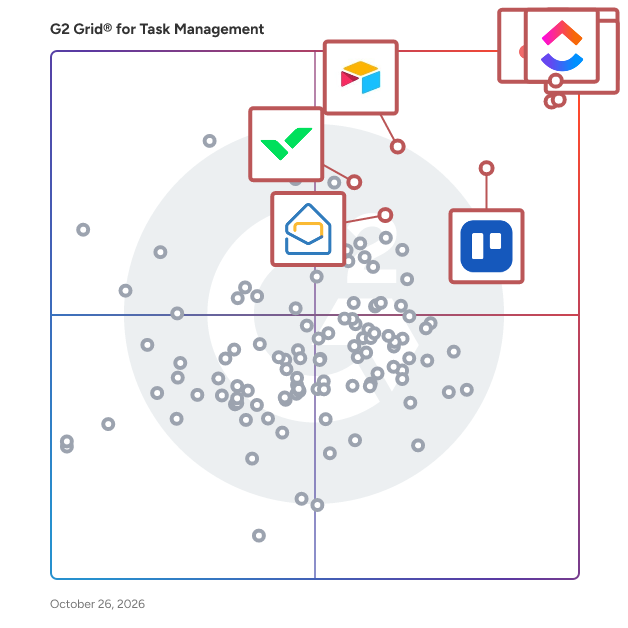
G2 Grid® for Task Management Software

G2 Grid® for Task Management Software plotting products by satisfaction and market presence

Highlighted products: Asana, ClickUp, monday AI Work Platform, Smartsheet, Trello, Airtable, Wrike, and Microsoft Planner.

Underlying data: [Grid® JSON](https://www.g2.com/categories/task-management-software/grids.json?focus%5B%5D=asana&focus%5B%5D=clickup&focus%5B%5D=monday-com&focus%5B%5D=smartsheet&focus%5B%5D=trello&focus%5B%5D=airtable&focus%5B%5D=wrike&focus%5B%5D=microsoft-planner)

morningmate

Your team’s new flow starts with Morningmate — the single workspace where work moves seamlessly from morning to done. Not as many integrations as Slack. Not as automated as Asana. But just enough of the right features to manage tasks, communicate in real time, and collaborate with clients — all without per-seat pricing. Stop switching between disconnected tools for chat, tasks, and calendars. Morningmate brings it all together with feed-style collaboration, built-in chat, and customizable workflows that adapt to any team. More than 550,000 teams rely on Morningmate to stay organized and connected. From your first login, our onboarding experts provide tailored, friendly support — for as long as you need it. With a familiar, social-style interface and hands-on help every step of the way, your team will be up and running in minutes — not months.

Average Rating: 4.8/5.0

Total Reviews: 265

How Do G2 Users Rate morningmate?

  • Has the product been a good partner in doing business?: 9.5/10 (Category avg: 9.0/10)
  • Task Prioritization: 8.8/10 (Category avg: 8.8/10)
  • Creation & Assignment: 9.2/10 (Category avg: 9.0/10)
  • To-Do Lists: 8.7/10 (Category avg: 8.9/10)

Who Is the Company Behind morningmate?

  • Seller: morningmate
  • Company Website:
  • HQ Location: N/A
  • Twitter: @morningmateGL
    18 Twitter followers
  • LinkedIn® Page: www.linkedin.com
    11 employees on LinkedIn®

Who Uses This Product?

  • Who Uses This: Assistant Manager, Developer
  • Top Industries: Computer Software, Information Technology and Services
  • Company Size: 52% Medium, 40% Small

What Do G2 Reviewers Say About morningmate?

AI-generated summary from verified user reviews

Pros
  • Users enjoy the user-friendly interface of Morningmate, facilitating seamless collaboration and efficient project management.
  • Users value the effective team collaboration features of Morningmate, facilitating seamless communication and task management.
  • Users appreciate the efficient task management of Morningmate, enabling seamless collaboration and clear communication on projects.
  • Users value the clear and organized communication that Morningmate provides for seamless collaboration across remote teams.
  • Users value the effective organization of project materials and seamless collaboration offered by Morningmate.
Cons
  • Users find the missing features in Morningmate, like language support and emotional options, hinder their overall experience.
  • Users report notification issues with morningmate, citing overwhelming alerts during busy project periods affecting workflow.
  • Users note a steep learning curve, as new team members can feel overwhelmed by the interface and features initially.
  • Users experience an overwhelming notification system during busy times, complicating project management and team communication.
  • Users experience slow loading times, particularly when searching for older files or switching between sections.

What Are Recent G2 Reviews of morningmate?

Quire

Quire stands as the pinnacle of modern project management software, introducing a transformative approach to your workflow. It empowers you to seamlessly break down ambitious goals into manageable, actionable steps. What truly sets Quire apart is its unique ability to offer a comprehensive view of project details while never losing sight of the big picture. Quire's emphasis on team collaboration ensures that you can elevate your project management to new heights of efficiency and productivity.

Average Rating: 4.6/5.0

Total Reviews: 79

How Do G2 Users Rate Quire?

  • Has the product been a good partner in doing business?: 9.2/10 (Category avg: 9.0/10)
  • Task Prioritization: 9.4/10 (Category avg: 8.8/10)
  • Creation & Assignment: 9.8/10 (Category avg: 9.0/10)
  • To-Do Lists: 9.5/10 (Category avg: 8.9/10)

Who Is the Company Behind Quire?

  • Seller: Potix Corporation
  • Year Founded: 2007
  • HQ Location: Taipei, Taiwan
  • Twitter: @quire_io
    1,225 Twitter followers
  • LinkedIn® Page: www.linkedin.com
    22 employees on LinkedIn®

Who Uses This Product?

  • Who Uses This: Manager
  • Top Industries: Marketing and Advertising, Aviation & Aerospace
  • Company Size: 52% Small, 48% Medium

What Do G2 Reviewers Say About Quire?

AI-generated summary from verified user reviews

Pros
  • Users appreciate the effective task organization in Quire, enhancing clarity and collaboration for managing complex projects.
  • Users find Quire's intuitive UI essential for quickly managing projects and tracking overall progress effortlessly.
  • Users value the intuitive interface and structured project management of Quire, enhancing workflow and productivity.
  • Users value the structured project tracking views in Quire, which enhance overall project management and progress visibility.
  • Users find that Quire's automation features streamline recurring tasks and integrate seamlessly into their workflow.
Cons
  • Users feel that difficult reporting limits their ability to manage larger projects effectively with Quire.
  • Users find the app slow and overloaded, along with experiencing inflexible customer support that hinders assistance.
  • Users feel the inadequate reporting limits their analytics for time tracking and performance evaluation in Quire.
  • Users feel the need for better integration options and advanced features in the free version of Quire.
  • Users feel that the limited customization options hinder their experience, especially for detailed project management.

What Are Recent G2 Reviews of Quire?

What Are G2 Users Discussing About Quire?

Profit.co

Profit.co's OKR software helps your organisation in executing your strategies using an OKR centric approach. Profit.co allows you to iterate faster using the Plan-Execute-Engage-Learn cycle every quarter. You can plan and align OKRs at the beginning of the quarter, track your execution with weekly check-ins and reviews, promote high levels of employee engagement using our collaborative features, and use the highly structured reflect and reset process for improving organizational learning. Since Profit.co is highly customizable, organisations of any size can get started with OKRs easily. Profit.co also has strategy tracking, task management, employee engagement, and employee development inbuilt. With real-time reports and dashboards, managers can view the progress of their teams and identify potential problems early. Profit.co integrates with Slack, Microsoft Teams, Jira, Salesforce, HubSpot, and several other popular business applications. On top of this, you can develop your custom integrations using Profit.co's Integration Engine improving adoption across the organization.

Average Rating: 4.7/5.0

Total Reviews: 487

How Do G2 Users Rate Profit.co?

  • Has the product been a good partner in doing business?: 9.4/10 (Category avg: 9.0/10)
  • Task Prioritization: 9.0/10 (Category avg: 8.8/10)
  • Creation & Assignment: 9.0/10 (Category avg: 9.0/10)
  • To-Do Lists: 8.8/10 (Category avg: 8.9/10)

Who Is the Company Behind Profit.co?

  • Seller: Profit.co
  • Company Website:
  • Year Founded: 2018
  • HQ Location: Flower Mound,Texas
  • Twitter: @profit_co
    8,471 Twitter followers
  • LinkedIn® Page: www.linkedin.com
    258 employees on LinkedIn®

Who Uses This Product?

  • Who Uses This: CEO, Project Manager
  • Top Industries: Information Technology and Services, Computer Software
  • Company Size: 58% Medium, 28% Small

What Do G2 Reviewers Say About Profit.co?

AI-generated summary from verified user reviews

Pros
  • Users value the simplicity and user-friendliness of Profit.co, making tracking objectives effortless and efficient.
  • Users appreciate the responsive customer support of Profit.co, aiding in seamless onboarding and feature adoption.
  • Users value the clear ownership and alignment of OKRs in Profit.co, enhancing team focus and progress tracking.
  • Users appreciate the goal-setting capabilities of Profit.co, enhancing progress tracking and team alignment towards objectives.
  • Users value the user-friendly integration of Profit.co, appreciating its robust tools for managing performance and goals.
Cons
  • Users find the learning curve steep, feeling the need for better training and a more intuitive interface.
  • Users find missing features in Profit.co, leading to high costs and cumbersome navigation experiences.
  • Users find navigation challenging initially due to complexity and lack of intuitive features in Profit.co's interface.
  • Users find poor navigation challenging initially, complicating the experience and making it difficult to access essential features.
  • Users find limited customization in Profit.co, hindering adaptation to specific needs and complicating usability.

What Are Recent G2 Reviews of Profit.co?

What Are G2 Users Discussing About Profit.co?

Teamflect

Teamflect is a performance management and employee engagement platform, natively developed for Microsoft 365, living fully inside the communication platforms your people use every day: Microsoft Teams and Outlook. Performance reviews, goals and OKRs, succession planning, individual development plans, 360-degree feedback, recognition, and engagement surveys all actually sit in the flow of work for your employees. Each module seamlessly connects to each other, as well as to detailed analytics and reporting dashboards. As a fully integrated and intuitive solution for admins and everyday users alike, Teamflect fully removes the adoption issues that plague most HR software rollouts. Since the software meets your employees where they are, Teamflect is the ideal choice for HR professionals who need a tool that employees actually use. Trusted by over 1,000 organizations, from Fortune 500 companies to fast-growing startups, Teamflect is SOC 1 and SOC 2 Type I and Type II certified, GDPR- and CCPA-compliant, and integrates with over 260 HRIS systems.

Average Rating: 4.5/5.0

Total Reviews: 189

How Do G2 Users Rate Teamflect?

  • Has the product been a good partner in doing business?: 9.2/10 (Category avg: 9.0/10)
  • Task Prioritization: 9.2/10 (Category avg: 8.8/10)
  • Creation & Assignment: 9.2/10 (Category avg: 9.0/10)
  • To-Do Lists: 9.2/10 (Category avg: 8.9/10)

Who Is the Company Behind Teamflect?

  • Seller: Teamflect
  • Company Website:
  • Year Founded: 2018
  • HQ Location: Unit 501 Leroy House, 434-436 Essex Road, London, England, N1 3QP
  • Twitter: @teamflect
    2,366 Twitter followers
  • LinkedIn® Page: www.linkedin.com
    51 employees on LinkedIn®

Who Uses This Product?

  • Top Industries: Non-Profit Organization Management, Information Technology and Services
  • Company Size: 49% Small, 38% Medium

What Do G2 Reviewers Say About Teamflect?

AI-generated summary from verified user reviews

Pros
  • Users praise the ease of use of Teamflect, highlighting its seamless integration with Teams and intuitive features.
  • Users highlight the effortless goal-setting capabilities of Teamflect, enhancing collaboration and tracking progress with ease.
  • Users value the seamless integration of Teamflect with Microsoft Teams, enhancing workflow and task management efficiency.
  • Users value the easy integrations of Teamflect, enhancing clarity and streamlining workflows with tools like Microsoft Teams.
  • Users value the intuitive functionality of Teamflect, enhancing task management and automation for seamless workflows.
Cons
  • Users find the missing features in Teamflect restrict their goal-setting capabilities and complicate the objectives process.
  • Users find Teamflect to be not user-friendly, citing complexity in areas like targets, goals, and settings.
  • Users find the interface not intuitive, expressing concerns about complexity in accessing goals and meeting notes.
  • Users find the learning curve challenging, especially those unfamiliar with performance management tools or Microsoft Teams integration.
  • Users face integration issues with Teamflect, needing manual uploads instead of seamless connections to existing systems.

What Are Recent G2 Reviews of Teamflect?

What Are G2 Users Discussing About Teamflect?

GUIDEcx

GUIDEcx is the world's leading Client Onboarding solution that creates a seamless transition between your sales and implementation process. With over five years and 300,000 successful onboarding projects completed, we know how to leverage our wisdom to deliver consistent Customer Onboarding experiences. Our process is designed to drive engagement, increase efficiency, and expand capacity without sacrificing quality of service. Easy to integrate into your existing CRM, GUIDEcx has custom templates, different customer views for each role, purpose-built integrations, and robust reporting. We don't just move your process to our software, our Professional Services team and Guide University resources are here to Guide and support you through every step of the process to accelerate time to value and maximize your onboarding team productivity. Reach out today to and we can help you bring your Customer Onboarding experience to new heights.

Average Rating: 4.6/5.0

Total Reviews: 460

How Do G2 Users Rate GUIDEcx?

  • Has the product been a good partner in doing business?: 9.5/10 (Category avg: 9.0/10)
  • Task Prioritization: 8.7/10 (Category avg: 8.8/10)
  • Creation & Assignment: 9.0/10 (Category avg: 9.0/10)
  • To-Do Lists: 8.8/10 (Category avg: 8.9/10)

Who Is the Company Behind GUIDEcx?

  • Seller: GuideCX
  • Year Founded: 2017
  • HQ Location: Lehi, Utah
  • Twitter: @guidecx
    173 Twitter followers
  • LinkedIn® Page: www.linkedin.com
    53 employees on LinkedIn®

Who Uses This Product?

  • Who Uses This: Project Manager, Implementation Manager
  • Top Industries: Computer Software, Information Technology and Services
  • Company Size: 52% Medium, 39% Small

What Do G2 Reviewers Say About GUIDEcx?

AI-generated summary from verified user reviews

Pros
  • Users appreciate the ease of use of GUIDEcx, making the platform simple to navigate and implement.
  • Users commend the responsive customer support from GUIDEcx, which enhances their onboarding and project management experience.
  • Users commend how GUIDEcx enables seamless project management, enhancing onboarding efficiency and team communication.
  • Users find GUIDEcx's ease of learning exceptional, allowing smooth navigation and quick mastery of the platform.
  • Users highlight the effective team collaboration features of GUIDEcx, enhancing communication and project management effortlessly.
Cons
  • Users note a steep learning curve with GUIDEcx that requires mental effort for initial setup and customization.
  • Users experience slow loading times that hinder navigation and overall user experience in GUIDEcx.
  • Users report glitches and hiccups in GUIDEcx, particularly with ticket creation and profile impersonation issues.
  • Users note the complexity in setting up GUIDEcx, which may require significant mental effort for unclear onboarding flows.
  • Users report experiencing glitches such as lag and unexpected logouts, affecting their workflow significantly.

What Are Recent G2 Reviews of GUIDEcx?

What Are G2 Users Discussing About GUIDEcx?

AYOA

About AYOA AYOA is a revolutionary AI-powered productivity platform and mind mapping software that brings visual thinking, project planning, and task management together in one neuro-inclusive workspace. Founded on the principles of organic mind mapping and cognitive science, we've created an all-in-one productivity solution that supports neurodivergent individuals, students, business professionals, and creative teams seeking better organisation, collaboration, and workflow efficiency. Comprehensive Productivity Solution AYOA combines four powerful tools in one seamless digital workspace: mind mapping software for structured planning and visual learning, online whiteboards for creative brainstorming and ideation, task management boards for project execution and team collaboration, and AI-powered features that eliminate blank page syndrome and boost productivity. Unlike traditional project management tools or basic mind mapping apps, AYOA adapts to different thinking styles and learning preferences, whether you're a visual learner, linear thinker, neurodivergent professional, or student managing complex coursework. Our organic mind mapping methodology follows curved branches that mirror natural thought patterns, scientifically proven to enhance memory retention, information processing, and creative problem-solving. Neuro-Inclusive Design for Neurodivergent Users At the heart of AYOA is our commitment to neurodiversity, accessibility, and inclusive design. We've developed every feature to support different cognitive approaches and learning styles, making AYOA the ideal productivity tool for individuals with dyslexia, ADHD, autism, dyspraxia, and other neurodivergent conditions. Our accessibility features include customisable fonts for dyslexia support, adjustable background colours to reduce visual stress, Auto Focus mode that minimises distractions for ADHD users, the Idea Bank for capturing racing thoughts without immediate organisation, and voice note capabilities for verbal processors. AYOA is DSA-approved software (Disabled Students' Allowance), supporting thousands of university students across the UK, and meets WCAG 2.1 international accessibility standards with full screen reader compatibility for visually impaired users. AI-Enhanced Mind Mapping and Whiteboarding Our artificial intelligence capabilities distinguish AYOA from traditional mind mapping software, brainstorming tools, and project management platforms. Generate comprehensive mind maps instantly from simple prompts or topics, create structured digital whiteboards for SWOT analysis, pros and cons evaluation, or strategic planning sessions, and transform visual ideas into actionable task lists with automated workflows. AI-powered content generation helps overcome writer's block, supports essay planning for students, accelerates business strategy development, and enhances creative brainstorming for marketing teams and designers. Flexible Task Management and Collaboration AYOA's task management features provide multiple viewing options to suit different work styles and project types. Workflow view offers Kanban-style boards for agile project management and visual task tracking, Canvas view provides spatial organisation for creative projects and complex planning, and Gantt chart timelines enable detailed project scheduling and deadline management. Collaborate seamlessly with team members through real-time editing, built-in chat functionality, project sharing capabilities, and free account collaboration that allows your entire team to work together regardless of subscription level. Enterprise-Grade Security We prioritise data protection and information security for all users. AYOA is ISO 27001 certified for information security management, uses 256-bit TLS encryption for all data transmission, and hosts information securely within Amazon EC2 cloud infrastructure with 24/7 monitoring. We maintain GDPR compliance and never share user data or generated content to train AI models. Available as a browser-based web application plus native mobile apps for iOS and Android, AYOA provides consistent cross-platform access with automatic cloud synchronisation. Whether you're searching for mind mapping software, project management tools, collaborative whiteboards, neurodivergent-friendly productivity apps, or AI-powered planning assistants, AYOA provides the visual clarity, creative flexibility, and structured execution you need. Stop imagining productivity and experience it with AYOA.

Average Rating: 4.4/5.0

Total Reviews: 63

How Do G2 Users Rate AYOA?

  • Has the product been a good partner in doing business?: 8.8/10 (Category avg: 9.0/10)
  • Task Prioritization: 9.7/10 (Category avg: 8.8/10)
  • Creation & Assignment: 9.8/10 (Category avg: 9.0/10)
  • To-Do Lists: 9.6/10 (Category avg: 8.9/10)

Who Is the Company Behind AYOA?

Who Uses This Product?

  • Top Industries: Information Technology and Services
  • Company Size: 44% Small, 41% Medium

What Do G2 Reviewers Say About AYOA?

AI-generated summary from verified user reviews

Pros
  • Users find AYOA's ease of use and intuitive design enhances productivity and project coordination effectively.
  • Users value the intuitive task management features of AYOA, enhancing productivity through visual and effective organization.
  • Users value the effective mind mapping capabilities of AYOA, enhancing project coordination and brainstorming sessions.
  • Users love the ability to convert mind map branches into tasks, enhancing productivity and organization effortlessly.
  • Users love AYOA for its effective organization features, enabling clear task ownership and real-time progress tracking.
Cons
  • Users struggle with diagramming issues, as it's easy to forget map organization and names among numerous maps.
  • While Ayoa’s interface is user-friendly, some users may face learning curve challenges when transitioning to digital management tools.
  • Users are frustrated by the lack of comprehensive features due to paywalls and potential categorization challenges.
  • Users note that AYOA can be expensive due to paywalled features, limiting access to its full potential.
  • Users face integration issues, finding AYOA insufficient for complex projects and reliant on other tools.

What Are Recent G2 Reviews of AYOA?

What Are G2 Users Discussing About AYOA?

ProofHub

Founded in the year 2012, ProofHub is a cloud-based project management and team collaboration platform that is used by teams across the globe. ProofHub is a top-rated work management application that has been designed to help teams in everyday work and is used by over 85,000 teams globally, including Netflix, Google, NASA, Nike, and Trip Advisor. ProofHub is a surprisingly simple yet powerful project management software that provides a consolidated view of tasks and progress. This project management software allows teams to communicate on work from anywhere using any device. With a rich set of features put in one location, this online SaaS tool is designed to help businesses swiftly plan, coordinate, organise, and deliver projects of all sizes. ProofHub is a cost-effective solution utilized by teams and enterprises of all sizes in various sectors. ProofHub can help businesses structure their work process while saving time and resources, with features ranging from task management to time tracking, bespoke workflows to online proofing, and much more. ProofHub offers a plethora of collaboration features such as chat, discussions, announcements, third-party integrations, file transfer, and more. ProofHub has a clean, simple layout with a low learning curve that makes users feel right at home. Apart from English, ProofHub is available in German, Spanish, Portuguese, French, Russian, Italian, Dutch, Chinese (Taiwan), Turkish, and Polish. ProofHub is a cost-effective solution that can be utilized by teams and enterprises in various sectors. ProofHub provides all the features you need to get your work done efficiently, from creating a project to assigning tasks, keeping track of progress, interacting with your team, and ultimately completing your projects on time.

Average Rating: 4.6/5.0

Total Reviews: 111

How Do G2 Users Rate ProofHub?

  • Has the product been a good partner in doing business?: 8.5/10 (Category avg: 9.0/10)
  • Task Prioritization: 9.8/10 (Category avg: 8.8/10)
  • Creation & Assignment: 9.0/10 (Category avg: 9.0/10)
  • To-Do Lists: 9.3/10 (Category avg: 8.9/10)

Who Is the Company Behind ProofHub?

  • Seller: ProofHub
  • Year Founded: 2012
  • HQ Location: Covina, CA
  • LinkedIn® Page: www.linkedin.com
    43 employees on LinkedIn®

Who Uses This Product?

  • Who Uses This: Marketing Manager
  • Top Industries: Computer Software, Marketing and Advertising
  • Company Size: 52% Small, 40% Medium

What Do G2 Reviewers Say About ProofHub?

AI-generated summary from verified user reviews

Pros
  • Users value the organization provided by ProofHub, as it centralizes information and clarifies task ownership effectively.
  • Users value the real-time visibility in ProofHub, enhancing project management and reducing the need for constant communication.
  • Users appreciate the real-time visibility in ProofHub, enhancing collaboration and streamlining marketing execution effectively.
  • Users love the effective team collaboration features of ProofHub, enhancing productivity and streamlining communication across projects.
  • Users find ProofHub's ease of use exceptional, streamlining project management and enhancing collaborative work experiences.
Cons
  • Users find ProofHub's interface lacks intuitiveness, making it more difficult to use compared to the desktop version.
  • Users find ProofHub's interface not intuitive, making it harder to use compared to the desktop version.
  • Users find the absence of a budgeting option and complex time management features challenging in ProofHub.
  • Users face challenges due to the inability to add participants to projects they did not create, limiting collaboration.
  • Users face collaboration issues due to restrictions on adding participants to projects they didn't create.

What Are Recent G2 Reviews of ProofHub?

What Are G2 Users Discussing About ProofHub?

Planfix

The Planfix platform allows organizations to manage their entire business online. Regardless of company size and industry, Planfix has something to offer as an excellent project and work management tool. With Planfix, your company gets a fully customizable management system, from process design to appearance. The integrated Planfix platform allows users to manage tasks and projects, CRM, sales, marketing, production, logistics, support services, finance, and human resources all at once. Data transfer between teams is seamless — for example, transactions during the implementation stage become projects, which are then transferred to support. Flexible access settings allow users to view only the information they need to remain productive at work, while managers can view the entire business process. No programming is needed to configure and control various business processes within a company. The platform offers a wide range of powerful features, including project management, client accounting, task management, online Gantt charts, email integration, calendars, event chronicles in real time, analytics and reporting, connecting external users, linking accounts, and much more. Whether you’re a newbie or a tech-savvy user, Planfix will be a perfect fit. Experienced users will find features in Planfix that aren’t available in other services and systems. These features include extensive customization, advanced automation of complex business processes, and flexible project building. Alternatively, ready-to-use configurations and automated procedures facilitate onboarding and implementation. We believe that Planfix is suitable for private businesses, nonprofits, public organizations, and any other group working towards a common goal. More than 68,000 users use Planfix to automate business workflows in over 7,000 companies.

Average Rating: 4.6/5.0

Total Reviews: 18

How Do G2 Users Rate Planfix?

  • Has the product been a good partner in doing business?: 8.7/10 (Category avg: 9.0/10)
  • Task Prioritization: 10.0/10 (Category avg: 8.8/10)
  • Creation & Assignment: 10.0/10 (Category avg: 9.0/10)
  • To-Do Lists: 10.0/10 (Category avg: 8.9/10)

Who Is the Company Behind Planfix?

  • Seller: Planfix
  • Year Founded: 2019
  • HQ Location: San Diego, US
  • Twitter: @planfix
    51 Twitter followers
  • LinkedIn® Page: www.linkedin.com
    20 employees on LinkedIn®

Who Uses This Product?

  • Company Size: 74% Small, 37% Medium

What Do G2 Reviewers Say About Planfix?

AI-generated summary from verified user reviews

Pros
  • Users appreciate the flexibility of Planfix, allowing easy configuration without needing developer assistance.

What Are Recent G2 Reviews of Planfix?

Voiset

Voiset is an AI day planner and voice-first task manager built for professionals, freelancers, and small teams who value their time. Unlike traditional task managers that force you to type everything, Voiset lets you create tasks by voice - just speak, and the AI captures, structures, and schedules them automatically. At its core, Voiset combines three things most productivity apps keep separate: an AI task manager, an AI scheduler with auto-planning, and AI smart notes that turn your spoken thoughts into actionable tasks. The AI analyzes your workload, priorities, and deadlines to schedule tasks at the most effective time - no manual reshuffling when plans change. Voiset reschedules missed tasks automatically and adapts your day in real time. What truly sets Voiset apart in 2026 is its integration with AI assistants. Through our MCP server, Voiset runs natively inside Claude - you can ask Claude to plan your day, schedule meetings, or review your week, and it works directly with your Voiset account. We also offer a ChatGPT plugin and Telegram bot for users who prefer those interfaces. This makes Voiset the only AI day planner that lives where you already work. Creating tasks in Voiset takes one tap or one voice command. The mobile app, available on iOS and Android, lets you capture ideas while driving, walking, or between meetings. Voice input works in 55 languages with real-time translation between team members - ideal for international teams, multilingual freelancers, and distributed startups. Voiset works as your AI personal planner across every area of life: work projects, family calendar, fitness goals, study schedules, and personal routines - all in one master calendar with color-coded workspaces. Built-in time tracking, and analytics show exactly where your hours go. Specific use cases where Voiset users save the most time: - ADHD-friendly planning - voice input removes the friction of typing, making task capture effortless for neurodivergent users - Real estate agents - capture follow-ups by voice between showings - Freelancers - auto-schedule client work across multiple projects - Small business owners - coordinate team workload without micromanagement - Students - turn lecture notes into study tasks instantly Integrations: Google Calendar, Microsoft 365, Zoom, ChatGPT, Claude (via MCP), and Telegram. Two-way calendar sync keeps everything in one place. If you spend more than 20 minutes a day planning, juggling calendars, or rewriting your to-do list - Voiset gives most of that time back.

Average Rating: 4.9/5.0

Total Reviews: 41

How Do G2 Users Rate Voiset?

  • Task Prioritization: 10.0/10 (Category avg: 8.8/10)
  • Creation & Assignment: 10.0/10 (Category avg: 9.0/10)
  • To-Do Lists: 10.0/10 (Category avg: 8.9/10)

Who Is the Company Behind Voiset?

Who Uses This Product?

  • Who Uses This: CEO
  • Top Industries: Information Technology and Services, Computer Software
  • Company Size: 66% Medium, 54% Small

What Do G2 Reviewers Say About Voiset?

AI-generated summary from verified user reviews

Pros
  • Users love the ease of use of Voiset, enabling seamless organization and efficient task management without distractions.
  • Users value the effective task management capabilities of Voiset, enhancing organization and collaboration across teams.
  • Users value the effective project management capabilities of Voiset, leading to increased productivity and streamlined operations.
  • Users value the organization capabilities of Voiset, enhancing task management and team collaboration seamlessly.
  • Users appreciate the automation features of Voiset, enhancing productivity with efficient task management and scheduling.
Cons
  • Users find Voiset's learning curve steep and overwhelming, requiring time to optimize workflows and understand its features.
  • Users find the limited customization in Voiset restricts their ability to effectively organize tasks and notifications.
  • Users find the inadequate reporting feature of Voiset limiting, especially for larger projects requiring detailed analytics.
  • Users face integration issues with Voiset, experiencing challenges in setup and functionality compared to other platforms.
  • Users note the lack of integration options with Voiset, limiting its connectivity with essential external applications.

What Are Recent G2 Reviews of Voiset?

Stackby

Stackby is a no-code work management platform that brings the best of spreadsheets and databases to enable anyone to create their own collaborative workflows for their teams. No-coding or training needed. Stackby merges spreadsheet functionalities with the capabilities of a relational database, offering search, filtering, grouping and sorting options, as well as the ability to generate custom forms and views. It is designed for teams of any size from one to over 1000, making it scalable for fast growing startups. It also has 500+ templates across Marketing, Sales, HR, Project Management, Startups and more. Over 50,000 companies globally use Stackby to manage their data and automate their processes, in amazing ways.

Average Rating: 4.6/5.0

Total Reviews: 82

How Do G2 Users Rate Stackby?

  • Has the product been a good partner in doing business?: 9.2/10 (Category avg: 9.0/10)
  • Task Prioritization: 8.8/10 (Category avg: 8.8/10)
  • Creation & Assignment: 9.4/10 (Category avg: 9.0/10)
  • To-Do Lists: 9.0/10 (Category avg: 8.9/10)

Who Is the Company Behind Stackby?

  • Seller: Relytree Inc.
  • Year Founded: 2018
  • HQ Location: San Francisco (and vicinity), California
  • Twitter: @StackbyHQ
    1,050 Twitter followers
  • LinkedIn® Page: www.linkedin.com
    21 employees on LinkedIn®

Who Uses This Product?

  • Who Uses This: CEO
  • Top Industries: Marketing and Advertising, Management Consulting
  • Company Size: 90% Small, 6% Medium

What Do G2 Reviewers Say About Stackby?

AI-generated summary from verified user reviews

Pros
  • Users appreciate the ease of use of Stackby, enabling smooth workflow customization without technical expertise.
  • Users value the high level of customization in Stackby, enabling tailored workflows and efficient operations without technical skills.
  • Users love the flexibility of Stackby, combining spreadsheets and databases for customized, powerful workflow solutions.
  • Users love the automation feature in Stackby, enhancing workflow efficiency and supporting non-technical users effectively.
  • Users appreciate the customizability of Stackby, allowing effortless creation of tailored workflows and templates for various needs.
Cons
  • Users find Stackby has limited advanced features compared to Airtable or Notion, affecting workflow efficiency.
  • Users find missing advanced features in Stackby compared to Airtable or Notion, limiting their workflow capabilities.
  • Users find feature limitations in Stackby, especially compared to competitors like Airtable, impacting their workflows and experience.
  • Users notice integration issues, as Stackby lacks automation and deeper connections with popular tools compared to competitors.
  • Users find the limited advanced features in Stackby compared to Airtable or Notion somewhat restricting for power users.

What Are Recent G2 Reviews of Stackby?

What Are G2 Users Discussing About Stackby?

Manifestly Checklists

Manifestly is the AI-first way to run every recurring process the right way. On time, every time. Audited. Secure. Dependable. We ship a native MCP server that makes every workflow callable by Claude, ChatGPT, Gemini, and any MCP-compatible assistant, so AI agents can start runs, complete steps, and read process data directly. And because that automation happens inside Manifestly, it inherits everything your SOPs already give you. Your processes get assigned, scheduled, and tracked, with deadlines, data capture, and audit-ready history. The SOP in the wiki becomes the SOP your team (and now your AI) actually follows, governed and audited, not run in a separate black box. Trusted by teams at Compass, Foxconn, Keller Williams, Ford and Sheraton, alongside thousands of operations, IT, HR, and services teams. ** How Manifestly works ** * Build your SOP once as a reusable template — start from a blank checklist or one of our pre-built ones * Schedule it to recur on any cadence, or trigger it from Slack, an API call, an email, or a Salesforce event * Each task gets assigned to the right person or role automatically when the workflow runs * Your team checks off steps, captures form data, attaches files, and signs off as work happens * You see live progress, get notified of blockers, and pull audit-ready reports any time ** Where Manifestly does its best work ** * IT and DevOps runbooks — access reviews, patching, deployments, incident response * Compliance and change control — approvals, evidence capture, sign-offs, ITGCs * Employee onboarding and offboarding * Customer onboarding and recurring services delivery * Finance and HR routines that must run the same way every time * Multi-location operations — store openings, property turnovers, facility checks * Manufacturing changeovers, quality inspections, and field service procedures ** Industries that rely on us ** * IT / SysAdmin and DevOps * Accounting and finance * HR and People Ops * SaaS and professional services * Healthcare operations * Manufacturing and field ops * Real estate and property management * Hospitality and multi-unit retail ** Why teams choose Manifestly ** * Fast to deploy — most teams have their first SOP running in under an hour, not a quarter * Actually gets used — simple enough that teams adopt it without weeks of training * Change tracking built in — see what changed, who changed it, and roll back when needed * Accountability that holds — every task has an owner and a deadline; nothing slips * Audit-ready by default — searchable history, captured data, file attachments, and exports for any review * Conditional logic — show or hide steps based on answers earlier in the workflow * Role-based assignments — assign by role, not by person, so workflows stay correct as your team changes ** Governance without the overhead ** * SOC 2 Type II audited annually * SAML SSO and role-based access control * Full version history and audit logs for every workflow run * Granular permissions and departments * Built to work with the AI agents your team already uses — Claude, ChatGPT, Copilot, Gemini ** Runs where your team already works ** * Slack — start, complete, and discuss checklists right in channel * Microsoft Teams — same, with notifications routed to the right channel * Salesforce — trigger workflows from records, log progress back * Notion — embed checklists in your existing docs * Zapier — connect to thousands of tools without code * Public API and webhooks — for the rest ** Quick answers ** * How fast can we be running? Most teams have their first SOP running in under an hour. No implementation project, no setup fees. * Do we need IT involved to deploy? No. Self-serve signup, with optional SAML SSO when you're ready. * Is there a free trial? Yes — 14 days, full Business plan, no credit card required. * What does it cost? $10/user/month for Business (or $100/user/year — save 17%). Enterprise tier with SSO and onboarding starts at $20/user/month, annual contract. * Is our data secure? SOC 2 Type II audited annually. Encrypted in transit and at rest. Standard SaaS deployment.

Average Rating: 4.5/5.0

Total Reviews: 137

How Do G2 Users Rate Manifestly Checklists?

  • Has the product been a good partner in doing business?: 9.0/10 (Category avg: 9.0/10)
  • Task Prioritization: 5.0/10 (Category avg: 8.8/10)
  • Creation & Assignment: 9.5/10 (Category avg: 9.0/10)
  • To-Do Lists: 9.7/10 (Category avg: 8.9/10)

Who Is the Company Behind Manifestly Checklists?

  • Seller: Manifestly
  • Company Website:
  • Year Founded: 2013
  • HQ Location: Madison, US
  • Twitter: @ManifestlyApp
    449 Twitter followers
  • LinkedIn® Page: www.linkedin.com
    2 employees on LinkedIn®

Who Uses This Product?

  • Top Industries: Information Technology and Services, Computer Software
  • Company Size: 45% Small, 39% Medium

What Do G2 Reviewers Say About Manifestly Checklists?

AI-generated summary from verified user reviews

Pros
  • Users value the ease of use of Manifestly, facilitating efficient workflows and simplifying team training and updates.
  • Users benefit from timely notifications in Manifestly Checklists, which help keep tasks on track and enhance accountability.
  • Users value the clarity and ease of workflow management with Manifestly, enhancing operations and compliance effortlessly.
  • Users commend the responsive customer support of Manifestly Checklists, consistently providing helpful and timely assistance.
  • Users value the ease of learning with Manifestly Checklists, finding it accessible and quick to adopt for all employees.
Cons
  • Users find that Manifestly lacks the ability to resolve confusion in undefined processes, requiring additional context for effective use.
  • Users find it challenging to make changes due to difficulties in usage while working on their current checklist iteration.
  • Users feel that the layout issues hinder navigation, suggesting a table of contents for better accessibility.
  • Users feel there is a steep learning curve and Manifestly requires adaptation rather than providing immediate clarity.
  • Users find Manifestly lacks flexibility in features, limiting its capacity to improve or adapt broken processes.

What Are Recent G2 Reviews of Manifestly Checklists?

What Are G2 Users Discussing About Manifestly Checklists?
Swit

Swit is every team's work hub that consolidates collaboration essentials in one place - task, chat, goals, approvals, and integrations with Google Workspace and Microsoft 365. It's purpose-built to drive Employee Connection Where It Counts. Bring your entire company together on a unified platform that supports communication, work management, task tracking, goal setting, and so much more! Swit is flexible and scalable to meet the needs of any organization of any size. Drag and drop emails into Channels or convert them into task cards. Drag and drop task cards into Channels or DMs. Attach Approvals or OKRs directly to task cards. See why Swit is loved by organizations of all sizes from Small Businesses to Enterprise customers.

Average Rating: 4.7/5.0

Total Reviews: 350

How Do G2 Users Rate Swit?

  • Has the product been a good partner in doing business?: 8.9/10 (Category avg: 9.0/10)
  • Task Prioritization: 9.4/10 (Category avg: 8.8/10)
  • Creation & Assignment: 10.0/10 (Category avg: 9.0/10)
  • To-Do Lists: 10.0/10 (Category avg: 8.9/10)

Who Is the Company Behind Swit?

  • Seller: Swit
  • Year Founded: 2018
  • HQ Location: San Francisco, California
  • Twitter: @GetSwit
    207 Twitter followers
  • LinkedIn® Page: www.linkedin.com
    178 employees on LinkedIn®

Who Uses This Product?

  • Who Uses This: CEO, Deputy General Manager
  • Top Industries: Airlines/Aviation, Computer Software
  • Company Size: 50% Small, 42% Medium

What Are Recent G2 Reviews of Swit?

What Are G2 Users Discussing About Swit?

MeisterTask

MeisterTask is a web-based task and project management tool that is perfect for agile project management. Beautifully-designed interface, intuitive functionality, and seamless integrations with other tools make it a logical choice for project teams. MeisterTask offers a free Basic plan (up to 3 projects), with paid subscriptions from €12,50 per user per month. Alongside customizable, Kanban-style project boards, MeisterTask boasts numerous powerful features designed to streamline project work. Workload can be managed with Timeline: a Gantt-style overview of tasks that pinpoints bottlenecks and keeps projects flowing smoothly. Set up Automations to speed up manual work or complete specific tasks automatically. MeisterTask is part of the Meister Suite, a group of products for flawless workflow management. From ideation in our mind mapping tool, MindMeister, to online documentation in MeisterNote, your team unlocks a powerful toolkit that drives projects every step of the way.

Average Rating: 4.6/5.0

Total Reviews: 166

How Do G2 Users Rate MeisterTask?

  • Has the product been a good partner in doing business?: 9.3/10 (Category avg: 9.0/10)
  • Task Prioritization: 8.9/10 (Category avg: 8.8/10)
  • Creation & Assignment: 9.5/10 (Category avg: 9.0/10)
  • To-Do Lists: 9.1/10 (Category avg: 8.9/10)

Who Is the Company Behind MeisterTask?

  • Seller: MeisterLabs
  • Year Founded: 2006
  • HQ Location: Vienna, Austria
  • Twitter: @mindmeister
    20,018 Twitter followers
  • LinkedIn® Page: www.linkedin.com
    129 employees on LinkedIn®

Who Uses This Product?

  • Who Uses This: Owner
  • Top Industries: Marketing and Advertising, Computer Software
  • Company Size: 72% Small, 20% Medium

What Are Recent G2 Reviews of MeisterTask?

What Are G2 Users Discussing About MeisterTask?

Enalytix

Enalytix is an AI-based Productivity App designed to enhance workforce management and operational efficiency. This works especially well for distributed or field workforces. Our key module include: Task Workflow Management: Assign and track tasks with geofencing/geo-tracking Define work mandates for each task such as audio/video/document requirements Supervisor task approval or rejection. Mobile-first, Automated Timesheets: Easy to fill, weekly timesheets Flexibility to link timesheets to assigned tasks automatically Timesheet Approval workflow Work Reports & Expense Tracking: Easy submission of work reports with approval workflow Real-time view of travels and expenses. Ensure valid expense pay-outs with tasks/reports tracking. Real-Time Collaboration: Secure peer-to-peer chats and document sharing. Broadcast updates to all employees. Role-based document access on mobile devices. Rewards & Recognition: Real-time recognition for big and small wins Reward employees instantly with a redemption catalogue. Configurable R&R campaigns for greater impact. Geo-fenced Facial Attendance: Accurate check-ins and check-outs with facial authentication. Auto-checkout based on geofence and shift times. Real-time tracking of work hours Align all other modules with check-ins to get a comprehensive view of an employee’s work day Self-service Admin Dashboard Easy to set up and configure business rules Multi-Admin access

Average Rating: 4.9/5.0

Total Reviews: 11

How Do G2 Users Rate Enalytix?

  • Has the product been a good partner in doing business?: 10.0/10 (Category avg: 9.0/10)
  • Task Prioritization: 9.3/10 (Category avg: 8.8/10)
  • Creation & Assignment: 10.0/10 (Category avg: 9.0/10)
  • To-Do Lists: 9.8/10 (Category avg: 8.9/10)

Who Is the Company Behind Enalytix?

Who Uses This Product?

  • Top Industries: Information Technology and Services
  • Company Size: 91% Medium, 9% Small

What Do G2 Reviewers Say About Enalytix?

AI-generated summary from verified user reviews

Pros
  • Users love the automated attendance tracking in Enalytix, making attendance management hassle-free and efficient.
  • Users value the versatile features of Enalytix, enhancing team performance and streamlining task management effectively.
  • Users love the ease of tracking attendance with Enalytix, praising its seamless reporting and simple interface.
  • Users love the ease of use of Enalytix, finding it intuitive for task and attendance management.
  • Users value the diverse range of modules in Enalytix, enhancing productivity and simplifying team management seamlessly.
Cons
  • Users desire more advanced analytics features in Enalytix to enhance their data analysis capabilities.
  • Users desire more advanced analytics features in Enalytix to enhance their analytical capabilities and insights.
  • Users find the feed section lacking user-friendliness, suggesting improvements for better engagement and information flow.
  • Users feel the poor design of Enalytix detracts from usability and overall experience of the product.
  • Users believe the UI could be more improved to enhance their overall experience with Enalytix.

What Are Recent G2 Reviews of Enalytix?

TrackingTime PRO

TrackingTime is a time tracking software designed to help teams and freelancers efficiently manage their projects and enhance productivity. This solution enables managers to plan and monitor their team's work, ensuring that all tasks are aligned and any potential conflicts or bottlenecks are identified early on. By providing a comprehensive timeline for each project, TrackingTime allows users to maintain a clear overview of tasks and resources, facilitating better decision-making and project execution. The target audience for TrackingTime includes project managers overseeing multiple projects, freelancers managing their time across various clients, and teams looking to optimize their workflow. This software is particularly beneficial for organizations that require precise tracking of work hours, project progress, and employee attendance. Companies can leverage TrackingTime to streamline their payroll processes, as it provides accurate data on work hours, breaks, extra time, and time off, making payroll management significantly more efficient. One of the standout features of TrackingTime is its ability to create customized online timesheets that cater to the specific needs of a team. This functionality allows users to monitor and evaluate team performance, manage project budgets, and bill clients effectively. Additionally, the software enables users to export these timesheets into professional business reports, which can be easily shared with clients and colleagues, enhancing communication and transparency. This level of customization ensures that teams can adapt the tool to fit their unique workflows and reporting requirements. TrackingTime also excels in its integration capabilities, seamlessly connecting with over 60 popular business tools. This eliminates the need for users to switch between different applications, allowing for a more cohesive workflow. By integrating smoothly with existing processes, TrackingTime helps users maximize their efficiency and focus on their core work without the distractions of managing multiple platforms. The ease of integration contributes to a more streamlined experience, making it simpler for teams to adopt and utilize the software effectively. Overall, TrackingTime empowers teams to take control of their projects and workloads, ensuring optimal productivity and effective time management. With its robust features and user-friendly interface, it stands out as a valuable tool for anyone looking to enhance their project management capabilities and streamline their time tracking efforts. The combination of customizable timesheets, integration options, and comprehensive reporting makes TrackingTime a practical choice for organizations aiming to improve their operational efficiency.

Average Rating: 4.4/5.0

Total Reviews: 178

How Do G2 Users Rate TrackingTime PRO?

  • Has the product been a good partner in doing business?: 9.1/10 (Category avg: 9.0/10)
  • Task Prioritization: 6.3/10 (Category avg: 8.8/10)
  • Creation & Assignment: 7.9/10 (Category avg: 9.0/10)
  • To-Do Lists: 7.5/10 (Category avg: 8.9/10)

Who Is the Company Behind TrackingTime PRO?

  • Seller: TrackingTime
  • Company Website:
  • Year Founded: 2012
  • HQ Location: Buenos Aires, Argentina
  • Twitter: @TrackingTime
    1,367 Twitter followers
  • LinkedIn® Page: www.linkedin.com
    20 employees on LinkedIn®

Who Uses This Product?

  • Who Uses This: Owner
  • Top Industries: Marketing and Advertising, Computer Software
  • Company Size: 55% Small, 9% Medium

What Do G2 Reviewers Say About TrackingTime PRO?

AI-generated summary from verified user reviews

Pros
  • Users value the effortless time tracking of TrackingTime PRO, enhancing project management and billing accuracy seamlessly.
  • Users love the ease of use of TrackingTime PRO, making time tracking and project management seamless and efficient.
  • Users find time-saving benefits with TrackingTime PRO, enabling efficient project management and streamlined reporting.
  • Users find that task management features enhance productivity and streamline client billing in multi-project environments.
  • Users love the seamless integrations of TrackingTime Pro, enhancing efficiency and simplifying time management across platforms.
Cons
  • Users feel that TrackingTime PRO is a bit complex for crafting simple timesheets, hindering ease of use for time capture.
  • Users find time tracking issues with project hour breakdowns, necessitating manual calculations, especially in the free version.
  • Users struggle with a steep learning curve, finding navigation and reporting complicated without sufficient training or support.
  • Users often note the limited features of TrackingTime PRO, wishing for more options to enhance their usage.
  • Users find the reporting issues frustrating, wishing for more detailed and flexible generate reports in TrackingTime Pro.

What Are Recent G2 Reviews of TrackingTime PRO?

What Are G2 Users Discussing About TrackingTime PRO?