Top Free Task Management Software - Page 12

How Many Task Management Software Products Does G2 Track?

Total Products under this Category: 547

Category Stats (Sep 2026)

  • Average Rating: 4.46/5 (↑0.01 vs Aug 2026) The average rating of products in this category, based on all submitted ratings
  • Top Trending Product: Chaser (+1.82%) - Among all products in this category, Chaser recorded the largest rating increase compared to last month

Last updated: September 01, 2026

How Does G2 Rank Task Management Software Products?

Why You Can Trust G2's Software Rankings:

  • 30 Analysts and Data Experts
  • 118,700+ Authentic Reviews
  • 547+ Products
  • Unbiased Rankings

G2's software rankings are built on verified user reviews, rigorous moderation, and a consistent research methodology maintained by a team of analysts and data experts. Each product is measured using the same transparent criteria, with no paid placement or vendor influence. While reviews reflect real user experiences, which can be subjective, they offer valuable insight into how software performs in the hands of professionals. Together, these inputs power the G2 Score, a standardized way to compare tools within every category.

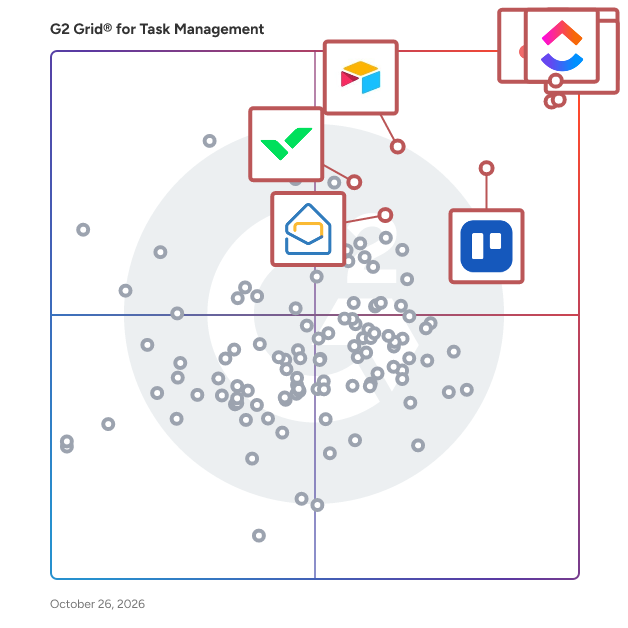
G2 Grid® for Task Management Software

G2 Grid® for Task Management Software plotting products by satisfaction and market presence

Highlighted products: Asana, ClickUp, monday AI Work Platform, Smartsheet, Trello, Airtable, Wrike, and Microsoft Planner.

Underlying data: [Grid® JSON](https://www.g2.com/categories/task-management-software/grids.json?focus%5B%5D=asana&focus%5B%5D=clickup&focus%5B%5D=monday-com&focus%5B%5D=smartsheet&focus%5B%5D=trello&focus%5B%5D=airtable&focus%5B%5D=wrike&focus%5B%5D=microsoft-planner)

Grux

Grux is a Google Workspace task management, shared inbox, and workflow platform that turns Gmail and Google Chat conversations into structured, trackable work. Teams running on Google Workspace often coordinate work through Gmail threads, Google Chat messages, shared Drive folders, and informal conversations. Requests arrive through email or chat, but ownership, status, and workflow are rarely defined. As organizations grow, work becomes harder to track, follow-ups become manual, and execution depends on memory rather than systems. Grux solves this by adding task management and workflow structure directly inside Google Workspace. Using the Grux Chrome extension, teams can convert Gmail messages and Google Chat conversations into trackable tasks, assign ownership, define workflow stages, and maintain shared visibility across projects without switching tools. Instead of moving work into a separate project management platform, Grux enables teams to manage tasks and workflows directly inside Gmail and Google Workspace. Grux also functions as a collaborative shared inbox for teams managing high volumes of communication. Incoming requests from clients, teammates, and partners can be routed through defined workflows, assigned to the right owners, and tracked through completion. This makes Grux useful for operations teams, professional services organizations, and customer support teams looking for a shared inbox for Gmail or a help desk workflow built on Google Workspace. Grux connects execution directly to the files and conversations that created the work. Teams can link Google Drive documents to tasks, collaborate through shared views, annotate screenshots, and record short walkthroughs when additional context is needed. By linking conversations, files, and task tracking together, Grux prevents work from getting lost across inboxes, chat threads, and documents. Many organizations rely on multiple disconnected tools to manage task tracking, shared inboxes, internal coordination, documentation, and customer communication. Over time this creates SaaS sprawl, where different teams adopt overlapping software that increases cost and operational complexity. Grux consolidates these workflows into a single execution system built directly on top of Google Workspace. Organizations often use Grux to replace lightweight task managers, shared inbox software, internal help desk tools, and coordination platforms. By centralizing work inside Gmail, Google Chat, and Google Drive, teams can manage projects, requests, and communication without introducing additional software layers. Designed for organizations running on Google Workspace as their operational backbone, Grux improves visibility, accountability, and coordination by turning everyday communication into structured work.

Who Is the Company Behind Grux?

Hylark

Hylark is a modern software platform designed to help people manage and share their projects and hobbies in one place. Built for creators, builders, and curious minds, Hylark combines structured organization with expressive, public-facing pages. The platform is designed to be flexible, intuitive, and powered by AI to help users get started quickly and grow over time. Hylark allows users to create customizable pages for their interests using templates and AI-assisted setup. Behind each page are powerful tools such as custom records, notes, to-dos, calendars, dashboards, and collaboration features. Users can build structured systems for their projects while presenting them beautifully through shareable, public-facing layouts. The primary value of Hylark is helping users turn their passions into organized, shareable spaces without the complexity of traditional productivity tools. It removes the friction between managing something privately and sharing it publicly. Hylark enables people to organize what they love, showcase their work, and connect with others all in one joyful, flexible environment.

Who Is the Company Behind Hylark?

Karya Keeper

Karya Keeper is a project and task management platform designed to help teams plan, track, and deliver projects. By uniting project setup, task tracking, time logging, and resource management under one interface, it helps to ensure that nothing falls through the cracks. 𝐏𝐫𝐨𝐣𝐞𝐜𝐭 & 𝐓𝐚𝐬𝐤 𝐌𝐚𝐧𝐚𝐠𝐞𝐦𝐞𝐧𝐭 Plan, assign, and track tasks. 𝐊𝐚𝐧𝐛𝐚𝐧 𝐁𝐨𝐚𝐫𝐝𝐬 Drag-and-drop boards that create instant visibility into priorities and blockers. 𝐓𝐢𝐦𝐞 𝐋𝐨𝐠𝐠𝐢𝐧𝐠 Log and approve hours for billing and payroll. 𝐑𝐞𝐬𝐨𝐮𝐫𝐜𝐞 𝐎𝐩𝐭𝐢𝐦𝐢𝐳𝐚𝐭𝐢𝐨𝐧 See who’s free or overloaded in real time to balance workloads. 𝐑𝐞𝐚𝐥-𝐓𝐢𝐦𝐞 𝐃𝐚𝐬𝐡𝐛𝐨𝐚𝐫𝐝 Monitor project health at a glance. Spot delays and track milestones. 𝐏𝐫𝐨𝐣𝐞𝐜𝐭 𝐇𝐞𝐚𝐥𝐭𝐡 𝐑𝐞𝐩𝐨𝐫𝐭 Identify risks early with live health reports to prevent delays. 𝐑𝐞𝐩𝐨𝐫𝐭𝐢𝐧𝐠 & 𝐀𝐧𝐚𝐥𝐲𝐭𝐢𝐜𝐬 Turn data into actionable insights with ready-to-use team and client reports. 𝐂𝐮𝐬𝐭𝐨𝐦 𝐖𝐨𝐫𝐤𝐟𝐥𝐨𝐰𝐬 Adapt Karya Keeper to internal processes with stages, roles, and approvals.

Average Rating: 5.0/5.0

Total Reviews: 2

How Do G2 Users Rate Karya Keeper?

  • Has the product been a good partner in doing business?: 10.0/10 (Category avg: 9.0/10)

Who Is the Company Behind Karya Keeper?

Who Uses This Product?

  • Company Size: 100% Medium

What Do G2 Reviewers Say About Karya Keeper?

AI-generated summary from verified user reviews

Pros
  • Users love the ease of use of Karya Keeper, finding it simple yet powerful for efficient project management.
  • Users value the real-time progress tracking of Karya Keeper, enhancing organization and team collaboration effortlessly.
  • Users value the effective task assignment capabilities of Karya Keeper, which enhances organization and collaboration effortlessly.
  • Users enjoy the simplicity and power of Karya Keeper for efficient task and project management.
  • Users appreciate the collaboration ease of Karya Keeper, enhancing team communication and simplifying task management.

What Are Recent G2 Reviews of Karya Keeper?

KiteSuite

KiteSuite is a type of work management and collaboration software designed to help users effectively manage tasks, enhance communication, and streamline project workflows. This comprehensive platform integrates various tools that facilitate project planning, team collaboration, and performance tracking, making it suitable for organizations of all sizes looking to improve their operational efficiency. Targeted at teams and organizations that require a cohesive approach to project management, KiteSuite is particularly beneficial for project managers, team leaders, and remote teams. It addresses the need for a centralized platform where team members can collaborate in real-time, share documents, and track progress on tasks. With its versatile features, KiteSuite supports a wide range of use cases, from managing simple tasks to overseeing complex projects that involve multiple stakeholders. One of the standout features of KiteSuite is its interactive Kanban boards, which allow users to visualize their workflows and manage tasks effectively. This visual representation helps teams prioritize work and monitor progress at a glance. Additionally, KiteSuite includes robust communication tools such as chat functionality, enabling team members to discuss projects and share updates instantly. The document-sharing feature further enhances collaboration by allowing users to access and edit files in a centralized location, reducing the time spent searching for important documents. KiteSuite also offers time tracking capabilities, which help teams monitor how much time is spent on various tasks and projects. This feature is particularly useful for organizations that bill clients based on hours worked or those seeking to optimize their resource allocation. Automation tools within KiteSuite streamline repetitive tasks, allowing teams to focus on higher-value activities. Custom reporting options enable users to generate insights tailored to their specific needs, providing valuable data that can inform decision-making processes. Overall, KiteSuite serves as an all-in-one solution for work management, designed to enhance team productivity and optimize workflows. By integrating essential tools for task management, communication, documentation, and reporting, KiteSuite empowers teams to collaborate more effectively and achieve their project goals with greater efficiency.

Who Is the Company Behind KiteSuite?

Who Uses This Product?

  • Company Size: 100% Small

What Are Recent G2 Reviews of KiteSuite?

Machtask

Machtask runs repeatable team work as structured requests. The form, required steps, team handoffs and deadlines defined once, then applied to every request. The right team gets the work, workers see what to do next, and everything is done correctly, visibly, on time. Best for finance; HR; procurement; claims; risk/governance; contact-centre; and shared-services teams running high-volume repeatable work with frequent handoffs. Machtask is for teams whose processes live in email templates, spreadsheets, SOP documents, and the heads of experienced people. It turns any process into a structured and automatic process with an SLA. Put your business on rails today with Machtask.

Who Is the Company Behind Machtask?

Macro

Macro is the open source workspace that replaces a patchwork of productivity apps with one AI-native tool containing email, channels, docs, tasks, calls, and CRM. Each Macro Block feeds into one shared AI memory layer, so what you see is the same context Macro's agents act on and remember. The whole product is built to be keyboard-first: opening a doc, creating a channel, filing a task, or switching to search can all be done via keyboard shortcuts. With bidirectional linking, @mention anything: people, docs, tasks, channels, and calls link together automatically through any Macro Block. -Macro Docs are markdown-native documents with real-time CRDT collaboration, live agent cursors, and version history you can time-travel through. -Macro Chat is focused, Slack-like messaging, with inline replies and a real inbox instead of an endless scroll. -Macro Tasks can be created from any message in a keystroke, bidirectionally linked to GitHub so branches and PRs move status automatically. -Macro Calls are recorded, transcribed, and diarized by default, with transcripts fed straight to the agent. -Macro CRM is a self-updating, auto-enriched sales pipeline that stays current without manual data entry. Startups and the fast moving teams of today are trusting Macro to never lose context.

Who Is the Company Behind Macro?

  • Seller: Macro
  • Year Founded: 2021
  • HQ Location: New York, US
  • LinkedIn® Page: www.linkedin.com
    49 employees on LinkedIn®

Matidor.com

Matidor is a GIS-native field operations platform built for oil and gas companies, environmental consulting firms, and multi-site operations teams. Founded in 2019 in Canada by a team with roots in Google Earth, Matidor was designed to solve the operational problems that generic project management tools cannot: real-time budget control, offline field work, and geographic coordination across distributed sites. Operations teams use Matidor to manage 10 to 100 concurrent projects without spreadsheet chaos — whether overseeing well abandonment programs, pipeline integrity inspections, Phase I through III environmental site assessments, remediation projects, or multi-site construction and utilities work. Four core capabilities power the platform: •Location Intelligence puts every project on an interactive GIS map with multi-layer visualization of regulatory zones, right-of-way corridors, environmental constraints, and asset disposition. Operations managers see their entire portfolio geographically, enabling proximity-based resource coordination and complete spatial context for every decision. •Project Management delivers portfolio dashboards with color-coded health indicators, custom workflows, contractor portals, and centralized communication. Monthly reports that previously took days generate in minutes. •Budget and Cost Control tracks every dollar as field costs flow in real time. Automated alerts trigger at 70, 90, and 100 percent of budget thresholds. AFE budget tracking, cost-by-well reporting, and accounting integration eliminate the month-end surprise cycle. Integrations include QuickBooks Online and Deltek Vantagepoint. •Field Operations delivers 100 percent offline-first mobile apps for remote well sites, pipeline corridors, and environmental assessment zones with zero cellular coverage. Field crews collect GPS-tagged photos and submit forms without connectivity. Everything syncs automatically when connection returns, with timestamps and attribution for compliance-ready documentation. Implementation takes 4 to 6 weeks, not 6 to 12 months. No IT team required. Integrates with QuickBooks Online, Deltek Vantagepoint, ArcGIS, Microsoft Power BI, Harvest, Replicon, and custom systems via REST API. Recognized as a TechCrunch Startup Battlefield finalist and SXSW 2021 pitch finalist. Trusted by 100+ operations teams across North America. Free 14-day trial at matidor.com.

Average Rating: 4.9/5.0

Total Reviews: 7

How Do G2 Users Rate Matidor.com?

  • Has the product been a good partner in doing business?: 9.4/10 (Category avg: 9.0/10)

Who Is the Company Behind Matidor.com?

  • Seller: Matidor.com
  • Year Founded: 2018
  • HQ Location: Burnaby, CA
  • Twitter: @matidor_com
    147 Twitter followers
  • LinkedIn® Page: www.linkedin.com
    19 employees on LinkedIn®

Who Uses This Product?

  • Company Size: 57% Small, 43% Medium

What Do G2 Reviewers Say About Matidor.com?

AI-generated summary from verified user reviews

Pros
  • Users find Matidor.com to offer ease of use, especially in project tracking and budget management.
  • Users commend Matidor for its effective tracking efficiency, simplifying budget management and project reporting.
  • Users praise the excellent customer support of Matidor.com, highlighting quick responses to issues and project management ease.
  • Users value the easy integration of Matidor.com, enabling seamless data access and input from the field for efficiency.
  • Users find form creation easy with Matidor, streamlining project tracking and budget management effectively.
Cons
  • Users face a learning curve when starting with Matidor, but the support team helps ease the transition.

What Are Recent G2 Reviews of Matidor.com?

PocketOcean

PocketOcean is a workspace solution for organizations and teams in all industries that want to be super productive. The software is made of tools that help you and your team get work done and meet your deadlines. Breakdown projects into detailed tasks and checklist items while collaborating with your team. Create project roadmaps, agile kanban boards and easily see your progress in tasks streams and illustrative graphs. We are bring more accuracy and visibility to the work you do and creating an environment to communicate well.

Who Is the Company Behind PocketOcean?

Priority-Zero!

Priority-Zero is a project management, time tracking, quoting, invoicing and scheduling platform built for freelancers, solopreneurs, independent professionals and small teams. Everything you're responsible for, client work, personal projects, creative pursuits, side businesses, lives in one place, organised well enough that you can plan all of it around all of it. Most tools are built for teams inside organisations, which means people who work independently have been making do with software that doesn't fit how they actually operate. Priority-Zero was built from the ground up for people who work for themselves or run small operations, and the difference shows in how it handles the specific problems those people face every day. The OCP System Everything in Priority-Zero is organised around OCPs, Organisations, Categories and Personas. An OCP is a distinct identity within your account. Your primary business is one OCP. A side hustle is another. A creative project or personal pursuit is another. Each OCP has its own projects, billing details, logo and optional Directory listing, discoverable independently of your other identities. If you're a consultant who also writes, teaches and runs a product business, all four can exist as separate, clearly defined contexts within a single Priority-Zero account, each visible alongside the others so you can plan everything around everything else. On the free plan, you can create up to two OCPs. During the 14-day free trial, you can create as many as you need without restriction, and they remain yours after the trial converts to a free account. Unlimited OCPs are available from the Professional plan upward. Projects and Deliverables Projects in Priority-Zero come in two forms. A unitary project has no deliverables and is timed and scheduled directly at the project level. A composite project is broken down into deliverables, each of which carries its own time estimate, priority, scheduling and timer. As deliverables are added and time estimates entered, the total project time is calculated automatically from the sum of its parts. Every project and deliverable has its own rich text workspace for instructions, notes, briefs, agreements and specifications. Tables, images, links and formatted content are all supported. Projects are colour-coded for quick visual identification in the project list. Billable deliverables are marked with a gold medallion so you can tell at a glance which projects contain chargeable work. Projects and deliverables can be P-Zeroed, marked as complete and moved out of the active view, without being permanently deleted. Action Stations and The Plan Action Stations is the primary working area in Priority-Zero, where all active projects and deliverables are managed. The Plan panel sits alongside it and shows everything scheduled for today, drawn from both Priority-Zero and any connected external calendar. Between Action Stations and The Plan, you start every day knowing exactly what you're supposed to be working on and why, with no need to reconstruct that picture from separate tools or scattered notes. Time Tracking Anything in Action Stations that displays a timer icon can be timed, including project and deliverable tiles, items in The Plan, and the detail panel of any project or deliverable. Timers are started and stopped with a single click, with optional start and end comments for context. The "What was I up to?" feature shows the details of your most recent timer session so you can pick up exactly where you left off. All recorded time feeds directly into billing, which means the hours you track are the hours you invoice, without having to reconstruct from memory. Quoting and Invoicing The Billing section is where Priority-Zero makes a material difference to the financial side of independent work. For fixed-price projects, the Auto Quote feature generates a fully itemised quote directly from the project scope. Every deliverable marked as billable is pulled in as a line item, your hourly rate is applied, tax is calculated and the total is produced automatically. Your rate, tax settings, currency and payment terms are entered once in Billing Settings and applied to everything from that point on. When the project is complete, the quote converts to an invoice in a single click, with the original quote number preserved as a reference. For hourly billing, you select a client and a date range and Priority-Zero picks up every billable hour recorded in that period automatically. You choose whether to present the invoice as a grouped summary or a full activity-by-activity breakdown. Either way, it's ready in seconds. Manual invoicing is also supported for situations where you need to enter your own descriptions, quantities and rates. Quotes, invoices and credit notes can all be exported to PDF. Scheduling and Workload Management Work can be scheduled from Action Stations or the Activity Calendar. Scheduling an item opens a panel where you select the date, start time, duration and any notes. Scheduled items appear in the Activity Calendar alongside events imported from Google Calendar and Outlook and can be rescheduled by dragging them on the calendar. Reminders can be created for any type of event and converted into full projects with a single click, useful when a client gives a project the go-ahead during a scheduled meeting. The Workload Viewer provides two perspectives on capacity. The Aggregated Workload view shows total estimated time remaining across all active projects as a proportion of the next four rolling weeks, adjusted for your set working days and hours and reduced by time already logged. The Scheduled Hours view shows committed hours against available work hours across the same period, highlighting capacity gaps and overbooked days. Availability Calendar and Meeting Management Priority-Zero generates a shareable availability link that accounts for everything already scheduled, project time, personal commitments, non-work days, before showing anyone a free slot. When someone clicks the link, they see only the times you're genuinely available. The system automatically displays both your timezone and theirs side by side, so there's no confusion across borders. Meeting requests can be sent to one or more people directly from within Priority-Zero, with options for recurring meetings on a daily, weekly, fortnightly or monthly basis. All video meetings are powered by Jitsi, a free and open-source video conferencing system, without requiring any external subscription. Teams and Collaboration Priority-Zero handles external collaboration without per-seat pricing for the people you invite. You invite a collaborator to a specific project by email. They create a free Priority-Zero account, accept the invitation, and a shared workspace opens for both of you. You can assign deliverables to them, which get converted into projects in their Action Stations view. They can add their own notes and files, and shared file storage connects to Google Drive or OneDrive at the project level. The Meeting Manager within the shared workspace handles questions and agenda items between sessions, with the ability to mark items resolved or carry them to the next meeting. The collaborator's account remains free for collaboration purposes for as long as the project runs and beyond. If they find any premium features useful, they can subscribe independently. Collaborators can be found through the Priority-Zero Directory, searchable by skill, occupation, service or product, or invited directly via email through the Teams and Collaboration section. Publishing and Sharing Any project or deliverable in Priority-Zero can be published with a unique public link, accessible to anyone, whether or not they have a Priority-Zero account. Proposals, briefs, agreements, research, creative work, anything written in the rich text workspace can be shared as a clean, read-only page. Publishing multiple deliverables under the same project creates a navigable collection with a left-hand menu. Individual deliverables can be unpublished at any time and the link stops working immediately. If a parent project is unpublished, all its deliverables are unpublished with it. Reports The Reports section provides six views across any date range: a Project Progress Chart comparing estimated to actual time per project; a Project Breakdown Table listing planned and actual time for each project; a Planned vs Actual Activity report comparing scheduled, worked and billed hours; a Day-by-Day Comparison of planned versus completed work; a pie chart showing time distribution across all projects; and a downloadable Activity Detail Report showing every recorded work session with start and end times, duration and notes. Reports can be filtered by team member. Integrations Priority-Zero integrates with Google Calendar, Google Drive, Microsoft Outlook and OneDrive. Xero integration is also available. File storage connects at the project and deliverable level, with files stored in a folder structure that mirrors your projects in your chosen cloud storage account. For shared collaborative projects, a shared folder is created automatically that all team members can access. Forms and Directory The Form Designer lets you build, preview and publish shareable forms linked to any OCP, useful for gathering information from clients, leads or audiences on social media. The Directory is a community space with listings searchable by skill, occupation, service or product, with options to visit websites, view published work or send collaboration invitations. Priority-Zero is available on a free plan with access to core features, and on Professional, Commercial and Collaborative tiers that unlock additional OCPs, features and team capacity. A 14-day free trial gives full access to every feature without requiring a credit card.

Who Is the Company Behind Priority-Zero!?

Riter

Collaborative task management Joint remote work becomes more affordable due to transparent workflow, general awareness and maximum independence Multiple projects management Riter is focused on multiple projects management where managers are able to reassign developers between several projects.

Who Is the Company Behind Riter?

RowShare

RowShare is a secure collaborative table that lets you gather data from multiple users in a simple while very secure way. It comes with table templates to centralize and simplify manual processes. More productive and organized than paper documents, emails, or Excel files scattered among different collaborators. Simpler, faster, and much easier to use than specialized software.

Who Is the Company Behind RowShare?

  • Seller: Rowshare
  • Year Founded: 2014
  • HQ Location: Antony, FR
  • LinkedIn® Page: www.linkedin.com
    7 employees on LinkedIn®

Skello

Skello is a European company with one mission: to reinvent shifted work through a collaborative solution which enables the whole team to better anticipate, organize and communicate. In short, Skello is a workforce management solution for shift based workplaces that enables teams to tackle the hassle of complex scheduling. For managers, Skello optimizes work organization by helping them to make the best decisions in managing their staff costs. For employees, the tool facilitates easy and open communication and simplifies daily life. Skello’s ambition is to be the number one solution for shifted work teams in Europe. To achieve this, Skello raised a €40M Series B round of financing from expert funds in the field (Partech, Aglaé Ventures & XAnge) in order to bring ever more value to our clients through new features and to open up new markets, beyond our historic industries such as hospitality, retail and health.

Who Is the Company Behind Skello?

  • Seller: skello
  • Year Founded: 2016
  • HQ Location: Paris, FR
  • Twitter: @Skelloapp
    501 Twitter followers
  • LinkedIn® Page: www.linkedin.com
    385 employees on LinkedIn®

Smart Admin

SMART ADMIN is an integrated Project Management, Time sheet, Payroll and Invoice web app shared on subscription basis. The project management and Payroll tools can be customized for any geography. SMART ADMINencourages greater Collaboration @Work Place, and seek consistency in project execution with reduced operational risks. We are open to accommodate all configuration requests and act quickly to ensure easy implementation. SMART ADMIN can be configured for users across multiple countries and time-zones. It accommodates combination of currencies. and with Its customizable salary, leave and holiday packages SMART ADMIN is ideal for any organization, culture, and country. Overall, SMART ADMIN helps to digitize business operations with minimal investment. Here are the highlights. • Real Time Project /Program Progress • Assigning Task To Team Members • Time Sheet Entry Against Assigned Tasks • Option to approve timesheet entries by Manager • Task Monitoring against Completion of Hours • Calculation of Hours for Each Task • Option To Add Billable/Non- Billable Projects/Programs • Invoice Option for Completed Tasks • Time sheet mapping with project, compensation and invoice • Quick setup for employee roles • Encryption of all personally identifiable information • Zero installation, maintenance, and ownership cost • Integration of SMART ADMIN with web domain similar to www.your-website.com/manager • Customization Support for Configuration and Maintenance In addition to the project management option, the app can be used for generating payroll and invoice. All users need to update timesheet on daily basis and the same data points can be mapped for generating payroll and invoice; but optional. Prior to that the pay structure and Leave or Time off needs to be defined. Similarly, there is an option to add clients for each project and the same tasks can be used to generate invoice.

Who Is the Company Behind Smart Admin?

Sprintlio

Maximize your distributed team's performance with a powerful retro tool that helps them stick together, supercharge participation, and boost accountability.

Who Is the Company Behind Sprintlio?

Squad

Important details keep getting buried in chat threads. A vendor mentioned in passing, a price agreed casually, a contract deadline discussed and forgotten. Squad is a team chat app where AI automatically detects entities: vendors, systems, contracts, prices, decisions - as your team chats and surfaces them in a shared dashboard in real time. Nothing to copy paste, nothing to manually log. Free forever for team chat and entity detection. Meeting and email extraction on Plus.

Who Is the Company Behind Squad?