  # Best Survey Software for Small Business

  *By [Nana Serwah Nkrahene](https://research.g2.com/insights/author/nana-nkrahene)*

   Products classified in the overall Survey category are similar in many regards and help companies of all sizes solve their business problems. However, small business features, pricing, setup, and installation differ from businesses of other sizes, which is why we match buyers to the right Small Business Survey to fit their needs. Compare product ratings based on reviews from enterprise users or connect with one of G2&#39;s buying advisors to find the right solutions within the Small Business Survey category.

In addition to qualifying for inclusion in the Survey Software category, to qualify for inclusion in the Small Business Survey Software category, a product must have at least 10 reviews left by a reviewer from a small business.


  ## How Many Survey Software Products Does G2 Track?
**Total Products under this Category:** 539
  ### Category Stats (May 2026)
  - **Average Rating**: 4.41/5
  - **New Reviews This Quarter**: 803
  - **Buyer Segments**: Small-Business 52% │ Mid-Market 38% │ Enterprise 11%
  - **Top Trending Product**: SurveyKing (+0.25)
  *Last updated: May 13, 2026*

  
## How Does G2 Rank Survey Software Products?

**Why You Can Trust G2's Software Rankings:**

- 30 Analysts and Data Experts
- 149,800+ Authentic Reviews
- 539+ Products
- Unbiased Rankings

G2's software rankings are built on verified user reviews, rigorous moderation, and a consistent research methodology maintained by a team of analysts and data experts. Each product is measured using the same transparent criteria, with no paid placement or vendor influence. While reviews reflect real user experiences, which can be subjective, they offer valuable insight into how software performs in the hands of professionals. Together, these inputs power the G2 Score, a standardized way to compare tools within every category.

  
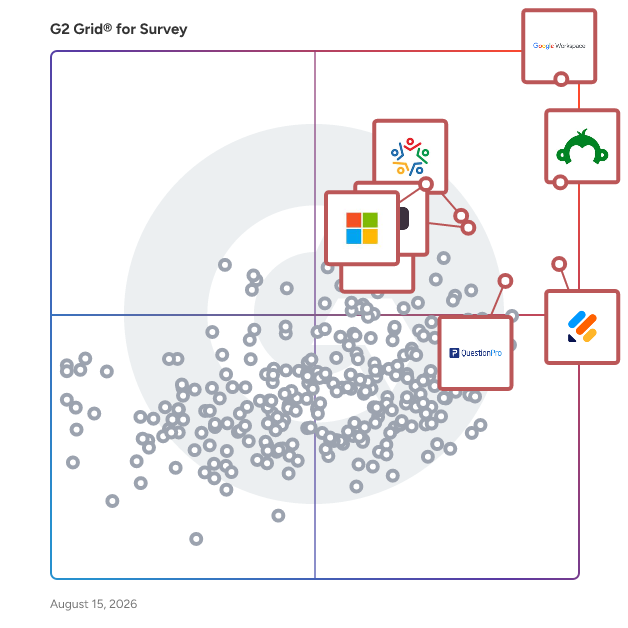
## Top Survey Software at a Glance
| # | Product | Rating | Best For | What Users Say |
|---|---------|--------|----------|----------------|
| 1 | [Google Workspace](https://www.g2.com/products/google-workspace/reviews) | 4.6/5.0 (45,387 reviews) | Real-time team survey and document collaboration | "[All-in-One Solution for Communication and Collaboration](https://www.g2.com/survey_responses/google-workspace-review-12774997)" |
| 2 | [SurveyMonkey](https://www.g2.com/products/surveymonkey/reviews) | 4.4/5.0 (23,177 reviews) | Fast survey creation and feedback reporting | "[Build with AI Makes Survey Creation Fast and Effortless](https://www.g2.com/survey_responses/surveymonkey-review-12696624)" |
| 3 | [Jotform](https://www.g2.com/products/jotform/reviews) | 4.7/5.0 (4,857 reviews) | Flexible forms with payments and workflows | "[User-Friendly and Versatile with Impressive AI Capabilities](https://www.g2.com/survey_responses/jotform-review-12753803)" |
| 4 | [Microsoft Forms](https://www.g2.com/products/microsoft-forms/reviews) | 4.4/5.0 (455 reviews) | Microsoft-native simple surveys and quizzes | "[Simple and Practical Tool for Managing forms, Follow ups, and Daily Information Collection](https://www.g2.com/survey_responses/microsoft-forms-review-12786461)" |
| 5 | [Zoho Survey](https://www.g2.com/products/zoho-survey/reviews) | 4.4/5.0 (980 reviews) | CRM-connected customer feedback surveys | "[Clean, Beginner-Friendly Survey Creation That Makes Feedback Collection Easy](https://www.g2.com/survey_responses/zoho-survey-review-12752688)" |
| 6 | [Typeform](https://www.g2.com/products/typeform/reviews) | 4.5/5.0 (967 reviews) | Interactive lead and feedback forms | "[Powerful AI Surveys with Automation and Seamless Integrations](https://www.g2.com/survey_responses/typeform-review-12747374)" |
| 7 | [Microsoft 365](https://www.g2.com/products/microsoft365/reviews) | 4.6/5.0 (5,500 reviews) | Suite-based survey and file workflows | "[The Ultimate Suite for Professional Content Creation and Formatting](https://www.g2.com/survey_responses/microsoft-365-review-12785319)" |
| 8 | [QuestionPro](https://www.g2.com/products/questionpro/reviews) | 4.5/5.0 (1,123 reviews) | Advanced research surveys with branching | "[A helpful survey data collection tool](https://www.g2.com/survey_responses/questionpro-review-8007405)" |
| 9 | [Constant Contact](https://www.g2.com/products/constant-contact/reviews) | 4.1/5.0 (7,200 reviews) | Email campaigns with embedded feedback collection | "[Clean, Affordable Newsletter Tool with Easy Integrations, Analytics, and A/B Testing](https://www.g2.com/survey_responses/constant-contact-review-12722795)" |
| 10 | [Qualtrics Strategy &amp; Research](https://www.g2.com/products/qualtrics-strategy-research/reviews) | 4.4/5.0 (2,911 reviews) | Research-grade experience feedback analysis | "[Very useful for Wellness Surveys, Feedback Collection and Research Work](https://www.g2.com/survey_responses/qualtrics-strategy-research-review-12806991)" |


## Which Type of Survey Software Tools Are You Looking For?
  - [Survey Software](https://www.g2.com/categories/survey) *(current)*
  - [Employee Engagement Software](https://www.g2.com/categories/employee-engagement)
  - [Online Form Builder Software](https://www.g2.com/categories/online-form-builder)
  - [User Research Tools](https://www.g2.com/categories/user-research)

  
---

**Sponsored**

### Alchemer Survey

Alchemer Survey is a professional survey platform that helps organizations collect feedback, analyze results, and turn insights into action across customer experience, employee engagement, and market research programs. Designed for teams that need more power and flexibility than basic survey tools — without the complexity of enterprise research platforms — Alchemer Survey scales from a single project to organization-wide feedback programs. What is Alchemer Survey used for? Alchemer Survey is used to run customer satisfaction (CSAT) surveys, Net Promoter Score (NPS) programs, market research studies, employee engagement surveys, product feedback loops, and academic or organizational research. It supports both one-off surveys and ongoing, multi-wave feedback programs across industries including technology, healthcare, education, financial services, and retail. Who is Alchemer Survey for? Alchemer Survey is built for researchers, CX professionals, HR teams, marketers, and product managers who need advanced survey logic and reporting without requiring dedicated IT or data science support. It serves organizations of all sizes — from small teams running targeted studies to enterprises managing global, multi-language feedback programs. Key capabilities: - Advanced survey building with branching logic, piping, randomization, and skip patterns — enabling highly tailored respondent experiences - Pre-built templates for common use cases alongside full custom-build options, so teams can launch fast or go deep - Omnichannel distribution via email, web, SMS, embedded links, QR codes, and social media — maximizing reach and response rates - Real-time reporting and analytics with live dashboards, response filtering, cross-tabulation, and exportable reports for easy stakeholder sharing - Multi-language support for global research programs, with role-based permissions to manage access and data governance at scale - Scalable architecture that grows with organizational needs — from a single survey to enterprise-wide feedback operations How does Alchemer Survey compare to other survey platforms? Alchemer Survey sits between simple tools like SurveyMonkey and Google Forms and enterprise platforms like Qualtrics. It offers research-grade features — advanced logic, robust reporting, and flexible distribution — at a price point and implementation complexity accessible to mid-market teams. Organizations that have outgrown basic tools but don&#39;t need (or want to pay for) a full enterprise suite consistently cite Alchemer Survey as a preferred alternative. Bottom line: Alchemer Survey gives organizations the tools to ask smarter questions, reach the right audiences, and act on what they learn — whether running a quick pulse survey or a comprehensive global research program.


[Visit website](https://www.g2.com/external_clickthroughs/record?secure%5Bad_program%5D=ppc&amp;secure%5Bad_slot%5D=category_product_list&amp;secure%5Bcategory_id%5D=28&amp;secure%5Bdisplayable_resource_id%5D=28&amp;secure%5Bdisplayable_resource_type%5D=Category&amp;secure%5Bmedium%5D=sponsored&amp;secure%5Bplacement_reason%5D=page_category&amp;secure%5Bplacement_resource_ids%5D%5B%5D=28&amp;secure%5Bprioritized%5D=false&amp;secure%5Bproduct_id%5D=1627&amp;secure%5Bresource_id%5D=28&amp;secure%5Bresource_type%5D=Category&amp;secure%5Bsource_type%5D=category_page&amp;secure%5Bsource_url%5D=https%3A%2F%2Fwww.g2.com%2Fcategories%2Fsurvey%3Fpage%3D15&amp;secure%5Btoken%5D=dd5ca2077c7a2f9c045af9462e4ce012f08bd770bec887e5937ae41844ea3465&amp;secure%5Burl%5D=https%3A%2F%2Fwww.alchemer.com%2Fl%2Falchemer-survey-g2-ppc%2F&amp;secure%5Burl_type%5D=book_demo)

---

  
## Buyer Guide: Key Questions for Choosing Survey Software Software
  ### What does Survey Software do?
  When I explain survey software, I frame it as a system that helps teams collect feedback from question creation through response analysis. These platforms bring survey building, templates, branding, question logic, distribution links, embedded forms, dashboards, and reports into one workflow. Instead of collecting feedback through scattered forms, emails, or manual tracking, teams can create cleaner respondent experiences, gather responses faster, and turn feedback from customers, employees, students, or researchers into usable data.


  ### Who uses Survey Software primarily?
  After I evaluated G2 reviewer roles and job titles, I found that Survey Software serves many teams:

- **Marketing teams** gather customer feedback, campaign input, and audience insights.
- **Product teams** collect user opinions and feature feedback.
- **HR teams** run employee engagement and satisfaction surveys.
- **Educational users** create quizzes, classroom forms, and academic feedback.
- **Researchers and consultants** conduct market, client, and field studies.
- **Administrators** manage templates, permissions, workflows, and integrations.
- **Business owners** use results to guide decisions.


  ### Why do businesses use Survey Software?
  From the G2 reviewer patterns I evaluated, businesses use Survey Software because feedback work becomes difficult when teams rely on manual forms, scattered responses, or slow reporting. Users mention the need to gather opinions quickly, measure satisfaction, support research, and make decisions from structured response data.

Common benefits include:

- Faster survey creation through templates and intuitive builders.
- Easier feedback collection across email, websites, mobile, and shared links.
- Better analysis through dashboards, summaries, and responses.
- Stronger collaboration for teams that create and review surveys.
- More consistent customer, employee, event, and research programs.


  ### What types of Survey Software should I consider?
  From G2 reviewer descriptions, buyers should compare several product types:

- **General survey builders** for quick questionnaires and feedback collection.
- **Form-first platforms** for registrations, intake, payments, and operational data capture.
- **Research-focused tools** for panels, advanced question logic, and analysis.
- **Employee feedback platforms** for engagement, pulse surveys, and internal programs.
- **Event and education tools** for live polling, quizzes, and participation.
- **Field data tools** for mobile, offline, and geospatial collection needs.


  ### What are the core features to look for in Survey Software?
  When I break down G2 reviews for this category, I look closely at the themes users repeatedly mention:

- Flexible question types, branching, and conditional logic that help create more relevant respondent experiences.
- Custom branding, themes, and layout controls that help surveys feel polished and consistent with the organization&#39;s brand.
- Dashboards, response summaries, and reporting tools that help teams understand feedback and share results more easily.
- Integrations with productivity, CRM, marketing, and automation systems that help connect survey data to daily workflows.
- Collaboration, sharing, permissions, and team management that help multiple stakeholders review, edit, and manage surveys together.
- Mobile-friendly forms and dependable respondent access that help people complete surveys from different devices and locations.
- Support resources for setup and survey design issues that help teams launch surveys with fewer delays.


  ### What trends are shaping Survey Software right now?
  From the G2 review patterns I evaluated, several trends stand out:

- **AI-assisted survey building** is speeding up question creation, survey design, and response summarization.
- **Respondent experience** is becoming a stronger priority as teams look for cleaner layouts, easier navigation, and higher completion rates.
- **Advanced logic and personalization** are making surveys more targeted based on respondent answers, segments, or use cases.
- **Workflow integrations** are connecting survey data with CRM, marketing, productivity, and automation systems.
- **Mobile and offline collection** is expanding survey use cases for field teams, events, research, and operational feedback.
- **Real-time reporting** is helping teams interpret responses faster and act on feedback sooner.


  ### How should I choose Survey Software?
  For me, the strongest Survey Software fit depends on audience, survey complexity, reporting needs, and connected workflows. I would prioritize products reviewers praise for ease of use, customization, dependable collection, useful reporting, and responsive support. I would also examine concerns around learning curve, advanced logic, plan limits, mobile depth, and integration quality before making a final choice.


---

  ## What Are the Top-Rated Survey Software Products in 2026?
### 1. [Google Workspace](https://www.g2.com/products/google-workspace/reviews)
  **Average Rating:** 4.6/5.0
  **Total Reviews:** 45,387
  **Why buyers love it?:** When I assessed Google Workspace’s G2 review data, the central signal was its value as a shared work hub where forms, files, email, chat, and meetings stay connected. Reviewers highlight real-time collaboration, familiar tools, easy sharing, and a single place for daily work across Docs, Sheets, Drive, Gmail, Meet, and Forms. The product reads as a practical survey option when feedback collection needs to live beside documents, classroom tasks, team communication, and lightweight analysis. Users also mention friction around shared Drive organization, file conversion, lower-tier feature limits, offline depth, and large Sheets workloads.


### What Do G2 Reviewers Say About Google Workspace?
*AI-generated summary from verified user reviews*

**Pros:**

- Users value the **ease of use** of Google Workspace, enhancing productivity with its seamless integration and centralization.
- Users value the **seamless collaboration** of Google Workspace, enhancing productivity and communication effortlessly among teams.
- Users appreciate the **seamless integrations** within Google Workspace, enhancing efficiency and organization for quick access to tools.
- Users appreciate the **ease of use and seamless integrations** of Google Workspace, greatly enhancing daily productivity and collaboration.
- Users value the **intuitive design** of Google Workspace, simplifying productivity and centralizing various important tools effortlessly.

**Cons:**

- Users are frustrated by **missing features** , such as offline access limitations and restricted capabilities without admin approval.
- Many users find the **limited features** of Google Workspace unsuitable for small teams, lacking essential functionalities.
- Users find Google Workspace **lacking in advanced features** compared to competitors, especially in CRM and spreadsheet capabilities.
- Users feel the **lack of features** in Google Workspace limits customization and advanced functionalities compared to other tools.
- Users find the **limited customization options** in Google Workspace frustrating, especially for tools like Google Calendar and Forms.
  #### What Are Recent G2 Reviews of Google Workspace?

**"[Effortless Collaboration, Outshines Competitors](https://www.g2.com/survey_responses/google-workspace-review-12806571)"**

**Rating:** 5.0/5.0 stars
*— Robert M.*

[Read full review](https://www.g2.com/survey_responses/google-workspace-review-12806571)

---

**"[All-in-One Solution for Communication and Collaboration](https://www.g2.com/survey_responses/google-workspace-review-12774997)"**

**Rating:** 5.0/5.0 stars
*— Kunal N.*

[Read full review](https://www.g2.com/survey_responses/google-workspace-review-12774997)

---

  #### What Are G2 Users Discussing About Google Workspace?

- [What tips do you have for effectively using Google Meet’s advanced features for large virtual meetings?](https://www.g2.com/discussions/what-tips-do-you-have-for-effectively-using-google-meet-s-advanced-features-for-large-virtual-meetings) - 16 comments, 10 upvotes
- [What is Google Surveys used for?](https://www.g2.com/discussions/what-is-google-surveys-used-for) - 8 comments, 2 upvotes
- [What does G Suite do?](https://www.g2.com/discussions/what-does-g-suite-do) - 8 comments, 5 upvotes
### 2. [SurveyMonkey](https://www.g2.com/products/surveymonkey/reviews)
  **Average Rating:** 4.4/5.0
  **Total Reviews:** 23,177
  **Why buyers love it?:** Across SurveyMonkey’s G2 reviews, I found a clear emphasis on speed and approachability for survey creation. Reviewers highlight templates, easy setup, simple distribution, real-time analytics, visual reports, and AI-assisted summarization that help teams collect feedback with less manual work. I read the product as a strong fit for routine customer, employee, education, and market feedback where teams need structured responses and quick insight. Users also mention price sensitivity, distribution constraints, branding limits, and reporting flexibility as areas that can affect more advanced programs.


### What Do G2 Reviewers Say About SurveyMonkey?
*AI-generated summary from verified user reviews*

**Pros:**

- Users love the **ease of use** of SurveyMonkey, allowing them to create surveys quickly and intuitively.
- Users love the **ease of creation** with SurveyMonkey, finding it quick and user-friendly for building surveys.
- Users find SurveyMonkey **intuitive and user-friendly** , making it easy to create and understand surveys effortlessly.
- Users love how **simple** SurveyMonkey makes survey creation and analysis, even for those without technical skills.
- Users appreciate the **ease of use** of SurveyMonkey, which simplifies feedback collection and data analysis effectively.

**Cons:**

- Users find SurveyMonkey to be **expensive** , especially for additional features and customization options, which can deter new users.
- Users find the **free plan limitations** restrictive, making it difficult to fully utilize SurveyMonkey without upgrading.
- Users find SurveyMonkey&#39;s **survey issues** to be less engaging due to outdated features and limited customization options.
- Users find that the **limited features** in SurveyMonkey&#39;s free plans restrict their survey capabilities and customization options.
- Users find the **limited customization** options in SurveyMonkey restrictive, particularly for free and basic plans.

#### Key Features
  - Customer Service Channels
  - Survey Builder
  - Branding
  - Reporting &amp; Analytics
  - Conditional Logic
  #### What Are Recent G2 Reviews of SurveyMonkey?

**"[Build with AI Makes Survey Creation Fast and Effortless](https://www.g2.com/survey_responses/surveymonkey-review-12696624)"**

**Rating:** 4.5/5.0 stars
*— Chandra K.*

[Read full review](https://www.g2.com/survey_responses/surveymonkey-review-12696624)

---

**"[SurveyMonkey Makes Survey Creation and Analytics Effortless](https://www.g2.com/survey_responses/surveymonkey-review-12723986)"**

**Rating:** 4.5/5.0 stars
*— Rakshika S.*

[Read full review](https://www.g2.com/survey_responses/surveymonkey-review-12723986)

---

  #### What Are G2 Users Discussing About SurveyMonkey?

- [What is SurveyMonkey used for?](https://www.g2.com/discussions/what-is-surveymonkey-used-for) - 6 comments
- [What is SurveyMonkey Market Research Solutions used for?](https://www.g2.com/discussions/what-is-surveymonkey-market-research-solutions-used-for) - 3 comments, 2 upvotes
- [What is SurveyMonkey?](https://www.g2.com/discussions/what-is-surveymonkey) - 2 comments, 1 upvote
### 3. [Jotform](https://www.g2.com/products/jotform/reviews)
  **Average Rating:** 4.7/5.0
  **Total Reviews:** 4,857
  **Why buyers love it?:** My read of Jotform’s G2 feedback centered on form creation that extends beyond surveys into data capture, approvals, and payments. Reviewers highlight drag-and-drop setup, templates, field options, AI-assisted form creation, integrations, exports, and the ability to manage customer or internal information in one place. I found the product valuable when teams need surveys, registrations, service requests, subscriptions, and payment collection in the same form-building environment. Users also mention submission limits, free-plan constraints, advanced feature complexity, integration friction, and occasional issues with AI-assisted edits.


### What Do G2 Reviewers Say About Jotform?
*AI-generated summary from verified user reviews*

**Pros:**

- Users love the **ease of use** of Jotform, finding it simple to create versatile and effective forms.
- Users admire Jotform for its **ease of use and comprehensive templates** , enabling efficient client information collection and professional branding.
- Users appreciate the **ease of creation** with Jotform, highlighting its straightforward setup and user-friendly features.
- Users love the **flexibility and creativity** of Jotform, allowing easy form creation and effective data collection.
- Users find Jotform to be **extremely user-friendly** , allowing quick creation of customized forms with seamless integration.

**Cons:**

- Users find Jotform&#39;s pricing to be **too expensive** , especially when opting for monthly payments over annual subscriptions.
- Users feel that **missing features** hinder integration and customization options, complicating their use of Jotform.
- Users report **form issues** that hinder navigation and customization, affecting the overall usability of Jotform.
- Users find **limited customization** options in Jotform, making branding integration and field mapping challenging.
- Users find **form design options lacking** and report difficulties in navigation and customization for their needs.

#### Key Features
  - Integration APIs
  - Candidate Search
  - Candidate Evaluations
  - Survey Customization
  - Goal and Challenge Creation
  #### What Are Recent G2 Reviews of Jotform?

**"[My experience with Jotform Instagram Agent improved after direct technical support involvement](https://www.g2.com/survey_responses/jotform-review-12792028)"**

**Rating:** 4.0/5.0 stars
*— Meltem A.*

[Read full review](https://www.g2.com/survey_responses/jotform-review-12792028)

---

**"[User-Friendly and Versatile with Impressive AI Capabilities](https://www.g2.com/survey_responses/jotform-review-12753803)"**

**Rating:** 5.0/5.0 stars
*— Jimmy K.*

[Read full review](https://www.g2.com/survey_responses/jotform-review-12753803)

---

  #### What Are G2 Users Discussing About Jotform?

- [What innovative uses of Jotform are seen in data collection and management across various sectors?](https://www.g2.com/discussions/what-innovative-uses-of-jotform-are-seen-in-data-collection-and-management-across-various-sectors) - 1 upvote
- [What is Jotform used for?](https://www.g2.com/discussions/jotform-what-is-jotform-used-for) - 4 comments, 2 upvotes
- [Who uses JotForm?](https://www.g2.com/discussions/who-uses-jotform)
### 4. [Typeform](https://www.g2.com/products/typeform/reviews)
  **Average Rating:** 4.5/5.0
  **Total Reviews:** 967
  **Why buyers love it?:** In Typeform’s G2 feedback, I saw the strongest signal around polished, interactive forms that feel easy for respondents to complete. Reviewers highlight quick survey setup, mobile-first form design, routing logic, localization, custom variables, integrations with marketing and CRM tools, and AI-assisted creation. I read the product as useful for lead qualification, event feedback, customer satisfaction, and quizzes where presentation quality and response flow matter. Users also mention higher-plan feature access, limited pop-up customization, response organization effort, load delays, and cost concerns.


### What Do G2 Reviewers Say About Typeform?
*AI-generated summary from verified user reviews*

**Pros:**

- Users love the **ease of use** in Typeform, simplifying complex pathways and enhancing user engagement.
- Users value the **intuitive design** of Typeform, which enhances user experience and simplifies complex surveys.
- Users love the **conversational format** of Typeform, making interactions feel engaging and personalized without overwhelming fields.
- Users love the **seamless integrations** of Typeform, enhancing efficiency with tools like Google Sheets and HubSpot.
- Users love the **ease of creation** with Typeform, thanks to its intuitive interface and helpful templates.

**Cons:**

- Users find Typeform **very expensive** , with too many essential features locked behind high paywalls and low submission limits.
- Users find **limited customization** options frustrating, often requiring significant time to achieve a polished and professional look.
- Users often find **limited features** with Typeform, especially regarding data handling and advanced reporting tools.
- Users find **missing features** like reporting and bulk export options hinder effective data management in Typeform.
- Users express concerns about **integration issues** , noting difficulties with exporting data and accessing advanced reporting features.

#### Key Features
  - Features
  - Mobile
  - Forms
  - Question Types
  - Branching/Skip Logic
  #### What Are Recent G2 Reviews of Typeform?

**"[Powerful AI Surveys with Automation and Seamless Integrations](https://www.g2.com/survey_responses/typeform-review-12747374)"**

**Rating:** 5.0/5.0 stars
*— Konjengbam  M.*

[Read full review](https://www.g2.com/survey_responses/typeform-review-12747374)

---

**"[imple and Professional Platform for Forms and Data Collection](https://www.g2.com/survey_responses/typeform-review-12799700)"**

**Rating:** 5.0/5.0 stars
*— Ishan S.*

[Read full review](https://www.g2.com/survey_responses/typeform-review-12799700)

---

  #### What Are G2 Users Discussing About Typeform?

- [What is Typeform used for?](https://www.g2.com/discussions/typeform-what-is-typeform-used-for) - 1 comment
- [Is Typeform secure?](https://www.g2.com/discussions/is-typeform-secure) - 1 comment
- [What is included in Typeform free plan?](https://www.g2.com/discussions/what-is-included-in-typeform-free-plan) - 1 comment
### 5. [Constant Contact](https://www.g2.com/products/constant-contact/reviews)
  **Average Rating:** 4.1/5.0
  **Total Reviews:** 7,200
  **Why buyers love it?:** Constant Contact’s review data framed surveys for me as part of a broader communication and marketing workflow. Reviewers highlight email templates, campaign scheduling, list management, mobile previews, deliverability support, automation, social publishing, analytics, and survey tools that help collect feedback from an existing audience. I saw the product as useful when surveys need to connect with newsletters, clinic updates, promotions, or customer communications rather than stand alone as research instruments. Users also mention editor rigidity, slower UI moments, higher-tier feature access, segmentation limits, and cost concerns.


### What Do G2 Reviewers Say About Constant Contact?
*AI-generated summary from verified user reviews*

**Pros:**

- Users love the **ease of use** of Constant Contact, making email marketing simple and efficient for small businesses.
- Users appreciate the **easy creation of campaigns** on Constant Contact, facilitating engagement with new users and customers.
- Users appreciate the **user-friendly email builder** of Constant Contact, simplifying campaign creation and user engagement.
- Users appreciate the **ease of creating consistent newsletters and social media posts** , enhancing engagement with clients effectively.
- Users find Constant Contact to be **exceptionally helpful** for managing email campaigns and tracking engagement effectively.

**Cons:**

- Users find the **missing features** in Constant Contact limiting, struggling with slow uploads and irrelevant tools.
- Users find the **limited customization** options frustrating, affecting their creative control and overall user experience.
- Users find the **limited features** of Constant Contact not cost-effective and lacking relevance for their needs.
- Users are frustrated by the **limited templates** offered by Constant Contact, restricting creativity and design options.
- Users find **layout issues** in Constant Contact&#39;s dashboard hinder navigation and complicate the design process.

#### Key Features
  - CRM Integration
  - Email and Mobile Preview
  - Social Functionality
  - Rich Media Capabilties
  - Performance and Reliability
  #### What Are Recent G2 Reviews of Constant Contact?

**"[Clean, Affordable Newsletter Tool with Easy Integrations, Analytics, and A/B Testing](https://www.g2.com/survey_responses/constant-contact-review-12722795)"**

**Rating:** 5.0/5.0 stars
*— Charles J.*

[Read full review](https://www.g2.com/survey_responses/constant-contact-review-12722795)

---

**"[Easy to Use, Confident Messaging, and a Clean Look](https://www.g2.com/survey_responses/constant-contact-review-12683986)"**

**Rating:** 4.0/5.0 stars
*— Olivia M.*

[Read full review](https://www.g2.com/survey_responses/constant-contact-review-12683986)

---

  #### What Are G2 Users Discussing About Constant Contact?

- [How are small businesses using Constant Contact to enhance their email marketing campaigns effectively?](https://www.g2.com/discussions/how-are-small-businesses-using-constant-contact-to-enhance-their-email-marketing-campaigns-effectively) - 3 comments
- [What is Constant Contact used for?](https://www.g2.com/discussions/constant-contact-what-is-constant-contact-used-for) - 4 comments, 1 upvote
- [Does Constant Contact have a CRM?](https://www.g2.com/discussions/does-constant-contact-have-a-crm) - 2 comments
### 6. [QuestionPro](https://www.g2.com/products/questionpro/reviews)
  **Average Rating:** 4.5/5.0
  **Total Reviews:** 1,123
  **Why buyers love it?:** QuestionPro’s G2 reviews signaled to me a platform aimed at more structured research than basic form collection. Reviewers highlight advanced survey logic, branching, panel management, file uploads, GDPR-aware data collection, analytics, reporting, security controls, and support for complex academic, healthcare, and market research needs. I read the product as a fit when teams need targeted studies with many question types, compliance considerations, and centralized insight workflows. Users also mention a busy interface, rigid chart output, niche logic setup complexity, pricing fit, and the need for guidance on advanced configurations.


### What Do G2 Reviewers Say About QuestionPro?
*AI-generated summary from verified user reviews*

**Pros:**

- Users appreciate the **ease of use** of QuestionPro, benefiting from its intuitive platform and excellent support.
- Users value the **exceptional customer service** and intuitive design of QuestionPro, making it easy to use and navigate.
- Users value the **intuitive design** of QuestionPro, noting its ease of use and seamless navigation.
- Users value the **responsive and helpful customer support** of QuestionPro, enhancing their experience with the platform.
- Users appreciate the **ease of creation** with QuestionPro, allowing quick and multilingual survey design.

**Cons:**

- Users feel that the **limited number of available surveys** restricts the overall functionality and effectiveness of QuestionPro.
- Users find the **learning curve steep** , especially when navigating advanced features, but appreciate the platform once familiar.
- Users find QuestionPro&#39;s pricing to be **expensive** , especially with sudden increases and lack of suitable plan options.
- Users feel **limited customization** options hinder their ability to create attractive surveys and emails on QuestionPro.
- Users find the **interface is not intuitive** and can feel confusing when navigating advanced features and customization.

#### Key Features
  - Survey Builder
  - Branching/Skip Logic
  - Reporting &amp; Analytics
  - Adaptive Learning
  #### What Are Recent G2 Reviews of QuestionPro?

**"[A helpful survey data collection tool](https://www.g2.com/survey_responses/questionpro-review-8007405)"**

**Rating:** 4.5/5.0 stars
*— Maegan A.*

[Read full review](https://www.g2.com/survey_responses/questionpro-review-8007405)

---

**"[QuestionPro- The King of Market Research For Businesses](https://www.g2.com/survey_responses/questionpro-review-12739232)"**

**Rating:** 4.5/5.0 stars
*— Christian K.*

[Read full review](https://www.g2.com/survey_responses/questionpro-review-12739232)

---

  #### What Are G2 Users Discussing About QuestionPro?

- [What is QuestionPro used for?](https://www.g2.com/discussions/what-is-questionpro-used-for) - 1 comment
### 7. [Zoho Survey](https://www.g2.com/products/zoho-survey/reviews)
  **Average Rating:** 4.4/5.0
  **Total Reviews:** 980
  **Why buyers love it?:** Zoho Survey’s review data pointed me toward a straightforward tool for building and distributing feedback forms with minimal ramp time. Reviewers highlight drag-and-drop survey creation, question flexibility, logic, theme customization, real-time reports, email or SMS distribution, and connections to Zoho CRM and other tools. I found the product useful for customer feedback programs that need survey data tied back to sales or service context. Users also mention advanced feature limits, paid-plan requirements, support response concerns, and some integration or customization challenges.


### What Do G2 Reviewers Say About Zoho Survey?
*AI-generated summary from verified user reviews*

**Pros:**

- Users praise the **ease of use** of Zoho Survey, highlighting its intuitive interface and quick survey creation capabilities.
- Users appreciate the **easy, intuitive survey creation** of Zoho Survey, enabling quick and professional survey design.
- Users value the **intuitive design** of Zoho Survey, making survey creation and management efficient and user-friendly.
- Users value the **simplicity and user-friendliness** of Zoho Survey, making survey creation and management effortless.
- Users find Zoho Survey **extremely helpful** for its ease of use and diverse features for effective data collection.

**Cons:**

- Users find the **limited customization options** in Zoho Survey restrict their ability to create unique survey designs.
- Users highlight the need for a more **intuitive interface and improved distribution features** in Zoho Survey.
- Users find the **limited features** of Zoho Survey restrict their capabilities, especially for advanced customization and reporting.
- Users face **limited data analysis** capabilities with Zoho Survey, requiring external tools for comprehensive insights and reporting.
- Users find the **outdated design** of Zoho Survey makes it less appealing and limits customization options.

#### Key Features
  - Survey Builder
  - Branching/Skip Logic
  - Reporting &amp; Analytics
  - Adaptive Learning
  #### What Are Recent G2 Reviews of Zoho Survey?

**"[Clean, Beginner-Friendly Survey Creation That Makes Feedback Collection Easy](https://www.g2.com/survey_responses/zoho-survey-review-12752688)"**

**Rating:** 4.0/5.0 stars
*— Muhammad O.*

[Read full review](https://www.g2.com/survey_responses/zoho-survey-review-12752688)

---

**"[Fast, Intuitive Survey Builder with Professional Templates](https://www.g2.com/survey_responses/zoho-survey-review-12718812)"**

**Rating:** 5.0/5.0 stars
*— Abhijit S.*

[Read full review](https://www.g2.com/survey_responses/zoho-survey-review-12718812)

---

  #### What Are G2 Users Discussing About Zoho Survey?

- [What is Zoho Survey used for?](https://www.g2.com/discussions/what-is-zoho-survey-used-for) - 4 comments, 1 upvote
- [What are the features of survey?](https://www.g2.com/discussions/zoho-survey-what-are-the-features-of-survey)
- [Is Zoho survey legit?](https://www.g2.com/discussions/is-zoho-survey-legit) - 2 comments, 1 upvote
### 8. [Microsoft 365](https://www.g2.com/products/microsoft365/reviews)
  **Average Rating:** 4.6/5.0
  **Total Reviews:** 5,500
  **Why buyers love it?:** When I evaluated Microsoft 365’s review data, the clearest theme was productivity breadth rather than standalone survey depth. Reviewers highlight familiar Office apps, OneDrive file access, real-time sync, Forms, Teams, Outlook, Power BI, and Copilot-supported work across communication and reporting. I saw the survey fit where feedback collection is part of a broader Microsoft-based workflow that also needs documents, email, storage, and analysis. Users also mention subscription cost, layout changes, feature volume, internet dependency, and system heaviness as factors that can slow adoption.


### What Do G2 Reviewers Say About Microsoft 365?
*AI-generated summary from verified user reviews*

**Pros:**

- Users value the **ease of use** of Microsoft 365, enjoying seamless access across devices for better collaboration.
- Users value the **seamless team collaboration** in Microsoft 365, enhancing productivity and communication effortlessly across various applications.
- Users value the **seamless integration** with Microsoft apps, ensuring accessibility and top-notch communication for their needs.
- Users appreciate the **seamless integration** of Microsoft 365 apps, enhancing collaboration and accessibility across all devices.
- Users appreciate the **seamless integration** of Microsoft 365 apps, enhancing accessibility and collaboration across platforms.

**Cons:**

- Users feel that Microsoft 365 is **expensive** , particularly when compared to free alternatives like Google Workspace.
- Users are frustrated by **missing features** and inconsistent updates that disrupt workflow and functionality in Microsoft 365.
- Users report a **daunting learning curve** for non-technical individuals, making initial setup and tool usage challenging.
- Users are frustrated by the **limited features** of Microsoft 365, feeling they often require higher-priced plans.
- Users find Microsoft 365 **lacking features** on lower-priced plans, which can limit functionality for small teams.
  #### What Are Recent G2 Reviews of Microsoft 365?

**"[The Ultimate Suite for Professional Content Creation and Formatting](https://www.g2.com/survey_responses/microsoft-365-review-12785319)"**

**Rating:** 4.5/5.0 stars
*— Sapna b.*

[Read full review](https://www.g2.com/survey_responses/microsoft-365-review-12785319)

---

**"[Multi functional, All in one App](https://www.g2.com/survey_responses/microsoft-365-review-12753510)"**

**Rating:** 4.5/5.0 stars
*— Sharon M.*

[Read full review](https://www.g2.com/survey_responses/microsoft-365-review-12753510)

---

  #### What Are G2 Users Discussing About Microsoft 365?

- [What are the uses of Microsoft software?](https://www.g2.com/discussions/what-are-the-uses-of-microsoft-software) - 2 comments, 1 upvote
- [What kind of software is Microsoft Office?](https://www.g2.com/discussions/what-kind-of-software-is-microsoft-office) - 1 comment
- [What programs are in Microsoft Office suite?](https://www.g2.com/discussions/what-programs-are-in-microsoft-office-suite) - 1 comment
### 9. [Tally](https://www.g2.com/products/tally-forms-tally/reviews)
  **Average Rating:** 4.9/5.0
  **Total Reviews:** 125
  **Product Description:** Say Goodbye to Boring Forms Tally is the simplest way to create online forms for free. No coding required — just type your questions like you would in a doc, and you’re ready to go. The best part? You get unlimited forms and submissions for free. 💨 As simple as it gets: Tally is the intuitive form builder you’ve been searching for. Just type and build any type of form in seconds.  🆓 Unlimited submissions for free: Say goodbye to paywalls. With Tally, you can create unlimited forms and collect unlimited submissions at no cost, as long as you follow our fair usage guidelines.  💬 Exceptional customer support: At Tally, our users come first. As an independent company, we build in public with a roadmap shaped by your feedback and provide fast, responsive support.


### What Do G2 Reviewers Say About Tally?
*AI-generated summary from verified user reviews*

**Pros:**

- Users love the **ease of use** of Tally, finding it intuitive and quick to set up for varied tasks.
- Users commend the **easy setup** of Tally, contributing to a seamless integration into their workflows.
- Users appreciate the **seamless CRM integrations** of Tally, enhancing their workflow and data management effortlessly.
- Users find Tally&#39;s **simplicity and speed** ideal for easily creating effective forms with minimal hassle.
- Users rave about Tally&#39;s **excellent customer support** , highlighting quick, clear assistance for seamless problem-solving.

**Cons:**

- Users find the **learning curve steep** , particularly with complex calculations that may overwhelm novices.
- Users find the **absence of key features** in Tally, such as version history and integrations, quite limiting.
- Users find the **limited customization** options frustrating, wishing for more design flexibility and built-in styling methods.
- Users find **form issues** such as clunky currency switches and mobile display problems, affecting usability and clarity.
- Users face **layout issues** with Tally, affecting mobile scaling and the arrangement of media within questionnaires.
  #### What Are Recent G2 Reviews of Tally?

**"[Fast, Minimalist Form Builder with Polished Results, Plus Unlimited Free Forms](https://www.g2.com/survey_responses/tally-review-12703783)"**

**Rating:** 5.0/5.0 stars
*— Jatin B.*

[Read full review](https://www.g2.com/survey_responses/tally-review-12703783)

---

**"[Simple on the Surface, Powerful Under the Hood — and Outstanding Support](https://www.g2.com/survey_responses/tally-review-12721769)"**

**Rating:** 5.0/5.0 stars
*— Yannick P.*

[Read full review](https://www.g2.com/survey_responses/tally-review-12721769)

---

### 10. [SurveyMars](https://www.g2.com/products/surveymars/reviews)
  **Average Rating:** 4.6/5.0
  **Total Reviews:** 120
  **Product Description:** SurveyMars is a completely free survey and poll maker platform. With unlimited surveys, questions, and responses, you can gather insights quickly and effortlessly. Get started for free and there is no credit card required.


### What Do G2 Reviewers Say About SurveyMars?
*AI-generated summary from verified user reviews*

**Pros:**

- Users find it incredibly easy to create surveys with **varied question types and helpful AI hints** on SurveyMars.
- Users appreciate the **simple and fast setup** of SurveyMars, making survey creation and data analysis efficient and straightforward.
- Users love the **simple and fast survey creation** in SurveyMars, allowing quick feedback collection without needing technical skills.
- Users find SurveyMars **incredibly user-friendly** , allowing even non-technical teams to efficiently create and send surveys.
- Users praise the **easy setup** of SurveyMars, enabling immediate survey creation without complicated onboarding processes.

**Cons:**

- Users desire **more advanced customization options** in SurveyMars for enhanced survey design flexibility.
- Users find the **limited data analysis capabilities** of SurveyMars restrictive for comprehensive audience segmentation and reporting.
- Users report **export limitations** and **mobile formatting issues** that hinder efficient survey experiences and data handling.
- Users point out the **missing advanced security and customization features** , limiting suitability for sensitive enterprise surveys.
- Users find the **poor visualization** in SurveyMars limits data analysis and sharing of insights effectively.
  #### What Are Recent G2 Reviews of SurveyMars?

**"[User-Friendly Surveys with Powerful Analytics, AI Templates, and Integrations](https://www.g2.com/survey_responses/surveymars-review-12760624)"**

**Rating:** 4.5/5.0 stars
*— Konjengbam  M.*

[Read full review](https://www.g2.com/survey_responses/surveymars-review-12760624)

---

**"[Fast, Organized Healthcare Surveys with Helpful AI Question Generation](https://www.g2.com/survey_responses/surveymars-review-12782471)"**

**Rating:** 5.0/5.0 stars
*— Ishan S.*

[Read full review](https://www.g2.com/survey_responses/surveymars-review-12782471)

---

### 11. [G2 Marketing Solutions](https://www.g2.com/products/g2/reviews)
  **Average Rating:** 4.6/5.0
  **Total Reviews:** 5,277
  **Why buyers love it?:** For G2 Marketing Solutions, I saw the review data emphasize ease of participation and the value of software feedback as a decision input. Reviewers highlight an easy interface, simple setup, review and survey workflows, AI assistance, templates, software comparison, and the ability to gather opinions that help buyers evaluate products. I read the product as relevant when teams want to collect, organize, and activate customer voice around software reputation and market presence. Users also mention generic questions, email volume, AI response preferences, interface density, and review verification friction.


### What Do G2 Reviewers Say About G2 Marketing Solutions?
*AI-generated summary from verified user reviews*

**Pros:**

- Users value the **ease of use** of G2 Marketing Solutions, enabling straightforward integration and personal experience sharing.
- Users value the **authenticity and transparency** of G2 Marketing Solutions, trusting peer reviews for informed decision-making.
- Users appreciate the **user-friendly interface** of G2 Marketing Solutions, enhancing navigation and fostering genuine feedback.
- Users value the **genuine and fair reviews** on G2 Marketing Solutions, enhancing decision-making for potential buyers.
- Users value G2 Marketing Solutions for its **genuine and authentic reviews** , helping them make informed technology decisions.

**Cons:**

- Users experience **inconsistent review approvals** and outdated feedback, leading to confusion when assessing G2 Marketing Solutions.
- Users warn about **biased reviews** on G2 Marketing Solutions, which can lead to misinformation and hinder decision-making.
- Users struggle with a **lack of clarity** in review approvals and video submission tracking, hindering their experience.
- Users find the **reviewing process time-consuming** and occasionally lengthy, impacting their ability to provide feedback quickly.
- Users experience a **confusing interface** and misunderstandings due to misleading features and inadequate support.

#### Key Features
  - Customer Feedback
  - Revenue Reporting
  - Social Networks Monitoring
  - Contact Data Availability
  - Integrations
  #### What Are Recent G2 Reviews of G2 Marketing Solutions?

**"[Great platform for B2b reviews and buyer incentive data](https://www.g2.com/survey_responses/g2-marketing-solutions-review-7062945)"**

**Rating:** 5.0/5.0 stars
*— Niels L.*

[Read full review](https://www.g2.com/survey_responses/g2-marketing-solutions-review-7062945)

---

**"[Builds Trust and Visibility with Authentic Reviews and Buyer Intent Data](https://www.g2.com/survey_responses/g2-marketing-solutions-review-12793251)"**

**Rating:** 5.0/5.0 stars
*— Atharva Z.*

[Read full review](https://www.g2.com/survey_responses/g2-marketing-solutions-review-12793251)

---

  #### What Are G2 Users Discussing About G2 Marketing Solutions?

- [In what ways is G2.com influencing purchasing decisions in the software and technology market?](https://www.g2.com/discussions/in-what-ways-is-g2-com-influencing-purchasing-decisions-in-the-software-and-technology-market) - 8 comments, 4 upvotes
- [How is G2.com being used to enhance operational efficiency and user experience in its specific field?](https://www.g2.com/discussions/how-is-g2-com-being-used-to-enhance-operational-efficiency-and-user-experience-in-its-specific-field) - 6 comments, 2 upvotes
- [What is G2.com used for?](https://www.g2.com/discussions/what-is-g2-com-used-for) - 11 comments, 6 upvotes
### 12. [Okendo](https://www.g2.com/products/okendo/reviews)
  **Average Rating:** 4.6/5.0
  **Total Reviews:** 353
  **Product Description:** Okendo is the customer marketing platform built for Shopify brands to strengthen relationships and maximize lifetime value. Okendo makes it easy to collect feedback, reward engagement, and personalize interactions, helping brands turn shoppers into Superfans. Okendo’s products work together to build trust, increase retention, and capture valuable insights. With unified profiles, AI-powered tools and insights, customizable programs, and deep integrations across the eCommerce stack, Okendo provides brands with the tools to build stronger communities and drive long-term growth. With Okendo, brands can: - Convert better by showcasing content like customer ratings, reviews, photos, and videos that build trust and improve shopper confidence. - Retain more with loyalty and referral programs that reward engagement, encourage repeat purchases, and strengthen brand advocacy. - Adapt faster with quizzes, surveys, and AI automation that capture customer insights and personalize campaigns in real time. Why Brands Choose Okendo - Trusted by 18,000+ fast-growing Shopify brands including SKIMS, Rhode, and Oh Polly. - Proven impact with an average 4X lift in conversion rates and 15X ROI. - 65+ integrations with tools like Shopify, Klaviyo, Attentive, Postscript, and Meta. - Dedicated customer support with responsive, hands-on guidance for SMBs through enterprise. - Reliable, scalable performance built to support growth at every stage.


### What Do G2 Reviewers Say About Okendo?
*AI-generated summary from verified user reviews*

**Pros:**

- Users value the **ease of use** of Okendo, appreciating its seamless integration with Shopify and intuitive interface.
- Users commend Okendo for their **responsive and helpful customer support** , enhancing the overall experience with the platform.
- Users value Okendo for its **seamless Shopify integration** and proactive customer support, enhancing their e-commerce efforts significantly.
- Users appreciate Okendo&#39;s **seamless Shopify integration** and powerful features like automation and segmentation for a tailored experience.
- Users highlight the **easy setup** of Okendo, appreciating the intuitive interface and efficient guidance throughout the process.

**Cons:**

- Users note the **limited customization** options in Okendo, desiring more flexibility in design and review placement.
- Users note the **missing features** in Okendo, making certain promotions and functionalities cumbersome and less automated.
- Users feel that the **price is a bit expensive** and wish for more affordable options for Okendo.
- Users note a **lack of customization** , limiting branding and user experience adjustments in Okendo.
- Users find **usage difficult** due to a complicated interface and limitations with multi-store management in Okendo.
  #### What Are Recent G2 Reviews of Okendo?

**"[Performance Insights Dashboard Speeds Up Customer Experience Decisions](https://www.g2.com/survey_responses/okendo-review-12750652)"**

**Rating:** 4.5/5.0 stars
*— Joe H.*

[Read full review](https://www.g2.com/survey_responses/okendo-review-12750652)

---

**"[Reliable, Intuitive Reviews That Feel Premium and On-Brand](https://www.g2.com/survey_responses/okendo-review-12759695)"**

**Rating:** 4.5/5.0 stars
*— Polly I.*

[Read full review](https://www.g2.com/survey_responses/okendo-review-12759695)

---

  #### What Are G2 Users Discussing About Okendo?

- [What is Okendo used for?](https://www.g2.com/discussions/what-is-okendo-used-for) - 1 comment
### 13. [Mentimeter](https://www.g2.com/products/mentimeter/reviews)
  **Average Rating:** 4.7/5.0
  **Total Reviews:** 787
  **Why buyers love it?:** Mentimeter’s review data made its real-time audience use case especially clear to me. Reviewers highlight polls, quizzes, word clouds, anonymous responses, interactive slides, participant access, and strong engagement in classes, workshops, meetings, and events. I read the product as a fit when survey questions need to happen live and support discussion during a presentation or facilitated session. Users also mention free-plan limits, design customization limits, reliance on stable internet, and gaps in more advanced quiz or gamification options.


### What Do G2 Reviewers Say About Mentimeter?
*AI-generated summary from verified user reviews*

**Pros:**

- Users value the **ease of use** of Mentimeter, enhancing engagement and interactivity in presentations and lectures.
- Users appreciate the **engaging interaction** facilitated by Mentimeter, enhancing participation and making learning enjoyable.
- Users appreciate the **interactive engagement** of Mentimeter, enhancing participation and making presentations enjoyable.
- Users love how Mentimeter makes presentations **fun and interactive** , enhancing engagement and participation during classes.
- Users value the **easy interactions** in Mentimeter presentations, enhancing engagement and participation effortlessly across devices.

**Cons:**

- Users find the **limited customization options** of Mentimeter restrict their ability to create tailored presentations.
- Users feel that Mentimeter has **missing features** , such as limited free options and the need for advanced functionalities.
- Users find the **PowerPoint integration glitchy** and troublesome, especially with animations and high-resolution images.
- Users face **PowerPoint integration issues** with Mentimeter, including glitches and loss of animations during imports.
- Users find the **limited features** of Mentimeter restrictive for creating customized and advanced interactive sessions.
  #### What Are Recent G2 Reviews of Mentimeter?

**"[Mentimeter Makes Presentations Engaging with Intuitive, Interactive Live Polls](https://www.g2.com/survey_responses/mentimeter-review-12775477)"**

**Rating:** 4.5/5.0 stars
*— Rinalon E.*

[Read full review](https://www.g2.com/survey_responses/mentimeter-review-12775477)

---

**"[very useful for Interactive Presentations, Surveys and Audience Feedback](https://www.g2.com/survey_responses/mentimeter-review-12803919)"**

**Rating:** 5.0/5.0 stars
*— Ishan S.*

[Read full review](https://www.g2.com/survey_responses/mentimeter-review-12803919)

---

  #### What Are G2 Users Discussing About Mentimeter?

- [What do you like most about Mentimeter for audience engagement, and what improvements would you suggest?](https://www.g2.com/discussions/what-do-you-like-most-about-mentimeter-for-audience-engagement-and-what-improvements-would-you-suggest)
- [Is Mentimeter a software?](https://www.g2.com/discussions/is-mentimeter-a-software)
- [Why is Mentimeter good?](https://www.g2.com/discussions/why-is-mentimeter-good) - 1 comment
### 14. [SurveySparrow](https://www.g2.com/products/surveysparrow/reviews)
  **Average Rating:** 4.4/5.0
  **Total Reviews:** 2,013
  **Product Description:** SurveySparrow is an AI-powered Customer Experience platform that goes further — bringing feedback from surveys, reviews, support conversations, calls, and social media into one place, and turning it into insights your team can act on the same day. Instead of managing a feedback program, you build a continuous system that improves customer satisfaction, retention, and growth. Try it free for 14 days. No credit card required. What Running CX on SurveySparrow Actually Looks Like: You want to run a survey — but not the kind that feels like a survey. With Conversational Surveys, it feels like a chat. Customers don&#39;t fill in a form; they have a conversation, and that changes everything. Response rates go up by 40%, and the answers actually mean something. But a good question only gets you so far. So Echo AI steps in mid-conversation, automatically asking the follow-ups your team would have asked anyway. The score comes with the story behind it. Now you&#39;ve got responses — hundreds of them, maybe thousands. CogniVue reads every single one. Sentiment, themes, and trends all surfaced automatically, before anyone on your team opens a dashboard. No spreadsheets. No manual tagging. No waiting. And you didn&#39;t have to spend days building the survey in the first place. The AI Survey Builder suggested the questions, the logic, and the flow based on what you were trying to find out. Auto-Translate made sure it ran in every language your customers speak, across every channel they use — surveys, reviews, social, support, calls. All of it lands in one place through Omnichannel Feedback Collection. Your NPS, CSAT, and CES dashboards now reflect the full picture. Leadership sees what&#39;s happening in real time. And when something needs action, Workflow Automation makes sure it gets it — triggering follow-ups, notifying the right teams, and pushing data directly into Salesforce, HubSpot, Slack, Jira, and 95+ other tools without anyone having to move a thing manually. For teams in the field, there are Offline Surveys. For research that needs a human face, Video Surveys. For regulated industries, HIPAA Compliance. And for companies that want the entire experience to feel theirs unmistakably, Add Your Own Brand keeps your brand front and centre across every survey, every communication, and every customer touchpoint. That&#39;s the full loop. From the first question to the last action handled.


### What Do G2 Reviewers Say About SurveySparrow?
*AI-generated summary from verified user reviews*

**Pros:**

- Users appreciate the **ease of use** of SurveySparrow, enjoying a quick setup and intuitive, engaging survey experience.
- Users find SurveySparrow to be **very helpful** for conducting engaging surveys that enhance customer satisfaction effectively.
- Users love the **clean and intuitive interface** of SurveySparrow, making survey creation quick and enjoyable.
- Users love the **conversational interface and automation features** of SurveySparrow, enhancing engagement and simplifying feedback collection.
- Users love the **intuitive interface** of SurveySparrow, making survey creation quick and engaging with chat-like interactions.

**Cons:**

- Users find the **reporting options limited** , complicating quick reviews and day-to-day survey management.
- Users find **difficult reporting** and limited customization options hinder their ability to efficiently analyze survey data.
- Users find **limited customization** options in SurveySparrow, requiring more effort for advanced features and reporting adjustments.
- Users find the **reporting limitations** frustrating, wishing for better analytics and customization options for deeper insights.
- Users find SurveySparrow **expensive** , especially for essential features that require higher-tier plans for full functionality.
  #### What Are Recent G2 Reviews of SurveySparrow?

**"[SurveySparrow Makes Survey Creation Simple, Engaging, and Automated](https://www.g2.com/survey_responses/surveysparrow-review-12566754)"**

**Rating:** 5.0/5.0 stars
*— Rishi S.*

[Read full review](https://www.g2.com/survey_responses/surveysparrow-review-12566754)

---

**"[SurveySparrow Makes Interactive, Easy Surveys and Streamlines Customer Feedback](https://www.g2.com/survey_responses/surveysparrow-review-12780059)"**

**Rating:** 5.0/5.0 stars
*— Sidharth B.*

[Read full review](https://www.g2.com/survey_responses/surveysparrow-review-12780059)

---

  #### What Are G2 Users Discussing About SurveySparrow?

- [What novel approaches are market researchers adopting with SurveySparrow to gain deeper insights?](https://www.g2.com/discussions/what-novel-approaches-are-market-researchers-adopting-with-surveysparrow-to-gain-deeper-insights)
- [What is SurveySparrow used for?](https://www.g2.com/discussions/what-is-surveysparrow-used-for) - 2 comments
### 15. [Paperform](https://www.g2.com/products/paperform/reviews)
  **Average Rating:** 4.8/5.0
  **Total Reviews:** 82
  **Product Description:** Paperform is a modern online form builder designed for small and growing businesses that want their forms to run the business, not just collect data. Start on a generous free plan and use a familiar doc‑style editor to build anything from simple contact forms to full landing‑page‑style experiences—no code, no designer and no clunky drag‑and‑drop required. Where some tools optimize for “quick and basic” and others focus on sheer feature breadth, Paperform is optimized for SMB workflows. Marketing, eCommerce, agency, education, healthcare and professional services teams use Paperform to power everyday forms: lead capture for campaigns and social ads, client onboarding and briefs, event registrations, bookings, internal requests, surveys and feedback. In one place, you can: - Build any form layout Single page, multi‑page or one‑question‑at‑a‑time—with rich text, images and video so forms look like part of your brand, not a bolted‑on widget. -Take payments and subscriptions Via Stripe, PayPal, Square and more, with live price calculations, discounts and currencies handled directly in the form. -Handle bookings and eSignatures With built‑in scheduling fields and Papersign, turn submissions into contracts and signed documents in a few clicks. - Automate workflows Using conditional logic, on‑form calculations and Stepper, routing approvals, updating CRMs, pinging Slack and creating tasks automatically. Ask Native AI to build In-app AI accelerates everything without taking control away from you: generate full forms from a prompt, ask AI to write complex calculation rules and use AI Insights to summarize survey responses into clear, shareable reports. Forms plug into the tools you already use—like HubSpot, Google Sheets, Notion, Slack and thousands more—via native integrations, Stepper, webhooks and Zapier/Make. Under the hood, Paperform is built for business: trusted by over 500K teams worldwide, SOC 2 Type II &amp; GDPR compliant, with SSO, roles and permissions, data residency controls and a dedicated Trust Center backed by fast, human support. Featuring 30,000+ designer form templates, the result is an “all‑rounder” form builder that lets SMBs design, automate and scale their most important workflows from one simple platform.


### What Do G2 Reviewers Say About Paperform?
*AI-generated summary from verified user reviews*

**Pros:**

- Users enjoy the **ease of use** of Paperform, praising its intuitive design and powerful integration capabilities.
- Users value the **responsive and dedicated customer support** of Paperform, enhancing their overall experience significantly.
- Users find Paperform&#39;s **exceptional support** team to be fast, thoughtful, and genuinely helpful throughout their experience.
- Users love the **intuitive interface** of Paperform, appreciating its balance of simplicity and powerful features.
- Users praise the **incredible flexibility** of Paperform, enabling streamlined processes and tailored solutions effortlessly.

**Cons:**

- Users note the **limited customization** options in Paperform, making it harder to tailor the tool to specific needs.
- Users find Paperform **expensive** to maintain, especially for small businesses with limited needs or infrequent usage.
- Users note the **absence of niche features** in Paperform, though they appreciate regular updates and thoughtful improvements.
- Users note the **mandatory single calendar integration** and optional white label, which may limit customization options.
- Users wish for better **customization of webhook output** , reducing reliance on third-party applications for integration.
  #### What Are Recent G2 Reviews of Paperform?

**"[Stand it Up Fast, Start Making Money Now, Stop Duct-Taping Things Together](https://www.g2.com/survey_responses/paperform-review-12358551)"**

**Rating:** 5.0/5.0 stars
*— Starlight M.*

[Read full review](https://www.g2.com/survey_responses/paperform-review-12358551)

---

**"[Way more than just a form builder + really awesome team](https://www.g2.com/survey_responses/paperform-review-12542698)"**

**Rating:** 5.0/5.0 stars
*— Nikki E.*

[Read full review](https://www.g2.com/survey_responses/paperform-review-12542698)

---

  #### What Are G2 Users Discussing About Paperform?

- [What is a paper form?](https://www.g2.com/discussions/what-is-a-paper-form)
- [How do I create an online form?](https://www.g2.com/discussions/how-do-i-create-an-online-form)
- [How do you create a form builder?](https://www.g2.com/discussions/how-do-you-create-a-form-builder)
### 16. [Microsoft Forms](https://www.g2.com/products/microsoft-forms/reviews)
  **Average Rating:** 4.4/5.0
  **Total Reviews:** 455
  **Why buyers love it?:** Microsoft Forms showed me a consistent pattern in the review data: simple feedback collection inside an existing Microsoft environment. Reviewers highlight a clean form builder, fast sharing, real-time responses, automatic charts, multilingual support, notifications, and Microsoft suite integration. I read the product as a fit for teams that need quick surveys, quizzes, registrations, and feedback forms without a separate specialized survey stack. Users also mention limited design control, basic branding options, restricted question types, and less depth for complex survey logic.


### What Do G2 Reviewers Say About Microsoft Forms?
*AI-generated summary from verified user reviews*

**Pros:**

- Users find Microsoft Forms to be a **highly user-friendly tool** , making it easy to create and manage various forms.
- Users value the **ease of creation** in Microsoft Forms, enabling effortless survey and quiz development without technical skills.
- Users value the **excellent integrations** of Microsoft Forms with Microsoft tools, enhancing collaboration and data management.
- Users love Microsoft Forms for its **intuitive design** , making data collection and survey creation effortless and straightforward.
- Users appreciate the **ease of use** of Microsoft Forms, making it effective for quick edits and gathering feedback.

**Cons:**

- Users find the **limited customization** options of Microsoft Forms frustrating, as it restricts design and creativity.
- Users find Microsoft Forms lacking in **essential features** , including customization options and advanced logic capabilities.
- Users find that Microsoft Forms has **limited features** , restricting customization, question types, and advanced functionalities.
- Users highlight the **poor design** of Microsoft Forms, noting limitations in customization and usability compared to competitors.
- Users find the **limited integrations** with non-Microsoft applications a significant drawback for enhanced functionality.

#### Key Features
  - Survey Builder
  - Branching/Skip Logic
  - BI Tools Integration
  - Conditional Logic
  - Embedded Forms
  #### What Are Recent G2 Reviews of Microsoft Forms?

**"[Simple and Practical Tool for Managing forms, Follow ups, and Daily Information Collection](https://www.g2.com/survey_responses/microsoft-forms-review-12786461)"**

**Rating:** 4.5/5.0 stars
*— Ishan S.*

[Read full review](https://www.g2.com/survey_responses/microsoft-forms-review-12786461)

---

**"[Easy Survey Creation with Seamless Microsoft 365 Integration](https://www.g2.com/survey_responses/microsoft-forms-review-12374954)"**

**Rating:** 4.0/5.0 stars
*— Satish M.*

[Read full review](https://www.g2.com/survey_responses/microsoft-forms-review-12374954)

---

  #### What Are G2 Users Discussing About Microsoft Forms?

- [What is Microsoft Forms used for?](https://www.g2.com/discussions/what-is-microsoft-forms-used-for) - 2 comments
- [Is Microsoft form free?](https://www.g2.com/discussions/is-microsoft-form-free) - 2 comments
- [Is Microsoft Forms good?](https://www.g2.com/discussions/is-microsoft-forms-good) - 2 comments
### 17. [ArcGIS Survey123](https://www.g2.com/products/arcgis-survey123/reviews)
  **Average Rating:** 4.3/5.0
  **Total Reviews:** 60
  **Product Description:** ArcGIS Survey123 provides an end to end, location aware, form-centric data gathering solution. With Survey123 you can design powerful smart forms and leverage them throughout your organization to streamline the way you work. Organizations worldwide use Survey123 to support asset and inventory inspection workflows, perform field damage assessments, support citizen science, crowdsourcing efforts and much more. Survey123 is included with ArcGIS, and provides powerful features to help you leverage the power of location to boost your productivity while capturing data and analyzing the results of your surveys.


### What Do G2 Reviewers Say About ArcGIS Survey123?
*AI-generated summary from verified user reviews*

**Pros:**

- Users love the **ease of use** in ArcGIS Survey123, which simplifies creating smart, efficient forms for data collection.
- Users value the **efficiency** of ArcGIS Survey123, enabling streamlined data collection and seamless integration with GIS tools.
- Users value the **customization options** in ArcGIS Survey123, allowing for tailored, high-quality form designs and user experiences.
- Users value the **easy integrations** of ArcGIS Survey123, enhancing data flow within the ArcGIS ecosystem for efficient analysis.
- Users value the **streamlined setup** of ArcGIS Survey123, making form creation quick and user-friendly.

**Cons:**

- Users find the **complexity of designing advanced forms** in Survey123 to be time-consuming and often unreliable.
- Users find **customization options limited** in ArcGIS Survey123, restricting the design of complex and dynamic surveys.
- Users find **limited features** in ArcGIS Survey123, particularly when customizing complex or dynamic surveys.
- Users frequently face **survey issues** , including slow loading times and bugs, hindering efficiency and user experience.
- Users face frustrating **upload issues** with ArcGIS Survey123, including slow loading times and frequent performance-related glitches.
  #### What Are Recent G2 Reviews of ArcGIS Survey123?

**"[Reliable Tool for Easy Field Data Collection](https://www.g2.com/survey_responses/arcgis-survey123-review-12541540)"**

**Rating:** 5.0/5.0 stars
*— Emina d.*

[Read full review](https://www.g2.com/survey_responses/arcgis-survey123-review-12541540)

---

**"[Form-Based Surveys with Powerful Offline Sync for Field Data Collection](https://www.g2.com/survey_responses/arcgis-survey123-review-12638371)"**

**Rating:** 5.0/5.0 stars
*— Dhawood Gani N.*

[Read full review](https://www.g2.com/survey_responses/arcgis-survey123-review-12638371)

---

  #### What Are G2 Users Discussing About ArcGIS Survey123?

- [What is ArcGIS Survey123 used for?](https://www.g2.com/discussions/what-is-arcgis-survey123-used-for) - 2 comments, 1 upvote
- [What&#39;s new in survey123?](https://www.g2.com/discussions/what-s-new-in-survey123) - 1 comment, 1 upvote
- [How much does survey123 cost?](https://www.g2.com/discussions/how-much-does-survey123-cost) - 2 comments
### 18. [Matter](https://www.g2.com/products/matter-app/reviews)
  **Average Rating:** 4.7/5.0
  **Total Reviews:** 1,182
  **Product Description:** Bring employee recognition, rewards, surveys, and more directly into Slack or Microsoft Teams! 💜 Trusted by 4,700+ companies, including Sephora, Petco, Shell, Bolt, JiffyLube, Siemens, Carrier, True Classic, Microsoft, Sotheby’s, and many more! ✅ Free 14-Day Trial – Full access to all features, no credit card required ✅ 2-Minute Setup – Start building culture instantly ✅ Free Forever Plan – Keep core kudos recognition features at no cost Matter helps you build culture, boost engagement, and create happier teams — all where work happens. What you can do with Matter: 🎉 Recognition: Celebrate wins together with peer-to-peer kudos recognition tied to your company values. Create a recognition habit with Feedback Friday™ — automatic engagement reminders that gamify recognition and encourage participation. 🎁&amp;nbsp;Rewards: 5,500+ reward options across 200+ countries. Turn recognition into rewards people love — gift cards, premium gifts, donations, prepaid cards, monetary options, and more! Create your own rewards store with custom company-branded rewards. Whether it’s an extra day off, an exclusive t-shirt, or a unique perk, offer rewards that match your culture. 📋 Surveys: Collect continuous feedback and insights with pulse surveys, eNPS, custom employee surveys, and automated onboarding surveys, all delivered natively inside Microsoft Teams (and via email). Boost response rates by up to 10x with seamless delivery and built-in rewards. 🏆 Challenges &amp; Incentives: Drive action with customizable challenges and incentives that align with your goals, reinforce company culture, and reward behaviors that move people forward. 🥳 Celebrations &amp; Milestones: Never miss a birthday or work anniversary with automated celebrations and reward delivery — strengthening team connection and culture for every special moment and service milestone. 📊&amp;nbsp;Analytics &amp; Reporting: Access real-time dashboards, exportable data reports, manager-level insights, advanced filtering across groups (e.g., departments) and segments, and fully custom reporting to understand and improve engagement across your organization. ⚙️&amp;nbsp;Integrations: Matter integrates natively with Slack, Microsoft Teams, and 200+ HRIS systems for turn-key integration and data import. API access for all your reporting, accounting, and billing requirements. What companies are saying about Matter: - “Our company’s culture &amp; morale changed overnight! In under 2 months, we’ve had over 2,000 kudos sent and 80%+ engagement across all employees. Matter has motivated people to participate like no other software we have ever used.” — Jeff Hagel, President - “I love how easy it is for employees to recognize each other with kudos. Matter has boosted morale, increased employee engagement, and it’s now a strong presence in our company culture.” — Michael Margolese, Senior Human Resources Manager - “Matter helps our employees feel more valued, rewarded, and recognized. It’s a very fun and easy-to-use platform that has created a positive experience and engagement for our people while also helping to reinforce our core values daily.” — Taylor Rapp, Director of People &amp; Culture


### What Do G2 Reviewers Say About Matter?
*AI-generated summary from verified user reviews*

**Pros:**

- Users love the **seamless integration and culture of appreciation** fostered by MatterApp for team engagement and recognition.
- Users love the **powerful culture of appreciation** fostered by Matter, enhancing team recognition and engagement effortlessly.
- Users love the **automated recognition features** of Matter, making acknowledgment quick, easy, and effective within teams.
- Users appreciate the **peer recognition** of Matter, fostering team culture and enhancing appreciation among colleagues.
- Users find MatterApp&#39;s **ease of use** and seamless Slack integration enhance team engagement effortlessly.

**Cons:**

- Users find the **limited options** for recognition features in Matter somewhat restrictive and desire additional customization.
- Users feel that the **limited customization** of kudos cards restricts creativity and personalization options.
- Users find the **excessive notifications** overwhelming and difficult to manage, especially when integrated with Slack.
- Users find the **coin limitations** frustrating, impacting engagement and redemption options, especially outside the US.
- Users find **annoying distractions** from automatic notices and autoposts that clutter team channels, though it&#39;s manageable.
  #### What Are Recent G2 Reviews of Matter?

**"[People will work more for praise, than a raise!](https://www.g2.com/survey_responses/matter-review-8332935)"**

**Rating:** 5.0/5.0 stars
*— Amanda G.*

[Read full review](https://www.g2.com/survey_responses/matter-review-8332935)

---

**"[Effortless Recognition &amp; Reward, Perfect for Remote Teams](https://www.g2.com/survey_responses/matter-review-11181672)"**

**Rating:** 4.5/5.0 stars
*— Bennie  V.*

[Read full review](https://www.g2.com/survey_responses/matter-review-11181672)

---

### 19. [Pollfish](https://www.g2.com/products/pollfish/reviews)
  **Average Rating:** 4.6/5.0
  **Total Reviews:** 53
  **Product Description:** Pollfish is a global DIY market research platform and online survey software that enables businesses to collect fast, reliable insights from targeted consumer audiences worldwide. Unlike traditional survey tools that only provide survey creation functionality, Pollfish combines survey design with built-in access to a global respondent panel, including a proprietary, first-party panel network powered by Prodege, one of the world’s largest consumer insights companies. This allows teams to both build their survey and reach verified consumers within a single platform. Companies use Pollfish for brand tracking, concept testing, product research, advertising and message testing, market validation, and consumer preference studies. The platform is built specifically for fast-turn, B2C research that requires precise targeting and scalable global reach. Pollfish provides access to millions of verified respondents across more than 160 countries through its proprietary panel and first-party partner network operated by Prodege. Users can target by demographics, geographic location, behavioral attributes, purchase intent, product usage, and custom screening questions. This enables precise audience definition before launch, rather than relying solely on existing customer lists or external recruitment. Designed for speed and usability, Pollfish allows users to create surveys from scratch or templates, apply skip logic and advanced question types, and use AI-powered survey builder assistance. Real-time pricing updates reflect targeting selections instantly, and surveys can be launched in minutes. There is no subscription required to register; users only pay when purchasing survey responses. For more complex research needs, Pollfish also offers managed services including survey design, programming, fielding, and reporting. Once launched, survey responses begin immediately. Users can monitor results in real time, export data in formats such as CSV and SPSS, generate AI-powered reports, apply filters and cross-tabulations, and share interactive dashboards. Pollfish also provides 24/7 human customer support, ensuring users can receive real-time assistance throughout survey setup, targeting, launch, and analysis. Pollfish prioritizes data quality through multi-layer fraud detection, device fingerprinting, duplicate prevention, behavioral quality checks, and attention filters. The platform adheres to GDPR-compliant data protection standards to ensure respondent integrity and reliable research outcomes.


### What Do G2 Reviewers Say About Pollfish?
*AI-generated summary from verified user reviews*

**Pros:**

- Users value the **intuitive interface** of Pollfish, which simplifies survey creation and enhances research quality and efficiency.
- Users commend Pollfish for its **fantastic fast customer service** , ensuring timely responses to all inquiries.
- Users appreciate the **ease of use** of Pollfish, noting its intuitive dashboard and swift results delivery.
- Users find Pollfish to be **intuitive and easy to use** , streamlining the survey creation process effectively.
- Users love the **quick setup** of Pollfish surveys, finding the process effortless and efficient for collecting responses.

**Cons:**

- Users express concerns about **survey issues** , particularly regarding response authenticity and the need for a more modern UI.
- Users find Pollfish to be **not user-friendly** due to clunky features and occasional dashboard crashes affecting usability.
- Users find Pollfish **expensive** , particularly when applying filters and during A/B testing, affecting overall value.
- Users find Pollfish&#39;s **limited customization** hampers their survey creation experience compared to competitors like SurveyMonkey.
- Users experience **dashboard issues** with crashes that necessitate refreshing the browser, impacting usability.
  #### What Are Recent G2 Reviews of Pollfish?

**"[Inexpensive, Targeted Polling That Delivered 400 Quality Australian Completions](https://www.g2.com/survey_responses/pollfish-review-12266979)"**

**Rating:** 5.0/5.0 stars
*— Robert S.*

[Read full review](https://www.g2.com/survey_responses/pollfish-review-12266979)

---

**"[Incredibly Helpful Support That Goes Above and Beyond](https://www.g2.com/survey_responses/pollfish-review-12667087)"**

**Rating:** 4.5/5.0 stars
*— Lisa S.*

[Read full review](https://www.g2.com/survey_responses/pollfish-review-12667087)

---

  #### What Are G2 Users Discussing About Pollfish?

- [How do you complete a Pollfish survey?](https://www.g2.com/discussions/how-do-you-complete-a-pollfish-survey)
- [Can I earn from Pollfish?](https://www.g2.com/discussions/can-i-earn-from-pollfish)
- [How good is Pollfish?](https://www.g2.com/discussions/how-good-is-pollfish)
### 20. [Opinion Stage Form, Survey &amp; Quiz Maker](https://www.g2.com/products/opinion-stage-form-survey-quiz-maker/reviews)
  **Average Rating:** 4.8/5.0
  **Total Reviews:** 105
  **Product Description:** Opinion Stage powers marketers to create quizzes, surveys, and forms that drive higher engagement and get more responses. Unlike generic form builders, we put engagement first because that’s what gets more conversions. Our visual, one-question-at-a-time format, combined with smart logic and personalization, makes every interaction feel like a genuine conversation. The result? Our quizzes consistently achieve participation rates up to 80% and completion rates as high as 90%. And, our forms deliver as much as 3.5x more responses compared to alternatives. Create in Minutes Get started fast with a builder that makes it easy for you to launch high-performing experiences in minutes. - Start from Scratch: Whether you&#39;re new or a pro, our intuitive visual no-code builder makes it easy to dive right in. - Create with AI: Just add your topic and goal, and the AI will generate an item ready for launch. - Customizable Templates: Choose from hundreds of templates built for every use case, then customize them to match your goals and brand. - Import Questions: Save time by importing your existing questions and jump straight into designing. Solutions for Every Goal From engagement to insight, Opinion Stage gives you the tools you need to reach your goals. - Engagement: Boost interaction with fun, shareable items that keep your audience hooked. - Lead Generation: Capture qualified leads using interactive forms and personalized follow-ups. - Customer Feedback: Collect opinions to improve products or services. - Market Research: Find out what makes your audience tick, then use that data to shape smarter campaigns or content. - Product Recommendation: Guide users to the right product or service with relevant questions and personalized results. Put Your Brand Front &amp; Center With powerful customization options, you can design every element to reflect your brand’s unique identity. - Customize everything, from color themes, fonts, and buttons to match your brand style. - Apply custom CSS to fine-tune layouts and elements beyond the builder. - White label your items by removing all Opinion Stage branding. - Add your own logo to make it truly yours. Share Anywhere You’re just a few clicks away from getting your items in front of the right audience. - Embed on your website to keep visitors engaged without ever leaving the page. - Run it from a landing page on our site if you don’t have one of your own. - Add it to emails to reach your audience directly through campaigns or newsletters. - Post it on social media to connect with your followers on Facebook, LinkedIn, X, and more. Seamless Integration With Your Marketing Tools You can easily connect to the rest of your marketing stack, from automation to email and beyond. - Integrate with 1,000+ tools via native options like Mailchimp or Google Tag Manager, or through Zapier, webhooks, and API. - Easily send data to your CRM, email platform, or spreadsheets for follow-ups and reporting. - Track conversions by adding Meta and Google pixels for better remarketing and performance insights. Compliance &amp; Security You Can Trust We protect your users’ data and ensure your items are private, secure, and usable by all. - GDPR compliant: Your data is handled with care and in full alignment with European privacy standards. - CCPA compliant: We respect user privacy and meet California Consumer Privacy Act requirements. - Accessible: Everyone can engage with your items, no matter how they browse, navigate, or interact. With 1.2+ million items created and 3.5+ billion questions answered, we empower you to create interactive experiences that drive higher engagement and get more responses.


### What Do G2 Reviewers Say About Opinion Stage Form, Survey &amp; Quiz Maker?
*AI-generated summary from verified user reviews*

**Pros:**

- Users appreciate the **ease of use** of Opinion Stage, praising its intuitive setup and customization options.
- Users value the **intuitive design** of Opinion Stage, making surveys easy to create and navigate for participants.
- Users commend the **excellent customer support** from Opinion Stage, noting helpfulness and quick responses to inquiries.
- Users find the **quick setup** of Opinion Stage Form, Survey &amp; Quiz Maker effortless, enabling them to start smoothly.
- Users love the **customizability** of Opinion Stage, enjoying tailored quizzes that enhance branding and engagement effortlessly.

**Cons:**

- Users feel the pricing is **expensive** without one-off options and prefer per-quiz charges instead of full membership.
- Users express frustration with the **payment issues** , preferring one-off options over mandatory full membership fees.
- Users express concern over the **payment requirements** , preferring more flexible options and add-ons for voting.
- Users feel that the **cost of account upgrades** is too high and suggest pricing per quiz instead.
- Users request a **confirmation step** after clicking images to avoid accidental voting and ensure accurate choices.
  #### What Are Recent G2 Reviews of Opinion Stage Form, Survey &amp; Quiz Maker?

**"[User-Friendly and Perfect for Annual Voting Needs](https://www.g2.com/survey_responses/opinion-stage-form-survey-quiz-maker-review-12635041)"**

**Rating:** 5.0/5.0 stars
*— Shanda W.*

[Read full review](https://www.g2.com/survey_responses/opinion-stage-form-survey-quiz-maker-review-12635041)

---

**"[Effortless Quiz Creation with Top-Notch Support](https://www.g2.com/survey_responses/opinion-stage-form-survey-quiz-maker-review-12082480)"**

**Rating:** 5.0/5.0 stars
*— Dan C.*

[Read full review](https://www.g2.com/survey_responses/opinion-stage-form-survey-quiz-maker-review-12082480)

---

  #### What Are G2 Users Discussing About Opinion Stage Form, Survey &amp; Quiz Maker?

- [What is quiz Maker?](https://www.g2.com/discussions/what-is-quiz-maker) - 1 comment
- [What is the best online quiz maker?](https://www.g2.com/discussions/quizmaker-what-is-the-best-online-quiz-maker)
- [Can I use SurveyMonkey for a quiz?](https://www.g2.com/discussions/can-i-use-surveymonkey-for-a-quiz) - 1 comment
### 21. [Delighted](https://www.g2.com/products/delighted/reviews)
  **Average Rating:** 4.7/5.0
  **Total Reviews:** 59
  **Why buyers love it?:** What stood out to me in Delighted’s G2 feedback was how often reviewers connect simple survey creation with fast feedback visibility. Reviewers highlight an intuitive interface, quick survey setup, templates, multiple distribution options, Slack integration, customer categorization, and dashboards that make NPS or CSAT results easier to monitor. I read the product as a strong fit for teams that want short customer feedback surveys with reporting that stakeholders can understand without heavy configuration. Users also mention limits around advanced reporting, integrations, web survey customization, direct response workflows, and occasional downtime.


  #### What Are Recent G2 Reviews of Delighted?

**"[Delighted is amazing.](https://www.g2.com/survey_responses/delighted-review-9782860)"**

**Rating:** 5.0/5.0 stars
*— Anna G.*

[Read full review](https://www.g2.com/survey_responses/delighted-review-9782860)

---

**"[Very VERY intuitive 👏](https://www.g2.com/survey_responses/delighted-review-6697443)"**

**Rating:** 5.0/5.0 stars
*— Verified User in Computer Software*

[Read full review](https://www.g2.com/survey_responses/delighted-review-6697443)

---

  #### What Are G2 Users Discussing About Delighted?

- [Who owns delighted?](https://www.g2.com/discussions/who-owns-delighted) - 1 comment
- [What is NPS delighted?](https://www.g2.com/discussions/what-is-nps-delighted)
- [What does Delighted do?](https://www.g2.com/discussions/what-does-delighted-do)
### 22. [SOCi](https://www.g2.com/products/soci/reviews)
  **Average Rating:** 4.5/5.0
  **Total Reviews:** 3,924
  **Product Description:** SOCi is redefining how multi-location enterprises achieve local and AI search visibility with the world’s first agentic workforce. Built specifically for distributed brands, SOCi’s brand-trained agents are guided by a unified visibility engine that autonomously executes and optimizes local marketing work across AI search, GEO ecosystems, social, and reviews — ensuring every location is visible, discoverable, and growing in today’s geo-driven landscape. Trusted by leading brands like Ford, Ace Hardware, and Liberty Tax, and recognized by Fast Company as one of the World’s Most Innovative Companies, SOCi transforms marketing from software you manage into work that gets done — intelligently, consistently, and at scale. Learn more at www.soci.ai or contact hello@soci.ai MEET SOCi GENIUS AGENTS: Trained on your brand, data, and guidelines, Genius Agents work 24/7 across every location, managing local search, social, and reputation for you. Local search, social, and reputation are all connected. When Genius Agents work together, sharing insights and coordinating plans, they unlock even greater value. Genius Local Search Agent: Drives local SEO and AI search visibility by analyzing signals, optimizing listings, and publishing Google Posts. Genius Social Agent: Publishes and manages social content and engagements, guided by customer signals and market trends. Genius Reputation Agent: Responds to all reviews, analyzes surveys, and uses customer feedback to uncover insights and sentiment trends. ADDITIONAL SOLUTIONS: Pages: Create customizable, search-optimized local landing pages to maximize visibility and drive conversions. Locators: Make it easy for customers to find your nearby locations and products with SEO-friendly locator pages. Boost &amp; Ads: Auto-generate and deploy hyper-localized ad campaigns across all your locations, tailored to local audiences. Forms &amp; Surveys: Automate localized forms and surveys across every location to capture customer insights, generate leads, manage feedback, and collect first-party data.


### What Do G2 Reviewers Say About SOCi?
*AI-generated summary from verified user reviews*

**Pros:**

- Users find SOCi to be an **easy-to-use platform** for managing marketing across multiple businesses effortlessly.
- Users love the **post scheduling** feature in SOCi, streamlining management across multiple businesses effortlessly.
- Users appreciate the **ability to schedule posts** across multiple platforms, streamlining their social media management effectively.
- Users appreciate the **centralized management** of SOCi, enhancing efficiency and consistency in handling multi-location social media presence.
- Users appreciate the **efficient scheduling** system of SOCi, easily managing posts and updates for multiple businesses.

**Cons:**

- Users express frustration over **missing editing features** and the lack of social listening or competitor comparison tools.
- Users face occasional **posting issues** with SOCi, particularly with links and multi-platform content sharing constraints.
- Users are frustrated by the **limited features** of SOCi, including issues with photo uploads and posting across platforms.
- Users find the **learning curve steep** due to many features and complexities, especially for beginners.
- Users feel that SOCi needs **improved customization options** for reports and clearer analytics visuals.
  #### What Are Recent G2 Reviews of SOCi?

**"[SOCi Centralizes Multi-Location Management and Keeps Brand Consistency](https://www.g2.com/survey_responses/soci-review-11285287)"**

**Rating:** 4.5/5.0 stars
*— Marketing .*

[Read full review](https://www.g2.com/survey_responses/soci-review-11285287)

---

**"[One Size Fits All Tool for Marketing - Must Implement](https://www.g2.com/survey_responses/soci-review-8480255)"**

**Rating:** 4.5/5.0 stars
*— Meghan P.*

[Read full review](https://www.g2.com/survey_responses/soci-review-8480255)

---

### 23. [Qualtrics Strategy &amp; Research](https://www.g2.com/products/qualtrics-strategy-research/reviews)
  **Average Rating:** 4.4/5.0
  **Total Reviews:** 2,911
  **Why buyers love it?:** Qualtrics Strategy &amp; Research stood out to me in the review data for flexible survey design paired with deeper analysis. Reviewers highlight advanced analytics, survey logic, automation, trigger-based workflows, AI sentiment analysis, dashboards, and the ability to collect experience data across customer, product, and research programs. I read the product as a fit for teams that need systematic feedback capture and insight development for strategic decisions. Users also mention dashboard navigation friction, feature complexity, training needs, advanced module cost, and occasional limits in chart refinement.


### What Do G2 Reviewers Say About Qualtrics Strategy &amp; Research?
*AI-generated summary from verified user reviews*

**Pros:**

- Users appreciate the **ease of use** of Qualtrics, enabling effortless survey creation and management with powerful features.
- Users praise the **ease of survey creation** in Qualtrics, highlighting its versatile features and automation options.
- Users appreciate the **flexible and scalable survey capabilities** of Qualtrics, enhancing their research and data management experience.
- Users appreciate the **intuitive design** of Qualtrics, making survey creation and data analysis seamless and efficient.
- Users appreciate the **ease of creating and updating surveys** with Qualtrics, enjoying the intuitive and user-friendly interface.

**Cons:**

- Users find the **survey collaboration limitations** frustrating, complicating sharing and feedback processes significantly.
- Users notice **survey limitations** in customization and interactivity, stating the interface could be more engaging and modern.
- Users report a **steep learning curve** with Qualtrics, finding it unintuitive and challenging to troubleshoot effectively.
- Users find the **limited customization** options in Qualtrics, making it challenging to tailor surveys to specific needs.
- Users find **pricing issues** with Qualtrics Strategy &amp; Research, deeming it expensive and lacking flexible payment options.

#### Key Features
  - Survey
  - Survey Builder
  - Branching/Skip Logic
  - Reporting &amp; Analytics
  - Comparison
  #### What Are Recent G2 Reviews of Qualtrics Strategy &amp; Research?

**"[Very useful for Wellness Surveys, Feedback Collection and Research Work](https://www.g2.com/survey_responses/qualtrics-strategy-research-review-12806991)"**

**Rating:** 5.0/5.0 stars
*— Ishan S.*

[Read full review](https://www.g2.com/survey_responses/qualtrics-strategy-research-review-12806991)

---

**"[Intuitive Surveys, Results can be difficult to view](https://www.g2.com/survey_responses/qualtrics-strategy-research-review-12705973)"**

**Rating:** 4.0/5.0 stars
*— Emily H.*

[Read full review](https://www.g2.com/survey_responses/qualtrics-strategy-research-review-12705973)

---

  #### What Are G2 Users Discussing About Qualtrics Strategy &amp; Research?

- [How are organizations utilizing Qualtrics CoreXM to gather and analyze customer experience data?](https://www.g2.com/discussions/how-are-organizations-utilizing-qualtrics-corexm-to-gather-and-analyze-customer-experience-data) - 1 comment
- [What is Qualtrics CoreXM used for?](https://www.g2.com/discussions/what-is-qualtrics-corexm-used-for) - 2 comments, 2 upvotes
- [Is qualtrics better than SurveyMonkey?](https://www.g2.com/discussions/is-qualtrics-better-than-surveymonkey) - 3 comments, 1 upvote
### 24. [AhaSlides](https://www.g2.com/products/ahaslides/reviews)
  **Average Rating:** 4.7/5.0
  **Total Reviews:** 330
  **Product Description:** AhaSlides: The All-in-One Interactive Presentation Software for Real-Time Engagement AhaSlides is an industry-leading interactive presentation platform designed to transform passive audiences into active participants. Trusted by over 4 million educators and business professionals worldwide, AhaSlides provides a comprehensive suite of engagement tools for meetings, classrooms, hybrid training sessions, and live events. The Ultimate Solution for Audience Engagement In an era of remote work and digital classrooms, &quot;death by PowerPoint&quot; is a major hurdle for communication. AhaSlides solves this by making every slide a two-way conversation. Our cloud-based presentation software allows you to build dynamic decks featuring: Live Polling &amp; Surveys: Gather instant feedback, run pulse checks, and visualize results with bar charts, donuts, and pie charts. Gamified Quizzes &amp; Leaderboards: Turn learning into a fun, competitive experience with live trivia, timed answers, and real-time scoreboards. Interactive Word Clouds: Crowdsource ideas and visualize the &quot;big picture&quot; of audience sentiment in seconds. Real-Time Q&amp;A: Facilitate transparent dialogue with audience upvoting and moderation tools, perfect for all-hands meetings and town halls. Brainstorming &amp; Idea Boards: Allow participants to submit, categorize, and vote on ideas to foster true collaboration. Designed for Every Use Case Whether you are looking for a Slido alternative for corporate events or a Mentimeter alternative for higher education, AhaSlides is built to be versatile: For Corporate Training &amp; HR: Boost retention in employee onboarding and professional development workshops. For Educators &amp; Lecturers: Increase student participation with formative assessments and interactive icebreakers. For Event Organizers: Scale your engagement from small team-building sessions to massive international conferences. Seamless Participation – No App Required One of the biggest barriers to engagement is technical friction. With AhaSlides, participants join your session instantly via a QR code or a custom URL using their mobile browser. There is no app download needed, ensuring 100% participation regardless of the device. Advanced Features &amp; Integrations AhaSlides integrates seamlessly into your existing tech stack, supporting Microsoft PowerPoint, Google Slides, Microsoft Teams, and Zoom. Presenters can take advantage of our AI-powered slide assistant to generate quiz questions instantly, and deep-dive into post-session reports and analytics to measure engagement ROI. Join the mission to end boring presentations. Start for free today and see why AhaSlides is the preferred choice for interactive communication!


### What Do G2 Reviewers Say About AhaSlides?
*AI-generated summary from verified user reviews*

**Pros:**

- Users find AhaSlides **incredibly easy to use** , making interactive quiz creation simple and enjoyable for all ages.
- Users appreciate the **interactive engagement features** of AhaSlides, making presentations more dynamic and participatory.
- Users love the **interactive features** of AhaSlides, enhancing engagement and making presentations fun and dynamic.
- Users love the **interactive features** of AhaSlides, making presentations engaging and fun for all participants.
- Users love AhaSlides for its **interactive engagement** , enhancing presentations with live polls and quizzes that captivate audiences.

**Cons:**

- Users feel the **limited options** on the free plan restrict participant capacity and content review capabilities.
- Users express frustration with the **limited customization options** , particularly regarding fixed layouts that restrict adjustments.
- Users find the **picture library inadequate** and wish for more features in the free plan of AhaSlides.
- Users find the **pricing to be high** , especially for smaller teams and casual use, limiting accessibility.
- Users face **access limitations** with AhaSlides&#39; free plan, struggling with participant capacity and connectivity issues.
  #### What Are Recent G2 Reviews of AhaSlides?

**"[Intuitive, Fast, and Great for Interactive Presentations - Especially on Mobile](https://www.g2.com/survey_responses/ahaslides-review-12686985)"**

**Rating:** 5.0/5.0 stars
*— Aleksandra R.*

[Read full review](https://www.g2.com/survey_responses/ahaslides-review-12686985)

---

**"[A Game-Changer for Engaging Virtual Training Sessions](https://www.g2.com/survey_responses/ahaslides-review-12534152)"**

**Rating:** 5.0/5.0 stars
*— Rajesh B.*

[Read full review](https://www.g2.com/survey_responses/ahaslides-review-12534152)

---

  #### What Are G2 Users Discussing About AhaSlides?

- [Can you download AhaSlides?](https://www.g2.com/discussions/can-you-download-ahaslides)
- [How do you make AhaSlides?](https://www.g2.com/discussions/how-do-you-make-ahaslides)
- [Is AHA slide free?](https://www.g2.com/discussions/is-aha-slide-free)
### 25. [Intuit Mailchimp All-in-One Marketing Platform](https://www.g2.com/products/intuit-mailchimp-all-in-one-marketing-platform/reviews)
  **Average Rating:** 4.4/5.0
  **Total Reviews:** 5,189
  **Product Description:** Mailchimp is a marketing automation platform trusted by 11 million+ users worldwide to personalize every email and SMS for every customer using AI-powered insights and content creation tools. With a 99% delivery rate and over 300 integrations, Mailchimp helps businesses connect with their customers, foster repeat business, and build lasting brand loyalty while seamlessly fitting into their existing workflows. Our platform puts data-backed recommendations at the heart of your marketing so you can find and engage customers with multichannel campaigns. In 2021, Mailchimp was acquired by Intuit Inc. (Nasdaq: INTU), the global financial technology platform that makes Intuit TurboTax, Credit Karma, QuickBooks, and Mailchimp. Since then, we’ve released 100+ new features to help our customers continue to grow. Find out why more than 11+ million businesses trust Intuit Mailchimp to help them turn insights into action and their emails into revenue. Visit Mailchimp.com to get started today.


### What Do G2 Reviewers Say About Intuit Mailchimp All-in-One Marketing Platform?
*AI-generated summary from verified user reviews*

**Pros:**

- Users appreciate the **ease of use** of Intuit Mailchimp, finding campaign management and navigation seamless and flexible.
- Users appreciate the **intuitive and easy-to-use email marketing** features of Mailchimp, simplifying campaign management and tracking.
- Users love the **user-friendly email management** in Mailchimp, allowing easy access to various marketing tools in one place.
- Users appreciate the **intuitive and comprehensive marketing tools** of Mailchimp, simplifying campaign management and performance tracking.
- Users love the **easy creation** of campaigns on Mailchimp, finding the platform intuitive and user-friendly.

**Cons:**

- Users note that Mailchimp&#39;s **pricing can escalate quickly** with a growing subscriber list, posing a challenge for some.
- Users feel frustrated by the **limited features** in the free version of Intuit Mailchimp, hindering their experience.
- Users find the **importing process and social media link management inconvenient** , highlighting a need for improved features.
- Users find the **learning curve challenging** , particularly when importing contacts and creating manual onboarding forms.
- Users find **limited customization** options hinder their ability to tailor the experience to their needs.
  #### What Are Recent G2 Reviews of Intuit Mailchimp All-in-One Marketing Platform?

**"[It was really smooth and easy using Mailchimp, Best Email Marketing Platform.](https://www.g2.com/survey_responses/intuit-mailchimp-all-in-one-marketing-platform-review-8578060)"**

**Rating:** 5.0/5.0 stars
*— Hardik C.*

[Read full review](https://www.g2.com/survey_responses/intuit-mailchimp-all-in-one-marketing-platform-review-8578060)

---

**"[Intuitive Email Builder and Affordable Scaling for Small Businesses](https://www.g2.com/survey_responses/intuit-mailchimp-all-in-one-marketing-platform-review-12627025)"**

**Rating:** 5.0/5.0 stars
*— Kato M.*

[Read full review](https://www.g2.com/survey_responses/intuit-mailchimp-all-in-one-marketing-platform-review-12627025)

---

  #### What Are G2 Users Discussing About Intuit Mailchimp All-in-One Marketing Platform?

- [What advantages does the Mailchimp All-in-One Marketing Platform offer over traditional email marketing tools?](https://www.g2.com/discussions/mailchimp-all-in-one-marketing-platform-what-advantages-does-the-mailchimp-all-in-one-marketing-platform-offer-over-traditional-email-marketi) - 3 comments, 1 upvote
- [What advantages does the Mailchimp All-in-One Marketing Platform offer over traditional email marketing tools?](https://www.g2.com/discussions/what-advantages-does-the-mailchimp-all-in-one-marketing-platform-offer-over-traditional-email-marketing-tools) - 1 comment
- [What is Mailchimp All-in-One Marketing Platform used for?](https://www.g2.com/discussions/what-is-mailchimp-all-in-one-marketing-platform-used-for) - 3 comments

    ## What Is Survey Software?
  [Collaboration &amp; Productivity Software](https://www.g2.com/categories/collaboration-productivity)
  ## What Software Categories Are Similar to Survey Software?
    - [Employee Engagement Software](https://www.g2.com/categories/employee-engagement)
    - [Online Form Builder Software](https://www.g2.com/categories/online-form-builder)
    - [User Research Tools](https://www.g2.com/categories/user-research)

  
---

## How Do You Choose the Right Survey Software?

### What You Should Know About Survey Software

### What is Survey Software?

Survey software allows users to create various survey types to gather information. These solutions are useful across a wide range of industries and for collecting different sets of information. Businesses can gather customer feedback to inform their product development and marketing strategies. This information can also be used to develop internal employee engagement strategies. Survey software can even be used to poll constituents in a political district. That data is then used to shape campaign strategies. Mobile survey software applications have now expanded the possibilities for use. In short, survey software is a multiuse tool that is limited only by the creativity of its users during deployment.

Key Benefits of Survey Software

- Collect feedback and data efficiently
- Leverage data to develop strategy
- Gain customer insight
- Manage the survey process

### Why Use Survey Software?

Survey software has many different use cases. Businesses may use survey software to shape product development based on customer feedback, and educational institutions use survey software to assess their academic programs and employees. Corporations may use it to solicit feedback from employees, take that feedback, and use it to create an employee engagement strategy. Survey tools can be used during live events and even in the field to collect valuable data.

**Product Development —** Products, be they software products or otherwise, can always improve. Internal product teams are often extremely close to the product they’re developing, so it can be difficult to stay objective and maintain an unbiased perspective when it comes to evaluating potential areas for improvement. Survey software can be used prelaunch to help teams put together a comprehensive, customer-focused product or postlaunch to help product teams tweak the product to improve it.

**Education Program Assessment —** Academic program surveys have long been a part of university-level courses. They give students a voice that can be heard by the administration by producing teacher evaluations. Course evaluations are also given to compile feedback about the actual structure and content of the course itself. The feedback is then used to improve teacher performance and increase the amount of value students are seeing from their courses.

**Employee Feedback —** One of the use cases of survey software is gathering employee feedback. These surveys are often anonymous to solicit the most accurate, unfiltered feedback from employees. Businesses then compile the data gathered from employees during the survey and analyze it. Management and human resources teams then use the insights gained through the analysis of the data to identify employee-highlighted problem areas and put in place active strategies to improve those areas. While survey tools can be used to solicit employee feedback, employee engagement tools contain both survey features and comprehensive tools to address employee concerns and increase engagement levels.

### Who Uses Survey Software?

HR departments, educational institutions (typically universities), product teams, marketers, and researchers all use survey software. Because survey software can be used to structure and distribute surveys in a multitude of ways, the user base is extremely diverse and the use cases varied. Each group uses survey software to gather specific sets of information.

**Marketers —** Marketers use survey software to gauge customer reaction to advertisements and campaigns they produce. They also use these solutions to conduct in-depth market research, laying the groundwork for product development and marketing campaigns by seeing what their target demographic wants and needs.

**Academic Researchers —** Researchers use survey software to collect the data that drives their insights. A lot of academic research, particularly in the social sciences, is conducted using surveys, and survey software is increasingly used to carry out those surveys.

**HR Departments —** Human resources professionals use survey software to carry out employee satisfaction surveys. These surveys typically hit on things like employee happiness, the perceived availability of career advancement opportunities, company culture, and more. Tools, like the net promoter score (NPS), can be tabulated from the answers given to gauge overall employee contentment with their workplace.

**Product Teams —** Product teams can use survey software to solicit customer feedback on their product. They can ask questions about specific features, desired features, and more to improve upon their existing product. This can always be a vital tool but is particularly useful in the initial stages of development.

### Kinds of Survey Software

There are three main types of survey software: telephone, in-person, and web-based. Telephone survey software automates the process of calling people and collecting and recording their answers. Computer-assisted in-person survey software is designed to be used for in-depth answer collection when both parties, interviewer and interviewee are in the same room. There are prompts delivered via the software interface on both sides. Entirely web-based survey software is the most common type and is conducted entirely online.

### Survey Software Features

Survey software often contains, but is not limited to, the following features:

**Survey Builder —** Survey software comes with a feature, often a drag-and-drop tool, that enables users to easily build surveys within the solution. This tool allows users to craft every aspect of the survey, including the form of question, the layout of the survey, and more.

**Survey Template —** Survey solutions typically offer pre-built templates for users to save time when creating surveys. These templates will vary depending on the type of survey being constructed. For example, a survey to gather feedback for academic research will look a lot different from a market research survey put together by a marketing team.

**Multimedia Support —** Certain surveys work better when there is rich media included. Some survey solutions offer the ability to include multimedia like images, videos, and more.

**Analytics —** This feature allows users to gain insights from the data collected within the software. The analytics capabilities within survey software can range from fairly basic to quite complex, with the ability to have different types of weighting, filtering, and multivariable analysis.

**Email Distribution —** Use email to distribute survey questions. This feature may be an integration or just built in to the application itself.

**Mobility —** This feature allows users to distribute surveys via mobile devices, which is an increasingly important feature to have, as people spend more time and conduct more activity on their phones and tablets than ever before.

#### Additional Survey Software Features

**Multilingual Support —** The ability to produce surveys in multiple languages can be vital if conducting international data collection.

**White-Labeling —** This feature allows users to completely brand their surveys with their company or organization logo and feel. The fully branded survey may be helpful in raising brand awareness.

**Answer Scoring —** Survey software can calculate survey scores automatically, which is dependent on the scoring algorithm for each survey. The algorithm sets the weight of different questions to determine the final score.

**Answer Flows —** This feature handles the survey’s reaction to different answers that are given. As users go through the survey, different paths may be taken, depending on their answers to certain questions.

### Trends Related to Survey Software

There are several trends that are currently affecting the survey software market. Some of the major ones include an increase in focus on the customer experience with the product, a paradigm shift to thinking about the customer experience as a whole.

**Customer Experience Ecosystem —** Companies have begun to focus on every single customer touchpoint. Instead of just focusing on surveying for product feedback, companies will use survey tools to gain insights into how customers perceive their support and all of the other interaction points with the company. The multiuse nature of survey software will facilitate the gathering of this data.

**Real User Feedback —** This is an increasingly important aspect of solidifying trust in a customer base. Potential customers want to see real user feedback to verify a product’s qualifications. This feedback is often collected using survey software, which allows customers to air grievances or wholeheartedly endorse products. The important thing here is the transparency that real user reviews allow a company to stamp its product with.

**Multi-Channel Options —** The public is living in different portions of the digital world more and more. The increase in mobile phone usage that accompanied the proliferation of smartphones has driven an increased need for companies to reach customers at different touchpoints. Mobile versions of survey software applications are popping up everywhere, allowing users to gather data from multiple channels. Certain people still prefer phone surveys. Survey software has adapted to cover all available avenues to questioning.

**Artificial Intelligence —** The rise of AI has affected the survey industry, in addition to many others. Applications are now using machine learning to help surveyors engineer new question sets and analyze the data they receive from those they survey. The number of survey solutions that incorporate machine learning and AI in their software should continue to increase going forward.

**Personalized Questions —** Personalized question sets are the new normal. As survey solutions offer increasingly complex survey creation options, including skip logic and varied survey paths dependent on the answers to survey questions, there are more options for surveyors to engineer complicated surveys that will get them valuable data.

**Pulse Surveys —** Pulse surveys are increasing in popularity. These are extremely short surveys, often just a question long, to gauge customer satisfaction. (You may have seen these in retail stores or airports, where the question is often about how your experience was and the possible answers range from a sad face to a smiley face.) Survey software will accomodate more of these pulse surveys going forward.

### Potential Issues with Survey Software

**Subpar Answers —** This is a potential issue that can hamper the data collection process, particularly during anonymous surveys. If someone’s name is not attached to something, they might feel less of an obligation to fill out answers to the extent they otherwise might.

**Survey Question Ambiguity —** This issue is not exclusive to surveys conducted with survey software but is still something to be aware of. If a company wants to use the data gathered by their survey, it should ensure that the open-ended questions are clear and the answers can be standardized. Ambiguities in the questions can lead to bad data, which then defeats the purpose of carrying the survey out in the first place.

**Privacy —** The issue of survey data being exposed is always a concern, so organizations should take extra steps to ensure that the data they collect is being protected.

### Software and Services Related to Survey Software

Survey software often integrates with third-party solutions in [marketing software](https://www.g2.com/categories/marketing) categories.

[**CRM Software**](https://www.g2.com/categories/crm) **—** Survey solutions sometimes integrate with CRM software to provide users with survey data attached to customer profiles.

**Marketing Software —** Survey software also usually interacts with marketing software to provide marketing solutions with access to data that can help shape strategy.

### What are the best software tools for creating professional surveys?

Here are some leading software platforms for creating professional, high-quality surveys with ease:

- [SurveyMonkey](https://www.g2.com/products/surveymonkey/reviews) offers advanced survey templates and logic features that make it easy to design polished, professional-grade surveys.
- [Qualtrics Strategy &amp; Research](https://www.g2.com/products/qualtrics-strategy-research-formerly-corexm/reviews)provides enterprise-level survey capabilities with deep analytics, ideal for high-stakes research and strategic feedback.
- [Typeform](https://www.g2.com/products/typeform/reviews) creates visually engaging, conversational surveys that feel more interactive and user-friendly for respondents.
- [Jotform](https://www.g2.com/products/jotform/reviews) combines powerful form-building with customizable survey layouts to support professional branding and design flexibility.
- [Zoho Survey](https://www.g2.com/products/zoho-survey/reviews) delivers robust survey tools with multilingual support and analytics, perfect for global teams seeking polished insights.

### What are the most user-friendly survey software tools for small teams?

Here are some of the most user-friendly survey tools ideal for [small teams](https://www.g2.com/categories/survey/small-business) looking to gather quick, actionable insights:

- [Google Workspace (Forms)](https://www.g2.com/products/google-workspace/reviews) is easy to set up and share. Google Forms is ideal for small teams looking to create quick surveys with built-in collaboration.
- [Microsoft Forms](https://www.g2.com/products/microsoft-forms/reviews) offers a clean interface and seamless integration with Microsoft 365, making it a natural fit for small teams already using Office tools.
- [SurveySparrow](https://www.g2.com/products/surveysparrow/reviews) delivers conversational, mobile-friendly surveys with a minimal learning curve—perfect for small teams focused on engagement.
- [Jotform](https://www.g2.com/products/jotform/reviews) provides a drag-and-drop builder with flexible templates, enabling small teams to launch polished surveys without technical skills.
- [Typeform](https://www.g2.com/products/typeform/reviews) features a visually appealing, step-by-step format that enhances the user experience and simplifies data collection for lean teams.﻿


