Best Screen Sharing Software - Page 3

How Many Screen Sharing Software Products Does G2 Track?

Total Products under this Category: 72

Category Stats (Sep 2026)

  • Average Rating: 4.42/5 The average rating of products in this category, based on all submitted ratings
  • Top Trending Product: Watch and Learn (+0.21%) - Among all products in this category, Watch and Learn recorded the largest rating increase compared to last month

Last updated: September 05, 2026

How Does G2 Rank Screen Sharing Software Products?

Why You Can Trust G2's Software Rankings:

  • 30 Analysts and Data Experts
  • 156,900+ Authentic Reviews
  • 72+ Products
  • Unbiased Rankings

G2's software rankings are built on verified user reviews, rigorous moderation, and a consistent research methodology maintained by a team of analysts and data experts. Each product is measured using the same transparent criteria, with no paid placement or vendor influence. While reviews reflect real user experiences, which can be subjective, they offer valuable insight into how software performs in the hands of professionals. Together, these inputs power the G2 Score, a standardized way to compare tools within every category.

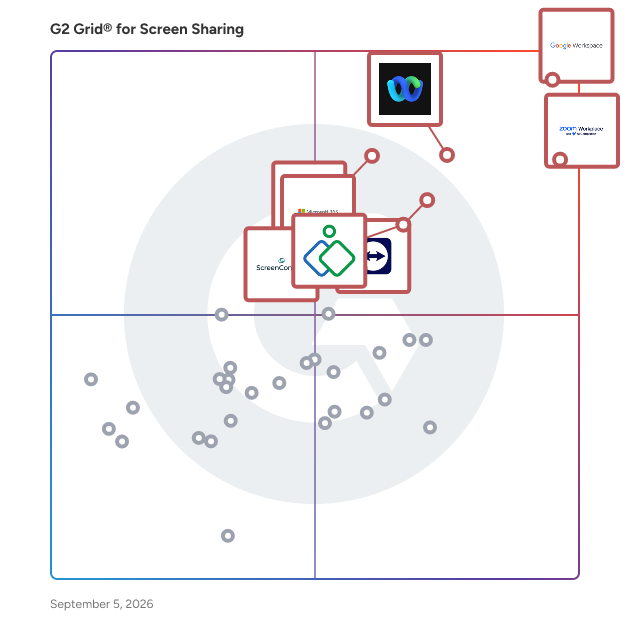
G2 Grid® for Screen Sharing Software

G2 Grid® for Screen Sharing Software plotting products by satisfaction and market presence

Highlighted products: Google Workspace, Zoom Workplace, Webex Suite, TeamViewer, Microsoft 365, Zoho Assist, GoTo Meeting, and ScreenConnect.

Underlying data: [Grid® JSON](https://www.g2.com/categories/screen-sharing/grids.json?focus%5B%5D=google-workspace&focus%5B%5D=zoom-workplace&focus%5B%5D=cisco-webex-suite&focus%5B%5D=teamviewer&focus%5B%5D=microsoft365&focus%5B%5D=zoho-assist&focus%5B%5D=goto-meeting&focus%5B%5D=screenconnect)

Thirdlane Connect

Thirdlane Connect is a white-label team collaboration tool with voice, omnichannel messaging, and video for MSPs, service providers, and telecom resellers on Thirdlane’s multi-tenant UCaaS platform. Deliver branded calling, chat, and meetings across web, desktop, and mobile with APIs and CRM integrations. Main features: - VoIP calling, call recording, transfer, and hold - Team chat for 1:1 and groups - Video meetings with screen sharing - Presence and status sync - File sharing and inline media - Click-to-call and CRM screen pops - Branded apps for web, Windows, macOS, Linux, iOS, and Android See how Thirdlane helps MSPs, UCaaS providers, resellers, and enterprises deliver white-label multi-tenant communications. Request a live demo today: https://www.thirdlane.com

Average Rating: 4.3/5.0

Total Reviews: 22

How Do G2 Users Rate Thirdlane Connect?

  • Has the product been a good partner in doing business?: 8.3/10 (Category avg: 9.1/10)
  • Video Conferencing: 9.2/10 (Category avg: 8.8/10)
  • Live Preview: 8.3/10 (Category avg: 8.9/10)
  • Audio Conferencing: 9.6/10 (Category avg: 8.9/10)

Who Is the Company Behind Thirdlane Connect?

  • Seller: Thirdlane
  • Year Founded: 2003
  • HQ Location: Fairfax, US
  • Twitter: @thirdlanepbx
    47 Twitter followers
  • LinkedIn® Page: www.linkedin.com
    4 employees on LinkedIn®
  • Ownership: Third Lane Technologies, LLC

Who Uses This Product?

  • Company Size: 43% Small, 29% Medium

What Do G2 Reviewers Say About Thirdlane Connect?

AI-generated summary from verified user reviews

Pros
  • Users love the ease of use of Thirdlane Connect, making communication seamless for everyone in the team.
  • Users value the easy communication of Thirdlane Connect, enjoying seamless calls, chats, and meetings in one platform.
  • Users value the consolidated communication tools in Thirdlane Connect, enhancing collaboration with seamless integration and ease of use.
  • Users find the easy setup of Thirdlane Connect allows for quick integration and smooth communication from the start.
  • Users value the intuitive interface of Thirdlane Connect, enhancing workflows and making communication seamless across all devices.
Cons
  • Users face a steep learning curve with Thirdlane Connect, making initial setup and navigation challenging for non-technical users.
  • Users often struggle with the difficult setup of Thirdlane Connect, as it demands technical expertise for configuration.
  • Users find the steep learning curve challenging, particularly for non-technical users during initial setup and navigation.
  • Users struggle with the steep learning curve and dated interface of Thirdlane Connect, complicating initial setup and navigation.
  • Users struggle with the difficult interface of Thirdlane Connect, finding setup and navigation overwhelming and challenging.

What Are Recent G2 Reviews of Thirdlane Connect?

What Are G2 Users Discussing About Thirdlane Connect?

XTIUM Unified Communications as a Service

XTIUM, created through the business combination of ATSG and Evolve IP, delivers a modern security-first approach to the managed IT services experience. Leveraging AI innovations, enterprise-grade cybersecurity, virtual desktops, unified communications, and more, XTIUM acts as a trusted partner to help businesses reduce risk, boost operational efficiency, and scale with confidence. At XTIUM, we empower IT leaders to scale confidently, reduce risk, and drive measurable business outcomes with a level of service and accountability that sets a new industry standard. Our mission is simple: to make our clients more secure, more agile, and more successful, every step of the way.

Average Rating: 4.2/5.0

Total Reviews: 69

How Do G2 Users Rate XTIUM Unified Communications as a Service?

  • Has the product been a good partner in doing business?: 9.2/10 (Category avg: 9.1/10)
  • Video Conferencing: 8.0/10 (Category avg: 8.8/10)
  • Live Preview: 8.1/10 (Category avg: 8.9/10)
  • Audio Conferencing: 8.0/10 (Category avg: 8.9/10)

Who Is the Company Behind XTIUM Unified Communications as a Service?

  • Seller: Xtium
  • Year Founded: 2007
  • HQ Location: Tampa, FL
  • LinkedIn® Page: www.linkedin.com
    473 employees on LinkedIn®

Who Uses This Product?

  • Top Industries: Information Technology and Services
  • Company Size: 64% Medium, 21% Small

What Do G2 Reviewers Say About XTIUM Unified Communications as a Service?

AI-generated summary from verified user reviews

Pros
  • Users value the seamless connectivity of XTIUM Unified Communications, enhancing collaboration and efficiency for businesses.
  • Users appreciate the reliability of XTIUM, benefiting from seamless communication and robust support in hybrid environments.
  • Users value the excellent customer support of XTIUM, ensuring timely updates and seamless communication integration.
  • Users appreciate the ease of use of XTIUM, ensuring seamless communication and collaboration for their business needs.
  • Users value the easy communication features of XTIUM, enhancing collaboration through seamless integration and support.
Cons
  • Users feel that the product is expensive and may not be suitable for smaller setups, affecting ROI concerns.
  • Users feel that the cost of software license subscriptions for XTIUM is on the higher side.
  • Users find it crucial to evaluate return on investment as XTIUM may not benefit small setups effectively.

What Are Recent G2 Reviews of XTIUM Unified Communications as a Service?

What Are G2 Users Discussing About XTIUM Unified Communications as a Service?

CollabNow

CollabNow is first fully-encrypted video conferencing, screen sharing, and conversational intelligence solution that is simple to use and requires no downloads. With the ability to share multiple screens simultaneously, brainstorm on virtual whiteboards, and let attendees pause and magnify presented content - CollabNow offers a more immersive, secure, and reliable way to virtually collaborate at an unbeatable price.

Average Rating: 4.4/5.0

Total Reviews: 12

How Do G2 Users Rate CollabNow?

  • Has the product been a good partner in doing business?: 10.0/10 (Category avg: 9.1/10)
  • Video Conferencing: 9.4/10 (Category avg: 8.8/10)
  • Live Preview: 8.9/10 (Category avg: 8.9/10)
  • Audio Conferencing: 9.2/10 (Category avg: 8.9/10)

Who Is the Company Behind CollabNow?

  • Seller: CollabNow
  • HQ Location: Stuttgart, DE
  • Twitter: @CollabNow_Team
    13 Twitter followers
  • LinkedIn® Page: www.linkedin.com
    1 employees on LinkedIn®

Who Uses This Product?

  • Company Size: 38% Small, 38% Large

What Are Recent G2 Reviews of CollabNow?

What Are G2 Users Discussing About CollabNow?

Watch and Learn

Watch and Learn is a comprehensive video communication platform designed to enhance collaboration and knowledge sharing within teams and organizations. By integrating synchronous and asynchronous communication tools, it streamlines interactions, making them more efficient and engaging. Key Features and Functionality: - Video Calling: Facilitates high-quality one-on-one and group video calls with screen sharing and recording capabilities, accessible via mobile devices and desktops. - Video, Audio, and Chat Messaging: Enables users to send quick video, audio, and text messages through a customizable, branded platform, with instant feedback on views and engagement. - Screencasting and Screen Sharing: Allows recording and sharing of on-screen activities to demonstrate processes and share instructions effectively. - Voice Recording: Provides the ability to send voice messages to colleagues or record private notes for later reference. - Transcription: Converts video content into text, facilitating easy sharing of notes and enhancing accessibility. - Analytics: Offers insights into video and chat activity, tracking engagement through metrics like plays, sentiment, and word usage. Primary Value and Solutions Provided: Watch and Learn addresses the challenges of traditional communication methods by offering a unified platform that combines various forms of interaction. It reduces reliance on lengthy email threads and multiple communication tools, fostering a more transparent and connected work environment. The platform's features support efficient knowledge transfer, enhance team collaboration, and provide valuable analytics to measure engagement and effectiveness. By humanizing communication through video and audio messages, it helps build stronger personal connections among team members, regardless of their physical location.

Average Rating: 4.3/5.0

Total Reviews: 69

How Do G2 Users Rate Watch and Learn?

  • Has the product been a good partner in doing business?: 8.5/10 (Category avg: 9.1/10)
  • Video Conferencing: 9.2/10 (Category avg: 8.8/10)
  • Live Preview: 8.7/10 (Category avg: 8.9/10)
  • Audio Conferencing: 9.0/10 (Category avg: 8.9/10)

Who Is the Company Behind Watch and Learn?

  • Seller: Watch and Learn
  • Year Founded: 2016
  • HQ Location: Leeds , Leeds
  • Twitter: @watchandlearnio
    23 Twitter followers
  • LinkedIn® Page: www.linkedin.com
    1 employees on LinkedIn®

Who Uses This Product?

  • Top Industries: Information Technology and Services, Accounting
  • Company Size: 65% Small, 17% Medium

What Do G2 Reviewers Say About Watch and Learn?

AI-generated summary from verified user reviews

Pros
  • Users appreciate the easy-to-use interface of Watch and Learn, making learning straightforward and accessible for everyone.
  • Users love the intuitive platform of Watch and Learn, ensuring a quick and stress-free learning experience.
  • Users value the simplicity of Watch and Learn, enjoying an engaging, intuitive way to effectively absorb new concepts.
  • Users love the video conferencing capabilities of Watch and Learn, enhancing engagement and interactive learning experiences.
  • Users appreciate the easy collaboration provided by Watch and Learn, making team learning smooth and stress-free.
Cons
  • Users find limited features in Watch and Learn, wishing for more interactive tools and smoother functionality.
  • Users often experience connection issues, leading to frustrating difficulties in accessing content and using the platform effectively.
  • Users experience frequent connectivity issues, leading to difficulties accessing content and affecting their overall experience.
  • Users find the costly paid plan limiting, as not all features are accessible without extra expense.
  • Users often experience glitches like video pauses and repetition in topics, which disrupts their overall learning experience.

What Are Recent G2 Reviews of Watch and Learn?

What Are G2 Users Discussing About Watch and Learn?

Arvia

Arvia turns your eCommerce into a social shopping destination with Livestream and One-to-One Video Shopping solutions. With Arvia Live Video Shopping, you can engage with your shoppers in real time and attract new prospects with special deals. All engagement and interaction take place directly in your online store. Drive engagement and sales in your e-Commerce with Arvia. Create magical conversion rates with real people and live video shopping. Key Features for Livestream Shopping - In-show Promotions, Coupons, Product Highlights - Add to Cart Button - Unique shopper experiences with Product Demos, Unboxing, Complementary Content, etc - Live Chat with Pinned Messages & Emojis - Live Chat Moderations - Recording Key Features for One-on-One Video Shopping - User-Friendly Video Call Widget - Text Chat - CRM/ERP Integrations - Google Analytics Integrations - Call Recording - Call Routing, - Agent Tagging, - Widget Customization, - Screen Sharing, - File Transfer, - Advanced Analytics - Lead Form - Schedule Video Call We constantly innovate our products and services to ensure our clients have the tools they need to succeed. Thank you for choosing Arvia. We look forward to helping you grow your business!

Average Rating: 4.2/5.0

Total Reviews: 32

How Do G2 Users Rate Arvia?

  • Has the product been a good partner in doing business?: 10.0/10 (Category avg: 9.1/10)
  • Video Conferencing: 8.3/10 (Category avg: 8.8/10)
  • Audio Conferencing: 10.0/10 (Category avg: 8.9/10)

Who Is the Company Behind Arvia?

  • Seller: Arvia Technology
  • Year Founded: 2017
  • HQ Location: New York, US
  • Twitter: @ArviaTech
    26 Twitter followers
  • LinkedIn® Page: www.linkedin.com
    22 employees on LinkedIn®

Who Uses This Product?

  • Company Size: 44% Small, 31% Medium

What Do G2 Reviewers Say About Arvia?

AI-generated summary from verified user reviews

Pros
  • Users love the ease of use of Arvia, appreciating its quick setup and seamless video conferencing experience.
  • Users find the easy setup of Arvia seamless, typically taking only about 5 minutes for initial use.
  • Users find the initial setup to be incredibly easy, typically taking just about 5 minutes for basic use.
  • Users appreciate the high-quality video and audio in Arvia, enhancing their business interactions and customer connections.
  • Users love the high-quality video conferencing of Arvia, enhancing interactions and making virtual meetings feel personal.
Cons
  • Users note the need for required improvements in customization, scalability, and AI reliability for a better experience.
  • Users note integration issues with Arvia, seeking better compatibility with third-party apps and tools for flexibility.
  • Users report audio quality issues during video calls with Arvia, affecting overall communication and experience.
  • Users experience connection issues, particularly with lag during low internet speeds, affecting overall performance.
  • Users experience connectivity issues with Arvia, particularly with lag during low internet speeds and limited mobile compatibility.

What Are Recent G2 Reviews of Arvia?

What Are G2 Users Discussing About Arvia?

BeamYourScreen

BeamYourScreen is a desktop sharing and online collaboration software solution that enables one or several guests to see your computer screen live over the Internet.

Average Rating: 3.4/5.0

Total Reviews: 9

How Do G2 Users Rate BeamYourScreen?

  • Has the product been a good partner in doing business?: 8.3/10 (Category avg: 9.1/10)
  • Video Conferencing: 6.1/10 (Category avg: 8.8/10)
  • Live Preview: 7.0/10 (Category avg: 8.9/10)
  • Audio Conferencing: 6.9/10 (Category avg: 8.9/10)

Who Is the Company Behind BeamYourScreen?

  • Seller: BeamYourScreen
  • HQ Location: Mannheim, Baden-W‚àö√Æ‚àö‚àè≈í¬©‚àö√Æ‚àö‚àè≈í¬©rttemberg
  • Twitter: @BeamYourScreen
    13 Twitter followers
  • LinkedIn® Page: www.linkedin.com
    1 employees on LinkedIn®

Who Uses This Product?

  • Company Size: 50% Small, 30% Medium

What Are Recent G2 Reviews of BeamYourScreen?

What Are G2 Users Discussing About BeamYourScreen?

Consolto

Consolto’s hope is that with their SMB-focused conferencing solution, anyone can offer high impact, one-on-one digital services that are on par and even exceed those provided by larger organizations. The Problem According to Consolto.com, right now setting up a videochat with a client can be somewhat of an awkward process with current solutions like Zoom, Skype or Google Hangouts which were not built for business to client scenarios. They require either: Some sort of client installation -- bummer. Username/Password credentials -- where is that darn password? Sending a link or an email to connect with prospective clients -- tedious. Adding to contacts -- privacy anyone? Little to no backoffice capabilities. How’s one supposed to get any business done? Another important aspect that is poorly addressed by these solutions is their ability to manage the sessions. For example, Zoom does not save texts from chats, so important notes and insights written during sessions are lost. These types of solutions make it difficult to manage sales or consultation sessions. Consolto sees their solution as a VCRM -- a Videochat-based Customer Relationship Management platform that was designed to enhance business interactions. It enables anonymous, contactless (without exchanging contact details), frictionless (no downloads, no credentials) real-time communication via video. Their product is available either as a website widget or a direct link enabled through a Personal Page. Fully optimized for the needs of SMBs and freelancers, Consolto’s easy to install solution (just one line of code) deploys an impressive roster of high impact functionality that simplifies the management of videochat business interactions. These functionalities include meeting scheduling, in-app invoicing and payments, memos, session transcription (coming soon), CRM-like followup notifications, client analytics and persistent messaging, to name just a few.

Average Rating: 4.7/5.0

Total Reviews: 67

How Do G2 Users Rate Consolto?

  • Has the product been a good partner in doing business?: 9.4/10 (Category avg: 9.1/10)
  • Video Conferencing: 10.0/10 (Category avg: 8.8/10)
  • Live Preview: 10.0/10 (Category avg: 8.9/10)
  • Audio Conferencing: 10.0/10 (Category avg: 8.9/10)

Who Is the Company Behind Consolto?

  • Seller: Consolto
  • Year Founded: 2018
  • HQ Location: Yokneam Illit, Israel
  • Twitter: @ConsoltoTweet
    14 Twitter followers
  • LinkedIn® Page: www.linkedin.com
    3 employees on LinkedIn®

Who Uses This Product?

  • Who Uses This: Founder
  • Top Industries: Marketing and Advertising
  • Company Size: 85% Small, 4% Medium

What Do G2 Reviewers Say About Consolto?

AI-generated summary from verified user reviews

Pros
  • Users love the ease of use of Consolto, appreciating its straightforward setup and integration into workflows.
  • Users value the easy setup of Consolto, allowing quick integration and a seamless experience for communications.
  • Users value the easy integrations of Consolto, enabling fast setup of diverse communication features on their websites.
  • Users highlight the easy integration of Consolto, enabling quick setup and seamless incorporation into websites.
  • Users value the intuitive design of Consolto, enhancing connectivity and customer engagement seamlessly across various platforms.
Cons
  • Users find the limited integrations restrictive, wishing for more options like Zapier and other platforms.

What Are Recent G2 Reviews of Consolto?

What Are G2 Users Discussing About Consolto?

Iperius Remote

Remote Desktop Software, for Remote Support, Remote Access, and Online Meetings. Iperius Remote ensures fast and secure remote desktop connections. The software is convenient for both ITPROS and private individuals. Connect from any a PCs or Devices to another easily and stability. Iperius Remote allows connection over the internet. Remote Control Connect in a simple and rapid manner to any computer. Work as if you were present locally, transfer files, make use of chat. Complete Remote Desktop. Unattended access Install Iperius Remote as a service for unattended access. You can keep a list of the computers of your customers and connect to them in order to carry out assistance at any time. Remote Support Software Access the Servers and Computers of your customers and provide technical support in the easiest and most immediate way. You can connect multiple customers simultaneously in separate windows or have multiple operators access the same remote computer. Manage all your tasks remotely from a centralized panel Once you get in your own account, you’ll be able to see a list of all connected computers and therefore obtain an immediately accessible list of customers to whom you can provide support and managing tasks remotely. Check your Detailed Session Reports The Pro versions allow you to quickly view all the statistics relating to remote connections made. These statistics can be grouped by group, computer or operator, and filtered by specific dates. Secure Powerful Universal Iperius Remote ensures the highest possible level of security with end-to-end encryption, compliant with HIPAA and GDPR standards and Two-Factor Authentication. The video transmission technology is among the most powerful available, with a frame rate of up to 60 FPS. Iperius Remote is a multi-platform software, you can use it on Mac, Windows, Linux but also on Android and iOS.

Average Rating: 4.5/5.0

Total Reviews: 25

How Do G2 Users Rate Iperius Remote?

  • Has the product been a good partner in doing business?: 8.6/10 (Category avg: 9.1/10)
  • Video Conferencing: 10.0/10 (Category avg: 8.8/10)
  • Live Preview: 10.0/10 (Category avg: 8.9/10)
  • Audio Conferencing: 10.0/10 (Category avg: 8.9/10)

Who Is the Company Behind Iperius Remote?

  • Seller: Enter
  • HQ Location: Grottammare, AP
  • Twitter: @enter
    2,965 Twitter followers
  • LinkedIn® Page: www.linkedin.com
    29 employees on LinkedIn®

Who Uses This Product?

  • Top Industries: Information Technology and Services
  • Company Size: 85% Small, 15% Medium

What Do G2 Reviewers Say About Iperius Remote?

AI-generated summary from verified user reviews

Pros
  • Users value the automation for unattended access, enabling quick server restarts and efficient remote troubleshooting.
  • Users love the super fast connection speed of Iperius Remote, ensuring quick access for seamless remote troubleshooting.
  • Users appreciate the superior connectivity of Iperius Remote, enabling seamless access and quick troubleshooting for uninterrupted services.
  • Users value the ease of use of Iperius Remote, finding it intuitive for quick and efficient access.
  • Users love the easy access provided by Iperius Remote for quick and seamless remote troubleshooting and service management.
Cons
  • Users often find audio issues during video conferencing, impacting their overall experience with Iperius Remote.
  • Users find the tool great, but it needs improvement for video conferencing capabilities to enhance overall usability.
  • Users find the video quality lacking during conferencing, which impacts their overall experience with Iperius Remote.

What Are Recent G2 Reviews of Iperius Remote?

What Are G2 Users Discussing About Iperius Remote?

ShowMyPC

ShowMyPC provides easy-to-use and secure remote access, remote support, collaboration, and productivity tools for individuals and businesses worldwide. Browser-based, no download HTML5 viewer, blazing-fast Windows RDP support, access and manage unattended PCs.

Average Rating: 4.1/5.0

Total Reviews: 18

How Do G2 Users Rate ShowMyPC?

  • Has the product been a good partner in doing business?: 8.3/10 (Category avg: 9.1/10)
  • Video Conferencing: 8.3/10 (Category avg: 8.8/10)
  • Live Preview: 8.7/10 (Category avg: 8.9/10)
  • Audio Conferencing: 8.3/10 (Category avg: 8.9/10)

Who Is the Company Behind ShowMyPC?

  • Seller: ShowMyPC
  • HQ Location: Santa Clara,CA
  • Twitter: @desktopsharings
    2 Twitter followers
  • LinkedIn® Page: www.linkedin.com

Who Uses This Product?

  • Top Industries: Information Technology and Services
  • Company Size: 56% Small, 22% Medium

What Do G2 Reviewers Say About ShowMyPC?

AI-generated summary from verified user reviews

Pros
  • Users value the ease of use of ShowMyPC, finding it simple and efficient for remote access and support.
  • Users love the easy access of ShowMyPC, enjoying its straightforward setup and reliable remote support.
  • Users love the easy setup of ShowMyPC, finding it straightforward and perfect for quick remote access.
  • Users highlight the reliable remote connectivity of ShowMyPC, enhancing their experience with straightforward access and support.
  • Users commend the reliability of ShowMyPC, enjoying its straightforward functionality for remote access and support.
Cons
  • Users find feature limitations in ShowMyPC, especially compared to advanced remote access tools, somewhat restricting.
  • Users find limited customization options in ShowMyPC, making it less versatile than more advanced remote access tools.
  • Users find ShowMyPC's limited features inadequate for advanced tasks, making it feel basic compared to other tools.
  • Users find missing advanced features in ShowMyPC, feeling it's limited compared to other remote access tools.
  • Users find ShowMyPC not user-friendly, with a limited interface and minimal advanced features affecting overall ease of use.

What Are Recent G2 Reviews of ShowMyPC?

What Are G2 Users Discussing About ShowMyPC?

RemoteHQ

RemoteHQ is an online collaborative browsing platform for remote and hybrid teams. With its revolutionary Remote Browser, you can co-browse and co-edit any web app with your team or customers. Think of it as interactive screen sharing. With RemoteHQ, your virtual meetings just got a whole lot more collaborative. All meeting participants can work - review, edit, create - from the same screen, as if they are working side by side. Teams can co-browse the web bypassing miscommunication between users and replacing screen share, a 30+ year old invention.

Average Rating: 4.4/5.0

Total Reviews: 16

How Do G2 Users Rate RemoteHQ?

  • Has the product been a good partner in doing business?: 8.3/10 (Category avg: 9.1/10)
  • Video Conferencing: 9.0/10 (Category avg: 8.8/10)
  • Live Preview: 8.7/10 (Category avg: 8.9/10)
  • Audio Conferencing: 8.7/10 (Category avg: 8.9/10)

Who Is the Company Behind RemoteHQ?

  • Seller: RemoteHQ
  • HQ Location: Boston, Massachusetts
  • Twitter: @HQRemote
    533 Twitter followers
  • LinkedIn® Page: www.linkedin.com
    1 employees on LinkedIn®

Who Uses This Product?

  • Company Size: 75% Small, 25% Medium

What Are Recent G2 Reviews of RemoteHQ?

Jugo

Jugo is the next-gen virtual meeting platform built for the moments that matter. It turns your Zoom calls into immersive, attention-grabbing experiences. Its cinematic virtual stages transform flat calls into on-brand, immersive environments that grab attention from start to finish. Hosts feel unstoppable and in control, attendees are engaged from minute one, and every conversation can drive measurable business momentum. Jugo Intelligence provides AI-driven insights before, during, and after meetings, helping hosts own the moment and deliver presentations that leave a lasting impression. Better yet, it’s frictionless, working seamlessly with the tools you already use, with no downloads, plugins, or extra hardware required. Pioneered on the back of 30 years of experience in events management, powered by NVIDIA, and proven with the world’s biggest brands like Coca-Cola, Amex, and Vodafone. When important things and important people are on the line, Jugo helps you own the moment.

Average Rating: 4.4/5.0

Total Reviews: 13

How Do G2 Users Rate Jugo?

  • Has the product been a good partner in doing business?: 10.0/10 (Category avg: 9.1/10)
  • Video Conferencing: 8.3/10 (Category avg: 8.8/10)
  • Live Preview: 8.3/10 (Category avg: 8.9/10)
  • Audio Conferencing: 9.0/10 (Category avg: 8.9/10)

Who Is the Company Behind Jugo?

Who Uses This Product?

  • Top Industries: Information Technology and Services
  • Company Size: 100% Small

What Do G2 Reviewers Say About Jugo?

AI-generated summary from verified user reviews

Pros
  • Users praise Jugo for its ease of use, enhancing video communication and creating a positive virtual experience.
  • Users appreciate the customizable privacy levels and diverse meeting options, enhancing connectivity and user engagement effectively.
  • Users value the customizable privacy options of Jugo, enhancing their experience with tailored features and insights.
  • Users appreciate the detailed attendee engagement features of Jugo, enhancing their event insights and customization options.
  • Users love the customizable attendee management features of Jugo, enhancing their event planning and engagement strategies.
Cons
  • Users highlight the need for improvement in user interface and navigation, which affects usability and overall experience.
  • Users find Jugo to be not user-friendly, facing navigation difficulties and lag that impact usability.
  • Users face navigation difficulties and lag, which detract from the overall usability of Jugo's platform.
  • Users find the poor interface design of Jugo challenging, leading to navigation issues and decreased usability.
  • Users face poor navigation on Jugo, experiencing lag and difficulties that hinder their overall usability experience.

What Are Recent G2 Reviews of Jugo?

Univerge Blue

Messaging. Voice. Video. File Sharing. Chat. Contact Center. Integrations. All-In-one. With UNIVERGE BLUE, your employees can be there without being there. Set your business up for success with the fully integrated communications platform that goes anywhere you go.

Average Rating: 4.3/5.0

Total Reviews: 12

How Do G2 Users Rate Univerge Blue?

  • Has the product been a good partner in doing business?: 7.8/10 (Category avg: 9.1/10)
  • Video Conferencing: 7.7/10 (Category avg: 8.8/10)
  • Live Preview: 7.3/10 (Category avg: 8.9/10)
  • Audio Conferencing: 8.7/10 (Category avg: 8.9/10)

Who Is the Company Behind Univerge Blue?

Who Uses This Product?

  • Company Size: 60% Small, 27% Medium

What Do G2 Reviewers Say About Univerge Blue?

AI-generated summary from verified user reviews

Pros
  • Users appreciate the great call quality of Univerge Blue, enjoying an excellent UI/UX experience.
  • Users find Univerge Blue easy to use, enjoying its user-friendly features and seamless phone integration.
  • Users praise the great call quality and user-friendly features of Univerge Blue for efficient communication.
  • Users value the user-friendly interface of Univerge Blue, enhancing their overall experience with ease of use.
  • Users love the easy-to-use interface of Univerge Blue, enhancing their overall experience and call quality.
Cons
  • Users feel the price is expensive and question if the subscription cost is justified for the service provided.
  • Users find call connectivity issues impact their experience with Univerge Blue, affecting overall communication quality.
  • Users experience connection issues with Univerge Blue, making mobile connectivity feel less fluid and reliable.
  • Users often experience connectivity issues with Univerge Blue, causing frustration during mobile usage.
  • Users find the customer support challenging, citing difficulties with the accounts team and high pricing concerns.

What Are Recent G2 Reviews of Univerge Blue?

OnePgr

OnePgr is a complete meeting and collaboration platform, delivered as a single application, fundamentally changing the way sales, customer support, and other teams communicate. From conversations ranging from exchanging emails, scheduling meetings, meeting online, sharing documents, sending video messages, to analyzing recordings, OnePgr helps teams more effectively organize information and communication as well as gain behavioral insights to help improve sales cycle time, ticket & incident resolution time, project efficiency, among other performance metrics. More information at: https://onepgr.com

Average Rating: 4.4/5.0

Total Reviews: 10

How Do G2 Users Rate OnePgr?

  • Has the product been a good partner in doing business?: 8.3/10 (Category avg: 9.1/10)
  • Video Conferencing: 9.3/10 (Category avg: 8.8/10)
  • Live Preview: 9.2/10 (Category avg: 8.9/10)
  • Audio Conferencing: 9.3/10 (Category avg: 8.9/10)

Who Is the Company Behind OnePgr?

  • Seller: OnePgr
  • HQ Location: San Francisco, Bay Area
  • LinkedIn® Page: www.linkedin.com
    13 employees on LinkedIn®

Who Uses This Product?

  • Company Size: 50% Small, 50% Medium

What Do G2 Reviewers Say About OnePgr?

AI-generated summary from verified user reviews

Pros
  • Users love the real-time collaboration features of OnePgr, enhancing communication for sales and business initiatives.
  • Users love the efficient communication features of OnePgr, making meetings and collaborations seamless and easy.
  • Users find OnePgr incredibly helpful for seamless communication and efficient real-time collaboration during meetings and webinars.
  • Users praise the seamless video conferencing features of OnePgr, enhancing client communication and collaboration effortlessly.
  • Users value the efficient virtual meetings capabilities of OnePgr, enhancing client communication and collaboration seamlessly.
Cons
  • Users report connection issues, including poor video and audio quality, affecting their conferencing experience.
  • Users experience connectivity issues with poor video and audio quality affecting their conferencing experience.
  • Users frequently face video issues with poor connection and stability, affecting the overall conferencing experience.
  • Users report poor audio quality during video conferences, leading to frustrating communication difficulties.
  • Users experience call issues with OnePgr, citing poor connection and audio quality during video conferences.

What Are Recent G2 Reviews of OnePgr?

What Are G2 Users Discussing About OnePgr?

Bitrix24

Bitrix24 is an all-in-one business workspace that combines CRM, collaboration, and management tools in a single, easy-to-use platform – free for unlimited users. Whether you're a small team or a growing business, Bitrix24 helps you to: — Track leads and manage customer relationships with a built-in CRM — Stay on top of projects and tasks with Kanban boards, timelines, and time tracking — Communicate easily via team messenger, video calls, and shared calendars — Create and edit documents, manage files, and collect e-signatures — Run marketing campaigns and manage customer interactions through email, calls, and WhatsApp Bitrix24’s AI-powered assistant CoPilot helps automate routine tasks, write emails, analyze data, and suggest next steps, saving time and boosting productivity. What makes Bitrix24 a great solution for businesses: — Free forever for unlimited users, with access to core features and 5 GB storage — No per-user fees – upgrade only when you need more storage or advanced tools — Accessible anywhere via web, desktop, and mobile apps — Scalable – grow your business without switching platforms or juggling tools Over 15 million companies trust Bitrix24 to simplify operations, cut costs, and get more done – all in one place.

Average Rating: 4.1/5.0

Total Reviews: 578

How Do G2 Users Rate Bitrix24?

  • Has the product been a good partner in doing business?: 7.8/10 (Category avg: 9.1/10)
  • Video Conferencing: 7.5/10 (Category avg: 8.8/10)
  • Live Preview: 8.9/10 (Category avg: 8.9/10)
  • Audio Conferencing: 8.3/10 (Category avg: 8.9/10)

Who Is the Company Behind Bitrix24?

  • Seller: Bitrix24
  • Company Website:
  • Year Founded: 1998
  • HQ Location: Alexandria, Virginia
  • LinkedIn® Page: www.linkedin.com
    268 employees on LinkedIn®

Who Uses This Product?

  • Who Uses This: Marketing Manager, Project Manager
  • Top Industries: Information Technology and Services, Marketing and Advertising
  • Company Size: 55% Small, 35% Medium

What Do G2 Reviewers Say About Bitrix24?

AI-generated summary from verified user reviews

Pros
  • Users find Bitrix24 to be easy to use, effectively streamlining business processes and enhancing customer experience.
  • Users appreciate the team collaboration tools in Bitrix24, enhancing communication and streamlining business processes effortlessly.
  • Users value the effective communication capabilities of Bitrix24, enhancing collaboration with teams and customers seamlessly.
  • Users appreciate the flexibility and versatility of Bitrix24, enjoying its comprehensive features for business management.
  • Users find Bitrix24 intuitive, making collaboration and customer management seamless and enhancing overall productivity.
Cons
  • Users find the learning curve steep, requiring time and training to fully utilize Bitrix24's extensive features.
  • Users report performance issues with Bitrix24, experiencing lag and slowdowns, especially during complex workflows.
  • Users express concern over lacking features, with notable omissions affecting value as compared to initial promises.
  • Users find Bitrix24 to be not user-friendly, often struggling to locate tools and navigate the system efficiently.
  • Users experience slow performance with Bitrix24, especially during complex workflows, impacting overall productivity.

What Are Recent G2 Reviews of Bitrix24?

What Are G2 Users Discussing About Bitrix24?

Mingle View

First ever free desktop sharing application with unlimited participants.

Average Rating: 4.1/5.0

Total Reviews: 4

How Do G2 Users Rate Mingle View?

  • Video Conferencing: 7.8/10 (Category avg: 8.8/10)
  • Live Preview: 8.3/10 (Category avg: 8.9/10)
  • Audio Conferencing: 8.9/10 (Category avg: 8.9/10)

Who Is the Company Behind Mingle View?

Who Uses This Product?

  • Company Size: 75% Small, 25% Medium

What Do G2 Reviewers Say About Mingle View?

AI-generated summary from verified user reviews

Pros
  • Users value the good audio quality of Mingle View, enhancing their experience during meetings.
  • Users love the ease of use and cost-effectiveness of Mingle View for daily project discussions and screen sharing.
  • Users value the ease of use of Mingle View, allowing seamless meetings with just a meeting ID.
  • Users find Mingle View’s easy implementation highly beneficial for seamless and real-time project discussions without lag.
  • Users love the easy setup of Mingle View, enabling quick and efficient meetings without personal information requirements.
Cons
  • Users find Mingle View's browser compatibility limited, as it lacks support for MacOS and mobile devices.
  • Users note the lack of frequent updates, leading to dissatisfaction with Mingle View's overall performance and features.
  • Users face integration issues with Mingle View, limiting its compatibility and overall functionality across platforms.
  • Users find Mingle View's limited features restrict functionality and hinder integration with other applications.
  • Users experience poor performance during meetings, with frequent lags and issues while sharing their screens.

What Are Recent G2 Reviews of Mingle View?

Neeraja Prakash
NP
Researched and written by Neeraja Prakash
Updated October 3, 2024