Best Network Monitoring Software - Page 2

How Many Network Monitoring Software Products Does G2 Track?

Total Products under this Category: 228

Category Stats (Sep 2026)

  • Average Rating: 4.49/5 (↓0.01 vs Aug 2026) The average rating of products in this category, based on all submitted ratings
  • Top Trending Product: Netcrunch (+1.38%) - Among all products in this category, Netcrunch recorded the largest rating increase compared to last month

Last updated: September 26, 2026

How Does G2 Rank Network Monitoring Software Products?

Why You Can Trust G2's Software Rankings:

  • 30 Analysts and Data Experts
  • 19,900+ Authentic Reviews
  • 228+ Products
  • Unbiased Rankings

G2's software rankings are built on verified user reviews, rigorous moderation, and a consistent research methodology maintained by a team of analysts and data experts. Each product is measured using the same transparent criteria, with no paid placement or vendor influence. While reviews reflect real user experiences, which can be subjective, they offer valuable insight into how software performs in the hands of professionals. Together, these inputs power the G2 Score, a standardized way to compare tools within every category.

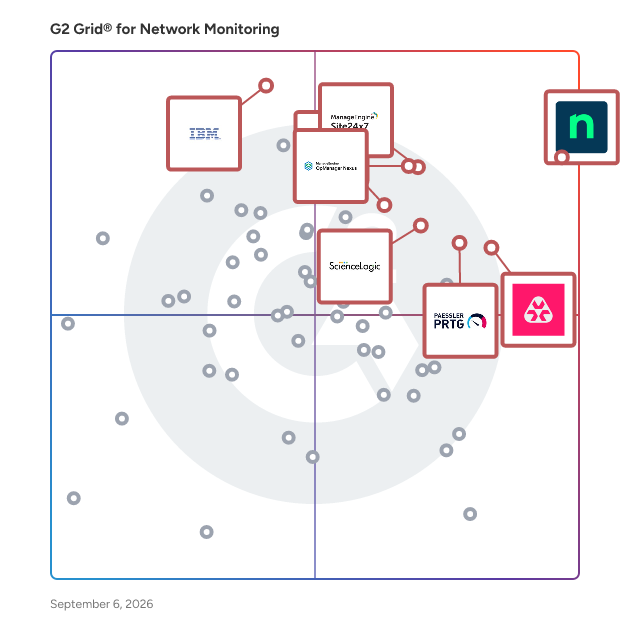
G2 Grid® for Network Monitoring Software

G2 Grid® for Network Monitoring Software plotting products by satisfaction and market presence

Highlighted products: NinjaOne, OpManager Nexus, Site24x7, Remote Monitoring and Management, Paessler PRTG, ScienceLogic AI Platform, IBM SevOne, and TeamViewer.

Underlying data: [Grid® JSON](https://www.g2.com/categories/network-monitoring/grids.json?focus%5B%5D=ninjaone&focus%5B%5D=opmanager-nexus&focus%5B%5D=site24x7&focus%5B%5D=remote-monitoring-and-management&focus%5B%5D=paessler-prtg&focus%5B%5D=sciencelogic-ai-platform&focus%5B%5D=ibm-sevone&focus%5B%5D=teamviewer)

N-able N-central

Join the thousands of MSPs and IT professionals who use N-able™ N-central® to remotely monitor and manage devices and complex networks. Built with security in mind, N-central provides the visibility and efficiency you need to monitor more, provide great customer service, and scale your business. Key features include: • Monitor almost any device, including support for Windows, Linux, and macOS • Gain complete insight across your network and cloud services without the need for extra network monitoring software • Create automated patch management policies to ensure devices are up to date • Streamline your workflow with drag-and-drop scripting in automation manager—no need to write a line of code • Provide remote support across devices and platforms with the integrated Take Control feature • Integrate your existing PSA software or use N-able MSP Manager to manage tickets and billing • Manage security with integrated backup, EDR, AV, and disk encryption • Available as an on-premises or hosted cloud solution to fit your business N-central is designed to help you run your managed services business or internal IT department more efficiently, so you can focus on scaling operations.

Average Rating: 4.4/5.0

Total Reviews: 543

How Do G2 Users Rate N-able N-central?

  • Has the product been a good partner in doing business?: 8.6/10 (Category avg: 8.8/10)
  • Performance Monitoring: 8.4/10 (Category avg: 8.9/10)
  • Multi-Network Capability: 8.2/10 (Category avg: 8.7/10)
  • Path Analysis: 7.2/10 (Category avg: 8.4/10)

Who Is the Company Behind N-able N-central?

  • Seller: N-able
  • Company Website:
  • HQ Location: Morrisville, North Carolina
  • Twitter: @Nable
    15,859 Twitter followers
  • LinkedIn® Page: www.linkedin.com
    2,307 employees on LinkedIn®
  • Ownership: NYSE: NABL

Who Uses This Product?

  • Who Uses This: Director, Operations Manager
  • Top Industries: Information Technology and Services, Computer & Network Security
  • Company Size: 59% Small, 33% Medium

What Do G2 Reviewers Say About N-able N-central?

AI-generated summary from verified user reviews

Pros
  • Users appreciate the ease of use of N-able N-central, finding it intuitive for managing systems seamlessly.
  • Users value the customizable automation features of N-able N-central, enhancing control and efficiency in IT management.
  • Users value the customizable scripting options in N-able N-central, enhancing control and flexibility for IT management.
  • Users appreciate the solid remote access features of N-able N-central, enhancing system monitoring and management efficiency.
  • Users value the proactive monitoring capabilities of N-able N-central, enhancing efficiency without disrupting clients.
Cons
  • Users find the missing features, like chat and credential management, hinder efficiency and user experience.
  • Users often face feature issues that hinder efficiency, including bugs, connection problems, and inconsistent filtering.
  • Users express frustration over filter editing limitations and the cumbersome patching process in N-able N-central.
  • Users find the steep learning curve due to scattered documentation and lack of comprehensive guides challenging.
  • Users find the interface confusing, struggling with a steep learning curve and unwieldy settings management.

What Are Recent G2 Reviews of N-able N-central?

What Are G2 Users Discussing About N-able N-central?

Progress WhatsUp Gold

WhatsUp Gold is an IT infrastructure monitoring software designed to help users identify and resolve network issues swiftly, often before they impact end users. This solution provides comprehensive visibility into network performance and availability, enabling IT professionals to maintain optimal operations across their infrastructure. With its interactive mapping interface, WhatsUp Gold allows users to visualize the status of all devices connected to their network, making it easier to monitor both on-premise and cloud-based resources. Targeted primarily at IT administrators and network engineers, WhatsUp Gold is particularly beneficial for organizations that rely heavily on network performance for their daily operations. Its user-friendly design caters to both seasoned professionals and those new to network management, offering a range of features that streamline the monitoring process. The software is designed to support various use cases, from small businesses needing basic monitoring capabilities to large enterprises requiring advanced network management solutions. One of the standout features of WhatsUp Gold is its customizable drag-and-drop dashboards, which provide users with the flexibility to tailor their monitoring experience according to specific needs. These dashboards present real-time data on device status and performance, allowing users to quickly assess the health of their network. Additionally, the software’s automatic discovery and mapping capabilities enable users to visualize their entire network topology, ensuring that no device goes unnoticed during monitoring. WhatsUp Gold also emphasizes optimization, helping users manage network traffic and bandwidth utilization effectively. By providing actionable insights and unified views of network performance, the software empowers IT teams to troubleshoot issues efficiently. The ability to identify and resolve network and server problems proactively not only enhances operational efficiency but also improves overall user satisfaction by minimizing downtime. In summary, WhatsUp Gold offers a robust and interactive solution for IT infrastructure monitoring, combining ease of use with powerful features. Its focus on real-time visibility, customization, and proactive troubleshooting makes it a valuable tool for organizations looking to enhance their network management capabilities.

Average Rating: 4.4/5.0

Total Reviews: 380

How Do G2 Users Rate Progress WhatsUp Gold?

  • Has the product been a good partner in doing business?: 8.8/10 (Category avg: 8.8/10)
  • Performance Monitoring: 9.1/10 (Category avg: 8.9/10)
  • Multi-Network Capability: 8.7/10 (Category avg: 8.7/10)
  • Path Analysis: 8.3/10 (Category avg: 8.4/10)

Who Is the Company Behind Progress WhatsUp Gold?

  • Seller: Progress Software
  • Company Website:
  • Year Founded: 1981
  • HQ Location: Burlington, MA.
  • Twitter: @ProgressSW
    48,773 Twitter followers
  • LinkedIn® Page: www.linkedin.com
    4,242 employees on LinkedIn®

Who Uses This Product?

  • Who Uses This: Network Engineer, Network Administrator
  • Top Industries: Information Technology and Services, Education Management
  • Company Size: 58% Medium, 27% Large

What Do G2 Reviewers Say About Progress WhatsUp Gold?

AI-generated summary from verified user reviews

Pros
  • Users value the ease of use of Progress WhatsUp Gold, appreciating its intuitive interface and simple setup process.
  • Users love the real-time visibility provided by WhatsUp Gold’s interactive network maps and intuitive dashboards.
  • Users value the real-time visibility and ease of use provided by Progress WhatsUp Gold for network performance monitoring.
  • Users value the timely and proactive alert notifications of Progress WhatsUp Gold, enhancing issue detection and network reliability.
  • Users appreciate the intuitive user interface of Progress WhatsUp Gold, enhancing real-time network monitoring and management.
Cons
  • Users find the cost of Progress WhatsUp Gold to be high, especially for smaller organizations and add-ons.
  • Users find the poor interface design of Progress WhatsUp Gold can be clunky and outdated in complex setups.
  • Users find the complex setup process of Progress WhatsUp Gold to be cumbersome and challenging, especially for advanced configurations.
  • Users note a steep learning curve with Progress WhatsUp Gold, particularly for advanced configuration and initial setup.
  • Users find the interface outdated, especially when managing complex environments, impacting overall user experience.

What Are Recent G2 Reviews of Progress WhatsUp Gold?

What Are G2 Users Discussing About Progress WhatsUp Gold?

Infoblox NIOS DDI

Infoblox NIOS DDI is the industry-leading platform for managing and securing the mission-critical DNS, DHCP and IP address management, or “DDI” services, that keep every user, device and application connected. Trusted by more than 13,000 customers worldwide—including most of the Fortune 500—NIOS provides a purpose-built, enterprise-grade platform for critical network service visibility, automation, control and resiliency in on-premises, hybrid and multi-cloud network environments. Whether organizations are transitioning beyond traditional data centers or simply seeking to improve uptime and manageability on-premises, NIOS simplifies management, reduces errors and outages, speeds deployments and ensures five-nines reliability for the critical network services that keep the business running.

Average Rating: 4.6/5.0

Total Reviews: 19

How Do G2 Users Rate Infoblox NIOS DDI?

  • Has the product been a good partner in doing business?: 8.8/10 (Category avg: 8.8/10)
  • Performance Monitoring: 8.8/10 (Category avg: 8.9/10)
  • Multi-Network Capability: 8.8/10 (Category avg: 8.7/10)
  • Path Analysis: 8.3/10 (Category avg: 8.4/10)

Who Is the Company Behind Infoblox NIOS DDI?

  • Seller: Infoblox
  • Company Website:
  • Year Founded: 1999
  • HQ Location: Santa Clara, California
  • Twitter: @Infoblox
    11,290 Twitter followers
  • LinkedIn® Page: www.linkedin.com
    3,388 employees on LinkedIn®

Who Uses This Product?

  • Top Industries: Information Technology and Services, Computer & Network Security
  • Company Size: 58% Large, 29% Medium

What Do G2 Reviewers Say About Infoblox NIOS DDI?

AI-generated summary from verified user reviews

Pros
  • Users value the automation features of Infoblox NIOS, which streamline management and minimize manual errors effectively.
  • Users value the robust centralized management of Infoblox NIOS, enhancing efficiency and reducing manual errors significantly.
  • Users appreciate the intuitive dashboard features of Infoblox NIOS, enabling easy management and quick troubleshooting of networking resources.
  • Users find the intuitive DNS management of Infoblox NIOS DDI enhances efficiency and simplifies network administration.
  • Users appreciate the intuitive interface of Infoblox NIOS DDI, making management of DNS, DHCP, and IP spaces effortless.
Cons
  • Users face a complex configuration process that leads to a steep learning curve for new administrators.
  • Users find the complex setup challenging, facing a steep learning curve and potential service interruptions during updates.
  • Users find the complex user interface challenging, particularly during initial setup and for new administrators.
  • Users find the configuration difficulty challenging, especially for new administrators facing a steep learning curve.
  • Users find the high costs of Infoblox NIOS DDI prohibitive, especially for smaller organizations needing budget-friendly solutions.

What Are Recent G2 Reviews of Infoblox NIOS DDI?

What Are G2 Users Discussing About Infoblox NIOS DDI?

NETSCOUT Network & Application Observability

NETSCOUT’s Network & Application Observability solution is engineered for IT practitioners who need deep, real-time visibility into complex hybrid environments. Whether you're managing a sprawling data center, a multi-cloud deployment, 5G deployment, or a remote workforce, this solution delivers the actionable intelligence required to maintain performance, availability, and user experience across every layer of your infrastructure. At its core, NETSCOUT leverages Deep Packet Inspection (DPI) to convert raw network traffic into smart data. This allows IT teams to monitor application behavior, network performance, and service dependencies with precision, even in containerized environments. The result is a unified, end-to-end view that helps you quickly isolate root causes, reduce mean time to knowledge (MTTK), and proactively resolve issues before they impact users or business operations. What sets NETSCOUT apart is its ability to scale observability across both legacy and modern architectures without requiring intrusive agents or instrumentation. It integrates seamlessly with existing workflows and tools, providing consistent visibility whether you're troubleshooting a VoIP degradation, tracking down a cloud latency spike, or validating the performance of a new application rollout. For IT professionals tasked with ensuring uptime and optimizing digital experiences, NETSCOUT’s observability platform is not just a monitoring tool—it’s a strategic asset that transforms packet-level data into operational intelligence. Products included in this solution: - nGeniusONE - InfiniStreamNG - vSTREAM - Packet Flow Switches (PFS) and TAPs

Average Rating: 4.5/5.0

Total Reviews: 96

How Do G2 Users Rate NETSCOUT Network & Application Observability?

  • Has the product been a good partner in doing business?: 7.2/10 (Category avg: 8.8/10)
  • Performance Monitoring: 8.5/10 (Category avg: 8.9/10)
  • Multi-Network Capability: 7.7/10 (Category avg: 8.7/10)
  • Path Analysis: 7.1/10 (Category avg: 8.4/10)

Who Is the Company Behind NETSCOUT Network & Application Observability?

  • Seller: NETSCOUT
  • Company Website:
  • Year Founded: 1984
  • HQ Location: Westford, Mass.
  • Twitter: @NETSCOUT
    13,759 Twitter followers
  • LinkedIn® Page: www.linkedin.com
    2,710 employees on LinkedIn®

Who Uses This Product?

  • Top Industries: Telecommunications, Financial Services
  • Company Size: 39% Large, 31% Medium

What Do G2 Reviewers Say About NETSCOUT Network & Application Observability?

AI-generated summary from verified user reviews

Pros
  • Users value the comprehensive visibility NETSCOUT provides, enabling swift issue resolution and enhanced performance monitoring.
  • Users value the issue detection capabilities of NETSCOUT, enabling swift resolution of performance bottlenecks and disruptions.
  • Users value the comprehensive visibility NETSCOUT provides, enabling swift identification and resolution of performance issues.
  • Users value the reliability of NETSCOUT Network & Application Observability for proactive troubleshooting and insightful network management.
  • Users find NETSCOUT Network & Application Observability to be user-friendly, facilitating easy setup and efficient diagnosis of network issues.
Cons
  • Users face a steep learning curve with NETSCOUT, leading to implementation challenges and requiring specialized knowledge.
  • Users experience complexity in implementing NETSCOUT, facing a steep learning curve and integration challenges.
  • Users face a difficult learning curve with NETSCOUT, finding the complexity challenging to manage and comprehend.
  • Users find the complex setup challenging, requiring specialized knowledge and time for new team members to adapt.
  • Users highlight the complex configuration process and the steep learning curve for new team members, complicating implementation.

What Are Recent G2 Reviews of NETSCOUT Network & Application Observability?

Pandora FMS

Pandora FMS is a unified monitoring and observability platform designed to consolidate visibility, alerting, reporting, and automation across heterogeneous IT environments. Instead of combining multiple point tools for networks, servers, applications, and cloud services, Pandora FMS centralizes data collection and operational workflows in a single console, reducing integration effort and operational complexity in on-premise, hybrid, and multi-cloud architectures. The platform collects telemetry using multiple methods, including agents, remote checks, standard protocols (e.g., SNMP/WMI), APIs, and log/event ingestion. This enables teams to monitor infrastructure and services end-to-end, correlate signals, and maintain consistent alerting policies and dashboards across distributed estates. Pandora FMS also supports capacity and trend analysis to anticipate resource constraints and identify recurring patterns, and includes AI-assisted capabilities for anomaly detection and automated thresholds to surface hard-to-spot operational signals. Pandora FMS is extensible through a large plugin ecosystem (500+ plugins and integrations), covering a wide range of enterprise and infrastructure technologies such as SAP, Oracle, Citrix, JBoss, VMware, AWS, SQL Server, Red Hat, and WebSphere. This extensibility helps organizations standardize monitoring across legacy and modern stacks without redesigning their monitoring approach per technology. Core capabilities: -Unified monitoring for networks, servers, applications, cloud services, endpoints, and logs -Centralized alerting, event correlation, dashboards, and scheduled reporting -Flexible data collection via agents, remote checks, APIs, and plugins -Scalability for distributed environments and large numbers of monitored elements -Analytics for trend/capacity planning plus AI-assisted anomaly detection and dynamic thresholds -A key differentiator is direct vendor support, which simplifies escalation and ensures continuity of expertise for deployment, tuning, and ongoing operations.

Average Rating: 4.6/5.0

Total Reviews: 212

How Do G2 Users Rate Pandora FMS?

  • Has the product been a good partner in doing business?: 9.0/10 (Category avg: 8.8/10)
  • Performance Monitoring: 9.5/10 (Category avg: 8.9/10)
  • Multi-Network Capability: 9.4/10 (Category avg: 8.7/10)
  • Path Analysis: 9.1/10 (Category avg: 8.4/10)

Who Is the Company Behind Pandora FMS?

  • Seller: Pandora FMS
  • Company Website:
  • Year Founded: 2004
  • HQ Location: Madrid, Spain
  • Twitter: @pandorafms
    5,458 Twitter followers
  • LinkedIn® Page: www.linkedin.com
    56 employees on LinkedIn®

Who Uses This Product?

  • Who Uses This: Data Analyst
  • Top Industries: Information Technology and Services, Telecommunications
  • Company Size: 50% Medium, 37% Small

What Do G2 Reviewers Say About Pandora FMS?

AI-generated summary from verified user reviews

Pros
  • Users value the reliable remote monitoring capabilities of Pandora FMS, ensuring seamless oversight of their systems.
  • Users enjoy the ease of use of Pandora FMS, appreciating its intuitive interface and reliable support.
  • Users value the real-time monitoring capabilities of Pandora FMS, enhancing visibility of all network devices effortlessly.
  • Users value the flexibility and adaptability of Pandora FMS, making it suitable for diverse IT monitoring needs.
  • Users value the versatility of network monitoring in Pandora FMS, effectively managing diverse devices and environments.
Cons
  • Users find the learning curve steep, particularly with initial setup and complex functionalities of Pandora FMS.
  • Users find the complex setup of Pandora FMS challenging, particularly due to compatibility issues and steep learning curves.
  • Users note the learning difficulty with Pandora FMS, especially for those lacking technical expertise for setup and configuration.
  • Users find the complex configuration of Pandora FMS challenging, especially without extensive technical expertise.
  • Users face a difficult learning curve with Pandora FMS, which can hinder effective usage for beginners.

What Are Recent G2 Reviews of Pandora FMS?

What Are G2 Users Discussing About Pandora FMS?

Auvik

Auvik’s cloud-based IT management platform empowers IT teams to confidently navigate change with less friction. The key is absolute simplicity: seamless deployment, an intuitive interface, and effortless automation. IT teams are able to proactively manage diverse networks, endpoints and SaaS applications. Users are able to work however and wherever they want. It’s absolutely that simple. Simplify Everything: Simplicity of deployment, ease of use and effortless automation save time so that everyone can focus on strategic business priorities and the new opportunities that come with change. Boost Visibility: Our platform delivers total visibility into key parts of your infrastructure. By enabling a proactive—rather than reactive—approach to IT management, Auvik reduces friction and lowers operational risk while raising confidence in IT infrastructure. Move Forward, Faster: Auvik offers faster detection, accelerated speed to resolution, and reduced downtime, which improves efficiency and extends the bandwidth of IT teams and end users. This means more time is able to be invested in the work that keeps everyone moving forward. And empowers IT teams to confidently navigate change with less friction.

Average Rating: 4.5/5.0

Total Reviews: 379

How Do G2 Users Rate Auvik?

  • Has the product been a good partner in doing business?: 9.0/10 (Category avg: 8.8/10)
  • Performance Monitoring: 8.9/10 (Category avg: 8.9/10)
  • Multi-Network Capability: 9.2/10 (Category avg: 8.7/10)
  • Path Analysis: 8.2/10 (Category avg: 8.4/10)

Who Is the Company Behind Auvik?

  • Seller: Auvik Networks Inc.
  • Company Website:
  • Year Founded: 2011
  • HQ Location: Waterloo, Ontario
  • Twitter: @AuvikOfficial
    2,988 Twitter followers
  • LinkedIn® Page: www.linkedin.com
    359 employees on LinkedIn®

Who Uses This Product?

  • Who Uses This: Network Engineer, IT Manager
  • Top Industries: Information Technology and Services, Computer & Network Security
  • Company Size: 51% Small, 41% Medium

What Do G2 Reviewers Say About Auvik?

AI-generated summary from verified user reviews

Pros
  • Users find Auvik's ease of use impressive, appreciating its intuitive interface and simple setup process.
  • Users value Auvik's alert notifications for quick identification of network issues, enhancing efficiency in troubleshooting.
  • Users find Auvik's easy setup facilitates quick network monitoring across various sites, enhancing overall efficiency.
  • Users value Auvik's effective monitoring capabilities, benefiting from quick alerts and an intuitive network map feature.
  • Users value Auvik's reliability, appreciating its operational clarity and improved incident response across complex networks.
Cons
  • Users face device limitations in Auvik, with misidentification and lack of granular control affecting usability.
  • Users find the missing features in Auvik, such as top-level diagrams and DNS name improvements, disappointing.
  • Users find the alert tuning process cumbersome, leading to excessive noise and requiring significant effort for effective management.
  • Users find Auvik to be expensive, particularly due to pricing tied to device counts in large environments.
  • Users experience device misidentification issues with Auvik, leading to frustrating false alerts and correlation problems.

What Are Recent G2 Reviews of Auvik?

What Are G2 Users Discussing About Auvik?

OpsRamp

OpsRamp’s modern, SaaS-based platform provides enterprise IT teams and managed service providers comprehensive IT operations management (ITOM) from discovery to monitoring to remediation and automation in a single, unified solution.

Average Rating: 4.1/5.0

Total Reviews: 22

How Do G2 Users Rate OpsRamp?

  • Has the product been a good partner in doing business?: 7.7/10 (Category avg: 8.8/10)
  • Performance Monitoring: 4.2/10 (Category avg: 8.9/10)
  • Multi-Network Capability: 6.7/10 (Category avg: 8.7/10)
  • Path Analysis: 8.3/10 (Category avg: 8.4/10)

Who Is the Company Behind OpsRamp?

  • Seller: OpsRamp
  • Year Founded: 2014
  • HQ Location: San Jose, CA
  • Twitter: @OpsRamp
    1,451 Twitter followers
  • LinkedIn® Page: www.linkedin.com
    154 employees on LinkedIn®

Who Uses This Product?

  • Top Industries: Information Technology and Services
  • Company Size: 54% Large, 29% Medium

What Do G2 Reviewers Say About OpsRamp?

AI-generated summary from verified user reviews

Pros
  • Users admire the outstanding customer support from OpsRamp, ensuring their queries are swiftly addressed and resolved.
  • Users praise the outstanding customer support of OpsRamp, addressing queries effectively and enhancing user experience.
  • Users appreciate the customizability of OpsRamp, enabling tailored monitoring and integration with existing IT systems effortlessly.
  • Users appreciate the user-friendly interface of OpsRamp, enabling effortless discovery and monitoring of infrastructure.
  • Users commend the ease of use in OpsRamp, benefiting from a user-friendly interface and excellent support.
Cons
  • Users find OpsRamp expensive for smaller organizations, especially when compared to more affordable alternatives.
  • Users find the high licensing cost prohibitive, especially for smaller organizations compared to alternative options.
  • Users find the pricing high for smaller organizations, especially compared to other alternatives available in the market.
  • Users experience slow performance in OpsRamp dashboards, particularly when retrieving data from larger environments.

What Are Recent G2 Reviews of OpsRamp?

What Are G2 Users Discussing About OpsRamp?

Coralogix

Coralogix is a modern, full-stack observability platform transforming how businesses process and understand their data. Our unique architecture powers in-stream analytics without reliance on indexing or hot storage. We specialize in comprehensive monitoring of logs, metrics, trace and security events, enhancing operational efficiency and reducing total cost of ownership by up to 70%. Coralogix stands out for its simple pricing model, based solely on data volume ingested and retained, and offers free, fast customer support with less than 30 second response time and 1 hour resolution time. Our platform covers the entire range of observability with features such as APM, RUM, SIEM, Kubernetes monitoring and more, all streamlined for quick integration and immediate value. Components within the stream store the system state to provide stateful insights and real-time alerting without ever needing to index the data — so there are never any trade-offs to achieve observability. Once ingested, parsed, and enriched, data is written remotely to an archive bucket controlled by the client. The archive can be queried directly at any time, from the platform UI or via CLI, giving users infinite retention with full control over, and access to, their data. View and query your data from any dashboard using any syntax. Coralogix has successfully completed relevant security and privacy compliances by BDO including GDPR, SOC 2, PCI, HIPAA, and ISO 27001/27701.

Average Rating: 4.6/5.0

Total Reviews: 339

How Do G2 Users Rate Coralogix?

  • Has the product been a good partner in doing business?: 9.4/10 (Category avg: 8.8/10)
  • Performance Monitoring: 8.6/10 (Category avg: 8.9/10)
  • Multi-Network Capability: 7.9/10 (Category avg: 8.7/10)
  • Path Analysis: 8.1/10 (Category avg: 8.4/10)

Who Is the Company Behind Coralogix?

  • Seller: Coralogix
  • Company Website:
  • Year Founded: 2014
  • HQ Location: San Francisco, CA
  • Twitter: @Coralogix
    4,102 Twitter followers
  • LinkedIn® Page: www.linkedin.com
    591 employees on LinkedIn®

Who Uses This Product?

  • Who Uses This: Software Engineer, DevOps Engineer
  • Top Industries: Computer Software, Information Technology and Services
  • Company Size: 53% Medium, 34% Large

What Do G2 Reviewers Say About Coralogix?

AI-generated summary from verified user reviews

Pros
  • Users appreciate the ease of use of Coralogix, highlighting its simple setup and efficient integrations.
  • Users value the ease of log monitoring and seamless integration, enhancing overall observability and support responsiveness.
  • Users value the integration of logs, metrics, and alerts, enhancing efficiency in root-cause analysis and monitoring.
  • Users commend the exceptional customer support of Coralogix, ensuring quick resolutions and a smooth experience.
  • Users value the real-time monitoring of Coralogix, enhancing their understanding of user behavior and improving incident response.
Cons
  • Users find that the learning curve is steep for beginners, making navigation and understanding features challenging.
  • Users experience slow performance with Coralogix, leading to frustration due to delayed log fetching and UI loading.
  • Users find the difficult learning curve of Coralogix challenging, especially for beginners navigating complex options.
  • Users find the missing feature for downloading log results a significant limitation in Coralogix's functionality.
  • Users find the learning difficulty of Coralogix challenging, especially when navigating advanced features and the overwhelming UI.

What Are Recent G2 Reviews of Coralogix?

ManageEngine OpUtils

ManageEngine OpUtils is an effective IP address manager, switch port mapper and rogue detection tool that can help you manage and monitor your network address space easily. It also has 30+ networking tools to help network admins monitor, diagnose, and troubleshoot day-to-day network tasks. Secure your IT from IP conflicts, rogue devices, and switching issues today by incorporating OpUtils into your enterprise network.

Average Rating: 4.4/5.0

Total Reviews: 10

How Do G2 Users Rate ManageEngine OpUtils?

  • Has the product been a good partner in doing business?: 9.3/10 (Category avg: 8.8/10)
  • Performance Monitoring: 9.3/10 (Category avg: 8.9/10)
  • Multi-Network Capability: 9.4/10 (Category avg: 8.7/10)
  • Path Analysis: 8.6/10 (Category avg: 8.4/10)

Who Is the Company Behind ManageEngine OpUtils?

  • Seller: Zoho
  • Year Founded: 1996
  • HQ Location: Austin, TX
  • Twitter: @Zoho
    137,880 Twitter followers
  • LinkedIn® Page: www.linkedin.com
    30,913 employees on LinkedIn®
  • Phone: +1 (888) 900-9646

Who Uses This Product?

  • Company Size: 40% Medium, 40% Large

What Do G2 Reviewers Say About ManageEngine OpUtils?

AI-generated summary from verified user reviews

Pros
  • Users appreciate the ease of use of OpUtils, allowing effortless monitoring and management of network resources.
  • Users value the high reliability of ManageEngine OpUtils, enjoying streamlined network monitoring and proactive alerts.
  • Users value the real-time alerts from OpUtils, enabling proactive management and minimizing potential outages effectively.
  • Users appreciate the all-in-one monitoring solution of OpUtils, which simplifies network troubleshooting and management tasks.
  • Users praise the easy implementation of ManageEngine OpUtils, allowing for quick network discovery and visibility.
Cons
  • Users note a lack of clear security requirements for necessary ports, causing concerns about system vulnerabilities.
  • Users often face configuration difficulties, particularly with understanding detailed monitoring and alerts during initial setup.
  • Users notice data limitations in OpUtils, as it struggles with performance during real-time scanning of large networks.
  • Users find the inadequate monitoring setup process challenging, as it requires time and can be confusing initially.

What Are Recent G2 Reviews of ManageEngine OpUtils?

What Are G2 Users Discussing About ManageEngine OpUtils?

LogicMonitor

LogicMonitor is an AI-first observability platform that helps enterprises protect revenue, brand reputation, and customer experience in a digital-first world. As every customer interaction depends on application and infrastructure performance, downtime is more than an IT issue—it is a business risk. LogicMonitor eliminates blind spots across cloud, infrastructure, applications, and the Internet, giving IT teams unified visibility from user experience to code-level performance. With AI-powered insights, intelligent alerting, and automation, LogicMonitor helps organizations detect, prioritize, and prevent issues before they impact customers. By enabling teams to move from reactive incident response to autonomous IT operations, LogicMonitor helps modern enterprises reduce disruption, operate efficiently at scale, and keep digital services performing reliably. For more information, visit  www.logicmonitor.com and our blog, or follow us on LinkedIn, X, Facebook, and YouTube.

Average Rating: 4.5/5.0

Total Reviews: 586

How Do G2 Users Rate LogicMonitor?

  • Has the product been a good partner in doing business?: 9.0/10 (Category avg: 8.8/10)
  • Performance Monitoring: 8.9/10 (Category avg: 8.9/10)
  • Multi-Network Capability: 8.8/10 (Category avg: 8.7/10)
  • Path Analysis: 7.2/10 (Category avg: 8.4/10)

Who Is the Company Behind LogicMonitor?

  • Seller: LogicMonitor
  • Company Website:
  • Year Founded: 2007
  • HQ Location: Santa Barbara, CA
  • Twitter: @logicmonitor
    12,430 Twitter followers
  • LinkedIn® Page: www.linkedin.com
    1,258 employees on LinkedIn®

Who Uses This Product?

  • Who Uses This: Infrastructure Manager, IT Manager
  • Top Industries: Information Technology and Services, Computer Software
  • Company Size: 52% Medium, 30% Large

What Do G2 Reviewers Say About LogicMonitor?

AI-generated summary from verified user reviews

Pros
  • Users value the ease of use in LogicMonitor, benefiting from its intuitive navigation and simple management features.
  • Users praise the implementation ease of LogicMonitor, appreciating its fast setup and intuitive platform navigation.
  • Users value the broad range of monitoring features in LogicMonitor, enhancing both infrastructure and application oversight.
  • Users value the comprehensive monitoring of LogicMonitor, providing deep insights into applications and infrastructure effortlessly.
  • Users commend the excellent customer support of LogicMonitor, facilitating enhanced monitoring and problem management effortlessly.
Cons
  • Users find the steep learning curve challenging due to the need for advanced skills and internet reliance.
  • Users note limited features, facing challenges like integrations, training needs, and an expensive licensing model.
  • Users find LogicMonitor to be expensive, especially for small teams without a free tier or affordable licenses.
  • Users find the inadequate monitoring capabilities of LogicMonitor frustrating, especially with traditional server workloads and configuration demands.
  • Users find the complexity of integrations and setup challenging, often requiring external tools and training for effective use.

What Are Recent G2 Reviews of LogicMonitor?

What Are G2 Users Discussing About LogicMonitor?

Domotz

Domotz is a network monitoring and management software platform used by MSPs and IT teams to gain visibility and operational control across distributed network environments. It enables organizations to monitor, manage, and troubleshoot network infrastructure across multiple sites or customer environments from a centralized interface. Founded in 2015 and headquartered in Draper, Utah, Domotz supports organizations worldwide that are responsible for maintaining reliable and secure network operations. The platform is used in a wide range of environments, including small and mid sized businesses, enterprise locations, and managed service provider deployments. Domotz provides automated device discovery and asset inventory, allowing teams to identify all devices connected to the network and maintain accurate records over time. It supports SNMP monitoring, alerting, and performance tracking to help teams detect availability issues, degradation, or misconfigurations before they impact users. Network topology visualization helps teams understand how devices are connected and identify potential points of failure. Additional capabilities include configuration backup and change tracking for supported devices, secure remote access without requiring VPNs, and tools for troubleshooting network issues remotely. Domotz can be used to monitor and manage routers, switches, firewalls, access points, servers, cameras, printers, and other IP enabled devices across heterogeneous vendor environments. Domotz is designed for operational use by technical teams. It can be deployed quickly, provides access to real network data, and supports ongoing monitoring and troubleshooting as networks evolve. The platform integrates with common MSP and IT tools to support workflows related to documentation, alerting, and service delivery. Pricing is based on a per device monthly model, currently priced at $1.50 per device per month. This pricing structure allows organizations to scale monitoring based on the number of devices managed while maintaining predictable costs. Users can start with Free Discovery to evaluate their environment using real network data before committing.

Average Rating: 4.8/5.0

Total Reviews: 101

How Do G2 Users Rate Domotz?

  • Has the product been a good partner in doing business?: 9.6/10 (Category avg: 8.8/10)
  • Performance Monitoring: 8.9/10 (Category avg: 8.9/10)
  • Multi-Network Capability: 8.5/10 (Category avg: 8.7/10)
  • Path Analysis: 8.4/10 (Category avg: 8.4/10)

Who Is the Company Behind Domotz?

  • Seller: Domotz
  • Company Website:
  • Year Founded: 2015
  • HQ Location: Draper, Utah
  • Twitter: @domotz
    2,420 Twitter followers
  • LinkedIn® Page: www.linkedin.com
    70 employees on LinkedIn®

Who Uses This Product?

  • Who Uses This: Owner
  • Top Industries: Information Technology and Services, Computer & Network Security
  • Company Size: 71% Small, 23% Medium

What Do G2 Reviewers Say About Domotz?

AI-generated summary from verified user reviews

Pros
  • Users value the ease of use of Domotz, enhancing their ability to monitor and manage networks effortlessly.
  • Users value the customizable alerts and seamless monitoring of network devices offered by Domotz for efficient troubleshooting.
  • Users value the customizable alert notifications from Domotz, enabling quick responses to network device issues.
  • Users appreciate the customizable alerts from Domotz, enabling quick responses to device issues and enhancing network management.
  • Users highlight the excellent customer support of Domotz, emphasizing quick responses and helpful assistance.
Cons
  • Users find the network diagram feature lacking and experience lag with the desktop app when managing multiple devices.
  • Users face challenges with alert issues, including false positives and overwhelming notifications during network outages.
  • Users find the costs prohibitive for SMEs and individuals, with frequent price increases adding to their concerns.
  • Users note the missing features in Domotz, particularly for beginners and flat networks, limiting functionality and flexibility.
  • Users face integration issues due to lack of API support, making setup and notifications challenging initially.

What Are Recent G2 Reviews of Domotz?

What Are G2 Users Discussing About Domotz?

ThousandEyes

Cisco ThousandEyes empowers organizations to assure every digital experience across every network, everywhere, every time. With built-in AI and powerful ecosystem integrations, ThousandEyes enables IT teams to proactively detect, diagnose, and resolve issues before they impact end-user experiences. ThousandEyes is deeply integrated across Cisco's entire technology portfolio and beyond, enabling customers to deploy at scale while delivering assurance across Cisco's industry-leading Networking, Security, Collaboration, and Observability solutions.

Average Rating: 4.5/5.0

Total Reviews: 79

How Do G2 Users Rate ThousandEyes?

  • Has the product been a good partner in doing business?: 8.9/10 (Category avg: 8.8/10)
  • Performance Monitoring: 8.9/10 (Category avg: 8.9/10)
  • Multi-Network Capability: 8.5/10 (Category avg: 8.7/10)
  • Path Analysis: 9.0/10 (Category avg: 8.4/10)

Who Is the Company Behind ThousandEyes?

  • Seller: Cisco
  • Year Founded: 1984
  • HQ Location: San Jose, CA
  • Twitter: @Cisco
    720,366 Twitter followers
  • LinkedIn® Page: www.linkedin.com
    95,294 employees on LinkedIn®
  • Ownership: NASDAQ:CSCO

Who Uses This Product?

  • Top Industries: Information Technology and Services, Computer Networking
  • Company Size: 79% Large, 13% Medium

What Do G2 Reviewers Say About ThousandEyes?

AI-generated summary from verified user reviews

Pros
  • Users value the clear visibility and comprehensive insights of ThousandEyes, streamlining issue tracking and enhancing network performance.
  • Users value the clear and detailed visibility provided by ThousandEyes, enhancing efficiency in diagnosing network issues.
  • Users value the clear visibility provided by ThousandEyes, enabling quick identification of network issues in real time.
  • Users praise the real-time visibility of ThousandEyes, significantly reducing time spent on manual issue tracking.
  • Users value the real-time alert notifications from ThousandEyes that simplify issue tracking and improve network efficiency.
Cons
  • Users find the complex configuration and metric screens less intuitive, impacting their overall experience with ThousandEyes.
  • Users find the complex interface of ThousandEyes challenging, impacting their ability to navigate configuration and metrics effectively.
  • Users find the complex setup challenging, requiring significant time to master all features effectively.
  • Users find the configuration difficulties in ThousandEyes challenging, as some screens lack intuitiveness.
  • Users find the difficult learning curve challenging at first, requiring time to grasp all the features effectively.

What Are Recent G2 Reviews of ThousandEyes?

Checkmk

Checkmk is a full-stack monitoring and observability platform designed to provide unified visibility into hybrid IT infrastructures. With more than 2,000 built-in integrations, it offers broad coverage across networks, servers, cloud workloads, Kubernetes and applications. The platform is highly automated, featuring auto-discovery of hosts and services and rule-based configuration to reduce manual setup. It is highly scalable, capable of efficiently monitoring thousands of hosts and millions of services. A central web-based interface allows users to manage configuration, visualize data with customizable dashboards, and track system performance over time. Checkmk is available as packages for all common Linux distributions, as a virtual or physical appliance, through AWS and Azure Marketplace images, or as SaaS. Checkmk is available in four editions: Checkmk Community offers free and open source monitoring for small infrastructures. Checkmk Pro allows for monitoring at speed and scale for data center infrastructures. Checkmk Ultimate offers full-stack observability for hybrid and cloud-native infrastructures which is also available with multi-tenancy and data segregation to support security and compliance. And Checkmk Cloud for full-stack observability for hybrid and cloud-native infrastructures in a SaaS platform. Available extensions include synthetic monitoring and OpenTelemetry for application monitoring. The Checkmk Relay enables secure data collection for segmented networks using outbound-only communication, supporting fully air-gapped and zero-inbound monitoring deployments. Checkmk supports integration with ITSM tools and third-party platforms, enabling automatic ticket creation and consistent alerting. Features such as forecasting, capacity planning, and asset inventory as well as lifecycle management and auto-registration help teams manage dynamic IT environments. Monitoring capabilities: - Monitoring of hybrid infrastructures: cloud, on-premises, virtual, and container environments. - 2000+ built-in integrations networks, servers, cloud workloads, Kubernetes and applications out-of-the-box dashboards provide key metrics for AWS and Azure environments, Linux and Windows servers, and Kubernetes clusters. - Automated discovery and configuration. - Alerting with native ITSM integrations. Operational benefits: - Provides insights into system health, capacity trends, and future resource needs through built-in assessments and forecasting tools. - Reduces manual effort with auto-discovery, rule-based configuration, and centralized agent management as well as auto-registration and host lifecycle management. - Accelerates incident response time by using custom self-healing workflows via the ‘Alert Handler’. - Allows creation of tailored dashboards and views to focus on the most relevant metrics for each team. - Maintains an up-to-date inventory of hardware and software assets, enriched with live monitoring data. - Supports distributed monitoring and can handle massive amounts of data. Why choose Checkmk? - Cost Efficiency: Transparent pricing model with a strong price-performance ratio - Security: Meets stringent security requirements, including fully air-gapped deployments and zero-inbound monitoring. - Visibility: Delivers broad and deep visibility with flexible deployment options. - Scalability: Scales efficiently to support large, distributed environments with high host and service counts. - Extensibility: Supports custom plug-ins, integrations, synthetic monitoring to monitor you applications from the user’s perspective and OpenTelemetry for application monitoring. Customers include: Adobe, Cloudera, Fujitsu, Siemens, Orange, VW, HP, Zalando, Fitbit, NEC, Continental, NHL, Capgemini, Sixt, Intesa SanPaolo

Average Rating: 4.7/5.0

Total Reviews: 295

How Do G2 Users Rate Checkmk?

  • Has the product been a good partner in doing business?: 9.0/10 (Category avg: 8.8/10)
  • Performance Monitoring: 8.5/10 (Category avg: 8.9/10)
  • Multi-Network Capability: 8.5/10 (Category avg: 8.7/10)
  • Path Analysis: 7.2/10 (Category avg: 8.4/10)

Who Is the Company Behind Checkmk?

  • Seller: Checkmk
  • Company Website:
  • Year Founded: 2007
  • HQ Location: Munich, DE
  • Twitter: @checkmk
    1,755 Twitter followers
  • LinkedIn® Page: www.linkedin.com
    232 employees on LinkedIn®

Who Uses This Product?

  • Who Uses This: IT Engineer, Systemadministrator
  • Top Industries: Information Technology and Services, Computer & Network Security
  • Company Size: 42% Medium, 40% Large

What Do G2 Reviewers Say About Checkmk?

AI-generated summary from verified user reviews

Pros
  • Users appreciate the ease of use of Checkmk, finding it quick to deploy and well-documented.
  • Users commend Checkmk for its flexibility and powerful monitoring capabilities, effectively managing diverse IT infrastructures.
  • Users appreciate the comprehensive monitoring capabilities of Checkmk, enabling effective oversight of diverse IT environments.
  • Users value the flexibility and customization of Checkmk, making it a powerful solution tailored to their needs.
  • Users value Checkmk for its real-time monitoring capabilities, allowing efficient oversight of diverse systems and applications.
Cons
  • Users find the steep learning curve challenging, making onboarding difficult for non-regular users and complicating their experience.
  • Users find difficult learning due to complex customization and limited data insights in Checkmk, affecting usability.
  • Users find the configuration process overly complex, especially during onboarding for new and non-regular users.
  • Users find the learning difficulty steep due to complex configurations and lacking intuitive documentation for advanced features.
  • Users find the complex setup of Checkmk challenging, especially for newcomers unfamiliar with the system.

What Are Recent G2 Reviews of Checkmk?

What Are G2 Users Discussing About Checkmk?

Catchpoint

The Internet relies on Catchpoint Global 5000 companies, top online retailers, financial services, cloud infrastructure and services companies, and xSPs trust Catchpoint’s Internet Performance Monitoring (IPM) to detect and resolve internal or external issues across the Internet stack before they impact customers, employees, or digital experiences. Offering Internet Synthetics, RUM, BGP, Heartbeat Monitoring, Distributed Tracing, and performance optimization with high-fidelity data and flexible visualizations, Catchpoint is powered by the world’s largest active agent network to provide real-world user experience visibility and internet stack insights that complement Application Performance Monitoring (APM) to give IT Ops team instant awareness of incidents, root cause insights, and quick resolution.

Average Rating: 4.5/5.0

Total Reviews: 109

How Do G2 Users Rate Catchpoint?

  • Has the product been a good partner in doing business?: 9.3/10 (Category avg: 8.8/10)
  • Performance Monitoring: 8.9/10 (Category avg: 8.9/10)
  • Multi-Network Capability: 8.9/10 (Category avg: 8.7/10)
  • Path Analysis: 8.5/10 (Category avg: 8.4/10)

Who Is the Company Behind Catchpoint?

  • Seller: LogicMonitor
  • Company Website:
  • Year Founded: 2007
  • HQ Location: Santa Barbara, CA
  • Twitter: @logicmonitor
    12,430 Twitter followers
  • LinkedIn® Page: www.linkedin.com
    1,258 employees on LinkedIn®

Who Uses This Product?

  • Who Uses This: Software Engineer
  • Top Industries: Information Technology and Services, Financial Services
  • Company Size: 65% Large, 22% Medium

What Do G2 Reviewers Say About Catchpoint?

AI-generated summary from verified user reviews

Pros
  • Users value Catchpoint for its real-time issue detection, enhancing performance monitoring and speeding up resolution times.
  • Users value Catchpoint for its effective monitoring capabilities, providing real-time insights and proactive issue detection.
  • Users appreciate the real-time alerting features of Catchpoint, enabling quick issue detection and seamless user experience.
  • Users value the real-time alerts from Catchpoint that enhance issue detection and improve system performance monitoring.
  • Users value the real-time alert notifications from Catchpoint, enabling swift issue resolution and enhanced performance monitoring.
Cons
  • Users feel that the pricing is too high and lacks transparency, making it less accessible for smaller teams.
  • Users find the complex configuration challenging initially, as it requires time to learn and master the features.
  • Users find the complex setup of Catchpoint challenging initially, requiring time to learn and configure its features.
  • Users report data inaccuracy with Catchpoint, noting false alerts that misrepresent test case failures during manual checks.
  • Users find the difficult learning curve of Catchpoint challenging initially, though it becomes easier with time.

What Are Recent G2 Reviews of Catchpoint?

What Are G2 Users Discussing About Catchpoint?

HPE Aruba Networking Management

HPE Aruba Networking Management Software, also known as AirWave, is a comprehensive network operations system designed to manage both wired and wireless infrastructures from HPE Aruba Networking and various third-party manufacturers. It offers granular visibility into devices, users, and applications, enabling IT organizations to proactively optimize network performance, enhance security, and improve the end-user experience. Key Features and Functionality: - Unified Network Management: AirWave provides centralized control over wired and wireless networks, allowing for efficient management of global enterprise infrastructures. - Granular Visibility: The software delivers detailed insights into network devices, user activities, and application performance, facilitating proactive monitoring and troubleshooting. - Real-Time Monitoring and Alerts: AirWave offers real-time diagnostics, proactive alerts, and historical reporting to quickly identify and resolve network issues. - Support for Multi-Vendor Environments: It manages a wide range of devices from HPE Aruba Networking and third-party manufacturers, ensuring flexibility in diverse network environments. - Enhanced Security: The platform strengthens wireless security by providing detailed visibility and control over network access and usage. Primary Value and Solutions Provided: AirWave addresses the challenges of managing complex, multi-vendor network environments by offering a unified platform that simplifies operations and enhances visibility. By providing real-time monitoring, proactive alerts, and detailed reporting, it enables IT teams to optimize network performance, swiftly troubleshoot issues, and ensure a secure and reliable network experience for end-users. This comprehensive approach reduces operational complexity and supports the efficient management of enterprise networks.

Average Rating: 4.6/5.0

Total Reviews: 26

How Do G2 Users Rate HPE Aruba Networking Management?

  • Has the product been a good partner in doing business?: 9.0/10 (Category avg: 8.8/10)
  • Performance Monitoring: 9.2/10 (Category avg: 8.9/10)
  • Multi-Network Capability: 8.8/10 (Category avg: 8.7/10)
  • Path Analysis: 8.3/10 (Category avg: 8.4/10)

Who Is the Company Behind HPE Aruba Networking Management?

Who Uses This Product?

  • Company Size: 46% Medium, 38% Large

What Do G2 Reviewers Say About HPE Aruba Networking Management?

AI-generated summary from verified user reviews

Pros
  • Users appreciate the configuration ease of HPE Aruba Networking Management, simplifying access point setup from one location.
  • Users value the strong security integration of HPE Aruba Networking Management, enhancing their cybersecurity measures seamlessly.
  • Users find HPE Aruba Networking Management to be easy to use, simplifying access point configuration from one location.
  • Users value the strong security integration in HPE Aruba Networking Management, enhancing their network safety and control.
  • Users value the user-friendly interface of HPE Aruba Networking Management, enhancing their experience with easy navigation.
Cons
  • Users find the complexity of HPE Aruba Networking Management confusing at times due to its nested structure.
  • Users find the additional licensing costs for advanced features of HPE Aruba Networking Management to be quite high.
  • Users find the learning curve steep with HPE Aruba Networking Management, leading to occasional confusion in navigation.

What Are Recent G2 Reviews of HPE Aruba Networking Management?

What Are G2 Users Discussing About HPE Aruba Networking Management?

Tian Lin
TL
Researched and written by Tian Lin
Updated April 1, 2025