# Top Free Network Monitoring Software

## How Many Network Monitoring Software Products Does G2 Track?

**Total Products under this Category:** 183

### Category Stats (Jul 2026)

- **Average Rating:** 4.5/5 The average rating of products in this category, based on all submitted ratings
- **Top Trending Product:** NetSense NMS (+5.56%) - Among all products in this category, NetSense NMS recorded the largest rating increase compared to last month

_Last updated: July 24, 2026_

## How Does G2 Rank Network Monitoring Software Products?

**Why You Can Trust G2's Software Rankings:**

- 30 Analysts and Data Experts
- 19,400+ Authentic Reviews
- 183+ Products
- Unbiased Rankings

G2's software rankings are built on verified user reviews, rigorous moderation, and a consistent research methodology maintained by a team of analysts and data experts. Each product is measured using the same transparent criteria, with no paid placement or vendor influence. While reviews reflect real user experiences, which can be subjective, they offer valuable insight into how software performs in the hands of professionals. Together, these inputs power the G2 Score, a standardized way to compare tools within every category.

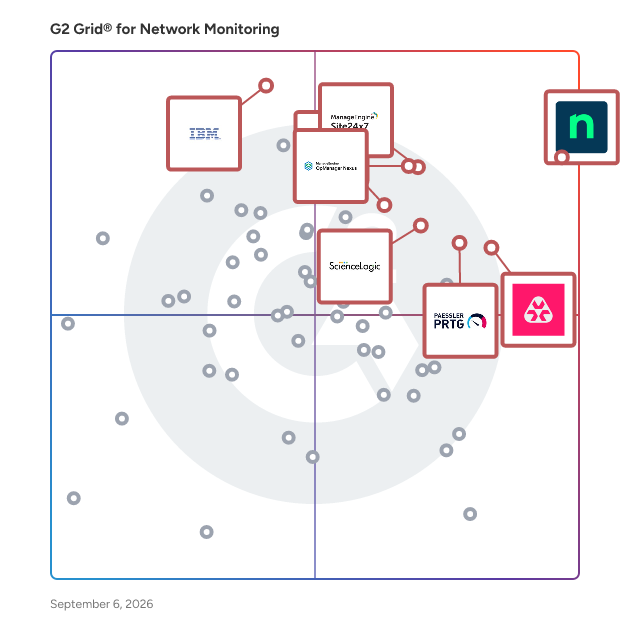
## G2 Grid® for Network Monitoring Software
 ![G2 Grid® for Network Monitoring Software plotting products by satisfaction and market presence](https://www.g2.com/categories/network-monitoring/grids.png?focus%5B%5D=25671&focus%5B%5D=16222&focus%5B%5D=17351&focus%5B%5D=10874&focus%5B%5D=13665&focus%5B%5D=17801&focus%5B%5D=2397&focus%5B%5D=3824)

Highlighted products: NinjaOne, Atera, OpManager Nexus, Paessler PRTG, Site24x7, IBM SevOne, TeamViewer, and Datadog.

Underlying data: [Grid® JSON](https://www.g2.com/categories/network-monitoring/grids.json?focus%5B%5D=ninjaone&focus%5B%5D=atera&focus%5B%5D=opmanager-nexus&focus%5B%5D=paessler-prtg&focus%5B%5D=site24x7&focus%5B%5D=ibm-sevone&focus%5B%5D=teamviewer&focus%5B%5D=datadog)

**Sponsored**

### Centreon Infra Monitoring

Centreon is a comprehensive IT monitoring solution designed to help organizations gain full visibility and control over their IT operations. By providing real-time insights into system performance, network health, and application availability, Centreon enables businesses to proactively manage their IT environments, ensuring uninterrupted operations and optimal resource utilization. Targeted primarily at IT departments and operations teams, Centreon serves a diverse range of industries, from small businesses to large enterprises. Its user-friendly interface and customizable dashboards make it accessible for both technical and non-technical users. This versatility allows organizations to tailor the monitoring experience to their specific needs, making it an invaluable tool for maintaining operational efficiency and enhancing service delivery. One of the key use cases for Centreon is its ability to prevent downtime through proactive issue detection. By continuously monitoring critical systems and applications, Centreon alerts IT teams to potential problems before they escalate into significant outages. This proactive approach minimizes disruptions and helps organizations maintain a reliable IT infrastructure, which is essential for meeting business demands and ensuring customer satisfaction. Centreon also emphasizes resource optimization, allowing businesses to maximize efficiency and reduce IT costs. By providing detailed insights into resource utilization, organizations can identify underperforming assets and make informed decisions about capacity planning and resource allocation. This capability enables businesses to streamline their IT operations, ultimately leading to cost savings and improved performance. In addition, Centreon enhances the user experience by delivering consistent, high-quality IT services. With its comprehensive monitoring capabilities, IT teams can ensure that applications and services are running smoothly, providing end-users with the reliable performance they expect. This focus on user experience fosters customer loyalty and supports overall business success by aligning IT services with organizational goals. Centreon distinguishes itself in the IT monitoring category by combining powerful monitoring features with a user-centric approach. Its ability to deliver actionable insights, prevent downtime, optimize resources, and enhance user experience makes it a vital tool for organizations looking to improve their IT operations and achieve business success.

[Visit website](https://www.g2.com/external_clickthroughs/record?secure%5Bad_program%5D=paid_promo&secure%5Bad_slot%5D=category_product_list&secure%5Bcategory_id%5D=128&secure%5Bchosen_at%5D=2026-07-27T22%3A56%3A07Z&secure%5Bmedium%5D=sponsored&secure%5Bprioritized%5D=false&secure%5Bproduct_id%5D=42028&secure%5Bresource_id%5D=128&secure%5Bresource_type%5D=Category&secure%5Bsource_type%5D=category_page&secure%5Bsource_url%5D=https%3A%2F%2Fwww.g2.com%2Fcategories%2Fnetwork-monitoring%2Ffree&secure%5Btoken%5D=36291b24be812b069bb9adf31fd1d9250a6ad3d67be1c273ed80252c5d6a605d&secure%5Burl%5D=https%3A%2F%2Fwww.centreon.com%2Fcentreon-infra-monitoring%2F&secure%5Burl_type%5D=paid_promos)

### [NinjaOne](https://www.g2.com/products/ninjaone/reviews)

NinjaOne is the unified IT operations platform that helps IT teams and managed service providers manage, secure, and support every endpoint from a single cloud-native console. Nearly 40,000 customers across 140+ countries use NinjaOne to replace fragmented point tools with one platform built to scale. The platform brings together the core work of modern IT operations: endpoint management, autonomous patch management, vulnerability management, endpoint and SaaS backup, remote access, and IT service desk. Teams monitor and control Windows, macOS, Linux, mobile, and virtual devices in one place, automate routine work with policy-based automation and human-centered AI, and cut the cost and risk that come from running many disconnected tools. NinjaOne serves internal IT teams and MSPs alike, from lean IT departments to mid-market and large enterprise organizations managing distributed, multi-site environments. Common uses include consolidating IT tooling, automating patching for security and compliance, managing distributed and hybrid workforces, improving endpoint visibility, and strengthening backup and ransomware readiness. NinjaOne has maintained a 98 percent customer satisfaction score for more than five years, backed by free unlimited onboarding and 24/7 support in seven languages. Organizations that move to NinjaOne report replacing four or more separate tools with the single platform. NinjaOne is FedRAMP Moderate Authorized and SOC 2 Type II and Type III compliant, and supports audit-ready compliance evidence across frameworks including CMMC, ISO 27001, and HIPAA. The mission behind the platform is simple: unify IT to simplify work, giving IT teams better tools and employees a great technology experience at work.

**Average Rating:** 4.7/5.0

**Total Reviews:** 4,767

#### How Do G2 Users Rate NinjaOne?

- **Has the product been a good partner in doing business?:** 9.4/10 (Category avg: 8.8/10)
- **Performance Monitoring:** 8.9/10 (Category avg: 8.9/10)
- **Multi-Network Capability:** 8.8/10 (Category avg: 8.6/10)
- **Path Analysis:** 7.6/10 (Category avg: 8.4/10)

#### Who Is the Company Behind NinjaOne?

- **Seller:** [NinjaOne](https://www.g2.com/sellers/ninjaone)
- **Company Website:** https://www.ninjaone.com/
- **Year Founded:** 2013
- **HQ Location:** Austin, Texas
- **Twitter:** @NinjaOne (3,607 Twitter followers)
- **LinkedIn® Page:** https://www.linkedin.com/company/6436301/ (2,376 employees on LinkedIn®)

#### Who Uses This Product?

- **Who Uses This:** IT Manager, Owner
- **Top Industries:** Information Technology and Services, Computer & Network Security
- **Company Size:** 47% Medium, 45% Small

#### What Do G2 Reviewers Say About NinjaOne?

_AI-generated summary from verified user reviews_

##### Pros

- Users appreciate the **ease of use** of NinjaOne, streamlining asset management and automating essential tasks effortlessly.
- Users praise the **powerful automation** capabilities of NinjaOne, enhancing efficiency and simplifying device management.
- Users appreciate the **easy navigation and dashboard** of NinjaOne, facilitating quick device management and monitoring.
- Users praise NinjaOne for its **automated updates and efficient alerts** , significantly simplifying server management and saving time.
- Users value the **excellent customer support** from NinjaOne, noting quick access to knowledgeable staff and practical solutions.

##### Cons

- Users feel the **missing features** limit functionality, particularly lacking client and customer portal capabilities.
- Users find the **search function lacking** , and the interface can confuse end users with unclear icons.
- Users find NinjaOne has **limited features** , especially in mobile app functionality and device management options.
- Users find that NinjaOne needs **improvement in search functionality** and a better ticketing dashboard for efficiency tracking.
- Users report facing **feature issues** with function settings and a lack of adequate role-based controls in NinjaOne.

#### What Are Recent G2 Reviews of NinjaOne?

**["Impowered Our MSP to Resolve Issues Quickly and Grow Quickly"](https://www.g2.com/survey_responses/ninjaone-review-10168731)**

**Rating:** 4.5/5.0 stars

_— Robert M._

[Read full review](https://www.g2.com/survey_responses/ninjaone-review-10168731)

**["Revolutionalised Our Workflows"](https://www.g2.com/survey_responses/ninjaone-review-8785777)**

**Rating:** 5.0/5.0 stars

_— Drew B._

[Read full review](https://www.g2.com/survey_responses/ninjaone-review-8785777)

### [Atera](https://www.g2.com/products/atera/reviews)

The first and only Agentic AI platform for IT management, offers a digital workforce of AI agents that proactively and autonomously support your entire IT operation. Atera’s all-in-one IT management platform consolidates RMM, helpdesk, ticketing, advanced reporting and automation- thus empowering IT teams and MSPs to efficiently manage and protect infrastructure, automate tasks, and boost service quality by reducing downtime and improving SLAs. Introducing Robin by Atera: It isn’t another IT solution, it’s a transformation in how organization scale IT. This evolution paves the way for Autonomous IT, shifting the modus operandi from reactive or routine automation to proactive and preemptive action. (1) Cut 40% of your IT workload: Eliminate 100% of tasks that drain your team’s time. Robin doesn’t just assist, it acts and resolves. (2) Always-on. No downtime: Deliver 24/7/365 IT support, no vacations, no sick leave. (3) A personal IT tech for every employee: Intelligent, context-aware AI agent that understands your environment, adapts to each user, responds instantly, and resolves autonomously. Plus, early-adopters have said it’s also quite polite. Atera is pioneering the shift from automation to AI-powered autonomy in IT. With our AI agents, IT teams can offload repetitive tasks, resolve issues faster, ensure better service, and focus on strategy rather than fix/break or firefighting. We maintain the highest security and compliance standards and follow responsible AI frameworks, ensuring our AI can be a trusted extension of your IT team. Trusted by over 13K customers in 120+ countries, Atera offers a scalable solution enabling organizations to drive sustainable growth and maximize organizational efficiency. Discover how Atera can help you achieve unparalleled IT efficiency. Try Atera free for 30 days at: www.atera.com

**Average Rating:** 4.6/5.0

**Total Reviews:** 1,213

#### How Do G2 Users Rate Atera?

- **Has the product been a good partner in doing business?:** 9.2/10 (Category avg: 8.8/10)
- **Performance Monitoring:** 8.9/10 (Category avg: 8.9/10)
- **Multi-Network Capability:** 8.6/10 (Category avg: 8.6/10)
- **Path Analysis:** 8.0/10 (Category avg: 8.4/10)

#### Who Is the Company Behind Atera?

- **Seller:** [Atera](https://www.g2.com/sellers/atera)
- **Company Website:** https://www.atera.com
- **Year Founded:** 2011
- **HQ Location:** Tel Aviv
- **Twitter:** @AteraCloud (1,675 Twitter followers)
- **LinkedIn® Page:** https://www.linkedin.com/company/98739/ (415 employees on LinkedIn®)

#### Who Uses This Product?

- **Who Uses This:** Owner, IT Manager
- **Top Industries:** Information Technology and Services, Computer & Network Security
- **Company Size:** 55% Small, 30% Medium

#### What Do G2 Reviewers Say About Atera?

_AI-generated summary from verified user reviews_

##### Pros

- Users find Atera to be incredibly **easy to use** , streamlining workstation and server management in one place.
- Users value the **powerful automation tools** of Atera, enabling efficient workstation and server management through scripts and remote access.
- Users appreciate the **all-in-one dashboard** of Atera, which streamlines their workflow and enhances productivity drastically.
- Users value the **efficiency** of Atera, noting its automation and ease of use streamline their device management.
- Users appreciate Atera's **proactive monitoring** , enhancing efficiency with a seamless all-in-one dashboard for better workflow.

##### Cons

- Users note **missing features** like checklists and insufficient alert context, complicating their overall Atera experience.
- Users find the **limited features** of Atera restrictive, especially in the mobile app and billing options.
- Users report that **improvement is needed** in Atera's interface changes and remote access reliability, impacting workflows.
- Users note that **report loading times and limited customization** can hinder efficiency and usability within Atera.
- Users highlight **feature issues** with Atera, including inconvenient billing increments and disruptive interface changes.

#### What Are Recent G2 Reviews of Atera?

**["Atera boosts productivity with automations, WhatsApp, and reports"](https://www.g2.com/survey_responses/atera-review-13106823)**

**Rating:** 5.0/5.0 stars

_— Fabian M._

[Read full review](https://www.g2.com/survey_responses/atera-review-13106823)

**["A practical way to coordinate technicians, users, and infrastructure work"](https://www.g2.com/survey_responses/atera-review-13121276)**

**Rating:** 4.5/5.0 stars

_— Alamgir H._

[Read full review](https://www.g2.com/survey_responses/atera-review-13121276)

### [OpManager Nexus](https://www.g2.com/products/opmanager-nexus/reviews)

OpManager Nexus is a full-stack observability platform that helps IT teams monitor and manage their entire infrastructure, including networks, servers, applications, databases, and websites, from a single console. Designed for mid-size to large organizations managing hybrid and on-premises environments, OpManager Nexus provides deep visibility across every layer of the IT stack. IT teams gain a consolidated view of their infrastructure, eliminating the need for multiple disconnected monitoring tools and reducing the operational overhead that comes with managing them. This unified approach enables faster decision-making and helps organizations maintain service reliability across complex, distributed environments where downtime can have a direct impact on business continuity. OpManager Nexus includes AIOps capabilities that go beyond traditional monitoring. Agentic AI and generative AI integrations automate routine diagnostics and accelerate issue resolution, while smart event correlation identifies relationships between alerts across the stack. Together, these capabilities help IT teams detect issues early, cut through alert noise, and resolve problems before they impact end users or broader business operations. For IT teams dealing with high volumes of events across large environments, this level of automation significantly reduces the time spent on manual troubleshooting. On the deployment front, OpManager Nexus supports both on-premises installation and cloud access (powered by Site24x7) through ManageEngine's private datacenters. Organizations can choose the model that aligns with their infrastructure strategy, security policies, and compliance requirements, without compromising on monitoring depth or platform capability. As part of the ManageEngine ecosystem, OpManager Nexus integrates natively with ITSM, analytics, and security tools, giving IT teams the full operational context needed to manage infrastructure performance and respond to incidents end to end.

**Average Rating:** 4.6/5.0

**Total Reviews:** 222

#### How Do G2 Users Rate OpManager Nexus?

- **Has the product been a good partner in doing business?:** 9.0/10 (Category avg: 8.8/10)
- **Performance Monitoring:** 9.2/10 (Category avg: 8.9/10)
- **Multi-Network Capability:** 8.7/10 (Category avg: 8.6/10)
- **Path Analysis:** 8.3/10 (Category avg: 8.4/10)

#### Who Is the Company Behind OpManager Nexus?

- **Seller:** [Zoho](https://www.g2.com/sellers/zoho-b00ca9d5-bca8-41b5-a8ad-275480841704)
- **Company Website:** https://www.zoho.com
- **Year Founded:** 1996
- **HQ Location:** Austin, TX
- **Twitter:** @Zoho (137,880 Twitter followers)
- **LinkedIn® Page:** https://www.linkedin.com/company/38373/ (30,766 employees on LinkedIn®)

#### Who Uses This Product?

- **Who Uses This:** IT Manager, Network Administrator
- **Top Industries:** Information Technology and Services, Financial Services
- **Company Size:** 55% Medium, 31% Large

#### What Do G2 Reviewers Say About OpManager Nexus?

_AI-generated summary from verified user reviews_

##### Pros

- Users value the **monitoring capabilities** of OpManager Nexus, praising its ease of use and effective real-time alerting.
- Users value the **real-time monitoring** of OpManager Nexus, enhancing issue resolution and maintaining system efficiency.
- Users appreciate the **ease of use** of OpManager Nexus, which simplifies monitoring and management of critical systems.
- Users value the **intuitive user interface** of OpManager Nexus, enhancing their monitoring experience with easy navigation and alerts.
- Users value the **comprehensive monitoring** capabilities of OpManager Nexus for enhanced server and network management.

##### Cons

- Users find that the **complexity of setup** for OpManager Nexus can lead to difficulties in management and notifications.
- Users find the **complex configuration** of OpManager challenging, especially during initial setup and management of alerts.
- Users find the **complex setup** of OpManager Nexus challenging, especially during the initial onboarding process.
- Users note **missing features** in OpManager Nexus, with some advanced options locked behind higher editions, limiting functionality.
- Users find the **difficult configuration** of OpManager challenging, often leading to excessive alerts without proper adjustments.

#### What Are Recent G2 Reviews of OpManager Nexus?

**["Clear Dashboards and Proactive Alerts for Full Infrastructure Visibility"](https://www.g2.com/survey_responses/opmanager-nexus-review-13121842)**

**Rating:** 4.5/5.0 stars

_— Tarun A._

[Read full review](https://www.g2.com/survey_responses/opmanager-nexus-review-13121842)

**["Centralized NOC Dashboards and Real-Time Monitoring Made Simple"](https://www.g2.com/survey_responses/opmanager-nexus-review-13134137)**

**Rating:** 5.0/5.0 stars

_— Francesco T._

[Read full review](https://www.g2.com/survey_responses/opmanager-nexus-review-13134137)

### [Paessler PRTG](https://www.g2.com/products/paessler-prtg/reviews)

Your infrastructure is complex. Your monitoring tool shouldn't be. Paessler PRTG delivers mission-critical visibility across IT and OT environments, deploying in minutes, not months. Whether you're managing servers, switches, virtual machines, cloud services, or industrial systems, PRTG monitors everything from a single platform, so your team always knows what's running, what's struggling, and what needs attention, before users do. Fast to deploy. Easy to run. Auto-discovery finds devices on your network automatically, and 300+ pre-configured sensors cover the most common infrastructure components out of the box. Support for all major protocols (SNMP, WMI, REST APIs, SSH, NetFlow, and more) means PRTG fits into your existing environment without forcing changes to it. Built for lean teams under real pressure. Customizable dashboards give instant visibility across your entire landscape. Flexible alerting (via email, SMS, push notification, or third-party integrations) ensures the right people are notified the moment something goes wrong. Historical trend data helps you spot patterns and plan ahead, not just react. Scales on your terms. From a single site to distributed multi-location environments, PRTG grows with your organization. Available as an on-premises installation or a hosted solution, it adapts to your infrastructure and your IT policies, no rip-and-replace required. Trusted by more than 500,000 users across 190+ countries since 1997, Paessler PRTG is the monitoring standard for IT professionals who need results, not complexity.

**Average Rating:** 4.7/5.0

**Total Reviews:** 203

#### How Do G2 Users Rate Paessler PRTG?

- **Has the product been a good partner in doing business?:** 8.9/10 (Category avg: 8.8/10)
- **Performance Monitoring:** 9.4/10 (Category avg: 8.9/10)
- **Multi-Network Capability:** 9.1/10 (Category avg: 8.6/10)
- **Path Analysis:** 8.0/10 (Category avg: 8.4/10)

#### Who Is the Company Behind Paessler PRTG?

- **Seller:** [Paessler GmbH](https://www.g2.com/sellers/paessler-gmbh)
- **Company Website:** https://www.paessler.com/
- **Year Founded:** 1997
- **HQ Location:** Nuremberg, Germany
- **LinkedIn® Page:** https://www.linkedin.com/company/409588/ (402 employees on LinkedIn®)

#### Who Uses This Product?

- **Who Uses This:** Software Engineer, Network Administrator
- **Top Industries:** Information Technology and Services, Telecommunications
- **Company Size:** 52% Medium, 36% Large

#### What Do G2 Reviewers Say About Paessler PRTG?

_AI-generated summary from verified user reviews_

##### Pros

- Users find Paessler PRTG's **ease of use** impressive, enjoying customizable dashboards and intuitive reporting features.
- Users praise the **reliable monitoring** capabilities of PRTG, emphasizing its ease of use and flexibility in tracking crucial systems.
- Users commend the **monitoring capabilities** of PRTG, appreciating its reliability and flexibility in tracking critical systems.
- Users value the **real-time alerting system** of PRTG, enabling immediate responses to network disruptions and issues.
- Users praise the **easy setup** of Paessler PRTG, enabling quick monitoring configuration and efficient network management.

##### Cons

- Users find the **high cost** of Paessler PRTG concerning, especially with its sensor-based licensing model and limited training.
- Users experience **slow performance** with large reports and dashboards, impacting efficiency and usability of PRTG.
- Users face **user interface issues** , including a dated design and a challenging learning curve for advanced features.
- Users find the **learning curve steep** for advanced features, making initial configuration overwhelming for new users.
- Users find the **complex setup** of PRTG challenging, requiring extensive experimentation and fine-tuning for optimal performance.

#### What Are Recent G2 Reviews of Paessler PRTG?

**["Auto-Discovery That Actually Works—Deep Hardware Health via SNMP"](https://www.g2.com/survey_responses/paessler-prtg-review-12413075)**

**Rating:** 5.0/5.0 stars

_— peeyusha d._

[Read full review](https://www.g2.com/survey_responses/paessler-prtg-review-12413075)

**["Authentic, Experience-Based Reviews for PRTG Paessler"](https://www.g2.com/survey_responses/paessler-prtg-review-12437064)**

**Rating:** 5.0/5.0 stars

_— Sainath H._

[Read full review](https://www.g2.com/survey_responses/paessler-prtg-review-12437064)

### [Site24x7](https://www.g2.com/products/site24x7/reviews)

ManageEngine Site24x7 offers unified cloud monitoring for DevOps and IT operations within small to large organizations. The solution monitors the experience of real users accessing websites and applications from desktop and mobile devices. In-depth monitoring capabilities enable DevOps teams to monitor and troubleshoot applications, servers and network infrastructure, including private and public clouds. End-user experience monitoring is done from more than 100 locations across the world and various wireless carriers.

**Average Rating:** 4.6/5.0

**Total Reviews:** 433

#### How Do G2 Users Rate Site24x7?

- **Has the product been a good partner in doing business?:** 8.9/10 (Category avg: 8.8/10)
- **Performance Monitoring:** 9.1/10 (Category avg: 8.9/10)
- **Multi-Network Capability:** 8.8/10 (Category avg: 8.6/10)
- **Path Analysis:** 8.4/10 (Category avg: 8.4/10)

#### Who Is the Company Behind Site24x7?

- **Seller:** [Zoho](https://www.g2.com/sellers/zoho-b00ca9d5-bca8-41b5-a8ad-275480841704)
- **Year Founded:** 1996
- **HQ Location:** Austin, TX
- **Twitter:** @Zoho (137,880 Twitter followers)
- **LinkedIn® Page:** https://www.linkedin.com/company/38373/ (30,766 employees on LinkedIn®)
- **Phone:** +1 (888) 900-9646 

#### Who Uses This Product?

- **Who Uses This:** CEO, CTO
- **Top Industries:** Information Technology and Services, Computer Software
- **Company Size:** 45% Medium, 42% Small

#### What Do G2 Reviewers Say About Site24x7?

_AI-generated summary from verified user reviews_

##### Pros

- Users appreciate the **ease of use** of Site24x7, benefiting from its simple interface and helpful support.
- Users appreciate the **single pane of glass visibility** that seamlessly connects website and server metrics, saving time effortlessly.
- Users appreciate the **real-time monitoring** capabilities of Site24x7, making performance tracking simple and efficient.
- Users value the **vast monitoring options** of Site24x7, allowing easy management of multiple resources from one interface.
- Users love the **easy setup and extensive visibility** of Site24x7, making network monitoring efficient and straightforward.

##### Cons

- Users report **missing alerts** and challenges with interfaces, impacting event monitoring efficiency and effectiveness.
- Users find the **tool integration process complex** , leading to confusion due to the multitude of options available.
- Users find the pricing of Site24x7 to be **expensive** , particularly for smaller businesses needing flexibility.
- Users find the **learning curve for advanced features** of Site24x7 can be steep and daunting.
- Users find the **UI poorly designed** , noting it lacks intuitiveness and feels outdated, affecting overall usability.

#### What Are Recent G2 Reviews of Site24x7?

**["Single Dashboard Monitoring That Makes Infrastructure Management Effortless"](https://www.g2.com/survey_responses/site24x7-review-11331109)**

**Rating:** 4.5/5.0 stars

_— Kavikumar N._

[Read full review](https://www.g2.com/survey_responses/site24x7-review-11331109)

**["Site24x7: Unified Monitoring with Smart AI Alerts and Root-Cause Insights"](https://www.g2.com/survey_responses/site24x7-review-13054966)**

**Rating:** 5.0/5.0 stars

_— Ravi R._

[Read full review](https://www.g2.com/survey_responses/site24x7-review-13054966)

### [TeamViewer](https://www.g2.com/products/teamviewer/reviews)

TeamViewer is a leading provider of remote connectivity software for individuals and businesses of all sizes. Our remote software enables companies across various industries to enhance their efficiency and achieve their business goals by digitally transforming their processes. We offer a selection of bespoke solutions: TeamViewer Tensor, our enterprise remote connectivity solution, enables businesses to connect, manage, and protect computers, mobile devices, and embedded platforms – on site and around the globe. TeamViewer Remote, our remote access and support solution, enables secure access to devices for remote support in small and medium-sized businesses. A free version of TeamViewer Remote is available for personal use. TeamViewer is actively working to shape the digital revolution by innovating in the fields of augmented reality (AR) and the Internet of Things (IoT). Our AR platform, Frontline, brings digital technology onto the shop floor with industrial AR solutions designed to optimize manual processes. Strategic partnerships and software integrations with other industry leaders such as SAP, Google, and Microsoft let us provide our customers with a seamless experience, regardless of their device or operating system. Since TeamViewer was founded in Göppingen, Germany, in 2005, our solutions have been installed on more than 2.5 billion devices worldwide. For more information, visit www.teamviewer.com.

**Average Rating:** 4.5/5.0

**Total Reviews:** 3,958

#### How Do G2 Users Rate TeamViewer?

- **Has the product been a good partner in doing business?:** 8.6/10 (Category avg: 8.8/10)
- **Performance Monitoring:** 9.4/10 (Category avg: 8.9/10)
- **Multi-Network Capability:** 9.3/10 (Category avg: 8.6/10)
- **Path Analysis:** 9.3/10 (Category avg: 8.4/10)

#### Who Is the Company Behind TeamViewer?

- **Seller:** [TeamViewer](https://www.g2.com/sellers/teamviewer)
- **Company Website:** https://www.teamviewer.com
- **Year Founded:** 2005
- **HQ Location:** Goppingen
- **Twitter:** @TeamViewer (48,070 Twitter followers)
- **LinkedIn® Page:** https://www.linkedin.com/company/3479536/ (2,769 employees on LinkedIn®)

#### Who Uses This Product?

- **Who Uses This:** Software Engineer, IT Manager
- **Top Industries:** Information Technology and Services, Computer Software
- **Company Size:** 41% Small, 35% Medium

#### What Do G2 Reviewers Say About TeamViewer?

_AI-generated summary from verified user reviews_

##### Pros

- Users enjoy the **ease of use** of TeamViewer, appreciating its flexible interface and accessible features for collaboration.
- Users appreciate the **ease of use** and reliable connections TeamViewer offers, making remote access seamless and effective.
- Users value the **ease of use** of TeamViewer for reliable remote access and seamless technical support.
- Users appreciate the **easy access** of TeamViewer, enabling seamless control and support across all devices.
- Users find TeamViewer's **remote access capabilities** invaluable for virtual meetings and seamless collaboration without platform limitations.

##### Cons

- Users often face **connection issues** with TeamViewer, leading to frustrations in maintaining stable connections during use.
- Users experience **connectivity issues** with TeamViewer, leading to difficulties during connections and affecting performance.
- Users find TeamViewer's pricing to be **quite steep** , especially when considered against its competitors' offerings.
- Users often experience **slow performance** during screenshare, particularly with weak internet connections affecting usability.
- Users find **remote access issues** with TeamViewer frustrating, often struggling with connectivity and confusing control panels.

#### What Are Recent G2 Reviews of TeamViewer?

**["TeamViewer’s Global Culture and Expanding Digital Workplace Vision"](https://www.g2.com/survey_responses/teamviewer-review-13087488)**

**Rating:** 4.5/5.0 stars

_— Vrinda M._

[Read full review](https://www.g2.com/survey_responses/teamviewer-review-13087488)

**["Reliable Tool for Remote Support and Collaboration"](https://www.g2.com/survey_responses/teamviewer-review-13109863)**

**Rating:** 4.5/5.0 stars

_— Ayush J._

[Read full review](https://www.g2.com/survey_responses/teamviewer-review-13109863)

### [ExtraHop](https://www.g2.com/products/extrahop/reviews)

ExtraHop is the cybersecurity partner enterprises trust to reveal cyber risk and build business resilience. The ExtraHop RevealX platform for network detection and response and network performance management uniquely delivers the instant visibility and unparalleled decryption capabilities organizations need to expose the cyber risks and performance issues that other tools can’t see. When organizations have full network transparency with ExtraHop, they can investigate smarter, stop threats faster, and keep operations running. RevealX deploys on premises or in the cloud. It addresses the following use cases: - Ransomware - Zero trust - Software supply chain attacks - Lateral movement and C2 communication - Security hygiene - Network and Application Performance Management - IDS - Forensics and more A few of our differentiators: Continuous and on-demand PCAP: Full packet processing is superior to NetFlow and yields higher quality detections. Strategic decryption across a variety of protocols, including SSL/TLS, MS-RPC, WinRM, and SMBv3, gives you better visibility into early-stage threats hiding in encrypted traffic as they attempt to move laterally across your network. Protocol coverage: RevealX decodes more than 70 network protocols. Cloud-scale machine learning: Rather than relying on limited "on-box" compute power for analysis and detections, RevealX uses sophisticated cloud-hosted and cloud-scale machine learning workloads to identify suspicious behavior in real time and create high-fidelity alerts. ExtraHop was named a Leader in The Forrester Wave™: Network Analysis and Visibility, Q2 2023. Key Technology Integration and Go-to-Market Partners: CrowdStrike: RevealX integrates with CrowdStrike Falcon® LogScale, Falcon Insight XDR, Falcon Threat Graph, and Falcon Intelligence. Splunk SOAR AWS Google Cloud Security Founded in 2007, ExtraHop is privately held and headquartered in Seattle, Wash. To learn more, visit www.extrahop.com.

**Average Rating:** 4.6/5.0

**Total Reviews:** 68

#### How Do G2 Users Rate ExtraHop?

- **Has the product been a good partner in doing business?:** 9.3/10 (Category avg: 8.8/10)
- **Performance Monitoring:** 10.0/10 (Category avg: 8.9/10)
- **Multi-Network Capability:** 9.2/10 (Category avg: 8.6/10)
- **Path Analysis:** 8.8/10 (Category avg: 8.4/10)

#### Who Is the Company Behind ExtraHop?

- **Seller:** [ExtraHop Networks](https://www.g2.com/sellers/extrahop-networks)
- **Year Founded:** 2007
- **HQ Location:** Seattle, Washington
- **Twitter:** @ExtraHop (10,695 Twitter followers)
- **LinkedIn® Page:** https://www.linkedin.com/company/extrahop-networks/ (761 employees on LinkedIn®)

#### Who Uses This Product?

- **Top Industries:** Hospital & Health Care, Transportation/Trucking/Railroad
- **Company Size:** 69% Large, 26% Medium

#### What Do G2 Reviewers Say About ExtraHop?

_AI-generated summary from verified user reviews_

##### Pros

- Users appreciate the **all-in-one solution** of ExtraHop, enabling complete network visibility and excellent support from knowledgeable teams.
- Users value the **comprehensive monitoring** provided by ExtraHop, enabling detailed traffic analysis and enhanced network visibility.
- Users find **Easy Deployment** of ExtraHop to be seamless, enhancing network visibility with excellent support from the Customer Success teams.
- Users value the **responsive support** from ExtraHop's knowledgeable Customer Success teams, enhancing their overall experience.

#### What Are Recent G2 Reviews of ExtraHop?

**["One stop shop for network detections and notifications Easy to use and easy to understand."](https://www.g2.com/survey_responses/extrahop-review-9197231)**

**Rating:** 5.0/5.0 stars

_— Jeff H._

[Read full review](https://www.g2.com/survey_responses/extrahop-review-9197231)

**["Complete visibility on network activity"](https://www.g2.com/survey_responses/extrahop-review-10580190)**

**Rating:** 5.0/5.0 stars

_— Verified User in Insurance_

[Read full review](https://www.g2.com/survey_responses/extrahop-review-10580190)

### [Dynatrace](https://www.g2.com/products/dynatrace/reviews)

Dynatrace is advancing observability for today’s digital businesses, helping to transform the complexity of modern digital ecosystems into powerful business assets. By leveraging AI-powered insights, Dynatrace enables organizations to analyze, automate, and innovate faster to drive their business forward. Learn more at www.dynatrace.com.

**Average Rating:** 4.5/5.0

**Total Reviews:** 1,234

#### How Do G2 Users Rate Dynatrace?

- **Has the product been a good partner in doing business?:** 8.7/10 (Category avg: 8.8/10)
- **Performance Monitoring:** 9.0/10 (Category avg: 8.9/10)
- **Multi-Network Capability:** 8.2/10 (Category avg: 8.6/10)
- **Path Analysis:** 9.2/10 (Category avg: 8.4/10)

#### Who Is the Company Behind Dynatrace?

- **Seller:** [Dynatrace](https://www.g2.com/sellers/dynatrace)
- **Year Founded:** 2005
- **HQ Location:** Boston, MA
- **Twitter:** @Dynatrace (18,668 Twitter followers)
- **LinkedIn® Page:** https://www.linkedin.com/company/125999/ (6,060 employees on LinkedIn®)
- **Ownership:** NYSE: DT

#### Who Uses This Product?

- **Who Uses This:** Software Engineer, Senior Software Engineer
- **Top Industries:** Information Technology and Services, Financial Services
- **Company Size:** 69% Large, 23% Medium

#### What Do G2 Reviewers Say About Dynatrace?

_AI-generated summary from verified user reviews_

##### Pros

- Users praise the **ease of use** of Dynatrace, highlighting its intuitive navigation and quick installation process.
- Users value the **real-time break point feature** for debugging code in production, enhancing their development process.
- Users commend the **quick information gathering** of Dynatrace, enhancing bug detection and overall debugging efficiency.
- Users value the **comprehensive data gathering** capabilities of Dynatrace, enabling efficient bug detection without production interruptions.
- Users find **monitoring** capabilities invaluable for quick insights and timely alerts on system issues, enhancing reliability.

##### Cons

- Users find the **learning curve steep** , with challenges in instrumentation and understanding the system effectively.
- Users are frustrated with **missing features** in Dynatrace, impacting data extraction and overall usability.
- Users find the **complexity of instrumentation** with Dynatrace can hinder effective problem investigation and ease of use.
- Users feel the **UI could be less cluttered** , making navigation and log viewing cumbersome for newcomers.
- Users find the **steep learning curve** of Dynatrace challenging, making it difficult to fully utilize its features.

#### What Are Recent G2 Reviews of Dynatrace?

**["Comprehensive Observability, Excellent AI, but Complex Pricing"](https://www.g2.com/survey_responses/dynatrace-review-13111992)**

**Rating:** 4.0/5.0 stars

_— Vishnu Vardhan N._

[Read full review](https://www.g2.com/survey_responses/dynatrace-review-13111992)

**["Davis AI Delivers Clear Root-Cause Insights and Real-Time User Monitoring"](https://www.g2.com/survey_responses/dynatrace-review-12645823)**

**Rating:** 4.5/5.0 stars

_— Sabina K._

[Read full review](https://www.g2.com/survey_responses/dynatrace-review-12645823)

### [Entuity](https://www.g2.com/products/entuity/reviews)

Imagine never having to worry about your IT infrastructure again. Entuity Software offers a comprehensive platform that provides real-time visibility and actionable insights into every aspect of your on-prem, cloud and hybrid infrastructures in real-time. With its intuitive interface and advanced analytics capabilities, Entuity enables organizations to proactively monitor and optimize network performance, enhance security measures, and maximize resource efficiency. Ideal for enterprises seeking to streamline operations and ensure seamless connectivity, Entuity Software stands out for its ability to deliver comprehensive network visibility and management solutions that empower IT teams to drive business success.

**Average Rating:** 4.6/5.0

**Total Reviews:** 98

#### How Do G2 Users Rate Entuity?

- **Has the product been a good partner in doing business?:** 9.5/10 (Category avg: 8.8/10)
- **Performance Monitoring:** 9.5/10 (Category avg: 8.9/10)
- **Multi-Network Capability:** 9.4/10 (Category avg: 8.6/10)
- **Path Analysis:** 8.8/10 (Category avg: 8.4/10)

#### Who Is the Company Behind Entuity?

- **Seller:** [Park Place Technologies](https://www.g2.com/sellers/park-place-technologies)
- **Company Website:** https://www.parkplacetechnologies.com/
- **Year Founded:** 1991
- **HQ Location:** Mayfield Heights, OH
- **Twitter:** @parkplacetech (1,021 Twitter followers)
- **LinkedIn® Page:** https://www.linkedin.com/company/825290/ (2,484 employees on LinkedIn®)

#### Who Uses This Product?

- **Top Industries:** Information Technology and Services, Banking
- **Company Size:** 48% Medium, 45% Large

#### What Do G2 Reviewers Say About Entuity?

_AI-generated summary from verified user reviews_

##### Pros

- Users find Entuity's **ease of use** remarkable, with a simple interface requiring no prior training for operations.
- Users value the **user-friendly interface** of Entuity, appreciating its simplicity and ease of use without prior training.
- Users value the **intuitive interface** of Entuity, enhancing usability and simplifying management significantly.
- Users value the **exceptional customer support** from Entuity, enhancing usability and customization for their specific needs.
- Users commend Entuity for its **real-time monitoring and alerts** , enhancing network performance and usability significantly.

##### Cons

- Users report **integration issues** with Entuity, finding the API and scripts less developer-friendly and confusing.
- Users find the **complexity of configuration management** in Entuity can make integration and usage awkward and unclear.
- Users find the **configuration difficulty** in Entuity challenging, as it's not clear or user-friendly compared to other features.
- Users find **inadequate monitoring** due to limited support documents and insufficient device polling capabilities.
- Users find **configuration management** somewhat unclear and complicated compared to other features in Entuity.

#### What Are Recent G2 Reviews of Entuity?

**["Robust Network Visibility with Strong SNMP Polling and Flexible Customization"](https://www.g2.com/survey_responses/entuity-review-12698734)**

**Rating:** 5.0/5.0 stars

_— Sureshkumar A._

[Read full review](https://www.g2.com/survey_responses/entuity-review-12698734)

**["Highly Customizable with Room for GUI Improvement"](https://www.g2.com/survey_responses/entuity-review-12664752)**

**Rating:** 4.0/5.0 stars

_— Joshua V._

[Read full review](https://www.g2.com/survey_responses/entuity-review-12664752)

### [SolarWinds Observability](https://www.g2.com/products/solarwinds-worldwide-llc-solarwinds-observability/reviews)

SolarWinds® Observability is a comprehensive full-stack observability solution designed to meet the diverse needs of modern organizations, regardless of their size. This solution provides deep visibility into hybrid ecosystems, enabling users to monitor and manage both on-premises and cloud environments effectively. By optimizing performance and ensuring availability across distributed hybrid IT infrastructures, SolarWinds Observability supports organizations in navigating the complexities of their IT environments. Targeted at IT professionals and organizations that require robust monitoring capabilities, SolarWinds Observability caters to a wide range of use cases. It is particularly beneficial for businesses operating in hybrid environments, where the integration of on-premises and cloud resources is essential. The solution allows users to gain a holistic view of their networks, applications, databases, and user experiences, thereby facilitating better decision-making and operational efficiency. This is especially crucial in today’s fast-paced digital landscape, where downtime can significantly impact service reliability and customer satisfaction. One of the standout features of SolarWinds Observability is its built-in intelligence powered by AIOps capabilities. This functionality accelerates issue remediation by enabling users to detect, troubleshoot, and resolve problems more efficiently. The advanced predictive analysis and anomaly-based alerts help organizations proactively address potential issues before they escalate, ultimately reducing downtime and enhancing service reliability. Additionally, the solution's log pattern analysis further streamlines the troubleshooting process, allowing IT teams to focus on strategic initiatives rather than being bogged down by operational challenges. SolarWinds Observability offers flexibility in deployment, providing users with the option to choose between self-hosted and SaaS models. The self-hosted option integrates seamlessly with other SolarWinds services, such as security and storage monitoring, while the SaaS option is tailored for deeper monitoring of custom and cloud-based applications. This adaptability ensures that organizations can select the deployment method that best aligns with their operational needs and infrastructure. Moreover, SolarWinds Observability stands out by consolidating multiple monitoring tools into a single, integrated solution. This not only simplifies the monitoring process but also helps organizations reduce costs associated with managing disparate systems. By offering comprehensive visibility across hybrid IT environments, SolarWinds Observability empowers organizations to optimize their operations and enhance overall performance.

**Average Rating:** 4.3/5.0

**Total Reviews:** 822

#### How Do G2 Users Rate SolarWinds Observability?

- **Has the product been a good partner in doing business?:** 8.3/10 (Category avg: 8.8/10)
- **Performance Monitoring:** 9.1/10 (Category avg: 8.9/10)
- **Multi-Network Capability:** 8.7/10 (Category avg: 8.6/10)
- **Path Analysis:** 8.2/10 (Category avg: 8.4/10)

#### Who Is the Company Behind SolarWinds Observability?

- **Seller:** [SolarWinds Worldwide LLC](https://www.g2.com/sellers/solarwinds-worldwide-llc)
- **Company Website:** https://www.solarwinds.com
- **Year Founded:** 1999
- **HQ Location:** Austin, TX
- **Twitter:** @solarwinds (19,570 Twitter followers)
- **LinkedIn® Page:** https://www.linkedin.com/company/166039/ (2,824 employees on LinkedIn®)

#### Who Uses This Product?

- **Who Uses This:** Network Engineer, Network Administrator
- **Top Industries:** Information Technology and Services, Hospital & Health Care
- **Company Size:** 44% Large, 35% Medium

#### What Do G2 Reviewers Say About SolarWinds Observability?

_AI-generated summary from verified user reviews_

##### Pros

- Users highlight the **ease of use** of SolarWinds Observability, appreciating its intuitive interface and unified dashboards.
- Users appreciate the **comprehensive visibility** with SolarWinds Observability, enhancing system management and performance monitoring effortlessly.
- Users appreciate the **visibility** provided by SolarWinds Observability, making system management and performance monitoring effortless.
- Users appreciate the **real-time monitoring** of SolarWinds Observability, which enhances system management and troubleshooting efficiency.
- Users appreciate the **easy-to-read dashboards** of SolarWinds Observability, making monitoring and system management seamless and efficient.

##### Cons

- Users face a **significant learning curve** in leveraging advanced features and navigating the setup and configuration process.
- Users find the **pricing to be steep** , especially with costs increasing rapidly as more features are utilized.
- Users find SolarWinds Observability **not user-friendly** due to a difficult new interface and outdated setup documentation.
- Users face **integration issues** due to limited out-of-the-box support and challenges with setup and custom work.
- Users report **poor customer support** from SolarWinds Observability, with insufficient assistance for integrations and troubleshooting issues.

#### What Are Recent G2 Reviews of SolarWinds Observability?

**["Powerful Database Observability"](https://www.g2.com/survey_responses/solarwinds-observability-review-12663147)**

**Rating:** 4.5/5.0 stars

_— Naveen T._

[Read full review](https://www.g2.com/survey_responses/solarwinds-observability-review-12663147)

**["Highly recommended for organizations looking to modernize their monitoring strategy."](https://www.g2.com/survey_responses/solarwinds-observability-review-13140564)**

**Rating:** 5.0/5.0 stars

_— MJ S._

[Read full review](https://www.g2.com/survey_responses/solarwinds-observability-review-13140564)

### [ManageEngine NetFlow Analyzer](https://www.g2.com/products/manageengine-netflow-analyzer/reviews)

ManageEngine NetFlow Analyzer is a comprehensive bandwidth monitoring and traffic analysis. It collects and analyzes flow data from various network devices. This empowers IT teams to gain deep visibility into how network bandwidth is being consumed, identifying top talkers, applications, and conversations. The tool helps pinpoint performance bottlenecks, understand traffic patterns, detect security anomalies from suspicious traffic, and even plan future network capacity based on historical usage data.

**Average Rating:** 4.6/5.0

**Total Reviews:** 49

#### How Do G2 Users Rate ManageEngine NetFlow Analyzer?

- **Has the product been a good partner in doing business?:** 9.0/10 (Category avg: 8.8/10)
- **Performance Monitoring:** 9.3/10 (Category avg: 8.9/10)
- **Multi-Network Capability:** 8.6/10 (Category avg: 8.6/10)
- **Path Analysis:** 8.6/10 (Category avg: 8.4/10)

#### Who Is the Company Behind ManageEngine NetFlow Analyzer?

- **Seller:** [Zoho](https://www.g2.com/sellers/zoho-b00ca9d5-bca8-41b5-a8ad-275480841704)
- **Year Founded:** 1996
- **HQ Location:** Austin, TX
- **Twitter:** @Zoho (137,880 Twitter followers)
- **LinkedIn® Page:** https://www.linkedin.com/company/38373/ (30,766 employees on LinkedIn®)
- **Phone:** +1 (888) 900-9646 

#### Who Uses This Product?

- **Top Industries:** Information Technology and Services
- **Company Size:** 44% Medium, 36% Large

#### What Do G2 Reviewers Say About ManageEngine NetFlow Analyzer?

_AI-generated summary from verified user reviews_

##### Pros

- Users appreciate the **ease of use** of ManageEngine NetFlow Analyzer, allowing quick setup and intuitive navigation.
- Users value the **reliability** of ManageEngine NetFlow Analyzer, appreciating its consistent performance and effective customer support.
- Users value the **efficient reporting features** of ManageEngine NetFlow Analyzer for clear insights into bandwidth usage.
- Users value the **effective alert notifications** from ManageEngine NetFlow Analyzer, enhancing proactive issue resolution and network management.
- Users appreciate the **real-time bandwidth and traffic visibility** in ManageEngine NetFlow Analyzer, enhancing troubleshooting and planning.

##### Cons

- Users struggle with the **complex configuration** of ManageEngine NetFlow Analyzer, particularly in large environments with advanced features.
- Users report **slow performance** on large deployments, particularly with reports and heavy data usage, affecting usability.
- Users find **inadequate reporting** options and complex setup challenging, particularly for large and multi-vendor environments.
- Users find the **learning curve steep** due to the complex setup and overwhelming interface for new users.
- Users often face **navigation issues** , experiencing a clunky interface and complex pathways to access specific data.

#### What Are Recent G2 Reviews of ManageEngine NetFlow Analyzer?

**["Efficient Bandwidth Monitoring for Enterprise Networks"](https://www.g2.com/survey_responses/manageengine-netflow-analyzer-review-12367235)**

**Rating:** 5.0/5.0 stars

_— Atul S._

[Read full review](https://www.g2.com/survey_responses/manageengine-netflow-analyzer-review-12367235)

**["Detailed NetFlow Bandwidth & Interface Utilization Reporting"](https://www.g2.com/survey_responses/manageengine-netflow-analyzer-review-13084173)**

**Rating:** 4.5/5.0 stars

_— Arvind K._

[Read full review](https://www.g2.com/survey_responses/manageengine-netflow-analyzer-review-13084173)

### [N-able N-central](https://www.g2.com/products/n-able-n-central/reviews)

Join the thousands of MSPs and IT professionals who use N-able™ N-central® to remotely monitor and manage devices and complex networks. Built with security in mind, N-central provides the visibility and efficiency you need to monitor more, provide great customer service, and scale your business. Key features include: • Monitor almost any device, including support for Windows, Linux, and macOS • Gain complete insight across your network and cloud services without the need for extra network monitoring software • Create automated patch management policies to ensure devices are up to date • Streamline your workflow with drag-and-drop scripting in automation manager—no need to write a line of code • Provide remote support across devices and platforms with the integrated Take Control feature • Integrate your existing PSA software or use N-able MSP Manager to manage tickets and billing • Manage security with integrated backup, EDR, AV, and disk encryption • Available as an on-premises or hosted cloud solution to fit your business N-central is designed to help you run your managed services business or internal IT department more efficiently, so you can focus on scaling operations.

**Average Rating:** 4.4/5.0

**Total Reviews:** 541

#### How Do G2 Users Rate N-able N-central?

- **Has the product been a good partner in doing business?:** 8.6/10 (Category avg: 8.8/10)
- **Performance Monitoring:** 8.4/10 (Category avg: 8.9/10)
- **Multi-Network Capability:** 8.2/10 (Category avg: 8.6/10)
- **Path Analysis:** 7.2/10 (Category avg: 8.4/10)

#### Who Is the Company Behind N-able N-central?

- **Seller:** [N-able](https://www.g2.com/sellers/n-able)
- **Company Website:** https://www.n-able.com
- **HQ Location:** Morrisville, North Carolina
- **Twitter:** @Nable (15,859 Twitter followers)
- **LinkedIn® Page:** https://www.linkedin.com/company/n-able (2,287 employees on LinkedIn®)
- **Ownership:** NYSE: NABL

#### Who Uses This Product?

- **Who Uses This:** Director, Owner
- **Top Industries:** Information Technology and Services, Computer & Network Security
- **Company Size:** 59% Small, 33% Medium

#### What Do G2 Reviewers Say About N-able N-central?

_AI-generated summary from verified user reviews_

##### Pros

- Users appreciate the **ease of use** of N-able N-central, which simplifies remote management and integration of tools.
- Users value the **automation capabilities** of N-able N-central, appreciating the control and flexibility it provides.
- Users value the **customizable scripting options** and excellent remote access for effective IT management in N-able N-central.
- Users value the **solid remote access** features of N-able N-central, enhancing monitoring and management capabilities.
- Users value the **extensive monitoring capabilities** of N-able N-central, enabling proactive support without client disruption.

##### Cons

- Users find the **missing features** in N-able N-central, like better chat and credential management, frustrating for support tasks.
- Users experience **feature issues** with N-able N-central, including bugs, inconsistent filters, and a lack of reporting.
- Users express frustration with the **inability to edit filters** and the complexity of managing patches in N-able N-central.
- Users experience a challenging **learning curve** with N-able N-central due to scattered documentation and complexity.
- Users find the **user interface confusing** , often struggling with navigation and frequent issues with the take control feature.

#### What Are Recent G2 Reviews of N-able N-central?

**["N-central - Great software to manage a fleet of device and get proper information"](https://www.g2.com/survey_responses/n-able-n-central-review-13077800)**

**Rating:** 4.5/5.0 stars

_— Jeremi D._

[Read full review](https://www.g2.com/survey_responses/n-able-n-central-review-13077800)

**["Very powerful, flexible platform with strong integrations and automation"](https://www.g2.com/survey_responses/n-able-n-central-review-12805749)**

**Rating:** 5.0/5.0 stars

_— Patrick K._

[Read full review](https://www.g2.com/survey_responses/n-able-n-central-review-12805749)

### [Progress WhatsUp Gold](https://www.g2.com/products/progress-whatsup-gold/reviews)

WhatsUp Gold is an IT infrastructure monitoring software designed to help users identify and resolve network issues swiftly, often before they impact end users. This solution provides comprehensive visibility into network performance and availability, enabling IT professionals to maintain optimal operations across their infrastructure. With its interactive mapping interface, WhatsUp Gold allows users to visualize the status of all devices connected to their network, making it easier to monitor both on-premise and cloud-based resources. Targeted primarily at IT administrators and network engineers, WhatsUp Gold is particularly beneficial for organizations that rely heavily on network performance for their daily operations. Its user-friendly design caters to both seasoned professionals and those new to network management, offering a range of features that streamline the monitoring process. The software is designed to support various use cases, from small businesses needing basic monitoring capabilities to large enterprises requiring advanced network management solutions. One of the standout features of WhatsUp Gold is its customizable drag-and-drop dashboards, which provide users with the flexibility to tailor their monitoring experience according to specific needs. These dashboards present real-time data on device status and performance, allowing users to quickly assess the health of their network. Additionally, the software’s automatic discovery and mapping capabilities enable users to visualize their entire network topology, ensuring that no device goes unnoticed during monitoring. WhatsUp Gold also emphasizes optimization, helping users manage network traffic and bandwidth utilization effectively. By providing actionable insights and unified views of network performance, the software empowers IT teams to troubleshoot issues efficiently. The ability to identify and resolve network and server problems proactively not only enhances operational efficiency but also improves overall user satisfaction by minimizing downtime. In summary, WhatsUp Gold offers a robust and interactive solution for IT infrastructure monitoring, combining ease of use with powerful features. Its focus on real-time visibility, customization, and proactive troubleshooting makes it a valuable tool for organizations looking to enhance their network management capabilities.

**Average Rating:** 4.4/5.0

**Total Reviews:** 380

#### How Do G2 Users Rate Progress WhatsUp Gold?

- **Has the product been a good partner in doing business?:** 8.8/10 (Category avg: 8.8/10)
- **Performance Monitoring:** 9.0/10 (Category avg: 8.9/10)
- **Multi-Network Capability:** 8.7/10 (Category avg: 8.6/10)
- **Path Analysis:** 8.3/10 (Category avg: 8.4/10)

#### Who Is the Company Behind Progress WhatsUp Gold?

- **Seller:** [Progress Software](https://www.g2.com/sellers/progress-software)
- **Company Website:** https://www.progress.com/
- **Year Founded:** 1981
- **HQ Location:** Burlington, MA.
- **Twitter:** @ProgressSW (48,773 Twitter followers)
- **LinkedIn® Page:** https://www.linkedin.com/company/progress-software/ (4,205 employees on LinkedIn®)

#### Who Uses This Product?

- **Who Uses This:** Network Engineer, Network Administrator
- **Top Industries:** Information Technology and Services, Education Management
- **Company Size:** 58% Medium, 26% Large

#### What Do G2 Reviewers Say About Progress WhatsUp Gold?

_AI-generated summary from verified user reviews_

##### Pros

- Users find Progress WhatsUp Gold **easy to use** , with clear alerts and real-time monitoring that enhances network management.
- Users value the **real-time monitoring** of Progress WhatsUp Gold, which simplifies network management and enhances responsiveness.
- Users value the **real-time monitoring and clear alerts** from Progress WhatsUp Gold, enhancing network management efficiency.
- Users value the **clear and real-time alert notifications** from Progress WhatsUp Gold, enhancing their network management efficiency.
- Users appreciate the **user-friendly interface** of Progress WhatsUp Gold, making network monitoring straightforward and efficient.

##### Cons

- Users find WhatsUp Gold to be **expensive** due to costly add-ons for features that should be standard.
- Users find the **poor interface design** of Progress WhatsUp Gold to hinder usability and create confusion during operation.
- Users find the **complex setup** of Progress WhatsUp Gold challenging, requiring technical expertise for effective configuration.
- Users note a **high learning curve** with Progress WhatsUp Gold, making initial configuration challenging and time-consuming.
- Users often find the **outdated interface** of Progress WhatsUp Gold confusing, hindering their overall experience and efficiency.

#### What Are Recent G2 Reviews of Progress WhatsUp Gold?

**["Reliable Network Monitoring with Room for UI Improvement"](https://www.g2.com/survey_responses/progress-whatsup-gold-review-12619683)**

**Rating:** 4.5/5.0 stars

_— Udit P._

[Read full review](https://www.g2.com/survey_responses/progress-whatsup-gold-review-12619683)

**["User-Friendly Interface, Comprehensive Monitoring"](https://www.g2.com/survey_responses/progress-whatsup-gold-review-13021374)**

**Rating:** 4.5/5.0 stars

_— Zidani B._

[Read full review](https://www.g2.com/survey_responses/progress-whatsup-gold-review-13021374)

### [Pandora FMS](https://www.g2.com/products/pandora-fms/reviews)

Pandora FMS is a unified monitoring and observability platform designed to consolidate visibility, alerting, reporting, and automation across heterogeneous IT environments. Instead of combining multiple point tools for networks, servers, applications, and cloud services, Pandora FMS centralizes data collection and operational workflows in a single console, reducing integration effort and operational complexity in on-premise, hybrid, and multi-cloud architectures. The platform collects telemetry using multiple methods, including agents, remote checks, standard protocols (e.g., SNMP/WMI), APIs, and log/event ingestion. This enables teams to monitor infrastructure and services end-to-end, correlate signals, and maintain consistent alerting policies and dashboards across distributed estates. Pandora FMS also supports capacity and trend analysis to anticipate resource constraints and identify recurring patterns, and includes AI-assisted capabilities for anomaly detection and automated thresholds to surface hard-to-spot operational signals. Pandora FMS is extensible through a large plugin ecosystem (500+ plugins and integrations), covering a wide range of enterprise and infrastructure technologies such as SAP, Oracle, Citrix, JBoss, VMware, AWS, SQL Server, Red Hat, and WebSphere. This extensibility helps organizations standardize monitoring across legacy and modern stacks without redesigning their monitoring approach per technology. Core capabilities: -Unified monitoring for networks, servers, applications, cloud services, endpoints, and logs -Centralized alerting, event correlation, dashboards, and scheduled reporting -Flexible data collection via agents, remote checks, APIs, and plugins -Scalability for distributed environments and large numbers of monitored elements -Analytics for trend/capacity planning plus AI-assisted anomaly detection and dynamic thresholds -A key differentiator is direct vendor support, which simplifies escalation and ensures continuity of expertise for deployment, tuning, and ongoing operations.

**Average Rating:** 4.6/5.0

**Total Reviews:** 212

#### How Do G2 Users Rate Pandora FMS?

- **Has the product been a good partner in doing business?:** 9.0/10 (Category avg: 8.8/10)
- **Performance Monitoring:** 9.5/10 (Category avg: 8.9/10)
- **Multi-Network Capability:** 9.4/10 (Category avg: 8.6/10)
- **Path Analysis:** 9.1/10 (Category avg: 8.4/10)

#### Who Is the Company Behind Pandora FMS?

- **Seller:** [Pandora FMS](https://www.g2.com/sellers/pandora-fms)
- **Company Website:** https://pandorafms.com/
- **Year Founded:** 2004
- **HQ Location:** Madrid, Spain
- **Twitter:** @pandorafms (5,458 Twitter followers)
- **LinkedIn® Page:** https://www.linkedin.com/company/pandora-pfms/ (56 employees on LinkedIn®)

#### Who Uses This Product?

- **Who Uses This:** Data Analyst
- **Top Industries:** Information Technology and Services, Telecommunications
- **Company Size:** 50% Medium, 37% Small

#### What Do G2 Reviewers Say About Pandora FMS?

_AI-generated summary from verified user reviews_

##### Pros

- Users value the **reliable remote monitoring** of Pandora FMS, appreciating its seamless integration and ease of access.
- Users appreciate the **ease of use** of Pandora FMS, making server monitoring and management seamless and efficient.
- Users value the **real-time monitoring** capabilities of Pandora FMS, enhancing visibility and quick response across IT systems.
- Users value the **flexibility** of Pandora FMS, easily adapting monitoring to diverse systems and specific needs.
- Users value the **real-time network monitoring** of Pandora FMS, which provides instant alerts for any issues.

##### Cons

- Users find the **learning curve steep** , especially for beginners navigating complex scripts and configurations.
- Users find the **complex setup** of Pandora FMS to be challenging, impacting initial experiences and usability.
- Users find the **learning curve steep** with Pandora FMS, particularly when customizing and integrating specific functionalities.
- Users struggle with the **complex configuration** of Pandora FMS, finding the setup process time-consuming and challenging to navigate.
- Users find the **difficult learning curve** of Pandora FMS challenging, affecting their overall experience with the software.

#### What Are Recent G2 Reviews of Pandora FMS?

**["Fast Deployment, Easy to Use, and Strong Performance Even in the Community Version"](https://www.g2.com/survey_responses/pandora-fms-review-12677659)**

**Rating:** 5.0/5.0 stars

_— David D._

[Read full review](https://www.g2.com/survey_responses/pandora-fms-review-12677659)

**["Why we decided to bet on PandoraFMS"](https://www.g2.com/survey_responses/pandora-fms-review-7666873)**

**Rating:** 4.5/5.0 stars

_— Verified User in Commercial Real Estate_

[Read full review](https://www.g2.com/survey_responses/pandora-fms-review-7666873)

- &lsaquo; Prev‹ Prev
- 1
- [2](/categories/network-monitoring/free?order=g2_score&page=2#product-list)
- [3](/categories/network-monitoring/free?order=g2_score&page=3#product-list)
- [4](/categories/network-monitoring/free?order=g2_score&page=4#product-list)
- [5](/categories/network-monitoring/free?order=g2_score&page=5#product-list)
- [Next &rsaquo;Next ›](/categories/network-monitoring/free?order=g2_score&page=2#product-list)

Spotlight Categories

[Contract Lifecycle Management (CLM) Software](https://www.g2.com/categories/contract-lifecycle-management-clm)

[Chatbots Software](https://www.g2.com/categories/chatbots)

[Accounts Payable Automation Software](https://www.g2.com/categories/ap-automation)

[Security Awareness Training Software](https://www.g2.com/categories/security-awareness-training)

[Mobile Device Management (MDM) Software](https://www.g2.com/categories/mobile-device-management-mdm)

Similar Categories

- [AI Agent Observability](/categories/ai-agent-observability)
- [Application Performance Monitoring (APM)](/categories/application-performance-monitoring-apm)
- [Cloud Infrastructure Monitoring](/categories/cloud-infrastructure-monitoring)
- [Database Monitoring](/categories/database-monitoring)

- [Enterprise Monitoring](/categories/enterprise-monitoring)
- [Hardware Monitoring](/categories/hardware-monitoring)
- [Log Monitoring](/categories/log-monitoring)
- [Observability Pipeline](/categories/observability-pipeline)

- [Observability Software](/categories/observability-software)
- [Other Monitoring](/categories/other-monitoring)
- [Website Monitoring](/categories/website-monitoring)

[Browse Network Monitoring Themes](/categories/network-monitoring/themes)