Best Enterprise Network Monitoring Software

How Many Network Monitoring Software Products Does G2 Track?

Total Products under this Category: 232

Category Stats (Oct 2026)

  • Average Rating: 4.49/5 (↓0.01 vs Sep 2026) The average rating of products in this category, based on all submitted ratings
  • Top Trending Product: NETSCOUT Network & Application Observability (+0.73%) - Among all products in this category, NETSCOUT Network & Application Observability recorded the largest rating increase compared to last month

Last updated: October 10, 2026

How Does G2 Rank Network Monitoring Software Products?

Why You Can Trust G2's Software Rankings:

  • 30 Analysts and Data Experts
  • 20,300+ Authentic Reviews
  • 232+ Products
  • Unbiased Rankings

G2's software rankings are built on verified user reviews, rigorous moderation, and a consistent research methodology maintained by a team of analysts and data experts. Each product is measured using the same transparent criteria, with no paid placement or vendor influence. While reviews reflect real user experiences, which can be subjective, they offer valuable insight into how software performs in the hands of professionals. Together, these inputs power the G2 Score, a standardized way to compare tools within every category.

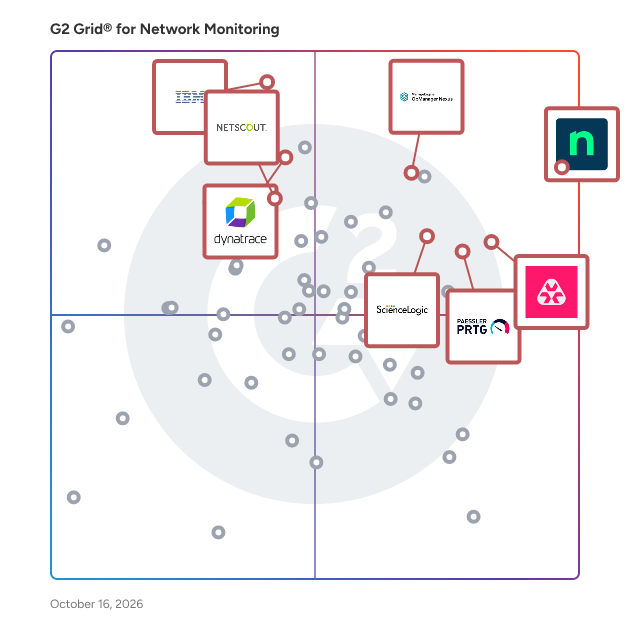
G2 Grid® for Network Monitoring Software

G2 Grid® for Network Monitoring Software plotting products by satisfaction and market presence

Highlighted products: NinjaOne, Paessler PRTG, OpManager Nexus, IBM SevOne, Remote Monitoring and Management, Dynatrace, ScienceLogic AI Platform, and NETSCOUT Network & Application Observability.

Underlying data: [Grid® JSON](https://www.g2.com/categories/network-monitoring/grids.json?focus%5B%5D=ninjaone&focus%5B%5D=paessler-prtg&focus%5B%5D=opmanager-nexus&focus%5B%5D=ibm-sevone&focus%5B%5D=remote-monitoring-and-management&focus%5B%5D=dynatrace&focus%5B%5D=sciencelogic-ai-platform&focus%5B%5D=netscout-network-application-observability&segment=enterprise)

NinjaOne

NinjaOne unifies IT to simplify work for 40,000 customers in 140+ countries. The NinjaOne Unified IT Operations Platform delivers endpoint management, autonomous patching, backup, and remote access in a single console to improve efficiency, increase resilience, and reduce spend. By automating IT and managing all endpoints, organizations give employees a great technology experience at work. The platform brings together the core work of modern IT operations: endpoint management, autonomous patch management, vulnerability management, endpoint and SaaS backup, remote access, and IT service desk. Teams monitor and control Windows, macOS, Linux, mobile, and virtual devices in one place, automate routine work with policy-based automation and human-centered AI, and cut the cost and risk that come from running many disconnected tools. NinjaOne has maintained a 98 percent customer satisfaction score for more than five years, backed by free unlimited onboarding and 24/7 support in seven languages. Organizations that move to NinjaOne report replacing four or more separate tools with the single platform. NinjaOne is FedRAMP Moderate Authorized and SOC 2 Type II and Type III compliant, and supports audit-ready compliance evidence across frameworks including CMMC, ISO 27001, and HIPAA. The mission behind the platform is simple: unify IT to simplify work, giving IT teams better tools and employees a great technology experience at work.

Average Rating: 4.7/5.0

Total Reviews: 5,150

How Do G2 Users Rate NinjaOne?

  • Has the product been a good partner in doing business?: 9.4/10 (Category avg: 8.8/10)
  • Performance Monitoring: 8.9/10 (Category avg: 9.0/10)
  • Multi-Network Capability: 8.8/10 (Category avg: 8.7/10)
  • Path Analysis: 7.6/10 (Category avg: 8.4/10)

Who Is the Company Behind NinjaOne?

  • Seller: NinjaOne
  • Company Website:
  • Year Founded: 2013
  • HQ Location: Austin, Texas
  • Twitter: @NinjaOne
    3,607 Twitter followers
  • LinkedIn® Page: www.linkedin.com
    2,555 employees on LinkedIn®

Who Uses This Product?

  • Who Uses This: IT Manager, Owner
  • Top Industries: Information Technology and Services, Computer & Network Security
  • Company Size: 47% Medium, 45% Small

What Do G2 Reviewers Say About NinjaOne?

AI-generated summary from verified user reviews

Pros
  • Users value the ease of use of NinjaOne, highlighting its seamless implementation and effective support for MSPs.
  • Users appreciate the ongoing feature enhancements of NinjaOne, ensuring the platform continuously evolves to meet our needs.
  • Users praise NinjaOne for its easy-to-navigate remote access and full visibility, enhancing IT support efficiency.
  • Users praise the powerful automation features of NinjaOne, enhancing efficiency and simplifying management tasks.
  • Users appreciate the exceptional customer support of NinjaOne, which simplifies learning and enhances overall usability.
Cons
  • Users notice the missing features in NinjaOne, specifically regarding client and customer portal capabilities.
  • Users find the limited features of NinjaOne frustrating, especially regarding user management and third-party software automation.
  • Users find the search function lacking and struggle with visibility and usability issues in NinjaOne.
  • Users feel the search function needs improvement and find the visibility of the NinjaOne icon inconsistent.
  • Users express concerns about feature issues, including confusion over roles, auto-installations, and OS compatibility challenges.

What Are Recent G2 Reviews of NinjaOne?

What Are G2 Users Discussing About NinjaOne?

Paessler PRTG

Your infrastructure is complex. Your monitoring tool shouldn't be. Paessler PRTG delivers mission-critical visibility across IT and OT environments, deploying in minutes, not months. Whether you're managing servers, switches, virtual machines, cloud services, or industrial systems, PRTG monitors everything from a single platform, so your team always knows what's running, what's struggling, and what needs attention, before users do. Fast to deploy. Easy to run. Auto-discovery finds devices on your network automatically, and 300+ pre-configured sensors cover the most common infrastructure components out of the box. Support for all major protocols (SNMP, WMI, REST APIs, SSH, NetFlow, and more) means PRTG fits into your existing environment without forcing changes to it. Built for lean teams under real pressure. Customizable dashboards give instant visibility across your entire landscape. Flexible alerting (via email, SMS, push notification, or third-party integrations) ensures the right people are notified the moment something goes wrong. Historical trend data helps you spot patterns and plan ahead, not just react. Scales on your terms. From a single site to distributed multi-location environments, PRTG grows with your organization. Available as an on-premises installation or a hosted solution, it adapts to your infrastructure and your IT policies, no rip-and-replace required. Trusted by more than 500,000 users across 190+ countries since 1997, Paessler PRTG is the monitoring standard for IT professionals who need results, not complexity.

Average Rating: 4.7/5.0

Total Reviews: 208

How Do G2 Users Rate Paessler PRTG?

  • Has the product been a good partner in doing business?: 8.8/10 (Category avg: 8.8/10)
  • Performance Monitoring: 9.4/10 (Category avg: 9.0/10)
  • Multi-Network Capability: 9.1/10 (Category avg: 8.7/10)
  • Path Analysis: 8.0/10 (Category avg: 8.4/10)

Who Is the Company Behind Paessler PRTG?

  • Seller: Paessler GmbH
  • Company Website:
  • Year Founded: 1997
  • HQ Location: Nuremberg, Germany
  • LinkedIn® Page: www.linkedin.com
    397 employees on LinkedIn®

Who Uses This Product?

  • Who Uses This: Software Engineer, Network Administrator
  • Top Industries: Information Technology and Services, Telecommunications
  • Company Size: 52% Medium, 35% Large

What Do G2 Reviewers Say About Paessler PRTG?

AI-generated summary from verified user reviews

Pros
  • Users find Paessler PRTG's ease of use impressive, enjoying intuitive setup and customizable features for effective monitoring.
  • Users value the reliable monitoring capabilities of PRTG, enjoying its customizable sensors and mobile accessibility.
  • Users highlight the reliable monitoring capabilities of PRTG, enabling efficient tracking of critical network infrastructure.
  • Users value the robust alerting system of PRTG, ensuring immediate notifications for any network disruptions or issues.
  • Users find the easy setup of Paessler PRTG efficient, enabling quick monitoring of their network infrastructure.
Cons
  • Users find the high acquisition cost problematic, complicating the decision to monitor additional metrics and services.
  • Users report slow performance with large reports and dashboards, affecting usability during peak access times.
  • Users report user interface issues with PRTG, finding the web interface dated and the mobile app lacking polish.
  • Users find the learning curve for advanced features of PRTG to be steeper than expected, especially for new users.
  • Users find the complex setup of PRTG challenging, requiring extensive experimentation and fine-tuning for optimal performance.

What Are Recent G2 Reviews of Paessler PRTG?

What Are G2 Users Discussing About Paessler PRTG?

OpManager Nexus

OpManager Nexus is a full-stack observability platform that helps IT teams monitor and manage their entire infrastructure, including networks, servers, applications, databases, and websites, from a single console. Designed for mid-size to large organizations managing hybrid and on-premises environments, OpManager Nexus provides deep visibility across every layer of the IT stack. IT teams gain a consolidated view of their infrastructure, eliminating the need for multiple disconnected monitoring tools and reducing the operational overhead that comes with managing them. This unified approach enables faster decision-making and helps organizations maintain service reliability across complex, distributed environments where downtime can have a direct impact on business continuity. OpManager Nexus includes AIOps capabilities that go beyond traditional monitoring. Agentic AI and generative AI integrations automate routine diagnostics and accelerate issue resolution, while smart event correlation identifies relationships between alerts across the stack. Together, these capabilities help IT teams detect issues early, cut through alert noise, and resolve problems before they impact end users or broader business operations. For IT teams dealing with high volumes of events across large environments, this level of automation significantly reduces the time spent on manual troubleshooting. On the deployment front, OpManager Nexus supports both on-premises installation and cloud access (powered by Site24x7) through ManageEngine's private datacenters. Organizations can choose the model that aligns with their infrastructure strategy, security policies, and compliance requirements, without compromising on monitoring depth or platform capability. As part of the ManageEngine ecosystem, OpManager Nexus integrates natively with ITSM, analytics, and security tools, giving IT teams the full operational context needed to manage infrastructure performance and respond to incidents end to end.

Average Rating: 4.5/5.0

Total Reviews: 232

How Do G2 Users Rate OpManager Nexus?

  • Has the product been a good partner in doing business?: 9.0/10 (Category avg: 8.8/10)
  • Performance Monitoring: 9.2/10 (Category avg: 9.0/10)
  • Multi-Network Capability: 8.8/10 (Category avg: 8.7/10)
  • Path Analysis: 8.3/10 (Category avg: 8.4/10)

Who Is the Company Behind OpManager Nexus?

  • Seller: Zoho
  • Company Website:
  • Year Founded: 1996
  • HQ Location: Austin, TX
  • Twitter: @Zoho
    137,880 Twitter followers
  • LinkedIn® Page: www.linkedin.com
    30,913 employees on LinkedIn®

Who Uses This Product?

  • Who Uses This: IT Manager, Network Administrator
  • Top Industries: Information Technology and Services, Financial Services
  • Company Size: 54% Medium, 32% Large

What Do G2 Reviewers Say About OpManager Nexus?

AI-generated summary from verified user reviews

Pros
  • Users value the effective monitoring capabilities of OpManager Nexus, essential for managing bandwidth and network performance.
  • Users value the real-time monitoring capabilities of OpManager Nexus, enhancing issue resolution and network visibility.
  • Users find OpManager Nexus to have ease of use with intuitive dashboards and efficient monitoring capabilities.
  • Users value the intuitive user interface of OpManager Nexus, praising its easy-to-use dashboards and monitoring capabilities.
  • Users appreciate the comprehensive monitoring capabilities of OpManager Nexus, enhancing the management of critical devices and networks.
Cons
  • Users find the setup complex for large networks, with performance slowdowns and additional licensing adding to the challenge.
  • Users find the complex configuration of OpManager Nexus challenging, particularly in large network setups and advanced features.
  • Users find the complex setup of OpManager Nexus challenging, especially for large networks and during onboarding.
  • Users note the missing features in OpManager Nexus, particularly lacking advanced metrics and cloud-native integrations.
  • Users find the difficult configuration of OpManager challenging, particularly when managing alerts and third-party integrations.

What Are Recent G2 Reviews of OpManager Nexus?

What Are G2 Users Discussing About OpManager Nexus?

AI can help you find the answers. G2 helps you trust them.

Connect G2 to Claude or ChatGPT for answers grounded in G2's trusted reviews, comparisons, and pricing from real user insights.

How it works

IBM SevOne

IBM® SevOne, now part of the Concert platform, gives NetOps teams deep, real-time visibility into hybrid cloud and SD-WAN performance — combining network-layer intelligence and app-aware insights to speed up resolution, reduce complexity, and ensure seamless digital experiences. In a world of hybrid clouds and ever-rising user expectations, downtime is not an option. IBM SevOne 8.0 equips NetOps teams with real-time, unified visibility across complex networks—from SD-WAN and multi-cloud (AWS, GCP, Azure) to Kubernetes. Built for speed and scale, it reduces time-to-value with native widget deployment, enhances diagnostics with advanced Flow Filters, and integrates seamlessly with vendors like Cisco, Aruba, and Palo Alto. The result? A cloud-smart, app-aware network that proactively detects issues before they impact users. With SevOne, you don’t just monitor. You take control of the future of network observability—today.

Average Rating: 4.3/5.0

Total Reviews: 70

How Do G2 Users Rate IBM SevOne?

  • Has the product been a good partner in doing business?: 9.0/10 (Category avg: 8.8/10)
  • Performance Monitoring: 8.5/10 (Category avg: 9.0/10)
  • Multi-Network Capability: 8.3/10 (Category avg: 8.7/10)
  • Path Analysis: 7.9/10 (Category avg: 8.4/10)

Who Is the Company Behind IBM SevOne?

  • Seller: IBM
  • Year Founded: 1911
  • HQ Location: Armonk, New York, United States
  • Twitter: @IBMSecurity
    74,660 Twitter followers
  • LinkedIn® Page: www.linkedin.com
    344,328 employees on LinkedIn®
  • Ownership: SWX:IBM

Who Uses This Product?

  • Top Industries: Computer Software, Information Technology and Services
  • Company Size: 38% Medium, 32% Large

What Do G2 Reviewers Say About IBM SevOne?

AI-generated summary from verified user reviews

Pros
  • Users value the real-time monitoring capabilities of IBM SevOne, enabling proactive management and rapid issue resolution.
  • Users commend the reliability of IBM SevOne, providing timely insights and consistent performance monitoring for complex networks.
  • Users value the real-time monitoring capabilities of IBM SevOne, enhancing their ability to track network performance effectively.
  • Users appreciate the customizable dashboards of IBM SevOne, which enhance network monitoring and team collaboration effectively.
  • Users value the customizable dashboards in IBM SevOne, enhancing their ability to monitor network health effectively.
Cons
  • Users find the steep learning curve of IBM SevOne challenging, requiring significant time and effort to master.
  • Users find the difficult learning curve of IBM SevOne challenging, requiring significant effort to master the platform.
  • Users find the complex setup of IBM SevOne to be a significant hurdle, requiring considerable effort and expertise.
  • Users find the steep learning curve challenging, making initial setup and configuration time-consuming and complex.
  • Users find the complex configuration of IBM SevOne overwhelming, making it difficult for newcomers to navigate effectively.

What Are Recent G2 Reviews of IBM SevOne?

What Are G2 Users Discussing About IBM SevOne?

Remote Monitoring and Management

Atera is defining the category of Autonomous IT, where AI agents resolve technical incidents end to end, without a technician in the loop. Atera's AI-native IT management platform consolidates RMM, helpdesk, ticketing, advanced reporting, and automation, empowering IT teams and MSPs to manage and protect infrastructure, automate tasks, and boost service quality by reducing downtime and improving SLAs. Atera’s autonomous AI agent, Robin, detects, diagnoses, remediates, and verifies incidents by taking action directly on devices, servers, networks, and mainframes, resolving Tier-1 and complex Tier-2 incidents in full. 1) Resolution without the wait. Robin doesn't just suggest or assist, it acts and resolves, on its own, instantly. 2) Always-on coverage, day and night. Robin extends your team's reach around the clock, resolving issues at 2am just as reliably as at 2pm, so your team isn't the only line of defense when it comes to fighting downtime. 3) A personal IT tech for every employee. An intelligent, context-aware AI agent that understands your environment, adapts to each user, and responds instantly. Built on a patented architecture, Robin operates as a system of action within your existing enterprise environment, adhering to the highest enterprise-grade security and compliance standards. It's governed by configurable guardrails, a complete audit trail, and approval workflows, so autonomy never comes at the cost of control. More than 13,000 organizations across 120+ countries rely on Atera to keep their people working, uninterrupted. Discover how Atera can help you achieve unparalleled organizational efficiency at www.atera.com.

Average Rating: 4.6/5.0

Total Reviews: 1,261

How Do G2 Users Rate Remote Monitoring and Management?

  • Has the product been a good partner in doing business?: 9.1/10 (Category avg: 8.8/10)
  • Performance Monitoring: 8.9/10 (Category avg: 9.0/10)
  • Multi-Network Capability: 8.6/10 (Category avg: 8.7/10)
  • Path Analysis: 8.0/10 (Category avg: 8.4/10)

Who Is the Company Behind Remote Monitoring and Management?

  • Seller: Atera
  • Company Website:
  • Year Founded: 2011
  • HQ Location: New York
  • Twitter: @ateracloud
    1,675 Twitter followers
  • LinkedIn® Page: www.linkedin.com
    416 employees on LinkedIn®

Who Uses This Product?

  • Who Uses This: Owner, IT Manager
  • Top Industries: Information Technology and Services, Computer & Network Security
  • Company Size: 55% Small, 30% Medium

What Do G2 Reviewers Say About Remote Monitoring and Management?

AI-generated summary from verified user reviews

Pros
  • Users find Atera's ease of use exceptional, streamlining management and enhancing efficiency across various tasks.
  • Users appreciate the powerful automation tools of Atera, enabling efficient management and consistent setup for new employees.
  • Users appreciate the all-in-one dashboard of Atera, enhancing efficiency with seamless access to various tools and features.
  • Users praise Atera for its efficiency, streamlining processes and enhancing remote management of devices.
  • Users value the proactive monitoring and all-in-one platform of Atera, significantly enhancing productivity and efficiency.
Cons
  • Users find missing features in Atera, such as insufficient alert context and lack of essential ticketing tools.
  • Users find the limited features of Atera, especially in the mobile app, restrict overall functionality for freelancers.
  • Users find improvement needed in Atera's interface changes and agent installation process, along with remote access reliability.
  • Users note that report loading times and limited customization can hinder efficiency, revealing areas for improvement.
  • Users express concerns about feature issues in Atera, citing limitations and disruptions affecting their workflow.

What Are Recent G2 Reviews of Remote Monitoring and Management?

What Are G2 Users Discussing About Remote Monitoring and Management?

Dynatrace

Dynatrace is advancing observability for today’s digital businesses, helping to transform the complexity of modern digital ecosystems into powerful business assets. By leveraging AI-powered insights, Dynatrace enables organizations to analyze, automate, and innovate faster to drive their business forward. To learn more about how Dynatrace can help your business, visit www.dynatrace.com, visit our blog and follow us on LinkedIn and X @dynatrace.

Average Rating: 4.5/5.0

Total Reviews: 1,238

How Do G2 Users Rate Dynatrace?

  • Has the product been a good partner in doing business?: 8.7/10 (Category avg: 8.8/10)
  • Performance Monitoring: 9.0/10 (Category avg: 9.0/10)
  • Multi-Network Capability: 8.2/10 (Category avg: 8.7/10)
  • Path Analysis: 9.2/10 (Category avg: 8.4/10)

Who Is the Company Behind Dynatrace?

  • Seller: Dynatrace
  • Year Founded: 2005
  • HQ Location: Boston, MA
  • Twitter: @Dynatrace
    18,668 Twitter followers
  • LinkedIn® Page: www.linkedin.com
    6,181 employees on LinkedIn®
  • Ownership: NYSE: DT

Who Uses This Product?

  • Who Uses This: Software Engineer, Senior Software Engineer
  • Top Industries: Information Technology and Services, Financial Services
  • Company Size: 69% Large, 23% Medium

What Do G2 Reviewers Say About Dynatrace?

AI-generated summary from verified user reviews

Pros
  • Users appreciate the ease of use of Dynatrace, enjoying seamless application instrumentation and comprehensive support.
  • Users value the insightful dashboarding of Dynatrace, enhancing executive views and simplifying monitoring processes.
  • Users value the comprehensive monitoring capabilities of Dynatrace, enhancing problem identification and prevention effectively.
  • Users value the effective debugging capabilities of Dynatrace, enhancing their ability to identify and resolve issues promptly.
  • Users value the robust analytics and integration features of Dynatrace, enhancing their monitoring and debugging capabilities.
Cons
  • Users find the steep learning curve of Dynatrace challenging, making it hard to fully utilize its features.
  • Users find that missing features in Dynatrace hinder detailed analysis and communication regarding updates and fixes.
  • Users find Dynatrace's complexity overwhelming, with a steep learning curve and costly pricing affecting usability.
  • Users find the learning difficulty challenging due to overwhelming information and inconsistencies in functionality.
  • Users find the costly nature of Dynatrace challenging, making it more suitable for large enterprises only.

What Are Recent G2 Reviews of Dynatrace?

What Are G2 Users Discussing About Dynatrace?

ScienceLogic AI Platform

ScienceLogic delivers a unified, service-centric, AI-powered IT operations platform that transforms reactive IT into intelligent, automated operations, using high-fidelity telemetry data and safe, explainable automation to deliver measurable results. Deployable across on-premises, cloud, and hybrid environments, the ScienceLogic AI Platform consolidates fragmented tools, delivers complete service-aware observability, and empowers engineers to move beyond manual processes with the efficiency of automation and the intelligence of AI. Unlike competitors, ScienceLogic’s platform leverages automation as a true differentiator, providing goal-driven insights, closed-loop remediation, and explainable actions governed by enterprise policies. This reduces MTTR, improves efficiency, and frees teams to focus on innovation, with confidence that every automated action is safe, verifiable, and aligned with business intent. Through seamless integrations, advanced agentic AI capabilities, and a data-rich architecture built on continuous telemetry and discovery, the ScienceLogic AI Platform enables enterprises and managed service providers to manage complex, distributed infrastructures with accuracy, efficiency, and speed. Flexible and extensive, the ScienceLogic AI Platform helps enterprises, MSPs, government agencies, and other organizations scale services reliably, deliver superior customer experiences, and consolidate toolsets with intelligent automation built on trusted data. Recognized as a leader in The Forrester Wave™: AIOps Platforms, Q2 2025, and a visionary in the 2025 Gartner® Magic Quadrant™ for Observability Platforms, ScienceLogic empowers customers to achieve faster service restoration, executive-level visibility, and optimal business outcomes, while advancing toward fully autonomous IT operations.

Average Rating: 4.5/5.0

Total Reviews: 40

How Do G2 Users Rate ScienceLogic AI Platform?

  • Has the product been a good partner in doing business?: 9.2/10 (Category avg: 8.8/10)
  • Performance Monitoring: 9.4/10 (Category avg: 9.0/10)
  • Multi-Network Capability: 9.3/10 (Category avg: 8.7/10)
  • Path Analysis: 8.4/10 (Category avg: 8.4/10)

Who Is the Company Behind ScienceLogic AI Platform?

  • Seller: ScienceLogic
  • Company Website:
  • Year Founded: 2003
  • HQ Location: Reston, Virginia
  • Twitter: @ScienceLogic
    9,190 Twitter followers
  • LinkedIn® Page: www.linkedin.com
    579 employees on LinkedIn®

Who Uses This Product?

  • Top Industries: Information Technology and Services, Computer Software
  • Company Size: 50% Large, 24% Small

What Do G2 Reviewers Say About ScienceLogic AI Platform?

AI-generated summary from verified user reviews

Pros
  • Users value the unified visibility provided by ScienceLogic AI Platform across hybrid, cloud, and on-premise environments.
  • Users value the AI-driven automation of ScienceLogic AI Platform, enhancing operational efficiency and proactive issue resolution.
  • Users appreciate the ease of use of ScienceLogic AI Platform, highlighting its intuitive and flexible interface for monitoring.
  • Users value the automatic root cause detection of ScienceLogic AI Platform, enabling quick issue resolution and efficiency.
  • Users appreciate the monitoring efficiency of ScienceLogic AI Platform, which enhances visibility and reduces operational downtime.
Cons
  • Users find the noisy alerts troublesome, leading to false positives and a complicated experience with alert tuning.
  • Users face a difficult learning curve with ScienceLogic AI Platform, making initial setup and customization quite challenging.
  • Many users find the initial setup has a steep learning curve, making the onboarding process challenging.
  • Users face a steep learning curve during initial setup, making it complex to become proficient with the platform.
  • Users find the initial setup and integration complex, leading to a steep learning curve for effective usage.

What Are Recent G2 Reviews of ScienceLogic AI Platform?

What Are G2 Users Discussing About ScienceLogic AI Platform?

Site24x7

ManageEngine Site24x7 offers unified cloud monitoring for DevOps and IT operations within small to large organizations. The solution monitors the experience of real users accessing websites and applications from desktop and mobile devices. In-depth monitoring capabilities enable DevOps teams to monitor and troubleshoot applications, servers and network infrastructure, including private and public clouds. End-user experience monitoring is done from more than 100 locations across the world and various wireless carriers.

Average Rating: 4.6/5.0

Total Reviews: 469

How Do G2 Users Rate Site24x7?

  • Has the product been a good partner in doing business?: 8.9/10 (Category avg: 8.8/10)
  • Performance Monitoring: 9.1/10 (Category avg: 9.0/10)
  • Multi-Network Capability: 8.8/10 (Category avg: 8.7/10)
  • Path Analysis: 8.4/10 (Category avg: 8.4/10)

Who Is the Company Behind Site24x7?

  • Seller: Zoho
  • Year Founded: 1996
  • HQ Location: Austin, TX
  • Twitter: @Zoho
    137,880 Twitter followers
  • LinkedIn® Page: www.linkedin.com
    30,913 employees on LinkedIn®
  • Phone: +1 (888) 900-9646

Who Uses This Product?

  • Who Uses This: CEO, IT Manager
  • Top Industries: Information Technology and Services, Computer Software
  • Company Size: 46% Medium, 41% Small

What Do G2 Reviewers Say About Site24x7?

AI-generated summary from verified user reviews

Pros
  • Users appreciate the ease of use of Site24x7, making implementation and daily operations smooth and efficient.
  • Users appreciate the single pane of glass visibility in Site24x7, enhancing efficiency and monitoring flexibility.
  • Users appreciate the real-time monitoring capabilities of Site24x7, providing comprehensive oversight for networks and infrastructure.
  • Users value the extensive monitoring features of Site24x7, enabling efficient oversight of multiple resources from one interface.
  • Users enjoy the extensive visibility of Site24x7, appreciating its ease of setup and efficient monitoring capabilities.
Cons
  • Users face missing alerts and limited interface visibility, hindering their ability to monitor system efficiency effectively.
  • Users find the complexity of tool integration and plan options overwhelming, preferring a simplified default view.
  • Users find the pricing overwhelming and feel it could be more flexible for smaller businesses or startups.
  • Users find the learning curve for advanced features of Site24x7 challenging, impacting effective usage of the platform.
  • Users find the UI lacking modernity, making it difficult to adopt and navigate smoothly.

What Are Recent G2 Reviews of Site24x7?

What Are G2 Users Discussing About Site24x7?

NETSCOUT Network & Application Observability

NETSCOUT’s Network & Application Observability solution is engineered for IT practitioners who need deep, real-time visibility into complex hybrid environments. Whether you're managing a sprawling data center, a multi-cloud deployment, 5G deployment, or a remote workforce, this solution delivers the actionable intelligence required to maintain performance, availability, and user experience across every layer of your infrastructure. At its core, NETSCOUT leverages Deep Packet Inspection (DPI) to convert raw network traffic into smart data. This allows IT teams to monitor application behavior, network performance, and service dependencies with precision, even in containerized environments. The result is a unified, end-to-end view that helps you quickly isolate root causes, reduce mean time to knowledge (MTTK), and proactively resolve issues before they impact users or business operations. What sets NETSCOUT apart is its ability to scale observability across both legacy and modern architectures without requiring intrusive agents or instrumentation. It integrates seamlessly with existing workflows and tools, providing consistent visibility whether you're troubleshooting a VoIP degradation, tracking down a cloud latency spike, or validating the performance of a new application rollout. For IT professionals tasked with ensuring uptime and optimizing digital experiences, NETSCOUT’s observability platform is not just a monitoring tool—it’s a strategic asset that transforms packet-level data into operational intelligence. Products included in this solution: - nGeniusONE - InfiniStreamNG - vSTREAM - Packet Flow Switches (PFS) and TAPs

Average Rating: 4.5/5.0

Total Reviews: 128

How Do G2 Users Rate NETSCOUT Network & Application Observability?

  • Has the product been a good partner in doing business?: 7.2/10 (Category avg: 8.8/10)
  • Performance Monitoring: 9.2/10 (Category avg: 9.0/10)
  • Multi-Network Capability: 8.5/10 (Category avg: 8.7/10)
  • Path Analysis: 8.3/10 (Category avg: 8.4/10)

Who Is the Company Behind NETSCOUT Network & Application Observability?

  • Seller: NETSCOUT
  • Company Website:
  • Year Founded: 1984
  • HQ Location: Westford, Mass.
  • Twitter: @NETSCOUT
    13,759 Twitter followers
  • LinkedIn® Page: www.linkedin.com
    2,710 employees on LinkedIn®

Who Uses This Product?

  • Top Industries: Telecommunications, Financial Services
  • Company Size: 44% Large, 27% Medium

What Do G2 Reviewers Say About NETSCOUT Network & Application Observability?

AI-generated summary from verified user reviews

Pros
  • Users value the comprehensive visibility NETSCOUT provides, enabling swift issue resolution and enhanced performance monitoring.
  • Users value the issue detection capabilities of NETSCOUT, enabling swift resolution of performance bottlenecks and disruptions.
  • Users value the comprehensive visibility NETSCOUT provides, enabling swift identification and resolution of performance issues.
  • Users value the reliability of NETSCOUT Network & Application Observability for proactive troubleshooting and insightful network management.
  • Users find NETSCOUT Network & Application Observability to be user-friendly, facilitating easy setup and efficient diagnosis of network issues.
Cons
  • Users face a steep learning curve with NETSCOUT, leading to implementation challenges and requiring specialized knowledge.
  • Users experience complexity in implementing NETSCOUT, facing a steep learning curve and integration challenges.
  • Users face a difficult learning curve with NETSCOUT, finding the complexity challenging to manage and comprehend.
  • Users find the complex setup challenging, requiring specialized knowledge and time for new team members to adapt.
  • Users highlight the complex configuration process and the steep learning curve for new team members, complicating implementation.

What Are Recent G2 Reviews of NETSCOUT Network & Application Observability?

Datadog

Datadog is the monitoring, security and analytics platform for developers, IT operations teams, security engineers and business users in the cloud age. The SaaS platform integrates and automates infrastructure monitoring, application performance monitoring and log management to provide unified, real-time observability of our customers' entire technology stack. Datadog is used by organizations of all sizes and across a wide range of industries to enable digital transformation and cloud migration, drive collaboration among development, operations, security and business teams, accelerate time to market for applications, reduce time to problem resolution, secure applications and infrastructure, understand user behavior and track key business metrics.

Average Rating: 4.4/5.0

Total Reviews: 726

How Do G2 Users Rate Datadog?

  • Has the product been a good partner in doing business?: 8.5/10 (Category avg: 8.8/10)
  • Performance Monitoring: 9.2/10 (Category avg: 9.0/10)
  • Multi-Network Capability: 8.5/10 (Category avg: 8.7/10)
  • Path Analysis: 8.8/10 (Category avg: 8.4/10)

Who Is the Company Behind Datadog?

  • Seller: Datadog
  • Company Website:
  • Year Founded: 2010
  • HQ Location: New York
  • Twitter: @datadoghq
    51,207 Twitter followers
  • LinkedIn® Page: www.linkedin.com
    10,780 employees on LinkedIn®

Who Uses This Product?

  • Who Uses This: Software Engineer, DevOps Engineer
  • Top Industries: Information Technology and Services, Computer Software
  • Company Size: 46% Medium, 34% Large

What Do G2 Reviewers Say About Datadog?

AI-generated summary from verified user reviews

Pros
  • Users appreciate the ease of use of Datadog, enjoying intuitive dashboard creation and straightforward implementation.
  • Users appreciate the intuitive monitoring features of Datadog, enabling easy integration and insightful data analysis.
  • Users value the real-time monitoring capabilities of Datadog, enhancing oversight across various applications and infrastructures.
  • Users appreciate the user-friendly interface and robust integration capabilities of Datadog for effective monitoring.
  • Users value the intuitive dashboard creation in Datadog, which enhances monitoring and analysis efficiency.
Cons
  • Users find Datadog's pricing to be expensive, suggesting it should be more affordable given its features.
  • Users find pricing issues with Datadog, citing rapidly escalating costs and high subscription fees as concerns.
  • Users find the steep learning curve challenging, especially with rapidly evolving features and required knowledge.
  • Users find the costs to be unpredictable and excessively high, especially with data storage and additional features.
  • Users find learning difficulty in Datadog, noting that new users may require training to understand its complexities.

What Are Recent G2 Reviews of Datadog?

What Are G2 Users Discussing About Datadog?

SolarWinds Observability

SolarWinds® Observability is a comprehensive full-stack observability solution designed to meet the diverse needs of modern organizations, regardless of their size. This solution provides deep visibility into hybrid ecosystems, enabling users to monitor and manage both on-premises and cloud environments effectively. By optimizing performance and ensuring availability across distributed hybrid IT infrastructures, SolarWinds Observability supports organizations in navigating the complexities of their IT environments. Targeted at IT professionals and organizations that require robust monitoring capabilities, SolarWinds Observability caters to a wide range of use cases. It is particularly beneficial for businesses operating in hybrid environments, where the integration of on-premises and cloud resources is essential. The solution allows users to gain a holistic view of their networks, applications, databases, and user experiences, thereby facilitating better decision-making and operational efficiency. This is especially crucial in today’s fast-paced digital landscape, where downtime can significantly impact service reliability and customer satisfaction. One of the standout features of SolarWinds Observability is its built-in intelligence powered by AIOps capabilities. This functionality accelerates issue remediation by enabling users to detect, troubleshoot, and resolve problems more efficiently. The advanced predictive analysis and anomaly-based alerts help organizations proactively address potential issues before they escalate, ultimately reducing downtime and enhancing service reliability. Additionally, the solution's log pattern analysis further streamlines the troubleshooting process, allowing IT teams to focus on strategic initiatives rather than being bogged down by operational challenges. SolarWinds Observability offers flexibility in deployment, providing users with the option to choose between self-hosted and SaaS models. The self-hosted option integrates seamlessly with other SolarWinds services, such as security and storage monitoring, while the SaaS option is tailored for deeper monitoring of custom and cloud-based applications. This adaptability ensures that organizations can select the deployment method that best aligns with their operational needs and infrastructure. Moreover, SolarWinds Observability stands out by consolidating multiple monitoring tools into a single, integrated solution. This not only simplifies the monitoring process but also helps organizations reduce costs associated with managing disparate systems. By offering comprehensive visibility across hybrid IT environments, SolarWinds Observability empowers organizations to optimize their operations and enhance overall performance.

Average Rating: 4.3/5.0

Total Reviews: 832

How Do G2 Users Rate SolarWinds Observability?

  • Has the product been a good partner in doing business?: 8.3/10 (Category avg: 8.8/10)
  • Performance Monitoring: 9.2/10 (Category avg: 9.0/10)
  • Multi-Network Capability: 8.7/10 (Category avg: 8.7/10)
  • Path Analysis: 8.2/10 (Category avg: 8.4/10)

Who Is the Company Behind SolarWinds Observability?

  • Seller: SolarWinds Worldwide LLC
  • Company Website:
  • Year Founded: 1999
  • HQ Location: Austin, TX
  • Twitter: @solarwinds
    19,570 Twitter followers
  • LinkedIn® Page: www.linkedin.com
    2,864 employees on LinkedIn®

Who Uses This Product?

  • Who Uses This: Network Engineer, Network Administrator
  • Top Industries: Information Technology and Services, Hospital & Health Care
  • Company Size: 44% Large, 35% Medium

What Do G2 Reviewers Say About SolarWinds Observability?

AI-generated summary from verified user reviews

Pros
  • Users love the intuitive interface of SolarWinds Observability, making system management and monitoring effortless and efficient.
  • Users appreciate the comprehensive visibility of SolarWinds Observability, simplifying performance monitoring across diverse environments.
  • Users value the unified visibility across infrastructure that simplifies monitoring and accelerates troubleshooting effectively.
  • Users appreciate the monitoring capabilities of SolarWinds Observability, effectively managing and analyzing network environments.
  • Users appreciate the intuitive user interface of SolarWinds, enhancing the management and visibility of network performance.
Cons
  • Users find the pricing escalates quickly, making SolarWinds Observability less affordable for larger setups and features.
  • Users face a significant learning curve with SolarWinds Observability, complicating the use of advanced features and integrations.
  • Users face integration issues due to complex setups and limited support for ITSM platform connections, affecting usability.
  • Users find the complex setup of SolarWinds Observability challenging, requiring significant technical expertise and time investment.
  • Users find the configuration difficulty of SolarWinds Observability to be a significant hurdle in effective deployment.

What Are Recent G2 Reviews of SolarWinds Observability?

What Are G2 Users Discussing About SolarWinds Observability?

TeamViewer

TeamViewer is a leading provider of remote connectivity software for individuals and businesses of all sizes. Our remote software enables companies across various industries to enhance their efficiency and achieve their business goals by digitally transforming their processes. We offer a selection of bespoke solutions: TeamViewer Tensor, our enterprise remote connectivity solution, enables businesses to connect, manage, and protect computers, mobile devices, and embedded platforms – on site and around the globe. TeamViewer Remote, our remote access and support solution, enables secure access to devices for remote support in small and medium-sized businesses. A free version of TeamViewer Remote is available for personal use. TeamViewer is actively working to shape the digital revolution by innovating in the fields of augmented reality (AR) and the Internet of Things (IoT). Our AR platform, Frontline, brings digital technology onto the shop floor with industrial AR solutions designed to optimize manual processes. Strategic partnerships and software integrations with other industry leaders such as SAP, Google, and Microsoft let us provide our customers with a seamless experience, regardless of their device or operating system. Since TeamViewer was founded in Göppingen, Germany, in 2005, our solutions have been installed on more than 2.5 billion devices worldwide. For more information, visit www.teamviewer.com.

Average Rating: 4.5/5.0

Total Reviews: 4,104

How Do G2 Users Rate TeamViewer?

  • Has the product been a good partner in doing business?: 8.6/10 (Category avg: 8.8/10)
  • Performance Monitoring: 9.4/10 (Category avg: 9.0/10)
  • Multi-Network Capability: 9.3/10 (Category avg: 8.7/10)
  • Path Analysis: 9.3/10 (Category avg: 8.4/10)

Who Is the Company Behind TeamViewer?

  • Seller: TeamViewer
  • Company Website:
  • Year Founded: 2005
  • HQ Location: Goppingen
  • Twitter: @TeamViewer
    48,070 Twitter followers
  • LinkedIn® Page: www.linkedin.com
    2,818 employees on LinkedIn®

Who Uses This Product?

  • Who Uses This: Software Engineer, IT Manager
  • Top Industries: Information Technology and Services, Computer Software
  • Company Size: 41% Small, 34% Medium

What Do G2 Reviewers Say About TeamViewer?

AI-generated summary from verified user reviews

Pros
  • Users appreciate the ease of use of TeamViewer, enjoying a smooth experience for remote access and support.
  • Users appreciate the easy remote access provided by TeamViewer, simplifying connections and enhancing productivity.
  • Users value the easy remote access with TeamViewer, simplifying connections and control over devices effortlessly.
  • Users love the Easy Access feature of TeamViewer, making remote connections seamless and efficient.
  • Users appreciate the seamless remote access of TeamViewer, enhancing productivity through easy connections and cross-platform compatibility.
Cons
  • Users face significant connection issues with TeamViewer, impacting performance during slow or unstable internet conditions.
  • Users experience connectivity issues with TeamViewer, leading to poor performance during slow or bad connections.
  • Users find TeamViewer expensive in South Africa due to high subscription fees and limited performance on slow connections.
  • Users experience slow performance with TeamViewer, particularly during weak internet connections and after network disruptions.
  • Users often face remote access issues with TeamViewer, including connection failures and confusing control panel interfaces.

What Are Recent G2 Reviews of TeamViewer?

What Are G2 Users Discussing About TeamViewer?

Coralogix

Coralogix is a modern, full-stack observability platform transforming how businesses process and understand their data. Our unique architecture powers in-stream analytics without reliance on indexing or hot storage. We specialize in comprehensive monitoring of logs, metrics, trace and security events, enhancing operational efficiency and reducing total cost of ownership by up to 70%. Coralogix stands out for its simple pricing model, based solely on data volume ingested and retained, and offers free, fast customer support with less than 30 second response time and 1 hour resolution time. Our platform covers the entire range of observability with features such as APM, RUM, SIEM, Kubernetes monitoring and more, all streamlined for quick integration and immediate value. Components within the stream store the system state to provide stateful insights and real-time alerting without ever needing to index the data — so there are never any trade-offs to achieve observability. Once ingested, parsed, and enriched, data is written remotely to an archive bucket controlled by the client. The archive can be queried directly at any time, from the platform UI or via CLI, giving users infinite retention with full control over, and access to, their data. View and query your data from any dashboard using any syntax. Coralogix has successfully completed relevant security and privacy compliances by BDO including GDPR, SOC 2, PCI, HIPAA, and ISO 27001/27701.

Average Rating: 4.5/5.0

Total Reviews: 419

How Do G2 Users Rate Coralogix?

  • Has the product been a good partner in doing business?: 9.4/10 (Category avg: 8.8/10)
  • Performance Monitoring: 8.7/10 (Category avg: 9.0/10)
  • Multi-Network Capability: 8.0/10 (Category avg: 8.7/10)
  • Path Analysis: 8.2/10 (Category avg: 8.4/10)

Who Is the Company Behind Coralogix?

  • Seller: Coralogix
  • Company Website:
  • Year Founded: 2014
  • HQ Location: San Francisco, CA
  • Twitter: @Coralogix
    4,102 Twitter followers
  • LinkedIn® Page: www.linkedin.com
    609 employees on LinkedIn®

Who Uses This Product?

  • Who Uses This: Software Engineer, DevOps Engineer
  • Top Industries: Computer Software, Information Technology and Services
  • Company Size: 57% Medium, 32% Large

What Do G2 Reviewers Say About Coralogix?

AI-generated summary from verified user reviews

Pros
  • Users appreciate the ease of use of Coralogix, highlighting its simple setup and efficient integrations.
  • Users value the ease of log monitoring and seamless integration, enhancing overall observability and support responsiveness.
  • Users value the integration of logs, metrics, and alerts, enhancing efficiency in root-cause analysis and monitoring.
  • Users commend the exceptional customer support of Coralogix, ensuring quick resolutions and a smooth experience.
  • Users value the real-time monitoring of Coralogix, enhancing their understanding of user behavior and improving incident response.
Cons
  • Users find that the learning curve is steep for beginners, making navigation and understanding features challenging.
  • Users experience slow performance with Coralogix, leading to frustration due to delayed log fetching and UI loading.
  • Users find the difficult learning curve of Coralogix challenging, especially for beginners navigating complex options.
  • Users find the missing feature for downloading log results a significant limitation in Coralogix's functionality.
  • Users find the learning difficulty of Coralogix challenging, especially when navigating advanced features and the overwhelming UI.

What Are Recent G2 Reviews of Coralogix?

LogicMonitor

LogicMonitor is an AI-first observability platform that helps enterprises protect revenue, brand reputation, and customer experience in a digital-first world. As every customer interaction depends on application and infrastructure performance, downtime is more than an IT issue—it is a business risk. LogicMonitor eliminates blind spots across cloud, infrastructure, applications, and the Internet, giving IT teams unified visibility from user experience to code-level performance. With AI-powered insights, intelligent alerting, and automation, LogicMonitor helps organizations detect, prioritize, and prevent issues before they impact customers. By enabling teams to move from reactive incident response to autonomous IT operations, LogicMonitor helps modern enterprises reduce disruption, operate efficiently at scale, and keep digital services performing reliably. For more information, visit  www.logicmonitor.com and our blog, or follow us on LinkedIn, X, Facebook, and YouTube.

Average Rating: 4.5/5.0

Total Reviews: 589

How Do G2 Users Rate LogicMonitor?

  • Has the product been a good partner in doing business?: 9.0/10 (Category avg: 8.8/10)
  • Performance Monitoring: 8.9/10 (Category avg: 9.0/10)
  • Multi-Network Capability: 8.8/10 (Category avg: 8.7/10)
  • Path Analysis: 7.2/10 (Category avg: 8.4/10)

Who Is the Company Behind LogicMonitor?

  • Seller: LogicMonitor
  • Company Website:
  • Year Founded: 2007
  • HQ Location: Santa Barbara, CA
  • Twitter: @logicmonitor
    12,430 Twitter followers
  • LinkedIn® Page: www.linkedin.com
    1,258 employees on LinkedIn®

Who Uses This Product?

  • Who Uses This: Infrastructure Manager, IT Manager
  • Top Industries: Information Technology and Services, Computer Software
  • Company Size: 52% Medium, 30% Large

What Do G2 Reviewers Say About LogicMonitor?

AI-generated summary from verified user reviews

Pros
  • Users value the ease of use in LogicMonitor, benefiting from its intuitive navigation and simple management features.
  • Users praise the implementation ease of LogicMonitor, appreciating its fast setup and intuitive platform navigation.
  • Users value the broad range of monitoring features in LogicMonitor, enhancing both infrastructure and application oversight.
  • Users value the comprehensive monitoring of LogicMonitor, providing deep insights into applications and infrastructure effortlessly.
  • Users commend the excellent customer support of LogicMonitor, facilitating enhanced monitoring and problem management effortlessly.
Cons
  • Users find the steep learning curve challenging due to the need for advanced skills and internet reliance.
  • Users note limited features, facing challenges like integrations, training needs, and an expensive licensing model.
  • Users find LogicMonitor to be expensive, especially for small teams without a free tier or affordable licenses.
  • Users find the inadequate monitoring capabilities of LogicMonitor frustrating, especially with traditional server workloads and configuration demands.
  • Users find the complexity of integrations and setup challenging, often requiring external tools and training for effective use.

What Are Recent G2 Reviews of LogicMonitor?

What Are G2 Users Discussing About LogicMonitor?

Entuity

Imagine never having to worry about your IT infrastructure again. Entuity Software offers a comprehensive platform that provides real-time visibility and actionable insights into every aspect of your on-prem, cloud and hybrid infrastructures in real-time. With its intuitive interface and advanced analytics capabilities, Entuity enables organizations to proactively monitor and optimize network performance, enhance security measures, and maximize resource efficiency. Ideal for enterprises seeking to streamline operations and ensure seamless connectivity, Entuity Software stands out for its ability to deliver comprehensive network visibility and management solutions that empower IT teams to drive business success.

Average Rating: 4.6/5.0

Total Reviews: 105

How Do G2 Users Rate Entuity?

  • Has the product been a good partner in doing business?: 9.5/10 (Category avg: 8.8/10)
  • Performance Monitoring: 9.5/10 (Category avg: 9.0/10)
  • Multi-Network Capability: 9.4/10 (Category avg: 8.7/10)
  • Path Analysis: 8.8/10 (Category avg: 8.4/10)

Who Is the Company Behind Entuity?

  • Seller: Park Place Technologies
  • Company Website:
  • Year Founded: 1991
  • HQ Location: Mayfield Heights, OH
  • Twitter: @parkplacetech
    1,021 Twitter followers
  • LinkedIn® Page: www.linkedin.com
    2,633 employees on LinkedIn®

Who Uses This Product?

  • Top Industries: Information Technology and Services, Telecommunications
  • Company Size: 48% Medium, 44% Large

What Do G2 Reviewers Say About Entuity?

AI-generated summary from verified user reviews

Pros
  • Users highlight the ease of use of Entuity, appreciating its simple interface and seamless deployment.
  • Users find Entuity's user-friendly interface simple and clear, enabling easy operation without prior training.
  • Users value the simple and intuitive user interface of Entuity, enhancing their overall management experience significantly.
  • Users praise the intuitive reporting features of Entuity, enabling effective real-time monitoring and streamlined network management.
  • Users value the exceptional customer support of Entuity, praising assistance with configuration and customization needs.
Cons
  • Users face integration issues with Entuity, citing confusion and lack of clarity in their API and scripts.
  • Users find configuration management complex, leading to awkward integrations and confusion with the interface at times.
  • Users find configuration difficulty in Entuity, noting that management features are not clear or intuitive.
  • Users find configuration management complex and not as clear or intuitive as other features in Entuity.
  • Users note that configuration management can be unclear and challenging, impacting the overall usability of Entuity.

What Are Recent G2 Reviews of Entuity?

What Are G2 Users Discussing About Entuity?

Tian Lin
TL
Researched and written by Tian Lin
Updated