# Best Knowledge Base Software for Small Business

  *By [Gauri Pawsey](https://research.g2.com/insights/author/gauri-pawsey)*

   Products classified in the overall Knowledge Base category are similar in many regards and help companies of all sizes solve their business problems. However, small business features, pricing, setup, and installation differ from businesses of other sizes, which is why we match buyers to the right Small Business Knowledge Base to fit their needs. Compare product ratings based on reviews from enterprise users or connect with one of G2&#39;s buying advisors to find the right solutions within the Small Business Knowledge Base category.

In addition to qualifying for inclusion in the Knowledge Base Software category, to qualify for inclusion in the Small Business Knowledge Base Software category, a product must have at least 10 reviews left by a reviewer from a small business.


## Category Overview

**Total Products under this Category:** 225


## Trust & Credibility Stats

**Why You Can Trust G2's Software Rankings:**

- 30 Analysts and Data Experts
- 87,000+ Authentic Reviews
- 225+ Products
- Unbiased Rankings

G2's software rankings are built on verified user reviews, rigorous moderation, and a consistent research methodology maintained by a team of analysts and data experts. Each product is measured using the same transparent criteria, with no paid placement or vendor influence. While reviews reflect real user experiences, which can be subjective, they offer valuable insight into how software performs in the hands of professionals. Together, these inputs power the G2 Score, a standardized way to compare tools within every category.


## Top-Rated Products (Ranked by G2 Score)
  ### 1. [Notion](https://www.g2.com/products/notion/reviews)
  Notion is the connected AI workspace that brings all work together in a tool that adapts to every team—with AI to find answers and automate busywork. It&#39;s one place for search, manage projects, capture notes and company knowledge, and collaborate as a team. Millions love Notion because it increases productivity, reduces tools &amp; costs, and empowers everyone to do their best work. Unlike fragmented, rigid software, Notion connects work into one tool that’s customizable and people love to use. Now you have beautiful tools to build your life’s work.


  **Average Rating:** 4.6/5.0
  **Total Reviews:** 10,395

**User Satisfaction Scores:**

- **Has the product been a good partner in doing business?:** 8.9/10 (Category avg: 9.0/10)
- **Quality of Support:** 8.5/10 (Category avg: 8.8/10)
- **Other Integrations:** 7.7/10 (Category avg: 8.2/10)
- **Ease of Use:** 8.3/10 (Category avg: 8.8/10)


**Seller Details:**

- **Seller:** [Notion](https://www.g2.com/sellers/notion-7effc4fe-47b3-4888-8ef0-ce4addda94db)
- **Company Website:** https://www.notion.com/
- **Year Founded:** 2016
- **HQ Location:** San Francisco, California
- **Twitter:** @NotionHQ (512,589 Twitter followers)
- **LinkedIn® Page:** https://www.linkedin.com/company/notionhq/ (5,201 employees on LinkedIn®)

**Reviewer Demographics:**
  - **Who Uses This:** Software Engineer, Student
  - **Top Industries:** Computer Software, Information Technology and Services
  - **Company Size:** 60% Small-Business, 24% Mid-Market


#### Pros & Cons

**Pros:**

- Ease of Use (4772 reviews)
- Features (2750 reviews)
- AI Features (2437 reviews)
- Useful (2362 reviews)
- Organization (2260 reviews)

**Cons:**

- Learning Curve (1909 reviews)
- Limited Features (1033 reviews)
- Learning Difficulty (944 reviews)
- Missing Features (936 reviews)
- Usage Limitations (853 reviews)

  ### 2. [Slack](https://www.g2.com/products/slack/reviews)
  Slack is your single workspace that connects you with the people and tools you work with everyday, no matter where you are or what you do. With Slack you get real-time messaging through calls and chat, a searchable record of all your files and conversations, and integrations with a growing number of handy bots and apps. Now everyone can finally be on the same page and get their work done. Slack: It’s where work happens.


  **Average Rating:** 4.5/5.0
  **Total Reviews:** 36,994

**User Satisfaction Scores:**

- **Has the product been a good partner in doing business?:** 9.1/10 (Category avg: 9.0/10)
- **Quality of Support:** 8.8/10 (Category avg: 8.8/10)
- **Other Integrations:** 8.6/10 (Category avg: 8.2/10)
- **Ease of Use:** 9.2/10 (Category avg: 8.8/10)


**Seller Details:**

- **Seller:** [Salesforce](https://www.g2.com/sellers/salesforce)
- **Company Website:** https://www.salesforce.com/
- **Year Founded:** 1999
- **HQ Location:** San Francisco, CA
- **Twitter:** @salesforce (581,281 Twitter followers)
- **LinkedIn® Page:** https://www.linkedin.com/company/3185/ (88,363 employees on LinkedIn®)

**Reviewer Demographics:**
  - **Who Uses This:** Software Engineer, Project Manager
  - **Top Industries:** Computer Software, Information Technology and Services
  - **Company Size:** 41% Small-Business, 41% Mid-Market


#### Pros & Cons

**Pros:**

- Ease of Use (3620 reviews)
- Team Collaboration (3150 reviews)
- Communication (2994 reviews)
- Integrations (2216 reviews)
- Features (1937 reviews)

**Cons:**

- Notification Issues (1137 reviews)
- Missing Features (941 reviews)
- Limited Features (757 reviews)
- Overwhelming Experience (752 reviews)
- Channel Management (688 reviews)

  ### 3. [ClickUp](https://www.g2.com/products/clickup/reviews)
  ClickUp is the world’s first Converged AI Workspace, bringing together all work apps, data, and workflows. ClickUp eliminates all forms of work sprawl to provide 100% context and a single place for humans and agents to work, together. Trusted by more than 20 million users worldwide, ClickUp is on a mission to maximize human productivity.


  **Average Rating:** 4.7/5.0
  **Total Reviews:** 11,295

**User Satisfaction Scores:**

- **Has the product been a good partner in doing business?:** 9.0/10 (Category avg: 9.0/10)
- **Quality of Support:** 8.9/10 (Category avg: 8.8/10)
- **Other Integrations:** 8.4/10 (Category avg: 8.2/10)
- **Ease of Use:** 8.5/10 (Category avg: 8.8/10)


**Seller Details:**

- **Seller:** [ClickUp](https://www.g2.com/sellers/clickup)
- **Company Website:** https://ClickUp.com
- **Year Founded:** 2017
- **HQ Location:** San Diego, California
- **Twitter:** @clickup (68,823 Twitter followers)
- **LinkedIn® Page:** https://www.linkedin.com/company/12949663/ (1,525 employees on LinkedIn®)

**Reviewer Demographics:**
  - **Who Uses This:** CEO, Project Manager
  - **Top Industries:** Marketing and Advertising, Computer Software
  - **Company Size:** 77% Small-Business, 18% Mid-Market


#### Pros & Cons

**Pros:**

- Ease of Use (4222 reviews)
- Task Management (3221 reviews)
- Features (3118 reviews)
- Project Management (2788 reviews)
- Organization (2589 reviews)

**Cons:**

- Missing Features (2040 reviews)
- Learning Curve (1753 reviews)
- Limited Features (1335 reviews)
- Not Intuitive (1183 reviews)
- Slow Loading (1155 reviews)

  ### 4. [Confluence](https://www.g2.com/products/confluence/reviews)
  Confluence is the AI-powered collaborative workspace for all teams. Equipped with intelligent AI agents to save time on tedious tasks, brainstorm new ideas, and help you quickly find the answers you need, Confluence is where knowledge becomes impact. Versatile content types like pages, live docs, whiteboards, and databases help teams move seamlessly from ideation to execution. Confluence integrates with the Atlassian suite of products like Jira Software, Trello, and Loom to enable both synchronous and async work and to push work forward.


  **Average Rating:** 4.1/5.0
  **Total Reviews:** 4,187

**User Satisfaction Scores:**

- **Has the product been a good partner in doing business?:** 8.5/10 (Category avg: 9.0/10)
- **Quality of Support:** 8.1/10 (Category avg: 8.8/10)
- **Other Integrations:** 8.4/10 (Category avg: 8.2/10)
- **Ease of Use:** 8.0/10 (Category avg: 8.8/10)


**Seller Details:**

- **Seller:** [Atlassian](https://www.g2.com/sellers/atlassian)
- **Company Website:** https://www.atlassian.com/
- **Year Founded:** 2002
- **HQ Location:** Sydney and San Francisco
- **Twitter:** @Atlassian (106,006 Twitter followers)
- **LinkedIn® Page:** https://www.linkedin.com/company/atlassian (21,797 employees on LinkedIn®)

**Reviewer Demographics:**
  - **Who Uses This:** Software Engineer, Product Manager
  - **Top Industries:** Computer Software, Information Technology and Services
  - **Company Size:** 48% Mid-Market, 34% Enterprise


#### Pros & Cons

**Pros:**

- Ease of Use (304 reviews)
- Team Collaboration (213 reviews)
- Organization (160 reviews)
- Integrations (158 reviews)
- Collaboration Efficiency (147 reviews)

**Cons:**

- Not Intuitive (84 reviews)
- Slow Performance (84 reviews)
- Page Management (71 reviews)
- Learning Curve (64 reviews)
- Complexity (59 reviews)

  ### 5. [IT Glue](https://www.g2.com/products/it-glue/reviews)
  IT Glue is the first documentation platform specifically built for the needs of IT professionals. With IT Glue, your team will have IT asset, vendor and software information, along with passwords, contacts and SOPs, all in a single pane of glass. Documentation can be linked to the others, making for a seamless experience, where your team has everything, they need at their fingertips, without having to toggle between applications. IT Glue is trusted by IT teams in over 16,000 organizations across 70+ countries. IT Glue makes documentation easy by consolidating and integrating with the monitoring, ticketing and Microsoft tools techs use every day. Hundreds of out-of-the-box documentation templates ensure you get started with ease, your team creates documentation in a consistent format, and our deep search makes everything easy to find. IT Glue is SOC 2, Type II certified, and comes with a wealth of security features, including host-proof password hosting, granular security permissions at both the group and individual levels, version control, an immutable audit trail and more. With IT Glue, users can: • Organize and manage IT assets • Formalize IT processes and practices • Create editable SOPs and Knowledge Base articles • Define relationships between assets, licensing, vendors, passwords and more • Create checklists for high-level, repeatable processes and procedures • Upload or attach various file types, such as audio and video files, images, and external links • Securely share credentials • Automate the filling of password forms or logins


  **Average Rating:** 4.7/5.0
  **Total Reviews:** 662

**User Satisfaction Scores:**

- **Has the product been a good partner in doing business?:** 9.0/10 (Category avg: 9.0/10)
- **Quality of Support:** 8.7/10 (Category avg: 8.8/10)
- **Other Integrations:** 8.4/10 (Category avg: 8.2/10)
- **Ease of Use:** 9.1/10 (Category avg: 8.8/10)


**Seller Details:**

- **Seller:** [Kaseya](https://www.g2.com/sellers/kaseya)
- **Company Website:** https://www.kaseya.com/
- **Year Founded:** 2000
- **HQ Location:** Miami, FL
- **Twitter:** @KaseyaCorp (17,431 Twitter followers)
- **LinkedIn® Page:** https://www.linkedin.com/company/kaseya/ (5,512 employees on LinkedIn®)

**Reviewer Demographics:**
  - **Who Uses This:** Owner, System Administrator
  - **Top Industries:** Information Technology and Services, Computer &amp; Network Security
  - **Company Size:** 69% Small-Business, 27% Mid-Market


#### Pros & Cons

**Pros:**

- Ease of Use (98 reviews)
- Document Management (63 reviews)
- Integrations (57 reviews)
- Organization (43 reviews)
- Easy Integrations (41 reviews)

**Cons:**

- Slow Performance (22 reviews)
- Missing Features (20 reviews)
- Search Functionality (18 reviews)
- Learning Curve (17 reviews)
- Search Limitations (14 reviews)

  ### 6. [Helpjuice](https://www.g2.com/products/helpjuice/reviews)
  Helpjuice&#39;s AI knowledge base is an industry-leading playform designed to supercharge your team and customers by enhancing knowledge sharing across your organization. With Helpjuice, you can capture, create, and share critical information effortlessly, making it the ideal knowledge base tool for training employees, onboarding new customers, enabling self-service, and sharing knowledge within and outside your company. Our powerful platform allows users to create new content directly in our easy-to-use editor as well as upload content in multiple formats, ensuring that essential information is accessible anytime and anywhere. Helpjuice&#39;s powerful, Google-like search functionality makes it easy for users to find the right information they need quickly and efficiently. Trusted by major organizations such as Amazon, Change.org, Wells Fargo, the World Health Organization, Shipt, TCL, and thousands of others, Helpjuice is dedicated to breaking down information silos and fostering a culture of knowledge sharing.


  **Average Rating:** 4.7/5.0
  **Total Reviews:** 375

**User Satisfaction Scores:**

- **Has the product been a good partner in doing business?:** 9.4/10 (Category avg: 9.0/10)
- **Quality of Support:** 9.5/10 (Category avg: 8.8/10)
- **Other Integrations:** 7.8/10 (Category avg: 8.2/10)
- **Ease of Use:** 9.1/10 (Category avg: 8.8/10)


**Seller Details:**

- **Seller:** [Helpjuice](https://www.g2.com/sellers/helpjuice)
- **Year Founded:** 2011
- **HQ Location:** Miami, FL
- **Twitter:** @HelpJuice (776 Twitter followers)
- **LinkedIn® Page:** https://www.linkedin.com/company/1879314/ (38 employees on LinkedIn®)

**Reviewer Demographics:**
  - **Who Uses This:** Customer Success Manager, Technical Writer
  - **Top Industries:** Computer Software, Information Technology and Services
  - **Company Size:** 49% Mid-Market, 39% Small-Business


#### Pros & Cons

**Pros:**

- Ease of Use (121 reviews)
- Helpful (102 reviews)
- Customer Support (93 reviews)
- Features (81 reviews)
- Customization (73 reviews)

**Cons:**

- Editing Difficulties (36 reviews)
- Limited Customization (31 reviews)
- Formatting Issues (30 reviews)
- Editing Limitations (22 reviews)
- Learning Curve (20 reviews)

  ### 7. [GitBook](https://www.g2.com/products/gitbook/reviews)
  GitBook enables teams to easily manage, share and publish their knowledge through a documentation platform designed for the entire organization. Packed with powerful features, GitBook supports any form of rich text, programming languages and visual assets. - Easily create and publish beautiful looking docs without any design or code required - Organize your knowledge and have your team working from a central place - Keep your GitHub workflows in sync with our native integration - Support for both save / merge (async) and real-time collaboration on any doc. GitBook is free for open-source projects, non-profit orgs and students.


  **Average Rating:** 4.8/5.0
  **Total Reviews:** 180

**User Satisfaction Scores:**

- **Has the product been a good partner in doing business?:** 9.5/10 (Category avg: 9.0/10)
- **Quality of Support:** 9.4/10 (Category avg: 8.8/10)
- **Other Integrations:** 8.2/10 (Category avg: 8.2/10)
- **Ease of Use:** 9.3/10 (Category avg: 8.8/10)


**Seller Details:**

- **Seller:** [GitBook](https://www.g2.com/sellers/gitbook)
- **Year Founded:** 2014
- **HQ Location:** Covina, US
- **Twitter:** @GitBookIO (7,687 Twitter followers)
- **LinkedIn® Page:** https://www.linkedin.com/company/gitbook (40 employees on LinkedIn®)

**Reviewer Demographics:**
  - **Who Uses This:** CEO
  - **Top Industries:** Computer Software, Information Technology and Services
  - **Company Size:** 80% Small-Business, 14% Mid-Market


#### Pros & Cons

**Pros:**

- Ease of Use (16 reviews)
- Intuitive (10 reviews)
- Helpful (7 reviews)
- Features (6 reviews)
- Team Collaboration (6 reviews)

**Cons:**

- Software Bugs (2 reviews)
- Billing Issues (1 reviews)
- Complexity (1 reviews)
- Difficult Automation (1 reviews)
- Formatting Issues (1 reviews)

  ### 8. [Hudu](https://www.g2.com/products/hudu/reviews)
  Hudu is a comprehensive IT documentation platform designed to help organizations streamline their operations and improve team efficiency. It provides a centralized hub for storing critical documentation—covering everything from systems, processes, and policies to credentials, SOPs, and asset records. With Hudu, teams can ensure that important information is always organized, easy to access, and kept up to date, making day-to-day work smoother and decision-making faster. While originally built for internal IT departments and MSPs, Hudu is flexible enough to support a wide range of industries, including finance, healthcare, education, and construction. Its structure can be tailored to fit the needs of any organization, whether you&#39;re managing internal infrastructure, supporting clients, or coordinating distributed teams. Teams can build custom asset layouts to track hardware, software, or industry-specific data. Knowledge base articles and SOPs support rich formatting, embedded content, and reusable templates to keep documentation consistent and easy to follow. Passwords and OTPs are stored securely with full access controls and history tracking for auditability and compliance. Hudu supports detailed permission management, so teams can control access at a granular level across departments, roles, or clients. It integrates with popular tools like Microsoft 365, ConnectWise, HaloPSA, NinjaOne, N-able, and many more to automatically sync key data and reduce manual entry. A browser extension and mobile app make it easy to access or update documentation on the go, whether in the office or the field. For more advanced workflows, Hudu offers a powerful API, allowing teams to automate documentation or integrate with internal systems. Organizations with strict security requirements can also choose to deploy Hudu on-premises with full control over their environment. With Hudu, teams can reduce onboarding time, cut down on repetitive questions, and ensure processes are followed consistently. It replaces scattered documentation with a centralized source of truth that’s easy to manage and scale. If your team depends on shared knowledge to operate efficiently, Hudu helps you keep it organized, accessible, and secure—no matter your industry or size.


  **Average Rating:** 4.7/5.0
  **Total Reviews:** 351

**User Satisfaction Scores:**

- **Has the product been a good partner in doing business?:** 9.5/10 (Category avg: 9.0/10)
- **Quality of Support:** 9.2/10 (Category avg: 8.8/10)
- **Other Integrations:** 8.2/10 (Category avg: 8.2/10)
- **Ease of Use:** 9.2/10 (Category avg: 8.8/10)


**Seller Details:**

- **Seller:** [Hudu](https://www.g2.com/sellers/hudu)
- **Company Website:** https://hudu.com/
- **Year Founded:** 2018
- **HQ Location:** Fort Collins, Colorado
- **Twitter:** @HuduHQ (500 Twitter followers)
- **LinkedIn® Page:** https://www.linkedin.com/company/hudu-technologies/ (30 employees on LinkedIn®)

**Reviewer Demographics:**
  - **Who Uses This:** Owner, Director
  - **Top Industries:** Information Technology and Services, Computer &amp; Network Security
  - **Company Size:** 70% Small-Business, 12% Mid-Market


#### Pros & Cons

**Pros:**

- Ease of Use (207 reviews)
- Features (111 reviews)
- Integrations (103 reviews)
- Easy Setup (95 reviews)
- Simple (85 reviews)

**Cons:**

- Missing Features (75 reviews)
- Poor Integration (43 reviews)
- UX Improvement (41 reviews)
- Limited Features (38 reviews)
- Integration Issues (36 reviews)

  ### 9. [Tettra](https://www.g2.com/products/tettra/reviews)
  Tettra is knowledge base software that organizes scattered company information to answer your team&#39;s repetitive questions right in Slack or our web app. It has a simple, user-friendly UI and integrates with Slack, Google Drive, Notion and more. Tettra also has a powerful context-driven search feature that lets you find any information in seconds. Many customer support and operations teams depend on Tettra for their internal documentation and answers. With Tettra, you&#39;ll get: •&amp;nbsp;Q&amp;A workflow to capture questions •&amp;nbsp;Knowledge base to document answers •&amp;nbsp;Knowledge management features to keep content up to date. •&amp;nbsp;Integrations with chat tools to make sure your team actually uses Tettra Start your knowledge base today. Free for up to 10 users.


  **Average Rating:** 4.7/5.0
  **Total Reviews:** 158

**User Satisfaction Scores:**

- **Has the product been a good partner in doing business?:** 9.5/10 (Category avg: 9.0/10)
- **Quality of Support:** 9.4/10 (Category avg: 8.8/10)
- **Other Integrations:** 8.7/10 (Category avg: 8.2/10)
- **Ease of Use:** 9.3/10 (Category avg: 8.8/10)


**Seller Details:**

- **Seller:** [Tettra](https://www.g2.com/sellers/tettra)
- **Year Founded:** 2015
- **HQ Location:** Somerville, MA
- **Twitter:** @tettra (1,149 Twitter followers)
- **LinkedIn® Page:** https://www.linkedin.com/company/10319907/ (11 employees on LinkedIn®)

**Reviewer Demographics:**
  - **Who Uses This:** Account Manager
  - **Top Industries:** Marketing and Advertising, Computer Software
  - **Company Size:** 51% Small-Business, 42% Mid-Market


#### Pros & Cons

**Pros:**

- Ease of Use (30 reviews)
- Organization (27 reviews)
- Centralization (22 reviews)
- Intuitive (17 reviews)
- Easy Access (11 reviews)

**Cons:**

- Formatting Issues (4 reviews)
- Inefficient Search Functionality (3 reviews)
- Limited Customization (2 reviews)
- Poor Content Management (2 reviews)
- Difficult Automation (1 reviews)

  ### 10. [Slite](https://www.g2.com/products/slite/reviews)
  Slite is the fastest way to access trusted company information. Powered by AI, Slite’s knowledge base enables growing teams to instantly get the answers they need - without even searching. From onboarding guides to all hands notes, Slite keeps all types of company information centralised in one place. Docs stay organised, can be verified, and are tracked so everyone can get on with their work, informed. Replace all-in-one workspaces with a tool built for company knowledge and see it scale with your team. Join more than 200,000 companies that use Slite as their single source of truth today.


  **Average Rating:** 4.6/5.0
  **Total Reviews:** 268

**User Satisfaction Scores:**

- **Has the product been a good partner in doing business?:** 8.9/10 (Category avg: 9.0/10)
- **Quality of Support:** 9.2/10 (Category avg: 8.8/10)
- **Other Integrations:** 7.5/10 (Category avg: 8.2/10)
- **Ease of Use:** 9.3/10 (Category avg: 8.8/10)


**Seller Details:**

- **Seller:** [Slite](https://www.g2.com/sellers/slite)
- **Year Founded:** 2016
- **HQ Location:** Paris
- **Twitter:** @sliteHQ (3,463 Twitter followers)
- **LinkedIn® Page:** https://www.linkedin.com/company/11163379/ (40 employees on LinkedIn®)

**Reviewer Demographics:**
  - **Who Uses This:** Product Manager, CTO
  - **Top Industries:** Computer Software, Information Technology and Services
  - **Company Size:** 63% Small-Business, 29% Mid-Market


#### Pros & Cons

**Pros:**

- Ease of Use (9 reviews)
- Intuitive (7 reviews)
- Team Collaboration (7 reviews)
- Helpful (6 reviews)
- User Interface (6 reviews)

**Cons:**

- Limited Customization (3 reviews)
- Formatting Issues (2 reviews)
- Integration Issues (2 reviews)
- Limited Reporting (2 reviews)
- Tool Limitations (2 reviews)

  ### 11. [Perplexity](https://www.g2.com/products/perplexity/reviews)
  Perplexity is an AI-powered search engine designed to transform how users discover and interact with information. By processing user queries through advanced language models, it delivers concise, conversational answers backed by verifiable sources. Each response includes citations and links to original content, enabling users to verify information and delve deeper into topics. This approach streamlines the search experience, moving beyond traditional search engines that present numerous links for users to sift through. Key Features and Functionality: - Conversational Search Interface: Users can ask questions in natural language and receive direct, concise answers. - Real-Time Web Integration: The platform searches the web in real-time to provide up-to-date information. - Source Citations: Each response includes citations and links to original sources, ensuring transparency and credibility. - Multiple AI Model Integration: Perplexity integrates cutting-edge AI models, including OpenAI&#39;s GPT models and Anthropic&#39;s Claude, allowing users to choose the model that best fits their specific needs. - Freemium Model: Offers a free version with access to a proprietary large language model, while the paid Perplexity Pro subscription provides access to advanced models like GPT-4, Claude 3, Mistral Large, Llama 3, and an experimental Perplexity model. Primary Value and User Solutions: Perplexity addresses the inefficiencies of traditional search engines by providing direct, concise answers to user queries, eliminating the need to sift through numerous links. Its integration of multiple AI models and real-time web search capabilities ensures that users receive accurate and current information. The inclusion of source citations enhances transparency and trustworthiness, making it a valuable tool for researchers, professionals, and the general public seeking reliable information efficiently.


  **Average Rating:** 4.5/5.0
  **Total Reviews:** 268

**User Satisfaction Scores:**

- **Has the product been a good partner in doing business?:** 9.0/10 (Category avg: 9.0/10)
- **Quality of Support:** 8.3/10 (Category avg: 8.8/10)
- **Other Integrations:** 10.0/10 (Category avg: 8.2/10)
- **Ease of Use:** 9.3/10 (Category avg: 8.8/10)


**Seller Details:**

- **Seller:** [Perplexity AI](https://www.g2.com/sellers/perplexity-ai)
- **Year Founded:** 2022
- **HQ Location:** San Francisco, California
- **Twitter:** @perplexity_ai (482,414 Twitter followers)
- **LinkedIn® Page:** https://www.linkedin.com/company/perplexity-ai/ (1,542 employees on LinkedIn®)

**Reviewer Demographics:**
  - **Who Uses This:** Founder, Software Engineer
  - **Top Industries:** Information Technology and Services, Computer Software
  - **Company Size:** 50% Small-Business, 14% Mid-Market


#### Pros & Cons

**Pros:**

- Ease of Use (154 reviews)
- Useful (111 reviews)
- Helpful (98 reviews)
- Easy Setup (69 reviews)
- Features (66 reviews)

**Cons:**

- Usage Limitations (63 reviews)
- Improvement Needed (49 reviews)
- AI Limitations (40 reviews)
- Context Understanding (40 reviews)
- Inaccurate Data (35 reviews)

  ### 12. [Document360](https://www.g2.com/products/document360/reviews)
  Document360 is an AI-powered knowledge base platform built for enterprises that need secure, scalable documentation. It centralizes your organization’s knowledge into one unified workspace whether you’re building public help centres, private internal wikis, SOPs, user manuals, API documentation or product playbooks. Who It’s For: By Role: Customer support teams deflect tickets, technical writers publish faster, product managers align teams and engineers document APIs and workflows effortlessly. By Industry: SaaS, IT &amp; consulting, finance, healthcare, education, and manufacturing Key Capabilities: AI Search: ChatGPT-style assistant that delivers precise, context-aware answers from your docs. AI Writing Agent: Instantly turn text, video or prompts into structured, ready-to-publish documentation. SEO Automation: Auto-generate titles, tags and glossaries to improve content discoverability. Powerful Editors: Markdown for speed and WYSIWYG for rich visuals, both with real-time previews and drag-and-drop media. Step-by-Step Guides: Capture on-screen actions to create interactive guides; edit steps and customize highlights in seconds. Category Manager: Organize and restructure content effortlessly with drag-and-drop control. Interactive Demos: Create guided, clickable walkthroughs inside articles to help users learn by doing. Custom Workflow Builder: Automate documentation workflows with custom review stages, roles and approvals. Pro Analytics: Measure performance, engagement, search trends, feedback and ticket deflection. Brand Customization: Tailor portal design, layout and color themes to your brand. Security: SOC 2 and GDPR-aligned with SSO, JWT, SAML and IP restriction Localization: Supports 50+ languages


  **Average Rating:** 4.7/5.0
  **Total Reviews:** 496

**User Satisfaction Scores:**

- **Has the product been a good partner in doing business?:** 9.4/10 (Category avg: 9.0/10)
- **Quality of Support:** 9.5/10 (Category avg: 8.8/10)
- **Other Integrations:** 8.2/10 (Category avg: 8.2/10)
- **Ease of Use:** 9.3/10 (Category avg: 8.8/10)


**Seller Details:**

- **Seller:** [Kovai Limited](https://www.g2.com/sellers/kovai-limited)
- **Company Website:** https://www.kovai.co/
- **Year Founded:** 2009
- **HQ Location:** London
- **Twitter:** @BizTalk360 (1,922 Twitter followers)
- **LinkedIn® Page:** https://www.linkedin.com/company/kovaico/ (333 employees on LinkedIn®)

**Reviewer Demographics:**
  - **Who Uses This:** Technical Writer, Senior Technical Writer
  - **Top Industries:** Computer Software, Information Technology and Services
  - **Company Size:** 47% Mid-Market, 40% Small-Business


#### Pros & Cons

**Pros:**

- Ease of Use (46 reviews)
- Features (31 reviews)
- Customer Support (29 reviews)
- Helpful (27 reviews)
- User Interface (27 reviews)

**Cons:**

- Missing Features (11 reviews)
- Editing Difficulties (10 reviews)
- Editing Limitations (9 reviews)
- Expensive (9 reviews)
- Limited Customization (9 reviews)

  ### 13. [Guru](https://www.g2.com/products/guru/reviews)
  Guru is the AI Source of Truth for your company—an AI knowledge platform that connects everything your teams know, makes it accessible everywhere you work, and keeps it accurate automatically. Guru unifies your company’s apps, chats, and docs into one governed knowledge layer, delivering cited, permission-aware answers, chat, and research across Slack, Teams, your browser, or even other AIs like ChatGPT and Claude. Every answer is grounded in verified knowledge, with built-in verification and lineage to ensure trust, compliance, and confidence at scale. Connect your knowledge. Access it everywhere. Build trust—automatically.


  **Average Rating:** 4.7/5.0
  **Total Reviews:** 2,251

**User Satisfaction Scores:**

- **Has the product been a good partner in doing business?:** 9.4/10 (Category avg: 9.0/10)
- **Quality of Support:** 9.4/10 (Category avg: 8.8/10)
- **Other Integrations:** 9.0/10 (Category avg: 8.2/10)
- **Ease of Use:** 9.3/10 (Category avg: 8.8/10)


**Seller Details:**

- **Seller:** [Guru](https://www.g2.com/sellers/guru)
- **Company Website:** https://www.getguru.com
- **Year Founded:** 2013
- **HQ Location:** Philadelphia, PA
- **Twitter:** @Guru_HQ (4,264 Twitter followers)
- **LinkedIn® Page:** https://www.linkedin.com/company/5129180/ (2,330 employees on LinkedIn®)

**Reviewer Demographics:**
  - **Who Uses This:** Customer Service Representative, Customer Success Manager
  - **Top Industries:** Computer Software, Information Technology and Services
  - **Company Size:** 59% Mid-Market, 29% Enterprise


#### Pros & Cons

**Pros:**

- Ease of Use (742 reviews)
- Helpful (418 reviews)
- Comprehensive Information (315 reviews)
- Easy Access (298 reviews)
- Information Accuracy (287 reviews)

**Cons:**

- Search Functionality (152 reviews)
- Inefficient Search (149 reviews)
- Search Functionality Issues (138 reviews)
- Inefficient Searching (136 reviews)
- Organizational Challenges (110 reviews)

  ### 14. [Featurebase](https://www.g2.com/products/featurebase/reviews)
  Featurebase is a modern customer support &amp; product suite that combines AI-powered support, feedback collection, help docs, roadmaps, and changelogs into a single platform for startups. It&#39;s loved by thousands of fast-growing teams from companies like Lovable, Raycast, and n8n. 💫 Instead of having 5+ different tools, Featurebase offers everything in one place to help you build products your users love: - Support platform – Support your customers from anywhere with an omnichannel inbox and automate support with powerful AI agents. - Feedback collection &amp; voting: Centralize feedback with in-app widgets, integrations, and a dedicated feedback forum. Let users vote on each other&#39;s feature ideas, see their total revenue, and focus on the most impactful features. Plus, all upvoters will automatically be notified when you ship their request. - Changelogs: Announce product changes and increase feature adoption with neat in-app popups, notification emails, and a standalone changelog page. - Help Center: Provide self-serve support with a beautiful knowledge base &amp; bring help articles inside your product with a lightweight widget. - Surveys (NPS, CSAT, etc.): Create targeted in-app surveys to ask users anything and measure customer satisfaction.


  **Average Rating:** 4.7/5.0
  **Total Reviews:** 49

**User Satisfaction Scores:**

- **Has the product been a good partner in doing business?:** 9.5/10 (Category avg: 9.0/10)
- **Quality of Support:** 9.6/10 (Category avg: 8.8/10)
- **Other Integrations:** 7.8/10 (Category avg: 8.2/10)
- **Ease of Use:** 9.3/10 (Category avg: 8.8/10)


**Seller Details:**

- **Seller:** [Featurebase](https://www.g2.com/sellers/featurebase)
- **Year Founded:** 2021
- **HQ Location:** Tallinn, EE
- **Twitter:** @FeaturebaseHQ (2,208 Twitter followers)
- **LinkedIn® Page:** https://www.linkedin.com/company/featurebaseapp/ (6 employees on LinkedIn®)

**Reviewer Demographics:**
  - **Who Uses This:** Founder
  - **Top Industries:** Computer Software, Information Technology and Services
  - **Company Size:** 90% Small-Business, 8% Mid-Market


#### Pros & Cons

**Pros:**

- Features (31 reviews)
- Ease of Use (27 reviews)
- Helpful (26 reviews)
- Customer Support (21 reviews)
- Feedback Management (19 reviews)

**Cons:**

- Missing Features (11 reviews)
- Limited Features (9 reviews)
- Limitations (8 reviews)
- Limited Customization (7 reviews)
- Limited Functionality (7 reviews)

  ### 15. [TextExpander](https://www.g2.com/products/textexpander/reviews)
  TextExpander is a typing productivity tool that helps teams manage recurring writing tasks, create snippets, correct spellings, share content, and more. Keep your whole team communicating efficiently and with consistent language. Share messaging snippets, signatures, and descriptions with everyone who works on projects with you.


  **Average Rating:** 4.8/5.0
  **Total Reviews:** 447

**User Satisfaction Scores:**

- **Has the product been a good partner in doing business?:** 9.5/10 (Category avg: 9.0/10)
- **Quality of Support:** 9.3/10 (Category avg: 8.8/10)
- **Other Integrations:** 7.2/10 (Category avg: 8.2/10)
- **Ease of Use:** 9.4/10 (Category avg: 8.8/10)


**Seller Details:**

- **Seller:** [Text Expander](https://www.g2.com/sellers/text-expander)
- **Company Website:** https://textexpander.com/
- **Year Founded:** 2005
- **HQ Location:** San Francisco, US
- **Twitter:** @TextExpander (12,198 Twitter followers)
- **LinkedIn® Page:** https://linkedin.com/company/textexpander/ (51 employees on LinkedIn®)

**Reviewer Demographics:**
  - **Who Uses This:** Owner, Account Executive
  - **Top Industries:** Computer Software, Information Technology and Services
  - **Company Size:** 38% Small-Business, 29% Mid-Market


#### Pros & Cons

**Pros:**

- Ease of Use (213 reviews)
- Time-saving (157 reviews)
- Time-Saving (151 reviews)
- Daily Use (94 reviews)
- Useful (84 reviews)

**Cons:**

- Software Bugs (51 reviews)
- App Issues (32 reviews)
- Learning Curve (24 reviews)
- Complexity (21 reviews)
- Missing Features (21 reviews)

  ### 16. [Supered](https://www.g2.com/products/supered/reviews)
  Supered is a sales enablement software platform based in the United States that helps sales teams improve sales playbook adoption and sales process execution directly inside their CRM. Designed primarily for sales enablement leaders, Supered also supports sales leaders, RevOps, and sales operations teams responsible for driving consistent execution across the sales organization. Supered works natively with HubSpot and Salesforce and addresses a common sales enablement challenge: playbooks and training materials that exist outside the CRM and are not consistently applied during live selling. As a CRM-native sales enablement platform, Supered embeds just-in-time, in-app guidance directly into HubSpot and Salesforce workflows so reps can learn while they sell. Rather than relying on static documentation or external training portals, Supered delivers contextual guidance during real deal execution based on CRM context such as deal stage, role, or activity. Core sales enablement functionality includes: - Executable sales playbooks that live inside the CRM - Contextual, in-app sales guidance delivered at the moment of need - Manager visibility into sales process adherence - Role-aware guidance aligned to CRM permissions Supered supports ongoing sales enablement instead of one-time onboarding. Because it operates entirely inside the CRM, reps do not log into a separate tool or change how they work. Sales enablement teams can update playbooks and guidance centrally and see changes reflected immediately in execution, without redistributing documents or retraining teams. Sales leaders and managers use Supered to inspect and coach deal execution based on observable behavior rather than self-reported updates. Managers can see whether key steps are followed, where processes break down, and where coaching is needed while deals are still active. Manager and leadership use cases include: - Coaching reps based on real execution, not anecdotes - Inspecting deal execution without manual audits or spreadsheets - Identifying process breakdowns before deals are lost Supered is commonly used to enforce sales playbooks, onboard new reps, and manage ongoing sales process changes. Sales enablement teams use it to reinforce best practices and reduce reliance on static content. RevOps and sales ops teams use Supered to standardize workflows, support CRM data integrity, and ensure sales processes are followed as designed across teams and regions. Operational value for enablement, RevOps, and sales ops teams includes: - Improved consistency across deals and teams - Reduced process drift over time - Cleaner CRM data through enforced execution - Less time maintaining documentation that goes unused The primary value of Supered is helping organizations shift sales enablement from content distribution to behavior change. By making sales processes observable and enforceable inside the CRM, Supered helps teams improve consistency, strengthen execution, and get more value from their sales enablement strategy and sales technology stack. Supered supports secure, enterprise-ready deployment, including SOC 2 compliance, GDPR alignment, and respect for existing CRM permissions. It is not a learning management system, content library, or offline training tool. Supered is built for teams that want sales enablement to happen where selling actually occurs and to drive consistent execution through real-time guidance and visibility.


  **Average Rating:** 4.9/5.0
  **Total Reviews:** 68

**User Satisfaction Scores:**

- **Has the product been a good partner in doing business?:** 9.9/10 (Category avg: 9.0/10)
- **Quality of Support:** 9.7/10 (Category avg: 8.8/10)
- **Ease of Use:** 9.1/10 (Category avg: 8.8/10)


**Seller Details:**

- **Seller:** [Supered](https://www.g2.com/sellers/supered)
- **Company Website:** https://supered.io
- **Year Founded:** 2023
- **HQ Location:** Atlanta, US
- **LinkedIn® Page:** https://www.linkedin.com/company/getsupered/about/ (20 employees on LinkedIn®)

**Reviewer Demographics:**
  - **Top Industries:** Consulting
  - **Company Size:** 57% Small-Business, 16% Mid-Market


#### Pros & Cons

**Pros:**

- Ease of Use (28 reviews)
- Easy Setup (15 reviews)
- CRM Efficiency (9 reviews)
- Data Centralization (9 reviews)
- Simple (8 reviews)

**Cons:**

- Steep Learning Curve (4 reviews)
- Update Issues (4 reviews)
- Learning Curve (3 reviews)
- Not Intuitive (3 reviews)
- Poor User Experience (3 reviews)

  ### 17. [Yext](https://www.g2.com/products/yext/reviews)
  Yext (NYSE: YEXT) is the leading local brand visibility platform built for a world where discovery and engagement happen everywhere — across AI and traditional search, social, websites, and direct communications. Backed by billions of trusted data points benchmarked against the competition, Yext provides unmatched visibility into brand performance at both the global and hyper-local level. From insight to impact, you get actionable recommendations and a suite of integrated tools to execute at scale. The result: clarity, control, and confidence that customers discover you everywhere it matters. To learn more about Yext, visit yext.com.


  **Average Rating:** 4.4/5.0
  **Total Reviews:** 1,056

**User Satisfaction Scores:**

- **Has the product been a good partner in doing business?:** 8.7/10 (Category avg: 9.0/10)
- **Quality of Support:** 8.5/10 (Category avg: 8.8/10)
- **Other Integrations:** 8.1/10 (Category avg: 8.2/10)
- **Ease of Use:** 8.5/10 (Category avg: 8.8/10)


**Seller Details:**

- **Seller:** [Yext](https://www.g2.com/sellers/yext)
- **Company Website:** https://www.yext.com
- **Year Founded:** 2006
- **HQ Location:** New York
- **Twitter:** @yext (21,833 Twitter followers)
- **LinkedIn® Page:** https://www.linkedin.com/company/515401/ (2,348 employees on LinkedIn®)

**Reviewer Demographics:**
  - **Who Uses This:** Marketing Manager, Digital Marketing Manager
  - **Top Industries:** Financial Services, Hospital &amp; Health Care
  - **Company Size:** 38% Enterprise, 31% Mid-Market


#### Pros & Cons

**Pros:**

- Ease of Use (360 reviews)
- Helpful (199 reviews)
- Centralized Management (189 reviews)
- Customer Support (182 reviews)
- Features (165 reviews)

**Cons:**

- Complex Usability (99 reviews)
- Learning Curve (83 reviews)
- Difficult Learning (80 reviews)
- Difficult Navigation (68 reviews)
- Limited Features (67 reviews)

  ### 18. [Nuclino](https://www.g2.com/products/nuclino/reviews)
  Nuclino works like a collective brain, helping teams bring all their knowledge, docs, and projects together in one place. It&#39;s a modern, simple, and blazingly fast way to collaborate, without the chaos of files and folders, context switching, or silos. Nuclino is trusted by over 12,000 teams and companies across the world.


  **Average Rating:** 4.7/5.0
  **Total Reviews:** 24

**User Satisfaction Scores:**

- **Has the product been a good partner in doing business?:** 10.0/10 (Category avg: 9.0/10)
- **Quality of Support:** 9.0/10 (Category avg: 8.8/10)
- **Other Integrations:** 8.3/10 (Category avg: 8.2/10)
- **Ease of Use:** 9.4/10 (Category avg: 8.8/10)


**Seller Details:**

- **Seller:** [Nuclino GmbH](https://www.g2.com/sellers/nuclino-gmbh)
- **Year Founded:** 2015
- **HQ Location:** Munich, DE
- **LinkedIn® Page:** https://www.linkedin.com/company/6423479/ (3 employees on LinkedIn®)

**Reviewer Demographics:**
  - **Company Size:** 67% Small-Business, 29% Mid-Market


#### Pros & Cons


**Cons:**

- App Functionality (1 reviews)
- Limited Sharing (1 reviews)

  ### 19. [Stack Overflow Internal](https://www.g2.com/products/stack-overflow-internal/reviews)
  Stack Overflow Internal is the enterprise knowledge intelligence layer that ingests, validates, and delivers trusted knowledge into the tools and workflows technologists rely on every day. Built for modern engineering teams, Stack Internal combines human insight and AI automation to keep enterprise knowledge accurate, accessible, and in flow—so answers surface where work happens and copilots perform with reliability. Unlike static wikis or generic AI assistants, Stack Internal creates a secure, continuously learning ecosystem that reduces cognitive load, strengthens compliance, and accelerates enterprise modernization.


  **Average Rating:** 4.5/5.0
  **Total Reviews:** 790

**User Satisfaction Scores:**

- **Has the product been a good partner in doing business?:** 9.0/10 (Category avg: 9.0/10)
- **Quality of Support:** 8.8/10 (Category avg: 8.8/10)
- **Other Integrations:** 7.9/10 (Category avg: 8.2/10)
- **Ease of Use:** 9.1/10 (Category avg: 8.8/10)


**Seller Details:**

- **Seller:** [Stack Overflow](https://www.g2.com/sellers/stack-overflow)
- **Company Website:** https://stackoverflow.co/teams
- **Year Founded:** 2008
- **HQ Location:** New York
- **Twitter:** @StackOverflow (255,875 Twitter followers)
- **LinkedIn® Page:** https://www.linkedin.com/company/974353/ (644 employees on LinkedIn®)

**Reviewer Demographics:**
  - **Who Uses This:** Software Engineer, Software Developer
  - **Top Industries:** Computer Software, Information Technology and Services
  - **Company Size:** 48% Mid-Market, 38% Small-Business


#### Pros & Cons

**Pros:**

- Ease of Use (57 reviews)
- Knowledge Sharing (46 reviews)
- Helpful (45 reviews)
- Centralization (42 reviews)
- Team Collaboration (41 reviews)

**Cons:**

- Inefficient Search Functionality (19 reviews)
- Irrelevant Content (19 reviews)
- Inadequate Search Functionality (14 reviews)
- Learning Difficulties (13 reviews)
- Search Limitations (13 reviews)

  ### 20. [BoldDesk](https://www.g2.com/products/bolddesk/reviews)
  BoldDesk® by Syncfusion® is an advanced, AI-powered Customer service software designed to streamline customer support operations. It combines robust ticketing software, live chat, and multi-channel support with cutting-edge AI features like AI Copilot and AI Agents. AI Agents provide 24/7 assistance with fast, accurate, and human-like responses, ensuring customers always get the right support, anytime. It integrates seamlessly with over 40 popular tools, supports 35+ languages, and scales effortlessly from startups to large enterprises, making it the ideal choice for modern, AI-driven customer support.


  **Average Rating:** 4.5/5.0
  **Total Reviews:** 118

**User Satisfaction Scores:**

- **Has the product been a good partner in doing business?:** 8.7/10 (Category avg: 9.0/10)
- **Quality of Support:** 9.2/10 (Category avg: 8.8/10)
- **Ease of Use:** 8.8/10 (Category avg: 8.8/10)


**Seller Details:**

- **Seller:** [Syncfusion](https://www.g2.com/sellers/syncfusion)
- **Company Website:** https://www.syncfusion.com
- **Year Founded:** 2001
- **HQ Location:** Morrisville, North Carolina
- **Twitter:** @Syncfusion (11,932 Twitter followers)
- **LinkedIn® Page:** https://www.linkedin.com/company/123064/ (2,568 employees on LinkedIn®)

**Reviewer Demographics:**
  - **Who Uses This:** Software Developer
  - **Top Industries:** Information Technology and Services, Computer Software
  - **Company Size:** 45% Small-Business, 34% Mid-Market


#### Pros & Cons

**Pros:**

- Ease of Use (41 reviews)
- Simple (19 reviews)
- Customer Support (17 reviews)
- Easy Setup (17 reviews)
- Features (17 reviews)

**Cons:**

- Missing Features (13 reviews)
- Learning Curve (9 reviews)
- Limited Customization (9 reviews)
- Not Intuitive (8 reviews)
- Ticketing Issues (8 reviews)

  ### 21. [Coda](https://www.g2.com/products/superhuman-coda/reviews)
  Coda is the all-in-one workspace for teams that think in documents and build like developers. It combines the flexibility of docs, the structure of spreadsheets, and the power of apps, so anyone can create custom tools that fit their workflow perfectly. With connected tables, live data, buttons that take action, and now AI built right in, Coda lets teams run projects, scale knowledge, and ship faster. From product roadmaps to GTM plans to internal wikis, Coda is built to flex to your team’s thinking and grow with your ambition. Coda is part of Superhuman, the AI productivity platform on a mission to unlock the superhuman potential in everyone. Superhuman’s suite of apps and agents brings AI wherever people work, helping over 40 million individuals and 50,000 organizations focus on what matters.


  **Average Rating:** 4.6/5.0
  **Total Reviews:** 474

**User Satisfaction Scores:**

- **Has the product been a good partner in doing business?:** 9.3/10 (Category avg: 9.0/10)
- **Quality of Support:** 9.1/10 (Category avg: 8.8/10)
- **Other Integrations:** 7.7/10 (Category avg: 8.2/10)
- **Ease of Use:** 8.5/10 (Category avg: 8.8/10)


**Seller Details:**

- **Seller:** [Superhuman](https://www.g2.com/sellers/superhuman-888da3d1-51f7-4603-8d73-08989f8a7db1)
- **Company Website:** https://superhuman.com/
- **HQ Location:** San Francisco, California
- **LinkedIn® Page:** https://www.linkedin.com/company/superhuman-co/ (195 employees on LinkedIn®)

**Reviewer Demographics:**
  - **Who Uses This:** Founder, CEO
  - **Top Industries:** Computer Software, Information Technology and Services
  - **Company Size:** 54% Small-Business, 31% Mid-Market


#### Pros & Cons

**Pros:**

- Ease of Use (19 reviews)
- Features (13 reviews)
- Flexibility (12 reviews)
- Automation (11 reviews)
- Customization (10 reviews)

**Cons:**

- Learning Curve (9 reviews)
- Steep Learning Curve (7 reviews)
- Complexity (4 reviews)
- Limited Features (4 reviews)
- Difficulty (3 reviews)

  ### 22. [ReadMe](https://www.g2.com/products/readme/reviews)
  ReadMe is a documentation platform built around the full customer journey, not just content creation. Teams can sync their OpenAPI spec to auto-generate interactive API docs, publish guides and changelogs in a fully branded hub, and collaborate with branching workflows and bi-directional sync. Built-in AI features like Ask AI and an AI writing assistant help developers get answers faster and improve content quality, while real-time usage insights show how APIs are actually being used. Enterprise-ready controls including SSO, granular permissions, and audit logs ensure security and compliance at scale. Leading brands like NVIDIA, Amazon, and PagerDuty trust ReadMe to power their developer experience.


  **Average Rating:** 4.5/5.0
  **Total Reviews:** 44

**User Satisfaction Scores:**

- **Has the product been a good partner in doing business?:** 9.2/10 (Category avg: 9.0/10)
- **Quality of Support:** 8.6/10 (Category avg: 8.8/10)
- **Other Integrations:** 6.7/10 (Category avg: 8.2/10)
- **Ease of Use:** 9.1/10 (Category avg: 8.8/10)


**Seller Details:**

- **Seller:** [ReadMe](https://www.g2.com/sellers/readme-d9598c4e-09d2-410d-973f-e2de04d99f12)
- **Company Website:** https://www.readme.com
- **Year Founded:** 2015
- **HQ Location:** San Francisco, US
- **LinkedIn® Page:** https://www.linkedin.com/company/readme (75 employees on LinkedIn®)

**Reviewer Demographics:**
  - **Top Industries:** Computer Software, Financial Services
  - **Company Size:** 58% Small-Business, 38% Mid-Market


#### Pros & Cons

**Pros:**

- Ease of Use (4 reviews)
- Easy Setup (2 reviews)
- Features (2 reviews)
- Customization (1 reviews)
- Helpful (1 reviews)

**Cons:**

- Billing Issues (1 reviews)
- Learning Curve (1 reviews)
- Limited Customization (1 reviews)
- Limited Reporting (1 reviews)
- Missing Features (1 reviews)

  ### 23. [Spekit](https://www.g2.com/products/spekit/reviews)
  Spekit is the Rep Acceleration Platform that turns GTM knowledge and unified deal intelligence into in-workflow insights, coaching, actions and buyer-ready experiences, so revenue teams can ramp fast, stay fast, and win more.


  **Average Rating:** 4.7/5.0
  **Total Reviews:** 280

**User Satisfaction Scores:**

- **Has the product been a good partner in doing business?:** 9.7/10 (Category avg: 9.0/10)
- **Quality of Support:** 9.5/10 (Category avg: 8.8/10)
- **Other Integrations:** 8.8/10 (Category avg: 8.2/10)
- **Ease of Use:** 9.1/10 (Category avg: 8.8/10)


**Seller Details:**

- **Seller:** [Spekit Inc.](https://www.g2.com/sellers/spekit-inc)
- **Company Website:** https://spekit.com/
- **Year Founded:** 2018
- **HQ Location:** Denver, Colorado
- **Twitter:** @spekitapp (1,172 Twitter followers)
- **LinkedIn® Page:** https://www.linkedin.com/company/18421890/ (98 employees on LinkedIn®)

**Reviewer Demographics:**
  - **Who Uses This:** Account Manager, Salesforce Administrator
  - **Top Industries:** Computer Software, Information Technology and Services
  - **Company Size:** 67% Mid-Market, 20% Enterprise


#### Pros & Cons

**Pros:**

- Ease of Use (70 reviews)
- Helpful (40 reviews)
- Integrations (33 reviews)
- Time-saving (30 reviews)
- Navigation Ease (29 reviews)

**Cons:**

- Navigation Difficulties (12 reviews)
- Inefficient Search Functionality (11 reviews)
- Missing Features (11 reviews)
- Learning Curve (9 reviews)
- Inadequate Search Functionality (8 reviews)

  ### 24. [Flowlu](https://www.g2.com/products/flowlu/reviews)
  Flowlu is a cloud-based business management platform designed to help teams plan, track, and optimize their work in a single, centralized workspace. It provides a suite of tools for project management, CRM, task tracking, financial management, team collaboration, and knowledge sharing. Flowlu is built to streamline operations, improve productivity, and ensure seamless communication across teams, making it an ideal solution for businesses of all sizes, from startups to large enterprises. Flowlu supports organizations across various industries by offering tools to: Manage projects efficiently with task assignments, deadlines, progress tracking, and automated workflows. Streamline sales processes with an integrated CRM, pipeline management, and automated follow-ups. Optimize financial operations through invoicing, expense tracking, budgeting, and revenue forecasting. Enhance team collaboration with real-time communication, shared workspaces, and internal chat. Store and distribute knowledge with an internal and external knowledge base for easy access to critical information. Key Features &amp; Benefits Project Management: Utilize Kanban boards, Gantt charts, and task dependencies for structured planning and execution. CRM &amp; Sales Automation: Track leads, manage opportunities, and set up automated workflows for follow-ups and deal tracking. Financial Management: Create invoices, process payments, monitor expenses, and gain real-time insights into business profitability. Customization: Personalize workflows, dashboards, reports, and fields to fit specific business needs. Time Tracking &amp; Workload Management: Monitor time spent on tasks and balance workloads to enhance team efficiency. Client Portal: Securely share project updates, invoices, and documents with clients for smooth communication. Who Can Benefit from Flowlu? Flowlu is designed for small to mid-sized businesses, agencies, freelancers, and enterprises that need an all-in-one platform to manage their projects, finances, and client relationships. It is particularly valuable for service-based businesses, consulting firms, IT companies, creative agencies, and product development teams looking to improve efficiency and organization. By centralizing essential business operations, Flowlu eliminates the need for multiple disconnected tools, enabling teams to stay organized, productive, and focused on achieving their goals.


  **Average Rating:** 4.7/5.0
  **Total Reviews:** 193

**User Satisfaction Scores:**

- **Has the product been a good partner in doing business?:** 9.5/10 (Category avg: 9.0/10)
- **Quality of Support:** 9.2/10 (Category avg: 8.8/10)
- **Other Integrations:** 10.0/10 (Category avg: 8.2/10)
- **Ease of Use:** 9.0/10 (Category avg: 8.8/10)


**Seller Details:**

- **Seller:** [Cloud22](https://www.g2.com/sellers/cloud22)
- **Year Founded:** 2016
- **HQ Location:** Dubai
- **Twitter:** @Flowlusoft (193 Twitter followers)
- **LinkedIn® Page:** https://www.linkedin.com/company/flowlu (9 employees on LinkedIn®)

**Reviewer Demographics:**
  - **Who Uses This:** CEO, Owner
  - **Top Industries:** Marketing and Advertising, Information Technology and Services
  - **Company Size:** 89% Small-Business, 9% Mid-Market


#### Pros & Cons

**Pros:**

- Efficiency (2 reviews)
- Intuitive Interface (2 reviews)
- Affordable (1 reviews)
- All-in-one (1 reviews)
- Automation (1 reviews)


  ### 25. [Outline](https://www.g2.com/products/outline/reviews)
  Outline is a comprehensive team knowledge base and wiki designed to streamline the organization and accessibility of company information. It offers a user-friendly platform where teams can collaboratively create, edit, and manage documents in real-time, ensuring that critical knowledge is centralized and easily retrievable. Key Features and Functionality: - Intuitive Editing Experience: A fast editor supporting markdown, slash commands, and interactive embeds. - Real-Time Collaboration: Simultaneous document editing with team members, complemented by commenting and @mentions for organized discussions. - Advanced Search and AI Integration: Instant workspace search capabilities and AI-powered question answering for efficient information retrieval. - Seamless Integrations: Compatibility with over 20 tools, including Slack, Figma, and Miro, enhancing workflow continuity. - Customizable Access Controls: Robust permissions system with user groups, guest access, and public sharing options. - Multilingual Support: Translations available in over 20 languages, catering to diverse teams. - Security and Compliance: Data encryption both in transit and at rest, with support for Single Sign-On (SSO) authentication methods. Primary Value and Solutions Provided: Outline addresses the common challenges of scattered documentation and inefficient knowledge sharing within organizations. By centralizing information in a collaborative and secure environment, it enhances team productivity, ensures consistency in documentation, and reduces time spent searching for information. Its integration capabilities and customizable features make it adaptable to various team needs, fostering a more organized and informed workplace.


  **Average Rating:** 4.4/5.0
  **Total Reviews:** 31

**User Satisfaction Scores:**

- **Has the product been a good partner in doing business?:** 9.0/10 (Category avg: 9.0/10)
- **Quality of Support:** 8.3/10 (Category avg: 8.8/10)
- **Other Integrations:** 8.1/10 (Category avg: 8.2/10)
- **Ease of Use:** 9.3/10 (Category avg: 8.8/10)


**Seller Details:**

- **Seller:** [General Outline](https://www.g2.com/sellers/general-outline)
- **Year Founded:** 2018
- **HQ Location:** San Francisco, California
- **Twitter:** @getoutline (2,490 Twitter followers)
- **LinkedIn® Page:** https://www.linkedin.com/company/68524157 (7 employees on LinkedIn®)

**Reviewer Demographics:**
  - **Top Industries:** Information Technology and Services
  - **Company Size:** 52% Small-Business, 39% Mid-Market


#### Pros & Cons

**Pros:**

- AI Assistance (1 reviews)
- Automation (1 reviews)
- Ease of Use (1 reviews)

**Cons:**

- Search Limitations (1 reviews)


## Parent Category

[Knowledge Management Software](https://www.g2.com/categories/knowledge-management)


## Related Categories

- [Customer Self-Service Software](https://www.g2.com/categories/customer-self-service)
- [Employee Intranet Software](https://www.g2.com/categories/employee-intranet)
- [Contact Center Knowledge Base Software](https://www.g2.com/categories/contact-center-knowledge-base)


---

## Buyer Guide

### What You Should Know About Knowledge Base Software

### Knowledge Base Software software buying insights at a glance

[Knowledge base software](https://www.g2.com/categories/knowledge-base-software) helps organizations create, organize, and manage internal or customer-facing documentation so teams can quickly find reliable answers and standardized information. These platforms centralize product documentation, processes, troubleshooting guides, and training materials in a searchable system, helping companies maintain a consistent source of truth as teams work across more tools and distributed environments.

Organizations adopt knowledge base software to reduce knowledge silos, document SOPs, accelerate onboarding, and help employees or customers quickly find answers. Across the G2 reviews analyzed, buyers frequently highlight benefits such as centralized documentation, faster information retrieval, and improved collaboration across teams. The strongest knowledge base platforms combine intuitive authoring tools, powerful search, and integrations that connect knowledge directly to daily workflows.

Pricing varies based on user volume, governance capabilities, and advanced administration features. Many vendors offer free or entry-level plans, while higher tiers add analytics, integrations, and stronger content governance for larger organizations.

**Top 5 FAQs from software buyers:**

- What features should I look for in the best knowledge base software for internal documentation?
- How do knowledge base platforms enable powerful search and AI-assisted knowledge retrieval?
- What makes a knowledge base solution easy for nontechnical teams to maintain and update?
- How do knowledge base tools help with onboarding, SOPs, and support workflows?
- What should I expect to pay for top knowledge base software?

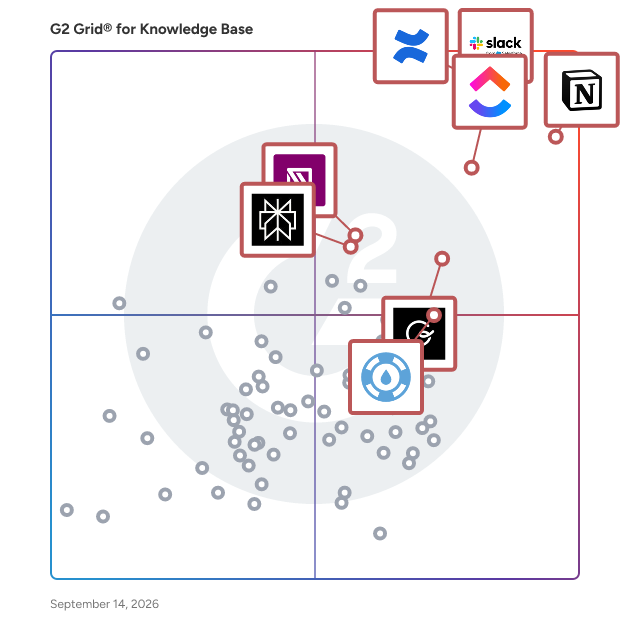
G2’s top-rated knowledge base software, based on verified reviews, includes [Slack](https://www.g2.com/products/slack/reviews) **,** [Confluence](https://www.g2.com/products/confluence/reviews) **,** [Notion](https://www.g2.com/products/notion/reviews), [ClickUp](https://www.g2.com/products/clickup/reviews), and [IT Glue](https://www.g2.com/products/it-glue/reviews).

### What are the top-reviewed Knowledge Base Software on G2?&amp;nbsp;

[Notion](https://www.g2.com/products/notion/reviews)

- Number of Reviews: 4,913
- Satisfaction: 98
- Market Score: 85
- G2 Score: 91

[Slack](https://www.g2.com/products/slack/reviews)

- Number of Reviews: 1,208
- Satisfaction: 89
- Market Score: 92
- G2 Score: 91

[Confluence](https://www.g2.com/products/confluence/reviews)

- Number of Reviews: 3,929
- Satisfaction: 77
- Market Score: 99
- G2 Score: 88

[ClickUp](https://www.g2.com/products/clickup/reviews)

- Number of Reviews: 1,892
- Satisfaction: 77
- Market Score: 85
- G2 Score: 81

[**IT Glue**](https://www.g2.com/products/it-glue/reviews)

- Number of Reviews: 519
- Satisfaction: 72
- Market Score: 77
- G2 Score: 75

Satisfaction reflects user-reported ratings across various factors, including ease of use, feature fit, and quality of support. ([Source 2](https://www.g2.com/reports))

Market Presence scores are calculated based on review volume, third-party signals, and overall market visibility. ([Source 2](https://www.g2.com/reports))

G2 Score is a weighted composite of Satisfaction and Market Presence. ([Source 2](https://www.g2.com/reports))

Learn how G2 scores products. ([Source 1](https://documentation.g2.com/docs/research-scoring-methodologies?_gl=1*5vlk6s*_gcl_au*MTAwMzU5MzUxLjE3NjM0MTg0NzYuNjY0NTIxMTY0LjE3NjQ2MTc0NzcuMTc2NDYxNzQ3Nw..*_ga*NzY1MDU0NjE3LjE3NjM0NzQ3ODM.*_ga_MFZ5NDXZ5F*czE3NjYwODk1MTMkbzY3JGcxJHQxNzY2MDkyMjQyJGo1NyRsMCRoMA..))

### What I Often See in Knowledge Base Software

#### Feedback Pros: What Users Consistently Appreciate

- **Flexible page databases and templates centralize cross-team documentation**
- “_Flexible pages, Databases and templates allow everything from notes to project tracking in one clean workspace. Customisation feels intuitive and saves a lot of time once the setup is completed”_ - [Kiran S.](https://www.g2.com/products/notion/reviews/notion-review-12426914), Notion review

- **Transforms Communication with Stellar Integrations**
- “_I use Slack daily for work, mostly for quick syncs, async updates, and keeping project threads organized, which really helps cut through email chaos. I find Threads extremely useful for keeping chats clean and preventing main channel chaos. The Search feature is fantastic for finding anything fast, eliminating those &#39;where’d we decide that?&#39; moments. I&#39;m impressed by the integrations with tools like Figma, Jira, and Google Docs, which allow me to work seamlessly without switching tabs or losing context. I appreciate the custom notifications and Do Not Disturb settings that let me control when I&#39;m interrupted. Having all my tools like Figma comments, Jira tickets, and Google Drive built right into Slack makes my workflow smooth and efficient._” - [Souptik D.](https://www.g2.com/products/slack/reviews/slack-review-12459330), Slack review

- **AI meeting notes and integrations turn discussions into reusable knowledge**
- _“What I like most about Confluence is how it brings everything into one place. It makes documenting processes, sharing knowledge, and collaborating with teams much easier. Instead of information being scattered across emails or chats, it lives in a structured space where everyone can access and update it when needed. I also find the page hierarchy and linking between pages really helpful for organizing information logically. It saves a lot of time when you need to look up something quickly or onboard someone new to a project. Overall, it helps teams stay aligned and keeps knowledge from getting lost.”_ - [Ashutosh J.](https://www.g2.com/products/confluence/reviews/confluence-review-12444610), Confluence review

#### Cons: Where Many Platforms Fall Short

- **Wide range of tools creates complexity for new users**
- _“ClickUp can feel overwhelming at times. There are many features and configuration options, which is helpful, but it also means the system can become cluttered if it is not set up carefully. New users often need guidance to understand how our team uses it.”_ - [Kirsti H.](https://www.g2.com/products/clickup/reviews/clickup-review-12411150), ClickUp review&amp;nbsp;

- **Steep learning curve for first-time Confluence users**
- “_When I first started using Confluence, I didn’t understand a lot of the buttons or the sidebar. The interface felt overwhelming at first, so it took me some time to adjust to Confluence and figure out what to do and how to get to where everything is.”_ - Dr. [Akshay M.](https://www.g2.com/products/confluence/reviews/confluence-review-12444378), Confluence review

- **Large knowledge bases can require extra effort to stay organized**
- “_One drawback is that organising a large number of knowledge cards can sometimes require extra effort to maintain structure. New users may also need a short learning period to fully understand how to manage and verify content effectively.”_ - [Piyush P.](https://www.g2.com/products/guru/reviews/guru-review-12452472), Guru review

### My Expert Takeaway on Knowledge Base Software

Knowledge base software delivers the most value when organizations treat it as a structured knowledge system rather than a simple document repository. The strongest implementations organize information so teams can quickly retrieve answers, standardize processes, and reuse institutional knowledge across support, operations, and product workflows.

Review sentiment shows strong adoption. Across the 500-review dataset analyzed, the category averages 4.51/5 stars and 9.02/10 likelihood to recommend, alongside strong usability scores for Meets Requirements, Ease of Use, Ease of Setup, Ease of Admin, Ease of Doing Business With, and Quality of Support. These signals suggest buyers see clear operational value once knowledge bases are implemented effectively.

Friction usually appears when organizations treat knowledge bases as static document storage. High-performing teams approach knowledge base software with clear governance, defined content ownership, and consistent documentation practices. The best knowledge base platforms balance flexible documentation with strong structure and search, making them increasingly essential infrastructure for teams that rely on fast, reliable knowledge sharing.

### Knowledge Base Software FAQs

#### **What is knowledge base software?**

Knowledge base software is a system for creating, organizing, searching, and governing company knowledge in one place. Teams use it to publish SOPs, product information, onboarding materials, and common answers so employees or customers can self-serve faster.

#### **What is the best knowledge base software?**

The best knowledge base software depends on your team’s documentation needs, search capabilities, and governance requirements. On G2, top-rated tools include [Slack](https://www.g2.com/products/slack/reviews), [Notion](https://www.g2.com/products/notion/reviews) **,** [Guru](https://www.g2.com/products/guru/reviews) **,** [ClickUp](https://www.g2.com/products/clickup/reviews) **,** [Confluence](https://www.g2.com/products/confluence/reviews) **,** and [IT Glue](https://www.g2.com/products/it-glue/reviews), each earning strong user ratings around 4.6/5 stars and recognized for flexible documentation, integrations, and scalable knowledge management features.

#### **How does knowledge base software help call centers?**

Knowledge base software helps call centers reduce handle time by giving agents fast access to approved answers, scripts, and process steps. It improves consistency, speeds ramp time, and makes it easier to update frontline guidance when policies, products, or procedures change.

#### **What are the leading knowledge base software for SaaS businesses?**

Leading knowledge base software for SaaS businesses typically combines strong documentation features, search capabilities, and integrations with product and support tools. Based on G2 ratings and user reviews, popular options include [Guru](https://www.g2.com/products/guru/reviews) **,** [IT Glue](https://www.g2.com/products/it-glue/reviews) **,** [Bloomfire](https://www.g2.com/products/bloomfire/reviews) **,** and [Confluence](https://www.g2.com/products/confluence/reviews), which consistently receive high satisfaction scores and strong adoption among SaaS and IT teams.

#### **What are the reliable knowledge base software for remote teams?**

Some of the most reliable knowledge base software for remote teams, based on high G2 ratings and strong user reviews, include:

- [Guru](https://www.g2.com/products/guru/reviews) – 4.7/5 rating; strong workflow integrations with Slack and Teams for distributed teams.
- [Document360](https://www.g2.com/products/document360/reviews) – ~4.7/5 rating; scalable documentation platform with version control and analytics.
- [Slite](https://www.g2.com/products/slite/reviews) – ~4.6/5 rating; designed for asynchronous documentation and remote collaboration.
- [Helpjuice](https://www.g2.com/products/helpjuice/reviews) – ~4.7/5 rating; advanced search and customization for internal and customer knowledge bases.

These tools consistently rank highly on G2 due to ease of use, strong collaboration features, and reliable knowledge-sharing capabilities, making them well-suited for remote or distributed teams that rely on centralized documentation.

### Sources

1. [G2 Scoring Methodologies](https://documentation.g2.com/docs/research-scoring-methodologies?_gl=1*5ky9es*_gcl_au*MTY2NDg2MDY3Ny4xNzU1MDQxMDU4*_ga*MTMwMTMzNzE1MS4xNzQ5MjMyMzg1*_ga_MFZ5NDXZ5F*czE3NTUwOTkzMjgkbzQkZzEkdDE3NTUwOTk3NzYkajU3JGwwJGgw)
2. [G2 Winter 2026 Reports](https://company.g2.com/news/g2-winter-2026-reports)

Researched By: [Gauri Pawsey](https://research.g2.com/insights/author/gauri-pawsey)

Last updated on March 16, 2026


