Best IT Service Management Tools for Medium-Sized Businesses - Page 2

How Many IT Service Management Tools Products Does G2 Track?

Total Products under this Category: 295

Category Stats (Nov 2026)

  • Average Rating: 4.38/5 (↓0.01 vs Oct 2026) The average rating of products in this category, based on all submitted ratings
  • Top Trending Product: IBM Maximo IT (+1.2%) - Among all products in this category, IBM Maximo IT recorded the largest rating increase compared to last month

Last updated: November 01, 2026

How Does G2 Rank IT Service Management Tools Products?

Why You Can Trust G2's Software Rankings:

  • 30 Analysts and Data Experts
  • 47,500+ Authentic Reviews
  • 295+ Products
  • Unbiased Rankings

G2's software rankings are built on verified user reviews, rigorous moderation, and a consistent research methodology maintained by a team of analysts and data experts. Each product is measured using the same transparent criteria, with no paid placement or vendor influence. While reviews reflect real user experiences, which can be subjective, they offer valuable insight into how software performs in the hands of professionals. Together, these inputs power the G2 Score, a standardized way to compare tools within every category.

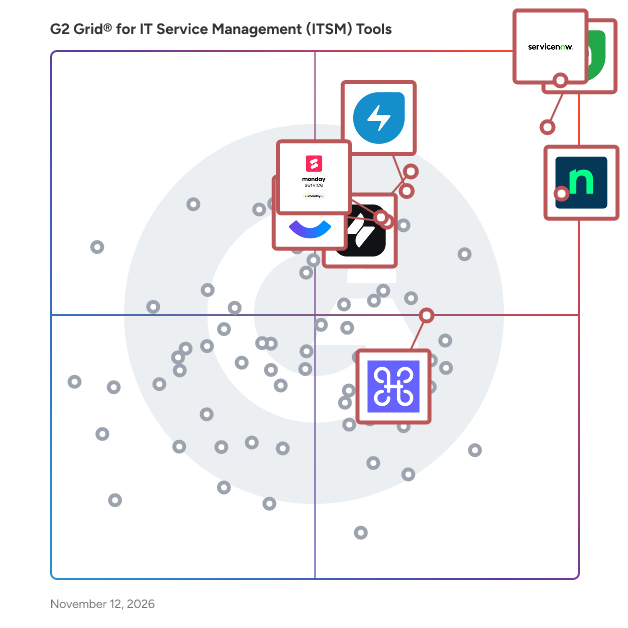
G2 Grid® for IT Service Management Tools

G2 Grid® for IT Service Management Tools plotting products by satisfaction and market presence

Highlighted products: Freshdesk, NinjaOne, ServiceNow IT Service Management, Jira Service Management, Freshservice, monday service, Harmony, and ClickUp.

Underlying data: [Grid® JSON](https://www.g2.com/categories/it-service-management-itsm-tools/grids.json?focus%5B%5D=freshdesk&focus%5B%5D=ninjaone&focus%5B%5D=servicenow-it-service-management&focus%5B%5D=jira-service-management&focus%5B%5D=freshservice&focus%5B%5D=monday-service&focus%5B%5D=harmony-io&focus%5B%5D=clickup&segment=mid-market)

ConnectWise RMM

ConnectWise RMM is a cloud-native remote monitoring and management (RMM) solution designed for IT professionals who need to monitor, manage, and support diverse IT environments. It provides centralized visibility, intelligent alerting, and advanced automation to help teams proactively address IT challenges and prevent downtime. Comprehensive Monitoring and Visibility ConnectWise RMM delivers 24/7 monitoring across endpoints, networks, backups, cloud health and availability, and security posture. Unified dashboards bring this information together in one place, making it easier to identify issues and act before issues affect end users. With more than 1,200 expert-maintained alerts, the system can reduce typical RMM alerting noise by up to 90% without sacrificing visibility, helping technicians focus on meaningful issues instead of spending time reviewing false positives. Automated Patch Management The solution includes automated OS and third-party patch management for over 7,000 applications. Uniquely, Windows OS security updates are reviewed and approved by ConnectWise NOC experts before each release. This helps teams' patch faster and with more confidence to reduce vulnerabilities, streamline compliance, and keep systems optimized. Advanced Automation and Scripting ConnectWise RMM provides automation capabilities such as built-in automation to select intelligent alerts, AI-assisted script generation, and multi-solution workflow orchestration. These tools simplify routine maintenance tasks, enforce consistent standards, and enable faster response to common IT events. Teams can complete work up to 75% faster, reducing repetitive manual effort and creating more time for strategic projects. Scalability and Endpoint Management ConnectWise RMM is built to support a wide range of businesses, including large and complex environments, with the ability to manage more than 100,000 devices in a single tenant. By unifying monitoring, patching, automation, and scripting into one solution, IT professionals can deliver reliable service, reduce ticket volume, and improve overall IT performance. Multi-site visibility, flexible add-ons, and seamless integration with security, backup, and business management tools make it easy to adapt as environments grow without adding unnecessary complexity.

Average Rating: 4.1/5.0

Total Reviews: 80

How Do G2 Users Rate ConnectWise RMM?

  • Has the product been a good partner in doing business?: 8.2/10 (Category avg: 8.9/10)
  • Administration Console: 8.3/10 (Category avg: 8.8/10)
  • Policy Dictation: 8.3/10 (Category avg: 8.2/10)
  • Process Workflow: 7.4/10 (Category avg: 8.7/10)

Who Is the Company Behind ConnectWise RMM?

  • Seller: ConnectWise
  • Company Website:
  • Year Founded: 1982
  • HQ Location: Tampa, FL
  • LinkedIn® Page: www.linkedin.com
    3,401 employees on LinkedIn®
  • Phone: 800-671-6898

Who Uses This Product?

  • Top Industries: Information Technology and Services, Computer & Network Security
  • Company Size: 66% Small, 30% Medium

What Do G2 Reviewers Say About ConnectWise RMM?

AI-generated summary from verified user reviews

Pros
  • Users appreciate the ease of use of ConnectWise RMM, allowing convenient access and management without hassle.
  • Users love the easy remote access of ConnectWise RMM, enabling seamless management from any location without installations.
  • Users benefit from the automation of tasks in ConnectWise RMM, enhancing efficiency and proactive problem resolution.
  • Users value the all-in-one functionality of ConnectWise RMM, enhancing organization and integration with other ConnectWise tools.
  • Users praise the user-friendly interface of ConnectWise RMM, highlighting its simplicity and convenience in managing endpoints.
Cons
  • Users highlight the missing features in ConnectWise RMM, particularly in scripting, reporting, and integrations.
  • Users experience poor customer support, facing slow response times and unhelpful guidance, impacting overall satisfaction.
  • Users face feature issues like lack of customization and complex setup, impacting overall usability and efficiency.
  • Users face integration issues with ConnectWise RMM, highlighted by lacking automation and limited third-party application support.
  • Users find the pricing to be costly for ConnectWise RMM, desiring a more affordable cloud backup option.

What Are Recent G2 Reviews of ConnectWise RMM?

What Are G2 Users Discussing About ConnectWise RMM?

SysAid

Most AI tools tell IT what to do. SysAid's AI does it. SysAid pairs world-class ITSM with agentic AI built to act from day one, resolving incidents, fulfilling requests, triggering workflows, and deploying changes without anyone touching them. It's not a chatbot. It's the only platform built to run agentic AI on ITSM guardrails your team sets, with every action logged and every rule visible. No black box, no code required, no developers needed. Incident management, request fulfillment, change management, problem management, CMDB, SLAs, and knowledge management all run in one platform, live in weeks, not months. Your team stops drowning in repeat requests and starts driving the projects that actually move the business forward. End users get instant answers in natural language, without waiting on a ticket. And when results happen, you have the visibility to prove it to leadership.

Average Rating: 4.5/5.0

Total Reviews: 725

How Do G2 Users Rate SysAid?

  • Has the product been a good partner in doing business?: 9.1/10 (Category avg: 8.9/10)
  • Administration Console: 9.0/10 (Category avg: 8.8/10)
  • Policy Dictation: 8.3/10 (Category avg: 8.2/10)
  • Process Workflow: 8.9/10 (Category avg: 8.7/10)

Who Is the Company Behind SysAid?

  • Seller: SysAid
  • Company Website:
  • Year Founded: 2002
  • HQ Location: Toronto, Canada
  • LinkedIn® Page: www.linkedin.com
    271 employees on LinkedIn®

Who Uses This Product?

  • Who Uses This: IT Manager, System Administrator
  • Top Industries: Information Technology and Services, Hospital & Health Care
  • Company Size: 60% Medium, 30% Large

What Do G2 Reviewers Say About SysAid?

AI-generated summary from verified user reviews

Pros
  • Users rave about the responsive customer support of SysAid, enhancing their overall experience and satisfaction.
  • Users value the ease of use in SysAid, which streamlines IT service management and boosts efficiency.
  • Users commend the automation features of SysAid, significantly improving response times and overall efficiency.
  • Users appreciate the comprehensive suite of features in SysAid, enhancing productivity and simplifying IT service management.
  • Users value the efficient ticket management of SysAid, streamlining workflows and enhancing asset tracking effectively.
Cons
  • Users find the missing features in SysAid to be frustrating and time-consuming to access and utilize effectively.
  • Users note a steep learning curve with SysAid, finding the setup and customization complex and time-consuming.
  • Users find the clunky interface of SysAid frustrating, highlighting the need for simplification and modernization.
  • Users express frustration with poor customer support, highlighting long response times and unreliable assistance in resolving issues.
  • Users find the complex setup of SysAid challenging, with difficult configurations and unoptimized mobile performance hindering efficiency.

What Are Recent G2 Reviews of SysAid?

What Are G2 Users Discussing About SysAid?

Automation Anywhere Agentic Process Automation

Automation Anywhere Agentic Process Automation (APA) is an enterprise platform that orchestrates AI agents, RPA bots, APIs, documents, and human expertise as a single governed system of work. APA transforms what is possible with automation — orchestrating every instrument of work across every system, with execution grounded in process expertise, and end-to-end process governance across every agent, every step, and every decision. It turns individual capabilities into compounded business transformation. With the APA platform, you can optimize what already runs your business and expand into what has never been feasible before. What's inside the platform Process Reasoning Engine (PRE) — the decision layer. Goal-driven AI agents plan, act, adapt, and self-correct in real time as conditions change. Mozart Orchestrator — a unified composer that manages decisions, dependencies, context, and exceptions across agents, automations, documents, and APIs. AI Agent Studio — a low-code workspace for building AI agents on foundational models from Amazon Bedrock, Google Vertex AI, Azure OpenAI, OpenAI, and others. Automator AI — generative AI–powered automation development across any application, cloud or on-premises. Document Automation — processes unstructured documents at over 95% accuracy, and 5x faster with Cloud Extraction Service for large-scale extraction. Process Discovery — surfaces bottlenecks and identifies what to automate next. Automation Co-Pilot — triggers multi-step agentic workflows in natural language, inside the applications teams already use. Governance built in, not bolted on Every agent, action, and decision runs inside enterprise controls: fine-grained role-based access control (RBAC), AES-256 encryption at rest, TLS in transit, native audit logs with SIEM integration, and human-in-the-loop oversight. Automation Anywhere maintains SOC 1 Type 2, SOC 2 Type 2, ISO 27001, ISO 22301, and HITRUST certifications, and supports GDPR compliance. Proven in production 1,500+ live APA deployments, 400M+ automations run per year, and 1.8M+ unique AI agent executions across 26 global regions. Bancolombia — 1,300% ROI in the first year and a 50% increase in customer service efficiency JBS — $1M and 125,000 hours saved in IT Granite Telecom — $635,000 in monthly savings and 15,000 hours saved per month Ricoh — 500 days of operational time saved per month SoftBank Corp. — 85% reduction in recruitment hours Who it's for Enterprise operations, IT, finance, HR, customer service, and shared services teams in banking, insurance, healthcare, life sciences, manufacturing, telecommunications, and the public sector — wherever complex, cross-system work has to run reliably and be governed. Learn more at https://www.automationanywhere.com.

Average Rating: 4.5/5.0

Total Reviews: 4,181

How Do G2 Users Rate Automation Anywhere Agentic Process Automation?

  • Has the product been a good partner in doing business?: 8.7/10 (Category avg: 8.9/10)
  • Administration Console: 10.0/10 (Category avg: 8.8/10)
  • Process Workflow: 10.0/10 (Category avg: 8.7/10)

Who Is the Company Behind Automation Anywhere Agentic Process Automation?

  • Seller: Automation Anywhere
  • Company Website:
  • Year Founded: 2003
  • HQ Location: San Jose, CA
  • LinkedIn® Page: www.linkedin.com
    2,327 employees on LinkedIn®

Who Uses This Product?

  • Who Uses This: RPA Developer, Software Engineer
  • Top Industries: Information Technology and Services, Computer Software
  • Company Size: 58% Large, 23% Medium

What Do G2 Reviewers Say About Automation Anywhere Agentic Process Automation?

AI-generated summary from verified user reviews

Pros
  • Users appreciate the ease of use in Automation Anywhere, highlighting its intuitive interface and helpful features for automation.
  • Users appreciate the ease of use of Automation Anywhere, highlighting its intuitive interface and reliable automation capabilities.
  • Users value the efficiency of Automation Anywhere, noting significant reductions in manual work and boosted productivity.
  • Users value the automation ease of Automation Anywhere, noting its user-friendly features that simplify bot creation and management.
  • Users highly value the intuitive interface of Automation Anywhere, which simplifies bot creation and enhances productivity.
Cons
  • Users feel that the pricing of Automation Anywhere can be expensive, limiting accessibility for smaller teams and startups.
  • Users find a steep learning curve in Automation Anywhere, complicating onboarding and impacting initial setup and debugging.
  • Users note a lack of information in solutions, which can hinder the overall effectiveness of Automation Anywhere.
  • Users often face software bugs that hinder smooth operation and complicate bot deployment and debugging processes.
  • Users experience challenges with bot issues, including complex UI and slow performance during automation processes.

What Are Recent G2 Reviews of Automation Anywhere Agentic Process Automation?

What Are G2 Users Discussing About Automation Anywhere Agentic Process Automation?

AI can help you find the answers. G2 helps you trust them.

Connect G2 to Claude or ChatGPT for answers grounded in G2's trusted reviews, comparisons, and pricing from real user insights.

How it works

Wavity Help and Service Desk

Wavity’s Modern, Easy to Use, Maintain and Operate Help and Service Desk Solution can be used by Organizations of all sizes – whether you are a small organization using spreadsheets and ad-hoc homegrown solutions or solutions from the big guys. It is particularly well suited for Business Process Outsourcing (BPO) organizations since it offers the ability to offer the unique functionality needed by each customer and is cost effective. This is made possible by our Zero Code Application Designer and wBots – our RPA (Robotic Powered Automation) tools. Our Analytics engine gives you actionable metrics - in real time - as defined by you! Our radical pricing model is guaranteed to reduce your SaaS spend.

Average Rating: 4.9/5.0

Total Reviews: 39

How Do G2 Users Rate Wavity Help and Service Desk?

  • Has the product been a good partner in doing business?: 10.0/10 (Category avg: 8.9/10)

Who Is the Company Behind Wavity Help and Service Desk?

  • Seller: Wavity
  • Year Founded: 2016
  • HQ Location: San Jose, CA
  • LinkedIn® Page: www.linkedin.com
    80 employees on LinkedIn®

Who Uses This Product?

  • Top Industries: Mechanical or Industrial Engineering
  • Company Size: 70% Medium, 15% Small

What Do G2 Reviewers Say About Wavity Help and Service Desk?

AI-generated summary from verified user reviews

Pros
  • Users value the extensive customizability of Wavity Help and Service Desk, tailoring it to their specific needs effectively.
  • Users appreciate the ease of use of Wavity Help and Service Desk, enjoying its quick setup and customization options.
  • Users appreciate the ease of automation in Wavity Help and Service Desk, enhancing workflow efficiency and customization.
  • Users value the extensive customization options that Wavity Help and Service Desk offers for a tailored experience.
  • Users value the intuitive customization of Wavity, enhancing their experience with its clean and editable interface.
Cons
  • Users express frustration over the inability to customize color palettes to align with their company's branding.
  • Users struggle with the lack of out-of-box integration with other financial applications, hindering their workflow.
  • Users express frustration over the limited customization options for color palettes, which does not align with their branding.
  • Users experience poor error visibility, often lacking detailed explanations for encountered issues, leading to frustration.
  • Users often face technical issues with Wavity Help and Service Desk, lacking clear explanations for encountered errors.

What Are Recent G2 Reviews of Wavity Help and Service Desk?

What Are G2 Users Discussing About Wavity Help and Service Desk?

Milvus TI

O Milvus é uma plataforma completa de gestão de atendimento, relacionamento com clientes e ativos de TI, desenvolvida para empresas que buscam centralizar processos, aumentar a eficiência operacional e melhorar a experiência do cliente. A solução reúne em um único ambiente recursos de Help Desk, gestão de tickets, inventário de TI, atendimento multicanal (e-mail, chat, WhatsApp e outros) e automação de processos, permitindo maior controle, visibilidade e padronização das operações de suporte e atendimento. Com foco em simplicidade, escalabilidade e integração, o Milvus se conecta facilmente a ferramentas de CRM, marketing e vendas, ajudando equipes a tomar decisões baseadas em dados e a acompanhar indicadores em tempo real. É ideal para empresas de diferentes portes que desejam profissionalizar o suporte, organizar ativos tecnológicos e fortalecer o relacionamento com seus clientes.

Average Rating: 4.8/5.0

Total Reviews: 132

How Do G2 Users Rate Milvus TI?

  • Has the product been a good partner in doing business?: 9.4/10 (Category avg: 8.9/10)
  • Administration Console: 8.8/10 (Category avg: 8.8/10)
  • Policy Dictation: 9.2/10 (Category avg: 8.2/10)
  • Process Workflow: 8.9/10 (Category avg: 8.7/10)

Who Is the Company Behind Milvus TI?

  • Seller: Milvus
  • HQ Location: São Caetano do Sul, BR
  • LinkedIn® Page: www.linkedin.com
    71 employees on LinkedIn®

Who Uses This Product?

  • Who Uses This: Analista de Suporte, Analista de TI
  • Top Industries: Information Technology and Services, Computer Networking
  • Company Size: 45% Small, 42% Medium

What Do G2 Reviewers Say About Milvus TI?

AI-generated summary from verified user reviews

Pros
  • Users value the efficient asset management features of Milvus TI, streamlining operations and enhancing productivity.
  • Users value the automation capabilities of Milvus TI, enhancing efficiency and simplifying daily operations significantly.
  • Users praise the efficiency of Milvus TI for automating tasks and streamlining daily operations effortlessly.
  • Users value the management efficiency of Milvus TI, especially its automation tools and effective ticketing system.
  • Users value the WhatsApp integration for automating ticket creation and improving overall efficiency in operations.
Cons
  • Users often face connection issues with Milvus TI, experiencing sluggish performance on older hardware and unreliable access.
  • Users experience performance issues with Milvus TI, especially on older hardware where connections can feel sluggish.
  • Users find Milvus TI initially complex due to filter usage, but recognize its power with some effort.
  • Users experience latency issues on older hardware, resulting in sluggish connections that need optimization for low-end devices.
  • Users find Milvus TI's interface a bit complex at first due to the learning curve, but it proves powerful with time.

What Are Recent G2 Reviews of Milvus TI?

Motadata ServiceOps

Motadata ServiceOps is an AI-enabled, ITIL-aligned IT Service Management platform that helps organizations improve service delivery across people, processes, and technology. Built on DFIT (Deep Learning Framework for IT Operations), it brings IT service management, asset management, and patch management together in one unified suite, removing the need for third-party tools. ServiceOps includes a PinkVerify-certified Service Desk for incident, service request, problem, and change management, alongside an Asset Manager for full hardware and software lifecycle tracking and a Patch Manager for endpoint patching. Automation runs throughout the platform, from ticket routing and prioritization to SLA enforcement and approval workflows. Teams choose ServiceOps for its intuitive interface, strong automation, real-time reporting, and responsive support. It is available for on-premises deployment, giving organizations control over their data while modernizing and streamlining IT operations.

Average Rating: 4.5/5.0

Total Reviews: 47

How Do G2 Users Rate Motadata ServiceOps?

  • Has the product been a good partner in doing business?: 9.7/10 (Category avg: 8.9/10)
  • Administration Console: 9.6/10 (Category avg: 8.8/10)
  • Policy Dictation: 9.8/10 (Category avg: 8.2/10)
  • Process Workflow: 9.6/10 (Category avg: 8.7/10)

Who Is the Company Behind Motadata ServiceOps?

Who Uses This Product?

  • Top Industries: Information Technology and Services, Computer & Network Security
  • Company Size: 67% Medium, 23% Large

What Do G2 Reviewers Say About Motadata ServiceOps?

AI-generated summary from verified user reviews

Pros
  • Users value the intuitive asset tracking in Motadata ServiceOps, enhancing management and reporting efficiency.
  • Users appreciate the ease of use of Motadata ServiceOps, finding it simple to track and manage assets efficiently.
  • Users appreciate the easy tracking of assets in Motadata ServiceOps, enhanced by real-time updates and intuitive reporting.
  • Users value the real-time updates and detailed reporting that enhance asset tracking and management in Motadata ServiceOps.
  • Users appreciate the automation of ticket assignment in Motadata ServiceOps, enhancing efficiency and transparency in support processes.
Cons
  • Users face installation issues with Motadata ServiceOps, particularly challenging on macOS, hindering smooth setup.

What Are Recent G2 Reviews of Motadata ServiceOps?

What Are G2 Users Discussing About Motadata ServiceOps?

HaloITSM

Halo is a low-code enterprise service management platform designed to streamline and automate cross-functional processes across IT, HR, Finance, Facilities and other business functions. Built on ITIL-aligned service management foundations and extended across the whole business, halo is used by more than 5000 organisations in over 100 countries. The platform provides incident, problem and change management, asset and configuration management via a built-in CMDB, and service request handling within a single centralisied platform. Each department can run its own services, forms, workflows, portals and approval routes, while employees get one consistent place to raise and track requests, automatically guided to the right team without needing to understand how the organisation is structured. Federated administration lets departments or regions manage their own areas while central teams retain governance. Halo supports workflow automation, real-time reporting, self-service for end users and integration with other business applications, allowing you to streamline service delivery throughout your business. Through using Halo, you are able to standardise processes, have visibility into team activity and facilitate collaboration. Halo AI is built into the platform as standard, supporting request triage, categorisation, summarisation, sentiment analysis, suggested replies and knowledge suggestions, with a built-in LLM connection included at no extra cost, with organisations also able to connect to their own AI provider. With more than 250 native integrations, including Slack, Microsoft 365, Okta, Splunk, Halo connects into the tools organisations already rely on without heavy custom development. Extensive no-code configuration and customisation options let organisations adapt forms, fields, workflows, rules and reports to meet specific service management requirements, and over 1,000 out-of-the-box reports gives managers live visibility into the agent performance and workload. Halo is built for trust at enterprise scale, holding ISO 27001, SOC 2 Type II, FedRAMP, GDPR, Cyber Essentials Plus, IRAP and HIPAA certifications, with 99.99% average global uptime, SSO, ODIC, SAML, role-based access control and full audit logging. Deployment options include Halo Cloud, Private Cloud and On-Premise, and a dedicated migration team has delivered over 1,000 migrations from every major vendor and legacy platform. All-inclusive pricing means every capability is included from day one, allowing organisations to scale from a single service desk solution to a shared service management platform across the whole business without module-by-module licensing.

Average Rating: 4.7/5.0

Total Reviews: 37

How Do G2 Users Rate HaloITSM?

  • Has the product been a good partner in doing business?: 9.8/10 (Category avg: 8.9/10)
  • Administration Console: 9.2/10 (Category avg: 8.8/10)
  • Policy Dictation: 7.7/10 (Category avg: 8.2/10)
  • Process Workflow: 8.6/10 (Category avg: 8.7/10)

Who Is the Company Behind HaloITSM?

Who Uses This Product?

  • Company Size: 47% Medium, 26% Large

What Do G2 Reviewers Say About HaloITSM?

AI-generated summary from verified user reviews

Pros
  • Users appreciate the ease of use of HaloITSM, enjoying its simple setup and effective ticket logging.
  • Users appreciate the easy setup of HaloITSM, contributing to efficient ticket logging and enhanced workflow management.
  • Users value the enhanced workflow efficiency of HaloITSM, thanks to its simple setup and effective ticket logging.
  • Users appreciate the setup ease of HaloITSM, finding it simple to install and user-friendly for ticket logging.
  • Users appreciate the simplicity and ease of use of HaloITSM, facilitating efficient IT ticket management and documentation.
Cons
  • Users find the limited customization in HaloITSM frustrating, particularly regarding the ticket resolution process steps.
  • Users find the ticketing process cumbersome, with unnecessary steps impacting the resolution state transition.

What Are Recent G2 Reviews of HaloITSM?

What Are G2 Users Discussing About HaloITSM?

TeamDynamix IT Service Management

TeamDynamix is a no-code AI-powered ITSM/ESM platform with AI-native automation, virtual support agents, and enterprise-wide integration. Deflect 30-60% of tickets, resolve tickets 40-90% faster, eliminate 2-3 months of manual tasks, and reduce overhead.

Average Rating: 4.5/5.0

Total Reviews: 100

How Do G2 Users Rate TeamDynamix IT Service Management?

  • Has the product been a good partner in doing business?: 9.5/10 (Category avg: 8.9/10)
  • Administration Console: 7.8/10 (Category avg: 8.8/10)
  • Policy Dictation: 6.5/10 (Category avg: 8.2/10)
  • Process Workflow: 7.8/10 (Category avg: 8.7/10)

Who Is the Company Behind TeamDynamix IT Service Management?

Who Uses This Product?

  • Top Industries: Higher Education, Education Management
  • Company Size: 46% Medium, 45% Large

What Are Recent G2 Reviews of TeamDynamix IT Service Management?

What Are G2 Users Discussing About TeamDynamix IT Service Management?

Xurrent ITSM

Xurrent is an AI-powered service and operations management platform that unifies ITSM, IT operations, and incident management on a single system of record. With an always-on AI fabric and deep automation, Xurrent helps teams eliminate silos, reduce MTTR, and keep the business running smoothly.

Average Rating: 4.6/5.0

Total Reviews: 83

How Do G2 Users Rate Xurrent ITSM?

  • Has the product been a good partner in doing business?: 9.2/10 (Category avg: 8.9/10)
  • Administration Console: 8.9/10 (Category avg: 8.8/10)
  • Policy Dictation: 8.0/10 (Category avg: 8.2/10)
  • Process Workflow: 8.8/10 (Category avg: 8.7/10)

Who Is the Company Behind Xurrent ITSM?

  • Seller: Xurrent
  • Year Founded: 2010
  • HQ Location: Santa Barbara, US
  • LinkedIn® Page: www.linkedin.com
    176 employees on LinkedIn®

Who Uses This Product?

  • Top Industries: Information Technology and Services, Insurance
  • Company Size: 51% Large, 30% Medium

What Do G2 Reviewers Say About Xurrent ITSM?

AI-generated summary from verified user reviews

Pros
  • Users highlight the ease of use with Xurrent ITSM, appreciating its intuitive setup and seamless navigation.
  • Users value the intuitive interface and seamless integrations of Xurrent ITSM, enhancing their overall experience and efficiency.
  • Users value the intuitive user interface of Xurrent ITSM, making incident and service management effortless.
  • Users value the efficiency of Xurrent ITSM, enhancing incident management and service delivery through quick automations and seamless integration.
  • Users appreciate the implementation ease of Xurrent ITSM, highlighting quick setup and minimal configuration hassle.
Cons
  • Users find missing features in Xurrent ITSM, such as dynamic API lookups and comprehensive reporting capabilities.
  • Users note the limited features of Xurrent ITSM, affecting functionality and user experience across workflows.
  • Users find the poor design of Xurrent ITSM with a clunky UI and underdeveloped features frustrating.
  • Users find the dated interface of Xurrent ITSM lacking, though improvements are promised in the near future.
  • Users find Xurrent ITSM suffers from insufficient information, lacking detailed documentation and requiring data duplication.

What Are Recent G2 Reviews of Xurrent ITSM?

What Are G2 Users Discussing About Xurrent ITSM?

Microsoft System Center

Microsoft System Center helps customers realize the benefits of the Microsoft Cloud Platform by delivering unified management. Experience fast time-to-value with out-of-the-box monitoring, provisioning, configuration, automation, protection and self-service.

Average Rating: 4.1/5.0

Total Reviews: 547

How Do G2 Users Rate Microsoft System Center?

  • Has the product been a good partner in doing business?: 8.1/10 (Category avg: 8.9/10)
  • Administration Console: 8.5/10 (Category avg: 8.8/10)
  • Policy Dictation: 8.3/10 (Category avg: 8.2/10)
  • Process Workflow: 8.3/10 (Category avg: 8.7/10)

Who Is the Company Behind Microsoft System Center?

  • Seller: Microsoft
  • Year Founded: 1975
  • HQ Location: Redmond, Washington
  • LinkedIn® Page: www.linkedin.com
    232,750 employees on LinkedIn®
  • Ownership: MSFT
  • Phone: +1 (877) 276-2464

Who Uses This Product?

  • Who Uses This: IT Manager, System Administrator
  • Top Industries: Information Technology and Services, Education Management
  • Company Size: 46% Large, 34% Medium

What Do G2 Reviewers Say About Microsoft System Center?

AI-generated summary from verified user reviews

Pros
  • Users praise the ease of use of Microsoft System Center, enabling efficient updates and quick deployments seamlessly.
  • Users love the all-in-one solution of Microsoft System Center, enjoying the convenience of having everything in one place.
  • Users love the automation capabilities of Microsoft System Center, enabling efficient updates and quick deployments remotely.
  • Users appreciate the centralized management of Microsoft System Center, having all their tools conveniently in one place.
  • Users appreciate the user-friendly customization of Microsoft System Center, enhancing their overall experience with various features.
Cons
  • Users feel that the pricing of Microsoft System Center is too expensive, with a desire for better deals and value.
  • Users feel that the pricing issues of Microsoft System Center could be more competitive with better deals.
  • Users report inaccurate information and unreliable tools, leading to frustration and security concerns.
  • Users face missing features in Microsoft System Center, causing difficulties in Word and Outlook operations.
  • Users experience performance issues with slow policy application and remote command execution in Microsoft System Center.

What Are Recent G2 Reviews of Microsoft System Center?

What Are G2 Users Discussing About Microsoft System Center?

SolarWinds IT Incident Response (Squadcast)

SolarWinds® Incident Response (formerly Squadcast) is a premier unified incident management platform engineered to help modern enterprises automate response workflows, minimize downtime, and maximize engineering efficiency. Built on a robust Reliability Automation Platform, our solution seamlessly integrates on-call scheduling and incident response into a single, high-visibility interface. In today’s complex hybrid and multi-cloud environments, observability alone isn’t enough. SolarWinds Incident Response bridges the gap between detection and resolution. By unifying alerts from over 200 third-party tools, our platform uses AI-powered correlation and intelligent deduplication to eliminate alert fatigue. For DevOps, SRE, and IT teams, this means a massive reduction in "noise," allowing them to focus on critical system health rather than chasing false positives. Key Benefits for High-Performing Teams include: Accelerated Remediation: Drive significant operational improvements, with customers reporting up to a 68% reduction in Mean Time to Remediation (MTTR) and a 93% improvement in Mean Time to Acknowledge (MTTA). Intelligent On-Call Management: Automate complex scheduling and escalation paths. Ensure the right subject matter expert is reached instantly via Slack, Microsoft Teams, SMS, or mobile app notifications. Proactive SRE Workflows: Move beyond reactive firefighting. Use standardized runbooks, automated post-mortems, and SLO tracking to adopt Site Reliability Engineering (SRE) best practices effortlessly. Real-Time Collaboration: Empower cross-functional "incident swarming" with integrated communication tools and shared visibility, ensuring stakeholders are kept informed through automated status pages. Our mission is to provide the most user-friendly incident management solution on the market. By combining deep observability insights with proactive automation, we empower companies to strengthen system reliability and deliver seamless digital experiences. Whether you are managing on-premises infrastructure or scaling in the cloud, SolarWinds Incident Response provides the structured approach needed to maintain operational resilience. Transform your incident lifecycle from a manual burden into a streamlined, automated engine for continuous improvement.

Average Rating: 4.4/5.0

Total Reviews: 307

How Do G2 Users Rate SolarWinds IT Incident Response (Squadcast)?

  • Has the product been a good partner in doing business?: 9.1/10 (Category avg: 8.9/10)
  • Administration Console: 8.8/10 (Category avg: 8.8/10)
  • Policy Dictation: 8.8/10 (Category avg: 8.2/10)
  • Process Workflow: 9.1/10 (Category avg: 8.7/10)

Who Is the Company Behind SolarWinds IT Incident Response (Squadcast)?

Who Uses This Product?

  • Who Uses This: DevOps Engineer, Software Engineer
  • Top Industries: Information Technology and Services, Computer Software
  • Company Size: 50% Medium, 41% Small

What Do G2 Reviewers Say About SolarWinds IT Incident Response (Squadcast)?

AI-generated summary from verified user reviews

Pros
  • Users appreciate the efficiency of Squadcast, enabling streamlined incident management and quick setup for their teams.
  • Users value the automatic escalation and customizable notifications of SolarWinds IT Incident Response, enhancing incident management efficiency.
  • Users value the reliability and consistent performance of SolarWinds IT Incident Response, ensuring confidence during critical incidents.
  • Users value the intuitive design of SolarWinds IT Incident Response, enabling seamless navigation and efficient incident management.
  • Users benefit from the automation features of Squadcast, streamlining incident response and enabling quick resolution.
Cons
  • Users experience notification issues that hinder alert management and integration with other tools like Sentry.
  • Users face issues with alert overload, as alerts do not update existing tags, complicating incident management.
  • Users find the absence of critical features limits their ability to manage alerts effectively in SolarWinds IT Incident Response.
  • Users face feature issues with SolarWinds IT Incident Response, especially regarding alert tagging and filtering options.
  • Users face challenges with call issues, including lack of round robin alerts and difficulties in acknowledging calls.

What Are Recent G2 Reviews of SolarWinds IT Incident Response (Squadcast)?

What Are G2 Users Discussing About SolarWinds IT Incident Response (Squadcast)?

SymphonyAI IT Service Management

SymphonyAI IT Service Management offers an enterprise-class solution that delivers measurable business outcomes leveraging automation, predictive, and generative AI. Customers have been able to automate 60% of service requests, achieve a 50% faster resolution, and realize a 30% savings on hardware and software costs using our ITSM platform. We are recognized as a Gartner Customers’ Choice, featured as a leader and significant player in many leading analyst reports. Leading global companies like KPMG, Toyota, Trelix, Ameritas, Hershey’s, Smart & Final, are SymphonyAI customers. SymphonyAI ITSM can generate significant cost savings and a faster time to value compared to any leading players in the market.

Average Rating: 4.6/5.0

Total Reviews: 66

How Do G2 Users Rate SymphonyAI IT Service Management?

  • Has the product been a good partner in doing business?: 8.7/10 (Category avg: 8.9/10)
  • Administration Console: 8.8/10 (Category avg: 8.8/10)
  • Policy Dictation: 7.3/10 (Category avg: 8.2/10)
  • Process Workflow: 8.3/10 (Category avg: 8.7/10)

Who Is the Company Behind SymphonyAI IT Service Management?

  • Seller: SymphonyAI
  • Year Founded: 2017
  • HQ Location: Palo Alto, California
  • LinkedIn® Page: www.linkedin.com
    2,087 employees on LinkedIn®

Who Uses This Product?

  • Top Industries: Information Technology and Services, Automotive
  • Company Size: 68% Large, 32% Medium

What Do G2 Reviewers Say About SymphonyAI IT Service Management?

AI-generated summary from verified user reviews

Pros
  • Users appreciate the automation of service request creation, enhancing efficiency and streamlining customer onboarding processes.
  • Users value the automation efficiency of SymphonyAI, especially in simplifying service request management through email integration.
  • Users love the easy configuration of service requests in SymphonyAI, enhancing efficiency for small and medium organizations.
  • Users value the customizability of SymphonyAI, simplifying service request creation and management for their organizations.
  • Users appreciate the ease of use of SymphonyAI IT Service Management, particularly in configuring and automating service requests.
Cons
  • Users find the complex configuration to be challenging, hindering their ability to efficiently utilize the system.
  • Users are frustrated with the complex backend configurations that complicate the overall usability of SymphonyAI IT Service Management.
  • Users find the complex setup of SymphonyAI IT Service Management challenging, making backend configurations difficult to manage.
  • Users find the expensive subscription model challenging for mid and large organizations, affecting overall accessibility.
  • Users experience challenges with filtering issues, particularly when excluding specific email addresses from results.

What Are Recent G2 Reviews of SymphonyAI IT Service Management?

What Are G2 Users Discussing About SymphonyAI IT Service Management?

Ivanti ITSM

Ivanti Neurons for ITSM delivers modern, AI‑powered service management that transforms how organizations operate. By combining intelligent automation, predictive insights, and unified IT and security workflows, it accelerates resolutions, enhances productivity, and reduces operational risk. With capabilities that span discovery, incident and request management, automated task orchestration, and real‑time performance measurement, Ivanti Neurons for ITSM helps teams streamline processes, improve user experiences, and achieve meaningful IT and business outcomes, from lowering costs and expanding service management beyond IT, to driving continuous improvement across the enterprise.

Average Rating: 4.0/5.0

Total Reviews: 310

How Do G2 Users Rate Ivanti ITSM?

  • Has the product been a good partner in doing business?: 8.1/10 (Category avg: 8.9/10)
  • Administration Console: 6.3/10 (Category avg: 8.8/10)
  • Policy Dictation: 7.3/10 (Category avg: 8.2/10)
  • Process Workflow: 8.3/10 (Category avg: 8.7/10)

Who Is the Company Behind Ivanti ITSM?

  • Seller: Ivanti
  • Company Website:
  • Year Founded: 1985
  • HQ Location: South Jordan, UT
  • LinkedIn® Page: www.linkedin.com
    3,026 employees on LinkedIn®

Who Uses This Product?

  • Top Industries: Information Technology and Services, Hospital & Health Care
  • Company Size: 53% Large, 33% Medium

What Do G2 Reviewers Say About Ivanti ITSM?

AI-generated summary from verified user reviews

Pros
  • Users appreciate the proactive customer support of Ivanti Neurons, enhancing their ITSM experience significantly.
  • Users value the customizability of Ivanti Neurons for ITSM, effectively tailoring features to meet their specific needs.
  • Users value the customization options of Ivanti Neurons for ITSM, enabling tailored setups to meet specific needs.
  • Users find Ivanti Neurons for ITSM to be easy to use, providing a solid solution despite interface concerns.
  • Users appreciate the easy integrations provided by Ivanti Neurons for ITSM, enhancing their overall service management experience.
Cons
  • Users face a clunky interface that complicates migration and makes feature requests feel ineffective.
  • Users face compatibility issues due to disjointed modules and a steep learning curve, complicating effective usage.
  • Users face a steep learning curve with Ivanti Neurons for ITSM, complicating the realization of its full potential.
  • Users face a steep learning curve with Ivanti Neurons for ITSM, needing time and support to fully utilize its features.
  • Users find the limited customization options time-consuming and often requiring costly support for implementation.

What Are Recent G2 Reviews of Ivanti ITSM?

What Are G2 Users Discussing About Ivanti ITSM?

Vivantio

Vivantio is service management software that helps IT teams, service desks, and customer support teams implement quickly, scale efficiently, and adapt workflows without added complexity. Vivantio helps service teams manage complexity without adding more of it. Built for IT service management, customer service operations, and enterprise service delivery, Vivantio gives teams the structure, flexibility, and visibility they need to improve service over time. Teams use Vivantio to implement faster, standardize workflows, automate manual work, and continuously improve service performance across departments. Key capabilities include: Fast, structured implementation Flexible workflows, forms, and processes Role-based workspaces and automation Reporting and dashboards for service improvement Self-service, knowledge management, and omni-channel support Vivantio is a strong fit for organizations that need powerful service management without forcing teams into rigid, overbuilt systems.

Average Rating: 4.3/5.0

Total Reviews: 294

How Do G2 Users Rate Vivantio?

  • Has the product been a good partner in doing business?: 8.9/10 (Category avg: 8.9/10)
  • Administration Console: 8.8/10 (Category avg: 8.8/10)
  • Policy Dictation: 8.5/10 (Category avg: 8.2/10)
  • Process Workflow: 8.3/10 (Category avg: 8.7/10)

Who Is the Company Behind Vivantio?

  • Seller: Vivantio
  • Year Founded: 2003
  • HQ Location: Boston, MA
  • LinkedIn® Page: www.linkedin.com
    27 employees on LinkedIn®

Who Uses This Product?

  • Who Uses This: IT Manager
  • Top Industries: Information Technology and Services, Outsourcing/Offshoring
  • Company Size: 58% Medium, 28% Large

What Do G2 Reviewers Say About Vivantio?

AI-generated summary from verified user reviews

Pros
  • Users value the ease of use of Vivantio, enjoying its intuitive features and efficient self-service capabilities.
  • Users value the efficiency of Vivantio, enhancing incident management and streamlining operations across various IT services.
  • Users value the extensive customization options of Vivantio, enabling tailored workflows and improved incident management.
  • Users value the extensive customization options in Vivantio, enabling tailored workflows for their specific organizational needs.
  • Users value the robust incident and customer service management features of Vivantio, enhancing team effectiveness and support.
Cons
  • Users find the learning curve steep with Vivantio's complex configurations, requiring significant expertise and time investment.
  • Users find Vivantio's complexity overwhelming, particularly with setup and report creation, especially for new users.
  • Users feel Vivantio requires improvement in functionality and modern features compared to competitors like Jira and Service Now.
  • Users find limited customization in Vivantio, which complicates setup and requires advanced skills to navigate effectively.
  • Users find the missing features in Vivantio hinder its effectiveness, impacting operational efficiency and user experience.

What Are Recent G2 Reviews of Vivantio?

What Are G2 Users Discussing About Vivantio?

Alloy Navigator

Alloy Navigator is an AI-powered IT service and asset management solution that enables organizations of all sizes to manage their IT operations. This solution offers fully integrated help desk, network inventory and knowledge base capabilities, plus ITIL standards such as change and configuration management. Navigator creates relationships automatically between meaningful data while providing a comprehensive view of IT infrastructure components. Alloy Navigator’s service desk manages tickets, assets, incidents, changes, work orders and more within a single interface. Workflow management engine inside Alloy Navigator enables users to design custom IT processes. These can be altered to the specific needs of the business and personnel and might even include AI-driven steps. The solution also offers an online web portal, self-service portal for end users, and mobile apps for technicians and end-users. The Self-Service Portal is equipped with an AI Assistant to resolve routine questions of end-users, freeing IT for bigger challenges. Alloy Navigator gives users the ability to one-click audit their entire network, conduct a physical inventory with a barcode scanner and ensure compliance in software licensing. End users and admins also have access to interactive dashboards, scheduled reporting and real-time views for timely analysis.

Average Rating: 4.8/5.0

Total Reviews: 119

How Do G2 Users Rate Alloy Navigator?

  • Has the product been a good partner in doing business?: 9.1/10 (Category avg: 8.9/10)
  • Administration Console: 8.3/10 (Category avg: 8.8/10)
  • Policy Dictation: 8.9/10 (Category avg: 8.2/10)
  • Process Workflow: 8.7/10 (Category avg: 8.7/10)

Who Is the Company Behind Alloy Navigator?

  • Seller: Alloy Software
  • Company Website:
  • Year Founded: 2002
  • HQ Location: Bloomfield, NJ
  • LinkedIn® Page: www.linkedin.com
    18 employees on LinkedIn®

Who Uses This Product?

  • Top Industries: Information Technology and Services, Marketing and Advertising
  • Company Size: 76% Small, 32% Medium

What Do G2 Reviewers Say About Alloy Navigator?

AI-generated summary from verified user reviews

Pros
  • Users value the automatic device scanning feature of Alloy Navigator, ensuring accurate and up-to-date asset management.
  • Users find the ease of use in Alloy Navigator enhances both user and technician experiences significantly.
  • Users value the user-friendly ticketing system of Alloy Navigator, which enhances efficiency for both users and technicians.
  • Users value the efficient ticket management in Alloy Navigator, highlighting its quick monitoring and automation capabilities.
  • Users value the automation features of Alloy Navigator, simplifying IT management and reducing manual workload significantly.
Cons
  • Users find the learning curve steep, as setting up basic features can be complex and time-consuming.
  • Users find the complex setup of Alloy Navigator challenging, particularly with automatic scans and synchronization tasks.
  • Users find limited customization in Alloy Navigator, restricting flexibility for creative collaboration and quick project discussions.
  • Users find the setup difficulty challenging, particularly with automatic scans and configuration instructions needing improvement.
  • Users find the poor interface design of Alloy Navigator outdated and less efficient compared to other options.

What Are Recent G2 Reviews of Alloy Navigator?

What Are G2 Users Discussing About Alloy Navigator?

Tian Lin
TL
Researched and written by Tian Lin
Updated