Best Invoice Management Software for Small Business

How Many Invoice Management Software Products Does G2 Track?

Total Products under this Category: 808

Category Stats (Nov 2026)

  • Average Rating: 4.48/5 (↑0.01 vs Oct 2026) The average rating of products in this category, based on all submitted ratings
  • Top Trending Product: OneSuite (+3.41%) - Among all products in this category, OneSuite recorded the largest rating increase compared to last month

Last updated: November 01, 2026

How Does G2 Rank Invoice Management Software Products?

Why You Can Trust G2's Software Rankings:

  • 30 Analysts and Data Experts
  • 46,500+ Authentic Reviews
  • 808+ Products
  • Unbiased Rankings

G2's software rankings are built on verified user reviews, rigorous moderation, and a consistent research methodology maintained by a team of analysts and data experts. Each product is measured using the same transparent criteria, with no paid placement or vendor influence. While reviews reflect real user experiences, which can be subjective, they offer valuable insight into how software performs in the hands of professionals. Together, these inputs power the G2 Score, a standardized way to compare tools within every category.

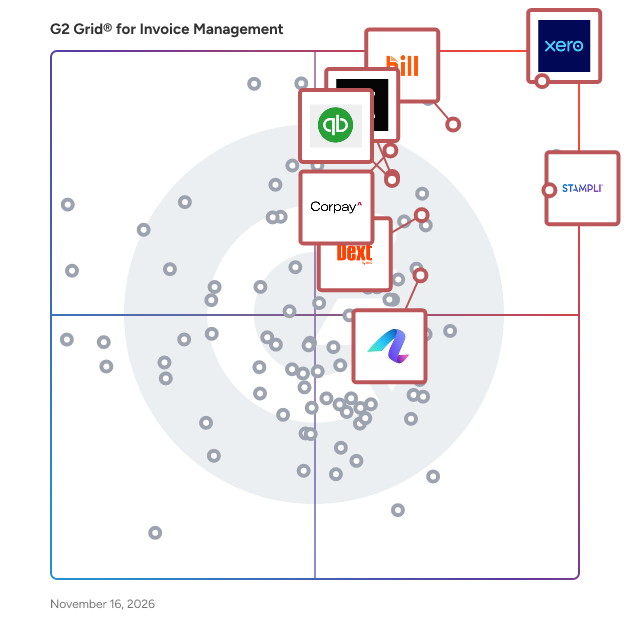
G2 Grid® for Invoice Management Software

G2 Grid® for Invoice Management Software plotting products by satisfaction and market presence

Highlighted products: Xero, BILL AP/AR, Dext, QuickBooks Bill Pay, Stampli, Corpay Cross-Border, Qonto, and Anchor.

Underlying data: [Grid® JSON](https://www.g2.com/categories/invoice-management/grids.json?focus%5B%5D=xero&focus%5B%5D=bill-ap-ar&focus%5B%5D=dext&focus%5B%5D=quickbooks-bill-pay&focus%5B%5D=stampli&focus%5B%5D=corpay-cross-border&focus%5B%5D=qonto&focus%5B%5D=anchor-anchor&segment=small-business)

Xero

Xero is a software designed to help small business owners and accounting professionals manage their financial operations efficiently. The software provides cloud-based bookkeeping, invoicing, and bank reconciliation by leveraging AI through JAX (Just Ask Xero), an AI financial superagent that processes natural language commands. It automates data ingestion from banks and e-commerce platforms and reduces manual data entry, saving users an average of six hours per month. Xero addresses the complexity of financial management by adapting smart bank reconciliation to user patterns, simplifying the process to a click-to-confirm operation. The software supports cash flow management, regional tax compliance, customizable online invoices, and integrations with a broad ecosystem of accounting and business tools.

Average Rating: 4.4/5.0

Total Reviews: 1,830

G2 Deal: 90% off Xero for 6 months

Simplify your business with Xero: access apps, banks, and financial tools in one place. Start now and enjoy 90% off for six months!

View this exclusive G2 deal

How Do G2 Users Rate Xero?

  • Has the product been a good partner in doing business?: 8.6/10 (Category avg: 8.9/10)
  • Accounting: 9.0/10 (Category avg: 8.8/10)
  • Cashflow: 8.6/10 (Category avg: 8.4/10)
  • Payments: 8.7/10 (Category avg: 8.7/10)

Who Is the Company Behind Xero?

  • Seller: Xero
  • Company Website:
  • Year Founded: 2006
  • HQ Location: Wellington
  • LinkedIn® Page: www.linkedin.com
    6,086 employees on LinkedIn®
  • Ownership: ASX:XRO

Who Uses This Product?

  • Who Uses This: Owner, Director
  • Top Industries: Accounting, Information Technology and Services
  • Company Size: 73% Small, 31% Medium

What Do G2 Reviewers Say About Xero?

AI-generated summary from verified user reviews

Pros
  • Users find Xero to be extremely easy to use, enhancing efficiency in accounting and reconciliations.
  • Users appreciate the easy invoicing feature of Xero, which simplifies billing and enhances overall business efficiency.
  • Users love the automated bank reconciliation in Xero, making financial management fast and hassle-free.
  • Users value the efficiency of Xero, appreciating its simplicity in managing accounting tasks and automating finances.
  • Users value Xero for its simplicity in managing business tasks, enhancing efficiency and user satisfaction significantly.
Cons
  • Users find Xero's lack of offline mode and group company management a significant limitation for their needs.
  • Users find the limited options in Xero frustrating, especially regarding customizations and report flexibility.
  • Users find Xero's limited customization frustrating, especially for reporting and branding needs.
  • Users find accounting limitations in Xero, particularly with group companies and complex reporting challenges.
  • Users report poor customer support that leaves them feeling misled and unable to efficiently manage multiple entities.

What Are Recent G2 Reviews of Xero?

What Are G2 Users Discussing About Xero?

BILL AP/AR

BILL AP/AR is a software designed to help small and midsize businesses streamline and manage their financial workflows by digitizing and automating manual processes. The software provides intelligent accounts payable and accounts receivable automation by leveraging AI-powered data extraction, customizable approval workflows, and multi-method payment processing including ACH, wire transfers, and checks. It automates invoice capture, approval routing, and payment scheduling and reduces manual data entry through two-way sync with accounting platforms such as QuickBooks, Xero, and NetSuite. BILL AP/AR addresses cash flow visibility and control challenges by centralizing AP, corporate cards, and expense management in a single platform. The software supports use cases including vendor payment management, expense reimbursement, collections management, and real-time reconciliation with major accounting systems.

Average Rating: 4.4/5.0

Total Reviews: 1,795

G2 Deal: 20% Discount on BILL AP/AR Subscription

Enjoy our special G2 rate! A 20% discount on your BILL AP/AR subscription.

View this exclusive G2 deal

How Do G2 Users Rate BILL AP/AR?

  • Has the product been a good partner in doing business?: 8.6/10 (Category avg: 8.9/10)
  • Accounting: 8.7/10 (Category avg: 8.8/10)
  • Cashflow: 8.1/10 (Category avg: 8.4/10)
  • Payments: 8.9/10 (Category avg: 8.7/10)

Who Is the Company Behind BILL AP/AR?

Who Uses This Product?

  • Who Uses This: Controller, Accountant
  • Top Industries: Accounting, Non-Profit Organization Management
  • Company Size: 62% Small, 28% Medium

What Do G2 Reviewers Say About BILL AP/AR?

AI-generated summary from verified user reviews

Pros
  • Users value the ease of use of BILL AP/AR, noting quick learning and efficient bill management features.
  • Users appreciate the easy payments with Bill.com, simplifying vendor payment processes and enhancing communication efficiency.
  • Users value the seamless integrations of BILL AP/AR, enhancing workflow and simplifying payment management with QuickBooks.
  • Users value the easy setup of BILL AP/AR, appreciating its straightforward implementation and seamless QuickBooks integration.
  • Users value the time-saving features of BILL AP/AR, streamlining invoice management and payment processes efficiently.
Cons
  • Users are frustrated with payment issues, including difficulties in voiding payments and distinguishing client windows.
  • Users find the missing features in BILL AP/AR limiting, particularly with AI functionality and lack of customization options.
  • Users are frustrated by sync errors in BILL AP/AR that lack clarity and require support for resolution.
  • Users face invoicing problems with BILL AP/AR due to a confusing client window and issues with payment voids.
  • Users indicate that vendor management can be complicated, leading to errors and difficulties when handling transactions across systems.

What Are Recent G2 Reviews of BILL AP/AR?

What Are G2 Users Discussing About BILL AP/AR?

Dext

Automate bookkeeping with Dext, invoice to payment. AI captures, extracts & codes receipts/invoices, syncs to Xero, QBO & 36+ platforms. You stay in control. 12,000+ firms trust Dext. Manage your bookkeeping workflows from invoice to payment in one AI-powered platform. Our intelligent, cloud-based bookkeeping automation platform is built for accountants, bookkeepers, and growing businesses. It connects document capture, extraction, categorisation, approvals, expenses and payments in one workflow, powered by AI built specifically for bookkeeping, not generic AI, so your business gets accurate, real-time financial data with you in control. More than 700,000 businesses and 12,000+ accounting firms trust Dext. Each year, the platform processes over 350 million financial documents at over 99% extraction accuracy, and connects to more than 11,500 banks, platforms, and accounting systems worldwide. How Dext works 1. Capture invoices and receipts – Snap a photo, upload a PDF, forward by email or WhatsApp, or connect a data feed. 2. Extract key data with AI – Reads supplier, amount, tax, due date and more. 3. Categorise and enrich automatically – AI suggests categories, descriptions, and payment methods, learning from how your business or practice works. 4. Sync with accounting software – Send accurate data to Xero, QuickBooks, Sage, and 36+ platforms. 5. Approve and pay – Manage the full accounts payable workflow, with built-in approvals and security checks. 6. Reconcile transactions – Automatic matching keeps accounts accurate and up to date. Receipt capture and submission options: Capture data however you prefer: snap a photo, submit receipts individually or in bulk, calculate mileage using GPS, and manage expense claims from the mobile app, or send documents by email, WhatsApp, Dropbox, drag-and-drop, or direct bank feed. Bookkeeping automation, AI and accounts payable Supplier rules and smart splits automate categorisation and posting, while AI Assist, Dext's agentic AI, learns how you work and suggests smarter automations, transparent, optional and fully auditable. Nothing publishes without review and sign-off. Dext manages the rest of the accounts payable workflow too: approvals and supplier payments, with built-in security checks. Integrations and ecosystem Dext connects to more than 11,500 banks, e-commerce platforms and payment systems, syncing with 36+ accounting platforms including Xero, QuickBooks and Sage, plus Amazon, Shopify, Stripe and PayPal. This removes duplicate entry and supports every business type. Expense management Digital approval workflows and automated reimbursements simplify expense management for businesses and firms alike. Multi-level approvals, real-time spend visibility, multi-currency support and mileage tracking are all built in. Reliability and accuracy Dext matches transactions with bank feeds automatically, catching duplicates and flagging missing documents, delays and bottlenecks before they become problems, no spreadsheets or manual checks needed. Security and compliance All data is stored in the EU, encrypted at every stage, with least-privilege access. Dext is ISO/IEC 27001 certified and GDPR-compliant, with a live Trust Centre available anytime. Dext never sells customer data, every supplier is vetted, and the platform maintains over 99.99% uptime. Recognition and ratings - 30 G2 Leader Badges across six categories in the Fall 2026 Report: Expense Management, Invoice Management, OCR, Mileage Tracking, Accounting Practice Management, and Travel & Expense. - Xero App Partner of the Year (UK and US, 2024) - QuickBooks Developer Spotlight 2024 - SME News Best Cloud-Based Accounting Software 2023 - Rated 4.7 stars on Trustpilot, 4.8 stars on the App Store, and 4.5 stars on Google Play FAQs Does Dext integrate with accounting software? Yes. Dext integrates directly with Xero, QuickBooks, Sage, and 36+ accounting platforms, plus more than 11,500 banks, platforms, and systems worldwide. Is Dext just a receipt capture or OCR tool? No. Dext has evolved beyond receipt capture and OCR into a full intelligent bookkeeping automation platform, managing the complete workflow from invoice to payment, with AI at its core. Does Dext support e-invoicing? In France, Dext is one of the first government-certified Aggregated Platforms (PA) for e-invoicing, trusted by more than 2,000 accounting firms and 290,000 businesses, and has won five Gold Medals at France's Palmarès du Monde du Chiffre (a leading awards program for the French accounting industry). Start your 14-day free trial today and experience intelligent bookkeeping automation with Dext.

Average Rating: 4.6/5.0

Total Reviews: 387

How Do G2 Users Rate Dext?

  • Has the product been a good partner in doing business?: 9.2/10 (Category avg: 8.9/10)
  • Accounting: 10.0/10 (Category avg: 8.8/10)
  • Cashflow: 8.3/10 (Category avg: 8.4/10)

Who Is the Company Behind Dext?

  • Seller: IRIS Software Group
  • Company Website:
  • Year Founded: 1978
  • HQ Location: Slough, United Kingdom
  • LinkedIn® Page: www.linkedin.com
    3,115 employees on LinkedIn®

Who Uses This Product?

  • Who Uses This: Director, Accountant
  • Top Industries: Accounting, Financial Services
  • Company Size: 87% Small, 11% Medium

What Do G2 Reviewers Say About Dext?

AI-generated summary from verified user reviews

Pros
  • Users appreciate the ease of use of Dext, which streamlines workflows and enhances efficiency in managing documents.
  • Users value the time-saving features of Dext, enhancing workflow efficiency and simplifying transaction management significantly.
  • Users appreciate the automation capabilities of Dext, significantly reducing manual work and enhancing workflow efficiency.
  • Users highlight the automation efficiency of Dext, significantly reducing manual work and streamlining financial processes.
  • Users value the speed and efficiency of Dext, enhancing workflow and simplifying transaction management significantly.
Cons
  • Users express concerns over pricing issues with Dext, citing unauthorized charges and costly plan changes without consent.
  • Users express frustration over billing issues with Dext, highlighting unauthorized charges and poor communication regarding plan changes.
  • Users often face slow processing times with Dext, leading to delays in document handling and data fetching.
  • Users express frustration over approval issues with Dext, noting complications in plan changes and billing practices.
  • Users are frustrated with Dext’s expensive practices, including unauthorized charges and misleading subscription changes.

What Are Recent G2 Reviews of Dext?

What Are G2 Users Discussing About Dext?

AI can help you find the answers. G2 helps you trust them.

Connect G2 to Claude or ChatGPT for answers grounded in G2's trusted reviews, comparisons, and pricing from real user insights.

How it works

Stampli

Stampli is a software designed to help finance teams manage the full procure-to-pay lifecycle from purchase request through payment without requiring ERP rework. The software provides AI-driven invoice coding, approval routing, exception handling, and institutional knowledge preservation by leveraging intelligence trained on billions of real-world transactions across $150 billion in annual spend. It automates data extraction, transaction coding, and invoice matching and reduces manual processing effort while remaining fully aligned to the ERP as the system of record. Stampli addresses the complexity of scaling AP operations by absorbing growth in volume, entities, and approval hierarchies without proportional increases in headcount. The software supports procurement, accounts payable, vendor management, payments, and corporate cards with full visibility, audit-ready accuracy, and compatibility across more than 1,800 customer environments.

Average Rating: 4.6/5.0

Total Reviews: 2,119

How Do G2 Users Rate Stampli?

  • Has the product been a good partner in doing business?: 9.5/10 (Category avg: 8.9/10)
  • Accounting: 9.0/10 (Category avg: 8.8/10)
  • Cashflow: 8.4/10 (Category avg: 8.4/10)
  • Payments: 8.8/10 (Category avg: 8.7/10)

Who Is the Company Behind Stampli?

  • Seller: Stampli
  • Company Website:
  • Year Founded: 2015
  • HQ Location: Mountain View, California
  • LinkedIn® Page: www.linkedin.com
    310 employees on LinkedIn®

Who Uses This Product?

  • Who Uses This: Controller, Staff Accountant
  • Top Industries: Accounting, Hospital & Health Care
  • Company Size: 61% Medium, 27% Small

What Do G2 Reviewers Say About Stampli?

AI-generated summary from verified user reviews

Pros
  • Users value the ease of use of Stampli, finding it intuitive and efficient for managing AP processes.
  • Users value the efficient invoicing process of Stampli, praising its user-friendly features and seamless approval workflows.
  • Users appreciate the intuitive ease of use of Stampli, making invoice approval simple and user-friendly.
  • Users value the efficiency of Stampli, finding it easy to use and streamline the AP process effectively.
  • Users praise Stampli's excellent customer support, highlighting quick responses and friendly, helpful assistance from the support team.
Cons
  • Users experience invoice issues with scrolling difficulties and frustrating navigation affecting their efficiency in Stampli.
  • Users feel the missing features limit functionality, particularly in multi-location visibility and purchase order integration.
  • Users express concerns over approval issues, citing excessive approvers and lack of options for streamlined suggestions.
  • Users report technical issues with Stampli, including problems with purchase orders and sensitive clicking behaviors.
  • Users experience challenges with invoicing navigation, as scrolling and returning to previous invoices can be cumbersome.

What Are Recent G2 Reviews of Stampli?

What Are G2 Users Discussing About Stampli?

QuickBooks Bill Pay

QuickBooks Bill Pay is an AI-powered accounts payable (A/P) automation tool built into QuickBooks Online. Manage bills, vendor records, and 1099s in one place. Pay vendors by ACH or check, automate bill entry with AI, and sync payments with your books in real time. Streamline your bill pay in QuickBooks. QuickBooks Bill Pay is built exclusively for QuickBooks Online users, providing native integration with AI-powered bill creation, automated approval workflows, and real-time transaction syncing. Manage bills, vendor records, and 1099s in one place to optimize cash flow and stay in control.

Average Rating: 4.5/5.0

Total Reviews: 41

How Do G2 Users Rate QuickBooks Bill Pay?

  • Has the product been a good partner in doing business?: 9.5/10 (Category avg: 8.9/10)
  • Accounting: 10.0/10 (Category avg: 8.8/10)
  • Cashflow: 10.0/10 (Category avg: 8.4/10)
  • Payments: 10.0/10 (Category avg: 8.7/10)

Who Is the Company Behind QuickBooks Bill Pay?

  • Seller: Intuit
  • Company Website:
  • Year Founded: 1983
  • HQ Location: Mountain View, California
  • LinkedIn® Page: www.linkedin.com
    15,963 employees on LinkedIn®
  • Ownership: VIE:INTU

Who Uses This Product?

  • Top Industries: Accounting
  • Company Size: 88% Small, 7% Medium

What Do G2 Reviewers Say About QuickBooks Bill Pay?

AI-generated summary from verified user reviews

Pros
  • Users find QuickBooks Bill Pay easy to use, making it suitable for those with basic accounting skills.
  • Users appreciate the easy integrations with QuickBooks, enhancing billing and cash flow management seamlessly.
  • Users benefit from the seamless QuickBooks integration, ensuring instant payments and convenient fund management for their businesses.
  • Users appreciate the easy-to-read reports for effective decision-making and client communication.
  • Users value the budgeting ease with QuickBooks Bill Pay, benefiting from no fees and instant transactions.
Cons
  • Users find QuickBooks Bill Pay expensive, especially for businesses operating on a tight budget.
  • Users note the lack of check writing features in QuickBooks Bill Pay, limiting their payment options.
  • Users express frustration with the limited customer support options of QuickBooks Bill Pay, primarily relying on chat assistance.

What Are Recent G2 Reviews of QuickBooks Bill Pay?

Corpay Cross-Border

Corpay Cross-Border is a software designed to help global businesses manage cross-border payments, currency risk, and international vendor invoice processing from a single platform. The software provides foreign exchange execution, payment automation, and global invoice management by leveraging connections to more than 100 correspondent banks and counterparties alongside proprietary currency risk mitigation technology. It automates the extraction of cost and payment data from invoices and reduces reconciliation effort through custom disbursement files, compliance screening, and line-by-line settlement details. Corpay Cross-Border addresses the complexity of international AP operations by enabling payments in over 100 currencies with a 180-day deliverable exchange rate and built-in AML and anti-fraud protections. The software supports ERP and accounting system integrations, unlimited custom reporting, immediate vendor remittance, and scalable payment workflows for businesses ranging from small companies to Fortune 1000 enterprises.

Average Rating: 4.5/5.0

Total Reviews: 1,173

How Do G2 Users Rate Corpay Cross-Border?

  • Has the product been a good partner in doing business?: 9.3/10 (Category avg: 8.9/10)
  • Accounting: 7.9/10 (Category avg: 8.8/10)
  • Cashflow: 7.7/10 (Category avg: 8.4/10)
  • Payments: 8.4/10 (Category avg: 8.7/10)

Who Is the Company Behind Corpay Cross-Border?

  • Seller: Corpay
  • Company Website:
  • Year Founded: 2000
  • HQ Location: Atlanta, US
  • LinkedIn® Page: www.linkedin.com
    7,238 employees on LinkedIn®

Who Uses This Product?

  • Who Uses This: Controller, CFO
  • Top Industries: Accounting, Wholesale
  • Company Size: 68% Small, 27% Medium

What Do G2 Reviewers Say About Corpay Cross-Border?

AI-generated summary from verified user reviews

Pros
  • Users find Corpay Cross-Border easy to use, with straightforward navigation and excellent customer support enhancing their experience.
  • Users commend the excellent customer support of Corpay Cross-Border, which enhances their overall experience and satisfaction.
  • Users appreciate the helpful customer service of Corpay Cross-Border, noting quick support and ease of use.
  • Users appreciate the simplicity and ease of use of Corpay Cross-Border, enhancing their payment experience significantly.
  • Users value the fast and efficient fund transfers with Corpay Cross-Border, enhancing overall cash flow management and visibility.
Cons
  • Users face payment issues, including delays and lack of notifications, causing significant project disruptions.
  • Users face payment delays that disrupt time-sensitive projects, despite eventual resolution and cheaper rates.
  • Users note that transactions can be slow, especially in high-risk countries, causing delays in vendor payments.
  • Users find the complex processes of Corpay Cross-Border challenging, particularly regarding navigation and payment management.
  • Users find poor usability in Corpay Cross-Border, struggling with limitations and difficulties on both mobile and desktop platforms.

What Are Recent G2 Reviews of Corpay Cross-Border?

What Are G2 Users Discussing About Corpay Cross-Border?

Qonto

Qonto is a software designed to help European small businesses and entrepreneurs manage everyday banking and financial operations from a single business account. The software provides invoice management, spend management, bookkeeping, and multi-country banking by leveraging local IBANs across France, Germany, Italy, and Spain alongside flexible payment methods from Instant SEPA to SWIFT. It automates outgoing payments and receipt collection and reduces the manual effort of reconciling transactions through real-time notifications and direct accountant collaboration tools. Qonto addresses the fragmentation of business banking and financial management by consolidating invoicing, corporate cards, budgets, and cash flow oversight in one platform with 7-day customer support. The software supports team spending controls, integrated financing options, seamless accountant connectivity, and unlimited transaction history for growing businesses.

Average Rating: 4.6/5.0

Total Reviews: 170

How Do G2 Users Rate Qonto?

  • Has the product been a good partner in doing business?: 8.6/10 (Category avg: 8.9/10)
  • Accounting: 9.2/10 (Category avg: 8.8/10)
  • Cashflow: 8.7/10 (Category avg: 8.4/10)
  • Payments: 9.4/10 (Category avg: 8.7/10)

Who Is the Company Behind Qonto?

  • Seller: Qonto
  • Year Founded: 2016
  • HQ Location: Paris, Île-de-France, France
  • LinkedIn® Page: www.linkedin.com
    2,442 employees on LinkedIn®

Who Uses This Product?

  • Who Uses This: CEO, Président
  • Top Industries: Accounting, Consulting
  • Company Size: 76% Small, 4% Medium

What Do G2 Reviewers Say About Qonto?

AI-generated summary from verified user reviews

Pros
  • Users love the ease of use of Qonto, noting its clean UI and seamless integration of features.
  • Users value the prompt and friendly customer support provided by Qonto, enhancing their overall experience.
  • Users value the efficiency of Qonto, appreciating its quick features and seamless integration for expense management.
  • Users love the intuitive interface of Qonto, which simplifies day-to-day finance management with seamless integration.
  • Users value the easy invoice matching feature of Qonto, simplifying tracking and management of transactions.
Cons
  • Users find the costs of services and transfer fees with Qonto to be significantly higher than traditional banks.
  • Users are frustrated by slow check deposit processing and limited integrations, which hinder a smoother experience.
  • Users experience poor customer support from Qonto, with unhelpful staff and frustrating communication issues.
  • Users find the pricing issues with Qonto to be high, especially for international transactions and service fees.
  • Users experience approval issues due to unhelpful staff, long processing times, and complicated initial setup.

What Are Recent G2 Reviews of Qonto?

What Are G2 Users Discussing About Qonto?

Spendesk

Spendesk is the complete spend management platform that saves businesses time and money by connecting company spend. With the integration of everyday technologies, built-in automation, procurement, and an easily adopted approval process, Spendesk’s single solution makes agile, efficient spending easy for employees. It gives finance leaders complete visibility across company spend. With the launch of its Procure-to-Pay solution, Spendesk is the first European platform to fully integrate procurement and spend management for businesses of up to 1,000 employees.

Average Rating: 4.5/5.0

Total Reviews: 920

How Do G2 Users Rate Spendesk?

  • Has the product been a good partner in doing business?: 8.5/10 (Category avg: 8.9/10)
  • Accounting: 8.4/10 (Category avg: 8.8/10)
  • Cashflow: 8.7/10 (Category avg: 8.4/10)
  • Payments: 9.1/10 (Category avg: 8.7/10)

Who Is the Company Behind Spendesk?

  • Seller: Spendesk
  • Company Website:
  • Year Founded: 2016
  • HQ Location: Paris, Île-de-France
  • LinkedIn® Page: www.linkedin.com
    348 employees on LinkedIn®

Who Uses This Product?

  • Who Uses This: CFO, comptable
  • Top Industries: Computer Software, Information Technology and Services
  • Company Size: 57% Medium, 40% Small

What Do G2 Reviewers Say About Spendesk?

AI-generated summary from verified user reviews

Pros
  • Users praise the ease of use of Spendesk, highlighting its intuitive interface and clear expense tracking process.
  • Users feel that Spendesk lacks timely customer support, impacting their overall satisfaction with the service.
  • Users feel the customer support of Spendesk has declined, impacting their overall experience negatively.
  • Users appreciate the ease of understanding of Spendesk, making it simple to track and order finances.
  • Users value the easy submission process of Spendesk, enjoying its user-friendly interface and efficient expense management.
Cons
  • Users report approval issues with Spendesk, facing delays and lack of support that hinder daily operations.
  • Users report severe credit issues with Spendesk, facing unresponsive support and lost funds during urgent business needs.
  • Users report significant delays in support response, leading to frustration and disruption in their purchasing processes.
  • Users report significant payment issues with Spendesk, citing inaccessible funds and poor customer support response.
  • Users report significant processing delays with Spendesk, impacting accessibility to funds and urgent business transactions.

What Are Recent G2 Reviews of Spendesk?

What Are G2 Users Discussing About Spendesk?

Anchor

Anchor is billing and payments automation software for accounting firms, bookkeepers, and professional service businesses. It combines proposals, engagement letters, agreements, automated billing, and payment collection in one platform Helping service businesses get paid on time, every time effortlessly. With no subscription fees. Syncing proposals, agreements, billing, and payments into one seamless workflow. Clients are auto-billed and auto-charged based on dynamic agreements, and everything syncs in real time with your general ledger. Designed for accountants, consultants, agencies, and service providers, Anchor eliminates manual billing tasks, reduces human error, and helps prevent revenue leakage. • Close deals faster with branded online proposals • Send flexible agreements that evolve with scope and terms • Automate billing: recurring, hourly, fixed, or one-time • Accept ACH or credit cards with adjustable fee settings • Collaborate via roles, permissions, and audit trails • Give clients a self-serve portal and automated reminders • Sync with QuickBooks Online, Xero and 5,000+ apps via Zapier Just $5 per payment. No subscriptions. No limits.

Average Rating: 4.9/5.0

Total Reviews: 130

How Do G2 Users Rate Anchor?

  • Has the product been a good partner in doing business?: 9.8/10 (Category avg: 8.9/10)
  • Accounting: 9.5/10 (Category avg: 8.8/10)
  • Cashflow: 8.7/10 (Category avg: 8.4/10)
  • Payments: 9.2/10 (Category avg: 8.7/10)

Who Is the Company Behind Anchor?

  • Seller: Anchor
  • Company Website:
  • Year Founded: 2021
  • HQ Location: New York, US
  • LinkedIn® Page: www.linkedin.com
    124 employees on LinkedIn®

Who Uses This Product?

  • Who Uses This: Owner, CEO
  • Top Industries: Accounting, Marketing and Advertising
  • Company Size: 98% Small, 2% Medium

What Do G2 Reviewers Say About Anchor?

AI-generated summary from verified user reviews

Pros
  • Users love how time-saving Anchor is, allowing quick proposal sending right after Discovery Calls without delays.
  • Users value the ease of use of Anchor, appreciating its mobile-friendliness and efficient proposal management.
  • Users value the automation features of Anchor, allowing for quick proposal creation and seamless integrations with workflows.
  • Users value the efficiency of Anchor, enjoying quick proposal creation and seamless integrations that enhance workflow.
  • Users value the flexibility of Anchor, enabling easy customization and efficient management of billing and payments.
Cons
  • Users report payment issues, including complexities with service splitting and concerns over Plaid's excessive permissions.
  • Users note processing delays have improved, but desire next day funding for a better experience.
  • Users desire greater customization options for email reminders and agreements, seeking more control over communications.
  • Users note a steep learning curve with Anchor, requiring time and effort to set up effectively.
  • Users note a 10-day delay in payouts via ACH, although improvements have been made to funding speeds.

What Are Recent G2 Reviews of Anchor?

TallyPrime

TallyPrime is a software designed to help small to medium-sized enterprises manage invoicing, accounting, inventory, taxation, payroll, and cost management from a single integrated platform. The software provides over 400 business reports and interconnected financial modules by leveraging automation across GST calculations, financial reporting, and cash and credit management. It automates critical business processes including invoicing and tax compliance and reduces the time and effort required for routine administrative tasks. TallyPrime addresses operational complexity for businesses in retail, manufacturing, and services by consolidating multiple functions into one platform with an intuitive, accessible interface. The software supports mobile and device-agnostic report access, real-time performance analysis, and customizable reporting to support informed decision-making and sustainable business growth.

Average Rating: 4.5/5.0

Total Reviews: 304

How Do G2 Users Rate TallyPrime?

  • Has the product been a good partner in doing business?: 9.0/10 (Category avg: 8.9/10)
  • Accounting: 9.3/10 (Category avg: 8.8/10)
  • Cashflow: 8.8/10 (Category avg: 8.4/10)
  • Payments: 8.8/10 (Category avg: 8.7/10)

Who Is the Company Behind TallyPrime?

  • Seller: Tally Solutions
  • Company Website:
  • Year Founded: 1986
  • HQ Location: Bangalore
  • LinkedIn® Page: www.linkedin.com
    5,423 employees on LinkedIn®

Who Uses This Product?

  • Who Uses This: Accountant, Senior Accountant
  • Top Industries: Accounting, Information Technology and Services
  • Company Size: 60% Small, 35% Medium

What Do G2 Reviewers Say About TallyPrime?

AI-generated summary from verified user reviews

Pros
  • Users appreciate TallyPrime's ease of use, enabling simple navigation while managing complex accounting tasks efficiently.
  • Users commend TallyPrime for its simplicity and powerful accounting features, enhancing efficiency and accuracy in financial management.
  • Users value the accounting efficiency of TallyPrime, finding it user-friendly and reliable for daily business needs.
  • Users appreciate the interlinked modules in TallyPrime, enabling seamless updates and quick report generation for better decision-making.
  • Users value the accounting ease of TallyPrime, appreciating its simplicity and efficiency in managing complex financial tasks.
Cons
  • Users find TallyPrime lacking in advanced features, hindering workflows like analytics, reporting, and customization ease.
  • Users note the limited customization options in TallyPrime, finding it challenging to modify reports and integrate seamlessly.
  • Users find TallyPrime's poor interface design challenging, leading to difficulties with navigation and customization.
  • Users find the user unfriendliness of TallyPrime frustrating due to its outdated interface and limited customization options.
  • Users find the learning curve challenging for TallyPrime, particularly for those lacking accounting experience.

What Are Recent G2 Reviews of TallyPrime?

What Are G2 Users Discussing About TallyPrime?

HoneyBook

HoneyBook is a clientflow management platform designed for independent service businesses, such as photographers, venues, virtual assistants, wedding planners, and creative freelancers. The platform consolidates every stage of the client lifecycle into one place, from initial inquiry to final payment, allowing users to manage their operations without switching between multiple tools. Unlike generic CRM tools, HoneyBook offers a tailored experience that integrates lead capture, contracts, invoicing, scheduling, and client communication into a single platform. It includes AI-powered automation and customization features designed specifically for the workflows of service-based businesses. The target audience for HoneyBook includes service-oriented professionals who need a system to handle lead generation, client management, and payment processing. The platform is particularly relevant for those who operate in creative industries such as photography, event venues, graphic design, consulting, and virtual assistance, where client interactions and project management are central to running the business. Key features include: Branded lead forms and questionnaires that embed on any website, along with online scheduling, appointment booking, and automated follow-up sequences to convert inquiries into booked clients Online invoices with integrated payment processing, legally binding contracts with e-signatures, and customizable proposals that combine services, pricing, contracts, and payment in one document A visual project pipeline to track every client and job status, CRM and contact management to store client details and history, a branded client portal where clients can view documents and make payments, and automated workflows and task reminders to reduce manual follow-up HoneyBook integrates with over 40 third-party tools including Squarespace, Google Ads, Mailchimp, Zoom, and QuickBooks, allowing businesses to connect their existing tech stack. The platform is available on web and mobile. A 30-day free trial is available. No credit card required.

Average Rating: 4.5/5.0

Total Reviews: 246

How Do G2 Users Rate HoneyBook?

  • Has the product been a good partner in doing business?: 9.2/10 (Category avg: 8.9/10)
  • Accounting: 8.5/10 (Category avg: 8.8/10)
  • Cashflow: 8.5/10 (Category avg: 8.4/10)
  • Payments: 8.7/10 (Category avg: 8.7/10)

Who Is the Company Behind HoneyBook?

  • Seller: HoneyBook
  • Company Website:
  • Year Founded: 2013
  • HQ Location: San Francisco, CA
  • LinkedIn® Page: www.linkedin.com
    325 employees on LinkedIn®

Who Uses This Product?

  • Who Uses This: Owner, Photographer
  • Top Industries: Photography, Events Services
  • Company Size: 97% Small, 2% Medium

What Do G2 Reviewers Say About HoneyBook?

AI-generated summary from verified user reviews

Pros
  • Users appreciate the seamless payment management of HoneyBook, enhancing organization and professionalism in their business operations.
  • Users love the easy creation of proposals and templates, streamlining client communication and management effortlessly.
  • Users find HoneyBook extremely user-friendly, seamlessly integrating essential business tasks into one efficient platform.
  • Users appreciate the easy customization of HoneyBook, enabling smooth creation of proposals, invoices, and contracts.
  • Users value the streamlined organization and ease of use in managing clients and payments with HoneyBook.
Cons
  • Users experience payment issues, particularly with complicated processes and lack of options for alternative payments.
  • Users find HoneyBook to be too expensive for the value provided, with frustrating data export limitations.
  • Users express frustration over the lack of integration options, complicating project management and data migration processes.
  • Users find limited features in HoneyBook, particularly in workflow automations, which restricts their operational efficiency.
  • Users find the reporting features lacking, complicating efforts to track earnings and improve business performance.

What Are Recent G2 Reviews of HoneyBook?

What Are G2 Users Discussing About HoneyBook?

Payhawk

Payhawk is a software designed to help mid-market and enterprise finance teams manage all types of company spend across bills, cards, expenses, travel, and procurement in a single platform. The software provides AI-native automation and policy enforcement by leveraging specialized AI agents including a Finance Controller Agent, Payments Agent, Procurement Agent, and Travel Agent to streamline each area of spend. It automates reconciliation, receipt retrieval, and approval flows and reduces manual work through deep integrations with ERPs such as Microsoft Dynamics, NetSuite, Xero, Sage, and QuickBooks. Payhawk addresses the complexity of global financial operations by combining a global money account with support for payments in over 150 countries across 115 currencies. The software supports corporate card issuance, multi-currency account management, SEPA and ACH payment rails, and end-to-end spend visibility for organizations including Luxair, Babbel, and Vinted.

Average Rating: 4.5/5.0

Total Reviews: 956

How Do G2 Users Rate Payhawk?

  • Has the product been a good partner in doing business?: 8.9/10 (Category avg: 8.9/10)
  • Accounting: 8.5/10 (Category avg: 8.8/10)
  • Cashflow: 7.9/10 (Category avg: 8.4/10)
  • Payments: 8.6/10 (Category avg: 8.7/10)

Who Is the Company Behind Payhawk?

  • Seller: Payhawk
  • Company Website:
  • Year Founded: 2018
  • HQ Location: London, England
  • LinkedIn® Page: www.linkedin.com
    472 employees on LinkedIn®

Who Uses This Product?

  • Who Uses This: Finance Manager, Accountant
  • Top Industries: Computer Software, Information Technology and Services
  • Company Size: 58% Medium, 30% Small

What Do G2 Reviewers Say About Payhawk?

AI-generated summary from verified user reviews

Pros
  • Users appreciate the ease of use of Payhawk, finding it intuitive and efficient for all financial tasks.
  • Users appreciate the user-friendly expense management of Payhawk, praising its intuitive design and efficient processes.
  • Users value Payhawk for its time-saving automation, speeding up processes like payments and expense management significantly.
  • Users praise Payhawk for its prompt and useful customer support, highlighting quick assistance with transactions and inquiries.
  • Users highlight Payhawk's efficiency, enjoying streamlined payment processes and time-saving automation for better spend management.
Cons
  • Users find approval issues challenging with multiple entities and complex workflows affecting their experience and efficiency.
  • Users emphasize the need for improved missing features like currency exchange and card labeling for better clarity.
  • Users find limited customization options in Payhawk, making certain financial processes cumbersome and manual.
  • Users find the approval process confusing with multiple entities, causing delays and difficulty in categorizing expenses.
  • Users experience integration issues with Payhawk, leading to manual exports and time-consuming data sync problems.

What Are Recent G2 Reviews of Payhawk?

What Are G2 Users Discussing About Payhawk?

Yooz

Yooz is an accounts payable (AP) and Purchase to Pay (P2P) automation platform that helps organizations capture, process, manage and pay invoices through a centralized digital workflow to track approvals and related financial documents. The system is used by finance and accounting teams that need to manage invoice intake, approval routing, documentation, payments, and audit preparation across a standardized AP process. Yooz performs functions including multichannel invoice capture, general ledger coding, line-level purchase order matching, workflow orchestration, fraud identification, and electronic document retention. The platform integrates with more than 250 enterprise resource planning (ERP) and accounting systems across mid‑market and enterprise environments. Supported ecosystems include Sage, Microsoft Dynamics, Acumatica, NetSuite, and QuickBooks. Yooz accepts documents from email, document upload, scanning, mobile capture, sFTP, and structured formats such as UBL, CII, and EDIFACT. Machine learning models perform document classification, field extraction, and exception identification to support automated data processing and consistent routing across distributed teams. Yooz includes features for fraud identification through forensic AI analysis, invoice authentication, duplicate detection, and data consistency checks. The platform maintains complete audit trails, timestamps, and role‑based access permissions to support internal controls and external audit requirements. Storage and retention capabilities help organizations meet regulatory and archival needs across the AP documentation lifecycle. Reporting and analytics tools provide visibility into invoice volumes, processing times, workflow steps, and exception categories. Document search features and integrations with business intelligence platforms enable users to review transaction histories, track processing status, and analyze operational metrics across entities or locations. Organizations utilize Yooz for use cases such as invoice digitization, multi‑entity AP centralization, document archiving, fraud identification, payments, and standardized routing of recurring invoice flows. The platform supports AP teams in maintaining consistent processes and documentation practices while managing invoices from initial receipt through payment and the final posting in the ERP system. Core capabilities and benefits include: > Multichannel invoice capture with AI–based line-level data extraction and classification > Automated general ledger coding, two‑ and three‑way purchase order matching, and configurable workflow routing > Fraud prevention features including fake document and duplicate detection, document validation, and data consistency checks > Connectivity with more than 250 ERP and accounting systems for synchronized posting and data exchange > Payment automation supporting ACH, check, and virtual card transactions, associated reporting and tracking tools, and vendor reconciliation statements

Average Rating: 4.4/5.0

Total Reviews: 449

How Do G2 Users Rate Yooz?

  • Has the product been a good partner in doing business?: 8.8/10 (Category avg: 8.9/10)
  • Accounting: 8.6/10 (Category avg: 8.8/10)
  • Cashflow: 8.3/10 (Category avg: 8.4/10)
  • Payments: 8.5/10 (Category avg: 8.7/10)

Who Is the Company Behind Yooz?

  • Seller: Yooz
  • Company Website:
  • Year Founded: 2010
  • HQ Location: Dallas, Texas
  • LinkedIn® Page: www.linkedin.com
    509 employees on LinkedIn®
  • Phone: +18323849669

Who Uses This Product?

  • Who Uses This: Controller, Accountant
  • Top Industries: Accounting, Automotive
  • Company Size: 55% Medium, 27% Small

What Do G2 Reviewers Say About Yooz?

AI-generated summary from verified user reviews

Pros
  • Users find Yooz to be very organized and user-friendly, facilitating quick setup and intuitive navigation.
  • Users appreciate the intuitive user interface of Yooz, making financial processes straightforward and effortless for everyone.
  • Users appreciate the user-friendly design of Yooz, making invoice processing efficient and easily understood by all.
  • Users highlight the time-saving benefits of Yooz, streamlining invoice management and reducing the need for follow-ups.
  • Users find Yooz's easy invoice entry and intelligent coding features significantly streamline their invoicing process.
Cons
  • Users experience technical issues with Yooz, facing error warnings and discrepancies in information retrieval and learning.
  • Users face invoicing issues due to AI recognition errors and lack of email confirmations, complicating invoice management.
  • Users find the design outdated and lack flexibility, making it challenging to correct mistakes or reroute reports.
  • Users face issues with vendor management, as incorrect supplier recognition leads to invoice processing errors and confusion.
  • Users face challenges with inaccurate data extraction from invoices, leading to numerous errors and extra corrections required.

What Are Recent G2 Reviews of Yooz?

SAP Concur

SAP Concur is a software designed to help small, medium, and large businesses automate and simplify expense reporting, travel booking, and invoice processing. The software provides near real-time spend visibility and policy enforcement by leveraging AI to audit 100% of transactions and flag exceptions automatically. It automates approval routing and receipt capture and reduces errors and manual paperwork across the full spend management lifecycle. SAP Concur addresses the challenge of fragmented business spend control by integrating travel, expense, and invoice data into a single cloud-based platform accessible on mobile and desktop. The software supports compliance with travel and expense policies, real-time spending analysis, and informed financial decision-making across organizations of all sizes.

Average Rating: 4.0/5.0

Total Reviews: 7,121

How Do G2 Users Rate SAP Concur?

  • Has the product been a good partner in doing business?: 8.1/10 (Category avg: 8.9/10)
  • Accounting: 8.9/10 (Category avg: 8.8/10)
  • Cashflow: 8.7/10 (Category avg: 8.4/10)
  • Payments: 8.7/10 (Category avg: 8.7/10)

Who Is the Company Behind SAP Concur?

  • Seller: SAP Concur
  • Company Website:
  • Year Founded: 1993
  • HQ Location: Bellevue, WA
  • LinkedIn® Page: www.linkedin.com
    6,562 employees on LinkedIn®

Who Uses This Product?

  • Who Uses This: Software Engineer, Executive Assistant
  • Top Industries: Information Technology and Services, Computer Software
  • Company Size: 55% Large, 36% Medium

What Do G2 Reviewers Say About SAP Concur?

AI-generated summary from verified user reviews

Pros
  • Users find the interface intuitive and easy to navigate, helping them move through everyday tasks quickly.
  • Users value expense automation that reduces repetitive data entry and manual work, saving time and effort.
  • Users appreciate straightforward expense management and easier invoice processing, helping them handle expenses and invoices more conveniently.
  • Users value the faster processing and automation, which save time on expense tasks and administrative work.
  • Users find expense reporting straightforward and quick, making it easier to submit and manage expense claims.
Cons
  • Users find the interface cluttered, complex, and often unintuitive, especially for newcomers.
  • Users experience slow loading and lag when navigating or using the interface.
  • Users say the interface looks and feels outdated and could use a visual refresh.
  • Users say simple expense tasks and other workflows require too many steps and clicks.
  • Users find navigation and locating features unintuitive and time-consuming, with menus and settings sometimes difficult to reach.

What Are Recent G2 Reviews of SAP Concur?

What Are G2 Users Discussing About SAP Concur?

Melio

Melio is a software designed to help businesses of any size streamline B2B accounts payable and accounts receivable payments from a single platform. The software provides vendor payment management, invoice tracking, and cash flow control by leveraging flexible payment methods including bank transfers and cards alongside automated approval and scheduling workflows. It automates reconciliation and payment scheduling and reduces administrative tasks so finance teams can focus on business growth. Melio addresses the operational complexity of managing vendor and customer payments by syncing in real time with QuickBooks and Xero to keep financial records consistently up to date. The software supports scheduled payments, multi-method payment flexibility, and a free 30-day trial period, making it accessible for small businesses managing high volumes of vendor transactions.

Average Rating: 4.4/5.0

Total Reviews: 252

How Do G2 Users Rate Melio?

  • Has the product been a good partner in doing business?: 8.9/10 (Category avg: 8.9/10)
  • Accounting: 8.7/10 (Category avg: 8.8/10)
  • Cashflow: 8.4/10 (Category avg: 8.4/10)
  • Payments: 8.7/10 (Category avg: 8.7/10)

Who Is the Company Behind Melio?

  • Seller: Xero
  • Company Website:
  • Year Founded: 2006
  • HQ Location: Wellington
  • LinkedIn® Page: www.linkedin.com
    6,086 employees on LinkedIn®
  • Ownership: ASX:XRO

Who Uses This Product?

  • Who Uses This: Owner, Founder
  • Top Industries: Accounting, Marketing and Advertising
  • Company Size: 93% Small, 6% Medium

What Do G2 Reviewers Say About Melio?

AI-generated summary from verified user reviews

Pros
  • Users appreciate the ease of use of Melio, making business payments simple and efficient.
  • Users find Melio's easy payments feature essential for smooth, efficient vendor transactions and managing cash flow.
  • Users value the customizable approval workflows and fast payment options that enhance their payment processing experience.
  • Users find Melio's payment process simple and efficient, enhancing cash flow management and saving valuable administrative time.
  • Users value Melio for its time-saving payment process, enhancing efficiency and cash-flow control in vendor payments.
Cons
  • Users express frustration with the delays in payments, impacting financial planning and timely transactions.
  • Users report significant payment issues with Melio, facing failed transactions and unresponsive customer support.
  • Users express dissatisfaction with payment delays, facing issues with unaccounted funds and slow resolution times from Melio.
  • Users express concerns over poor customer support, facing difficulty in resolving payment issues and lack of communication.
  • Users find Melio's missing features limiting, especially in accounting tools and customer support responsiveness.

What Are Recent G2 Reviews of Melio?

What Are G2 Users Discussing About Melio?

Nathan Calabrese
NC
Researched and written by Nathan Calabrese
Updated