2026 Best Software Awards are here!See the list

Best GIS Software for Small Business

Daniel Rivera
DR
Researched and written by Daniel Rivera

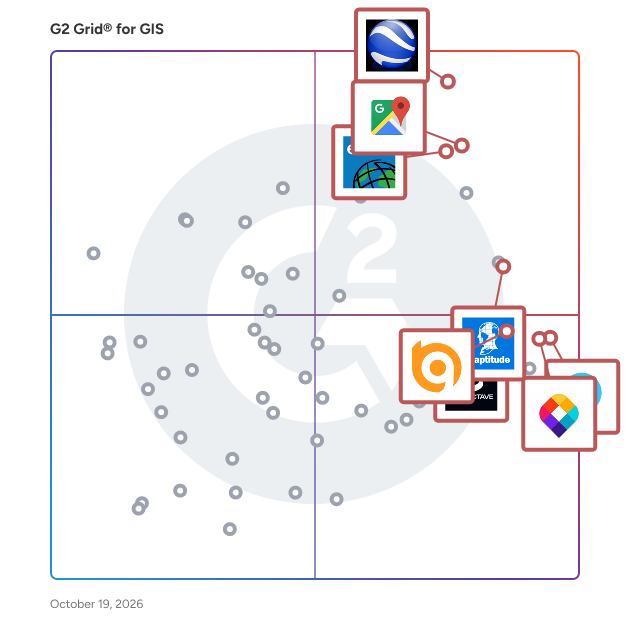
Products classified in the overall GIS category are similar in many regards and help companies of all sizes solve their business problems. However, small business features, pricing, setup, and installation differ from businesses of other sizes, which is why we match buyers to the right Small Business GIS to fit their needs. Compare product ratings based on reviews from enterprise users or connect with one of G2's buying advisors to find the right solutions within the Small Business GIS category.

In addition to qualifying for inclusion in the GIS Software category, to qualify for inclusion in the Small Business GIS Software category, a product must have at least 10 reviews left by a reviewer from a small business.

Show More
Show Less

G2 takes pride in showing unbiased reviews on user satisfaction in our ratings and reports. We do not allow paid placements in any of our ratings, rankings, or reports. Learn about our scoring methodologies.

1 filter applied
Clear All

32 Listings in Small Business GIS Available

(53)4.7 out of 5
View top Consulting Services for Google Maps Platform
Save to My Lists
  • Overview
    Expand/Collapse Overview
  • Product Description
    How are these determined?Information
    This description is provided by the seller.

    Google Maps Platform is a comprehensive suite of APIs and SDKs that enables developers to integrate dynamic, real-world mapping and location-based services into their applications. Leveraging Google's

    Users
    No information available
    Industries
    • Information Technology and Services
    Market Segment
    • 58% Small-Business
    • 26% Mid-Market
  • Pros and Cons
    Expand/Collapse Pros and Cons
  • Google Maps Platform Pros and Cons
    How are these determined?Information
    Pros and Cons are compiled from review feedback and grouped into themes to provide an easy-to-understand summary of user reviews.
    Pros
    Ease of Use
    14
    Location Services
    14
    Navigation Ease
    9
    Mapping Features
    8
    Location Tracking
    7
    Cons
    Mapping Issues
    7
    Inaccurate Geolocation
    6
    Accuracy Issues
    4
    Navigation Issues
    3
    Technical Issues
    3
  • User Satisfaction
    Expand/Collapse User Satisfaction
  • Google Maps Platform features and usability ratings that predict user satisfaction
    9.1
    Data Capture
    Average: 8.5
    9.2
    Data Visualization
    Average: 8.5
    9.3
    Ease of Use
    Average: 8.3
    8.9
    Spatial Analysis
    Average: 8.3
  • Seller Details
    Expand/Collapse Seller Details
  • Seller Details
    Seller
    Google
    Year Founded
    1998
    HQ Location
    Mountain View, CA
    Twitter
    @google
    31,680,097 Twitter followers
    LinkedIn® Page
    www.linkedin.com
    325,935 employees on LinkedIn®
    Ownership
    NASDAQ:GOOG
Product Description
How are these determined?Information
This description is provided by the seller.

Google Maps Platform is a comprehensive suite of APIs and SDKs that enables developers to integrate dynamic, real-world mapping and location-based services into their applications. Leveraging Google's

Users
No information available
Industries
  • Information Technology and Services
Market Segment
  • 58% Small-Business
  • 26% Mid-Market
Google Maps Platform Pros and Cons
How are these determined?Information
Pros and Cons are compiled from review feedback and grouped into themes to provide an easy-to-understand summary of user reviews.
Pros
Ease of Use
14
Location Services
14
Navigation Ease
9
Mapping Features
8
Location Tracking
7
Cons
Mapping Issues
7
Inaccurate Geolocation
6
Accuracy Issues
4
Navigation Issues
3
Technical Issues
3
Google Maps Platform features and usability ratings that predict user satisfaction
9.1
Data Capture
Average: 8.5
9.2
Data Visualization
Average: 8.5
9.3
Ease of Use
Average: 8.3
8.9
Spatial Analysis
Average: 8.3
Seller Details
Seller
Google
Year Founded
1998
HQ Location
Mountain View, CA
Twitter
@google
31,680,097 Twitter followers
LinkedIn® Page
www.linkedin.com
325,935 employees on LinkedIn®
Ownership
NASDAQ:GOOG
(1,047)4.7 out of 5
7th Easiest To Use in GIS software
Save to My Lists
Entry Level Price:$0
  • Overview
    Expand/Collapse Overview
  • Product Description
    How are these determined?Information
    This description is provided by the seller.

    BatchGeo is the easiest way to get your list of addresses on a map. Since 2006 BatchGeo has hosted millions of maps for Fortune 50 companies, non-profits, and individuals. The idea behind BatchGeo is

    Users
    • Manager
    • Analyst
    Industries
    • Real Estate
    • Marketing and Advertising
    Market Segment
    • 59% Small-Business
    • 27% Mid-Market
  • Pros and Cons
    Expand/Collapse Pros and Cons
  • BatchGeo Pros and Cons
    How are these determined?Information
    Pros and Cons are compiled from review feedback and grouped into themes to provide an easy-to-understand summary of user reviews.
    Pros
    Ease of Use
    3
    Mapping Features
    2
    Tool Variety
    2
    Easy Sharing
    1
    Image Integration
    1
    Cons
    Feature Limitations
    1
    No Tutorials
    1
  • User Satisfaction
    Expand/Collapse User Satisfaction
  • BatchGeo features and usability ratings that predict user satisfaction
    8.8
    Data Capture
    Average: 8.5
    8.8
    Data Visualization
    Average: 8.5
    9.1
    Ease of Use
    Average: 8.3
    8.8
    Spatial Analysis
    Average: 8.3
  • Seller Details
    Expand/Collapse Seller Details
  • Seller Details
    Seller
    BatchGeo
    HQ Location
    VANCOUVER, Washington
    Twitter
    @batchgeo
    556 Twitter followers
    LinkedIn® Page
    www.linkedin.com
    1 employees on LinkedIn®
Product Description
How are these determined?Information
This description is provided by the seller.

BatchGeo is the easiest way to get your list of addresses on a map. Since 2006 BatchGeo has hosted millions of maps for Fortune 50 companies, non-profits, and individuals. The idea behind BatchGeo is

Users
  • Manager
  • Analyst
Industries
  • Real Estate
  • Marketing and Advertising
Market Segment
  • 59% Small-Business
  • 27% Mid-Market
BatchGeo Pros and Cons
How are these determined?Information
Pros and Cons are compiled from review feedback and grouped into themes to provide an easy-to-understand summary of user reviews.
Pros
Ease of Use
3
Mapping Features
2
Tool Variety
2
Easy Sharing
1
Image Integration
1
Cons
Feature Limitations
1
No Tutorials
1
BatchGeo features and usability ratings that predict user satisfaction
8.8
Data Capture
Average: 8.5
8.8
Data Visualization
Average: 8.5
9.1
Ease of Use
Average: 8.3
8.8
Spatial Analysis
Average: 8.3
Seller Details
Seller
BatchGeo
HQ Location
VANCOUVER, Washington
Twitter
@batchgeo
556 Twitter followers
LinkedIn® Page
www.linkedin.com
1 employees on LinkedIn®
G2 Advertising
Sponsored
G2 Advertising
Get 2x conversion than Google Ads with G2 Advertising!
G2 Advertising places your product in premium positions on high-traffic pages and on targeted competitor pages to reach buyers at key comparison moments.
(1,897)4.4 out of 5
6th Easiest To Use in GIS software
View top Consulting Services for AutoCAD
Save to My Lists
Entry Level Price:$2940 /2 years
  • Overview
    Expand/Collapse Overview
  • Product Description
    How are these determined?Information
    This description is provided by the seller.

    Subscribe to Autodesk® AutoCAD® including specialized toolsets and get access to industry-specific functionality, greater mobility with the new web and mobile apps, and the latest feature updates. Spe

    Users
    • Architect
    • Designer
    Industries
    • Architecture & Planning
    • Civil Engineering
    Market Segment
    • 45% Small-Business
    • 34% Mid-Market
  • Pros and Cons
    Expand/Collapse Pros and Cons
  • AutoCAD Pros and Cons
    How are these determined?Information
    Pros and Cons are compiled from review feedback and grouped into themes to provide an easy-to-understand summary of user reviews.
    Pros
    Ease of Use
    168
    Drawing
    98
    Features
    64
    3D Modeling
    58
    Detailed Engineering Drawings
    56
    Cons
    Expensive
    54
    Learning Curve
    40
    3D Modeling
    38
    Difficult Learning
    38
    High Cost
    37
  • User Satisfaction
    Expand/Collapse User Satisfaction
  • AutoCAD features and usability ratings that predict user satisfaction
    8.6
    Data Capture
    Average: 8.5
    8.9
    Data Visualization
    Average: 8.5
    8.3
    Ease of Use
    Average: 8.3
    8.5
    Spatial Analysis
    Average: 8.3
  • Seller Details
    Expand/Collapse Seller Details
  • Seller Details
    Seller
    Autodesk
    Company Website
    Year Founded
    1982
    HQ Location
    San Francisco
    Twitter
    @autodesk
    275,376 Twitter followers
    LinkedIn® Page
    www.linkedin.com
    15,679 employees on LinkedIn®
Product Description
How are these determined?Information
This description is provided by the seller.

Subscribe to Autodesk® AutoCAD® including specialized toolsets and get access to industry-specific functionality, greater mobility with the new web and mobile apps, and the latest feature updates. Spe

Users
  • Architect
  • Designer
Industries
  • Architecture & Planning
  • Civil Engineering
Market Segment
  • 45% Small-Business
  • 34% Mid-Market
AutoCAD Pros and Cons
How are these determined?Information
Pros and Cons are compiled from review feedback and grouped into themes to provide an easy-to-understand summary of user reviews.
Pros
Ease of Use
168
Drawing
98
Features
64
3D Modeling
58
Detailed Engineering Drawings
56
Cons
Expensive
54
Learning Curve
40
3D Modeling
38
Difficult Learning
38
High Cost
37
AutoCAD features and usability ratings that predict user satisfaction
8.6
Data Capture
Average: 8.5
8.9
Data Visualization
Average: 8.5
8.3
Ease of Use
Average: 8.3
8.5
Spatial Analysis
Average: 8.3
Seller Details
Seller
Autodesk
Company Website
Year Founded
1982
HQ Location
San Francisco
Twitter
@autodesk
275,376 Twitter followers
LinkedIn® Page
www.linkedin.com
15,679 employees on LinkedIn®
(148)4.7 out of 5
2nd Easiest To Use in GIS software
Save to My Lists
Entry Level Price:Free
  • Overview
    Expand/Collapse Overview
  • Product Description
    How are these determined?Information
    This description is provided by the seller.

    Maptitude is the best mapping software and GIS, on both desktop and online/SaaS/Cloud, to: • Optimize sales territories, vehicle routes, and site locations • Visualize, analyze, and present missio

    Users
    • President
    • Owner
    Industries
    • Hospital & Health Care
    • Higher Education
    Market Segment
    • 53% Small-Business
    • 26% Enterprise
  • Pros and Cons
    Expand/Collapse Pros and Cons
  • Maptitude Pros and Cons
    How are these determined?Information
    Pros and Cons are compiled from review feedback and grouped into themes to provide an easy-to-understand summary of user reviews.
    Pros
    Features
    11
    Ease of Use
    10
    Mapping Features
    7
    Data Accuracy
    6
    GIS Analysis
    5
    Cons
    Limited Accessibility
    3
    Expensive
    2
    Feature Limitations
    2
    Learning Curve
    2
    Learning Difficulty
    2
  • User Satisfaction
    Expand/Collapse User Satisfaction
  • Maptitude features and usability ratings that predict user satisfaction
    9.6
    Data Capture
    Average: 8.5
    9.5
    Data Visualization
    Average: 8.5
    8.2
    Ease of Use
    Average: 8.3
    9.2
    Spatial Analysis
    Average: 8.3
  • Seller Details
    Expand/Collapse Seller Details
  • Seller Details
    Seller
    Caliper
    Company Website
    Year Founded
    1983
    HQ Location
    Newton, MA
    Twitter
    @Maptitude
    1,209 Twitter followers
    LinkedIn® Page
    www.linkedin.com
    41 employees on LinkedIn®
Product Description
How are these determined?Information
This description is provided by the seller.

Maptitude is the best mapping software and GIS, on both desktop and online/SaaS/Cloud, to: • Optimize sales territories, vehicle routes, and site locations • Visualize, analyze, and present missio

Users
  • President
  • Owner
Industries
  • Hospital & Health Care
  • Higher Education
Market Segment
  • 53% Small-Business
  • 26% Enterprise
Maptitude Pros and Cons
How are these determined?Information
Pros and Cons are compiled from review feedback and grouped into themes to provide an easy-to-understand summary of user reviews.
Pros
Features
11
Ease of Use
10
Mapping Features
7
Data Accuracy
6
GIS Analysis
5
Cons
Limited Accessibility
3
Expensive
2
Feature Limitations
2
Learning Curve
2
Learning Difficulty
2
Maptitude features and usability ratings that predict user satisfaction
9.6
Data Capture
Average: 8.5
9.5
Data Visualization
Average: 8.5
8.2
Ease of Use
Average: 8.3
9.2
Spatial Analysis
Average: 8.3
Seller Details
Seller
Caliper
Company Website
Year Founded
1983
HQ Location
Newton, MA
Twitter
@Maptitude
1,209 Twitter followers
LinkedIn® Page
www.linkedin.com
41 employees on LinkedIn®
  • Overview
    Expand/Collapse Overview
  • Product Description
    How are these determined?Information
    This description is provided by the seller.

    Mergin Maps is a field data collection tool built on the free and open-source QGIS which allows you to collect, store and synchronise your data with your team. It removes the pain of writing down pape

    Users
    No information available
    Industries
    • Environmental Services
    Market Segment
    • 70% Small-Business
    • 30% Mid-Market
  • Pros and Cons
    Expand/Collapse Pros and Cons
  • Mergin Maps Pros and Cons
    How are these determined?Information
    Pros and Cons are compiled from review feedback and grouped into themes to provide an easy-to-understand summary of user reviews.
    Pros
    Ease of Use
    18
    Easy Integration
    8
    Easy Learning
    6
    User-Friendly
    6
    Customer Support
    5
    Cons
    Limited Features
    5
    Integration Issues
    3
    Connectivity Issues
    2
    Data Management
    2
    Feature Limitations
    2
  • User Satisfaction
    Expand/Collapse User Satisfaction
  • Mergin Maps features and usability ratings that predict user satisfaction
    9.2
    Data Capture
    Average: 8.5
    7.5
    Data Visualization
    Average: 8.5
    8.7
    Ease of Use
    Average: 8.3
    7.7
    Spatial Analysis
    Average: 8.3
  • Seller Details
    Expand/Collapse Seller Details
  • Seller Details
    Year Founded
    2009
    HQ Location
    London, GB
    LinkedIn® Page
    www.linkedin.com
    16 employees on LinkedIn®
Product Description
How are these determined?Information
This description is provided by the seller.

Mergin Maps is a field data collection tool built on the free and open-source QGIS which allows you to collect, store and synchronise your data with your team. It removes the pain of writing down pape

Users
No information available
Industries
  • Environmental Services
Market Segment
  • 70% Small-Business
  • 30% Mid-Market
Mergin Maps Pros and Cons
How are these determined?Information
Pros and Cons are compiled from review feedback and grouped into themes to provide an easy-to-understand summary of user reviews.
Pros
Ease of Use
18
Easy Integration
8
Easy Learning
6
User-Friendly
6
Customer Support
5
Cons
Limited Features
5
Integration Issues
3
Connectivity Issues
2
Data Management
2
Feature Limitations
2
Mergin Maps features and usability ratings that predict user satisfaction
9.2
Data Capture
Average: 8.5
7.5
Data Visualization
Average: 8.5
8.7
Ease of Use
Average: 8.3
7.7
Spatial Analysis
Average: 8.3
Seller Details
Year Founded
2009
HQ Location
London, GB
LinkedIn® Page
www.linkedin.com
16 employees on LinkedIn®
  • Overview
    Expand/Collapse Overview
  • Product Description
    How are these determined?Information
    This description is provided by the seller.

    Your complete field sales tool kit– Badger Maps is the top rated mobile app for B2B reps in the field and a total territory management for your entire field team. With Badger, outside sales & f

    Users
    • Territory Manager
    • Regional Sales Manager
    Industries
    • Medical Devices
    • Wholesale
    Market Segment
    • 63% Small-Business
    • 24% Mid-Market
  • Pros and Cons
    Expand/Collapse Pros and Cons
  • Badger Maps Pros and Cons
    How are these determined?Information
    Pros and Cons are compiled from review feedback and grouped into themes to provide an easy-to-understand summary of user reviews.
    Pros
    Ease of Use
    65
    Mapping Features
    48
    Route Planning
    47
    Route Optimization
    45
    Routing Efficiency
    39
    Cons
    Routing Issues
    18
    Mapping Issues
    16
    Expensive
    15
    Improvement Needed
    14
    Limitations
    11
  • User Satisfaction
    Expand/Collapse User Satisfaction
  • Badger Maps features and usability ratings that predict user satisfaction
    10.0
    Data Capture
    Average: 8.5
    8.3
    Data Visualization
    Average: 8.5
    9.1
    Ease of Use
    Average: 8.3
    8.3
    Spatial Analysis
    Average: 8.3
  • Seller Details
    Expand/Collapse Seller Details
  • Seller Details
    Company Website
    Year Founded
    2012
    HQ Location
    San Francisco, California
    Twitter
    @BadgerMaps
    2,115 Twitter followers
    LinkedIn® Page
    www.linkedin.com
    74 employees on LinkedIn®
Product Description
How are these determined?Information
This description is provided by the seller.

Your complete field sales tool kit– Badger Maps is the top rated mobile app for B2B reps in the field and a total territory management for your entire field team. With Badger, outside sales & f

Users
  • Territory Manager
  • Regional Sales Manager
Industries
  • Medical Devices
  • Wholesale
Market Segment
  • 63% Small-Business
  • 24% Mid-Market
Badger Maps Pros and Cons
How are these determined?Information
Pros and Cons are compiled from review feedback and grouped into themes to provide an easy-to-understand summary of user reviews.
Pros
Ease of Use
65
Mapping Features
48
Route Planning
47
Route Optimization
45
Routing Efficiency
39
Cons
Routing Issues
18
Mapping Issues
16
Expensive
15
Improvement Needed
14
Limitations
11
Badger Maps features and usability ratings that predict user satisfaction
10.0
Data Capture
Average: 8.5
8.3
Data Visualization
Average: 8.5
9.1
Ease of Use
Average: 8.3
8.3
Spatial Analysis
Average: 8.3
Seller Details
Company Website
Year Founded
2012
HQ Location
San Francisco, California
Twitter
@BadgerMaps
2,115 Twitter followers
LinkedIn® Page
www.linkedin.com
74 employees on LinkedIn®
  • Overview
    Expand/Collapse Overview
  • Product Description
    How are these determined?Information
    This description is provided by the seller.

    Google Earth Pro is a comprehensive desktop application that offers an immersive 3D representation of the Earth's surface, combining high-resolution satellite imagery, aerial photography, and geograph

    Users
    • Project Engineer
    • Project Manager
    Industries
    • Civil Engineering
    • Construction
    Market Segment
    • 42% Mid-Market
    • 42% Small-Business
  • Pros and Cons
    Expand/Collapse Pros and Cons
  • Google Earth Pro Pros and Cons
    How are these determined?Information
    Pros and Cons are compiled from review feedback and grouped into themes to provide an easy-to-understand summary of user reviews.
    Pros
    3D Visualization
    2
    Address Validation
    1
    Customization Options
    1
    Ease of Use
    1
    Easy Learning
    1
    Cons
    Poor Usability
    2
    Export Issues
    1
    Image Issues
    1
    Licensing Issues
    1
    Not User-Friendly
    1
  • User Satisfaction
    Expand/Collapse User Satisfaction
  • Google Earth Pro features and usability ratings that predict user satisfaction
    8.8
    Data Capture
    Average: 8.5
    8.9
    Data Visualization
    Average: 8.5
    8.9
    Ease of Use
    Average: 8.3
    8.4
    Spatial Analysis
    Average: 8.3
  • Seller Details
    Expand/Collapse Seller Details
  • Seller Details
    Seller
    Google
    Year Founded
    1998
    HQ Location
    Mountain View, CA
    Twitter
    @google
    31,680,097 Twitter followers
    LinkedIn® Page
    www.linkedin.com
    325,935 employees on LinkedIn®
    Ownership
    NASDAQ:GOOG
Product Description
How are these determined?Information
This description is provided by the seller.

Google Earth Pro is a comprehensive desktop application that offers an immersive 3D representation of the Earth's surface, combining high-resolution satellite imagery, aerial photography, and geograph

Users
  • Project Engineer
  • Project Manager
Industries
  • Civil Engineering
  • Construction
Market Segment
  • 42% Mid-Market
  • 42% Small-Business
Google Earth Pro Pros and Cons
How are these determined?Information
Pros and Cons are compiled from review feedback and grouped into themes to provide an easy-to-understand summary of user reviews.
Pros
3D Visualization
2
Address Validation
1
Customization Options
1
Ease of Use
1
Easy Learning
1
Cons
Poor Usability
2
Export Issues
1
Image Issues
1
Licensing Issues
1
Not User-Friendly
1
Google Earth Pro features and usability ratings that predict user satisfaction
8.8
Data Capture
Average: 8.5
8.9
Data Visualization
Average: 8.5
8.9
Ease of Use
Average: 8.3
8.4
Spatial Analysis
Average: 8.3
Seller Details
Seller
Google
Year Founded
1998
HQ Location
Mountain View, CA
Twitter
@google
31,680,097 Twitter followers
LinkedIn® Page
www.linkedin.com
325,935 employees on LinkedIn®
Ownership
NASDAQ:GOOG
  • Overview
    Expand/Collapse Overview
  • Product Description
    How are these determined?Information
    This description is provided by the seller.

    ArcGIS Pro is Esri’s powerful, single desktop GIS application. Technologically ahead of everything else on the market, ArcGIS Pro supports data visualization, advanced analysis and authoritative data

    Users
    • GIS Analyst
    • GIS Specialist
    Industries
    • Government Administration
    • Environmental Services
    Market Segment
    • 38% Mid-Market
    • 37% Enterprise
  • Pros and Cons
    Expand/Collapse Pros and Cons
  • ArcGIS Pro Pros and Cons
    How are these determined?Information
    Pros and Cons are compiled from review feedback and grouped into themes to provide an easy-to-understand summary of user reviews.
    Pros
    User-Friendly
    3
    3D Visualization
    2
    Powerful Tools
    2
    Tool Variety
    2
    User Interface
    2
    Cons
    High Cost
    2
    Expensive Licensing
    1
    Learning Curve
    1
    Learning Difficulty
    1
    Mapping Issues
    1
  • User Satisfaction
    Expand/Collapse User Satisfaction
  • ArcGIS Pro features and usability ratings that predict user satisfaction
    8.4
    Data Capture
    Average: 8.5
    9.0
    Data Visualization
    Average: 8.5
    7.5
    Ease of Use
    Average: 8.3
    8.9
    Spatial Analysis
    Average: 8.3
  • Seller Details
    Expand/Collapse Seller Details
  • Seller Details
    Seller
    Esri
    Year Founded
    1969
    HQ Location
    Redlands, CA
    Twitter
    @Esri
    188,840 Twitter followers
    LinkedIn® Page
    www.linkedin.com
    7,187 employees on LinkedIn®
Product Description
How are these determined?Information
This description is provided by the seller.

ArcGIS Pro is Esri’s powerful, single desktop GIS application. Technologically ahead of everything else on the market, ArcGIS Pro supports data visualization, advanced analysis and authoritative data

Users
  • GIS Analyst
  • GIS Specialist
Industries
  • Government Administration
  • Environmental Services
Market Segment
  • 38% Mid-Market
  • 37% Enterprise
ArcGIS Pro Pros and Cons
How are these determined?Information
Pros and Cons are compiled from review feedback and grouped into themes to provide an easy-to-understand summary of user reviews.
Pros
User-Friendly
3
3D Visualization
2
Powerful Tools
2
Tool Variety
2
User Interface
2
Cons
High Cost
2
Expensive Licensing
1
Learning Curve
1
Learning Difficulty
1
Mapping Issues
1
ArcGIS Pro features and usability ratings that predict user satisfaction
8.4
Data Capture
Average: 8.5
9.0
Data Visualization
Average: 8.5
7.5
Ease of Use
Average: 8.3
8.9
Spatial Analysis
Average: 8.3
Seller Details
Seller
Esri
Year Founded
1969
HQ Location
Redlands, CA
Twitter
@Esri
188,840 Twitter followers
LinkedIn® Page
www.linkedin.com
7,187 employees on LinkedIn®
Entry Level Price:Free
  • Overview
    Expand/Collapse Overview
  • Product Description
    How are these determined?Information
    This description is provided by the seller.

    Trusted for over 15 years by hobbyists and professionals, Scribble Maps offers an intuitive online platform for web mapping and data visualization. Users can annotate maps, plot territories, filter an

    Users
    No information available
    Industries
    • Construction
    • Real Estate
    Market Segment
    • 70% Small-Business
    • 24% Mid-Market
  • Pros and Cons
    Expand/Collapse Pros and Cons
  • Scribble Maps Pros and Cons
    How are these determined?Information
    Pros and Cons are compiled from review feedback and grouped into themes to provide an easy-to-understand summary of user reviews.
    Pros
    Ease of Use
    10
    Mapping Features
    9
    Map Creation
    6
    User Interface
    5
    Design Quality
    4
    Cons
    Mapping Issues
    3
    Limited Customization
    2
    App Bugs
    1
    Complexity
    1
    Customization Difficulty
    1
  • User Satisfaction
    Expand/Collapse User Satisfaction
  • Scribble Maps features and usability ratings that predict user satisfaction
    9.3
    Data Capture
    Average: 8.5
    9.5
    Data Visualization
    Average: 8.5
    9.0
    Ease of Use
    Average: 8.3
    9.0
    Spatial Analysis
    Average: 8.3
  • Seller Details
    Expand/Collapse Seller Details
  • Seller Details
    Company Website
    Year Founded
    2009
    HQ Location
    Walnut, California
    Twitter
    @scribblemaps
    3,881 Twitter followers
    LinkedIn® Page
    www.linkedin.com
    4 employees on LinkedIn®
Product Description
How are these determined?Information
This description is provided by the seller.

Trusted for over 15 years by hobbyists and professionals, Scribble Maps offers an intuitive online platform for web mapping and data visualization. Users can annotate maps, plot territories, filter an

Users
No information available
Industries
  • Construction
  • Real Estate
Market Segment
  • 70% Small-Business
  • 24% Mid-Market
Scribble Maps Pros and Cons
How are these determined?Information
Pros and Cons are compiled from review feedback and grouped into themes to provide an easy-to-understand summary of user reviews.
Pros
Ease of Use
10
Mapping Features
9
Map Creation
6
User Interface
5
Design Quality
4
Cons
Mapping Issues
3
Limited Customization
2
App Bugs
1
Complexity
1
Customization Difficulty
1
Scribble Maps features and usability ratings that predict user satisfaction
9.3
Data Capture
Average: 8.5
9.5
Data Visualization
Average: 8.5
9.0
Ease of Use
Average: 8.3
9.0
Spatial Analysis
Average: 8.3
Seller Details
Company Website
Year Founded
2009
HQ Location
Walnut, California
Twitter
@scribblemaps
3,881 Twitter followers
LinkedIn® Page
www.linkedin.com
4 employees on LinkedIn®
(245)4.6 out of 5
Optimized for quick response
3rd Easiest To Use in GIS software
Save to My Lists
Entry Level Price:$43.00
  • Overview
    Expand/Collapse Overview
  • Product Description
    How are these determined?Information
    This description is provided by the seller.

    Fulcrum is a field-first SaaS platform designed to transform how organizations manage field data collection and inspections for mission-critical operations. Built specifically for the challenges of fi

    Users
    • Project Manager
    Industries
    • Environmental Services
    • Utilities
    Market Segment
    • 52% Small-Business
    • 30% Mid-Market
  • Pros and Cons
    Expand/Collapse Pros and Cons
  • Fulcrum Pros and Cons
    How are these determined?Information
    Pros and Cons are compiled from review feedback and grouped into themes to provide an easy-to-understand summary of user reviews.
    Pros
    Ease of Use
    20
    User-Friendly
    14
    Customization Options
    8
    Customer Support
    7
    Easy Setup
    7
    Cons
    Connectivity Issues
    3
    Editing Issues
    3
    Not User-Friendly
    3
    App Crashes
    2
    Complexity
    2
  • User Satisfaction
    Expand/Collapse User Satisfaction
  • Fulcrum features and usability ratings that predict user satisfaction
    8.9
    Data Capture
    Average: 8.5
    8.0
    Data Visualization
    Average: 8.5
    9.1
    Ease of Use
    Average: 8.3
    10.0
    Spatial Analysis
    Average: 8.3
  • Seller Details
    Expand/Collapse Seller Details
  • Seller Details
    Seller
    Fulcrum
    Company Website
    Year Founded
    2011
    HQ Location
    San Francisco, California, United States
    Twitter
    @fulcrumapp
    2,769 Twitter followers
    LinkedIn® Page
    www.linkedin.com
    145 employees on LinkedIn®
Product Description
How are these determined?Information
This description is provided by the seller.

Fulcrum is a field-first SaaS platform designed to transform how organizations manage field data collection and inspections for mission-critical operations. Built specifically for the challenges of fi

Users
  • Project Manager
Industries
  • Environmental Services
  • Utilities
Market Segment
  • 52% Small-Business
  • 30% Mid-Market
Fulcrum Pros and Cons
How are these determined?Information
Pros and Cons are compiled from review feedback and grouped into themes to provide an easy-to-understand summary of user reviews.
Pros
Ease of Use
20
User-Friendly
14
Customization Options
8
Customer Support
7
Easy Setup
7
Cons
Connectivity Issues
3
Editing Issues
3
Not User-Friendly
3
App Crashes
2
Complexity
2
Fulcrum features and usability ratings that predict user satisfaction
8.9
Data Capture
Average: 8.5
8.0
Data Visualization
Average: 8.5
9.1
Ease of Use
Average: 8.3
10.0
Spatial Analysis
Average: 8.3
Seller Details
Seller
Fulcrum
Company Website
Year Founded
2011
HQ Location
San Francisco, California, United States
Twitter
@fulcrumapp
2,769 Twitter followers
LinkedIn® Page
www.linkedin.com
145 employees on LinkedIn®
(316)4.6 out of 5
Optimized for quick response
4th Easiest To Use in GIS software
Save to My Lists
  • Overview
    Expand/Collapse Overview
  • Product Description
    How are these determined?Information
    This description is provided by the seller.

    Smarty offers global address verification, address validation, and geocoding via API, bulk upload, and a collection of 3rd party integrations that transform how organizations handle address data.

    Users
    • CTO
    • CEO
    Industries
    • Computer Software
    • Financial Services
    Market Segment
    • 51% Small-Business
    • 38% Mid-Market
  • Pros and Cons
    Expand/Collapse Pros and Cons
  • Smarty Pros and Cons
    How are these determined?Information
    Pros and Cons are compiled from review feedback and grouped into themes to provide an easy-to-understand summary of user reviews.
    Pros
    Ease of Use
    55
    Address Validation
    49
    Data Accuracy
    28
    Easy Integration
    24
    Customer Support
    20
    Cons
    Address Issues
    14
    API Issues
    9
    High Cost
    9
    Feature Limitations
    5
    Integration Issues
    5
  • User Satisfaction
    Expand/Collapse User Satisfaction
  • Smarty features and usability ratings that predict user satisfaction
    9.5
    Data Capture
    Average: 8.5
    9.0
    Data Visualization
    Average: 8.5
    9.3
    Ease of Use
    Average: 8.3
    9.2
    Spatial Analysis
    Average: 8.3
  • Seller Details
    Expand/Collapse Seller Details
  • Seller Details
    Seller
    Smarty
    Company Website
    Year Founded
    2011
    HQ Location
    Provo, Utah
    Twitter
    @smartycompany
    1,256 Twitter followers
    LinkedIn® Page
    www.linkedin.com
    149 employees on LinkedIn®
Product Description
How are these determined?Information
This description is provided by the seller.

Smarty offers global address verification, address validation, and geocoding via API, bulk upload, and a collection of 3rd party integrations that transform how organizations handle address data.

Users
  • CTO
  • CEO
Industries
  • Computer Software
  • Financial Services
Market Segment
  • 51% Small-Business
  • 38% Mid-Market
Smarty Pros and Cons
How are these determined?Information
Pros and Cons are compiled from review feedback and grouped into themes to provide an easy-to-understand summary of user reviews.
Pros
Ease of Use
55
Address Validation
49
Data Accuracy
28
Easy Integration
24
Customer Support
20
Cons
Address Issues
14
API Issues
9
High Cost
9
Feature Limitations
5
Integration Issues
5
Smarty features and usability ratings that predict user satisfaction
9.5
Data Capture
Average: 8.5
9.0
Data Visualization
Average: 8.5
9.3
Ease of Use
Average: 8.3
9.2
Spatial Analysis
Average: 8.3
Seller Details
Seller
Smarty
Company Website
Year Founded
2011
HQ Location
Provo, Utah
Twitter
@smartycompany
1,256 Twitter followers
LinkedIn® Page
www.linkedin.com
149 employees on LinkedIn®
  • Overview
    Expand/Collapse Overview
  • Product Description
    How are these determined?Information
    This description is provided by the seller.

    Mapme is an interactive map-building platform that empowers organizations to transform location-based information into engaging, visual experiences - without writing a single line of code. Designed fo

    Users
    No information available
    Industries
    No information available
    Market Segment
    • 62% Small-Business
    • 24% Mid-Market
  • Pros and Cons
    Expand/Collapse Pros and Cons
  • Mapme Pros and Cons
    How are these determined?Information
    Pros and Cons are compiled from review feedback and grouped into themes to provide an easy-to-understand summary of user reviews.
    Pros
    Ease of Use
    8
    Customer Support
    6
    Customization Options
    3
    Easy Implementation
    3
    Easy Integration
    3
    Cons
    Learning Curve
    1
    Learning Difficulty
    1
    Limited Customization
    1
    Offline Issues
    1
    Outdated Information
    1
  • User Satisfaction
    Expand/Collapse User Satisfaction
  • Mapme features and usability ratings that predict user satisfaction
    8.7
    Data Capture
    Average: 8.5
    9.3
    Data Visualization
    Average: 8.5
    9.7
    Ease of Use
    Average: 8.3
    8.3
    Spatial Analysis
    Average: 8.3
  • Seller Details
    Expand/Collapse Seller Details
  • Seller Details
    Seller
    Mapme
    Year Founded
    2014
    HQ Location
    N/A
    Twitter
    @mapme
    59 Twitter followers
    LinkedIn® Page
    www.linkedin.com
    13 employees on LinkedIn®
Product Description
How are these determined?Information
This description is provided by the seller.

Mapme is an interactive map-building platform that empowers organizations to transform location-based information into engaging, visual experiences - without writing a single line of code. Designed fo

Users
No information available
Industries
No information available
Market Segment
  • 62% Small-Business
  • 24% Mid-Market
Mapme Pros and Cons
How are these determined?Information
Pros and Cons are compiled from review feedback and grouped into themes to provide an easy-to-understand summary of user reviews.
Pros
Ease of Use
8
Customer Support
6
Customization Options
3
Easy Implementation
3
Easy Integration
3
Cons
Learning Curve
1
Learning Difficulty
1
Limited Customization
1
Offline Issues
1
Outdated Information
1
Mapme features and usability ratings that predict user satisfaction
8.7
Data Capture
Average: 8.5
9.3
Data Visualization
Average: 8.5
9.7
Ease of Use
Average: 8.3
8.3
Spatial Analysis
Average: 8.3
Seller Details
Seller
Mapme
Year Founded
2014
HQ Location
N/A
Twitter
@mapme
59 Twitter followers
LinkedIn® Page
www.linkedin.com
13 employees on LinkedIn®
(534)4.5 out of 5
View top Consulting Services for Esri ArcGIS
Save to My Lists
  • Overview
    Expand/Collapse Overview
  • Product Description
    How are these determined?Information
    This description is provided by the seller.

    ArcGIS is a comprehensive suite of mapping and location intelligence tools and capabilities. ArcGIS can be deployed on local machines (ArcGIS Pro), on your remote or on-premises servers (ArcGIS Enterp

    Users
    • GIS Analyst
    • GIS Specialist
    Industries
    • Government Administration
    • Environmental Services
    Market Segment
    • 39% Mid-Market
    • 32% Enterprise
  • Pros and Cons
    Expand/Collapse Pros and Cons
  • Esri ArcGIS Pros and Cons
    How are these determined?Information
    Pros and Cons are compiled from review feedback and grouped into themes to provide an easy-to-understand summary of user reviews.
    Pros
    Ease of Use
    3
    Visualization
    3
    3D Visualization
    2
    Data Visualization
    2
    Geospatial Analysis
    2
    Cons
    High Cost
    2
    Learning Curve
    2
    Learning Difficulty
    2
    Accuracy Issues
    1
    Complexity
    1
  • User Satisfaction
    Expand/Collapse User Satisfaction
  • Esri ArcGIS features and usability ratings that predict user satisfaction
    9.0
    Data Capture
    Average: 8.5
    9.0
    Data Visualization
    Average: 8.5
    7.3
    Ease of Use
    Average: 8.3
    9.2
    Spatial Analysis
    Average: 8.3
  • Seller Details
    Expand/Collapse Seller Details
  • Seller Details
    Seller
    Esri
    Year Founded
    1969
    HQ Location
    Redlands, CA
    Twitter
    @Esri
    188,840 Twitter followers
    LinkedIn® Page
    www.linkedin.com
    7,187 employees on LinkedIn®
Product Description
How are these determined?Information
This description is provided by the seller.

ArcGIS is a comprehensive suite of mapping and location intelligence tools and capabilities. ArcGIS can be deployed on local machines (ArcGIS Pro), on your remote or on-premises servers (ArcGIS Enterp

Users
  • GIS Analyst
  • GIS Specialist
Industries
  • Government Administration
  • Environmental Services
Market Segment
  • 39% Mid-Market
  • 32% Enterprise
Esri ArcGIS Pros and Cons
How are these determined?Information
Pros and Cons are compiled from review feedback and grouped into themes to provide an easy-to-understand summary of user reviews.
Pros
Ease of Use
3
Visualization
3
3D Visualization
2
Data Visualization
2
Geospatial Analysis
2
Cons
High Cost
2
Learning Curve
2
Learning Difficulty
2
Accuracy Issues
1
Complexity
1
Esri ArcGIS features and usability ratings that predict user satisfaction
9.0
Data Capture
Average: 8.5
9.0
Data Visualization
Average: 8.5
7.3
Ease of Use
Average: 8.3
9.2
Spatial Analysis
Average: 8.3
Seller Details
Seller
Esri
Year Founded
1969
HQ Location
Redlands, CA
Twitter
@Esri
188,840 Twitter followers
LinkedIn® Page
www.linkedin.com
7,187 employees on LinkedIn®
(188)4.5 out of 5
15th Easiest To Use in GIS software
Save to My Lists
  • Overview
    Expand/Collapse Overview
  • Product Description
    How are these determined?Information
    This description is provided by the seller.

    Connect people, locations, and data using interactive maps created with ArcGIS Online. Quickly create maps by dropping in your spreadsheet and mashing it up with other location data included in ArcGIS

    Users
    • GIS Analyst
    • GIS Specialist
    Industries
    • Government Administration
    • Civil Engineering
    Market Segment
    • 40% Mid-Market
    • 32% Enterprise
  • Pros and Cons
    Expand/Collapse Pros and Cons
  • ArcGIS Online Pros and Cons
    How are these determined?Information
    Pros and Cons are compiled from review feedback and grouped into themes to provide an easy-to-understand summary of user reviews.
    Pros
    Ease of Use
    3
    Collaboration
    1
    Customer Support
    1
    Data Management
    1
    Design Quality
    1
    Cons
    Learning Curve
    2
    Expensive
    1
    Expensive Subscription
    1
    High System Requirements
    1
    Learning Difficulty
    1
  • User Satisfaction
    Expand/Collapse User Satisfaction
  • ArcGIS Online features and usability ratings that predict user satisfaction
    8.3
    Data Capture
    Average: 8.5
    8.9
    Data Visualization
    Average: 8.5
    8.4
    Ease of Use
    Average: 8.3
    8.5
    Spatial Analysis
    Average: 8.3
  • Seller Details
    Expand/Collapse Seller Details
  • Seller Details
    Seller
    Esri
    Year Founded
    1969
    HQ Location
    Redlands, CA
    Twitter
    @Esri
    188,840 Twitter followers
    LinkedIn® Page
    www.linkedin.com
    7,187 employees on LinkedIn®
Product Description
How are these determined?Information
This description is provided by the seller.

Connect people, locations, and data using interactive maps created with ArcGIS Online. Quickly create maps by dropping in your spreadsheet and mashing it up with other location data included in ArcGIS

Users
  • GIS Analyst
  • GIS Specialist
Industries
  • Government Administration
  • Civil Engineering
Market Segment
  • 40% Mid-Market
  • 32% Enterprise
ArcGIS Online Pros and Cons
How are these determined?Information
Pros and Cons are compiled from review feedback and grouped into themes to provide an easy-to-understand summary of user reviews.
Pros
Ease of Use
3
Collaboration
1
Customer Support
1
Data Management
1
Design Quality
1
Cons
Learning Curve
2
Expensive
1
Expensive Subscription
1
High System Requirements
1
Learning Difficulty
1
ArcGIS Online features and usability ratings that predict user satisfaction
8.3
Data Capture
Average: 8.5
8.9
Data Visualization
Average: 8.5
8.4
Ease of Use
Average: 8.3
8.5
Spatial Analysis
Average: 8.3
Seller Details
Seller
Esri
Year Founded
1969
HQ Location
Redlands, CA
Twitter
@Esri
188,840 Twitter followers
LinkedIn® Page
www.linkedin.com
7,187 employees on LinkedIn®
  • Overview
    Expand/Collapse Overview
  • Product Description
    How are these determined?Information
    This description is provided by the seller.

    ArcGIS Earth is a simple, lightweight, easy-to-use desktop application that allows you to display and explore a variety of 3D and 2D map data for any part of the world.

    Users
    No information available
    Industries
    • Government Administration
    Market Segment
    • 52% Mid-Market
    • 41% Small-Business
  • User Satisfaction
    Expand/Collapse User Satisfaction
  • ArcGIS Earth features and usability ratings that predict user satisfaction
    8.6
    Data Capture
    Average: 8.5
    9.2
    Data Visualization
    Average: 8.5
    8.3
    Ease of Use
    Average: 8.3
    9.3
    Spatial Analysis
    Average: 8.3
  • Seller Details
    Expand/Collapse Seller Details
  • Seller Details
    Seller
    Esri
    Year Founded
    1969
    HQ Location
    Redlands, CA
    Twitter
    @Esri
    188,840 Twitter followers
    LinkedIn® Page
    www.linkedin.com
    7,187 employees on LinkedIn®
Product Description
How are these determined?Information
This description is provided by the seller.

ArcGIS Earth is a simple, lightweight, easy-to-use desktop application that allows you to display and explore a variety of 3D and 2D map data for any part of the world.

Users
No information available
Industries
  • Government Administration
Market Segment
  • 52% Mid-Market
  • 41% Small-Business
ArcGIS Earth features and usability ratings that predict user satisfaction
8.6
Data Capture
Average: 8.5
9.2
Data Visualization
Average: 8.5
8.3
Ease of Use
Average: 8.3
9.3
Spatial Analysis
Average: 8.3
Seller Details
Seller
Esri
Year Founded
1969
HQ Location
Redlands, CA
Twitter
@Esri
188,840 Twitter followers
LinkedIn® Page
www.linkedin.com
7,187 employees on LinkedIn®