Best Urban Planning and Design Software

How Many Urban Planning and Design Software Products Does G2 Track?

Total Products under this Category: 42

Category Stats (Sep 2026)

  • Average Rating: 4.41/5 The average rating of products in this category, based on all submitted ratings

Last updated: September 08, 2026

How Does G2 Rank Urban Planning and Design Software Products?

Why You Can Trust G2's Software Rankings:

  • 30 Analysts and Data Experts
  • 3,000+ Authentic Reviews
  • 42+ Products
  • Unbiased Rankings

G2's software rankings are built on verified user reviews, rigorous moderation, and a consistent research methodology maintained by a team of analysts and data experts. Each product is measured using the same transparent criteria, with no paid placement or vendor influence. While reviews reflect real user experiences, which can be subjective, they offer valuable insight into how software performs in the hands of professionals. Together, these inputs power the G2 Score, a standardized way to compare tools within every category.

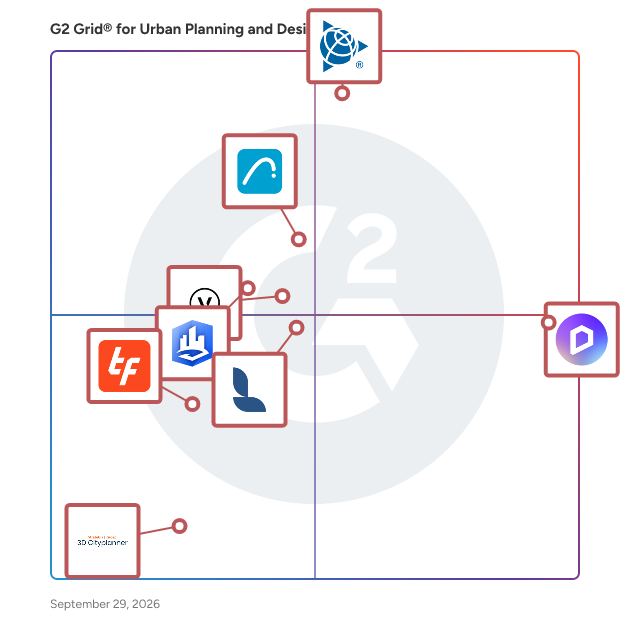
G2 Grid® for Urban Planning and Design Software

G2 Grid® for Urban Planning and Design Software plotting products by satisfaction and market presence

Highlighted products: SketchUp, D5 Render, Archicad, Vectorworks Landmark, ArcGIS CityEngine, Lumion Pro, TestFit, and 3D Cityplanner.

Underlying data: [Grid® JSON](https://www.g2.com/categories/urban-planning-and-design/grids.json?focus%5B%5D=sketchup&focus%5B%5D=d5-render&focus%5B%5D=archicad&focus%5B%5D=vectorworks-landmark&focus%5B%5D=arcgis-cityengine&focus%5B%5D=lumion-pro&focus%5B%5D=testfit&focus%5B%5D=3d-cityplanner)

SketchUp

Trimble is a global technology company founded in 1978 and headquartered in Westminster, Colorado. With over 11,000 employees worldwide, Trimble connects the physical and digital worlds to transform the ways work gets done. Through relentless innovation in precise positioning, modeling, and data analytics, Trimble powers essential industries including construction, geospatial, and transportation. Whether helping customers build infrastructure, optimize global supply chains, or map the world, Trimble is at the forefront of driving productivity and progress. Trimble SketchUp provides a comprehensive 3D design ecosystem starting with its highly intuitive 3D modeling app, empowering professionals to create and communicate in 3D quickly and accurately. 3D output transitions seamlessly into detailed, precise 2D documentation, allowing designers to combine 2D and 3D graphics into impactful presentations and comprehensive construction drawing sets. Speed up the design process with access to 3D Warehouse, a massive searchable library of pre-built models, while SketchUp AI introduces intelligent tools for rapid rendering and geometry creation to instantly turn basic concepts into client-ready deliverables. SketchUp also offers advanced tools for working with point clouds and Revit files efficiently, plus photorealistic rendering with V-Ray, and more. What's Included* > Professional 3D modeling applications for Desktop, iPad, and Web > Desktop publishing tools for professional documentation > The world's largest free 3D library of pre-built models > Site-specific climate insights, environmental analysis, and design recommendations > Plugin library to customize and augment SketchUp capabilities > Geolocation of models to import satellite imagery, terrain, and surrounding context > Cloud storage to manage and share project files in 2D and 3D > AI-powered image and 3D geometry creation > Advanced interoperability with native Revit files > Import, view, and model directly on point cloud data within SketchUp > Advanced photorealistic rendering, includes ray tracing and artificial lighting with V-Ray SketchUp enables unmatched creative flow with precision, making it the best tool for creating, developing, and communicating your design solutions. It solves critical workflow barriers by ensuring users never have to compromise creativity for accuracy—or wrestle with the budgetary, time, and quality deficits that result from navigating between disjointed programs. By providing this integrated, intuitive ecosystem, SketchUp removes technical barriers and enables unlimited creative freedom, effective communication, and seamless collaboration. *Dependent on subscription tier

Average Rating: 4.5/5.0

Total Reviews: 1,298

How Do G2 Users Rate SketchUp?

  • Quality of Support: 8.1/10 (Category avg: 8.4/10)
  • Sequence: 7.4/10 (Category avg: 7.8/10)
  • 3D Modeling: 9.0/10 (Category avg: 8.4/10)
  • 2D Modeling: 7.5/10 (Category avg: 8.1/10)

Who Is the Company Behind SketchUp?

  • Seller: Trimble
  • Year Founded: 1978
  • HQ Location: Sunnyvale, CA
  • Twitter: @TrimbleCorpNews
    12,061 Twitter followers
  • LinkedIn® Page: www.linkedin.com
    18,122 employees on LinkedIn®
  • Ownership: NASDAQ

Who Uses This Product?

  • Who Uses This: Architect, Designer
  • Top Industries: Architecture & Planning, Design
  • Company Size: 75% Small, 18% Medium

What Do G2 Reviewers Say About SketchUp?

AI-generated summary from verified user reviews

Pros
  • Users value the ease of use of SketchUp, enjoying its intuitive learning curve and straightforward modeling process.
  • Users appreciate the intuitive 3D modeling capabilities of SketchUp, making design work quick and straightforward.
  • Users appreciate the ease of learning in SketchUp, finding it intuitive and straightforward for 3D modeling.
  • Users love the intuitive design of SketchUp, finding it simplifies 3D modeling and enhances the creative process.
  • Users love the intuitive and quick drawing capabilities of SketchUp for creating accurate 2D and 3D designs.
Cons
  • Users find the poor rendering quality of SketchUp hampers detailed work and requires costly plugins for improvement.
  • Users find SketchUp expensive with hidden costs and subscription models, complicating access to essential features and updates.
  • Users report slow performance with large models in SketchUp, leading to frustration and limitations on sophisticated projects.
  • Users find the limited rendering capabilities of SketchUp frustrating, hindering high-detail modeling and professional visualizations.
  • Users often experience performance issues with SketchUp, particularly when handling large or complex models, causing frustrating delays.

What Are Recent G2 Reviews of SketchUp?

What Are G2 Users Discussing About SketchUp?

D5 Render

D5 is a visualization ecosystem for architecture, landscape architecture, interior design, engineering, and other 3D design professionals. Combining real-time rendering, AI-assisted visualization, design content, and team collaboration, the D5 ecosystem brings together D5 Render, D5 Lite, D5 Works, and D5 Teams to support visualization workflows from concept design through project presentation and collaboration. The D5 ecosystem includes four complementary products: - D5 Render is a real-time rendering and visualization solution that combines GPU ray tracing, rasterization, and real-time path tracing. It enables designers to create photorealistic images, animations, panoramas, and Interactive Presentations while visualizing design changes in real time. D5 Render supports LiveSync and direct import workflows for SketchUp, Revit, Rhino, Archicad, 3ds Max, Blender, Cinema 4D, and Vectorworks. - D5 Lite is an AI-native visualization plugin for SketchUp, Rhino, and Revit. It brings AI-powered visualization and real-time path tracing into the modeling environment, allowing designers to explore lighting, materials, and atmosphere during early-stage design before continuing in D5 Render. - D5 Works is a 3D asset platform for architecture, landscape, and interior design. It offers professionally curated models, materials, and design assets, and integrates with D5 Render to support content discovery and visualization workflows. - D5 Teams is a collaboration solution for design teams featuring Enterprise Team Library, enabling teams to securely access, organize, and share content across projects. Key capabilities of D5 Render include: - Real-time rendering with GPU ray tracing, real-time path tracing, and D5 Global Illumination (D5 GI). - Interactive visualization and presentation, including Interactive Presentation, animation, VR Recording, and stereoscopic panoramas. - AI-powered visualization tools, including AI Agent, AI Scene Match, AI Atmosphere Match, AI PBR Material Snap, AI Ultra HD Texture, AI Model Generation, AI Enhancer, AI Style Transfer, and AI Inpainting. - Landscape and environment tools, including Scatter, Brush, Path, Terrain, City Generator, Seasonal Vegetation, and HeightField Tracing. - Professional rendering output, supporting images and panoramas up to 16K resolution, 4K video rendering at up to 120 FPS, and render passes including Material ID, Reflection, Ambient Occlusion (AO), Sky Mask, and Z-depth. - Integrated CAD and BIM workflows through LiveSync plugins and direct file support for SketchUp, Revit, Rhino, Archicad, 3ds Max, Blender, Cinema 4D, and Vectorworks.

Average Rating: 4.8/5.0

Total Reviews: 1,065

How Do G2 Users Rate D5 Render?

  • Quality of Support: 9.1/10 (Category avg: 8.4/10)
  • Sequence: 10.0/10 (Category avg: 7.8/10)
  • 3D Modeling: 7.2/10 (Category avg: 8.4/10)
  • 2D Modeling: 10.0/10 (Category avg: 8.1/10)

Who Is the Company Behind D5 Render?

  • Seller: Dimension 5 Techs
  • Company Website:
  • Year Founded: 2020
  • HQ Location: New York, US
  • LinkedIn® Page: www.linkedin.com
    155 employees on LinkedIn®

Who Uses This Product?

  • Who Uses This: Architect, Student
  • Top Industries: Architecture & Planning, Design
  • Company Size: 90% Small, 2% Medium

What Do G2 Reviewers Say About D5 Render?

AI-generated summary from verified user reviews

Pros
  • Users praise D5 Render for its ease of use, making complex rendering tasks quick and straightforward.
  • Users love the realistic rendering of D5 Render, transforming architectural visualization with stunning results and intuitive interface.
  • Users admire the impressive rendering quality of D5 Render, finding it user-friendly and efficient for professional design work.
  • Users praise the fast real-time rendering of D5 Render, transforming architectural visualization with stunning results and efficiency.
  • Users love the real-time rendering quality of D5 Render, enabling quick and stunning visuals effortlessly.
Cons
  • Users find the limited assets in D5 Render hinder their ability to create detailed, customized presentations.
  • Users find the limited materials in D5 Render restricts their creative options, especially for advanced rendering needs.
  • Users face performance issues on lower-end devices, affecting the experience and leading to lag in projects.
  • Users find that D5 Render has high system requirements, necessitating powerful hardware for optimal performance.
  • Users feel that D5 Render is expensive, especially with no trial available to assess its value before purchase.

What Are Recent G2 Reviews of D5 Render?

What Are G2 Users Discussing About D5 Render?

Archicad

Archicad is a Building Information Modeling (BIM) software platform developed by Graphisoft. It’s designed for architects, designers, engineers, and other AEC professionals. Archicad is available natively on both Windows and macOS, empowering professionals to design, model, visualize, document, and collaborate on projects of any size—from initial concept through construction. Archicad is ideal for architects, designers, engineers, and other AEC professionals who want to streamline building design, modeling, documentation, collaboration, and visualization using BIM workflows. - Archicad is widely adopted by architectural firms, solo practitioners, construction professionals, and BIM managers seeking efficient design processes and reliable project coordination.​ - Students and educators also benefit from Archicad’s free educational licensing for learning and teaching BIM principles.​ Whether working independently or as part of a team, Archicad supports projects of all sizes and stages—from initial concept development through construction, making it a preferred solution for anyone looking to excel in digital building design. Archicad provides a comprehensive suite of architectural and MEP toolsets: - Parametric building elements: Wall, Slab, Roof, Column, and Beam tools automatically adjust and maintain relationships between building components for seamless design updates.​ - Intelligent objects: Easily customizable Doors, Windows, Stairs, Railings, and Curtain Walls support advanced modeling and design flexibility.​ - Structural modeling: Native tools for modeling and analyzing load-bearing elements, plus real-time updating and automatic creation of a Structural Analytical Model for coordination with engineers.​ - MEP feature set: Design, model, and document mechanical, electrical, and plumbing systems using built-in parametric objects, clash detection, and unified collaboration workflows.​ Archicad’s integrated environment enables architects and engineers to collaborate, with automatic documentation and seamless transitions from concept to construction. Archicad enables efficient team collaboration using BIMcloud: - Real-time teamwork: Multiple users can work on the same model simultaneously, with changes synchronized automatically and version management handled in the cloud.​ - Conflict reduction: Automated sync and smart notifications help minimize conflicts and version issues during design development.​ - Distributed collaboration: BIMcloud connects teams across offices and disciplines, supporting both internal and cross-company workflows.​ This setup streamlines project delivery and ensures all team members stay up-to-date throughout every project stage.

Average Rating: 4.6/5.0

Total Reviews: 286

How Do G2 Users Rate Archicad?

  • Quality of Support: 8.3/10 (Category avg: 8.4/10)
  • Sequence: 7.4/10 (Category avg: 7.8/10)
  • 3D Modeling: 9.2/10 (Category avg: 8.4/10)
  • 2D Modeling: 8.6/10 (Category avg: 8.1/10)

Who Is the Company Behind Archicad?

  • Seller: GRAPHISOFT
  • Company Website:
  • Year Founded: 1982
  • HQ Location: Budapest, Hungary
  • Twitter: @GRAPHISOFT
    8,630 Twitter followers
  • LinkedIn® Page: www.linkedin.com
    928 employees on LinkedIn®

Who Uses This Product?

  • Who Uses This: Architect, Principal
  • Top Industries: Architecture & Planning, Construction
  • Company Size: 86% Small, 11% Medium

What Do G2 Reviewers Say About Archicad?

AI-generated summary from verified user reviews

Pros
  • Users appreciate the extreme ease of use of Archicad, enjoying its intuitive interface and seamless integration.
  • Users value the intuitive interface of Archicad, enhancing their modeling efficiency and overall design experience.
  • Users value the user-friendly design and powerful features of Archicad, benefiting both individuals and large teams.
  • Users value the design efficiency of Archicad, enhancing 3D modeling and project management in diverse architectural fields.
  • Users praise Archicad's intuitive design tools, facilitating creativity and ease of use for architects and engineers alike.
Cons
  • Users find the missing features in ArchiCAD, specifically for site modifications, to significantly hinder their workflow.
  • Users are frustrated by the bulky libraries that significantly delay loading times and limit available objects.
  • Users find the limited library in ArchiCAD hampers essential features and complicates project workflows significantly.
  • Users express frustration over ArchiCAD's limited modeling capabilities, lacking essential site modification features and automation.
  • Users find that Archicad's inadequate tools necessitate creativity and hard workarounds, especially for large-scale projects.

What Are Recent G2 Reviews of Archicad?

What Are G2 Users Discussing About Archicad?

Vectorworks Landmark

Vectorworks Landmark is a design and Building Information Modeling (BIM) software platform for landscape architects and designers. It helps professionals take site and landscape projects from early concepts through coordinated documentation and final deliverables while balancing creative intent, constructability, and environmental performance. The platform brings terrain modeling, planting design, BIM, visualization, and documentation together in one intuitive interface. Vectorworks Landmark 2027 includes intelligent landscape objects, powerful plant and site databases, flexible documentation tools, and cloud-based collaboration with Vectorworks Cloud Services. New capabilities include the Volume Fill tool for quantifying spaces such as attenuation ponds and site-model low areas, simplified georeferencing via the Geolocation Setup Wizard, and AI-assisted visualization using Nano Banana models in the AI Visualizer. Vectorworks Landmark helps landscape professionals design resilient, data-rich environments more efficiently. It reduces manual rework by helping teams evaluate grading and site-volume impacts, streamline plant selection and placement, coordinate project information, and clearly communicate design intent—from conceptual landscape plans to detailed construction documentation. Vectorworks Landmark supports projects across every phase of the design process: • Phase 1: Pre-design — Every site designer’s process begins with a base file, and Landmark frees your workflow from there — whether you start from field measurements, surveys, GIS mapping, or drone-captured data, you’ll be able to work with an informed context plan and model to conduct pre-development analysis such as sun/shade, surface drainage, and slope. • Phase 2: Schematic Design — Bring your sketches to life by converting them to smart objects like hardscapes, landscape areas, plantings, and more. Landmark continuously supports your project through varying levels of detail, from 2D drafted concepts and bubble diagrams to 3D site modeling. This gives you the flexibility to use conceptual objects until you’re ready to specify your exact materials and easily update them with more accurate components as your design progresses. • Phase 3: Design Development — Count on Landmark to keep your projects current by referencing DWG, IFC, and RVT files and work through iterative changes from your collaborators. As your maturing projects gather more intelligence and data, you can use visual analysis to ensure your designed elements and their impacts on the site will be better performing. This data is also harvested through reports to capture the crucial calculations required by the client, contractor, and approving agencies. • Phase 4: Construction Documentation — Vectorworks Landmark’s sheet layers and customizable viewports allow you to make detailed construction documents that fit the needs of your design process. 3D data-driven design tools and a flexible BIM workflow allow you to seamlessly update and coordinate plans, elevations, sections, and any other details in your designs. Collaborate without compromise with a software that makes producing construction documents more efficient and less tedious.

Average Rating: 4.3/5.0

Total Reviews: 74

How Do G2 Users Rate Vectorworks Landmark?

  • Quality of Support: 8.5/10 (Category avg: 8.4/10)
  • Sequence: 6.3/10 (Category avg: 7.8/10)
  • 3D Modeling: 7.7/10 (Category avg: 8.4/10)
  • 2D Modeling: 8.5/10 (Category avg: 8.1/10)

Who Is the Company Behind Vectorworks Landmark?

  • Seller: Vectorworks, Inc.
  • Company Website:
  • Year Founded: 1985
  • HQ Location: Columbia, Maryland
  • Twitter: @Vectorworks
    10,997 Twitter followers
  • LinkedIn® Page: www.linkedin.com
    321 employees on LinkedIn®

Who Uses This Product?

  • Who Uses This: Landscape Architect, Owner
  • Top Industries: Architecture & Planning, Design
  • Company Size: 77% Small, 15% Medium

What Do G2 Reviewers Say About Vectorworks Landmark?

AI-generated summary from verified user reviews

Pros
  • Users praise the ease of use of Vectorworks Landmark, appreciating its templates, library, and powerful rendering capabilities.
  • Users rave about the impressive 3D visualization capabilities of Vectorworks Landmark, enhancing design and presentation quality significantly.
  • Users appreciate the powerful drawing capabilities of Vectorworks Landmark, enhancing both illustrative and construction plan production.
  • Users value the versatile parametric/BIM tools in Vectorworks Landmark, enhancing their design capabilities with integrated workflows.
  • Users value the integrated planting and modeling tools of Vectorworks Landmark, enhancing their design and workflow efficiency.
Cons
  • Users face a steep learning curve with Vectorworks Landmark, making initial use and mastering features challenging.
  • Users find the difficult learning curve of Vectorworks Landmark to be a significant obstacle for beginners.
  • Users find poor usability in Vectorworks Landmark due to unclear information and difficulties in file sharing.
  • Users find the steep learning curve daunting, as mastering Vectorworks Landmark's depth takes significant time and effort.
  • Users express frustration with the inadequate tools in Vectorworks Landmark, citing difficulties with 3D modeling and text formatting.

What Are Recent G2 Reviews of Vectorworks Landmark?

What Are G2 Users Discussing About Vectorworks Landmark?

Lumion Pro

Lumion Pro is the trusted advanced visualization solution for thousands of architects, designers and visualization professionals worldwide. It benefits those seeking to take full control of their design visualizations, creating high-quality, photorealistic results without compromising speed or creativity. Built for professionals, it combines intuitive tools, lightning-fast performance, and unparalleled realism to help you turn your models into client-ready visuals. Lumion Pro contains everything you need to turn models into client-ready visuals: -Import your 3D model: Use the LiveSync plugin to create a real-time connection with your favorite CAD or BIM tool. -Build scenes from the ground up: Apply realistic materials using a full PBR workflow. Shape terrain with intuitive landscape controls and create projects of any scale, from garden plots to entire city blocks. -Add context fast: Select items from an asset library of over 10,000 items. Apply terrain, nature, objects, characters and more. -Fine-tune with effects: Sharpen the mood using a wide range of stunning weather and atmospheric effects and post-processing options. -Render high-quality outputs: tell your design stories effectively through high-quality images, videos, or panoramas. Upscale images to 4x with AI Upscaler. -Get projects finished, and signed-off, faster: Upload renders to Lumion Cloud for teams and clients to collaborate and approve. Compatible with all major CAD & BIM, including: -ArchiCAD -AutoCAD -Autodesk FormIt -Revit -Rhino -SketchUp And many more! System Requirements & Recommendations Lumion Pro is Windows-only software. As a 3D rendering program, Lumion Pro is different from other CAD software as it relies primarily on having an excellent graphics card. This is especially important for Lumion Pro’s high-end features. Lumion Pro requires a computer with a fast graphics card, plenty of memory, and an internet connection. Check the system requirements on our website. Lumion’s software is trusted by hundreds of thousands of users in more than 180 countries and is adopted by three-quarters of the world’s top 100 architecture firms. Whether you're presenting early ideas or final designs, Lumion’s solutions help communicate intent visually, so clients understand faster and approvals come sooner.

Average Rating: 4.5/5.0

Total Reviews: 107

How Do G2 Users Rate Lumion Pro?

  • Quality of Support: 8.6/10 (Category avg: 8.4/10)
  • Sequence: 8.1/10 (Category avg: 7.8/10)
  • 3D Modeling: 6.5/10 (Category avg: 8.4/10)
  • 2D Modeling: 5.0/10 (Category avg: 8.1/10)

Who Is the Company Behind Lumion Pro?

  • Seller: Lumion
  • Company Website:
  • Year Founded: 2001
  • HQ Location: Sassenheim, NL
  • Twitter: @lumion3d
    11,140 Twitter followers
  • LinkedIn® Page: www.linkedin.com
    151 employees on LinkedIn®

Who Uses This Product?

  • Who Uses This: Architect, Designer
  • Top Industries: Architecture & Planning, Construction
  • Company Size: 70% Small, 19% Medium

What Do G2 Reviewers Say About Lumion Pro?

AI-generated summary from verified user reviews

Pros
  • Users love the excellent speed in rendering of Lumion Pro, significantly boosting their workflow efficiency.
  • Users appreciate the time-saving rendering speed of Lumion Pro, significantly enhancing workflow efficiency compared to other software.
  • Users value the excellent speed in rendering of Lumion Pro, significantly enhancing their workflow efficiency.
  • Users appreciate the ease of use of Lumion Pro, enhancing workflow and simplifying the rendering process significantly.
  • Users highlight the excellent speed in rendering with Lumion Pro, significantly enhancing their workflow efficiency.
Cons
  • Users find the limited materials in Lumion Pro challenging, complicating workflow and impacting project quality.
  • Users find managing materials complex, especially in large projects, complicating their experience with Lumion Pro.
  • Users find material management complex in Lumion Pro, particularly when handling large projects, complicating the experience.
  • Users find the difficulty learning curve of Lumion challenging, particularly in managing materials for large projects.
  • Users note the requirement for good hardware in Lumion Pro complicates high-detail project executions.

What Are Recent G2 Reviews of Lumion Pro?

What Are G2 Users Discussing About Lumion Pro?

ArcGIS CityEngine

Esri CityEngine is 3D modeling software for quickly creating large urban environments. The environments you choose to create can be based on real-world data or can be completely conceptual. CityEngine saves you time by using rules to automatically create the urban environment based on your input. You can import 3D models you've created in other software to create context around them and export your entire environment into visualization tools, game engines and VR experiences.

Average Rating: 4.2/5.0

Total Reviews: 20

How Do G2 Users Rate ArcGIS CityEngine?

  • Quality of Support: 8.4/10 (Category avg: 8.4/10)
  • Sequence: 9.4/10 (Category avg: 7.8/10)
  • 3D Modeling: 10.0/10 (Category avg: 8.4/10)
  • 2D Modeling: 10.0/10 (Category avg: 8.1/10)

Who Is the Company Behind ArcGIS CityEngine?

  • Seller: Esri
  • Year Founded: 1969
  • HQ Location: Redlands, CA
  • Twitter: @Esri
    188,738 Twitter followers
  • LinkedIn® Page: www.linkedin.com
    7,396 employees on LinkedIn®

Who Uses This Product?

  • Company Size: 168% Medium, 64% Large

What Are Recent G2 Reviews of ArcGIS CityEngine?

What Are G2 Users Discussing About ArcGIS CityEngine?

TestFit

TestFit is the real estate feasibility platform that makes it easy to do site planning for developers, architects, and contractors who want to maximize site potential and get the right deals done faster. TestFit takes care of tedious tasks like counting parking stalls, drafting iterations, and calculating yield on cost by generating rapid concept iterations based on your parametric input. Our AI configurators optimize the best design solutions for every site with real-time insights into design, constructability, and cost so you can save time on site planning, reduce risk on acquiring deals, and increase potentials for all your sites. Over 650 Deals and 80,000 units are evaluated in TestFit per week.

Average Rating: 4.3/5.0

Total Reviews: 22

How Do G2 Users Rate TestFit?

  • Quality of Support: 9.1/10 (Category avg: 8.4/10)
  • Sequence: 6.5/10 (Category avg: 7.8/10)
  • 3D Modeling: 7.1/10 (Category avg: 8.4/10)
  • 2D Modeling: 7.8/10 (Category avg: 8.1/10)

Who Is the Company Behind TestFit?

  • Seller: TestFit
  • Year Founded: 2016
  • HQ Location: Dallas, US
  • Twitter: @TestFitInc
    5,509 Twitter followers
  • LinkedIn® Page: www.linkedin.com
    181 employees on LinkedIn®

Who Uses This Product?

  • Top Industries: Architecture & Planning
  • Company Size: 68% Small, 27% Medium

What Do G2 Reviewers Say About TestFit?

AI-generated summary from verified user reviews

Pros
  • Users value the ease of use of TestFit, significantly enhancing efficiency and streamlining site planning tasks.
  • Users appreciate the efficiency of TestFit, streamlining site planning with powerful automation and quick calculations.
  • Users value TestFit's responsive customer service and its ability to facilitate complex design decisions efficiently.
  • Users find TestFit's quick and powerful area allocation capabilities enhance efficiency and streamline the design process.
  • Users value the simplicity and rapid design iteration capabilities of TestFit, streamlining their pre-design processes effectively.
Cons
  • Users note the missing features in TestFit, like UK mapping and limitations in custom layouts and entries.
  • Users feel that the limited capabilities hinder effective use, with challenges around mapping and layout customization.
  • Users find the poor interface design of TestFit challenging and feel a course is necessary for usability.
  • Users find the poor usability of TestFit challenging, requiring a course to navigate effectively.
  • Users express frustration with the software bugs in TestFit, despite quick updates from the company addressing these issues.

What Are Recent G2 Reviews of TestFit?

3D Cityplanner

3D Cityplanner is a powerful 3D software that is transforming the way urban development projects are being planned and executed. It enables urban planners to create virtual 3D models of cities, streets, buildings and other structures. This makes it easier to visualize how a project will look like in the future, as well as identify potential problems before they arise. 3D Cityplanner also allows for easy collaboration between stakeholders, since all data can be shared in a single platform. This makes it easier for everyone involved to stay on top of changes and make sure the project is moving forward in the right direction. Ultimately, this leads to better results and more efficient projects that are completed on time and within budget.

Average Rating: 4.3/5.0

Total Reviews: 18

How Do G2 Users Rate 3D Cityplanner?

  • Quality of Support: 9.7/10 (Category avg: 8.4/10)
  • Sequence: 8.0/10 (Category avg: 7.8/10)
  • 3D Modeling: 8.0/10 (Category avg: 8.4/10)
  • 2D Modeling: 6.4/10 (Category avg: 8.1/10)

Who Is the Company Behind 3D Cityplanner?

  • Seller: Strategis Groep bv
  • Year Founded: 2005
  • HQ Location: Amersfoort, NL
  • Twitter: @StrateGisGroep
    102 Twitter followers
  • LinkedIn® Page: www.linkedin.com
    6 employees on LinkedIn®

Who Uses This Product?

  • Top Industries: Architecture & Planning
  • Company Size: 83% Small, 11% Medium

What Are Recent G2 Reviews of 3D Cityplanner?

What Are G2 Users Discussing About 3D Cityplanner?

CityCAD

CityCAD is a city information modelling solution for urban designers and planners who want to explore, test and communicate development options for large scale mixed-use urban masterplans. Unlike conventional CAD and GIS software, CityCAD was created specifically for urban planning and makes it easy to create 3D models of cities using tried-and-tested street types and urban typologies. For more information please visit www.holisticcity.co.uk

Average Rating: 4.3/5.0

Total Reviews: 9

How Do G2 Users Rate CityCAD?

  • Quality of Support: 8.9/10 (Category avg: 8.4/10)
  • Sequence: 7.8/10 (Category avg: 7.8/10)
  • 3D Modeling: 7.9/10 (Category avg: 8.4/10)
  • 2D Modeling: 8.3/10 (Category avg: 8.1/10)

Who Is the Company Behind CityCAD?

Who Uses This Product?

  • Company Size: 80% Small, 10% Large

What Do G2 Reviewers Say About CityCAD?

AI-generated summary from verified user reviews

Pros
  • Users find the seamless integrations of CityCAD greatly enhance their experience and workflow efficiency.
  • Users appreciate the seamless integrations of CityCAD, enhancing their experience with efficient connectivity.
Cons
  • Users desire enhancements in realism regarding graphics and detailing in CityCAD for better accuracy and immersion.
  • Users find the poor customer support of CityCAD to be a significant challenge in their experience.
  • Users desire enhancements in graphics and detailing for CityCAD to improve visual quality and realism.

What Are Recent G2 Reviews of CityCAD?

cmBuilder.io

cmBuilder democratizes 4D construction site logistics with fast & easy cloud-based workflows, powerful sequencing simulation capabilities, and unparalleled real-time collaboration.

Average Rating: 4.9/5.0

Total Reviews: 27

How Do G2 Users Rate cmBuilder.io?

  • Quality of Support: 9.9/10 (Category avg: 8.4/10)
  • Sequence: 9.4/10 (Category avg: 7.8/10)
  • 3D Modeling: 8.9/10 (Category avg: 8.4/10)
  • 2D Modeling: 8.1/10 (Category avg: 8.1/10)

Who Is the Company Behind cmBuilder.io?

  • Seller: CadMakers
  • Company Website:
  • Year Founded: 2014
  • HQ Location: Burnaby
  • LinkedIn® Page: www.linkedin.com
    68 employees on LinkedIn®

Who Uses This Product?

  • Top Industries: Construction
  • Company Size: 56% Medium, 26% Large

What Do G2 Reviewers Say About cmBuilder.io?

AI-generated summary from verified user reviews

Pros
  • Users find cmBuilder.io to be incredibly intuitive, making it easy for anyone to navigate and utilize effectively.
  • Users value the efficient project planning of CM Builder, enhancing collaboration and site management with 3D capabilities.
  • Users commend the responsive and supportive customer service of cmBuilder.io, enhancing their overall experience significantly.
  • Users find cmBuilder.io to be incredibly intuitive, making it easy for anyone to learn and use effectively.
  • Users praise the intuitive interface and extensive resource library of cmBuilder.io, enhancing project visualization and collaboration.
Cons
  • Users find the service expensive, especially for the highest subscription tier with essential features locked behind a paywall.
  • Users note a lack of realism in cmBuilder.io due to limitations in advanced rendering capabilities and customization options.
  • Users note that limited accessibility to advanced features can hinder cmBuilder.io's usability for some businesses.
  • Users find limited customization options restrict visual realism and function, affecting their overall modeling experience.
  • Users experience slow performance occasionally, especially with large models, which can lead to frustration during use.

What Are Recent G2 Reviews of cmBuilder.io?

UrbanFootprint

Get quick answers to complex urban planning and mobility questions. Innovate your planning process with UrbanFootprint.

Average Rating: 4.4/5.0

Total Reviews: 7

How Do G2 Users Rate UrbanFootprint?

  • Quality of Support: 8.3/10 (Category avg: 8.4/10)
  • Sequence: 7.5/10 (Category avg: 7.8/10)
  • 3D Modeling: 8.9/10 (Category avg: 8.4/10)
  • 2D Modeling: 7.2/10 (Category avg: 8.1/10)

Who Is the Company Behind UrbanFootprint?

  • Seller: UrbanFootprint
  • Year Founded: 2015
  • HQ Location: Berkeley, US
  • Twitter: @UFPlatform
    5,102 Twitter followers
  • LinkedIn® Page: www.linkedin.com
    9 employees on LinkedIn®

Who Uses This Product?

  • Company Size: 57% Medium, 43% Large

What Do G2 Reviewers Say About UrbanFootprint?

AI-generated summary from verified user reviews

Pros
  • Users find UrbanFootprint to be easy to use, enhancing their ability to analyze location-based data effectively.
  • Users commend the accuracy of UrbanFootprint in analyzing location-based datasets, enhancing market understanding and scenario planning.
  • Users value the comprehensive analysis capabilities of UrbanFootprint, enhancing understanding of markets and populations.
  • Users find UrbanFootprint efficient for urban planning, aiding in the analysis of critical developmental factors.
  • Users value the intelligent location-based analysis of UrbanFootprint, enhancing their understanding of markets and populations.
Cons
  • Users feel that UrbanFootprint is expensive due to the need for extensive training and onboarding resources.
  • Users find UrbanFootprint lacks robust modeling tools to assess impacts on public transportation systems effectively.
  • Users note the limited modeling capabilities of UrbanFootprint make it challenging to assess impacts on public transportation systems.

What Are Recent G2 Reviews of UrbanFootprint?

ArcGIS Urban

ArcGIS Urban is an immersive 3D experience designed to improve urban planning and decision-making. Quickly visualize projects in your local context and leverage location intelligence to drive better decisions. Be more proactive and less reactive in your planning process. Simplify project collaboration across internal agencies and public stakeholders.

Average Rating: 4.1/5.0

Total Reviews: 4

How Do G2 Users Rate ArcGIS Urban?

  • Quality of Support: 7.2/10 (Category avg: 8.4/10)
  • Sequence: 5.6/10 (Category avg: 7.8/10)
  • 3D Modeling: 9.4/10 (Category avg: 8.4/10)
  • 2D Modeling: 8.9/10 (Category avg: 8.1/10)

Who Is the Company Behind ArcGIS Urban?

  • Seller: Esri
  • Year Founded: 1969
  • HQ Location: Redlands, CA
  • Twitter: @Esri
    188,738 Twitter followers
  • LinkedIn® Page: www.linkedin.com
    7,396 employees on LinkedIn®

Who Uses This Product?

  • Company Size: 50% Medium, 25% Large

What Are Recent G2 Reviews of ArcGIS Urban?

What Are G2 Users Discussing About ArcGIS Urban?

Nomoko

We capture your chosen location in 3D and integrate your designs into photorealistic and accurate environments that help you plan, design and visualize your urban development projects.

Average Rating: 4.2/5.0

Total Reviews: 3

How Do G2 Users Rate Nomoko?

  • Quality of Support: 6.7/10 (Category avg: 8.4/10)
  • Sequence: 8.9/10 (Category avg: 7.8/10)
  • 3D Modeling: 8.3/10 (Category avg: 8.4/10)
  • 2D Modeling: 8.9/10 (Category avg: 8.1/10)

Who Is the Company Behind Nomoko?

  • Seller: Nomoko
  • Year Founded: 2015
  • HQ Location: Zurich, CH
  • LinkedIn® Page: www.linkedin.com
    4 employees on LinkedIn®

Who Uses This Product?

  • Company Size: 33% Small, 33% Large

What Are Recent G2 Reviews of Nomoko?

TopoDOT

TopoDOT is a point cloud processing software application offering a comprehensive feature extraction tool suite with the right balance between automation and quality assurance. TopoDOT offers a well-documented process to extract Digital Twin as-built deliverables such as topographies, assets, 3D models, measurements, data analyses, and reports meeting the highest quality-controlled standards. Our TopoShare product provides a comprehensive process to organize, store and share your data across operations at the lowest possible cost. TopoDOT LLC is headquartered in Winter Garden, Florida.

Average Rating: 4.0/5.0

Total Reviews: 2

How Do G2 Users Rate TopoDOT?

  • Quality of Support: 8.3/10 (Category avg: 8.4/10)
  • Sequence: 6.7/10 (Category avg: 7.8/10)
  • 3D Modeling: 5.0/10 (Category avg: 8.4/10)
  • 2D Modeling: 8.3/10 (Category avg: 8.1/10)

Who Is the Company Behind TopoDOT?

  • Seller: TopoDOT
  • Year Founded: 2011
  • HQ Location: Winter Garden, US
  • Twitter: @_TopoDOT
    2,004 Twitter followers
  • LinkedIn® Page: www.linkedin.com
    26 employees on LinkedIn®

Who Uses This Product?

  • Company Size: 100% Small

What Do G2 Reviewers Say About TopoDOT?

AI-generated summary from verified user reviews

Pros
  • Users value the collaboration capabilities with actual data in TopoDOT, enhancing their workflow efficiency.

What Are Recent G2 Reviews of TopoDOT?

Arcol

Arcol simplifies the earliest stages of projects for architects, developers and contractors. Arcol is a parametric modeling technology with that produces real-time data/metrics, supports real-time multiplayer collaboration and creates ready made client presentations for you.

Average Rating: 4.0/5.0

Total Reviews: 1

How Do G2 Users Rate Arcol?

  • Quality of Support: 5.0/10 (Category avg: 8.4/10)
  • 3D Modeling: 10.0/10 (Category avg: 8.4/10)

Who Is the Company Behind Arcol?

  • Seller: Arcol
  • HQ Location: N/A
  • Twitter: @ArcolTech
    1,370 Twitter followers
  • LinkedIn® Page: www.linkedin.com
    8 employees on LinkedIn®

Who Uses This Product?

  • Company Size: 100% Small

What Do G2 Reviewers Say About Arcol?

AI-generated summary from verified user reviews

Pros
  • Users love the collaborative online 3D modeling aspect of Arcol, enhancing learning and teamwork while reducing PC load.
  • Users value the 3D visualization capabilities of Arcol, enhancing collaborative architectural modeling and streamlining workflows.
  • Users appreciate the easy setup and collaborative 3D model building features of Arcol that enhance learning and efficiency.
  • Users value the collaborative capabilities of Arcol, enabling efficient teamwork in 3D architectural design.
  • Users find ease of learning with Arcol, appreciating its simple setup and collaborative online 3D modeling features.
Cons
  • Users find Arcol has limited features for building designs, hoping for future enhancements to improve usability.

What Are Recent G2 Reviews of Arcol?

Daniel Rivera
DR
Researched and written by Daniel Rivera
Updated October 3, 2024