Best Engineering Document Management Software

How Many Engineering Document Management Software Products Does G2 Track?

Total Products under this Category: 67

Category Stats (Sep 2026)

  • Average Rating: 4.36/5 (↑0.03 vs Aug 2026) The average rating of products in this category, based on all submitted ratings
  • Top Trending Product: Newforma (+0.26%) - Among all products in this category, Newforma recorded the largest rating increase compared to last month

Last updated: September 26, 2026

How Does G2 Rank Engineering Document Management Software Products?

Why You Can Trust G2's Software Rankings:

  • 30 Analysts and Data Experts
  • 2,900+ Authentic Reviews
  • 67+ Products
  • Unbiased Rankings

G2's software rankings are built on verified user reviews, rigorous moderation, and a consistent research methodology maintained by a team of analysts and data experts. Each product is measured using the same transparent criteria, with no paid placement or vendor influence. While reviews reflect real user experiences, which can be subjective, they offer valuable insight into how software performs in the hands of professionals. Together, these inputs power the G2 Score, a standardized way to compare tools within every category.

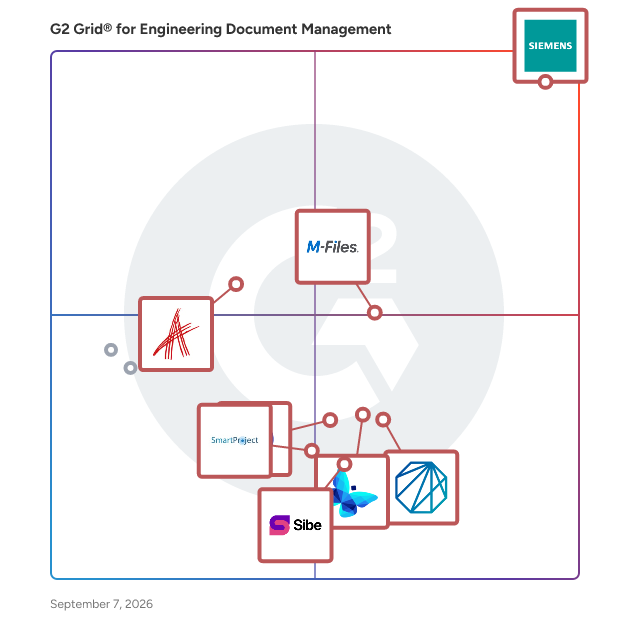
G2 Grid® for Engineering Document Management Software

G2 Grid® for Engineering Document Management Software plotting products by satisfaction and market presence

Highlighted products: Teamcenter, M-Files, Aras Innovator, Newforma, Synergis Adept, DocuWare, Sibe, and WRENCH SmartProject.

Underlying data: [Grid® JSON](https://www.g2.com/categories/engineering-document-management/grids.json?focus%5B%5D=teamcenter&focus%5B%5D=m-files&focus%5B%5D=aras-innovator&focus%5B%5D=newforma&focus%5B%5D=synergis-adept&focus%5B%5D=docuware&focus%5B%5D=sibe&focus%5B%5D=wrench-smartproject)

Teamcenter

Teamcenter® software is a modern, adaptable product lifecycle management (PLM) system designed to help organizations manage the entire lifecycle of a product from inception, through engineering design and manufacturing, to service and disposal. By connecting people and processes across functional silos, Teamcenter utilizes a digital thread to facilitate innovation and streamline product development. This comprehensive approach enables teams to collaborate effectively, ensuring that every stakeholder is engaged in the product development process. The target audience for Teamcenter encompasses a diverse range of professionals, including manufacturers, engineers, and product managers across industries such as automotive, aerospace, electronics, and consumer goods. These professionals often face complex challenges in product development, including managing intricate supply chains, ensuring compliance with regulations, and meeting customer demands for faster innovation. Teamcenter addresses these challenges by providing a centralized platform where teams can access critical information, share insights, and make informed decisions throughout the product lifecycle. Key features of Teamcenter include robust data management capabilities that allow users to organize and control product data efficiently. The software supports advanced visualization tools that enable teams to review and analyze designs collaboratively, which reduces errors and enhances decision-making. Additionally, Teamcenter's intuitive user interface simplifies navigation, making it easier for users to engage with the system and access the information they need. The platform also offers flexible deployment options, allowing organizations to choose between on-premises, cloud-based, or SaaS solutions via Teamcenter X, ensuring that they can adapt the software to their specific needs and infrastructure. The benefits of using Teamcenter are significant. Organizations can innovate faster by leveraging the software's comprehensive portfolio of solutions tailored to various aspects of product development. The integration of processes and data helps to eliminate silos, fostering collaboration and improving communication among teams. Furthermore, Teamcenter's scalability ensures that it can grow alongside an organization, accommodating increasing complexity and volume in product development efforts. By providing a unified platform for managing the entire product lifecycle, Teamcenter empowers organizations to deliver high-quality products more efficiently and effectively. In essence, Teamcenter serves as a vital tool for organizations looking to enhance their product development processes, ensuring that they can navigate the complexities of modern manufacturing and meet the evolving demands of the market.

Average Rating: 4.3/5.0

Total Reviews: 1,411

How Do G2 Users Rate Teamcenter?

  • Ease of Use: 7.8/10 (Category avg: 8.6/10)
  • Has the product been a good partner in doing business?: 8.4/10 (Category avg: 8.6/10)
  • Quality of Support: 8.3/10 (Category avg: 8.8/10)
  • Ease of Admin: 7.6/10 (Category avg: 8.2/10)

Who Is the Company Behind Teamcenter?

Who Uses This Product?

  • Who Uses This: Application Engineer, Design Engineer
  • Top Industries: Automotive, Aviation & Aerospace
  • Company Size: 52% Large, 33% Medium

What Do G2 Reviewers Say About Teamcenter?

AI-generated summary from verified user reviews

Pros
  • Users appreciate the ease of use of Teamcenter, highlighting its friendly setup and seamless integration for all disciplines.
  • Users appreciate the flexibility and integration capabilities of Teamcenter for effective data management and unique workflows.
  • Users value the seamless CAD/ERP integrations of Teamcenter, enhancing their product development and engineering workflows.
  • Users value the seamless integration and comprehensive functionality of Teamcenter, enhancing their product development process.
  • Users value Teamcenter's flexibility in creating unique workflows, ensuring quality and organization in product development.
Cons
  • Users face difficult usability with Teamcenter, struggling with complex workflows and configuration challenges that hinder productivity.
  • Users report a significant learning difficulty with Teamcenter due to its confusing workflows and dated user interface.
  • Users often face a steep learning curve due to customization requirements and separate view modifications in Teamcenter.
  • Users find usability complex, with challenging workflows and setups that hinder effective adoption, especially for small businesses.
  • Users find Teamcenter's interface not intuitive, with confusing features and processes that hinder efficiency and usability.

What Are Recent G2 Reviews of Teamcenter?

What Are G2 Users Discussing About Teamcenter?

M-Files

M-Files delivers Context-First Document Management with an AI-native, metadata-driven architecture that eliminates information chaos and improves productivity across the document lifecycle. By linking documents to the people, processes, clients, and projects that give them meaning, M-Files creates a unified, connected environment that accelerates decision-making, strengthens governance, and streamlines industry-specific workflows through advanced workflow automation and AI. M-Files is also the only document management system that is native to Microsoft 365. This unified solution extends Microsoft collaboration, Copilot, and Purview capabilities to curated M-Files content, enabling stronger security, more consistent compliance, and more accurate AI outcomes grounded in trusted, contextualized information. Organizations gain a seamless, future-ready environment that maximizes ROI on their Microsoft investments while supporting smarter and more efficient work across the business. Schedule a Demo: https://bit.ly/3O1SCm0

Average Rating: 4.4/5.0

Total Reviews: 229

How Do G2 Users Rate M-Files?

  • Ease of Use: 8.5/10 (Category avg: 8.6/10)
  • Has the product been a good partner in doing business?: 8.4/10 (Category avg: 8.6/10)
  • Quality of Support: 8.5/10 (Category avg: 8.8/10)
  • Ease of Admin: 7.7/10 (Category avg: 8.2/10)

Who Is the Company Behind M-Files?

  • Seller: M-Files Corporation
  • Year Founded: 2002
  • HQ Location: Austin, Texas
  • Twitter: @M_Files
    8,609 Twitter followers
  • LinkedIn® Page: www.linkedin.com
    858 employees on LinkedIn®

Who Uses This Product?

  • Who Uses This: Project Manager, Director
  • Top Industries: Information Technology and Services, Computer Software
  • Company Size: 48% Medium, 41% Small

What Do G2 Reviewers Say About M-Files?

AI-generated summary from verified user reviews

Pros
  • Users love the user-friendly interface of M-Files, making document management simple and efficient for everyone.
  • Users value the effortless organization and collaboration capabilities of M-Files, simplifying document management and access control.
  • Users value the easy access to files anytime, benefiting from a central, secure storage and user-friendly interface.
  • Users value the efficient data management capabilities of M-Files, enhancing organization and simplifying information retrieval significantly.
  • Users value the organization capabilities of M-Files, making project management and document tracking effortless and efficient.
Cons
  • Users find the learning curve steep for M-Files, requiring significant time and training for effective use.
  • Users face initial training challenges with M-Files, requiring extra time to adapt to the platform's structure.
  • Users report slow performance with M-Files, particularly during document retrieval and complex search operations.
  • Users often experience slow loading times in M-Files, particularly during complex searches and document handling.
  • Users find the outdated UI and inconsistent features of M-Files challenging, especially for new users.

What Are Recent G2 Reviews of M-Files?

What Are G2 Users Discussing About M-Files?

Aras Innovator

Aras Innovator is a flexible and scalable Product Lifecycle Management (PLM) platform designed to help organizations manage complex product data, processes, and digital threads across the enterprise. Unlike traditional PLM systems, Aras Innovator is built on a resilient, low-code architecture that enables rapid customization and continuous upgrades without disruption. This ensures businesses can adapt to evolving requirements while maintaining a single source of truth for product information. With Aras Innovator, companies can manage the entire product lifecycle—from concept and design to manufacturing, service, and beyond. It supports advanced configuration management, change control, requirements engineering, and simulation management, making it ideal for industries with highly complex products, such as aerospace, defense, automotive, and industrial manufacturing. A key differentiator of Aras Innovator is its support for the Digital Thread, connecting critical data across disciplines and throughout the lifecycle. This connectivity enhances traceability, collaboration, and decision-making, ensuring teams can access up-to-date, accurate information in real time. Unlike legacy PLM solutions with rigid licensing models, Aras Innovator uses an enterprise subscription model with unlimited user access, enabling seamless collaboration across global teams. Organizations benefit from continuous innovation, regular updates, and expert support without the risk of version lock-in. Available in both cloud and on-premises deployments, Aras Innovator empowers organizations to transform product development, improve efficiency, and drive innovation. By eliminating barriers to scalability and flexibility, it serves as a future-ready foundation for managing the complexities of modern engineering and manufacturing.

Average Rating: 4.4/5.0

Total Reviews: 113

How Do G2 Users Rate Aras Innovator?

  • Ease of Use: 7.9/10 (Category avg: 8.6/10)
  • Has the product been a good partner in doing business?: 8.6/10 (Category avg: 8.6/10)
  • Quality of Support: 7.2/10 (Category avg: 8.8/10)
  • Ease of Admin: 7.9/10 (Category avg: 8.2/10)

Who Is the Company Behind Aras Innovator?

  • Seller: Aras Corp
  • Company Website:
  • Year Founded: 2000
  • HQ Location: Andover, Massachusetts
  • Twitter: @aras_plm
    3,369 Twitter followers
  • LinkedIn® Page: www.linkedin.com
    794 employees on LinkedIn®

Who Uses This Product?

  • Top Industries: Manufacturing, Automotive
  • Company Size: 45% Large, 41% Medium

What Do G2 Reviewers Say About Aras Innovator?

AI-generated summary from verified user reviews

Pros
  • Users value the customization flexibility of Aras Innovator, enabling tailored solutions that adapt to specific business needs.
  • Users value the flexibility and ease of integration in Aras Innovator, enhancing collaboration and innovation across teams.
  • Users find Aras Innovator to be intuitive and easy to use, streamlining their product development processes effectively.
  • Users value the flexible customization options of Aras Innovator, enabling tailored solutions for specific business needs.
  • Users value the flexibility of Aras Innovator, allowing easy customization and seamless integration into their workflows.
Cons
  • Users face performance issues like slow response times, indicating a need for improvement in Aras Innovator.
  • Users experience poor customer support, making it challenging to resolve issues promptly and effectively.
  • Users experience slow performance with Aras Innovator, impacting functionality and requiring high-speed internet for better results.
  • Users face a difficult configuration process with Aras Innovator, leading to higher costs and time investments.
  • Users face a difficult setup with Aras Innovator, experiencing challenges that can hinder initial usability and performance.

What Are Recent G2 Reviews of Aras Innovator?

What Are G2 Users Discussing About Aras Innovator?

Newforma

Newforma is project information management (PIM) software for the architecture, engineering, construction, and owner (AECO) industry. It connects the emails, instant messages, files, drawings, models, issues and contract documents spread across a project team's systems and makes them accessible in one searchable project record. Teams use Newforma to run construction administration workflows, control documents, coordinate BIM issues, while showing creating a complete audit log of who knew what and when. The platform comes in cloud and on-premises versions, so firms choose where their project data lives. Newforma Konekt is the cloud option, differentiated by its hosted access, a single mobile companion app, and BIM coordination in 2D and 3D. Newforma Project Center is the server-based option for firms that keep project information inside their own network for control, security, or compliance reasons. Both work with the tools teams most frequently use, including Microsoft Outlook, Microsoft Teams, Microsoft SharePoint, Autodesk Revit, Autodesk Data Management (formally named Docs), local file server drives and Procore. Newforma’s goal is not replacing these solutions but instead provide a single interface users can access their project information regardless of where it is stored. ideal customer types are mid-market and enterprise architects, engineers, general contractors, and owners, frequently delivering document-heavy projects. Common use cases include construction administration, document control, project correspondence, design coordination, and protecting the firm during claims and disputes. Main capabilities: - Search across everything. One search covers project email, files, plans, folders, sheets, and logs, including records stored in connected systems like SharePoint and Autodesk Docs. - Project communication management. Email is filed from Outlook to the project record, so correspondence belongs to the whole team instead of sitting in one person's inbox. Additionally, Newforma connects Microsoft Teams Channels to the project record, retrieving available history and continuously archiving new posts, replies, reactions, and attachments - Construction administration. RFIs, submittals, transmittals, and contract changes move through structured review cycles with due dates, revision history, and a full audit trail. - Document control and file sharing. Version control, drawing and sheet management, package issuance, and large file transfers to outside parties. - BIM coordination and action items. Issues are tracked by location in 2D sheets and 3D models, assigned to the right person, and resolved in Revit or another authoring tool. Newforma has worked in AECO information management for more than 20 years. Firms including Foster + Partners, HOK, WSP, Arcadis, and Thornton Tomasetti use Newforma, and the platform holds records for over 20 million projects and roughly 1 billion project emails. Customers report shorter RFI and submittal response times and faster document retrieval during audits and claims. Pricing is quoted by firm based on product, package, and user count. Support includes implementation services, a customer help center, and training through Newforma Academies.

Average Rating: 4.2/5.0

Total Reviews: 180

How Do G2 Users Rate Newforma?

  • Ease of Use: 7.7/10 (Category avg: 8.6/10)
  • Has the product been a good partner in doing business?: 9.1/10 (Category avg: 8.6/10)
  • Quality of Support: 8.8/10 (Category avg: 8.8/10)
  • Ease of Admin: 8.4/10 (Category avg: 8.2/10)

Who Is the Company Behind Newforma?

  • Seller: Newforma
  • Company Website:
  • Year Founded: 2003
  • HQ Location: Manchester, NH
  • LinkedIn® Page: www.linkedin.com
    37 employees on LinkedIn®

Who Uses This Product?

  • Who Uses This: IT Manager
  • Top Industries: Architecture & Planning, Construction
  • Company Size: 65% Medium, 19% Large

What Do G2 Reviewers Say About Newforma?

AI-generated summary from verified user reviews

Pros
  • Users value the ease of use of Newforma Project Center, enjoying seamless management of all project processes in one platform.
  • Users appreciate the excellent organization capabilities of Newforma Project Center for efficiently managing project files and emails.
  • Users value the centralized document management of Newforma Project Center, streamlining access and improving project efficiency.
  • Users benefit from effective tracking of project data, making information retrieval and management seamless and efficient.
  • Users value the efficient data management of Newforma Project Center, enabling easy access, search, and organization of project information.
Cons
  • Users experience slow performance at times, which can hinder efficiency given the system's data processing demands.
  • Users experience slow processing during startup and email filing, affecting the overall efficiency of Newforma Project Center.
  • Users experience performance issues with Newforma Project Center, citing slow speeds and cumbersome processes that hinder efficiency.
  • Users express frustration over missing features in Newforma Project Center, affecting usability and workflow efficiency.
  • Users find the outdated interface of Newforma Project Center cumbersome and in need of significant improvements.

What Are Recent G2 Reviews of Newforma?

What Are G2 Users Discussing About Newforma?

FAQs About Engineering Document Management Software

Generated using AI

Last updated: June 3, 2026

Which Engineering Document Management tools provide full regulatory traceability for AS9100 and ISO compliance

Based on G2 reviews, these products are frequently used for traceability, revision control, audit history, and controlled engineering records.

Engineering Document Management software maintaining compliance audit trails and design intent across versions

According to verified users, engineering document management software supports controlled versioning, revision history, and documented approval flows so teams can understand what changed and why. Recent reviews repeatedly describe value in maintaining a single source of truth for drawings, CAD data, BOMs, and related engineering records. Buyers also highlight audit trails, history visibility, and controlled access as important for compliance-driven environments. Across the category, reviewers connect these capabilities to fewer version errors, better collaboration across teams and sites, and more confidence that manufacturing, quality, and engineering are all working from the latest approved information.

Which Engineering Document Management platforms integrate with CATIA, Solidworks, and Pro/ENGINEER workflows

Based on G2 reviews, these products are commonly mentioned for CAD-connected document control and engineering workflow support.

What features define modern engineering document management software

G2 reviewers mention that modern engineering document management software is defined by strong version control, searchability, controlled access, and workflow support around engineering changes. In recent reviews, buyers frequently call out centralized storage for drawings, CAD files, BOMs, and related documentation, along with the ability to retrieve current and historical revisions quickly. Search by metadata, attributes, or structure is a recurring theme, especially for large engineering datasets. Reviewers also value integrations with CAD, ERP, and adjacent business systems, plus audit history, approval routing, and permissions that limit visibility by role. Together, these capabilities help teams reduce duplication, avoid outdated files, and support more reliable collaboration.

How do teams use Engineering Document Management for change management

According to verified users, teams use engineering document management for change management by routing revisions through structured approval workflows and keeping a documented history of who changed what and when. Recent reviews often connect this to ECN and ECR processes, release control, and the ability to compare versions or trace related parts, drawings, and supporting records. Reviewers also describe benefits in managing downstream handoffs, reducing confusion around outdated documents, and making approvals more consistent across engineering, manufacturing, and quality teams. For buyers, the pattern is clear: change management works best when document control, revision history, and access permissions are managed in one connected system.

Synergis Adept

Synergis Adept is an Engineering Document Management (EDM) and Product Data Management (PDM) solution that serves as the engineering system of record for asset-intensive organizations. Available on-premise or as Adept Cloud, a fully managed SaaS platform, Adept keeps engineering information trusted, connected, and controlled from project execution through operations and maintenance. Adept centralizes CAD drawings, engineering documents, and product data in a secure platform with version and revision control, engineering change workflows, audit trails, automated approvals, and deep CAD integrations. By replacing shared drives, disconnected systems, and manual processes, Adept ensures engineering, operations, maintenance, and project teams always have access to accurate, current information throughout the asset lifecycle. With Adept, organizations can: - Choose their deployment model: Adept on-premise or Adept Cloud - Support Asset Information Lifecycle Management by governing engineering data across design, construction, commissioning, operations, and maintenance - Prevent configuration drift through controlled engineering changes and revision management - Keep teams working from current, approved engineering information - Automate document approvals and engineering change workflows - Support compliance with complete audit trails and electronic records - Integrate with leading CAD, ERP, EAM, and CMMS systems Designed specifically for engineering environments, Adept goes beyond general document management or PDM. Native integrations with AutoCAD, SOLIDWORKS, Inventor, MicroStation, and other engineering applications keep information connected across the enterprise while maintaining accuracy, traceability, and control. Adept Cloud delivers these capabilities in a browser-based platform with unlimited users, automatic updates, built-in AI capabilities, and no infrastructure to manage, giving organizations a faster, simpler path to modern engineering information management. Why do engineering teams choose Adept over general document management systems? Unlike SharePoint or general document management systems, Adept is purpose-built for engineering information, providing CAD integrations, change workflows, version and revision control, and lifecycle governance. Organizations use Adept to reduce operational risk, improve collaboration between engineering and operations, support regulatory compliance, and accelerate digital transformation. Who is Adept best suited for? Adept is for organizations in manufacturing, energy & utilities, life sciences, chemicals, mining, and oil and gas, that need trusted engineering information throughout the asset lifecycle. From the plant floor to the engineering office to the executive suite, Adept is built for everyone who depends on accurate engineering information: engineering leaders, IT leaders, document control leaders, operations leaders, and CAD managers and senior designers.

Average Rating: 4.4/5.0

Total Reviews: 208

How Do G2 Users Rate Synergis Adept?

  • Ease of Use: 8.3/10 (Category avg: 8.6/10)
  • Has the product been a good partner in doing business?: 9.4/10 (Category avg: 8.6/10)
  • Quality of Support: 9.5/10 (Category avg: 8.8/10)
  • Ease of Admin: 8.3/10 (Category avg: 8.2/10)

Who Is the Company Behind Synergis Adept?

  • Seller: Synergis Software
  • Company Website:
  • Year Founded: 1985
  • HQ Location: Quakertown, PA
  • Twitter: @SynergisAdept
    498 Twitter followers
  • LinkedIn® Page: www.linkedin.com
    74 employees on LinkedIn®

Who Uses This Product?

  • Top Industries: Mechanical or Industrial Engineering, Manufacturing
  • Company Size: 59% Medium, 21% Small

What Do G2 Reviewers Say About Synergis Adept?

AI-generated summary from verified user reviews

Pros
  • Users commend the exceptional customer support of Synergis Adept, ensuring a successful software experience and seamless upgrades.
  • Users appreciate the user-friendly document management of Synergis Adept, noting excellent customer support and customization options.
  • Users find the ease of use in Synergis Adept beneficial, enhancing file archiving and searchability for their workflow.
  • Users commend the exceptional customer support of Synergis Adept, highlighting their dedication and professionalism.
  • Users love the ease of searchability in Synergis Adept, finding document searches intuitive and efficient.
Cons
  • Users note the poor viewer quality in Synergis Adept, impacting functionality and user experience.
  • Users report performance issues with the Synergis Adept, citing slow document delivery and occasional crashes.
  • Users report bug issues with Synergis Adept, experiencing glitches and delays in fixes affecting overall performance.
  • Users note the limited features in Adept, particularly in 3D model management and workflow customization.
  • Users note several missing features in Synergis Adept, particularly in customization and workflow capabilities.

What Are Recent G2 Reviews of Synergis Adept?

What Are G2 Users Discussing About Synergis Adept?

DocuWare

DocuWare is a type of digital document management and automated workflow solution designed to help organizations streamline their document processes and enhance operational efficiency. This versatile platform caters to businesses of all sizes and spans various industries, including but not limited to manufacturing, finance, education, and government. By offering a comprehensive suite of tools for managing documents and automating workflows, DocuWare enables users to reduce manual tasks, improve collaboration, and ensure compliance with regulatory requirements. The target audience for DocuWare includes organizations seeking to optimize their document management practices and automate repetitive processes. This solution is particularly beneficial for businesses that handle large volumes of paperwork or require secure access to sensitive information. With its capabilities, DocuWare serves a diverse clientele, from small businesses to large enterprises, making it a flexible choice for any organization looking to enhance its document handling capabilities. DocuWare's key features include robust document storage, intelligent document processing, advanced search functionalities, and customizable workflow automation. Users can easily store and retrieve documents in a secure digital environment, ensuring that critical information is always accessible. The platform's advanced search capabilities allow users to locate documents quickly, saving time and improving productivity. Additionally, the customizable workflow automation tools enable organizations to design processes tailored to their specific needs, facilitating smoother operations and reducing the likelihood of errors. One of the standout aspects of DocuWare is its adaptability to various deployment options. Organizations can choose between cloud-based or on-premises solutions, allowing them to select the deployment method that best fits their infrastructure and security requirements. With support for 24 languages, DocuWare is accessible to a global audience, making it a suitable choice for multinational organizations. The platform currently serves over 20,000 customers and 930,000 users across more than 100 countries, backed by a network of over 800 partners, which highlights its widespread acceptance and reliability in the market. Overall, DocuWare provides a comprehensive solution for organizations looking to modernize their document management and workflow processes. By leveraging its advanced features and flexible deployment options, businesses can enhance efficiency, improve collaboration, and ensure that they remain compliant with industry regulations.

Average Rating: 4.4/5.0

Total Reviews: 238

How Do G2 Users Rate DocuWare?

  • Ease of Use: 8.8/10 (Category avg: 8.6/10)
  • Has the product been a good partner in doing business?: 9.0/10 (Category avg: 8.6/10)
  • Quality of Support: 8.9/10 (Category avg: 8.8/10)
  • Ease of Admin: 8.2/10 (Category avg: 8.2/10)

Who Is the Company Behind DocuWare?

  • Seller: DocuWare
  • Company Website:
  • Year Founded: 1988
  • HQ Location: Beacon, NY
  • Twitter: @DocuWare
    2,283 Twitter followers
  • LinkedIn® Page: www.linkedin.com
    653 employees on LinkedIn®

Who Uses This Product?

  • Who Uses This: Software Analyst
  • Top Industries: Information Technology and Services, Pharmaceuticals
  • Company Size: 47% Medium, 30% Large

What Do G2 Reviewers Say About DocuWare?

AI-generated summary from verified user reviews

Pros
  • Users value the ease of use of DocuWare, finding its intuitive interface and efficient workflows highly beneficial.
  • Users appreciate the seamless integration capabilities of DocuWare, enhancing productivity and simplifying document management effortlessly.
  • Users appreciate the efficient data management of DocuWare, enabling easy indexing and streamlined workflows for various business needs.
Cons
  • Users notice missing features, including inadequate OCR and limited system integration, affecting overall efficiency.
  • Users face a challenging learning curve with DocuWare, especially those new to document management systems.
  • Users find the complex setup and steep learning curve frustrating, hindering efficient initial use of DocuWare.
  • Users face a challenging learning curve with DocuWare due to complex setup and insufficient tutorials available.
  • Users find DocuWare to be pricey and wish for more flexible customization options despite overall satisfaction.

What Are Recent G2 Reviews of DocuWare?

What Are G2 Users Discussing About DocuWare?

Sibe

Best Solution for Solidworks Teams. Sibe is an Engineering collaboration platform built for mechanical engineering teams using SOLIDWORKS. It helps teams manage CAD files, preserve references, control revisions, and collaborate securely. With Sibe, engineers can check files in and out, manage versions, track history, and work on individual parts or subassemblies directly from a native SOLIDWORKS add-in. This helps prevent accidental overwrites, broken references, and merge conflicts, even when teams are working concurrently or offline. Sibe also includes web-based collaboration tools for non-CAD stakeholders. Teams can share projects, specific versions, or released revisions with vendors, customers, manufacturing teams, and reviewers on any device. Unlimited web visitors are free, and access controls help protect IP by managing roles, permissions, and download rights. Because Sibe is cloud-based, there are no servers, VPNs, or heavy admin work required. Teams can start quickly, avoid complex upfront migration, and build a controlled engineering workflow from design through approval and release.

Average Rating: 4.9/5.0

Total Reviews: 35

How Do G2 Users Rate Sibe?

  • Ease of Use: 9.3/10 (Category avg: 8.6/10)
  • Has the product been a good partner in doing business?: 7.5/10 (Category avg: 8.6/10)
  • Quality of Support: 9.3/10 (Category avg: 8.8/10)
  • Ease of Admin: 7.5/10 (Category avg: 8.2/10)

Who Is the Company Behind Sibe?

  • Seller: Sibe
  • Year Founded: 2023
  • HQ Location: Dover, US
  • LinkedIn® Page: www.linkedin.com
    18 employees on LinkedIn®

Who Uses This Product?

  • Top Industries: Management Consulting
  • Company Size: 54% Small, 31% Medium

What Do G2 Reviewers Say About Sibe?

AI-generated summary from verified user reviews

Pros
  • Users value Sibe's intuitive user interface, enabling seamless collaboration and efficient management of CAD files.
  • Users commend Sibe for its ease of use, facilitating seamless collaboration and efficient model reviews.
  • Users benefit from the freeze and release feature of Sibe, facilitating seamless BOM management and integrated communication.
  • Users highly value Sibe for its enhanced collaboration, allowing simultaneous access to CAD files and direct communication.
  • Users value the compatibility of Sibe, enhancing collaboration without requiring clients to download additional software.
Cons
  • Users face assembly issues that complicate navigation and hinder efficient workflow in Sibe's interface.
  • Users report export issues, struggling with complex processes and wishing for more efficient batch export options.
  • Users express the need for improved file management systems for faster uploads to enhance their experience with Sibe.
  • Users find the inefficient search functionality in Sibe frustrating, as it adds unnecessary clicks and slows down workflow.
  • Users find Sibe's inefficient UI frustrating, as repetitive clicks for filters hinder their daily workflow.

What Are Recent G2 Reviews of Sibe?

WRENCH SmartProject

Wrench SmartProject is an EDMS and construction management platform for design firms, contractors, PMCs, and owners. It has built-in workflows and software integrations to enable the online execution and monitoring of engineering and capital projects. SmartProject links a project’s master schedule with its technical drawings, EDDRs, BoMs, MoMs, emails, reports, S Curves, and other project documents to create a unified work environment for teams and stakeholders and results in dramatically lower manpower costs, higher productivity, 100% quality & compliance, and increased efficiency. EDMS Features: •Workflow-driven document and construction management platform •Workflows based on ISO, PMBOK7, TCM, Prince2, etc. •Actual-time status of documents available 24x7 on dashboards •Older document versions labelled obsolete automatically (everyone works on the latest versions only) •Audit trails for all documents with complete change traceability. •Electronic commenting during reviews, the system automatically collates and appends comments to each document after the review •Centralised archival and login-based access to RFI’s, correspondences, and MoMs. Construction Management & Project Control Features •Schedules integrated with budgets/invoices •Integration with planning tools like Primavera or MsProject and with ERP, email, and other corporate software •Pre-defined workflows drive deliverables from initiation to approval •Automated alerts in case of delay in any document/deliverable •Alerts automatically escalated up the management chain •S-Curves and multi-level progress reports on demand

Average Rating: 3.1/5.0

Total Reviews: 92

How Do G2 Users Rate WRENCH SmartProject?

  • Ease of Use: 8.3/10 (Category avg: 8.6/10)
  • Has the product been a good partner in doing business?: 8.9/10 (Category avg: 8.6/10)
  • Quality of Support: 8.7/10 (Category avg: 8.8/10)
  • Ease of Admin: 9.2/10 (Category avg: 8.2/10)

Who Is the Company Behind WRENCH SmartProject?

  • Seller: Wrench Solutions
  • Year Founded: 1994
  • HQ Location: Bangalore
  • Twitter: @WrenchSolutions
    337 Twitter followers
  • LinkedIn® Page: www.linkedin.com
    292 employees on LinkedIn®

Who Uses This Product?

  • Top Industries: Construction, Oil & Energy
  • Company Size: 43% Medium, 36% Large

What Do G2 Reviewers Say About WRENCH SmartProject?

AI-generated summary from verified user reviews

Pros
  • Users praise the ease of use of WRENCH SmartProject, noting its intuitive UI and seamless ERP integration.
  • Users value the complete integration with Enterprise ERP in WRENCH SmartProject, enhancing their overall user experience.
  • Users praise the intuitive UI of WRENCH SmartProject, appreciating its seamless integration with Enterprise ERP systems.
Cons
  • Users find the complexity of WRENCH SmartProject challenging, particularly due to burdensome BoQ uploading in Capex projects.
  • Users find the inadequate tools of WRENCH SmartProject make tasks like BoQ uploading cumbersome and user-unfriendly.
  • Users find the learning curve steep, particularly with cumbersome BoQ uploading for Capex projects.
  • Users find the not intuitive interface cumbersome, especially regarding BoQ uploading in Capex projects.
  • Users find the slow upload speed cumbersome, especially when handling BoQs for Capex projects.

What Are Recent G2 Reviews of WRENCH SmartProject?

What Are G2 Users Discussing About WRENCH SmartProject?

R2 Docuo

Cloud-based document management and workflow platform. R2 Docuo helps organizations manage contracts, invoices, quotes, and business processes through ready-to-use apps or fully customized solutions. Store, organize, and share documents with advanced metadata, version control, templates, and powerful search capabilities. Automate approvals, reviews, and other recurring workflows while connecting information across departments. For organizations with more complex requirements, R2 Docuo provides configurable modules, API access, and industry-specific business solutions built on the same platform. AI-powered document processing helps classify, extract, and retrieve information faster.

Average Rating: 4.5/5.0

Total Reviews: 98

How Do G2 Users Rate R2 Docuo?

  • Ease of Use: 8.7/10 (Category avg: 8.6/10)
  • Has the product been a good partner in doing business?: 8.5/10 (Category avg: 8.6/10)
  • Quality of Support: 9.1/10 (Category avg: 8.8/10)
  • Ease of Admin: 8.5/10 (Category avg: 8.2/10)

Who Is the Company Behind R2 Docuo?

  • Seller: R2 Sistemas
  • Company Website:
  • Year Founded: 2012
  • HQ Location: Madrid, Spain
  • Twitter: @R2Docuo
    302 Twitter followers
  • LinkedIn® Page: www.linkedin.com
    18 employees on LinkedIn®

Who Uses This Product?

  • Top Industries: Accounting, Airlines/Aviation
  • Company Size: 51% Small, 28% Medium

What Are Recent G2 Reviews of R2 Docuo?

What Are G2 Users Discussing About R2 Docuo?

Accruent RedEye

RedEye is a cloud-native EDMS purpose-built for asset-intensive industries, delivering total document control without the friction of per-seat licensing. Generic tools like SharePoint break under the demands of engineering documents, while many EDMS solutions restrict collaboration, charging you for every worker who needs access. RedEye is a modern, intuitive solution built to scale engineering document management. It provides a single controlled source of truth with automated workflows, full audit trails, and role-based permissions eliminating version chaos and risky workarounds that weaken your compliance posture, and infrastructure overhead that inflates budgets. Every engineer, contractor, and field technician collaborates from the latest revision. iOS and Android apps mean on-site teams are never working from an outdated drawing. And when the auditors arrive, you're ready. Stop maintaining infrastructure. Stop paying for seats. Start using a system built for the work. Why RedEye? - Unlimited users, unrestricted collaboration — no per-seat costs, no licence negotiations, no barriers to getting the right people on the right documents - Built for compliance, not bolted on — full audit trails, version history, and access controls keep you audit-ready without relying on manual processes or spreadsheet logs - Eliminate overhead — cloud-native means no on-premises infrastructure, no costly upgrades, and no IT maintenance burden - Modern UX your team will actually use — an intuitive interface reduces training time and drives real adoption across the business - Replace risky workarounds — eliminate folders, emailed drawings, and Excel trackers with a single controlled source of truth purpose-built for engineering documents - Always-current in the field — iOS and Android apps ensure on-site teams work from the latest revision, reducing the risk of outdated documents reaching critical operations

Average Rating: 3.6/5.0

Total Reviews: 13

How Do G2 Users Rate Accruent RedEye?

  • Ease of Use: 8.3/10 (Category avg: 8.6/10)
  • Has the product been a good partner in doing business?: 10.0/10 (Category avg: 8.6/10)
  • Quality of Support: 7.7/10 (Category avg: 8.8/10)
  • Ease of Admin: 10.0/10 (Category avg: 8.2/10)

Who Is the Company Behind Accruent RedEye?

  • Seller: Accruent
  • Company Website:
  • Year Founded: 1995
  • HQ Location: Austin, TX
  • Twitter: @AccruentLLC
    1,296 Twitter followers
  • LinkedIn® Page: www.linkedin.com
    1,070 employees on LinkedIn®

Who Uses This Product?

  • Company Size: 54% Medium, 31% Large

What Are Recent G2 Reviews of Accruent RedEye?

Hyland Alfresco

Hyland’s Alfresco Digital Business Platform offers open, secure, comprehensive content services with content at its core to let you unlock the value from your most important business information. Alfresco gives users access to their content wherever and however they work with open, flexible and highly scalable content services. Easily integrate and connect with business-critical applications and processes. Find, view, collaborate on, govern and securely share digital content. Get relevant information to the right person at the right time.

Average Rating: 3.8/5.0

Total Reviews: 52

How Do G2 Users Rate Hyland Alfresco?

  • Ease of Use: 7.1/10 (Category avg: 8.6/10)
  • Has the product been a good partner in doing business?: 6.0/10 (Category avg: 8.6/10)
  • Quality of Support: 6.4/10 (Category avg: 8.8/10)
  • Ease of Admin: 6.3/10 (Category avg: 8.2/10)

Who Is the Company Behind Hyland Alfresco?

  • Seller: Hyland
  • Company Website:
  • Year Founded: 1991
  • HQ Location: Westlake, OH
  • Twitter: @Hyland
    13,165 Twitter followers
  • LinkedIn® Page: www.linkedin.com
    4,396 employees on LinkedIn®

Who Uses This Product?

  • Top Industries: Information Technology and Services, Computer Software
  • Company Size: 44% Medium, 31% Large

What Do G2 Reviewers Say About Hyland Alfresco?

AI-generated summary from verified user reviews

Pros
  • Users value the centralized management offered by Alfresco, simplifying digital content creation and enhancing accessibility.
  • Users value the centralized content management of Hyland Alfresco, enhancing efficiency with accessible tools and features.
  • Users value the high customization capabilities of Hyland Alfresco, enhancing their content management experience seamlessly.
  • Users value the centralized digital content management of Hyland Alfresco, making their workflow simpler and more efficient.
  • Users appreciate the document organization capabilities of Alfresco, simplifying management and enhancing accessibility across devices.
Cons
  • Users often experience performance issues with Hyland Alfresco, especially when downloading large files and processing data.
  • Users struggle with capacity handling for content statistics, making it difficult to track certain repository metrics effectively.
  • Users find the licensing costs of Hyland Alfresco to be expensive, necessitating upgrades every 2 to 3 years.
  • Users frequently experience slow processing times for large data downloads, which hinders their efficiency with the software.
  • Users often face delayed customer support with Hyland Alfresco, especially when contacting from LATAM.

What Are Recent G2 Reviews of Hyland Alfresco?

What Are G2 Users Discussing About Hyland Alfresco?

Accuris

Accuris provides global market, industry and technical information and expertise.

Average Rating: 3.7/5.0

Total Reviews: 8

How Do G2 Users Rate Accuris?

  • Ease of Use: 6.7/10 (Category avg: 8.6/10)
  • Has the product been a good partner in doing business?: 8.3/10 (Category avg: 8.6/10)
  • Quality of Support: 6.7/10 (Category avg: 8.8/10)

Who Is the Company Behind Accuris?

  • Seller: Accuris
  • Year Founded: 1959
  • HQ Location: Denver, US
  • LinkedIn® Page: www.linkedin.com
    557 employees on LinkedIn®

Who Uses This Product?

  • Company Size: 50% Large, 25% Medium

What Do G2 Reviewers Say About Accuris?

AI-generated summary from verified user reviews

Pros
  • Users praise the fast search capability of Accuris, efficiently handling large data for relevant results.
  • Users value the effective data retrieval capabilities of Accuris, enhancing their search experience significantly.
Cons
  • Users note that Accuris needs improvement in integrations and overall user-friendliness for better accessibility.
  • Users find a lack of information in Accuris, needing better resources and integrations for effective use.
  • Users note a requirement for technical expertise to effectively utilize Accuris, which can hinder accessibility.

What Are Recent G2 Reviews of Accuris?

What Are G2 Users Discussing About Accuris?

Assai Document Management

Assai is an AI Data Platform for Industrial Intelligence, helping engineering and asset-intensive organisations keep critical engineering information accurate, traceable and up to date throughout the asset lifecycle. Assai brings together engineering document management, information access and change governance across projects and operations. It connects documents, drawings and asset information with the processes that govern them, helping teams know what is approved, what has changed and whether the information they rely on reflects the asset as it is built and operated. The result is less time spent searching, checking and reconciling information, stronger handover and engineering change processes, improved audit readiness and better-informed decisions across engineering and operations.

Average Rating: 4.9/5.0

Total Reviews: 4

How Do G2 Users Rate Assai Document Management?

  • Ease of Use: 9.6/10 (Category avg: 8.6/10)
  • Has the product been a good partner in doing business?: 10.0/10 (Category avg: 8.6/10)
  • Quality of Support: 9.6/10 (Category avg: 8.8/10)
  • Ease of Admin: 10.0/10 (Category avg: 8.2/10)

Who Is the Company Behind Assai Document Management?

Who Uses This Product?

  • Top Industries: Information Technology and Services
  • Company Size: 75% Small, 25% Medium

What Are Recent G2 Reviews of Assai Document Management?

SmartPlant Foundation

SmartPlant Foundation is the Hexagon PPM total solution for plant information management. It ensures secure access to plant information, including engineering designs, vendor data, purchase orders, RFQs, specification sheets, and all ancillary documents

Average Rating: 4.3/5.0

Total Reviews: 4

How Do G2 Users Rate SmartPlant Foundation?

  • Ease of Use: 8.9/10 (Category avg: 8.6/10)
  • Has the product been a good partner in doing business?: 8.3/10 (Category avg: 8.6/10)
  • Quality of Support: 9.2/10 (Category avg: 8.8/10)
  • Ease of Admin: 7.5/10 (Category avg: 8.2/10)

Who Is the Company Behind SmartPlant Foundation?

Who Uses This Product?

  • Company Size: 50% Large, 25% Small

What Are Recent G2 Reviews of SmartPlant Foundation?

Autodesk Vault

Autodesk Vault is product data management software that integrates with Autodesk design tools and other CAD systems to keep everyone working from a central source of organized data. Vault automates design and engineering processes, tracks revisions and design history as you work, and controls what people can access and edit. Use Vault to increase collaboration and streamline workflows across engineering, manufacturing, and extended teams.

Average Rating: 4.1/5.0

Total Reviews: 52

How Do G2 Users Rate Autodesk Vault?

  • Ease of Use: 7.1/10 (Category avg: 8.6/10)
  • Has the product been a good partner in doing business?: 7.8/10 (Category avg: 8.6/10)
  • Quality of Support: 7.2/10 (Category avg: 8.8/10)
  • Ease of Admin: 7.7/10 (Category avg: 8.2/10)

Who Is the Company Behind Autodesk Vault?

  • Seller: Autodesk
  • Year Founded: 1982
  • HQ Location: San Francisco
  • Twitter: @autodesk
    273,215 Twitter followers
  • LinkedIn® Page: www.linkedin.com
    15,757 employees on LinkedIn®
  • Ownership: NASDAQ:ADSK

Who Uses This Product?

  • Top Industries: Mechanical or Industrial Engineering, Oil & Energy
  • Company Size: 52% Medium, 28% Small

What Are Recent G2 Reviews of Autodesk Vault?

What Are G2 Users Discussing About Autodesk Vault?

Daniel Rivera
DR
Researched and written by Daniel Rivera
Updated October 3, 2024