Best Enterprise Content Management (ECM) Systems - Page 2

How Many Enterprise Content Management (ECM) Systems Products Does G2 Track?

Total Products under this Category: 226

Category Stats (Aug 2026)

  • Average Rating: 4.38/5 The average rating of products in this category, based on all submitted ratings
  • Top Trending Product: Iron Mountain InSight Content Management (CM) (+3.4%) - Among all products in this category, Iron Mountain InSight Content Management (CM) recorded the largest rating increase compared to last month

Last updated: August 04, 2026

How Does G2 Rank Enterprise Content Management (ECM) Systems Products?

Why You Can Trust G2's Software Rankings:

  • 30 Analysts and Data Experts
  • 18,300+ Authentic Reviews
  • 226+ Products
  • Unbiased Rankings

G2's software rankings are built on verified user reviews, rigorous moderation, and a consistent research methodology maintained by a team of analysts and data experts. Each product is measured using the same transparent criteria, with no paid placement or vendor influence. While reviews reflect real user experiences, which can be subjective, they offer valuable insight into how software performs in the hands of professionals. Together, these inputs power the G2 Score, a standardized way to compare tools within every category.

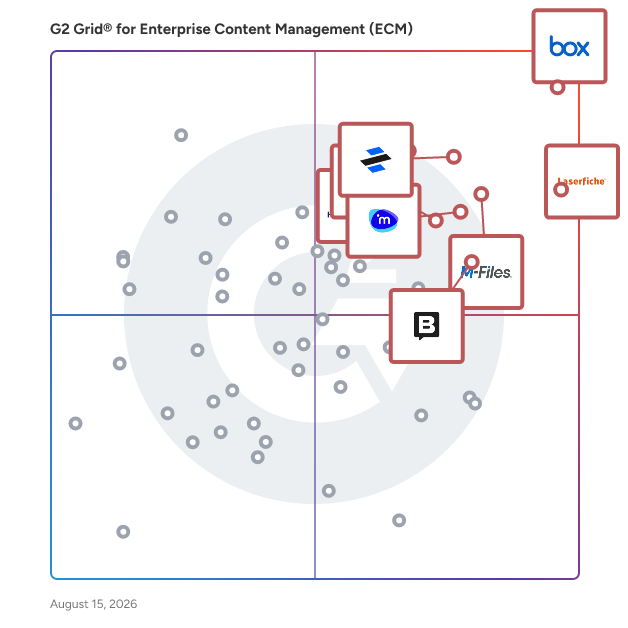
G2 Grid® for Enterprise Content Management (ECM) Systems

G2 Grid® for Enterprise Content Management (ECM) Systems plotting products by satisfaction and market presence

Highlighted products: Box, Laserfiche, Dropbox Dash, M-Files, Hyland OnBase, iManage Work, Cloudflare Application Security and Performance, and Storyblok.

Underlying data: [Grid® JSON](https://www.g2.com/categories/enterprise-content-management-ecm/grids.json?focus%5B%5D=box&focus%5B%5D=laserfiche&focus%5B%5D=dropbox-dash&focus%5B%5D=m-files&focus%5B%5D=hyland-onbase&focus%5B%5D=imanage-work&focus%5B%5D=cloudflare-application-security-and-performance&focus%5B%5D=storyblok)

Sponsored

Verito

Verito offers cloud hosting and managed IT for tax and accounting firms. Run your desktop tax & accounting software securely from any location. Private servers, MFA, and offline encrypted backups keep you IRS and FTC compliant without extra work. 100% uptime since 2016. Dedicated resources mean your software runs faster. Our VeritCertified support team knows tax software inside out and responds in under one minutes. We handle the IT so you can focus on clients. It just works. Securely.

Visit website

DocuWare

DocuWare is a type of digital document management and automated workflow solution designed to help organizations streamline their document processes and enhance operational efficiency. This versatile platform caters to businesses of all sizes and spans various industries, including but not limited to manufacturing, finance, education, and government. By offering a comprehensive suite of tools for managing documents and automating workflows, DocuWare enables users to reduce manual tasks, improve collaboration, and ensure compliance with regulatory requirements. The target audience for DocuWare includes organizations seeking to optimize their document management practices and automate repetitive processes. This solution is particularly beneficial for businesses that handle large volumes of paperwork or require secure access to sensitive information. With its capabilities, DocuWare serves a diverse clientele, from small businesses to large enterprises, making it a flexible choice for any organization looking to enhance its document handling capabilities. DocuWare's key features include robust document storage, intelligent document processing, advanced search functionalities, and customizable workflow automation. Users can easily store and retrieve documents in a secure digital environment, ensuring that critical information is always accessible. The platform's advanced search capabilities allow users to locate documents quickly, saving time and improving productivity. Additionally, the customizable workflow automation tools enable organizations to design processes tailored to their specific needs, facilitating smoother operations and reducing the likelihood of errors. One of the standout aspects of DocuWare is its adaptability to various deployment options. Organizations can choose between cloud-based or on-premises solutions, allowing them to select the deployment method that best fits their infrastructure and security requirements. With support for 24 languages, DocuWare is accessible to a global audience, making it a suitable choice for multinational organizations. The platform currently serves over 20,000 customers and 930,000 users across more than 100 countries, backed by a network of over 800 partners, which highlights its widespread acceptance and reliability in the market. Overall, DocuWare provides a comprehensive solution for organizations looking to modernize their document management and workflow processes. By leveraging its advanced features and flexible deployment options, businesses can enhance efficiency, improve collaboration, and ensure that they remain compliant with industry regulations.

Average Rating: 4.4/5.0

Total Reviews: 238

How Do G2 Users Rate DocuWare?

  • Ease of Use: 8.8/10 (Category avg: 8.6/10)
  • Process Automation: 9.0/10 (Category avg: 8.6/10)
  • Performance and Reliability: 8.8/10 (Category avg: 8.8/10)
  • Conditions: 8.9/10 (Category avg: 8.4/10)

Who Is the Company Behind DocuWare?

  • Seller: DocuWare
  • Company Website:
  • Year Founded: 1988
  • HQ Location: Beacon, NY
  • Twitter: @DocuWare
    2,283 Twitter followers
  • LinkedIn® Page: www.linkedin.com
    647 employees on LinkedIn®

Who Uses This Product?

  • Who Uses This: Software Analyst
  • Top Industries: Information Technology and Services, Pharmaceuticals
  • Company Size: 47% Medium, 30% Large

What Do G2 Reviewers Say About DocuWare?

AI-generated summary from verified user reviews

Pros
  • Users appreciate the ease of use of DocuWare, which streamlines document management and improves accessibility.
  • Users value the seamless integration capabilities of DocuWare, enhancing productivity and streamlining workflows effectively.
  • Users value the streamlined document management in DocuWare, enhancing efficiency and organization through intuitive workflows and integrations.
  • Users appreciate the robust automation of DocuWare, significantly enhancing efficiency and streamlining workflows across various businesses.
  • Users value the easy integrations of DocuWare, enhancing workflow efficiency and connectivity with various applications.
Cons
  • Users note missing features in DocuWare, such as inadequate OCR and API documentation, affecting overall efficiency.
  • Users may face a difficult learning curve with DocuWare, especially those new to document management systems.
  • Users find DocuWare has limited features, requiring extensive scripting and lacking necessary built-in actions for workflows.
  • Users find the complexity of DocuWare's setup and features overwhelming, making initial use time-consuming and challenging.
  • Users find the training required challenging, especially due to limited tutorials and complex components to learn.

What Are Recent G2 Reviews of DocuWare?

What Are G2 Users Discussing About DocuWare?

Pickit

Pickit aims to be the smartest, simplest DAM platform on the planet, making it easier than ever to source, store, share, organize, and optimize digital assets. Statistically, 70% of digital assets are underused or never used at all due to scattered files, multiple storage systems, and complicated DAMs nobody wants to use. Pickit solves that with a single source of truth for all your visual assets, documents, templates, and guidelines, all integrated with your favorite applications. The award-winning Microsoft 365 and the Google workspace integration by Pickit takes your file management to the next level by making it faster, smarter, and more intuitive to import and discover assets from M365, Pickit Stock, and all other assets in Pickit without leaving M365 or Google apps. DAM smart. DAM simple.™

Average Rating: 4.5/5.0

Total Reviews: 116

How Do G2 Users Rate Pickit?

  • Ease of Use: 8.9/10 (Category avg: 8.6/10)
  • Process Automation: 10.0/10 (Category avg: 8.6/10)
  • Performance and Reliability: 9.5/10 (Category avg: 8.8/10)
  • Conditions: 10.0/10 (Category avg: 8.4/10)

Who Is the Company Behind Pickit?

  • Seller: Pickit
  • Company Website:
  • Year Founded: 2013
  • HQ Location: Visby
  • Twitter: @pickit
    6,395 Twitter followers
  • LinkedIn® Page: www.linkedin.com
    22 employees on LinkedIn®

Who Uses This Product?

  • Top Industries: Information Technology and Services, Computer Software
  • Company Size: 43% Small, 42% Medium

What Do G2 Reviewers Say About Pickit?

AI-generated summary from verified user reviews

Pros
  • Users appreciate the ease of use of Pickit, finding it effortless to centralize brand assets and onboard teams.
  • Users commend Pickit's exceptional customer support, highlighting quick responses and helpful training resources from the team.
  • Users value Pickit's organization and centralization of assets, enabling easy access and seamless collaboration across platforms.
  • Users appreciate the centralized media management in Pickit, enhancing efficiency and branding consistency across the organization.
  • Users find Pickit extremely intuitive, enabling quick onboarding and seamless access to brand assets for better efficiency.
Cons
  • Users face access issues with permissions and discrepancies between Mac and PC, complicating their experience with Pickit.
  • Users find the access permissions complex, which complicates management and affects their overall experience with Pickit.
  • Users find the complexity of Pickit, especially with Mac-PC discrepancies and user permission settings, challenging to navigate.
  • Users find complex workflows in Pickit challenging, especially when navigating discrepancies between Mac and PC functionalities.
  • Users find the image management features lacking, especially in slide control, search accuracy, and AI tagging effectiveness.

What Are Recent G2 Reviews of Pickit?

What Are G2 Users Discussing About Pickit?

Iris

Iris – AI-Powered RFP Automation & Security Questionnaire Software Iris is an AI-powered response automation platform that helps sales, presales, and compliance teams complete RFPs, security questionnaires, DDQs, RFIs, and other buyer-facing documents faster and more accurately. By combining intelligent content generation with a centralized knowledge base, Iris eliminates bottlenecks, reduces manual work, and ensures consistency across every response. Generate First Drafts in Minutes Iris uses AI trained on your organization's past responses and institutional knowledge to create high-quality first drafts instantly. Teams save hours on repetitive content while still delivering tailored, accurate answers that reflect your company's voice and compliance standards. A Single Source of Truth The built-in knowledge base centralizes your best content in one place. As your team adds new responses, Iris learns and improves—adapting to your tone, terminology, and evolving security or compliance requirements. No more digging through old documents or Slack threads to find the right answer. Collaborative Workflows for Cross-Functional Teams Whether you're answering a complex RFP or completing a time-sensitive vendor security assessment, Iris makes collaboration seamless. Multi-user access lets sales engineers, subject matter experts, and compliance teams work in parallel, assign tasks, and maintain version control—replacing fragmented spreadsheets and email chains. Content Library for Consistency at Scale Quickly reuse top-performing answers with Iris's searchable content library. Built-in tagging, custom instructions, and template management help teams standardize responses across different questionnaire types while maintaining quality and brand consistency. Respond Faster. Win More. By automating repetitive content creation and improving response quality, Iris helps teams submit faster, increase win rates, and deliver a better buyer experience. Whether you're a lean team managing a handful of proposals or an enterprise responding at scale, Iris grows with you.

Average Rating: 4.9/5.0

Total Reviews: 73

How Do G2 Users Rate Iris?

  • Ease of Use: 9.7/10 (Category avg: 8.6/10)
  • Process Automation: 10.0/10 (Category avg: 8.6/10)
  • Performance and Reliability: 9.4/10 (Category avg: 8.8/10)
  • Conditions: 10.0/10 (Category avg: 8.4/10)

Who Is the Company Behind Iris?

  • Seller: heyiris.ai
  • Company Website:
  • Year Founded: 2023
  • HQ Location: Brooklyn / Chicago, US
  • LinkedIn® Page: www.linkedin.com
    43 employees on LinkedIn®

Who Uses This Product?

  • Top Industries: Computer Software, Computer & Network Security
  • Company Size: 44% Medium, 27% Small

What Do G2 Reviewers Say About Iris?

AI-generated summary from verified user reviews

Pros
  • Users find Iris to be incredibly easy to use, requiring minimal training and streamlining the RFP process efficiently.
  • Users highly value the time-saving capabilities of Iris, enabling quick and efficient RFP responses.
  • Users value the time-saving RFP management of Iris, as it simplifies responses and enhances accuracy tremendously.
  • Users value Iris for its efficiency, enabling rapid responses and significantly reducing time spent on security questionnaires.
  • Users praise the exceptional customer support from Iris, highlighting proactive and responsive assistance throughout implementation and usage.
Cons
  • Users find the lack of features in Iris limits its capabilities, such as complex project management functions.
  • Users experience inaccurate responses from Iris, often confused by mixed information and incomplete knowledge bases.
  • Users express frustration over Iris's inability to generate original answers, leading to reliance on limited information.
  • Users report occasional bug issues that arise as the platform evolves, but benefits generally outweigh these drawbacks.
  • Users report integration issues with Iris, noting a lack of certain desired functionalities and mobile support.

What Are Recent G2 Reviews of Iris?

MasterControl Quality Management System

MasterControl Quality Excellence is the #1 Quality Management System (QMS) in life sciences. Built on an AI-driven platform, it enables life-sciences companies to enable flexible quality event management, simplified document management, and automated training management—that all work seamlessly together to close the loop on quality. Targeted primarily at quality professionals within the life sciences industry, MasterControl Qx serves a diverse range of organizations, from pharmaceuticals to biotechnology and medical devices. These industries often face stringent regulatory requirements and complex quality assurance processes. MasterControl Qx offers a centralized platform that integrates various quality management functions, allowing users to manage quality events, documentation, training, and audits seamlessly. This integration not only enhances operational efficiency but also ensures that organizations remain compliant with industry standards. One of the standout features of MasterControl Qx is its intelligent automation capabilities. By automating routine quality management tasks, organizations can reduce manual errors and free up valuable time for quality professionals to focus on more strategic initiatives. Additionally, the platform provides robust data insights that empower users to make informed decisions based on real-time information. This data-driven approach enhances the ability to identify trends, monitor compliance, and drive continuous improvement within quality processes. Furthermore, MasterControl Qx is designed to foster collaboration across departments and teams. The platform's connected nature allows for easy sharing of information and documentation, ensuring that all stakeholders are aligned and informed. This collaborative environment not only enhances communication but also supports a culture of quality throughout the organization. By utilizing MasterControl Qx, companies can create a more agile and responsive quality management system that adapts to changing regulatory landscapes and market demands. Overall, MasterControl Quality Excellence (Qx) stands out in the QMS category by providing a holistic solution tailored to the specific needs of the life sciences industry. Its combination of intelligent automation, robust data insights, and collaborative features positions it as a valuable tool for organizations striving to maintain high-quality standards while navigating the complexities of regulatory compliance.

Average Rating: 4.3/5.0

Total Reviews: 526

How Do G2 Users Rate MasterControl Quality Management System?

  • Ease of Use: 7.8/10 (Category avg: 8.6/10)
  • Process Automation: 9.2/10 (Category avg: 8.6/10)
  • Performance and Reliability: 9.0/10 (Category avg: 8.8/10)
  • Conditions: 9.0/10 (Category avg: 8.4/10)

Who Is the Company Behind MasterControl Quality Management System?

  • Seller: MasterControl
  • Company Website:
  • Year Founded: 1993
  • HQ Location: Salt Lake City, UT
  • Twitter: @MCMasterControl
    6,258 Twitter followers
  • LinkedIn® Page: www.linkedin.com
    742 employees on LinkedIn®

Who Uses This Product?

  • Who Uses This: Quality Assurance Specialist, Quality Engineer
  • Top Industries: Pharmaceuticals, Medical Devices
  • Company Size: 64% Medium, 25% Large

What Do G2 Reviewers Say About MasterControl Quality Management System?

AI-generated summary from verified user reviews

Pros
  • Users appreciate the ease of use of MasterControl, benefiting from its intuitive interface and customizable features.
  • Users value the centralized document management features of MasterControl, enhancing integration and user experience effectively.
  • Users value the user-friendly training integration and centralized system for managing compliance and quality events effectively.
  • Users value the efficient document control in MasterControl, appreciating easy access to documents and timely upgrades.
  • Users appreciate the customizable and user-friendly features of MasterControl, facilitating efficient quality management processes.
Cons
  • Users find the interface not intuitive, struggling with complex setups and unclear iconography affecting user experience.
  • Users face a steep learning curve with MasterControl, particularly during initial setup and navigation between modules.
  • Users find the difficult usability of MasterControl's system a challenge, particularly with report creation and workflow setup.
  • Users struggle with the not user-friendly interface of MasterControl, finding navigation and search features cumbersome and challenging.
  • Users find the complex setup challenging, requiring extensive training to effectively use MasterControl's capabilities.

What Are Recent G2 Reviews of MasterControl Quality Management System?

What Are G2 Users Discussing About MasterControl Quality Management System?

Brightspot

Brightspot is the leading content management solution for delivering brilliant digital experiences through a fast, flexible and secure platform. Founded in 2008 and headquartered in Reston, Virginia, Brightspot has spent more than 15 years helping organizations transform how they manage and deliver content. Today, the platform powers mission-critical digital experiences for some of the world’s most recognized brands, including AP News, NPR, Walmart and FedEx. Built to support the needs of both non-technical users and developers alike, Brightspot removes the friction that slows content teams down. With support for headless, hybrid and decoupled architectures, the platform gives you the flexibility to scale your digital operations without the limitations of legacy systems or rigid infrastructure. From multisite and multilingual publishing to role-based workflows, modular content models and seamless integrations, Brightspot enables you to manage even the most complex content ecosystems — all from one centralized hub. Brightspot’s AI-powered features and automation tools accelerate your publishing process, freeing teams to focus on what matters most: creating high-impact content. Intuitive authoring tools, pre-built templates, customizable workflows and built-in SEO and translation tools make it easier than ever to create. Beyond the product, Brightspot is known for its unmatched customer partnership. From onboarding to innovation, Brightspot works closely with your team to ensure your CMS evolves with your business. Whether you're growing your audience, adding new brands, expanding to global markets or integrating with the latest technologies, Brightspot is with you every step of the way. That’s why 97% of customers return year after year. With Brightspot, content becomes a competitive advantage — not a roadblock. Launch faster. Scale smarter. And lead fearlessly with a CMS that adapts to your business, not the other way around.

Average Rating: 4.4/5.0

Total Reviews: 84

How Do G2 Users Rate Brightspot?

  • Ease of Use: 8.5/10 (Category avg: 8.6/10)
  • Process Automation: 8.3/10 (Category avg: 8.6/10)
  • Performance and Reliability: 5.0/10 (Category avg: 8.8/10)
  • Conditions: 8.3/10 (Category avg: 8.4/10)

Who Is the Company Behind Brightspot?

  • Seller: Brightspot
  • Company Website:
  • Year Founded: 2008
  • HQ Location: Reston, US
  • Twitter: @TeamBrightspot
    500 Twitter followers
  • LinkedIn® Page: www.linkedin.com
    195 employees on LinkedIn®

Who Uses This Product?

  • Top Industries: Online Media, Information Technology and Services
  • Company Size: 55% Medium, 30% Small

What Do G2 Reviewers Say About Brightspot?

AI-generated summary from verified user reviews

Pros
  • Users value the ease of use in Brightspot, enjoying a clean UX and flexible, powerful tools for content management.
  • Users value the clean UX and powerful customization options in Brightspot, enhancing their content management experience.
  • Users value the high degree of customization in Brightspot, enabling tailored workflows and user management for their needs.
  • Users value the highly customizable features of Brightspot, enhancing the platform's adaptability to unique workflows and processes.
  • Users commend Brightspot's flexibility, enabling adaptations for evolving needs and independence from development teams.
Cons
  • Users face feature limitations with Brightspot, struggling with integration, editing options, and content sharing difficulties.
  • Users find the learning curve steep, as complex workflows and customization create significant challenges and frustrations.
  • Users find limited customization options in Brightspot frustrating, impacting flexibility and overall user experience.
  • Users find Brightspot has limited functionality, struggling with batch deletions and inadequate reporting tools for specific needs.
  • Users note a lack of essential features in Brightspot, limiting functionality and customization for specific needs.

What Are Recent G2 Reviews of Brightspot?

What Are G2 Users Discussing About Brightspot?

DocuShare

Easy content management – intuitive, integrated and cloud-enabled. Xerox DocuShare is enterprise content management (ECM) designed with usability, flexibility and convenience in mind. It helps knowledge workers be more efficient every day by focusing on the intersection of people, paper and processes – the lifeblood of today’s work environment. The latest release of DocuShare features personalized views, few clicks, mobile-friendly web design, application integration and enhanced workflow and lifecycle management.

Average Rating: 4.0/5.0

Total Reviews: 122

How Do G2 Users Rate DocuShare?

  • Ease of Use: 8.2/10 (Category avg: 8.6/10)
  • Process Automation: 8.2/10 (Category avg: 8.6/10)
  • Performance and Reliability: 8.6/10 (Category avg: 8.8/10)
  • Conditions: 8.0/10 (Category avg: 8.4/10)

Who Is the Company Behind DocuShare?

  • Seller: Xerox
  • Year Founded: 1906
  • HQ Location: Norwalk, CT
  • Twitter: @Xerox
    151,437 Twitter followers
  • LinkedIn® Page: www.linkedin.com
    47,068 employees on LinkedIn®
  • Ownership: NYSE:XRX

Who Uses This Product?

  • Top Industries: Information Technology and Services, Education Management
  • Company Size: 47% Large, 33% Medium

What Do G2 Reviewers Say About DocuShare?

AI-generated summary from verified user reviews

Pros
  • Users value the robust document management capabilities of DocuShare, enhancing organization and collaboration across materials.
  • Users appreciate the robust document management capabilities of DocuShare, enhancing organization and collaboration across academic materials.
  • Users appreciate the automation of workflows in DocuShare, which significantly enhances efficiency and productivity in document management.
  • Users value the collaboration features of DocuShare, enabling seamless teamwork and efficient management of academic materials.
  • Users appreciate the robust document management capabilities of DocuShare, enhancing their content storage and organization efficiency.
Cons
  • Users experience performance issues with DocuShare, facing slow loading and lag with large or complex documents.
  • Users report that complex workflows can significantly slow down DocuShare, hindering their overall efficiency.
  • Users report that performance slows down with large data, affecting efficiency during document management tasks.

What Are Recent G2 Reviews of DocuShare?

What Are G2 Users Discussing About DocuShare?

Progress ShareFile

Progress® ShareFile® AI-powered document collaboration platform is designed to help businesses run client work from start to finish—securely, efficiently and with less friction. Built for organizations that handle sensitive information—such as accounting, legal and financial services—ShareFile software goes beyond traditional file transfer tools to support a more connected, end-to-end client experience. From document collection and collaboration to approvals, e-signatures and secure storage, ShareFile unifies key stages of client work in a single, secure platform. With ShareFile, teams can securely share files, manage document workflows and collaborate with clients through branded client portals—while helping maintain visibility into documents, requests and client interactions. Instead of juggling disconnected tools, businesses can streamline processes, reduce manual work and create more consistent, professional client experiences. ShareFile combines secure file transfer, client portals, document workflow automation and e-signature capabilities into one solution, helping teams move work faster, while helping organizations manage sensitive data. Key capabilities include: • Secure file sharing and large file transfer with encrypted email and attachments • Client portals for structured, branded collaboration and document exchange • Document workflow automation for intake, approvals, onboarding and repeatable processes • Built-in e-signature, forms and approvals to help complete work without switching tools • AI-powered document automation, including intake, summarization and instant Q&A • Granular permissions, audit trails and governance controls to help improve visibility and support compliance efforts • Advanced security features, including encryption in transit and at rest, plus tools that support secure client interactions By unifying people, processes and data into a single platform, ShareFile helps reduce tool sprawl and enables teams to scale client work without increasing complexity. Benefits can include improved efficiency, more consistent client experiences and stronger operational outcomes. ShareFile is a modern alternative to legacy FTP systems and basic file-sharing tools—purpose-built to help organizations run client work end-to-end, improve client experiences and operate with greater confidence.

Average Rating: 4.2/5.0

Total Reviews: 1,477

How Do G2 Users Rate Progress ShareFile?

  • Ease of Use: 8.5/10 (Category avg: 8.6/10)
  • Process Automation: 7.9/10 (Category avg: 8.6/10)
  • Performance and Reliability: 8.6/10 (Category avg: 8.8/10)
  • Conditions: 8.6/10 (Category avg: 8.4/10)

Who Is the Company Behind Progress ShareFile?

  • Seller: Progress Software
  • Company Website:
  • Year Founded: 1981
  • HQ Location: Burlington, MA.
  • Twitter: @ProgressSW
    48,773 Twitter followers
  • LinkedIn® Page: www.linkedin.com
    4,205 employees on LinkedIn®

Who Uses This Product?

  • Who Uses This: Owner, Office Manager
  • Top Industries: Accounting, Information Technology and Services
  • Company Size: 37% Small, 32% Medium

What Do G2 Reviewers Say About Progress ShareFile?

AI-generated summary from verified user reviews

Pros
  • Users appreciate the ease of use of Progress ShareFile, praising its intuitive interface and smooth collaboration features.
  • Users value the robust security features of Progress ShareFile, ensuring secure collaboration and document management across teams.
  • Users appreciate the easy document sharing of Progress ShareFile, facilitating seamless collaboration across teams and devices.
  • Users praise the easy collaboration and sharing capabilities of Progress ShareFile across devices and locations.
  • Users appreciate the secure sharing of Progress ShareFile, enabling smooth collaboration with internal and external teams.
Cons
  • Users find the file tracking system cumbersome, making it harder to manage shared files and their histories.
  • Users find the interface issues of Progress ShareFile challenging, especially for newcomers navigating its complex features.
  • Users experience slow performance with Progress ShareFile, particularly when uploading large files or handling multiple tasks simultaneously.
  • Users find the pricing expensive, particularly challenging for small teams or startups needing basic file-sharing features.
  • Users find the interface usability lacking, citing complexity and clutter that can overwhelm new users.

What Are Recent G2 Reviews of Progress ShareFile?

What Are G2 Users Discussing About Progress ShareFile?

OpenText Content Management

Organizations need to deliver timely and relevant information to boost productivity, collaboration and decision-making among increasingly distributed workforces. To reach peak performance, organizations must master information usage, access, and insight to drive end-to-end digital business processes. Connecting business content and business process is at the heart of OpenText Extended ECM. The solution integrates content management with process applications to drive new levels of business automation that bring content, processes and users together. It automatically delivers the right information at the right time directly into lead applications or systems used by employees daily. Behind the scenes, automated governance protects and secures content throughout its lifecycle. Information is quick to find, easy to act upon, and adds fuel to processes driving productivity within distributed, agile work processes.

Average Rating: 4.1/5.0

Total Reviews: 65

How Do G2 Users Rate OpenText Content Management?

  • Ease of Use: 8.0/10 (Category avg: 8.6/10)
  • Process Automation: 7.9/10 (Category avg: 8.6/10)
  • Performance and Reliability: 7.9/10 (Category avg: 8.8/10)
  • Conditions: 7.7/10 (Category avg: 8.4/10)

Who Is the Company Behind OpenText Content Management?

  • Seller: OpenText
  • Year Founded: 1991
  • HQ Location: Waterloo, ON
  • Twitter: @OpenText
    21,565 Twitter followers
  • LinkedIn® Page: www.linkedin.com
    23,048 employees on LinkedIn®
  • Ownership: NASDAQ:OTEX

Who Uses This Product?

  • Top Industries: Information Technology and Services, Computer Software
  • Company Size: 44% Large, 32% Medium

What Do G2 Reviewers Say About OpenText Content Management?

AI-generated summary from verified user reviews

Pros
  • Users value the seamless integration of OpenText Content Management for enhancing organizational efficiency and collaboration.
  • Users appreciate the robust content management features of OpenText, enhancing collaboration and document organization across organizations.
  • Users value the robust document management features of OpenText, enhancing organization and collaboration across their business.
  • Users value the ease of use of OpenText Content Management, enhancing organization and collaboration across their teams.
  • Users value the seamless integration capabilities of OpenText Content Management, enhancing collaboration and efficiency across organizations.
Cons
  • Users find the training required for OpenText Content Management to be a significant challenge and time-consuming.
  • Users find the steep learning curve of OpenText Content Management challenging, hindering quick adoption and full utilization.
  • Users find the insufficient training challenging, indicating a steep learning curve for utilizing OpenText Content Management effectively.
  • Users find the technical knowledge requirement of OpenText Content Management challenging, hindering quick adoption for non-tech users.
  • Users find the difficult configuration of OpenText Content Management challenging, especially due to its complexity and steep learning curve.

What Are Recent G2 Reviews of OpenText Content Management?

What Are G2 Users Discussing About OpenText Content Management?

UpSlide

UpSlide is a document production solution specifically designed for the financial services sector, enabling firms to create and manage high-stakes documents within the Microsoft 365 environment. With over 15 years of experience, UpSlide focuses on enhancing the accuracy, consistency, and control of document creation, ensuring that financial professionals can deliver polished and compliant materials efficiently. Targeted primarily at finance firms, UpSlide caters to a diverse audience that includes investment banks, asset managers, and consulting firms. The platform is particularly beneficial for teams involved in the production of pitchbooks, investment memorandums (IMs), and financial reports. By streamlining the document creation process, UpSlide allows users to focus on the content and strategy rather than the formatting and compliance aspects, which are critical in the financial industry. One of the standout features of UpSlide is its ability to bridge the gap between AI-generated drafts and client-ready documents. The solution integrates AI agents with Microsoft 365, enabling seamless orchestration and deterministic workflows. This ensures that all documents remain on-brand and are thoroughly verified from the initial draft to the final version. The platform's robust capabilities help finance teams maintain high standards of quality while reducing the time spent on document production. UpSlide is trusted by over 900 teams, including prominent firms such as KPMG, Deloitte, PwC, and Rothschild & Co. The platform boasts a remarkable 98% renewal rate, reflecting its effectiveness and reliability in the industry. Additionally, UpSlide has earned a reputation as a Leader on G2, underscoring its strong market presence. The in-house implementation team provides comprehensive support throughout the rollout process, ensuring a smooth transition for new users. With an impressive customer satisfaction score of 4.9 out of 5 and an average deployment time of under six weeks, UpSlide demonstrates its commitment to delivering value to its clients. In summary, UpSlide stands out in the document production landscape for financial services by offering a powerful combination of AI integration, workflow automation, and dedicated support. This enables finance professionals to produce high-quality documents that meet the rigorous demands of their industry while enhancing overall productivity and efficiency.

Average Rating: 4.6/5.0

Total Reviews: 68

How Do G2 Users Rate UpSlide?

  • Ease of Use: 8.7/10 (Category avg: 8.6/10)
  • Process Automation: 7.1/10 (Category avg: 8.6/10)
  • Performance and Reliability: 8.8/10 (Category avg: 8.8/10)
  • Conditions: 7.1/10 (Category avg: 8.4/10)

Who Is the Company Behind UpSlide?

  • Seller: UpSlide
  • Company Website:
  • Year Founded: 2009
  • HQ Location: Paris, Ile-de-France
  • Twitter: @Up_Slide
    3,510 Twitter followers
  • LinkedIn® Page: www.linkedin.com
    186 employees on LinkedIn®

Who Uses This Product?

  • Top Industries: Financial Services, Accounting
  • Company Size: 49% Medium, 38% Large

What Do G2 Reviewers Say About UpSlide?

AI-generated summary from verified user reviews

Pros
  • Users appreciate the ease of use of UpSlide, streamlining document creation and enhancing productivity within Microsoft Office.
  • Users value the quick and tailored customer support provided by UpSlide, enhancing their overall experience and productivity.
  • Users praise UpSlide for its time-saving features, enhancing efficiency in slide creation and report generation.
  • Users value UpSlide's seamless integration and powerful features, enhancing productivity and consistency in presentations.
  • Users commend UpSlide for its time-saving features, streamlining tasks and enhancing overall productivity in presentations.
Cons
  • Users find the complex features of UpSlide can lead to confusion and hinder functionality, impacting their overall experience.
  • Users express frustration over the lack of features in UpSlide, limiting flexibility and efficiency in presentation management.
  • Users find the missing features in UpSlide hinder flexibility, requiring cumbersome workarounds for content management.
  • Users experience performance issues with UpSlide, including slow loading times and delays affecting workflow efficiency.
  • Users report slow performance in UpSlide, affecting content loading and workflow efficiency during updates.

What Are Recent G2 Reviews of UpSlide?

R2 Docuo

Cloud-based document management and workflow platform. R2 Docuo helps organizations manage contracts, invoices, quotes, and business processes through ready-to-use apps or fully customized solutions. Store, organize, and share documents with advanced metadata, version control, templates, and powerful search capabilities. Automate approvals, reviews, and other recurring workflows while connecting information across departments. For organizations with more complex requirements, R2 Docuo provides configurable modules, API access, and industry-specific business solutions built on the same platform. AI-powered document processing helps classify, extract, and retrieve information faster.

Average Rating: 4.5/5.0

Total Reviews: 80

How Do G2 Users Rate R2 Docuo?

  • Ease of Use: 8.6/10 (Category avg: 8.6/10)
  • Process Automation: 8.4/10 (Category avg: 8.6/10)
  • Performance and Reliability: 8.1/10 (Category avg: 8.8/10)
  • Conditions: 7.8/10 (Category avg: 8.4/10)

Who Is the Company Behind R2 Docuo?

  • Seller: R2 Sistemas
  • Company Website:
  • Year Founded: 2012
  • HQ Location: Madrid, Spain
  • Twitter: @R2Docuo
    302 Twitter followers
  • LinkedIn® Page: www.linkedin.com
    18 employees on LinkedIn®

Who Uses This Product?

  • Top Industries: Airlines/Aviation, Accounting
  • Company Size: 49% Small, 27% Medium

What Are Recent G2 Reviews of R2 Docuo?

What Are G2 Users Discussing About R2 Docuo?

DocLink

Acquired by AI leader Beyond Limits in 2022, Altec, headquartered in Southern California, delivers its powerful content and process automation platform DocLink, which helps companies save important time and money through better data management. Using DocLink, companies can digitize their documents and data in ANY department – AP, AR, HR, legal/contracts, IT and more, as well as automate workflows and streamlining vital business document processes. Taking everything digital results in a paperless and touchless environment that allows for faster approvals, less data entry, and reduced human errors. DocLink's secure digital data repository enables anyone to capture, create, process, and approve documents and data from anywhere. Automated workflows for document routing, approvals, and notifications reduce manual data entry and increase accuracy. This results in: • reduced AP processing times (on average 50-75%) • faster approval times (from weeks/days to hours/minutes) • storage savings with ALL storage eliminated • faster document retrieval • anytime data access from anywhere, on any device The benefits are significant, including improved access, visibility, and control; accelerated approval cycles; elimination of missed deadlines; and reduction of human errors. Ultimately, DocLink helps businesses spend less time managing their data, resulting in significant time and cost savings.

Average Rating: 4.1/5.0

Total Reviews: 61

How Do G2 Users Rate DocLink?

  • Ease of Use: 8.6/10 (Category avg: 8.6/10)
  • Process Automation: 8.3/10 (Category avg: 8.6/10)
  • Performance and Reliability: 7.4/10 (Category avg: 8.8/10)
  • Conditions: 7.9/10 (Category avg: 8.4/10)

Who Is the Company Behind DocLink?

Who Uses This Product?

  • Top Industries: Education Management, Information Technology and Services
  • Company Size: 41% Small, 38% Medium

What Do G2 Reviewers Say About DocLink?

AI-generated summary from verified user reviews

Pros
  • Users find DocLink's ease of use exceptional, facilitating a streamlined and efficient paperless workflow with minimal setup.
  • Users appreciate the seamless integration with ERP systems in DocLink, enhancing workflow efficiency and document management.
  • Users appreciate the true automation and seamless integration of DocLink, significantly enhancing document management efficiency.
  • Users value the seamless ERP integration of DocLink, ensuring effortless linking of documents with core business processes.
  • Users praise the seamless integration of DocLink, enhancing efficiency by linking documents with core business data effortlessly.
Cons
  • Users experience performance issues with DocLink, particularly during peak times and when handling large document volumes.
  • Users find DocLink lacking features, with a dated interface and limited functionality complicating tasks and workflows.
  • Users face a steep learning curve with DocLink, requiring training for effective navigation and workflow management.
  • Users experience slow performance with DocLink, particularly with large document volumes during peak usage, impacting productivity.
  • Users feel the limited features of DocLink restrict their productivity compared to other document management systems.

What Are Recent G2 Reviews of DocLink?

What Are G2 Users Discussing About DocLink?

NewgenONE Digital Transformation Platform

Transform your business with NewgenONE, an intelligent enterprise orchestration platform, featuring a suite of cutting-edge technologies—from task automation to mission-critical, content-rich applications and advanced workflow orchestration. Effortlessly integrate your existing systems and devices into a seamless ecosystem that ensures personalized, efficient experiences across the board. Build powerful applications at lightning speed with NewgenONE, a completely native low-code platform. Enjoy seamless scalability, robust security, and built-in governance and compliance, all while accelerating automation across your enterprise. Automate thousands of enterprise-wide processes and stay ahead of the competition with rapid, innovative solutions.

Average Rating: 4.5/5.0

Total Reviews: 89

How Do G2 Users Rate NewgenONE Digital Transformation Platform?

  • Ease of Use: 8.5/10 (Category avg: 8.6/10)
  • Process Automation: 9.5/10 (Category avg: 8.6/10)
  • Performance and Reliability: 9.3/10 (Category avg: 8.8/10)
  • Conditions: 9.3/10 (Category avg: 8.4/10)

Who Is the Company Behind NewgenONE Digital Transformation Platform?

  • Seller: Newgen
  • Year Founded: 1992
  • HQ Location: Mclean, VA
  • Twitter: @newgensoftware
    3,363 Twitter followers
  • LinkedIn® Page: www.linkedin.com
    5,405 employees on LinkedIn®

Who Uses This Product?

  • Top Industries: Banking, Financial Services
  • Company Size: 59% Large, 22% Medium

What Do G2 Reviewers Say About NewgenONE Digital Transformation Platform?

AI-generated summary from verified user reviews

Pros
  • Users value the comprehensive end-to-end automation of NewgenONE, making digital transformation effortless and efficient.
  • Users praise the end-to-end automation of NewgenONE, enhancing efficiency without requiring advanced technical skills.
  • Users value the end-to-end automation features of NewgenONE, enabling streamlined processes without requiring extensive technical skills.
  • Users value the comprehensive end-to-end automation of NewgenONE, enabling efficient processes without extensive technical expertise.
  • Users value the low-code, no-code platform of NewgenONE, facilitating easy access for non-technical users.
Cons
  • Users frequently face bug issues that complicate the setup process and hinder their experience with NewgenONE.
  • Users face numerous bugs in the NewgenONE platform, causing challenges in setup and overall user experience.
  • Users find the setup process complicated due to numerous bugs, making initial configurations challenging.
  • Users find the setup process complicated and report numerous bugs, complicating their initial experience.
  • Users find the difficult configuration of NewgenONE frustrating, complicating even basic setup tasks.

What Are Recent G2 Reviews of NewgenONE Digital Transformation Platform?

What Are G2 Users Discussing About NewgenONE Digital Transformation Platform?

FileCloud

FileCloud is a hyper-secure EFSS (enterprise file sync and share) platform that provides industry leading compliance, data governance, data leak protection, data retention and digital rights management capabilities. Workflow automation and granular control of content sharing across most enterprise platforms is fully integrated into the complete EFSS stack. FileCloud is a leader in content governance and collaboration for unstructured data, trusted and used worldwide across Global 1000 enterprises, educational institutions, government organizations, and service providers. Granular control of content sharing is fully integrated into the stack through comprehensive audit logs and access permissions, and the Compliance Center helps with regulations like GDPR, HIPAA, and NIST 800-171 (among others). FileCloud also provides Zero Trust File Sharing® an industry-first innovation that allows users to share sensitive data via an encrypted zip file that cannot be accessed by unauthorized users, even in the event of a data breach. FileCloud helps customers solve complex challenges in enterprise file sharing, privacy, compliance automation and governance across public, private, and hybrid cloud environments. In addition to its enterprise file sharing solution, FileCloud’s product portfolio also includes Signority (acquired in May 2024), a Canadian-based e-signature and document workflow platform.

Average Rating: 4.5/5.0

Total Reviews: 174

How Do G2 Users Rate FileCloud?

  • Ease of Use: 8.9/10 (Category avg: 8.6/10)
  • Process Automation: 8.6/10 (Category avg: 8.6/10)
  • Performance and Reliability: 9.1/10 (Category avg: 8.8/10)
  • Conditions: 8.3/10 (Category avg: 8.4/10)

Who Is the Company Behind FileCloud?

  • Seller: FileCloud
  • Year Founded: 2016
  • HQ Location: New York City, NY
  • Twitter: @getfilecloud
    1,456 Twitter followers
  • LinkedIn® Page: www.linkedin.com
    125 employees on LinkedIn®

Who Uses This Product?

  • Top Industries: Information Technology and Services, Construction
  • Company Size: 44% Small, 43% Medium

What Do G2 Reviewers Say About FileCloud?

AI-generated summary from verified user reviews

Pros
  • Users appreciate the ease of use of FileCloud, enabling smooth file access and seamless collaboration across devices.
  • Users appreciate the strong security and data control in FileCloud, enabling precise management of permissions and policies.
  • Users value the easy and flexible file sharing of FileCloud, ensuring control and security in their file management.
  • Users value the strong security and full data control of FileCloud, enhancing their file-sharing experience.
  • Users value the seamless integration of FileCloud with existing systems, enhancing security and usability effortlessly.
Cons
  • Users find the training required for initial setup complex and time-consuming, particularly for non-technical users.
  • Users find the difficult configuration of FileCloud to be time-consuming and challenging, particularly for non-technical users.
  • Users find the learning curve steep, as setup requires time and technical knowledge for optimal configuration.
  • Users find the interface issues of FileCloud can complicate setup and make navigation feel less intuitive.
  • Users find permissions issues in FileCloud confusing, impacting the effectiveness of access management and setup.

What Are Recent G2 Reviews of FileCloud?

What Are G2 Users Discussing About FileCloud?

AmpleLogic EDMS

AmpleLogic EDMS Software is a power-packed electronic document management system exclusively designed for Pharmaceutical and Biotech companies, developed, and implemented exclusively to meet the cGMP needs of Pharma domain with 21CFR Part 11 compliance, EU Annex 11 compliance can easily eliminate all the challenges faced by different companies AmpleLogic EDMS is a paperless document management system enables you to experience the effortless handling of all the documents and information. Various activities like document creation, review, approval, editing, document comparison, version control, parallel reviews are part of AmpleLogic Document Management System. AmpleLogic DMS helps to streamline the entire organization’s documents with full control and traceability. It ensures that the latest published document is used and eliminates the risk of using obsolete documentation. AmpleLogic Electronic Document Management and Issuance Software has been developed on the highly configurable LOW-CODE NO-CODE (LCNC) DEVELOPMENT PLATFORM. This EDMS Solution can be accessed from any devices.

Average Rating: 4.7/5.0

Total Reviews: 55

How Do G2 Users Rate AmpleLogic EDMS?

  • Ease of Use: 9.6/10 (Category avg: 8.6/10)
  • Process Automation: 9.6/10 (Category avg: 8.6/10)
  • Performance and Reliability: 9.6/10 (Category avg: 8.8/10)
  • Conditions: 9.1/10 (Category avg: 8.4/10)

Who Is the Company Behind AmpleLogic EDMS?

  • Seller: AmpleLogic
  • Year Founded: 2010
  • HQ Location: Hyderabad, Telangana
  • Twitter: @Ample_Logic
    636 Twitter followers
  • LinkedIn® Page: www.linkedin.com
    322 employees on LinkedIn®

Who Uses This Product?

  • Top Industries: Pharmaceuticals
  • Company Size: 76% Medium, 16% Large

What Do G2 Reviewers Say About AmpleLogic EDMS?

AI-generated summary from verified user reviews

Pros
  • Users value the centralized shared workspace of AmpleLogic EDMS, enhancing teamwork and collaboration effectively.
  • Users value the team support and shared workspace of AmpleLogic EDMS, enhancing collaboration and productivity.
  • Users value the team support provided by AmpleLogic EDMS, enhancing collaboration in a unified workspace.
  • Users appreciate the user-friendly dashboards of AmpleLogic EDMS, enhancing document management and tracking efficiency.
  • Users appreciate the ease of use of AmpleLogic EDMS, facilitating quick adaptation and efficient management of documents.
Cons
  • Users find that integration issues can require significant effort, impacting their overall experience with AmpleLogic EDMS.
  • Users find that integration and customization require significant effort, impacting their overall experience with AmpleLogic EDMS.

What Are Recent G2 Reviews of AmpleLogic EDMS?

Contentstack

Contentstack is redefining how modern digital experiences are built and managed. As the pioneer of the Agentic Experience Platform (AXP), Contentstack brings together structured content and brand governance (Content Cloud), real-time customer data, omnichannel personalization (Data Cloud) and autonomous AI orchestration (Agent OS) into one unified system. While many organizations adopted headless CMS or standalone AI tools expecting transformation, they often found themselves managing disconnected systems and manual workflows. Contentstack helps enterprises move beyond that complexity by connecting content, data and AI in a way that makes digital experiences faster to launch, easier to manage and more adaptive in real time. Leading brands including Steve Madden, LG Electronics, Subaru of America, Dolce & Gabbana, 1-800-Flowers, Decathlon, and Caesars Entertainment rely on Contentstack to reduce operational friction and deliver personalized, scalable digital experiences with confidence. The company is known for its customer-first culture and commitment to the communities it serves through the Contentstack Cares program. Learn more at https://www.contentstack.com.

Average Rating: 4.3/5.0

Total Reviews: 335

How Do G2 Users Rate Contentstack?

  • Ease of Use: 8.5/10 (Category avg: 8.6/10)
  • Process Automation: 7.7/10 (Category avg: 8.6/10)
  • Performance and Reliability: 8.7/10 (Category avg: 8.8/10)
  • Conditions: 7.6/10 (Category avg: 8.4/10)

Who Is the Company Behind Contentstack?

  • Seller: Contentstack
  • Company Website:
  • Year Founded: 2018
  • HQ Location: Austin, TX
  • Twitter: @Contentstack
    2,395 Twitter followers
  • LinkedIn® Page: www.linkedin.com
    649 employees on LinkedIn®

Who Uses This Product?

  • Who Uses This: Software Engineer, Product Manager
  • Top Industries: Retail, Computer Software
  • Company Size: 43% Medium, 38% Large

What Do G2 Reviewers Say About Contentstack?

AI-generated summary from verified user reviews

Pros
  • Users praise the intuitive interface of Contentstack, facilitating easy onboarding and efficient content management for non-technical teams.
  • Users appreciate the intuitive interface and flexibility of Contentstack, making content operations seamless and efficient.
  • Users value the intuitive design of Contentstack, enabling easy navigation and efficient content management without disruption.
  • Users commend the flexibility of Contentstack, enabling efficient content management across multiple platforms and workflows.
  • Users value Contentstack's flexible content modeling, enabling efficient multi-surface rollouts and streamlined workflows with automated processes.
Cons
  • Users find the content management system cumbersome, citing issues with usability, bugs, and frequent updates disrupting workflows.
  • Users find the limited features of Contentstack's Personalize tool hinder usability and flexibility in A/B testing.
  • Users find limited customization in Contentstack, lacking flexibility for advanced layouts and requiring developer assistance for HTML updates.
  • Users face editing difficulties with cumbersome asset management and formatting issues that slow down content creation.
  • Users face editing issues with navigating between page creation and asset management, which disrupts their workflow.

What Are Recent G2 Reviews of Contentstack?

What Are G2 Users Discussing About Contentstack?

Neeraja Prakash
NP
Researched and written by Neeraja Prakash
Updated October 3, 2024