Best Document Creation Software - Page 11

How Many Document Creation Software Products Does G2 Track?

Total Products under this Category: 343

Category Stats (Sep 2026)

  • Average Rating: 4.37/5 The average rating of products in this category, based on all submitted ratings
  • Top Trending Product: DocNexus (+2.22%) - Among all products in this category, DocNexus recorded the largest rating increase compared to last month

Last updated: September 01, 2026

How Does G2 Rank Document Creation Software Products?

Why You Can Trust G2's Software Rankings:

  • 30 Analysts and Data Experts
  • 156,500+ Authentic Reviews
  • 343+ Products
  • Unbiased Rankings

G2's software rankings are built on verified user reviews, rigorous moderation, and a consistent research methodology maintained by a team of analysts and data experts. Each product is measured using the same transparent criteria, with no paid placement or vendor influence. While reviews reflect real user experiences, which can be subjective, they offer valuable insight into how software performs in the hands of professionals. Together, these inputs power the G2 Score, a standardized way to compare tools within every category.

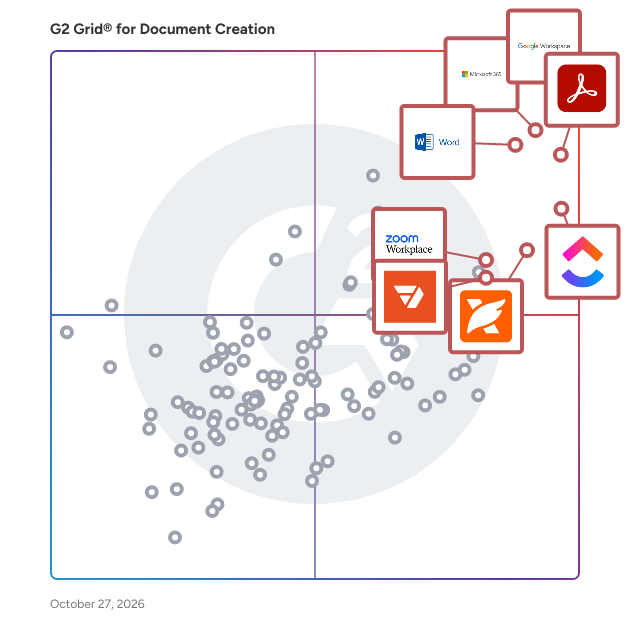
G2 Grid® for Document Creation Software

G2 Grid® for Document Creation Software plotting products by satisfaction and market presence

Highlighted products: Google Workspace, Microsoft 365, Adobe Acrobat, Microsoft Word, ClickUp, Foxit PDF Editor, Zoom Workplace, and Wondershare PDFelement.

Underlying data: [Grid® JSON](https://www.g2.com/categories/document-creation/grids.json?focus%5B%5D=google-workspace&focus%5B%5D=microsoft365&focus%5B%5D=adobe-acrobat&focus%5B%5D=microsoft-word&focus%5B%5D=clickup&focus%5B%5D=foxit-pdf-editor&focus%5B%5D=zoom-workplace&focus%5B%5D=wondershare-wondershare-pdfelement)

Campfire

Campfire Technology is a software company with the goal of helping people tell stories.

Average Rating: 4.0/5.0

Total Reviews: 4

How Do G2 Users Rate Campfire?

  • Quality of Support: 8.3/10 (Category avg: 8.6/10)
  • Ease of Use: 9.4/10 (Category avg: 8.9/10)

Who Is the Company Behind Campfire?

Who Uses This Product?

  • Company Size: 50% Small, 25% Medium

What Are Recent G2 Reviews of Campfire?

OneDeck

OneDeck is a business management platform designed to help users efficiently manage their business information and data. This comprehensive solution enables organizations to publish documents, automate workflows, and gain valuable insights, ultimately streamlining operations and enhancing productivity. By integrating various functionalities into a single platform, OneDeck serves as a centralized hub for businesses looking to optimize their management processes. Targeted towards small to medium-sized enterprises, OneDeck caters to a diverse range of industries that require effective management of their operational data. The platform is particularly beneficial for teams seeking to improve collaboration and communication while simplifying their workflows. With its user-friendly interface and customizable features, OneDeck allows businesses to tailor their management solutions to meet specific requirements, making it an ideal choice for organizations aiming to enhance their efficiency. OneDeck's core features include document publishing, workflow automation, data management, and analytical insights. Each feature is designed to be intuitive and flexible, allowing users to create a management system that aligns with their unique business needs. Document publishing enables teams to share important information seamlessly, while workflow automation reduces the time spent on repetitive tasks, allowing employees to focus on more strategic initiatives. The platform's data management capabilities ensure that all business information is organized and easily accessible, promoting informed decision-making. Additionally, OneDeck provides analytical insights that empower users to monitor performance metrics and identify areas for improvement. By leveraging these insights, businesses can make data-driven decisions that enhance operational efficiency and drive growth. The combination of these features not only simplifies the management process but also fosters a culture of collaboration and innovation within teams. Overall, OneDeck stands out in the business management software category by offering a highly customizable and user-friendly platform that adapts to the evolving needs of organizations. Its focus on enhancing collaboration, simplifying workflows, and providing actionable insights makes it a valuable tool for businesses looking to optimize their management practices and achieve their goals.

Average Rating: 5.0/5.0

Total Reviews: 24

How Do G2 Users Rate OneDeck?

  • Has the product been a good partner in doing business?: 9.7/10 (Category avg: 9.0/10)
  • Quality of Support: 9.9/10 (Category avg: 8.6/10)
  • Ease of Use: 10.0/10 (Category avg: 8.9/10)
  • Ease of Admin: 9.7/10 (Category avg: 8.9/10)

Who Is the Company Behind OneDeck?

Who Uses This Product?

  • Top Industries: Facilities Services
  • Company Size: 96% Small, 4% Medium

What Do G2 Reviewers Say About OneDeck?

AI-generated summary from verified user reviews

Pros
  • Users appreciate the ease of use of OneDeck, finding it intuitive and efficient for daily operations.
  • Users appreciate the excellent organization of OneDeck, enhancing collaboration and efficiency across various projects and tasks.
  • Users value the intuitive task management of OneDeck, enhancing workflow efficiency and overall organization.
  • Users commend the fast and efficient customer service of OneDeck, enhancing their overall experience with the platform.
  • Users value the ease of use and efficiency of OneDeck, enhancing project management and customer service experience.
Cons
  • Users feel limited by the lack of essential features like user flow visualization and direct payment integrations.
  • Users find OneDeck to be expensive, especially since essential features require purchasing a higher-tier plan.
  • Users desire more integration options, noting reliance on additional tools for essential functions.
  • Users desire more integrations with essential tools, as the lack complicates processes and workflows.
  • Users wish for limited integrations with other tools, finding it less convenient but not critical to usage.

What Are Recent G2 Reviews of OneDeck?

ONLYOFFICE DocSpace

ONLYOFFICE DocSpace is a room-based collaborative platform that allows users to edit and collaborate on documents, spreadsheets, presentations fillable forms and PDF files via their web browser, either in the cloud or within a local environment. The built-in ONLYOFFICE Docs suite provides DocSpace users with professional editing tools: * Work on text documents, spreadsheets and presentations in your web browser using a set of professional editing and formatting tools; * Create, edit and fill out PDF forms with interactive fields; * View, edit, annotate and co-author PDF files; * Enable any AI assistant of your choice (ChatGPT, DeepSeek, Mistral and more) and even use several AI assistants for various text-related tasks simultaneously; * Generate content, summarize texts, correct grammar mistakes and translate phrases in your documents using your favourite AI chatbot; * Co-author documents with other users in real time using two-coediting modes, comments, user mentions and other tools, such as Track Changes, Version History and Document comparison; * Enable video and audio conferencing via the Jitsi plugin; * Communicate with other co-authors in the built-in chat or with your Telegram contacts via the corresponding plugin while working on documents; * Access new features provided by third-party plugins, allowing you to translate texts with Google Translator or Deepl, convert text to speech, create bibliographies with Zotero or Mendeley, correct grammar mistakes with LanguageTool and much more. In ONLYOFFICE DocSpace, there are five main room types: 1) Collaboration is organized inside collaboration rooms, where various levels of access permissions can be granted to users to streamline the collaboration process. 2) Custom rooms are designed for more specific tasks, like commenting or document reviewing. 3) Public rooms make it possible to share files with external users via links, and the invited people don't need to register to be able to view the shared content. 4) Form-filling rooms handle PDF forms and allow you to easily collect and analyze responses in one place. 5) Virtual data rooms (VDR) are equipped with additional security options, like watermarks and file lifetime settings, to let you organize secure storage and sharing of confidential business information, which is ideal for due diligence. ONLYOFFICE DocSpace can be seamlessly integrated with Zoom, WordPress, Drupal and Pipidrive. There is also integration with Zapier through which it's possible to connect hundreds of business and productivity apps, like Trello, Asana, Hubspot, etc. The existing user roles in ONLYOFFICE DocSpace include owners, DocSpace admins, room admins, users, content creators, editors, viewers, commenters, reviewers, form fillers and guests. With all these permissions, you can make sure that your content can be only accessible to the people you know, allowing them to perform certain operations. ONLYOFFICE DocSpace is a self-hosted solution that is completely compatible with the GDPR standards and offers such security tools, as encryption, activity tracking, IP restrictions, SSO and more. Additionally, there is a cloud-based version with the same features. The Startup plan is free and allows you to create up to 12 rooms with an unlimited number of users and guests. The Business plan price is calculated based on the number of admins per month, starting from $20 per admin.

Average Rating: 4.7/5.0

Total Reviews: 5

How Do G2 Users Rate ONLYOFFICE DocSpace?

  • Quality of Support: 9.2/10 (Category avg: 8.6/10)
  • Ease of Use: 8.8/10 (Category avg: 8.9/10)

Who Is the Company Behind ONLYOFFICE DocSpace?

  • Seller: Ascensio System
  • Year Founded: 2008
  • HQ Location: Riga, Latvia
  • Twitter: @only_office
    6,700 Twitter followers
  • LinkedIn® Page: www.linkedin.com
    120 employees on LinkedIn®

Who Uses This Product?

  • Company Size: 50% Small, 33% Medium

What Do G2 Reviewers Say About ONLYOFFICE DocSpace?

AI-generated summary from verified user reviews

Pros
  • Users appreciate the affordability of ONLYOFFICE DocSpace, enjoying significant savings compared to Microsoft Office.
  • Users appreciate the cost-effectiveness of ONLYOFFICE DocSpace, enjoying savings compared to Microsoft Office.
  • Users praise the modern and user-friendly dashboard of ONLYOFFICE DocSpace for its seamless experience and efficiency.
  • Users appreciate the ease of use of ONLYOFFICE DocSpace, noting its modern interface and straightforward setup.
  • Users appreciate the easy setup of ONLYOFFICE DocSpace, making onboarding a smooth experience.
Cons
  • Users express disappointment with template compatibility, as it hinders their editing flexibility within ONLYOFFICE DocSpace.
  • Users feel that template compatibility is lacking, making it challenging to fully utilize ONLYOFFICE DocSpace.

What Are Recent G2 Reviews of ONLYOFFICE DocSpace?

Overleaf

Overleaf is the scientific and technical writing platform loved by over 20 million users around the world. It's a LaTeX editor that’s easy enough for beginners and powerful enough for experts. Using Overleaf, anyone can write smarter—creating complex, beautifully formatted documents with ease. But more than that, it lets you collaborate easily with colleagues, track changes in real-time, write in LaTeX code or a visual editor, and work anywhere, on any device. Plus, with personal, group, and institutional options, right up to on-premises enterprise solutions, you can take Overleaf with you wherever you go.

Average Rating: 4.6/5.0

Total Reviews: 74

How Do G2 Users Rate Overleaf?

  • Has the product been a good partner in doing business?: 10.0/10 (Category avg: 9.0/10)
  • Quality of Support: 8.2/10 (Category avg: 8.6/10)
  • Ease of Use: 8.9/10 (Category avg: 8.9/10)
  • Ease of Admin: 9.4/10 (Category avg: 8.9/10)

Who Is the Company Behind Overleaf?

  • Seller: Overleaf
  • Year Founded: 2012
  • HQ Location: London, England
  • Twitter: @overleaf
    55,401 Twitter followers
  • LinkedIn® Page: www.linkedin.com
    74 employees on LinkedIn®

Who Uses This Product?

  • Who Uses This: Student, Graduate Research Assistant
  • Top Industries: Research, Higher Education
  • Company Size: 43% Large, 30% Small

What Do G2 Reviewers Say About Overleaf?

AI-generated summary from verified user reviews

Pros
  • Users love the variety of templates Overleaf offers, simplifying writing tasks and enhancing the user experience.
  • Users appreciate the track changes feature in Overleaf, simplifying collaborative manuscript editing significantly.
  • Users highlight the ease of creation in Overleaf, appreciating its user-friendly interface and efficient document management.
  • Users find Overleaf's ease of use remarkable, appreciating its intuitive interface and streamlined document creation process.
  • Users value the easy creation process in Overleaf, enjoying seamless collaboration and efficient document management in the cloud.
Cons
  • Users experience difficulty navigating and editing code, particularly beginners facing complexities and concerns about internet connectivity.
  • Users experience performance issues with slower compiles and restrictions on features in the free plan.
  • Users express concern over saving issues that lead to worries about potential data loss during editing.
  • Users experience slow performance with large documents and limited features, affecting their efficiency on Overleaf.
  • Users find the complex features of Overleaf challenging, especially for beginners navigating tools and templates.

What Are Recent G2 Reviews of Overleaf?

What Are G2 Users Discussing About Overleaf?

PDF Shelter

PDF Shelter is an innovative document manipulation online toolset that sets itself apart by processing data on the user's own browser, thus greatly improving privacy and speed. By the same reason, PDF Shelter is able to deliver unlimited processing at zero cost.

Average Rating: 4.5/5.0

Total Reviews: 4

How Do G2 Users Rate PDF Shelter?

  • Quality of Support: 8.3/10 (Category avg: 8.6/10)
  • Ease of Use: 9.6/10 (Category avg: 8.9/10)

Who Is the Company Behind PDF Shelter?

Who Uses This Product?

  • Company Size: 50% Large, 50% Small

What Do G2 Reviewers Say About PDF Shelter?

AI-generated summary from verified user reviews

Pros
  • Users enjoy the ease of use of PDF Shelter, finding it fast and straightforward for optimizing files online.
  • Users enjoy the simplicity and speed of PDF Shelter, valuing its secure, browser-based functionality for daily use.
  • Users value the reliability of PDF Shelter, enjoying its fast performance and strong security features.
  • Users value the simplicity and speed of PDF Shelter, along with its secure, browser-based processing.
Cons
  • Users experience a significant dependency on internet connectivity, impacting usability and access to PDF Shelter.
  • Users wish for more file conversion options in PDF Shelter, specifically for additional file types like CSV.
  • Users find the tool limitations of PDF Shelter restrictive, especially concerning internet dependency and file size constraints.

What Are Recent G2 Reviews of PDF Shelter?

Pubrella

Pubrella is a workflow engine for regulatory writers, medical writers, and policy consultants who produce source-heavy deliverables where every claim must survive expert scrutiny. Most tools handle research or drafting — not the handoff between them. That's where citation integrity collapses and rework begins. Upload your sources. Pubrella structures research, drafting, and verification into one connected pipeline — every claim linked to a specific source, every gap flagged before your client or regulator sees it.

Average Rating: 4.6/5.0

Total Reviews: 4

How Do G2 Users Rate Pubrella?

  • Quality of Support: 9.2/10 (Category avg: 8.6/10)
  • Ease of Use: 7.5/10 (Category avg: 8.9/10)

Who Is the Company Behind Pubrella?

Who Uses This Product?

  • Company Size: 100% Small

What Are Recent G2 Reviews of Pubrella?

SWING PDF Converter

SWING PDF Converter is a premier tool for extracting content from Lotus Notes. It provides high-fidelity rendering, smart scaling, attachments, links, and metadata.

Average Rating: 4.6/5.0

Total Reviews: 4

How Do G2 Users Rate SWING PDF Converter?

  • Has the product been a good partner in doing business?: 10.0/10 (Category avg: 9.0/10)
  • Quality of Support: 8.9/10 (Category avg: 8.6/10)
  • Ease of Use: 9.6/10 (Category avg: 8.9/10)
  • Ease of Admin: 10.0/10 (Category avg: 8.9/10)

Who Is the Company Behind SWING PDF Converter?

  • Seller: SWING Software
  • Year Founded: 2001
  • HQ Location: Split, Croatia
  • Twitter: @swingsoftware
    298 Twitter followers
  • LinkedIn® Page: www.linkedin.com
    9 employees on LinkedIn®

Who Uses This Product?

  • Company Size: 50% Small, 50% Large

What Do G2 Reviewers Say About SWING PDF Converter?

AI-generated summary from verified user reviews

Pros
  • Users find SWING PDF Converter's ease of use exceptional, making document migration and customization straightforward.
  • Users appreciate the excellent customer support provided by SWING PDF Converter, enhancing their overall experience.
  • Users value the customization capabilities of SWING PDF Converter, making report generation and printing straightforward.
  • Users value the bookmark creation and attachment embedding features of SWING PDF Converter for effortless document migration.
Cons
  • Users face technical issues with unclear installation errors and inconsistent data with PDF templates, complicating their experience.
  • Users often face data mismatch issues with PDF templates and report difficulties in obtaining effective support.

What Are Recent G2 Reviews of SWING PDF Converter?

What Are G2 Users Discussing About SWING PDF Converter?

Unlayer

Unlayer is an embeddable drag-and-drop content builder designed to help businesses create visually appealing emails, landing pages, documents, and popups without the need for any coding. This innovative solution is backed by Y Combinator and has gained the trust of Fortune 500 companies such as Fidelity, Bank of America, as well as leading SaaS platforms like Keap and Hive. Unlayer empowers developers to integrate powerful, white-label design tools directly into their applications, thereby transforming the way teams design and collaborate on content. Unlayer provides an intuitive visual content editor that allows users to maintain full control over branding, data, and user experience. Whether you are developing a customer relationship management (CRM) system, a marketing automation platform, or a customer portal, Unlayer simplifies the embedding of a rich editing experience, enabling dev teams to launch features in days rather than months. This capability is particularly valuable for organizations looking to enhance user engagement and streamline the content creation processes. Key features of Unlayer include an intuitive user interface that facilitates easy content creation, along with white-label customization options that allow businesses to tailor the editing experience to their brand. The platform also incorporates AI-powered design tools that generate smart text, images, and headings, making it easier for users to create compelling content. With over 2,000 prebuilt templates and the ability to create custom tools and blocks, Unlayer caters to diverse content needs. Additionally, advanced roles and permissions ensure secure collaboration and approval workflows, while integrations with 28 platforms enhance its versatility. Unlayer stands out in the market by helping SaaS companies and enterprises reduce development costs and accelerate their time to market. Its developer-friendly SDK, comprehensive documentation, and robust API facilitate seamless integration into existing systems. The platform's focus on AI enhancements, real-time collaboration, and design consistency further enhances its value proposition. With features such as dynamic content personalization, team collaboration tools, and enterprise-grade security, Unlayer provides a comprehensive solution that scales with the evolving needs of businesses.

Average Rating: 4.4/5.0

Total Reviews: 57

How Do G2 Users Rate Unlayer?

  • Has the product been a good partner in doing business?: 8.2/10 (Category avg: 9.0/10)
  • Quality of Support: 8.5/10 (Category avg: 8.6/10)
  • Ease of Use: 9.2/10 (Category avg: 8.9/10)
  • Ease of Admin: 8.5/10 (Category avg: 8.9/10)

Who Is the Company Behind Unlayer?

  • Seller: Unlayer
  • HQ Location: San Francisco, US
  • Twitter: @unlayerapp
    341 Twitter followers
  • LinkedIn® Page: www.linkedin.com
    21 employees on LinkedIn®

Who Uses This Product?

  • Top Industries: Health, Wellness and Fitness, Computer Software
  • Company Size: 56% Small, 32% Medium

What Do G2 Reviewers Say About Unlayer?

AI-generated summary from verified user reviews

Pros
  • Users love the ease of use of Unlayer, enabling quick design of professional emails effortlessly.
  • Users love the easy-to-use templates of Unlayer, enabling quick and professional email designs without coding.
  • Users love the easy and fast email creation with Unlayer, enjoying the intuitive drag-and-drop builder.
  • Users love the easy-to-use drag and drop editor of Unlayer, making email design fast and enjoyable.
  • Users appreciate the ease of creation with Unlayer, finding it intuitive and efficient for designing emails quickly.
Cons
  • Users find the pricing of Unlayer steep, as essential features often require expensive paid plans to access.
  • Users note that the limited features in the free version can restrict customization and advanced functionality.
  • Users find the limited customization options a drawback, wishing for more flexibility to enhance their designs.
  • Users find missing features and rounded corner support lacking, complicating the design process and version management.
  • Users find the add-on costs of Unlayer high, especially given limited benefits and required additional payments for essential features.

What Are Recent G2 Reviews of Unlayer?

What Are G2 Users Discussing About Unlayer?

Arc Studio Pro

Arc Studio is the easiest way to outline, write, and edit screenplays and television scripts, for solo-writers, large writing staffs, and everything in between.

Average Rating: 4.7/5.0

Total Reviews: 6

How Do G2 Users Rate Arc Studio Pro?

  • Quality of Support: 9.6/10 (Category avg: 8.6/10)
  • Ease of Use: 9.7/10 (Category avg: 8.9/10)

Who Is the Company Behind Arc Studio Pro?

  • Seller: Arc Studio Pro
  • Year Founded: 2018
  • HQ Location: Berlin , DE
  • Twitter: @arcstudioproapp
    1,046 Twitter followers
  • LinkedIn® Page: www.linkedin.com
    5 employees on LinkedIn®

Who Uses This Product?

  • Company Size: 67% Small, 33% Medium

What Do G2 Reviewers Say About Arc Studio Pro?

AI-generated summary from verified user reviews

Pros
  • Users praise the helpful customer support team of Arc Studio Pro for their assistance and responsiveness.
  • Users appreciate the screen sharing feature of Arc Studio Pro for its versatility and ease of collaboration.
  • Users find the user interface versatile, enhancing the ease of writing and formatting long-form media.
  • Users value the versatility of Arc Studio Pro, simplifying long-form writing with its beats and outline options.
Cons
  • Users find the missing features in the iPad app limits functionality, hindering their writing experience on the go.

What Are Recent G2 Reviews of Arc Studio Pro?

What Are G2 Users Discussing About Arc Studio Pro?

Bottomline PrecisionForms

PrecisionForms is the simple, smart and secure way to efficiently and cost-effectively automate the creation, customisation, delivery and management of documents within your Microsoft Dynamics® 365 system. PrecisionForms can be deployed on-premise or in Azure to match your system choices.

Average Rating: 3.5/5.0

Total Reviews: 3

How Do G2 Users Rate Bottomline PrecisionForms?

  • Has the product been a good partner in doing business?: 9.2/10 (Category avg: 9.0/10)
  • Quality of Support: 8.3/10 (Category avg: 8.6/10)
  • Ease of Use: 7.8/10 (Category avg: 8.9/10)
  • Ease of Admin: 9.2/10 (Category avg: 8.9/10)

Who Is the Company Behind Bottomline PrecisionForms?

  • Seller: Bottomline
  • Year Founded: 1989
  • HQ Location: Portsmouth, NH
  • LinkedIn® Page: www.linkedin.com
    2,982 employees on LinkedIn®
  • Ownership: EPAY
  • Total Revenue (USD mm): $442

Who Uses This Product?

  • Company Size: 67% Large, 33% Small

What Are Recent G2 Reviews of Bottomline PrecisionForms?

What Are G2 Users Discussing About Bottomline PrecisionForms?

CoContract

CoContract is an online software to help business professionals eliminate the process of the print, edit, email cycle of contracts with the ability to build contracts digitally, notifying the respective parties of changes, and easily signing online.

Average Rating: 4.5/5.0

Total Reviews: 3

How Do G2 Users Rate CoContract?

  • Quality of Support: 9.2/10 (Category avg: 8.6/10)
  • Ease of Use: 7.5/10 (Category avg: 8.9/10)

Who Is the Company Behind CoContract?

  • Seller: CoContract
  • HQ Location: N/A
  • Twitter: @co_contract
    10 Twitter followers
  • LinkedIn® Page: www.linkedin.com
    1 employees on LinkedIn®

Who Uses This Product?

  • Company Size: 67% Small, 33% Medium

What Are Recent G2 Reviews of CoContract?

What Are G2 Users Discussing About CoContract?

DocMadeEasy

Our online tools are for users to edit, sign and send PDF files securely. Free and easy to use! Our eSignature tool helps companies of all sizes streamline and digitally sign their most critical documents. From NDAs to loans, from sales contracts to offer letters. Securely share files with real-time control and insights. End-to-end encryption with AES256. Track and analyze how recipients engage with each page of your documents in real-time. All files are encrypted and stored on the server.

Average Rating: 5.0/5.0

Total Reviews: 3

How Do G2 Users Rate DocMadeEasy?

  • Quality of Support: 10.0/10 (Category avg: 8.6/10)
  • Ease of Use: 10.0/10 (Category avg: 8.9/10)

Who Is the Company Behind DocMadeEasy?

Who Uses This Product?

  • Company Size: 67% Small, 33% Medium

What Are Recent G2 Reviews of DocMadeEasy?

dStyle 365

dStyles 365 integrated approach enables you to easily create documents, e-mails, offers, legal documents, and contracts from templates. You can also choose to draft from scratch in your companies corporate identity. dStyle ensures consistent, compliant and professional content.

Average Rating: 4.5/5.0

Total Reviews: 3

How Do G2 Users Rate dStyle 365?

  • Quality of Support: 6.7/10 (Category avg: 8.6/10)
  • Ease of Use: 8.9/10 (Category avg: 8.9/10)

Who Is the Company Behind dStyle 365?

  • Seller: Documentaal
  • Year Founded: 1991
  • HQ Location: Arnhem, NL
  • Twitter: @Documentaal
    875 Twitter followers
  • LinkedIn® Page: www.linkedin.com
    16 employees on LinkedIn®

Who Uses This Product?

  • Company Size: 67% Small, 33% Medium

What Are Recent G2 Reviews of dStyle 365?

Highland 2

Tools built for writing screenplays and made them work for almost every kind of document you write. From novels to blog posts and school reports, Highland's clean design and innovative tools help you focus on words, not formatting.

Average Rating: 3.3/5.0

Total Reviews: 4

How Do G2 Users Rate Highland 2?

  • Quality of Support: 10.0/10 (Category avg: 8.6/10)
  • Ease of Use: 6.7/10 (Category avg: 8.9/10)

Who Is the Company Behind Highland 2?

Who Uses This Product?

  • Company Size: 50% Large, 25% Small

What Are Recent G2 Reviews of Highland 2?

Invantive Composition

Save money by combining Word documents with data from databases and applications An often occurring business problem is the generation of complex documents with data from a database or application. For instance, because of the multitude of complex information and deviating rules per jurisdiction employees spend a lot of time in the composing of documents. This manual and repetitive activity causes more erroneous composed documents and brings with it unnecessary employee costs reducing business profit. For organizations that are dealing with different laws and regulations such as health care institutions, insurers and lawyers, the creation of complex documents is a costly and time consuming task. The automatic generation and creation of documents that meet the laws and regulations is however easily done using Invantive Composition! Your gains by filling a Word template with data from your database The automated filling and archiving of documents from a database with Invantive Composition will bring you advantages such as: - Automatically fill pre-composed templates in Word. - Focus on your business, not on technology; without any programming and without software developers. - Reduce time-to-market for changing your business by reducing effort by your IT department. - Merge unstructured texts in a document with structured data. - Optimization of the documentation and communication process. - Reduction of erroneously prepared documents and production costs. - Improved security of company information. Supported Platforms Invantive Composition for Microsoft Word supports the following databases: - Microsoft SQL Server - MySQL - Oracle RDBMS - Teradata - IBM DB2 UDB - ANSI SQL - ODBC

Average Rating: 4.2/5.0

Total Reviews: 3

How Do G2 Users Rate Invantive Composition?

  • Quality of Support: 6.7/10 (Category avg: 8.6/10)
  • Ease of Use: 7.5/10 (Category avg: 8.9/10)

Who Is the Company Behind Invantive Composition?

Who Uses This Product?

  • Company Size: 67% Large, 33% Medium

What Are Recent G2 Reviews of Invantive Composition?

What Are G2 Users Discussing About Invantive Composition?

Neeraja Prakash
NP
Researched and written by Neeraja Prakash
Updated April 10, 2026