Best Construction Project Management Software

How Many Construction Project Management Software Products Does G2 Track?

Total Products under this Category: 821

Category Stats (Sep 2026)

  • Average Rating: 4.41/5 (↑0.02 vs Aug 2026) The average rating of products in this category, based on all submitted ratings
  • Top Trending Product: Track3D (+8.33%) - Among all products in this category, Track3D recorded the largest rating increase compared to last month

Last updated: September 01, 2026

How Does G2 Rank Construction Project Management Software Products?

Why You Can Trust G2's Software Rankings:

  • 30 Analysts and Data Experts
  • 19,300+ Authentic Reviews
  • 821+ Products
  • Unbiased Rankings

G2's software rankings are built on verified user reviews, rigorous moderation, and a consistent research methodology maintained by a team of analysts and data experts. Each product is measured using the same transparent criteria, with no paid placement or vendor influence. While reviews reflect real user experiences, which can be subjective, they offer valuable insight into how software performs in the hands of professionals. Together, these inputs power the G2 Score, a standardized way to compare tools within every category.

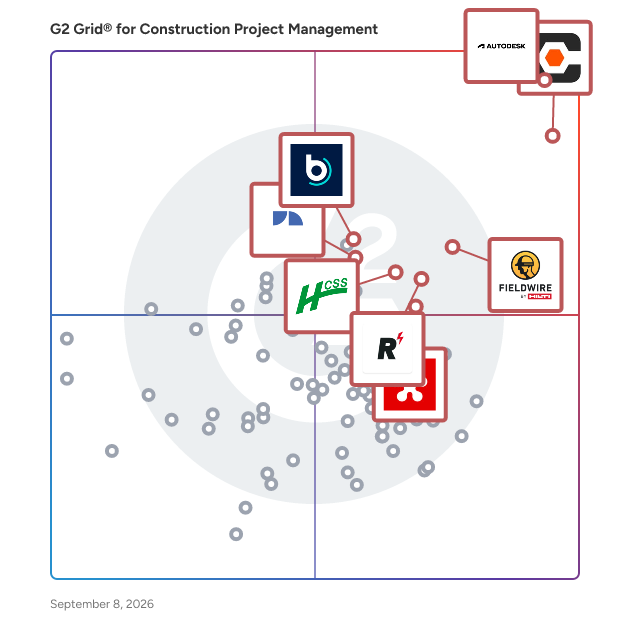
G2 Grid® for Construction Project Management Software

G2 Grid® for Construction Project Management Software plotting products by satisfaction and market presence

Highlighted products: Autodesk Forma (formerly Autodesk Construction Cloud), Procore, Fieldwire by Hilti, RDash, HCSS, Revizto, Buildertrend, and JobNimbus.

Underlying data: [Grid® JSON](https://www.g2.com/categories/construction-project-management/grids.json?focus%5B%5D=autodesk-forma-formerly-autodesk-construction-cloud&focus%5B%5D=procore&focus%5B%5D=fieldwire-by-hilti&focus%5B%5D=rdash&focus%5B%5D=hcss&focus%5B%5D=revizto&focus%5B%5D=buildertrend&focus%5B%5D=jobnimbus)

Autodesk Forma (formerly Autodesk Construction Cloud)

Autodesk Forma (formerly Autodesk Construction Cloud) connects workflows, teams and data at every stage of construction to reduce risk, maximize efficiency, and increase profits. Autodesk Build is part of Autodesk Forma (formerly Autodesk Construction Cloud)'s newest set of products that further connect data, workflows, and teams throughout the entire building lifecycle. Build delivers a broad, deep, and connected set of field execution and project management tools for builders in a single software platform that is easy to deploy, adopt and use. Autodesk Build delivers the unification of best-in-class technology from PlanGrid and BIM 360, along with new functionality, to connect construction data and workflows across the headquarters, office, and jobsite. It offers tools for project management, quality, safety, cost, document management and project closeout workflows in a single application that is purpose-built for what you do and where you are working. -Supports integrated & digitized processes for the build phase of a project in a platform that is easy to deploy, adopt and use, while ensuring information sharing and workflows are tightly controlled and highly-configurable. -Standardized and centralized data collection from design through operations enables data-driven decision making, and predictive analytics provide visibility into high-risk issues that can impact project cost, schedule, quality, and safety. -Cloud-based document management provides a single source of truth for all project documentation for the owner, GCs and subs. Autodesk Takeoff empowers estimators to create fast, accurate takeoffs in a cloud-based solution that combines 2D and 3D workflows. Autodesk Takeoff is part of Autodesk Forma (formerly Autodesk Construction Cloud)'s newest set of products that further connect data, workflows, and teams throughout the entire building lifecycle. Autodesk Takeoff allows estimators to perform more accurate 2D takeoffs and generate automated quantities from 3D models in a single online solution. Preconstruction teams are empowered to win more work with integrated takeoffs and quantities that help produce quality estimates for faster, more accurate bidding. -Manage sheets and models in one data environment with Autodesk Docs -Easily capture project scope with linear, count and area takeoff -Generate multiple quantities and use custom formulas -Get instant access to quantities from models for automated 3D takeoffs -Access aggregated quantities from drawings and models Autodesk BIM Collaborate is part of Autodesk Forma (formerly Autodesk Construction Cloud)'s newest set of products that further connect data, workflows, and teams throughout the entire building lifecycle. BIM Collaborate empowers project teams to align and execute on design intent and constructability by managing the entire design collaboration and coordination workflow. Autodesk BIM Collaborate empowers design and construction teams to align and execute on design intent and constructability in a single online solution. By allowing teams to manage the entire design collaboration and coordination process in a single common data environment, BIM Collaborate reduces rework and improves overall design quality. -No limits on projects or file storage -Subscribe once and use on any project you are working on -Flexible subscription offerings for users, projects and businesses -Easily add subscribers and models as your business grows -Keep the same central administration and user login when adding new products

Average Rating: 4.4/5.0

Total Reviews: 5,260

How Do G2 Users Rate Autodesk Forma (formerly Autodesk Construction Cloud)?

  • Has the product been a good partner in doing business?: 8.3/10 (Category avg: 8.8/10)
  • Construction Workforce Management Tool Integration: 7.2/10 (Category avg: 8.1/10)
  • Workforce Scheduling: 6.7/10 (Category avg: 7.7/10)
  • Information Management: 8.6/10 (Category avg: 8.8/10)

Who Is the Company Behind Autodesk Forma (formerly Autodesk Construction Cloud)?

  • Seller: Autodesk
  • Company Website:
  • Year Founded: 1982
  • HQ Location: San Francisco
  • Twitter: @autodesk
    273,215 Twitter followers
  • LinkedIn® Page: www.linkedin.com
    15,757 employees on LinkedIn®

Who Uses This Product?

  • Who Uses This: BIM Manager, Project Manager
  • Top Industries: Construction, Architecture & Planning
  • Company Size: 45% Medium, 31% Large

What Do G2 Reviewers Say About Autodesk Forma (formerly Autodesk Construction Cloud)?

AI-generated summary from verified user reviews

Pros
  • Users appreciate the simple user interface of Autodesk Forma, making it easy to navigate and utilize effectively.
  • Users value the real-time collaboration features of Autodesk Forma, enhancing project insight and coordination efficiency.
  • Users value the real-time collaboration features of Autodesk Forma, enhancing insights and teamwork throughout the design process.
  • Users value the seamless collaboration in Autodesk Forma, enhancing trust and efficiency across project phases.
  • Users value the accessible large CAD file capabilities of Autodesk Forma, ensuring seamless project management from anywhere.
Cons
  • Users express frustration over missing features and complex access hurdles that limit functionality for architects in Autodesk Forma.
  • Users face limitations in tracking and functionality, making project management challenging and costing concerns prevalent.
  • Users face access limitations with Autodesk Forma, struggling with login prompts and multi-level assemblies access.
  • Users highlight the need for better configuration and accessibility in Autodesk Forma for improved usability.
  • Users find the steep learning curve of Autodesk Forma challenging, especially for smaller teams and simpler projects.

What Are Recent G2 Reviews of Autodesk Forma (formerly Autodesk Construction Cloud)?

What Are G2 Users Discussing About Autodesk Forma (formerly Autodesk Construction Cloud)?

Procore

Procore construction software manages your construction projects, resources and financials from planning to closeout. The platform connects every project contributor to solutions built specifically for the industry for the owner, the general contractor and the specialty contractor. The ability to communicate across teams makes it easier to work together by establishing a single source of truth. This is how Procore gives your team easy access to everything they need to know to get the job done.

Average Rating: 4.6/5.0

Total Reviews: 4,251

How Do G2 Users Rate Procore?

  • Has the product been a good partner in doing business?: 8.9/10 (Category avg: 8.8/10)
  • Construction Workforce Management Tool Integration: 8.1/10 (Category avg: 8.1/10)
  • Workforce Scheduling: 7.9/10 (Category avg: 7.7/10)
  • Information Management: 9.0/10 (Category avg: 8.8/10)

Who Is the Company Behind Procore?

  • Seller: Procore Technologies
  • Company Website:
  • Year Founded: 2003
  • HQ Location: Carpinteria, CA
  • Twitter: @procoretech
    16,491 Twitter followers
  • LinkedIn® Page: www.linkedin.com
    4,788 employees on LinkedIn®

Who Uses This Product?

  • Who Uses This: Project Manager, Project Engineer
  • Top Industries: Construction, Architecture & Planning
  • Company Size: 48% Medium, 40% Small

What Do G2 Reviewers Say About Procore?

AI-generated summary from verified user reviews

Pros
  • Users highlight Procore's intuitive interface, making training and onboarding for new users effortless.
  • Users value the efficient document management in Procore, streamlining processes and reducing the need for physical storage.
  • Users value the logical organization of Procore, enhancing task management and collaboration on job sites.
  • Users value the centralization of information in Procore, streamlining processes and enhancing efficiency in construction projects.
Cons
  • Users find the learning curve steep, particularly with importing budgets from Excel, impacting overall user-friendliness.
  • Users note the missing features in Procore, particularly concerning material procurement and meeting management improvements.
  • Users find limitations in integration and reporting features that hinder Procore's overall effectiveness for their needs.
  • Users find Procore's difficult learning curve challenging, often feeling overwhelmed by its complex features and notifications.
  • Users find that significant improvement is needed in Procore's setup, integration, and overall module functionality.

What Are Recent G2 Reviews of Procore?

What Are G2 Users Discussing About Procore?

Fieldwire by Hilti

The field-first construction platform for less busywork and more building. Trusted on 4M+ projects worldwide, Fieldwire by Hilti connects the field and office in one simple, powerful platform so teams can move faster, stay aligned, and navigate projects with confidence from start to finish. Construction demands clear information, reliable coordination, and tools that perform where the work happens. Fieldwire brings plans, tasks, and updates into one transparent source of truth, giving everyone – from CEO to installer – access to the information they need, whether in the office or on the jobsite. Built for contractors across every trade, Fieldwire keeps teams aligned with up-to-date information and no surprises. Designed for easy adoption in the field, teams gain real-time visibility into progress, clear ownership of work, and the context to make confident decisions. Automated workflows and streamlined reporting reduce manual work, improve accountability, and help projects stay on schedule and on budget. As part of the Hilti Group, Fieldwire combines deep construction expertise with modern digital innovation to deliver better outcomes on every job. Learn more at Fieldwire.com.

Average Rating: 4.5/5.0

Total Reviews: 578

How Do G2 Users Rate Fieldwire by Hilti?

  • Has the product been a good partner in doing business?: 8.9/10 (Category avg: 8.8/10)
  • Construction Workforce Management Tool Integration: 6.9/10 (Category avg: 8.1/10)
  • Workforce Scheduling: 6.9/10 (Category avg: 7.7/10)
  • Information Management: 8.5/10 (Category avg: 8.8/10)

Who Is the Company Behind Fieldwire by Hilti?

  • Seller: Fieldwire
  • Company Website:
  • Year Founded: 2013
  • HQ Location: San Francisco, CA
  • LinkedIn® Page: www.linkedin.com
    365 employees on LinkedIn®

Who Uses This Product?

  • Who Uses This: Project Manager, Project Engineer
  • Top Industries: Construction, Architecture & Planning
  • Company Size: 56% Small, 32% Medium

What Do G2 Reviewers Say About Fieldwire by Hilti?

AI-generated summary from verified user reviews

Pros
  • Users appreciate the ease of use of Fieldwire, simplifying communication and project management across teams.
  • Users appreciate the short learning curve of Fieldwire by Hilti, enhancing efficiency and project management quickly.
  • Users value the efficient team collaboration offered by Fieldwire, enhancing communication and project tracking seamlessly.
  • Users find easy access to files and prints invaluable, enhancing organization and collaboration on job sites.
  • Users find Fieldwire to be intuitive and easy to use, streamlining project management and enhancing communication.
Cons
  • Users find the limited customization of Fieldwire restrictive, affecting its adaptability for unique business needs.
  • Users express frustration with limited functionality, including difficulties in viewing multiple projects and editing markups.
  • Users experience slow performance with Fieldwire, particularly when switching between projects on mobile and desktop devices.
  • Users find it frustrating that missing features limit checklist imports and report customization options in Fieldwire.
  • Users report update issues with Fieldwire, including excessive emails and syncing delays between devices.

What Are Recent G2 Reviews of Fieldwire by Hilti?

What Are G2 Users Discussing About Fieldwire by Hilti?

RDash

RDash is an AI-powered construction management software that unifies site teams, procurement, design and finance – out of the box. RDash is easy to deploy and integrates with all of the major ERPs

Average Rating: 4.6/5.0

Total Reviews: 81

How Do G2 Users Rate RDash?

  • Has the product been a good partner in doing business?: 9.1/10 (Category avg: 8.8/10)
  • Construction Workforce Management Tool Integration: 9.7/10 (Category avg: 8.1/10)
  • Workforce Scheduling: 9.7/10 (Category avg: 7.7/10)
  • Information Management: 9.9/10 (Category avg: 8.8/10)

Who Is the Company Behind RDash?

  • Seller: RDash
  • Company Website:
  • Year Founded: 2022
  • HQ Location: Gurugram, IN
  • LinkedIn® Page: www.linkedin.com
    103 employees on LinkedIn®

Who Uses This Product?

  • Top Industries: Construction, Architecture & Planning
  • Company Size: 70% Medium, 29% Small

What Are Recent G2 Reviews of RDash?

HCSS

Heavy Construction Systems Specialists (HCSS) is the leading provider of construction management software for heavy civil and infrastructure projects. Since 1986, HCSS has helped contractors work smarter, faster, and safer with innovative software designed hand in hand with the people who use it. What began with HeavyBid, the industry standard in estimating, has grown into a powerful, user-friendly platform spanning the entire project lifecycle. The HCSS platform—HeavyBid, HeavyJob, and HCSS Fleet—centralizes data across the office, field, and shop to deliver real-time insights and streamlined workflows so contractors can bid, build, and deliver with confidence. Recognized as both a pioneer and an industry leader, HCSS continues to innovate with customer-centric solutions and award-winning 24/7/365 support. The target audience for HCSS includes contractors engaged in heavy civil and infrastructure projects. These users face unique challenges, such as managing complex projects with multiple crews, coordinating multiple project phases, and ensuring compliance with safety regulations. HCSS addresses these challenges by offering tools that encompass the entire project lifecycle. From estimating costs with HeavyBid to managing daily job operations with HeavyJob, the platform provides an integrated approach that enhances productivity and minimizes errors. Key features of HCSS include rapid and precise estimating capabilities, real-time field management, and comprehensive fleet maintenance. HeavyBid allows users to generate accurate estimates quickly, while HeavyJob provides real-time insights into job performance and costs. Additionally, the platform offers offline-capable safety and compliance tracking, ensuring that contractors can maintain regulatory standards even in remote locations. The unified dashboard for fleet maintenance integrates mixed-fleet telematics, allowing users to monitor equipment performance and maintenance needs seamlessly. By centralizing estimating, production quantities, and equipment data, HCSS effectively eliminates the issues associated with disconnected spreadsheets and delayed reporting. This centralized approach provides contractors with the real-time clarity needed to make informed decisions and proactively address production issues. As a result, HCSS empowers contractors to scale their operations confidently, ensuring that they can meet project demands while maintaining profitability. The platform stands out in its category by offering a holistic solution that not only streamlines processes but also enhances overall project visibility and control.

Average Rating: 4.6/5.0

Total Reviews: 264

How Do G2 Users Rate HCSS?

  • Has the product been a good partner in doing business?: 9.1/10 (Category avg: 8.8/10)
  • Construction Workforce Management Tool Integration: 8.2/10 (Category avg: 8.1/10)
  • Workforce Scheduling: 8.1/10 (Category avg: 7.7/10)
  • Information Management: 8.3/10 (Category avg: 8.8/10)

Who Is the Company Behind HCSS?

  • Seller: HCSS
  • Company Website:
  • Year Founded: 1986
  • HQ Location: Sugar Land, TX
  • Twitter: @hcss
    2,473 Twitter followers
  • LinkedIn® Page: www.linkedin.com
    689 employees on LinkedIn®

Who Uses This Product?

  • Who Uses This: Estimator, Senior Estimator
  • Top Industries: Construction, Civil Engineering
  • Company Size: 58% Medium, 30% Small

What Do G2 Reviewers Say About HCSS?

AI-generated summary from verified user reviews

Pros
  • Users value the ease of use of HCSS, finding it user-friendly and easy to navigate for everyone.
  • Users appreciate HCSS for their responsive customer support and willingness to adapt based on feedback.
  • Users highlight the efficiency improvement provided by HCSS, streamlining the bidding process significantly.
  • Users value the consistency and efficiency HCSS provides in estimating and time management, enhancing overall productivity.
  • Users appreciate the user-friendly interface of HCSS, which simplifies navigation and enhances equipment management.
Cons
  • Users feel that HCSS has lost its user-friendly experience, lacking essential features and customization options for reports.
  • Users find access limitations challenging, particularly when navigating between projects and managing multiple bid items.
  • Users find the learning curve steep, requiring significant time to master HCSS's pricing calculations and integrations.
  • Users experience slow performance with HCSS, leading to frustrations with login times and outdated interface elements.
  • Users face significant compatibility issues when integrating HCSS with other systems, complicating the overall setup process.

What Are Recent G2 Reviews of HCSS?

What Are G2 Users Discussing About HCSS?

Buildertrend

Buildertrend is the industry’s leading all-in-one construction management platform built for home builders, remodelers, specialty trades and commercial contractors managing projects with the complexity, collaboration and client involvement of a residential build. Trusted by more than 20,000 contractors – and used on over half of all new home builds in the U.S. – it brings your projects, people, clients and financials into one unified system, so you can operate with clarity, confidence and control. Unlike disconnected tools or surface-level integrations, Buildertrend connects every part of your business – from scheduling and communication to job costing and client experience – creating a single source of truth and a system built to reflect how real construction businesses actually operate and grow. With Buildertrend, you can: • Run your entire business on one truly unified platform • Scale with confidence – without outgrowing your systems • Gain real-time financial visibility with built-in job costing and forecasting • Streamline operations and eliminate gaps between teams and workflows • Put your data to work with AI built into your workflows, automating the busywork and surfacing insights you can actually act on But Buildertrend goes beyond software. It’s a long-term partner in your success, equipping you with: • A proven platform trusted by the industry’s top builders • Buildertrend Community – an online hub connecting you with peers and real-world best practices • Exclusive virtual and in-person opportunities to learn, connect and grow Buildertrend isn’t a tool you piece together or outgrow. It’s the system builders move to when they’re ready to run a more connected, more disciplined and more profitable business – where every part of the operation works together, and every decision is backed by real data.

Average Rating: 4.3/5.0

Total Reviews: 228

How Do G2 Users Rate Buildertrend?

  • Has the product been a good partner in doing business?: 8.5/10 (Category avg: 8.8/10)
  • Construction Workforce Management Tool Integration: 8.2/10 (Category avg: 8.1/10)
  • Workforce Scheduling: 8.7/10 (Category avg: 7.7/10)
  • Information Management: 9.1/10 (Category avg: 8.8/10)

Who Is the Company Behind Buildertrend?

  • Seller: Buildertrend Solutions
  • Company Website:
  • Year Founded: 2006
  • HQ Location: Omaha, NE
  • Twitter: @Buildertrend
    3,903 Twitter followers
  • LinkedIn® Page: www.linkedin.com
    736 employees on LinkedIn®

Who Uses This Product?

  • Who Uses This: Project Manager, Owner
  • Top Industries: Construction, Building Materials
  • Company Size: 87% Small, 11% Medium

What Do G2 Reviewers Say About Buildertrend?

AI-generated summary from verified user reviews

Pros
  • Users find Buildertrend's platform incredibly easy to use, streamlining project management with excellent customer support.
  • Users value Buildertrend's document organization feature, enabling efficient access and management of all project-related documents.
  • Users appreciate Buildertrend's robust project management tools, enhancing scheduling, tracking, and overall project organization.
  • Users appreciate the scheduling features of Buildertrend, which keep all trades informed and organized throughout projects.
  • Users value Buildertrend for its effective budget management, enabling precise cost tracking and maintaining project budgets successfully.
Cons
  • Users feel Buildertrend is expensive, suggesting it's more suited for larger builders despite its quality.
  • Users find Buildertrend's complexity challenging, with a steep learning curve and a less user-friendly interface.
  • Users find the learning curve challenging initially, but it becomes easier with time and understanding of the platform.
  • Users find frequent update issues frustrating, as they disrupt established processes and require relearning features.
  • Users face challenges with file organization, as photos uploaded incorrectly become hard to locate for future reference.

What Are Recent G2 Reviews of Buildertrend?

What Are G2 Users Discussing About Buildertrend?

Revizto

Revizto is revolutionizing collaboration across the AECO industry. Helping architects, engineers, contractors, and owners deliver projects on time and on budget, without risk or waste. Revizto enables the people behind the world’s most important structures to do their best work. We connect architects, engineers, contractors, and owners through one shared 2D and 3D environment across the entire building lifecycle. By uniting teams from concept through completion, Revizto drives maximum collaboration, clarity, and results. Designed for professionals across the AECO industry, Revizto serves as a centralized Collaboration Hub where all project stakeholders can communicate, coordinate, and resolve issues in real time. The platform is especially powerful for large-scale, complex projects where alignment across multiple disciplines is critical. From airports and hospitals to data centers and other critical infrastructure, Revizto helps teams stay connected and informed, ensuring everyone is working from the same source of truth. Revizto’s intuitive interface allows users to visualize and interact with coordinated 2D sheets and 3D models in real time, making it easier to identify clashes, track issues, and resolve risks early in the design and construction process. Automated clash detection and robust issue tracking enable teams to assign responsibilities, monitor progress, and maintain accountability. This reduces rework, delays, and costly errors later in the project lifecycle. Built on a gaming engine, Revizto’s technology is purposefully engineered to withstand construction’s toughest conditions and most complex projects. The platform is fast, stable, and reliable, working seamlessly wherever teams need it, whether in the office or on site, across desktop, tablet, or mobile devices. As a cloud-based solution, Revizto ensures that every stakeholder has access to the most up-to-date project information, regardless of location. This flexibility supports today’s increasingly distributed teams while maintaining data integrity, security, and project continuity. Trusted by leading firms including Jacobs, AECOM, AtkinsRéalis, Skanska, and Stantec, Revizto is redefining how the built world collaborates. Backed by Summit Partners and headquartered in Lausanne, Switzerland, with team members across the globe, Revizto continues to transform the way critical infrastructure is designed and delivered, building a world that is made to last.

Average Rating: 4.6/5.0

Total Reviews: 287

How Do G2 Users Rate Revizto?

  • Has the product been a good partner in doing business?: 8.9/10 (Category avg: 8.8/10)
  • Construction Workforce Management Tool Integration: 7.5/10 (Category avg: 8.1/10)
  • Workforce Scheduling: 5.6/10 (Category avg: 7.7/10)
  • Information Management: 8.3/10 (Category avg: 8.8/10)

Who Is the Company Behind Revizto?

  • Seller: Revizto
  • Company Website:
  • Year Founded: 2010
  • HQ Location: Lausanne, Switzerland
  • Twitter: @REVIZTO
    9,157 Twitter followers
  • LinkedIn® Page: www.linkedin.com
    222 employees on LinkedIn®

Who Uses This Product?

  • Who Uses This: BIM Manager, VDC Manager
  • Top Industries: Construction, Architecture & Planning
  • Company Size: 48% Medium, 30% Large

What Do G2 Reviewers Say About Revizto?

AI-generated summary from verified user reviews

Pros
  • Users appreciate the ease of use of Revizto, enabling seamless collaboration and efficient BIM workflow management.
  • Users appreciate the centralized communication in Revizto, enhancing collaboration and streamlining project workflows effectively.
  • Users appreciate Revizto for its centralized communication and issue tracking, enhancing collaboration and workflow efficiency.
  • Users value Revizto's flexible issue management, fostering collaboration and streamlining workflows for efficient problem resolution.
  • Users value the team collaboration features of Revizto, facilitating seamless communication and efficient project management for all stakeholders.
Cons
  • Users express frustration over the missing features in Revizto, particularly concerning API limitations and integration with other platforms.
  • Users express concern over the lack of features in Revizto, particularly regarding integrations and usability improvements.
  • Users face slow processing times with Revizto, leading to delays in opening files and switching views.
  • Users find the markup tools inadequate, especially compared to alternatives like Bluebeam, limiting effective project communication.
  • Users face functionality issues with Revizto, particularly in export processes and limitations in clash reporting and sectioning.

What Are Recent G2 Reviews of Revizto?

What Are G2 Users Discussing About Revizto?

CMiC Platform

CMiC is the leading provider of an AI-powered, fully integrated construction ERP platform purpose-built for general contractors, specialty contractors, and civil/heavy-highway firms. Built on a Single Database Platform™, CMiC delivers a unified suite of Financials, Project Management, and Project Controls applications designed to manage the full complexity of construction operations. Core financial applications include Accounting, HR and Payroll, Opportunity Management (CRM), Resource Planning, and Inventory and Equipment Management. On the project management side, CMiC covers Bidding and Procurement, Drawing Management, and Project Management. Trusted by 1 in 5 General Contractors on Engineering News Record's Top 400, CMiC is an award-winning platform that enterprise construction firms rely on globally to drive financial control, operational efficiency, and project predictability. With a 25% market share among North America's top 400 contractors and a growing international footprint, some of the largest construction firms in the US have chosen CMiC as their long-term strategic ERP partner. CMiC's turnkey model means implementation, support, development, and customer success are all managed in-house, giving firms a single, accountable partner from initial deployment through long-term growth. With no middleware dependencies and over 50 integration partners, CMiC connects seamlessly with the tools and systems construction firms already rely on. CMiC's industry leadership has been consistently recognized by leading organizations. Deloitte has named CMiC a Best Managed Company for over seven years, a distinction it now holds at Platinum status. CMiC has also earned Construction Executive's Top Tech Award, BuildWorld's Preconstruction Tech Top 50, and Featured Customer's Market Leader Award. For more information, please visit www.cmicglobal.com.

Average Rating: 4.1/5.0

Total Reviews: 120

How Do G2 Users Rate CMiC Platform?

  • Has the product been a good partner in doing business?: 8.5/10 (Category avg: 8.8/10)
  • Construction Workforce Management Tool Integration: 7.2/10 (Category avg: 8.1/10)
  • Workforce Scheduling: 5.3/10 (Category avg: 7.7/10)
  • Information Management: 8.8/10 (Category avg: 8.8/10)

Who Is the Company Behind CMiC Platform?

  • Seller: CMiC
  • Company Website:
  • Year Founded: 1974
  • HQ Location: Toronto, Canada
  • Twitter: @cmicsoftware
    1,297 Twitter followers
  • LinkedIn® Page: www.linkedin.com
    708 employees on LinkedIn®

Who Uses This Product?

  • Who Uses This: Controller, Project Coordinator
  • Top Industries: Construction, Building Materials
  • Company Size: 65% Medium, 27% Small

What Are Recent G2 Reviews of CMiC Platform?

What Are G2 Users Discussing About CMiC Platform?

Oracle Aconex

Owners and delivery teams trust Oracle Aconex for visibility, control, reduced risk, and connected teams. Drive efficiency in design and construction coordination, project controls and cost management, document management, and field management. Get fast time to value with construction management software that is easy to use and deploys in days. The Aconex Difference: - A trusted platform and rock-solid audit trail drives adoption, visibility, a single source of truth and minimizes disputes. - Connected processes and data drives performance, insights, continuous learning and control. - Set up flexible processes based on how you work, and change as your processes develop. - Secure and compliant, meeting the highest international security standards. - Unparalleled service and support get your projects off to the best possible start and helps keep them running smoothly. Key Business Benefits of Oracle Aconex include: - Control, insights, effortless handover, and fast ROI - Process management across the entire lifecycle - Connected project team enhances collaboration - Common data environment (CDE) connects all project and model information - Configurable platform - enable specific processes - Single source of truth improves data management, reduces errors - Data-driven intelligence fuels continuous improvement Product Features: - Secure Document Management - Advanced Communications and Forms - Model Coordination in a Common Data Environment - Integrated Cost Management - Quality and Safety Processes - Unparalleled Service and Support “Using the review process, workflows and the online viewer have removed work duplication due to easy collaboration between all parties.” Nisha Khetani, Head of Document Control, Multiplex

Average Rating: 4.5/5.0

Total Reviews: 199

How Do G2 Users Rate Oracle Aconex?

  • Has the product been a good partner in doing business?: 8.5/10 (Category avg: 8.8/10)
  • Construction Workforce Management Tool Integration: 8.8/10 (Category avg: 8.1/10)
  • Workforce Scheduling: 9.2/10 (Category avg: 7.7/10)
  • Information Management: 9.4/10 (Category avg: 8.8/10)

Who Is the Company Behind Oracle Aconex?

  • Seller: Oracle
  • Year Founded: 1977
  • HQ Location: Austin, TX
  • Twitter: @Oracle
    827,997 Twitter followers
  • LinkedIn® Page: www.linkedin.com
    207,576 employees on LinkedIn®
  • Ownership: NYSE:ORCL

Who Uses This Product?

  • Who Uses This: Document Controller, Project Coordinator
  • Top Industries: Construction, Civil Engineering
  • Company Size: 54% Medium, 30% Large

What Do G2 Reviewers Say About Oracle Aconex?

AI-generated summary from verified user reviews

Cons
  • Users find the missing hierarchy in file organization problematic, particularly for project folders and document attributes.
  • Users find the missing hierarchy and document attributes in Oracle Aconex limit project organization and functionality.

What Are Recent G2 Reviews of Oracle Aconex?

What Are G2 Users Discussing About Oracle Aconex?

Houzz Pro

Houzz Pro, the leading platform for construction and design, empowers industry professionals and homeowners with the tools they need to make every project a success. Used by more than 3 million construction and design industry professionals and over 70 million homeowners and home design enthusiasts around the world, our AI-powered project management and design software helps pros win projects, collaborate with clients and teams, and run their businesses efficiently and profitably. It’s an all-in-one solution that spans the full customer lifecycle, CRM and Email Marketing tools, Estimates & Proposals, 3D Floor Plans, Schedule, Selections, financial tools, Invoicing & Payments, QuickBooks integration, and a client portal.

Average Rating: 4.2/5.0

Total Reviews: 69

How Do G2 Users Rate Houzz Pro?

  • Has the product been a good partner in doing business?: 8.1/10 (Category avg: 8.8/10)
  • Construction Workforce Management Tool Integration: 6.2/10 (Category avg: 8.1/10)
  • Workforce Scheduling: 6.5/10 (Category avg: 7.7/10)
  • Information Management: 8.6/10 (Category avg: 8.8/10)

Who Is the Company Behind Houzz Pro?

  • Seller: Houzz
  • Company Website:
  • Year Founded: 2009
  • HQ Location: Palo Alto, CA
  • Twitter: @houzz
    293,583 Twitter followers
  • LinkedIn® Page: www.linkedin.com
    1,380 employees on LinkedIn®

Who Uses This Product?

  • Who Uses This: Owner
  • Top Industries: Construction, Design
  • Company Size: 93% Small, 1% Medium

What Do G2 Reviewers Say About Houzz Pro?

AI-generated summary from verified user reviews

Pros
  • Users value the ease of use in Houzz Pro, appreciating its user-friendly design and comprehensive management tools.
  • Users value the integrated features of Houzz Pro for streamlining construction management and enhancing client communication.
  • Users value the integrated all-in-one business tools of Houzz Pro, enhancing efficiency in construction management projects.
  • Users value the comprehensive project management features of Houzz Pro, simplifying construction management and enhancing efficiency.
  • Users appreciate the integrated functionality of Houzz Pro, streamlining their business processes and improving efficiency.
Cons
  • Users find Houzz Pro to be expensive, with high subscription costs and additional client fees impacting their experience.
  • Users find the limited client list filtering and lack of features frustrating, impacting overall efficiency and usability.
  • Users report significant integration issues with QuickBooks and mobile functionality, hindering their workflow and efficiency.
  • Users report pricing issues with Houzz Pro, citing high subscription costs and additional client fees as concerns.
  • Users experience billing issues with slow processing, high fees, and complications with refunds, leading to frustration.

What Are Recent G2 Reviews of Houzz Pro?

What Are G2 Users Discussing About Houzz Pro?

JobNimbus

JobNimbus is an all-in-one roofing CRM and contractor management software built for roofing, fencing, and exterior contractors who need a system that can grow with their business. It helps contractors get found, manage leads, win jobs, run production, and get paid—on a single, flexible platform designed for how contractors actually work. Unlike generic CRM tools or point solutions that only handle part of the workflow, JobNimbus brings together marketing, estimating, job management, production, communication, reporting, and payments into one connected CRM system. Sales teams, production managers, field crews, and office staff all work from the same source of truth, reducing handoff errors, duplicate entry, and missed steps. JobNimbus is built to adapt as contractor businesses scale. Users can configure workflows, boards, automation, permissions, and visibility by role, allowing owners to maintain control while empowering teams to move quickly. This flexibility eliminates the need to replatform as companies add crews, locations, or service lines. JobNimbus supports the full contractor lifecycle, from the first touch to final payment: 1. Generate leads and manage marketing: Capture and track leads from websites, calls, forms, ads, and referrals. See where leads come from, respond faster with mobile notifications, and improve conversion without manual data entry. 2. Estimate and win jobs: Build professional estimates and proposals with customizable templates, Good / Better / Best pricing, financing options, e-signatures, and proposal tracking. Know when proposals are sent, viewed, and approved so follow-up happens at the right time. 3. Manage jobs and production: Track every job using customizable Boards and Workflows. Keep tasks, documents, photos, notes, and timelines connected so sales, production, and office teams stay aligned. 4. Order materials and coordinate work: Create work orders, manage job details, and connect to supplier integrations with real-time pricing. Reduce ordering errors, improve coordination, and protect margins as volume grows. 5. Communicate and automate: Automate repeatable steps like customer updates, reminders, internal handoffs, and follow-ups so nothing slips through the cracks while teams focus on high-value work. 6. Invoice and get paid: Generate invoices directly from completed work, accept online payments by credit card or ACH, send automated reminders, and improve cash flow without chasing payments. Field execution is a core strength. The mobile app is built for real jobsite conditions, allowing crews to upload photos, complete forms, update job status, communicate, collect signatures, and accept payments from the field. JobNimbus integrates with the tools contractors already rely on, including measurement providers, suppliers, accounting systems, and marketing platforms—reducing tool sprawl while maintaining flexibility. Contractors retain full data ownership and can export their data at any time. With a 4.8★ mobile app rating and live onboarding, training, and human support, JobNimbus is built to be a long-term operating partner—not just another contractor software tool.

Average Rating: 4.5/5.0

Total Reviews: 134

How Do G2 Users Rate JobNimbus?

  • Has the product been a good partner in doing business?: 8.7/10 (Category avg: 8.8/10)
  • Construction Workforce Management Tool Integration: 8.6/10 (Category avg: 8.1/10)
  • Workforce Scheduling: 8.6/10 (Category avg: 7.7/10)
  • Information Management: 9.8/10 (Category avg: 8.8/10)

Who Is the Company Behind JobNimbus?

  • Seller: JobNimbus
  • Company Website:
  • Year Founded: 2011
  • HQ Location: Lehi, Utah
  • Twitter: @JobNimbus
    1,868 Twitter followers
  • LinkedIn® Page: www.linkedin.com
    299 employees on LinkedIn®

Who Uses This Product?

  • Who Uses This: Owner, Office Manager
  • Top Industries: Construction
  • Company Size: 91% Small, 9% Medium

What Do G2 Reviewers Say About JobNimbus?

AI-generated summary from verified user reviews

Pros
  • Users value the ease of use of JobNimbus, with simple setup and convenient access to all jobs.
  • Users appreciate the centralized management of JobNimbus, finding it convenient to access all jobs and invoicing easily.
  • Users appreciate the user-friendly document management in JobNimbus, enhancing efficiency with multiple options and features.
  • Users find easy access to invoicing and job information convenient, enhancing their overall experience with JobNimbus.
  • Users appreciate the user-friendly estimating software, which simplifies processes and enhances payment collection efficiency.
Cons
  • Users report poor functionality with certain settings at specific levels of use, affecting overall effectiveness.

What Are Recent G2 Reviews of JobNimbus?

What Are G2 Users Discussing About JobNimbus?

Oracle Primavera

For more than 30 years, successful projects around the world have relied on Oracle Construction and Engineering's Primavera solutions to plan, build, and operate critical assets. It is the only solution that integrates project and portfolio planning and delivery teams for planning, resourcing, risk mitigation, scheduling, and program management. Manage projects of any size. Robust and easy-to-use. Key Benefits - Cloud-based, delivering fast time to value - One platform for planning, prioritizing, executing, and monitoring projects and programs - Optimization and oversight of capital spend to maximize return and align with strategies - Enhanced risk mitigation; better visibility of project and portfolio health - Comprehensive, integrated planning - critical path method (CPM) and Lean scheduling, plus upstream portfolio planning and downstream risk mitigation - Total resource management – maintain optimal staffing levels to improve delivery efficiency - Collaboration and control across teams – drive efficiency and quality, reduce waste - Connect teams with access from any device, create and update activities and tasks, and view portfolios and files with offline support - Risk mitigation – avoid delays and cost overruns

Average Rating: 4.4/5.0

Total Reviews: 345

How Do G2 Users Rate Oracle Primavera?

  • Has the product been a good partner in doing business?: 8.0/10 (Category avg: 8.8/10)
  • Construction Workforce Management Tool Integration: 8.1/10 (Category avg: 8.1/10)
  • Workforce Scheduling: 8.6/10 (Category avg: 7.7/10)
  • Information Management: 8.2/10 (Category avg: 8.8/10)

Who Is the Company Behind Oracle Primavera?

  • Seller: Oracle
  • Year Founded: 1977
  • HQ Location: Austin, TX
  • Twitter: @Oracle
    827,997 Twitter followers
  • LinkedIn® Page: www.linkedin.com
    207,576 employees on LinkedIn®
  • Ownership: NYSE:ORCL

Who Uses This Product?

  • Who Uses This: Planning Engineer, Project Manager
  • Top Industries: Construction, Oil & Energy
  • Company Size: 38% Medium, 37% Large

What Do G2 Reviewers Say About Oracle Primavera?

AI-generated summary from verified user reviews

Pros
  • Users value the essential project management capabilities of Oracle Primavera, keeping large projects organized and on track.
  • Users value the centralization of Oracle Primavera, which keeps large projects organized and on track.
  • Users value the comprehensive coverage of Oracle Primavera, facilitating effective project management from start to finish.
  • Users value the comprehensive features of Oracle Primavera for effective project planning, execution, and monitoring.
  • Users find Oracle Primavera essential for keeping projects organized and on track, even under high-stakes conditions.
Cons
  • Users struggle with the complex setup of Oracle Primavera, facing challenges with its steep learning curve and outdated interface.
  • Users find Oracle Primavera expensive, with complex features that may overwhelm small or simple projects.
  • Users find Oracle Primavera expensive, feeling its extensive features may be unnecessary for smaller projects.
  • Users find the limited features of Oracle Primavera inadequate for straightforward projects, leading to dissatisfaction.
  • Users find the limited functionality of Oracle Primavera excessive for smaller or simpler project needs.

What Are Recent G2 Reviews of Oracle Primavera?

What Are G2 Users Discussing About Oracle Primavera?

JobTread

JobTread provides end-to-end construction management software that helps jobs-based businesses manage all of their processes, from pre-construction to project completion. The platform serves as a central location to manage jobs, teams, documents, photos, finances, customers, vendors, sub-contractors, and more. Its budget-first approach creates financial transparency at every stage of a project. Through JobTread, you will have access to an extensive list of Sales and Estimating features ranging from a construction CRM and budgeting to contracts and eSignitures. The Project Management features cover purchase orders, daily logs, tasks and scheduling and more. Its Finance and Cashflow features offer Change Orders, invoices, billing, job costing, and payment processing. With the Business Intelligence features the user has custom fields, reporting, dashboards, and performance insights. JobTread has integrations with Quickbooks Online, Stripe Payments, Slack, and Zapier.

Average Rating: 5.0/5.0

Total Reviews: 101

How Do G2 Users Rate JobTread?

  • Has the product been a good partner in doing business?: 9.8/10 (Category avg: 8.8/10)
  • Construction Workforce Management Tool Integration: 9.5/10 (Category avg: 8.1/10)
  • Workforce Scheduling: 9.6/10 (Category avg: 7.7/10)
  • Information Management: 9.7/10 (Category avg: 8.8/10)

Who Is the Company Behind JobTread?

  • Seller: JobTread
  • Company Website:
  • Year Founded: 2019
  • HQ Location: Dallas, US
  • Twitter: @jobtread
    225 Twitter followers
  • LinkedIn® Page: www.linkedin.com
    68 employees on LinkedIn®

Who Uses This Product?

  • Who Uses This: Owner, President
  • Top Industries: Construction
  • Company Size: 97% Small, 3% Large

What Do G2 Reviewers Say About JobTread?

AI-generated summary from verified user reviews

Pros
  • Users praise the exceptional customer support of JobTread, highlighting their responsiveness and commitment to assisting clients.
  • Users appreciate the ease of use of JobTread, highlighting its intuitive interface and exceptional customer support.
  • Users commend JobTread for its efficiency improvements, enabling quick project management and seamless workflows daily.
  • Users praise JobTread for being very affordable, enabling them to streamline processes and improve efficiency significantly.
  • Users praise JobTread for its increased efficiency, enabling smoother, faster workflows and streamlined project management.
Cons
  • Users note a lack of essential features in JobTread, with limitations for fixed-price contracts and missing functions like takeoff.
  • Users face access limitations with JobTread, such as inability to edit spreadsheets directly on the platform.
  • Users face editing difficulties with JobTread, needing external tools to modify spreadsheets before uploading them.
  • Users experience update issues with JobTread, finding it challenging to keep up with frequent changes and new features.
  • Users face access restrictions with JobTread, limiting its effectiveness for contractors using fixed-price contracts.

What Are Recent G2 Reviews of JobTread?

What Are G2 Users Discussing About JobTread?

Methvin

Construction estimators don't lose bids because they priced too high. They lose because their numbers weren't built on solid ground. Methvin is the only platform that calculates costs from first principles. While other tools rely on historical averages that no longer reflect the market, Methvin builds every figure from scratch, labor, plant, and materials. One miscalculation on a tight-margin project doesn't just hurt the job; it can wipe out the profit from three others. Stop guessing. Start winning bids you can actually deliver on. --- WHY TOP FIRMS CHOOSE METHVIN --- ACCURACY: Automate heavy lifting and turn around accurate tenders faster without cutting corners. SCALABILITY: From small fitouts to large civil infrastructure, the platform scales without breaking your process. FLEXIBILITY: Configure workflows to match how your team actually estimates. Methvin adapts to you, not the other way around. REAL-TIME COLLABORATION: Everyone works from the same numbers, from anywhere, in real time. --- THE FULL PROJECT LIFECYCLE --- Beyond estimating, Methvin handles the heavy lifting of project management: Takeoff tools to measure quantities directly from plans. Gantt scheduling to keep timelines and dependencies visible. Job costing to track spend as it happens. Cost-vs-Allowable reporting to flag variances before they become problems. --- THE INTELLIGENT RECORD --- Most platforms miss the biggest risk: the "he-said, she-said" of site disputes. Methvin’s Correspondence module brings every contract, RFI, site instruction, and variation into one place. You can ask it questions in plain language: "What was agreed on the structural steel spec?" or "Has the client signed off on the drainage scope?" The answer comes straight from your documents instantly. In construction, a missed instruction can cost more than the original estimate. An intelligent, searchable record isn't a luxury, it is how professional teams protect their margins. Methvin is purpose-built for construction. If your current tools feel like you're working around them, it's time to see what a platform built for this industry actually feels like.

Average Rating: 4.6/5.0

Total Reviews: 109

How Do G2 Users Rate Methvin?

  • Has the product been a good partner in doing business?: 8.9/10 (Category avg: 8.8/10)
  • Construction Workforce Management Tool Integration: 9.8/10 (Category avg: 8.1/10)
  • Workforce Scheduling: 9.9/10 (Category avg: 7.7/10)
  • Information Management: 9.9/10 (Category avg: 8.8/10)

Who Is the Company Behind Methvin?

  • Seller: Methvin
  • Company Website:
  • Year Founded: 2018
  • HQ Location: Albany, Auckland
  • Twitter: @Methvin
    15 Twitter followers
  • LinkedIn® Page: www.linkedin.com
    7 employees on LinkedIn®

Who Uses This Product?

  • Top Industries: Construction, Civil Engineering
  • Company Size: 56% Small, 30% Large

What Do G2 Reviewers Say About Methvin?

AI-generated summary from verified user reviews

Pros
  • Users value Methvin's first-principles estimating, enhancing accuracy and client confidence in risk and margin management.
  • Users value the ease of use of Methvin, enhancing project management and streamlining collaboration across teams.
  • Users value the first-principles estimating of Methvin, enhancing accuracy and boosting client confidence in cost assessments.
  • Users value the efficient project management of Methvin, enabling quicker bid preparation and enhanced team collaboration.
  • Users value the strong collaboration enabled by Methvin, enhancing real-time data sharing among project teams.
Cons
  • Users find the learning curve steep, requiring time for setup, training, and adjustment for effective use.
  • Users note a steep learning curve with Methvin, requiring significant training and planning for effective use.
  • Users find that difficult learning curves are present, requiring significant training and configuration to fully utilize Methvin.
  • Users find the interface can feel dense, making initial adoption challenging and overwhelming for new users.
  • Users find the difficult learning curve of Methvin challenging, requiring significant training for effective use.

What Are Recent G2 Reviews of Methvin?

What Are G2 Users Discussing About Methvin?

Bluebeam

Bluebeam provides leading digital productivity and collaboration solutions engineered specifically for the architecture, engineering, and construction (AEC) industries. Part of the Nemetschek Group and trusted by over 4 million professionals across 160+ countries, Bluebeam connects project teams through seamless desktop, web, and mobile workflows. From initial design review to field construction coordination, Bluebeam empowers teams to markup documents, conduct quantity takeoffs, track revisions, and collaborate in real-time on a single source of truth—accelerating project delivery, improving communication, and minimizing costly errors across the entire project lifecycle. With plan options like Bluebeam Max, organizations gain access to advanced features, AI-powered productivity tools, complete mobile flexibility, and enhanced support designed to scale across large enterprise teams.

Average Rating: 4.5/5.0

Total Reviews: 452

How Do G2 Users Rate Bluebeam?

  • Has the product been a good partner in doing business?: 8.2/10 (Category avg: 8.8/10)

Who Is the Company Behind Bluebeam?

  • Seller: Bluebeam
  • Year Founded: 2002
  • HQ Location: Pasadena , Calif
  • Twitter: @Bluebeam
    7,170 Twitter followers
  • LinkedIn® Page: www.linkedin.com
    736 employees on LinkedIn®

Who Uses This Product?

  • Who Uses This: Project Manager, Project Engineer
  • Top Industries: Construction, Architecture & Planning
  • Company Size: 44% Medium, 35% Small

What Do G2 Reviewers Say About Bluebeam?

AI-generated summary from verified user reviews

Pros
  • Users find Bluebeam to be very easy to use, facilitating quick collaboration and efficient implementation across teams.
  • Users appreciate the customizable tools in Bluebeam, enhancing their document editing and review experience significantly.
  • Users find Bluebeam's intuitive design invaluable for seamless comments and reviews of drawings and documents.
  • Users praise Bluebeam for its effective PDF editing and collaborative features, enhancing teamwork and functionality in projects.
  • Users love the ease of use and extensive features in Bluebeam, enhancing their document management experience.
Cons
  • Users find Bluebeam has a steep learning curve for new users, making initial setup challenging and daunting.
  • Users find the difficult learning curve for Bluebeam steep, making it challenging for beginners to use effectively.
  • Users are disappointed by the lack of features in Bluebeam, finding limited value in the subscription model.
  • Users find Bluebeam's subscription pricing expensive compared to one-time purchase options, lacking sufficient value for some users.
  • Users are frustrated with the subscription issues in Bluebeam, finding limited value and support for previous licenses.

What Are Recent G2 Reviews of Bluebeam?

What Are G2 Users Discussing About Bluebeam?

Neya Kumaresan
NK
Researched and written by Neya Kumaresan
Updated March 4, 2025

Learn More About Construction Project Management Software

Construction Project Management Software FAQs

Small Business FAQs

What is the most affordable construction project management software for SMBs?

Smaller contractors do not need every feature in a construction ERP. Construction project management software for SMBs typically cover job costing, scheduling, and document management at a price point that fits a lean operation and a billing structure that does not punish growth. Here are some of the most affordable options:

  • Contractor Foreman: Consistently rated by SMB reviewers as one of the most affordable all-in-one construction management platforms, covering financials, change orders, scheduling, and contracts with QuickBooks integration at a competitive price point.
  • Fieldwire by Hilti: Offers transparent per-user pricing with a free starter tier, giving small field teams access to task management, blueprint viewing, and daily reporting without a heavy upfront commitment.
  • Knowify: A construction management and job costing platform built for small contractors, rated by SMB reviewers for combining project tracking, time cards, and invoicing in a single accessible tool.

What is the best construction project management software for startups?

A new construction business needs software that earns its keep from day one, not one that requires a consultant to implement. These platforms are ready to use quickly and cover the essentials from estimate through closeout:

  • Buildertrend: Popular with residential startup contractors for fast setup, client portal, and scheduling tools that replace manual coordination without construction software experience.
  • HCSS: A construction management suite rated by growing contractors for intuitive setup, consistent performance, and 24/7 customer support that helps small teams transition from spreadsheets to structured job cost and project tracking.
  • UDA ConstructionOnline: A construction management platform rated for covering estimating, scheduling, and project communication in a single tool suited to small residential and commercial contractors building out their first formal PM workflow.

Which construction project management software is most user-friendly for startups?

Construction crews are not going to adopt software that slows them down. These tools are consistently cited by field teams for interfaces that make sense without training and mobile apps that actually work on site:

  • Dalux: Rated for its self-explanatory interface and ease of field adoption, with reviewers noting that construction crews learn the platform quickly without formal training or IT support.
  • Procore: Rated by small construction teams for its intuitive navigation and fast onboarding, with a free trial covering plan management, field clock-in, and document control tools before committing to a paid plan.
  • HCSS: Earns top marks for user-friendliness and quality of support, with reviewers consistently describing the platform as approachable for non-technical construction teams backed by highly responsive implementation help.

What construction PM software works best for residential contractors managing multiple jobs?

Running three to fifteen residential projects concurrently without a system creates scheduling conflicts, missed change orders, and gaps in client communication. These tools close those gaps:

  • Buildertrend: The leading residential construction PM platform rated by home builders and remodelers for combining estimate-to-completion workflows, subcontractor scheduling, and homeowner communication tools in a purpose-built environment.
  • UDA ConstructionOnline: A residential-focused construction management platform rated for combining estimating, scheduling, and client-facing communication tools that keep multiple projects organized from bid through closeout.
  • Knowify: A construction management and job costing platform rated by residential contractors for combining project tracking, scheduling, change orders, and client billing in a single accessible tool suited to smaller multi-job operations.

What is the best free construction project management software for small teams?

Some contractors need to test software before they commit to a budget. These platforms offer genuine free access or trials with enough functionality to evaluate whether the tool fits before signing up:

  • Fieldwire by Hilti: Offers a free plan with task management, blueprint viewing, and basic reporting for up to five users, giving small field teams a practical introduction to digital construction coordination without upfront cost.
  • Contractor Foreman: Provides a free trial covering its full feature set, allowing small contractors to evaluate financials, scheduling, and document management before committing to a subscription.
  • Procore: Offers a free trial period and flexible pricing tiers, giving small construction teams access to plan markups, field clock-in, and document management capabilities before committing to a paid plan.

Enterprise FAQs 

What is the best-rated construction project management software for tech enterprises?

General contractors and engineering firms running hundreds of projects simultaneously need enterprise construction project management software  -  with role-based access, robust integrations, and the reporting depth to manage at scale. Here are the best-rated options:

  • Autodesk Forma (formerly Autodesk Construction Cloud): The most reviewed enterprise construction platform, rated for centralized model coordination, cross-discipline access control, and project controls spanning the full construction and infrastructure lifecycle.
  • Procore: Rated by enterprise reviewers for connecting finance, operations, and field management in a single system with AI-powered risk insights through Procore Helix and scalable workflow automation.
  • Revizto: A BIM coordination and issue-tracking platform rated by enterprise architecture and engineering teams for real-time 3D model collaboration, clash detection, and cross-discipline project visibility.

What is the most reliable construction project management tool for enterprises?

On a billion-dollar construction program, software downtime and data loss are not abstract risks. These platforms have the implementation infrastructure and long-term customer relationships to back enterprise-scale deployments:

  • Procore: Earns strong ease-of-doing-business scores among enterprise reviewers, with dedicated implementation support and a partner ecosystem that reduces deployment risk across large, multi-site construction programs.
  • Autodesk Forma (formerly Autodesk Construction Cloud): Backed by Autodesk's global infrastructure, rated for consistent performance at scale across complex capital programs and large GC organizations managing multiple concurrent projects.
  • Newforma Project Center: An enterprise project information management platform rated by architecture and engineering firms for reliable document control, email management, and cross-team coordination on large, long-duration projects.

What is the best-reviewed construction PM software for enterprise app integration?

A construction PM platform that cannot talk to the project accounting system, the BIM model, or the scheduling tool creates manual work that undermines the entire investment. These enterprise construction PM tools have the required integration depth:

  • Buildertrend: Provides open API and native integrations with accounting platforms and ERP systems, rated by enterprise residential contractors for connecting project data across the back-office systems that drive large-scale home building.
  • Revizto: Rated by enterprise teams for deep BIM integration, clash coordination, and issue tracking that connects design data with field workflows, giving large organizations a single coordination layer across their PM and design ecosystems.
  • InEight: Provides REST APIs and pre-built connectors to ERP, scheduling, and cost management systems, rated by enterprise construction organizations for integrating field cost data and contract workflows across complex program ecosystems.

Which construction PM platform is best for enterprises managing large capital programs?

Multi-year capital programs involve owner oversight, multiple prime contractors, earned value tracking, and reporting chains that feed into lender covenants and board dashboards. These platforms are designed for that level of operational complexity:

  • HCSS: A heavy civil construction platform rated for managing large capital program workflows, including bid management, field operations, and project controls across enterprise GC organizations running multiple concurrent large-scale projects.
  • InEight: An enterprise capital project management platform rated for cost control, schedule forecasting, and risk management across large program portfolios, used by major infrastructure owners and ENR top contractors.
  • Oracle Primavera Unifier: An Oracle capital project management platform rated for multi-contractor cost control, contract lifecycle management, and earned value tracking across large infrastructure programs and ENR-ranked contractors.

Which enterprise construction PM software has the strongest compliance and audit trail features?

Government contracts, regulated infrastructure programs, and publicly funded construction projects all require document trails that withstand audits. These platforms make that documentation systematic rather than manual:

  • Newforma Project Center: An enterprise construction PM platform rated for structured document control, RFI management, and audit-ready project records that support compliance requirements of regulated and publicly funded construction programs.
  • Dalux: Trusted by enterprise project owners for BIM-enabled compliance documentation, issue tracking, and handover management that meets the quality and audit requirements of large public infrastructure and commercial construction programs.
  • HCSS: Rated for compliance-grade time card management, equipment tracking, and job cost reporting, with 24/7 customer support and audit-ready records that meet the accountability requirements of government and regulated construction contracts.

Last updated on April 27, 2026