# Best Webinar Platforms

*By [Alanna Iwuh](https://research.g2.com/insights/author/alanna-iwuh)*


Webinar software enables organizations to host virtual seminars in which one or more presenters deliver content to large audiences, offering high-quality video, audio, branding customization, and interactive engagement tools. These platforms support trainings, sales presentations, product introductions, and other events where a presenter connects with many viewers without requiring physical presence.

### Core Capabilities of Webinar Software

To qualify for inclusion in the Webinar category, a product must:

- Be meant for multiple presenters with up to hundreds or even thousands of attendees in live webinar sessions
- Include lead capture and registration capabilities
- Provide for the creation of engaging presentations and videos for widespread viewing
- Include performance tracking and audience analytics

### Common Use Cases for Webinar Software

Typical applications of webinar tools include:

- Staff trainings and professional development sessions
- Sales presentations and product demonstrations
- Executive briefings and leadership communication
- Large-scale thought-leadership events, such as keynote sessions
- Educational lectures and continuing learning programs

### How Webinar Software Differs from Other Tools

While webinar tools share similarities with [Web Conferencing](https://www.g2.com/categories/video-conferencing) and [Audio Conferencing](https://www.g2.com/categories/audio-conferencing) software, they stand out by emphasizing one-to-many communication and event-style presentation features designed for large audiences.

### Insights from G2 on Webinar Software

Based on category trends on G2, the value of strong audience engagement features, smooth large-scale streaming performance, and branding capabilities that help elevate the professionalism and memorability of their online events.


## Top Webinar Platforms at a Glance
| # | Product | Rating | Best For | What Users Say |
|---|---------|--------|----------|----------------|
| 1 | [Microsoft Teams Webinars](https://www.g2.com/products/microsoft-teams-webinars/reviews) | 4.6/5.0 (129 reviews) | Microsoft 365-native webinar registration and delivery | "[Microsoft Teams Webinars: Easy Setup, Stable Sessions, and Organized Recordings](https://www.g2.com/survey_responses/microsoft-teams-webinars-review-12842652)" |
| 2 | [Zoho Meeting](https://www.g2.com/products/zoho-meeting/reviews) | 4.5/5.0 (1,136 reviews) | Browser-based webinars with Zoho CRM integration | "[Zoho Meeting’s Unified Workflow Makes Webinars and Demos Effortless](https://www.g2.com/survey_responses/zoho-meeting-review-12870215)" |
| 3 | [WebinarGeek](https://www.g2.com/products/webinargeek/reviews) | 4.5/5.0 (532 reviews) | Browser-based webinars with automated replay funnels | "[Practical Webinar Hosting with Great Demo Videos and Dry-Run Tools](https://www.g2.com/survey_responses/webinargeek-review-12955578)" |
| 4 | [Wistia](https://www.g2.com/products/wistia/reviews) | 4.6/5.0 (1,122 reviews) | Webinar hosting with video marketing analytics | "[Wistia Makes Video Management Simple, Customizable, and Efficient](https://www.g2.com/survey_responses/wistia-review-12960803)" |
| 5 | [ON24](https://www.g2.com/products/on24/reviews) | 4.3/5.0 (1,154 reviews) | Branded webinars with on-demand engagement tracking | "[ON24-Your All-in-One Webinar Solution](https://www.g2.com/survey_responses/on24-review-7540937)" |
| 6 | [Contrast](https://www.g2.com/products/contrast-contrast/reviews) | 4.8/5.0 (163 reviews) | HubSpot-native webinar engagement and lead tracking | "[A simple and powerful webinar platform for seamless engagement](https://www.g2.com/survey_responses/contrast-review-12888956)" |
| 7 | [Riverside](https://www.g2.com/products/riverside/reviews) | 4.8/5.0 (1,727 reviews) | Remote podcast recording with local 4K capture | "[Easy to Use and Makes Podcast Production and Editing a Breeze](https://www.g2.com/survey_responses/riverside-review-12976238)" |
| 8 | [Zoom Events and Webinars](https://www.g2.com/products/zoom-events-and-webinars/reviews) | 4.5/5.0 (381 reviews) | Familiar webinar delivery with large-scale capacity | "[Efficient Event Management with Reliable Performance](https://www.g2.com/survey_responses/zoom-events-and-webinars-review-12701276)" |
| 9 | [Adobe Connect](https://www.g2.com/products/adobe-connect/reviews) | 4.0/5.0 (918 reviews) | Persistent webinar rooms with customizable pod layouts | "[Share your stories and work projects using Adobe Connect&#39;s virtual communication features.](https://www.g2.com/survey_responses/adobe-connect-review-12717016)" |
| 10 | [Livestorm](https://www.g2.com/products/livestorm/reviews) | 4.4/5.0 (1,647 reviews) | Browser-based webinars with automated email workflows | "[Livestorm made our webinars more structured, but still has a few rough edges](https://www.g2.com/survey_responses/livestorm-review-12764411)" |

---
## What Are the Most Common Questions About Webinar Platforms?
*AI-generated · Last updated: May 26, 2026*
### What webinar software with reliable Q&amp;A and polling features that don&#39;t lag during high-attendance events?
Based on G2 reviews, buyers looking for reliable Q&amp;A and polling in high-attendance webinar platforms consistently mention tools that keep audience interaction organized while maintaining stable delivery. According to verified users, ON24 is frequently praised for interactive polls, Q&amp;A, and engagement tools during large virtual events, while Zoom Events and Webinars is often noted for smooth audience management and built-in engagement features. G2 reviewers mention Microsoft Teams Webinars for polls, Q&amp;A, and structured attendee controls, though some users note the interface can feel busy during more interactive sessions. For teams prioritizing live engagement, the most common review themes are dependable performance, simple moderation, and interaction tools that stay manageable as audiences grow.


### Which webinar software actually delivers on attendee experience without dropped connections or audio delays?
Based on G2 reviews, [Microsoft Teams Webinars](https://www.g2.com/products/microsoft-teams-webinars/reviews) stands out here because it has the strongest recent review volume among products in this category data and is repeatedly described as easy to join, familiar for attendees, and stable for regular webinar use. According to verified users, attendee experience improves when the platform minimizes downloads, keeps audio and video clear, and makes registration, reminders, and replays easy to access. G2 reviewers mention that smooth attendee experiences are often tied to browser access, clear navigation, and dependable audio during larger sessions. At the same time, some reviews across products still note occasional lag, cluttered interfaces, or mobile limitations, so the best fit depends on audience expectations and event format.


### What best webinar platforms for non-technical teams managing recurring monthly product training and customer onboarding sessions?
Based on G2 reviews, the webinar platforms most often praised by non-technical teams are the ones described as quick to learn, simple to set up, and easy to repeat for ongoing training programs. According to verified users, Microsoft Teams Webinars is often valued for familiar workflows, built-in scheduling, and keeping registration, reminders, recordings, and follow-up in one place. G2 reviewers also highlight Zoho Meeting for browser-based access and straightforward setup, especially for smaller teams, while Zoom Events and Webinars is frequently mentioned for user familiarity and recurring training use cases. Reviewers consistently point to ease of setup, clear attendee management, and dependable recordings as the biggest factors for teams running monthly onboarding and product education sessions.

**Here are some of the top-rated products on G2:**

- [Microsoft Teams Webinars](https://www.g2.com/products/microsoft-teams-webinars/reviews) – often used for recurring trainings, onboarding, and follow-up workflows in one place
- [Zoho Meeting](https://www.g2.com/products/zoho-meeting/reviews) – commonly praised for browser-based access and simple setup for non-technical groups
- [Zoom Events and Webinars](https://www.g2.com/products/zoom-events-and-webinars/reviews) – frequently cited for familiar attendee experience and ongoing customer training sessions


### What most trusted webinar tools by marketing and sales teams based on user reviews from mid-market companies?
Based on G2 reviews, marketing and sales teams most often trust webinar platforms that combine dependable hosting with integrations for CRM, follow-up, and attendee tracking. According to verified users, ON24 is regularly described as a strong fit for lead generation, engagement tracking, and marketing workflows, while Wistia is often valued for video hosting, webinar management, and integrations that support follow-up. G2 reviewers also mention Contrast for smooth HubSpot connectivity and webinar workflows that reduce manual work for lean teams. Across mid-market use cases, trust is usually tied to simple event setup, strong reporting visibility, and easier coordination between marketing, sales, and customer-facing teams after the event.


### What highest rated webinar platforms for B2B SaaS teams managing customer success training at scale?
Based on G2 reviews, B2B SaaS teams managing customer success training at scale tend to favor webinar platforms that make registration, follow-up, analytics, and on-demand sharing easy to manage. According to verified users, Wistia is often mentioned for webinar hosting, immediate replay availability, and integrations that help marketing and customer teams work from one video platform. G2 reviewers also highlight Zoom Events and Webinars for large virtual training sessions and structured attendee management, while Microsoft Teams Webinars is repeatedly noted for scheduling, reminders, reports, recordings, and training delivery in one place. Reviews suggest the strongest options are the ones that reduce tool switching and help teams scale repeatable customer education programs.


### What top webinar platforms for B2B companies needing quick setup and attendee experience that minimizes technical friction?
Based on G2 reviews, B2B buyers most often describe low-friction webinar platforms as the ones that reduce downloads, simplify registration, and let hosts launch events without much technical overhead. According to verified users, Microsoft Teams Webinars is often praised for familiar workflows and quick event setup, while Livestorm is repeatedly noted for browser-based access that helps attendees join with fewer barriers. G2 reviewers also mention Contrast for intuitive setup and a streamlined experience for both hosts and registrants. Across these products, the common themes are simple onboarding, dependable reminder flows, and attendee experiences that avoid extra installs or confusing steps before joining a live session.

**Here are some of the top-rated products on G2:**

- [Microsoft Teams Webinars](https://www.g2.com/products/microsoft-teams-webinars/reviews) – frequently used for fast setup and familiar meeting-based webinar workflows
- [Livestorm](https://www.g2.com/products/livestorm/reviews) – often highlighted for browser-based joining and reducing technical friction for attendees
- [Contrast](https://www.g2.com/products/contrast-contrast/reviews) – praised for intuitive setup, smooth registration, and easy host management


### What webinar tools offering native recording and on-demand replay without requiring separate video hosting?
Based on G2 reviews, buyers looking for native recording and on-demand replay often favor webinar platforms that keep live delivery and replay management in one workflow. According to verified users, Wistia is frequently praised for hosting webinars, generating replays quickly, and managing video content without relying on a separate platform. G2 reviewers also mention Microsoft Teams Webinars for recordings that can be shared after live sessions, while GoTo Webinar is noted for combining live webinars, analytics, and stored webinar content in one environment. Across reviews, the main value comes from faster post-event sharing, less manual file handling, and simpler content reuse for teams that run recurring sessions.


### Which webinar platforms prioritize mobile attendee experience and work reliably on smartphones and tablets?
Based on G2 reviews, mobile-friendly webinar platforms are usually the ones buyers describe as simple to join, stable on smaller screens, and accessible without complicated setup. According to verified users, Zoom Events and Webinars is often praised for letting attendees stay connected while traveling and for making sessions easy to join from phones. G2 reviewers also mention ON24 for mobile device compatibility and dependable streaming, and Zoho Webinar is noted for browser-based access that reduces app download friction for attendees. Review themes suggest that strong mobile experience depends on quick access, readable navigation, and stable audio and video for participants joining on smartphones or tablets.


### What webinar platforms with proven uptime and stability based on reviews from companies hosting 500+ attendees monthly?
Based on G2 reviews, platforms associated with higher-volume events are most often described in terms of stability, large-audience handling, and reliable production controls. According to verified users, ON24 is frequently used for large webinars and virtual events with strong emphasis on engagement and reporting, while Zoom Events and Webinars is often praised for handling large audiences with consistent delivery. G2 reviewers also mention Webex Events &amp; Webinars for large-scale event management and dependable event-day performance. Across these reviews, uptime and stability are usually reflected in comments about smooth streaming, fewer interruptions, easier host controls, and confidence running recurring high-attendance sessions without needing a complex workaround stack.

**Here are some of the top-rated products on G2:**

- [ON24](https://www.g2.com/products/on24/reviews) – commonly used for polished large-scale webinars with engagement and reporting tools
- [Zoom Events and Webinars](https://www.g2.com/products/zoom-events-and-webinars/reviews) – often chosen for large virtual sessions with reliable audience management
- [Webex Events &amp; Webinars](https://www.g2.com/products/webex-events-webinars/reviews) – frequently cited for large event coordination and stable all-day performance


### Which webinar platforms integrate directly with major CRM and marketing automation tools?
Based on G2 reviews, webinar platforms with the strongest CRM and marketing automation reputation are the ones users repeatedly connect to HubSpot, Salesforce, Marketo, or similar systems for registration sync and follow-up. According to verified users, Contrast is often highlighted for smooth HubSpot integration and easier webinar attribution, while ON24 is regularly mentioned for integrations that support lead tracking and campaign workflows. G2 reviewers also cite Wistia for connecting webinar and video engagement with CRM and marketing tools. Across reviews, the main buyer value is less manual data transfer, cleaner registration tracking, and better visibility for marketing and sales teams after each event.


## How Many Webinar Platforms Products Does G2 Track?
**Total Products under this Category:** 129

### Category Stats (Jun 2026)
- **Average Rating**: 4.45/5 The average rating of products in this category, based on all submitted ratings
- **Top Trending Product**: WebinarNinja (+6.25%) - Among all products in this category, WebinarNinja recorded the largest rating increase compared to last month
*Last updated: June 24, 2026*


## How Does G2 Rank Webinar Platforms Products?

**Why You Can Trust G2's Software Rankings:**

- 30 Analysts and Data Experts
- 21,300+ Authentic Reviews
- 129+ Products
- Unbiased Rankings

G2's software rankings are built on verified user reviews, rigorous moderation, and a consistent research methodology maintained by a team of analysts and data experts. Each product is measured using the same transparent criteria, with no paid placement or vendor influence. While reviews reflect real user experiences, which can be subjective, they offer valuable insight into how software performs in the hands of professionals. Together, these inputs power the G2 Score, a standardized way to compare tools within every category.


## Which Webinar Platforms Is Best for Your Use Case?

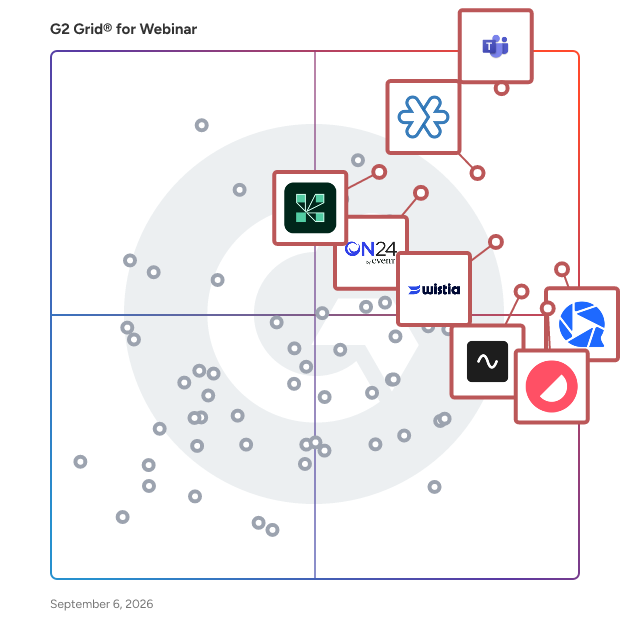
- **Leader:** [Microsoft Teams Webinars](https://www.g2.com/products/microsoft-teams-webinars/reviews)
- **Highest Performer:** [Sequel.io](https://www.g2.com/products/sequel-io/reviews)
- **Easiest to Use:** [Contrast](https://www.g2.com/products/contrast-contrast/reviews)
- **Top Trending:** [Contrast](https://www.g2.com/products/contrast-contrast/reviews)
- **Best Free Software:** [Livestorm](https://www.g2.com/products/livestorm/reviews)


---

**Sponsored**

### Locus

Locus is an agentic enterprise Transportation Management System designed to orchestrate planning, execution, and settlement across all-mile logistics. It unifies order orchestration, transportation planning and optimization, carrier and rate management, execution control, tracking, settlement, analytics, and governance into a closed-loop platform for managing cost, service levels, and customer promises across multi-carrier networks. Since its founding in 2015, Locus has helped customers globally execute over 1.5 billion + deliveries across 30+ countries spanning the Americas, Southeast Asia, the Middle East, and the Indian subcontinent. Its technology has helped save $320 million+ in transit costs, offset 17M+ Kgs in CO2 emissions, and maintained a 99.5% SLA adherence ratio. The modular, API-first platform serves industries including Retail, Manufacturing, FMCG/CPG, Courier/Express/Parcel, e-commerce, and 3PL providers. It integrates seamlessly with existing TMS, OMS, WMS, and ERP solutions through simple API plugins. Targeting retailers and logistics providers, Locus offers an end-to-end solution that facilitates seamless delivery from any location, whether it be a local store or international borders. The platform&#39;s patented routing and geocoding engines are designed to optimize every stage of the supply chain. By integrating captive, contracted, and carrier fleets across the first, middle, and final mile, Locus ensures that businesses can achieve cost efficiency while maintaining high levels of customer satisfaction. Key features of Locus include precise geolocation capabilities, hybrid fleet management, and dynamic route optimization. These tools work together to enhance fulfillment accuracy, flexibility, and predictability, allowing retailers to navigate the complexities of logistics with greater ease. The platform provides complete shipment visibility, which eliminates uncertainty for retailers, fleet partners, and distributors, thus fostering a more transparent supply chain environment. Locus has gained the trust of leading global brands, including Unilever and Nestlé, executing over a billion deliveries across more than 30 countries. The company is committed to innovation and sustainable growth, continuously evolving its solutions to meet the demands of the logistics landscape. As artificial intelligence and automation play an increasingly significant role in the industry, Locus is poised to streamline operations from pre-purchase fulfillment to post-delivery support, transforming complex supply chains into strategic growth enablers for businesses worldwide.


[Visit website](https://www.g2.com/external_clickthroughs/record?secure%5Bad_program%5D=ppc&amp;secure%5Bad_slot%5D=category_product_list&amp;secure%5Bcategory_id%5D=1113&amp;secure%5Bdisplayable_resource_id%5D=372&amp;secure%5Bdisplayable_resource_type%5D=Category&amp;secure%5Bmedium%5D=sponsored&amp;secure%5Bplacement_reason%5D=retargeted_product&amp;secure%5Bplacement_resource_ids%5D%5B%5D=53581&amp;secure%5Bprioritized%5D=false&amp;secure%5Bproduct_id%5D=53581&amp;secure%5Bresource_id%5D=1113&amp;secure%5Bresource_type%5D=Category&amp;secure%5Bsource_type%5D=category_page&amp;secure%5Bsource_url%5D=https%3A%2F%2Fwww.g2.com%2Fcategories%2Fwebinar&amp;secure%5Btoken%5D=26deac6afe3e2b0e5c2d2f3640f2d96d957e8b39e11b096c4847537a51289134&amp;secure%5Burl%5D=https%3A%2F%2Flocus.sh%2Ftransportation-management-system%2F%3Futm_source%3Dg2%26utm_medium%3Dppc%26utm_campaign%3Dtransportation-management-system&amp;secure%5Burl_type%5D=custom_url)

---

## What Are the Top-Rated Webinar Platforms Products in 2026?
### 1. [Microsoft Teams Webinars](https://www.g2.com/products/microsoft-teams-webinars/reviews)
Microsoft Teams Webinars is an end-to-end webinar platform, enabling high-quality, professional, and engaging webinars for any audience. Teams webinars delivers a broad set of tools to ensure that the webinar experience is seamless, secure, and engaging, before the events begins to long after the event is over.


**Average Rating:** 4.6/5.0
**Total Reviews:** 129
**How Do G2 Users Rate Microsoft Teams Webinars?**

- **Has the product been a good partner in doing business?:** 9.2/10 (Category avg: 9.0/10)
- **Social Media Integration:** 8.4/10 (Category avg: 8.2/10)
- **Software Integrations:** 8.8/10 (Category avg: 8.6/10)
- **Attendee Reports:** 9.1/10 (Category avg: 8.9/10)

**Who Is the Company Behind Microsoft Teams Webinars?**

- **Seller:** [Microsoft](https://www.g2.com/sellers/microsoft)
- **Year Founded:** 1975
- **HQ Location:** Redmond, Washington
- **Twitter:** @microsoft (13,091,739 Twitter followers)
- **LinkedIn® Page:** https://www.linkedin.com/company/microsoft/ (231,632 employees on LinkedIn®)
- **Ownership:** MSFT

**Who Uses This Product?**
- **Top Industries:** Information Technology and Services, Computer Software
- **Company Size:** 52% Mid-Market, 24% Small-Business


#### What Are Microsoft Teams Webinars's Pros and Cons?

**Pros:**

- Ease of Use (25 reviews)
- Webinars (19 reviews)
- Integrations (16 reviews)
- Attendee Management (14 reviews)
- Easy Setup (12 reviews)

**Cons:**

- Limited Customization (9 reviews)
- Missing Features (9 reviews)
- Limited Analytics (8 reviews)
- Limited Branding (7 reviews)
- Cluttered Interface (6 reviews)


### What Do G2 Reviewers Say About Microsoft Teams Webinars?
*AI-generated summary from verified user reviews*

**Pros:**

- Users value the **ease of use** in Microsoft Teams Webinars, appreciating effortless scheduling and attendee management.
- Users love the **seamless integration and ease of management** for scheduling and running webinars with Microsoft Teams.
- Users value the **seamless integration** of Microsoft Teams webinars with other Microsoft tools for a streamlined experience.
- Users appreciate the **easy scheduling and management of attendees** in Microsoft Teams Webinars, which streamlines the webinar process.
- Users find the **easy setup** of Microsoft Teams Webinars enhances their experience and facilitates smooth webinar management.

**Cons:**

- Users find the **limited customization** of Microsoft Teams Webinars restricts branding and personalizing their events effectively.
- Users find that some **features are missing or limited** , affecting user-friendliness and customization in Microsoft Teams Webinars.
- Users find the **limited analytics** of Microsoft Teams Webinars insufficient for effective reporting and insights.
- Users find **branding options limited** , struggling to customize registration pages and emails for their marketing needs.
- Users find the interface **cluttered and disorganized** , making it difficult to locate essential webinar controls and calendars.

#### What Are Recent G2 Reviews of Microsoft Teams Webinars?

**"[Managing Health Education Webinars Became More Organized and Professional](https://www.g2.com/survey_responses/microsoft-teams-webinars-review-12824540)"**

**Rating:** 4.5/5.0 stars
*— Ishan S.*

[Read full review](https://www.g2.com/survey_responses/microsoft-teams-webinars-review-12824540)

---

**"[Microsoft Teams Webinars: Easy Setup, Stable Sessions, and Organized Recordings](https://www.g2.com/survey_responses/microsoft-teams-webinars-review-12842652)"**

**Rating:** 5.0/5.0 stars
*— Anshul T.*

[Read full review](https://www.g2.com/survey_responses/microsoft-teams-webinars-review-12842652)

---


### 2. [Zoho Meeting](https://www.g2.com/products/zoho-meeting/reviews)
One stop solution to manage your online meetings, video conferencing, meeting rooms, business phones, and webinars for your organization. The best solution for your remote collaboration for the hybrid work. Communication and collaboration that cuts through EX to CX across all departments of an organization. Online meeting or web conferencing is a rapidly growing segment of the Internet as more businesses opt to connect with customers and partners remotely. Zoho Meeting is the easiest and most affordable online web conferencing tool to enhance the business collaboration with screen/application sharing, whiteboard sharing, remote control, audio, and video conferencing. It provides single users as well as small and large size organizations, a quick and easy way to host and conduct secure and cost-effective online meetings. Host product launches, feature demonstrations, sales presentations, lead-nurturing webinars, user education webinars, and online meetings, right from your browser. Zoho Meeting is typically used in the following scenarios. You can host secure, robust web meetings and share your screen online with your remote audience using any browser or computer operating system. Your remote audience can be from any part of the world and they can be in different locations. Zoho Meeting saves time, travel and money by providing real-time virtual meetings - While face-to-face meetings are still a necessity and irreplaceable in many circumstances; the power of a Zoho Meeting provides the next best thing. Online meeting is also tightly integrated with Zoho CRM, Zoho Projects, Microsoft Teams, Slack, Gmail, and more. Now you can schedule, invite, host meetings and view reports and recording from your Zoho CRM account. You can organize cost-effective sales and marketing meetings with a few simple clicks of your mouse. Demonstrate your products and services to potential clients, connect with your colleagues for discussions and periodic meetings, engage larger audiences and even perform after-sales support. Simplify your sales process with online presentations, conduct web meetings for business strategy and marketing; communicate efficiently and quickly with your customers anywhere, anytime. You can target new prospects or announce new product launches to your existing customer base using Zoho Meeting. Host large virtual events and live stream them on social platform. Webinars and media launches can effectively be managed to save you a bundle in time and money.


**Average Rating:** 4.5/5.0
**Total Reviews:** 1,136
**How Do G2 Users Rate Zoho Meeting?**

- **Has the product been a good partner in doing business?:** 9.0/10 (Category avg: 9.0/10)
- **Social Media Integration:** 8.3/10 (Category avg: 8.2/10)
- **Software Integrations:** 8.5/10 (Category avg: 8.6/10)
- **Attendee Reports:** 8.7/10 (Category avg: 8.9/10)

**Who Is the Company Behind Zoho Meeting?**

- **Seller:** [Zoho](https://www.g2.com/sellers/zoho-b00ca9d5-bca8-41b5-a8ad-275480841704)
- **Year Founded:** 1996
- **HQ Location:** Austin, TX
- **Twitter:** @Zoho (137,880 Twitter followers)
- **LinkedIn® Page:** https://www.linkedin.com/company/38373/ (30,766 employees on LinkedIn®)
- **Phone:** +1 (888) 900-9646 

**Who Uses This Product?**
- **Who Uses This:** CEO, Founder
- **Top Industries:** Information Technology and Services, Computer Software
- **Company Size:** 80% Small-Business, 14% Mid-Market


#### What Are Zoho Meeting's Pros and Cons?

**Pros:**

- Ease of Use (44 reviews)
- Easy Setup (19 reviews)
- Features (14 reviews)
- Simple (14 reviews)
- Affordable (13 reviews)

**Cons:**

- Video Quality (10 reviews)
- Audio Issues (9 reviews)
- Missing Features (7 reviews)
- Missing Functionality (7 reviews)
- Poor Quality (7 reviews)


### What Do G2 Reviewers Say About Zoho Meeting?
*AI-generated summary from verified user reviews*

**Pros:**

- Users find Zoho Meeting&#39;s **ease of use** remarkable, thanks to its simple setup and intuitive features for all skill levels.
- Users appreciate the **easy setup** of Zoho Meeting, allowing quick access without downloading additional software.
- Users appreciate the **cost-effective and useful features** of Zoho Meeting, combining the best of both Google and Microsoft.
- Users appreciate the **simplicity** of Zoho Meeting, finding it easy to set up and start discussions with friends.
- Users find Zoho Meeting **affordable and budget-friendly** , making it an excellent choice for small to medium teams.

**Cons:**

- Users experience **lag and choppy video quality** with Zoho Meeting, impacting the effectiveness of calls and screen sharing.
- Users experience **audio issues** with Zoho Meeting, affecting sound quality and overall meeting effectiveness.
- Users find **missing features** in Zoho Meeting, such as limited customization options and required participant accounts, frustrating.
- Users often find the **missing functionality** frustrating, especially regarding add-ons, organization creation, and recording limitations.
- Users experience **poor quality** issues like lag and blurry video during calls, affecting their overall satisfaction.

#### What Are Recent G2 Reviews of Zoho Meeting?

**"[Zoho Meeting’s Unified Workflow Makes Webinars and Demos Effortless](https://www.g2.com/survey_responses/zoho-meeting-review-12870215)"**

**Rating:** 4.0/5.0 stars
*— Prabhat C.*

[Read full review](https://www.g2.com/survey_responses/zoho-meeting-review-12870215)

---

**"[Makes Online Consultations and Health Webinars More Smooth and Organized](https://www.g2.com/survey_responses/zoho-meeting-review-12780407)"**

**Rating:** 5.0/5.0 stars
*— Ishan S.*

[Read full review](https://www.g2.com/survey_responses/zoho-meeting-review-12780407)

---


#### What Are G2 Users Discussing About Zoho Meeting?

- [What is Zoho Meeting used for?](https://www.g2.com/discussions/zoho-meeting-what-is-zoho-meeting-used-for) - 1 comment
- [How do I host a Zoho Meeting?](https://www.g2.com/discussions/how-do-i-host-a-zoho-meeting) - 1 comment
- [Is Zoho Meeting free?](https://www.g2.com/discussions/is-zoho-meeting-free) - 2 comments, 1 upvote
- [What is Zoho Meeting used for?](https://www.g2.com/discussions/what-is-zoho-meeting-used-for) - 2 comments

### 3. [WebinarGeek](https://www.g2.com/products/webinargeek/reviews)
WebinarGeek is the all-in-one platform for hosting interactive, professional webinars without the hassle. It’s 100% browser-based, super reliable, and built to scale—from small sessions to 5,000 live viewers. With tools like polls, quizzes, and CTA buttons, you’ll boost engagement and keep your audience involved from start to finish. Every part of the webinar can be fully branded, and automated follow-ups help turn viewers into customers. Connect WebinarGeek with over 6,000 tools like HubSpot, Mailchimp, and Zapier to streamline your entire marketing flow. Whether you’re running a product launch, training, or onboarding, WebinarGeek makes it easy to deliver real results. And if you ever need support? Our human team is just a click away and always rated the best. Try it free today.


**Average Rating:** 4.5/5.0
**Total Reviews:** 532
**How Do G2 Users Rate WebinarGeek?**

- **Has the product been a good partner in doing business?:** 9.1/10 (Category avg: 9.0/10)
- **Social Media Integration:** 8.1/10 (Category avg: 8.2/10)
- **Software Integrations:** 8.4/10 (Category avg: 8.6/10)
- **Attendee Reports:** 9.1/10 (Category avg: 8.9/10)

**Who Is the Company Behind WebinarGeek?**

- **Seller:** [WebinarGeek](https://www.g2.com/sellers/webinargeek)
- **Company Website:** https://www.webinargeek.com
- **Year Founded:** 2015
- **HQ Location:** Zoetermeer
- **Twitter:** @WebinarGeek (1,665 Twitter followers)
- **LinkedIn® Page:** https://www.linkedin.com/company/9369980/ (42 employees on LinkedIn®)

**Who Uses This Product?**
- **Who Uses This:** Owner, Founder
- **Top Industries:** Computer Software, Professional Training &amp; Coaching
- **Company Size:** 81% Small-Business, 13% Mid-Market


#### What Are WebinarGeek's Pros and Cons?

**Pros:**

- Ease of Use (110 reviews)
- Webinars (83 reviews)
- Easy Setup (73 reviews)
- Intuitive (40 reviews)
- Integrations (35 reviews)

**Cons:**

- Improvement Needed (24 reviews)
- Page Navigation (23 reviews)
- Missing Features (20 reviews)
- Learning Curve (18 reviews)
- Integration Issues (15 reviews)


### What Do G2 Reviewers Say About WebinarGeek?
*AI-generated summary from verified user reviews*

**Pros:**

- Users find WebinarGeek&#39;s interface to be **intuitive and user-friendly** , making webinar setup straightforward even for beginners.
- Users appreciate the **user-friendly interface** of WebinarGeek, enabling smooth webinar creation and attendee engagement.
- Users find the **easy setup** of WebinarGeek intuitive and efficient, streamlining the webinar creation process seamlessly.
- Users appreciate the **intuitive layout** of WebinarGeek, facilitating easy setup and enhancing the overall webinar experience.
- Users value the **seamless integrations** of WebinarGeek, enhancing their workflow with popular tools like Mailchimp.

**Cons:**

- Users note that **improvement is needed** in feature explanations and the overall webinar creation process can be confusing.
- Users find the **page navigation confusing** , with unclear labels and an unintuitive layout impacting usability.
- Users find the **missing features** in WebinarGeek, like bulk invites and improved navigation, lead to confusion and inefficiency.
- Users find the **learning curve steep** for WebinarGeek, citing confusion with navigation and setup as challenges.
- Users experience **integration issues** with WebinarGeek, particularly with CRM tools and navigating multiple features smoothly.

#### What Are Recent G2 Reviews of WebinarGeek?

**"[Simple operation, high benefit, and excellent support](https://www.g2.com/survey_responses/webinargeek-review-12932087)"**

**Rating:** 5.0/5.0 stars
*— Jürgen L.*

[Read full review](https://www.g2.com/survey_responses/webinargeek-review-12932087)

---

**"[Practical Webinar Hosting with Great Demo Videos and Dry-Run Tools](https://www.g2.com/survey_responses/webinargeek-review-12955578)"**

**Rating:** 4.5/5.0 stars
*— Ashley C.*

[Read full review](https://www.g2.com/survey_responses/webinargeek-review-12955578)

---


#### What Are G2 Users Discussing About WebinarGeek?

- [What is WebinarGeek used for?](https://www.g2.com/discussions/what-is-webinargeek-used-for) - 1 comment

### 4. [Wistia](https://www.g2.com/products/wistia/reviews)
Wistia is a complete video marketing platform that helps teams create, host, market, and measure their videos and webinars—all in one place. With Wistia, you can easily create professional videos, host webinars, collect and send leads to your marketing automation platform, and more. As you level up your video marketing strategy, Wistia has your back with educational resources and world-class support.


**Average Rating:** 4.6/5.0
**Total Reviews:** 1,122
**How Do G2 Users Rate Wistia?**

- **Has the product been a good partner in doing business?:** 9.2/10 (Category avg: 9.0/10)
- **Social Media Integration:** 8.4/10 (Category avg: 8.2/10)
- **Software Integrations:** 8.6/10 (Category avg: 8.6/10)
- **Attendee Reports:** 8.8/10 (Category avg: 8.9/10)

**Who Is the Company Behind Wistia?**

- **Seller:** [Wistia](https://www.g2.com/sellers/wistia)
- **Company Website:** https://www.wistia.com
- **Year Founded:** 2006
- **HQ Location:** Cambridge, MA
- **Twitter:** @wistia (28,640 Twitter followers)
- **LinkedIn® Page:** https://www.linkedin.com/company/1316084/ (206 employees on LinkedIn®)

**Who Uses This Product?**
- **Who Uses This:** Marketing Manager, Digital Marketing Manager
- **Top Industries:** Computer Software, Marketing and Advertising
- **Company Size:** 48% Mid-Market, 35% Small-Business


#### What Are Wistia's Pros and Cons?

**Pros:**

- Ease of Use (302 reviews)
- Features (189 reviews)
- Video Quality (125 reviews)
- Video Management (115 reviews)
- Integrations (100 reviews)

**Cons:**

- Limited Customization (67 reviews)
- Expensive (57 reviews)
- Missing Features (56 reviews)
- Expensive Cost (50 reviews)
- Feature Limitations (48 reviews)


### What Do G2 Reviewers Say About Wistia?
*AI-generated summary from verified user reviews*

**Pros:**

- Users find Wistia incredibly **easy to use** , simplifying video uploads, editing, and implementation into existing processes.
- Users value Wistia&#39;s **customization and integration features** , enhancing brand identity and streamlining video editing processes.
- Users appreciate the **high-quality video** features of Wistia, enhancing branding and integration with ease of use.
- Users value the **centralized video management** of Wistia, enabling effortless sharing, branding, and analytics for all videos.
- Users love the **seamless integrations** of Wistia, enhancing video campaigns and optimizing their media tech stack.

**Cons:**

- Users desire greater **customization options** for Wistia&#39;s live webinar experience and analytics functionality.
- Users find Wistia **expensive** , noting increased costs can hinder accessibility and lead to content removal.
- Users face challenges with **missing features** like easy playlist creation and better integration with HubSpot fields.
- Users find the **cost of Wistia** to be high, particularly as expenses increase with more hosted videos.
- Users express frustration over **feature limitations** , particularly in the landing page creation and event setup processes.

#### What Are Recent G2 Reviews of Wistia?

**"[Seamless Video Hosting with User-Friendly Interface](https://www.g2.com/survey_responses/wistia-review-4364873)"**

**Rating:** 5.0/5.0 stars
*— Josh W.*

[Read full review](https://www.g2.com/survey_responses/wistia-review-4364873)

---

**"[Wistia Makes Video Management Simple, Customizable, and Efficient](https://www.g2.com/survey_responses/wistia-review-12960803)"**

**Rating:** 5.0/5.0 stars
*— Mikalla C.*

[Read full review](https://www.g2.com/survey_responses/wistia-review-12960803)

---


#### What Are G2 Users Discussing About Wistia?

- [What is Wistia used for?](https://www.g2.com/discussions/wistia-what-is-wistia-used-for)
- [How do I download wistia?](https://www.g2.com/discussions/how-do-i-download-wistia) - 1 comment
- [How much does wistia cost?](https://www.g2.com/discussions/how-much-does-wistia-cost)
- [What is wistia?](https://www.g2.com/discussions/what-is-wistia)
- [What is wistia used for?](https://www.g2.com/discussions/what-is-wistia-used-for) - 1 comment

### 5. [ON24](https://www.g2.com/products/on24/reviews)
ON24 is on a mission to help businesses bring their go-to-market strategy into the AI era and drive the next generation of event marketing. Through its leading webinar and digital event platform, ON24 enables customers to combine its leading first-party experiences with personalization and content as well as capture and act on engagement insights, accelerating the buyer journey and propelling pipeline forward. ON24 provides industry-leading companies with a valuable source of first-party data to drive sales and marketing innovation, improve efficiency and increase business results.


**Average Rating:** 4.3/5.0
**Total Reviews:** 1,154
**How Do G2 Users Rate ON24?**

- **Has the product been a good partner in doing business?:** 8.5/10 (Category avg: 9.0/10)
- **Social Media Integration:** 7.7/10 (Category avg: 8.2/10)
- **Software Integrations:** 7.8/10 (Category avg: 8.6/10)
- **Attendee Reports:** 8.8/10 (Category avg: 8.9/10)

**Who Is the Company Behind ON24?**

- **Seller:** [Cvent](https://www.g2.com/sellers/cvent)
- **Company Website:** https://www.cvent.com/
- **Year Founded:** 1999
- **HQ Location:** Tysons Corner, VA
- **Twitter:** @cvent (42,011 Twitter followers)
- **LinkedIn® Page:** https://www.linkedin.com/company/18125/ (6,609 employees on LinkedIn®)

**Who Uses This Product?**
- **Who Uses This:** Marketing Manager, Marketing Coordinator
- **Top Industries:** Computer Software, Information Technology and Services
- **Company Size:** 42% Mid-Market, 40% Enterprise


#### What Are ON24's Pros and Cons?

**Pros:**

- Ease of Use (48 reviews)
- Webinars (38 reviews)
- Interactivity (30 reviews)
- Customer Support (23 reviews)
- Customization (23 reviews)

**Cons:**

- Learning Curve (18 reviews)
- Limited Customization (13 reviews)
- Missing Features (11 reviews)
- Expensive (10 reviews)
- Improvement Needed (10 reviews)


### What Do G2 Reviewers Say About ON24?
*AI-generated summary from verified user reviews*

**Pros:**

- Users appreciate the **ease of use** of ON24, enabling quick setup and seamless integration for engaging meetings.
- Users value the **outstanding live experience** and features of ON24 webinars, enhancing engagement and content promotion.
- Users appreciate the **interactive features** of ON24, enhancing engagement and collaboration during webinars and virtual events.
- Users value the **quick and responsive customer support** from ON24, ensuring seamless assistance whenever needed.
- Users appreciate the **customization options** in ON24, allowing tailored experiences and effective role-based access.

**Cons:**

- Users find the **learning curve challenging** , as advanced features and integrations aren&#39;t immediately intuitive.
- Users find ON24&#39;s **limited customization** options hinder creative control and integration with external tools.
- Users find **missing features** in ON24, like limited design freedom and integration options, hindering user experience.
- Users find ON24 to be **fairly expensive** , especially with additional costs for premium services and extra minutes.
- Users note that ON24 requires **improvement in platform reliability and support** for a better overall experience.

#### What Are Recent G2 Reviews of ON24?

**"[ON24-Your All-in-One Webinar Solution](https://www.g2.com/survey_responses/on24-review-7540937)"**

**Rating:** 5.0/5.0 stars
*— Elvis E.*

[Read full review](https://www.g2.com/survey_responses/on24-review-7540937)

---

**"[Intuitive Platform with Engaging Features, Room for Interface Improvement](https://www.g2.com/survey_responses/on24-review-12952499)"**

**Rating:** 5.0/5.0 stars
*— Dhaval M.*

[Read full review](https://www.g2.com/survey_responses/on24-review-12952499)

---


#### What Are G2 Users Discussing About ON24?

- [What is ON24 used for?](https://www.g2.com/discussions/what-is-on24-used-for)

### 6. [Contrast](https://www.g2.com/products/contrast-contrast/reviews)
Contrast helps marketing teams run webinar programs that feel modern and match their brand, with logos, colors and fonts. Onstream engagement features turn presentations into events the audience comes back to. Every interaction is tracked back into HubSpot, so that marketing and sales can follow up with the right message and person. When the session ends, AI gets to work: subtitled clips, a blog post, whatever you need next is there. Contrast is fast, easy to use and adapts to your needs. Whatever your setup; “It just works”, not our words but the 250+ reviews on G2 and HubSpot Marketplace. Setting up a webinar on Contrast takes minutes. Registration pages, email sequences and calendar invites are pre-built and automatically go out your brand colors and logo without the help of a designer or developer. Boring webinars? Not on Contrast. Engagement features are directly embedded into the video, visible on screen in your brand’s colors and font. No need to spend hours on making your video look good in post-production. When your webinar is over, you know exactly who to follow up with. Every registrant has their own record whether they attended live or on replay, how long they stayed, what they said, which CTAs they clicked. All of that data syncs to the #1 rated HubSpot integration for webinars. With over 50 data points ready to use in Lead Scoring, Workflows, Marketing Events and more. Your follow-up is segmented before you&#39;ve started the webinar. Meanwhile, Contrast AI turns the recording into whatever you need: subtitled clips, blog posts, social assets, and more. One webinar keeps your content calendar full for weeks. Contrast webinars is trusted by top brands like Whirlpool, Fathom and HubSpot. SOC2 certified, built in Europe and recognised as a HubSpot Leading Technology Partner. Rated 4.8 stars on G2 and 4.9 stars on the HubSpot Marketplace. Contrast is consistently ranked as the easiest to use, easiest to implement – and top rated webinar platform on G2.


**Average Rating:** 4.8/5.0
**Total Reviews:** 163
**How Do G2 Users Rate Contrast?**

- **Has the product been a good partner in doing business?:** 9.6/10 (Category avg: 9.0/10)
- **Social Media Integration:** 8.7/10 (Category avg: 8.2/10)
- **Software Integrations:** 9.2/10 (Category avg: 8.6/10)
- **Attendee Reports:** 9.2/10 (Category avg: 8.9/10)

**Who Is the Company Behind Contrast?**

- **Seller:** [Contrast](https://www.g2.com/sellers/contrast)
- **Year Founded:** 2020
- **HQ Location:** Paris, FR
- **LinkedIn® Page:** https://www.linkedin.com/company/getcontrast/ (21 employees on LinkedIn®)

**Who Uses This Product?**
- **Who Uses This:** Marketing Manager, Head of Marketing
- **Top Industries:** Computer Software, Information Technology and Services
- **Company Size:** 55% Small-Business, 38% Mid-Market


#### What Are Contrast's Pros and Cons?

**Pros:**

- Webinars (47 reviews)
- Ease of Use (42 reviews)
- Easy Setup (34 reviews)
- Customer Support (24 reviews)
- Integrations (24 reviews)

**Cons:**

- Missing Features (9 reviews)
- Expensive (7 reviews)
- Improvement Needed (6 reviews)
- Limited Customization (5 reviews)
- Recording Issues (5 reviews)


### What Do G2 Reviewers Say About Contrast?
*AI-generated summary from verified user reviews*

**Pros:**

- Users value the **user-friendly webinars** in Contrast, enabling smooth sessions and efficient content repurposing.
- Users value the **user-friendly interface** of Contrast, simplifying webinar setup and enhancing overall efficiency.
- Users appreciate the **easy setup** of Contrast, which streamlines webinar management and automates manual tasks.
- Users highlight the **exceptional customer support** of Contrast, noting their responsiveness and willingness to listen to feedback.
- Users praise the **seamless integrations** of Contrast, enhancing efficiency with tools like Hubspot and Zapier.

**Cons:**

- Users find the **missing features** in Contrast limiting, especially for integrations and analytics compared to competitors.
- Users feel that the **expensive pricing structure** of Contrast can quickly add up, especially for multiple webinars.
- Users note that **improvement is needed** in features like Q&amp;A, survey tools, and AI functionality for better usability.
- Users express frustration over the **limited customization** options in Contrast, seeking more flexibility for personal branding.
- Users often face **recording issues** with Contrast, leading to lost content and challenging post-event processes.

#### What Are Recent G2 Reviews of Contrast?

**"[A simple and powerful webinar platform for seamless engagement](https://www.g2.com/survey_responses/contrast-review-12888956)"**

**Rating:** 4.5/5.0 stars
*— Emma P.*

[Read full review](https://www.g2.com/survey_responses/contrast-review-12888956)

---

**"[Frictionless Webinars with Polished Studio and Powerful Marketing Automation](https://www.g2.com/survey_responses/contrast-review-12932350)"**

**Rating:** 5.0/5.0 stars
*— Louise A.*

[Read full review](https://www.g2.com/survey_responses/contrast-review-12932350)

---


### 7. [Riverside](https://www.g2.com/products/riverside/reviews)
Riverside (formerly Riverside.fm) is the all-in-one platform for recording, live streaming, editing, repurposing, and publishing studio-quality videos and podcasts. Creators and businesses use it to produce broadcast-quality content without the production maze of multiple tools, expensive studios, or technical expertise. Record up to 4K video and uncompressed audio locally on every participant’s device, so quality holds up even on bad internet. Edit by editing the transcript. Turn long recordings into clips, captions, show notes, and translations with AI. Webinars scale to 10,000 attendees. Trusted by independent podcasters like Tim Ferriss, Mel Robbins, and Guy Raz, and by brands including Spotify, Marvel, HubSpot, Microsoft, and Intuit. What are Riverside&#39;s core benefits? - All-in-one: Record, live stream, edit, repurpose, host, and publish from one platform. Studio-quality results, no studio needed: Up to 4K video and uncompressed audio, recorded locally so quality doesn’t depend on the internet connection. - AI that does the heavy lifting: Edit by chatting or by editing text, clip automatically, enhance audio, translate, and generate show notes in seconds. - Speed without compromising quality: Cut hours of post-production into minutes. - Maximum reach from every recording: Built-in repurposing into clips, captions, transcripts, translations, and social formats. - No learning curve: Easy enough for first-timers, deep enough for pros. Guests join from a browser link. What are Riverside&#39;s main features? - Record crystal-clear audio and video regardless of internet connection - Edit content with intuitive, time-saving tools leveraging AI - Repurpose content automatically for multiple channels - Live stream to any social platforms (YouTube, Facebook, Instagram, Twitch, and more) - Transcribe audio and video files in 100+ languages with 99% accuracy - Host and distribute your podcast to major directories like Spotify, Apple, and YouTube. What is Riverside best used for? For creators: - Podcast recording, editing, hosting, and publishing - Remote video interviews with guests anywhere in the world - YouTube videos and long-form content - Live shows and live podcasts - Solo recordings, screen capture, and tutorials For businesses and teams: - Marketing video: testimonials, case studies, social content, brand podcasts - Webinars and virtual events up to 10,000 attendees - Internal communications: town halls, executive updates, all-hands - Learning and development: training, onboarding, internal knowledge - Sales: demos, prospect calls, customer stories - Product: demos, recorded user calls, walkthroughs - Producers and agencies: multi-guest remote production with full producer control What does Riverside offer for businesses? Full production control: - Producer Mode: Run the session without appearing in the recording. Control guests’ mics, cameras, layouts, and teleprompters. - Studio branding: Lock fonts, colors, logos, and overlays so content stays on-brand at scale. Team collaboration: - Workspaces, roles, and permissions: Organize teams, assign access, share files inside/outside the company. - In-editor comments: Feedback without Slack threads or screen recordings. - Riverside API Scale and speed: - Unlimited recording, storage, and exports. - Simultaneous team editing. Enterprise-grade security and support: - End-to-end encryption. SSO available. - 24/7 live support - Dedicated Customer Success Manager. - Producer on demand


**Average Rating:** 4.8/5.0
**Total Reviews:** 1,727
**How Do G2 Users Rate Riverside?**

- **Has the product been a good partner in doing business?:** 9.5/10 (Category avg: 9.0/10)
- **Social Media Integration:** 8.4/10 (Category avg: 8.2/10)
- **Software Integrations:** 8.6/10 (Category avg: 8.6/10)
- **Attendee Reports:** 7.5/10 (Category avg: 8.9/10)

**Who Is the Company Behind Riverside?**

- **Seller:** [Riverside](https://www.g2.com/sellers/riverside)
- **Company Website:** https://riverside.com/
- **Year Founded:** 2020
- **HQ Location:** Palo Alto, California
- **Twitter:** @RiversidedotFM (10,509 Twitter followers)
- **LinkedIn® Page:** https://www.linkedin.com/company/riverside-fm/ (450 employees on LinkedIn®)

**Who Uses This Product?**
- **Who Uses This:** Founder, Owner
- **Top Industries:** Entertainment, Media Production
- **Company Size:** 89% Small-Business, 10% Mid-Market


#### What Are Riverside's Pros and Cons?

**Pros:**

- Ease of Use (1083 reviews)
- Quality (780 reviews)
- High Quality (728 reviews)
- Recording (670 reviews)
- Video Quality (656 reviews)

**Cons:**

- Recording Issues (248 reviews)
- Missing Features (215 reviews)
- Feature Deficiency (212 reviews)
- Audio Issues (155 reviews)
- Editing Issues (141 reviews)


### What Do G2 Reviewers Say About Riverside?
*AI-generated summary from verified user reviews*

**Pros:**

- Users find Riverside to have **ease of use** , simplifying remote recordings and enhancing focus on content creation.
- Users value the **high quality audio and video** of Riverside, making remote podcasting seamless and enjoyable.
- Users appreciate the **high quality** of Riverside, enabling them to produce professional recordings effortlessly and efficiently.
- Users value Riverside&#39;s **streamlined and efficient recording features** , enhancing their video production experience with quality and support.
- Users value the **great video quality** of Riverside, allowing for the production of professional-looking programs seamlessly.

**Cons:**

- Users report **recording issues** including audio quality problems and difficulties with transcription accuracy and functionality.
- Users desire **missing features** like green screen capabilities, collaborative tools, and better editing options in Riverside.
- Users find the lack of **green screen capability** and Zapier integration in Riverside limiting for their recording needs.
- Users report **audio issues** with Riverside, including missing tracks and unwanted background noise affecting overall quality.
- Users report various **editing issues** with Riverside, including disconnection between tools and problems with the text editor.

#### What Are Recent G2 Reviews of Riverside?

**"[Riverside has been critical to my podcast&#39;s growth!](https://www.g2.com/survey_responses/riverside-review-12939758)"**

**Rating:** 5.0/5.0 stars
*— Nick M.*

[Read full review](https://www.g2.com/survey_responses/riverside-review-12939758)

---

**"[Easy to Use and Makes Podcast Production and Editing a Breeze](https://www.g2.com/survey_responses/riverside-review-12976238)"**

**Rating:** 4.5/5.0 stars
*— David G.*

[Read full review](https://www.g2.com/survey_responses/riverside-review-12976238)

---


#### What Are G2 Users Discussing About Riverside?
- [How do I record on Riverside FM?](https://www.g2.com/discussions/how-do-i-record-on-riverside-fm)
- [Can you screen share on Riverside FM?](https://www.g2.com/discussions/can-you-screen-share-on-riverside-fm) - 2 comments
- [What is Riverside FM?](https://www.g2.com/discussions/what-is-riverside-fm) - 2 comments
- [How does Riverside FM work?](https://www.g2.com/discussions/how-does-riverside-fm-work) - 1 comment

### 8. [Zoom Events and Webinars](https://www.g2.com/products/zoom-events-and-webinars/reviews)
Zoom helps you host professional virtual events without juggling multiple tools. Zoom Webinars get you live fast. Set up in minutes on a platform your team and attendees already know. Perfect when you need reliable broadcasts without the complexity. Zoom Webinars Plus make your events look as polished as they deserve. Create branded experiences that match your company standards, turn recordings into content that keeps working for you, and get the engagement insights you need to prove ROI. AI handles the busywork so you can focus on strategy. Zoom Events handles the complexity when you&#39;re running multi-day conferences or bringing together in-person and virtual audiences. Everything you need to manage registration, networking, and logistics in one place.


**Average Rating:** 4.5/5.0
**Total Reviews:** 381
**How Do G2 Users Rate Zoom Events and Webinars?**

- **Has the product been a good partner in doing business?:** 8.4/10 (Category avg: 9.0/10)
- **Social Media Integration:** 8.0/10 (Category avg: 8.2/10)
- **Software Integrations:** 8.0/10 (Category avg: 8.6/10)
- **Attendee Reports:** 8.6/10 (Category avg: 8.9/10)

**Who Is the Company Behind Zoom Events and Webinars?**

- **Seller:** [Zoom](https://www.g2.com/sellers/zoom-a5000ea1-6d30-4ab4-b591-20723189ac97)
- **Year Founded:** 2011
- **HQ Location:** San Jose, CA
- **Twitter:** @zoom (1,042,714 Twitter followers)
- **LinkedIn® Page:** https://www.linkedin.com/company/2532259/ (13,494 employees on LinkedIn®)

**Who Uses This Product?**
- **Who Uses This:** Software Engineer, Student
- **Top Industries:** Computer Software, Information Technology and Services
- **Company Size:** 42% Mid-Market, 41% Small-Business


#### What Are Zoom Events and Webinars's Pros and Cons?

**Pros:**

- Ease of Use (48 reviews)
- Webinars (33 reviews)
- Event Management (26 reviews)
- Easy Setup (25 reviews)
- Virtual Meetings (23 reviews)

**Cons:**

- Expensive (16 reviews)
- Limited Customization (12 reviews)
- Missing Features (11 reviews)
- Event Management (9 reviews)
- Improvement Needed (8 reviews)


### What Do G2 Reviewers Say About Zoom Events and Webinars?
*AI-generated summary from verified user reviews*

**Pros:**

- Users appreciate the **ease of use** of Zoom Events and Webinars, making event setup and participation effortless.
- Users find Zoom Events and Webinars to be **ideal for organizing and managing large webinars** effortlessly.
- Users love the **easy organization of events** with Zoom Events, simplifying the management of large meetings and webinars.
- Users appreciate the **easy setup** of Zoom Events, allowing quick access and seamless integration for their events.
- Users appreciate the **high-quality virtual event hosting** of Zoom Events and Webinars, enjoying its reliable engagement tools.

**Cons:**

- Users find the **pricing to be quite high** , especially with extra charges for larger events, impacting affordability.
- Users face **limited customization** options, impacting collaboration and causing inconvenience during large webinars and registrations.
- Users feel frustrated by the **absence of essential features** that limit functionality and complicate event management.
- Users find the **analytics and reporting limited** , which hinders obtaining detailed insights and affects interaction during events.
- Users report that **improvement is needed** in video quality, support, and security for a better experience.

#### What Are Recent G2 Reviews of Zoom Events and Webinars?

**"[Reliable Large-Scale Webinars with Strong Engagement Features](https://www.g2.com/survey_responses/zoom-events-and-webinars-review-12675377)"**

**Rating:** 4.5/5.0 stars
*— Maria G.*

[Read full review](https://www.g2.com/survey_responses/zoom-events-and-webinars-review-12675377)

---

**"[Efficient Event Management with Reliable Performance](https://www.g2.com/survey_responses/zoom-events-and-webinars-review-12701276)"**

**Rating:** 4.0/5.0 stars
*— Evan L.*

[Read full review](https://www.g2.com/survey_responses/zoom-events-and-webinars-review-12701276)

---


#### What Are G2 Users Discussing About Zoom Events and Webinars?

- [What is Zoom Events and Webinars used for?](https://www.g2.com/discussions/what-is-zoom-events-and-webinars-used-for) - 2 comments
- [How do I organize my webinar on Zoom?](https://www.g2.com/discussions/how-do-i-organize-my-webinar-on-zoom)
- [Is Zoom good for webinars?](https://www.g2.com/discussions/is-zoom-good-for-webinars) - 2 comments, 1 upvote
- [Are Webinars free on Zoom?](https://www.g2.com/discussions/are-webinars-free-on-zoom) - 2 comments
- [What is Zoom Video Webinar?](https://www.g2.com/discussions/what-is-zoom-video-webinar) - 2 comments

### 9. [Adobe Connect](https://www.g2.com/products/adobe-connect/reviews)
Adobe Connect empowers you with the true potential of virtual technology to craft unforgettable stories. Utilize its adaptable platform to create and present exceptional virtual experiences for diverse audiences. Elevate your training sessions, webinars, and meetings, making them extraordinary while ensuring secure outreach beyond the ordinary. Create Genuine Connections: Redefine audience engagement by crafting immersive virtual experiences using robust storyboarding and engagement design tools. Global Outreach: Harness the genuine power of virtual communication to connect with audiences from various backgrounds and abilities worldwide. All-in-One Solution: Your search ends here. A unified platform to plan, execute, and monitor your events. We&#39;ve got all your event workflows covered.


**Average Rating:** 4.0/5.0
**Total Reviews:** 918
**How Do G2 Users Rate Adobe Connect?**

- **Has the product been a good partner in doing business?:** 7.8/10 (Category avg: 9.0/10)
- **Social Media Integration:** 8.3/10 (Category avg: 8.2/10)
- **Software Integrations:** 8.4/10 (Category avg: 8.6/10)
- **Attendee Reports:** 8.5/10 (Category avg: 8.9/10)

**Who Is the Company Behind Adobe Connect?**

- **Seller:** [Adobe](https://www.g2.com/sellers/adobe)
- **Year Founded:** 1982
- **HQ Location:** San Jose, CA
- **Twitter:** @Adobe (956,842 Twitter followers)
- **LinkedIn® Page:** https://www.linkedin.com/company/1480/ (42,087 employees on LinkedIn®)
- **Ownership:** NASDAQ:ADBE

**Who Uses This Product?**
- **Who Uses This:** Teacher, Instructor
- **Top Industries:** Higher Education, Primary/Secondary Education
- **Company Size:** 37% Mid-Market, 33% Enterprise


#### What Are Adobe Connect's Pros and Cons?

**Pros:**

- Ease of Use (6 reviews)
- Features (6 reviews)
- Video Quality (5 reviews)
- Efficiency (4 reviews)
- Security (4 reviews)

**Cons:**

- Expensive (2 reviews)
- Mobile App Issues (2 reviews)
- Admin Control (1 reviews)
- Admin Control Issues (1 reviews)
- Application Instability (1 reviews)


### What Do G2 Reviewers Say About Adobe Connect?
*AI-generated summary from verified user reviews*

**Pros:**

- Users find Adobe Connect to be **extremely easy to use** , enhancing their virtual communication and collaboration seamlessly.
- Users value Adobe Connect for its **robust features** , enhancing collaboration and project presentation with professional digital tools.
- Users value the **high video quality** of Adobe Connect, enhancing their virtual meetings and training experiences significantly.
- Users praise Adobe Connect for its **efficiency** in facilitating presentations and effective collaboration within teams.
- Users value the **security** of Adobe Connect, ensuring confidentiality and a productive virtual work environment.

**Cons:**

- Users find Adobe Connect **expensive** , making it less accessible for smaller organizations and their budgeting needs.
- Users struggle with **mobile app performance** , noting an outdated interface and limited features compared to desktop.
- Users report **inconsistent audio and video quality** , along with limitations in admin control affecting participant experience.
- Users face **admin control issues** restricting access and limiting functionalities during webinars, impacting the overall experience.
- Users experience **application instability** on mobile devices and older laptops, leading to a frustrating experience.

#### What Are Recent G2 Reviews of Adobe Connect?

**"[Share your stories and work projects using Adobe Connect&#39;s virtual communication features.](https://www.g2.com/survey_responses/adobe-connect-review-12717016)"**

**Rating:** 5.0/5.0 stars
*— Amir S.*

[Read full review](https://www.g2.com/survey_responses/adobe-connect-review-12717016)

---

**"[Adobe Connect, a platform that helps you advance your projects and work goals.](https://www.g2.com/survey_responses/adobe-connect-review-11711543)"**

**Rating:** 5.0/5.0 stars
*— Daniel K.*

[Read full review](https://www.g2.com/survey_responses/adobe-connect-review-11711543)

---


#### What Are G2 Users Discussing About Adobe Connect?

- [What is Adobe Connect used for?](https://www.g2.com/discussions/what-is-adobe-connect-used-for) - 1 comment
- [What is step away in Adobe Connect?](https://www.g2.com/discussions/what-is-step-away-in-adobe-connect) - 1 comment
- [How do I use Adobe Connect?](https://www.g2.com/discussions/how-do-i-use-adobe-connect)
- [Is Adobe Connect free?](https://www.g2.com/discussions/is-adobe-connect-free) - 1 comment
- [What can Adobe Connect do?](https://www.g2.com/discussions/what-can-adobe-connect-do) - 1 comment

### 10. [Livestorm](https://www.g2.com/products/livestorm/reviews)
Livestorm is where marketing teams run webinars: Powerful, secure, and built for events that drive pipeline. With Livestorm, unblock traditional online events silos by owning every steps of the journey, without relying on any external help. Get access to email templates and sequences, customizable registration pages, email delivery tracking, website widgets, built-in social sharing, instant transcript and content repurposing and much more. Forget boring webinars with little interaction. With Livestorm, you can choose from a host of features to engage participants: launch polls, answer questions, send emojis, share files, and much more. Finally, take data-driven decisions thanks to Livestorm&#39;s integrated dashboard to track registrations, attendance, and participant engagement. Integrate Livestorm with Salesforce, HubSpot, or any CRM to leverage the data from any event. Livestorm is built with ease of use in mind. We serve companies of all sizes, from startups to Fortune 500s. Respected brands like Shopify, Revolut, Zapier, and ElevenLabs trust Livestorm to organize webinars that drive engagement and real results. Livestorm is built for scaling and large companies and particularly loved by marketers in the Finance, Healthcare, and Software industries. Livestorm is available in 24 languages, connecting users all over the world.


**Average Rating:** 4.4/5.0
**Total Reviews:** 1,647
**How Do G2 Users Rate Livestorm?**

- **Has the product been a good partner in doing business?:** 8.8/10 (Category avg: 9.0/10)
- **Social Media Integration:** 7.8/10 (Category avg: 8.2/10)
- **Software Integrations:** 8.0/10 (Category avg: 8.6/10)
- **Attendee Reports:** 8.6/10 (Category avg: 8.9/10)

**Who Is the Company Behind Livestorm?**

- **Seller:** [Livestorm](https://www.g2.com/sellers/livestorm)
- **Year Founded:** 2016
- **HQ Location:** Paris
- **Twitter:** @livestormapp (4,539 Twitter followers)
- **LinkedIn® Page:** https://www.linkedin.com/company/10625816/ (104 employees on LinkedIn®)

**Who Uses This Product?**
- **Who Uses This:** Marketing Manager, Customer Success Manager
- **Top Industries:** Computer Software, Information Technology and Services
- **Company Size:** 48% Mid-Market, 45% Small-Business


#### What Are Livestorm's Pros and Cons?

**Pros:**

- Ease of Use (51 reviews)
- Intuitive (32 reviews)
- Easy Setup (28 reviews)
- Webinars (28 reviews)
- Reliability (18 reviews)

**Cons:**

- Limited Customization (18 reviews)
- Expensive (10 reviews)
- Limited Features (9 reviews)
- Limited Branding (8 reviews)
- Missing Features (8 reviews)


### What Do G2 Reviewers Say About Livestorm?
*AI-generated summary from verified user reviews*

**Pros:**

- Users highlight the **ease of use** of Livestorm, facilitating smooth online meetings and enhancing customer engagement.
- Users appreciate the **intuitive interface** of Livestorm, making it easy for presenters and participants to engage seamlessly.
- Users appreciate the **easy setup** of Livestorm, enjoying a smooth and straightforward experience for their events.
- Users appreciate the **seamless experience** Livestorm provides for hosting professional webinars, enhancing engagement and interactivity.
- Users appreciate the **reliability** of Livestorm, highlighting its smooth performance and user-friendly experience for online events.

**Cons:**

- Users find **branding options limited** unless upgrading, making it hard to customize webinars effectively.
- Users find Livestorm&#39;s pricing to be **expensive for small teams** , limiting accessibility and customization options without upgrades.
- Users find **limited features** in Livestorm, including basic analytics and few customization options for branding.
- Users feel that the **branding options are limited** on Livestorm unless they opt for higher-tier plans.
- Users find the **missing features** in Livestorm, like limited layouts and basic form logic, quite frustrating.

#### What Are Recent G2 Reviews of Livestorm?

**"[Livestorm made our webinars more structured, but still has a few rough edges](https://www.g2.com/survey_responses/livestorm-review-12764411)"**

**Rating:** 5.0/5.0 stars
*— Alex K.*

[Read full review](https://www.g2.com/survey_responses/livestorm-review-12764411)

---

**"[Seamless, Browser-Based Webinars with Strong Engagement Tools](https://www.g2.com/survey_responses/livestorm-review-12951874)"**

**Rating:** 4.5/5.0 stars
*— Dharamveer p.*

[Read full review](https://www.g2.com/survey_responses/livestorm-review-12951874)

---


#### What Are G2 Users Discussing About Livestorm?

- [What is Livestorm used for?](https://www.g2.com/discussions/what-is-livestorm-used-for) - 4 comments, 1 upvote

### 11. [RingEX](https://www.g2.com/products/ringex/reviews)
WHAT IS RINGEX? RingEX is the all-in-one business communications platform that connects teams, customers, and conversations across voice, video, messaging, SMS, and AI agents all powered by AI. Designed for organizations that value productivity, customer satisfaction, and simplicity, RingEX brings together everything your business needs to collaborate and engage effectively from anywhere. ADVANCED AI WITH AIR, AVA, AND ACE RingEX transforms every interaction into a strategic advantage through three specialized AI agents. AI Receptionist (AIR) acts as an intelligent digital front desk, answering calls 24/7 in natural, multilingual conversations to answer FAQs, capture leads, schedule appointments, and route complex calls with full context. AI Virtual Assistant (AVA) acts as a proactive co-pilot for daily tasks, automatically capturing meeting summaries, generating follow-up actions, and drafting context-aware messages. AI Conversation Expert (ACE) serves as a flagship conversation intelligence platform, analyzing every interaction to provide coaching, automated call scoring, and deep sentiment analysis. By turning raw data into executive insights and syncing directly with your CRM, ACE helps leaders replicate winning behaviors and stay ahead of customer trends. NEW: CUSTOMER ENGAGEMENT BUNDLE Built for small and mid-sized customer-facing teams, the Customer Engagement Bundle helps businesses deliver faster, more connected customer support without the complexity of a full contact center. The bundle seamlessly blends voice and SMS support in one unified workspace. Key capabilities include a shared SMS inbox for team visibility, automated SMS opt-out compliance, and reply templates to maintain a consistent brand voice. It also features queue transparency with place-in-line updates and live reports for real-time visibility into agent performance and service quality. WHY RINGEX? Whether your team is connecting internally or engaging customers, RingEX delivers reliability, flexibility, and intelligence in one platform. Backed by enterprise-grade security, RingEX helps you stay connected and responsive at every moment that matters. RingEX customers gain smarter communication with AVA, revenue intelligence with ACE, and better customer experiences through the Customer Engagement Bundle. RingEX isn’t just a phone system. It is the intelligent core of your business that ensures every conversation—internal or external—is connected, analyzed, and impactful.


**Average Rating:** 4.2/5.0
**Total Reviews:** 1,344
**How Do G2 Users Rate RingEX?**

- **Has the product been a good partner in doing business?:** 8.3/10 (Category avg: 9.0/10)
- **Social Media Integration:** 8.1/10 (Category avg: 8.2/10)
- **Software Integrations:** 8.3/10 (Category avg: 8.6/10)
- **Attendee Reports:** 8.3/10 (Category avg: 8.9/10)

**Who Is the Company Behind RingEX?**

- **Seller:** [RingCentral](https://www.g2.com/sellers/ringcentral)
- **Company Website:** https://www.ringcentral.com
- **Year Founded:** 1999
- **HQ Location:** Belmont, CA
- **Twitter:** @RingCentral (61,963 Twitter followers)
- **LinkedIn® Page:** https://www.linkedin.com/company/60868/ (6,726 employees on LinkedIn®)

**Who Uses This Product?**
- **Who Uses This:** Owner, Office Manager
- **Top Industries:** Computer Software, Information Technology and Services
- **Company Size:** 57% Small-Business, 34% Mid-Market


#### What Are RingEX's Pros and Cons?

**Pros:**

- Ease of Use (195 reviews)
- Customer Support (124 reviews)
- Helpful (100 reviews)
- Reliability (96 reviews)
- Phone Calls (93 reviews)

**Cons:**

- Complex Processes (44 reviews)
- Call Issues (42 reviews)
- Poor Customer Support (41 reviews)
- Customer Service (35 reviews)
- Limitations (35 reviews)


### What Do G2 Reviewers Say About RingEX?
*AI-generated summary from verified user reviews*

**Pros:**

- Users find RingEX&#39;s **ease of use** invaluable, simplifying on-call management and device switching effortlessly.
- Users praise the **helpful customer support** of RingEX, enhancing their experience during setup and maintenance.
- Users find the **helpful support** from RingEX invaluable for maintaining reliable client communication during setup.
- Users praise the **reliability** of RingEX, highlighting excellent call quality and ease of use for support tasks.
- Users praise the **high-definition voice quality** and ease of use for effective communication in customer support.

**Cons:**

- Users find the **onboarding process complex** , which leads to confusion and challenges in setting up the product.
- Users report **inconsistent call quality** with RingEX, experiencing lag and performance issues that hinder reliability.
- Users struggle with **poor customer support** , facing difficulties in onboarding and getting timely assistance when needed.
- Users find it challenging to reach **live customer service** , leading to frustration during onboarding and support issues.
- Users experience **interface overwhelm** and occasional performance issues, alongside slower support response times with RingEX.

#### What Are Recent G2 Reviews of RingEX?

**"[Seamless Communication, Unifies Our Workflow](https://www.g2.com/survey_responses/ringex-review-12983792)"**

**Rating:** 5.0/5.0 stars
*— Suhasu U.*

[Read full review](https://www.g2.com/survey_responses/ringex-review-12983792)

---

**"[RingEx is easy to setup. I&#39;ve setup 25 contact center very easily using IVR editor and duplications](https://www.g2.com/survey_responses/ringex-review-11729131)"**

**Rating:** 5.0/5.0 stars
*— Raffy B.*

[Read full review](https://www.g2.com/survey_responses/ringex-review-11729131)

---


#### What Are G2 Users Discussing About RingEX?

- [What is RingCentral MVP used for?](https://www.g2.com/discussions/what-is-ringcentral-mvp-used-for)
- [Is RingCentral good?](https://www.g2.com/discussions/is-ringcentral-good) - 1 comment
- [What are the three RingCentral plans products?](https://www.g2.com/discussions/what-are-the-three-ringcentral-plans-products)
- [What is RingCentral office?](https://www.g2.com/discussions/what-is-ringcentral-office)

### 12. [RingCentral Events](https://www.g2.com/products/ringcentral-events/reviews)
WHAT IS RINGCENTRAL EVENTS? RingCentral Events is an all-in-one, AI-powered platform for creating engaging webinars and virtual, hybrid, or onsite event experiences. Designed to help brands build community and drive measurable ROI, RingCentral Events provides everything needed to run personalized, high-impact events from start to finish. SCALABLE PRODUCTION AND CUSTOMIZATION Whether you are hosting a simple webinar or a complex multi-stage conference, RingCentral Events offers unmatched flexibility. The built-in professional production studio allows for polished, branded streams without the need for external hardware. With over 40 app integrations, custom domains, and fully branded event venues, you can create a unique space that reflects your brand’s identity. Engagement features like live chat, Q&amp;A, emojis, and confetti ensure your audience stays active and connected. YEAR-ROUND ROI WITH CREATOR LAB RingCentral Events transforms one-off sessions into a continuous content engine. Through the AI-powered Creator Lab, organizers can instantly repurpose event recordings into professional-grade marketing assets. The system automatically identifies high-impact moments to generate AI highlight clips, transcripts, social media posts, email follow-ups, and blog entries. These assets can be centralized in a branded Content Hub, driving attendee engagement and lead generation long after the live event ends. TRANSPARENT PRICING AND PERFORMANCE ANALYTICS Maximize your budget with transparent, flat-fee pricing that includes unlimited registrations and events. Easily understand the success of your strategy by tracking detailed attendee engagement and performance metrics across your entire event portfolio. This data-driven approach allows you to continuously refine your content and improve your event ROI. WHY CHOOSE RINGCENTRAL EVENTS Modern marketing and event teams choose RingCentral to bridge the gap between live interactions and long-term community growth. By combining the high-end capabilities of our built-in production studio with the content-scaling capabilities of Creator Lab, RingCentral Events ensures your brand delivers an impactful, professional, and seamless experience every time.


**Average Rating:** 4.5/5.0
**Total Reviews:** 914
**How Do G2 Users Rate RingCentral Events?**

- **Has the product been a good partner in doing business?:** 9.0/10 (Category avg: 9.0/10)
- **Social Media Integration:** 7.1/10 (Category avg: 8.2/10)
- **Software Integrations:** 7.5/10 (Category avg: 8.6/10)
- **Attendee Reports:** 8.0/10 (Category avg: 8.9/10)

**Who Is the Company Behind RingCentral Events?**

- **Seller:** [RingCentral](https://www.g2.com/sellers/ringcentral)
- **Company Website:** https://www.ringcentral.com
- **Year Founded:** 1999
- **HQ Location:** Belmont, CA
- **Twitter:** @RingCentral (61,963 Twitter followers)
- **LinkedIn® Page:** https://www.linkedin.com/company/60868/ (6,726 employees on LinkedIn®)

**Who Uses This Product?**
- **Who Uses This:** Executive Director, Project Manager
- **Top Industries:** Non-Profit Organization Management, Events Services
- **Company Size:** 59% Small-Business, 29% Mid-Market


#### What Are RingCentral Events's Pros and Cons?

**Pros:**

- Ease of Use (17 reviews)
- Event Management (17 reviews)
- Intuitive (11 reviews)
- Engagement (10 reviews)
- Platform Quality (10 reviews)

**Cons:**

- Learning Curve (9 reviews)
- Event Management (6 reviews)
- Limited Features (6 reviews)
- Missing Features (6 reviews)
- Confusing Processes (5 reviews)


### What Do G2 Reviewers Say About RingCentral Events?
*AI-generated summary from verified user reviews*

**Pros:**

- Users find RingCentral Events to be **easy to use** , facilitating smooth organization of various virtual and in-person events.
- Users appreciate the **scalable and interactive virtual session hosting** of RingCentral Events, enhancing engagement and communication.
- Users find the **intuitive interface** of RingCentral Events easy for hosting various types of events successfully.
- Users enjoy the **interactive virtual sessions** hosted by RingCentral Events, enhancing engagement and communication across teams.
- Users commend the **intuitive platform quality** of RingCentral Events, simplifying virtual and hybrid event hosting effectively.

**Cons:**

- Users find the **learning curve steep** for RingCentral Events, complicating setup and utilization of features.
- Users experience a **steep learning curve** and technical issues, complicating the setup and management of events.
- Users report a **limited features** set in RingCentral Events, making it cumbersome for extensive or complex event setups.
- Users find the **missing features** in RingCentral Events complicate the experience, affecting setup and content management.
- Users find the **confusing processes** of RingCentral Events frustrating, especially during setup and managing breakout rooms.

#### What Are Recent G2 Reviews of RingCentral Events?

**"[Managing Online Events Feels More Organized](https://www.g2.com/survey_responses/ringcentral-events-review-12951746)"**

**Rating:** 4.5/5.0 stars
*— Ishan S.*

[Read full review](https://www.g2.com/survey_responses/ringcentral-events-review-12951746)

---

**"[Simplifying Virtual and Hybrid Events](https://www.g2.com/survey_responses/ringcentral-events-review-12989144)"**

**Rating:** 5.0/5.0 stars
*— Suhasu U.*

[Read full review](https://www.g2.com/survey_responses/ringcentral-events-review-12989144)

---


#### What Are G2 Users Discussing About RingCentral Events?

- [What is Hopin used for?](https://www.g2.com/discussions/what-is-hopin-used-for)
- [Who owns hopin?](https://www.g2.com/discussions/who-owns-hopin)
- [How much does it cost to use hopin?](https://www.g2.com/discussions/how-much-does-it-cost-to-use-hopin)
- [How do you use Attendify?](https://www.g2.com/discussions/how-do-you-use-attendify)
- [How do you use hopin platform?](https://www.g2.com/discussions/how-do-you-use-hopin-platform) - 2 comments

### 13. [Zoho Webinar](https://www.g2.com/products/zoho-webinar/reviews)
Zoho Webinar is a secure online platform designed to facilitate large-scale virtual conferences, webinars, and online workshops. It enables businesses to conduct impactful events such as training sessions, marketing webinars, online courses, and workshops, ensuring seamless communication and engagement with a global audience. Key Features and Functionality: - Interactive Engagement: Enhance attendee participation through immersive Q&amp;A sessions, audience polls, and interactive features like the &quot;Raise Hand&quot; option and emoji reactions. - Personalized Branding: Customize webinar registration links, promote events across various social platforms, and livestream sessions on platforms like YouTube to extend reach and visibility. - Advanced Analytics: Monitor attendee lists, generate detailed reports on participant information, analyze audience engagement levels, and export analytical data for further insights. - Lead Generation: Integrate seamlessly with Zoho CRM to push attendee information as leads, nurture them using Zoho Marketing Automation, and focus on the most promising prospects to boost sales. - Scalability: Host webinars accommodating up to 5,000 attendees without compromising performance, making it suitable for corporate events, global conferences, and large-scale training sessions. Primary Value and Solutions: Zoho Webinar addresses the need for a comprehensive, user-friendly, and scalable solution for conducting virtual events. It simplifies the process of hosting webinars by offering an intuitive interface, eliminating the need for downloads, and providing flexible pricing structures with no hidden fees. By integrating with other Zoho applications and third-party tools, it enhances lead generation and marketing efforts, ensuring businesses can effectively engage with their audience, expand their reach, and achieve better returns on investment for their virtual events.


**Average Rating:** 4.5/5.0
**Total Reviews:** 79
**How Do G2 Users Rate Zoho Webinar?**

- **Has the product been a good partner in doing business?:** 8.9/10 (Category avg: 9.0/10)
- **Social Media Integration:** 7.6/10 (Category avg: 8.2/10)
- **Software Integrations:** 7.8/10 (Category avg: 8.6/10)
- **Attendee Reports:** 8.9/10 (Category avg: 8.9/10)

**Who Is the Company Behind Zoho Webinar?**

- **Seller:** [Zoho](https://www.g2.com/sellers/zoho-b00ca9d5-bca8-41b5-a8ad-275480841704)
- **Year Founded:** 1996
- **HQ Location:** Austin, TX
- **Twitter:** @Zoho (137,880 Twitter followers)
- **LinkedIn® Page:** https://www.linkedin.com/company/38373/ (30,766 employees on LinkedIn®)
- **Phone:** +1 (888) 900-9646 

**Who Uses This Product?**
- **Top Industries:** Information Technology and Services, Education Management
- **Company Size:** 82% Small-Business, 16% Mid-Market


#### What Are Zoho Webinar's Pros and Cons?

**Pros:**

- Ease of Use (21 reviews)
- Webinars (15 reviews)
- Features (13 reviews)
- Integrations (11 reviews)
- Affordable (9 reviews)

**Cons:**

- Limited Customization (7 reviews)
- Expensive (4 reviews)
- Missing Features (4 reviews)
- User Interface (3 reviews)
- Delay Issues (2 reviews)


### What Do G2 Reviewers Say About Zoho Webinar?
*AI-generated summary from verified user reviews*

**Pros:**

- Users love the **ease of use** of Zoho Webinar, finding it flexible and accessible across multiple avenues.
- Users appreciate the **impactful webinars** hosted on Zoho Webinar, valuing the quality and intuitive interface.
- Users appreciate the **robust feature set** of Zoho Webinar, enhancing engagement with easy navigation and integrations.
- Users love the **seamless integrations** of Zoho Webinar, enhancing workflow and simplifying attendee engagement management.
- Users appreciate the **affordable pricing** of Zoho Webinar, facilitating easy access and seamless integration with other Zoho products.

**Cons:**

- Users find **limited customization** options for promotional emails and forms in Zoho Webinar, hindering their experience.
- Users find Zoho Webinar **expensive** , especially for small startups needing advanced features locked behind higher-tier plans.
- Users highlight **missing features** in Zoho Webinar, such as payment integration and advanced tools like breakout rooms.
- Users find the **user interface complicated** , facing challenges with deactivating webinars and necessary features like chat settings.
- Users find the **delay issues** in Zoho Webinar frustrating, impacting their efficiency and lead management.

#### What Are Recent G2 Reviews of Zoho Webinar?

**"[Seamless Registration and Easy Setup with Zoho Webinar](https://www.g2.com/survey_responses/zoho-webinar-review-12948339)"**

**Rating:** 5.0/5.0 stars
*— Fatima  W.*

[Read full review](https://www.g2.com/survey_responses/zoho-webinar-review-12948339)

---

**"[Reliable Platform for Managing Educational Webinars and Online Sessions](https://www.g2.com/survey_responses/zoho-webinar-review-12789260)"**

**Rating:** 5.0/5.0 stars
*— Ishan S.*

[Read full review](https://www.g2.com/survey_responses/zoho-webinar-review-12789260)

---


### 14. [Sequel.io](https://www.g2.com/products/sequel-io/reviews)
Sequel runs webinars directly on your website and turns the engagement into first-party data you can use to drive pipeline, personalization, and attribution. Webinars Belong on Your Website Webinars shouldn’t send your best prospects to a third-party destination. Sequel delivers the entire webinar experience on your website, so traffic, brand experience, and conversion paths stay under your control. Webinars are embedded directly into your CMS, not hosted on an external domain. Registration, viewing, CTAs, and follow-up all happen within your owned site—keeping attendees surrounded by your product pages, pricing, and next steps. Instead of siphoning traffic away, webinars contribute to organic traffic, SEO, and conversion. Actionable, First-Party Intent Data Attendance alone isn’t insight. When Sequel is embedded on your website, it unlocks access to a deep data layer that captures how people engage during the webinar and what they do on your website before and after, creating a single behavioral record per person and account. In-event actions like polls, questions, CTAs, and watch time are combined with website behavior and post-event actions such as pricing page visits or demo clicks to create a unified timeline with clean, configurable data pushed directly into CRM and MAP systems—enabling scoring, routing, and follow-up based on real behavior, not assumptions. Faster Follow-Up and Better Attribution Sequel is built to shorten the gap between engagement and action. With real-time sync to Salesforce, HubSpot, and Marketo, teams can map custom engagement fields, trigger alerts and nurture flows, and tie webinars directly to pipeline and revenue—not just MQLs. It’s designed for teams that care about forecast accuracy and ROI credibility. AI-Powered Content Repurposing Extends the Life of Every Event Webinars shouldn’t end when the live session does. Sequel uses AI to turn every event into a scalable content engine—automatically transforming long-form video into high-performing assets that drive ongoing engagement and pipeline. Studio-quality local recordings power better outputs, while AI generates clips, highlights, summaries, written content, and chapters that break replays into navigable, topic-based sections. Sales and marketing can share precise moments instead of entire recordings, fueling SEO, nurture, and on-site discovery without post-production bottlenecks or loss of brand control. Built for Global Audiences Modern B2B audiences are global. Sequel makes it easy to serve international viewers without duplicating programs or fragmenting data. Live AI-powered translations with captions support multiple spoken languages in a single session. On-demand replays include translated subtitles, viewers select their preferred language seamlessly, and AI dubbing enables multilingual versions of webinar content—all within the same owned-site experience. The Foundation of the Intelligent Website Sequel is not just a webinar tool. It’s the starting point for making the website adaptive, personalized, and revenue-aware. Webinars act as high-signal moments to identify intent and interests. Engagement data feeds personalization and recommendations over time. AI summarizes, repurposes, and operationalizes content—setting the groundwork for adaptive web experiences by role, account, or behavior, and evolving naturally into a broader Intelligent Website strategy.


**Average Rating:** 4.5/5.0
**Total Reviews:** 122
**How Do G2 Users Rate Sequel.io?**

- **Has the product been a good partner in doing business?:** 9.2/10 (Category avg: 9.0/10)
- **Social Media Integration:** 7.8/10 (Category avg: 8.2/10)
- **Software Integrations:** 8.9/10 (Category avg: 8.6/10)
- **Attendee Reports:** 9.0/10 (Category avg: 8.9/10)

**Who Is the Company Behind Sequel.io?**

- **Seller:** [Sequel](https://www.g2.com/sellers/sequel)
- **Company Website:** https://www.sequel.io/
- **Year Founded:** 2021
- **HQ Location:** San Francisco, CA
- **Twitter:** @sequel_io (231 Twitter followers)
- **LinkedIn® Page:** https://www.linkedin.com/company/sequelio/ (26 employees on LinkedIn®)

**Who Uses This Product?**
- **Top Industries:** Computer Software, Information Technology and Services
- **Company Size:** 57% Mid-Market, 34% Small-Business


#### What Are Sequel.io's Pros and Cons?

**Pros:**

- Webinars (17 reviews)
- Customer Support (16 reviews)
- Attendee Management (15 reviews)
- Ease of Use (12 reviews)
- Easy Setup (10 reviews)

**Cons:**

- Missing Features (7 reviews)
- Integration Issues (4 reviews)
- Limited Customization (4 reviews)
- Feature Deficiency (3 reviews)
- Feature Limitations (3 reviews)


### What Do G2 Reviewers Say About Sequel.io?
*AI-generated summary from verified user reviews*

**Pros:**

- Users love the **seamless integration of webinars hosted on their website** , enhancing attendee engagement significantly.
- Users appreciate the **responsive customer support** from Sequel.io, ensuring a smooth setup and integration experience.
- Users appreciate the **streamlined attendee management** of Sequel.io, finding it intuitive and highly efficient for events.
- Users appreciate the **ease of use** of Sequel.io, allowing for quick and intuitive webinar creation and management.
- Users highly value the **easy setup** of Sequel.io, streamlining events and enhancing the overall experience.

**Cons:**

- Users find **missing features** in Sequel.io, affecting customization and reporting efficiency for various use cases.
- Users report **integration issues** with Salesforce and occasional glitches that affect the overall experience, though support is helpful.
- Users find **limited customization options** frustrating, particularly regarding analytics and reporting capabilities for different team needs.
- Users find a **feature deficiency** in Sequel.io, as email additions are limited to one hour before webinars.
- Users are looking for **enhanced filtering options** in Sequel.io’s analytics for better data granularity and access.

#### What Are Recent G2 Reviews of Sequel.io?

**"[Lightweight, Native Embeds with Rock-Solid Reliability for Live Events](https://www.g2.com/survey_responses/sequel-io-review-12642426)"**

**Rating:** 4.0/5.0 stars
*— Vishal K.*

[Read full review](https://www.g2.com/survey_responses/sequel-io-review-12642426)

---

**"[Best event marketing tool out there](https://www.g2.com/survey_responses/sequel-io-review-13002241)"**

**Rating:** 4.5/5.0 stars
*— Akshaya C.*

[Read full review](https://www.g2.com/survey_responses/sequel-io-review-13002241)

---


### 15. [BlueJeans Virtual Events](https://www.g2.com/products/bluejeans-virtual-events/reviews)
With BlueJeans Events, host and manage production-grade virtual events and engaging live streams for audiences around the world. Create Memorable Experiences: Produce TV-quality broadcasts with 1080p video, Dolby Voice audio, and BlueJeans Studio’s powerful production tools that will wow audiences and elevate any event experience. Maximize Audience Engagement: Create interactive experiences using Q&amp;A, chat, polling, and hand raising tools, then reach millions by live streaming your event to social platforms, any RTMP destination, or your website. Deliver Premium Performance: Reach massive scale with secure, browser-based event production for up to 150,000 registered attendees that’s easy to manage and join from any device.


**Average Rating:** 4.4/5.0
**Total Reviews:** 218
**How Do G2 Users Rate BlueJeans Virtual Events?**

- **Has the product been a good partner in doing business?:** 9.1/10 (Category avg: 9.0/10)
- **Social Media Integration:** 8.5/10 (Category avg: 8.2/10)
- **Software Integrations:** 8.7/10 (Category avg: 8.6/10)
- **Attendee Reports:** 8.8/10 (Category avg: 8.9/10)

**Who Is the Company Behind BlueJeans Virtual Events?**

- **Seller:** [Verizon](https://www.g2.com/sellers/verizon)
- **Year Founded:** 1983
- **HQ Location:** Basking RIdge, NJ
- **Twitter:** @Verizon (1,486,564 Twitter followers)
- **LinkedIn® Page:** https://www.linkedin.com/company/1103/ (95,704 employees on LinkedIn®)
- **Ownership:** NYSE:VZ

**Who Uses This Product?**
- **Top Industries:** Information Technology and Services, Education Management
- **Company Size:** 45% Enterprise, 41% Mid-Market


#### What Are BlueJeans Virtual Events's Pros and Cons?

**Pros:**

- Audio Quality (1 reviews)
- Content Management (1 reviews)
- Design (1 reviews)
- Event Management (1 reviews)
- Features (1 reviews)

**Cons:**

- Limited Features (2 reviews)
- Missing Features (2 reviews)
- Poor Interface Design (2 reviews)
- Difficult Usability (1 reviews)
- Feature Deficiency (1 reviews)


### What Do G2 Reviewers Say About BlueJeans Virtual Events?
*AI-generated summary from verified user reviews*

**Pros:**

- Users value the **high-definition audio quality** of BlueJeans Virtual Events, enhancing their overall virtual experience.
- Users appreciate the **content management features** of BlueJeans Virtual Events, enhancing audience engagement and event control.
- Users love the **high-definition audio and video streaming** and engaging tools of BlueJeans Virtual Events for seamless interactions.
- Users value the **excellent event management features** of BlueJeans, enhancing their virtual event experiences significantly.
- Users value the **high-definition streaming and audience engagement tools** of BlueJeans Virtual Events, enhancing overall experience.

**Cons:**

- Users find **limited features** in BlueJeans Virtual Events, which affect customization and overall usability compared to competitors.
- Users find BlueJeans Virtual Events lacking **essential features** and feel the platform is not as intuitive as competitors.
- Users find the **poor interface design** of BlueJeans Virtual Events limits customization and feels less intuitive than competitors.
- Users find BlueJeans Virtual Events to have **difficult usability** , with limited customization and an unintuitive interface compared to competitors.
- Users are frustrated with the **feature deficiencies** of BlueJeans Virtual Events, finding it less intuitive than competitors.

#### What Are Recent G2 Reviews of BlueJeans Virtual Events?

**"[excellent product](https://www.g2.com/survey_responses/bluejeans-virtual-events-review-8908448)"**

**Rating:** 5.0/5.0 stars
*— Harsh  J.*

[Read full review](https://www.g2.com/survey_responses/bluejeans-virtual-events-review-8908448)

---

**"[BlueJeans Virtual Events: A Seamless Virtual Gathering Experience](https://www.g2.com/survey_responses/bluejeans-virtual-events-review-8063684)"**

**Rating:** 5.0/5.0 stars
*— Mehmed Oğuz .*

[Read full review](https://www.g2.com/survey_responses/bluejeans-virtual-events-review-8063684)

---


#### What Are G2 Users Discussing About BlueJeans Virtual Events?

- [What is BlueJeans Virtual Events used for?](https://www.g2.com/discussions/what-is-bluejeans-virtual-events-used-for)
- [What is BlueJeans program?](https://www.g2.com/discussions/what-is-bluejeans-program)
- [Can you see everyone on BlueJeans?](https://www.g2.com/discussions/can-you-see-everyone-on-bluejeans)
- [Can you use BlueJeans for free?](https://www.g2.com/discussions/can-you-use-bluejeans-for-free)
- [How do I use events in BlueJeans?](https://www.g2.com/discussions/how-do-i-use-events-in-bluejeans)

### 16. [BigMarker](https://www.g2.com/products/bigmarker/reviews)
BigMarker is the world&#39;s most customizable platform for webinars, virtual, and in-person events. We combine cutting-edge video technology with advanced marketing and interactive tools to deliver one-of-a-kind, fully branded event experiences. Thousands of companies worldwide trust BigMarker’s all-in-one platform to create immersive, interactive, and high-impact events. With seamless integrations, APIs, and white-label solutions, we empower organizations to embed interactive video experiences into their marketing, sales, and learning ecosystems. Founded in 2010 and headquartered in Chicago, BigMarker powers events for leading brands and organizations around the globe. Let’s bring your vision to life and build an event experience like no other.


**Average Rating:** 4.7/5.0
**Total Reviews:** 431
**How Do G2 Users Rate BigMarker?**

- **Has the product been a good partner in doing business?:** 9.6/10 (Category avg: 9.0/10)
- **Social Media Integration:** 9.2/10 (Category avg: 8.2/10)
- **Software Integrations:** 9.2/10 (Category avg: 8.6/10)
- **Attendee Reports:** 9.4/10 (Category avg: 8.9/10)

**Who Is the Company Behind BigMarker?**

- **Seller:** [BigMarker](https://www.g2.com/sellers/bigmarker)
- **Company Website:** https://www.bigmarker.com
- **Year Founded:** 2011
- **HQ Location:** Chicago, IL
- **Twitter:** @bigmarker (15,720 Twitter followers)
- **LinkedIn® Page:** https://www.linkedin.com/company/2293301/ (89 employees on LinkedIn®)

**Who Uses This Product?**
- **Who Uses This:** CEO, Founder
- **Top Industries:** Marketing and Advertising, E-Learning
- **Company Size:** 84% Small-Business, 13% Mid-Market


#### What Are BigMarker's Pros and Cons?

**Pros:**

- Customer Support (16 reviews)
- Ease of Use (16 reviews)
- Webinars (15 reviews)
- Customization (14 reviews)
- Features (14 reviews)

**Cons:**

- Integration Issues (5 reviews)
- Missing Features (5 reviews)
- Learning Curve (4 reviews)
- Branding Issues (3 reviews)
- Confusing Processes (3 reviews)


### What Do G2 Reviewers Say About BigMarker?
*AI-generated summary from verified user reviews*

**Pros:**

- Users highlight the **responsive customer support** of BigMarker, always ready to assist with any inquiries.
- Users value the **ease of use** of BigMarker, appreciating its quick setup and responsive support for webinars.
- Users value the **exceptional support** and user-friendly features of BigMarker for seamless webinar hosting.
- Users value the **extensive customization** options in BigMarker, enhancing branding and user experience for virtual events.
- Users value the **customization and branding capabilities** of BigMarker, enhancing their virtual events and webinars.

**Cons:**

- Users report **integration issues** with BigMarker, seeking improved compatibility with third-party tools for better workflows.
- Users note the **limited customization features** in BigMarker, which hinders branding and layout flexibility.
- Users find the **difficult learning curve** of BigMarker overwhelming, requiring tech savviness to navigate its features.
- Users find **branding flexibility limited** on BigMarker, hindering customization and making adjustments slow during webinar setups.
- Users find the **confusing processes** of BigMarker challenging, especially regarding the admin interface and webinar settings.

#### What Are Recent G2 Reviews of BigMarker?

**"[Jack of All Trades Event Platform](https://www.g2.com/survey_responses/bigmarker-review-11584202)"**

**Rating:** 5.0/5.0 stars
*— Cecily P.*

[Read full review](https://www.g2.com/survey_responses/bigmarker-review-11584202)

---

**"[Highly Customizable Events with Powerful Production and Analytics](https://www.g2.com/survey_responses/bigmarker-review-12244876)"**

**Rating:** 5.0/5.0 stars
*— Will S.*

[Read full review](https://www.g2.com/survey_responses/bigmarker-review-12244876)

---


#### What Are G2 Users Discussing About BigMarker?

- [What is BigMarker used for?](https://www.g2.com/discussions/what-is-bigmarker-used-for) - 1 comment

### 17. [Cvent Webinar](https://www.g2.com/products/cvent-webinar/reviews)
Cvent Webinar provides you with intuitive tools to build all types of webinars easier than ever. Packed with branding, engagement, and production features, you can build interactive and professional webinars in minutes.


**Average Rating:** 4.3/5.0
**Total Reviews:** 30
**How Do G2 Users Rate Cvent Webinar?**

- **Has the product been a good partner in doing business?:** 9.3/10 (Category avg: 9.0/10)
- **Social Media Integration:** 8.3/10 (Category avg: 8.2/10)
- **Software Integrations:** 8.7/10 (Category avg: 8.6/10)
- **Attendee Reports:** 8.6/10 (Category avg: 8.9/10)

**Who Is the Company Behind Cvent Webinar?**

- **Seller:** [Cvent](https://www.g2.com/sellers/cvent)
- **Company Website:** https://www.cvent.com/
- **Year Founded:** 1999
- **HQ Location:** Tysons Corner, VA
- **Twitter:** @cvent (42,011 Twitter followers)
- **LinkedIn® Page:** https://www.linkedin.com/company/18125/ (6,609 employees on LinkedIn®)

**Who Uses This Product?**
- **Company Size:** 43% Small-Business, 37% Mid-Market


#### What Are Cvent Webinar's Pros and Cons?

**Pros:**

- Webinars (5 reviews)
- Customer Support (4 reviews)
- Ease of Use (3 reviews)
- Easy Setup (3 reviews)
- Hosting Ease (3 reviews)

**Cons:**

- Learning Curve (2 reviews)
- Registration Issues (2 reviews)
- Attendee Management (1 reviews)
- Cluttered Interface (1 reviews)
- Email Issues (1 reviews)


### What Do G2 Reviewers Say About Cvent Webinar?
*AI-generated summary from verified user reviews*

**Pros:**

- Users appreciate the **smooth integration and ease of use** of Cvent Webinar, enhancing the overall event experience.
- Users commend Cvent Webinar for its **excellent customer support** , ensuring a reliable and efficient webinar hosting experience.
- Users find Cvent Webinar to be **extremely easy to use** for hosting webinars, enhancing overall satisfaction and efficiency.
- Users commend the **easy setup** of Cvent Webinar, enhancing efficiency and reliability for frequent webinars.
- Users love the **ease of hosting webinars** with Cvent Webinar, praising its user-friendly interface and excellent support.

**Cons:**

- Users find the **learning curve steep** for Cvent Webinar, especially compared to simpler alternatives like Zoom or Teams.
- Users face **registration issues** including UI glitches and limited customization options, impacting the overall user experience.
- Users feel the platform lacks essential **attendee management features** like auto add-to-calendar and spam filtering.
- Users find the **cluttered interface** of Cvent Webinar hinders usability and makes navigation less intuitive.
- Users frequently face **email issues** due to limited customization and a somewhat outdated interface affecting their overall experience.

#### What Are Recent G2 Reviews of Cvent Webinar?

**"[Makes Webinar Management Much Easier and More Organized](https://www.g2.com/survey_responses/cvent-webinar-review-12961216)"**

**Rating:** 4.5/5.0 stars
*— Ishan S.*

[Read full review](https://www.g2.com/survey_responses/cvent-webinar-review-12961216)

---

**"[Cvent Webinar: Simple, Effective, and Perfectly Priced](https://www.g2.com/survey_responses/cvent-webinar-review-11936424)"**

**Rating:** 5.0/5.0 stars
*— Louise C.*

[Read full review](https://www.g2.com/survey_responses/cvent-webinar-review-11936424)

---


### 18. [Webex Events &amp; Webinars](https://www.g2.com/products/webex-events-webinars/reviews)
Webex Events and Webinars are two powerful workflows in the Webex Suite, designed to help customers host in-person, virtual, and hybrid interactive experiences. Webex Events (formerly Socio) is an end-to-end event management platform powering immersive, intuitive, and inclusive virtual, hybrid, and in-person events. Raise the bar with event apps, flexible registration, check-in and badge printing, lead retrieval, and live streaming technology. Webex Events blends flexibility with ease of use so organizers can host engaging events that support their goals, no matter the organization or type of event, up to 100,000 attendees. Webex Webinars (formerly Webex Events) allows event hosts to reach global audiences at scale, deliver virtual webinars with confidence, and create meaningful connections. With Webex Webinars, you can reach up to 100,000 attendees and offer an inclusive and accessible event with real-time translations in 100+ languages and live interpreters. Features such as breakout sessions, live polling and Q&amp;A with Slido, gesture recognition, and integrations allow attendees to engage with you and each other. Build brand recognition with your attendees with custom branding options and themes. Successfully execute webinars with rehearsal and stage manager features that allow you to manage the stage and content that your audience sees before, during, and after the event.


**Average Rating:** 4.6/5.0
**Total Reviews:** 1,057
**How Do G2 Users Rate Webex Events &amp; Webinars?**

- **Has the product been a good partner in doing business?:** 9.4/10 (Category avg: 9.0/10)
- **Social Media Integration:** 8.6/10 (Category avg: 8.2/10)
- **Software Integrations:** 8.9/10 (Category avg: 8.6/10)
- **Attendee Reports:** 9.0/10 (Category avg: 8.9/10)

**Who Is the Company Behind Webex Events &amp; Webinars?**

- **Seller:** [Cisco](https://www.g2.com/sellers/cisco)
- **Company Website:** https://www.cisco.com
- **Year Founded:** 1984
- **HQ Location:** San Jose, CA
- **Twitter:** @Cisco (720,366 Twitter followers)
- **LinkedIn® Page:** https://www.linkedin.com/company/cisco/ (95,545 employees on LinkedIn®)

**Who Uses This Product?**
- **Who Uses This:** Executive Director, Project Manager
- **Top Industries:** Non-Profit Organization Management, Information Technology and Services
- **Company Size:** 46% Small-Business, 33% Mid-Market


#### What Are Webex Events &amp; Webinars's Pros and Cons?

**Pros:**

- Ease of Use (61 reviews)
- Event Management (41 reviews)
- Features (37 reviews)
- Attendee Management (32 reviews)
- Attendee Engagement (31 reviews)

**Cons:**

- Limited Customization (17 reviews)
- Learning Curve (14 reviews)
- Missing Features (14 reviews)
- Not Intuitive (14 reviews)
- Limited Features (13 reviews)


### What Do G2 Reviewers Say About Webex Events &amp; Webinars?
*AI-generated summary from verified user reviews*

**Pros:**

- Users appreciate the **ease of use** of Webex Events &amp; Webinars, facilitating seamless interactions and efficient operations.
- Users appreciate the **easy and professional event management** of Webex Events &amp; Webinars, enhancing brand communication effectively.
- Users value the **customization and reliability** of Webex Events, enhancing engagement and professionalism for virtual gatherings.
- Users praise the **user-friendly attendee management** of Webex Events &amp; Webinars, ensuring smooth and engaging virtual experiences.
- Users enjoy the **exceptional attendee engagement** features, making events interactive and enhancing overall participation.

**Cons:**

- Users find the **limited customization options** of Webex Events &amp; Webinars restrict their ability to personalize their experience.
- Users find the **learning curve feels overwhelming** initially, making navigation and setup more challenging than expected.
- Users find **missing features** in Webex Events, such as speaker assignment and customizable templates, limiting their experience.
- Users find the setup for Webex Events &amp; Webinars to be **not intuitive** , requiring time to learn and navigate effectively.
- Users find the **limited features** of Webex Events &amp; Webinars restrict their experience and customization options.

#### What Are Recent G2 Reviews of Webex Events &amp; Webinars?

**"[Reliable, Feature-Rich Platform for Professional Training and Large-Scale Webinars](https://www.g2.com/survey_responses/webex-events-webinars-review-12359516)"**

**Rating:** 4.5/5.0 stars
*— Hidayatullah .*

[Read full review](https://www.g2.com/survey_responses/webex-events-webinars-review-12359516)

---

**"[Easy Event Logistics, Smooth Navigation, and Helpful Customer Support](https://www.g2.com/survey_responses/webex-events-webinars-review-12806122)"**

**Rating:** 5.0/5.0 stars
*— Maile C.*

[Read full review](https://www.g2.com/survey_responses/webex-events-webinars-review-12806122)

---


#### What Are G2 Users Discussing About Webex Events &amp; Webinars?

- [What is Webex Events (formerly Socio) used for?](https://www.g2.com/discussions/what-is-webex-events-formerly-socio-used-for)
- [What is Webex Webinars used for?](https://www.g2.com/discussions/what-is-webex-webinars-used-for) - 2 comments
- [How do I join a Webex event?](https://www.g2.com/discussions/how-do-i-join-a-webex-event) - 1 comment

### 19. [EasyWebinar](https://www.g2.com/products/easywebinar/reviews)
EasyWebinar is an AI-powered webinar platform built for conversions. Businesses use EasyWebinar to run live, automated, simulive, and evergreen webinars that generate leads, deliver product demos, onboard and train customers, host paid workshops, and drive revenue. Unlike meeting tools that only help you host sessions, EasyWebinar helps you build a complete webinar conversion system in one platform. Teams can create webinar funnels with AI, launch registration and replay pages, send reminder and follow-up emails, engage attendees with polls, chat, offers, and CTAs, sell directly inside the webinar, and track attendee-level engagement from registration to conversion. EasyWebinar supports live webinars, automated webinars, evergreen funnels, just-in-time sessions, on-demand webinars, recurring events, and instant replays. Its premium live experience is powered by Dolby OptiView/WebRTC streaming for ultra-low latency delivery, helping polls, offers, Q&amp;A, and live engagement happen in sync with the presentation. For marketers, sales teams, SaaS companies, coaches, course creators, agencies, and enterprise teams, EasyWebinar replaces disconnected webinar tools with one conversion-focused platform for hosting, automation, multistreaming, payments, CRM workflows, email/SMS follow-up, and deep webinar analytics. With EasyWebinar, one winning webinar can become a 24/7 conversion engine — helping teams generate pipeline, educate buyers, convert attendees, train customers, and scale webinar-led revenue from one place.


**Average Rating:** 4.4/5.0
**Total Reviews:** 99
**How Do G2 Users Rate EasyWebinar?**

- **Has the product been a good partner in doing business?:** 9.4/10 (Category avg: 9.0/10)
- **Social Media Integration:** 8.8/10 (Category avg: 8.2/10)
- **Software Integrations:** 8.8/10 (Category avg: 8.6/10)
- **Attendee Reports:** 8.8/10 (Category avg: 8.9/10)

**Who Is the Company Behind EasyWebinar?**

- **Seller:** [EasyWebinar](https://www.g2.com/sellers/easywebinar-ec39bd3f-979d-4228-b29a-accdbd30863a)
- **Company Website:** https://easywebinar.com
- **Year Founded:** 2014
- **HQ Location:** Las Vegas, NV
- **Twitter:** @EasyWebinar (32 Twitter followers)
- **LinkedIn® Page:** https://www.linkedin.com/company/easywebinar/ (36 employees on LinkedIn®)

**Who Uses This Product?**
- **Who Uses This:** Owner
- **Top Industries:** Health, Wellness and Fitness, Marketing and Advertising
- **Company Size:** 86% Small-Business, 11% Mid-Market


#### What Are EasyWebinar's Pros and Cons?

**Pros:**

- Customer Support (27 reviews)
- Easy Setup (25 reviews)
- Webinars (17 reviews)
- Ease of Use (13 reviews)
- Event Management (13 reviews)

**Cons:**

- Limited Customization (5 reviews)
- Expensive (3 reviews)
- Improvement Needed (3 reviews)
- Lack of Live Support (3 reviews)
- Email Issues (2 reviews)


### What Do G2 Reviewers Say About EasyWebinar?
*AI-generated summary from verified user reviews*

**Pros:**

- Users are impressed with the **responsive customer support** of EasyWebinar, especially from Rakesh, enhancing their experience.
- Users appreciate the **easy setup** of EasyWebinar, benefiting from exceptional support that simplifies the process.
- Users love the **exceptional IT support** provided by EasyWebinar, enhancing their webinar creation experience significantly.
- Users love the **ease of use** of EasyWebinar, finding setup and adjustments simple and intuitive.
- Users love the **exceptional support** from EasyWebinar, especially Rakesh, ensuring a smooth event management experience.

**Cons:**

- Users find the **limited customization** options in EasyWebinar challenging, especially with outdated registration pages and email templates.
- Users note that the **pricing is steep** , especially for features like &quot;just in time&quot; webinars that require a premium subscription.
- Users note the need for **improvement in tracking and design speed** to enhance their overall experience with EasyWebinar.
- Users feel the **lack of live support** in EasyWebinar hinders timely assistance and response effectiveness.
- Users find **email issues** with EasyWebinar, as tracking and customization options are limited compared to other systems.

#### What Are Recent G2 Reviews of EasyWebinar?

**"[Effortless Course Automation with Robust Integrations](https://www.g2.com/survey_responses/easywebinar-review-12569126)"**

**Rating:** 4.0/5.0 stars
*— Helene H.*

[Read full review](https://www.g2.com/survey_responses/easywebinar-review-12569126)

---

**"[EasyWebinar Makes Evergreen Webinars Scalable and Effortless](https://www.g2.com/survey_responses/easywebinar-review-12459516)"**

**Rating:** 5.0/5.0 stars
*— Ash A.*

[Read full review](https://www.g2.com/survey_responses/easywebinar-review-12459516)

---


### 20. [ClickMeeting](https://www.g2.com/products/clickmeeting/reviews)
ClickMeeting is a feature-rich, browser-based webinar and online meeting platform, chosen and loved by thousands of marketers, salespeople, teachers, trainers, and managers worldwide. ClickMeeting is suitable for freelancers and organizations of all types: from micro-businesses to international enterprises. It proves its worth as a multi-purpose application dedicated to managing and running various types of online events: • Online meetings – where up to 25 attendees can see, hear and talk to each other in one virtual conference room. • Live webinars – to present your content to a broader audience of up to 1000 attendees in real-time. • Automated webinars – to put your webinars on autopilot and win back your time in the process. • On-demand webinars – to let your audience watch your webinar recordings whenever they want. • Paid webinars – to sell access to your online courses and training sessions and to transform your expertise into a primary or additional source of revenue. • Huge virtual events – to scale up and stream your content to thousands of attendees with webcast technology. By choosing ClickMeeting, you don&#39;t have to worry about your and your users&#39; data and privacy. As a European entity, ClickMeeting is required to act in accordance with GDPR - the most comprehensive catalog of information processing rules.


**Average Rating:** 4.2/5.0
**Total Reviews:** 267
**How Do G2 Users Rate ClickMeeting?**

- **Has the product been a good partner in doing business?:** 8.3/10 (Category avg: 9.0/10)
- **Social Media Integration:** 8.9/10 (Category avg: 8.2/10)
- **Software Integrations:** 8.9/10 (Category avg: 8.6/10)
- **Attendee Reports:** 9.0/10 (Category avg: 8.9/10)

**Who Is the Company Behind ClickMeeting?**

- **Seller:** [ClickMeeting](https://www.g2.com/sellers/clickmeeting)
- **Year Founded:** 2012
- **HQ Location:** Gdansk, Poland
- **Twitter:** @clickmeeting (5,208 Twitter followers)
- **LinkedIn® Page:** https://www.linkedin.com/company/1514856/ (76 employees on LinkedIn®)

**Who Uses This Product?**
- **Who Uses This:** Owner, CEO
- **Top Industries:** E-Learning, Non-Profit Organization Management
- **Company Size:** 66% Small-Business, 25% Mid-Market


#### What Are ClickMeeting's Pros and Cons?

**Pros:**

- Ease of Use (11 reviews)
- Webinars (9 reviews)
- Intuitive (7 reviews)
- Reliability (7 reviews)
- Customer Support (5 reviews)

**Cons:**

- Connection Issues (2 reviews)
- Connectivity Issues (2 reviews)
- Expensive (2 reviews)
- Limited Customization (2 reviews)
- Missing Features (2 reviews)


### What Do G2 Reviewers Say About ClickMeeting?
*AI-generated summary from verified user reviews*

**Pros:**

- Users love the **ease of use** with ClickMeeting, making event organization and management a seamless experience.
- Users value the **intuitive design and excellent support** of ClickMeeting, enhancing their webinar hosting experience.
- Users love ClickMeeting for its **intuitive interface** , making it easy for anyone to host webinars effortlessly.
- Users commend the **reliability** of ClickMeeting, noting its consistent performance for webinars and online trainings.
- Users praise ClickMeeting for its **quick and responsive customer support** , enhancing their overall experience with the platform.

**Cons:**

- Users experience **connection issues** , occasionally requiring time-consuming troubleshooting to maintain a stable meeting experience.
- Users experience **connectivity issues** occasionally, impacting overall usability and causing frustration during meetings.
- Users find the **pricing high** , especially for small businesses needing higher attendee limits without advanced features.
- Users note the **limited customization** options for ClickMeeting, suggesting a need for more flexibility in design and branding.
- Users experience **missing features** in ClickMeeting&#39;s mobile version, impacting usability and event setup efficiency.

#### What Are Recent G2 Reviews of ClickMeeting?

**"[Useful for Managing Webinars, Meetings, and Online Sessions](https://www.g2.com/survey_responses/clickmeeting-review-12958095)"**

**Rating:** 4.5/5.0 stars
*— Ishan S.*

[Read full review](https://www.g2.com/survey_responses/clickmeeting-review-12958095)

---

**"[ClickMeeting: Easy, Feature-Rich Webinars with Powerful Automation and Great Support](https://www.g2.com/survey_responses/clickmeeting-review-12899002)"**

**Rating:** 5.0/5.0 stars
*— Marketing K.*

[Read full review](https://www.g2.com/survey_responses/clickmeeting-review-12899002)

---


#### What Are G2 Users Discussing About ClickMeeting?

- [What is ClickMeeting used for?](https://www.g2.com/discussions/what-is-clickmeeting-used-for)
- [Which webinar software is the best?](https://www.g2.com/discussions/clickmeeting-which-webinar-software-is-the-best)
- [Is ClickMeeting safe?](https://www.g2.com/discussions/is-clickmeeting-safe)
- [How do I use ClickMeeting?](https://www.g2.com/discussions/how-do-i-use-clickmeeting)
- [What is ClickMeeting?](https://www.g2.com/discussions/what-is-clickmeeting)

### 21. [Airmeet - Virtual Events &amp; Webinar Platform](https://www.g2.com/products/airmeet-virtual-events-webinar-platform/reviews)
Airmeet - Virtual Events &amp; Webinar Platform is a scalable webinar and virtual events platform that helps in creating interactive webinars to engaging and impactful virtual events from normal sessions to massive global audiences. Organize interactive and engaging webinars: - Boost turnout with a. One-click registration, b. CRM integration, c. CSV upload, d. Email triggers, and e. Customizable landing pages. - Enhance conversion and pipeline progression with a. Custom CTAs, b. Personalized resource lists, c. X-ray profile view, and d. CRM integration for enriched profiles. - Incorporate networking features a. Speed networking, b. Social lounges, c. Fluid spaces and d. Breakout rooms. - Drive participation with a. Moderated Q&amp;A, b. Live polling, c. Chat, d. Emoji reactions, e. Leaderboards etc. - Utilize AI for easy setup and branding options. - Offer live interpreters for preferred language listening during sessions. - Deepen engagement with breakout sessions for in-depth topics and connections.


**Average Rating:** 4.6/5.0
**Total Reviews:** 726
**How Do G2 Users Rate Airmeet - Virtual Events &amp; Webinar Platform?**

- **Has the product been a good partner in doing business?:** 9.0/10 (Category avg: 9.0/10)
- **Social Media Integration:** 8.4/10 (Category avg: 8.2/10)
- **Software Integrations:** 8.4/10 (Category avg: 8.6/10)
- **Attendee Reports:** 8.7/10 (Category avg: 8.9/10)

**Who Is the Company Behind Airmeet - Virtual Events &amp; Webinar Platform?**

- **Seller:** [Airmeet](https://www.g2.com/sellers/airmeet)
- **Year Founded:** 2019
- **HQ Location:** Lewes, Delaware
- **Twitter:** @airmeet (11,409 Twitter followers)
- **LinkedIn® Page:** https://www.linkedin.com/company/13414481/ (127 employees on LinkedIn®)

**Who Uses This Product?**
- **Who Uses This:** Student, Founder
- **Top Industries:** Education Management, Higher Education
- **Company Size:** 58% Small-Business, 32% Mid-Market


#### What Are Airmeet - Virtual Events &amp; Webinar Platform's Pros and Cons?

**Pros:**

- Event Management (18 reviews)
- Ease of Use (15 reviews)
- Engagement (15 reviews)
- Virtual Experience (14 reviews)
- Attendee Management (11 reviews)

**Cons:**

- Learning Curve (6 reviews)
- Limited Customization (6 reviews)
- Steep Learning Curve (5 reviews)
- Design Limitations (4 reviews)
- Not Intuitive (4 reviews)


### What Do G2 Reviewers Say About Airmeet - Virtual Events &amp; Webinar Platform?
*AI-generated summary from verified user reviews*

**Pros:**

- Users appreciate the **ease of event management** with Airmeet, enabling impactful webinars and seamless session organization.
- Users enjoy the **ease of use** of Airmeet, appreciating its straightforward setup and customizable options for events.
- Users appreciate the **high level of audience engagement** in Airmeet, enhancing interaction and participation during events.
- Users praise Airmeet for its **intuitive interface and high audience engagement** , enhancing overall virtual event experiences.
- Users appreciate the **effective attendee management** capabilities of Airmeet, enhancing their virtual event experiences significantly.

**Cons:**

- Users report a **steep learning curve** with Airmeet, making initial setup and customization challenging for newcomers.
- Users find the **customization options limited** in Airmeet, making it less flexible than other virtual event platforms.
- Users find a **steep learning curve** in mastering Airmeet’s features and event setup, especially for newcomers.
- Users note the **design limitations** of Airmeet, particularly in mobile compatibility and customization flexibility, impacting usability.
- Users find the **interface not intuitive** , making onboarding difficult for less technical attendees and speakers.

#### What Are Recent G2 Reviews of Airmeet - Virtual Events &amp; Webinar Platform?

**"[Rethinks Virtual Events with High Engagement](https://www.g2.com/survey_responses/airmeet-virtual-events-webinar-platform-review-12136893)"**

**Rating:** 4.5/5.0 stars
*— Bhavishya G.*

[Read full review](https://www.g2.com/survey_responses/airmeet-virtual-events-webinar-platform-review-12136893)

---

**"[Airmeet... the scaled up event registration platform](https://www.g2.com/survey_responses/airmeet-virtual-events-webinar-platform-review-9543178)"**

**Rating:** 4.0/5.0 stars
*— Dylan C.*

[Read full review](https://www.g2.com/survey_responses/airmeet-virtual-events-webinar-platform-review-9543178)

---


#### What Are G2 Users Discussing About Airmeet - Virtual Events &amp; Webinar Platform?

- [What is Airmeet Social Webinars used for?](https://www.g2.com/discussions/what-is-airmeet-social-webinars-used-for) - 2 comments

### 22. [Goldcast](https://www.g2.com/products/goldcast/reviews)
Goldcast is an AI-powered B2B Video Content Platform that puts video at the heart of the customer journey. Effectively capture attention and engage your audience, efficiently create and repurpose video content, and capitalize on intent. Elevate your video content strategy with Goldcast for true audience engagement, brand development, and revenue growth.


**Average Rating:** 4.7/5.0
**Total Reviews:** 228
**How Do G2 Users Rate Goldcast?**

- **Has the product been a good partner in doing business?:** 9.5/10 (Category avg: 9.0/10)
- **Social Media Integration:** 8.3/10 (Category avg: 8.2/10)
- **Software Integrations:** 8.7/10 (Category avg: 8.6/10)
- **Attendee Reports:** 9.2/10 (Category avg: 8.9/10)

**Who Is the Company Behind Goldcast?**

- **Seller:** [Cvent](https://www.g2.com/sellers/cvent)
- **Company Website:** https://www.cvent.com/
- **Year Founded:** 1999
- **HQ Location:** Tysons Corner, VA
- **Twitter:** @cvent (42,011 Twitter followers)
- **LinkedIn® Page:** https://www.linkedin.com/company/18125/ (6,609 employees on LinkedIn®)

**Who Uses This Product?**
- **Who Uses This:** CEO, Founder
- **Top Industries:** Computer Software, Information Technology and Services
- **Company Size:** 50% Mid-Market, 32% Small-Business


#### What Are Goldcast's Pros and Cons?

**Pros:**

- Ease of Use (5 reviews)
- Features (5 reviews)
- Webinars (5 reviews)
- Easy Setup (4 reviews)
- Engagement (4 reviews)

**Cons:**

- Navigation Difficulty (4 reviews)
- Learning Curve (3 reviews)
- Difficult Onboarding (2 reviews)
- Difficulty (2 reviews)
- Limited Customization (2 reviews)


### What Do G2 Reviewers Say About Goldcast?
*AI-generated summary from verified user reviews*

**Pros:**

- Users appreciate the **ease of use** of Goldcast, praising its intuitive design and user-friendly onboarding for events.
- Users appreciate the **seamless integration and intuitive design** of Goldcast, enhancing their webinar and event experiences.
- Users love Goldcast for its **intuitive UX and integration capabilities** , enhancing the overall webinar experience for everyone.
- Users find Goldcast&#39;s **easy setup** highly intuitive, making it accessible even for first-time webinar hosts.
- Users value the **engagement features** of Goldcast, enhancing participant interaction during webinars and events.

**Cons:**

- Users find **navigation difficult** , often needing training to locate features and settings effectively within Goldcast.
- Users find the **learning curve steep** with Goldcast, requiring training to navigate its features effectively.
- Users find the **difficult onboarding** process requires training, complicating navigation and access to essential features.
- Users find Goldcast **difficult to navigate initially** , requiring training to locate features and settings effectively.
- Users find that **limited customization** in Goldcast affects manual tasks and permission settings, hindering overall user experience.

#### What Are Recent G2 Reviews of Goldcast?

**"[The Webinar Platform we were waiting for!](https://www.g2.com/survey_responses/goldcast-review-10027876)"**

**Rating:** 5.0/5.0 stars
*— Kae G.*

[Read full review](https://www.g2.com/survey_responses/goldcast-review-10027876)

---

**"[Effortless Digital Events and Seamless HubSpot Integration](https://www.g2.com/survey_responses/goldcast-review-10166608)"**

**Rating:** 5.0/5.0 stars
*— Verified User in Information Technology and Services*

[Read full review](https://www.g2.com/survey_responses/goldcast-review-10166608)

---


#### What Are G2 Users Discussing About Goldcast?

- [What does Goldcast do?](https://www.g2.com/discussions/what-does-goldcast-do)
- [What is an event platform?](https://www.g2.com/discussions/what-is-an-event-platform)
- [What is virtual event platform?](https://www.g2.com/discussions/goldcast-what-is-virtual-event-platform)
- [What is Goldcast io?](https://www.g2.com/discussions/what-is-goldcast-io) - 1 comment

### 23. [Aonmeetings](https://www.g2.com/products/aonmeetings/reviews)
AONMeetings is a comprehensive browser-based video conferencing solution that helps businesses conduct HD video meetings, webinars, and live streams without requiring software installations. The platform operates entirely through web browsers, primarily Google Chrome and MS Edge, enabling users to connect instantly for professional communications. Here&#39;s the revised second paragraph: Designed to serve healthcare, education, legal, and corporate environments, AONMeetings also fits small to medium-sized businesses across various industries, prioritizing security with HIPAA compliance, end-to-end encryption, and granular access controls. The platform addresses the communication needs of organizations ranging from small businesses to large enterprises through its scalable participant limits and feature sets. Core Features and Capabilities: Unlimited HD video meetings and webinars with registration capabilities AI-powered meeting summaries and smart search functionality Screen sharing with annotations, whiteboard collaboration, and live polling Audio and video recording with closed captioning and virtual backgrounds Custom branding, multi-camera broadcasts, and RTMP streaming for advanced users AONMeetings operates on a tiered pricing model starting at $3.99 per month for up to 25 participants in the Standard plan, progressing through Pro (100 participants) and Business Pro (250 participants) tiers. The platform includes enterprise add-ons for large-scale webinars supporting 500 to 5,000 participants with both monthly subscription and one-time event pricing options. The solution distinguishes itself through its browser-based accessibility, eliminating the need for downloads or installations while maintaining professional-grade security standards. Integration capabilities include calendar systems like Calendly, MS Outlook, Google Calendar and Slack, while advanced analytics and insights help organizations optimize their communication strategies . This positions AONMeetings as a cost-effective alternative to traditional video conferencing platforms, particularly suited for organizations requiring reliable, secure, and feature-rich communication tools without the complexity of software management.


**Average Rating:** 4.9/5.0
**Total Reviews:** 40
**How Do G2 Users Rate Aonmeetings?**

- **Has the product been a good partner in doing business?:** 9.7/10 (Category avg: 9.0/10)
- **Social Media Integration:** 9.3/10 (Category avg: 8.2/10)
- **Software Integrations:** 8.3/10 (Category avg: 8.6/10)
- **Attendee Reports:** 9.4/10 (Category avg: 8.9/10)

**Who Is the Company Behind Aonmeetings?**

- **Seller:** [Aonmeetings](https://www.g2.com/sellers/aonmeetings)
- **Company Website:** https://aonmeetings.com
- **Year Founded:** 2020
- **HQ Location:** Des Moines, US
- **LinkedIn® Page:** https://www.linkedin.com/company/aonmeetings-com (5 employees on LinkedIn®)

**Who Uses This Product?**
- **Top Industries:** Information Technology and Services, Marketing and Advertising
- **Company Size:** 115% Small-Business, 4% Enterprise


#### What Are Aonmeetings's Pros and Cons?

**Pros:**

- Ease of Use (31 reviews)
- Reliability (15 reviews)
- Video Quality (13 reviews)
- Easy Setup (12 reviews)
- Virtual Meetings (12 reviews)

**Cons:**

- Limited Features (14 reviews)
- Limited Customization (11 reviews)
- Missing Features (11 reviews)
- User Interface (5 reviews)
- Limited Options (4 reviews)


### What Do G2 Reviewers Say About Aonmeetings?
*AI-generated summary from verified user reviews*

**Pros:**

- Users find Aonmeetings&#39; **ease of use** remarkable, allowing quick video conferencing without complicated setups.
- Users appreciate the **reliable quality** of Aonmeetings, ensuring smooth experiences even with limited bandwidth.
- Users value the **smooth video quality** of Aonmeetings, enhancing their overall conferencing experience without interruptions.
- Users love the **easy setup** of Aonmeetings, enjoying browser-based access without cumbersome downloads for smooth collaboration.
- Users value the **high video quality and browser-based access** of Aonmeetings, ensuring smooth and inclusive virtual meetings.

**Cons:**

- Users find **limited features** in Aonmeetings, such as basic polling and a lack of customization options.
- Users desire more **customization options** for meeting templates, chat features, and attendee data flexibility.
- Users find the **missing features** of Aonmeetings limit usability, particularly in storage management and customization options.
- Users find the **user interface lacking** , as it can be complex and does not integrate well with payment systems.
- Users find the **virtual background options limited** and desire more variety and advanced features for better functionality.

#### What Are Recent G2 Reviews of Aonmeetings?

**"[Apnmeetings: Easy Setup, Smooth Integrations, and Responsive Support](https://www.g2.com/survey_responses/aonmeetings-review-12632131)"**

**Rating:** 4.5/5.0 stars
*— Forza T.*

[Read full review](https://www.g2.com/survey_responses/aonmeetings-review-12632131)

---

**"[Highly Secure, End-to-End Encrypted Video Conferencing for Sensitive Shift Handovers](https://www.g2.com/survey_responses/aonmeetings-review-12827054)"**

**Rating:** 5.0/5.0 stars
*— Pavlikeni T.*

[Read full review](https://www.g2.com/survey_responses/aonmeetings-review-12827054)

---


### 24. [TwentyThree](https://www.g2.com/products/twentythree-twentythree/reviews)
TwentyThree is the world&#39;s first all-in-one Video Marketing Platform that enables everyone in any company to Get Real with Video. From our much-loved webinar tool, to simple but powerful ways of hosting and managing videos on your site, gathering leads, and analyzing your videos’ performance, TwentyThree is the essential platform for bringing companies into a video-driven world. As Europe’s only global video leader, we have all the tools any team needs to make, manage, and share video and webinars.


**Average Rating:** 4.5/5.0
**Total Reviews:** 17
**How Do G2 Users Rate TwentyThree?**

- **Has the product been a good partner in doing business?:** 9.5/10 (Category avg: 9.0/10)
- **Social Media Integration:** 7.9/10 (Category avg: 8.2/10)
- **Software Integrations:** 9.6/10 (Category avg: 8.6/10)
- **Attendee Reports:** 9.0/10 (Category avg: 8.9/10)

**Who Is the Company Behind TwentyThree?**

- **Seller:** [TwentyThree](https://www.g2.com/sellers/twentythree)
- **Year Founded:** 2005
- **HQ Location:** Copenhagen Area, Capital Region
- **Twitter:** @TwentyThree (2,311 Twitter followers)
- **LinkedIn® Page:** https://www.linkedin.com/company/10579921/ (45 employees on LinkedIn®)

**Who Uses This Product?**
- **Top Industries:** Marketing and Advertising
- **Company Size:** 53% Small-Business, 32% Mid-Market


#### What Are TwentyThree's Pros and Cons?

**Pros:**

- Video Creation (4 reviews)
- Content Creation (3 reviews)
- Helpfulness (3 reviews)
- Video Editing (2 reviews)
- Analytics/Statistics (1 reviews)

**Cons:**

- Slow Rendering (1 reviews)


### What Do G2 Reviewers Say About TwentyThree?
*AI-generated summary from verified user reviews*

**Pros:**

- Users highlight the **seamless video creation capabilities** of TwentyThree, making professional webinars and video integration effortless.
- Users highly value the **comprehensive content creation features** of TwentyThree, enhancing their webinar and video integration experience.
- Users appreciate the **helpful support and comprehensive features** of TwentyThree, enhancing their webinar and video management experience.
- Users praise the **seamless video integration** and comprehensive features of TwentyThree for enhancing their content management.
- Users value the **informative data insights** from TwentyThree, enhancing their understanding and optimization of video performance.

**Cons:**

- Users note the **slow rendering** in TwentyThree, with occasional dropped frames affecting their production experience.

#### What Are Recent G2 Reviews of TwentyThree?

**"[A Full-Stack Webinar &amp; Video Platform for Every Skill Level](https://www.g2.com/survey_responses/twentythree-review-11329709)"**

**Rating:** 5.0/5.0 stars
*— Tapio H.*

[Read full review](https://www.g2.com/survey_responses/twentythree-review-11329709)

---

**"[Comprehensive Modern Video/Webinar Platform With Excellent Support](https://www.g2.com/survey_responses/twentythree-review-11324039)"**

**Rating:** 5.0/5.0 stars
*— Lev C.*

[Read full review](https://www.g2.com/survey_responses/twentythree-review-11324039)

---


#### What Are G2 Users Discussing About TwentyThree?

- [What is TwentyThree used for?](https://www.g2.com/discussions/what-is-twentythree-used-for)

### 25. [SpotMe](https://www.g2.com/products/spotme/reviews)
SpotMe is the enterprise event platform that helps global brands run engaging in-person, hybrid, and virtual events that allow enterprises to increase the commercial impact of their events. With SpotMe, you get a branded and compliant event app, personalized experiences for every participant, and deep engagement data that flows in real time to your CRM. From registration and lead capture to appointment scheduling and content engagement, SpotMe is built to support complex enterprise use cases with consumer-grade ease. Trusted by 12,000+ enterprise users, including 15 of the top 20 life science companies, the Big Four, and global leaders in tech, finance, and manufacturing, SpotMe&#39;s product and services allows enterprises to deliver high-impact experiences. The robust CRM and marketing automation integrations ensure that every event becomes a high-performing asset that generates a measurable increase in ROI.


**Average Rating:** 4.7/5.0
**Total Reviews:** 194
**How Do G2 Users Rate SpotMe?**

- **Has the product been a good partner in doing business?:** 9.5/10 (Category avg: 9.0/10)
- **Social Media Integration:** 8.5/10 (Category avg: 8.2/10)
- **Software Integrations:** 8.2/10 (Category avg: 8.6/10)
- **Attendee Reports:** 9.0/10 (Category avg: 8.9/10)

**Who Is the Company Behind SpotMe?**

- **Seller:** [SpotMe](https://www.g2.com/sellers/spotme)
- **Year Founded:** 2001
- **HQ Location:** Lausanne, Switzerland
- **Twitter:** @SpotMe (959 Twitter followers)
- **LinkedIn® Page:** https://www.linkedin.com/company/1057848/ (145 employees on LinkedIn®)

**Who Uses This Product?**
- **Top Industries:** Pharmaceuticals, Accounting
- **Company Size:** 55% Enterprise, 27% Mid-Market


#### What Are SpotMe's Pros and Cons?

**Pros:**

- Ease of Use (6 reviews)
- Customer Support (5 reviews)
- Event Management (5 reviews)
- Customization (4 reviews)
- Reliability (4 reviews)

**Cons:**

- Poor Usability (2 reviews)
- App Availability (1 reviews)
- App Functionality Issues (1 reviews)
- Attendee Management (1 reviews)
- Chat Functionality (1 reviews)


### What Do G2 Reviewers Say About SpotMe?
*AI-generated summary from verified user reviews*

**Pros:**

- Users praise the **ease of use** of SpotMe, appreciating its user-friendly design and seamless functionality.
- Users praise the **exceptional customer support** of SpotMe, highlighting their excellent communication and seamless integration.
- Users value the **ease of use and organization** in SpotMe, enhancing their event management experience effectively.
- Users appreciate the **easy customization** of SpotMe, allowing for tailored experiences and improved organization.
- Users praise SpotMe for its **reliability and exceptional support** , ensuring successful implementation and user satisfaction.

**Cons:**

- Users find there is **poor usability** in SpotMe, with a challenging experience for new users navigating the app menu.
- Users wish there was a way to **update event details via the app** , as it currently requires a computer.
- Users express frustration with **app functionality issues** , wishing for backstage updates to be manageable via the mobile app.
- Users desire a **better linkage between speakers and attendees** for seamless communication and connection opportunities.
- Users desire improved **chat functionality** to enhance connectivity between attendees and speakers for better interaction.

#### What Are Recent G2 Reviews of SpotMe?

**"[Exceptionally Helpful Support That Resolves Issues Fast](https://www.g2.com/survey_responses/spotme-review-12883584)"**

**Rating:** 5.0/5.0 stars
*— Antonija Z.*

[Read full review](https://www.g2.com/survey_responses/spotme-review-12883584)

---

**"[SpotMe Turns Events Into Interactive, Data-Driven Experiences](https://www.g2.com/survey_responses/spotme-review-12889465)"**

**Rating:** 5.0/5.0 stars
*— Verified User in Pharmaceuticals*

[Read full review](https://www.g2.com/survey_responses/spotme-review-12889465)

---


#### What Are G2 Users Discussing About SpotMe?

- [What is SpotMe used for?](https://www.g2.com/discussions/what-is-spotme-used-for) - 1 comment, 1 upvote


## What Is Webinar Platforms?

[Marketing Software](https://www.g2.com/categories/marketing)

## What Software Categories Are Similar to Webinar Platforms?

- [Video Conferencing Software](https://www.g2.com/categories/video-conferencing)
- [Event Management Platforms](https://www.g2.com/categories/event-management-platforms)
- [Live Stream Software](https://www.g2.com/categories/live-stream-software)
- [Virtual Event Platforms](https://www.g2.com/categories/virtual-event-platforms)


---

## How Do You Choose the Right Webinar Platforms?

### What You Should Know About Webinar Software

### What are Webinar Platforms?

The beauty of [webinar software](https://www.g2.com/articles/best-webinar-software) is its potential to reach big audiences. Webinar platforms are intended for communications between a single conductor and a large audience. Before choosing a webinar tool, ensure it can handle the scale of your conference or broadcast size. A conference with 100 viewers will require less bandwidth than a conference with 10,000 viewers, and administrators shouldn’t have to pay extra costs associated with a larger-scale audience. Webinars are also not meant for one-on-one meetings or small-scale team meetings. Consider the style of communication you’ll need, as well as the number of people you’re communicating with. Both of these factors will play a significant role in your webinar decision.

You may also want to communicate with the audience during the webinar via surveys, polls, or other kinds of questionnaires. If so, you’ll want to find a webinar platform that provides this functionality. Interaction during a webinar has been known to increase engagement and send viewers home with a concrete takeaway or plan of action. A well-done webinar used for marketing or sales will leave an audience with a complete understanding of a product, a company’s brand, and what sets it apart. Webinars for education give students the face-to-face learning environment that best facilitates understanding. Explore a tool’s options for audience response and engagement before making your decision.

While a speaker is being broadcast, they may also want to share a screen or display certain media content. If you’d like a particular feature to be included in your webinars, you’ll need a tool that can deliver it. Additionally, some webinar software will allow you to conference with other speakers. This feature is beneficial when a correspondent or panel member cannot be physically present. By allowing others to video conference in, webinars can include remote participants.

Some webinars are simple product walkthroughs, while others are broadcasts meant to entertain or inform a large audience. Administrators will likely want these large broadcasts recorded and maintained, either for later use or to distribute among a wider audience. Oftentimes, webinars are saved and uploaded to a website for simple access. If you want the content of your webinar to be accessible after the event, consider a webinar software with recording capabilities. Even for the smallest webinar, it could be helpful to review the content at a later date.

Webinars are also an excellent opportunity to establish an individual or a company as a thought leader in a space. Hosting webinars on a given topic allows a speaker to broadcast their own thoughts or research on a topic without the hassle of finding or hosting an event. Thought pieces delivered through webinars are often recorded by the speaker and posted afterwards so others can download it. This can further cement status as a thought leader, since a message can be heard long after the initial recording.

Key Benefits of Webinar Platforms

- Conduct ticketed webinars
- Communicate directly with your audience on a large scale
- Deliver personalized teaching sessions
- Break down barriers to attendance such as an attendee’s location
- Offer audience interaction tools to increase engagement
- Develop names of interested buyers and leads
- Real-time communication with a live audience, whether present or remote
- Toll-free calling for remote attendees
- Capacity to connect quickly
- Ability to leverage various viewpoints
- Lead generation

### Why Use Webinar Platforms?

Webinar software puts you in the office spaces and living areas of people around the world. It helps you go live at a conference in Tokyo while you’re on the western coast of California. It helps you communicate with your entire team, or entire company, at once despite having offices in multiple locations.

Video communication has come a long way from the initial glitchy calls to faraway family. It’s now a necessary, daily-used piece of professional communication. But beyond standard web conferencing use cases, webinar software makes content led by one speaker or moderator available to audiences on a large scale.

**Marketing —** Webinar platforms can bring about awareness to a business, organization, or even idea. The whole point of webinar software is the dissemination of information. The content itself can range from life-changing valuable to casual yet thought-provoking. Businesses have used webinar tools to get their employees or spokespeople in front of large audiences to build initial interest in a product or service.

**Education —** Webinars are an invaluable teaching tool. Many people prefer to learn visually. Webinar platforms allow presenters to walk audiences through an explanation or a concept bit by bit. They can share presentations or videos within the webinar solution in order to give understanding to what they’re talking about. Visuals are engaging and leave viewers with concepts to remember or think about later.

**Meetings —** Although webinars are used to broadcast presentations to large audiences, they’re not always public. Webinar software can be used within a large organization to broadcast important meetings or company-wide announcements. They can also be stored and archived for later, providing valuable resources for employees to self-serve. Storage features are helpful in any webinar use case, as it helps the presentation be an ongoing resource for awareness, education, or internal communication.

**Drive Demand —** Perhaps one of the major business benefits to webinars is the opportunity to drive consumer interest. By presenting ideas or products in an impassioned, entertaining format, companies, nonprofits, and other financially dependent organizations can get face to face with potential buyers. This face time is vital, as consumers often feel more connected to a company whose ideas they understand or agree with. Webinars can help key speakers and consumers get on the same page and develop a mutual understanding that could potentially lead to a loyal customer relationship.

**Engage Your Audience —** Webinars get people amped, or relatively so. There’s something about knowing a presentation or conference lecture will be broadcast live that adds import to the subject matter. It makes audience members feel like they’re participating in something important, exciting, or newsworthy.

Because of this, webinar audiences are more likely to be engaged. Presenters can use this with other engagement-driving tactics, such as surveys and live audience communication. This is bound to pique viewer interest and provide more stand-out moments and vivid takeaways for audience members. Surveys and polls make viewers feel more involved and can help ideas sink in further.

**Establish Credentials —** Hosting a webinar on a topic one is well-versed in can help establish them as a thought leader in a given space. Webinars allow individuals or companies to attach their face or brand to a given topic or space, cementing their knowledge in a shareable video afterwards.

### Who Uses Webinar Platforms?

Webinars are an excellent tool to disseminate information while also interacting with an audience. This can be useful in any number of situations to a plethora of different people.

However, some professions have adopted webinars into their standard repertoire of technology tools. Webinar products have been developed that cater specifically to these use cases and as a result provide features outside of the norm. These professionals can include:

**Marketing and Sales Representatives —** For those in marketing or sales, webinars can serve as a convenient, personalizable tool to pitch your brand or product. With the features webinar software provides, reps can use webinars to modify their pitch and cater to the specific group they’re speaking to. This makes their presentation more engaging and more relevant to their audience, correlating to more lead generation and brand awareness.

Webinar platforms that cater to the needs of marketing and sales representatives will often feature branding options and integration with outside digital asset management software to pull branded assets.

**Educators —** Webinars have become a staple of the online learning environment. Educators using a learning management system (LMS) can post webinars in real time to simulate a physical classroom or post previously recorded webinars so students can learn on their own time.

Webinar platforms intended specifically for educational purposes are often built directly into an LMS, integrating with additional quiz and note-taking features within the platform. However, standalone educational webinar tools are available that can integrate with other outside LMS if necessary.

### Webinar Platform Features

**Branding —** Allows hosts to add official branding to their webinar. Branding helps attach a company to the ideas or product being presented.

**Role-Based Access —** Allows hosts to gate access to specific tools based on role. This ensures that audience participation is always on the speaker’s terms, and the audience’s attention is where the speaker wants it at a given time.

**Recording —** Allows hosts to record webinars for later viewing. Recorded webinars can be posted on a personal website or elsewhere on the web for others to download and view later. Some tools even allow for payment gateways where viewers must pay a fee first before downloading a webinar.

**Registration —** Allows attendees to register for webinar attendance within the application. Built-in registration allows a speaker to check attendance without ever leaving the app. Some webinar platforms even allow presenters to send collateral materials or automatically send emails to registered attendees.

**Attendee Live Chat —** Allows attendees to interact with one another via chat in real time. A live attendee chat allows the audience to remain engaged, especially if attendees are also not in a shared location. A speaker can also use a live chat to pull questions from the audience seamlessly.

**Polls and Surveys —** Allows attendees to participate in polls and surveys posted by the host. Polls and surveys offered to the audience in real time give the speaker personalized talking points, allowing them to tailor their message or presentation to those present.

#### Additional Webinar Features

**Event Analytics —** Provides insights into event performance (viewers, downloads, etc.). This information can indicate the success of a webinar at launch and over time if it was posted after recording. These insights can give speakers an idea of what they can improve and what they did well.

**Attendee Reports —** Consolidates attendee information for analysis. Attendee information can be used to send follow-up emails or consolidated into a list of leads that can be contacted later. If the list provides demographic information, further analysis can be done on a given audience.

**Social Media Integration —** Integrates with social media sites to allow for streaming across sites. Easy social media integration can spread a message across multiple channels, making for easy viewing and extra channel coverage. Streams on social media are also typically easy to share, which could equate to more generated interest than originally anticipated.

**Software Integration —** Integrates with outside software to provide other features. Webinar platforms will typically integrate with software reflective of its use case. Even generalized webinar software will integrate with more industry-specific tools like [learning management systems (LMS)](https://www.g2.com/categories/learning-management-system-lms), [corporate LMS](https://www.g2.com/categories/corporate-lms), and [digital asset management (DAM) software](https://www.g2.com/categories/digital-asset-management).

### What is the best webinar software for small businesses in 2025?

Running webinars on a tight budget? [Small businesses](https://www.g2.com/categories/webinar) praise these tools on G2 for their ease of use, essential features, and solid performance:

- [Webex Events &amp; Webinars](https://www.g2.com/products/webex-events-webinars/reviews): Offers scalable webinar functionality with HD video, Q&amp;A, and automated registration workflows—ideal for small businesses needing enterprise-grade reliability on a modest budget.
- [Livestorm](https://www.g2.com/products/livestorm/reviews): A browser-based solution with no downloads required, Livestorm makes it easy to host live and on-demand webinars with features like polls, automated emails, and analytics for tracking attendee engagement.
- [Zoho Webinar](https://www.g2.com/products/zoho-webinar/reviews): Part of the Zoho ecosystem, this lightweight platform is designed for small teams, offering essential webinar tools like screen sharing, chat, and CRM integration at an accessible price point.

### What is the top-rated webinar platform in 2025?

The top-rated webinar platforms in 2025 stand out for their user satisfaction, interactive features, and ability to support high-quality virtual events. According to G2 reviews, these platforms are recognized as leaders in the space:

- [ON24](https://www.g2.com/products/on24/reviews): Designed for engagement-driven webinars, ON24 offers advanced interactivity, including polls, Q&amp;A, and resource downloads, making it a favorite among marketers and content teams focused on lead generation.
- [RingCentral Events (formerly Hopin)](https://www.g2.com/products/ringcentral-events/reviews): Provides an all-in-one virtual event experience with tools for webinars, expos, and networking, ideal for companies hosting large-scale webinars with breakout sessions and sponsor booths.
- [Riverside.fm](https://www.g2.com/products/riverside-fm-riverside-fm/reviews): Known for studio-quality recording and live streaming, Riverside is ideal for brands that want to combine webinar delivery with podcast-level audio and video fidelity.
- [Zoom Webinars](https://www.g2.com/products/zoom-events-and-webinars/reviews): Offers an easy-to-use experience with robust features like registration, panellist management, and breakout sessions, earning consistently high user ratings across industries.

### Software and Services Related to Webinar Platforms

**Video Conferencing —** In terms of functionality, webinar software is similar to video conferencing software. Both connect relevant parties via a video feed over an internet connection and provide additional tools that facilitate communication. However, video conferencing software is used for smaller groups, while webinar platforms can host thousands of attendees if need be. Webinar software also provides more features specific to presenting than video conferencing products which are typically used for meetings.

**Video Hosting —** Many webinar software tools will allow hosts to record their webinars so they can be posted and viewed elsewhere. Some tools with this capability will have a built-in video hosting platform for hosts to upload their video to. However, those without it will often integrate with outside video hosting software to provide seamless coverage from recording to upload.