Best Contact Center Workforce Software

How Many Contact Center Workforce Software Products Does G2 Track?

Total Products under this Category: 119

Category Stats (Nov 2026)

  • Average Rating: 4.21/5 (↓0.01 vs Oct 2026) The average rating of products in this category, based on all submitted ratings
  • Top Trending Product: SuccessKPI (+2.37%) - Among all products in this category, SuccessKPI recorded the largest rating increase compared to last month

Last updated: November 01, 2026

How Does G2 Rank Contact Center Workforce Software Products?

Why You Can Trust G2's Software Rankings:

  • 30 Analysts and Data Experts
  • 26,300+ Authentic Reviews
  • 119+ Products
  • Unbiased Rankings

G2's software rankings are built on verified user reviews, rigorous moderation, and a consistent research methodology maintained by a team of analysts and data experts. Each product is measured using the same transparent criteria, with no paid placement or vendor influence. While reviews reflect real user experiences, which can be subjective, they offer valuable insight into how software performs in the hands of professionals. Together, these inputs power the G2 Score, a standardized way to compare tools within every category.

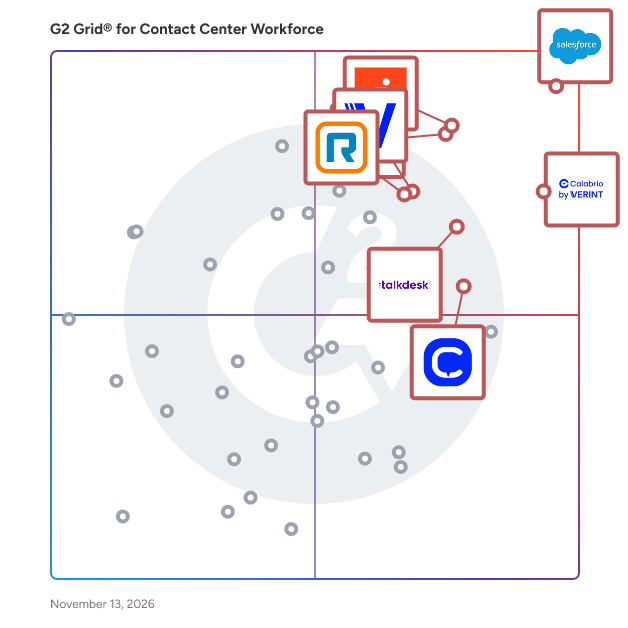
G2 Grid® for Contact Center Workforce Software

G2 Grid® for Contact Center Workforce Software plotting products by satisfaction and market presence

Highlighted products: Salesforce Service Cloud, Calabrio ONE, Genesys Cloud CX, Five9 Intelligent Cloud Contact Center Platform, Talkdesk, Verint Workforce Management, RingCX, and CloudTalk.

Underlying data: [Grid® JSON](https://www.g2.com/categories/contact-center-workforce/grids.json?focus%5B%5D=agentforce-service-formerly-salesforce-service-cloud&focus%5B%5D=calabrio-one&focus%5B%5D=genesys-cloud-cx&focus%5B%5D=five9-intelligent-cloud-contact-center-platform&focus%5B%5D=talkdesk&focus%5B%5D=verint-workforce-management&focus%5B%5D=ringcx&focus%5B%5D=cloudtalk)

Salesforce Service Cloud

Salesforce Service Cloud is the world's #1 AI CRM for service, where humans with AI agents drive customer success together. Service Cloud enables seamless collaboration between AI agents and humans, for every type of service, on any channel, and across any industry to deliver effortless experiences from first contact to final resolution. With autonomous agents, you can transform low-touch, high-volume interactions into no-touch experiences, seamlessly handing them off to your human agents only when needed for high-touch more complex interactions. AI integrated into the flow of work helps your service teams achieve new levels of productivity, drive better customer satisfaction and to drive growth. All of these capabilities are built on the Salesforce Platform with Agentforce and Data Cloud allowing service organizations around the world to : - Deliver proactive support with data from your products, assets & services - Provide 24/7 cross-channel service & resolve issues fast with AI agents - Boost productivity and accelerate growth with one integrated platform

Average Rating: 4.4/5.0

Total Reviews: 8,010

How Do G2 Users Rate Salesforce Service Cloud?

  • Has the product been a good partner in doing business?: 8.7/10 (Category avg: 8.7/10)
  • Automation: 8.2/10 (Category avg: 8.1/10)
  • Productivity Analysis: 8.3/10 (Category avg: 8.3/10)
  • Intraday Management: 7.6/10 (Category avg: 8.2/10)

Who Is the Company Behind Salesforce Service Cloud?

  • Seller: Salesforce
  • Company Website:
  • Year Founded: 1999
  • HQ Location: San Francisco, CA
  • LinkedIn® Page: www.linkedin.com
    89,711 employees on LinkedIn®
  • Ownership: NYSE:CRM

Who Uses This Product?

  • Who Uses This: Salesforce Administrator, Salesforce Developer
  • Top Industries: Information Technology and Services, Computer Software
  • Company Size: 42% Medium, 37% Large

What Do G2 Reviewers Say About Salesforce Service Cloud?

AI-generated summary from verified user reviews

Pros
  • Users appreciate the ease of use of Salesforce Service Cloud, benefiting from intuitive features and seamless management.
  • Users appreciate the excellent functionality of Salesforce Service Cloud, enhancing case management and customer feedback tracking seamlessly.
  • Users commend the effective case management of Salesforce Service Cloud, enhancing efficiency in handling customer issues and tasks.
  • Users value the efficiency of Salesforce Service Cloud, enhancing case management and streamlining call center operations effortlessly.
  • Users value the ease of customization in Salesforce Service Cloud, enabling effective case management and efficient customer support.
Cons
  • Users find the complexity of setup and usage challenging, particularly for new users unfamiliar with Salesforce.
  • Users find the learning curve steep, as setup and licensing can complicate the initial experience with Salesforce Service Cloud.
  • Users face a steep learning curve with Salesforce Service Cloud, requiring significant time and understanding for effective use.
  • Users find Salesforce Service Cloud expensive, especially with add-on costs making budgeting difficult.
  • Users find the missing features in Salesforce Service Cloud can clutter the interface and complicate configuration.

What Are Recent G2 Reviews of Salesforce Service Cloud?

What Are G2 Users Discussing About Salesforce Service Cloud?

Calabrio ONE

Calabrio ONE is now Verint. The workforce engagement and contact center intelligence capabilities you knew as Calabrio ONE are now offered through Verint CX Automation Platform – with expanded AI capabilities, deeper integrations, and the same focus on agent experience and customer outcomes. The Verint CX Automation Platform helps contact centers automate CX workflows and deliver measurable outcomes. Built to run on your existing infrastructure, it integrates with any CCaaS, CRM, or AI model. Powered by a shared CX Data Hub and Verint Da Vinci™ AI, the platform learns from every interaction to drive automation across self-service, agent support, analytics, quality, and workforce engagement.

Average Rating: 4.4/5.0

Total Reviews: 439

How Do G2 Users Rate Calabrio ONE?

  • Has the product been a good partner in doing business?: 8.8/10 (Category avg: 8.7/10)
  • Automation: 8.7/10 (Category avg: 8.1/10)
  • Productivity Analysis: 8.9/10 (Category avg: 8.3/10)
  • Intraday Management: 8.9/10 (Category avg: 8.2/10)

Who Is the Company Behind Calabrio ONE?

  • Seller: Verint
  • Company Website:
  • Year Founded: 1994
  • HQ Location: Melville, New York
  • LinkedIn® Page: www.linkedin.com
    4,316 employees on LinkedIn®
  • Ownership: Thoma Bravo

Who Uses This Product?

  • Who Uses This: Risk Investigator, Customer Service Representative
  • Top Industries: Consumer Services, Hospital & Health Care
  • Company Size: 53% Medium, 35% Large

What Do G2 Reviewers Say About Calabrio ONE?

AI-generated summary from verified user reviews

Pros
  • Users appreciate the ease of use of Calabrio ONE, allowing seamless access to schedules and leave management.
  • Users appreciate the all-in-one platform of Calabrio ONE, enhancing efficiency in workforce management and performance insights.
  • Users praise Calabrio ONE for its efficiency in streamlining processes, improving performance monitoring, and enhancing workforce management.
  • Users appreciate the efficient scheduling features of Calabrio ONE, enabling easy leave requests and shift management.
  • Users commend Calabrio ONE for its exceptional customer support, with helpful staff ensuring a smooth setup process.
Cons
  • Users note the missing features like accurate leave balances and more detailed reports, impacting effectiveness.
  • Users struggle with poor reporting tools in Calabrio ONE, finding them overly complex and not user-friendly.
  • Users struggle with inadequate reporting in Calabrio ONE, finding it overly complex and not user-friendly for their needs.
  • Users find Calabrio ONE's interface not intuitive, complicating report generation and leading to confusion with features.
  • Users express frustration over inaccurate data analysis, leading to repeated reporting and insufficient insights from Calabrio ONE.

What Are Recent G2 Reviews of Calabrio ONE?

What Are G2 Users Discussing About Calabrio ONE?

Genesys Cloud CX

Genesys Cloud CX® is an AI-Powered Experience Orchestration solution that enables organizations to coordinate customer and employee interactions across every touchpoint. By connecting data, systems and workflows in real time, it helps businesses deliver more consistent, personalized experiences that improve loyalty, efficiency and overall business outcomes. The solution brings together AI; voice and digital engagement; intelligent routing and automation; workforce engagement management; and end-to-end journey orchestration in a single, unified cloud solution. Its open, flexible architecture allows organizations to integrate easily with existing systems, reducing complexity while creating a more connected experience across channels and enabling innovation without disruption. Organizations use Genesys Cloud CX to accelerate time to value through rapid deployment and easy-to-deploy capabilities, while reducing cost to serve with AI-driven automation. Real-time personalization and context-aware interactions help improve customer satisfaction, while native AI capabilities enhance agent productivity, streamline workflows and support faster, more informed decision-making. A unified data layer provides real-time insights and ensures seamless experiences across channels, eliminating silos and improving visibility across operations. Built-in AI governance supports secure, compliant and explainable adoption, which is especially important for regulated industries. Designed for enterprise scale, the platform delivers high availability, stability and security, with the scalability and flexibility to support global operations and evolving business needs while maintaining resilience. Genesys Cloud CX is widely used by organizations of all sizes to orchestrate personalized customer experiences at scale, improve efficiency, simplify the technology stack and drive measurable ROI.

Average Rating: 4.4/5.0

Total Reviews: 1,495

How Do G2 Users Rate Genesys Cloud CX?

  • Has the product been a good partner in doing business?: 8.6/10 (Category avg: 8.7/10)
  • Automation: 8.1/10 (Category avg: 8.1/10)
  • Productivity Analysis: 8.5/10 (Category avg: 8.3/10)
  • Intraday Management: 8.5/10 (Category avg: 8.2/10)

Who Is the Company Behind Genesys Cloud CX?

  • Seller: Genesys
  • Company Website:
  • Year Founded: 1990
  • HQ Location: Menlo Park, CA
  • LinkedIn® Page: www.linkedin.com
    8,740 employees on LinkedIn®
  • Phone: +1 650 466 - 1100

Who Uses This Product?

  • Who Uses This: Case Advocate, Manager
  • Top Industries: Information Technology and Services, Financial Services
  • Company Size: 45% Medium, 41% Large

What Do G2 Reviewers Say About Genesys Cloud CX?

AI-generated summary from verified user reviews

Pros
  • Users appreciate the ease of use of Genesys Cloud CX, benefiting from simple setup and effective management of interactions.
  • Users appreciate the robust omnichannel capabilities of Genesys Cloud CX, which enhance customer interaction management and agent efficiency.
  • Users appreciate the reliability of Genesys Cloud CX, enjoying its efficiency in managing customer interactions effectively.
  • Users commend the efficiency of Genesys Cloud CX, enhancing agent productivity with streamlined workflows and automation.
  • Users value the intuitive interface of Genesys Cloud CX, enhancing day-to-day operations and agent efficiency seamlessly.
Cons
  • Users express frustration over limited features, hindering their operational efficiency and impacting essential tasks.
  • Users find the absence of essential features like Shared Line Appearance and sorting options frustrating and limiting.
  • Users find the admin complexity of Genesys Cloud CX challenging, which can hinder user experience and setup efficiency.
  • Users find the inadequate reporting in Genesys Cloud CX limits insights and complicates data analysis.
  • Users find the steep learning curve for Genesys Cloud CX's features can lead to frustrating experiences, especially for newcomers.

What Are Recent G2 Reviews of Genesys Cloud CX?

What Are G2 Users Discussing About Genesys Cloud CX?

AI can help you find the answers. G2 helps you trust them.

Connect G2 to Claude or ChatGPT for answers grounded in G2's trusted reviews, comparisons, and pricing from real user insights.

How it works

Five9 Intelligent Cloud Contact Center Platform

Founded in 2001 and headquartered in San Ramon, California, Five9 has evolved into a global CX leader with over 2,500 customers worldwide. As a pioneer in cloud contact center technology, Five9 serves organizations across industries looking to transform customer experiences through intelligent, personalized interactions. With over 1,400 partners globally and 2,700 employees, Five9 combines deep CX expertise with innovative technology to help brands deliver better business outcomes. The Five9 Intelligent CX Platform provides a comprehensive suite of solutions, including omnichannel engagement, agent assistance, workforce engagement, and AI-powered automation. Five9 Genius AI embeds practical artificial intelligence across the platform, enabling hyper-personalized customer journeys where AI Agents and Human Agents work hand in hand. Our open, cloud-native platform integrates effortlessly with leading CRM and enterprise systems, ensuring businesses can personalize experiences while maximizing operational agility. Five9 transforms CX from fragmented, frustrating experiences into seamless, AI-driven journeys that anticipate customer needs. By combining AI's efficiency with the human touch, businesses can deliver better experiences at lower costs, turning their contact centers from cost centers into strategic assets. With industry-leading reliability (99.999% uptime), deep CX expertise, and a consultative partnership approach, Five9 helps businesses unlock efficiency, boost customer satisfaction, and drive long-term loyalty. With Five9, the New CX Starts Here—where customer joy becomes a driving force for business growth.

Average Rating: 4.2/5.0

Total Reviews: 633

How Do G2 Users Rate Five9 Intelligent Cloud Contact Center Platform?

  • Has the product been a good partner in doing business?: 8.6/10 (Category avg: 8.7/10)
  • Automation: 8.0/10 (Category avg: 8.1/10)
  • Productivity Analysis: 8.1/10 (Category avg: 8.3/10)
  • Intraday Management: 8.3/10 (Category avg: 8.2/10)

Who Is the Company Behind Five9 Intelligent Cloud Contact Center Platform?

  • Seller: Five9
  • Company Website:
  • Year Founded: 2001
  • HQ Location: San Ramon, CA
  • LinkedIn® Page: www.linkedin.com
    3,127 employees on LinkedIn®
  • Ownership: NASDAQ:FIVN

Who Uses This Product?

  • Who Uses This: Customer Service Representative, Manager
  • Top Industries: Consumer Services, Financial Services
  • Company Size: 56% Medium, 24% Small

What Do G2 Reviewers Say About Five9 Intelligent Cloud Contact Center Platform?

AI-generated summary from verified user reviews

Pros
  • Users find the ease of use of Five9 Intelligent Cloud Contact Center Platform enhances agent productivity and customer experience.
  • Users commend the accommodating customer support of Five9, enhancing their overall experience with the platform.
  • Users value the accommodating support and versatile features of Five9, greatly enhancing their contact center experience.
  • Users appreciate the impressive features and integrations of Five9, enhancing both agent and customer experiences remarkably.
  • Users value the efficiency of Five9, enhancing operations and significantly reducing agent documentation time and costs.
Cons
  • Users face call issues due to inaccurate detection and automatic logouts, impacting overall user experience and efficiency.
  • Users find the platform's complexity and learning curve challenging, especially for new users navigating advanced features.
  • Users find the missing features frustrating, particularly regarding outdated self-help resources and delayed enhancements.
  • Users face technical issues like call clarity and disposition codes that hinder efficient call management and reporting.
  • Users report poor customer support, with inadequate assistance for daily issues and slow response times during outages.

What Are Recent G2 Reviews of Five9 Intelligent Cloud Contact Center Platform?

What Are G2 Users Discussing About Five9 Intelligent Cloud Contact Center Platform?

Talkdesk

Talkdesk provides a customer experience platform that helps organizations operate a human-AI hybrid workforce across service, sales, and support. The platform includes enterprise-grade Contact Center as a Service (CCaaS) to support the human workforce and Customer Experience Automation (CXA) to build and manage the AI workforce and orchestrate work across both. CXA can work with Talkdesk CCaaS or an existing third-party contact center. CXA uses agentic AI and multi-agent orchestration to automate and coordinate how customer needs are resolved. Agentic AI can reason through goals, use tools and enterprise systems, take action, and execute multi-step work, while orchestration coordinates specialized AI agents and human workflows, including decisions, escalations, and handoffs. AI agents can complete work such as processing a claim, updating a billing record, scheduling an appointment, or resolving a service case rather than only answering questions or routing interactions. Talkdesk Data Cloud provides unified, real-time context from customer interactions, enterprise systems, and knowledge sources. Built-in guardrails and governance help organizations control how AI operates as automation scales. Talkdesk CCaaS and CXA both support omnichannel customer interactions across voice and digital channels. Talkdesk CCaaS provides capabilities for the human workforce, including omnichannel routing, workforce engagement management, real-time agent guidance, employee collaboration, and customer experience analytics. CXA orchestrates work across the human-AI workforce, coordinating human agents, AI agents, data, knowledge, workflows, enterprise systems, and governance to move customer needs toward resolution while preserving context across channels and handoffs. *Key capabilities include: -Agentic end-to-end automation: Automate customer interactions and the underlying work required to resolve them across front- and back-office systems, using agentic AI that can reason, act, and complete work rather than simply respond or assist. -Human-AI and multi-agent orchestration: Coordinate specialized AI agents, human employees, data, knowledge, workflows, and enterprise systems as work moves through complex customer journeys with intelligent decisions, escalations, and handoffs, while maintaining the context required for resolution. -Continuous automation lifecycle: Analyze previous customer interactions and performance data to discover high-impact automation opportunities, build and customize agentic AI agents using natural language, test them before they engage customers, orchestrate them in production, and continuously monitor and optimize performance and outcomes. -Industry-aware data and automation: Connect industry-specific systems and data sources with purpose-built AI agents, workflows, integrations, and preconfigured use cases, giving humans and AI relevant industry context and knowledge to address customer journeys and operational requirements across more than 12 industries. -Unified data, knowledge, and governance: Use Talkdesk Data Cloud to unify customer interactions, enterprise data, knowledge, and systems of record, providing real-time context for AI agents, human employees, and workflows. Apply guardrails, permissions, monitoring, and governance to help improve accuracy, consistency, decision-making, and control as automation scales. Talkdesk is a registered trademark of Talkdesk, Inc. All product and company names are trademarks™ or registered® trademarks of their respective holders. Use of them does not imply any affiliation with or endorsement by them.

Average Rating: 4.4/5.0

Total Reviews: 2,517

How Do G2 Users Rate Talkdesk?

  • Has the product been a good partner in doing business?: 8.9/10 (Category avg: 8.7/10)
  • Automation: 9.0/10 (Category avg: 8.1/10)
  • Productivity Analysis: 9.2/10 (Category avg: 8.3/10)
  • Intraday Management: 9.0/10 (Category avg: 8.2/10)

Who Is the Company Behind Talkdesk?

  • Seller: Talkdesk
  • Company Website:
  • Year Founded: 2011
  • HQ Location: Palo Alto, CA
  • LinkedIn® Page: www.linkedin.com
    1,395 employees on LinkedIn®

Who Uses This Product?

  • Who Uses This: Supervisor, Customer Service Representative
  • Top Industries: Consumer Services, Computer Software
  • Company Size: 60% Medium, 20% Small

What Do G2 Reviewers Say About Talkdesk?

AI-generated summary from verified user reviews

Pros
  • Users appreciate the ease of use of Talkdesk, highlighting its convenience for calling and scheduling.
  • Users appreciate the efficiency of Talkdesk, enhanced by new features and reliable call quality for long durations.
  • Users appreciate the value-added features of Talkdesk, enhancing convenience and efficiency in communications.
  • Users love the ease of call management with Talkdesk, enhancing customer support and simplifying workflows effectively.
  • Users value the ease of use and convenience offered by Talkdesk for managing customer support effectively.
Cons
  • Users experience call issues with Talkdesk, particularly in low network areas and when using mobile hotspots.
  • Users experience technical issues including connectivity problems and slow support response, affecting overall satisfaction with Talkdesk.
  • Users find the missing features in Talkdesk frustrating, especially the lack of Italian support and customization options.
  • Users face significant connection issues with Talkdesk, impacting audio quality and causing disruptions during calls.
  • Users experience poor connectivity with Talkdesk, noting slow performance and frustrating tech issues during peak times.

What Are Recent G2 Reviews of Talkdesk?

What Are G2 Users Discussing About Talkdesk?

Verint Workforce Management

Verint Workforce Management is an AI-powered solution that forecasts your customer demand, analyzes and predicts the number of employees needed, and optimizes employee schedules to align with demand across contact center and back-office operations, to help you meet your CX and efficiency goals. We provide industry-leading forecasting accuracy (+/- 95%), the most flexibility in employee scheduling, and AI-derived data insights and dashboards for faster, better decision making. Verint WFM customers have achieved such AI-powered business outcomes as: 20% increase in employee productivity, 20%-30% reduction in employee attrition, 5%-10% increase in NPS / CSAT scores, 35% increase in manager capacity. Verint WFM is part of Verint Open Platform, which helps your customer service operations lower costs and elevate EX and CX with AI-powered bots that automate CX workflows. The Verint Platform has the broadest range of CX Automation solutions, including Agent Copilot Bots, Knowledge Management, Intelligent Virtual Assistants and more. The Platform and solutions are scalable from SMB customers to global enterprises, and can be deployed on-premises, single or multi-tenant cloud, or a hybrid mix.

Average Rating: 4.2/5.0

Total Reviews: 207

How Do G2 Users Rate Verint Workforce Management?

  • Has the product been a good partner in doing business?: 8.5/10 (Category avg: 8.7/10)
  • Automation: 7.8/10 (Category avg: 8.1/10)
  • Productivity Analysis: 7.9/10 (Category avg: 8.3/10)
  • Intraday Management: 8.4/10 (Category avg: 8.2/10)

Who Is the Company Behind Verint Workforce Management?

  • Seller: Verint
  • Year Founded: 1994
  • HQ Location: Melville, New York
  • LinkedIn® Page: www.linkedin.com
    4,316 employees on LinkedIn®
  • Ownership: Thoma Bravo
  • Total Revenue (USD mm): $1,303

Who Uses This Product?

  • Top Industries: Insurance, Financial Services
  • Company Size: 55% Large, 35% Medium

What Do G2 Reviewers Say About Verint Workforce Management?

AI-generated summary from verified user reviews

Pros
  • Users highlight the ease of use of Verint Workforce Management, especially beneficial for beginners and versatile for various tasks.
  • Users value the efficiency of Verint WFM, enhancing workforce planning and improving operational support accuracy.
  • Users find scheduling easy and versatile, enhancing workforce planning and monitoring for better operational efficiency.
  • Users appreciate the robust forecasting engine and mobile app of Verint WFM, enhancing operational efficiency significantly.
  • Users value the real-time monitoring and reporting features of Verint WFM, enhancing workforce planning and usability.
Cons
  • Users highlight the limited customization options, making it challenging to tailor the system to specific needs.
  • Users struggle with the steep learning curve of Verint Workforce Management, hindering effective and efficient usage of the system.
  • Users experience user interface issues with Verint Workforce Management, citing its complexity and outdated design as obstacles.
  • Users find the missing features in Verint Workforce Management hinder intuitive usage and limit effective reporting capabilities.
  • Users find the reporting features cumbersome, with slow loading times and limited customization options impacting usability.

What Are Recent G2 Reviews of Verint Workforce Management?

What Are G2 Users Discussing About Verint Workforce Management?

RingCX

RINGCX PRODUCT DESCRIPTION RingCX is an AI-first Contact Center as a Service (CCaaS) solution that delivers effortless customer experiences before, during, and after every interaction. Recognized with Metrigy's 2026 MetriStar Top Provider Award for CCaaS, RingCX enables businesses to manage human and AI agents, maximize team performance, and improve customer satisfaction from a single omnichannel platform. AGENTIC VOICE AI AND OMNICHANNEL SUPPORT Agentic Voice AI serves as the core of RingCX, delivering automation, real-time assistance, and insights across every interaction. The platform provides comprehensive omnichannel capabilities, supporting voice calls and over 20 digital channels natively. For total operational simplicity, all 20+ digital channels are included under a single license, letting businesses meet customers where they are without complex tier pricing or hidden channel add-on costs. AI-POWERED SELF-SERVICE AND AVA ASSISTANCE RingCX streamlines operations and drives down wait times with purpose-built AI support. The platform utilizes autonomous AI agents, including AI Receptionist (AIR) and AI Representative (AIR Pro), as well as an open ecosystem for IVAs like Cognigy and Omilia, to provide always-on 24/7 self service. For live interactions, the platform deploys AVA Agent Assist and AVA Supervisor Assist to deliver in-the-moment coaching, dynamic compliance guidelines, and instant conversation visibility, ensuring teams resolve complex inquiries efficiently. NATIVE WORKFORCE ENGAGEMENT MANAGEMENT WITH RINGWEM To continuously optimize customer service teams, the platform features RingWEM, a native AI-powered Workforce Engagement Management suite. This integrated toolkit encompasses automated quality management, advanced interaction analytics, and workforce management. By evaluating customer conversations across channels, RingWEM provides actionable operational insights into agent performance, customer sentiment, and operational efficiency. RAPID DEPLOYMENT AND NATIVE CRM INTEGRATIONS Built for rapid implementation, businesses can fully deploy a new RingCX contact center in just a few days. The solution provides industry-leading 99.999% availability to keep remote and hybrid agents reliably connected from anywhere. Competitively priced for mid-market deployments and easy to manage, RingCX integrates natively with the RingEX unified communications platform and major enterprise CRMs to offer an effortless single-pane-of-glass workspace. WHY CHOOSE RINGCX Modern support and sales organizations choose RingCX to eliminate the friction of fragmented legacy systems. By uniting Agentic Voice AI, autonomous tools like AIR, real-time guidance from AVA Agent Assist and AVA Supervisor Assist, built-in workforce optimization via RingWEM, and an all-inclusive omnichannel footprint into one simple deployment, RingCX delivers modern customer service infrastructure that is highly intelligent and exceptionally reliable.

Average Rating: 4.4/5.0

Total Reviews: 152

How Do G2 Users Rate RingCX?

  • Has the product been a good partner in doing business?: 8.7/10 (Category avg: 8.7/10)
  • Automation: 7.1/10 (Category avg: 8.1/10)
  • Productivity Analysis: 7.7/10 (Category avg: 8.3/10)
  • Intraday Management: 7.7/10 (Category avg: 8.2/10)

Who Is the Company Behind RingCX?

  • Seller: RingCentral
  • Company Website:
  • Year Founded: 1999
  • HQ Location: Belmont, CA
  • LinkedIn® Page: www.linkedin.com
    6,675 employees on LinkedIn®
  • Ownership: NYSE:RNG

Who Uses This Product?

  • Top Industries: Information Technology and Services, Insurance
  • Company Size: 48% Small, 41% Medium

What Do G2 Reviewers Say About RingCX?

AI-generated summary from verified user reviews

Pros
  • Users appreciate the ease of use of RingCX, finding it accessible and effective for daily operations.
  • Users admire the versatile features of RingCX, appreciating its ease of access and consistent improvements.
  • Users value the excellent customer support from RingCX, making it easy to implement and utilize effectively.
  • Users find the easy setup of RingCX fantastic, enjoying a seamless experience from the start.
  • Users praise the easy implementation of RingCX, highlighting its quick deployment and user-friendly interface.
Cons
  • Users face the issue of using personal phones for work calls, which complicates their work-life balance.
  • Users express concern over having to use their personal phone for work-related calls, affecting their privacy and convenience.
  • Users find limited features of RingCX restrict flexibility, especially for advanced call flows and analytics needs.
  • Users express concerns over missing features, particularly in customization and advanced reporting compared to legacy systems.
  • Users experience slow customer support response times, leading to frustration when resolving urgent communication issues.

What Are Recent G2 Reviews of RingCX?

CloudTalk

CloudTalk is the leading AI-powered business calling software for growing SMBs. CloudTalk helps more than 4,000 modern SMBs talk to more customers, close more deals, and resolve issues faster, without enterprise pricing or complexity. Over 30,000 sales and support professionals at SMBs across 160+ countries rely on CloudTalk to: Talk to 10x more people - Our AI Sales Dialer combines preview, power and parallel (up to 10 lines) dialing that filters out voicemails and dead lines automatically. Automate the calls humans shouldn't have to make - Build AI Voice Agents and AI Receptionist in minutes for appointment scheduling, lead qualification, after-hours coverage, payment reminders and more. Turn every conversation into structured data - Use AI Conversation Intelligence to get automatic call summaries, AI notes, sentiment analysis, topic extraction, call scoring, multi-lingual transcription, and talk/listen ratios. Run their full business phone system in one cloud platform - With Call Flow Designer, IVR, call queuing, call recording, real-time monitoring, analytics, international SMS, WhatsApp messaging, and workflow automation. Handle global calling without the infrastructure headache - Local numbers in 160+ countries, 99.999% uptime, multi-carrier redundancy, and crystal-clear call quality. Plug into the tools they already use - 100+ native integrations including HubSpot (Certified), Salesforce, Pipedrive, Zoho CRM, MS Dynamics, Intercom, Zendesk, Salesloft, Outreach, Bullhorn, monday, Shopify, and more. Most CloudTalk customers are live in a few days. No hardware, no PBX, no months of consulting. Just sign up, port numbers (or buy new ones), connect your CRM, and start calling — with AI doing the busywork from day one. CloudTalk is GDPR, SOC 2, ISO 27001, HIPAA, and CCPA compliant. Customers like Bit2Me reduced missed calls from 80% to 16%, cut wait times by 85%, and scaled from 2 to 20+ agents — without adding complexity. https://hubs.li/Q04n2f7L0 Learn how we can boost your calling on a 1:1 personalized demo: https://hubs.li/Q04n2f4C0

Average Rating: 4.4/5.0

Total Reviews: 1,918

How Do G2 Users Rate CloudTalk?

  • Has the product been a good partner in doing business?: 8.9/10 (Category avg: 8.7/10)
  • Automation: 8.8/10 (Category avg: 8.1/10)
  • Productivity Analysis: 8.9/10 (Category avg: 8.3/10)
  • Intraday Management: 8.7/10 (Category avg: 8.2/10)

Who Is the Company Behind CloudTalk?

  • Seller: CloudTalk
  • Company Website:
  • Year Founded: 2016
  • HQ Location: New York
  • LinkedIn® Page: www.linkedin.com
    228 employees on LinkedIn®

Who Uses This Product?

  • Who Uses This: CEO, Account Executive
  • Top Industries: Computer Software, Information Technology and Services
  • Company Size: 65% Small, 31% Medium

What Do G2 Reviewers Say About CloudTalk?

AI-generated summary from verified user reviews

Pros
  • Users appreciate the ease of use of CloudTalk, enjoying its user-friendly interface and reliable performance.
  • Users praise the reliability of CloudTalk, noting its consistent performance and smooth operation without connectivity issues.
  • Users appreciate the intuitive design of CloudTalk, enjoying its user-friendly interface and smooth functionality.
  • Users appreciate the user-friendly interface of CloudTalk, highlighting its ease of use and reliable performance.
  • Users praise CloudTalk's intuitive calling features, highlighting ease of use and efficient call management for businesses.
Cons
  • Users often face call issues, such as registering calls properly and complexities in setting up calling campaigns.
  • Users experience occasional connection issues with CloudTalk, leading to delays in call connectivity at times.
  • Users find the call management cumbersome, requiring multiple clicks and lacks integration with their CRM for seamless use.
  • Users find the missing features in CloudTalk, such as text messaging and CRM integration, quite limiting.
  • Users face poor connectivity issues with CloudTalk, impacting their overall experience despite helpful customer support.

What Are Recent G2 Reviews of CloudTalk?

What Are G2 Users Discussing About CloudTalk?

SuccessKPI

SuccessKPI is the performance platform for human + agentic CX. It measures, manages, and governs the work of both human agents and AI agents in the contact center, holding both to the same standards. Because SuccessKPI is independent of the systems it measures, its scores do not come from the vendor that supplied the AI. What SuccessKPI does SuccessKPI unifies interaction data from CCaaS platforms, CRMs, and business systems into one analytics layer, then applies AI to every interaction instead of a sample. Capabilities include business intelligence and reporting, speech and text analytics, quality management with automated scoring, real-time assistance for agents and supervisors, workforce management, Playbook Builder for automated action, last-mile connectivity monitoring, and security and governance controls. Most quality programs evaluate 1% to 3% of interactions and report weeks later. SuccessKPI scores 100% of interactions, human and AI, against evaluation forms the customer defines. A human reviewer confirms, adjusts, or overrides every AI-assigned score, and the reasoning behind each score is visible. Who uses SuccessKPI Quality leaders, workforce managers, contact center operations executives, supervisors, analysts, and agents. Customers include Centene, DHL, Maximus, and USDA Rural Development. SuccessKPI is deployed in healthcare, mental health and crisis services, financial services, insurance, government, telecommunications, transportation, and BPO operations, and it scales from small teams to several thousand agents. What SuccessKPI connects to SuccessKPI works alongside existing contact center platforms rather than replacing them. Integrations include Genesys Cloud CX, Amazon Connect, and Cisco, along with CRM, workforce, and business systems. Data can be exported to customer-owned storage such as Amazon S3, and reports can be scheduled and delivered by email or triggered by conditions in the data. How SuccessKPI handles security and compliance The platform runs serverless-first on AWS, and customer data stays in the contracted deployment region, including a dedicated EU environment. SuccessKPI is FedRAMP authorized for US federal customers. Controls include 256-bit AES encryption at rest, TLS in transit, SSO and MFA, role-based access down to the data partition, and automated redaction for PCI and PII. The compliance program covers SOC 2, ISO 27001, ISO 42001, PCI DSS, HIPAA, and GDPR. What problems SuccessKPI solves Contact centers use SuccessKPI to lower cost to serve, to put evidence behind compliance on every interaction rather than a sample, to stabilize workforce cost as AI agents change volume patterns, and to show whether an AI deployment is working before it scales further.

Average Rating: 4.5/5.0

Total Reviews: 126

How Do G2 Users Rate SuccessKPI?

  • Has the product been a good partner in doing business?: 8.7/10 (Category avg: 8.7/10)
  • Automation: 9.3/10 (Category avg: 8.1/10)
  • Productivity Analysis: 9.4/10 (Category avg: 8.3/10)
  • Intraday Management: 10.0/10 (Category avg: 8.2/10)

Who Is the Company Behind SuccessKPI?

  • Seller: SuccessKPI
  • Company Website:
  • Year Founded: 2017
  • HQ Location: Chantilly, US
  • LinkedIn® Page: www.linkedin.com
    160 employees on LinkedIn®

Who Uses This Product?

  • Who Uses This: Supervisor
  • Top Industries: Hospital & Health Care, Consumer Services
  • Company Size: 60% Medium, 21% Small

What Are Recent G2 Reviews of SuccessKPI?

What Are G2 Users Discussing About SuccessKPI?

8x8 Contact Center

8x8 Contact Center is a cloud-based, AI-powered platform designed to unify and streamline customer support across voice, chat, email, video, SMS, RCS, messaging apps, and social media channels. It empowers organizations with intelligent self-service automation, real-time guidance and analytics, and deep CRM integrations to elevate customer experience (CX) and boost operational efficiency. The solution supports seamless omnichannel engagement, enabling agents to deliver consistent, personalized service from a single interface. With enterprise-grade security and PCI-certified payments, 8x8 Contact Center aids in compliance while helping businesses scale with agility. Its flexibility and advanced insights make it ideal for modernizing legacy systems and optimizing customer support operations. Core Features & Functionality include: Omnichannel Routing Voice, email, web chat, SMS, video, Facebook Messenger, WhatsApp, Viber, RCS, and additional social media like X, YouTube, Instagram, and more via Meltwater. Blended interactions with individual agents handling up to 13 interactions at once. Web chat with real-time translation and customizable agent avatars. Email routing and templates. Co-browsing and secure payment handling via SMS or email. Agent and Supervisor Workspaces Unified interface with voice, chat, email, one-way video, RCS, social media, WhatsApp, Facebook Messenger, Viber, and SMS handling. Embedded softphone with customizable ringtones per channel. Support for Microsoft Teams chat and presence sync. Transfer calls to external contacts and queues. Intelligent routing, wrap-up codes, and campaign call handling. Real-time queue and agent monitoring for supervisors. Mobile supervisor app for oversight on the go. Interaction Retrieval Widget with bulk download and quick access to AI summaries, voicemails, and more. Customizable drag-and-drop widgets to tailor the workspace experience. AI & Automation Native and third-party AI (custom LLMs supported). AI summaries (real-time voice summarizations and post-call). Intelligent Customer Assistant (voice + digital self service). AI voice directory, predictive AI dialer. Real-time chat and text-to-speech translation. Queue, Agent & Call Management Queued callback, skills-based routing, CRM data-based routing. Direct Agent Routing (DAR), warm/cold transfer, whisper messages. Answer Machine Detection (AMD), call dispositioning, recording access. Channel setup (voice, SMS, chat, email, social). Agent roles, groups, schedules, whisper messages. Enhanced scripting (IVR, chat, email), callbacks, surveys. Campaign & Dialing Tools 8x8 Auto Dialer: predictive, progressive, preview modes. Regal.io integration for advanced segmentation, omnichannel outbound, behavior-based triggers. Campaign scheduling, retries, DNC filtering, Telephone Preference Service (TPS) or Corporate Telephone Preference Service (CTPS) filtering, Carrier Call Blocking (CCB) filtering, pre-recorded voicemail drop, automatic machine detection (AMD). CRM Integrations Native integrations with Salesforce, MS Dynamics, Zendesk, NetSuite. Features include screen pop, click-to-dial, interaction logging, transfers, voicemail, status management. 8x8 Native CRM to manage customers, cases, follow-ups, and tasks. Auto-log interactions, use API for external access. Reporting & Analytics Unified dashboards, real-time KPIs, interaction journey visualizations across channels. Report templates like Interaction Journey Report, Queue Interaction Summary, Agent Interactions Summary, Interactions Details Report, and more. Exportable metrics, SLA tracking, historical interaction access. Security & Compliance IP whitelisting, granular admin roles. OAuth2 for email, SSO with ADFS and Azure AD. Payment Card Industry Compliance Meeting and Call Recording Storage E911/999 Emergency Services Privacy Compliance W3C Web Content Accessibility Guidelines (WCAG) STIR/SHAKEN Compliance Health Insurance Portability and Accountability Act (HIPAA) Strategic Partner Integrations SpinSci for Healthcare Patient Assist: Real-time EHR integration, screen pop, context-aware routing. Prebuilt workflows for authentication, reporting, click-to-call. Omnichannel support with SSO. Patient Engage: Appointment scheduling, refill requests, bill pay, surveys. PCI support, multi-language, and password reset functionality. MNET for Financial Services CoreAccess+: Real-time core banking system access. Secure funds transfer, fraud alerts, screen pop authentication. CRM/workflow integration with no PII storage. Regal.io for Advanced Outbound Campaigns Behavior-based outreach triggers. Predictive dialing and personalized agent experiences. Integration with journey/CRM data for unified analytics. CallCabinet for Compliant Call Recording Compliant call recording for for voice, video and screen sharing Unlimited audio storage and 256-bit AES rotating encryption Advanced playback & tagging Cloud, hybrid, premise deployments

Average Rating: 4.1/5.0

Total Reviews: 254

How Do G2 Users Rate 8x8 Contact Center?

  • Has the product been a good partner in doing business?: 8.5/10 (Category avg: 8.7/10)
  • Automation: 7.5/10 (Category avg: 8.1/10)
  • Productivity Analysis: 7.9/10 (Category avg: 8.3/10)
  • Intraday Management: 7.2/10 (Category avg: 8.2/10)

Who Is the Company Behind 8x8 Contact Center?

  • Seller: 8x8
  • Company Website:
  • Year Founded: 1987
  • HQ Location: San Jose, CA
  • LinkedIn® Page: www.linkedin.com
    2,846 employees on LinkedIn®
  • Ownership: NYSE:EGHT

Who Uses This Product?

  • Who Uses This: Operations Manager
  • Top Industries: Financial Services, Information Technology and Services
  • Company Size: 53% Medium, 38% Small

What Do G2 Reviewers Say About 8x8 Contact Center?

AI-generated summary from verified user reviews

Pros
  • Users appreciate the ease of use of 8x8 Contact Center, enjoying smooth integration and intuitive features.
  • Users appreciate the kind and knowledgeable representatives of 8x8 Contact Center, enhancing their overall experience.
  • Users appreciate the kind and knowledgeable customer support of 8x8 Contact Center, enhancing their overall experience.
  • Users appreciate the user-friendly interface and intuitive analytics of 8x8 Contact Center, enhancing efficiency and productivity.
  • Users praise the efficiency of 8x8 Contact Center, highlighting its intuitive design and smooth deployment process.
Cons
  • Users express frustration over missing features in 8x8 Contact Center, including limited reporting and cumbersome user onboarding.
  • Users experience poor customer support with slow resolutions and frustrating authentication issues affecting their overall satisfaction.
  • Users dislike the inability to warm transfer calls within the company, complicating agent communication and efficiency.
  • Users struggle with the complexity of configuration and interface, making it challenging to use 8x8 Contact Center effectively.
  • Users experience integration issues with 8x8 Contact Center, complicating usability and data management across platforms.

What Are Recent G2 Reviews of 8x8 Contact Center?

What Are G2 Users Discussing About 8x8 Contact Center?

RingCentral Contact Center

RINGCENTRAL CONTACT CENTER PRODUCT DESCRIPTION RingCentral Contact Center is an enterprise-grade cloud contact center solution designed to deploy and scale customer operations globally. Built for large-scale organizations that demand flexibility and high performance, the platform unifies enterprise communications and contact center capabilities to deliver effortless customer experiences across the entire customer journey. GLOBAL OMNICHANNEL ENGAGEMENT AND ADVANCED ROUTING RingCentral Contact Center enables businesses to connect with customers on voice and over 30 digital channels globally. The solution utilizes sophisticated attribute-based routing to ensure customers are automatically paired with the right agent based on their specific needs and skills. By offering comprehensive omnichannel integration and seamless journey tracking, enterprises can maintain continuous, context-rich support across every international touchpoint. CONVERSATIONAL AI AND SELF-SERVICE AUTOMATION The platform features built-in AI Agents to streamline customer journeys and reduce operational costs. Through advanced AI self-service and AI-powered virtual agents, organizations can deliver personalized, data-driven conversations 24/7. These intelligent tools handle routine inquiries autonomously while generating deep interaction insights, providing instant assistance, and ensuring a smooth transition to live agents when necessary. NATIVE WORKFORCE ENGAGEMENT MANAGEMENT Optimize team performance and control costs with a native, AI-driven workforce optimization solution. RingCentral Contact Center encompasses full workforce engagement management (WEM) tools, including native scheduling and predictive forecasting to align team hours precisely with call traffic, vacations, and training. It also provides robust quality management features such as call recording, interaction analytics, and fair agent scoring, paired with interactive gamification and performance dashboards to boost agent satisfaction and productivity. COMPREHENSIVE ANALYTICS AND CUSTOM INTEGRATIONS Make business-critical decisions using granular historical reports and live analytics. The platform features an intuitive drag-and-drop interface to build customizable real-time dashboards, allowing managers to monitor key performance indicators like handle time, first contact resolution, and queue time instantly. Designed for bespoke deployments, the solution integrates deeply with over 120 marketplace tools and offers more than 400 available APIs to tailor workflows to any enterprise technology stack. WHY CHOOSE RINGCENTRAL CONTACT CENTER Global enterprises choose RingCentral Contact Center to deliver better customer service at scale and lift customer and employee satisfaction.. By combining powerful omnichannel routing, native workforce engagement management, and open API flexibility, RingCentral provides a secure, reliable cloud foundation that transforms traditional customer support into a strategic revenue driver.

Average Rating: 4.2/5.0

Total Reviews: 256

How Do G2 Users Rate RingCentral Contact Center?

  • Has the product been a good partner in doing business?: 8.0/10 (Category avg: 8.7/10)
  • Automation: 8.3/10 (Category avg: 8.1/10)
  • Productivity Analysis: 8.8/10 (Category avg: 8.3/10)
  • Intraday Management: 8.2/10 (Category avg: 8.2/10)

Who Is the Company Behind RingCentral Contact Center?

  • Seller: RingCentral
  • Company Website:
  • Year Founded: 1999
  • HQ Location: Belmont, CA
  • LinkedIn® Page: www.linkedin.com
    6,675 employees on LinkedIn®
  • Ownership: NYSE:RNG

Who Uses This Product?

  • Top Industries: Consumer Services, Information Technology and Services
  • Company Size: 50% Small, 38% Medium

What Do G2 Reviewers Say About RingCentral Contact Center?

AI-generated summary from verified user reviews

Pros
  • Users value the ease of use of RingCentral Contact Center, appreciating its intuitive setup and customizable features.
  • Users appreciate the helpful customer support at RingCentral Contact Center, ensuring swift issue resolution and seamless communication.
  • Users praise the intuitive interface of RingCentral Contact Center, enabling seamless communication and effortless setup.
  • Users appreciate the helpful customer support at RingCentral Contact Center, resolving requests efficiently and pleasantly.
  • Users commend the AI-powered efficiency of RingCentral Contact Center, streamlining customer interactions across various channels.
Cons
  • Users often face call issues with RingCentral, including disconnections and slow support for timely resolutions.
  • Users experience issues with call connectivity, including disconnections mid-call and difficulties answering via mobile.
  • Users experience call quality issues with RingCentral, including disconnections and challenges with mobile connectivity.
  • Users face significant connection issues with RingCentral Contact Center, affecting calls and overall user experience.
  • Users experience poor customer support, often facing delayed responses and inconsistent assistance during critical issues.

What Are Recent G2 Reviews of RingCentral Contact Center?

What Are G2 Users Discussing About RingCentral Contact Center?

Avaya Contact Center

Avaya Contact Center is delivered through Avaya Infinity, a cloud-native platform designed to orchestrate seamless customer experiences across all channels. Built on a modern microservices architecture with open AI orchestration, Avaya Infinity enables organizations to intelligently manage voice, digital, email, and messaging interactions. It provides dynamic routing, AI-powered automation, and real-time orchestration—with the unique flexibility to deploy fully in the cloud, on-premises, or in a hybrid environment. Core Capabilities: Voice Handling: Intelligent routing, real-time transcription, smart-search call recording, noise cancellation, callback support, and browser-based WebRTC calling via OmniSDK. Digital Channels: Feature-rich web chat (read receipts, typing indicators, interactive buttons), Microsoft 365 email integration, and messaging across key consumer platforms. Workflow Orchestration: Low-code/no-code workflow design, AI-generated workflows, SLA-based dynamic queueing, and secure PCI execution to automate end-to-end customer journeys. Agent Desktop: A unified, browser-based client featuring seamless CRM integration, screenpops, click-to-dial, and customizable UI through Infinity Elements. Outbound Campaigns: Fully automated voice, SMS, and email outreach with Predictive, Progressive, and Preview dialing modes. Analytics & Reporting: Real-time dashboards, historical supervisor tools, and advanced business intelligence powered by a Databricks data lakehouse architecture. AI & Technology Foundation: Tandem Care (Agentic AI): Bespoke AI assistants that seamlessly collaborate with human agents, augmenting their capabilities to make them up to 10x more productive while preserving the human touch. Model Context Protocol (MCP): Enables open AI orchestration, allowing organizations to securely connect any AI model with internal tools and APIs without vendor lock-in. AI Performance Index (APIx): A comprehensive set of value-driven KPIs that measure the real-world impact and effectiveness of AI within your contact center. Flexible Deployment Models: Cloud: A fully managed, cloud-native platform delivering the complete Infinity capability set with zero on-premises infrastructure required. Hybrid: Combines cloud-hosted Infinity with existing on-premises infrastructure, allowing enterprises to protect legacy investments or sensitive data while adding modern digital capabilities. On-Premises: The full Infinity stack re-platformed to run in the customer's data center, designed for regulated industries with strict data sovereignty mandates. Key Benefits: True Omnichannel: Unbroken context and orchestration across voice, email, chat, SMS, and outbound touchpoints. Open Architecture: API-first design seamlessly integrates with any CRM, ERP, HRM, or back-office system. Operational Efficiency: Intelligent routing, automated workflows, and smart self-service dramatically reduce handle times and boost first-contact resolution. Continuous Innovation: A microservices foundation ensures zero-downtime upgrades and seamless scalability. Summary: Avaya Contact Center through Avaya Infinity serves mid-market to large enterprises seeking to modernize customer engagement without compromising on architectural control. It is ideal for organizations—particularly those in highly regulated industries—that require true omnichannel orchestration, advanced AI automation, and the flexibility to choose their exact deployment model.

Average Rating: 4.1/5.0

Total Reviews: 179

How Do G2 Users Rate Avaya Contact Center?

  • Has the product been a good partner in doing business?: 8.0/10 (Category avg: 8.7/10)
  • Automation: 7.1/10 (Category avg: 8.1/10)
  • Productivity Analysis: 7.3/10 (Category avg: 8.3/10)
  • Intraday Management: 8.7/10 (Category avg: 8.2/10)

Who Is the Company Behind Avaya Contact Center?

  • Seller: Avaya
  • Company Website:
  • Year Founded: 2000
  • HQ Location: Morristown, NJ
  • LinkedIn® Page: www.linkedin.com
    11,753 employees on LinkedIn®

Who Uses This Product?

  • Who Uses This: Telecom engineer
  • Top Industries: Telecommunications, Information Technology and Services
  • Company Size: 46% Large, 36% Medium

What Do G2 Reviewers Say About Avaya Contact Center?

AI-generated summary from verified user reviews

Pros
  • Users value the enterprise voice and reporting capabilities of Avaya Contact Center for seamless inbound and outbound calling.
  • Users value the strong analytics and reporting capabilities of Avaya Contact Center for enterprise voice solutions.
  • Users value the excellent call quality of Avaya Contact Center, enhancing their communication and reporting capabilities.
  • Users value the connectivity of Avaya Contact Center, enabling seamless inbound and outbound calls from any location.
  • Users find Avaya Contact Center to be an easy-to-use platform, appreciating its simplicity and straightforward features.
Cons
  • Users often face complexity in deployment, configurations, and integrations, which can hinder effective usage of Avaya Contact Center.
  • Users face customization difficulty due to the complexity in deployment, configurations, and integrations of Avaya Contact Center.
  • Users face difficult implementation challenges with Avaya Contact Center, particularly in deployment and configurations.
  • Users find the difficult setup of Avaya Contact Center challenging, affecting deployment and integration efficiency.
  • Users often face authentication errors and static line issues, causing frustration and hindering effective communication.

What Are Recent G2 Reviews of Avaya Contact Center?

NICE CXone

NiCE (NASDAQ: NICE) is transforming the world with AI that puts people first. Our purpose-built AI-powered platforms automate engagements into proactive, safe, intelligent actions, empowering individuals and organizations to innovate and act, from interaction to resolution. Trusted by organizations throughout 150+ countries worldwide, NiCE’s platforms are widely adopted across industries connecting people, systems, and workflows to work smarter at scale, elevating performance across the organization, delivering proven measurable outcomes. www.nice.com

Average Rating: 4.3/5.0

Total Reviews: 1,604

How Do G2 Users Rate NICE CXone?

  • Has the product been a good partner in doing business?: 8.2/10 (Category avg: 8.7/10)
  • Automation: 8.9/10 (Category avg: 8.1/10)
  • Productivity Analysis: 9.2/10 (Category avg: 8.3/10)
  • Intraday Management: 9.0/10 (Category avg: 8.2/10)

Who Is the Company Behind NICE CXone?

  • Seller: NiCE
  • Year Founded: 1986
  • HQ Location: Hoboken, New Jersey
  • LinkedIn® Page: www.linkedin.com
    14,296 employees on LinkedIn®
  • Ownership: NASDAQ: NICE
  • Total Revenue (USD mm): $1,583

Who Uses This Product?

  • Who Uses This: Customer Service Representative, Customer Service Agent
  • Top Industries: Consumer Services, Information Technology and Services
  • Company Size: 52% Medium, 34% Large

What Do G2 Reviewers Say About NICE CXone?

AI-generated summary from verified user reviews

Pros
  • Users appreciate the ease of use of NICE CXone, allowing efficient management of schedules and performance tracking.
  • Users value the enhanced analytics and customizable dashboard of NICE CXone for improved visibility and performance tracking.
  • Users value the efficient performance tracking of NICE CXone, enhancing customer interaction management and productivity.
  • Users find NICE CXone very helpful for managing schedules and enhancing visibility into performance and customer interactions.
  • Users appreciate the intuitive interface of NICE CXone, enabling efficient management of customer interactions and workflows.
Cons
  • Users face call issues with NICE CXone, including dropped calls, agent status problems, and lag in scripts.
  • Users often face technical issues with NICE CXone, including glitches and lack of support during critical operations.
  • Users find the learning curve steep due to unclear documentation and complex processes impacting overall usability.
  • Users express concerns over missing features like customizable dashboards and meaningful support options in NICE CXone.
  • Users experience poor customer support with insufficient help options and challenges contacting service departments directly.

What Are Recent G2 Reviews of NICE CXone?

What Are G2 Users Discussing About NICE CXone?

ServiceNow Customer Service Management

ServiceNow's Customer Service Management (CSM) transforms customer service experiences with AI-powered workflows and AI agents that help you accelerate customer self-service, boost agent productivity, and speed up resolution time. With CSM, your organization can: - Deflect calls and increase satisfaction by enabling customers to self-serve answers and actions via an AI-powered conversational chat. - Increase capacity to handle more cases, extend business hours, and manage routine tasks with AI agents. - Save agents time with AI-generated case histories, case summaries, and suggested resolutions. - Integrate with top CCaaS solutions to unify routing, centralize call and work management, and boost agent efficiency on one AI-powered workspace. - Resolve issues quickly and consistently by automating tasks, uncovering bottlenecks, and improving processes. - Get up and running quickly and maintain a low TCO with continuous innovation in one extensible AI platform. Harness the power of AI, data and workflows to delight customers and deliver on what they want quickly, drive unprecedented agent productivity, and foster a whole new level of customer loyalty.

Average Rating: 4.4/5.0

Total Reviews: 509

How Do G2 Users Rate ServiceNow Customer Service Management?

  • Has the product been a good partner in doing business?: 8.6/10 (Category avg: 8.7/10)
  • Automation: 8.4/10 (Category avg: 8.1/10)
  • Productivity Analysis: 8.5/10 (Category avg: 8.3/10)
  • Intraday Management: 7.9/10 (Category avg: 8.2/10)

Who Is the Company Behind ServiceNow Customer Service Management?

  • Seller: ServiceNow
  • Company Website:
  • Year Founded: 2004
  • HQ Location: Santa Clara, CA
  • LinkedIn® Page: www.linkedin.com
    35,078 employees on LinkedIn®
  • Ownership: NYSE:NOW

Who Uses This Product?

  • Who Uses This: Associate Consultant, Senior Software Engineer
  • Top Industries: Information Technology and Services, Telecommunications
  • Company Size: 45% Large, 28% Medium

What Do G2 Reviewers Say About ServiceNow Customer Service Management?

AI-generated summary from verified user reviews

Pros
  • Users value the ease of use and customization of ServiceNow CSM, streamlining workflows across various departments.
  • Users value the centralized platform of ServiceNow Customer Service Management for streamlining customer interactions and automating workflows.
  • Users appreciate the efficiency of ServiceNow Customer Service Management in centralizing interactions and automating case management.
  • Users value the smoother workflow provided by ServiceNow's case management features, enhancing agent efficiency and case handling.
  • Users commend the automation features of ServiceNow Customer Service Management for maximizing efficiency and reducing manual efforts significantly.
Cons
  • Users find the learning curve steep, with complicated setups and configurations for workflows and routing rules.
  • Users face a steep learning curve with complex setup and configuration for workflows and routing in ServiceNow.
  • Users experience limited customization options in ServiceNow Customer Service Management, hindering their ability to tailor solutions effectively.
  • Users find the setup and configuration quite complicated, often requiring extensive time and effort to tailor workflows.
  • Users highlight the need for improvements in updates, visual design, and user experience in ServiceNow Customer Service Management.

What Are Recent G2 Reviews of ServiceNow Customer Service Management?

What Are G2 Users Discussing About ServiceNow Customer Service Management?

Assembled WFM

Assembled is an all-in-one support platform designed to enhance customer service operations by integrating AI agents with intelligent workforce management. This solution aims to help companies deliver exceptional support experiences while efficiently managing their resources. By leveraging advanced technology, Assembled enables organizations to streamline their support processes, ensuring that both AI and human agents work in harmony to meet customer needs. The platform primarily targets customer support teams across various industries that seek to improve their operational efficiency and service quality. Assembled is particularly beneficial for businesses that handle high volumes of customer interactions and require precise forecasting and staffing solutions. With its capabilities, teams can automate a significant portion of customer interactions, allowing human agents to focus on more complex inquiries, thereby enhancing overall productivity and customer satisfaction. Key features of Assembled include fast and intuitive scheduling, which allows teams to create customized work schedules that adapt to fluctuating demand. This flexibility is crucial for organizations that experience varying levels of customer inquiries throughout the day or week. Additionally, the platform offers human-in-the-loop AI-powered automation, which ensures that AI agents can seamlessly collaborate with human staff, providing a balanced approach to customer support. This unique feature helps to maintain a personal touch in customer interactions while benefiting from the efficiency of automation. Another standout aspect of Assembled is its powerful forecasting capabilities, which boast over 90% accuracy. This feature enables teams to predict customer demand accurately, allowing for optimal staffing decisions that align with anticipated workload. Furthermore, the platform provides meaningful cross-team visibility, ensuring that all stakeholders have access to relevant information and insights, fostering collaboration and informed decision-making. Assembled also excels in reporting, offering centralized and robust analytics that deliver actionable insights. This comprehensive reporting functionality empowers teams to track performance metrics, identify trends, and make data-driven adjustments to their support strategies. By utilizing Assembled, organizations can scale their support operations intelligently, balancing the strengths of AI with the irreplaceable value of human interaction, ultimately leading to enhanced customer experiences and operational success.

Average Rating: 4.6/5.0

Total Reviews: 184

How Do G2 Users Rate Assembled WFM?

  • Has the product been a good partner in doing business?: 9.5/10 (Category avg: 8.7/10)
  • Automation: 7.9/10 (Category avg: 8.1/10)
  • Productivity Analysis: 8.1/10 (Category avg: 8.3/10)
  • Intraday Management: 8.9/10 (Category avg: 8.2/10)

Who Is the Company Behind Assembled WFM?

  • Seller: Assembled
  • Company Website:
  • Year Founded: 2018
  • HQ Location: San Francisco, California
  • LinkedIn® Page: www.linkedin.com
    130 employees on LinkedIn®

Who Uses This Product?

  • Top Industries: Financial Services, Information Technology and Services
  • Company Size: 63% Medium, 21% Small

What Do G2 Reviewers Say About Assembled WFM?

AI-generated summary from verified user reviews

Pros
  • Users find Assembled WFM incredibly easy to use, allowing quick access to schedules and essential tools for effective management.
  • Users value the real-time scheduling capability of Assembled WFM, enhancing team visibility and adherence tracking.
  • Users appreciate the ease of scheduling with Assembled WFM, enabling quick adjustments and effective tracking of schedules.
  • Users find Assembled WFM to be very intuitive, allowing quick understanding and effective utilization across varying experience levels.
  • Users commend Assembled WFM for its exceptional efficiency, significantly enhancing operational management and team productivity.
Cons
  • Users face scheduling issues, finding the process of creating events and updating schedules unnecessarily complex and confusing.
  • Users find the lack of a mobile app and limited search functionality to be significant drawbacks in Assembled WFM.
  • Users desire more features like mobile access and enhanced notification options in Assembled WFM.
  • Users frequently face poor reporting with Assembled WFM, complicating schedule updates and diminishing operational efficiency.
  • Users experience slow loading times, impacting productivity with delays in reports, synchronization, and task management.

What Are Recent G2 Reviews of Assembled WFM?

What Are G2 Users Discussing About Assembled WFM?

Inia Debnath
ID
Researched and written by Inia Debnath
Updated October 3, 2024

Learn More About Contact Center Workforce Software

Contact center workforce software buying insights at a glance

Contact center workforce software helps customer service organizations manage agent scheduling, performance tracking, and real-time workforce optimization across voice and multichannel environments. These platforms use historical and real-time data to automate forecasting, balance workloads, and support remote or distributed teams.

Businesses typically use contact center workforce software to schedule shifts, monitor agent adherence, automate manual tasks, and maintain SLA compliance. Common use cases include shift planning, intraday management, agent self-service, and performance analytics. Solutions range from lightweight tools for small teams to enterprise-grade platforms with AI-powered forecasting and omnichannel support.

Most contact center workforce tools are priced per user annually, averaging around $1,931 per user/year (approximately $161/month). Some vendors offer free or entry-level tiers, while high-end platforms can cost up to $6,000 per user/year, depending on features and support levels.

If you're evaluating contact center workforce software, consider your contact volume, team structure, forecasting needs, integration requirements, and user experience expectations. Key questions to ask vendors include:

  • How transparent and scalable is the pricing structure?
  • What training and onboarding resources are provided?
  • What integrations are supported, and how user-friendly are they?
  • How responsive is the vendor to customer support issues?
  • Does the software use AI to automate forecasting or scheduling?

G2’s top-rated contact center workforce solutions currently include Salesforce Service Cloud, Talkdesk, Calabrio ONE, Genesys Cloud CX, and NICE CXone Mpower.

What is contact center workforce software?

G2 defines contact center workforce software as a type of workforce management solution tailored for customer service operations across voice and multichannel environments. These platforms are purpose-built to help companies forecast demand, schedule agents, and monitor performance metrics—streamlining how service teams handle fluctuating workloads across phone, email, chat, and messaging platforms.

This software plays a crucial role in aligning staffing resources with customer demand by using historical trends and real-time data to automate scheduling and shift planning. It allows managers to optimize labor costs, ensure service-level compliance, and support a distributed workforce with diverse skill sets. For agents, it improves daily workflows by offering greater schedule visibility, performance feedback, and workload balance—ultimately increasing engagement and productivity.

For organizations managing high volumes of customer interactions, contact center workforce software provides essential capabilities to reduce inefficiencies, eliminate manual processes, and elevate the quality of service delivered. It also helps teams adapt quickly to staffing changes and maintain continuity across multiple communication channels.

The global contact center workforce software market was valued at approximately $2.5 billion in 2023 and is projected to reach $5.8 billion by 2032, growing at a CAGR of 9.8% during the forecast period. (Source 1)

G2 currently lists 93 contact center workforce software products, with more than 717 verified reviews shared by real customers. This category continues to evolve as organizations seek agile, cloud-first solutions to manage dynamic customer service operations. (Source 2)

What are the top reviewed contact center workforce systems on G2?

G2 scores the top-rated contact center workforce systems based on a proprietary algorithm that factors in real-user satisfaction ratings and popularity from review data. Here are the five highest-rated contact center workforce products G2 for this category:

1. Salesforce Service Cloud

  • Number of Reviews: 378
  • Satisfaction: 100
  • Market Presence: 97
  • G2 Score: 98

2. Talkdesk

  • Number of Reviews: 449
  • Satisfaction: 87
  • Market Presence: 80
  • G2 Score: 83

3. Calabrio ONE

  • Number of Reviews: 238
  • Satisfaction: 89
  • Market Presence: 74
  • G2 Score: 81

4. Genesys Cloud CX

  • Number of Reviews: 352
  • Satisfaction: 65
  • Market Presence: 94
  • G2 Score: 79

5. NICE CXone Mpower

  • Number of Reviews: 756
  • Satisfaction: 51
  • Market Presence: 83
  • G2 Score: 67

These rankings are determined by combining verified user ratings and publicly available web search popularity data:

  • The Satisfaction Score measures user satisfaction with software products based on user feedback, review quality, quantity, and recency. It helps buyers easily understand how well a product meets user expectations. (Source 2)
  • The Market Presence Score measures a product's prominence in its market. It combines data from G2 user reviews and external sources, focusing primarily on product-specific factors to reflect real-world popularity and vendor influence. (Source 2)
  • G2 ranks products using a unique scoring system called the G2 Score, calculated from real user reviews, online data, and social signals. This score makes it easy to compare and evaluate different software products within each G2 category. (Source 2)

Contact center workforce software pricing and cost considerations

Pricing for contact center workforce software can differ widely depending on the provider, deployment model, team size, and the level of functionality required. Solutions are typically offered across several pricing tiers to accommodate the needs of different types of organizations.

Common pricing tiers include:

  • Free tier: Designed for smaller teams or companies in the early stages of contact center operations, these plans often provide essential scheduling and reporting features with limited customization. Some solutions in this category offer free versions that can serve as a low-risk entry point for teams exploring workforce management tools.
  • Entry-level and mid-market tiers: These plans offer broader functionality—such as omnichannel support, basic forecasting, and agent analytics—and are usually priced per user per month or year. They’re ideal for scaling customer support teams that require more operational oversight and automation.
  • Enterprise-level tiers: Built for high-volume, complex contact centers, enterprise solutions include advanced forecasting, AI-powered workforce optimization, real-time performance tracking, and strategic account support. These offerings are highly customizable and often include integrations with other enterprise systems.

Most contact center workforce software solutions are priced per user per year, though some vendors may offer monthly billing options. According to G2 data covering 4 contact center WFM solutions (13 software editions), the average annual license cost is approximately $1,931, which translates to around $161 per user per month when billed annually. Some products include free versions with limited capabilities, while enterprise-grade solutions can cost up to $6,000 per user per year, depending on the depth of features and support.

Organizations should carefully assess the total cost of ownership (TCO), including additional expenses such as implementation, user training, integrations, ongoing technical support, and potential upgrades. For businesses considering on-premise deployment, hardware, internal IT staffing, and maintenance costs should also be factored into budgeting.

Types of contact center workforce software on G2

Contact center workforce software solutions fall into several key types, each designed to support different facets of workforce planning, optimization, and flexibility. Below are the most common types found on G2:

  • Intraday Management Tools: These solutions help supervisors make real-time adjustments to schedules and staffing based on live conditions, ensuring responsiveness to fluctuating demand. Tools with intraday management capabilities are especially useful in fast-paced, high-volume environments.
  • Mobile-Accessible Platforms: Designed for distributed or hybrid teams, these tools provide agents and managers with on-the-go access to schedules, shift notifications, and performance dashboards. Products with mobile access enable seamless workforce coordination across locations and time zones.
  • AI-Powered Workforce Optimization: These solutions, which leverage machine learning and predictive analytics, automate forecasting, scheduling, and performance insights. They often integrate with call center AI software to improve efficiency and reduce manual workload.
  • Omnichannel Workforce Management: These platforms support staffing and performance tracking across multiple communication channels—voice, chat, email, and social media—helping teams align resources in real-time. This functionality often complements broader contact center software environments.
  • Industry-Specific Solutions: Tailored for sectors like healthcare, retail, or financial services, these tools address unique compliance requirements, workflows, and reporting standards within their respective industries.
  • Cloud-Based Workforce Software: Built for scalability and flexibility, cloud-based platforms offer remote access, automatic updates, and integration with other cloud-native tools. Many align with offerings found under cloud contact center software.

Best contact center workforce software features rated by G2 reviewers

When evaluating contact center workforce software, buyers should focus on these essential features that drive operational efficiency and team performance:

  • Agent Availability & Scheduling: Gain complete visibility into agent availability—including part-time hours, multiple time zones, and global teams—to build efficient shift schedules. Schedules should comply with labor regulations and reflect any unexpected changes in workload or agent availability.
  • Forecasting: Use historical data and trends to anticipate future contact volume and determine optimal staffing levels. This helps align scheduling with business demand and prepare for seasonal or campaign-specific spikes in activity.
  • Skills Management: Organize staff based on qualifications and competencies to make more strategic staffing decisions and ensure the right agents are assigned to the right tasks.
  • Intraday Management: Adjust in real time to unexpected events like absenteeism or volume surges. Intraday management tools help rebalance workloads throughout the day to ensure SLAs are met, and staffing remains efficient.
  • Performance Monitoring & Analytics: Track metrics such as calls handled, time per call, and service quality. Performance evaluations are often done monthly or quarterly and can include supervisor reviews and live monitoring to ensure agent and team effectiveness.
  • Agent Self-Service: Empower agents to manage their own schedules by setting shift preferences, requesting time off, or trading shifts—freeing up supervisor time and improving engagement.
  • Service Level Tracking: Monitor compliance with internal standards and external SLAs (Service Level Agreements) to avoid penalties and ensure customer satisfaction.
  • Performance Analytics: Track call volume, quality metrics, and individual agent performance to support coaching and continuous improvement.
  • Mobile Access: Mobile access enables agents and managers to interact with scheduling and performance tools from any device, supporting remote or hybrid workforces.
  • Automation: Automate routine tasks such as shift creation, time-off approvals, and alert notifications to reduce administrative overhead and human error.
  • Cost Tracking: Although not always a native feature, many platforms integrate with time tracking or payroll systems to monitor labor costs—the most significant expense in most contact centers.
  • Dashboards: Access centralized, visual interfaces that display key workforce metrics and performance indicators at a glance.

Top contact center workforce software benefits identified by G2 reviewers

Effective implementation of contact center workforce software delivers several measurable business advantages, as reflected in user reviews:

Improved customer responsiveness: By enabling better visibility into agent availability and real-time scheduling, these tools allow teams to respond to customer needs more promptly and efficiently—ultimately enhancing service quality and satisfaction.

“It has been a game-changer for our customer support. It's highly customizable and has helped us streamline our workflows and improve response times. The customizability of it allowed us to tailor it to our in-house process and at the same time improve our process. Overall, it's an excellent tool for enhancing customer service efficiency and satisfaction.” - Asif Raza, CTO.

Increased operational efficiency: Automated scheduling, forecasting, and shift management streamline day-to-day operations, reducing manual workload and freeing managers to focus on strategic tasks.

“This product addresses the challenge of managing customer service interactions across multiple channels by centralizing all data in one platform. As a result, it increases operational efficiency and allows for better, data-driven decision-making, ultimately benefiting businesses with improved customer retention and productivity.” - Umar muqthadar, Salesforce Consultant.

Greater visibility and control over agent performance: Supervisors benefit from performance dashboards and intraday monitoring, which help track agent adherence, call quality, and SLA compliance with actionable insights.

“The platform’s real-time analytics help us track agent performance and customer behavior, allowing us to make data-driven decisions to optimize operations.” - Amrita Tripathi, Manager - Advisory Consulting.

Optimized workforce planning: With historical data and predictive analytics, companies can accurately forecast staffing needs and allocate resources accordingly—minimizing overstaffing or undercoverage across shifts.

“The tool provides a comprehensive set of tools for managing and optimizing contact center operations. Its strengths in forecasting, scheduling, quality management, and analytics make it a valuable asset for any contact center aiming to improve efficiency and customer satisfaction.“- User, Customer Sales Administration.

Enhanced user experience and adoption: Users consistently cite the ease of use and intuitive design of these platforms, which accelerates adoption and reduces the need for extensive training.

“This platform is very reliable and user-friendly! I use this application every day for my position. The interface is very clean and intuitive—it's super easy to navigate, and I enjoy that it offers customizable features. The integration and implementation of this tool into our call center was seamless.”—User, Senior Customer Support Representative.

Top contact center workforce software challenges identified by G2 reviewers

Implementing contact center workforce software can introduce specific operational and strategic challenges. Based on user reviews from G2, the most frequent issues include pricing uncertainty, user interface limitations, restricted customization, and integration complexity. Here’s a breakdown of the most common pain points, with actionable guidance to help buyers evaluate vendors more effectively:

1. Cost concerns: Many reviewers flagged high or unclear pricing structures as a challenge—especially for growing or mid-sized organizations evaluating enterprise-level software tiers. The perception of cost often outweighs perceived value when core features are locked behind premium packages.

  • Essential questions to ask your contact center workforce vendor: What’s included in your pricing tiers? Are there extra charges for advanced features, additional users, or support packages?
  • How to overcome the challenge: Request transparent pricing breakdowns and opt for vendors that offer flexible, scalable plans that align with your forecasted team size and usage.

2. User Interface Limitations: Users also mentioned challenges related to outdated or unintuitive interfaces. These issues can affect agent adoption and slow down key workflows like schedule adjustments or shift swapping.

  • Essential questions to ask your contact center workforce vendor: Can you provide a demo of the user experience for agents and managers? What UI/UX improvements are on your product roadmap?
  • How to overcome the challenge: Look for platforms that offer intuitive dashboards and customizable views. Engage your frontline users in the demo process to ensure usability fits daily needs.

3. Customization Constraints: Some users expressed frustration with limited reporting capabilities, rigid forecasting tools, or the inability to tailor dashboards. This can restrict how teams respond to evolving performance and staffing needs.

  • Essential questions to ask your contact center workforce vendor: How flexible are your reporting and scheduling tools? Can teams customize dashboards, KPIs, or workflows without coding?
  • How to overcome the challenge: Prioritize vendors that provide no-code configuration options and robust reporting frameworks that adapt to team-specific performance metrics.

4. Integration Complexity: Integration issues—whether with CRM systems, payroll tools, or telephony platforms—were a notable concern. Users cited difficulties in syncing data, limited pre-built connectors, or lack of support during setup.

  • Essential questions to ask your contact center workforce vendor: What third-party tools do you natively integrate with? Do you provide implementation support for integrations?
  • How to overcome the challenge: Choose software that offers pre-built integrations with key systems and hands-on onboarding assistance. Validate compatibility with your tech stack early in the buying process.

What are contact center workforce platforms used for?

Contact center workforce software is primarily used to improve how customer support teams manage scheduling, staffing, and performance across high-volume, multichannel environments. User reviews highlight several core use cases:

  • Scheduling and Shift Management: Many users rely on these tools to create and manage staff schedules, particularly for teams working across different time zones or handling varied workloads. Features like shift swapping, real-time updates, and forecasting help maintain consistent coverage.
  • Performance Monitoring and Optimization: The software is widely used to track agent performance through metrics like call volume, handle time, and service quality. Managers use these insights for coaching, accountability, and ensuring SLA compliance.
  • Improving Customer Service Operations: Teams use workforce software to ensure timely responses and consistent service across communication channels. Several reviews emphasize improved responsiveness and better coordination between teams and agents.
  • Remote and Hybrid Workforce Support: With growing distributed teams, users report valuing features like mobile access and cloud-based dashboards that allow agents and supervisors to stay aligned, even when working remotely.
  • Reducing Manual Effort Through Automation: Another common use case is the automation of routine tasks—such as shift planning, attendance tracking, or exception handling—to free up administrative time and increase efficiency.

Who uses contact center workforce solutions?

Contact center workforce software is used by professionals across multiple roles, including agents, administrators, consultants, and executive sponsors. According to G2 reviewer data, typical users include customer sales specialists, assistant managers, risk investigators, and IT administrators. Common industries include consumer services, telecommunications, healthcare, automotive, and information technology.

Common contact center workforce software integrations

Contact center workforce tools are frequently integrated with a range of other platforms to unify operations and improve customer service outcomes. User reviews reflect several consistent integration patterns:

  • CRM and Case Management Systems:  Integrating workforce software with customer relationship and case management platforms enables teams to align staffing schedules with customer interactions. This helps ensure agents have immediate access to relevant context for each case, improving responsiveness and service continuity. These connections are often part of broader CRM software usage.
  • Omnichannel Contact Center Platforms: Users often mention integrations with full-scale contact center software, allowing seamless coordination across voice, chat, email, and social platforms. These integrations help align staffing needs with customer engagement patterns across multiple channels.
  • Communication and Collaboration Tools:  Users often mention the value of integrating with internal messaging and collaboration platforms. These integrations allow for immediate scheduling updates, shift notifications, and status changes, helping managers and agents stay aligned throughout the day.
  • Business Intelligence and Reporting Tools: Workforce platforms are also used in tandem with analytics and dashboard tools to track key performance metrics, such as adherence, occupancy, and service-level compliance. These reports help teams identify gaps and make data-driven staffing decisions.
  • Workflow Automation and API Integrations: Custom workflows and APIs enable businesses to connect workforce software with internal HR, payroll, and performance systems. These integrations reduce manual data entry and ensure accurate time tracking, attendance, and labor cost monitoring.

Future of Contact Center Workforce Software

The contact center workforce landscape is rapidly evolving as teams adapt to new technologies, operational models, and employee expectations. The trends below highlight where the market is heading, based on real-world needs and forward-looking research.

  1. Remote Work: As hybrid and remote work models become standard, contact centers increasingly rely on cloud-based workforce tools to manage remote agents. These platforms offer mobile access, real-time performance monitoring, and secure logins—critical for distributed teams operating outside of centralized offices. (Source 3)
  2. Outsourcing Across Geographies: With contact centers commonly outsourcing operations across multiple regions, workforce software must support compliance with regional labor laws, multilingual scheduling, and varied operational protocols.
  3. Channel Diversification & Automation: Customer interactions are shifting away from traditional voice to digital channels like chat, social media, and messaging apps. Simultaneously, automation tools such as voicebots and AI assistants are being used to handle routine tasks. Workforce tools must now support omnichannel planning and account for automation within forecasting models. (Source 4)
  4. AI-Powered Forecasting and Real-Time Optimization: AI is increasingly embedded in workforce software to automate forecasting, dynamically adjust schedules, and optimize agent availability. These systems enhance responsiveness while reducing manual planning. (Source 5)
  5. Elevated Focus on Agent Experience: Workforce platforms are incorporating self-service scheduling, real-time feedback, and wellness tracking to reduce burnout and improve retention. Companies are recognizing that employee experience is directly tied to customer satisfaction. (Source 6)
  6. Cloud-Based Scalability: Cloud-native platforms continue to gain traction, offering more agility, scalability, and accessibility than traditional on-premise systems. They also support faster deployment and flexible licensing—key for centers managing seasonal or fluctuating demand. (Source 7)

Sources

  1. Contact Center Workforce Software Market, Dataintelo
  2. G2 reviews data: G2 reviews are sourced from verified software users and factor in satisfaction ratings, market presence, and real-time popularity data. Rankings in this guide are based on an analysis of G2 user reviews published within the last 12 months. For more details, read G2’s full scoring methodology.
  3. 2025 Trends in WFM, Contact Center Pipeline
  4. Top 10 Contact Center Trends to Deploy in 2025, Inoria 
  5. Optimizing Contact Center Industry Trends in 2025, Liveops
  6. 4 Benefits of Modern Contact Centre Workforce Management Software, Genesys
  7. 9 Contact Center Trends for 2025, Joinkumo