Introducing G2.ai, the future of software buying.Try now

Best Workplace Innovation Platforms

Adam Crivello
AC
Researched and written by Adam Crivello

Workplace innovation platforms are high productivity collaborative development tools used by both developers and non-developers to solve business challenges not addressed by existing systems. They allow business leaders and general staff to work collaboratively to build applications and automate business processes while innovating their organization’s digital portfolio.

The user-friendly interface of workplace innovation platforms enables non-developers to quickly produce applications using free-form visual design tools. For professional developers, these platforms facilitate full-stack development and offer the ability to fine-tune applications and expand functionality. Adaptive and robust app creation tools allow for instant schema production and prevent classic syntax errors and exceptions, letting businesses iterate on pace with their rapidly evolving business requirements.

While traditional programming and RAD tools remain in the hands of IT departments and developers, workplace innovation platforms enable virtually all users—regardless of IT experience—to build, customize, and maintain applications that evolve alongside their business.

Workplace innovation platforms allow teams to share information in real time on any device. They also provide tools to connect systems and services using API integration. These platforms allow users to adopt emerging technologies through extensibility without the complexity of traditional development and integration.

Beyond the technical offerings of workplace innovation platforms, many of tools offer extensive resources that include a global professional partner network, in-depth learning resources, and an active online community. This allows users to build off the development of other teams and share their experiences working with the platform. Many also provide integrated marketplaces of commercial products that help extend the functionality of the platform.

To qualify for inclusion in the Workplace Innovation Platform category, a product must:

Provide both visual design and full-stack development tools
Provide collaborative application management and secure communication capabilities
Facilitate cross-platform availability via on-premise, cloud, or hybrid deployment
Provide integration tools for connecting to systems, services, and platforms
Provide a partner network, learning resources, marketplace, and/or user community
Show More
Show Less

Featured Workplace Innovation Platforms At A Glance

Free Plan Available:
Qmarkets Impact-Driven Innovation Software
Sponsored
Highest Performer:
Easiest to Use:
Top Trending:
Show LessShow More
Highest Performer:
Easiest to Use:
Top Trending:

G2 takes pride in showing unbiased reviews on user satisfaction in our ratings and reports. We do not allow paid placements in any of our ratings, rankings, or reports. Learn about our scoring methodologies.

No filters applied
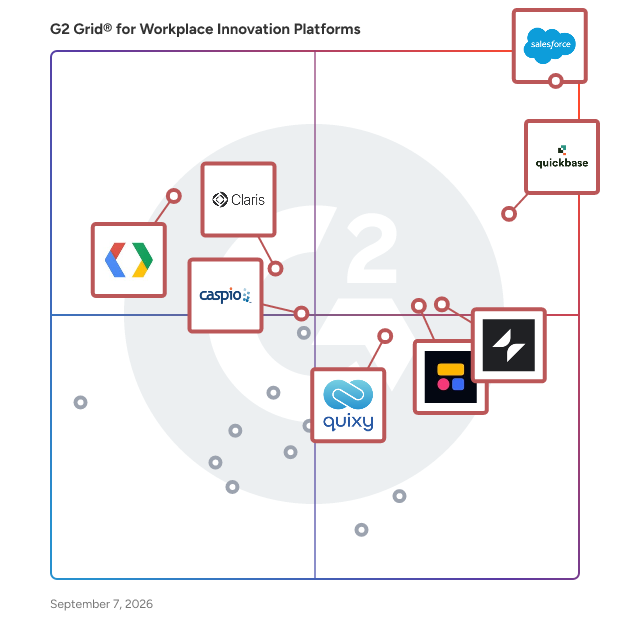
45 Listings in Workplace Innovation Platforms Available
(3,886)4.5 out of 5
Optimized for quick response
2nd Easiest To Use in Workplace Innovation Platforms software
View top Consulting Services for Salesforce Platform
Save to My Lists
Entry Level Price:$25 /user/month* (bil...
  • Overview
    Expand/Collapse Overview
  • Product Description
    How are these determined?Information
    This description is provided by the seller.

    Salesforce Platform is the leading low-code development platform that empowers your team to build and extend your Customer 360 with AI, automation, and data. With the Salesforce Platform, you can exec

    Users
    • Salesforce Developer
    • Account Executive
    Industries
    • Computer Software
    • Information Technology and Services
    Market Segment
    • 45% Mid-Market
    • 34% Enterprise
    User Sentiment
    How are these determined?Information
    These insights, currently in beta, are compiled from user reviews and grouped to display a high-level overview of the software.
    • Salesforce Platform is a customizable and flexible tool that empowers users to reduce IT backlogs and streamline operations through low-code tools and automation.
    • Reviewers frequently mention the platform's powerful automation tools, robust reporting capabilities, and seamless integration with other tools, which enhance efficiency and decision-making accuracy.
    • Reviewers mentioned the initial setup and configuration process can be complex and overwhelming for new users, and the platform's extensive features and updates can sometimes feel too complex and time-consuming to learn.
  • Pros and Cons
    Expand/Collapse Pros and Cons
  • Salesforce Platform Pros and Cons
    How are these determined?Information
    Pros and Cons are compiled from review feedback and grouped into themes to provide an easy-to-understand summary of user reviews.
    Pros
    Ease of Use
    1,548
    Features
    747
    Customizability
    627
    Customization
    627
    Customization Options
    586
    Cons
    Learning Curve
    540
    Complexity
    495
    Expensive
    460
    Difficult Learning
    390
    Missing Features
    385
  • User Satisfaction
    Expand/Collapse User Satisfaction
  • Salesforce Platform features and usability ratings that predict user satisfaction
    9.0
    Application Deployment
    Average: 9.1
    8.8
    Has the product been a good partner in doing business?
    Average: 9.2
    9.2
    Scalability
    Average: 9.1
    9.0
    Collaborative Development
    Average: 8.9
  • Seller Details
    Expand/Collapse Seller Details
  • Seller Details
    Company Website
    Year Founded
    1999
    HQ Location
    San Francisco, CA
    Twitter
    @salesforce
    577,838 Twitter followers
    LinkedIn® Page
    www.linkedin.com
    86,064 employees on LinkedIn®
Product Description
How are these determined?Information
This description is provided by the seller.

Salesforce Platform is the leading low-code development platform that empowers your team to build and extend your Customer 360 with AI, automation, and data. With the Salesforce Platform, you can exec

Users
  • Salesforce Developer
  • Account Executive
Industries
  • Computer Software
  • Information Technology and Services
Market Segment
  • 45% Mid-Market
  • 34% Enterprise
User Sentiment
How are these determined?Information
These insights, currently in beta, are compiled from user reviews and grouped to display a high-level overview of the software.
  • Salesforce Platform is a customizable and flexible tool that empowers users to reduce IT backlogs and streamline operations through low-code tools and automation.
  • Reviewers frequently mention the platform's powerful automation tools, robust reporting capabilities, and seamless integration with other tools, which enhance efficiency and decision-making accuracy.
  • Reviewers mentioned the initial setup and configuration process can be complex and overwhelming for new users, and the platform's extensive features and updates can sometimes feel too complex and time-consuming to learn.
Salesforce Platform Pros and Cons
How are these determined?Information
Pros and Cons are compiled from review feedback and grouped into themes to provide an easy-to-understand summary of user reviews.
Pros
Ease of Use
1,548
Features
747
Customizability
627
Customization
627
Customization Options
586
Cons
Learning Curve
540
Complexity
495
Expensive
460
Difficult Learning
390
Missing Features
385
Salesforce Platform features and usability ratings that predict user satisfaction
9.0
Application Deployment
Average: 9.1
8.8
Has the product been a good partner in doing business?
Average: 9.2
9.2
Scalability
Average: 9.1
9.0
Collaborative Development
Average: 8.9
Seller Details
Company Website
Year Founded
1999
HQ Location
San Francisco, CA
Twitter
@salesforce
577,838 Twitter followers
LinkedIn® Page
www.linkedin.com
86,064 employees on LinkedIn®
(779)4.7 out of 5
Optimized for quick response
1st Easiest To Use in Workplace Innovation Platforms software
Save to My Lists
Entry Level Price:Free
  • Overview
    Expand/Collapse Overview
  • Product Description
    How are these determined?Information
    This description is provided by the seller.

    Glide empowers teams to build AI-powered business apps without coding. Turn any spreadsheet or business dataset into powerful business software, complete with security features, authentication, and fe

    Users
    • Founder
    • CEO
    Industries
    • Information Technology and Services
    • Computer Software
    Market Segment
    • 78% Small-Business
    • 16% Mid-Market
  • Pros and Cons
    Expand/Collapse Pros and Cons
  • Glide Pros and Cons
    How are these determined?Information
    Pros and Cons are compiled from review feedback and grouped into themes to provide an easy-to-understand summary of user reviews.
    Pros
    Ease of Use
    118
    Easy Creation
    67
    Intuitive
    57
    No Coding
    50
    Simplicity
    49
    Cons
    Missing Features
    39
    Limitations
    35
    Expensive
    31
    Pricing Issues
    26
    Limited Customization
    23
  • User Satisfaction
    Expand/Collapse User Satisfaction
  • Glide features and usability ratings that predict user satisfaction
    9.0
    Application Deployment
    Average: 9.1
    9.0
    Has the product been a good partner in doing business?
    Average: 9.2
    8.1
    Scalability
    Average: 9.1
    7.6
    Collaborative Development
    Average: 8.9
  • Seller Details
    Expand/Collapse Seller Details
  • Seller Details
    Seller
    Glide
    Company Website
    Year Founded
    2018
    HQ Location
    San Francisco, CA
    Twitter
    @glideapps
    24,688 Twitter followers
    LinkedIn® Page
    www.linkedin.com
    104 employees on LinkedIn®
Product Description
How are these determined?Information
This description is provided by the seller.

Glide empowers teams to build AI-powered business apps without coding. Turn any spreadsheet or business dataset into powerful business software, complete with security features, authentication, and fe

Users
  • Founder
  • CEO
Industries
  • Information Technology and Services
  • Computer Software
Market Segment
  • 78% Small-Business
  • 16% Mid-Market
Glide Pros and Cons
How are these determined?Information
Pros and Cons are compiled from review feedback and grouped into themes to provide an easy-to-understand summary of user reviews.
Pros
Ease of Use
118
Easy Creation
67
Intuitive
57
No Coding
50
Simplicity
49
Cons
Missing Features
39
Limitations
35
Expensive
31
Pricing Issues
26
Limited Customization
23
Glide features and usability ratings that predict user satisfaction
9.0
Application Deployment
Average: 9.1
9.0
Has the product been a good partner in doing business?
Average: 9.2
8.1
Scalability
Average: 9.1
7.6
Collaborative Development
Average: 8.9
Seller Details
Seller
Glide
Company Website
Year Founded
2018
HQ Location
San Francisco, CA
Twitter
@glideapps
24,688 Twitter followers
LinkedIn® Page
www.linkedin.com
104 employees on LinkedIn®

This is how G2 Deals can help you:

  • Easily shop for curated – and trusted – software
  • Own your own software buying journey
  • Discover exclusive deals on software
(1,259)4.4 out of 5
Optimized for quick response
5th Easiest To Use in Workplace Innovation Platforms software
Save to My Lists
Entry Level Price:Starting at $8,500.00
  • Overview
    Expand/Collapse Overview
  • Product Description
    How are these determined?Information
    This description is provided by the seller.

    Quickbase is an AI-driven platform designed to help businesses streamline their operations by adapting to their unique workflows and processes. Unlike traditional off-the-shelf software, which often r

    Users
    • Project Manager
    • Project Coordinator
    Industries
    • Construction
    • Information Technology and Services
    Market Segment
    • 44% Mid-Market
    • 32% Small-Business
    User Sentiment
    How are these determined?Information
    These insights, currently in beta, are compiled from user reviews and grouped to display a high-level overview of the software.
    • Quickbase is a digital platform that allows users to improve their business processes and workflows, automate tasks, and manage virtual operations.
    • Users like Quickbase's ability to reduce technical errors, customize and organize work systems, and offer a user-friendly interface that facilitates automation and business collaboration.
    • Users reported that Quickbase can be expensive for small teams or startups, the user interface could feel more modern and intuitive, and it may not support complex customization or advanced backend logic as easily as traditional frameworks.
  • Pros and Cons
    Expand/Collapse Pros and Cons
  • Quickbase Pros and Cons
    How are these determined?Information
    Pros and Cons are compiled from review feedback and grouped into themes to provide an easy-to-understand summary of user reviews.
    Pros
    Ease of Use
    157
    Customization
    115
    Customizability
    99
    Flexibility
    99
    Versatility
    82
    Cons
    Learning Curve
    74
    Not Intuitive
    51
    Missing Features
    46
    Limited Features
    45
    User Interface
    42
  • User Satisfaction
    Expand/Collapse User Satisfaction
  • Quickbase features and usability ratings that predict user satisfaction
    8.8
    Application Deployment
    Average: 9.1
    8.7
    Has the product been a good partner in doing business?
    Average: 9.2
    8.8
    Scalability
    Average: 9.1
    8.9
    Collaborative Development
    Average: 8.9
  • Seller Details
    Expand/Collapse Seller Details
  • Seller Details
    Seller
    Quickbase
    Company Website
    Year Founded
    2012
    HQ Location
    Boston, MA
    Twitter
    @quickbase
    5,184 Twitter followers
    LinkedIn® Page
    www.linkedin.com
    861 employees on LinkedIn®
Product Description
How are these determined?Information
This description is provided by the seller.

Quickbase is an AI-driven platform designed to help businesses streamline their operations by adapting to their unique workflows and processes. Unlike traditional off-the-shelf software, which often r

Users
  • Project Manager
  • Project Coordinator
Industries
  • Construction
  • Information Technology and Services
Market Segment
  • 44% Mid-Market
  • 32% Small-Business
User Sentiment
How are these determined?Information
These insights, currently in beta, are compiled from user reviews and grouped to display a high-level overview of the software.
  • Quickbase is a digital platform that allows users to improve their business processes and workflows, automate tasks, and manage virtual operations.
  • Users like Quickbase's ability to reduce technical errors, customize and organize work systems, and offer a user-friendly interface that facilitates automation and business collaboration.
  • Users reported that Quickbase can be expensive for small teams or startups, the user interface could feel more modern and intuitive, and it may not support complex customization or advanced backend logic as easily as traditional frameworks.
Quickbase Pros and Cons
How are these determined?Information
Pros and Cons are compiled from review feedback and grouped into themes to provide an easy-to-understand summary of user reviews.
Pros
Ease of Use
157
Customization
115
Customizability
99
Flexibility
99
Versatility
82
Cons
Learning Curve
74
Not Intuitive
51
Missing Features
46
Limited Features
45
User Interface
42
Quickbase features and usability ratings that predict user satisfaction
8.8
Application Deployment
Average: 9.1
8.7
Has the product been a good partner in doing business?
Average: 9.2
8.8
Scalability
Average: 9.1
8.9
Collaborative Development
Average: 8.9
Seller Details
Seller
Quickbase
Company Website
Year Founded
2012
HQ Location
Boston, MA
Twitter
@quickbase
5,184 Twitter followers
LinkedIn® Page
www.linkedin.com
861 employees on LinkedIn®
(129)5.0 out of 5
3rd Easiest To Use in Workplace Innovation Platforms software
Save to My Lists
Entry Level Price:$20.00
  • Overview
    Expand/Collapse Overview
  • Product Description
    How are these determined?Information
    This description is provided by the seller.

    Quixy is a cloud-based, user-friendly platform that empowers users without coding skills to create enterprise-grade applications ten times faster using a simple drag-and-drop design. Built for today’s

    Users
    • Senior Software Engineer
    • Associate Software Engineer
    Industries
    • Computer Software
    • Information Technology and Services
    Market Segment
    • 62% Mid-Market
    • 23% Small-Business
  • Pros and Cons
    Expand/Collapse Pros and Cons
  • Quixy Pros and Cons
    How are these determined?Information
    Pros and Cons are compiled from review feedback and grouped into themes to provide an easy-to-understand summary of user reviews.
    Pros
    Ease of Use
    4
    Intuitive
    3
    User-Friendly
    3
    Automation
    2
    Automation Excellence
    2
    Cons
    Performance Issues
    2
    Refresh
    2
    Slow Loading
    2
    Slow Performance
    2
    Bugs
    1
  • User Satisfaction
    Expand/Collapse User Satisfaction
  • Quixy features and usability ratings that predict user satisfaction
    9.9
    Application Deployment
    Average: 9.1
    9.9
    Has the product been a good partner in doing business?
    Average: 9.2
    10.0
    Scalability
    Average: 9.1
    9.9
    Collaborative Development
    Average: 8.9
  • Seller Details
    Expand/Collapse Seller Details
  • Seller Details
    Seller
    Quixy
    Year Founded
    2019
    HQ Location
    Hyderabad, Telangana
    LinkedIn® Page
    www.linkedin.com
    275 employees on LinkedIn®
Product Description
How are these determined?Information
This description is provided by the seller.

Quixy is a cloud-based, user-friendly platform that empowers users without coding skills to create enterprise-grade applications ten times faster using a simple drag-and-drop design. Built for today’s

Users
  • Senior Software Engineer
  • Associate Software Engineer
Industries
  • Computer Software
  • Information Technology and Services
Market Segment
  • 62% Mid-Market
  • 23% Small-Business
Quixy Pros and Cons
How are these determined?Information
Pros and Cons are compiled from review feedback and grouped into themes to provide an easy-to-understand summary of user reviews.
Pros
Ease of Use
4
Intuitive
3
User-Friendly
3
Automation
2
Automation Excellence
2
Cons
Performance Issues
2
Refresh
2
Slow Loading
2
Slow Performance
2
Bugs
1
Quixy features and usability ratings that predict user satisfaction
9.9
Application Deployment
Average: 9.1
9.9
Has the product been a good partner in doing business?
Average: 9.2
10.0
Scalability
Average: 9.1
9.9
Collaborative Development
Average: 8.9
Seller Details
Seller
Quixy
Year Founded
2019
HQ Location
Hyderabad, Telangana
LinkedIn® Page
www.linkedin.com
275 employees on LinkedIn®
(155)4.5 out of 5
8th Easiest To Use in Workplace Innovation Platforms software
View top Consulting Services for Caspio
Save to My Lists
50% Off: Starting at $50/month
  • Overview
    Expand/Collapse Overview
  • Product Description
    How are these determined?Information
    This description is provided by the seller.

    Caspio is an AI-enhanced application development platform that helps organizations of all sizes build secure, data-driven business applications, without writing code. Trusted by more than 15,000 co

    Users
    • President
    Industries
    • Hospital & Health Care
    • Non-Profit Organization Management
    Market Segment
    • 63% Small-Business
    • 24% Mid-Market
  • Pros and Cons
    Expand/Collapse Pros and Cons
  • Caspio Pros and Cons
    How are these determined?Information
    Pros and Cons are compiled from review feedback and grouped into themes to provide an easy-to-understand summary of user reviews.
    Pros
    Ease of Use
    47
    Customer Support
    25
    Ease of Learning
    21
    Database Management
    16
    Fast Development
    16
    Cons
    Learning Curve
    20
    Missing Features
    15
    Limited Features
    12
    Poor Usability
    11
    Coding Skills
    8
  • User Satisfaction
    Expand/Collapse User Satisfaction
  • Caspio features and usability ratings that predict user satisfaction
    8.9
    Application Deployment
    Average: 9.1
    8.9
    Has the product been a good partner in doing business?
    Average: 9.2
    8.8
    Scalability
    Average: 9.1
    8.3
    Collaborative Development
    Average: 8.9
  • Seller Details
    Expand/Collapse Seller Details
  • Seller Details
    Seller
    Caspio
    Company Website
    Year Founded
    2000
    HQ Location
    Sunnyvale, CA
    Twitter
    @Caspio
    18,393 Twitter followers
    LinkedIn® Page
    www.linkedin.com
    209 employees on LinkedIn®
Product Description
How are these determined?Information
This description is provided by the seller.

Caspio is an AI-enhanced application development platform that helps organizations of all sizes build secure, data-driven business applications, without writing code. Trusted by more than 15,000 co

Users
  • President
Industries
  • Hospital & Health Care
  • Non-Profit Organization Management
Market Segment
  • 63% Small-Business
  • 24% Mid-Market
Caspio Pros and Cons
How are these determined?Information
Pros and Cons are compiled from review feedback and grouped into themes to provide an easy-to-understand summary of user reviews.
Pros
Ease of Use
47
Customer Support
25
Ease of Learning
21
Database Management
16
Fast Development
16
Cons
Learning Curve
20
Missing Features
15
Limited Features
12
Poor Usability
11
Coding Skills
8
Caspio features and usability ratings that predict user satisfaction
8.9
Application Deployment
Average: 9.1
8.9
Has the product been a good partner in doing business?
Average: 9.2
8.8
Scalability
Average: 9.1
8.3
Collaborative Development
Average: 8.9
Seller Details
Seller
Caspio
Company Website
Year Founded
2000
HQ Location
Sunnyvale, CA
Twitter
@Caspio
18,393 Twitter followers
LinkedIn® Page
www.linkedin.com
209 employees on LinkedIn®
(576)4.5 out of 5
4th Easiest To Use in Workplace Innovation Platforms software
Save to My Lists
  • Overview
    Expand/Collapse Overview
  • Product Description
    How are these determined?Information
    This description is provided by the seller.

    Make tech work for you, not the other way around. The Claris platform is uniquely suited to help businesses like yours build, test, and rapidly iterate customized, integrated solutions faster and mor

    Users
    • President
    • Owner
    Industries
    • Computer Software
    • Information Technology and Services
    Market Segment
    • 66% Small-Business
    • 23% Mid-Market
  • Pros and Cons
    Expand/Collapse Pros and Cons
  • Claris FileMaker Pros and Cons
    How are these determined?Information
    Pros and Cons are compiled from review feedback and grouped into themes to provide an easy-to-understand summary of user reviews.
    Pros
    Flexibility
    9
    Ease of Use
    8
    Integration Capabilities
    8
    Functionality
    7
    Integration
    7
    Cons
    Cost Issues
    3
    Expensive
    3
    Learning Curve
    3
    Navigation Difficulties
    3
    Database Limitations
    2
  • User Satisfaction
    Expand/Collapse User Satisfaction
  • Claris FileMaker features and usability ratings that predict user satisfaction
    8.9
    Application Deployment
    Average: 9.1
    9.0
    Has the product been a good partner in doing business?
    Average: 9.2
    8.2
    Scalability
    Average: 9.1
    8.2
    Collaborative Development
    Average: 8.9
  • Seller Details
    Expand/Collapse Seller Details
  • Seller Details
    Seller
    Claris
    Year Founded
    1998
    HQ Location
    Sunnyvale, US
    Twitter
    @ClarisOfficial
    9,265 Twitter followers
    LinkedIn® Page
    www.linkedin.com
    198 employees on LinkedIn®
Product Description
How are these determined?Information
This description is provided by the seller.

Make tech work for you, not the other way around. The Claris platform is uniquely suited to help businesses like yours build, test, and rapidly iterate customized, integrated solutions faster and mor

Users
  • President
  • Owner
Industries
  • Computer Software
  • Information Technology and Services
Market Segment
  • 66% Small-Business
  • 23% Mid-Market
Claris FileMaker Pros and Cons
How are these determined?Information
Pros and Cons are compiled from review feedback and grouped into themes to provide an easy-to-understand summary of user reviews.
Pros
Flexibility
9
Ease of Use
8
Integration Capabilities
8
Functionality
7
Integration
7
Cons
Cost Issues
3
Expensive
3
Learning Curve
3
Navigation Difficulties
3
Database Limitations
2
Claris FileMaker features and usability ratings that predict user satisfaction
8.9
Application Deployment
Average: 9.1
9.0
Has the product been a good partner in doing business?
Average: 9.2
8.2
Scalability
Average: 9.1
8.2
Collaborative Development
Average: 8.9
Seller Details
Seller
Claris
Year Founded
1998
HQ Location
Sunnyvale, US
Twitter
@ClarisOfficial
9,265 Twitter followers
LinkedIn® Page
www.linkedin.com
198 employees on LinkedIn®
(654)4.7 out of 5
7th Easiest To Use in Workplace Innovation Platforms software
View top Consulting Services for Softr
Save to My Lists
Entry Level Price:Free
  • Overview
    Expand/Collapse Overview
  • Product Description
    How are these determined?Information
    This description is provided by the seller.

    Softr is the easiest way to turn your data into modern portals and internal tools — no coding or design skills required. It works with your favorite data sources, including Airtable, Google Sheets, Hu

    Users
    • Founder
    • CEO
    Industries
    • Computer Software
    • Marketing and Advertising
    Market Segment
    • 87% Small-Business
    • 7% Mid-Market
    User Sentiment
    How are these determined?Information
    These insights, currently in beta, are compiled from user reviews and grouped to display a high-level overview of the software.
    • Softr is a no-code website builder that allows users to create custom business apps and websites, integrate with databases like Airtable and Google Sheets, and automate workflows.
    • Users frequently mention the ease of use, the intuitive building process, the helpful customer support, and the ability to integrate with other software and databases as key benefits of Softr.
    • Users reported issues with limited customization options, difficulties with certain features and integrations, and concerns about the cost and limitations of the free version.
  • Pros and Cons
    Expand/Collapse Pros and Cons
  • Softr Pros and Cons
    How are these determined?Information
    Pros and Cons are compiled from review feedback and grouped into themes to provide an easy-to-understand summary of user reviews.
    Pros
    Ease of Use
    189
    Customer Support
    138
    Easy Setup
    99
    Integrations
    94
    Intuitive
    90
    Cons
    Limited Customization
    89
    Missing Features
    80
    Limited Features
    73
    Limitations
    37
    Expensive
    35
  • User Satisfaction
    Expand/Collapse User Satisfaction
  • Softr features and usability ratings that predict user satisfaction
    9.1
    Application Deployment
    Average: 9.1
    9.2
    Has the product been a good partner in doing business?
    Average: 9.2
    8.9
    Scalability
    Average: 9.1
    8.1
    Collaborative Development
    Average: 8.9
  • Seller Details
    Expand/Collapse Seller Details
  • Seller Details
    Seller
    Softr
    Company Website
    Year Founded
    2020
    HQ Location
    Berlin, DE
    Twitter
    @softr_io
    15,475 Twitter followers
    LinkedIn® Page
    www.linkedin.com
    65 employees on LinkedIn®
Product Description
How are these determined?Information
This description is provided by the seller.

Softr is the easiest way to turn your data into modern portals and internal tools — no coding or design skills required. It works with your favorite data sources, including Airtable, Google Sheets, Hu

Users
  • Founder
  • CEO
Industries
  • Computer Software
  • Marketing and Advertising
Market Segment
  • 87% Small-Business
  • 7% Mid-Market
User Sentiment
How are these determined?Information
These insights, currently in beta, are compiled from user reviews and grouped to display a high-level overview of the software.
  • Softr is a no-code website builder that allows users to create custom business apps and websites, integrate with databases like Airtable and Google Sheets, and automate workflows.
  • Users frequently mention the ease of use, the intuitive building process, the helpful customer support, and the ability to integrate with other software and databases as key benefits of Softr.
  • Users reported issues with limited customization options, difficulties with certain features and integrations, and concerns about the cost and limitations of the free version.
Softr Pros and Cons
How are these determined?Information
Pros and Cons are compiled from review feedback and grouped into themes to provide an easy-to-understand summary of user reviews.
Pros
Ease of Use
189
Customer Support
138
Easy Setup
99
Integrations
94
Intuitive
90
Cons
Limited Customization
89
Missing Features
80
Limited Features
73
Limitations
37
Expensive
35
Softr features and usability ratings that predict user satisfaction
9.1
Application Deployment
Average: 9.1
9.2
Has the product been a good partner in doing business?
Average: 9.2
8.9
Scalability
Average: 9.1
8.1
Collaborative Development
Average: 8.9
Seller Details
Seller
Softr
Company Website
Year Founded
2020
HQ Location
Berlin, DE
Twitter
@softr_io
15,475 Twitter followers
LinkedIn® Page
www.linkedin.com
65 employees on LinkedIn®
(583)4.5 out of 5
Optimized for quick response
9th Easiest To Use in Workplace Innovation Platforms software
Save to My Lists
  • Overview
    Expand/Collapse Overview
  • Product Description
    How are these determined?Information
    This description is provided by the seller.

    For organizations ready to modernize and innovate, Jitterbit provides a unified AI-infused low-code platform for integration, orchestration, automation, and app development that accelerates business t

    Users
    • IT Manager
    • Consultant
    Industries
    • Information Technology and Services
    • Computer Software
    Market Segment
    • 52% Mid-Market
    • 25% Enterprise
    User Sentiment
    How are these determined?Information
    These insights, currently in beta, are compiled from user reviews and grouped to display a high-level overview of the software.
    • Jitterbit is a platform that automates processes and integrates applications, providing a stable integration layer between core applications and managing complex workflows.
    • Users frequently mention the platform's ease of use, robust error handling, logging, and fast customer support, appreciating its low-code interface, intuitive drag-and-drop feature, and the ability to build and deploy integrations quickly.
    • Users mentioned challenges in navigating the user interface, lack of reference material for advanced use cases, issues with new features in transformation, absence of a debug mode in the development tool, and inadequate logging during migration to cloud studio.
  • Pros and Cons
    Expand/Collapse Pros and Cons
  • Jitterbit Pros and Cons
    How are these determined?Information
    Pros and Cons are compiled from review feedback and grouped into themes to provide an easy-to-understand summary of user reviews.
    Pros
    Ease of Use
    60
    Customer Support
    27
    Integrations
    26
    Speed
    26
    Easy Integrations
    23
    Cons
    Learning Curve
    22
    Missing Features
    20
    Integration Issues
    12
    Complexity
    9
    Debugging Issues
    9
  • User Satisfaction
    Expand/Collapse User Satisfaction
  • Jitterbit features and usability ratings that predict user satisfaction
    9.0
    Application Deployment
    Average: 9.1
    9.2
    Has the product been a good partner in doing business?
    Average: 9.2
    9.1
    Scalability
    Average: 9.1
    8.8
    Collaborative Development
    Average: 8.9
  • Seller Details
    Expand/Collapse Seller Details
  • Seller Details
    Seller
    Jitterbit
    Company Website
    Year Founded
    2003
    HQ Location
    Alameda, CA
    Twitter
    @jitterbit
    3,675 Twitter followers
    LinkedIn® Page
    www.linkedin.com
    419 employees on LinkedIn®
Product Description
How are these determined?Information
This description is provided by the seller.

For organizations ready to modernize and innovate, Jitterbit provides a unified AI-infused low-code platform for integration, orchestration, automation, and app development that accelerates business t

Users
  • IT Manager
  • Consultant
Industries
  • Information Technology and Services
  • Computer Software
Market Segment
  • 52% Mid-Market
  • 25% Enterprise
User Sentiment
How are these determined?Information
These insights, currently in beta, are compiled from user reviews and grouped to display a high-level overview of the software.
  • Jitterbit is a platform that automates processes and integrates applications, providing a stable integration layer between core applications and managing complex workflows.
  • Users frequently mention the platform's ease of use, robust error handling, logging, and fast customer support, appreciating its low-code interface, intuitive drag-and-drop feature, and the ability to build and deploy integrations quickly.
  • Users mentioned challenges in navigating the user interface, lack of reference material for advanced use cases, issues with new features in transformation, absence of a debug mode in the development tool, and inadequate logging during migration to cloud studio.
Jitterbit Pros and Cons
How are these determined?Information
Pros and Cons are compiled from review feedback and grouped into themes to provide an easy-to-understand summary of user reviews.
Pros
Ease of Use
60
Customer Support
27
Integrations
26
Speed
26
Easy Integrations
23
Cons
Learning Curve
22
Missing Features
20
Integration Issues
12
Complexity
9
Debugging Issues
9
Jitterbit features and usability ratings that predict user satisfaction
9.0
Application Deployment
Average: 9.1
9.2
Has the product been a good partner in doing business?
Average: 9.2
9.1
Scalability
Average: 9.1
8.8
Collaborative Development
Average: 8.9
Seller Details
Seller
Jitterbit
Company Website
Year Founded
2003
HQ Location
Alameda, CA
Twitter
@jitterbit
3,675 Twitter followers
LinkedIn® Page
www.linkedin.com
419 employees on LinkedIn®
(280)4.8 out of 5
6th Easiest To Use in Workplace Innovation Platforms software
View top Consulting Services for Assembly
Save to My Lists
Entry Level Price:$39.00
  • Overview
    Expand/Collapse Overview
  • Product Description
    How are these determined?Information
    This description is provided by the seller.

    Create remarkable client experiences. CRM, portal, payments, tasks, contracts & more — with an AI Assistant that works for you. Assembly is the AI-powered platform for professional service fir

    Users
    • Owner
    • Founder
    Industries
    • Marketing and Advertising
    • Accounting
    Market Segment
    • 94% Small-Business
    • 3% Mid-Market
    User Sentiment
    How are these determined?Information
    These insights, currently in beta, are compiled from user reviews and grouped to display a high-level overview of the software.
    • Assembly is a client management platform that centralizes documents and information, streamlines communication, and offers a client portal for easy access.
    • Users frequently mention the ease of use, intuitive navigation, and the ability to customize the client portal as key benefits of using Assembly.
    • Reviewers mentioned issues with the message section not syncing properly, limitations in direct user profile access, unreliable automations, and a lack of certain features like complex billing situations.
  • Pros and Cons
    Expand/Collapse Pros and Cons
  • Assembly Pros and Cons
    How are these determined?Information
    Pros and Cons are compiled from review feedback and grouped into themes to provide an easy-to-understand summary of user reviews.
    Pros
    Ease of Use
    136
    Customer Support
    74
    Easy Setup
    71
    Features
    68
    Intuitive
    68
    Cons
    Missing Features
    89
    Limited Features
    58
    Limited Customization
    42
    Lacking Features
    40
    Integration Issues
    30
  • User Satisfaction
    Expand/Collapse User Satisfaction
  • Assembly features and usability ratings that predict user satisfaction
    10.0
    Application Deployment
    Average: 9.1
    9.5
    Has the product been a good partner in doing business?
    Average: 9.2
    10.0
    Scalability
    Average: 9.1
    10.0
    Collaborative Development
    Average: 8.9
  • Seller Details
    Expand/Collapse Seller Details
  • Seller Details
    Seller
    Assembly
    Company Website
    Year Founded
    2020
    HQ Location
    New York, US
    Twitter
    @copilot
    51,881 Twitter followers
    LinkedIn® Page
    www.linkedin.com
    36 employees on LinkedIn®
Product Description
How are these determined?Information
This description is provided by the seller.

Create remarkable client experiences. CRM, portal, payments, tasks, contracts & more — with an AI Assistant that works for you. Assembly is the AI-powered platform for professional service fir

Users
  • Owner
  • Founder
Industries
  • Marketing and Advertising
  • Accounting
Market Segment
  • 94% Small-Business
  • 3% Mid-Market
User Sentiment
How are these determined?Information
These insights, currently in beta, are compiled from user reviews and grouped to display a high-level overview of the software.
  • Assembly is a client management platform that centralizes documents and information, streamlines communication, and offers a client portal for easy access.
  • Users frequently mention the ease of use, intuitive navigation, and the ability to customize the client portal as key benefits of using Assembly.
  • Reviewers mentioned issues with the message section not syncing properly, limitations in direct user profile access, unreliable automations, and a lack of certain features like complex billing situations.
Assembly Pros and Cons
How are these determined?Information
Pros and Cons are compiled from review feedback and grouped into themes to provide an easy-to-understand summary of user reviews.
Pros
Ease of Use
136
Customer Support
74
Easy Setup
71
Features
68
Intuitive
68
Cons
Missing Features
89
Limited Features
58
Limited Customization
42
Lacking Features
40
Integration Issues
30
Assembly features and usability ratings that predict user satisfaction
10.0
Application Deployment
Average: 9.1
9.5
Has the product been a good partner in doing business?
Average: 9.2
10.0
Scalability
Average: 9.1
10.0
Collaborative Development
Average: 8.9
Seller Details
Seller
Assembly
Company Website
Year Founded
2020
HQ Location
New York, US
Twitter
@copilot
51,881 Twitter followers
LinkedIn® Page
www.linkedin.com
36 employees on LinkedIn®
  • Overview
    Expand/Collapse Overview
  • Product Description
    How are these determined?Information
    This description is provided by the seller.

    Build apps that fill gaps, like accelerating business workflows or scaling internal operations, with G Suite’s low-code development environment. App Maker is included with G Suite Business and Enterpr

    Users
    No information available
    Industries
    • Information Technology and Services
    • Computer Software
    Market Segment
    • 50% Small-Business
    • 26% Mid-Market
  • User Satisfaction
    Expand/Collapse User Satisfaction
  • Google App Maker features and usability ratings that predict user satisfaction
    8.1
    Application Deployment
    Average: 9.1
    8.1
    Has the product been a good partner in doing business?
    Average: 9.2
    7.9
    Scalability
    Average: 9.1
    8.1
    Collaborative Development
    Average: 8.9
  • Seller Details
    Expand/Collapse Seller Details
  • Seller Details
    Seller
    Google
    Year Founded
    1998
    HQ Location
    Mountain View, CA
    Twitter
    @google
    31,586,146 Twitter followers
    LinkedIn® Page
    www.linkedin.com
    325,935 employees on LinkedIn®
    Ownership
    NASDAQ:GOOG
Product Description
How are these determined?Information
This description is provided by the seller.

Build apps that fill gaps, like accelerating business workflows or scaling internal operations, with G Suite’s low-code development environment. App Maker is included with G Suite Business and Enterpr

Users
No information available
Industries
  • Information Technology and Services
  • Computer Software
Market Segment
  • 50% Small-Business
  • 26% Mid-Market
Google App Maker features and usability ratings that predict user satisfaction
8.1
Application Deployment
Average: 9.1
8.1
Has the product been a good partner in doing business?
Average: 9.2
7.9
Scalability
Average: 9.1
8.1
Collaborative Development
Average: 8.9
Seller Details
Seller
Google
Year Founded
1998
HQ Location
Mountain View, CA
Twitter
@google
31,586,146 Twitter followers
LinkedIn® Page
www.linkedin.com
325,935 employees on LinkedIn®
Ownership
NASDAQ:GOOG
(162)4.3 out of 5
13th Easiest To Use in Workplace Innovation Platforms software
View top Consulting Services for Zoho Creator
Save to My Lists
Entry Level Price:$8.00
  • Overview
    Expand/Collapse Overview
  • Product Description
    How are these determined?Information
    This description is provided by the seller.

    Zoho Creator is an AI-powered low-code platform that helps companies build powerful mobile and web applications tailored to their unique needs. From startups to large enterprises, businesses use Zoho

    Users
    No information available
    Industries
    • Information Technology and Services
    • Computer Software
    Market Segment
    • 48% Small-Business
    • 42% Mid-Market
  • Pros and Cons
    Expand/Collapse Pros and Cons
  • Zoho Creator Pros and Cons
    How are these determined?Information
    Pros and Cons are compiled from review feedback and grouped into themes to provide an easy-to-understand summary of user reviews.
    Pros
    Integrations
    7
    Ease of Use
    5
    Easy Integrations
    4
    Collaboration
    3
    Features
    3
    Cons
    Complexity
    3
    Learning Curve
    3
    Limited Customization
    3
    Poor Customer Support
    3
    Customization Difficulty
    2
  • User Satisfaction
    Expand/Collapse User Satisfaction
  • Zoho Creator features and usability ratings that predict user satisfaction
    8.5
    Application Deployment
    Average: 9.1
    8.7
    Has the product been a good partner in doing business?
    Average: 9.2
    8.9
    Scalability
    Average: 9.1
    9.3
    Collaborative Development
    Average: 8.9
  • Seller Details
    Expand/Collapse Seller Details
  • Seller Details
    Seller
    Zoho
    Year Founded
    1996
    HQ Location
    Austin, TX
    Twitter
    @Zoho
    136,526 Twitter followers
    LinkedIn® Page
    www.linkedin.com
    29,794 employees on LinkedIn®
    Phone
    +1 (888) 900-9646
Product Description
How are these determined?Information
This description is provided by the seller.

Zoho Creator is an AI-powered low-code platform that helps companies build powerful mobile and web applications tailored to their unique needs. From startups to large enterprises, businesses use Zoho

Users
No information available
Industries
  • Information Technology and Services
  • Computer Software
Market Segment
  • 48% Small-Business
  • 42% Mid-Market
Zoho Creator Pros and Cons
How are these determined?Information
Pros and Cons are compiled from review feedback and grouped into themes to provide an easy-to-understand summary of user reviews.
Pros
Integrations
7
Ease of Use
5
Easy Integrations
4
Collaboration
3
Features
3
Cons
Complexity
3
Learning Curve
3
Limited Customization
3
Poor Customer Support
3
Customization Difficulty
2
Zoho Creator features and usability ratings that predict user satisfaction
8.5
Application Deployment
Average: 9.1
8.7
Has the product been a good partner in doing business?
Average: 9.2
8.9
Scalability
Average: 9.1
9.3
Collaborative Development
Average: 8.9
Seller Details
Seller
Zoho
Year Founded
1996
HQ Location
Austin, TX
Twitter
@Zoho
136,526 Twitter followers
LinkedIn® Page
www.linkedin.com
29,794 employees on LinkedIn®
Phone
+1 (888) 900-9646
(398)4.8 out of 5
11th Easiest To Use in Workplace Innovation Platforms software
Save to My Lists
  • Overview
    Expand/Collapse Overview
  • Product Description
    How are these determined?Information
    This description is provided by the seller.

    AppSheet is the intelligent no-code platform trusted by over 200,000 app creators around the world including Clearlink, Enterprise Holdings, ESPN, Pepsi, Husqvarna and more. A Forrester Low/No Code De

    Users
    • Owner
    • CEO
    Industries
    • Information Technology and Services
    • Education Management
    Market Segment
    • 64% Small-Business
    • 26% Mid-Market
  • Pros and Cons
    Expand/Collapse Pros and Cons
  • AppSheet Pros and Cons
    How are these determined?Information
    Pros and Cons are compiled from review feedback and grouped into themes to provide an easy-to-understand summary of user reviews.
    Pros
    Automation
    1
    Creation Ease
    1
    Ease of Use
    1
    Easy Creation
    1
    Intuitive
    1
    Cons
    Access Restrictions
    1
    App Development
    1
    Integration Issues
    1
    Linking Issues
    1
    Missing Features
    1
  • User Satisfaction
    Expand/Collapse User Satisfaction
  • AppSheet features and usability ratings that predict user satisfaction
    9.0
    Application Deployment
    Average: 9.1
    9.0
    Has the product been a good partner in doing business?
    Average: 9.2
    8.3
    Scalability
    Average: 9.1
    8.6
    Collaborative Development
    Average: 8.9
  • Seller Details
    Expand/Collapse Seller Details
  • Seller Details
    Seller
    AppSheet
    Year Founded
    2014
    HQ Location
    Seattle, WA
    Twitter
    @appsheet
    5,318 Twitter followers
    LinkedIn® Page
    www.linkedin.com
    29 employees on LinkedIn®
Product Description
How are these determined?Information
This description is provided by the seller.

AppSheet is the intelligent no-code platform trusted by over 200,000 app creators around the world including Clearlink, Enterprise Holdings, ESPN, Pepsi, Husqvarna and more. A Forrester Low/No Code De

Users
  • Owner
  • CEO
Industries
  • Information Technology and Services
  • Education Management
Market Segment
  • 64% Small-Business
  • 26% Mid-Market
AppSheet Pros and Cons
How are these determined?Information
Pros and Cons are compiled from review feedback and grouped into themes to provide an easy-to-understand summary of user reviews.
Pros
Automation
1
Creation Ease
1
Ease of Use
1
Easy Creation
1
Intuitive
1
Cons
Access Restrictions
1
App Development
1
Integration Issues
1
Linking Issues
1
Missing Features
1
AppSheet features and usability ratings that predict user satisfaction
9.0
Application Deployment
Average: 9.1
9.0
Has the product been a good partner in doing business?
Average: 9.2
8.3
Scalability
Average: 9.1
8.6
Collaborative Development
Average: 8.9
Seller Details
Seller
AppSheet
Year Founded
2014
HQ Location
Seattle, WA
Twitter
@appsheet
5,318 Twitter followers
LinkedIn® Page
www.linkedin.com
29 employees on LinkedIn®
Entry Level Price:$99.00
  • Overview
    Expand/Collapse Overview
  • Product Description
    How are these determined?Information
    This description is provided by the seller.

    What is GW Apps? GW Apps is a No-Code application development platform designed to empower teams to build powerful, secure, and scalable business applications—without writing a single line of code.

    Users
    No information available
    Industries
    No information available
    Market Segment
    • 69% Small-Business
    • 15% Enterprise
  • Pros and Cons
    Expand/Collapse Pros and Cons
  • GW Apps Pros and Cons
    How are these determined?Information
    Pros and Cons are compiled from review feedback and grouped into themes to provide an easy-to-understand summary of user reviews.
    Pros
    Analytics
    1
    Automation Efficiency
    1
    Customization
    1
    Workflow Automation
    1
    Workflow Management
    1
    Cons
    This product has not yet received any negative sentiments.
  • User Satisfaction
    Expand/Collapse User Satisfaction
  • GW Apps features and usability ratings that predict user satisfaction
    9.0
    Application Deployment
    Average: 9.1
    10.0
    Has the product been a good partner in doing business?
    Average: 9.2
    9.7
    Scalability
    Average: 9.1
    9.4
    Collaborative Development
    Average: 8.9
  • Seller Details
    Expand/Collapse Seller Details
  • Seller Details
    Seller
    GW Apps
    Year Founded
    2018
    HQ Location
    Los Angeles, CA
    Twitter
    @gwapps_
    11 Twitter followers
    LinkedIn® Page
    www.linkedin.com
    13 employees on LinkedIn®
Product Description
How are these determined?Information
This description is provided by the seller.

What is GW Apps? GW Apps is a No-Code application development platform designed to empower teams to build powerful, secure, and scalable business applications—without writing a single line of code.

Users
No information available
Industries
No information available
Market Segment
  • 69% Small-Business
  • 15% Enterprise
GW Apps Pros and Cons
How are these determined?Information
Pros and Cons are compiled from review feedback and grouped into themes to provide an easy-to-understand summary of user reviews.
Pros
Analytics
1
Automation Efficiency
1
Customization
1
Workflow Automation
1
Workflow Management
1
Cons
This product has not yet received any negative sentiments.
GW Apps features and usability ratings that predict user satisfaction
9.0
Application Deployment
Average: 9.1
10.0
Has the product been a good partner in doing business?
Average: 9.2
9.7
Scalability
Average: 9.1
9.4
Collaborative Development
Average: 8.9
Seller Details
Seller
GW Apps
Year Founded
2018
HQ Location
Los Angeles, CA
Twitter
@gwapps_
11 Twitter followers
LinkedIn® Page
www.linkedin.com
13 employees on LinkedIn®
(362)4.7 out of 5
Optimized for quick response
10th Easiest To Use in Workplace Innovation Platforms software
Save to My Lists
Entry Level Price:€11.00
  • Overview
    Expand/Collapse Overview
  • Product Description
    How are these determined?Information
    This description is provided by the seller.

    Explore Ninox, the low-code platform that makes it easy to digitize and automate your business processes. Ideal for teams of any size. Whether CRM, ERP or project management - with Ninox you can

    Users
    • CEO
    • Director
    Industries
    • Education Management
    • Construction
    Market Segment
    • 86% Small-Business
    • 10% Mid-Market
  • Pros and Cons
    Expand/Collapse Pros and Cons
  • Ninox Pros and Cons
    How are these determined?Information
    Pros and Cons are compiled from review feedback and grouped into themes to provide an easy-to-understand summary of user reviews.
    Pros
    Ease of Use
    6
    Flexibility
    4
    Low Code
    4
    Low Coding
    4
    Customer Management
    3
    Cons
    Expensive
    3
    Licensing Issues
    2
    Poor Customer Support
    2
    Pricing Issues
    2
    Support Issues
    2
  • User Satisfaction
    Expand/Collapse User Satisfaction
  • Ninox features and usability ratings that predict user satisfaction
    8.8
    Application Deployment
    Average: 9.1
    9.0
    Has the product been a good partner in doing business?
    Average: 9.2
    8.8
    Scalability
    Average: 9.1
    8.2
    Collaborative Development
    Average: 8.9
  • Seller Details
    Expand/Collapse Seller Details
  • Seller Details
    Company Website
    Year Founded
    2013
    HQ Location
    Monbijoustraße 3A, 10117, Berlin, Germany
    LinkedIn® Page
    www.linkedin.com
    93 employees on LinkedIn®
Product Description
How are these determined?Information
This description is provided by the seller.

Explore Ninox, the low-code platform that makes it easy to digitize and automate your business processes. Ideal for teams of any size. Whether CRM, ERP or project management - with Ninox you can

Users
  • CEO
  • Director
Industries
  • Education Management
  • Construction
Market Segment
  • 86% Small-Business
  • 10% Mid-Market
Ninox Pros and Cons
How are these determined?Information
Pros and Cons are compiled from review feedback and grouped into themes to provide an easy-to-understand summary of user reviews.
Pros
Ease of Use
6
Flexibility
4
Low Code
4
Low Coding
4
Customer Management
3
Cons
Expensive
3
Licensing Issues
2
Poor Customer Support
2
Pricing Issues
2
Support Issues
2
Ninox features and usability ratings that predict user satisfaction
8.8
Application Deployment
Average: 9.1
9.0
Has the product been a good partner in doing business?
Average: 9.2
8.8
Scalability
Average: 9.1
8.2
Collaborative Development
Average: 8.9
Seller Details
Company Website
Year Founded
2013
HQ Location
Monbijoustraße 3A, 10117, Berlin, Germany
LinkedIn® Page
www.linkedin.com
93 employees on LinkedIn®
  • Overview
    Expand/Collapse Overview
  • Product Description
    How are these determined?Information
    This description is provided by the seller.

    AppMaster.io is a no-code platform designed to help businesses create production-level applications with code generation: backend, web, and native mobile apps. With AppMaster.io, you can grow from an

    Users
    • Chief Executive Officer
    Industries
    • Computer Software
    • Financial Services
    Market Segment
    • 80% Small-Business
    • 12% Mid-Market
  • Pros and Cons
    Expand/Collapse Pros and Cons
  • AppMaster.io Pros and Cons
    How are these determined?Information
    Pros and Cons are compiled from review feedback and grouped into themes to provide an easy-to-understand summary of user reviews.
    Pros
    Ease of Use
    16
    No Coding
    15
    Low Code
    13
    No-Code Development
    12
    App Development
    9
    Cons
    Cost Issues
    7
    Pricing Issues
    6
    Expensive
    5
    Learning Curve
    4
    Learning Difficulty
    4
  • User Satisfaction
    Expand/Collapse User Satisfaction
  • AppMaster.io features and usability ratings that predict user satisfaction
    9.6
    Application Deployment
    Average: 9.1
    9.8
    Has the product been a good partner in doing business?
    Average: 9.2
    9.4
    Scalability
    Average: 9.1
    9.1
    Collaborative Development
    Average: 8.9
  • Seller Details
    Expand/Collapse Seller Details
  • Seller Details
    Year Founded
    2020
    HQ Location
    San Francisco, US
    Twitter
    @appmaster_io
    284 Twitter followers
    LinkedIn® Page
    www.linkedin.com
    19 employees on LinkedIn®
Product Description
How are these determined?Information
This description is provided by the seller.

AppMaster.io is a no-code platform designed to help businesses create production-level applications with code generation: backend, web, and native mobile apps. With AppMaster.io, you can grow from an

Users
  • Chief Executive Officer
Industries
  • Computer Software
  • Financial Services
Market Segment
  • 80% Small-Business
  • 12% Mid-Market
AppMaster.io Pros and Cons
How are these determined?Information
Pros and Cons are compiled from review feedback and grouped into themes to provide an easy-to-understand summary of user reviews.
Pros
Ease of Use
16
No Coding
15
Low Code
13
No-Code Development
12
App Development
9
Cons
Cost Issues
7
Pricing Issues
6
Expensive
5
Learning Curve
4
Learning Difficulty
4
AppMaster.io features and usability ratings that predict user satisfaction
9.6
Application Deployment
Average: 9.1
9.8
Has the product been a good partner in doing business?
Average: 9.2
9.4
Scalability
Average: 9.1
9.1
Collaborative Development
Average: 8.9
Seller Details
Year Founded
2020
HQ Location
San Francisco, US
Twitter
@appmaster_io
284 Twitter followers
LinkedIn® Page
www.linkedin.com
19 employees on LinkedIn®

Learn More About Workplace Innovation Platforms

What is Workplace Innovation Platforms?

Workplace Innovation Platforms are a type of rapid application development (RAD) software used by businesses to solve challenges not addressed by existing systems. These tools are built for both developer- and non-developer use, allowing leaders and teams to collaborate while working to achieve and maintain digital transformation. Digital transformation refers to the effective leveraging of new technologies to help businesses stay competitive and productive in the modern landscape. Workplace innovation platforms empower users of all skill backgrounds to build applications and automate business processes while innovating their organization’s digital portfolio.

These platforms provide a user-friendly interface for non-developers, backed by powerful and flexible full-stack capabilities for developers. Workplace innovation platforms bridge the gap between users and facilitate agile collaboration. Traditionally, siloed development and IT teams have faced slow pipelines and communication issues when delivering new internal systems and applications. Workplace innovation platforms allow non-developer ideation to take functional form so that DevOps teams can seamlessly optimize and iterate upon those ideas.

Key Benefits of Workplace Innovation Platforms

  • Bridge gaps between developers and non-developers
  • Empower collaborative digital transformation
  • Build powerful custom applications tailored to specific company needs
  • Keep pace with evolving business requirements

Why Use Workplace Innovation Platforms?

Workplace innovation platforms provide users with a powerful, user-friendly way to transform their business and business processes. Custom internal systems and applications modernize workflows, replacing cumbersome manual processes with automated digital solutions.

Streamline manual tasks — Manual tasks such as data entry and working with complex spreadsheets hamper productivity and drain employees. With workplace innovation platforms, companies can craft semi- or fully automated workflows to replace their manual processes. This frees up users to focus on more substantive projects that require creativity and critical thinking, while saving time and boosting productivity.

Consolidate and manage information — Many companies struggle with issues arising from undocumented information held by select workers, as well as scattered information sources. By using workplace innovation platforms to build custom software solutions—rather than rely on various prebuilt tools—users can prevent important information from becoming siloed and ensure full data integration across systems. The customization and flexibility offered by purpose-built software also grants leaders better control over which information is available to which team members in case of sensitive data.

Empower non-developers to innovate — The powerful and flexible visual design tools offered by workplace innovation platforms allow users of all skill sets to take their ideas from concept to functional build. Non-developers with strong ideas for applications that will help their company need not rely on verbal translation to successfully communicate their vision to siloed IT and development teams. Users can fully create the applications they envision — or, they can produce a strong functional prototype for development teams to seamlessly iterate and build upon.

Go paperless — By digitizing business processes with workplace innovation platforms, companies can drastically reduce or eliminate their reliance on paper. This saves money on resources and minimizes waste.

Who Uses Workplace Innovation Platforms?

Non-developers — Business users with little to no coding experience use workplace innovation platforms’ visual, user-friendly interfaces to build functional applications tailored to their exact needs. This allows leaders and team members with strong visions for improved processes to take their ideas from concept to functional build.

Developers — Workplace innovation platforms’ full-stack development functionality allow developers to leverage their skillset and maximize the effectiveness of business applications built with these tools. User-friendly interfaces streamline the development process, meaning developers can add custom code extensions as-needed rather than coding functionality from scratch. This also allows developers and non-developers to collaborate fluidly on projects that might otherwise be hampered by siloed teams and slow, inaccurate communication. Non-developers can produce functional prototypes for their ideas rather than try to verbalize their vision in a way that makes sense from a development standpoint. Then, developers can iterate upon and optimize the existing builds produced by non-developer teammates, using their programming know-how to create the best possible version of the project.

Workplace Innovation Platforms Features

Accessible releases — Workplace innovation platforms allow users to release their finished applications for company-wide or team-specific access on desktop and mobile platforms.

Data security — Because applications built with workplace innovation platforms often handle sensitive company or user data, these platforms encrypt data or provide a firewall to protect information from being accessed by external parties.

Access control — Workplace innovation platforms grant administrators control over access privileges to updates, releases, and changes made to custom built applications.

Lifecycle management — Just like traditional application development, workplace innovation platforms allow users to manage applications and maintenance from build, throughout the release, and until deactivation.

Workflow automation — Workplace innovation platforms allow users to streamline the flow of work processes by establishing triggers and alerts that notify and route information to the appropriate people when their action is required within the compensation process.

Workflow mapping — Workplace innovation platforms visually display connected applications and integrated data, allowing users to map and reorganize them as they see fit. Workflow mapping allows for the customization and management of workflow structures.

Code extension — Workplace innovation platforms give developers the ability to edit or write custom code, enhancing their control over applications built within these tools.

WYSIWYG editor — Workplace innovation platforms provide the ability to drag-and-drop elements into the application to customize interfaces and functionalities.

Collaborative development — Many workplace innovation platforms allow users to share, review and develop applications remotely between members of a collaborative team.

Other Features of Workplace Innovation Platforms: Application templates, Real-time updates, Scalability