# Best Work Management Software

*By [Subhransu Sahu](https://research.g2.com/insights/author/subhransu-sahu)*


Work management software helps companies involve all employees, including external users, in project-based work, improving cross-departmental collaboration, productivity, and resource allocation. Unlike project management tools used primarily by project managers, work management software is accessible to anyone in the organization.

### Core Capabilities of Work Management Software

To qualify for inclusion in the Work Management category, a product must:

- Provide a single data repository for project information and related data
- Allow internal and external users to work and collaborate on projects
- Manage roles and access rights for project managers and other users
- Deliver standard workflows that can be customized per department
- Plan, schedule, and monitor projects and tasks across the organization
- Include features for collaboration, communication, and data sharing

### Common Use Cases for Work Management Software

Work management software is used across functions, from creative teams to operations, to coordinate cross-functional projects. Common use cases include:

- Enabling remote and cross-functional team collaboration
- Managing resource allocation across departments
- Coordinating external contributors alongside internal teams

### How Work Management Software Differs from Other Tools

Work management software should not be confused with [professional services automation software](https://www.g2.com/categories/professional-services-automation), which typically includes project portfolio management alongside back-office functions. Work management platforms integrate with [ERP systems](https://www.g2.com/categories/erp-systems) and [accounting software](https://www.g2.com/categories/accounting) to cover those functional gaps.

### Insights from G2 on Work Management Software

Based on category trends on G2, improved visibility into cross-team workloads and simplified collaboration stand out as primary benefits. The ability to support both internal and external users stands out as a key differentiator.


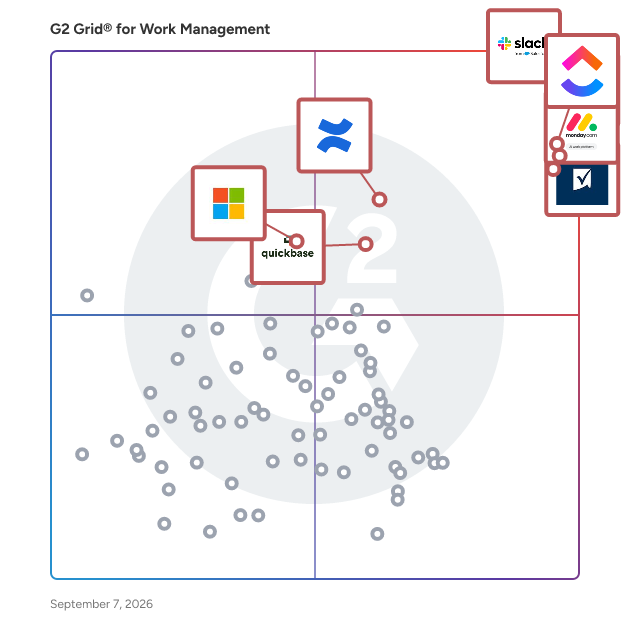
## Top Work Management Software at a Glance
| # | Product | Rating | Best For | What Users Say |
|---|---------|--------|----------|----------------|
| 1 | [Slack](https://www.g2.com/products/slack/reviews) | 4.5/5.0 (37,398 reviews) | Real-time team communication with threaded context | "[Intuitive, Reliable Slack That Streamlines Daily Work with Powerful Integrations](https://www.g2.com/survey_responses/slack-review-12992022)" |
| 2 | [Asana](https://www.g2.com/products/asana/reviews) | 4.4/5.0 (13,170 reviews) | Cross-functional project visibility with multi-homing tasks | "[Asana Finally Got My Team on the Same Page](https://www.g2.com/survey_responses/asana-review-13002169)" |
| 3 | [ClickUp](https://www.g2.com/products/clickup/reviews) | 4.6/5.0 (12,286 reviews) | Cross-functional task visibility with workflow automation | "[Intuitive Interface but Slow Performance with Tasks](https://www.g2.com/survey_responses/clickup-review-12993610)" |
| 4 | [monday AI Work Platform](https://www.g2.com/products/monday-com/reviews) | 4.7/5.0 (15,093 reviews) | Visual project boards with cross-team automations | "[Our Go-To Platform for Marketing Projects](https://www.g2.com/survey_responses/monday-ai-work-platform-review-12980779)" |
| 5 | [Smartsheet](https://www.g2.com/products/smartsheet/reviews) | 4.4/5.0 (21,993 reviews) | Spreadsheet-style project tracking with cross-team automation | "[Smartsheet Streamlines Project Tracking with Automations](https://www.g2.com/survey_responses/smartsheet-review-12999654)" |
| 6 | [Confluence](https://www.g2.com/products/confluence/reviews) | 4.1/5.0 (4,245 reviews) | Atlassian-native documentation with Jira workflow integration | "[The Ultimate Source of Truth for Engineering and Product Teams](https://www.g2.com/survey_responses/confluence-review-12546661)" |
| 7 | [Quickbase](https://www.g2.com/products/quickbase/reviews) | 4.5/5.0 (1,493 reviews) | No-code workflow apps with relational data | "[The app to overcome any challenge that anyone can build!](https://www.g2.com/survey_responses/quickbase-review-351540)" |
| 8 | [Keka](https://www.g2.com/products/keka/reviews) | 4.5/5.0 (1,879 reviews) | Payroll-integrated attendance and leave workflows | "[Powerful HRMS with Opportunities for Enhanced Customization](https://www.g2.com/survey_responses/keka-review-12995912)" |
| 9 | [Wrike](https://www.g2.com/products/wrike/reviews) | 4.2/5.0 (4,452 reviews) | Cross-functional marketing workflows with blueprint automation | "[Wrike Made Small Delays Easier to Notice](https://www.g2.com/survey_responses/wrike-review-12985633)" |
| 10 | [Microsoft Planner](https://www.g2.com/products/microsoft-planner/reviews) | 4.2/5.0 (232 reviews) | — | "[Lightweight Project Management Made Easy](https://www.g2.com/survey_responses/microsoft-planner-review-12375025)" |


## How Many Work Management Software Products Does G2 Track?
**Total Products under this Category:** 187

### Category Stats (Jun 2026)
- **Average Rating**: 4.51/5 The average rating of products in this category, based on all submitted ratings
- **Top Trending Product**: BST11 (+0.306) - Among all products in this category, BST11 recorded the largest rating increase compared to last month
*Last updated: June 01, 2026*


## How Does G2 Rank Work Management Software Products?

**Why You Can Trust G2's Software Rankings:**

- 30 Analysts and Data Experts
- 139,900+ Authentic Reviews
- 187+ Products
- Unbiased Rankings

G2's software rankings are built on verified user reviews, rigorous moderation, and a consistent research methodology maintained by a team of analysts and data experts. Each product is measured using the same transparent criteria, with no paid placement or vendor influence. While reviews reflect real user experiences, which can be subjective, they offer valuable insight into how software performs in the hands of professionals. Together, these inputs power the G2 Score, a standardized way to compare tools within every category.


## Which Work Management Software Is Best for Your Use Case?

- **Leader:** [Slack](https://www.g2.com/products/slack/reviews)
- **Highest Performer:** [Keka](https://www.g2.com/products/keka/reviews)
- **Easiest to Use:** [Keka](https://www.g2.com/products/keka/reviews)
- **Top Trending:** [Zenzap](https://www.g2.com/products/zenzap/reviews)
- **Best Free Software:** [monday AI Work Platform](https://www.g2.com/products/monday-com/reviews)


---

**Sponsored**

### Freshservice

Freshservice by Freshworks is an AI-powered ServiceOps platform built for modern enterprises that need to move fast without sacrificing control. By unifying ITSM, ITOM, IT asset management, and enterprise service management on a single platform with a shared data layer, Freshservice eliminates the tool sprawl and visibility gaps that slow teams down - creating one source of truth across services, assets, and infrastructure. IT teams get full visibility into their environment: automated discovery, a robust CMDB for impact analysis and root cause resolution, and streamlined incident, problem, change, and major incident management. Beyond IT, Freshservice extends seamlessly to HR, finance, and facilities - giving every business team the same consistent, efficient service experience without the complexity of separate tools. Freshservice comes with a natively embedded AI layer called Freddy AI, that helps agents resolve issues faster, automates employee service requests, and gives leaders the insights they need to make better decisions. The result isn&#39;t just faster service; it&#39;s a fundamentally more proactive operation that surfaces and resolves issues before they impact employees.


[Visit website](https://www.g2.com/external_clickthroughs/record?secure%5Bad_program%5D=ppc&amp;secure%5Bad_slot%5D=category_product_list&amp;secure%5Bcategory_id%5D=2360&amp;secure%5Bdisplayable_resource_id%5D=1391&amp;secure%5Bdisplayable_resource_type%5D=Category&amp;secure%5Bmedium%5D=sponsored&amp;secure%5Bplacement_reason%5D=retargeted_product&amp;secure%5Bplacement_resource_ids%5D%5B%5D=2864&amp;secure%5Bprioritized%5D=false&amp;secure%5Bproduct_id%5D=2864&amp;secure%5Bresource_id%5D=2360&amp;secure%5Bresource_type%5D=Category&amp;secure%5Bsource_type%5D=category_page&amp;secure%5Bsource_url%5D=https%3A%2F%2Fwww.g2.com%2Fcategories%2Fwork-management%3Fpage%3D6&amp;secure%5Btoken%5D=c5ad11d8fa612d315ee840334c8cd7487e970b77ccf8afa42cdec62167567161&amp;secure%5Burl%5D=https%3A%2F%2Fwww.freshworks.com%2Ffreshservice%2Flp%2Fmarketplace%2Fitam%2F%3Futm_source%3Dg2%26utm_medium%3Dg2&amp;secure%5Burl_type%5D=custom_url)

---

## What Are the Top-Rated Work Management Software Products in 2026?
### 1. [Slack](https://www.g2.com/products/slack/reviews)
Slack is your single workspace that connects you with the people and tools you work with everyday, no matter where you are or what you do. With Slack you get real-time messaging through calls and chat, a searchable record of all your files and conversations, and integrations with a growing number of handy bots and apps. Now everyone can finally be on the same page and get their work done. Slack: It’s where work happens.


**Average Rating:** 4.5/5.0
**Total Reviews:** 37,398
**How Do G2 Users Rate Slack?**

- **Has the product been a good partner in doing business?:** 9.1/10 (Category avg: 9.2/10)
- **Planning:** 8.6/10 (Category avg: 8.9/10)
- **Procedures:** 8.6/10 (Category avg: 8.5/10)
- **Insights:** 8.5/10 (Category avg: 8.5/10)

**Who Is the Company Behind Slack?**

- **Seller:** [Salesforce](https://www.g2.com/sellers/salesforce)
- **Company Website:** https://www.salesforce.com/
- **Year Founded:** 1999
- **HQ Location:** San Francisco, CA
- **Twitter:** @salesforce (579,511 Twitter followers)
- **LinkedIn® Page:** https://www.linkedin.com/company/3185/ (83,223 employees on LinkedIn®)

**Who Uses This Product?**
- **Who Uses This:** Software Engineer, Project Manager
- **Top Industries:** Computer Software, Information Technology and Services
- **Company Size:** 41% Small-Business, 41% Mid-Market


#### What Are Slack's Pros and Cons?

**Pros:**

- Ease of Use (3483 reviews)
- Team Collaboration (3031 reviews)
- Communication (2876 reviews)
- Integrations (2145 reviews)
- Features (1887 reviews)

**Cons:**

- Notification Issues (1114 reviews)
- Missing Features (905 reviews)
- Limited Features (733 reviews)
- Overwhelming Experience (728 reviews)
- Channel Management (665 reviews)


### What Do G2 Reviewers Say About Slack?
*AI-generated summary from verified user reviews*

**Pros:**

- Users love the **ease of use** of Slack, making it an essential tool for daily collaboration and communication.
- Users appreciate the **team collaboration features** of Slack, which enhance communication and organization among team members.
- Users value the **efficient communication** on Slack, enabling quick responses and seamless team coordination across time zones.
- Users love the **seamless integrations** in Slack, enhancing collaboration through extensive apps and API connectivity.
- Users appreciate the **seamless integration and organization** in Slack, making team communication efficient across time zones.

**Cons:**

- Users face **notification issues** with Slack, leading to missed important messages and overwhelming alerts from multiple channels.
- Users find Slack&#39;s **missing features** problematic, especially regarding organization and effective search capabilities.
- Users feel Slack has **limited features** for organization and message history, complicating project management and communication.
- Users find the **constant notifications and overwhelming channels** stressful, complicating their communication and leading to missed information.
- Users express a need for a more organized channel experience due to **overwhelming notifications and limited message history**.

#### What Are Recent G2 Reviews of Slack?

**"[Slack’s Clean UI and Flawless Integrations Make Collaboration Effortless](https://www.g2.com/survey_responses/slack-review-12981503)"**

**Rating:** 4.5/5.0 stars
*— Harshil S.*

[Read full review](https://www.g2.com/survey_responses/slack-review-12981503)

---

**"[Intuitive, Reliable Slack That Streamlines Daily Work with Powerful Integrations](https://www.g2.com/survey_responses/slack-review-12992022)"**

**Rating:** 5.0/5.0 stars
*— Edwin R.*

[Read full review](https://www.g2.com/survey_responses/slack-review-12992022)

---


#### What Are G2 Users Discussing About Slack?

- [What integrations have you found most effective for streamlining communication in Slack?](https://www.g2.com/discussions/what-integrations-have-you-found-most-effective-for-streamlining-communication-in-slack) - 20 comments, 4 upvotes
- [What is Slack used for?](https://www.g2.com/discussions/what-is-slack-used-for) - 22 comments, 7 upvotes
- [Is Slack a good tool?](https://www.g2.com/discussions/is-slack-a-good-tool) - 20 comments, 22 upvotes
- [What is unique about slack?](https://www.g2.com/discussions/what-is-unique-about-slack) - 11 comments, 4 upvotes
- [What does slack software do?](https://www.g2.com/discussions/what-does-slack-software-do) - 29 comments, 1 upvote

### 2. [Asana](https://www.g2.com/products/asana/reviews)
Asana is a leading work management platform for human + AI collaboration. Over 170,000 customers like Accenture, Amazon, Anthropic, and Suzuki rely on Asana to align teams and accelerate organizational impact. Whether it’s managing strategic initiatives, cross-functional programs, or company-wide goals, Asana helps organizations bring clarity to complexity—turning plans into action with AI working alongside teams every step of the way. To learn more, visit www.asana.com.


**Average Rating:** 4.4/5.0
**Total Reviews:** 13,170
**How Do G2 Users Rate Asana?**

- **Has the product been a good partner in doing business?:** 8.7/10 (Category avg: 9.2/10)
- **Planning:** 8.9/10 (Category avg: 8.9/10)
- **Procedures:** 8.3/10 (Category avg: 8.5/10)
- **Insights:** 8.3/10 (Category avg: 8.5/10)

**Who Is the Company Behind Asana?**

- **Seller:** [Asana](https://www.g2.com/sellers/asana)
- **Company Website:** https://asana.com
- **Year Founded:** 2008
- **HQ Location:** San Francisco, CA
- **Twitter:** @Asana (119,913 Twitter followers)
- **LinkedIn® Page:** https://www.linkedin.com/company/807257/ (4,369 employees on LinkedIn®)

**Who Uses This Product?**
- **Who Uses This:** Project Manager, Owner
- **Top Industries:** Marketing and Advertising, Information Technology and Services
- **Company Size:** 57% Small-Business, 31% Mid-Market


#### What Are Asana's Pros and Cons?

**Pros:**

- Ease of Use (1382 reviews)
- Task Management (1379 reviews)
- Project Management (1248 reviews)
- Team Collaboration (1113 reviews)
- Task Tracking (1027 reviews)

**Cons:**

- Missing Features (562 reviews)
- Learning Curve (555 reviews)
- Limited Features (498 reviews)
- Not Intuitive (360 reviews)
- Task Management (351 reviews)


### What Do G2 Reviewers Say About Asana?
*AI-generated summary from verified user reviews*

**Pros:**

- Users find Asana to have a **user-friendly interface** , making task management and collaboration effortless and efficient.
- Users value the **effective task management** capabilities of Asana, enhancing collaboration and preventing burnout in daily activities.
- Users value the **workflow features** of Asana, enhancing team collaboration and project management efficiency.
- Users appreciate the **effective team collaboration** in Asana, enabling seamless connections and management of multiple initiatives.
- Users value the **user-friendly task tracking** features of Asana, enhancing organization and efficiency in their workflow.

**Cons:**

- Users express frustration over **missing features** , particularly lacking time tracking and the ability to duplicate rules.
- Users find the **learning curve steep** in Asana, with many struggling to utilize its features effectively.
- Users express disappointment over **limited features** in Asana, particularly regarding advanced tools requiring expensive plans.
- Users find the **interface not intuitive** , experiencing difficulty navigating and organizing tasks effectively.
- Users find the **search functionality lacking** , making it difficult to locate projects and manage tasks effectively.

#### What Are Recent G2 Reviews of Asana?

**"[Asana Makes Task Organization and Project Visibility Effortless](https://www.g2.com/survey_responses/asana-review-13000043)"**

**Rating:** 4.5/5.0 stars
*— Ravindra N.*

[Read full review](https://www.g2.com/survey_responses/asana-review-13000043)

---

**"[Asana Finally Got My Team on the Same Page](https://www.g2.com/survey_responses/asana-review-13002169)"**

**Rating:** 4.0/5.0 stars
*— Kathy C.*

[Read full review](https://www.g2.com/survey_responses/asana-review-13002169)

---


#### What Are G2 Users Discussing About Asana?

- [How does Asana help organizations track OKRs and strategic goals?](https://www.g2.com/discussions/how-does-asana-help-organizations-track-okrs-and-strategic-goals) - 1 comment, 2 upvotes
- [What apps and tools does Asana integrate with?](https://www.g2.com/discussions/what-apps-and-tools-does-asana-integrate-with) - 1 comment, 2 upvotes
- [How does Asana use AI to help teams manage work?](https://www.g2.com/discussions/how-does-asana-use-ai-to-help-teams-manage-work) - 1 comment, 2 upvotes
- [What makes Asana different from other project management and work management tools?](https://www.g2.com/discussions/what-makes-asana-different-from-other-project-management-and-work-management-tools) - 1 comment, 2 upvotes
- [Is Asana worth it?](https://www.g2.com/discussions/is-asana-worth-it) - 12 comments, 18 upvotes

### 3. [ClickUp](https://www.g2.com/products/clickup/reviews)
ClickUp is the world’s first Converged AI Workspace, bringing together all work apps, data, and workflows. ClickUp eliminates all forms of work sprawl to provide 100% context and a single place for humans and agents to work, together. Trusted by more than 20 million users worldwide, ClickUp is on a mission to maximize human productivity.


**Average Rating:** 4.6/5.0
**Total Reviews:** 12,286
**How Do G2 Users Rate ClickUp?**

- **Has the product been a good partner in doing business?:** 9.0/10 (Category avg: 9.2/10)
- **Planning:** 9.1/10 (Category avg: 8.9/10)
- **Procedures:** 8.6/10 (Category avg: 8.5/10)
- **Insights:** 8.5/10 (Category avg: 8.5/10)

**Who Is the Company Behind ClickUp?**

- **Seller:** [ClickUp](https://www.g2.com/sellers/clickup)
- **Company Website:** https://ClickUp.com
- **Year Founded:** 2017
- **HQ Location:** San Diego, California
- **Twitter:** @clickup (69,539 Twitter followers)
- **LinkedIn® Page:** https://www.linkedin.com/company/12949663/ (1,526 employees on LinkedIn®)

**Who Uses This Product?**
- **Who Uses This:** CEO, Project Manager
- **Top Industries:** Marketing and Advertising, Computer Software
- **Company Size:** 77% Small-Business, 19% Mid-Market


#### What Are ClickUp's Pros and Cons?

**Pros:**

- Ease of Use (4220 reviews)
- Task Management (3219 reviews)
- Features (3119 reviews)
- Project Management (2788 reviews)
- Organization (2589 reviews)

**Cons:**

- Missing Features (2039 reviews)
- Learning Curve (1751 reviews)
- Limited Features (1334 reviews)
- Not Intuitive (1181 reviews)
- Slow Loading (1156 reviews)


### What Do G2 Reviewers Say About ClickUp?
*AI-generated summary from verified user reviews*

**Pros:**

- Users find ClickUp&#39;s **ease of use** invaluable for streamlining projects and enhancing collaboration across teams.
- Users value the **robust task management capabilities** of ClickUp, enhancing productivity and project organization effectively.
- Users value ClickUp&#39;s **robust features and flexibility** , enhancing productivity and workflow management across diverse projects.
- Users value the **flexibility and integration** of ClickUp for organizing tasks and driving project execution effectively.
- Users value the **effective organization** capabilities of ClickUp, enhancing collaboration and task management across teams.

**Cons:**

- Users find that many **valuable features are locked behind a paywall** , limiting accessibility and usability for non-profits.
- Users find the **learning curve for beginners** to be steep, requiring time to adapt to ClickUp&#39;s multiple layers.
- Users find **limited features** in ClickUp, particularly missing integrations and functionalities compared to other platforms.
- Users find ClickUp **not intuitive** , struggling with feature accessibility and navigation, leading to a frustrating experience.
- Users report that ClickUp can be **slow to load** , impacting its usability despite its overall benefits.

#### What Are Recent G2 Reviews of ClickUp?

**"[Intuitive Interface but Slow Performance with Tasks](https://www.g2.com/survey_responses/clickup-review-12993610)"**

**Rating:** 4.0/5.0 stars
*— Daniel C.*

[Read full review](https://www.g2.com/survey_responses/clickup-review-12993610)

---

**"[ClickUp keeps getting better - AI features are a game changer](https://www.g2.com/survey_responses/clickup-review-7811844)"**

**Rating:** 5.0/5.0 stars
*— Miguel O.*

[Read full review](https://www.g2.com/survey_responses/clickup-review-7811844)

---


#### What Are G2 Users Discussing About ClickUp?

- [What features of ClickUp make it a preferred choice for project management in agile teams?](https://www.g2.com/discussions/what-features-of-clickup-make-it-a-preferred-choice-for-project-management-in-agile-teams) - 6 comments, 6 upvotes
- [What is ClickUp used for?](https://www.g2.com/discussions/what-is-clickup-used-for) - 10 comments, 4 upvotes
- [Does Google use ClickUp?](https://www.g2.com/discussions/does-google-use-clickup) - 4 comments, 3 upvotes
- [Who uses ClickUp?](https://www.g2.com/discussions/who-uses-clickup) - 14 comments, 4 upvotes
- [Is ClickUp really free?](https://www.g2.com/discussions/is-clickup-really-free) - 12 comments, 3 upvotes

### 4. [monday AI Work Platform](https://www.g2.com/products/monday-com/reviews)
monday.com is the AI Work Platform where people and agents operate as one team - with shared cross-department context, enterprise-grade trust, and an easy-to-use interface built for adoption at scale. With monday.com, agents work alongside teams in the same boards, workflows, and goals they already use every day, creating a new kind of teamwork where people and agents move work forward together. Beyond agents, monday.com gives every team more ways to turn AI into real business impact. With monday vibe, teams can build custom work apps for their specific needs, and with monday sidekick, every user gets a personal AI assistant to help solve business challenges, move faster, and get more done. monday.com gives organizations the visibility, permissions, human oversight, and compliance standards they need to deploy AI with confidence. AI doesn’t operate in a black box - it operates within the same trusted guardrails teams already rely on. Because monday.com is already used across departments, agents can access the broader context of how work connects across marketing, sales, product, IT, HR, operations, and more. That means smarter decisions, faster execution, and fewer silos - all in one place. Today, over 250,000 customers and more than 60% of Fortune 500 companies trust monday.com with how they run their business.


**Average Rating:** 4.7/5.0
**Total Reviews:** 15,093
**How Do G2 Users Rate monday AI Work Platform?**

- **Has the product been a good partner in doing business?:** 9.1/10 (Category avg: 9.2/10)
- **Planning:** 9.1/10 (Category avg: 8.9/10)
- **Procedures:** 8.7/10 (Category avg: 8.5/10)
- **Insights:** 8.6/10 (Category avg: 8.5/10)

**Who Is the Company Behind monday AI Work Platform?**

- **Seller:** [monday.com](https://www.g2.com/sellers/monday-com-d88207e4-9e92-412d-903b-61cd13ca592b)
- **Company Website:** https://monday.com/
- **Year Founded:** 2012
- **HQ Location:** Tel Aviv
- **Twitter:** @mondaydotcom (40,761 Twitter followers)
- **LinkedIn® Page:** https://www.linkedin.com/company/mondaydotcom (3,837 employees on LinkedIn®)

**Who Uses This Product?**
- **Who Uses This:** Project Manager, CEO
- **Top Industries:** Marketing and Advertising, Information Technology and Services
- **Company Size:** 61% Small-Business, 30% Mid-Market


#### What Are monday AI Work Platform's Pros and Cons?

**Pros:**

- Ease of Use (3935 reviews)
- Team Collaboration (2777 reviews)
- Project Management (2666 reviews)
- Organization (2606 reviews)
- Task Management (2368 reviews)

**Cons:**

- Missing Features (1681 reviews)
- Learning Curve (1186 reviews)
- Limited Features (1036 reviews)
- Not Intuitive (822 reviews)
- Limited Customization (728 reviews)


### What Do G2 Reviewers Say About monday AI Work Platform?
*AI-generated summary from verified user reviews*

**Pros:**

- Users find monday AI Work Platform to be **easy to use** , enhancing organization and simplifying project management effortlessly.
- Users appreciate the **seamless team collaboration** features of monday AI Work Platform, enhancing project management and communication.
- Users appreciate the **clean workflows and automation** in monday AI Work Platform, enhancing project management efficiency.
- Users value how monday AI Work Platform enhances **organization** , making it easy to manage tasks and collaborate effectively.
- Users love the **clean workflows and automation** features that streamline complex data processing and enhance collaboration.

**Cons:**

- Users are frustrated by the **missing messaging features** and complex workflow setups, complicating their overall experience.
- Users experience a **learning curve** when integrating features and managing large datasets, hindering overall productivity.
- Users express a desire for **limited features** , noting challenges in task automation and data handling capabilities.
- Users find monday AI Work Platform **not intuitive** , especially when dealing with complex workflows and feature accessibility.
- Users find **limited customization** hinders productivity, making complex tasks more challenging and collaboration difficult across teams.

#### What Are Recent G2 Reviews of monday AI Work Platform?

**"[Intuitive, Modern Project Management That Keeps Everyone Aligned](https://www.g2.com/survey_responses/monday-ai-work-platform-review-12994940)"**

**Rating:** 5.0/5.0 stars
*— Rebecca W.*

[Read full review](https://www.g2.com/survey_responses/monday-ai-work-platform-review-12994940)

---

**"[Our Go-To Platform for Marketing Projects](https://www.g2.com/survey_responses/monday-ai-work-platform-review-12980779)"**

**Rating:** 4.5/5.0 stars
*— Jenny E.*

[Read full review](https://www.g2.com/survey_responses/monday-ai-work-platform-review-12980779)

---


#### What Are G2 Users Discussing About monday AI Work Platform?

- [What sets monday.com apart from other project management tools in terms of user experience and customization?](https://www.g2.com/discussions/what-sets-monday-com-apart-from-other-project-management-tools-in-terms-of-user-experience-and-customization) - 3 upvotes
- [What is monday marketer used for?](https://www.g2.com/discussions/what-is-monday-marketer-used-for)
- [Is Monday com any good?](https://www.g2.com/discussions/is-monday-com-any-good) - 10 upvotes
- [Does Monday com have a chat feature?](https://www.g2.com/discussions/does-monday-com-have-a-chat-feature) - 5 upvotes
- [What is Monday platform?](https://www.g2.com/discussions/what-is-monday-platform) - 6 upvotes

### 5. [Smartsheet](https://www.g2.com/products/smartsheet/reviews)
Smartsheet is an Intelligent Work Management Platform that revolutionizes how you manage projects, portfolios, and processes. The Smartsheet AI-powered platform delivers adaptability, sophisticated experiences, and enterprise-grade rigor to support work across industries — from service delivery to construction, clinical trials, and marketing campaigns. Designed to meet demanding requirements, it helps organizations drive efficiency, accelerate innovation, and stay competitive. Over 85% of Fortune 500 companies trust Smartsheet to align their resources to improve efficiency, agility, and collaboration in today’s ever-changing world of work.


**Average Rating:** 4.4/5.0
**Total Reviews:** 21,993
**How Do G2 Users Rate Smartsheet?**

- **Has the product been a good partner in doing business?:** 8.6/10 (Category avg: 9.2/10)
- **Planning:** 8.6/10 (Category avg: 8.9/10)
- **Procedures:** 8.1/10 (Category avg: 8.5/10)
- **Insights:** 7.9/10 (Category avg: 8.5/10)

**Who Is the Company Behind Smartsheet?**

- **Seller:** [Smartsheet](https://www.g2.com/sellers/smartsheet)
- **Company Website:** https://www.smartsheet.com/
- **Year Founded:** 2005
- **HQ Location:** Bellevue, WA
- **Twitter:** @Smartsheet (26,366 Twitter followers)
- **LinkedIn® Page:** https://www.linkedin.com/company/167700/ (4,022 employees on LinkedIn®)

**Who Uses This Product?**
- **Who Uses This:** Project Manager, Senior Project Manager
- **Top Industries:** Information Technology and Services, Construction
- **Company Size:** 41% Mid-Market, 34% Small-Business


#### What Are Smartsheet's Pros and Cons?

**Pros:**

- Ease of Use (2831 reviews)
- Project Management (2212 reviews)
- Team Collaboration (1802 reviews)
- Project Tracking (1573 reviews)
- Automation (1539 reviews)

**Cons:**

- Learning Curve (1453 reviews)
- Missing Features (1197 reviews)
- Not Intuitive (954 reviews)
- Limited Features (929 reviews)
- Limited Functionality (665 reviews)


### What Do G2 Reviewers Say About Smartsheet?
*AI-generated summary from verified user reviews*

**Pros:**

- Users find Smartsheet to be **easy to navigate** , enhancing collaboration and simplifying project management for all skill levels.
- Users value the **collaborative project tracking** of Smartsheet, enhancing efficiency and streamlining processes across teams.
- Users value the **enhanced team collaboration** in Smartsheet, enabling simultaneous work and effective communication among remote employees.
- Users value the **comprehensive project tracking capabilities** of Smartsheet, enhancing collaboration and efficiency in management.
- Users love the **automation capabilities** of Smartsheet, enhancing collaboration and streamlining project management processes effectively.

**Cons:**

- Users find the **learning curve steep** , requiring significant time to grasp Smartsheet&#39;s features and capabilities.
- Users find **missing features** in Smartsheet hinder their ability to track information and manage complex workflows effectively.
- Users find Smartsheet&#39;s interface to be **not intuitive** , making navigation and understanding difficult for newcomers.
- Users find the **limited features** in Smartsheet restrict collaboration, especially for smaller businesses facing price challenges.
- Users find **limited functionality** in Smartsheet, restricting full utilization of features and collaboration options.

#### What Are Recent G2 Reviews of Smartsheet?

**"[Smartsheet Streamlines Project Tracking with Automations](https://www.g2.com/survey_responses/smartsheet-review-12999654)"**

**Rating:** 4.5/5.0 stars
*— Michelle R.*

[Read full review](https://www.g2.com/survey_responses/smartsheet-review-12999654)

---

**"[Reliable Real-Time Dashboards and Seamless ERP Integration with Strong ROI](https://www.g2.com/survey_responses/smartsheet-review-13000105)"**

**Rating:** 4.5/5.0 stars
*— Charles C.*

[Read full review](https://www.g2.com/survey_responses/smartsheet-review-13000105)

---


#### What Are G2 Users Discussing About Smartsheet?

- [In what ways has Smartsheet transformed project management and team collaboration in your organization?](https://www.g2.com/discussions/in-what-ways-has-smartsheet-transformed-project-management-and-team-collaboration-in-your-organization) - 3 comments, 4 upvotes
- [What is Smartsheet used for?](https://www.g2.com/discussions/what-is-smartsheet-used-for) - 4 comments
- [Can I use smartsheet for free?](https://www.g2.com/discussions/can-i-use-smartsheet-for-free) - 10 comments, 1 upvote
- [Is smartsheet good?](https://www.g2.com/discussions/is-smartsheet-good) - 8 comments, 6 upvotes
- [Why is smartsheet bad?](https://www.g2.com/discussions/why-is-smartsheet-bad) - 34 comments

### 6. [Confluence](https://www.g2.com/products/confluence/reviews)
Confluence is the AI-powered collaborative workspace for all teams. Equipped with intelligent AI agents to save time on tedious tasks, brainstorm new ideas, and help you quickly find the answers you need, Confluence is where knowledge becomes impact. Versatile content types like pages, live docs, whiteboards, and databases help teams move seamlessly from ideation to execution. Confluence integrates with the Atlassian suite of products like Jira Software, Trello, and Loom to enable both synchronous and async work and to push work forward.


**Average Rating:** 4.1/5.0
**Total Reviews:** 4,245
**How Do G2 Users Rate Confluence?**

- **Has the product been a good partner in doing business?:** 8.5/10 (Category avg: 9.2/10)
- **Planning:** 8.9/10 (Category avg: 8.9/10)
- **Procedures:** 8.6/10 (Category avg: 8.5/10)
- **Insights:** 8.4/10 (Category avg: 8.5/10)

**Who Is the Company Behind Confluence?**

- **Seller:** [Atlassian](https://www.g2.com/sellers/atlassian)
- **Company Website:** https://www.atlassian.com/
- **Year Founded:** 2002
- **HQ Location:** Sydney and San Francisco
- **Twitter:** @Atlassian (106,496 Twitter followers)
- **LinkedIn® Page:** https://www.linkedin.com/company/atlassian (21,081 employees on LinkedIn®)

**Who Uses This Product?**
- **Who Uses This:** Software Engineer, Product Manager
- **Top Industries:** Computer Software, Information Technology and Services
- **Company Size:** 48% Mid-Market, 34% Enterprise


#### What Are Confluence's Pros and Cons?

**Pros:**

- Ease of Use (299 reviews)
- Team Collaboration (212 reviews)
- Organization (159 reviews)
- Integrations (155 reviews)
- Collaboration Efficiency (146 reviews)

**Cons:**

- Not Intuitive (84 reviews)
- Slow Performance (83 reviews)
- Page Management (71 reviews)
- Learning Curve (64 reviews)
- Complexity (59 reviews)


### What Do G2 Reviewers Say About Confluence?
*AI-generated summary from verified user reviews*

**Pros:**

- Users highlight the **ease of use** of Confluence, simplifying document management and enhancing project collaboration effectively.
- Users value the **effective team collaboration** features of Confluence, enhancing productivity and streamlining communication seamlessly.
- Users value the **organized and user-friendly interface** of Confluence, enhancing collaboration and documentation with ease.
- Users value the **seamless integrations** in Confluence, enhancing collaboration and simplifying project management significantly.
- Users value the **collaboration efficiency** of Confluence, fostering alignment and streamlined communication across teams.

**Cons:**

- Users find the editor **not intuitive** , experiencing slowness and difficulty with search and formatting content effectively.
- Users experience **slow performance** with Confluence, particularly when managing large pages or attachments, complicating navigation.
- Users find **page management cumbersome** due to slow performance, confusing permissions, and difficulty in content organization.
- Users struggle with the **steep learning curve** of Confluence&#39;s advanced features, requiring significant time to master the system.
- Users find **Confluence complex** due to permissions, search difficulties, and non-intuitive version control, especially for new users.

#### What Are Recent G2 Reviews of Confluence?

**"[The Ultimate Source of Truth for Engineering and Product Teams](https://www.g2.com/survey_responses/confluence-review-12546661)"**

**Rating:** 4.5/5.0 stars
*— Bibhuti Bhusan S.*

[Read full review](https://www.g2.com/survey_responses/confluence-review-12546661)

---

**"[Centralized Knowledge Hub Designed for Jira-Based Teams](https://www.g2.com/survey_responses/confluence-review-12827781)"**

**Rating:** 4.5/5.0 stars
*— Hitesh J.*

[Read full review](https://www.g2.com/survey_responses/confluence-review-12827781)

---


#### What Are G2 Users Discussing About Confluence?

- [How is Confluence being utilized to improve knowledge management and collaboration in remote work environments?](https://www.g2.com/discussions/how-is-confluence-being-utilized-to-improve-knowledge-management-and-collaboration-in-remote-work-environments) - 3 comments, 1 upvote
- [How is Confluence being used to enhance operational efficiency and user experience in its specific field?](https://www.g2.com/discussions/how-is-confluence-being-used-to-enhance-operational-efficiency-and-user-experience-in-its-specific-field) - 2 comments
- [What is Confluence used for?](https://www.g2.com/discussions/what-is-confluence-used-for) - 3 comments, 1 upvote
- [How is confluence different from Jira?](https://www.g2.com/discussions/how-is-confluence-different-from-jira) - 2 comments, 1 upvote
- [What are the benefits of confluence?](https://www.g2.com/discussions/what-are-the-benefits-of-confluence) - 2 comments

### 7. [Quickbase](https://www.g2.com/products/quickbase/reviews)
Quickbase is an AI-driven platform designed to help businesses streamline their operations by adapting to their unique workflows and processes. Unlike traditional off-the-shelf software, which often requires users to conform to predefined structures, Quickbase empowers organizations to create customized solutions that align with their specific needs. This flexibility is crucial for companies seeking to eliminate inefficiencies and reduce the burden of &#39;Gray Work&#39; - what we call the time-consuming tasks and manual processes that arise from using rigid software systems. The target audience for Quickbase includes businesses of all sizes across various industries that are looking to enhance their operational efficiency. Whether it&#39;s a 50 person small business or a large enterprise, organizations can benefit from a platform that allows them to connect disparate data sources, automate repetitive tasks, and scale their competitive advantages. Quickbase is particularly valuable for teams that rely on collaboration and data-driven decision-making, as it fosters an environment where information flows seamlessly and processes are optimized. Key features of Quickbase include its intuitive interface, which allows users to build custom applications without extensive coding knowledge. This user-friendly design enables teams to quickly adapt the platform to their specific workflows, ensuring that they can address unique challenges without the need for extensive IT support. Additionally, Quickbase offers powerful automation capabilities, allowing users to set up triggers and workflows that reduce manual effort and streamline operations. The platform also supports integration with various data sources, enabling businesses to consolidate their information and gain valuable insights. One of the standout benefits of Quickbase is its ability to scale with your business. As organizations grow and evolve, their processes often become more complex. Quickbase&#39;s adaptable nature ensures that users can modify their applications and workflows as needed, without the constraints typically associated with traditional software. This flexibility not only saves time but also fosters innovation, as teams can experiment with new processes and tools that enhance their productivity. By prioritizing user-centric design and adaptability, Quickbase stands out in the crowded landscape of business software solutions. It provides organizations with the tools they need to optimize their operations, reduce inefficiencies, and ultimately drive growth. With Quickbase, businesses can focus on what truly matters—leveraging their unique processes to gain a competitive edge in their respective markets.


**Average Rating:** 4.5/5.0
**Total Reviews:** 1,493
**How Do G2 Users Rate Quickbase?**

- **Has the product been a good partner in doing business?:** 8.7/10 (Category avg: 9.2/10)
- **Planning:** 8.4/10 (Category avg: 8.9/10)
- **Procedures:** 8.4/10 (Category avg: 8.5/10)
- **Insights:** 8.3/10 (Category avg: 8.5/10)

**Who Is the Company Behind Quickbase?**

- **Seller:** [Quickbase](https://www.g2.com/sellers/quickbase)
- **Company Website:** https://quickbase.com/
- **Year Founded:** 2012
- **HQ Location:** Boston, MA
- **Twitter:** @quickbase (5,146 Twitter followers)
- **LinkedIn® Page:** https://www.linkedin.com/company/2845325/ (816 employees on LinkedIn®)

**Who Uses This Product?**
- **Who Uses This:** Project Manager, Project Coordinator
- **Top Industries:** Construction, Information Technology and Services
- **Company Size:** 42% Mid-Market, 31% Small-Business


#### What Are Quickbase's Pros and Cons?

**Pros:**

- Ease of Use (304 reviews)
- Customization (216 reviews)
- Customizability (184 reviews)
- Flexibility (157 reviews)
- Customization Options (145 reviews)

**Cons:**

- Learning Curve (117 reviews)
- Missing Features (93 reviews)
- Limited Features (90 reviews)
- Not Intuitive (89 reviews)
- Limited Customization (73 reviews)


### What Do G2 Reviewers Say About Quickbase?
*AI-generated summary from verified user reviews*

**Pros:**

- Users find Quickbase to be **user-friendly** , enabling easy application creation and management without coding knowledge.
- Users appreciate the **extensive customization options** in Quickbase, enabling tailored solutions to fit their unique needs.
- Users value the **customizability** of Quickbase, enabling tailored dashboards and streamlined task management for their needs.
- Users value the **flexibility** of Quickbase, enabling custom solutions and seamless collaboration for diverse needs.
- Users appreciate the **extensive customization options** in Quickbase, enabling tailored solutions for diverse needs.

**Cons:**

- Users face a **steep learning curve** with Quickbase, as its UI can be overwhelming and requires technical knowledge.
- Users are frustrated with **missing features** in Quickbase, such as document uploads and limited reporting capabilities.
- Users find that Quickbase has **limited features** , hindering usability and integration with essential tools and functionalities.
- Users find Quickbase **not intuitive** , citing clunky interfaces and confusing terminology that hinders experienced developers.
- Users note **limited customization** leads to rigidity, making it challenging to fully adapt Quickbase for diverse needs.

#### What Are Recent G2 Reviews of Quickbase?

**"[A good solution for basic integrations, with the ability to be extended to do heavy lifting.](https://www.g2.com/survey_responses/quickbase-review-9048245)"**

**Rating:** 4.5/5.0 stars
*— Casey H.*

[Read full review](https://www.g2.com/survey_responses/quickbase-review-9048245)

---

**"[The app to overcome any challenge that anyone can build!](https://www.g2.com/survey_responses/quickbase-review-351540)"**

**Rating:** 5.0/5.0 stars
*— Stephanie H.*

[Read full review](https://www.g2.com/survey_responses/quickbase-review-351540)

---


#### What Are G2 Users Discussing About Quickbase?

- [How much is quick base?](https://www.g2.com/discussions/how-much-is-quick-base) - 3 comments, 1 upvote
- [Is quick base free?](https://www.g2.com/discussions/is-quick-base-free) - 3 comments
- [What is the use of Intuit quick base?](https://www.g2.com/discussions/what-is-the-use-of-intuit-quick-base)
- [What is quick base software?](https://www.g2.com/discussions/what-is-quick-base-software) - 1 comment, 1 upvote

### 8. [Keka](https://www.g2.com/products/keka/reviews)
Keka is a global People and Project Operations Platform designed for growing businesses to align teams, drive performance, and streamline HR, payroll, and project delivery. From hiring and onboarding to time tracking, performance reviews, payroll, and project billing, Keka brings everything together in one flexible, modular system that works across countries, roles, and industries. Built for real-world adoption across HR, finance, and delivery teams, Keka supports both desk and frontline workforces, simplifies compliance in every region, and offers project-level insights for service businesses. Whether you’re managing people, processing payroll, or running billable projects, Keka helps your business scale with clarity—not complexity.


**Average Rating:** 4.5/5.0
**Total Reviews:** 1,879
**How Do G2 Users Rate Keka?**

- **Has the product been a good partner in doing business?:** 8.9/10 (Category avg: 9.2/10)
- **Planning:** 8.5/10 (Category avg: 8.9/10)
- **Procedures:** 8.8/10 (Category avg: 8.5/10)
- **Insights:** 8.4/10 (Category avg: 8.5/10)

**Who Is the Company Behind Keka?**

- **Seller:** [Keka Technologies](https://www.g2.com/sellers/keka-technologies)
- **Company Website:** https://www.keka.com
- **Year Founded:** 2015
- **HQ Location:** Seattle, US
- **Twitter:** @kekahr_official (1,155 Twitter followers)
- **LinkedIn® Page:** https://www.linkedin.com/company/6417440/ (1,213 employees on LinkedIn®)

**Who Uses This Product?**
- **Who Uses This:** HR Manager, HR Executive
- **Top Industries:** Information Technology and Services, Computer Software
- **Company Size:** 69% Mid-Market, 21% Small-Business


#### What Are Keka's Pros and Cons?

**Pros:**

- Ease of Use (805 reviews)
- Customer Support (410 reviews)
- User Interface (362 reviews)
- Intuitive (343 reviews)
- Payroll (343 reviews)

**Cons:**

- Limited Customization (156 reviews)
- Poor Customer Support (145 reviews)
- Limited Features (143 reviews)
- Slow Loading (143 reviews)
- Missing Features (119 reviews)


### What Do G2 Reviewers Say About Keka?
*AI-generated summary from verified user reviews*

**Pros:**

- Users praise Keka&#39;s **ease of use** , highlighting its intuitive interface and efficient management for HR tasks.
- Users commend Keka for its **excellent customer support** , appreciating the team&#39;s responsiveness and assistance.
- Users appreciate the **user-friendly interface** of Keka, enhancing navigation and engagement for HR teams and employees.
- Users appreciate Keka&#39;s **intuitive interface** , finding it easy to navigate and use for effective HR management.
- Users appreciate the **smooth payroll processing** of Keka, enhancing accuracy and efficiency in HR management.

**Cons:**

- Users find Keka&#39;s **limited customization** restrictive, making it challenging to adapt to specific user needs.
- Users express **frustration with slow customer support** and inadequate project implementation team responses impacting their experience.
- Users find the **limited features** of Keka hinder flexibility in performance management and automation options.
- Users express **frustration with slow loading** times and occasional lags, impacting overall satisfaction with Keka.
- Users find the **limited features** in Keka, particularly in performance reviews and mobile functionality, frustrating and restrictive.

#### What Are Recent G2 Reviews of Keka?

**"[Powerful HRMS with Opportunities for Enhanced Customization](https://www.g2.com/survey_responses/keka-review-12995912)"**

**Rating:** 5.0/5.0 stars
*— Amit T.*

[Read full review](https://www.g2.com/survey_responses/keka-review-12995912)

---

**"[User-Friendly HR Platform That Simplifies Attendance, Leave, Payroll, and Performance](https://www.g2.com/survey_responses/keka-review-12995782)"**

**Rating:** 4.0/5.0 stars
*— Kiran S.*

[Read full review](https://www.g2.com/survey_responses/keka-review-12995782)

---


#### What Are G2 Users Discussing About Keka?

- [Which software is best for payroll?](https://www.g2.com/discussions/keka-hr-which-software-is-best-for-payroll) - 6 comments, 3 upvotes
- [Is KEKA a good company?](https://www.g2.com/discussions/is-keka-a-good-company) - 5 comments, 6 upvotes
- [What is HR and payroll software?](https://www.g2.com/discussions/what-is-hr-and-payroll-software) - 3 comments, 4 upvotes
- [What is KEKA software?](https://www.g2.com/discussions/what-is-keka-software) - 4 comments, 1 upvote

### 9. [Wrike](https://www.g2.com/products/wrike/reviews)
Wrike is the trusted work delivery platform where AI extends what people can accomplish. By centralizing all work in one governed, context-rich environment, Wrike helps organizations streamline collaboration, project planning, and task execution while maintaining the control and accountability that complex work demands. Wrike serves project managers, team leaders, and organizations of all sizes across marketing, IT, product development, professional services, and beyond. Teams use Wrike to track work progress, assign tasks, set deadlines, and facilitate communication, eliminating silos and fostering a culture of transparency and accountability that is crucial for successful delivery. Key features include AI Agents, Wrike Copilot, Wrike MCP Server, workflow automations, customizable dashboards, real-time collaboration tools, and advanced reporting capabilities. Teams can build and automate tailored workflows that reflect their unique processes, visualize timelines through Gantt charts and Kanban boards, and integrate seamlessly with tools like Slack, Google Drive, and Microsoft Teams. Wrike&#39;s MCP server extends this further, allowing AI assistants to connect directly to the platform where execution actually happens so AI-driven actions become part of the auditable record of how work gets done, not disconnected outputs living outside the system. And powered by the Wrike Work Intelligence® Graph, the platform gives AI the structured context it needs to act reliably inside the same roles, permissions, and access controls as your people. The result goes far beyond task management. Wrike reduces time spent on administrative work, scales alongside growing organizations, and gives teams the governed foundation they need to put AI to work on their most consequential workflows without losing control. With more than 20,000 organizations worldwide, including Siemens, Walmart, NVIDIA, and The Estée Lauder Companies, trusting Wrike to deliver their most important work, the platform has earned its place as a reliable partner for organizations to deliver without doubt


**Average Rating:** 4.2/5.0
**Total Reviews:** 4,452
**How Do G2 Users Rate Wrike?**

- **Has the product been a good partner in doing business?:** 8.5/10 (Category avg: 9.2/10)
- **Planning:** 8.5/10 (Category avg: 8.9/10)
- **Procedures:** 8.2/10 (Category avg: 8.5/10)
- **Insights:** 8.0/10 (Category avg: 8.5/10)

**Who Is the Company Behind Wrike?**

- **Seller:** [Wrike, Inc.](https://www.g2.com/sellers/wrike-inc)
- **Company Website:** https://www.wrike.com
- **Year Founded:** 2006
- **HQ Location:** San Diego, CA
- **Twitter:** @wrike (13,574 Twitter followers)
- **LinkedIn® Page:** https://www.linkedin.com/company/612239/ (1,254 employees on LinkedIn®)

**Who Uses This Product?**
- **Who Uses This:** Project Manager, Marketing Manager
- **Top Industries:** Marketing and Advertising, Information Technology and Services
- **Company Size:** 43% Mid-Market, 35% Small-Business


#### What Are Wrike's Pros and Cons?

**Pros:**

- Project Management (576 reviews)
- Team Collaboration (528 reviews)
- Task Management (515 reviews)
- Organization (413 reviews)
- Ease of Use (400 reviews)

**Cons:**

- Learning Curve (364 reviews)
- Not Intuitive (261 reviews)
- Missing Features (252 reviews)
- Limited Features (214 reviews)
- Task Management (186 reviews)


### What Do G2 Reviewers Say About Wrike?
*AI-generated summary from verified user reviews*

**Pros:**

- Users value the **seamless task management** of Wrike, significantly enhancing productivity and collaboration within large teams.
- Users highlight the **effective collaboration tools** in Wrike that streamline project management across large teams.
- Users find **task management efficiency** with Wrike essential for streamlined collaboration and project visibility across teams.
- Users love Wrike for its **centralized organization** , enhancing productivity and ensuring seamless collaboration on projects.
- Users find Wrike&#39;s **ease of use** remarkable, appreciating its intuitive interface and streamlined collaboration features.

**Cons:**

- Users experience a **steep learning curve** with Wrike, making it challenging for newcomers to adapt quickly.
- Users find Wrike&#39;s interface **not intuitive** , making it challenging to train others and navigate efficiently.
- Users find **missing features** in Wrike, such as templates and better sprint planning tools, hinder productivity.
- Users note the **limited features** of Wrike, finding it lacking compared to other project management tools.
- Users find the **task navigation overwhelming** and struggle with search functionality and timesheet entry.

#### What Are Recent G2 Reviews of Wrike?

**"[Wrike Made Small Delays Easier to Notice](https://www.g2.com/survey_responses/wrike-review-12985633)"**

**Rating:** 4.0/5.0 stars
*— Manoj S.*

[Read full review](https://www.g2.com/survey_responses/wrike-review-12985633)

---

**"[Wrike is an essential part of our Marketing project management. ](https://www.g2.com/survey_responses/wrike-review-4839019)"**

**Rating:** 5.0/5.0 stars
*— Kristen P.*

[Read full review](https://www.g2.com/survey_responses/wrike-review-4839019)

---


#### What Are G2 Users Discussing About Wrike?

- [How is Wrike facilitating project management and team collaboration in fast-paced business environments?](https://www.g2.com/discussions/how-is-wrike-facilitating-project-management-and-team-collaboration-in-fast-paced-business-environments) - 1 comment
- [How is Wrike being used to enhance operational efficiency and user experience in its specific field?](https://www.g2.com/discussions/how-is-wrike-being-used-to-enhance-operational-efficiency-and-user-experience-in-its-specific-field)
- [What is Wrike used for?](https://www.g2.com/discussions/wrike-what-is-wrike-used-for) - 4 comments
- [What should you check for when selecting your tool for a project?](https://www.g2.com/discussions/what-should-you-check-for-when-selecting-your-tool-for-a-project)
- [What are the features of project management?](https://www.g2.com/discussions/wrike-what-are-the-features-of-project-management) - 2 comments

### 10. [Microsoft Planner](https://www.g2.com/products/microsoft-planner/reviews)
Microsoft Planner is a task management tool designed for team collaboration and project organization. It allows users to create plans, assign tasks, set deadlines, and track progress through an intuitive, visual interface. As part of Microsoft 365, Planner enables real-time collaboration and easy communication within teams. Features like drag-and-drop task management, customizable labels, and progress charts help streamline workflows and improve productivity. Ideal for teams of all sizes, Microsoft Planner simplifies project management and enhances teamwork. The Planner app in Microsoft Teams has been updated recently to converge Microsoft To-Do, Planner, and Project into a singular product to streamline collaborative workflows and team organization


**Average Rating:** 4.2/5.0
**Total Reviews:** 232
**How Do G2 Users Rate Microsoft Planner?**

- **Has the product been a good partner in doing business?:** 8.7/10 (Category avg: 9.2/10)
- **Planning:** 8.1/10 (Category avg: 8.9/10)
- **Procedures:** 7.9/10 (Category avg: 8.5/10)
- **Insights:** 6.0/10 (Category avg: 8.5/10)

**Who Is the Company Behind Microsoft Planner?**

- **Seller:** [Microsoft](https://www.g2.com/sellers/microsoft)
- **Year Founded:** 1975
- **HQ Location:** Redmond, Washington
- **Twitter:** @microsoft (13,091,739 Twitter followers)
- **LinkedIn® Page:** https://www.linkedin.com/company/microsoft/ (231,632 employees on LinkedIn®)
- **Ownership:** MSFT

**Who Uses This Product?**
- **Who Uses This:** Project Manager
- **Top Industries:** Information Technology and Services, Computer Software
- **Company Size:** 38% Enterprise, 35% Mid-Market


#### What Are Microsoft Planner's Pros and Cons?

**Pros:**

- Ease of Use (13 reviews)
- Integrations (13 reviews)
- Task Management (11 reviews)
- Project Tracking (10 reviews)
- Team Collaboration (10 reviews)

**Cons:**

- Limited Features (8 reviews)
- Missing Features (8 reviews)
- Time Tracking (4 reviews)
- Inadequate Reporting (3 reviews)
- Limited Customization (3 reviews)


### What Do G2 Reviewers Say About Microsoft Planner?
*AI-generated summary from verified user reviews*

**Pros:**

- Users find Microsoft Planner to be **very easy to use** , thanks to its user-friendly interface and seamless integration.
- Users appreciate the **seamless integration** of Microsoft Planner with the Microsoft 365 suite, enhancing collaboration and productivity.
- Users appreciate the **ease of use and seamless integration** of Microsoft Planner with Microsoft 365 for task management.
- Users find **Microsoft Planner&#39;s project tracking** intuitive and effective for collaboration within the Microsoft ecosystem.
- Users appreciate the **team collaboration features** of Microsoft Planner, making it essential for managing tasks and projects together.

**Cons:**

- Users note the **limited features** of Microsoft Planner, hindering comprehensive project management capabilities and reporting.
- Users find Microsoft Planner has **missing features** like advanced reporting and Gantt charts, limiting its effectiveness for complex projects.
- Users find the **absence of robust time tracking features** in Microsoft Planner limits its project management effectiveness.
- Users note the **inadequate reporting** features in Microsoft Planner, which limit effective project management and analytics.
- Users find Microsoft Planner has **limited customization options** , making it challenging to manage complex projects effectively.

#### What Are Recent G2 Reviews of Microsoft Planner?

**"[Lightweight Project Management Made Easy](https://www.g2.com/survey_responses/microsoft-planner-review-12375025)"**

**Rating:** 4.0/5.0 stars
*— Jitheesh V.*

[Read full review](https://www.g2.com/survey_responses/microsoft-planner-review-12375025)

---

**"[Intuitive, Seamless Task Tracking with Outlook and MS App Integration](https://www.g2.com/survey_responses/microsoft-planner-review-12845672)"**

**Rating:** 5.0/5.0 stars
*— Rahul s.*

[Read full review](https://www.g2.com/survey_responses/microsoft-planner-review-12845672)

---


#### What Are G2 Users Discussing About Microsoft Planner?

- [What is Microsoft Planner used for?](https://www.g2.com/discussions/what-is-microsoft-planner-used-for) - 2 comments
- [Is there a Microsoft Planner desktop app?](https://www.g2.com/discussions/is-there-a-microsoft-planner-desktop-app)
- [Is Microsoft planner going away?](https://www.g2.com/discussions/is-microsoft-planner-going-away) - 1 comment
- [Is Microsoft Planner any good?](https://www.g2.com/discussions/is-microsoft-planner-any-good)
- [What can Microsoft planner do?](https://www.g2.com/discussions/what-can-microsoft-planner-do) - 1 comment

### 11. [Linear](https://www.g2.com/products/linear/reviews)
Linear is a purpose-built tool for planning and building products. Streamline issues, projects, and product roadmaps. Linear powers over 25,000 high-impact product teams including OpenAI, Ramp and CashApp.


**Average Rating:** 4.5/5.0
**Total Reviews:** 82
**How Do G2 Users Rate Linear?**

- **Has the product been a good partner in doing business?:** 9.1/10 (Category avg: 9.2/10)
- **Planning:** 10.0/10 (Category avg: 8.9/10)
- **Procedures:** 8.8/10 (Category avg: 8.5/10)
- **Insights:** 9.2/10 (Category avg: 8.5/10)

**Who Is the Company Behind Linear?**

- **Seller:** [Linear](https://www.g2.com/sellers/linear-5ba972df-6c7c-47e5-ae2d-6410c5af12b3)
- **Year Founded:** 2019
- **HQ Location:** San Francisco, California
- **Twitter:** @linear (105,690 Twitter followers)
- **LinkedIn® Page:** https://www.linkedin.com/company/linearapp/about/ (226 employees on LinkedIn®)

**Who Uses This Product?**
- **Top Industries:** Computer Software, Information Technology and Services
- **Company Size:** 74% Small-Business, 21% Mid-Market


#### What Are Linear's Pros and Cons?

**Pros:**

- Ease of Use (33 reviews)
- User Interface (21 reviews)
- Simple (18 reviews)
- Intuitive (16 reviews)
- Integrations (14 reviews)

**Cons:**

- Limited Features (6 reviews)
- Lack of Tools (5 reviews)
- Limited Customization (5 reviews)
- Missing Features (5 reviews)
- Intuitiveness (4 reviews)


### What Do G2 Reviewers Say About Linear?
*AI-generated summary from verified user reviews*

**Pros:**

- Users value the **intuitive and minimalist interface** of Linear, which enhances focus and boosts productivity effectively.
- Users appreciate the **clean and intuitive user interface** of Linear, making project management seamless and efficient.
- Users praise Linear for its **ease of use and efficiency** , enjoying fast performance and seamless tool integrations.
- Users enjoy the **intuitive interface** of Linear, which enhances productivity and simplifies issue tracking significantly.
- Users value the **impressive integrations** of Linear, enhancing communication and streamlining workflow across teams seamlessly.

**Cons:**

- Users find the **limited features** of Linear restrictive, especially regarding dashboard customization and automation capabilities.
- Users express a **lack of essential tools** like automation and time tracking, limiting project management capabilities.
- Users find the **limited customization options** of Linear restrictive, especially for complex workflows and reporting needs.
- Users miss **essential features** in Linear, such as automation and better insights, impacting their overall experience.
- Users find the **intuitive challenges** of Linear frustrating, particularly for non-engineering roles needing simplicity.

#### What Are Recent G2 Reviews of Linear?

**"[Streamlined Issue Tracking with Unmatched Speed](https://www.g2.com/survey_responses/linear-review-11687465)"**

**Rating:** 4.5/5.0 stars
*— Bob V.*

[Read full review](https://www.g2.com/survey_responses/linear-review-11687465)

---

**"[Linear Keeps Our Projects Organized, Fast, and Effortless to Collaborate On](https://www.g2.com/survey_responses/linear-review-12997454)"**

**Rating:** 5.0/5.0 stars
*— Maud N.*

[Read full review](https://www.g2.com/survey_responses/linear-review-12997454)

---


### 12. [Teamwork.com](https://www.g2.com/products/teamwork-com/reviews)
Combining powerful project management and easily streamlined operations - we’re the only platform built for managing client projects, profitably. Deliver work on time and on budget, eliminate client chaos, and understand profitability, all in one platform. Headquartered in Cork, Ireland and founded by a team who have run an agency before, Teamwork.com has more than 20,000 customers around the world with a global team of over 350 employees. Learn more at teamwork.com.


**Average Rating:** 4.4/5.0
**Total Reviews:** 1,175
**How Do G2 Users Rate Teamwork.com?**

- **Has the product been a good partner in doing business?:** 9.0/10 (Category avg: 9.2/10)
- **Planning:** 8.2/10 (Category avg: 8.9/10)
- **Procedures:** 8.3/10 (Category avg: 8.5/10)
- **Insights:** 8.0/10 (Category avg: 8.5/10)

**Who Is the Company Behind Teamwork.com?**

- **Seller:** [Teamwork](https://www.g2.com/sellers/teamwork)
- **Company Website:** https://www.teamwork.com
- **Year Founded:** 2007
- **HQ Location:** Cork
- **Twitter:** @teamwork (1 Twitter followers)
- **LinkedIn® Page:** https://www.linkedin.com/company/1042291/ (545 employees on LinkedIn®)

**Who Uses This Product?**
- **Who Uses This:** Project Manager, Owner
- **Top Industries:** Marketing and Advertising, Information Technology and Services
- **Company Size:** 57% Small-Business, 31% Mid-Market


#### What Are Teamwork.com's Pros and Cons?

**Pros:**

- Ease of Use (45 reviews)
- Project Management (44 reviews)
- Task Management (44 reviews)
- Team Collaboration (38 reviews)
- Task Tracking (36 reviews)

**Cons:**

- Limited Features (18 reviews)
- Learning Curve (17 reviews)
- Complexity (13 reviews)
- Missing Features (13 reviews)
- Not Intuitive (12 reviews)


### What Do G2 Reviewers Say About Teamwork.com?
*AI-generated summary from verified user reviews*

**Pros:**

- Users find the **ease of use** of Teamwork.com essential for efficient task management and collaboration across teams.
- Users appreciate the **comprehensive project management features** of Teamwork.com, enhancing task tracking and workflow automation.
- Users praise the **efficient task management** in Teamwork.com, enhancing focus and organization throughout projects.
- Users appreciate the **effective team collaboration** in Teamwork.com, enhancing focus and productivity through streamlined task management.
- Users appreciate the **comprehensive task tracking** of Teamwork.com, ensuring efficient project management and productivity.

**Cons:**

- Users are frustrated by the **limited features** of Teamwork.com, particularly in reporting and customization options.
- Users find the **learning curve steep** due to overwhelming features and a confusing setup process for new teams.
- Users find the **complex setup process** of Teamwork.com frustrating and time-consuming, hindering effective implementation and use.
- Users often note **missing features** in Teamwork.com, particularly in invoicing and cross-referencing tasks among colleagues.
- Users find some features of Teamwork.com to be **not intuitive** , making it challenging to navigate effectively.

#### What Are Recent G2 Reviews of Teamwork.com?

**"[Reliable Solution for Team Collaboration and Task Management](https://www.g2.com/survey_responses/teamwork-com-review-12674332)"**

**Rating:** 4.0/5.0 stars
*— Soumyajit B.*

[Read full review](https://www.g2.com/survey_responses/teamwork-com-review-12674332)

---

**"[Managing Daily Tasks and Professional Workflow More Easily](https://www.g2.com/survey_responses/teamwork-com-review-12845447)"**

**Rating:** 4.5/5.0 stars
*— Ishan S.*

[Read full review](https://www.g2.com/survey_responses/teamwork-com-review-12845447)

---


#### What Are G2 Users Discussing About Teamwork.com?

- [How teamwork is important?](https://www.g2.com/discussions/how-teamwork-is-important) - 1 comment
- [How much does teamwork cost?](https://www.g2.com/discussions/how-much-does-teamwork-cost)
- [How do you use teamwork projects?](https://www.g2.com/discussions/how-do-you-use-teamwork-projects)
- [What is teamwork program?](https://www.g2.com/discussions/what-is-teamwork-program)

### 13. [Workfront](https://www.g2.com/products/workfront/reviews)
Adobe Workfront is the leader in collaborative work management and marketing work management. Workfront connects strategy to delivery, integrating people and data across the enterprise, and manages work from start to finish to help teams deliver measurable outcomes. At every stage of planning, executing, and automating work, Workfront enables the business capabilities companies need to deliver exceptional customer experiences and to connect planning processes to execution workflows.


**Average Rating:** 4.1/5.0
**Total Reviews:** 1,149
**How Do G2 Users Rate Workfront?**

- **Has the product been a good partner in doing business?:** 8.4/10 (Category avg: 9.2/10)
- **Planning:** 9.0/10 (Category avg: 8.9/10)
- **Procedures:** 8.7/10 (Category avg: 8.5/10)
- **Insights:** 8.6/10 (Category avg: 8.5/10)

**Who Is the Company Behind Workfront?**

- **Seller:** [Adobe](https://www.g2.com/sellers/adobe)
- **Company Website:** https://adobe.com
- **Year Founded:** 1982
- **HQ Location:** San Jose, CA
- **Twitter:** @Adobe (956,842 Twitter followers)
- **LinkedIn® Page:** https://www.linkedin.com/company/1480/ (42,087 employees on LinkedIn®)

**Who Uses This Product?**
- **Who Uses This:** Project Manager, Senior Project Manager
- **Top Industries:** Marketing and Advertising, Information Technology and Services
- **Company Size:** 48% Enterprise, 35% Mid-Market


#### What Are Workfront's Pros and Cons?

**Pros:**

- Project Management (117 reviews)
- Ease of Use (99 reviews)
- Team Collaboration (87 reviews)
- Task Management (86 reviews)
- Organization (72 reviews)

**Cons:**

- Learning Curve (83 reviews)
- Not Intuitive (49 reviews)
- Complexity (44 reviews)
- Slow Performance (36 reviews)
- Limited Features (33 reviews)


### What Do G2 Reviewers Say About Workfront?
*AI-generated summary from verified user reviews*

**Pros:**

- Users value the **flexible customization** and comprehensive features of Workfront for efficient project management.
- Users appreciate the **ease of use** of Workfront, benefiting from its clean interface and streamlined functionality.
- Users value the **effective team collaboration** Workfront fosters, simplifying project management and enhancing communication among team members.
- Users value the **visibility and organization** of Workfront, improving task management and team collaboration significantly.
- Users value the **organization and visibility** provided by Workfront, enhancing project management and team efficiency effectively.

**Cons:**

- Users find the **learning curve challenging** , as the interface can be complex and requires significant initial setup.
- Users find Workfront&#39;s **non-intuitive interface** overwhelming, often requiring extensive training for effective navigation and functionality.
- Users find the **complexity of Workfront** overwhelming, noting a steep learning curve and cluttered interface that hinders productivity.
- Users experience **slow performance** with Workfront, especially when accessing larger projects or making bulk updates.
- Users criticize the **limited features** of Workfront, often requiring additional coding and system administration for effective use.

#### What Are Recent G2 Reviews of Workfront?

**"[Workfront Keeps Projects Organized and Team Coordination on Track](https://www.g2.com/survey_responses/workfront-review-12855220)"**

**Rating:** 5.0/5.0 stars
*— Muzammil M.*

[Read full review](https://www.g2.com/survey_responses/workfront-review-12855220)

---

**"[Excellent Workstream Visibility with a Clear Audit Trail and Centralized Proofing](https://www.g2.com/survey_responses/workfront-review-9896893)"**

**Rating:** 4.5/5.0 stars
*— Erick J.*

[Read full review](https://www.g2.com/survey_responses/workfront-review-9896893)

---


#### What Are G2 Users Discussing About Workfront?

- [What is Workfront used for?](https://www.g2.com/discussions/what-is-workfront-used-for) - 1 comment, 1 upvote
- [What is Workfront Fusion?](https://www.g2.com/discussions/what-is-workfront-fusion)
- [What are the advantages and disadvantages of using project management software?](https://www.g2.com/discussions/what-are-the-advantages-and-disadvantages-of-using-project-management-software)
- [What does Workfront cost?](https://www.g2.com/discussions/what-does-workfront-cost)
- [What is Workfront software?](https://www.g2.com/discussions/what-is-workfront-software)

### 14. [Backlog](https://www.g2.com/products/backlog/reviews)
Backlog is an all-in-one online tool designed for project management, task tracking, version control, and bug tracking, now supercharged with an AI Assistant to help you get more done with less effort. This comprehensive solution enables teams to seamlessly integrate project and code management, allowing them to plan work, monitor progress, and release code all within a single platform. By consolidating these functions and letting AI handle the busywork, Backlog enhances collaboration and efficiency, making it an ideal choice for teams looking to streamline their workflows and improve project outcomes. Backlog caters to professionals who require robust tools for managing complex projects. It is particularly beneficial for teams that operate in agile environments, where flexibility and rapid iteration are essential. With its diverse range of features, Backlog supports various use cases, from tracking tasks and managing bugs to overseeing version control and facilitating team communication. This versatility makes it suitable for both small startups and larger organizations, combining project management, issue tracking, and team collaboration into one platform without per-user pricing, so you can scale without the extra cost. One of the standout features of Backlog is its subtask management system, which allows users to break down larger tasks into manageable components. This process is now faster than ever: the AI Assistant can turn chats, notes, or meeting takeaways into clear timelines with actionable tasks at the speed of thought. This functionality promotes clarity and accountability, enabling team members to focus on specific aspects of a project without losing sight of the overall objectives. Additionally, customizable statuses provide teams with the ability to tailor their workflow according to their unique processes. Backlog also adapts to how you work with visual project management tools like Kanban-style boards and Gantt charts. Whether you prefer a big-picture view or detailed tracking, the AI Assistant helps create and update tasks quickly. For developers, built-in Git and SVN allow teams to manage code, review pull requests, and link commits to tasks without switching tools, while AI provides instant project updates and generates progress reports. Furthermore, built-in Wikis and file repositories centralize your team’s knowledge; users can leverage AI to draft, review, and polish well-structured documentation in seconds from raw inputs. Overall, Backlog stands out in the project management category by offering a comprehensive suite of tools built with trust in mind—keeping AI support fully secure by ensuring nothing moves forward without your team’s green light. Its ability to unify project and code management in one platform not only enhances transparency but also breaks down silos, enabling teams to work more efficiently. By providing a structured, AI-powered environment for collaboration, Backlog empowers teams to find answers without the deep dive, achieve their goals, and deliver high-quality results.


**Average Rating:** 4.6/5.0
**Total Reviews:** 384
**How Do G2 Users Rate Backlog?**

- **Has the product been a good partner in doing business?:** 8.9/10 (Category avg: 9.2/10)
- **Planning:** 9.2/10 (Category avg: 8.9/10)
- **Procedures:** 9.2/10 (Category avg: 8.5/10)
- **Insights:** 9.2/10 (Category avg: 8.5/10)

**Who Is the Company Behind Backlog?**

- **Seller:** [Nulab Inc.](https://www.g2.com/sellers/nulab-inc-9c44ff5b-8b59-4627-9703-f685e195f1ff)
- **Year Founded:** 2004
- **HQ Location:** Fukuoka, Japan
- **Twitter:** @nulabinc (2,186 Twitter followers)
- **LinkedIn® Page:** https://www.linkedin.com/company/729787/ (124 employees on LinkedIn®)

**Who Uses This Product?**
- **Who Uses This:** Software Engineer, Software Developer
- **Top Industries:** Information Technology and Services, Computer Software
- **Company Size:** 45% Mid-Market, 44% Small-Business


#### What Are Backlog's Pros and Cons?

**Pros:**

- Task Management (81 reviews)
- Ease of Use (77 reviews)
- Project Management (77 reviews)
- Task Tracking (77 reviews)
- Features (49 reviews)

**Cons:**

- Slow Performance (26 reviews)
- Slow Loading (23 reviews)
- Slow Speed (21 reviews)
- Limited Features (11 reviews)
- Notification Issues (11 reviews)


### What Do G2 Reviewers Say About Backlog?
*AI-generated summary from verified user reviews*

**Pros:**

- Users find **task management** on Backlog effective, enabling easy assignment and bug tracking for streamlined workflows.
- Users find **Backlog easy to use** , enabling quick understanding and efficient bug tracking within a day.
- Users find **Backlog&#39;s project management features** invaluable for task and bug tracking, streamlining teamwork effectively.
- Users find **task tracking seamless** with Backlog, enhancing productivity through easy assignment and effective bug management.
- Users appreciate the **user-friendly features** of Backlog, enhancing project management and team collaboration effectively.

**Cons:**

- Users often experience **slow performance** with Backlog, particularly due to glitches and delays in the mobile application.
- Users mention **slow loading** times in Backlog, affecting overall workflow and causing delays during usage.
- Users often experience **slow speed** in the Backlog mobile app and website, affecting overall usability and satisfaction.
- Users note the **limited features** in Backlog, wishing for more customization options and better tool integration.
- Users find the **excessive email notifications** annoying, cluttering their inbox and detracting from usability.

#### What Are Recent G2 Reviews of Backlog?

**"[I&#39;ve found something much more useful than just a project management tool](https://www.g2.com/survey_responses/backlog-review-13002482)"**

**Rating:** 5.0/5.0 stars
*— Phil J.*

[Read full review](https://www.g2.com/survey_responses/backlog-review-13002482)

---

**"[Simple task management that keeps our team on track](https://www.g2.com/survey_responses/backlog-review-12572285)"**

**Rating:** 4.0/5.0 stars
*— Luong B.*

[Read full review](https://www.g2.com/survey_responses/backlog-review-12572285)

---


#### What Are G2 Users Discussing About Backlog?

- [What is Backlog used for?](https://www.g2.com/discussions/what-is-backlog-used-for) - 1 comment
- [WHAT IS backlog project management?](https://www.g2.com/discussions/what-is-backlog-project-management) - 1 comment
- [What is in a backlog?](https://www.g2.com/discussions/what-is-in-a-backlog) - 1 comment
- [What are product backlog features?](https://www.g2.com/discussions/what-are-product-backlog-features) - 1 comment
- [What is a feature backlog?](https://www.g2.com/discussions/what-is-a-feature-backlog) - 1 comment

### 15. [Basecamp](https://www.g2.com/products/basecamp/reviews)
Basecamp is the #1 collaboration tool for hundreds of thousands of teams worldwide. Teams use Basecamp to work on projects, communicate, and get work organized every day. Whether with teammates across the room, or clients across the world, Basecamp is the best tool to get things done. Basecamp makes it easy for teams to see what everyone is working on, collaborate on documents, schedule projects, and more without meetings or emails. Not convinced? Read our thousands of reviews and sign up for free.


**Average Rating:** 4.1/5.0
**Total Reviews:** 5,355
**How Do G2 Users Rate Basecamp?**

- **Has the product been a good partner in doing business?:** 8.7/10 (Category avg: 9.2/10)
- **Planning:** 8.4/10 (Category avg: 8.9/10)
- **Procedures:** 8.4/10 (Category avg: 8.5/10)
- **Insights:** 8.3/10 (Category avg: 8.5/10)

**Who Is the Company Behind Basecamp?**

- **Seller:** [37signals](https://www.g2.com/sellers/37signals)
- **Year Founded:** 1999
- **HQ Location:** Chicago, IL
- **Twitter:** @basecamp (7,061 Twitter followers)
- **LinkedIn® Page:** https://www.linkedin.com/company/98003/ (175 employees on LinkedIn®)

**Who Uses This Product?**
- **Who Uses This:** Project Manager, Marketing Manager
- **Top Industries:** Marketing and Advertising, Information Technology and Services
- **Company Size:** 50% Small-Business, 34% Mid-Market


#### What Are Basecamp's Pros and Cons?

**Pros:**

- Ease of Use (90 reviews)
- Team Collaboration (69 reviews)
- Project Management (59 reviews)
- Organization (49 reviews)
- Task Management (43 reviews)

**Cons:**

- Limited Features (36 reviews)
- Missing Features (30 reviews)
- Limited Functionality (24 reviews)
- Project Management (21 reviews)
- Lack of Features (18 reviews)


### What Do G2 Reviewers Say About Basecamp?
*AI-generated summary from verified user reviews*

**Pros:**

- Users value the **ease of use** of Basecamp, appreciating its simplicity and efficient collaboration tools for project management.
- Users value the **effortless team collaboration** provided by Basecamp, streamlining project coordination and enhancing overall organization.
- Users highly value the **collaboration tools and dashboard** of Basecamp for enhancing team productivity and project management.
- Users love how Basecamp enhances **organization** , consolidating tools and simplifying project coordination for effective teamwork.
- Users appreciate how Basecamp&#39;s **task management simplicity** enhances organization and streamlines project communication effectively.

**Cons:**

- Users find Basecamp has **limited features** compared to other software, desiring enhancements in scheduling and notifications.
- Users find Basecamp has **missing features** in areas like reporting, scheduling, and task dependencies, limiting project management.
- Users find Basecamp has **limited functionality** , particularly for managing complex workflows and advanced scheduling needs.
- Users find the **project management challenging** due to complexity and the need for better tracking features.
- Users feel that the **lack of features** in Basecamp limits its effectiveness compared to other options available.

#### What Are Recent G2 Reviews of Basecamp?

**"[Basecamp continues to stick to its simplicity, for better or worse](https://www.g2.com/survey_responses/basecamp-review-12980605)"**

**Rating:** 4.5/5.0 stars
*— Yaroslav B.*

[Read full review](https://www.g2.com/survey_responses/basecamp-review-12980605)

---

**"[Basecamp Keeps Team Communication Streamlined with an Intuitive, Simple Setup](https://www.g2.com/survey_responses/basecamp-review-12868708)"**

**Rating:** 5.0/5.0 stars
*— Rene M.*

[Read full review](https://www.g2.com/survey_responses/basecamp-review-12868708)

---


#### What Are G2 Users Discussing About Basecamp?

- [What makes Basecamp a preferred tool for project management in remote work settings?](https://www.g2.com/discussions/basecamp-what-makes-basecamp-a-preferred-tool-for-project-management-in-remote-work-settings) - 2 comments
- [What makes Basecamp a preferred tool for project management in remote work settings?](https://www.g2.com/discussions/what-makes-basecamp-a-preferred-tool-for-project-management-in-remote-work-settings) - 2 comments
- [What is Basecamp used for?](https://www.g2.com/discussions/basecamp-what-is-basecamp-used-for) - 4 comments
- [Is basecamp the best project management software?](https://www.g2.com/discussions/is-basecamp-the-best-project-management-software) - 3 comments
- [What is the best way to use Basecamp?](https://www.g2.com/discussions/what-is-the-best-way-to-use-basecamp) - 1 comment

### 16. [Float.com](https://www.g2.com/products/float-com/reviews)
Float.com is the #1 resource management software for delivery teams, designed to give Operations and Delivery leaders the full picture of who’s working on what, whether delivery’s on track, and how to take on what’s next. Unlike disconnected spreadsheets or complex PSAs, Float offers a single, clear source of truth to plan, resource, and report on client work. It doesn’t replace existing CRMs, spreadsheets, HRIS, project and finance tools: it works alongside them to give you the full picture of delivery, so every decision gets made with complete visibility. 4,500+ of the best creative agencies, professional services, and in-house delivery teams globally choose Float to: ✔️ Always know who’s available and what’s coming next. No more spreadsheets that don’t match: your people’s availability, roles, and skills live in Float and update in real time. See who’s working on what at a glance, catch capacity issues early, and (re)allocate resources flexibly when plans change. ✔️ Scope accurately and adjust quickly. Set a baseline for every project—price, budget, roles, timeline—and know what delivery takes before work begins. Find the best-fit person with AI-assisted staffing; when something changes, compare your adjusted scope vs. the baseline and adapt with confidence instead of guesswork. ✔️ Stay on top of delivery performance. Get a live view of how delivery’s going, with the reporting depth to understand what’s driving it. From team capacity and utilization to actuals, margin, and budget burn: if things drift from the plan, you see it as it happens instead of finding out weeks (or months) later.


**Average Rating:** 4.3/5.0
**Total Reviews:** 2,001
**How Do G2 Users Rate Float.com?**

- **Has the product been a good partner in doing business?:** 8.9/10 (Category avg: 9.2/10)
- **Planning:** 8.3/10 (Category avg: 8.9/10)
- **Procedures:** 8.0/10 (Category avg: 8.5/10)
- **Insights:** 7.9/10 (Category avg: 8.5/10)

**Who Is the Company Behind Float.com?**

- **Seller:** [Float.com](https://www.g2.com/sellers/float-com)
- **Company Website:** https://www.float.com
- **Year Founded:** 2011
- **HQ Location:** Remote, OO
- **Twitter:** @float (1,591 Twitter followers)
- **LinkedIn® Page:** https://www.linkedin.com/company/5301969/ (56 employees on LinkedIn®)

**Who Uses This Product?**
- **Who Uses This:** Project Manager, Software Developer
- **Top Industries:** Marketing and Advertising, Information Technology and Services
- **Company Size:** 45% Mid-Market, 45% Small-Business


#### What Are Float.com's Pros and Cons?

**Pros:**

- Ease of Use (318 reviews)
- User Interface (154 reviews)
- Intuitive (146 reviews)
- Scheduling Management (144 reviews)
- Visibility (124 reviews)

**Cons:**

- Limited Features (69 reviews)
- Scheduling Issues (60 reviews)
- Missing Features (44 reviews)
- Task Management (44 reviews)
- Not Intuitive (42 reviews)


### What Do G2 Reviewers Say About Float.com?
*AI-generated summary from verified user reviews*

**Pros:**

- Users find Float.com to be exceptionally **easy to use** , enabling straightforward scheduling and team coordination.
- Users appreciate the **intuitive user interface** of Float.com, making project planning and team scheduling effortless.
- Users appreciate Float.com for its **intuitive interface** , enhancing scheduling and project planning with effortless navigation.
- Users appreciate the **intuitive scheduling management** of Float.com, enabling efficient project planning and team visibility.
- Users value the **visibility** Float provides for tracking tasks and deadlines, enhancing organization and team communication.

**Cons:**

- Users find Float has **limited features** , particularly in reporting options and customization for complex schedules.
- Users experience **scheduling issues** , with unclear information and difficulty managing bookings, affecting usability significantly.
- Users feel that Float.com lacks essential **ease of life features** , hindering efficiency and complicating time tracking.
- Users encounter issues with **split and delete functions** , making task management cumbersome and sometimes frustrating.
- Users find the interface **not intuitive** , leading to a learning curve that can be frustrating for newcomers.

#### What Are Recent G2 Reviews of Float.com?

**"[Simple Interface and Clear Visual Scheduling for Organized Project Planning](https://www.g2.com/survey_responses/float-com-review-12956639)"**

**Rating:** 4.5/5.0 stars
*— Rehan A.*

[Read full review](https://www.g2.com/survey_responses/float-com-review-12956639)

---

**"[Clear, Visual Resource Planning That Makes Scheduling Easy](https://www.g2.com/survey_responses/float-com-review-12631696)"**

**Rating:** 4.0/5.0 stars
*— keith .*

[Read full review](https://www.g2.com/survey_responses/float-com-review-12631696)

---


#### What Are G2 Users Discussing About Float.com?

- [What is float software?](https://www.g2.com/discussions/what-is-float-software) - 3 comments
- [What is a resource management tool?](https://www.g2.com/discussions/what-is-a-resource-management-tool)
- [What is resource planning software?](https://www.g2.com/discussions/float-what-is-resource-planning-software)
- [What is float schedule?](https://www.g2.com/discussions/what-is-float-schedule)

### 17. [Hive](https://www.g2.com/products/hive-hive-hive/reviews)
Hive is a type of project management software solution designed to help teams streamline their workflows and enhance collaboration. This platform provides a comprehensive suite of tools that cater to various project management needs, enabling users to manage tasks, track progress, and communicate effectively within their teams. Hive&#39;s flexibility allows organizations to tailor their project management experience to fit their unique requirements, ensuring that teams can work in a way that suits them best. Targeted at businesses of all sizes, Hive is particularly beneficial for teams that require a high level of customization in their project management processes. Whether it&#39;s a marketing team coordinating campaigns, a product development team managing timelines, or a remote team collaborating on deliverables, Hive offers the versatility needed to adapt to different workflows. The platform is designed to accommodate diverse use cases, making it a valuable asset for organizations looking to improve efficiency and productivity. One of the key features of Hive is its flexible project views, which allow users to visualize their work in a manner that aligns with their preferences. Users can choose from various layouts, such as Kanban boards, Gantt charts, or list views, providing multiple ways to manage tasks and deadlines. This adaptability ensures that teams can find the most effective way to organize their projects, leading to increased clarity and focus. Additionally, Hive offers extensive customization options, enabling users to create workflows that reflect their specific processes. This includes the ability to set custom fields, automate repetitive tasks, and integrate with other tools that teams may already be using. Such features not only save time but also enhance the overall project management experience by allowing teams to work more efficiently and effectively. Another standout aspect of Hive is its commitment to user success. The platform is designed with the understanding that every team has unique needs, and Hive is willing to build additional tools or features to meet those needs. This level of support ensures that organizations can fully leverage the capabilities of the software, ultimately leading to improved project outcomes and faster execution of tasks. By adopting Hive, teams can expect to enhance their project management processes and foster a more collaborative work environment.


**Average Rating:** 4.6/5.0
**Total Reviews:** 650
**How Do G2 Users Rate Hive?**

- **Has the product been a good partner in doing business?:** 9.4/10 (Category avg: 9.2/10)
- **Planning:** 8.9/10 (Category avg: 8.9/10)
- **Procedures:** 8.6/10 (Category avg: 8.5/10)
- **Insights:** 8.5/10 (Category avg: 8.5/10)

**Who Is the Company Behind Hive?**

- **Seller:** [Hive](https://www.g2.com/sellers/hive-a8fc1992-3c13-4b7c-bff1-ccef60fc94b6)
- **Company Website:** https://hive.com/
- **Year Founded:** 2016
- **HQ Location:** New York, New York
- **Twitter:** @hive (3,353 Twitter followers)
- **LinkedIn® Page:** https://www.linkedin.com/company/6473048/ (63 employees on LinkedIn®)

**Who Uses This Product?**
- **Who Uses This:** Project Manager, Graphic Designer
- **Top Industries:** Marketing and Advertising, Information Technology and Services
- **Company Size:** 63% Small-Business, 29% Mid-Market


#### What Are Hive's Pros and Cons?

**Pros:**

- Project Management (167 reviews)
- Ease of Use (159 reviews)
- Team Collaboration (145 reviews)
- Features (126 reviews)
- Organization (108 reviews)

**Cons:**

- Missing Features (77 reviews)
- Learning Curve (49 reviews)
- Limited Features (48 reviews)
- Not Intuitive (38 reviews)
- Complexity (34 reviews)


### What Do G2 Reviewers Say About Hive?
*AI-generated summary from verified user reviews*

**Pros:**

- Users appreciate the **versatile project management capabilities** of Hive, enabling effective tracking and organization of multiple projects.
- Users love the **ease of use** of Hive, appreciating its intuitive interface and seamless workflow management tools.
- Users value Hive for its **excellent team collaboration** , promoting seamless interactions through comments, file sharing, and chats.
- Users appreciate the **collaborative and efficient features** of Hive, enhancing project organization and completion timelines.
- Users value the **effective organization** of projects in Hive, appreciating its task management and reporting capabilities.

**Cons:**

- Users find Hive lacking in **essential features** , such as calendar view, task dependencies, and automatic note saving.
- Users find the **learning curve challenging** , especially with the software&#39;s counterintuitive quirks and complex UX in large projects.
- Users desire **more features** in Hive, including better automation and enhanced search functionalities for improved productivity.
- Users find the interface **not intuitive** at times, with hidden functionalities complicating project management.
- Users find the **complexity in managing projects and permissions** in Hive can hinder their overall experience.

#### What Are Recent G2 Reviews of Hive?

**"[Keeps My Healthcare Content and Projects Organized in One Workspace](https://www.g2.com/survey_responses/hive-review-12848273)"**

**Rating:** 5.0/5.0 stars
*— Ishan S.*

[Read full review](https://www.g2.com/survey_responses/hive-review-12848273)

---

**"[Flexible Views That Boost Project Visibility Across Teams](https://www.g2.com/survey_responses/hive-review-12715385)"**

**Rating:** 4.0/5.0 stars
*— Carter  B.*

[Read full review](https://www.g2.com/survey_responses/hive-review-12715385)

---


### 18. [ServiceNow Strategic Portfolio Management](https://www.g2.com/products/servicenow-strategic-portfolio-management/reviews)
ServiceNow Strategic Portfolio Management (SPM) is a comprehensive solution designed to align organizational strategies with business outcomes by integrating planning, execution, and delivery processes on a unified platform. It enables organizations to prioritize investments, optimize resources, and accelerate value delivery, ensuring that all initiatives are strategically aligned and effectively managed. Key Features and Functionality: - Portfolio Management: Provides complete visibility into project, program, and portfolio performance, allowing organizations to prioritize and align investments with strategic goals. - Demand Management: Captures, evaluates, and prioritizes demands across the organization, automating the intake process with workflows for assessment and approval. - Resource Management: Optimizes resource allocation with advanced planning and scheduling tools, monitoring utilization and capacity to ensure project success. - Financial Management: Tracks budgets, forecasts, and expenses to ensure financial alignment with business objectives, offering insights into portfolio ROI for informed decision-making. - Scenario Planning: Models and analyzes various scenarios to evaluate potential outcomes, enabling dynamic strategy adjustments based on real-time data and shifting priorities. - Roadmap Planning: Visualizes and communicates project timelines, dependencies, and milestones with intuitive roadmaps, aligning stakeholders with clear views of priorities and progress. - Risk and Compliance Management: Identifies, assesses, and mitigates risks across projects and portfolios, ensuring compliance with industry standards and organizational policies. - Integration with IT and Business Tools: Seamlessly integrates with ServiceNow ITSM, ITOM, and other business applications for unified operations. - Performance Analytics and Dashboards: Provides actionable insights with real-time dashboards and performance metrics, tracking key performance indicators (KPIs) to measure success and identify areas for improvement. - Collaboration and Workflows: Enables cross-functional collaboration with automated workflows and task management, facilitating updates and alignment among teams. Primary Value and Solutions Provided: ServiceNow SPM empowers organizations to make informed, data-driven decisions by providing real-time insights into project and portfolio performance. It ensures that all work is strategically aligned, resources are optimally utilized, and financial investments are effectively managed. By consolidating processes and increasing visibility on a single platform, SPM enhances efficiency, accelerates value delivery, and fosters cross-team collaboration. Ultimately, it enables organizations to achieve their strategic objectives with agility and precision, adapting to changing business needs and market dynamics.


**Average Rating:** 4.1/5.0
**Total Reviews:** 243
**How Do G2 Users Rate ServiceNow Strategic Portfolio Management?**

- **Has the product been a good partner in doing business?:** 8.6/10 (Category avg: 9.2/10)
- **Planning:** 10.0/10 (Category avg: 8.9/10)

**Who Is the Company Behind ServiceNow Strategic Portfolio Management?**

- **Seller:** [ServiceNow](https://www.g2.com/sellers/servicenow)
- **Company Website:** https://www.servicenow.com/
- **Year Founded:** 2004
- **HQ Location:** Santa Clara, CA
- **Twitter:** @servicenow (55,548 Twitter followers)
- **LinkedIn® Page:** https://www.linkedin.com/company/29352/ (35,081 employees on LinkedIn®)

**Who Uses This Product?**
- **Who Uses This:** ServiceNow Developer
- **Top Industries:** Information Technology and Services, Hospital &amp; Health Care
- **Company Size:** 51% Enterprise, 25% Mid-Market


#### What Are ServiceNow Strategic Portfolio Management's Pros and Cons?

**Pros:**

- Project Management (33 reviews)
- Ease of Use (24 reviews)
- Project Tracking (19 reviews)
- Visibility (19 reviews)
- Features (17 reviews)

**Cons:**

- Learning Curve (20 reviews)
- Learning Difficulty (20 reviews)
- Not Intuitive (16 reviews)
- Overwhelming (12 reviews)
- Steep Learning Curve (11 reviews)


### What Do G2 Reviewers Say About ServiceNow Strategic Portfolio Management?
*AI-generated summary from verified user reviews*

**Pros:**

- Users love the **robust project management features** of ServiceNow SPM, enhancing coordination and task management for complex projects.
- Users appreciate the **ease of use** of ServiceNow Strategic Portfolio Management, finding it engaging and highly intuitive.
- Users value the **seamless alignment of projects with business strategy** , enhancing planning and tracking for improved outcomes.
- Users value the **clear visibility** ServiceNow provides, linking strategy to execution with effective, visualized updates.
- Users appreciate the **rich visualization options** of ServiceNow, enhancing data representation and facilitating informed decision-making.

**Cons:**

- Users find the **steep learning curve** of ServiceNow Strategic Portfolio Management challenging, requiring significant effort for effective use.
- Users find the **learning difficulty** of ServiceNow SPM challenging, particularly for new users and non-technical stakeholders.
- Users find the interface **not intuitive** , often struggling with complex workflows and overwhelming information presentation.
- Users find the wealth of features in ServiceNow SPM **overwhelming** , complicating the user experience and navigation.
- Users find the **learning curve steep** with ServiceNow SPM, especially for those unfamiliar with project management tools.

#### What Are Recent G2 Reviews of ServiceNow Strategic Portfolio Management?

**"[Better visibility and control over strategic portfolio planning](https://www.g2.com/survey_responses/servicenow-strategic-portfolio-management-review-12737969)"**

**Rating:** 4.5/5.0 stars
*— Dharamveer p.*

[Read full review](https://www.g2.com/survey_responses/servicenow-strategic-portfolio-management-review-12737969)

---

**"[Powerful Strategic-to-Execution Governance and Portfolio Visibility with ServiceNow SPM](https://www.g2.com/survey_responses/servicenow-strategic-portfolio-management-review-12824083)"**

**Rating:** 4.0/5.0 stars
*— Arkajit D.*

[Read full review](https://www.g2.com/survey_responses/servicenow-strategic-portfolio-management-review-12824083)

---


#### What Are G2 Users Discussing About ServiceNow Strategic Portfolio Management?

- [What is ServiceNow IT Business Management used for?](https://www.g2.com/discussions/what-is-servicenow-it-business-management-used-for)
- [What are the three key aspects of project portfolio management?](https://www.g2.com/discussions/what-are-the-three-key-aspects-of-project-portfolio-management) - 2 comments
- [What are the key components of a portfolio management system?](https://www.g2.com/discussions/what-are-the-key-components-of-a-portfolio-management-system)
- [What is included in agile software development?](https://www.g2.com/discussions/what-is-included-in-agile-software-development) - 1 comment
- [Does ServiceNow have a project management module?](https://www.g2.com/discussions/does-servicenow-have-a-project-management-module) - 1 comment

### 19. [Scoro](https://www.g2.com/products/scoro/reviews)
Scoro is a professional services automation (PSA) software purpose-built for consultancies, agencies, IT firms, architecture companies, and other professional services businesses. It unites projects, resources, and finances in one system, so you don’t need to juggle multiple tools for planning, tracking, and billing for your work. Core features include: - CRM &amp; pipeline – Get a complete overview of your sales funnel and upcoming work - Quote-to-cash – Estimate scope, track progress and budget burn, and bill for work in one system - Capacity &amp; resource planning – Plan ahead with live heatmaps and utilization forecasts - Time &amp; expense tracking – Log time with built-in timers and auto-populated timesheets - Cost &amp; profit forecasts – Understand margins with role or service-level insights - Billing &amp; invoicing – Automate time &amp; material, fixed-fee, and retainer billing - Revenue forecasting – Track project income based on pipeline and committed work - AI-powered insights &amp; actions – Save time with automation and data-driven suggestions - Live dashboards – Monitor progress, profitability, and capacity in real time By uniting this data, Scoro gives you end-to-end visibility across your business. Helping you spot risks sooner, allocate resources smarter, and protect profitability as you scale.


**Average Rating:** 4.5/5.0
**Total Reviews:** 479
**How Do G2 Users Rate Scoro?**

- **Has the product been a good partner in doing business?:** 9.0/10 (Category avg: 9.2/10)
- **Planning:** 8.9/10 (Category avg: 8.9/10)
- **Procedures:** 8.5/10 (Category avg: 8.5/10)
- **Insights:** 8.5/10 (Category avg: 8.5/10)

**Who Is the Company Behind Scoro?**

- **Seller:** [Scoro](https://www.g2.com/sellers/scoro)
- **Company Website:** https://www.scoro.com
- **Year Founded:** 2013
- **HQ Location:** London
- **Twitter:** @ScoroSoftware (8,204 Twitter followers)
- **LinkedIn® Page:** https://www.linkedin.com/company/294623/ (144 employees on LinkedIn®)

**Who Uses This Product?**
- **Who Uses This:** Project Manager, CEO
- **Top Industries:** Marketing and Advertising, Information Technology and Services
- **Company Size:** 66% Small-Business, 24% Mid-Market


#### What Are Scoro's Pros and Cons?

**Pros:**

- Ease of Use (54 reviews)
- Project Management (49 reviews)
- Project Tracking (43 reviews)
- Time Tracking (38 reviews)
- Task Management (35 reviews)

**Cons:**

- Learning Curve (28 reviews)
- Not Intuitive (13 reviews)
- Missing Features (12 reviews)
- Steep Learning Curve (12 reviews)
- Complexity (11 reviews)


### What Do G2 Reviewers Say About Scoro?
*AI-generated summary from verified user reviews*

**Pros:**

- Users appreciate the **ease of use** of Scoro, benefiting from its streamlined interface and all-in-one functionality.
- Users appreciate the **powerful all-in-one project management capabilities** of Scoro, streamlining various business functions effectively.
- Users find the **project tracking capabilities** of Scoro invaluable for managing campaigns and finances effectively.
- Users value the **effective time tracking** feature of Scoro, simplifying task management and productivity monitoring.
- Users appreciate the **integrated task management** of Scoro, enhancing project visibility and streamlining business operations efficiently.

**Cons:**

- Users find the **learning curve steep** , with cumbersome task creation and complex initial setup disrupting workflow efficiency.
- Users find the **interface not intuitive** , often struggling with basic functions and requiring assistance from colleagues.
- Users note the **missing features** in Scoro, particularly on mobile, and the need for better integrations.
- Users face a **steep learning curve** due to complexity, requiring significant time to become comfortable with Scoro.
- Users find the **complexity of Scoro** can prolong the training period, hindering ease of use for newcomers.

#### What Are Recent G2 Reviews of Scoro?

**"[All-in-One Solution That Enhances Agency Efficiency](https://www.g2.com/survey_responses/scoro-review-12668796)"**

**Rating:** 4.5/5.0 stars
*— Heather E.*

[Read full review](https://www.g2.com/survey_responses/scoro-review-12668796)

---

**"[Scoro for the win!](https://www.g2.com/survey_responses/scoro-review-9631281)"**

**Rating:** 4.5/5.0 stars
*— Cheryl H.*

[Read full review](https://www.g2.com/survey_responses/scoro-review-9631281)

---


#### What Are G2 Users Discussing About Scoro?

- [What is Scoro used for?](https://www.g2.com/discussions/what-is-scoro-used-for)
- [What features and benefits does project management software provide?](https://www.g2.com/discussions/what-features-and-benefits-does-project-management-software-provide)
- [What are the features of a project?](https://www.g2.com/discussions/what-are-the-features-of-a-project)
- [How much does Scoro cost?](https://www.g2.com/discussions/how-much-does-scoro-cost)
- [What are some unique features of project management software?](https://www.g2.com/discussions/scoro-what-are-some-unique-features-of-project-management-software)

### 20. [GanttPRO](https://www.g2.com/products/ganttpro-ganttpro/reviews)
GanttPRO is intuitive online Gantt chart software for robust project management. The tool meets the needs of project, product, and portfolio managers from different spheres. GanttPRO offers task, deadline, cost, resource, and portfolio management, team collaboration, time logging, baselines, advanced export and sharing features. Robust import from MS Project and Excel as well as ready-made professional templates allows starting projects right away.


**Average Rating:** 4.8/5.0
**Total Reviews:** 527
**How Do G2 Users Rate GanttPRO?**

- **Has the product been a good partner in doing business?:** 9.2/10 (Category avg: 9.2/10)
- **Planning:** 9.8/10 (Category avg: 8.9/10)
- **Procedures:** 9.5/10 (Category avg: 8.5/10)
- **Insights:** 9.3/10 (Category avg: 8.5/10)

**Who Is the Company Behind GanttPRO?**

- **Seller:** [GanttPRO](https://www.g2.com/sellers/ganttpro)
- **Year Founded:** 2015
- **HQ Location:** Krakow, PL
- **Twitter:** @GanttPROcom (745 Twitter followers)
- **LinkedIn® Page:** https://www.linkedin.com/company/ganttpro/ (22 employees on LinkedIn®)

**Who Uses This Product?**
- **Who Uses This:** Student, Project Manager
- **Top Industries:** Higher Education, Computer Software
- **Company Size:** 76% Small-Business, 11% Enterprise


#### What Are GanttPRO's Pros and Cons?

**Pros:**

- Ease of Use (50 reviews)
- Project Management (48 reviews)
- Team Collaboration (35 reviews)
- Intuitive (27 reviews)
- User Interface (26 reviews)

**Cons:**

- Missing Features (9 reviews)
- Expensive (7 reviews)
- Learning Curve (7 reviews)
- Limited Customization (7 reviews)
- Billing Issues (5 reviews)


### What Do G2 Reviewers Say About GanttPRO?
*AI-generated summary from verified user reviews*

**Pros:**

- Users find **GanttPRO&#39;s ease of use** exceptional, simplifying project management tasks with its intuitive interface and features.
- Users praise the **ease of task management** in GanttPRO, highlighting its intuitive design and efficiency in project coordination.
- Users value the **team collaboration features** of GanttPRO, enhancing communication and productivity across projects.
- Users find GanttPRO&#39;s **intuitive interface** remarkable, allowing for effortless project management and enhanced productivity.
- Users appreciate the **intuitive and user-friendly interface** of GanttPRO, significantly enhancing project management efficiency.

**Cons:**

- Users are frustrated by the **missing features** in GanttPRO, such as project duplication and scenario planning options.
- Users find GanttPRO&#39;s pricing to be **expensive** , making it challenging for students and small businesses to afford.
- Users find the **steep learning curve** of GanttPRO challenging, particularly due to hidden features and extensive functionality.
- Users find the **limited customization** options in GanttPRO restrictive, impacting flexibility and overall project management efficiency.
- Users are frustrated by the **high pricing** of GanttPRO, especially students and small businesses facing budget constraints.

#### What Are Recent G2 Reviews of GanttPRO?

**"[Intuitive Tool for University Project Management](https://www.g2.com/survey_responses/ganttpro-review-12929359)"**

**Rating:** 4.0/5.0 stars
*— Ebrar P.*

[Read full review](https://www.g2.com/survey_responses/ganttpro-review-12929359)

---

**"[Clean, User-Friendly GanttPRO That Boosts Productivity and Keeps Projects Organized](https://www.g2.com/survey_responses/ganttpro-review-12658468)"**

**Rating:** 4.5/5.0 stars
*— Prashansa M.*

[Read full review](https://www.g2.com/survey_responses/ganttpro-review-12658468)

---


#### What Are G2 Users Discussing About GanttPRO?

- [How do I convert Excel to Gantt chart?](https://www.g2.com/discussions/how-do-i-convert-excel-to-gantt-chart) - 1 comment
- [How do I create a Gantt chart online?](https://www.g2.com/discussions/how-do-i-create-a-gantt-chart-online) - 1 comment
- [How can I make a Gantt chart online for free?](https://www.g2.com/discussions/how-can-i-make-a-gantt-chart-online-for-free) - 1 comment
- [What is GanttPRO?](https://www.g2.com/discussions/what-is-ganttpro) - 2 comments

### 21. [Freedcamp](https://www.g2.com/products/freedcamp/reviews)
The most user-friendly online experience for managing any type of Project. Contains one of the most comprehensive feature sets on the market while allowing you to only install the ones your team really needs. Offers innovative new user interfaces that reduce the amount of time required to stay on top of Projects. Ideal for businesses and freelancers are ready to get organized with ease. Check intro video here - https://www.youtube.com/watch?v=2oTmkmh88Bc&amp;feature=youtu.be


**Average Rating:** 4.5/5.0
**Total Reviews:** 151
**How Do G2 Users Rate Freedcamp?**

- **Has the product been a good partner in doing business?:** 9.3/10 (Category avg: 9.2/10)
- **Planning:** 8.9/10 (Category avg: 8.9/10)
- **Procedures:** 7.5/10 (Category avg: 8.5/10)
- **Insights:** 8.8/10 (Category avg: 8.5/10)

**Who Is the Company Behind Freedcamp?**

- **Seller:** [Freedcamp](https://www.g2.com/sellers/freedcamp)
- **Year Founded:** 2009
- **HQ Location:** Santa Barbara, CA
- **LinkedIn® Page:** https://www.linkedin.com/company/1831132/ (6 employees on LinkedIn®)

**Who Uses This Product?**
- **Top Industries:** Non-Profit Organization Management, Marketing and Advertising
- **Company Size:** 72% Small-Business, 20% Mid-Market


#### What Are Freedcamp's Pros and Cons?

**Pros:**

- Project Management (9 reviews)
- Task Management (8 reviews)
- Ease of Use (7 reviews)
- Task Assignment (7 reviews)
- Task Tracking (7 reviews)

**Cons:**

- Budgeting/Accounting Issues (1 reviews)
- Limited Features (1 reviews)


### What Do G2 Reviewers Say About Freedcamp?
*AI-generated summary from verified user reviews*

**Pros:**

- Users praise Freedcamp for its **intuitive project management** , making complex task organization effortless and efficient.
- Users appreciate the **efficient task management** of Freedcamp, enhancing their workflow and keeping them organized effortlessly.
- Users find Freedcamp extremely **easy to use** , streamlining project management with a simple, intuitive interface.
- Users value the **task assignment** feature in Freedcamp, making it easy to organize and manage team responsibilities efficiently.
- Users find the **task tracking feature** of Freedcamp essential for monitoring project progress and managing team tasks effectively.

**Cons:**

- Users express concerns about **budgeting and accounting issues** , particularly with advanced features being paywalled for limited budgets.
- Users find Freedcamp&#39;s **limited features** a drawback, especially in the mobile app compared to the web version.

#### What Are Recent G2 Reviews of Freedcamp?

**"[Flexible and Powerful project management that&#39;s easy to get in to fast.](https://www.g2.com/survey_responses/freedcamp-review-5465158)"**

**Rating:** 5.0/5.0 stars
*— Alistair D.*

[Read full review](https://www.g2.com/survey_responses/freedcamp-review-5465158)

---

**"[Freedcamp for Small Nonprofit Teams](https://www.g2.com/survey_responses/freedcamp-review-12442559)"**

**Rating:** 5.0/5.0 stars
*— Verified User in Non-Profit Organization Management*

[Read full review](https://www.g2.com/survey_responses/freedcamp-review-12442559)

---


#### What Are G2 Users Discussing About Freedcamp?

- [What is Freedcamp used for?](https://www.g2.com/discussions/what-is-freedcamp-used-for)

### 22. [morningmate](https://www.g2.com/products/morningmate/reviews)
Your team’s new flow starts with Morningmate — the single workspace where work moves seamlessly from morning to done. Not as many integrations as Slack. Not as automated as Asana. But just enough of the right features to manage tasks, communicate in real time, and collaborate with clients — all without per-seat pricing. Stop switching between disconnected tools for chat, tasks, and calendars. Morningmate brings it all together with feed-style collaboration, built-in chat, and customizable workflows that adapt to any team. More than 550,000 teams rely on Morningmate to stay organized and connected. From your first login, our onboarding experts provide tailored, friendly support — for as long as you need it. With a familiar, social-style interface and hands-on help every step of the way, your team will be up and running in minutes — not months.


**Average Rating:** 4.8/5.0
**Total Reviews:** 265
**How Do G2 Users Rate morningmate?**

- **Has the product been a good partner in doing business?:** 9.5/10 (Category avg: 9.2/10)
- **Planning:** 9.3/10 (Category avg: 8.9/10)
- **Procedures:** 9.1/10 (Category avg: 8.5/10)
- **Insights:** 8.9/10 (Category avg: 8.5/10)

**Who Is the Company Behind morningmate?**

- **Seller:** [morningmate](https://www.g2.com/sellers/morningmate)
- **Company Website:** https://www.morningmate.com/
- **HQ Location:** N/A
- **Twitter:** @morningmateGL (18 Twitter followers)
- **LinkedIn® Page:** https://www.linkedin.com/company/morningmate/ (11 employees on LinkedIn®)

**Who Uses This Product?**
- **Who Uses This:** Assistant Manager, Developer
- **Top Industries:** Computer Software, Information Technology and Services
- **Company Size:** 52% Mid-Market, 40% Small-Business


#### What Are morningmate's Pros and Cons?

**Pros:**

- Ease of Use (139 reviews)
- Team Collaboration (113 reviews)
- Task Management (97 reviews)
- Communication (81 reviews)
- Organization (77 reviews)

**Cons:**

- Missing Features (27 reviews)
- Notification Issues (24 reviews)
- Learning Curve (22 reviews)
- Notification System (22 reviews)
- Slow Loading (22 reviews)


### What Do G2 Reviewers Say About morningmate?
*AI-generated summary from verified user reviews*

**Pros:**

- Users appreciate the **ease of use** of Morningmate, making collaboration effortless even for less tech-savvy teammates.
- Users value the **real-time collaboration** features of morningmate, enhancing communication and project management efficiency.
- Users value the **efficient task management** in Morningmate, enhancing collaboration and project organization within teams.
- Users praise the **clear and organized communication** enabled by Morningmate, enhancing collaboration across remote teams.
- Users appreciate the **effective organization of project materials** in Morningmate, enhancing collaboration and workflow management.

**Cons:**

- Users find the **missing features** in Morningmate, such as slow app performance and limited calendar views, frustrating.
- Users find the **notification issues** annoying, wishing for more customization to reduce overwhelm and noise.
- Users find the **learning curve steep** due to overwhelming notifications and complex AI features, impacting the overall experience.
- Users find the **notification system overwhelming** , which distracts from important tasks and complicates project management.
- Users find the **slow loading** of Morningmate frustrating, especially when managing multiple tasks or larger files.

#### What Are Recent G2 Reviews of morningmate?

**"[An all-in-one project management tool that excels at measuring KPIs](https://www.g2.com/survey_responses/morningmate-review-11606171)"**

**Rating:** 5.0/5.0 stars
*— Emily C.*

[Read full review](https://www.g2.com/survey_responses/morningmate-review-11606171)

---

**"[A project management tool that drives measurable marketing results](https://www.g2.com/survey_responses/morningmate-review-11606329)"**

**Rating:** 5.0/5.0 stars
*— Elias .*

[Read full review](https://www.g2.com/survey_responses/morningmate-review-11606329)

---


### 23. [SmartSuite](https://www.g2.com/products/smartsuite-smartsuite/reviews)
SmartSuite is an AI-powered Work Operating System (Work OS) — one platform for GRC &amp; Resilience, IT Service Delivery, Project &amp; Portfolio Management, and Business Operations. Trusted by over 2,000 businesses worldwide, SmartSuite unites data, teams, and systems in a single governed environment, eliminating tool sprawl, reducing manual handoffs, and giving every stakeholder real-time visibility into the work that matters most. Where traditional GRC and ITSM platforms require lengthy build cycles, custom development, and months of professional services before a single team goes live, SmartSuite is built to launch in weeks, not quarters. Purpose-built Solution Suites — spanning Enterprise Risk Management, Compliance, Internal Audit, Cyber &amp; IT Risk, ITSM, IT Asset Management, Portfolio &amp; Financial Management, and more — are ready to deploy from day one, configured without code, and designed to expand as adoption grows across the organization. Underpinned by 8 interconnected platform frameworks — Data Architecture, Workflow Orchestration, Automation, Artificial Intelligence, Secure Collaboration, Enterprise Reporting, Integrations, and Security &amp; Governance — SmartSuite delivers the structural rigor enterprise organizations demand without the total cost of ownership that traditional point solutions carry. SOC 2, ISO 27001, GDPR, and HIPAA compliant out of the box.


**Average Rating:** 4.8/5.0
**Total Reviews:** 43
**How Do G2 Users Rate SmartSuite?**

- **Has the product been a good partner in doing business?:** 9.9/10 (Category avg: 9.2/10)
- **Planning:** 9.1/10 (Category avg: 8.9/10)
- **Procedures:** 9.3/10 (Category avg: 8.5/10)
- **Insights:** 9.0/10 (Category avg: 8.5/10)

**Who Is the Company Behind SmartSuite?**

- **Seller:** [SmartSuite](https://www.g2.com/sellers/smartsuite)
- **Company Website:** https://www.smartsuite.com
- **Year Founded:** 2019
- **HQ Location:** Newport Beach, US
- **Twitter:** @hellosmartsuite (494 Twitter followers)
- **LinkedIn® Page:** https://www.linkedin.com/company/hellosmartsuite/ (57 employees on LinkedIn®)

**Who Uses This Product?**
- **Top Industries:** Marketing and Advertising, Information Technology and Services
- **Company Size:** 81% Small-Business, 14% Mid-Market


#### What Are SmartSuite's Pros and Cons?

**Pros:**

- Ease of Use (18 reviews)
- Flexibility (10 reviews)
- Customer Support (9 reviews)
- Intuitive (8 reviews)
- User Interface (8 reviews)

**Cons:**

- Expensive (3 reviews)
- Missing Features (3 reviews)
- Learning Curve (2 reviews)
- App Limitations (1 reviews)
- Complex Functions (1 reviews)


### What Do G2 Reviewers Say About SmartSuite?
*AI-generated summary from verified user reviews*

**Pros:**

- Users love the **ease of use** of SmartSuite, enabling quick development of internal tools and organization of tasks.
- Users appreciate the **flexibility** of SmartSuite, enjoying various views and robust integration with other applications.
- Users rave about the **exceptional customer support** from SmartSuite, offering quick responses and helpful engagement.
- Users find SmartSuite to be an **intuitive platform** , enabling personalized solutions that boost productivity effortlessly.
- Users love SmartSuite&#39;s **beautiful and user-friendly interface** , which enhances initial impressions and simplifies complex workflows.

**Cons:**

- Users find SmartSuite **expensive** , prompting some to seek alternatives due to high pricing plans and limits.
- Users note the **missing features** in SmartSuite, such as limited functions and lacking essential automation capabilities.
- Users find the **learning curve steep** , requiring a database understanding and time for training to use effectively.
- Users desire a more efficient **&quot;My Tasks&quot; view** and improvements in the mobile app functionality.
- Users find SmartSuite&#39;s **limited formula functions and lack of conditional branching** hinder effective usage and data manipulation.

#### What Are Recent G2 Reviews of SmartSuite?

**"[Flexible, Powerful, Easy to Use, and a Game Changer for Our Business](https://www.g2.com/survey_responses/smartsuite-review-12822605)"**

**Rating:** 5.0/5.0 stars
*— Timothy D.*

[Read full review](https://www.g2.com/survey_responses/smartsuite-review-12822605)

---

**"[Awesome Value: Easy Resident Data Collection, Document Management, and 5 Seats per License](https://www.g2.com/survey_responses/smartsuite-review-12706714)"**

**Rating:** 5.0/5.0 stars
*— Jeff G.*

[Read full review](https://www.g2.com/survey_responses/smartsuite-review-12706714)

---


### 24. [Zoho Sprints](https://www.g2.com/products/zoho-sprints/reviews)
Zoho Sprints is a free online agile project management tool for Scrum teams. Add user stories to your backlog, estimate and prioritize work items, stay on track with personalized scrum boards and swimlanes, get actionable insights from velocity, burn up and burn down charts, collaborate with your team on a social feed, and schedule your review and retrospective meetings from one place.


**Average Rating:** 4.5/5.0
**Total Reviews:** 177
**How Do G2 Users Rate Zoho Sprints?**

- **Has the product been a good partner in doing business?:** 8.9/10 (Category avg: 9.2/10)
- **Planning:** 8.3/10 (Category avg: 8.9/10)

**Who Is the Company Behind Zoho Sprints?**

- **Seller:** [Zoho](https://www.g2.com/sellers/zoho-b00ca9d5-bca8-41b5-a8ad-275480841704)
- **Year Founded:** 1996
- **HQ Location:** Austin, TX
- **Twitter:** @Zoho (137,880 Twitter followers)
- **LinkedIn® Page:** https://www.linkedin.com/company/38373/ (30,766 employees on LinkedIn®)
- **Phone:** +1 (888) 900-9646 

**Who Uses This Product?**
- **Who Uses This:** CEO, Project Manager
- **Top Industries:** Computer Software, Information Technology and Services
- **Company Size:** 77% Small-Business, 20% Mid-Market


#### What Are Recent G2 Reviews of Zoho Sprints?

**"[Zoho Sprints Keeps Our Tasks Organized and the Team Moving Fast](https://www.g2.com/survey_responses/zoho-sprints-review-12739363)"**

**Rating:** 4.5/5.0 stars
*— Brantley A.*

[Read full review](https://www.g2.com/survey_responses/zoho-sprints-review-12739363)

---

**"[Zoho Sprints is a simple, effective, and reliable tool that makes agile project management.](https://www.g2.com/survey_responses/zoho-sprints-review-11769369)"**

**Rating:** 5.0/5.0 stars
*— Okesh B.*

[Read full review](https://www.g2.com/survey_responses/zoho-sprints-review-11769369)

---


#### What Are G2 Users Discussing About Zoho Sprints?

- [What is Zoho Sprints used for?](https://www.g2.com/discussions/what-is-zoho-sprints-used-for)
- [What is Zoho Projects?](https://www.g2.com/discussions/zoho-sprints-what-is-zoho-projects)
- [What are the key features of Sprint?](https://www.g2.com/discussions/what-are-the-key-features-of-sprint)
- [How do I use Zoho sprints?](https://www.g2.com/discussions/how-do-i-use-zoho-sprints)
- [What is Zoho Sprint?](https://www.g2.com/discussions/what-is-zoho-sprint) - 2 comments

### 25. [Bordio](https://www.g2.com/products/bordio/reviews)
Bordio is work management software for teams across all industries. Here you can add teams and invite your teammates, create projects, manage tasks and events and organize your teamwork. Whether you&#39;re working with people inside your team or bringing in outside partners and clients, Bordio has got you covered. It&#39;s designed to handle everything from your daily tasks to those big projects, keeping everything running smoothly so you can focus on what really matters. Bordio doesn&#39;t just stop at organizing your tasks; it goes the extra mile by helping you manage your team&#39;s workload effectively. With features that let you track the time spent on tasks and meetings, setting up recurring tasks, and keeping an eye on daily progress, it&#39;s easier than ever to keep everyone on track. Plus, with the ability to chat right in the task window, you&#39;ll never lose track of those important conversations and decisions. Keep the communication clear and make sure everyone&#39;s on the same page. Say goodbye to juggling multiple apps for notes, file storage, and calendars. With Bordio, you can upload files directly to tasks, keep all your project-related notes tidy, and even sync up with your Google Calendar. And with the mobile app, you can keep tabs on everything, no matter where you are. Bordio makes managing your team&#39;s work not just doable but downright easy.


**Average Rating:** 5.0/5.0
**Total Reviews:** 59
**How Do G2 Users Rate Bordio?**

- **Has the product been a good partner in doing business?:** 10.0/10 (Category avg: 9.2/10)
- **Planning:** 10.0/10 (Category avg: 8.9/10)
- **Procedures:** 10.0/10 (Category avg: 8.5/10)

**Who Is the Company Behind Bordio?**

- **Seller:** [Bordio](https://www.g2.com/sellers/bordio)
- **Year Founded:** 2021
- **HQ Location:** Riga, LV
- **LinkedIn® Page:** https://www.linkedin.com/company/bordio/ (7 employees on LinkedIn®)

**Who Uses This Product?**
- **Top Industries:** Automotive, Building Materials
- **Company Size:** 98% Small-Business, 2% Mid-Market


#### What Are Bordio's Pros and Cons?

**Pros:**

- Ease of Use (1 reviews)
- Flexibility (1 reviews)
- Management Ease (1 reviews)
- Multi-User Access (1 reviews)
- Project Management (1 reviews)

**Cons:**

- App Functionality (1 reviews)
- App Limitations (1 reviews)
- Connectivity Issues (1 reviews)
- Glitches (1 reviews)
- Limited Features (1 reviews)


### What Do G2 Reviewers Say About Bordio?
*AI-generated summary from verified user reviews*

**Pros:**

- Users appreciate the **ease of use** of Bordio, effortlessly organizing teams and tasks on a single board.
- Users enjoy the **flexibility** of Bordio in managing teams and rescheduling visits quickly.
- Users value the **management ease** of Bordio, allowing quick adjustments and clear organization of teams and tasks.
- Users appreciate the **multi-user access** of Bordio, enabling efficient team coordination and quick schedule adjustments.
- Users appreciate how Bordio offers **efficient project management** by organizing teams and tasks on one board seamlessly.

**Cons:**

- Users struggle with **app functionality** when signal strength is low and offline capabilities are inadequate for updates.
- Users find the **mobile and offline functionality lacking** , causing reliance on notebooks during low signal situations.
- Users often face **connectivity issues** with Bordio, especially when mobile signals are low or offline functionality is weak.
- Users face challenges with **glitches** , particularly offline functionality and low signal strength impacting the mobile experience.
- Users find the **limited offline functionality** of Bordio frustrating, often needing additional tools for updates when disconnected.

#### What Are Recent G2 Reviews of Bordio?

**"[Flexible scheduling board for daily fieldwork activities.](https://www.g2.com/survey_responses/bordio-review-12054950)"**

**Rating:** 5.0/5.0 stars
*— Keith K.*

[Read full review](https://www.g2.com/survey_responses/bordio-review-12054950)

---

**"[How Bordio simplified our workflow: a simple solution for our growing team&#39;s needs](https://www.g2.com/survey_responses/bordio-review-9843143)"**

**Rating:** 5.0/5.0 stars
*— Aleksejs .*

[Read full review](https://www.g2.com/survey_responses/bordio-review-9843143)

---


## What Is Work Management Software?

[Project, Portfolio &amp; Program Management Software](https://www.g2.com/categories/project-portfolio-program-management)

## What Software Categories Are Similar to Work Management Software?

- [Project Management Software](https://www.g2.com/categories/project-management)
- [Task Management Software](https://www.g2.com/categories/task-management-software)
- [Project Collaboration Software](https://www.g2.com/categories/project-collaboration)


---

## How Do You Choose the Right Work Management Software?

### What You Should Know About Work Management Software

### Work management software buying insights at a glance

[Work management software](https://www.g2.com/categories/work-management) enables organizations to coordinate projects, tasks, and operational processes across teams. These platforms provide a centralized workspace where teams can assign responsibilities, monitor deadlines, and track progress throughout the lifecycle of work. By consolidating planning, collaboration, and execution in a single system, work management software helps organizations maintain clarity around priorities and responsibilities. It acts as a foundation for coordinating work across multiple teams and functions, maintaining operational alignment as the volume and complexity of work grow.

According to G2 review data, work management software receives consistently high ratings across usability and support indicators. The category averages 4.53 out of 5 stars and an average likelihood-to-recommend score of 9.05 out of 10. Ease-of-use metrics are also strong, including 6.31/7 for Ease of Use, 6.24/7 for Ease of Setup, and 6.28/7 for Quality of Support. These ratings indicate that many organizations are able to implement work management solutions effectively once teams establish clear workflows.

Review trends suggest that organizations evaluating the best work management software often prioritize both flexibility and visibility. Buyers look for platforms that allow teams to customize workflows while maintaining clear oversight of tasks, deadlines, and project progress. The most effective work management platforms typically combine collaboration features, workflow automation, and reporting capabilities that support coordinated work across departments.

Organizations adopt work management software to coordinate projects, manage tasks, and maintain visibility into ongoing work. These platforms support cross-team collaboration, enable structured workflows for recurring operational processes, and provide managers with insight into workloads and project timelines. By centralizing work tracking in a shared system, work management tools help reduce communication gaps and improve coordination across teams.

Pricing for work management solutions typically depends on the number of users, the level of workflow automation, integrations, and the reporting functionality included in each plan. Entry-level options often focus on task management and collaboration for smaller teams, while enterprise work management systems provide more advanced automation, analytics, and governance features designed to support large organizations.

### Top 5 FAQs from software buyers

- What capabilities should organizations evaluate when selecting work management software?
- How does work management software differ from [project management platforms](https://www.g2.com/categories/project-management)?
- Which integrations are most valuable for work management tools?
- Can work management systems support multiple workflows across departments?
- What is the best work management software for coordinating cross-functional teams?

G2’s top-rated work management software, based on G2 review data, includes [Slack](https://www.g2.com/products/slack/reviews), [Asana](https://www.g2.com/products/asana/reviews), [Smartsheet](https://www.g2.com/products/smartsheet/reviews), [monday Work Management](https://www.g2.com/products/monday-com/reviews), and [ClickUp](https://www.g2.com/products/clickup/reviews).

### What are the top-reviewed work management software on G2?

[**Slack**](https://www.g2.com/products/slack/reviews)

- Number of Reviews: 1713
- Satisfaction: 100
- Market Presence: 99
- G2 Score: 100

[**Asana**](https://www.g2.com/products/asana/reviews)

- Number of Reviews: 3217
- Satisfaction: 98
- Market Presence: 87
- G2 Score: 93

[**Smartsheet**](https://www.g2.com/products/smartsheet/reviews)

- Number of Reviews: 5990
- Satisfaction: 98
- Market Presence: 85
- G2 Score: 91

[**monday Work Management**](https://www.g2.com/products/monday-com/reviews)

- Number of Reviews: 7739
- Satisfaction: 100
- Market Presence: 82
- G2 Score: 91

[**ClickUp**](https://www.g2.com/products/clickup/reviews)

- Number of Reviews: 5702
- Satisfaction: 92
- Market Presence: 81
- G2 Score: 86

Satisfaction reflects how users rate their experience with the product based on review signals such as usability, support quality, and likelihood to recommend. ([Source 2](https://www.g2.com/reports/5ea7e79b-a3bf-4700-a833-6bd58a7d37e2/preview?tab=scores))

Market Presence represents a product’s footprint in the market using signals such as company size, user adoption, and product growth indicators. ([Source 2](https://www.g2.com/reports/5ea7e79b-a3bf-4700-a833-6bd58a7d37e2/preview?tab=scores))

G2 Score combines Satisfaction and Market Presence to provide a category-level comparison between products. ([Source 2](https://www.g2.com/reports/5ea7e79b-a3bf-4700-a833-6bd58a7d37e2/preview?tab=scores))

Learn more about how G2 calculates these scores. ([Source 1](https://documentation.g2.com/docs/research-scoring-methodologies))

### What I Often See in Work Management Software

#### Feedback Pros: What Users Consistently Appreciate

- **Flexible workflow customization supports different projects and operational processes**

_“What I like best about monday Work Management is its clear visual structure and flexibility. It makes it easy to track tasks, responsibilities, and deadlines in one centralized place, while still allowing customization to fit different workflows. The automation features also help reduce manual follow-ups and improve overall team transparency and efficiency.”_

- [monday Work Management Review](https://www.g2.com/products/monday-com/reviews/monday-work-management-review-12416698), Verified User in Consumer Goods

- **Clear task organization improves visibility into responsibilities and deadlines**

_“I really like how ClickUp keeps me in the loop with my projects and those from other teams. The &#39;followers&#39; feature is really helpful for that. I also enjoy receiving notifications in my inbox and email. These features help me review what&#39;s happening from a broader perspective and remind me of things I have forgotten.”_

- [ClickUp Review](https://www.g2.com/products/clickup/reviews/clickup-review-12398953), Ricardo J.

- **Collaboration features help teams coordinate work across projects efficiently**

_“Confluence&#39;s enterprise collaboration features are the best because of their adaptability and integration with all your work processes, facilitating tasks automation and the resolution of problems related to your work processes. I can also say that Confluence stands out for its AI capabilities to create secure and professional work environments for active collaboration among all its users, facilitating communication and the transmission of professional ideas.”_

- [Confluence Review](https://www.g2.com/products/confluence/reviews/confluence-review-12419363), Karen C.

#### Cons: Where Many Platforms Fall Short

- **Advanced features may require additional setup or training**

_“One downside is that I wish the AI functionality (excluding the Super Agents - those are amazing) had stronger memory and training capabilities. Right now, it’s incredibly helpful in the moment, but it doesn’t retain long-term context about our brand voice, processes, or recurring workflows the way a fully trainable AI model can. If ClickUp’s AI could be trained on our internal documentation and retain memory across projects and time, it would become even more powerful. That would allow us to centralize not just project management, but also strategic thinking and content support, eliminating the need for additional AI tools. The AI is strong, but the ability to personalize and “teach” it over time would take it from helpful to indispensable.”_

- [ClickUp Review](https://www.g2.com/products/clickup/reviews/clickup-review-10453135), Danielle W.

- **Reporting capabilities sometimes require configuration to surface useful insights**

_“One thing I’ve noticed is that when there are too many tasks and notifications, it can feel slightly overwhelming, especially during busy sprints. It takes some effort to organize projects properly in the beginning; otherwise, things can look cluttered. Also, some advanced features like automation and detailed reporting are limited unless you upgrade, which can be a drawback for smaller teams or startups.”_

- [Asana Review](https://www.g2.com/products/asana/reviews/asana-review-12330470), Radhika R.

- **Performance may slow when managing large volumes of projects or tasks**

_“High-volume workspace often leads to &quot;notification fatigue and constant pings from numerous channels. The real-time nature of Slack can create a &quot;hyper-responsive&quot; environment where employees feel pressured to respond instantly, often at the expense of deep work and thoughtful decision-making.”_

- [Slack Review](https://www.g2.com/products/slack/reviews/slack-review-12438507), Venkat R.

### My Expert Takeaway on Work Management Software in 2026

Analysis of G2 review data indicates that work management software performs particularly well in areas that support sustained adoption. The category averages 4.53 out of 5 stars, alongside a 9.05 out of 10 likelihood-to-recommend score, suggesting that organizations frequently see operational benefits once these platforms become embedded in daily workflows.

Organizations that gain the most value from work management tools typically use them to structure operational processes rather than relying solely on basic task tracking. Defining clear workflow stages, assigning ownership, and automating routine coordination activities help teams maintain visibility into work progress while reducing manual oversight.

Industry trends within the review data show strong adoption among technology organizations, marketing teams, and professional services firms, where projects often involve multiple stakeholders and overlapping responsibilities. In these environments, work management systems provide a centralized view of tasks, deadlines, and ownership, helping teams coordinate complex initiatives.

Usability also appears to influence adoption patterns. Platforms that receive higher recommendation scores often combine customizable workflows with interfaces that remain accessible to everyday users. Metrics such as Ease of Use (6.31/7) and Quality of Support (6.28/7) indicate that many organizations are able to implement work management solutions without significant onboarding challenges.

Organizations evaluating the best work management software frequently prioritize three factors: the ability to customize workflows, visibility into project progress and workload distribution, and integrations with collaboration or productivity tools. Platforms that perform well across these areas often become central systems for coordinating work across teams.

### Work Management Software FAQs

#### Who are the leaders in work management software?

Several vendors consistently rank among the leaders in the work management software category, based on platform adoption, collaboration capabilities, and user satisfaction, as reflected in G2 review data. Commonly recognized leaders include:

- [Slack](https://www.g2.com/products/slack/reviews) is widely used as a collaboration hub that connects conversations, workflows, and integrations with productivity and project tools.
- [Asana](https://www.g2.com/products/asana/reviews) is known for structured project planning features such as timelines, task dependencies, and cross-team coordination workflows.
- [Smartsheet](https://www.g2.com/products/smartsheet/reviews) is often adopted by organizations that need spreadsheet-style work management combined with automation and reporting.

These platforms are frequently referenced in G2 review data when organizations evaluate the best work management software for managing tasks, projects, and cross-team collaboration.

#### What is the best work management tool for cross-functional teams?

Cross-functional teams typically need platforms that allow multiple departments to collaborate on shared projects while maintaining visibility into responsibilities. Popular work management tools for cross-team collaboration include:

- [monday Work Management](https://www.g2.com/products/monday-work-management/reviews) provides customizable workflow boards and dashboards that help teams track work across multiple departments.
- [ClickUp](https://www.g2.com/products/clickup/reviews) offers shared workspaces, automation rules, and reporting tools to coordinate projects across teams.
- [Teamwork.com](https://www.g2.com/products/teamwork/reviews) focuses on project coordination with task tracking, timelines, and collaboration tools for distributed teams.

These work management platforms are commonly adopted by organizations that manage projects involving multiple stakeholders.

#### What is the most affordable work management software for SMBs?

[Small and midsize businesses](https://www.g2.com/categories/work-management/small-business) often prioritize work management systems that are easy to implement while still supporting task tracking and workflow automation. Affordable options frequently chosen by SMB teams include:

- [Slack](https://www.g2.com/products/slack/reviews) provides channel-based collaboration, integrations, and lightweight workflow automation that help smaller teams coordinate work and communication.
- [Asana](https://www.g2.com/products/asana/reviews) offers structured project tracking with timelines, task assignments, and workflow visibility designed for growing teams.
- [monday Work Management](https://www.g2.com/products/monday-work-management/reviews) provides flexible workflow customization with entry-level plans suited to small organizations.

#### What is the top-rated work management platform for enterprises?

Large organizations typically need work management platforms that support complex workflows, integrations, and reporting capabilities. Platforms commonly used by enterprise teams include:

- [Smartsheet](https://www.g2.com/products/smartsheet/reviews) is frequently adopted for large-scale project coordination, reporting, and operational workflow management.
- [Wrike](https://www.g2.com/products/wrike/reviews) is known for advanced reporting dashboards and workflow customization used by large teams.
- [monday Work Management](https://www.g2.com/products/monday-work-management/reviews) provides scalable workflow automation and visibility across multiple departments.

#### What platform integrates work management with collaboration tools?

Many organizations prefer work management software that connects with communication platforms, document tools, and productivity apps. Platforms with strong collaboration integrations include:

- [Slack](https://www.g2.com/products/slack/reviews) integrates communication channels with task updates, workflow automation, and productivity tools.
- [Confluence](https://www.g2.com/products/confluence/reviews) provides documentation-driven workflows that enable teams to manage work alongside shared knowledge and collaboration spaces.
- [ClickUp](https://www.g2.com/products/clickup/reviews) connects task management with collaboration tools through integrations with communication and [productivity platforms](https://www.g2.com/categories/collaboration-productivity).

#### Sources

1. [G2 Research Scoring Methodologies](https://documentation.g2.com/docs/research-scoring-methodologies)
2. [G2 Market Presence Score Overview](https://www.g2.com/reports/5ea7e79b-a3bf-4700-a833-6bd58a7d37e2/preview?tab=scores)

**Researched By:** [Subhransu Sahu](https://research.g2.com/insights/author/subhransu-sahu)

Last updated on: March 16, 2026


---
## What Are the Most Common Questions About Work Management Software?
*AI-generated · Last updated: June  3, 2026*
### Which vendor offers AI-powered work prioritization features
Based on G2 reviews, several work management products are associated with AI-assisted prioritization, planning, or workflow guidance in recent feedback.

- [Asana](https://www.g2.com/products/asana) — task prioritization and workflow planning.
- [monday Work Management](https://www.g2.com/products/monday-com) — AI-supported boards and automation setup.
- [ClickUp](https://www.g2.com/products/clickup) — AI summaries and task organization.
- [Slack](https://www.g2.com/products/slack) — AI summaries for busy channels.


### Which work management platform offers the most comprehensive task and project tracking
Based on G2 reviews, buyers most often compare platforms by how well they centralize tasks, deadlines, ownership, and visibility.

- [Asana](https://www.g2.com/products/asana) — task timelines and ownership tracking.
- [monday Work Management](https://www.g2.com/products/monday-com) — customizable boards and status visibility.
- [ClickUp](https://www.g2.com/products/clickup) — dashboards, views, and dependencies.
- [Smartsheet](https://www.g2.com/products/smartsheet) — spreadsheet-style tracking and dashboards.


### Which vendor provides real-time work progress dashboards
Based on G2 reviews, several products are described as giving teams real-time visibility into work, workloads, and project status.

- [monday Work Management](https://www.g2.com/products/monday-com) — live project and workload dashboards.
- [Asana](https://www.g2.com/products/asana) — real-time progress and team visibility.
- [ClickUp](https://www.g2.com/products/clickup) — dashboard views for active work.
- [Smartsheet](https://www.g2.com/products/smartsheet) — dashboards and auto-updating project data.


### What are work management platforms
Work management platforms are tools teams use to organize tasks, timelines, ownership, updates, and collaboration in one place. Across recent G2 reviews, users describe them as replacing scattered work across email, spreadsheets, chat threads, and separate apps. Common capabilities mentioned include task assignment, project tracking, dashboards, reminders, file sharing, workload visibility, and automations. Reviewers also highlight the value of having a central place to see priorities, deadlines, and progress across teams. In practice, buyers use these platforms to reduce follow-up work, improve accountability, and keep projects moving with clearer visibility into who is doing what and when.


### What features define modern work management
According to verified users, modern work management is defined by visibility, coordination, and flexibility. In recent reviews, buyers repeatedly mention task assignment, due dates, subtasks, dashboards, workload views, timelines, automations, and reporting as core capabilities. They also value integrations that connect work with tools like Slack, Google Drive, Outlook, GitHub, Jira, and calendars so updates stay in one workflow. Search, notifications, reminders, and customizable views also come up often because they help teams stay organized without losing context. Across products, the strongest theme is centralization: users want one place to track ownership, progress, documents, approvals, and team communication without relying on scattered systems.


