Best Task Management Software - Page 5

How Many Task Management Software Products Does G2 Track?

Total Products under this Category: 587

Category Stats (Oct 2026)

  • Average Rating: 4.45/5 The average rating of products in this category, based on all submitted ratings
  • Top Trending Product: Timefold (+2.21%) - Among all products in this category, Timefold recorded the largest rating increase compared to last month

Last updated: October 26, 2026

How Does G2 Rank Task Management Software Products?

Why You Can Trust G2's Software Rankings:

  • 30 Analysts and Data Experts
  • 120,400+ Authentic Reviews
  • 587+ Products
  • Unbiased Rankings

G2's software rankings are built on verified user reviews, rigorous moderation, and a consistent research methodology maintained by a team of analysts and data experts. Each product is measured using the same transparent criteria, with no paid placement or vendor influence. While reviews reflect real user experiences, which can be subjective, they offer valuable insight into how software performs in the hands of professionals. Together, these inputs power the G2 Score, a standardized way to compare tools within every category.

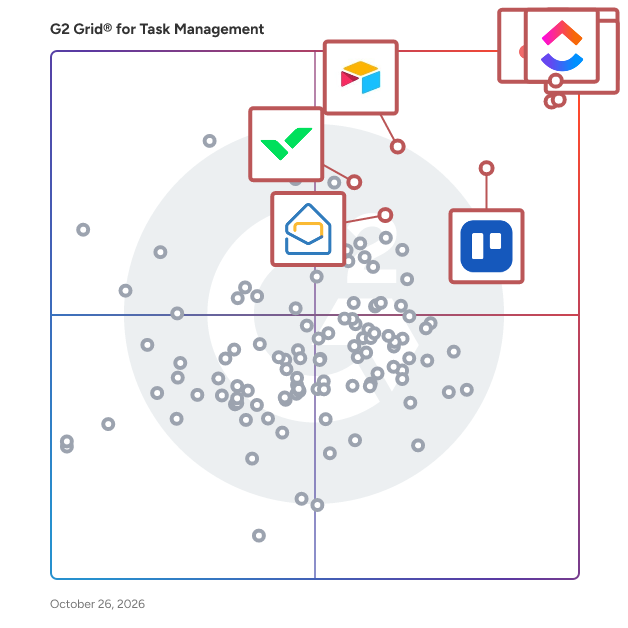
G2 Grid® for Task Management Software

G2 Grid® for Task Management Software plotting products by satisfaction and market presence

Highlighted products: Asana, ClickUp, monday AI Work Platform, Smartsheet, Trello, Airtable, Wrike, and Zoho Mail.

Underlying data: [Grid® JSON](https://www.g2.com/categories/task-management-software/grids.json?focus%5B%5D=asana&focus%5B%5D=clickup&focus%5B%5D=monday-com&focus%5B%5D=smartsheet&focus%5B%5D=trello&focus%5B%5D=airtable&focus%5B%5D=wrike&focus%5B%5D=zoho-mail)

liftOS - The ultimate productivity Workspace

#1 Easiest Project Management Software - Made in Germany Built-in Projects, Wikis, Documents and Whiteboard help small to large teams work with many tools in one place. Trusted by over 2000+ Businesses, Agencies and Freelancers. Detailed Features: - Todos (manage projects) - Notes (write, share, and create knowledgebase) - Files (share and store files) - Whiteboard (brainstorm in real time) - Chat (communicate with team & clients) - Calendar (visualize your day & week) - Google Workspace (Natively integrate Google Sheets, Docs or Slides) - Miro & more websites or weblinks

Average Rating: 4.9/5.0

Total Reviews: 18

How Do G2 Users Rate liftOS - The ultimate productivity Workspace?

  • Has the product been a good partner in doing business?: 10.0/10 (Category avg: 9.0/10)
  • Task Prioritization: 9.4/10 (Category avg: 8.8/10)
  • Creation & Assignment: 9.3/10 (Category avg: 9.0/10)
  • To-Do Lists: 9.7/10 (Category avg: 8.9/10)

Who Is the Company Behind liftOS - The ultimate productivity Workspace?

  • Seller: liftOS
  • Year Founded: 2021
  • HQ Location: Berlin, DE
  • LinkedIn® Page: www.linkedin.com
    3 employees on LinkedIn®

Who Uses This Product?

  • Company Size: 100% Small

What Do G2 Reviewers Say About liftOS - The ultimate productivity Workspace?

AI-generated summary from verified user reviews

Pros
  • Users find the ease of use in liftOS refreshing, enjoying its playful UI and streamlined organization for productivity.
  • Users love the seamless integrations with various apps, enhancing their productivity and simplifying workflow management.
  • Users value the centralized organization of liftOS, significantly improving their productivity and clarity in managing tasks.
  • Users appreciate the responsive customer support of liftOS, noting its helpfulness and genuine care for user needs.
  • Users love the seamless integration of productivity tools in liftOS, enhancing organization and efficiency in their workflows.
Cons
  • Users find the learning curve steep initially, but adaptability leads to smoother usage over time.
  • Users note the missing features in liftOS, but see potential as updates are on the way.
  • Users express a desire for improved template creation options, seeking enhanced customization and flexibility in LiftOS.
  • Users find difficult navigation at first, but eventually adapt for a smoother experience with liftOS.
  • Users express frustration over integration issues that limit functionality and hinder seamless workflow within liftOS.

What Are Recent G2 Reviews of liftOS - The ultimate productivity Workspace?

GQueues

GQueues is the leading task manager built specifically for teams on Google Workspace. Collaborate with your team and keep work moving forward with its intuitive design and familiar interface. GQueues has deep integrations with Google Calendar, Gmail, Google Drive, Google Contacts and Chrome making your team more efficient, less stressed, and more organized.

Average Rating: 4.8/5.0

Total Reviews: 34

How Do G2 Users Rate GQueues?

  • Has the product been a good partner in doing business?: 9.2/10 (Category avg: 9.0/10)
  • Task Prioritization: 5.0/10 (Category avg: 8.8/10)
  • Creation & Assignment: 6.7/10 (Category avg: 9.0/10)

Who Is the Company Behind GQueues?

  • Seller: GQueues
  • Company Website:
  • Year Founded: 2009
  • HQ Location: Chicago, IL
  • Twitter: @gqueues
    825 Twitter followers
  • LinkedIn® Page: www.linkedin.com
    1 employees on LinkedIn®

Who Uses This Product?

  • Who Uses This: Owner
  • Top Industries: Information Technology and Services
  • Company Size: 79% Small, 15% Medium

What Are Recent G2 Reviews of GQueues?

What Are G2 Users Discussing About GQueues?

Quinyx

Quinyx is the workforce management platform built for the world’s frontline industries, where efficiency, agility, and employee engagement make all the difference. More than just scheduling, Quinyx connects labor planning to real business outcomes. It helps organizations optimize staffing levels, control costs, and ensure compliance, all while empowering frontline teams with AI-powered, mobile-first tools designed for the way people actually work. Fast to deploy and simple to adopt, Quinyx delivers measurable ROI within months, transforming workforce management from a back-office function into a strategic driver of performance. With built-in global compliance and advanced AI capabilities, the platform enables businesses to forecast demand accurately, adapt to operational complexity, and scale seamlessly across regions and markets. Quinyx doesn’t just manage workforces — it elevates them. By aligning people, processes, and performance in one intuitive platform, Quinyx gives organizations the clarity and agility to make smarter labor decisions, engage their teams, and build a more productive, sustainable future of work.

Average Rating: 4.3/5.0

Total Reviews: 516

How Do G2 Users Rate Quinyx?

  • Has the product been a good partner in doing business?: 8.5/10 (Category avg: 9.0/10)
  • Task Prioritization: 0.0/10 (Category avg: 8.8/10)
  • Creation & Assignment: 0.0/10 (Category avg: 9.0/10)
  • To-Do Lists: 0.0/10 (Category avg: 8.9/10)

Who Is the Company Behind Quinyx?

  • Seller: Quinyx
  • Company Website:
  • Year Founded: 2005
  • HQ Location: Stockholm
  • LinkedIn® Page: www.linkedin.com
    293 employees on LinkedIn®

Who Uses This Product?

  • Who Uses This: Store Manager, Supervisor
  • Top Industries: Retail, Hospital & Health Care
  • Company Size: 37% Medium, 37% Large

What Do G2 Reviewers Say About Quinyx?

AI-generated summary from verified user reviews

Pros
  • Users love the ease of use of Quinyx, making daily tasks and team scheduling seamless and efficient.
  • Users love the intuitive interface of Quinyx, making scheduling and workforce management effortless and organized.
  • Users praise Quinyx for its simplicity and ease of use, making scheduling clear and manageable for everyone.
  • Users value the efficient scheduling capabilities of Quinyx, making it ideal for managing large teams effortlessly.
  • Users find the navigation ease of Quinyx refreshing, appreciating its intuitive interface for both employees and managers.
Cons
  • Users express frustration with scheduling issues, citing difficulty accessing colleagues' schedules and cumbersome adjustment processes.
  • Users feel the limited features of Quinyx hinder customization and make reporting less efficient.
  • Users find missing features in Quinyx, such as limited customization and cumbersome reporting processes, hindering usability.
  • Users find Quinyx to be not user-friendly, struggling with complex logins and confusing time representations.
  • Users find Quinyx's interface complex and unintuitive, making navigation and management tasks challenging, especially for new managers.

What Are Recent G2 Reviews of Quinyx?

What Are G2 Users Discussing About Quinyx?

AI can help you find the answers. G2 helps you trust them.

Connect G2 to Claude or ChatGPT for answers grounded in G2's trusted reviews, comparisons, and pricing from real user insights.

How it works

Flowlu

Flowlu is a cloud-based business management platform designed to help teams plan, track, and optimize their work in a single, centralized workspace. It provides a suite of tools for project management, CRM, task tracking, financial management, team collaboration, and knowledge sharing. Flowlu is built to streamline operations, improve productivity, and ensure seamless communication across teams, making it an ideal solution for businesses of all sizes, from startups to large enterprises. Flowlu supports organizations across various industries by offering tools to: Manage projects efficiently with task assignments, deadlines, progress tracking, and automated workflows. Streamline sales processes with an integrated CRM, pipeline management, and automated follow-ups. Optimize financial operations through invoicing, expense tracking, budgeting, and revenue forecasting. Enhance team collaboration with real-time communication, shared workspaces, and internal chat. Store and distribute knowledge with an internal and external knowledge base for easy access to critical information. Key Features & Benefits Project Management: Utilize Kanban boards, Gantt charts, and task dependencies for structured planning and execution. CRM & Sales Automation: Track leads, manage opportunities, and set up automated workflows for follow-ups and deal tracking. Financial Management: Create invoices, process payments, monitor expenses, and gain real-time insights into business profitability. Customization: Personalize workflows, dashboards, reports, and fields to fit specific business needs. Time Tracking & Workload Management: Monitor time spent on tasks and balance workloads to enhance team efficiency. Client Portal: Securely share project updates, invoices, and documents with clients for smooth communication. Who Can Benefit from Flowlu? Flowlu is designed for small to mid-sized businesses, agencies, freelancers, and enterprises that need an all-in-one platform to manage their projects, finances, and client relationships. It is particularly valuable for service-based businesses, consulting firms, IT companies, creative agencies, and product development teams looking to improve efficiency and organization. By centralizing essential business operations, Flowlu eliminates the need for multiple disconnected tools, enabling teams to stay organized, productive, and focused on achieving their goals.

Average Rating: 4.7/5.0

Total Reviews: 206

How Do G2 Users Rate Flowlu?

  • Has the product been a good partner in doing business?: 9.4/10 (Category avg: 9.0/10)
  • Task Prioritization: 10.0/10 (Category avg: 8.8/10)
  • Creation & Assignment: 10.0/10 (Category avg: 9.0/10)
  • To-Do Lists: 10.0/10 (Category avg: 8.9/10)

Who Is the Company Behind Flowlu?

  • Seller: Cloud22
  • Year Founded: 2016
  • HQ Location: Dubai
  • Twitter: @Flowlusoft
    194 Twitter followers
  • LinkedIn® Page: www.linkedin.com
    9 employees on LinkedIn®

Who Uses This Product?

  • Who Uses This: CEO, Owner
  • Top Industries: Marketing and Advertising, Information Technology and Services
  • Company Size: 90% Small, 9% Medium

What Do G2 Reviewers Say About Flowlu?

AI-generated summary from verified user reviews

Pros
  • Users value Flowlu's efficiency, benefiting from its all-in-one design that centralizes project management seamlessly.
  • Users love the intuitive interface of Flowlu, which simplifies project management and enhances team productivity.
  • Users praise Flowlu for its affordable pricing combined with excellent features, enhancing productivity and efficiency significantly.
  • Users love the harmonious functionality of Flowlu, appreciating its universal appeal and constant updates.
  • Users appreciate the automation capabilities of Flowlu, benefiting from its harmonious integration of multiple functions within one system.

What Are Recent G2 Reviews of Flowlu?

What Are G2 Users Discussing About Flowlu?

Progress Podio

Progress Podio is a flexible, custom collaboration database that enables you to accelerate and simplify your work. An all-in-one solution to accelerate productivity, digitize essential processes, streamline data collection, and automate document workflows in one secure tool. Progress Podio can automate, operationalize, and secure important business and document processes that reduces manual work and increases efficiency. Transform how work is done with versatile forms, powerful data collection, and automated client and document workflows— customized all by you with a few simple clicks. From key industries such as, creative agencies, legal services, accounting firms, real-estate, construction / manufacturing, to key departmental areas—sales, HR, marketing, legal, finance. Podio’s ability to connect diverse teams and disparate processes helps thousands of companies optimize their entire operations in one place. With Progress Podio, give your team a single tool to automate timely processes that unify in one tool. From simplifying client data collection to automating client interactions and agreements, Progress Podio simplifies your business’s most core activities.

Average Rating: 4.2/5.0

Total Reviews: 508

How Do G2 Users Rate Progress Podio?

  • Has the product been a good partner in doing business?: 8.4/10 (Category avg: 9.0/10)
  • Task Prioritization: 9.5/10 (Category avg: 8.8/10)
  • Creation & Assignment: 8.9/10 (Category avg: 9.0/10)
  • To-Do Lists: 9.5/10 (Category avg: 8.9/10)

Who Is the Company Behind Progress Podio?

  • Seller: Progress Software
  • Company Website:
  • Year Founded: 1981
  • HQ Location: Burlington, MA.
  • Twitter: @ProgressSW
    48,773 Twitter followers
  • LinkedIn® Page: www.linkedin.com
    4,242 employees on LinkedIn®

Who Uses This Product?

  • Who Uses This: Owner, Project Manager
  • Top Industries: Real Estate, Information Technology and Services
  • Company Size: 61% Small, 28% Medium

What Do G2 Reviewers Say About Progress Podio?

AI-generated summary from verified user reviews

Pros
  • Users find Progress Podio's ease of use invaluable, simplifying tasks and enhancing collaboration across various business processes.
  • Users appreciate the automation capabilities of Progress Podio, streamlining workflows and enhancing productivity across various tasks.
  • Users love the customization options that adapt Progress Podio to their specific business processes seamlessly.
  • Users love the integrated workflows and no-code capabilities of Progress Podio, enhancing efficiency in task management.
  • Users appreciate the powerful integrations of Progress Podio, enhancing collaboration and streamlining various business processes.
Cons
  • Users find the learning curve steep for Progress Podio, making setup challenging and performance occasionally sluggish.
  • Users find the billing issues and lack of responsive customer service frustrating in Progress Podio.
  • Users find the complexity of Progress Podio challenging, requiring significant effort to create an effective setup.
  • Users find poor customer support frustrating, often needing to hire external assistance for setup and issues.
  • Users find the slow performance of Progress Podio frustrating, as it hampers efficiency and productivity.

What Are Recent G2 Reviews of Progress Podio?

What Are G2 Users Discussing About Progress Podio?

Business-in-a-Box

Business in a Box — The Business Operating System for SMBs Business in a Box (BIB) is the Business Operating System (BOS) for small and medium businesses that want to run their company with structure, clarity, and control — without juggling dozens of disconnected tools. Most businesses don’t struggle because of a lack of effort. They struggle because their operations are fragmented: tasks in one app, documents in another, communication scattered, and critical knowledge living in people’s heads. Business in a Box replaces that chaos with one unified system that defines how the business works. Unlike traditional project management or collaboration tools, BIB is designed as a system, not just software. It brings together execution, communication, documentation, and organizational structure into a single operating layer for the business. With Business in a Box, companies can: - Organize work through goals, projects, and tasks with clear ownership - Centralize documents, templates, and company knowledge - Collaborate through built-in chat and communication channels tied directly to work - Set up departments, roles, and responsibilities that persist even when people change - Onboard teams quickly using prebuilt structures and workflows BIB also includes AI-powered capabilities that go beyond basic automation. The platform builds a contextual understanding of each business — learning from goals, projects, tasks, documents, and activity — to support planning, execution, and decision-making. AI can assist with creating business documents, recommending templates, highlighting risks, and guiding next steps, all within the context of how the company actually operates. Business in a Box is built for businesses with 1 to 100 employees, from founders and small teams to growing organizations that need more structure without enterprise complexity. A Free Forever Starter Plan allows companies to begin operating with a system from day one, while paid plans unlock full BOS capabilities with simple, transparent per-user pricing. At its core, Business in a Box helps companies move from ad-hoc operations to intentional execution. Instead of relying on memory, emails, and scattered tools, teams run their business on one operating system — designed to scale as they grow. Business in a Box is not just another tool. It’s how your business runs. Get Started Free in Just a Few Minutes! https://account.business-in-a-box.com/create-account/

Average Rating: 4.7/5.0

Total Reviews: 13

How Do G2 Users Rate Business-in-a-Box?

  • Has the product been a good partner in doing business?: 10.0/10 (Category avg: 9.0/10)

Who Is the Company Behind Business-in-a-Box?

  • Seller: Biztree
  • Year Founded: 2002
  • HQ Location: Montreal, Quebec, Canada
  • LinkedIn® Page: www.linkedin.com
    4 employees on LinkedIn®
  • Ownership: Biztree Inc.
  • Phone: 514-768-4100

Who Uses This Product?

  • Company Size: 92% Small, 8% Medium

What Do G2 Reviewers Say About Business-in-a-Box?

AI-generated summary from verified user reviews

Pros
  • Users praise the affordability of Business-in-a-Box, effectively replacing costly tools with great value.
  • Users value the cost-effective collaboration features of Business-in-a-Box, replacing multiple expensive tools seamlessly.
  • Users value the cost-effective data management solution, successfully replacing multiple expensive tools with one platform.
  • Users value the efficiency of Business-in-a-Box, as it consolidates multiple tools into one affordable solution.
  • Users value the cost-effective replacement for expensive tools, providing great value for small to medium-sized businesses.

What Are Recent G2 Reviews of Business-in-a-Box?

What Are G2 Users Discussing About Business-in-a-Box?

Remember the Milk

On-Line and mobile task management tool

Average Rating: 4.4/5.0

Total Reviews: 16

How Do G2 Users Rate Remember the Milk?

  • Has the product been a good partner in doing business?: 9.4/10 (Category avg: 9.0/10)
  • Task Prioritization: 10.0/10 (Category avg: 8.8/10)
  • Creation & Assignment: 10.0/10 (Category avg: 9.0/10)
  • To-Do Lists: 10.0/10 (Category avg: 8.9/10)

Who Is the Company Behind Remember the Milk?

  • Seller: Remember the Milk
  • HQ Location: San Francisco, CA
  • Twitter: @rememberthemilk
    11,064 Twitter followers
  • LinkedIn® Page: www.linkedin.com
    8 employees on LinkedIn®

Who Uses This Product?

  • Top Industries: Computer Software
  • Company Size: 63% Small, 19% Large

What Are Recent G2 Reviews of Remember the Milk?

What Are G2 Users Discussing About Remember the Milk?

Taskade

Taskade is the simplest way to create team outlines, checklists, and workflows. Whether you are managing team projects, or planning future milestones — getting work done with Taskade is simple, fast, and fun! Collaborate with team members on the same page and edit projects together in real time. Chat, organize, and work together instantly. Use Taskade to supercharge your team productivity. Taskade can be used by individuals or teams, at home or at work (or anywhere!). Automatic syncing means your data are always up to date on every device. Taskade gives your team superpowers! - FEATURES • Create beautiful task lists, notes, and outlines • Share and collaborate with others instantly • Invite and add team members to workspaces • Chat and work together in real time • Create unlimited nested outlines • Easy one-tap editing projects • Tag projects to organize and prioritize • Assign projects to multiple team members • Real-time syncing across your phone, tablet and computer • Beautiful and minimal interface • Elegantly simple, free to use - IS TASKADE FREE? Yes, Taskade is completely free. You have the option to upgrade to Taskade Pro, which will unlock extra features. - ANY PRODUCTIVITY TIPS? Focus on one thing at a time. When you have a bunch of to-dos and ideas swimming around in your head it gets hard to focus. Use Taskade to declutter and document your thoughts so you can focus fully on every task and project. Make team communication open and efficient. Rather than rely on scheduled meetings (which, let’s face it, can be a huge time-suck) encourage team members to communicate problems and questions as soon as they arise. With Taskade teams can chat live and collaborate in real time, so things get sorted out in a snap. - CAN I USE TASKADE WITH MY TEAM? Yes. Taskade is designed to supercharge your team productivity. Simply invite your team members to join a Workspace. You can work together in real-time to manage projects and assign tasks. Get work done faster, smarter. - WHAT IS A WORKSPACE? A workspace is a collection of projects. Workspaces help to keep your task lists and notes organized. Make workspaces collaborative by inviting team members. Team members can edit all projects inside and collaborate in real-time. Team members will also receive push notifications for any updates inside. - TEMPLATES Find creative ways to use Taskade by selecting a template or creating your own. Design your own productivity systems and workflows using Taskade. • Weekly planner and task list • Team standup and scrum checklist • Daily bullet journal and team diary • Brainstorming and meeting notes • Project roadmaps and outliner • Unlimited Workspaces and teams. • Unlimited team members and sharing. • Unlimited image attachments and uploads. • Make Templates to automate workflows • Sync task lists between your iPhone, iPad, and Mac • Themes and night mode are on the way • Keep the Taskade updates coming - GET IN TOUCH Email support@taskade.com Visit us at https://taskade.com Privacy Policy: http://taskade.com/privacy Terms of Service: http://taskade.com/terms

Average Rating: 4.5/5.0

Total Reviews: 92

How Do G2 Users Rate Taskade?

  • Has the product been a good partner in doing business?: 9.1/10 (Category avg: 9.0/10)
  • Task Prioritization: 8.8/10 (Category avg: 8.8/10)
  • Creation & Assignment: 9.0/10 (Category avg: 9.0/10)
  • To-Do Lists: 9.0/10 (Category avg: 8.9/10)

Who Is the Company Behind Taskade?

  • Seller: Taskade
  • Year Founded: 2017
  • HQ Location: San Francisco, California
  • Twitter: @Taskade
    12,393 Twitter followers
  • LinkedIn® Page: www.linkedin.com
    16 employees on LinkedIn®

Who Uses This Product?

  • Who Uses This: Founder
  • Top Industries: Education Management, Computer Software
  • Company Size: 83% Small, 10% Medium

What Do G2 Reviewers Say About Taskade?

AI-generated summary from verified user reviews

Pros
  • Users praise the ease of use of Taskade, enhancing productivity with its intuitive interface and seamless features.
  • Users enjoy the ease of learning Taskade, praising its intuitive interface and speedy onboarding process.
  • Users value the easy setup of Taskade, enabling quick starts and enhanced productivity from the outset.
  • Users rave about the intuitive interface of Taskade, enhancing streamlined task management and collaboration.
  • Users love the seamless collaboration features of Taskade, enhancing team project management and workflow optimization.
Cons
  • Users find Taskade expensive, especially with unexpected billing for premium plans that don't meet their needs.
  • Users note that limited customization of dashboard widgets restricts flexibility for tailored team workflows in Taskade.
  • Users express frustration over limited features, highlighting issues with the user interface and file interaction.
  • Users find the overwhelming experience due to the rapid addition of new AI features in Taskade.
  • Users note slow loading during peak times, which slightly impacts mobile app responsiveness but appreciate Taskade's overall excellence.

What Are Recent G2 Reviews of Taskade?

What Are G2 Users Discussing About Taskade?

PSOHUB.

PSOhub is PSA software purpose-built for professional services organizations: IT firms, consultancies, marketing agencies, and financial services teams. It covers the entire delivery cycle in one connected platform, from quoting and project management through resource and capacity planning, time and expense tracking, and invoicing. Built by a founding team with over 30 years of combined experience in professional services, and trusted by organizations across 40+ countries. From quote to project When a quote is accepted, the project is ready to start. Tasks are structured, budgets are set, and the team is assigned. Project managers get a real-time view of task progress, budget burn, and margin at every stage, so there are no surprises at month-end. Most professional services teams run 6 to 10 separate tools. PSOhub replaces that stack so data flows without manual handovers at every step. Resource and capacity planning The AI scheduling layer automatically assigns and reschedules resources based on skills, live capacity, and current utilization. When someone hits full utilization, the system flags it and suggests moving tasks to another team member with headroom. Keeping utilization high without blowing deadlines used to mean constant manual oversight. With PSOhub, it largely handles itself. Time and expense tracking Time and expenses connect directly to each project's budget and contract type. Whether billing fixed-fee, time and material, or retainer, hours log against the right scope and invoices generate without a manual reconciliation step. AI project and risk management The AI Copilot generates a full project plan, including financials, team assignment, and timeline, in around 10 seconds, drawing on the organization's own historical data rather than generic benchmarks. It monitors margins continuously, flags scope creep early, including situations like a senior consultant logging hours on a junior task, and generates risk assessments with concrete recommended actions. Integrations For teams using HubSpot as their CRM, a native two-way integration connects closed deals directly to projects, with time logs flowing back to the CRM. Also integrates with SAP Business One, QuickBooks, Xero, and Salesforce. Works for organizations of 10 to 1,000+.

Average Rating: 4.1/5.0

Total Reviews: 250

G2 Deal: Claim our G2 Deal and start using PSOhub with a 15% discount*!

PSOhub provides unique All-in-One Project Management software through predictive project management, smart resource management, self-driving time and expense tracking, and invoicing in a seamlessly integrated platform. Take a look, try it for free, or book a demo to get more information!

Price: ~~$25 Essentials, $35 Professional, $45 Enterprise~~ → $21 Essentials, $30 Professional, $38 Enterprise

View this exclusive G2 deal

How Do G2 Users Rate PSOHUB.?

  • Has the product been a good partner in doing business?: 8.5/10 (Category avg: 9.0/10)
  • Task Prioritization: 7.5/10 (Category avg: 8.8/10)
  • Creation & Assignment: 8.2/10 (Category avg: 9.0/10)
  • To-Do Lists: 7.4/10 (Category avg: 8.9/10)

Who Is the Company Behind PSOHUB.?

  • Seller: PSOHUB.
  • Company Website:
  • Year Founded: 2020
  • HQ Location: Bussum, North Holland, Netherlands
  • Twitter: @PSOhub
    38 Twitter followers
  • LinkedIn® Page: www.linkedin.com
    15 employees on LinkedIn®

Who Uses This Product?

  • Who Uses This: Security Analyst, Consultant
  • Top Industries: Consulting, Marketing and Advertising
  • Company Size: 60% Small, 38% Medium

What Do G2 Reviewers Say About PSOHUB.?

AI-generated summary from verified user reviews

Pros
  • Users find PSOhub's ease of use remarkable, facilitating smooth project management and time tracking.
  • Users appreciate the easy timesheet and project management interface of PSOhub, which enhances productivity and efficiency.
  • Users appreciate the ease of use of PSOHUB, citing its efficient data entry and project management capabilities.
  • Users appreciate the efficiency of project tracking with PSOHUB, making data management a breeze across multiple projects.
  • Users appreciate the clear and intuitive UI of PSOhub, finding it simple and user-friendly for daily tasks.
Cons
  • Users find PSOHUB not intuitive, struggling with navigation and feature understanding, affecting overall usability.
  • Users find the limited customization options restricting, impacting their ability to tailor reports effectively.
  • Users find limited features in PSOhub, particularly in reporting customization and mobile app functionality compared to competitors.
  • Users face time tracking issues, struggling with complexity and bugs that disrupt task management and progress tracking.
  • Users find PSOHUB to have a complex usability that requires time and effort to fully understand.

What Are Recent G2 Reviews of PSOHUB.?

What Are G2 Users Discussing About PSOHUB.?

TaskRay

TaskRay is your ultimate solution for streamlined project management and seamless customer onboarding—all within Salesforce. Empower your teams to create project plans, automate repetitive tasks, allocate resources effectively, and foster collaboration across departments. Whether you're managing new customer implementations or driving internal initiatives, TaskRay ensures every project is delivered with precision and efficiency. 100% Salesforce Native TaskRay integrates seamlessly into your existing Salesforce ecosystem, offering unmatched visibility and alignment across Sales, CPQ, Service, and Experience Clouds. Designed for Growing Businesses If your organization has outgrown spreadsheets or non-Salesforce tools and needs better visibility into project performance, TaskRay is your next step. It's ideal for businesses facing challenges like: ✓ Revenue delays caused by lengthy onboarding or implementation timelines. ✓ Complex implementations, where multiple SKUs require custom solutions and support. ✓ Integrated customer management, spanning multiple Salesforce Clouds. Industry-Specific Expertise • TaskRay is trusted by industry leaders in: • Technology & SaaS • Healthcare & Life Sciences • Manufacturing • Real Estate & Franchising • Financial Services • Telecommunications Deliver Faster, Reduce Costs, and Increase Customer Satisfaction TaskRay helps you accelerate project timelines, cut operational costs, and improve productivity. Here's what our customers achieve: • 2.5x Faster Project Completion: Streamline workflows and improve efficiency. • 29% Faster Revenue Realization: Get to value quicker with optimized onboarding. • 21% Cost Reduction: Save time and resources with automation and visibility. • 15% Increase in Customer Satisfaction: Delight customers with smooth implementations. • 200% Boost in Project Visibility: Gain clarity and insight into every project detail. • 20% More Project Capacity: Handle more work without adding complexity. Proven Success Across Industries Join the growing list of businesses transforming their operations with TaskRay. From technology innovators to global manufacturers, our platform drives results.

Average Rating: 4.3/5.0

Total Reviews: 156

How Do G2 Users Rate TaskRay?

  • Has the product been a good partner in doing business?: 9.1/10 (Category avg: 9.0/10)
  • Task Prioritization: 8.2/10 (Category avg: 8.8/10)
  • Creation & Assignment: 8.8/10 (Category avg: 9.0/10)
  • To-Do Lists: 8.1/10 (Category avg: 8.9/10)

Who Is the Company Behind TaskRay?

  • Seller: TaskRay
  • Company Website:
  • Year Founded: 2010
  • HQ Location: Denver, CO
  • Twitter: @TaskRay
    400 Twitter followers
  • LinkedIn® Page: www.linkedin.com
    53 employees on LinkedIn®

Who Uses This Product?

  • Top Industries: Computer Software, Information Technology and Services
  • Company Size: 50% Medium, 47% Small

What Do G2 Reviewers Say About TaskRay?

AI-generated summary from verified user reviews

Pros
  • Users find the ease of use of TaskRay invaluable, facilitating seamless collaboration and efficient project management.
  • Users value the easy integration of TaskRay with Salesforce, enhancing collaboration and streamlining project management effortlessly.
  • Users highlight the seamless Salesforce integration of TaskRay, enabling centralized data and effective stakeholder collaboration.
  • Users value the seamless integration with Salesforce, enhancing data management and stakeholder connectivity across projects.
  • Users value the seamless organization of TaskRay, enhancing collaboration and clarity in project management within Salesforce.
Cons
  • Users find multiple portfolio management challenging with TaskRay, leading to operational issues and overwhelming large projects.
  • Users find TaskRay's inefficient task management challenging, particularly with complex projects and dependencies affecting productivity.
  • Users find TaskRay's complexity overwhelming, requiring significant time to understand its intricate interface and controls.
  • Users find difficult customization in TaskRay challenging, as the interface is complex and overwhelming to navigate.
  • Users find the steep learning curve of TaskRay challenging, particularly for those unfamiliar with Salesforce.

What Are Recent G2 Reviews of TaskRay?

What Are G2 Users Discussing About TaskRay?

Kroolo

Kroolo is a next-generation productivity platform powered by Agentic AI, designed to redefine how teams work, think, and create. Unlike traditional task managers, Kroolo is built to be proactive. It doesn't just help you organize work—it acts as your smart partner, driving your workflows forward with. The platform unifies projects, tasks, documents, conversations, OKRs, forms, and dashboards into one seamless ecosystem — eliminating the need for multiple disconnected tools. With multiple workspace views (list, Kanban, timeline, calendar, workload), real-time collaboration, and embedded insights, Kroolo adapts to every team’s workflow, across industries and sizes. Kroolo also excels in collaboration. It provides a central hub for team alignment with features like visual roadmaps, dynamic calendars, project timelines, and goal tracking—all enhanced by generative AI inputs. The platform's intuitive UX, combined with its smart suggestions and instant planning tools, makes it a must-have for forward-looking teams.

Average Rating: 4.6/5.0

Total Reviews: 20

How Do G2 Users Rate Kroolo?

  • Has the product been a good partner in doing business?: 9.6/10 (Category avg: 9.0/10)
  • Task Prioritization: 8.8/10 (Category avg: 8.8/10)
  • Creation & Assignment: 8.3/10 (Category avg: 9.0/10)
  • To-Do Lists: 8.7/10 (Category avg: 8.9/10)

Who Is the Company Behind Kroolo?

  • Seller: Kroolo
  • Year Founded: 2023
  • HQ Location: Singapore, SG
  • Twitter: @getkroolo
    49 Twitter followers
  • LinkedIn® Page: www.linkedin.com
    44 employees on LinkedIn®

Who Uses This Product?

  • Top Industries: Computer Software, Information Technology and Services
  • Company Size: 65% Small, 32% Medium

What Do G2 Reviewers Say About Kroolo?

AI-generated summary from verified user reviews

Pros
  • Users benefit from Kroolo's effective project management, seamlessly integrating tasks and enhancing overall productivity across various life aspects.
  • Users appreciate the time-saving features of Kroolo, allowing for efficient project management and quick insights.
  • Users find Kroolo to be user-friendly, making project management simple and enjoyable through its efficient features.
  • Users love the effective organization capabilities of Kroolo, seamlessly managing multiple projects and enhancing productivity.
  • Users value the seamless team collaboration in Kroolo, enhancing project management across all areas of life.
Cons
  • Users find the complexity of Kroolo overwhelming initially, but become more familiar with continued use.
  • Users find the learning curve steep for Kroolo initially, although familiarity improves navigation over time.
  • Users find Kroolo's interface initially difficult to navigate due to its complexity, especially for beginners.
  • Users find the limited features of Kroolo can cause confusion and complicate the navigation experience.
  • Users find Kroolo's app not particularly mobile-friendly, hindering easy access to updates and changes on the go.

What Are Recent G2 Reviews of Kroolo?

LaunchBay

LaunchBay is the client experience platform for B2B service providers, agencies, and software companies that want to deliver a best-in-class customer experience without having to hire more staff or add work to their existing team's plate. From onboarding and implementation to ongoing service delivery, LaunchBay brings every step including tasks, communication, approvals, time tracking, resource management, and data collection into one platform your team and your clients actually use. For internal teams, LaunchBay delivers the operational clarity of a professional services automation tool with the client experience layer most PSA platforms leave out. A real-time projects dashboard gives ops leaders visibility into health scores, project status, and blockers across every active engagement. Spot which projects are on track and which are behind at a glance, drill into any blocker instantly, and take action before clients complain. Reusable templates standardize delivery across every project, automated reminders replace manual follow-up, and a shared message center with private internal notes keeps client communication centralized and your team aligned. For clients, LaunchBay creates a premium self-service experience. Each customer gets a secure, branded portal with loginless access via magic link, no account creation required. Clients complete tasks with clear context on what to do and why, track their own project progress in real time, and always know exactly where things stand without emailing your team to ask. The result is faster time-to-value, fewer status calls, and a client experience that reflects your brand's professionalism at every touchpoint. Whether you're a SaaS company managing customer onboarding, a marketing agency running client kickoff projects, or a professional services firm delivering complex implementations, LaunchBay gives you the workflow automation, task management, and client communication tools to deliver with speed, consistency, and confidence. LaunchBay helps growing B2B teams run all client work in one place, streamline service delivery, and deliver an exceptional client experience.

Average Rating: 4.6/5.0

Total Reviews: 56

How Do G2 Users Rate LaunchBay?

  • Has the product been a good partner in doing business?: 9.3/10 (Category avg: 9.0/10)
  • Task Prioritization: 10.0/10 (Category avg: 8.8/10)
  • To-Do Lists: 10.0/10 (Category avg: 8.9/10)

Who Is the Company Behind LaunchBay?

Who Uses This Product?

  • Top Industries: Marketing and Advertising
  • Company Size: 98% Small, 2% Medium

What Do G2 Reviewers Say About LaunchBay?

AI-generated summary from verified user reviews

Pros
  • Users appreciate the ease of use of LaunchBay, making client collaboration and project management effortless and efficient.
  • Users find the client management features of LaunchBay to be streamlined and effective for project collaboration.
  • Users commend the excellent customer support of LaunchBay, enhancing their overall project management experience.
  • Users appreciate the centralized organization of LaunchBay, enhancing communication and streamlining project management for teams.
  • Users value the intuitive interface of LaunchBay, which simplifies client collaboration and enhances project management efficiency.
Cons
  • Users find limited features in LaunchBay, lacking robust project and user management capabilities for effective tracking.
  • Users find LaunchBay lacking in robust features, desiring better project management and visibility enhancements.
  • Users feel the need for better document management features to enhance project organization within LaunchBay.
  • Users find inefficient task management in LaunchBay due to cumbersome setup and document upload limitations.
  • Users face integration issues with LaunchBay, as it currently only connects with Zapier, limiting automation options.

What Are Recent G2 Reviews of LaunchBay?

TeuxDeux

If you like making to-do lists, you will love TeuxDeux.

Average Rating: 4.5/5.0

Total Reviews: 28

How Do G2 Users Rate TeuxDeux?

  • Has the product been a good partner in doing business?: 9.2/10 (Category avg: 9.0/10)
  • Task Prioritization: 9.7/10 (Category avg: 8.8/10)
  • Creation & Assignment: 9.7/10 (Category avg: 9.0/10)
  • To-Do Lists: 10.0/10 (Category avg: 8.9/10)

Who Is the Company Behind TeuxDeux?

  • Seller: TeuxDeux
  • Year Founded: 2010
  • HQ Location: Brooklyn, New York
  • Twitter: @teuxdeux
    5,249 Twitter followers
  • LinkedIn® Page: www.linkedin.com
    3 employees on LinkedIn®

Who Uses This Product?

  • Top Industries: Marketing and Advertising
  • Company Size: 76% Small, 14% Large

What Are Recent G2 Reviews of TeuxDeux?

What Are G2 Users Discussing About TeuxDeux?

Ryver

Ryver enables you to organize your team’s communication IN ONE APP with group chat, task management, and voice & video calls.

Average Rating: 4.4/5.0

Total Reviews: 156

How Do G2 Users Rate Ryver?

  • Has the product been a good partner in doing business?: 8.8/10 (Category avg: 9.0/10)
  • Task Prioritization: 9.0/10 (Category avg: 8.8/10)
  • Creation & Assignment: 9.0/10 (Category avg: 9.0/10)
  • To-Do Lists: 9.0/10 (Category avg: 8.9/10)

Who Is the Company Behind Ryver?

  • Seller: Ryver
  • Year Founded: 2015
  • HQ Location: Scottsdale, AZ
  • Twitter: @RyverApp
    2,807 Twitter followers
  • LinkedIn® Page: www.linkedin.com
    3 employees on LinkedIn®

Who Uses This Product?

  • Who Uses This: Owner
  • Top Industries: Computer Software, Information Technology and Services
  • Company Size: 65% Small, 27% Medium

What Do G2 Reviewers Say About Ryver?

AI-generated summary from verified user reviews

Pros
  • Users value the seamless team collaboration in Ryver, enhancing communication and task management all in one platform.
  • Users appreciate the effective communication in Ryver, enjoying seamless integration of chat, tasks, and collaboration.
  • Users appreciate the ease of use in Ryver, enjoying straightforward setup and seamless integration of chat and tasks.
  • Users value the seamless integration of chat and task management in Ryver, enhancing team collaboration and efficiency.
  • Users love the easy initial setup of Ryver, enabling quick collaboration and efficient project management from the start.
Cons
  • Users find the learning curve challenging, making the initial setup and understanding of Ryver quite difficult.
  • Users note the missing features in Ryver, highlighting the need for better tools and an improved interface.
  • Users report degrading audio quality in Ryver, which hampers the overall video conferencing experience.
  • Users find difficult navigation with Ryver, as understanding features and locating files can be challenging initially.
  • Users feel that Ryver is expensive, which influences their decision on future purchases and overall satisfaction.

What Are Recent G2 Reviews of Ryver?

What Are G2 Users Discussing About Ryver?

WeekMate HRMS

WeekMate empowers every organization to achieve more with a comprehensive, integrated software ecosystem that offers unparalleled control and enduring value, all without recurring subscription fees. With various modules for different industries and job roles to make their task management seamless. Our SaaS development company specialises in custom software development with enterprise-grade architecture. We deliver scalable cloud-based software that integrates seamlessly with existing systems, including enterprise resource planning ERP software and manufacturing ERP software.

Average Rating: 4.5/5.0

Total Reviews: 20

How Do G2 Users Rate WeekMate HRMS?

  • Has the product been a good partner in doing business?: 10.0/10 (Category avg: 9.0/10)
  • Task Prioritization: 10.0/10 (Category avg: 8.8/10)
  • Creation & Assignment: 9.8/10 (Category avg: 9.0/10)
  • To-Do Lists: 10.0/10 (Category avg: 8.9/10)

Who Is the Company Behind WeekMate HRMS?

Who Uses This Product?

  • Top Industries: Information Technology and Services
  • Company Size: 83% Medium, 17% Small

What Do G2 Reviewers Say About WeekMate HRMS?

AI-generated summary from verified user reviews

Pros
  • Users find WeekMate HRMS to be extremely user-friendly, making asset and shift management hassle-free and efficient.
  • Users love the automation features of WeekMate HRMS, greatly reducing manual work and enhancing efficiency in management tasks.
  • Users find WeekMate HRMS significantly boosts efficiency by streamlining attendance, shift management, and HR tasks seamlessly.
  • Users appreciate the time-saving automation of WeekMate HRMS, enhancing productivity and simplifying management tasks effortlessly.
  • Users appreciate the effortless integrations of WeekMate HRMS, enhancing workflow and streamlining HR management seamlessly.
Cons
  • Users desire more detailed reporting with better visuals in WeekMate HRMS for improved clarity and understanding.
  • Users desire more detailed reporting features in WeekMate HRMS for improved clarity and visual representation.
  • Users note the lack of a recruitment module, which hinders the platform's overall effectiveness and integration.

What Are Recent G2 Reviews of WeekMate HRMS?

Subhransu Sahu
SS
Researched and written by Subhransu Sahu
Updated April 10, 2026