Best Enterprise Server Backup Software - Page 2

How Many Server Backup Software Products Does G2 Track?

Total Products under this Category: 187

Category Stats (Oct 2026)

  • Average Rating: 4.33/5 The average rating of products in this category, based on all submitted ratings
  • Top Trending Product: Summit Managed Infrastructure (+1.78%) - Among all products in this category, Summit Managed Infrastructure recorded the largest rating increase compared to last month

Last updated: October 01, 2026

How Does G2 Rank Server Backup Software Products?

Why You Can Trust G2's Software Rankings:

  • 30 Analysts and Data Experts
  • 18,800+ Authentic Reviews
  • 187+ Products
  • Unbiased Rankings

G2's software rankings are built on verified user reviews, rigorous moderation, and a consistent research methodology maintained by a team of analysts and data experts. Each product is measured using the same transparent criteria, with no paid placement or vendor influence. While reviews reflect real user experiences, which can be subjective, they offer valuable insight into how software performs in the hands of professionals. Together, these inputs power the G2 Score, a standardized way to compare tools within every category.

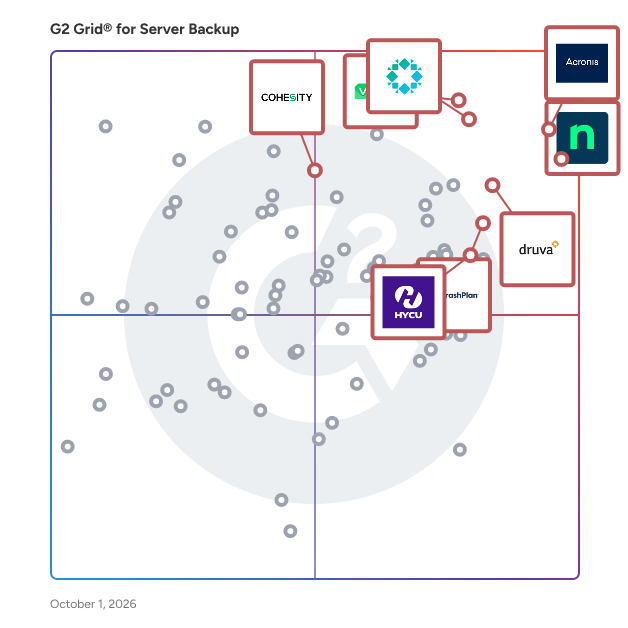
G2 Grid® for Server Backup Software

G2 Grid® for Server Backup Software plotting products by satisfaction and market presence

Highlighted products: Rubrik, NinjaOne, Druva Data Security Cloud, Veeam Data Platform, CrashPlan Platform, Cohesity, HYCU, and Acronis Cyber Protect Cloud.

Underlying data: [Grid® JSON](https://www.g2.com/categories/server-backup/grids.json?focus%5B%5D=rubrik&focus%5B%5D=ninjaone&focus%5B%5D=druva-data-security-cloud&focus%5B%5D=veeam-data-platform&focus%5B%5D=crashplan-platform&focus%5B%5D=cohesity&focus%5B%5D=hycu&focus%5B%5D=acronis-cyber-protect-cloud&segment=enterprise)

IBM Storage Protect

IBM® Storage Protect™ can simplify data protection, whether data is hosted in physical, virtual, software-defined or cloud environments. With IBM Storage Protect, organizations can choose the right software to manage and protect their data—while also simplifying backup administration, improving efficiency, delivering scalable capacity and enabling advanced capabilities.

Average Rating: 4.1/5.0

Total Reviews: 59

How Do G2 Users Rate IBM Storage Protect?

  • Has the product been a good partner in doing business?: 7.5/10 (Category avg: 8.7/10)
  • Security Standards: 8.6/10 (Category avg: 8.7/10)
  • Disaster Recovery: 9.4/10 (Category avg: 8.6/10)
  • Activity Monitoring: 8.8/10 (Category avg: 8.6/10)

Who Is the Company Behind IBM Storage Protect?

  • Seller: IBM
  • Year Founded: 1911
  • HQ Location: Armonk, New York, United States
  • Twitter: @IBMSecurity
    74,660 Twitter followers
  • LinkedIn® Page: www.linkedin.com
    344,328 employees on LinkedIn®
  • Ownership: SWX:IBM

Who Uses This Product?

  • Top Industries: Information Technology and Services, Hospital & Health Care
  • Company Size: 58% Large, 30% Medium

What Do G2 Reviewers Say About IBM Storage Protect?

AI-generated summary from verified user reviews

Pros
  • Users value the reliability of IBM Storage Protect, ensuring secure and accessible data recovery for remote teams.
  • Users appreciate the app accessibility of IBM Storage Protect, enabling remote access and efficient data recovery for teams.
  • Users appreciate the variety of backup options offered by IBM Storage Protect, enhancing data management and security.
  • Users value the data security and remote access capabilities of IBM Storage Protect, enhancing their data management experience.
  • Users value the data recovery capabilities of IBM Storage Protect, enhancing accessibility and safeguarding critical files remotely.
Cons
  • Users find significant compatibility issues due to a limited compatibility list and missing GUI options.
  • Users find the complex setup of IBM Storage Protect frustrating and time-consuming during their initial experience.
  • Users find the initial setup of IBM Storage Protect to be difficult to learn, causing frustration in the beginning.
  • Users find the difficult setup of IBM Storage Protect frustrating and time-consuming during their first experience.
  • Users find the initial experience with IBM Storage Protect to be frustrating and time-consuming, impacting overall satisfaction.

What Are Recent G2 Reviews of IBM Storage Protect?

What Are G2 Users Discussing About IBM Storage Protect?

NAKIVO Backup & Replication

NAKIVO Backup & Replication provides an all-in-one data protection solution for backup, replication, recovery, ransomware resilience, and disaster recovery (DR). The feature set includes application-aware backups, instant recovery capabilities, Site Recovery for DR orchestration, encryption, federated repositories, immutability, and other security features. IT Monitoring for VMware vSphere is also available as a separately licensed capability. Supported Platforms: VMware vSphere, Microsoft Hyper-V, Nutanix AHV, Proxmox VE, Amazon EC2, Windows and Linux physical machines, Microsoft 365, NAS and file shares, and Oracle Database via RMAN.

Average Rating: 4.7/5.0

Total Reviews: 333

How Do G2 Users Rate NAKIVO Backup & Replication?

  • Has the product been a good partner in doing business?: 9.4/10 (Category avg: 8.7/10)
  • Security Standards: 9.1/10 (Category avg: 8.7/10)
  • Disaster Recovery: 9.4/10 (Category avg: 8.6/10)
  • Activity Monitoring: 9.2/10 (Category avg: 8.6/10)

Who Is the Company Behind NAKIVO Backup & Replication?

  • Seller: NAKIVO, Inc.
  • Year Founded: 2012
  • HQ Location: Sparks, Nevada, USA
  • Twitter: @Nakivo
    1,367 Twitter followers
  • LinkedIn® Page: www.linkedin.com
    197 employees on LinkedIn®

Who Uses This Product?

  • Who Uses This: IT Manager, Owner
  • Top Industries: Information Technology and Services, Computer & Network Security
  • Company Size: 58% Small, 36% Medium

What Do G2 Reviewers Say About NAKIVO Backup & Replication?

AI-generated summary from verified user reviews

Pros
  • Users appreciate the ease of use of NAKIVO Backup & Replication, highlighting quick deployment and a user-friendly interface.
  • Users appreciate the seamless backup and recovery of NAKIVO Backup & Replication, enhancing their overall experience and satisfaction.
  • Users value the excellent customer support from NAKIVO Backup & Replication, enhancing their overall backup experience.
  • Users appreciate the comprehensive features of NAKIVO Backup & Replication, emphasizing reliability and excellent support.
  • Users highlight the affordability of NAKIVO Backup & Replication, offering excellent value without sacrificing features.
Cons
  • Users experience backup issues, needing to carefully manage setups and missing some advanced features typical of pricier options.
  • Users find backup problems due to missing features and sensitivity in handling transporters, complicating backups.
  • Users find storage limitations in NAKIVO Backup & Replication frustrating, particularly with removable media management and backup visibility.
  • Users note a lack of integrated backup options, particularly for SQL Server transaction logs, hindering efficiency.
  • Users find the learning curve steep due to unfamiliar terminology and complex menus, impacting usability initially.

What Are Recent G2 Reviews of NAKIVO Backup & Replication?

What Are G2 Users Discussing About NAKIVO Backup & Replication?

Clumio

Clumio is a cloud-based data protection solution specifically designed to help organizations manage their data in Amazon Web Services (AWS). This software-as-a-service (SaaS) platform offers a secure, air-gapped environment that ensures data integrity while simplifying the complexities associated with data backup and recovery. Clumio addresses the growing need for robust data management solutions in the cloud, enabling organizations to meet stringent compliance requirements while efficiently safeguarding their critical information. Targeted primarily at businesses operating within the AWS ecosystem, Clumio is particularly beneficial for IT professionals, data administrators, and compliance officers who require a reliable method for data protection. The platform is designed to cater to various industries, including finance, healthcare, and technology, where data security and compliance are of utmost importance. Clumio's capabilities allow organizations to back up and restore data in a matter of minutes, significantly reducing downtime and enhancing operational efficiency. One of the standout features of Clumio is its secure air-gapped architecture, which provides an additional layer of protection against ransomware and other cyber threats. By isolating backup data from the primary environment, Clumio ensures that even in the event of a security breach, the backup remains intact and accessible. This feature is crucial for organizations that must adhere to strict regulatory standards, as it helps maintain data integrity and availability. In addition to its security features, Clumio offers enhanced visibility into cloud storage costs, enabling organizations to optimize their data management strategies. By providing insights into usage patterns and storage requirements, Clumio helps users make informed decisions about their cloud resources, ultimately leading to cost savings. The platform's intuitive interface and comprehensive reporting tools further empower users to monitor their data protection efforts effectively. Overall, Clumio stands out in the data protection category by combining security, compliance, and cost optimization into a single, user-friendly solution. Its focus on AWS environments makes it a valuable asset for organizations looking to streamline their data management processes while ensuring robust protection against potential threats.

Average Rating: 4.7/5.0

Total Reviews: 63

How Do G2 Users Rate Clumio?

  • Has the product been a good partner in doing business?: 9.3/10 (Category avg: 8.7/10)
  • Security Standards: 9.6/10 (Category avg: 8.7/10)
  • Disaster Recovery: 9.4/10 (Category avg: 8.6/10)
  • Activity Monitoring: 9.6/10 (Category avg: 8.6/10)

Who Is the Company Behind Clumio?

  • Seller: Commvault
  • Company Website:
  • Year Founded: 1996
  • HQ Location: Eatontown, New Jersey, United States
  • Twitter: @Commvault
    64,666 Twitter followers
  • LinkedIn® Page: www.linkedin.com
    3,551 employees on LinkedIn®

Who Uses This Product?

  • Top Industries: Information Technology and Services, Higher Education
  • Company Size: 57% Medium, 35% Large

What Do G2 Reviewers Say About Clumio?

AI-generated summary from verified user reviews

Pros
  • Users appreciate the ease of use of Clumio, finding it user-friendly and well-suited for their needs.
  • Users praise the user-friendly interface of Clumio, highlighting its comprehensive tools and excellent support for easy implementation.
  • Users appreciate the user-friendly interface of Clumio, finding it easy to navigate and efficient for their needs.
  • Users appreciate Clumio's affordability, enjoying its easy implementation and comprehensive support features at a fair price.
  • Users value the excellent customer support provided by Clumio, enhancing their overall experience with the product.
Cons
  • Users find billing issues challenging due to unclear estimated costs and limited reporting on usage.
  • Users find the licensing issues with Clumio challenging, particularly regarding cost clarity and reporting limitations.
  • Users find poor reporting on usage and billing creates confusion around estimated costs for Clumio.
  • Users find pricing issues with Clumio, noting difficulties in understanding costs and limited billing reports.
  • Users find the storage limitations of Clumio challenging, as costs and usage reporting are not clearly communicated.

What Are Recent G2 Reviews of Clumio?

AI can help you find the answers. G2 helps you trust them.

Connect G2 to Claude or ChatGPT for answers grounded in G2's trusted reviews, comparisons, and pricing from real user insights.

How it works

Cove Data Protection

Cove Data Protection, from N-able, is a cloud-first backup and disaster recovery service for servers, workstations, and Microsoft 365™, all managed from a multitenant web-based dashboard. Cove was created and optimized for the cloud, so incremental backups are up to 60 times smaller than with traditional image backup products. This allows you to back up more often, and the SaaS delivery format reduces administrative time, lowering your cost of service delivery. Storage in our private cloud is included, with data centers worldwide.

Average Rating: 4.5/5.0

Total Reviews: 430

How Do G2 Users Rate Cove Data Protection?

  • Has the product been a good partner in doing business?: 8.9/10 (Category avg: 8.7/10)
  • Security Standards: 8.8/10 (Category avg: 8.7/10)
  • Disaster Recovery: 8.9/10 (Category avg: 8.6/10)
  • Activity Monitoring: 9.0/10 (Category avg: 8.6/10)

Who Is the Company Behind Cove Data Protection?

  • Seller: N-able
  • Company Website:
  • HQ Location: Morrisville, North Carolina
  • Twitter: @Nable
    15,859 Twitter followers
  • LinkedIn® Page: www.linkedin.com
    2,307 employees on LinkedIn®
  • Ownership: NYSE: NABL

Who Uses This Product?

  • Who Uses This: Owner, President
  • Top Industries: Information Technology and Services, Computer & Network Security
  • Company Size: 72% Small, 21% Medium

What Do G2 Reviewers Say About Cove Data Protection?

AI-generated summary from verified user reviews

Pros
  • Users appreciate the ease of use of Cove Data Protection, facilitating seamless backup management and recovery processes.
  • Users praise the centralized backup management of Cove Data Protection, praising its speed and ease of use.
  • Users commend the high reliability of Cove Data Protection, appreciating its low maintenance and exceptional support.
  • Users value the easy backup management of Cove Data Protection, ensuring data is securely stored and easily restored.
  • Users find Cove Data Protection's easy setup excellent, enabling seamless implementation across multiple platforms with minimal effort.
Cons
  • Users face challenges with backup issues, including limitations in separate component backups and poor internet connection reliability.
  • Users face backup failures due to lack of separate component backups and random errors, despite quick support from N-Able.
  • Users find the data restore process cumbersome and complicated, needing significant improvements for ease of use.
  • Users report a significant lack of backup options, especially for online archives and granular restores, impacting usability.
  • Users find the data restoration process cumbersome, seeking a simpler and more efficient solution for their needs.

What Are Recent G2 Reviews of Cove Data Protection?

What Are G2 Users Discussing About Cove Data Protection?

Dell NetWorker

Dell NetWorker is an enterprise-level data protection software designed to safeguard critical workloads across diverse environments, including physical, virtual, and cloud infrastructures. It offers a unified and automated approach to backup and recovery, ensuring data integrity and availability across data centers and public clouds. With its inherent flexibility, NetWorker supports a wide range of operating systems and applications, making it a versatile solution for organizations of all sizes. Key Features and Functionality: - Comprehensive Backup and Recovery: NetWorker provides centralized management for backup and recovery operations across heterogeneous IT ecosystems, supporting various operating systems, databases, and applications. - Scalability and Performance: Designed to meet the needs of growing enterprises, NetWorker delivers high-performance protection for extensive data sets, ensuring efficient backup and recovery processes. - Multicloud Enablement: The software extends data protection capabilities to the cloud, offering backup to cloud, in-cloud backup, long-term retention, and cloud disaster recovery options. - Efficiency Through Automation: NetWorker's automation features reduce management time and operational costs, streamlining data protection tasks. - Broad Application Support: It supports a wide array of applications, including databases like Oracle, SQL Server, and SAP, ensuring application-consistent backup and recovery. - Integrated Snapshot Management: NetWorker offers built-in snapshot management for block and file storage arrays, providing point-in-time copies of data without disrupting application performance. - VMware Optimization: Tight integration with VMware allows administrators to leverage familiar tools, enhancing efficiency in virtualized environments. Primary Value and User Solutions: Dell NetWorker addresses the critical need for reliable and efficient data protection in complex IT environments. By offering a scalable and flexible solution, it enables organizations to safeguard their data across various platforms and infrastructures, including on-premises and cloud-based systems. The software's automation capabilities reduce administrative overhead, while its comprehensive support for diverse applications ensures that businesses can maintain continuity and meet recovery objectives effectively. Ultimately, NetWorker empowers organizations to protect their valuable data assets with confidence and ease.

Average Rating: 3.7/5.0

Total Reviews: 37

How Do G2 Users Rate Dell NetWorker?

  • Has the product been a good partner in doing business?: 7.5/10 (Category avg: 8.7/10)
  • Security Standards: 7.7/10 (Category avg: 8.7/10)
  • Disaster Recovery: 6.4/10 (Category avg: 8.6/10)
  • Activity Monitoring: 6.7/10 (Category avg: 8.6/10)

Who Is the Company Behind Dell NetWorker?

  • Seller: Dell Technologies
  • Year Founded: 1984
  • HQ Location: Round Rock, TX
  • Twitter: @Dell
    799,086 Twitter followers
  • LinkedIn® Page: www.linkedin.com
    124,254 employees on LinkedIn®
  • Ownership: NYSE: DELL

Who Uses This Product?

  • Top Industries: Information Technology and Services
  • Company Size: 59% Large, 36% Medium

What Do G2 Reviewers Say About Dell NetWorker?

AI-generated summary from verified user reviews

Pros
  • Users highlight the seamless integration with Data Domain, enhancing recovery speed and efficiency during backups.
  • Users praise the excellent product quality of Dell NetWorker, highlighting its seamless integration and fast recovery speeds.
  • Users value the high reliability of Dell NetWorker for enterprise-scale backups across diverse workloads.
  • Users value the data security provided by Dell NetWorker, ensuring multiple copies through its robust cloning features.
  • Users value the storage capacity of Dell NetWorker, appreciating its cloning features for enhanced data security.
Cons
  • Users face challenges with backup issues due to the requirement of high bandwidth internet for data transfer.
  • Users find the implementation confusing, often needing specialized knowledge for proper administration and setup.
  • Users find the difficult configuration of Dell NetWorker challenging, requiring specialized knowledge for effective administration.
  • Users find the lack of backup options limiting, as critical features like NAS backup are unavailable.
  • Users find the outdated interface of Dell NetWorker complicated and unintuitive, hindering efficient performance.

What Are Recent G2 Reviews of Dell NetWorker?

What Are G2 Users Discussing About Dell NetWorker?

NetApp Backup and Recovery

The NetApp Console simplifies the implementation of any backup strategy, including the spectrum of 3-2-1 backup variants, without needing multiple resource managers or specialized personnel. Users can easily define local snapshots and replication schemes or back up to any object store in the cloud or on-premises using an intuitive interface. NetApp's block-level, incremental-forever technology preserves all storage efficiencies, significantly reducing the amount of data that’s replicated and stored. This approach optimizes bandwidth consumption, minimizes the performance impact on production, and makes it easy to meet the SLAs of even the most demanding workloads. Data copies are independent and can’t be modified. Backups are locked and monitored. Alerts are raised if someone attempts to corrupt the data.  Backup and Recovery gives users more control over how backups are created without adding overhead and complexity. Users can restore entire volumes, directories, or even single files by using a searchable indexed catalog.  Customers pay only for what’s protected, using the lowest-cost storage tiers available. 

Average Rating: 4.0/5.0

Total Reviews: 30

How Do G2 Users Rate NetApp Backup and Recovery?

  • Has the product been a good partner in doing business?: 8.6/10 (Category avg: 8.7/10)

Who Is the Company Behind NetApp Backup and Recovery?

  • Seller: NetApp
  • Year Founded: 1992
  • HQ Location: Sunnyvale, California
  • Twitter: @NetApp
    118,015 Twitter followers
  • LinkedIn® Page: www.linkedin.com
    12,706 employees on LinkedIn®
  • Ownership: NASDAQ

Who Uses This Product?

  • Top Industries: Information Technology and Services
  • Company Size: 61% Large, 36% Medium

What Are Recent G2 Reviews of NetApp Backup and Recovery?

What Are G2 Users Discussing About NetApp Backup and Recovery?

Arcserve UDP

Arcserve Unified Data Protection (UDP) is an all-in-one data resilience solution designed to protect data across physical, virtual, and cloud environments. With comprehensive backup, granular restore, and disaster recovery capabilities, Arcserve UDP also provides AI-enabled ransomware protection. The platform offers image-based backups, agentless protection for virtual environments, support for applications like Microsoft Exchange and SQL Server, and capabilities for data reduction, automated testing, instant recovery, bare-metal recovery, instant restores, and failover capabilities. Arcserve UDP supports multiple hypervisors, as well as on-premises and cloud storage providers, including Arcserve Cloud Storage, AWS, Microsoft Azure, Google Cloud, and Wasabi.

Average Rating: 4.2/5.0

Total Reviews: 103

How Do G2 Users Rate Arcserve UDP?

  • Has the product been a good partner in doing business?: 8.4/10 (Category avg: 8.7/10)
  • Security Standards: 8.6/10 (Category avg: 8.7/10)
  • Disaster Recovery: 8.8/10 (Category avg: 8.6/10)
  • Activity Monitoring: 8.2/10 (Category avg: 8.6/10)

Who Is the Company Behind Arcserve UDP?

  • Seller: Arcserve
  • Year Founded: 1983
  • HQ Location: Eden Prairie, MN
  • Twitter: @Arcserve
    12,988 Twitter followers
  • LinkedIn® Page: www.linkedin.com
    652 employees on LinkedIn®

Who Uses This Product?

  • Who Uses This: IT Manager, System Administrator
  • Top Industries: Information Technology and Services, Computer & Network Security
  • Company Size: 56% Medium, 31% Small

What Do G2 Reviewers Say About Arcserve UDP?

AI-generated summary from verified user reviews

Pros
  • Users value the ease of use of Arcserve UDP, appreciating its simple configuration and friendly interface.
  • Users value the reliable backup solutions of Arcserve UDP, highlighting its ease of use and ransomware protection.
  • Users find Arcserve UDP to be reliable, offering easy-to-use solutions with effective ransomware protection and backup features.
  • Users value the ease of use of Arcserve UDP, appreciating its simple configuration and friendly interface.
  • Users value the simple configuration of Arcserve UDP, enjoying its user-friendly interface and ease of use.
Cons
  • Users experience poor customer support with inconsistent responses and delays in addressing product updates and functionalities.
  • Users face slow restoration times and dependency on IT, limiting effective backup and recovery options.
  • Users express concerns about backup failures due to the need for on-site IT and datastore issues.
  • Users face significant backup issues with Arcserve UDP, requiring on-site IT support and risking data loss during datastore problems.
  • Users face data deletion issues with Arcserve UDP, risking loss of backup data during datastore problems.

What Are Recent G2 Reviews of Arcserve UDP?

What Are G2 Users Discussing About Arcserve UDP?

Veritas NetBackup

NetBackup with Cloud Scale Technology is the only enterprise data management solution that combines automation, artificial intelligence, and an elastic architecture to improve agility and data security across any cloud, at any scale. With 100 exabytes of information currently under management, no other solution comes close.

Average Rating: 4.0/5.0

Total Reviews: 105

How Do G2 Users Rate Veritas NetBackup?

  • Has the product been a good partner in doing business?: 8.3/10 (Category avg: 8.7/10)
  • Security Standards: 8.6/10 (Category avg: 8.7/10)
  • Disaster Recovery: 8.2/10 (Category avg: 8.6/10)
  • Activity Monitoring: 8.7/10 (Category avg: 8.6/10)

Who Is the Company Behind Veritas NetBackup?

  • Seller: Cohesity
  • Year Founded: 2013
  • HQ Location: Santa Clara, CA
  • Twitter: @Cohesity
    29,248 Twitter followers
  • LinkedIn® Page: www.linkedin.com
    7,808 employees on LinkedIn®

Who Uses This Product?

  • Who Uses This: Systems Administrator
  • Top Industries: Information Technology and Services, Government Administration
  • Company Size: 51% Large, 37% Medium

What Do G2 Reviewers Say About Veritas NetBackup?

AI-generated summary from verified user reviews

Pros
  • Users value the reliable alerting system of Veritas NetBackup, ensuring dependable monitoring and extensive logging for their backups.
  • Users value the solid reliability of Veritas NetBackup, ensuring dependable backups and data management across large environments.
Cons
  • Users find the difficult configuration of Veritas NetBackup requires extensive time and specialized knowledge to manage effectively.
  • Users find Veritas NetBackup expensive and complicated, requiring substantial time and expertise for effective configuration and maintenance.
  • Users express frustration with the outdated interface, finding it unmodern and difficult to navigate and configure.

What Are Recent G2 Reviews of Veritas NetBackup?

What Are G2 Users Discussing About Veritas NetBackup?

OpenText Server Backup

OpenText™ Server Backup is a cloud-based backup and disaster recovery solution designed to protect physical and virtual servers from ransomware, hardware failures, accidental deletion, and other data loss events. It securely backs up server data to the cloud with encryption in transit and at rest, while enabling fast recovery of files, folders, volumes, or entire servers when needed. Built for IT teams, SMBs, and managed service providers, OpenText Server Backup simplifies backup management through a centralized cloud console with automated policies, monitoring, reporting, and recovery workflows. Incremental backups reduce bandwidth and storage usage by only backing up new or changed data after the initial backup. Key benefits include: * Rapid recovery from ransomware, outages, and disasters * Secure cloud backup with encrypted storage and transmission * Automated backups with customizable retention policies * Centralized management across multiple servers and sites * Bare-metal recovery for full server restoration * Flexible recovery options for files, volumes, or complete systems * AWS cloud storage integration for scalability and resilience * Lightweight agents with minimal performance impact OpenText Server Backup helps organizations improve cyber resilience, minimize downtime, and ensure business continuity without the complexity of traditional backup infrastructure.

Average Rating: 4.5/5.0

Total Reviews: 81

How Do G2 Users Rate OpenText Server Backup?

  • Has the product been a good partner in doing business?: 9.0/10 (Category avg: 8.7/10)
  • Security Standards: 9.2/10 (Category avg: 8.7/10)
  • Disaster Recovery: 8.6/10 (Category avg: 8.6/10)
  • Activity Monitoring: 8.5/10 (Category avg: 8.6/10)

Who Is the Company Behind OpenText Server Backup?

  • Seller: OpenText
  • Year Founded: 1991
  • HQ Location: Waterloo, ON
  • Twitter: @OpenText
    21,565 Twitter followers
  • LinkedIn® Page: www.linkedin.com
    22,835 employees on LinkedIn®
  • Ownership: NASDAQ:OTEX

Who Uses This Product?

  • Top Industries: Information Technology and Services, Computer & Network Security
  • Company Size: 47% Medium, 34% Small

What Are Recent G2 Reviews of OpenText Server Backup?

Unitrends Backup and Recovery

Unitrends Data Center Backup and Recovery offers a Unified BCDR solution enabling our users to address the challenges of today with a complete, agile solution designed to backup, secure and recover all workloads. The platform encompasses protection for traditional data center infrastructure as well as cloud-based IaaS workloads, SaaS applications and the data being generated on endpoint devices such as laptops and PCs. Purposeful integrations with security tools provide end-to-end protection against cybercrime and human error, while automation and artificial intelligence is injected into the platform to simplify complex systems and provide a unified experience with visibility across a complete backup infrastructure.

Average Rating: 4.2/5.0

Total Reviews: 445

How Do G2 Users Rate Unitrends Backup and Recovery?

  • Has the product been a good partner in doing business?: 8.5/10 (Category avg: 8.7/10)
  • Security Standards: 8.5/10 (Category avg: 8.7/10)
  • Disaster Recovery: 8.6/10 (Category avg: 8.6/10)
  • Activity Monitoring: 8.4/10 (Category avg: 8.6/10)

Who Is the Company Behind Unitrends Backup and Recovery?

  • Seller: Kaseya
  • Company Website:
  • Year Founded: 2000
  • HQ Location: Miami, FL
  • Twitter: @KaseyaCorp
    17,411 Twitter followers
  • LinkedIn® Page: www.linkedin.com
    5,483 employees on LinkedIn®

Who Uses This Product?

  • Who Uses This: IT Manager, Network Administrator
  • Top Industries: Information Technology and Services, Hospital & Health Care
  • Company Size: 61% Medium, 28% Small

What Do G2 Reviewers Say About Unitrends Backup and Recovery?

AI-generated summary from verified user reviews

Pros
  • Users find Unitrends Backup and Recovery to be easy to use, with intuitive interfaces and smooth recovery processes.
  • Users highlight the reliability of Unitrends Backup and Recovery, praising its flawless backups and solid performance.
  • Users praise the flawless backup functionality of Unitrends Backup, appreciating its comprehensive VM support and management features.
  • Users appreciate the frequent and reliable backups of Unitrends, ensuring data protection and ease of management.
  • Users commend the exceptional customer support of Unitrends Backup and Recovery for its quick and knowledgeable assistance.
Cons
  • Users experience significant issues with poor customer support, leading to frustrating troubleshooting and unresolved problems.
  • Users find the poor interface design frustrating, making navigation difficult and complicating daily tasks.
  • Users struggle with backup issues, finding setup unintuitive and lacking sufficient troubleshooting guidance for persistent errors.
  • Users find the missing features of Unitrends Backup and Recovery frustrating, hindering effective management and resolution of issues.
  • Users find the UI needs improvement, citing navigation issues and a lack of customization and user permissions.

What Are Recent G2 Reviews of Unitrends Backup and Recovery?

What Are G2 Users Discussing About Unitrends Backup and Recovery?

IDrive Online and SaaS Backup, Object Storage e2

IDrive protects all your PCs, Macs, mobile devices, Servers, your Cloud Applications Data (SAAS) including Office 365, Google Workspace and more, and provides the best in class S3 compatible Object Storage service with IDrive e2. IDrive offers many different plans for cloud backup for your devices: -IDrive Personal -IDrive Team -IDrive Small Business -IDrive Enterprise - IDrive360 EndPoint IDrive provides Cloud Applications data (SAAS) Backup: - Microsoft Office 365 Backup - Google Workspace Backup - Dropbox and Box Backup - Salesforce Backup The company's services help over 4 million customers back up over 1 Exabyte of data

Average Rating: 4.4/5.0

Total Reviews: 2,032

How Do G2 Users Rate IDrive Online and SaaS Backup, Object Storage e2?

  • Has the product been a good partner in doing business?: 9.0/10 (Category avg: 8.7/10)
  • Security Standards: 9.0/10 (Category avg: 8.7/10)
  • Disaster Recovery: 9.2/10 (Category avg: 8.6/10)
  • Activity Monitoring: 8.6/10 (Category avg: 8.6/10)

Who Is the Company Behind IDrive Online and SaaS Backup, Object Storage e2?

  • Seller: IDrive
  • Year Founded: 2007
  • HQ Location: Calabasas, CA
  • Twitter: @IDriveBackup
    17,846 Twitter followers
  • LinkedIn® Page: www.linkedin.com
    134 employees on LinkedIn®

Who Uses This Product?

  • Who Uses This: Owner, President
  • Top Industries: Photography, Information Technology and Services
  • Company Size: 88% Small, 4% Medium

What Do G2 Reviewers Say About IDrive Online and SaaS Backup, Object Storage e2?

AI-generated summary from verified user reviews

Pros
  • Users find iDrive Online and SaaS Backup to be exceptionally easy to install and use, making daily backups effortless.
  • Users praise iDrive for its affordable pricing, making long-term backup solutions stress-free and accessible.
  • Users appreciate the affordable and efficient storage capacity of iDrive, making it a reliable long-term solution for backups.
  • Users appreciate the setup ease of IDrive, allowing quick backups and customization for worry-free data management.
  • Users appreciate the daily backup frequency of iDrive, enjoying hassle-free and reliable data protection seamlessly in the background.
Cons
  • Users experience backup issues including slow initial upload speeds and a cumbersome interface for file selection.
  • Users find the poor interface design to be cumbersome, impacting file selection and overall usability.
  • Users experience backup failures due to difficulties identifying unbacked files and occasional errors with duplications.
  • Users face storage issues due to slow upload speeds and cumbersome file selection for backups and restoration.
  • Users experience slow backup times, especially with large data volumes, which can hinder overall performance.

What Are Recent G2 Reviews of IDrive Online and SaaS Backup, Object Storage e2?

What Are G2 Users Discussing About IDrive Online and SaaS Backup, Object Storage e2?

Arctera Backup Exec

Backup Exec is a simple, secure, unified and comprehensive data protection software solution. It is designed to help organizations protect their data by providing a range of features for backup, disaster recovery, and archiving. Key features of Backup Exec include: Data Backup: Backup Exec offers flexible backup options for various environments, including virtual machines, physical servers, cloud storage, and databases. It can back up data from both on-premises and cloud-based systems. Disaster Recovery: The software includes tools for disaster recovery, ensuring that businesses can quickly restore their critical systems and data in the event of a system failure, data corruption, or cyberattack. Cross-Platform Support: It supports a wide range of operating systems, including Windows, Linux, and VMware, as well as cloud platforms like Amazon Web Services (AWS) and Microsoft Azure. Centralized Management: Backup Exec provides a centralized interface to manage backups, monitor system status, and configure backup policies, making it easier for IT administrators to oversee the entire backup environment. File and Application Protection: It includes specialized agents for backing up applications like Microsoft Exchange, SQL Server, and SharePoint, as well as file-level backup. Cloud Integration: Backup Exec integrates with cloud storage, allowing organizations to back up data directly to the cloud for offsite storage and disaster recovery. Encryption and Security: The software offers encryption both during the backup process and for data storage, ensuring that sensitive data is secure and compliant with regulations. Automated Backups: Backup Exec can automate backup tasks based on customizable schedules, reducing manual intervention and ensuring that backups occur regularly. In summary, Backup Exec is a powerful solution for businesses looking to protect and recover their critical data, with a range of features that address the needs of both small and large organizations.

Average Rating: 4.2/5.0

Total Reviews: 264

How Do G2 Users Rate Arctera Backup Exec?

  • Has the product been a good partner in doing business?: 8.3/10 (Category avg: 8.7/10)
  • Security Standards: 8.7/10 (Category avg: 8.7/10)
  • Disaster Recovery: 8.7/10 (Category avg: 8.6/10)
  • Activity Monitoring: 8.6/10 (Category avg: 8.6/10)

Who Is the Company Behind Arctera Backup Exec?

  • Seller: Arctera
  • Year Founded: 2024
  • HQ Location: Pleasanton, California, United States
  • LinkedIn® Page: www.linkedin.com
    586 employees on LinkedIn®

Who Uses This Product?

  • Who Uses This: IT Manager, IT Administrator
  • Top Industries: Information Technology and Services, Computer Software
  • Company Size: 59% Medium, 22% Small

What Do G2 Reviewers Say About Arctera Backup Exec?

AI-generated summary from verified user reviews

Pros
  • Users value the flexible backup frequency of Arctera Backup Exec, enabling quick recovery based on available disk space.
  • Users value the efficient virtual machine backup of Arctera Backup Exec, enabling quick recovery with minimal effort.
  • Users value the efficient recovery process of Arctera Backup Exec, enabling quick restoration of vital systems effortlessly.
  • Users value the efficient disaster recovery capabilities of Arctera Backup Exec, enabling quick restoration of critical systems.
  • Users value the ease of use of Arctera Backup Exec, finding it simplifies their backup management tasks.
Cons
  • Users find the complex setup of job scheduling in Arctera Backup Exec to be challenging and cumbersome.
  • Users find the learning curve steep when scheduling jobs, indicating a need for a more user-friendly interface.
  • Users find the scheduling limitations challenging, particularly when managing multiple jobs efficiently.
  • Users experience slow performance with Arctera Backup Exec, noting delays in refreshing and occasional lags.
  • Users experience time delays with Arctera Backup Exec, as it takes time to refresh and occasionally lags.

What Are Recent G2 Reviews of Arctera Backup Exec?

What Are G2 Users Discussing About Arctera Backup Exec?

NetVault Backup

NetVault provides comprehensive data protection software for enterprises with diverse IT environments - with exceptional ransomware protection features. NetVault provides data immutability for the backup jobs you select where data can not be changed or deleted during the defined retention period. It supports multiple server and application platforms in both physical and virtual environments. That means you can ensure availability of business-critical applications, including Microsoft 365, Oracle, Exchange, MySQL, SQL Server, DB2, SAP and more with a single solution. With NetVault, you can safeguard information stored on network-attached storage (NAS) devices. It also allows you to back up to cloud, tape or disk, as well as leverage data deduplication to minimize your storage footprint.

Average Rating: 3.6/5.0

Total Reviews: 20

How Do G2 Users Rate NetVault Backup?

  • Has the product been a good partner in doing business?: 7.1/10 (Category avg: 8.7/10)
  • Security Standards: 7.5/10 (Category avg: 8.7/10)
  • Disaster Recovery: 9.4/10 (Category avg: 8.6/10)
  • Activity Monitoring: 10.0/10 (Category avg: 8.6/10)

Who Is the Company Behind NetVault Backup?

  • Seller: Quest Software
  • Year Founded: 1987
  • HQ Location: Austin, TX
  • Twitter: @Quest
    17,109 Twitter followers
  • LinkedIn® Page: www.linkedin.com
    3,507 employees on LinkedIn®
  • Ownership: NYSE: DGX

Who Uses This Product?

  • Top Industries: Information Technology and Services
  • Company Size: 45% Large, 41% Medium

What Are Recent G2 Reviews of NetVault Backup?

What Are G2 Users Discussing About NetVault Backup?

Bacula Enterprise

Bacula Enterprise is a subscription-based enterprise data backup solution which empowers data centers to truly escape data volume price traps. Its especially broad functionality and high-end technologies are proven in the most demanding mission critical environments to ensure minimal downtime, fast recovery, positive business advantages and unrestricted growth of data, without volume or other convoluted charges. Bacula's software is known for having unusually high security levels compared to other vendors. High numbers of enterprise organizations worldwide (incl. NASA, Bank of Austria, Swisscom Navisite, Warner Bros. and Sky PLC) have adopted Bacula Enterprise because of its security, advanced feature set, extraordinary reliability and ability to handle high data volume at very low cost. Bacula spans physical, virtual, container, edge and hybrid Cloud environments, all from one platform. Features include support for Linux, Unix, Windows, Mac OS X, Solaris, Android, AIX. Specialist capabilities for MySQL, Oracle, PostgreSQL, MSSQL, SAP and Sap HANA, Sybase, SQLite, Hadoop and MariaDB are catered for, as well as VMware, Hyper-V, Red Hat, Proxmox, Nutanix, Xen and KVM virtual machines backup. Bacula Enterprise comprehensively backs up Docker, OpenShift and Kubernetes clusters. Bare Metal backup and data recovery is available for both Windows and Linux. Over 34 OS versions are supported. Bacula also allows backing up directory servers (MS AD and LDAP), Exchange clusters, M365, NAS / SAN storages and NDMP devices. It has a particularly broad range of storage interfaces and deduplication technologies.

Average Rating: 4.7/5.0

Total Reviews: 54

How Do G2 Users Rate Bacula Enterprise?

  • Has the product been a good partner in doing business?: 9.8/10 (Category avg: 8.7/10)
  • Security Standards: 9.3/10 (Category avg: 8.7/10)
  • Disaster Recovery: 9.3/10 (Category avg: 8.6/10)
  • Activity Monitoring: 9.2/10 (Category avg: 8.6/10)

Who Is the Company Behind Bacula Enterprise?

  • Seller: Bacula Systems
  • Year Founded: 2009
  • HQ Location: Yverdon, Vaud
  • Twitter: @baculasystems
    594 Twitter followers
  • LinkedIn® Page: www.linkedin.com
    34 employees on LinkedIn®

Who Uses This Product?

  • Top Industries: Military, Government Administration
  • Company Size: 57% Medium, 34% Large

What Are Recent G2 Reviews of Bacula Enterprise?

What Are G2 Users Discussing About Bacula Enterprise?

MSP360 Backup

MSP360 Managed Backup is a centralized backup platform for managed service providers and IT teams. It covers multiple clients, platforms, and workloads from a single web console - no on-premises infrastructure needed. Deploy agents remotely, configure backup plans, track job status in real time, and handle issues without site visits. The platform supports the full range of environments MSPs work with: - File-level and image-based backup for Windows, macOS, and Linux desktops and servers - Virtual machine backup for VMware (vSphere 6.0+), Hyper-V, and Proxmox - SQL Server backup and application-aware (VSS-based) backup - Local, cloud, and hybrid destinations, including NAS and network shares MSP360 Managed Backup works on a bring-your-own-storage model - connect your preferred provider and keep full control over costs and data residency. Supported storage includes Amazon S3, Microsoft Azure, Wasabi, Backblaze B2, Google Cloud, and IDrive e2. No proprietary storage required. Security and compliance are covered at every level: - AES 256-bit encryption in transit and at rest - Object Lock (immutability) to protect backups from ransomware and deletion - Two-factor authentication and role-based access control - GFS retention policies and versioning - Audit logging and scheduled reporting Group endpoints by company, apply policies in bulk, and configure alerts and reports per client. White-labeling lets MSPs deliver the platform under their own brand. Native integration with MSP360 RMM gives teams a unified view of endpoint health and backup status in one console. PSA integrations include ConnectWise PSA and Autotask for billing automation and ticketing, and HaloPSA for asset sync and remote access. Recovery options include bare-metal restore, granular file and folder recovery, and restore to dissimilar hardware or virtual machines.

Average Rating: 4.5/5.0

Total Reviews: 537

How Do G2 Users Rate MSP360 Backup?

  • Has the product been a good partner in doing business?: 8.9/10 (Category avg: 8.7/10)
  • Security Standards: 9.2/10 (Category avg: 8.7/10)
  • Disaster Recovery: 9.0/10 (Category avg: 8.6/10)
  • Activity Monitoring: 8.9/10 (Category avg: 8.6/10)

Who Is the Company Behind MSP360 Backup?

  • Seller: MSP360
  • Company Website:
  • Year Founded: 2011
  • HQ Location: Pittsburgh, PA
  • Twitter: @msp360
    2,785 Twitter followers
  • LinkedIn® Page: www.linkedin.com
    120 employees on LinkedIn®

Who Uses This Product?

  • Who Uses This: Owner, President
  • Top Industries: Information Technology and Services, Computer & Network Security
  • Company Size: 81% Small, 14% Medium

What Do G2 Reviewers Say About MSP360 Backup?

AI-generated summary from verified user reviews

Pros
  • Users highlight the ease of use of MSP360 Backup, enjoying its intuitive interface and straightforward backup process.
  • Users find the ease of use in MSP360 Backup to be exceptional, simplifying backups and management tasks significantly.
  • Users praise the responsive customer support of MSP360 Backup, highlighting its effectiveness and clear solutions.
  • Users value the easy setup of MSP360 Backup, allowing quick deployment and configuration for efficient backups.
  • Users appreciate the ease of use of MSP360 Backup, making backups to AWS quick and straightforward.
Cons
  • Users express frustration over poor customer support, citing difficulties in reaching tech support when urgent help is needed.
  • Users find the interface design confusing, with a learning curve that complicates navigation and access to settings.
  • Users face backup issues such as needing proprietary formats for recovery and occasional errors during review.
  • Users note a lack of backup options, particularly for local storage, affecting disaster recovery effectiveness.
  • Users note a learning difficulty with MSP360 Backup, requiring time to master its various options and settings.

What Are Recent G2 Reviews of MSP360 Backup?

What Are G2 Users Discussing About MSP360 Backup?

Tian Lin
TL
Researched and written by Tian Lin
Updated