Best Password Managers - Page 4

How Many Password Managers Products Does G2 Track?

Total Products under this Category: 125

Category Stats (Oct 2026)

  • Average Rating: 4.43/5 (↑0.01 vs Sep 2026) The average rating of products in this category, based on all submitted ratings
  • Top Trending Product: Passwork (+0.32%) - Among all products in this category, Passwork recorded the largest rating increase compared to last month

Last updated: October 26, 2026

How Does G2 Rank Password Managers Products?

Why You Can Trust G2's Software Rankings:

  • 30 Analysts and Data Experts
  • 27,600+ Authentic Reviews
  • 125+ Products
  • Unbiased Rankings

G2's software rankings are built on verified user reviews, rigorous moderation, and a consistent research methodology maintained by a team of analysts and data experts. Each product is measured using the same transparent criteria, with no paid placement or vendor influence. While reviews reflect real user experiences, which can be subjective, they offer valuable insight into how software performs in the hands of professionals. Together, these inputs power the G2 Score, a standardized way to compare tools within every category.

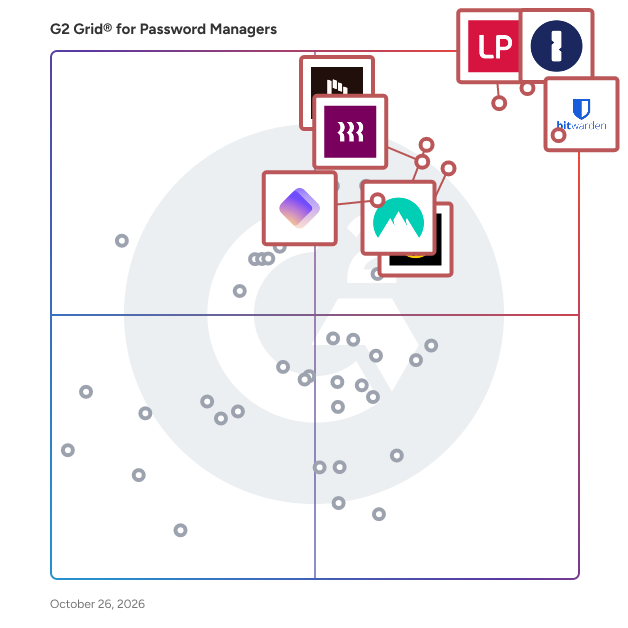
G2 Grid® for Password Managers

G2 Grid® for Password Managers plotting products by satisfaction and market presence

Highlighted products: 1Password, Bitwarden, LastPass, NordPass Business, Keeper Password Manager, Rippling IT, Dashlane Password Manager, and Proton Pass For Business.

Underlying data: [Grid® JSON](https://www.g2.com/categories/password-managers/grids.json?focus%5B%5D=1password&focus%5B%5D=bitwarden&focus%5B%5D=lastpass&focus%5B%5D=nordpass-business&focus%5B%5D=keeper-password-manager&focus%5B%5D=rippling-it&focus%5B%5D=dashlane-password-manager&focus%5B%5D=proton-pass-for-business)

PasswordState

Click Studios (SA) Pty Ltd | 304 followers on LinkedIn. Password management should be affordable for everyone. Because it's important! | Click Studios Passwordstate is the web-based solution for Enterprise Password Management. Allow teams of people to access and share sensitive password credentials without the need of additional complex security and auditing tools.

Average Rating: 4.3/5.0

Total Reviews: 6

How Do G2 Users Rate PasswordState?

  • Has the product been a good partner in doing business?: 10.0/10 (Category avg: 9.0/10)
  • Admin Management: 8.3/10 (Category avg: 9.0/10)
  • Quick Login: 9.0/10 (Category avg: 9.1/10)
  • Two-Factor Authentication: 7.8/10 (Category avg: 9.1/10)

Who Is the Company Behind PasswordState?

Who Uses This Product?

  • Company Size: 50% Large, 33% Medium

What Do G2 Reviewers Say About PasswordState?

AI-generated summary from verified user reviews

Pros
  • Users find PasswordState to be simple and easy to use, suitable for managing all types of sensitive information.
  • Users value the simplicity and ease of use of PasswordState for managing various types of secrets.
Cons
  • Users report occasional SSO issues with PasswordState, leading to unexpected access complications.

What Are Recent G2 Reviews of PasswordState?

RoboForm Password Manager

Leading the way in password management technology, security, and innovation

Average Rating: 3.7/5.0

Total Reviews: 5

How Do G2 Users Rate RoboForm Password Manager?

  • Has the product been a good partner in doing business?: 9.2/10 (Category avg: 9.0/10)
  • Admin Management: 9.0/10 (Category avg: 9.0/10)
  • Quick Login: 7.3/10 (Category avg: 9.1/10)
  • Two-Factor Authentication: 10.0/10 (Category avg: 9.1/10)

Who Is the Company Behind RoboForm Password Manager?

  • Seller: Siber Systems
  • Year Founded: 2000
  • HQ Location: Fairfax, US
  • Twitter: @roboform
    19,840 Twitter followers
  • LinkedIn® Page: www.linkedin.com
    16 employees on LinkedIn®
  • Phone: 1-703-218-1851

Who Uses This Product?

  • Company Size: 100% Small

What Do G2 Reviewers Say About RoboForm Password Manager?

AI-generated summary from verified user reviews

Pros
  • Users love the ease of use of RoboForm, enjoying seamless access and effortless login across all devices.
  • Users value the easy access provided by RoboForm, enjoying seamless sync across all devices and hassle-free logins.
  • Users value the seamless synchronization of RoboForm, providing easy access to secure information across all devices.
  • Users value the seamless autofill feature of RoboForm for effortless form filling and quick logins across devices.
  • Users value the centralized storage of RoboForm, ensuring easy access and security for all their passwords and identities.
Cons
  • Users face 2FA issues with RoboForm, experiencing complicated authentication steps that hinder ease of use on Windows PCs.
  • Users report significant authentication issues with RoboForm, experiencing cumbersome procedures and security setting changes without warning.
  • Users find autofill issues frustrating, often having to manually manage passwords instead of seamless autofill functionality.
  • Users find copy-paste issues prevalent, complicating password management and requiring additional steps for password access.
  • Users find the new update makes RoboForm not user-friendly, requiring multiple clicks for basic authentication.

What Are Recent G2 Reviews of RoboForm Password Manager?

Devolutions Cloud

Devolutions Cloud is a cloud-hosted password and credential management solution that helps teams securely store, share, and govern their passwords and sensitive data without maintaining their own server infrastructure. It belongs to the password manager and credential management software category and is designed for IT teams, small and midsize businesses, and organizations that want centralized credential governance delivered as a managed service. As a fully managed workspace, Devolutions Cloud removes the need to provision, update, or back up servers — the infrastructure is operated by Devolutions. It serves as a centralized data source for Devolutions applications such as Devolutions Password Manager and Remote Desktop Manager, providing the vault, permissions, and audit layer that those tools connect to. Users store and retrieve credentials, share them securely with colleagues, and apply access policies, while administrators manage roles, single sign-on, and multi-factor authentication from a central location. Common use cases include centralizing employee credentials across business applications, sharing access securely across a team without exposing raw passwords, enforcing password and access policies, and auditing credential usage for accountability and compliance. Key features and benefits include: - A fully managed, cloud-hosted workspace with no servers, updates, or backups for the customer to maintain - Centralized credential storage with role-based permissions and secure sharing across teams - Single sign-on (SSO) and multi-factor authentication (MFA) support with providers such as Microsoft Entra ID and Okta - SOC 2 Type II and ISO 27001 certified infrastructure - Integration with Devolutions Password Manager, Remote Desktop Manager, and the broader Devolutions suite as a connected data source Organizations adopt Devolutions Cloud when they want centralized credential management and governance but prefer a managed service over self-hosting. It offers the same core access-management capabilities as the self-hosted Devolutions Server while shifting infrastructure responsibility to the vendor, making it suited to teams that want to focus on security and access rather than maintaining systems. It scales from small teams to larger organizations with formal access and compliance needs.

Average Rating: 4.9/5.0

Total Reviews: 4

How Do G2 Users Rate Devolutions Cloud?

  • Has the product been a good partner in doing business?: 10.0/10 (Category avg: 9.0/10)
  • Admin Management: 10.0/10 (Category avg: 9.0/10)
  • Quick Login: 10.0/10 (Category avg: 9.1/10)
  • Two-Factor Authentication: 8.3/10 (Category avg: 9.1/10)

Who Is the Company Behind Devolutions Cloud?

  • Seller: Devolutions
  • Year Founded: 2010
  • HQ Location: Lavaltrie, Quebec
  • Twitter: @DevolutionsInc
    1,249 Twitter followers
  • LinkedIn® Page: www.linkedin.com
    234 employees on LinkedIn®

Who Uses This Product?

  • Company Size: 75% Small

What Do G2 Reviewers Say About Devolutions Cloud?

AI-generated summary from verified user reviews

Pros
  • Users appreciate the centralized storage of Devolutions Cloud, allowing secure and efficient access to all important data.
  • Users value the intuitive design of Devolutions Cloud, enabling easy management of IT infrastructure and software access.
  • Users appreciate the centralized management of Devolutions Cloud, enhancing efficiency and security for IT infrastructure access.
Cons
  • Users find the learning curve steep for Devolutions Cloud, making it challenging for new users to acclimate.

What Are Recent G2 Reviews of Devolutions Cloud?

What Are G2 Users Discussing About Devolutions Cloud?

AI can help you find the answers. G2 helps you trust them.

Connect G2 to Claude or ChatGPT for answers grounded in G2's trusted reviews, comparisons, and pricing from real user insights.

How it works

Anonyome Platform

Anonyome Labs is an AI-native privacy and identity protection company delivering enterprise and consumer solutions since 2014. For businesses, the company offers turnkey SDKs, APIs, and white-label applications spanning VPN, Password Manager, Verifiable Credentials, and more trusted by Fortune 100 companies and backed by 25 issued patents. For consumers, its flagship app MySudo gives users private digital identities with working phone numbers, email inboxes, virtual cards, and private browsing, supported by a suite of privacy tools including VPN, AI Privacy Inbox Scanner, and Password Manager (coming soon). Headquartered in Salt Lake City, Utah, Anonyome Labs is committed to making privacy and identity protection the norm.

Average Rating: 4.6/5.0

Total Reviews: 10

How Do G2 Users Rate Anonyome Platform?

  • Has the product been a good partner in doing business?: 8.8/10 (Category avg: 9.0/10)

Who Is the Company Behind Anonyome Platform?

  • Seller: Anonyome Labs
  • Year Founded: 2014
  • HQ Location: Salt Lake City, US
  • Twitter: @AnonyomeLabs
    3,696 Twitter followers
  • LinkedIn® Page: www.linkedin.com
    121 employees on LinkedIn®

Who Uses This Product?

  • Top Industries: Computer Games
  • Company Size: 50% Medium, 30% Large

What Are Recent G2 Reviews of Anonyome Platform?

What Are G2 Users Discussing About Anonyome Platform?

ManageEngine Password Manager Pro MSP

Password Manager Pro is a secure vault for storing and managing shared sensitive information such as passwords, documents and digital identities. Password Manager Pro's MSP Edition allows service providers to centrally manage the privileged passwords of their customers through a fully automated, policy-driven approach. This ensures MSPs are able to offer critical data protection above and beyond their customer's best practice security guidelines for sensitive information and also helps them demonstrate to their customers that the critical data are being securely handled.

Average Rating: 3.8/5.0

Total Reviews: 3

How Do G2 Users Rate ManageEngine Password Manager Pro MSP?

  • Has the product been a good partner in doing business?: 8.3/10 (Category avg: 9.0/10)
  • Admin Management: 10.0/10 (Category avg: 9.0/10)
  • Quick Login: 10.0/10 (Category avg: 9.1/10)
  • Two-Factor Authentication: 10.0/10 (Category avg: 9.1/10)

Who Is the Company Behind ManageEngine Password Manager Pro MSP?

  • Seller: Zoho
  • Year Founded: 1996
  • HQ Location: Austin, TX
  • Twitter: @Zoho
    137,880 Twitter followers
  • LinkedIn® Page: www.linkedin.com
    30,913 employees on LinkedIn®
  • Phone: +1 (888) 900-9646

Who Uses This Product?

  • Company Size: 67% Small, 33% Large

What Do G2 Reviewers Say About ManageEngine Password Manager Pro MSP?

AI-generated summary from verified user reviews

Pros
  • Users love the convenience of centrally storing secure documents, ensuring easy access while maintaining high security.
  • Users appreciate the secure sharing capability of ManageEngine Password Manager Pro, enabling centralized access to important documents.
  • Users value the secure storage feature for centralized access to important documents while maintaining high security standards.
  • Users value the centralized secure document storage that ensures restricted access and enhanced security for sensitive information.

What Are Recent G2 Reviews of ManageEngine Password Manager Pro MSP?

Buttercup

Buttercup is a free, open-source, cross platform Password Manager that provides a simple interface with which to manage your login details, credentials and other secret materials on all of your devices.

Average Rating: 4.8/5.0

Total Reviews: 2

How Do G2 Users Rate Buttercup?

  • Admin Management: 10.0/10 (Category avg: 9.0/10)
  • Quick Login: 10.0/10 (Category avg: 9.1/10)
  • Two-Factor Authentication: 9.2/10 (Category avg: 9.1/10)

Who Is the Company Behind Buttercup?

Who Uses This Product?

  • Company Size: 50% Medium, 50% Small

What Are Recent G2 Reviews of Buttercup?

Byteseal

Byteseal is a password management system designed for computers and mobile devices. It eliminates the effort to remember the credentials to log in to any website or account. It stores the data or credentials on a private cloud network. Also, as data theft is increasingly becoming hard to tackle, Byteseal is not just restricted to software but also comprises hardware authentication. The device is compact, card-shaped, and portable that operates on the biometric ID system with the help of world’s most secure capacitive fingerprint sensor, enabling a smooth and hassle-free login process. The mix and merge of the software and device, subsequently, shapes up a unique combination of biometric system and credential manager; thus, adding additional security to your data and the login process. Privacy of your data matters the most when the world is moving fast towards automation and technology-driven innovation, leading to reshaping workplaces and the quality of our lives. In a similar attempt, Byteseal is an innovation towards improving the security of your data on the Internet; shielding it against the major cyber-attacks such as ‘stolen credentials’ while letting you reap the benefits of the internet without worrying about data theft due to web account break-ins. It is a card-shaped device that simplifies access to your online web accounts. What sets this device apart from setting up a secure way of managing passwords is its concept of tokenization. The device communicates with the software installed on your computer which manages your credentials. Furthermore, it exchanges the token of authentication without distorting or changing the credentials. The data consisting of credentials are safely stored on the private cloud network. Once the device authenticates the user, the credential for the respective website is granted access for login. Eventually, it is a merge of the biometric and credential management systems; thus, providing double authentication.

Average Rating: 5.0/5.0

Total Reviews: 2

Who Is the Company Behind Byteseal?

Who Uses This Product?

  • Company Size: 100% Small

What Are Recent G2 Reviews of Byteseal?

Excel Password Recovery

Excel Password Recovery Lastic is a robust and user-friendly tool designed to recover or remove lost or forgotten passwords from Microsoft Excel documents. Supporting all major versions of Excel, this software ensures quick access to your important files by efficiently cracking various types of passwords, regardless of their complexity. Its intuitive interface allows users to process multiple documents simultaneously, making it an ideal solution for both individual and business needs. Key Features and Functionality: - Comprehensive Password Recovery: Capable of recovering or removing passwords to open, modify, and protect workbooks, shared workbooks, individual worksheets, and VBA projects. - Batch Processing: Efficiently handles multiple password-protected Excel files at once, saving time and effort. - Instant Recovery: Utilizes a unique Password Server Technology to decrypt Excel 97/2000/XP/2003 documents in seconds, regardless of password complexity. - Secure Operations: Ensures document integrity by working with copies of the original files, leaving the originals unaltered. - User-Friendly Interface: Features a simple and intuitive design with multi-language support, facilitating easy navigation and operation. Primary Value and User Solutions: Excel Password Recovery Lastic addresses the common challenge of inaccessible Excel files due to forgotten passwords. By providing a swift and secure method to regain access, it eliminates the frustration and potential data loss associated with such situations. Its ability to process multiple files simultaneously enhances productivity, making it an invaluable tool for users who manage numerous Excel documents. The software's commitment to security and ease of use ensures that users can recover their data without compromising confidentiality or spending excessive time on the process.

Average Rating: 4.5/5.0

Total Reviews: 2

Who Is the Company Behind Excel Password Recovery?

Who Uses This Product?

  • Company Size: 100% Small

What Are Recent G2 Reviews of Excel Password Recovery?

FastPass Sync

FastPass Sync is an innovative approach to password management, tailored for medium to large organizations. It streamlines the user experience by enabling a single password across multiple systems, including Active Directory, SAP, IBM iSeries, RACF, Mainframes, z/OS, RACF, Oracle, OpenLDAP, eDir, Linux, Unix, MS SQL and many other systems. Synchronization not only simplifies the login process but also significantly cuts down on help desk interactions related to password issues. The system's security is enhanced as it reduces the risk of weak or forgotten passwords. This solution is a blend of convenience, efficiency, and heightened security, making it a valuable asset for any enterprise looking to optimize its password management practices. Following this product is a Password Filter used to align Password Policies between source and target systems. Compliant with FIPS 140-2 standards and Cyber Essentials Plus certified, FastPass meets high-security benchmarks. Catering to a global user base, FastPa FastPassCorp is publicly listed on Nasdaq/Copenhagen stock exchange (Ticker: FASTPC). Headquarter: Copenhagen, Denmark.

Average Rating: 3.8/5.0

Total Reviews: 2

How Do G2 Users Rate FastPass Sync?

  • Has the product been a good partner in doing business?: 10.0/10 (Category avg: 9.0/10)
  • Quick Login: 10.0/10 (Category avg: 9.1/10)
  • Two-Factor Authentication: 10.0/10 (Category avg: 9.1/10)

Who Is the Company Behind FastPass Sync?

  • Seller: FastPassCorp
  • Year Founded: 2000
  • HQ Location: Copenhagen
  • Twitter: @FastPassCorpAS
    161 Twitter followers
  • LinkedIn® Page: www.linkedin.com
    63 employees on LinkedIn®

Who Uses This Product?

  • Company Size: 50% Large, 50% Small

What Are Recent G2 Reviews of FastPass Sync?

XTIUM Desktop as a Service

XTIUM's Desktop as a Service (DaaS) provides secure, cloud-based virtual desktops, enabling employees to access company applications and data from any device, anywhere. This solution enhances security by ensuring data remains in the cloud, reducing risks associated with device loss or theft. DaaS simplifies IT management by centralizing updates and support, offering predictable per-user costs, and allowing rapid scaling to accommodate business growth. By extending the lifespan of existing hardware and minimizing the need for frequent device refreshes, XTIUM's DaaS optimizes both performance and cost-efficiency.

Average Rating: 4.5/5.0

Total Reviews: 29

How Do G2 Users Rate XTIUM Desktop as a Service?

  • Has the product been a good partner in doing business?: 9.0/10 (Category avg: 9.0/10)

Who Is the Company Behind XTIUM Desktop as a Service?

  • Seller: Xtium
  • Year Founded: 2007
  • HQ Location: Tampa, FL
  • LinkedIn® Page: www.linkedin.com
    473 employees on LinkedIn®

Who Uses This Product?

  • Top Industries: Information Technology and Services
  • Company Size: 39% Medium, 35% Small

What Do G2 Reviewers Say About XTIUM Desktop as a Service?

AI-generated summary from verified user reviews

Pros
  • Users value the enhanced administration management provided by XTIUM Desktop, ensuring improved productivity and security compliance.
  • Users value the centralized management of XTIUM, which streamlines IT processes and enhances security efficiently.
  • Users value the centralized storage of XTIUM Desktop as a Service for enhanced security and streamlined data management.
  • Users value the flexibility and reliability of XTIUM Desktop as a Service, accessing it seamlessly from any location.
  • Users appreciate the excellent customer support of XTIUM, enhancing productivity and reducing IT support costs effectively.
Cons
  • Users find resource management challenging due to strict limits on memory and disk space in XTIUM DaaS.
  • Users report high resource usage causing performance issues, leading to difficulties in identifying the underlying causes.
  • Users find inefficient processes in XTIUM Desktop as a Service complicate resource management and disk space utilization.
  • Users experience laggy performance and high resource usage with XTIUM Desktop as a Service, impacting their efficiency.
  • Users report limited compatibility, leading to high resource usage and occasional performance issues without clear causes.

What Are Recent G2 Reviews of XTIUM Desktop as a Service?

Accent OFFICE Password Recovery

Accent OFFICE Password Recovery is faster and more effective than ever at recovering and deleting passwords to all versions of Microsoft Office and OpenOffice files. Runs up to 40 faster with AMD(ATI) and NVIDIA graphics cards.

Average Rating: 4.0/5.0

Total Reviews: 1

Who Is the Company Behind Accent OFFICE Password Recovery?

  • Seller: Passcovery
  • Year Founded: 2008
  • HQ Location: N/A
  • Twitter: @passcovery
    306 Twitter followers
  • LinkedIn® Page: www.linkedin.com
    1 employees on LinkedIn®

Who Uses This Product?

  • Company Size: 100% Medium

What Are Recent G2 Reviews of Accent OFFICE Password Recovery?

What Are G2 Users Discussing About Accent OFFICE Password Recovery?

boolebox secure password

BooleBox Secure Password is a comprehensive password management solution designed to safeguard sensitive information within a secure digital vault. It enables users to generate, store, and manage complex passwords, as well as securely save critical documents such as driver's licenses, insurance policies, and credit card details. Tailored for corporate environments, this tool ensures that all stored data is automatically encrypted, providing robust protection against unauthorized access. Key Features and Functionality: - Pre-set Templates: Offers customizable templates for various data types, streamlining the organization and retrieval of stored information. - Automatic Protection and Organization: Ensures that all data within the vault is encrypted and systematically organized for easy access. - Corporate Password Generator: Provides a built-in tool to create random, complex passwords, enhancing security and compliance with corporate policies. - Mobile Accessibility: Allows users to access and manage their secure vault via dedicated mobile applications for iOS and Android devices. Primary Value and User Solutions: BooleBox Secure Password addresses the critical need for secure password management in corporate settings. By facilitating the creation and storage of complex passwords, it mitigates the risks associated with weak or reused credentials. The platform's encryption capabilities ensure that sensitive information remains confidential, reducing the likelihood of data breaches. Additionally, by providing employees with direct access to their credentials, it alleviates the burden on IT departments, minimizing the time spent on password resets and related support tasks.

Average Rating: 3.5/5.0

Total Reviews: 1

How Do G2 Users Rate boolebox secure password?

  • Admin Management: 10.0/10 (Category avg: 9.0/10)
  • Quick Login: 10.0/10 (Category avg: 9.1/10)
  • Two-Factor Authentication: 10.0/10 (Category avg: 9.1/10)

Who Is the Company Behind boolebox secure password?

Who Uses This Product?

  • Company Size: 100% Large

What Are G2 Users Discussing About boolebox secure password?

Crypt-o

Crypt-o is a network password manager and secure data storage solution for your enterprise. Crypt-o will help you to organize and store securely any kind of valuable information, such as logins, passwords, customers or employees lists, access codes, credit card numbers, PIN codes, files, etc. All your data is stored in databases encrypted using the AES encryption algorithm with a 256-bit key. With Crypt-o you can: * Easily create custom encrypted databases for storing your sensitive data. * Access the databases from network workstations via secure TLS connection. * Control permissions for any object using a flexible system of user account privileges. * Use Windows domain or LDAP authentication to access Crypt-o databases, if needed. * View users activity and data changes in the Audit log. * Fill out forms in web browsers and other applications. * Attach files to database records. * Create a portable version of Crypt-o at a USB stick. * Web interface to access your data from any location and any device (phone, tablet, laptop). * Fast deploy Crypt-o via Windows Active Directory.

Average Rating: 4.5/5.0

Total Reviews: 1

Who Is the Company Behind Crypt-o?

Who Uses This Product?

  • Company Size: 100% Medium

What Are Recent G2 Reviews of Crypt-o?

What Are G2 Users Discussing About Crypt-o?

Hypervault

Say goodbye to your traditional password manager. Store all your companies' sensitive data in our digital vault. Collaborate securely, with your team or your customers. Create your own data categories to store your data. Separate data over different workspaces.

Average Rating: 5.0/5.0

Total Reviews: 1

How Do G2 Users Rate Hypervault?

  • Has the product been a good partner in doing business?: 10.0/10 (Category avg: 9.0/10)
  • Admin Management: 10.0/10 (Category avg: 9.0/10)
  • Quick Login: 10.0/10 (Category avg: 9.1/10)

Who Is the Company Behind Hypervault?

Who Uses This Product?

  • Company Size: 100% Small

What Are Recent G2 Reviews of Hypervault?

Idemeum Password Manager

Bridge the gap between HR and IT. Now your teams can work effectively together by unifying HR system with app management for onboarding, offboarding, and everything in between. No more waiting or requests for access – employees are ready to go day one.

Average Rating: 2.5/5.0

Total Reviews: 1

How Do G2 Users Rate Idemeum Password Manager?

  • Has the product been a good partner in doing business?: 6.7/10 (Category avg: 9.0/10)

Who Is the Company Behind Idemeum Password Manager?

Who Uses This Product?

  • Company Size: 100% Small
Brandon Summers-Miller
BS
Researched and written by Brandon Summers-Miller
Updated April 9, 2026