Top Free Note-Taking Software

How Many Note-Taking Software Products Does G2 Track?

Total Products under this Category: 191

Category Stats (Sep 2026)

  • Average Rating: 4.39/5 The average rating of products in this category, based on all submitted ratings
  • Top Trending Product: Mentalyc (+2.08%) - Among all products in this category, Mentalyc recorded the largest rating increase compared to last month

Last updated: September 15, 2026

How Does G2 Rank Note-Taking Software Products?

Why You Can Trust G2's Software Rankings:

  • 30 Analysts and Data Experts
  • 101,900+ Authentic Reviews
  • 191+ Products
  • Unbiased Rankings

G2's software rankings are built on verified user reviews, rigorous moderation, and a consistent research methodology maintained by a team of analysts and data experts. Each product is measured using the same transparent criteria, with no paid placement or vendor influence. While reviews reflect real user experiences, which can be subjective, they offer valuable insight into how software performs in the hands of professionals. Together, these inputs power the G2 Score, a standardized way to compare tools within every category.

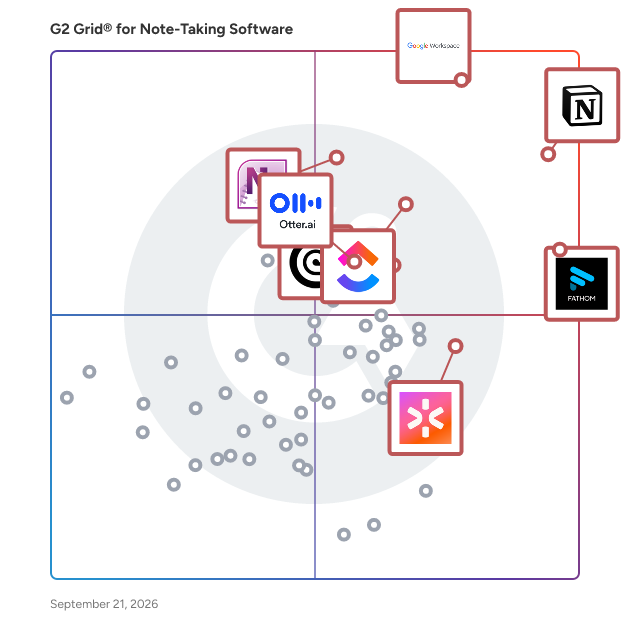
G2 Grid® for Note-Taking Software

G2 Grid® for Note-Taking Software plotting products by satisfaction and market presence

Highlighted products: Notion, Google Workspace, Fathom, ClickUp, Microsoft OneNote, Rev, CoRecruit (formerly Quil), and Otter.ai.

Underlying data: [Grid® JSON](https://www.g2.com/categories/note-taking-software/grids.json?focus%5B%5D=notion&focus%5B%5D=google-workspace&focus%5B%5D=fathom-video&focus%5B%5D=clickup&focus%5B%5D=microsoft-onenote&focus%5B%5D=rev&focus%5B%5D=corecruit-formerly-quil&focus%5B%5D=otter-ai)

Notion

Notion is the connected AI workspace that brings all work together in a tool that adapts to every team—with AI to find answers and automate busywork. It's one place for search, manage projects, capture notes and company knowledge, and collaborate as a team. Millions love Notion because it increases productivity, reduces tools & costs, and empowers everyone to do their best work. Unlike fragmented, rigid software, Notion connects work into one tool that’s customizable and people love to use. Now you have beautiful tools to build your life’s work.

Average Rating: 4.6/5.0

Total Reviews: 12,517

How Do G2 Users Rate Notion?

  • Has the product been a good partner in doing business?: 8.8/10 (Category avg: 9.1/10)
  • Quality of Support: 8.4/10 (Category avg: 8.5/10)
  • Ease of Use: 8.3/10 (Category avg: 8.9/10)

Who Is the Company Behind Notion?

  • Seller: Notion
  • Company Website:
  • Year Founded: 2016
  • HQ Location: San Francisco, California
  • Twitter: @NotionHQ
    518,653 Twitter followers
  • LinkedIn® Page: www.linkedin.com
    7,360 employees on LinkedIn®

Who Uses This Product?

  • Who Uses This: Software Engineer, Student
  • Top Industries: Computer Software, Information Technology and Services
  • Company Size: 62% Small, 24% Medium

What Do G2 Reviewers Say About Notion?

AI-generated summary from verified user reviews

Pros
  • Users find Notion's ease of use incredibly helpful, appreciating its intuitive design and straightforward collaboration features.
  • Users love Notion’s flexible organization features, making it easy to manage projects, notes, and collaborate effectively.
  • Users love the integrated AI features of Notion, enhancing productivity and simplifying content management effortlessly.
  • Users find Notion extremely useful for managing tasks, enhancing collaboration, and streamlining documentation processes effectively.
  • Users love how Notion offers powerful organization features that greatly enhance productivity and streamline workflow management.
Cons
  • Users find the learning curve steep in Notion, leading to frustration with editing and organization.
  • Users find Notion's limited features frustrating, noting a lack of depth and missing functionalities like recording and free templates.
  • Users find the learning difficulty creates navigation challenges, making formatting and advanced features less intuitive.
  • Users note several missing features in Notion, which hinder optimization and streamline their workflow effectively.
  • Users express frustration with usage limitations in Notion, highlighting challenges in setup, organization, and document drafting.

What Are Recent G2 Reviews of Notion?

Google Workspace

Google Workspace is a comprehensive productivity and collaboration solution designed to help users streamline their work processes by integrating essential tools such as email, chat, file storage, and video conferencing into a unified platform. This suite of applications is tailored for businesses, educational institutions, and individuals looking to enhance their communication and collaboration efforts, all while leveraging the power of Google’s artificial intelligence. Targeted at a diverse audience, Google Workspace caters to teams of all sizes, from small startups to large enterprises. It is particularly beneficial for remote teams and organizations that prioritize collaboration across different locations. The platform supports various use cases, including project management, team communication, document sharing, and virtual meetings, making it an ideal choice for professionals who need to work together efficiently, regardless of their physical location. One of the key features of Google Workspace is its seamless integration of applications such as Gmail, Google Meet, Google Drive, and Google Docs. This interconnectedness allows users to switch effortlessly between tasks, whether they are sending emails, participating in video calls, or collaborating on documents in real-time. The AI capabilities embedded within the platform enhance user experience by providing smart suggestions, automating repetitive tasks, and improving search functionalities, ultimately saving time and increasing productivity. Additionally, Google Workspace prioritizes security and data protection, offering robust features such as two-factor authentication, advanced phishing protection, and customizable access controls. These measures ensure that sensitive information remains secure while allowing teams to collaborate freely. The platform also supports third-party integrations, enabling users to connect their favorite applications and tools, further enhancing their workflow. In summary, Google Workspace stands out in the productivity software category by providing a holistic approach to collaboration. Its user-friendly interface, combined with powerful AI-driven features and strong security protocols, makes it a valuable tool for anyone looking to improve their work processes and foster effective teamwork. Whether for managing projects, communicating with colleagues, or sharing files, Google Workspace is designed to meet the diverse needs of its users, making it an essential resource in today’s digital workplace.

Average Rating: 4.6/5.0

Total Reviews: 45,693

How Do G2 Users Rate Google Workspace?

  • Has the product been a good partner in doing business?: 9.0/10 (Category avg: 9.1/10)
  • Quality of Support: 8.6/10 (Category avg: 8.5/10)
  • Ease of Use: 9.3/10 (Category avg: 8.9/10)

Who Is the Company Behind Google Workspace?

  • Seller: Google
  • Year Founded: 1998
  • HQ Location: Mountain View, CA
  • Twitter: @google
    31,899,995 Twitter followers
  • LinkedIn® Page: www.linkedin.com
    301,144 employees on LinkedIn®
  • Ownership: NASDAQ:GOOG

Who Uses This Product?

  • Who Uses This: Student, Teacher
  • Top Industries: Information Technology and Services, Education Management
  • Company Size: 46% Small, 35% Medium

What Do G2 Reviewers Say About Google Workspace?

AI-generated summary from verified user reviews

Pros
  • Users appreciate the ease of use in Google Workspace, facilitating smooth and efficient workflow management.
  • Users love the seamless team collaboration in Google Workspace, enhancing communication and boosting productivity effortlessly.
  • Users love the seamless integrations in Google Workspace, enhancing efficiency with easy access to tools and scheduling.
  • Users praise the ease of use and integration in Google Workspace, enhancing productivity and collaboration seamlessly.
  • Users appreciate the seamless Google integration of Workspace, enhancing collaboration and efficiency across all tools.
Cons
  • Users face missing features in Google Workspace, such as limited offline capabilities and restrictions on accessing certain functionalities.
  • Users find the limited features of Google Workspace unnecessary for smaller teams, lacking essential tools for their needs.
  • Users find Google Workspace lacking features compared to other platforms, impacting effective campaign management and data handling.
  • Users find internet dependency challenging, as offline functionality is limited and issues with quality can arise.
  • Users find limited customization options in Google Workspace, particularly for calendars and forms, restricting flexibility and creativity.

What Are Recent G2 Reviews of Google Workspace?

What Are G2 Users Discussing About Google Workspace?

Fathom

Fathom is the #1-rated AI meeting partner that captures what matters and turns every conversation into clear, actionable outcomes. It surfaces decisions, makes every meeting searchable, and syncs insights directly into CRM and productivity tools – eliminating manual work. Named to G2’s 2026 Best Software Awards Top 100, and recognized by HubSpot as its 2025 Most Used App of the Year, Fathom is trusted by hundreds of thousands of companies worldwide to help individuals stay focused, teams stay aligned, and organizations move faster.

Average Rating: 5.0/5.0

Total Reviews: 7,030

How Do G2 Users Rate Fathom?

  • Has the product been a good partner in doing business?: 9.7/10 (Category avg: 9.1/10)
  • Quality of Support: 9.7/10 (Category avg: 8.5/10)
  • Ease of Use: 9.7/10 (Category avg: 8.9/10)

Who Is the Company Behind Fathom?

  • Seller: Fathom
  • Company Website:
  • Year Founded: 2020
  • HQ Location: San Francisco, CA
  • Twitter: @fathomdotai
    2,469 Twitter followers
  • LinkedIn® Page: www.linkedin.com
    183 employees on LinkedIn®

Who Uses This Product?

  • Who Uses This: CEO, Founder
  • Top Industries: Marketing and Advertising, Computer Software
  • Company Size: 78% Small, 20% Medium

What Do G2 Reviewers Say About Fathom?

AI-generated summary from verified user reviews

Pros
  • Users praise Fathom for its incredible accuracy in note-taking, enhancing engagement and efficiency during meetings.
  • Users appreciate the helpfulness of Fathom, enabling productive meetings with automatic note-taking and efficient task assignments.
  • Users appreciate the ease of use of Fathom, enjoying its intuitive interface and efficient navigation for productivity.
  • Users love the simple setup and seamless integration of Fathom across various meeting platforms, enhancing productivity.
  • Users value the accuracy and efficiency of Fathom's note-taking, enhancing focus during meetings and facilitating recaps.
Cons
  • Users face challenges with meeting report accuracy, along with limitations on advanced features in the free version.
  • Users experience recording issues with Fathom, including inaccurate transcripts and unnecessary constant recording.
  • Users find the missing features in Fathom hinder usability, particularly concerning call attribution and transcript visibility.
  • Users express frustration with constant recording limitations that affect meeting setup and participation flexibility.
  • Users report AI inaccuracy with Fathom, noting frequent misinterpretations of spoken communication and insufficient sales-specific features.

What Are Recent G2 Reviews of Fathom?

ClickUp

ClickUp is the world’s first Converged AI Workspace, bringing together all work apps, data, and workflows. ClickUp eliminates all forms of work sprawl to provide 100% context and a single place for humans and agents to work, together. Trusted by more than 20 million users worldwide, ClickUp is on a mission to maximize human productivity.

Average Rating: 4.6/5.0

Total Reviews: 13,576

How Do G2 Users Rate ClickUp?

  • Has the product been a good partner in doing business?: 9.0/10 (Category avg: 9.1/10)
  • Quality of Support: 8.8/10 (Category avg: 8.5/10)
  • Ease of Use: 8.5/10 (Category avg: 8.9/10)

Who Is the Company Behind ClickUp?

  • Seller: ClickUp
  • Company Website:
  • Year Founded: 2017
  • HQ Location: San Diego, California
  • Twitter: @clickup
    69,539 Twitter followers
  • LinkedIn® Page: www.linkedin.com
    7,082 employees on LinkedIn®

Who Uses This Product?

  • Who Uses This: CEO, Project Manager
  • Top Industries: Marketing and Advertising, Computer Software
  • Company Size: 77% Small, 19% Medium

What Do G2 Reviewers Say About ClickUp?

AI-generated summary from verified user reviews

Pros
  • Users find ClickUp to be incredibly easy and simple to use, streamlining tasks and enhancing productivity effortlessly.
  • Users value the flexibility in task management, enabling customized workflows for personal, team, and project tasks.
  • Users appreciate the abundance of features in ClickUp, making task management seamless and efficient.
  • Users appreciate ClickUp for its streamlined management tasks, enabling better organization and efficiency in project handling.
  • Users appreciate ClickUp for its streamlined organization, making team management and project tracking efficient and effortless.
Cons
  • Users find the missing features in ClickUp frustrating, particularly the lack of basic tools like subfolders.
  • Users experience a learning curve with ClickUp, finding the plethora of features daunting at first.
  • Users note limited features in ClickUp, with missing basic options and a complex setup process hindering ease of use.
  • Users find ClickUp not intuitive, feeling overwhelmed by its many features and struggling with initial setup and performance.
  • Users experience slow loading times in ClickUp, which affects their productivity when managing multiple tasks and fields.

What Are Recent G2 Reviews of ClickUp?

What Are G2 Users Discussing About ClickUp?

CoRecruit (formerly Quil)

CoRecruit is an AI recruiting platform designed to eliminate the "admin tax" for high-performing agencies. Built for mid-market and enterprise search firms, CoRecruit automatically transforms every interview into fully updated ATS records and polished, client-ready candidate submissions. Recruiting at scale fails when critical information lives only in a recruiter’s head. CoRecruit captures the nuance of every conversation—whether it happens over a cell phone call, VoIP, video conference, or in-person—and turns it into structured, actionable data. By automating the transition from "interview" to "submission," CoRecruit allows teams to move candidates faster and increase placement volume without adding headcount. On average, recruiting teams using CoRecruit reclaim 8+ hours per week per recruiter, ensuring that data stays consistent and high-value talent never falls through the cracks. Key Features and Functionality Omnichannel Interview Capture: The only platform that supports the full recruiter workflow: mobile calls, VoIP (RingCentral, Aircall), video (Zoom, Teams, Meet), and even in-person meetings. Deep ATS/CRM Synchronization: Bi-directional integration with Bullhorn, JobAdder, Loxo, Crelate, and more. Notes, candidate attributes, and statuses update automatically—no manual data entry required. Automated Candidate Submittals: Generate "client-ready" candidate summaries and branded write-ups instantly. Reduce client pushback by delivering consistent, professional submissions every time. Structured Team Data: Standardize interviews, intake calls, and BD meetings with reusable templates. Ensure every recruiter on the team captures the exact data points required for your specific vertical. CoRecruit Intelligence: A powerful search layer across your entire firm’s conversations. Instantly surface candidate insights or specific interview details across thousands of past meetings. Leadership Coaching Tools: Gain visibility into the "black box" of interviews. Leaders can review call context to provide targeted coaching and improve team-wide closing rates.

Average Rating: 4.7/5.0

Total Reviews: 486

How Do G2 Users Rate CoRecruit (formerly Quil)?

  • Has the product been a good partner in doing business?: 9.2/10 (Category avg: 9.1/10)
  • Quality of Support: 9.5/10 (Category avg: 8.5/10)
  • Ease of Use: 9.0/10 (Category avg: 8.9/10)

Who Is the Company Behind CoRecruit (formerly Quil)?

Who Uses This Product?

  • Who Uses This: Recruitment Consultant, Managing Director
  • Top Industries: Staffing and Recruiting, Consulting
  • Company Size: 86% Small, 6% Medium

What Do G2 Reviewers Say About CoRecruit (formerly Quil)?

AI-generated summary from verified user reviews

Pros
  • Users appreciate the ease of use of CoRecruit, saving time and enhancing focus during interviews.
  • Users find that CoRecruit saves valuable time, making their recruitment processes more efficient and organized.
  • Users love the time-saving note-taking capabilities of CoRecruit, enhancing focus during conversations and improving workflow efficiency.
  • Users value the amazing customer support of CoRecruit, enhancing efficiency and saving valuable time for recruiters.
  • Users value the quick response times and seamless integration of CoRecruit, enhancing their overall productivity and engagement.
Cons
  • Users face connectivity issues with CoRecruit, experiencing dropped calls and unreliable performance on the mobile app.
  • Users experience bugs and integration issues that disrupt call functionality and affect the AI notetaker's quality.
  • Users experience integration issues that can delay setup and affect overall functionality with CoRecruit.
  • Users experience inaccuracy in transcription with CoRecruit, necessitating review before sharing notes to avoid mistakes.
  • Users experience inefficiency with CoRecruit, facing frustrating setup times and awkward call integration issues that disrupt workflow.

What Are Recent G2 Reviews of CoRecruit (formerly Quil)?

Otter.ai

Otter.ai is the leading AI Meeting Assistant that helps sales, marketing, product, finance, operations design, customer success, customer support and cross functional teams automatically record, transcribe, and summarize all their meetings, making it easy to recall action items and easily share key insights. Otter integrates with leading video conference platforms, including Zoom, Microsoft Teams, and Google Meet, to automatically join and generate meeting notes. Otter AI Chat is like having ChatGPT for your meetings, it allows meeting participants to ask Otter questions about the meeting, including “what did I miss”, or “write a follow-up email to all participants”. Otter offers iOS and Android Apps to make it easy to record and transcribe in-person meetings. Otter also allows users to import and transcribe pre-recorded audio and video files. Designed specifically for the workflow of sales teams, OtterPilot for Sales shortens sales cycles by capturing critical information in real-time and automating follow-up emails and sentiment analysis. OtterPilot for Sales integrates with Salesforce and Hubspot to help automate call reporting. Improve win rates by sharing best practices and coaching reps based on data-driven insights. Boost productivity and free up time by automating tedious tasks like note-taking and data entry so SDRs, Sale Reps, Account Executives, Customer Success Managers, Sales Leaders and CROs can focus all of their attention on the customer and closing more deals. Otter.ai has over 15 million registered users and has transcribed over a billion meetings. Otter was named a top AI App by The Wall Street Journal in June 2023.

Average Rating: 4.4/5.0

Total Reviews: 499

How Do G2 Users Rate Otter.ai?

  • Has the product been a good partner in doing business?: 8.5/10 (Category avg: 9.1/10)
  • Quality of Support: 8.4/10 (Category avg: 8.5/10)
  • Ease of Use: 9.0/10 (Category avg: 8.9/10)

Who Is the Company Behind Otter.ai?

  • Seller: Otter.ai
  • Company Website:
  • HQ Location: Mountain View, California
  • Twitter: @otter_ai
    17,074 Twitter followers
  • LinkedIn® Page: www.linkedin.com
    298 employees on LinkedIn®

Who Uses This Product?

  • Who Uses This: CEO, Account Executive
  • Top Industries: Computer Software, Marketing and Advertising
  • Company Size: 70% Small, 20% Medium

What Do G2 Reviewers Say About Otter.ai?

AI-generated summary from verified user reviews

Pros
  • Users appreciate the ease of use of Otter.ai, finding it simple to transcribe and summarize conversations.
  • Users appreciate the helpfulness of Otter.ai, streamlining note-taking and enhancing meeting summaries for easy reference.
  • Users appreciate the high accuracy of Otter.ai's transcripts, ensuring reliable and precise speech-to-text conversions.
  • Users find Otter.ai's efficient transcription invaluable for summarizing meetings and accurately capturing speaker discussions.
  • Users value the effective meeting organization by Otter.ai, relishing easy access to notes and key action points.
Cons
  • Users often face recording issues with Otter.ai, leading to confusion and manual recording requirements for accuracy.
  • Users experience accuracy issues with heavy accents, background noise, and overlapping speech, affecting transcription quality.
  • Users report AI inaccuracy in transcriptions with accents, simultaneous speakers, and challenging terminology impacting their experience.
  • Users experience accuracy issues with Otter.ai, especially with accents, background noise, and multiple speakers.
  • Users find that Otter.ai has missing features in post-meeting summaries and speaker identification, affecting usability and efficiency.

What Are Recent G2 Reviews of Otter.ai?

What Are G2 Users Discussing About Otter.ai?

Goodnotes

Goodnotes was founded back in 2013 and currently has offices in Hong Kong and London with 200+ employees from 30+ nationalities. Our app offers industry-first digital paper, powered by AI, and with over 26 million monthly active users and average rating of 4.75/5 from 1.8 million user reviews, Goodnotes is the No. 1 App for Productivity on the App Store. We won Apple’s iPad App of the Year for 2022. Goodnotes 6 is a powerful note-taking app designed to provide a seamless and natural handwriting experience on digital paper. The comprehensive solution combines the simplicity of handwriting, the power of digital tools, and advanced AI features to enhance productivity, planning, organization and live collaboration. Whether you're in a meeting, on a call, or brainstorming, Goodnotes keeps your ideas organized and accessible. Key Features: - Seamless Handwriting Experience - PDF Document Annotation - Sharing & Collaboration - Advanced Spell-check & Word Prediction - Shape Recognition - Voice Recording - Sync Across Devices Enjoy seamless digital handwriting with real-time spell-check and intelligent word prediction, helping you maintain both accuracy and speed. Import and annotate any document, including PDFs and images, highlight, underline, create, save and reuse your custom designs, graphics and elements, take notes directly within the documents and share with your team to collaborate on in real time. Sync your notes across all your devices effortlessly, ensuring you have access to your important information anytime, anywhere. Effortlessly draw and create perfect shapes with our intelligent shape recognition technology, ensuring your diagrams and illustrations are precise and presentation-ready.

Average Rating: 4.7/5.0

Total Reviews: 119

How Do G2 Users Rate Goodnotes?

  • Has the product been a good partner in doing business?: 9.0/10 (Category avg: 9.1/10)
  • Quality of Support: 8.6/10 (Category avg: 8.5/10)
  • Ease of Use: 9.2/10 (Category avg: 8.9/10)

Who Is the Company Behind Goodnotes?

  • Seller: Goodnotes
  • Company Website:
  • Year Founded: 2011
  • HQ Location: London, United Kingdom
  • Twitter: @GoodnotesApp
    47,490 Twitter followers
  • LinkedIn® Page: www.linkedin.com
    314 employees on LinkedIn®

Who Uses This Product?

  • Top Industries: Computer Software, Higher Education
  • Company Size: 67% Small, 13% Medium

What Do G2 Reviewers Say About Goodnotes?

AI-generated summary from verified user reviews

Pros
  • Users find GoodNotes to be extremely user-friendly, facilitating easy note-taking and seamless organization of materials.
  • Users value the easy organization features of Goodnotes, allowing seamless management of notes and documents across devices.
  • Users find the easy setup of Goodnotes straightforward, enhancing their notetaking experience without complications.
  • Users love GoodNotes for its user-friendly design, seamless integration of handwritten and typed notes, and flexible features.
  • Users praise Goodnotes for its helpful and interactive note-taking features, enhancing organization and efficiency in their tasks.
Cons
  • Users experience slow performance with large notebooks and image-heavy files, causing noticeable lag during use.
  • Users face connectivity issues with Goodnotes, experiencing unreliable sync and a lack of real-time updates.
  • Users experience significant performance issues with Goodnotes, including lag, sync delays, and memory consumption in heavier tasks.
  • Users report technical issues with Goodnotes, including performance lag, sync problems, and unreliable cloud features.
  • Users find the expensive pricing of Goodnotes a barrier, especially for those needing cross-platform access.

What Are Recent G2 Reviews of Goodnotes?

What Are G2 Users Discussing About Goodnotes?

Claap

Claap records every sales conversation and automatically structures it into rich, labeled data - speakers, objections, pain points, next steps, and more. That structured context becomes the fuel for AI agents to take over the rest: updating your CRM, drafting follow-up emails and sales decks, surfacing coaching insights, and triggering workflows across your stack. Claap delivers agent-ready conversation intelligence: pre-labeled, structured for retrieval, and open to any AI agent via MCP (Model Context Protocol). Video calls, phone calls, all captured in one platform without bots or friction. On average, sales reps save 30 minutes after each meeting with workflow automations, and revenue leaders increase their win rate up to 30% with deal insights and AI-assisted coaching. Claap is part of the lemlist group, and trusted by 1,000+ companies including Revolut, Qonto, 360Learning, Figures, and OpenClassrooms.

Average Rating: 4.6/5.0

Total Reviews: 474

How Do G2 Users Rate Claap?

  • Has the product been a good partner in doing business?: 9.0/10 (Category avg: 9.1/10)
  • Quality of Support: 9.1/10 (Category avg: 8.5/10)
  • Ease of Use: 9.4/10 (Category avg: 8.9/10)

Who Is the Company Behind Claap?

  • Seller: Claap
  • Year Founded: 2021
  • HQ Location: Hempstead, New York
  • Twitter: @claap_io
    335 Twitter followers
  • LinkedIn® Page: www.linkedin.com
    49 employees on LinkedIn®

Who Uses This Product?

  • Who Uses This: Software Engineer, Manager
  • Top Industries: Information Technology and Services, Computer Software
  • Company Size: 44% Small, 38% Medium

What Do G2 Reviewers Say About Claap?

AI-generated summary from verified user reviews

Pros
  • Users value the effortless usability of Claap, allowing easy recording and sharing of videos without complications.
  • Users value Claap for its time-saving capabilities, enabling efficient communication and reducing unnecessary meetings.
  • Users appreciate the easy recording feature of Claap, enabling seamless communication and efficient collaboration without constant meetings.
  • Users appreciate the simplicity and reliability of Claap, enhancing communication and saving time with easy integration.
  • Users enjoy the efficiency of Claap, streamlining communication and automating tasks for a seamless workflow.
Cons
  • Users frequently experience slow performance with Claap, affecting video upload times and overall usability.
  • Users frequently experience slow loading times for videos and interface, which hampers their overall experience with Claap.
  • Users note recording limitations with processing delays and speaker identification issues, impacting efficiency in summary sharing.
  • Users face recording issues with Claap, including slow processing times and glitches in integrations, impacting usability.
  • Users often experience delays in video uploads and processing, impacting efficiency during longer recordings.

What Are Recent G2 Reviews of Claap?

Evernote

Evernote helps you capture and manage ideas, projects, memories, and to-do lists, so nothing gets missed. Write notes, attach documents, scan images, take voice memos or clip from the web. Organize everything from big projects to personal moments in a single place, accessible on your computer, tablet, or phone—even when offline. Quickly find the information you need with a powerful search that recognizes words in handwriting, images, and attachments. With Evernote, you can focus on what matters.

Average Rating: 4.4/5.0

Total Reviews: 2,019

How Do G2 Users Rate Evernote?

  • Has the product been a good partner in doing business?: 8.7/10 (Category avg: 9.1/10)
  • Quality of Support: 8.5/10 (Category avg: 8.5/10)
  • Ease of Use: 8.9/10 (Category avg: 8.9/10)

Who Is the Company Behind Evernote?

  • Seller: Evernote
  • Year Founded: 2008
  • HQ Location: Redwood City, CA
  • Twitter: @evernote
    373,769 Twitter followers
  • LinkedIn® Page: www.linkedin.com
    176 employees on LinkedIn®

Who Uses This Product?

  • Who Uses This: Owner, Project Manager
  • Top Industries: Computer Software, Information Technology and Services
  • Company Size: 47% Small, 29% Medium

What Do G2 Reviewers Say About Evernote?

AI-generated summary from verified user reviews

Pros
  • Users appreciate the ease of use of Evernote, making note-taking and organization effortless across devices.
  • Users value Evernote for its quick and reliable note-taking, enjoying seamless syncing and user-friendly organization.
  • Users appreciate the organization features of Evernote, enhancing their productivity and note management across devices.
  • Users love the customization options in Evernote, allowing personalized organization and unique task displays tailored to their needs.
  • Users love the easy setup of Evernote, making it simple to start organizing notes quickly.
Cons
  • Users find the tool limitations of Evernote frustrating, especially with costly upgrades and device restrictions.
  • Users face connectivity issues with Evernote, making data migration and syncing frustrating and complex.
  • Users are frustrated by usage limitations in Evernote, particularly with unclear quotas and insufficient storage in the free version.
  • Users find data migration and interoperability challenging, feeling somewhat trapped and unable to easily transfer their information.
  • Users experience integration issues with Evernote, finding data migration to other apps like Notion frustrating and problematic.

What Are Recent G2 Reviews of Evernote?

What Are G2 Users Discussing About Evernote?

Fellow

Fellow is the only AI meeting assistant built from the ground up with privacy and security at its core. With both bot and botless recording options, Fellow gives teams full control over how meetings are captured — whether through a visible meeting bot or seamless, native recording with no bot required. Every recording, transcript, and summary is protected by enterprise-grade privacy and access controls, ensuring only the right people see the right information. Fellow delivers the most accurate AI meeting notes, transcripts, and summaries — and with Ask Fellow, you can instantly search across all your past meetings to surface key decisions, action items, and context without digging through notes. Leaders at Shopify, Aledade, Vidyard, and HubSpot trust Fellow to save their teams time and money by revolutionizing the way they meet.

Average Rating: 4.7/5.0

Total Reviews: 2,427

How Do G2 Users Rate Fellow?

  • Has the product been a good partner in doing business?: 9.4/10 (Category avg: 9.1/10)
  • Quality of Support: 9.3/10 (Category avg: 8.5/10)
  • Ease of Use: 9.0/10 (Category avg: 8.9/10)

Who Is the Company Behind Fellow?

Who Uses This Product?

  • Who Uses This: Team Lead, Product Manager
  • Top Industries: Computer Software, Information Technology and Services
  • Company Size: 38% Medium, 33% Small

What Do G2 Reviewers Say About Fellow?

AI-generated summary from verified user reviews

Pros
  • Users value the ease of use of Fellow, benefiting from its seamless organization and integration features for meetings.
  • Users appreciate the organized meeting notes feature of Fellow, enhancing collaboration and consistency during discussions.
  • Users appreciate the easy note-taking and organizational features of Fellow, enhancing their workflow and team collaboration.
  • Users find the action item tracking in Fellow invaluable for organizing tasks and enhancing meeting effectiveness.
  • Users value the organization features of Fellow, effectively managing meeting notes and action items in one place.
Cons
  • Users experience joining issues with Fellow and wish for compatibility with more meeting platforms.
  • Users find that action item management is cumbersome, leading to overlooked tasks and inefficiencies in tracking responsibilities.
  • Users face issues with calendar integration, limiting functionality and causing missed meetings across different platforms.
  • Users find the template issues frustrating, citing lack of intuitiveness and difficulty in customization for meetings.
  • Users face integration issues with Fellow, limiting its functionality across various meeting platforms and tools.

What Are Recent G2 Reviews of Fellow?

What Are G2 Users Discussing About Fellow?

Lark

Built by ByteDance, Lark is an enterprise AI workspace designed for seamless human-agent collaboration. It unifies teams, communication, knowledge, and business workflows in one connected environment with an open architecture for AI models and agents. By bringing work into one place rather than scattering it across separate apps, Lark gives AI complete, real-time context and the native ability to act across the entire business. Today, organizations in more than 190 markets use Lark to turn AI into measurable business value.

Average Rating: 4.6/5.0

Total Reviews: 178

How Do G2 Users Rate Lark?

  • Has the product been a good partner in doing business?: 9.5/10 (Category avg: 9.1/10)
  • Quality of Support: 9.0/10 (Category avg: 8.5/10)
  • Ease of Use: 9.1/10 (Category avg: 8.9/10)

Who Is the Company Behind Lark?

  • Seller: Lark Technologies
  • Year Founded: 2003
  • HQ Location: Singapore, Singapore
  • Twitter: @lark
    471 Twitter followers
  • LinkedIn® Page: www.linkedin.com
    220 employees on LinkedIn®

Who Uses This Product?

  • Top Industries: Information Technology and Services, Computer Software
  • Company Size: 48% Small, 31% Medium

What Do G2 Reviewers Say About Lark?

AI-generated summary from verified user reviews

Pros
  • Users appreciate the ease of use of Lark, enjoying seamless collaboration and efficient navigation across its features.
  • Users love Lark for its user-friendly features, including real-time collaboration, integrated tools, and easy navigation.
  • Users value the seamless team collaboration offered by Lark, integrating communication, tasks, and documents in one platform.
  • Users admire Lark's innovative communication tools, enhancing collaboration with real-time features and seamless integration.
  • Users love Lark for its user-friendly collaboration, seamlessly integrating meetings, chat, and document sharing in one app.
Cons
  • Users face a notable learning curve with Lark, as navigating features can be confusing at first.
  • Users face integration issues that interrupt workflows and complicate the use of Lark with other platforms.
  • Users report slow loading issues with Lark, causing frustration and inefficiencies during their work experience.
  • Users express frustration over limited customization, affecting ease of use and overall experience with Lark.
  • Users report login issues with Lark, including confusion during setup and occasional bugs affecting accessibility.

What Are Recent G2 Reviews of Lark?

What Are G2 Users Discussing About Lark?

Zoho Mail

What does Zoho Mail offer? With 16 million happy users and more than a decade of experience, Zoho Mail is packed with useful features. It nails down the basics and also caters to demanding businesses. Below are some of the bells and whistles that comprise Zoho Mail. ☑️ Custom domain as unique as you Give your brand or business that authentic exterior and increase brand awareness with the option to create a custom domain for your business email. Zoho Mail lets you purchase your own domain and set it up, if you don't own one already. ☑️ Supercharged email with a suite of apps Crush emails, keep an eye on your calendar, create contextual notes from emails, tick off your to-dos, and more with the suite of apps Zoho Mail comes with. These apps are tightly integrated and talk well with each other so that your workflow is frictionless. ☑️ A truck-load of integrations Zoho Mail cooperates with a host of other third-party applications. Now you can get your project details from Asana, jump into a Zoom meeting, or encrypt your emails using PGP, all within your Zoho Mail inbox. These integrations stay right inside your inbox so that you can quickly access them. ☑️ Take your collaboration up a notch Zoho Mail has a nifty feature called Streams that adds a flavor of social media to your emails. Everyone can come together, ideate, and execute a plan without the hassle of unending email threads. Email delegation ☑️ Delegate and conquer your day with the email delegation feature in Zoho Mail. You can assign people to take care of your inbox while maintaining control by giving role-based access to ensure security and privacy. ☑️ AI assistance Everyone needs a helping hand in their life and Zia does just that. Zia with Zoho Mail is your AI version of a knight in shining armor. With Zia by your side, email efficiency can vastly improve because it can help you with drafting responses and summarizing messages. ☑️ Robust security With great power comes great responsibility. This is where Zoho Mail takes much pride in following best-in-class security, compliance, and privacy practices. These make sure that your emailing experience is secure and your data remains yours truly. ✔️Other features ✔️Admin control ✔️Easy migration ✔️Offline emailing ✔️Native desktop and mobile apps ✔️24/7 support With a privacy-first approach, Zoho Mail can transform the way you go about your emails. Get started with Zoho Mail now!

Average Rating: 4.4/5.0

Total Reviews: 699

How Do G2 Users Rate Zoho Mail?

  • Has the product been a good partner in doing business?: 8.8/10 (Category avg: 9.1/10)
  • Quality of Support: 8.4/10 (Category avg: 8.5/10)
  • Ease of Use: 9.0/10 (Category avg: 8.9/10)

Who Is the Company Behind Zoho Mail?

  • Seller: Zoho
  • Year Founded: 1996
  • HQ Location: Austin, TX
  • Twitter: @Zoho
    137,880 Twitter followers
  • LinkedIn® Page: www.linkedin.com
    30,913 employees on LinkedIn®
  • Phone: +1 (888) 900-9646

Who Uses This Product?

  • Who Uses This: Founder, CEO
  • Top Industries: Information Technology and Services, Marketing and Advertising
  • Company Size: 75% Small, 21% Medium

What Do G2 Reviewers Say About Zoho Mail?

AI-generated summary from verified user reviews

Pros
  • Users appreciate the clean and easy-to-use interface of Zoho Mail, enhancing their daily work efficiency.
  • Users appreciate the clean and distraction-free email management of Zoho Mail, enhancing their productivity and professionalism.
  • Users value the seamless integrations of Zoho Mail with other applications, enhancing their overall communication experience.
  • Users appreciate the clean and intuitive interface of Zoho Mail, finding it fast and easy to use.
  • Users find Zoho Mail's intuitive interface enhances productivity and makes email management effortless and enjoyable.
Cons
  • Users experience slow performance, particularly with syncing emails and using the mobile app, affecting overall efficiency.
  • Users note that slow loading times can affect syncing and overall experience, especially on mobile devices.
  • Users experience sync delays and limitations on attachment sizes, making the email process less efficient and cumbersome.
  • Users express concern about limited storage in Zoho Mail's free plan, impacting their ability to manage emails effectively.
  • Users find the learning curve challenging, especially with navigation and initial configuration of Zoho Mail.

What Are Recent G2 Reviews of Zoho Mail?

What Are G2 Users Discussing About Zoho Mail?

Grain

Grain is an AI-powered meeting recording tool built to help customer-focused teams understand, organize, and advocate for the needs of their customers. It connects seamlessly to platforms like Zoom, Google Meet, and Microsoft Teams to automate note-taking, record-keeping, and insight capture from every customer conversation. Grain ensures that no important detail, request, or moment of insight is ever lost, helping teams stay aligned and data-driven across every interaction. Conversation Intelligence Grain was designed with mid-market sales teams in mind. Transform everyday customer conversations into actionable revenue drivers by automatically identifying coaching opportunities, capturing key insights, and syncing them directly to your CRM to keep deals moving forward. With built-in automation and smart integration, Grain is free to start, simple to deploy, and cost-effective to scale across your entire organization. Superpower Your AEs Empower your account executives with AI-generated insights that drive results. Automatically update CRM properties, detect winning deal patterns using the “Deals” feature, and close more opportunities with meaningful, contextual data. Generate personalized follow-up emails in one click using meeting context, and instantly sync summaries and conversation details across your entire CRM ecosystem. Change Customer Success Send AI-driven customer feedback directly to sales, product, or leadership with a single click. Use Grain features like “Trackers” and “Ask,” along with MCP to highlight, share, and organize customer sentiment, requests, and milestones, ensuring teams stay aligned on what customers truly care about. Build Better Products Transform real customer conversations into context-informed deliverables including product briefs, roadmaps, and sprint plans. Keep teams connected with automatic Slack updates summarizing insights, next steps, and decisions. Grain helps you build better products and stronger customer relationships, faster.

Average Rating: 4.7/5.0

Total Reviews: 308

How Do G2 Users Rate Grain?

  • Has the product been a good partner in doing business?: 9.6/10 (Category avg: 9.1/10)
  • Quality of Support: 9.1/10 (Category avg: 8.5/10)
  • Ease of Use: 9.4/10 (Category avg: 8.9/10)

Who Is the Company Behind Grain?

  • Seller: Grain Intelligence
  • Year Founded: 2018
  • HQ Location: San Francisco, US
  • Twitter: @grainhq
    1,984 Twitter followers
  • LinkedIn® Page: www.linkedin.com
    97 employees on LinkedIn®

Who Uses This Product?

  • Who Uses This: Student, CEO
  • Top Industries: Computer Software, Marketing and Advertising
  • Company Size: 77% Small, 20% Medium

What Do G2 Reviewers Say About Grain?

AI-generated summary from verified user reviews

Pros
  • Users appreciate the high accuracy of Grain's transcriptions, which significantly enhance meeting documentation and follow-up tasks.
  • Users value the seamless CRM integration of Grain, significantly enhancing productivity and saving time in meetings.
  • Users love the customizable templates of Grain, enhancing adaptability and improving organization in client interactions.
  • Users praise Grain for its excellent note-taking abilities, making meetings more efficient and driving accountability effectively.
  • Users value the s seamless integration with HubSpot, greatly enhancing workflow efficiency and saving time on sales calls.
Cons
  • Users report integration issues with Grain, affecting connectivity with other tools like Productboard and CRM systems.
  • Users find the AI inaccuracy in Grain frustrating, limiting their ability to efficiently integrate outputs into projects.
  • Users feel the AI tooling could be better in Grain, limiting integration with other tools and functionality.
  • Users experience call issues that hinder distinguishing between meetings and calls, complicating the user experience.
  • Users find Grain to be expensive, especially for smaller teams needing additional access for viewing and highlights.

What Are Recent G2 Reviews of Grain?

What Are G2 Users Discussing About Grain?

Basecamp

Basecamp is the #1 collaboration tool for hundreds of thousands of teams worldwide. Teams use Basecamp to work on projects, communicate, and get work organized every day. Whether with teammates across the room, or clients across the world, Basecamp is the best tool to get things done. Basecamp makes it easy for teams to see what everyone is working on, collaborate on documents, schedule projects, and more without meetings or emails. Not convinced? Read our thousands of reviews and sign up for free.

Average Rating: 4.1/5.0

Total Reviews: 5,358

G2 Deal: Get 10% off Basecamp Pro Unlimited

Basecamp Pro Unlimited gets you unlimited users, 10x more storage, priority support, personal onboarding and more for one flat fee. Discount available for a limited time only.

Price: ~~$299~~ → $269

View this exclusive G2 deal

How Do G2 Users Rate Basecamp?

  • Has the product been a good partner in doing business?: 8.7/10 (Category avg: 9.1/10)
  • Quality of Support: 8.4/10 (Category avg: 8.5/10)
  • Ease of Use: 8.5/10 (Category avg: 8.9/10)

Who Is the Company Behind Basecamp?

  • Seller: 37signals
  • Year Founded: 1999
  • HQ Location: Chicago, IL
  • Twitter: @basecamp
    7,061 Twitter followers
  • LinkedIn® Page: www.linkedin.com
    176 employees on LinkedIn®

Who Uses This Product?

  • Who Uses This: Project Manager, Marketing Manager
  • Top Industries: Marketing and Advertising, Information Technology and Services
  • Company Size: 50% Small, 34% Medium

What Do G2 Reviewers Say About Basecamp?

AI-generated summary from verified user reviews

Pros
  • Users love the ease of use of Basecamp, facilitating smooth collaboration and project management for remote teams.
  • Users value the easy project coordination and streamlined team communication offered by Basecamp within a centralized platform.
  • Users love Basecamp's collaboration tools, promoting teamwork and streamlined project management for success.
  • Users enjoy the organization features of Basecamp, which streamline project coordination and enhance team accountability.
  • Users love how Basecamp offers intuitive task management, making it easy to organize and track multiple projects smoothly.
Cons
  • Users find Basecamp to have limited features compared to other software, wanting more options for scheduling and reporting.
  • Users find Basecamp lacking in advanced features, including reporting and scheduling tools for complex project management.
  • Users find Basecamp's limited functionality challenging for managing complex workflows and tracking project progress effectively.
  • Users find Basecamp's project management confusing, struggling with visibility and oversimplification, especially in complex scenarios.
  • Users feel that the lack of features in Basecamp limits its effectiveness compared to other software options.

What Are Recent G2 Reviews of Basecamp?

What Are G2 Users Discussing About Basecamp?

Superhuman Docs

Superhuman Docs (formerly Coda) gets your team and AI on the same page. Most AI tools are built for solo work, so the work ends up trapped in chats. Docs brings your team and AI together in a familiar space, reimagining what a doc can do. Drafts happen faster, projects stay on task, and decisions don’t stall. Ask for what you need and Docs helps your team build and run with it. Docs is part of Superhuman, the AI productivity platform on a mission to unlock the superhuman potential in everyone. AI is everywhere, but what it creates stays disconnected from where your team actually works. Superhuman Docs fixes that. Instead of generating alone and copy-pasting results somewhere else, your whole team works with AI in one shared place—asking, editing, and building on one another’s work without context switching or silos. And you can create docs, trackers, and workflows in plain language. Just say what you need and Docs AI builds it with you. No code. No writing formulas. No learning curve. Superhuman Docs supports real-time multi-user collaboration, rich content editing, AI generation, and text summarization, so your team can ask for a first draft, meeting notes, or a project tracker and build on it together, instantly. Docs features templates, task creation and assignment mapping, GANTT charts, revision history, in-line comments, notifications, and knowledge sharing—all in one shared doc. No switching between tools to generate, organize, and move work forward. And since Docs connects to over 1,000 tools, including Slack, Jira, and Salesforce, you’ll always have access to the latest data so due dates for your team’s OKRs are always current.

Average Rating: 4.6/5.0

Total Reviews: 477

How Do G2 Users Rate Superhuman Docs?

  • Has the product been a good partner in doing business?: 9.3/10 (Category avg: 9.1/10)
  • Quality of Support: 9.1/10 (Category avg: 8.5/10)
  • Ease of Use: 8.5/10 (Category avg: 8.9/10)

Who Is the Company Behind Superhuman Docs?

  • Seller: Superhuman
  • Company Website:
  • HQ Location: San Francisco, California
  • LinkedIn® Page: www.linkedin.com
    7,182 employees on LinkedIn®

Who Uses This Product?

  • Who Uses This: CEO, Founder
  • Top Industries: Computer Software, Information Technology and Services
  • Company Size: 54% Small, 31% Medium

What Do G2 Reviewers Say About Superhuman Docs?

AI-generated summary from verified user reviews

Pros
  • Users love the ease of use of Superhuman Docs, making project management and collaboration effortless and efficient.
  • Users love the flexibility and efficiency of Superhuman Docs, seamlessly integrating docs, data, and workflows together.
  • Users value the flexibility of Superhuman Docs, appreciating its ability to customize and streamline various workflows effortlessly.
  • Users love the automation features of Superhuman Docs for efficient project management and task assignment.
  • Users love the customization options of Coda, allowing them to tailor the platform to meet their specific needs.
Cons
  • Users find the steep learning curve of Superhuman Docs challenging, feeling overwhelmed and needing more time to adapt.
  • Users note a steep learning curve with Superhuman Docs, especially when mastering advanced features and functionalities.
  • Users find the complexity of the authors system to be a learning curve, which can be frustrating.
  • Users find the limited and unattractive canvas layout options hinder usability and functionality in Superhuman Docs.
  • Users find the learning curve difficult, especially with complex features and initial intimidation affecting usability.

What Are Recent G2 Reviews of Superhuman Docs?

What Are G2 Users Discussing About Superhuman Docs?

Neeraja Prakash
NP
Researched and written by Neeraja Prakash
Updated March 3, 2025