Top Free Knowledge Base Software - Page 2

How Many Knowledge Base Software Products Does G2 Track?

Total Products under this Category: 440

Category Stats (Nov 2026)

  • Average Rating: 4.49/5 (↑0.01 vs Oct 2026) The average rating of products in this category, based on all submitted ratings
  • Top Trending Product: Tana (+0.63%) - Among all products in this category, Tana recorded the largest rating increase compared to last month

Last updated: November 01, 2026

How Does G2 Rank Knowledge Base Software Products?

Why You Can Trust G2's Software Rankings:

  • 30 Analysts and Data Experts
  • 158,500+ Authentic Reviews
  • 440+ Products
  • Unbiased Rankings

G2's software rankings are built on verified user reviews, rigorous moderation, and a consistent research methodology maintained by a team of analysts and data experts. Each product is measured using the same transparent criteria, with no paid placement or vendor influence. While reviews reflect real user experiences, which can be subjective, they offer valuable insight into how software performs in the hands of professionals. Together, these inputs power the G2 Score, a standardized way to compare tools within every category.

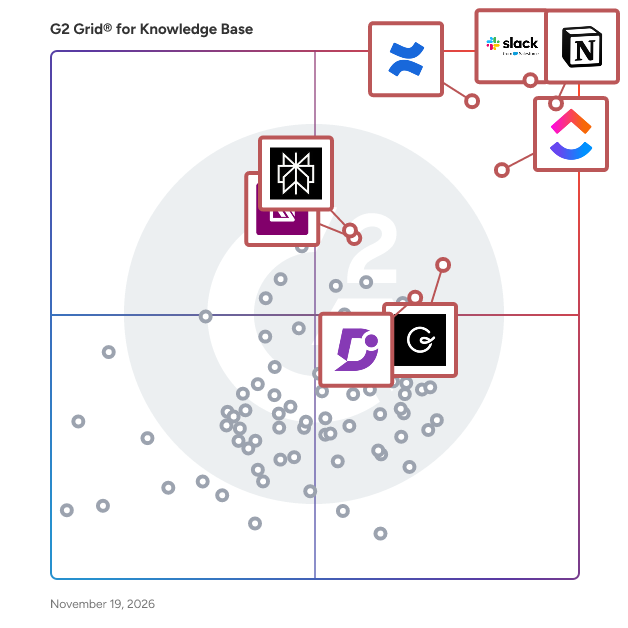
G2 Grid® for Knowledge Base Software

G2 Grid® for Knowledge Base Software plotting products by satisfaction and market presence

Highlighted products: Notion, Slack, Confluence, ClickUp, Guru, Perplexity, IT Glue, and Document360.

Underlying data: [Grid® JSON](https://www.g2.com/categories/knowledge-base-software/grids.json?focus%5B%5D=notion&focus%5B%5D=slack&focus%5B%5D=confluence&focus%5B%5D=clickup&focus%5B%5D=guru&focus%5B%5D=perplexity&focus%5B%5D=it-glue&focus%5B%5D=document360)

Freshdesk

Freshdesk (a product of Freshworks Inc.) helps customer service teams move from their first AI agent to AI-powered customer service, without a drawn-out transformation program. Freshdesk unifies channels, conversations, AI, and customer context into one place, so agents always have the full picture before responding. Ready-to-use AI agents understand intent, take action, and resolve requests across channels, not just route them. AI Copilot helps every agent work faster and with more confidence, and AI Insights turns service data into decisions instead of dashboards. Guided rollout and prebuilt templates mean teams can launch quickly and expand at their own pace, whether they're a support team of 10 or 500. Freshdesk is quick to set up, easy to use, and designed for rapid impact—it delivers 60% improved agent productivity, a 97% first-contact resolution rate, and up to 80% of resolutions with AI agents.

Average Rating: 4.4/5.0

Total Reviews: 3,929

How Do G2 Users Rate Freshdesk?

  • Has the product been a good partner in doing business?: 8.7/10 (Category avg: 9.0/10)
  • Quality of Support: 8.7/10 (Category avg: 8.9/10)
  • Ease of Use: 8.9/10 (Category avg: 8.8/10)

Who Is the Company Behind Freshdesk?

  • Seller: Freshworks
  • Company Website:
  • Year Founded: 2010
  • HQ Location: San Mateo, CA
  • LinkedIn® Page: www.linkedin.com
    7,783 employees on LinkedIn®
  • Ownership: NASDAQ: FRSH

Who Uses This Product?

  • Who Uses This: Manager, Owner
  • Top Industries: Information Technology and Services, Computer Software
  • Company Size: 48% Small, 40% Medium

What Do G2 Reviewers Say About Freshdesk?

AI-generated summary from verified user reviews

Pros
  • Users find the interface intuitive and easy to use, helping new team members get started quickly.
  • Users appreciate structured ticket management that organizes queries and helps agents resolve them efficiently.
  • Users like task automation that streamlines support workflows and handles routine ticket actions, reducing manual effort and saving time.
  • Users find setup straightforward and quick, with minimal configuration needed to get started.
  • Users like having customer conversations, tickets, and support information in one central place, making interactions easier to manage and share.
Cons
  • Users find reporting lacks flexibility and analytical depth, while building or customizing reports can feel complicated.
  • Users report slow loading and lag, especially during peak periods or when handling large ticket volumes.
  • Users find customization too limited for tailoring fields, ticket views, portals, and workflows.
  • Users find pricing high for small teams, with costs rising as they add agents, advanced features, or higher-tier plans.
  • Users find the interface cluttered and unintuitive, with dated design and frequent changes making it harder to navigate.

What Are Recent G2 Reviews of Freshdesk?

What Are G2 Users Discussing About Freshdesk?

Slite

Slite is the self-maintaining knowledge base that keeps company information current and trusted. Powered by an AI agent, Slite watches what changes across your tools, catches when docs have drifted from reality, and proposes the fix for your team to approve, so the answer you find is always the right one. From onboarding guides to all-hands notes, Slite keeps every type of company knowledge centralised in one place: organised, verified, and tracked. And because it stays in sync, the people and AI agents relying on it can act with confidence. Replace all-in-one workspaces with a tool built for company knowledge, and join thousands of growing teams who trust Slite as their single source of truth.

Average Rating: 4.6/5.0

Total Reviews: 272

How Do G2 Users Rate Slite?

  • Has the product been a good partner in doing business?: 8.9/10 (Category avg: 9.0/10)
  • Quality of Support: 9.2/10 (Category avg: 8.9/10)
  • Other Integrations: 7.6/10 (Category avg: 8.3/10)
  • Ease of Use: 9.3/10 (Category avg: 8.8/10)

Who Is the Company Behind Slite?

  • Seller: Slite
  • Year Founded: 2016
  • HQ Location: Paris
  • LinkedIn® Page: www.linkedin.com
    43 employees on LinkedIn®

Who Uses This Product?

  • Who Uses This: CEO, Product Manager
  • Top Industries: Computer Software, Information Technology and Services
  • Company Size: 63% Small, 28% Medium

What Do G2 Reviewers Say About Slite?

AI-generated summary from verified user reviews

Pros
  • Users enjoy the straightforward user experience of Slite, facilitating clear document writing and collaboration.
  • Users find Slite to be intuitive and easy to learn, allowing for smooth document management and collaboration.
  • Users appreciate the real-time collaboration in Slite, enhancing team efficiency and streamlining information sharing.
  • Users appreciate the helpful user experience of Slite, finding it easy to write, review, and manage documents.
  • Users love the clean and intuitive interface of Slite, making organization and collaboration effortless and efficient.
Cons
  • Users feel that Slite's limited customization options hinder flexibility for more complex workflows and diverse team needs.
  • Users find the limited formatting options in Slite to be a drawback for their documentation needs.
  • Users experience integration issues with Slite, finding it lacks extensive options and robust collaboration features.
  • Users find Slite's limited reporting capabilities restrict complex workflows and customization options for their documentation needs.
  • Users find Slite has tool limitations, particularly in search functionality and lack of multiple window support.

What Are Recent G2 Reviews of Slite?

What Are G2 Users Discussing About Slite?

Supered

Supered is sales process enforcement software that makes sure sales reps follow your sales process inside HubSpot, Salesforce, and Pipedrive. Sales leaders, RevOps, and sales enablement teams use Supered to turn their best practices into rules, show each rep what is out of process every day, and see who is following the process and where deals stall. Most sales teams already know what good looks like. Leadership has defined the stages, the gates, and the steps a rep has to check off. The hard part is knowing whether reps do it. CRM validation rules and reports get unruly fast. They add fields reps should never have to fill out, depend on the one admin who can build them, and leave managers chasing 14-day reports instead of coaching. Supered replaces that with a daily system inside the CRM: - Process Rules: define your non-negotiables, such as required fields by stage, next steps, past-due tasks, and deal hygiene, without adding new CRM fields. - Process Boards: each rep starts the day with a short list of what is out of process and fixes it on the spot with inline CRM editing. - Leadership visibility: see who follows the process, who is a repeat violator, and where deals stall, so you know whether to coach the rep or change the process. - Streaks: reward reps for staying in process so following it becomes a habit. - In-CRM guidance: knowledge cards, step-by-step guides, action plans, and quizzes appear at the moment of need, so training happens every day where reps work. The goal is behavior change. Reps think less about the small tasks of running a deal and focus on selling. Managers stop inspecting by spreadsheet. Leaders can compare process adherence against win rate to show what the process is worth. Supered includes AI built for process. Supered Assistant builds Process Rules and Process Boards from a description of your process. The Supered MCP server lets reps and AI agents follow the same framework inside LLMs such as Claude, so your process holds whether work happens in the CRM or in an AI tool. Supered also offers Prospector, a separate product that gives reps point-and-click lead sourcing and enrichment through the team's own Clay account, and checks that sourced leads are worked to your standard. Key facts: - CRMs: HubSpot (Sales Hub and Service Hub), Salesforce, and Pipedrive - Fit: sales and service teams of 10 or more users who work at a computer - Time to live: most customers go live in under a week, and Supered builds the first Process Board with you - Security: SOC 2 Type II, GDPR, SSO and SCIM, and existing CRM permissions are respected - Ecosystem: HubSpot Premier Technology Partner, Pipedrive technology partner, 6,000+ HubSpot installs Supered is not a learning management system or a sales content library. It defines what good looks like in your CRM and measures each rep against it.

Average Rating: 4.9/5.0

Total Reviews: 80

How Do G2 Users Rate Supered?

  • Has the product been a good partner in doing business?: 9.9/10 (Category avg: 9.0/10)
  • Quality of Support: 9.7/10 (Category avg: 8.9/10)
  • Ease of Use: 9.2/10 (Category avg: 8.8/10)

Who Is the Company Behind Supered?

  • Seller: Supered
  • Company Website:
  • Year Founded: 2023
  • HQ Location: Atlanta, US
  • LinkedIn® Page: www.linkedin.com
    17 employees on LinkedIn®

Who Uses This Product?

  • Top Industries: Consulting, Information Technology and Services
  • Company Size: 56% Small, 22% Medium

What Do G2 Reviewers Say About Supered?

AI-generated summary from verified user reviews

Pros
  • Users love the ease of use of Supered, praising its intuitive features and seamless integration across platforms.
  • Users highlight the easy setup of Supered, enhancing their experience and ensuring a seamless onboarding process.
  • Users love the CRM efficiency of Supered, integrating seamless guidance and training directly in their workflow.
  • Users benefit from data centralization in Supered, making information easy to access within their workflow.
  • Users highlight the simplicity of Supered, making task management and process documentation effortless and efficient.
Cons
  • Users experience a steep learning curve in understanding Supered's object interactions and user experience complexities.
  • Users find the update issues in Supered frustrating, as outdated reminders and slow card updates can hinder usability.
  • Users experience a notable learning curve with Supered, requiring time to adapt to its unique system and features.
  • Users find the platform not intuitive, requiring time to understand object interactions and navigate the interface effectively.
  • Users find the user experience lacking, requiring extra time to understand the platform's complex interactions and setup.

What Are Recent G2 Reviews of Supered?

AI can help you find the answers. G2 helps you trust them.

Connect G2 to Claude or ChatGPT for answers grounded in G2's trusted reviews, comparisons, and pricing from real user insights.

How it works

Serviceware Knowledge

SaaS-based Serviceware Knowledge gets the most out of your organization’s knowledge because it’s easy to use, deploy and administer. Serviceware Knowledge wraps a beautiful interface around a fully-featured solution — with CRM and ticketing app integrations and an API. Find out how powerful easy can be.

Average Rating: 4.8/5.0

Total Reviews: 27

How Do G2 Users Rate Serviceware Knowledge?

  • Has the product been a good partner in doing business?: 9.5/10 (Category avg: 9.0/10)
  • Quality of Support: 9.2/10 (Category avg: 8.9/10)
  • Other Integrations: 6.7/10 (Category avg: 8.3/10)
  • Ease of Use: 9.5/10 (Category avg: 8.8/10)

Who Is the Company Behind Serviceware Knowledge?

Who Uses This Product?

  • Company Size: 41% Medium, 37% Large

What Are Recent G2 Reviews of Serviceware Knowledge?

What Are G2 Users Discussing About Serviceware Knowledge?

Knowmax

Knowmax is an AI knowledge management platform that helps enterprises deliver consistent, accurate, and high-quality customer experiences across all touchpoints. It ensures seamless knowledge flow across assisted channels such as contact centers, field service, and retail, as well as digital platforms like websites, mobile apps, and chatbots by using a single source of truth for an omni-channel experience. With Agentic AI capabilities, Knowmax enables intelligent, goal-oriented support by proactively surfacing the right information at the right time. This empowers agents to resolve queries faster while improving decision-making and operational efficiency. Knowmax is a multilingual platform, making it ideal for global organizations looking to deliver localized and inclusive support experiences. It also supports compliance standards such as SOC II, GDPR, ISO, HIPAA, ensuring data security and regulatory adherence for sensitive industries. The platform has native integrations with leading CRM, CCaaS, and enterprise systems, such as Genesys, Salesforce, SAP, Zendesk, and Freshworks, as well as WebHooks and APIs that help embed knowledge directly into existing workflows.

Average Rating: 4.6/5.0

Total Reviews: 32

How Do G2 Users Rate Knowmax?

  • Has the product been a good partner in doing business?: 9.8/10 (Category avg: 9.0/10)
  • Quality of Support: 9.2/10 (Category avg: 8.9/10)
  • Other Integrations: 7.7/10 (Category avg: 8.3/10)
  • Ease of Use: 9.2/10 (Category avg: 8.8/10)

Who Is the Company Behind Knowmax?

  • Seller: Knowmax
  • Year Founded: 2019
  • HQ Location: Gurgaon, Haryana
  • LinkedIn® Page: www.linkedin.com
    33 employees on LinkedIn®

Who Uses This Product?

  • Top Industries: Telecommunications
  • Company Size: 56% Medium, 29% Large

What Do G2 Reviewers Say About Knowmax?

AI-generated summary from verified user reviews

Pros
  • Users highlight the ease of use of Knowmax, facilitating quick access to essential information for improved service.
  • Users value the easy access to a centralized knowledge base that enhances efficiency and supports quick issue resolution.
  • Users commend Knowmax for its intuitive interface, making navigation effortless and enhancing the overall user experience.
  • Users praise the intuitive knowledge management structure of Knowmax for enhancing agent productivity and customer service quality.
  • Users appreciate the intuitive user interface of Knowmax, enhancing knowledge access and agent productivity in customer support.
Cons
  • Users note the limited customization options in Knowmax, impacting flexibility and admin workflows significantly.
  • Users indicate that the AI limitations hinder functionality due to security restrictions and complex navigation.
  • Users find the administrative interface complex, making workflow creation and navigation cumbersome and challenging.
  • Users find the inefficient search in Knowmax detracts from usability, seeking better organization and improved accuracy.
  • Users find layout issues with Knowmax's admin interface, citing complexity and limited customization that hinder usability.

What Are Recent G2 Reviews of Knowmax?

What Are G2 Users Discussing About Knowmax?

Tettra

Tettra is knowledge base software that organizes scattered company information to answer your team's repetitive questions right in Slack or our web app. It has a simple, user-friendly UI and integrates with Slack, Google Drive, Notion and more. Tettra also has a powerful context-driven search feature that lets you find any information in seconds. Many customer support and operations teams depend on Tettra for their internal documentation and answers. With Tettra, you'll get: • Q&A workflow to capture questions • Knowledge base to document answers • Knowledge management features to keep content up to date. • Integrations with chat tools to make sure your team actually uses Tettra Start your knowledge base today. Free for up to 10 users.

Average Rating: 4.7/5.0

Total Reviews: 159

How Do G2 Users Rate Tettra?

  • Has the product been a good partner in doing business?: 9.5/10 (Category avg: 9.0/10)
  • Quality of Support: 9.4/10 (Category avg: 8.9/10)
  • Other Integrations: 8.7/10 (Category avg: 8.3/10)
  • Ease of Use: 9.3/10 (Category avg: 8.8/10)

Who Is the Company Behind Tettra?

  • Seller: Tettra
  • Year Founded: 2015
  • HQ Location: Somerville, MA
  • LinkedIn® Page: www.linkedin.com
    11 employees on LinkedIn®

Who Uses This Product?

  • Who Uses This: Account Manager
  • Top Industries: Marketing and Advertising, Computer Software
  • Company Size: 50% Small, 42% Medium

What Do G2 Reviewers Say About Tettra?

AI-generated summary from verified user reviews

Pros
  • Users appreciate the ease of use of Tettra, facilitating quick access to organized and reliable information.
  • Users find Tettra's easy navigation essential for quickly accessing and organizing important information efficiently.
  • Users value the centralization of knowledge in Tettra, facilitating efficient organization and quick access to reliable information.
  • Users appreciate the intuitive interface of Tettra, making knowledge organization and information access quick and easy.
  • Users love the easy access to up-to-date information in Tettra, streamlining internal knowledge sharing effortlessly.
Cons
  • Users feel that Tettra suffers from limited formatting options, hindering the clarity of technical documentation.
  • Users find the inefficient search functionality of Tettra hampers easy access to information and content organization.
  • Users find the limited customization of Tettra restricts adaptability to their specific team needs and preferences.
  • Users note the poor content management in Tettra, indicating challenges with maintaining and organizing documentation effectively.
  • Users find difficult automation frustrating, as it can hinder effective organization and retrieval of information.

What Are Recent G2 Reviews of Tettra?

What Are G2 Users Discussing About Tettra?

iSpring LMS

iSpring LMS is a feature-rich platform that helps companies accelerate their business momentum through ROI-efficient training. The LMS enables the entire training cycle with clarity and consistency, from structured onboarding to continuous employee development. It helps reduce employee turnover, improve performance, and ensure that teams stay aligned, skilled, and ready to support the company’s long-term growth. iSpring LMS gives managers and trainers a simple way to organize training, guide employees through skill-building, and see exactly how their learners are progressing. Employees get a clear path to follow, and leaders get the visibility they need to support growth, maintain standards, and keep performance on track. Here are the core capabilities that make this possible: - The mirrored organizational structure reflects how your company works, so training stays aligned with roles and teams. - Specified learning tracks guide learners step by step through required courses and programs. - Detailed reporting highlights progress, deadlines, and knowledge gaps with actionable insights. - The Supervisor Dashboard gives managers instant visibility into team performance without extra admin work. - Automated workflows handle enrollments, reminders, and assignments, saving time and reducing manual tasks. - The corporate portal and newsfeed centralize updates and announcements to keep everyone aligned. - 360-Degree Reviews gather well-rounded performance feedback from peers and supervisors. - On-The-Job Training validates real-world skills with structured checklists. - Knowledge Base gives employees quick access to SOPs, product info, and internal documentation. - Development Plans build personalized growth paths that connect training to long-term skill development.

Average Rating: 4.6/5.0

Total Reviews: 172

How Do G2 Users Rate iSpring LMS?

  • Has the product been a good partner in doing business?: 9.2/10 (Category avg: 9.0/10)
  • Quality of Support: 9.4/10 (Category avg: 8.9/10)
  • Other Integrations: 7.3/10 (Category avg: 8.3/10)
  • Ease of Use: 9.1/10 (Category avg: 8.8/10)

Who Is the Company Behind iSpring LMS?

  • Seller: iSpring
  • Company Website:
  • Year Founded: 2001
  • HQ Location: Alexandria, VA
  • LinkedIn® Page: www.linkedin.com
    270 employees on LinkedIn®

Who Uses This Product?

  • Top Industries: E-Learning, Information Technology and Services
  • Company Size: 53% Medium, 38% Small

What Do G2 Reviewers Say About iSpring LMS?

AI-generated summary from verified user reviews

Pros
  • Users appreciate the ease of use of iSpring LMS, finding it intuitive and straightforward for training management.
  • Users appreciate the intuitive course creation tools in iSpring LMS, streamlining training management for small businesses effectively.
  • Users appreciate the user-friendly interface of iSpring LMS, enhancing training efficiency and simplifying course management.
  • Users value the excellent customer support of iSpring LMS, enhancing their overall experience with the platform.
  • Users find iSpring LMS to be simple and intuitive, making it ideal for small businesses and easy to manage.
Cons
  • Users feel that iSpring LMS has limited features, lacking advanced authoring tools and necessary feedback options.
  • Users find the missing features in iSpring LMS hinder usability, such as inadequate integration and feedback options.
  • Users note that integration issues hinder ease of use, with gaps requiring impractical workarounds for better compatibility.
  • Users desire more limited customization options within iSpring LMS, hoping for enhanced integration and authoring tools.
  • Users desire more advanced features in iSpring LMS, especially for authoring tools and report integration.

What Are Recent G2 Reviews of iSpring LMS?

Stonly

Stonly is the modern knowledge platform for customer service. We help companies drive fast, accurate resolutions with step-by-step guides, decision trees, AI answers, automations, walkthroughs, checklists, and knowledge bases for agents and customers. Unlike other knowledge platforms, Stonly’s knowledge is interactive (instead of static) and delivered when and where people need it. That means it gets used much more often and can handle every case that comes its way. Use AI to leverage your knowledge to respond to each request with the ideal solution—be it an easy answer or in-depth guidance. You can control the answers and handle every question well, even the most critical and complex ones. Easily create great knowledge content and keep it up to date and accurate. We’ll give you the tools to collect feedback, measure, and improve the impact of knowledge on your business. Integrate with all of your tools and processes, including Zendesk, Salesforce Service Cloud, Freshworks, HubSpot, and more. Learn how Stonly empowers thousands of companies to support millions of customers at https://stonly.com/

Average Rating: 4.8/5.0

Total Reviews: 131

How Do G2 Users Rate Stonly?

  • Has the product been a good partner in doing business?: 9.3/10 (Category avg: 9.0/10)
  • Quality of Support: 9.2/10 (Category avg: 8.9/10)
  • Other Integrations: 8.1/10 (Category avg: 8.3/10)
  • Ease of Use: 9.0/10 (Category avg: 8.8/10)

Who Is the Company Behind Stonly?

  • Seller: Stonly
  • Year Founded: 2018
  • HQ Location: Paris, FR
  • LinkedIn® Page: www.linkedin.com
    65 employees on LinkedIn®

Who Uses This Product?

  • Top Industries: Computer Software, Information Technology and Services
  • Company Size: 58% Small, 34% Medium

What Do G2 Reviewers Say About Stonly?

AI-generated summary from verified user reviews

Pros
  • Users appreciate the ease of use of Stonly, enabling effortless updates and comprehensive guide management for clients.
  • Users praise Stonly for its exceptional customer support and easy implementation, enhancing productivity and adaptability.
  • Users find Stonly to be incredibly user-friendly, facilitating updates and customization for effective team and customer communication.
  • Users find easy implementation of Stonly allows quick integration and immense value with minimal effort required.
  • Users highlight Stonly's intuitive design, making it easy to update and access information effectively.
Cons
  • Users note the missing features in Stonly, such as mixed media support and enhanced reporting tools.
  • Users note a lack of features, though non-critical, with some complementary options under development.
  • Users find the time-consuming management of widgets an inconvenience, especially with the lack of bulk import options.
  • Users express concerns over button issues, indicating frustration with functionality and navigation in Stonly.
  • Users struggle with chatbot integration issues, hindering effective communication and response efficiency in Stonly.

What Are Recent G2 Reviews of Stonly?

What Are G2 Users Discussing About Stonly?

Featurebase

Featurebase is an AI customer support platform for modern software teams. It answers customers across every channel and turns conversations into product improvements.

Average Rating: 4.7/5.0

Total Reviews: 52

How Do G2 Users Rate Featurebase?

  • Has the product been a good partner in doing business?: 9.6/10 (Category avg: 9.0/10)
  • Quality of Support: 9.6/10 (Category avg: 8.9/10)
  • Other Integrations: 7.8/10 (Category avg: 8.3/10)
  • Ease of Use: 9.3/10 (Category avg: 8.8/10)

Who Is the Company Behind Featurebase?

Who Uses This Product?

  • Who Uses This: Founder
  • Top Industries: Computer Software, Information Technology and Services
  • Company Size: 90% Small, 8% Medium

What Do G2 Reviewers Say About Featurebase?

AI-generated summary from verified user reviews

Pros
  • Users value the wide range of modules in Featurebase, enhancing product management with effective feedback centralization.
  • Users appreciate the ease of use in Featurebase, enabling quick setup and efficient support through its intuitive features.
  • Users value the centralized feedback and prioritization in Featurebase, enhancing clarity and responsiveness to customer needs.
  • Users highlight the fast and helpful customer support of Featurebase, enhancing their overall experience and satisfaction.
  • Users value the centralized feedback management of Featurebase, simplifying prioritization and enhancing response quality seamlessly.
Cons
  • Users find missing features in Featurebase, feeling important aspects like versioning and customization need improvement.
  • Users find the limited features of Featurebase frustrating, particularly regarding pricing and essential functionalities.
  • Users find some features of Featurebase to be incomplete or gated behind higher plans, limiting their effectiveness and accessibility.
  • Users find limited customization options frustrating, impacting branding, analytics, and help center flexibility.
  • Users find limited functionality in Featurebase, particularly regarding customization, analytics, and data export capabilities.

What Are Recent G2 Reviews of Featurebase?

Unily

Reimagine the employee experience with Unily — the AI-powered platform defining the future of work. Recognized as a global Leader across top analyst reports, Unily helps enterprises boost productivity, accelerate organizational velocity, and connect every employee through intelligent alignment, engagement, and collaboration.

Average Rating: 4.5/5.0

Total Reviews: 45

How Do G2 Users Rate Unily?

  • Has the product been a good partner in doing business?: 8.9/10 (Category avg: 9.0/10)
  • Quality of Support: 9.0/10 (Category avg: 8.9/10)
  • Other Integrations: 8.7/10 (Category avg: 8.3/10)
  • Ease of Use: 8.8/10 (Category avg: 8.8/10)

Who Is the Company Behind Unily?

  • Seller: Unily
  • Company Website:
  • Year Founded: 2005
  • HQ Location: London, GB
  • LinkedIn® Page: www.linkedin.com
    314 employees on LinkedIn®

Who Uses This Product?

  • Top Industries: Marketing and Advertising
  • Company Size: 58% Large, 20% Medium

What Do G2 Reviewers Say About Unily?

AI-generated summary from verified user reviews

Pros
  • Users appreciate Unily for its ease of use, as it simplifies content management and enhances organizational communication.
  • Users value the exceptional customer support from Unily, ensuring guidance and assistance for a smooth experience.
  • Users value the robust functionality of Unily, enhancing customization and efficient content management for improved collaboration.
  • Users value Unily's exceptional support and customization features, enhancing communication and engagement across teams and content.
  • Users value Unily's seamless access and centralized communication, enhancing efficiency and user engagement across teams.
Cons
  • Users highlight the lack of customization in Unily, restricting its flexibility and overall utility for diverse needs.
  • Users express frustration over a lack of features in Unily, particularly with its limited reporting and integration capabilities.
  • Users find limited customization in Unily, restricting flexibility and personalization of components and layouts.
  • Users experience confusion due to backend inconsistencies and complex setup processes, hindering their overall experience.
  • Users find Unily's insufficient reporting capabilities limits their ability to track engagement and analytics effectively.

What Are Recent G2 Reviews of Unily?

What Are G2 Users Discussing About Unily?

Superhuman Docs

Superhuman Docs (formerly Coda) gets your team and AI on the same page. Most AI tools are built for solo work, so the work ends up trapped in chats. Docs brings your team and AI together in a familiar space, reimagining what a doc can do. Drafts happen faster, projects stay on task, and decisions don’t stall. Ask for what you need and Docs helps your team build and run with it. Docs is part of Superhuman, the AI productivity platform on a mission to unlock the superhuman potential in everyone. AI is everywhere, but what it creates stays disconnected from where your team actually works. Superhuman Docs fixes that. Instead of generating alone and copy-pasting results somewhere else, your whole team works with AI in one shared place—asking, editing, and building on one another’s work without context switching or silos. And you can create docs, trackers, and workflows in plain language. Just say what you need and Docs AI builds it with you. No code. No writing formulas. No learning curve. Superhuman Docs supports real-time multi-user collaboration, rich content editing, AI generation, and text summarization, so your team can ask for a first draft, meeting notes, or a project tracker and build on it together, instantly. Docs features templates, task creation and assignment mapping, GANTT charts, revision history, in-line comments, notifications, and knowledge sharing—all in one shared doc. No switching between tools to generate, organize, and move work forward. And since Docs connects to over 1,000 tools, including Slack, Jira, and Salesforce, you’ll always have access to the latest data so due dates for your team’s OKRs are always current.

Average Rating: 4.6/5.0

Total Reviews: 478

How Do G2 Users Rate Superhuman Docs?

  • Has the product been a good partner in doing business?: 9.3/10 (Category avg: 9.0/10)
  • Quality of Support: 9.1/10 (Category avg: 8.9/10)
  • Other Integrations: 7.7/10 (Category avg: 8.3/10)
  • Ease of Use: 8.5/10 (Category avg: 8.8/10)

Who Is the Company Behind Superhuman Docs?

  • Seller: Superhuman
  • Company Website:
  • HQ Location: San Francisco, California
  • LinkedIn® Page: www.linkedin.com
    7,182 employees on LinkedIn®

Who Uses This Product?

  • Who Uses This: CEO, Founder
  • Top Industries: Computer Software, Information Technology and Services
  • Company Size: 54% Small, 31% Medium

What Do G2 Reviewers Say About Superhuman Docs?

AI-generated summary from verified user reviews

Pros
  • Users value the ease of use of Superhuman Docs, seamlessly integrating collaboration and project management in one platform.
  • Users appreciate the flexible and integrated document features of Superhuman Docs, enhancing collaboration and productivity.
  • Users value the flexibility of Superhuman Docs, enabling seamless integration of documents, spreadsheets, and workflows in one platform.
  • Users love the automation features of Superhuman Docs, saving time and enhancing collaboration across teams.
  • Users value the customization capabilities of Superhuman Docs, enabling tailored management tools for enhanced collaboration.
Cons
  • Users find a steep learning curve with Superhuman Docs, especially when navigating advanced features and author roles.
  • Users find the steep learning curve of Superhuman Docs challenging, especially when navigating advanced features and functionalities.
  • Users find the complexity of the authoring system in Superhuman Docs challenging, leading to frustration and reduced collaboration.
  • Users find limited features in Superhuman Docs, specifically regarding visual graphics and layout options, reducing usability.
  • Users find the learning curve challenging, making initial use of Superhuman Docs feel intimidating and complex.

What Are Recent G2 Reviews of Superhuman Docs?

What Are G2 Users Discussing About Superhuman Docs?

Slab

Slab is a modern knowledge hub and wiki that helps teams unlock their full potential through shared learning and documentation. Slab features a beautiful, easy-to-use editor, dozens of integrations like Slack, GitHub and Google, and blazing-fast search, both across Slab and across your integrated apps. No matter where it lives, the knowledge you need to do your best work is just a click away!

Average Rating: 4.6/5.0

Total Reviews: 300

How Do G2 Users Rate Slab?

  • Has the product been a good partner in doing business?: 9.3/10 (Category avg: 9.0/10)
  • Quality of Support: 9.3/10 (Category avg: 8.9/10)
  • Other Integrations: 8.8/10 (Category avg: 8.3/10)
  • Ease of Use: 9.2/10 (Category avg: 8.8/10)

Who Is the Company Behind Slab?

  • Seller: Slab, Inc
  • Company Website:
  • Year Founded: 2016
  • HQ Location: San Francisco, California
  • LinkedIn® Page: www.linkedin.com
    20 employees on LinkedIn®

Who Uses This Product?

  • Who Uses This: Account Manager, Software Engineer
  • Top Industries: Computer Software, Information Technology and Services
  • Company Size: 60% Small, 37% Medium

What Do G2 Reviewers Say About Slab?

AI-generated summary from verified user reviews

Pros
  • Users value the ease of use of Slab, appreciating its straightforward features and seamless integration for teamwork.
  • Users love Slab's advanced search functions, enhancing efficiency and personalizing their work experience seamlessly.
  • Users value the robust integrations of Slab, enhancing collaboration and simplifying information sharing across platforms.
  • Users love the easy integrations of Slab, enhancing teamwork and streamlining their information-sharing processes.
  • Users value the easy access and integration of Slab, enhancing their workflow and information retrieval experiences.
Cons
  • Users find the limited customization options in Slab hinder detailed document formatting and user permissions.
  • Users find the learning curve steep, noting challenges in understanding terminology and customization options.
  • Users find limited functionality regarding permissions and formatting options, impacting their overall experience with Slab.
  • Users find Slab has missing features like advanced image handling and complex table support, leading to frustration.
  • Users find Slab's interface to be overwhelming for beginners, especially with extensive existing content complicating navigation.

What Are Recent G2 Reviews of Slab?

What Are G2 Users Discussing About Slab?

EngageBay

EngageBay is an all-in-one customer engagement platform designed for small and mid-sized businesses that want to manage marketing, sales, and support from a unified system. Positioned as a cost-conscious alternative to platforms like HubSpot and ActiveCampaign, it focuses on delivering essential CRM and automation capabilities without the overhead typically associated with enterprise software. The platform combines contact and deal management, marketing automation, email marketing, landing pages, forms, live chat, and help desk functionality within a single interface. By consolidating these functions, EngageBay provides teams with a centralized view of customer interactions across the lifecycle and reduces the need for multiple disconnected tools. EngageBay also incorporates AI-assisted features to streamline common tasks and improve productivity. These capabilities include AI-powered email and content generation, subject line suggestions, and workflow assistance that help teams create campaigns and communications more efficiently. The AI tools are designed to support everyday execution rather than replace core strategy, making them accessible to smaller teams that may not have dedicated automation specialists. On the marketing side, users can build email campaigns, design automation workflows, capture leads through forms and landing pages, and run A/B tests. The CRM module supports pipeline tracking, contact management, task automation, and appointment scheduling to help sales teams manage opportunities in a structured way. For post-purchase engagement, the service suite includes ticketing, knowledge base tools, and live chat to manage customer support conversations from one place. A key design principle of EngageBay is accessibility for growing businesses. The platform offers a free tier with core functionality and scales through bundled paid plans rather than numerous add-ons, helping teams adopt automation without significant upfront investment. EngageBay integrates with a range of third-party tools and provides reporting dashboards to monitor campaign performance, deal progress, and support activity. While it is not positioned as a deep enterprise platform, it is built to meet the day-to-day operational needs of SMB revenue teams looking for an integrated, AI-assisted, and budget-aware solution. The platform is built with a focus on simplicity and performance, integrating advanced marketing automation, sales CRM, and customer support software into one cohesive system. EngageBay leverages cutting-edge AI intelligence to enhance productivity and decision-making across various teams. This integration allows businesses to streamline their operations and improve customer interactions, making it an ideal choice for organizations that require a robust yet user-friendly solution. EngageBay's AI capabilities are particularly noteworthy, providing users with tools that help create content quickly, predict outcomes intelligently, and deliver personalized experiences at scale. The AI Email & Content Generator allows users to craft engaging emails and campaigns in seconds, while the AI Lead & Deal Scoring feature helps identify and prioritize leads most likely to convert. Additionally, AI Insights & Recommendations offer actionable suggestions to enhance engagement and productivity, making it easier for businesses to navigate their customer journeys effectively. The platform also boasts a suite of key features that add significant value to its users. EngageBay's marketing automation capabilities include email marketing workflows, landing page and form builders, and social media integration, which collectively enhance outreach efforts. The sales CRM component provides tools for contact and deal management, visual sales pipelines, and team collaboration, ensuring that sales processes are efficient and transparent. Furthermore, the customer support features, such as a helpdesk and ticketing system, live chat, and a unified customer view, facilitate seamless communication and service delivery. EngageBay is particularly well-suited for small to mid-sized businesses, startups, and growing teams that seek an affordable yet powerful alternative to fragmented tools. It is designed for organizations aiming to automate customer interactions, align marketing and sales efforts, and improve support efficiency through the use of AI. This comprehensive approach not only enhances operational efficiency but also positions businesses to compete effectively in their respective markets. What is this product? EngageBay is an all-in-one CRM software platform built for small and mid-sized businesses to manage marketing automation, sales pipelines, and customer support in a single system. It combines email marketing, marketing automation, landing pages, contact management, deal tracking, helpdesk, and live chat—eliminating the need for multiple disconnected tools. Designed as an affordable alternative to HubSpot and ActiveCampaign, EngageBay helps growing businesses attract leads, convert deals, and support customers without enterprise-level costs or complexity. It centralizes customer data, automates workflows, and improves visibility across the entire customer lifecycle.

Average Rating: 4.6/5.0

Total Reviews: 796

G2 Deal: 30% Off EngageBay

Marketing automation software to automate all your marketing & sales tasks, customer service workflows, lead generation & lead nurturing.

View this exclusive G2 deal

How Do G2 Users Rate EngageBay?

  • Has the product been a good partner in doing business?: 9.5/10 (Category avg: 9.0/10)
  • Quality of Support: 9.5/10 (Category avg: 8.9/10)
  • Ease of Use: 9.1/10 (Category avg: 8.8/10)

Who Is the Company Behind EngageBay?

  • Seller: EngageBay Inc
  • Company Website:
  • Year Founded: 2018
  • HQ Location: Wilmington, Delaware
  • LinkedIn® Page: www.linkedin.com
    54 employees on LinkedIn®

Who Uses This Product?

  • Who Uses This: Marketing Manager, Marketing Analyst
  • Top Industries: Information Technology and Services, Staffing and Recruiting
  • Company Size: 71% Small, 30% Medium

What Do G2 Reviewers Say About EngageBay?

AI-generated summary from verified user reviews

Pros
  • Users find EngageBay's ease of use beneficial for managing contacts and streamlining daily communication effortlessly.
  • Users appreciate the automation capabilities of EngageBay, streamlining processes and enhancing consistency in communication.
  • Users value the efficient customer support in EngageBay, appreciating how it enhances the overall experience of the platform.
  • Users appreciate the all-in-one platform of EngageBay for streamlined contact management, email campaigns, and automation.
  • Users appreciate the automation capabilities of EngageBay, streamlining tasks and enhancing efficiency in their workflows.
Cons
  • Users find the limited features of EngageBay lacking for advanced analysis and automation flexibility.
  • Users note the limited features of EngageBay, expressing a need for more templates and improved automation options.
  • Users find the reporting issues in EngageBay can be limiting and may require time to master effectively.
  • Users find limited customization in EngageBay's reporting, automation, and design tools, affecting advanced workflow needs.
  • Users find poor reporting as a limitation in EngageBay, lacking depth for thorough analysis and insights.

What Are Recent G2 Reviews of EngageBay?

What Are G2 Users Discussing About EngageBay?
Archbee

Archbee: Your All-in-One Documentation Platform Archbee is a complete documentation platform designed to help teams and customers quickly find the information they need. Whether it's developer guides, API references, or onboarding documentation, Archbee centralizes knowledge and provides instant, AI-powered answers to user queries. By unifying product, engineering, support, marketing, and sales documentation, Archbee streamlines workflows and enhances collaboration for teams of all sizes. With an intuitive interface and robust integrations, Archbee makes it easy to create, manage, and share documentation that drives productivity and customer success. What is Archbee? Archbee is the first complete documentation platform built for teams to consolidate all their knowledge in one place. It helps teams write and publish trusted documentation that serves as the single source of truth—whether it’s for internal use, customer support, or onboarding. Archbee also stands out by offering AI-driven instant answers, making it easier for users to find exactly what they need, right when they need it. Stop piecing together multiple tools—Archbee does it all. Who is Archbee For? • Product Teams creating user guides and product FAQs. • Developers writing API documentation and technical references. • Customer Support Teams providing in-app, contextual support with widgets. • HR & Operations Teams onboarding and training new hires. • Sales & Marketing Teams building knowledge portals for customer-facing needs. Why Choose Archbee? • Centralizes all documentation in one place, eliminating silos. • Enhances team collaboration with live editing and review systems. • Integrates with over 30 popular tools, including GitHub, Slack, Airtable, Figma, and Google Analytics. • Supports gated portals for private customer documentation. • Offers AI-powered search to deliver instant answers from your documentation. Use Cases: • Create stunning developer and API docs. • Build complete documentation sites. • Add real-time, in-app support with contextual widgets. • Standardize internal processes. • Simplify onboarding and training with easy-to-navigate resources. 300+ Happy Customers and Counting We work closely with our customers to continuously refine and improve the platform. By listening to feedback and implementing changes rapidly, we ensure Archbee is always optimized to meet your needs.

Average Rating: 4.6/5.0

Total Reviews: 112

How Do G2 Users Rate Archbee?

  • Has the product been a good partner in doing business?: 9.4/10 (Category avg: 9.0/10)
  • Quality of Support: 9.2/10 (Category avg: 8.9/10)
  • Other Integrations: 7.1/10 (Category avg: 8.3/10)
  • Ease of Use: 9.4/10 (Category avg: 8.8/10)

Who Is the Company Behind Archbee?

Who Uses This Product?

  • Who Uses This: CEO, Founder
  • Top Industries: Computer Software, Marketing and Advertising
  • Company Size: 91% Small, 8% Medium

What Do G2 Reviewers Say About Archbee?

AI-generated summary from verified user reviews

Pros
  • Users praise Archbee for its ease of use, allowing intuitive content creation and seamless integration for documentation.
  • Users praise Archbee for its ease of use and integration, finding it a powerful solution for their documentation needs.
  • Users admire the ease of creating and deploying documentation with Archbee, highlighting its customizable and powerful features.
  • Users love Archbee's highly customizable options, allowing tailored visual styles and seamless integration for diverse documentation needs.
  • Users find the easy setup of Archbee invaluable for integrating and managing their knowledge base efficiently.
Cons
  • Users report formatting issues with Archbee, especially when copying from Google Docs and opening pages in new tabs.
  • Users experience occasional software bugs with Archbee, particularly when creating blocks quickly or editing API references.
  • Users note layout issues with the API documentation, particularly regarding organization and accessibility of endpoints.
  • Users note a lack of reporting options in Archbee, which can limit data visibility and insights.
  • Users express concerns over missing features like an additional developer API and limited Swagger documentation support.

What Are Recent G2 Reviews of Archbee?

What Are G2 Users Discussing About Archbee?

Bitrix24

Bitrix24 is an all-in-one business workspace that combines vibe coding platform, CRM, collaboration, and management tools in a single, easy-to-use platform – free for unlimited users. Whether you're a small team or a growing business, Bitrix24 helps you to: — Build working apps, internal tools, and web pages from plain-language prompts — Track leads and manage customer relationships with a built-in CRM — Stay on top of projects and tasks with Kanban boards, timelines, and time tracking — Communicate easily via team messenger, video calls, and shared calendars — Create and edit documents, manage files, and collect e-signatures — Run marketing campaigns and manage customer interactions through email, calls, and WhatsApp Bitrix24’s AI-powered assistant helps automate routine tasks, write emails, analyze data, and suggest next steps, saving time and boosting productivity. What makes Bitrix24 a great solution for businesses: — Free forever for unlimited users, with access to core features and 5 GB storage — No per-user fees – upgrade only when you need more storage or advanced tools — Accessible anywhere via web, desktop, and mobile apps — Scalable – grow your business without switching platforms or juggling tools Over 15 million companies trust Bitrix24 to simplify operations, cut costs, and get more done – all in one place.

Average Rating: 4.1/5.0

Total Reviews: 582

How Do G2 Users Rate Bitrix24?

  • Has the product been a good partner in doing business?: 7.8/10 (Category avg: 9.0/10)
  • Quality of Support: 7.7/10 (Category avg: 8.9/10)
  • Other Integrations: 8.3/10 (Category avg: 8.3/10)
  • Ease of Use: 7.9/10 (Category avg: 8.8/10)

Who Is the Company Behind Bitrix24?

  • Seller: Bitrix24
  • Company Website:
  • Year Founded: 1998
  • HQ Location: Alexandria, Virginia
  • LinkedIn® Page: www.linkedin.com
    269 employees on LinkedIn®

Who Uses This Product?

  • Who Uses This: Marketing Manager, Project Manager
  • Top Industries: Information Technology and Services, Marketing and Advertising
  • Company Size: 56% Small, 34% Medium

What Do G2 Reviewers Say About Bitrix24?

AI-generated summary from verified user reviews

Pros
  • Users appreciate the ease of use of Bitrix24, enabling streamlined project management and centralizing communication effectively.
  • Users appreciate the seamless team collaboration of Bitrix24, thanks to integrated tools and automation that enhance efficiency.
  • Users appreciate the centralized task management of Bitrix24, streamlining projects and boosting productivity effortlessly.
  • Users appreciate the integration of multiple tools in Bitrix24, simplifying project management and enhancing workflow efficiency.
  • Users love the feature abundance of Bitrix24, seamlessly managing leads, deals, and tasks in one platform.
Cons
  • Users often find the learning curve steep with Bitrix24, struggling with the complex and cluttered interface while navigating features.
  • Users find missing features like email automation and notification issues hinder performance and ease of use.
  • Users find limited features in Bitrix24, especially lacking in email automation and marketing insights integration.
  • Users find Bitrix24 lacking features for advanced tasks, requiring additional tools for effective email automation and complex operations.
  • Users experience performance issues with Bitrix24, including slow operation and delayed mobile app notifications, causing frustration.

What Are Recent G2 Reviews of Bitrix24?

What Are G2 Users Discussing About Bitrix24?

Neeraja Prakash
NP
Researched and written by Neeraja Prakash
Updated April 9, 2026