Top Free Knowledge Base Software - Page 6

How Many Knowledge Base Software Products Does G2 Track?

Total Products under this Category: 440

Category Stats (Nov 2026)

  • Average Rating: 4.49/5 (↑0.01 vs Oct 2026) The average rating of products in this category, based on all submitted ratings
  • Top Trending Product: Tana (+0.63%) - Among all products in this category, Tana recorded the largest rating increase compared to last month

Last updated: November 01, 2026

How Does G2 Rank Knowledge Base Software Products?

Why You Can Trust G2's Software Rankings:

  • 30 Analysts and Data Experts
  • 158,500+ Authentic Reviews
  • 440+ Products
  • Unbiased Rankings

G2's software rankings are built on verified user reviews, rigorous moderation, and a consistent research methodology maintained by a team of analysts and data experts. Each product is measured using the same transparent criteria, with no paid placement or vendor influence. While reviews reflect real user experiences, which can be subjective, they offer valuable insight into how software performs in the hands of professionals. Together, these inputs power the G2 Score, a standardized way to compare tools within every category.

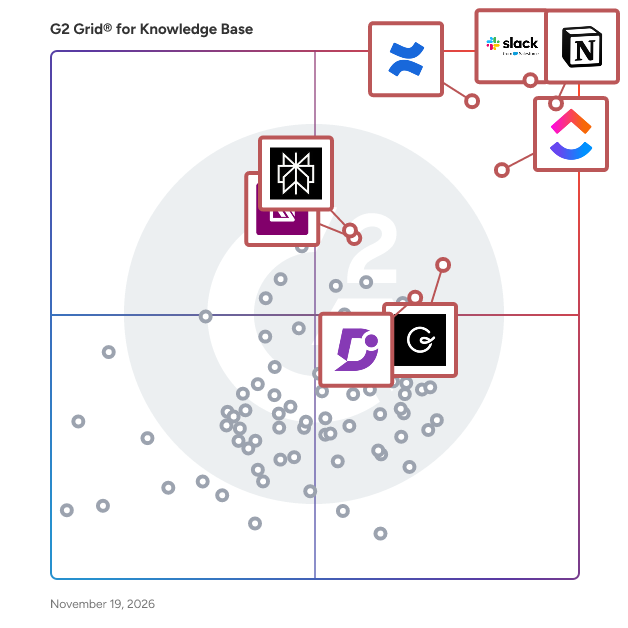
G2 Grid® for Knowledge Base Software

G2 Grid® for Knowledge Base Software plotting products by satisfaction and market presence

Highlighted products: Notion, Slack, Confluence, ClickUp, Guru, Perplexity, IT Glue, and Document360.

Underlying data: [Grid® JSON](https://www.g2.com/categories/knowledge-base-software/grids.json?focus%5B%5D=notion&focus%5B%5D=slack&focus%5B%5D=confluence&focus%5B%5D=clickup&focus%5B%5D=guru&focus%5B%5D=perplexity&focus%5B%5D=it-glue&focus%5B%5D=document360)

DeveloperHub

DeveloperHub is a hosted documentation platform for product docs and API references. Writers use a visual editor, developers use Git, and docs are AI-ready from day one: llms.txt, markdown and MCP. Established in 2018, DeveloperHub helps enterprises decrease support ticket volume by allowing everyone in the team to collaborate on documentation, to publish instantly, and to understand how their documentation is performing.

Average Rating: 4.7/5.0

Total Reviews: 3

Who Is the Company Behind DeveloperHub?

Who Uses This Product?

  • Company Size: 33% Medium, 33% Small

What Are Recent G2 Reviews of DeveloperHub?

What Are G2 Users Discussing About DeveloperHub?

Hubity

Hubity is an AI workspace for teams that run on client work. It answers questions from your company's own documents, clients, and projects instead of the open web, and it brings the day-to-day operations of a services business into one place. At the center is a knowledge base your whole team can ask in plain language. Upload contracts, proposals, policies, rate cards, and meeting notes, and Hubity makes them searchable and answerable. Ask a question and you get a direct answer drawn from your own material, with the source attached so you can verify it. Enterprise search across documents, clients, projects, and operational records means people stop digging through folders and channels for something a colleague already wrote down. Around that knowledge base, Hubity runs the work itself. Manage projects and tasks on boards with live status, organize clients and contacts, track a sales pipeline from prospect to close, log billable time with approval workflows, and send invoices tied to projects with visibility into outstanding, overdue, and collected amounts. Because the answers and the work share one workspace, context follows you instead of scattering across separate tools. An AI assistant ties it together. It holds a conversation, takes actions on your behalf such as drafting status reports and summarizing meetings, and surfaces proactive briefings so you start the day knowing what needs attention. Permissions and role-based access keep sensitive material scoped to the right people, and the workspace is available in multiple languages for distributed teams. Hubity is built for professional services teams: agencies, consultancies, contractors, and studios that manage clients, projects, time, and billing, and that depend on shared knowledge to do good work. It replaces the patchwork of a separate project tool, knowledge base, CRM, and billing system with a single workspace where each part understands the others. The result is less time spent searching, faster onboarding from the same shared knowledge, and answers you can trust because they come from your own records.

Average Rating: 5.0/5.0

Total Reviews: 3

How Do G2 Users Rate Hubity?

  • Has the product been a good partner in doing business?: 10.0/10 (Category avg: 9.0/10)
  • Quality of Support: 10.0/10 (Category avg: 8.9/10)
  • Ease of Use: 10.0/10 (Category avg: 8.8/10)

Who Is the Company Behind Hubity?

Who Uses This Product?

  • Company Size: 100% Small

What Are Recent G2 Reviews of Hubity?

All Gravy

All Gravy is an all-in-one employee app for hospitality and frontline teams that brings communication, training, operations, and HR into a single platform. 🌈 It replaces tools like WhatsApp, LMS systems, paper handbooks, and disconnected HR or scheduling software with one mobile-first solution where teams can communicate, onboard, access company knowledge, and manage daily work. Employees use All Gravy to chat with their team, receive updates, complete training, and find answers to operational questions. Managers use it to onboard staff, share information, run operations, and track engagement across locations. The platform includes an AI assistant trained on company policies and SOPs, enabling instant answers, automated workflows, and faster content creation. CORE FEATURES 💬 Communication tools such as real-time chat, group messaging, announcements, and a social-style feed 🎓 Learning and onboarding with mobile-first training courses, onboarding journeys, and compliance tracking 📘 Digital handbooks that turn SOPs and policies into searchable, mobile-friendly content delivered as learning games, articles, videos, you name it. 🤖 AI-powered assistant that answers staff questions, generates content, and automates workflows 🗓️ Scheduling and operations support, including rota integrations, shift management, time tracking, and task management 📊 HR and people management with employee profiles, document storage, performance reviews, and hiring workflows 🥇 Engagement and insights through surveys, Pulse score, people analytics, and recognition features like badges ⚙️ Integrations with existing scheduling, payroll, and HRIS systems, acting as a one-stop-shop and central layer on top of your existing tech stack All Gravy is purpose-built for shift-based, multi-location businesses like restaurants, pubs, hotels and hospitality groups that need a simple, scalable way to manage and engage their workforce.

Average Rating: 4.7/5.0

Total Reviews: 3

How Do G2 Users Rate All Gravy?

  • Has the product been a good partner in doing business?: 10.0/10 (Category avg: 9.0/10)
  • Quality of Support: 10.0/10 (Category avg: 8.9/10)
  • Ease of Use: 9.4/10 (Category avg: 8.8/10)

Who Is the Company Behind All Gravy?

  • Seller: All Gravy
  • Year Founded: 2020
  • HQ Location: Copenhagen, DK
  • LinkedIn® Page: www.linkedin.com
    61 employees on LinkedIn®

Who Uses This Product?

  • Company Size: 67% Medium, 33% Large

What Are Recent G2 Reviews of All Gravy?

AI can help you find the answers. G2 helps you trust them.

Connect G2 to Claude or ChatGPT for answers grounded in G2's trusted reviews, comparisons, and pricing from real user insights.

How it works

Ariv.ai

Ariv.ai helps you discover, organize and reuse knowledge right where you and your team, work. (Available for Slack and Microsoft Teams) Capturing tribal enterprise knowledge is the holy grail of knowledge management. This knowledge is often exhibited in conversations (chat, email, audio, or video) between team members. Ariv.ai uses cutting edge natural language understanding (NLU) to create reusable context from these conversations in public channels inside Slack or Microsoft Teams. The context stored in a knowledge graph allows Ariv to show you relevant conversations when you ask a question, set up a periodic digest that notifies you when interesting topics are discussed, and award “Karma” points that recognize and reward team-mates who share knowledge and give feedback. All you have to do is ask. Just ask a question like you would a colleague and she’ll dive into the swamp of public channel messages to find a relevant conversation thread, to help you answer your question. Knowledgeable folks don’t need to answer the same question over and over again, and knowledge seekers find answers whenever they need them. Interested in certain topics but can't keep up with the flood of scattered messages in different channels? Just tell ariv what you are interested in, and wait for ariv to deliver a digest of relevant messages to you at your own convenience. Never miss an interesting conversation thread or be constantly interrupted by incoming message notifications. Earn karma points automatically when your responses help other team members, or for giving feedback to improve Ariv's answers. Create a virtuous cycle of knowledge sharing within your teams, recognize titleless experts, and reward the behavior of sharing. Got a set of questions that people keep asking over and over again? Just upload a FAQ set into ariv, and let ariv answer such repetitive questions for you while you focus on other deep work. You can do all of these things without writing knowledge articles, or flagging pieces of content as knowledge. Let artificial intelligence and machine learning do the heavy lifting, users simply continue having conversations as they normally do. Ariv is Knowledge Management without the overhead of managing knowledge. Available for teams that use Slack or Microsoft Teams.

Average Rating: 4.5/5.0

Total Reviews: 2

How Do G2 Users Rate Ariv.ai?

  • Quality of Support: 7.5/10 (Category avg: 8.9/10)
  • Other Integrations: 6.7/10 (Category avg: 8.3/10)
  • Ease of Use: 9.2/10 (Category avg: 8.8/10)

Who Is the Company Behind Ariv.ai?

Who Uses This Product?

  • Company Size: 50% Medium, 50% Small

What Are Recent G2 Reviews of Ariv.ai?

BlueDocs

BlueDocs is an all-in-one internal documentation, training, and compliance platform designed to bring clarity and structure to growing teams. It caters to modern companies that require a unified approach to operational knowledge, policies, and onboarding workflows, eliminating the need for multiple disconnected tools. Whether you are a scaling startup or a mid-sized business, BlueDocs centralizes and streamlines the processes that keep your teams aligned and productive. This platform integrates the functionalities of a knowledge base, document management system, policy acknowledgment tracker, and lightweight learning management system (LMS) into a single, user-friendly interface. Users can effortlessly create, categorize, and assign content, including standard operating procedures (SOPs), training modules, policies, and onboarding flows. With features such as built-in version control, role-based permissions, and audit trails, BlueDocs ensures that every document remains accurate, accessible, and secure. BlueDocs is particularly beneficial for HR, operations, compliance, and enablement teams, allowing them to maintain accountability across departments while minimizing administrative overhead. The platform's key features include real-time collaboration tools like comments and notifications, modular training paths, automated document assignments, and visual dashboards for engagement and compliance tracking. Additionally, it integrates seamlessly with popular file storage solutions such as Google Drive, SharePoint, and Dropbox, providing centralized access to important documents. From policy rollouts to ongoing employee training, BlueDocs is designed to grow alongside your organization. The platform is built for clarity and efficiency, addressing the challenges of juggling multiple internal tools. Unlike traditional document management systems or rigid LMS platforms, BlueDocs offers a lightweight, customizable solution that allows teams to operate swiftly while remaining organized and compliant. It is specifically designed for HR, operations, compliance, and internal team leads who require structure, visibility, and control in their workflows. Key Features * Internal Knowledge Base * Global AI Search Across Internal & External Apps * SOP & Workflow Documentation * Rich Text Editor with Media & Code Blocks * Document Version Control * Policy Management with Acknowledgment Tracking * Modular Training & Onboarding Paths * Role-Based Access & Permissions * Assignment Automation & Notifications * Drag-and-Drop Page Builder * Real-Time Collaboration: Comments, Mentions, Reactions * Visual Analytics Dashboards * Audit Trails & Compliance Reporting * File Integrations (Google Drive, SharePoint, Dropbox) * Custom Taxonomy, Categories, and Branding By utilizing BlueDocs, companies can significantly reduce repetitive inquiries, accelerate onboarding processes, enhance compliance, and provide their teams with a single source of truth for essential information. This platform not only simplifies internal documentation but also drives real operational impact, making it an invaluable resource for organizations aiming to optimize their internal processes.

Average Rating: 5.0/5.0

Total Reviews: 2

How Do G2 Users Rate BlueDocs?

  • Has the product been a good partner in doing business?: 10.0/10 (Category avg: 9.0/10)
  • Quality of Support: 10.0/10 (Category avg: 8.9/10)
  • Other Integrations: 10.0/10 (Category avg: 8.3/10)
  • Ease of Use: 10.0/10 (Category avg: 8.8/10)

Who Is the Company Behind BlueDocs?

  • Seller: BlueDocs
  • Year Founded: 2025
  • HQ Location: San Francisco, US
  • LinkedIn® Page: www.linkedin.com
    1 employees on LinkedIn®

Who Uses This Product?

  • Company Size: 100% Small

What Do G2 Reviewers Say About BlueDocs?

AI-generated summary from verified user reviews

Pros
  • Users find BlueDocs to be extremely user-friendly, consolidating tools and enhancing overall efficiency in information management.
  • Users find BlueDocs' effective internal documentation management transforms onboarding clarity and tracking significantly.
  • Users value the training capabilities of BlueDocs, enhancing employee onboarding and progress tracking significantly.
  • Users value the integrated tool consolidation of BlueDocs, enhancing efficiency and organization across various functions.
  • Users appreciate the consolidation of tools with BlueDocs, creating an efficient central hub for all information.
Cons
  • Users criticize the formatting issues in BlueDocs, finding limited customization for documents and templates.
  • Users find limited customization options in BlueDocs, requiring thoughtful organization during initial setup to enhance usability.
  • Users find missing features in BlueDocs' mobile app, lacking advanced editing and localization options compared to the web version.
  • Users find the limited capabilities of the BlueDocs mobile app hinder document editing and offline access.
  • Users find the limited reporting and features on BlueDocs mobile app compared to the web version frustrating.

What Are Recent G2 Reviews of BlueDocs?

Cocoom

Everybody involved, informed, and on the same page
 The internal media that brings together all the employees around the company projects and corporate culture

Average Rating: 4.8/5.0

Total Reviews: 2

How Do G2 Users Rate Cocoom?

  • Has the product been a good partner in doing business?: 8.3/10 (Category avg: 9.0/10)
  • Quality of Support: 8.3/10 (Category avg: 8.9/10)
  • Other Integrations: 8.3/10 (Category avg: 8.3/10)
  • Ease of Use: 10.0/10 (Category avg: 8.8/10)

Who Is the Company Behind Cocoom?

  • Seller: Cocoom
  • Year Founded: 2017
  • HQ Location: Grenoble, FR
  • LinkedIn® Page: linkedin.com
    3 employees on LinkedIn®

Who Uses This Product?

  • Company Size: 50% Medium, 50% Small

What Are Recent G2 Reviews of Cocoom?

What Are G2 Users Discussing About Cocoom?

FlowShare

What is FlowShare? FlowShare is a Windows-native process documentation solution with full data control. It is built for organizations that need to document work inside enterprise systems (SAP GUI, Microsoft Dynamics, custom ERP platforms, document management systems, Citrix environments, and legacy desktop software), as well as virtually any other application running on the local Windows device or in the browser, while keeping process data under their own control. FlowShare runs locally in the background and automatically captures every click and action as you work. Its TrackingEngine reads the actual UI elements at the operating-system level: it knows what each field and button is called because it captured the click event, not because it guessed from a screen recording. Each workflow becomes a clear, branded, step-by-step guide with annotated screenshots in seconds. Record once, export everywhere: no manual screenshotting, no copy-paste into Word, no cloud upload required. Capture and storage happen locally on the user's device by design. FlowShare does offer modern AI and cloud features (the FlowShare Portal, AI-powered search, and auto-translation), but all of them are optional and can be deactivated. For customers with the highest data security requirements, FlowShare can be configured so that documentation never leaves the local environment. That is why FlowShare is used in highly regulated and even air-gapped environments such as government, utilities, and healthcare. Key capabilities ✓ Automatic capture of any Windows or browser application: SAP GUI, Microsoft Dynamics, custom ERP systems, DMS platforms, Citrix environments, legacy desktop software, and modern web tools. If you can click it, FlowShare can document it. ✓ OS-level element recognition: exact field names and transaction codes, not AI guesses from video frames. ✓ Guides generated in seconds, with annotated screenshots and auto-written step descriptions. Customers report documentation up to 10x faster. ✓ Every guide is an editable source file (.flow): when a process changes, update the affected steps and re-export. No re-recording, no rework. ✓ 10 export templates from a single capture, including PDF, Word, PowerPoint, HTML, SCORM, and interactive demos. ✓ Publish where your teams already work: direct integrations with SharePoint and Confluence, plus the FlowShare Portal with a built-in AI assistant so colleagues find answers in seconds without installing FlowShare. ✓ Bulk blur of sensitive data across all screenshots in one action. ✓ Guide content auto-translates into 29+ languages for global rollouts. ✓ Local by design: documentation (texts and screenshots) is managed entirely on the device unless a platform integration is explicitly set up. All AI and cloud features can be deactivated on request. 🔐 Data privacy by architecture, not just by paperwork. Cloud-first tools can be made GDPR-compliant on paper through DPAs and EU data residency, but your process data still transits their servers by design. FlowShare captures and stores locally. Where cloud features are used, they run on EU infrastructure: the hosted Portal runs in Frankfurt, Germany, and AI features run on Azure OpenAI within the EU. A Data Processing Agreement is available and ISO certification is in progress. 👥 Who uses FlowShare IT, Operations, Learning & Development, and Compliance teams in mid-market and enterprise organizations, for process standardization, faster onboarding, audit-ready documentation, and complex software rollouts (SAP, ERP, DMS, and other enterprise systems). FlowShare has passed security reviews at organizations with the strictest IT requirements. 📈 Reported customer results Up to 90% less time spent creating documentation Up to 50% faster new-hire onboarding Up to 70% reduction in training and support costs 100% standardized, consistently branded documentation across teams, tools, and languages 🌍 4.8 average rating, top-rated on Capterra, GetApp, Software Advice, and SourceForge 💬 What customers say "No more excuse for non-existing documentation" (CTO, FetchGoat) "Creates instructions in minutes instead of hours." (IT Manager, Birkengold GmbH) "The AI, which accurately captures how you navigate through an application, is the key feature." (Founder, Augmenticon AG) "I can document one or multiple applications in a single flow, clearly seeing what was clicked or entered." (Lead Architect, IGS GmbH) "Simple and intuitive, my users love it." (CEO, Fernlea Community Care) 🔗 Integrations FlowShare fits your existing IT landscape with 10+ integrations. SharePoint and Confluence are the flagship integrations: publish finished guides directly into the knowledge bases where your teams already work, so documentation lives next to everything else and stays discoverable. HeyGen and Synthesia turn guides into AI-generated training videos. Further integrations include Obsidian, Guru, Avendoo, WordPress, and more. 💶 Pricing & trial Plans start at $44/user/month, with Pro and Enterprise tiers available; contact sales for enterprise pricing. A 7-day free trial is available. 🆚 Why organizations choose FlowShare over the alternatives FlowShare's differentiation is not a single feature; it's a combination no other tool holds in full: Windows-native capture across any application including SAP GUI and Citrix, local-first architecture with optional on-premise deployment, a modern team Portal with AI-powered search, EU infrastructure, and a price point accessible to mid-market teams, not just large enterprises with dedicated IT resources. Browser-extension tools can only capture what happens inside a browser tab and are cloud-dependent by design. The moment SAP, an ERP system, or legacy desktop software is involved, FlowShare is the only modern option at a mid-market price point. Learn more at getflowshare.com _________ ❓ Frequently Asked Questions Does FlowShare work on Mac or Linux? No. FlowShare is Windows-only (64-bit) and there are currently no plans to support Mac or Linux. Is FlowShare safe to install in a regulated IT environment? Yes. FlowShare makes no changes to system directories, and registry changes are confined to FlowShare's own directory. It installs in minutes via MSI and is designed to work under strict IT regulations, and FlowShare has been through security reviews at large regulated organizations. A dedicated technical information document is available for IT departments, and a portable zip-archive install is available for environments where standard installation isn't permitted. Is FlowShare safe from a data-privacy standpoint? Yes. FlowShare captures and stores locally: documentation stays on the user's device unless actively shared or a platform integration is explicitly set up. Cloud and AI features (Portal, AI search, auto-translation) run on EU infrastructure in Frankfurt with AI on Azure OpenAI within the EU, and a Data Processing Agreement is available. For maximum security, all AI functionality and Portal access can be fully deactivated, in which case only license verification data is sent externally. Can the AI and cloud features be switched off? Yes. FlowShare offers a maximum-security configuration in which all AI-related functionality and Portal access are deactivated. In this mode, only license verification information leaves the device: individual license keys are managed via a third-party provider, while enterprise customers use a dedicated license server. Documentation itself remains entirely local. How much time does FlowShare actually save? Customers report reducing documentation creation time by 75 to 90%, depending on their prior process. How is FlowShare different from recording a video and converting it with AI? Video-to-AI pipelines are one-way: video in, document out, with no source file to edit. When the process changes, you re-record and fix whatever the AI got wrong. FlowShare captures a structured, editable source file (.flow), reads exact field names at the OS level instead of inferring them from pixels, and produces ten output formats plus a searchable team Portal from a single capture. 🏢 Built for Enterprise, Ready to Scale FlowShare is built for organizations that care about speed, consistency, and data protection at scale. It installs locally in minutes via MSI, requires no integration to start capturing, and connects to any Windows or browser-based software including SAP GUI, Microsoft Dynamics, and Citrix, with no custom development and no lengthy implementation. Most users create their first guide within an hour of installation. Enterprise customers include DHL, B. Braun, STRABAG, NBCUniversal, Kyocera, and PepsiCo. For large or distributed teams, FlowShare supports enterprise-scale needs directly: guides publish into tools teams already use (SharePoint, Confluence, the FlowShare Portal), the Portal's AI assistant makes the entire guide library searchable for everyone, including colleagues without FlowShare installed, and content auto-translates into 29+ languages for global rollouts. Pro and Enterprise tiers come with dedicated support and, where required, the maximum-security configuration with a dedicated license server in Germany or the USA. Contact sales for enterprise pricing. 🙋 Built for Mid-Market Teams and Individuals, Too FlowShare's enterprise capabilities don't require an enterprise budget or dedicated IT resources. The entry-level plan starts at $44/user/month with no enterprise contract required. Independent consultants, solo business owners, and small teams use FlowShare to document their own workflows and client processes without IT support. No design or scripting skills are needed, and customers report even non-technical users get comfortable within minutes of starting the free trial.

Average Rating: 4.4/5.0

Total Reviews: 8

How Do G2 Users Rate FlowShare?

  • Has the product been a good partner in doing business?: 8.9/10 (Category avg: 9.0/10)
  • Quality of Support: 9.0/10 (Category avg: 8.9/10)
  • Ease of Use: 9.2/10 (Category avg: 8.8/10)

Who Is the Company Behind FlowShare?

Who Uses This Product?

  • Company Size: 78% Small, 11% Large

What Are Recent G2 Reviews of FlowShare?

HelpCenter.io

HelpCenter.io is the complete platform for creating and managing exceptional public-facing help centers and internal knowledge bases. Built for businesses that care about getting help right, it turns company knowledge into accurate, easy-to-find, genuinely helpful self-service—without requiring developers or complicated content tools. Teams can create beautifully branded, multilingual help content with an intuitive no-code editor, organize articles clearly, collaborate across the company, and keep important answers fresh with ownership and review workflows. Customers get fast, relevant search that helps them find answers in their own words, AI answers grounded in the content the business controls, and contextual help directly inside a website or product through the HelpCenter.io Smart Widget. When self-service cannot resolve a question, businesses can preserve a clear path to human support. Built-in analytics reveal what customers search for, which content they use, and where questions still go unanswered—giving teams a practical way to improve the experience over time. Businesses and agencies can also create and manage multiple help centers from one account without unnecessary development work or per-seat pricing. HelpCenter.io treats a help center as more than a place to store articles. It is an essential part of the customer experience: one that should respect customers’ time, strengthen trust, reduce repetitive support requests, and deliver the right answer exactly when it is needed.

Average Rating: 4.8/5.0

Total Reviews: 2

How Do G2 Users Rate HelpCenter.io?

  • Has the product been a good partner in doing business?: 10.0/10 (Category avg: 9.0/10)
  • Quality of Support: 10.0/10 (Category avg: 8.9/10)
  • Other Integrations: 9.2/10 (Category avg: 8.3/10)
  • Ease of Use: 10.0/10 (Category avg: 8.8/10)

Who Is the Company Behind HelpCenter.io?

Who Uses This Product?

  • Company Size: 50% Medium, 50% Small

What Are Recent G2 Reviews of HelpCenter.io?

k03

Wer verwendet koviko Portal? koviko was developed to meet the requirements of companies of all sizes and industries. It focuses on knowledge, training and communication and meets a variety of requirements of daily office life. Core of the koviko Portal is knowledge and learning management. It serves features like fully customizable design, elastic search and easy content management. A lot optional modules like workflow, lms, social intranet, idea management, survey, calendar, contest module, gamification, etc. full fill the needs of daily office life. Can be hosted in the cloud or on company internal servers on premise. The firm behind supports you by additional adjustments, tutorials, demos, phone call and mail.

Average Rating: 4.0/5.0

Total Reviews: 2

How Do G2 Users Rate k03?

  • Quality of Support: 8.3/10 (Category avg: 8.9/10)
  • Ease of Use: 6.7/10 (Category avg: 8.8/10)

Who Is the Company Behind k03?

  • Seller: koviko
  • Year Founded: 2001
  • HQ Location: Potsdam, DE
  • LinkedIn® Page: www.linkedin.com
    26 employees on LinkedIn®

Who Uses This Product?

  • Company Size: 100% Small

What Are Recent G2 Reviews of k03?

What Are G2 Users Discussing About k03?

Teamwork Spaces

A knowledge base software, Teamwork Spaces best place to organize and access your team and company content. A centralized workspace for your team to create, edit, collaborate, and share content across teams and with clients. See how the right knowledge base software, can help your team to become more transparent, efficient, and productive. Teamwork Spaces seamlessly integrates with Teamwork and Teamwork Chat, further enhancing your project planning and project execution and increasing collaboration and communication across your entire team. See Teamwork Spaces https://www.youtube.com/watch?v=KeNjvb5_FAE&feature=youtu.be Try it today with a 30 day free trial!

Average Rating: 4.8/5.0

Total Reviews: 2

How Do G2 Users Rate Teamwork Spaces?

  • Quality of Support: 8.3/10 (Category avg: 8.9/10)
  • Ease of Use: 8.3/10 (Category avg: 8.8/10)

Who Is the Company Behind Teamwork Spaces?

Who Uses This Product?

  • Company Size: 100% Small

What Are Recent G2 Reviews of Teamwork Spaces?

What Are G2 Users Discussing About Teamwork Spaces?

Tryyb

Tryyb helps small teams build big collaborative spaces. Whether managing employees or large groups of independent professionals, Tryyb can put everything you need for them to work together under a single web application. Combining over a dozen collaboration and management features into one easy-to-use product, Tryyb can help even the least technical team create a world-class platform.

Average Rating: 4.6/5.0

Total Reviews: 5

How Do G2 Users Rate Tryyb?

  • Quality of Support: 9.6/10 (Category avg: 8.9/10)
  • Ease of Use: 8.7/10 (Category avg: 8.8/10)

Who Is the Company Behind Tryyb?

  • Seller: Mocaworks
  • Year Founded: 1998
  • HQ Location: Ridgefield, US
  • LinkedIn® Page: www.linkedin.com
    7 employees on LinkedIn®

Who Uses This Product?

  • Company Size: 40% Large, 40% Small

What Are Recent G2 Reviews of Tryyb?

What Are G2 Users Discussing About Tryyb?

Agentwork

Agentwork is an AI-driven knowledge management platform that unifies data from tools like Slack, Notion, and Google Drive into a single searchable knowledge base. It enables users to ask questions in natural language and receive answers with source citations, eliminating the need to switch between systems. By consolidating information, the platform simplifies retrieval through plain-language queries and automates workflows, reducing manual data collection. Each answer links back to its original document, ensuring accuracy and transparency. Agentwork centralizes access to scattered organizational data, streamlining processes and maintaining data integrity.

Average Rating: 5.0/5.0

Total Reviews: 1

How Do G2 Users Rate Agentwork?

  • Has the product been a good partner in doing business?: 10.0/10 (Category avg: 9.0/10)
  • Quality of Support: 10.0/10 (Category avg: 8.9/10)
  • Ease of Use: 10.0/10 (Category avg: 8.8/10)

Who Is the Company Behind Agentwork?

  • Seller: Agentwork
  • Year Founded: 2025
  • HQ Location: Copenhagen, DK
  • LinkedIn® Page: www.linkedin.com
    5 employees on LinkedIn®

Who Uses This Product?

  • Company Size: 100% Small

What Are Recent G2 Reviews of Agentwork?

Bugasura

Bugasura is a Customer-Focused Agentic QA platform for QA teams, SDETs, engineering leaders, and product managers who want testing to stay connected to real customer, product, and business context, not just move faster. It connects requirements, test management, AI-powered issue tracking, specialized QA agents, and system knowledge into one closed loop, so every test begins with context and every result strengthens what the team knows going into the next sprint. Bugasura is used by 1,000+ teams and more than 50,000 engineers, and has ranked #1 Product of the Day on Product Hunt. Bugasura was built by Moolya, a software testing company with over a decade of experience working with fast-growing product and engineering teams worldwide. It started as a no-friction bug tracker designed to get issues from discovery to resolution without bureaucratic overhead. Over time, a pattern emerged in how the strongest QA teams used it: they weren't just tracking bugs, they were connecting bugs to requirements, mapping defects to features, and using that history to decide what to test next. That pattern is now built into the platform itself. Founded in 2020, Bugasura exists on a simple observation: AI is making software development faster, but faster development does not automatically mean better quality. Testing and quality decisions need to stay anchored to business value as development speed increases. Requirements and knowledge management sit at the base of the platform. Teams bring requirements, user stories, product documents, and QA knowledge into one shared workspace instead of leaving them scattered across Jira tickets, Confluence pages, spreadsheets, and Slack threads. Requirements can be created manually or generated with AI assistance, then linked directly to the test cases and defects that trace back to them, so a requirement change immediately shows which tests and open bugs it affects. Test management in Bugasura covers the full cycle. Teams create test cases with inline steps and expected results, organize them with smart tagging and grouping instead of rigid folder structures, bulk clone or update test cases, and reuse them across cycles and projects. Test execution supports pass, fail, blocked, and skipped states with comments, attachments, and logs captured at the point of execution, and results sync automatically into real-time reports broken down by severity, module, or assignee, with trend graphs to spot bottlenecks and one-click export for sprint reviews and audits. API and functional test cases live in the same workspace, and test data, variables, environments, and custom workflows are all managed without leaving the platform. Most teams are up and running within 15 minutes, with no formal onboarding required. The AI-powered Issue Tracker captures bugs with evidence, reproduction context, and links to similar or duplicate issues automatically, cutting down the repetitive write-up that eats into testing time. Issue text and requirement text can be AI-generated from a short description, test cases can be auto-mapped to the requirements they cover, and similar test cases are automatically flagged to reduce duplication across a growing test suite. Bugs link directly to the test case and requirement they came from, so a single failed test can be traced all the way from customer-facing requirement to root defect and back, without manually rebuilding that chain in a spreadsheet. A Chrome extension and web reporting widget let anyone, technical or not, capture a bug or flag an issue from wherever they find it, including during exploratory testing sessions, without opening a separate tool. Testpert is Bugasura's AI-powered sprint intelligence layer, and the deepest point of differentiation in the platform. It reads product context, customer behavior, technical systems, and defect history together, the same four sources of context a senior QA lead would draw on before sprint planning, and uses them to ask the questions that actually matter: what changed, where has this broken before, what is the user impact if this fails, and which paths are completely untested. From that context, Testpert drafts test cases that reflect real risk and business impact rather than a mechanical line-by-line conversion of requirements into steps, flags coverage gaps against actual usage, and identifies stale tests automatically as the product evolves. For QA leaders, Testpert turns "how many tests do we have" into "what are we actually protected against," with coverage visibility mapped to features and risk rather than raw test counts. Testpert is built to keep senior testers in the loop, not replace them: it surfaces analysis and drafts, and humans approve before anything moves downstream. Because Testpert is a premium capability evaluated separately by engineering and QA leadership, pricing is scoped to each team through a working session with the Bugasura team rather than published as a flat rate. Bugasura also includes a growing set of specialized AI agents called Asuras, each purpose-built for a specific testing job rather than a general-purpose assistant. Browser Asura, API Asura, Mobile Asura, and Duplicate Bug Asura are currently available in early access, covering browser-based UI testing, API validation, mobile testing workflows, and automatic duplicate bug detection respectively. They sit inside the World of Asuras, the realm Bugasura is building out for this agent layer, with more specialized agents planned as the platform matures. For teams building with AI coding tools, Bugasura's MCP server brings quality context directly into the editor. Requirements, defect history, and test coverage become available inside tools like Claude and Cursor, so a developer fixing a bug does not have to leave their IDE and hunt through a separate tracker to understand what broke, why it matters, and what has already been tried. Beyond MCP, Bugasura connects with 25+ tools teams already use, including Atlassian Jira, GitHub, Slack, Linear, Asana, Confluence, Zendesk, Plane, OpenProject, Sentry, GlitchTip, and Zoho Projects, with webhook and API access for anything that needs a custom connection. Setup for most integrations is one click, so quality tracking stays centralized without forcing a change in how engineering and product teams already work. Reporting in Bugasura is built for two different audiences. Day-to-day, testers and engineering leads get real-time dashboards on execution status, pass and fail trends, and coverage by module or severity, exportable for sprint reviews and audits. At the leadership level, Eagle Eye, part of Bugasura's advanced tier, surfaces release risk before customers do, giving engineering and product leaders a clear readiness signal ahead of a launch instead of finding out what broke after it ships. Custom roles and project-level access control mean QA leads, developers, product managers, and outside collaborators like agency clients can all work in the same workspace with the right level of visibility. Security and data handling are treated as first-class concerns, not an afterthought. Bugasura holds SOC 2 Type II certification, and the advanced tier adds on-premises deployment, SSO and SAML, dedicated data isolation with India and Singapore hosting options, and a private AI mode where product and test data never trains any model. Core Bugasura, including test management, the AI issue tracker, requirements and knowledge management, 25+ integrations, the Chrome reporter and web widget, and 50GB of storage, is free forever for unlimited users and unlimited projects, with no trial period, no seat limits, and no feature gates on the core platform. Custom pricing applies only to on-premises deployment, Testpert, Eagle Eye, and enterprise-scale Asura execution, scoped to each team rather than sold as a fixed tier. Bugasura is best suited to agile product, engineering, and QA teams roughly up to 50 developers and 20 QA testers, sprint-based teams that ship frequently, and web development or IT services agencies managing multiple client projects at once. It fits teams that have outgrown spreadsheets or email threads for tracking bugs, and teams adopting AI-assisted development who need testing and quality context to keep pace with how fast they're now shipping.

Average Rating: 4.6/5.0

Total Reviews: 17

How Do G2 Users Rate Bugasura?

  • Has the product been a good partner in doing business?: 10.0/10 (Category avg: 9.0/10)
  • Quality of Support: 9.4/10 (Category avg: 8.9/10)
  • Ease of Use: 9.5/10 (Category avg: 8.8/10)

Who Is the Company Behind Bugasura?

  • Seller: Moolya
  • Year Founded: 2020
  • HQ Location: Bengaluru, IN
  • LinkedIn® Page: www.linkedin.com
    12 employees on LinkedIn®

Who Uses This Product?

  • Top Industries: Computer Software
  • Company Size: 88% Small, 12% Medium

What Do G2 Reviewers Say About Bugasura?

AI-generated summary from verified user reviews

Pros
  • Users appreciate the intuitive and user-friendly interface of Bugasura, making bug tracking and management effortless.
  • Users appreciate the intuitive interface of Bugasura, which streamlines bug tracking and management with ease.
  • Users highlight the improved efficiency of Bugasura in managing bugs and test cases effortlessly.
  • Users love the screen capturing feature, making bug reporting clear and precise for developers across devices.
  • Users love the intuitive interface of Bugasura, enabling effortless bug and test case management with minimal learning curve.

What Are Recent G2 Reviews of Bugasura?

What Are G2 Users Discussing About Bugasura?
Deepser

Deepser is a modern ITSM software with an interactive web interface. It allows you to manage all services in a single platform and organize support requests, improving customer satisfaction and optimizing the use of company resources. Deepser is modular and scalable: Ticketing, CMDB, ITAM, CRM etc. It allows a rapid implementation and various integrations. Available Cloud and On Premise. All features are included in the low cost of the license: It is convenient and tailored to your needs.

Average Rating: 5.0/5.0

Total Reviews: 1

Who Is the Company Behind Deepser?

What Are Recent G2 Reviews of Deepser?

What Are G2 Users Discussing About Deepser?

Empolis Industrial Knowledge

Empolis Knowledge Express® is a digital knowledge platform that centralizes access to company-wide knowledge and data sources, connects the right people with each other and boosts team performance. This enables companies in process industries to achieve substantial cost reduction goals with the help of experienced-based knowledge access across organizational boundaries.

Average Rating: 4.8/5.0

Total Reviews: 2

How Do G2 Users Rate Empolis Industrial Knowledge?

  • Has the product been a good partner in doing business?: 10.0/10 (Category avg: 9.0/10)
  • Quality of Support: 7.5/10 (Category avg: 8.9/10)
  • Other Integrations: 8.3/10 (Category avg: 8.3/10)
  • Ease of Use: 8.3/10 (Category avg: 8.8/10)

Who Is the Company Behind Empolis Industrial Knowledge?

Who Uses This Product?

  • Company Size: 50% Large, 50% Small

What Are Recent G2 Reviews of Empolis Industrial Knowledge?

Neeraja Prakash
NP
Researched and written by Neeraja Prakash
Updated April 9, 2026