Best Invoice Management Software - Page 2

Last updated: April 9, 2026

How Many Invoice Management Software Products Does G2 Track?

Total Products under this Category: 801

Category Stats (Nov 2026)

  • Average Rating: 4.48/5 (↑0.01 vs Oct 2026) The average rating of products in this category, based on all submitted ratings
  • Top Trending Product: OneSuite (+3.41%) - Among all products in this category, OneSuite recorded the largest rating increase compared to last month

Last updated: November 01, 2026

How Does G2 Rank Invoice Management Software Products?

Why You Can Trust G2's Software Rankings:

  • 30 Analysts and Data Experts
  • 46,700+ Authentic Reviews
  • 801+ Products
  • Unbiased Rankings

G2's software rankings are built on verified user reviews, rigorous moderation, and a consistent research methodology maintained by a team of analysts and data experts. Each product is measured using the same transparent criteria, with no paid placement or vendor influence. While reviews reflect real user experiences, which can be subjective, they offer valuable insight into how software performs in the hands of professionals. Together, these inputs power the G2 Score, a standardized way to compare tools within every category.

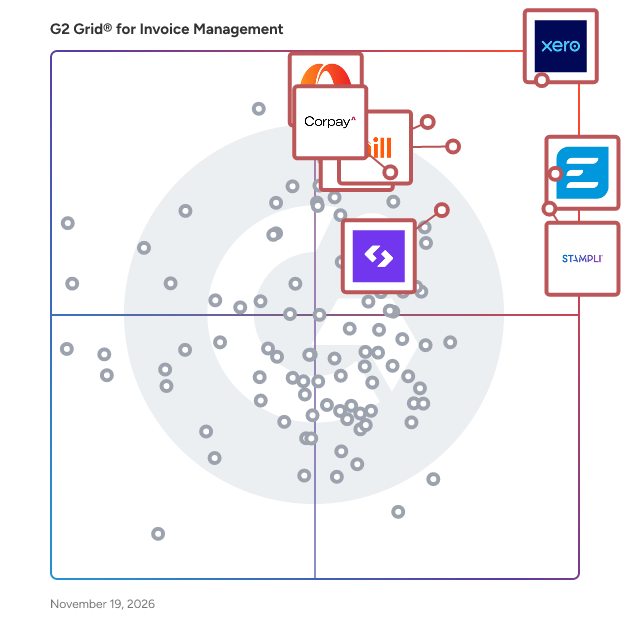
G2 Grid® for Invoice Management Software

G2 Grid® for Invoice Management Software plotting products by satisfaction and market presence

Highlighted products: Xero, Emburse, Stampli, SAP Concur, BILL AP/AR, Spendesk, Corpay Cross-Border, and Paylocity.

Underlying data: [Grid® JSON](https://www.g2.com/categories/invoice-management/grids.json?focus%5B%5D=xero&focus%5B%5D=emburse-2026-11-11&focus%5B%5D=stampli&focus%5B%5D=sap-concur&focus%5B%5D=bill-ap-ar&focus%5B%5D=spendesk&focus%5B%5D=corpay-cross-border&focus%5B%5D=paylocity)

Qonto

Qonto is a software designed to help European small businesses and entrepreneurs manage everyday banking and financial operations from a single business account. The software provides invoice management, spend management, bookkeeping, and multi-country banking by leveraging local IBANs across France, Germany, Italy, and Spain alongside flexible payment methods from Instant SEPA to SWIFT. It automates outgoing payments and receipt collection and reduces the manual effort of reconciling transactions through real-time notifications and direct accountant collaboration tools. Qonto addresses the fragmentation of business banking and financial management by consolidating invoicing, corporate cards, budgets, and cash flow oversight in one platform with 7-day customer support. The software supports team spending controls, integrated financing options, seamless accountant connectivity, and unlimited transaction history for growing businesses.

Average Rating: 4.6/5.0

Total Reviews: 171

How Do G2 Users Rate Qonto?

  • Has the product been a good partner in doing business?: 8.6/10 (Category avg: 8.9/10)
  • Accounting: 9.2/10 (Category avg: 8.8/10)
  • Cashflow: 8.7/10 (Category avg: 8.4/10)
  • Payments: 9.4/10 (Category avg: 8.7/10)

Who Is the Company Behind Qonto?

  • Seller: Qonto
  • Year Founded: 2016
  • HQ Location: Paris, Île-de-France, France
  • LinkedIn® Page: www.linkedin.com
    2,442 employees on LinkedIn®

Who Uses This Product?

  • Who Uses This: CEO, Président
  • Top Industries: Accounting, Consulting
  • Company Size: 76% Small, 4% Medium

What Do G2 Reviewers Say About Qonto?

AI-generated summary from verified user reviews

Pros
  • Users love the ease of use of Qonto, noting its clean UI and seamless integration of features.
  • Users value the prompt and friendly customer support provided by Qonto, enhancing their overall experience.
  • Users value the efficiency of Qonto, appreciating its quick features and seamless integration for expense management.
  • Users love the intuitive interface of Qonto, which simplifies day-to-day finance management with seamless integration.
  • Users value the easy invoice matching feature of Qonto, simplifying tracking and management of transactions.
Cons
  • Users find the costs of services and transfer fees with Qonto to be significantly higher than traditional banks.
  • Users are frustrated by slow check deposit processing and limited integrations, which hinder a smoother experience.
  • Users experience poor customer support from Qonto, with unhelpful staff and frustrating communication issues.
  • Users find the pricing issues with Qonto to be high, especially for international transactions and service fees.
  • Users experience approval issues due to unhelpful staff, long processing times, and complicated initial setup.

What Are Recent G2 Reviews of Qonto?

What Are G2 Users Discussing About Qonto?

TallyPrime

TallyPrime is a software designed to help small to medium-sized enterprises manage invoicing, accounting, inventory, taxation, payroll, and cost management from a single integrated platform. The software provides over 400 business reports and interconnected financial modules by leveraging automation across GST calculations, financial reporting, and cash and credit management. It automates critical business processes including invoicing and tax compliance and reduces the time and effort required for routine administrative tasks. TallyPrime addresses operational complexity for businesses in retail, manufacturing, and services by consolidating multiple functions into one platform with an intuitive, accessible interface. The software supports mobile and device-agnostic report access, real-time performance analysis, and customizable reporting to support informed decision-making and sustainable business growth.

Average Rating: 4.5/5.0

Total Reviews: 309

How Do G2 Users Rate TallyPrime?

  • Has the product been a good partner in doing business?: 9.0/10 (Category avg: 8.9/10)
  • Accounting: 9.3/10 (Category avg: 8.8/10)
  • Cashflow: 8.8/10 (Category avg: 8.4/10)
  • Payments: 8.8/10 (Category avg: 8.7/10)

Who Is the Company Behind TallyPrime?

  • Seller: Tally Solutions
  • Company Website:
  • Year Founded: 1986
  • HQ Location: Bangalore
  • LinkedIn® Page: www.linkedin.com
    5,423 employees on LinkedIn®

Who Uses This Product?

  • Who Uses This: Accountant, Senior Accountant
  • Top Industries: Accounting, Information Technology and Services
  • Company Size: 60% Small, 35% Medium

What Do G2 Reviewers Say About TallyPrime?

AI-generated summary from verified user reviews

Pros
  • Users appreciate TallyPrime's ease of use, enabling simple navigation while managing complex accounting tasks efficiently.
  • Users commend TallyPrime for its simplicity and powerful accounting features, enhancing efficiency and accuracy in financial management.
  • Users value the accounting efficiency of TallyPrime, finding it user-friendly and reliable for daily business needs.
  • Users appreciate the interlinked modules in TallyPrime, enabling seamless updates and quick report generation for better decision-making.
  • Users value the accounting ease of TallyPrime, appreciating its simplicity and efficiency in managing complex financial tasks.
Cons
  • Users find TallyPrime lacking in advanced features, hindering workflows like analytics, reporting, and customization ease.
  • Users note the limited customization options in TallyPrime, finding it challenging to modify reports and integrate seamlessly.
  • Users find TallyPrime's poor interface design challenging, leading to difficulties with navigation and customization.
  • Users find the user unfriendliness of TallyPrime frustrating due to its outdated interface and limited customization options.
  • Users find the learning curve challenging for TallyPrime, particularly for those lacking accounting experience.

What Are Recent G2 Reviews of TallyPrime?

What Are G2 Users Discussing About TallyPrime?

Anchor

Anchor is billing and payments automation software for accounting firms, bookkeepers, and professional service businesses. It combines proposals, engagement letters, agreements, automated billing, and payment collection in one platform Helping service businesses get paid on time, every time effortlessly. With no subscription fees. Syncing proposals, agreements, billing, and payments into one seamless workflow. Clients are auto-billed and auto-charged based on dynamic agreements, and everything syncs in real time with your general ledger. Designed for accountants, consultants, agencies, and service providers, Anchor eliminates manual billing tasks, reduces human error, and helps prevent revenue leakage. • Close deals faster with branded online proposals • Send flexible agreements that evolve with scope and terms • Automate billing: recurring, hourly, fixed, or one-time • Accept ACH or credit cards with adjustable fee settings • Collaborate via roles, permissions, and audit trails • Give clients a self-serve portal and automated reminders • Sync with QuickBooks Online, Xero and 5,000+ apps via Zapier Just $5 per payment. No subscriptions. No limits.

Average Rating: 4.9/5.0

Total Reviews: 130

How Do G2 Users Rate Anchor?

  • Has the product been a good partner in doing business?: 9.8/10 (Category avg: 8.9/10)
  • Accounting: 9.5/10 (Category avg: 8.8/10)
  • Cashflow: 8.7/10 (Category avg: 8.4/10)
  • Payments: 9.2/10 (Category avg: 8.7/10)

Who Is the Company Behind Anchor?

  • Seller: Anchor
  • Company Website:
  • Year Founded: 2021
  • HQ Location: New York, US
  • LinkedIn® Page: www.linkedin.com
    124 employees on LinkedIn®

Who Uses This Product?

  • Who Uses This: Owner, CEO
  • Top Industries: Accounting, Marketing and Advertising
  • Company Size: 98% Small, 2% Medium

What Do G2 Reviewers Say About Anchor?

AI-generated summary from verified user reviews

Pros
  • Users love how time-saving Anchor is, allowing quick proposal sending right after Discovery Calls without delays.
  • Users value the ease of use of Anchor, appreciating its mobile-friendliness and efficient proposal management.
  • Users value the automation features of Anchor, allowing for quick proposal creation and seamless integrations with workflows.
  • Users value the efficiency of Anchor, enjoying quick proposal creation and seamless integrations that enhance workflow.
  • Users value the flexibility of Anchor, enabling easy customization and efficient management of billing and payments.
Cons
  • Users report payment issues, including complexities with service splitting and concerns over Plaid's excessive permissions.
  • Users note processing delays have improved, but desire next day funding for a better experience.
  • Users desire greater customization options for email reminders and agreements, seeking more control over communications.
  • Users note a steep learning curve with Anchor, requiring time and effort to set up effectively.
  • Users note a 10-day delay in payouts via ACH, although improvements have been made to funding speeds.

What Are Recent G2 Reviews of Anchor?

AI can help you find the answers. G2 helps you trust them.

Connect G2 to Claude or ChatGPT for answers grounded in G2's trusted reviews, comparisons, and pricing from real user insights.

How it works

DualEntry

DualEntry is a software designed to help finance teams at mid-market to IPO-stage companies manage global, multi-entity, and multi-currency accounting operations with minimal manual effort. The software provides AR/AP automation, revenue management, tax handling, financial reporting, and audit preparation by leveraging AI-native automation built specifically by accountants for accountants. It automates intercompany eliminations, journal-entry posting, and reconciliation workflows and reduces manual work across everyday accounting tasks through 200-plus free integrations and 13,000-plus bank connections spanning 60-plus countries. DualEntry addresses the complexity of scaling finance operations by supporting 180 local currencies across 240 countries with live FX rates, custom workflows, and granular access controls within a SOX, SOC 2, and GDPR-compliant environment. The software supports multi-dimensional drillable reporting, role-based real-time dashboards, audit-ready financials, and seamless growth from mid-market through public company requirements.

Average Rating: 4.9/5.0

Total Reviews: 123

How Do G2 Users Rate DualEntry?

  • Has the product been a good partner in doing business?: 9.5/10 (Category avg: 8.9/10)
  • Accounting: 9.8/10 (Category avg: 8.8/10)
  • Cashflow: 9.4/10 (Category avg: 8.4/10)
  • Payments: 9.7/10 (Category avg: 8.7/10)

Who Is the Company Behind DualEntry?

  • Seller: DualEntry
  • Company Website:
  • Year Founded: 2024
  • HQ Location: New York, US
  • LinkedIn® Page: www.linkedin.com
    85 employees on LinkedIn®

Who Uses This Product?

  • Who Uses This: Accountant
  • Top Industries: Accounting, Manufacturing
  • Company Size: 49% Medium, 34% Small

What Do G2 Reviewers Say About DualEntry?

AI-generated summary from verified user reviews

Pros
  • Users enjoy the ease of use offered by DualEntry, enhancing their workflow with a clean and intuitive interface.
  • Users appreciate the user-friendly interface of DualEntry, making it easy to navigate and understand.
  • Users love the efficiency of DualEntry, enjoying a smoother workflow and instant data synchronization.
  • Users benefit from the excellent integration options of DualEntry, simplifying data import and enhancing workflow efficiency.
  • Users rave about the time-saving efficiency of DualEntry, enhancing workflows and reducing stress significantly.
Cons
  • Users note the need for interface improvements and more accessible options to enhance usability and flexibility.
  • Users highlight the lack of customizable features, suggesting more options for personalizing the DualEntry experience.
  • Users seek more customization options in DualEntry to enhance their workflow and user experience.
  • Users find DualEntry not user-friendly due to its complexity and the need for accounting knowledge to navigate effectively.
  • Users find that a lack of learning support in DualEntry can make it challenging for beginners and lead to mistakes.

What Are Recent G2 Reviews of DualEntry?

Basware

Basware is how the world’s best finance teams gain complete control of every invoice, every time. We offer a cloud-based platform for invoice lifecycle management automation, supporting end-to-end processing of invoices, from receipt or creation, through approval and matching, to payment and archive. Powered by the world’s most sophisticated invoice-centric AI – trained on over 2 billion invoices – Basware's Intelligent Automation drives real ROI by transforming finance operations. We serve 6,500+ customers globally and are trusted by industry leaders including DHL, Heineken and Sony. Fueled by 40 years of specialized expertise with $10+ trillion in total spend handled, we are pioneering the next era of finance. With Basware, now it all just happens.

Average Rating: 4.1/5.0

Total Reviews: 136

How Do G2 Users Rate Basware?

  • Has the product been a good partner in doing business?: 7.8/10 (Category avg: 8.9/10)
  • Accounting: 8.2/10 (Category avg: 8.8/10)
  • Cashflow: 7.4/10 (Category avg: 8.4/10)
  • Payments: 7.8/10 (Category avg: 8.7/10)

Who Is the Company Behind Basware?

  • Seller: Basware
  • Company Website:
  • Year Founded: 1985
  • HQ Location: Espoo
  • LinkedIn® Page: www.linkedin.com
    1,687 employees on LinkedIn®
  • Ownership: BAS1V.HE

Who Uses This Product?

  • Top Industries: Accounting, Computer Software
  • Company Size: 63% Large, 28% Medium

What Do G2 Reviewers Say About Basware?

AI-generated summary from verified user reviews

Pros
  • Users appreciate the ease of use of Basware, highlighting its clear menu and quick learning curve.
  • Users value the visibility and automation in Basware, streamlining invoice processes and enhancing efficiency in Accounts Payable.
  • Users value the efficiency of Basware, streamlining invoice processing and enhancing visibility in Accounts Payable operations.
  • Users value the robust invoicing capabilities of Basware, enhancing efficiency and transparency in the AP process.
  • Users value the automation capabilities of Basware, enhancing efficiency and reducing manual errors in invoice processing.
Cons
  • Users frequently experience slow loading times with Basware, impacting efficiency and user satisfaction during critical tasks.
  • Users criticize the complexity of Basware, citing unintuitive workflows and slow performance hindering their efficiency.
  • Users often face delays in support response and invoice processing, negatively impacting their overall experience with Basware.
  • Users feel that improvement is needed in Basware's user interface, workflows, and overall system responsiveness.
  • Users face invoice issues with Basware, including slow processing and unclear error messages complicating troubleshooting efforts.

What Are Recent G2 Reviews of Basware?

What Are G2 Users Discussing About Basware?

Melio

Melio is a software designed to help businesses of any size streamline B2B accounts payable and accounts receivable payments from a single platform. The software provides vendor payment management, invoice tracking, and cash flow control by leveraging flexible payment methods including bank transfers and cards alongside automated approval and scheduling workflows. It automates reconciliation and payment scheduling and reduces administrative tasks so finance teams can focus on business growth. Melio addresses the operational complexity of managing vendor and customer payments by syncing in real time with QuickBooks and Xero to keep financial records consistently up to date. The software supports scheduled payments, multi-method payment flexibility, and a free 30-day trial period, making it accessible for small businesses managing high volumes of vendor transactions.

Average Rating: 4.4/5.0

Total Reviews: 253

How Do G2 Users Rate Melio?

  • Has the product been a good partner in doing business?: 8.9/10 (Category avg: 8.9/10)
  • Accounting: 8.7/10 (Category avg: 8.8/10)
  • Cashflow: 8.4/10 (Category avg: 8.4/10)
  • Payments: 8.7/10 (Category avg: 8.7/10)

Who Is the Company Behind Melio?

  • Seller: Xero
  • Company Website:
  • Year Founded: 2006
  • HQ Location: Wellington
  • LinkedIn® Page: www.linkedin.com
    6,086 employees on LinkedIn®
  • Ownership: ASX:XRO

Who Uses This Product?

  • Who Uses This: Owner, Founder
  • Top Industries: Accounting, Marketing and Advertising
  • Company Size: 93% Small, 6% Medium

What Do G2 Reviewers Say About Melio?

AI-generated summary from verified user reviews

Pros
  • Users appreciate the ease of use of Melio, making business payments simple and efficient.
  • Users find Melio's easy payments feature essential for smooth, efficient vendor transactions and managing cash flow.
  • Users value the customizable approval workflows and fast payment options that enhance their payment processing experience.
  • Users find Melio's payment process simple and efficient, enhancing cash flow management and saving valuable administrative time.
  • Users value Melio for its time-saving payment process, enhancing efficiency and cash-flow control in vendor payments.
Cons
  • Users express frustration with the delays in payments, impacting financial planning and timely transactions.
  • Users report significant payment issues with Melio, facing failed transactions and unresponsive customer support.
  • Users express dissatisfaction with payment delays, facing issues with unaccounted funds and slow resolution times from Melio.
  • Users express concerns over poor customer support, facing difficulty in resolving payment issues and lack of communication.
  • Users find Melio's missing features limiting, especially in accounting tools and customer support responsiveness.

What Are Recent G2 Reviews of Melio?

What Are G2 Users Discussing About Melio?

Tipalti

Tipalti is a software designed to help businesses automate their end-to-end payables process and eliminate up to 80% of manual workload while closing the books 25% faster. The software provides accounts payable, global payments, procurement, and employee expense management by leveraging OCR invoice scanning, 2-and-3-way PO matching, and global tax compliance tools. It automates supplier onboarding, PO generation, approval acceleration, and invoice entry elimination and reduces manual effort through instant reconciliation with ERP integrations including NetSuite, QuickBooks, Xero, and Sage Intacct. Tipalti addresses the complexity of managing global payables by enabling fast payments to 196 countries in local currency with multi-entity support and physical and virtual card management. The software supports fast-growing companies such as Amazon Twitch, GoPro, Roblox, and Zola with a solution that maintains 98% customer satisfaction across AP, expense, and procurement workflows.

Average Rating: 4.5/5.0

Total Reviews: 425

How Do G2 Users Rate Tipalti?

  • Has the product been a good partner in doing business?: 8.7/10 (Category avg: 8.9/10)
  • Accounting: 8.4/10 (Category avg: 8.8/10)
  • Cashflow: 7.6/10 (Category avg: 8.4/10)
  • Payments: 8.5/10 (Category avg: 8.7/10)

Who Is the Company Behind Tipalti?

  • Seller: Tipalti
  • Company Website:
  • Year Founded: 2010
  • HQ Location: Foster City, US
  • LinkedIn® Page: www.linkedin.com
    1,092 employees on LinkedIn®

Who Uses This Product?

  • Who Uses This: Controller, Accounting Manager
  • Top Industries: Marketing and Advertising, Accounting
  • Company Size: 61% Medium, 33% Small

What Do G2 Reviewers Say About Tipalti?

AI-generated summary from verified user reviews

Pros
  • Users praise the ease of use of Accounts Payable, enjoying time savings and seamless setup for efficiency.
  • Users love the efficiency of Accounts Payable, saving time with convenient features like mobile receipt scanning.
  • Users value the responsive customer support of Accounts Payable, enhancing their experience with quick and effective assistance.
  • Users commend Tipalti for their exceptional support and implementation guidance, ensuring a smooth setup and user experience.
  • Users love the time-saving capabilities of Accounts Payable, simplifying tasks like receipt scanning and ERP integration.
Cons
  • Users report payment issues including delays, functionality restrictions, and inefficiencies in processing payments.
  • Users find the missing features limiting, wishing for enhanced capabilities in invoice management and payouts.
  • Users experience poor customer support with Tipalti, citing slow response times and inconsistency in assistance.
  • Users experience delays in fund release and processing efficiency, complicating payments and workflows with slow server speeds.
  • Users are frustrated by the poor reporting features, which hinder effective data analysis and workflow efficiency.

What Are Recent G2 Reviews of Tipalti?

What Are G2 Users Discussing About Tipalti?

HoneyBook

HoneyBook is a clientflow management platform designed for independent service businesses, such as photographers, venues, virtual assistants, wedding planners, and creative freelancers. The platform consolidates every stage of the client lifecycle into one place, from initial inquiry to final payment, allowing users to manage their operations without switching between multiple tools. Unlike generic CRM tools, HoneyBook offers a tailored experience that integrates lead capture, contracts, invoicing, scheduling, and client communication into a single platform. It includes AI-powered automation and customization features designed specifically for the workflows of service-based businesses. The target audience for HoneyBook includes service-oriented professionals who need a system to handle lead generation, client management, and payment processing. The platform is particularly relevant for those who operate in creative industries such as photography, event venues, graphic design, consulting, and virtual assistance, where client interactions and project management are central to running the business. Key features include: Branded lead forms and questionnaires that embed on any website, along with online scheduling, appointment booking, and automated follow-up sequences to convert inquiries into booked clients Online invoices with integrated payment processing, legally binding contracts with e-signatures, and customizable proposals that combine services, pricing, contracts, and payment in one document A visual project pipeline to track every client and job status, CRM and contact management to store client details and history, a branded client portal where clients can view documents and make payments, and automated workflows and task reminders to reduce manual follow-up HoneyBook integrates with over 40 third-party tools including Squarespace, Google Ads, Mailchimp, Zoom, and QuickBooks, allowing businesses to connect their existing tech stack. The platform is available on web and mobile. A 30-day free trial is available. No credit card required.

Average Rating: 4.4/5.0

Total Reviews: 247

How Do G2 Users Rate HoneyBook?

  • Has the product been a good partner in doing business?: 9.2/10 (Category avg: 8.9/10)
  • Accounting: 8.5/10 (Category avg: 8.8/10)
  • Cashflow: 8.5/10 (Category avg: 8.4/10)
  • Payments: 8.7/10 (Category avg: 8.7/10)

Who Is the Company Behind HoneyBook?

  • Seller: HoneyBook
  • Company Website:
  • Year Founded: 2013
  • HQ Location: San Francisco, CA
  • LinkedIn® Page: www.linkedin.com
    325 employees on LinkedIn®

Who Uses This Product?

  • Who Uses This: Owner, Photographer
  • Top Industries: Photography, Events Services
  • Company Size: 97% Small, 2% Medium

What Do G2 Reviewers Say About HoneyBook?

AI-generated summary from verified user reviews

Pros
  • Users appreciate the seamless payment management of HoneyBook, enhancing organization and professionalism in their business operations.
  • Users love the easy creation of proposals and templates, streamlining client communication and management effortlessly.
  • Users find HoneyBook extremely user-friendly, seamlessly integrating essential business tasks into one efficient platform.
  • Users appreciate the easy customization of HoneyBook, enabling smooth creation of proposals, invoices, and contracts.
  • Users value the streamlined organization and ease of use in managing clients and payments with HoneyBook.
Cons
  • Users experience payment issues, particularly with complicated processes and lack of options for alternative payments.
  • Users find HoneyBook to be too expensive for the value provided, with frustrating data export limitations.
  • Users express frustration over the lack of integration options, complicating project management and data migration processes.
  • Users find limited features in HoneyBook, particularly in workflow automations, which restricts their operational efficiency.
  • Users find the reporting features lacking, complicating efforts to track earnings and improve business performance.

What Are Recent G2 Reviews of HoneyBook?

What Are G2 Users Discussing About HoneyBook?

Ottimate

Ottimate is an AI-native Accounts Payable (AP) automation platform that leverages the latest agentic technology to proactively identify opportunities to optimize cash flow and intelligently automate mundane tasks, enabling organizations to strategically maximize working capital while saving tens of thousands in labor costs. Built for unique, industry-specific workflows in hospitality, healthcare, and grocery, Ottimate centralizes AP across multiple locations and empowers finance teams to reduce costs, prevent overpayments, detect fraud, and enforce policy compliance across the entire invoice-to-payment lifecycle. Beyond traditional automation, we give finance teams real-time intelligence, preemptively uncovering efficiency gaps, unexpected cost savings, and strengthening profitability. Insights that used to take 11+ hours to compile now surface within seconds, so teams can regain control of their AP and margins.

Average Rating: 4.6/5.0

Total Reviews: 214

How Do G2 Users Rate Ottimate?

  • Has the product been a good partner in doing business?: 9.2/10 (Category avg: 8.9/10)
  • Accounting: 8.7/10 (Category avg: 8.8/10)
  • Cashflow: 7.7/10 (Category avg: 8.4/10)
  • Payments: 8.6/10 (Category avg: 8.7/10)

Who Is the Company Behind Ottimate?

  • Seller: Ottimate
  • Company Website:
  • Year Founded: 2014
  • HQ Location: San Francisco, US
  • LinkedIn® Page: www.linkedin.com
    267 employees on LinkedIn®

Who Uses This Product?

  • Who Uses This: Controller, Accountant
  • Top Industries: Hospitality, Restaurants
  • Company Size: 54% Medium, 34% Small

What Do G2 Reviewers Say About Ottimate?

AI-generated summary from verified user reviews

Pros
  • Users find Ottimate to be extremely user-friendly, streamlining AP processes and enhancing efficiency effortlessly.
  • Users commend Ottimate's invoicing automation, which significantly speeds up processing and simplifies vendor payments.
  • Users find that Ottimate significantly boosts efficiency, making invoice processing faster and freeing up valuable time for teams.
  • Users rave about the automation features of Ottimate, significantly streamlining invoice processing and payment management.
  • Users value the efficient billing process of Ottimate, enhancing speed and ease in managing accounts payable.
Cons
  • Users experience inefficient invoicing with excessive notifications and issues related to password payment processing.
  • Users face export issues with Ottimate, including complications with offline payments and slow processing times.
  • Users face integration issues with Ottimate, often needing support to resolve functionality challenges across different modules.
  • Users experience slow performance with Ottimate, particularly during invoice uploads and syncing with accounting software.
  • Users face accuracy issues with Ottimate, experiencing unintended inputs and erroneous flags that require manual correction.

What Are Recent G2 Reviews of Ottimate?

What Are G2 Users Discussing About Ottimate?

AvidXchange

AvidXchange is the AI-powered accounts payable (AP) and payments solution built for mid-market businesses. We combine AI that eliminates manual work with over 25 years of experience and data intelligence to get it right, so finance teams can move faster, pay smarter, and operate with complete confidence. Over 8,000 growth-driven businesses rely on AvidXchange to deliver greater efficiency, tighter control, and real-time visibility into their AP process and to execute millions of payments with accuracy and enhanced security through our proprietary payment network. For more information, visit avidxchange.com.

Average Rating: 4.4/5.0

Total Reviews: 357

How Do G2 Users Rate AvidXchange?

  • Has the product been a good partner in doing business?: 8.4/10 (Category avg: 8.9/10)
  • Accounting: 8.6/10 (Category avg: 8.8/10)
  • Cashflow: 7.2/10 (Category avg: 8.4/10)
  • Payments: 8.6/10 (Category avg: 8.7/10)

Who Is the Company Behind AvidXchange?

  • Seller: AvidXchange
  • Company Website:
  • Year Founded: 2000
  • HQ Location: Charlotte, NC
  • LinkedIn® Page: www.linkedin.com
    1,672 employees on LinkedIn®
  • Ownership: NASDAQ: AVDX

Who Uses This Product?

  • Who Uses This: Accounts Payable, Accounts Payable Manager
  • Top Industries: Real Estate, Accounting
  • Company Size: 51% Medium, 39% Small

What Do G2 Reviewers Say About AvidXchange?

AI-generated summary from verified user reviews

Pros
  • Users value the ease of use of AvidXchange, enhancing organization and efficiency in handling invoices and approvals.
  • Users value the time-saving features of AvidXchange, streamlining the AP process and enhancing overall efficiency.
  • Users commend AvidXchange for its efficiency in automating AP workflows, enhancing organization and reducing manual errors.
  • Users value the streamlined AP workflow of AvidXchange, enhancing efficiency and reducing manual errors significantly.
  • Users value the streamlined invoicing process of AvidXchange, enhancing efficiency and control in accounts payable workflows.
Cons
  • AvidXchange needs to enhance their customer support as users face long wait times and slow resolution processes.
  • Users experience delays in support resolution, with long wait times impacting the overall satisfaction with AvidXchange.
  • Users face frequent payment issues with AvidXchange, causing delays and requiring constant support for resolution.
  • Users experience delays in vendor payments and find it difficult to choose preferred payment methods in AvidXchange.
  • Users face invoicing issues with AvidXchange, struggling with limited invoice visibility and errors in indexing.

What Are Recent G2 Reviews of AvidXchange?

What Are G2 Users Discussing About AvidXchange?

Hyperbots

Hyperbots builds AI copilots that remove the repetitive, manual workload from finance and accounting. The focus is straightforward: eliminate the processes that slow teams down like invoice processing, 2-/3-way matching, accruals, capitalization, GL coding, vendor onboarding, procurement approvals, expense checks, receivables, collections, and the daily coordination with employees, vendors, and customers. To make this possible, Hyperbots develops finance-specific AI across NLP, vision models, large language models, recommenders, document intelligence, data visualization, and conversational systems. This foundation powers a platform built specifically for finance rather than generic automation repurposed for it. The copilots cover Accounts Payable, Procurement, Vendor Management, Payments, Sales Tax Verification, and Accruals. They handle end-to-end workflows — extracting and validating data, performing matching, suggesting GL codes, handling exceptions, routing approvals, optimizing payments, and posting directly into ERP systems. Each copilot adapts to an organization’s rules, approval paths, entity structures, and accounting practices without requiring custom IT builds. Developed with input from dozens of CFOs, the platform emphasizes measurable results. Early rollouts show up to an 80% reduction in per-invoice processing cost and cycle times shrinking from 5–15 days to minutes. Teams see cleaner data, fewer manual interventions, higher straight-through processing, and stronger compliance. Hyperbots connects with major ERP, CRM, and finance systems, supports both cloud and on-prem setups, and scales across multi-entity environments. With enterprise-grade controls, auditability, and security, it brings intelligent, adaptive automation that helps finance teams move faster, operate with accuracy, and contribute more strategically.

Average Rating: 5.0/5.0

Total Reviews: 12

How Do G2 Users Rate Hyperbots?

  • Has the product been a good partner in doing business?: 10.0/10 (Category avg: 8.9/10)
  • Accounting: 10.0/10 (Category avg: 8.8/10)
  • Cashflow: 10.0/10 (Category avg: 8.4/10)
  • Payments: 10.0/10 (Category avg: 8.7/10)

Who Is the Company Behind Hyperbots?

Who Uses This Product?

  • Company Size: 117% Medium, 25% Large

What Do G2 Reviewers Say About Hyperbots?

AI-generated summary from verified user reviews

Pros
  • Users find the ease of use of Hyperbots A/P suite enhances invoice processing and minimizes manual effort effectively.
  • Users appreciate the automation features of Hyperbots A/P suite, significantly reducing manual effort and improving accuracy.
  • Users value the efficiency of Hyperbots A/P suite, enjoying streamlined invoice processing and organized payment workflows.
  • Users appreciate the effortless invoice processing of Hyperbots A/P suite, enhancing accuracy and reducing manual workload significantly.
  • Users commend the high accuracy of Hyperbots A/P suite, streamlining invoice processing and reducing manual errors effectively.
Cons
  • Users experience a slight learning curve initially but find ease after onboarding and configuring workflows.
  • Users experience a steep learning curve initially, complicating setup before understanding its comprehensive features.
  • Users find the complexity of initial setup and configuration challenging, requiring time to adapt to the workflows.
  • Users face a complex setup process initially, with a steep learning curve for configuring workflows and validations.
  • Users note that delays in optimizing advanced features can hinder overall workflow efficiency in Hyperbots A/P suite.

What Are Recent G2 Reviews of Hyperbots?

Moss

Moss is Europe’s premier SMB spend management solution, providing real-time visibility and control over company spending. By automating credit card issuance, invoice management, and employee reimbursements, Moss streamlines workflows and reduces manual, administrative burdens on finance teams. Beyond just cost savings, Moss aims to be the go-to tool for finance professionals, freeing them to focus on more forward-thinking decisions. Integrations with common ERP, HRIS, and accounting solutions such as DATEV, Xero, Exact Online and many more, allow Moss to fit seamlessly into existing finance team processes.

Average Rating: 4.7/5.0

Total Reviews: 261

How Do G2 Users Rate Moss?

  • Has the product been a good partner in doing business?: 9.0/10 (Category avg: 8.9/10)
  • Accounting: 9.0/10 (Category avg: 8.8/10)
  • Cashflow: 8.4/10 (Category avg: 8.4/10)
  • Payments: 9.0/10 (Category avg: 8.7/10)

Who Is the Company Behind Moss?

  • Seller: Moss
  • Company Website:
  • Year Founded: 2019
  • HQ Location: Berlin, Germany
  • LinkedIn® Page: www.linkedin.com
    339 employees on LinkedIn®

Who Uses This Product?

  • Top Industries: Computer Software, Information Technology and Services
  • Company Size: 51% Medium, 39% Small

What Do G2 Reviewers Say About Moss?

AI-generated summary from verified user reviews

Pros
  • Users value the ease of use of Moss, praising its straightforward setup and intuitive expense tracking features.
  • Users value the seamless expense management of Moss, enjoying its ease, efficiency, and effective receipt tracking.
  • Users value the convenience of Moss, enjoying its user-friendly app and seamless integration for efficient expense management.
  • Users commend the efficient setup and seamless expense management of Moss, enhancing their operational workflows significantly.
  • Users value the time-saving features of Moss, streamlining expense management and reducing paperwork significantly.
Cons
  • Users report approval issues with Moss | Spend smarter, including card blocks and transaction declines affecting usability.
  • Users find the learning curve steep, citing difficulties with the login process and limited customization options.
  • Users are frustrated by limited payment options, impacting their ability to use Moss effectively in various situations.
  • Users find the difficulties surrounding lost receipts create extra administrative efforts and hinder transaction closure.
  • Users experience upload issues with Moss, finding the receipt management process slow and disruptive when blocked.

What Are Recent G2 Reviews of Moss?

ApprovalMax

ApprovalMax is Accounts Payable approval software for finance teams using QuickBooks Online, Xero, and NetSuite. Trusted by 20,000+ businesses around the world, it sits between your accounting platform and every outgoing payment, making sure nothing moves without the right sign-off, at the right level, with the right documentation attached. Finance teams that outgrow email-based approvals use ApprovalMax to automate the entire approval process – from bills and purchase orders to expenses, credit notes, and batch payments. Approval workflows route automatically based on rules you define. Approvers act from any device. And every decision generates a permanent, time-stamped record without anyone having to compile it. What ApprovalMax does - Routes invoices and purchase orders to the correct approvers automatically, based on vendor, amount, department, or any combination of your own policies - Checks every bill against supplier history and flags anomalies before approval – unusual amounts, billing frequency jumps, mismatched coding, or a supplier you've never paid before. - Flags duplicate invoices, alerts finance teams when vendor bank details change, and enforces coding rules at the point of approval – before money moves - Shows live budget impact to approvers at the moment of decision, so overspend is prevented rather than explained after the fact - Generates an immutable audit trail for every approval: who approved, what they reviewed, and when each step occurred - Scales from simple single-step workflows to multi-tiered, multi-entity approval chains – without requiring approvers to hold licenses in your accounting platform Who uses it ApprovalMax is used by in-house finance teams, controllers, CFOs, and the accountants and bookkeepers who support them. It's designed for businesses that need structured, enforceable approval controls – and that can't afford to find out what slipped through after the fact. For finance teams, it removes the manual chase and replaces it with workflows that run in the background. For finance leaders, it provides governance they can demonstrate to auditors, boards, and investors on demand. For accountants, it's a single platform that works across every client.

Average Rating: 4.6/5.0

Total Reviews: 104

How Do G2 Users Rate ApprovalMax?

  • Has the product been a good partner in doing business?: 9.4/10 (Category avg: 8.9/10)
  • Accounting: 9.3/10 (Category avg: 8.8/10)
  • Cashflow: 7.7/10 (Category avg: 8.4/10)
  • Payments: 8.1/10 (Category avg: 8.7/10)

Who Is the Company Behind ApprovalMax?

  • Seller: ApprovalMax
  • Company Website:
  • Year Founded: 2016
  • HQ Location: London, GB
  • LinkedIn® Page: www.linkedin.com
    134 employees on LinkedIn®

Who Uses This Product?

  • Who Uses This: Accountant
  • Top Industries: Accounting, Health, Wellness and Fitness
  • Company Size: 56% Small, 36% Medium

What Do G2 Reviewers Say About ApprovalMax?

AI-generated summary from verified user reviews

Pros
  • Users value the efficient approval process of ApprovalMax, ensuring smooth flow and effective transaction management.
  • Users appreciate the ease of use of ApprovalMax, enhancing workflow efficiency and simplifying approval processes.
  • Users appreciate the easy integrations of ApprovalMax, enabling seamless workflows with tools like Xero and QuickBooks.
  • Users appreciate the streamlined efficiency of ApprovalMax, enhancing approval workflows and financial transaction monitoring.
  • Users appreciate the seamless integrations of ApprovalMax, enhancing workflow connectivity with accounting tools like Xero and QuickBooks.
Cons
  • Users face missing features and difficulties with 2FA, approval reassignment, and limited expense handling in ApprovalMax.
  • Users face approval issues that complicate workflow setup, leading to frustrations with reassignments and missing approvers.
  • Users face challenges with data management issues such as 2FA complications and workflow reassignments, complicating user experience.
  • Users experience limitations with expenses and approval automation, causing frustration and rework when submitting bills.
  • Users express frustration over the lack of communication features, making it hard to track feedback and support requests.

What Are Recent G2 Reviews of ApprovalMax?

Pleo

Pleo is a comprehensive spending solution designed to streamline expense management for companies of all sizes. This innovative platform provides employees with smart company cards, enabling them to make necessary purchases without the hassle of tracking down receipts or managing reimbursements. With Pleo, organizations can gain real-time visibility into their spending, reduce administrative burdens, and foster a culture of trust and autonomy among team members. Targeted primarily at businesses looking to enhance their financial processes, Pleo caters to a diverse audience, including finance teams, HR departments, and employees across various sectors. The solution is particularly beneficial for companies that want to empower their staff while maintaining control over expenditures. By simplifying the expense management process, Pleo allows teams to focus on their core responsibilities rather than getting bogged down by paperwork and manual tracking. One of the key features of Pleo is its automated expense management system, which eliminates the need for tedious paperwork and manual entry. As soon as a purchase is made using a Pleo card, notifications are sent to administrators, ensuring that there are no unexpected expenses at the end of the month. This level of transparency is a significant advantage, as it allows companies to monitor spending in real-time and adjust budgets as necessary. Many users report that this feature has increased their overall productivity and enhanced their understanding of financial flows within the organization. Pleo also offers customizable spending limits for each cardholder, giving businesses the flexibility to manage their budgets effectively. This feature allows organizations to set individual limits based on roles or departments, ensuring that spending aligns with company policies. The ability to adjust these limits as needed further enhances control over finances, making it easier for administrators to respond to changing business needs. Ultimately, Pleo empowers teams by removing the constraints of traditional expense management. By providing employees with the tools they need to make purchases directly, companies can save significant time and resources. On average, Pleo admins report saving up to 138 hours annually, allowing them to redirect their efforts toward more strategic initiatives. This combination of efficiency, transparency, control, and freedom makes Pleo a valuable asset for organizations aiming to optimize their financial operations.

Average Rating: 4.7/5.0

Total Reviews: 1,417

How Do G2 Users Rate Pleo?

  • Has the product been a good partner in doing business?: 8.9/10 (Category avg: 8.9/10)
  • Accounting: 8.2/10 (Category avg: 8.8/10)
  • Cashflow: 8.0/10 (Category avg: 8.4/10)
  • Payments: 8.7/10 (Category avg: 8.7/10)

Who Is the Company Behind Pleo?

  • Seller: Pleo
  • Company Website:
  • Year Founded: 2015
  • HQ Location: København N, Hovedstaden
  • LinkedIn® Page: www.linkedin.com
    941 employees on LinkedIn®

Who Uses This Product?

  • Who Uses This: CEO, Managing Director
  • Top Industries: Computer Software, Information Technology and Services
  • Company Size: 59% Small, 33% Medium

What Do G2 Reviewers Say About Pleo?

AI-generated summary from verified user reviews

Pros
  • Users value Pleo's ease of use, praising its simple setup and efficient expense management for quick reimbursements.
  • Users love Pleo's user-friendly design, making expense management and reimbursements effortless and quick.
  • Users appreciate the user-friendly interface of Pleo, making expense management simple and efficient.
  • Users love the Easy Upload feature of Pleo, enjoying its simple interface and quick receipt scanning capability.
  • Users love the efficiency of Pleo, enjoying its user-friendly interface and quick receipt management.
Cons
  • Users find the receipt scanning issues frustrating, particularly with slow processing and inconsistent loading times.
  • Users find the card issues frustrating, particularly with delays in accessing digital cards and using them on mobile.
  • Users find the approval issues with Pleo frustrating, particularly the delays in accessing their digital card information.
  • Users face frequent upload issues, leading to confusion and potential data loss during attachment processes.
  • Users express frustration with poor customer support, citing unresolved issues and lack of helpful resources.

What Are Recent G2 Reviews of Pleo?

What Are G2 Users Discussing About Pleo?

Corpay Spend Management

The smarter, faster way to manage all business payments — without the hassle. Corpay Complete brings AP automation, corporate card management, and expense control into one seamless platform. Say goodbye to manual processes and disconnected systems. Now, you can automate the P2P process, track expenses in real time, and gain full visibility over all of your company spend. With best-in-class automation, built-in fraud protection, and enterprise-grade security, Corpay Complete helps businesses reduce risk, increase efficiency, and scale with ease. Start with the tools you need today and expand as your business grows. Product Description Corpay (NYSE: CPAY) is America’s #1 commercial card issuer and a trusted S&P 500 company, helping 800,000 businesses streamline payments across 200+ countries. Corpay Complete is Fully Managed AP. It eliminates inefficiencies by consolidating purchase orders, invoicing, vendor payments, corporate cards, and expense controls into a single, automated workflow. No more juggling multiple vendors or disconnected systems. Instead, businesses get one intuitive platform designed for complete control over spend. With real-time visibility, built-in fraud protection, and seamless ERP integrations — including NetSuite, QuickBooks, and Microsoft Dynamics and more — finance teams can close the books faster, optimize cash flow, strengthen financial oversight without payments related distractions. . How Do You Position Yourself Against Competitors? Unlike fragmented solutions that require multiple vendors and manual processes, Corpay Complete consolidates all AP and expense processes in one intelligent platform. We do more than just “Bill Pay”. We are the only provider that provides “Fully Managed AP”. That means Automating the entire P2P process, managing vendor enrollment/payments, , and eliminating manual work enabling our clients to spend more time focusing on their core business. With 1.8 billion payments processed annually and vendor network of 3.8M vendors, Corpay is the trusted choice for finance teams that need speed, security, and scale.

Average Rating: 4.6/5.0

Total Reviews: 417

How Do G2 Users Rate Corpay Spend Management?

  • Has the product been a good partner in doing business?: 9.3/10 (Category avg: 8.9/10)
  • Accounting: 9.9/10 (Category avg: 8.8/10)
  • Cashflow: 9.5/10 (Category avg: 8.4/10)
  • Payments: 9.9/10 (Category avg: 8.7/10)

Who Is the Company Behind Corpay Spend Management?

  • Seller: Corpay
  • Company Website:
  • Year Founded: 2000
  • HQ Location: Atlanta, US
  • LinkedIn® Page: www.linkedin.com
    7,238 employees on LinkedIn®

Who Uses This Product?

  • Who Uses This: Controller, CFO
  • Top Industries: Automotive, Primary/Secondary Education
  • Company Size: 69% Medium, 18% Large

What Do G2 Reviewers Say About Corpay Spend Management?

AI-generated summary from verified user reviews

Pros
  • Users appreciate the ease of use of Corpay Spend Management, streamlining financial processes and enhancing account organization.
  • Users appreciate the efficiency of Corpay Spend Management, streamlining financial processes and enhancing asset management effectively.
  • Users value the efficient customer support of Corpay Spend Management, enhancing their experience and satisfaction with the product.
  • Users appreciate the efficient payment processing of Corpay Spend Management, enhancing automation and integration for smoother transactions.
  • Users appreciate the easy payment features of Corpay Complete, enhancing security and efficiency in financial management.
Cons
  • Users face payment issues with Corpay Spend Management, leading to communication problems and a frustrating onboarding process.
  • Users face difficulties in vendor setup and some hiccups with certain vendors, impacting the overall experience.
  • Users face poor customer support with Corpay Spend Management, leading to frustrating communication and operational challenges.
  • Users face delays during onboarding and payment processes, impacting their efficiency and overall experience with Corpay Spend Management.
  • Users face poor communication and rigidity in payment processing, leading to delays and internal workarounds.

What Are Recent G2 Reviews of Corpay Spend Management?

What Are G2 Users Discussing About Corpay Spend Management?

Nathan Calabrese
NC
Researched and written by Nathan Calabrese