# Best Diagramming Software - Page 3

*By [Neeraja Prakash](https://research.g2.com/insights/author/neeraja-prakash)*


Diagramming software allows users to create detailed diagrams—such as flow charts and floor plans—out of data and images. Diagramming tools often include templates for building diagrams in addition to enabling users to create diagrams from scratch. Certain diagramming programs can integrate with other design tools, and may offer collaborative platforms so multiple users can view and edit diagram files at the same time.

To qualify for inclusion in the Diagramming category, a product must:

- Offer specialized tools for designing one or more types of diagrams, such as organizational charts and floorplans
- Provide industry-related shapes and elements for use in diagrams and allow users to create or import custom diagram components
- Allow specified users to view and interact with diagrams online during and after presentations


## Top Diagramming Software at a Glance
| # | Product | Rating | Best For | What Users Say |
|---|---------|--------|----------|----------------|
| 1 | [Miro](https://www.g2.com/products/miro/reviews) | 4.6/5.0 (13,123 reviews) | Collaborative visual diagramming with infinite canvas | "[Flawless](https://www.g2.com/survey_responses/miro-review-13095234)" |
| 2 | [Lucid Visual Collaboration Suite](https://www.g2.com/products/lucid-software-inc-lucid-visual-collaboration-suite/reviews) | 4.5/5.0 (8,674 reviews) | Real-time visual diagramming with collaborative workflows | "[As a Business Analyst, I believe that Lucidcharts is a game changer.](https://www.g2.com/survey_responses/lucid-visual-collaboration-suite-review-13060586)" |
| 3 | [Visio](https://www.g2.com/products/visio/reviews) | 4.2/5.0 (676 reviews) | Microsoft-native process and network diagramming | "[A Crucial Tool for Regulatory Affairs](https://www.g2.com/survey_responses/visio-review-12734647)" |
| 4 | [FigJam](https://www.g2.com/products/fig-jam/reviews) | 4.6/5.0 (457 reviews) | Collaborative flow diagramming inside Figma | "[Fast, intuitive, and team-friendly](https://www.g2.com/survey_responses/figjam-review-13039267)" |
| 5 | [Wondershare EdrawMax](https://www.g2.com/products/wondershare-edrawmax/reviews) | 4.5/5.0 (139 reviews) | Cross-domain diagramming with zero-learning-curve templates | "[Outstanding Application makes works easy](https://www.g2.com/survey_responses/wondershare-edrawmax-review-10942452)" |
| 6 | [SmartDraw](https://www.g2.com/products/smartdraw/reviews) | 4.5/5.0 (386 reviews) | Multi-format diagramming with Visio-compatible workflows | "[Clean, Easy-to-Use Interface That Streamlines Team Collaboration](https://www.g2.com/survey_responses/smartdraw-review-12917764)" |
| 7 | [Cvent Event Marketing &amp; Management](https://www.g2.com/products/cvent-event-marketing-management/reviews) | 4.3/5.0 (2,082 reviews) | — | "[One-Stop Solution for Managing Event Needs!](https://www.g2.com/survey_responses/cvent-event-marketing-management-review-5377617)" |
| 8 | [Mural](https://www.g2.com/products/mural/reviews) | 4.6/5.0 (1,401 reviews) | Visual diagramming for real-time remote collaboration | "[Flexible Visual Canvas That Supercharges Remote Collaboration](https://www.g2.com/survey_responses/mural-review-12983512)" |
| 9 | [Creately](https://www.g2.com/products/creately/reviews) | 4.4/5.0 (1,379 reviews) | Collaborative visual diagramming with AI-assisted workflows | "[Great tool for quick and intuitive database modeling](https://www.g2.com/survey_responses/creately-review-12565759)" |
| 10 | [Draw.io](https://www.g2.com/products/draw-io/reviews) | 4.4/5.0 (442 reviews) | Browser-native flowchart and architecture diagramming | "[Powerful Diagramming Tool with Great Flexibility](https://www.g2.com/survey_responses/draw-io-review-12958091)" |


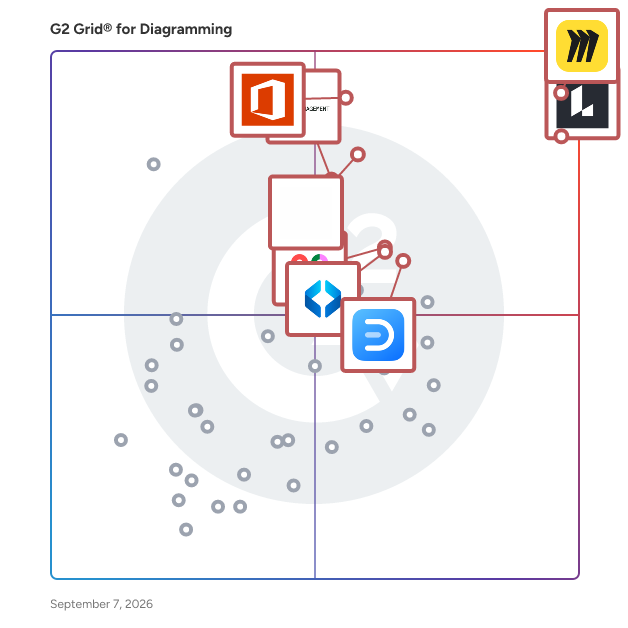
## G2 Grid® for Diagramming Software
![G2 Grid® for Diagramming Software plotting products by satisfaction and market presence](https://www.g2.com/categories/diagramming/grids.png?focus%5B%5D=42445&focus%5B%5D=2887&focus%5B%5D=17137&focus%5B%5D=1215793&focus%5B%5D=89809&focus%5B%5D=17725&focus%5B%5D=737&focus%5B%5D=6782)
Highlighted products: Miro, Lucid Visual Collaboration Suite, Visio, FigJam, Wondershare EdrawMax, SmartDraw, Cvent Event Marketing &amp; Management, and Mural.
Underlying data: [Grid® JSON](https://www.g2.com/categories/diagramming/grids.json?focus%5B%5D=miro&amp;focus%5B%5D=lucid-software-inc-lucid-visual-collaboration-suite&amp;focus%5B%5D=visio&amp;focus%5B%5D=fig-jam&amp;focus%5B%5D=wondershare-edrawmax&amp;focus%5B%5D=smartdraw&amp;focus%5B%5D=cvent-event-marketing-management&amp;focus%5B%5D=mural)


## How Many Diagramming Software Products Does G2 Track?
**Total Products under this Category:** 136

### Category Stats (Jul 2026)
- **Average Rating**: 4.39/5 The average rating of products in this category, based on all submitted ratings
- **Top Trending Product**: LibreOffice Draw (+1.0%) - Among all products in this category, LibreOffice Draw recorded the largest rating increase compared to last month
*Last updated: July 13, 2026*


## How Does G2 Rank Diagramming Software Products?

**Why You Can Trust G2's Software Rankings:**

- 30 Analysts and Data Experts
- 33,500+ Authentic Reviews
- 136+ Products
- Unbiased Rankings

G2's software rankings are built on verified user reviews, rigorous moderation, and a consistent research methodology maintained by a team of analysts and data experts. Each product is measured using the same transparent criteria, with no paid placement or vendor influence. While reviews reflect real user experiences, which can be subjective, they offer valuable insight into how software performs in the hands of professionals. Together, these inputs power the G2 Score, a standardized way to compare tools within every category.


## Which Diagramming Software Is Best for Your Use Case?

- **Leader:** [Miro](https://www.g2.com/products/miro/reviews)
- **Highest Performer:** [Whimsical](https://www.g2.com/products/whimsical/reviews)
- **Easiest to Use:** [Creately](https://www.g2.com/products/creately/reviews)
- **Top Trending:** [Excalidraw](https://www.g2.com/products/excalidraw/reviews)
- **Best Free Software:** [Miro](https://www.g2.com/products/miro/reviews)


---

**Sponsored**

### eWorkOrders CMMS

eWorkOrders CMMS is a powerful, affordable, and web-based Computerized Maintenance Management System (CMMS) that helps organizations streamline work orders, preventive maintenance, and asset management. Designed for maintenance teams of all sizes, eWorkOrders makes it simple to track assets, manage inventory, schedule maintenance, and generate detailed reports—all from any device, anywhere. Key features include: • Work Order Management – create, assign, and track tasks efficiently. • Preventive Maintenance (PMs) – plan and automate maintenance schedules. • Asset &amp; Inventory Management – keep assets and spare parts organized. • Employee &amp; Service Management – manage staff, contractors, and service requests. • Documentation &amp; Meter Tracking – record vital maintenance data and readings. • GIS Tracking &amp; Scheduling – optimize operations across multiple locations. • AI Assistant with Automatic Assignments, PM Recommendations, Work Orders Assist, Reporting &amp; Help Assistant. No software installation or hardware purchase required. Upgrades and technical support are included, so you can be up and running in a single day. Discover why eWorkOrders is consistently one of the highest-rated CMMS solutions. Request a live demo today by calling us at 888-333-4617 and learn how it can reduce downtime, improve compliance, and enhance asset reliability


[Visit website](https://www.g2.com/external_clickthroughs/record?secure%5Bad_program%5D=ppc&amp;secure%5Bad_slot%5D=category_product_list&amp;secure%5Bcategory_id%5D=588&amp;secure%5Bchosen_at%5D=2026-07-13T21%3A07%3A40Z&amp;secure%5Bdisplayable_resource_id%5D=431&amp;secure%5Bdisplayable_resource_type%5D=Category&amp;secure%5Bmedium%5D=sponsored&amp;secure%5Bplacement_reason%5D=retargeted_product&amp;secure%5Bplacement_resource_ids%5D%5B%5D=11966&amp;secure%5Bprioritized%5D=false&amp;secure%5Bproduct_id%5D=11966&amp;secure%5Bresource_id%5D=588&amp;secure%5Bresource_type%5D=Category&amp;secure%5Bsource_type%5D=category_page&amp;secure%5Bsource_url%5D=https%3A%2F%2Fwww.g2.com%2Fcategories%2Fdiagramming%3Fpage%3D4&amp;secure%5Btoken%5D=e90def4c27fa3055dbada4a2215e433b5fd14c677d1c3d0de2c9b9e28eb61199&amp;secure%5Burl%5D=https%3A%2F%2Feworkorders.com%2FLandingPages.asp&amp;secure%5Burl_type%5D=product_website)

---

## What Are the Top-Rated Diagramming Software Products in 2026?
### 1. [Widget-Board](https://www.g2.com/products/widget-board/reviews)
Widget Board is a productivity tool that lets you create custom boards with your favorite widgets such as tasks, notes, media, date &amp; time, weather, calendar and so much more! Mindmap and brainstorm your ideas, manage your projects and create collections of anything - all in one place. Simply drag &amp; drop widgets and files into a new board. There is also a limited free forever plan :)


**Average Rating:** 3.6/5.0
**Total Reviews:** 5
**How Do G2 Users Rate Widget-Board?**

- **Quality of Support:** 8.9/10 (Category avg: 8.7/10)
- **Ease of Use:** 10.0/10 (Category avg: 8.7/10)

**Who Is the Company Behind Widget-Board?**

- **Seller:** [Widget-Board](https://www.g2.com/sellers/widget-board)
- **HQ Location:** N/A
- **LinkedIn® Page:** https://www.linkedin.com/company/No-Linkedin-Presence-Added-Intentionally-By-DataOps (1 employees on LinkedIn®)

**Who Uses This Product?**
- **Company Size:** 40% Enterprise, 40% Small-Business


#### What Are Recent G2 Reviews of Widget-Board?

**"[A nice little workspace](https://www.g2.com/survey_responses/widget-board-review-8426606)"**

**Rating:** 4.0/5.0 stars
*— Rachel M.*

[Read full review](https://www.g2.com/survey_responses/widget-board-review-8426606)

---

**"[Cool App to increases productivity](https://www.g2.com/survey_responses/widget-board-review-8457717)"**

**Rating:** 4.0/5.0 stars
*— Rishi A.*

[Read full review](https://www.g2.com/survey_responses/widget-board-review-8457717)

---


### 2. [Zen Flowchart](https://www.g2.com/products/zen-flowchart/reviews)
Zen Flowchart is the simplest tool to create flowcharts and other diagrams.


**Average Rating:** 4.2/5.0
**Total Reviews:** 5
**How Do G2 Users Rate Zen Flowchart?**

- **Quality of Support:** 8.3/10 (Category avg: 8.7/10)
- **Ease of Use:** 8.3/10 (Category avg: 8.7/10)
- **Has the product been a good partner in doing business?:** 5.0/10 (Category avg: 9.0/10)

**Who Is the Company Behind Zen Flowchart?**

- **Seller:** [Zen Flowchart](https://www.g2.com/sellers/zen-flowchart)
- **HQ Location:** Newark, US
- **LinkedIn® Page:** https://www.linkedin.com/company/zenflowchart (6 employees on LinkedIn®)

**Who Uses This Product?**
- **Company Size:** 80% Small-Business, 20% Enterprise


#### What Are Zen Flowchart's Pros and Cons?

**Pros:**

- Templates (1 reviews)
- Useful (1 reviews)


### What Do G2 Reviewers Say About Zen Flowchart?
*AI-generated summary from verified user reviews*

**Pros:**

- Users love the **built-out templates** of Zen Flowchart, significantly reducing time spent on organization and design.
- Users find **built-out templates** indispensable for saving time and simplifying their workflow with Zen Flowchart.


#### What Are Recent G2 Reviews of Zen Flowchart?

**"[Excelent web solution for easily creating flowcharts!](https://www.g2.com/survey_responses/zen-flowchart-review-8429260)"**

**Rating:** 4.5/5.0 stars
*— Leandro L.*

[Read full review](https://www.g2.com/survey_responses/zen-flowchart-review-8429260)

---

**"[Using this flow chart application is truly Zen.](https://www.g2.com/survey_responses/zen-flowchart-review-8426363)"**

**Rating:** 4.5/5.0 stars
*— Rachel M.*

[Read full review](https://www.g2.com/survey_responses/zen-flowchart-review-8426363)

---


### 3. [dbdiagram.io](https://www.g2.com/products/dbdiagram-io/reviews)
dbdiagram.io is a free, web-based tool designed for developers and data analysts to create and visualize database relationship diagrams (ERDs efficiently. By utilizing a simple, code-based interface, users can define database schemas using the Database Markup Language (DBML, which the platform instantly translates into clear, interactive diagrams. This approach streamlines the database design process, allowing for rapid prototyping and easy sharing of schemas without the need for complex software installations. Key Features and Functionality: - Code-Based Interface: Enables users to design database schemas by writing DBML code, facilitating a seamless and keyboard-centric workflow. - Import and Export Capabilities: Supports importing existing PostgreSQL or MySQL scripts to visualize databases quickly. Users can export diagrams as SQL scripts, PDFs, or PNG images for documentation and implementation purposes. - Real-Time Collaboration: Offers features for team collaboration, including version control and revision history, enhancing teamwork and project management. - Customization and Auto-Layout: Provides options to customize visual aspects like colors and fonts, along with auto-layout functionality to organize diagrams efficiently. - Integration with Popular Frameworks: Allows integration with frameworks like Rails or Django by uploading schema files, streamlining the design process for developers. Primary Value and Problem Solved: dbdiagram.io addresses the challenge of efficiently designing and communicating complex database schemas. By offering a code-based, intuitive platform, it reduces the time and effort required to create ER diagrams, making the process more accessible and collaborative. This tool is particularly beneficial for developers and data analysts seeking a straightforward solution for database design, documentation, and sharing, thereby enhancing productivity and clarity in database development projects.


**Average Rating:** 4.3/5.0
**Total Reviews:** 4
**How Do G2 Users Rate dbdiagram.io?**

- **Quality of Support:** 8.3/10 (Category avg: 8.7/10)
- **Ease of Use:** 9.2/10 (Category avg: 8.7/10)

**Who Is the Company Behind dbdiagram.io?**

- **Seller:** [Holistics](https://www.g2.com/sellers/holistics)
- **Year Founded:** 2015
- **HQ Location:** Central Business District
- **Twitter:** @holistics_bi (652 Twitter followers)
- **LinkedIn® Page:** https://www.linkedin.com/company/10147065 (67 employees on LinkedIn®)

**Who Uses This Product?**
- **Company Size:** 50% Small-Business, 50% Mid-Market


#### What Are Recent G2 Reviews of dbdiagram.io?

**"[Amazing and super easy to use!](https://www.g2.com/survey_responses/dbdiagram-io-review-9328210)"**

**Rating:** 5.0/5.0 stars
*— Verified User in Marketing and Advertising*

[Read full review](https://www.g2.com/survey_responses/dbdiagram-io-review-9328210)

---

**"[Easy Data modelling tools](https://www.g2.com/survey_responses/dbdiagram-io-review-8482669)"**

**Rating:** 4.0/5.0 stars
*— Sowndharya K.*

[Read full review](https://www.g2.com/survey_responses/dbdiagram-io-review-8482669)

---


### 4. [Diagramo](https://www.g2.com/products/diagramo/reviews)
Diagramo is an online HTML5 based flowchart software.


**Average Rating:** 3.8/5.0
**Total Reviews:** 4
**How Do G2 Users Rate Diagramo?**

- **Quality of Support:** 6.7/10 (Category avg: 8.7/10)
- **Ease of Use:** 8.8/10 (Category avg: 8.7/10)

**Who Is the Company Behind Diagramo?**

- **Seller:** [Diagramo](https://www.g2.com/sellers/diagramo)
- **HQ Location:** N/A
- **LinkedIn® Page:** https://www.linkedin.com/company/No-Linkedin-Presence-Added-Intentionally-By-DataOps (1 employees on LinkedIn®)

**Who Uses This Product?**
- **Company Size:** 50% Enterprise, 25% Mid-Market


#### What Are Diagramo's Pros and Cons?

**Pros:**

- Easy Drawing (2 reviews)
- Options (2 reviews)
- User Interface (2 reviews)
- Ease of Learning (1 reviews)
- Ease of Use (1 reviews)

**Cons:**

- Diagram Issues (1 reviews)
- Feature Complexity (1 reviews)
- Limited Features (1 reviews)
- Linking Issues (1 reviews)


### What Do G2 Reviewers Say About Diagramo?
*AI-generated summary from verified user reviews*

**Pros:**

- Users value the **fast and simple drawing tools** of Diagramo, making diagram creation effortless and effective.
- Users appreciate the **ease of use** of Diagramo, enabling quick and efficient diagram creation without prior training.
- Users appreciate the **simple and intuitive user interface** of Diagramo, making it easier for anyone to create diagrams.
- Users find Diagramo **easy to learn** , making it simple to create flowcharts and design efficient solutions quickly.
- Users find Diagramo to be **easy to use** , enabling quick flowchart creation and diverse design options.

**Cons:**

- Users find the **lack of organizational tools** in Diagramo leads to messy, longer diagrams that are hard to manage.
- Users find the **feature complexity** of Diagramo overwhelming, seeking simpler tools for text and connections.
- Users feel that Diagramo has **limited features** , suggesting improvements in text handling, connections, and usability.
- Users find that **linking issues** in Diagramo hinder the ease of creating flowcharts and connecting elements effectively.

#### What Are Recent G2 Reviews of Diagramo?

**"[Simple and complete](https://www.g2.com/survey_responses/diagramo-review-10536033)"**

**Rating:** 5.0/5.0 stars
*— Verified User in Health, Wellness and Fitness*

[Read full review](https://www.g2.com/survey_responses/diagramo-review-10536033)

---

**"[Effective open-source option](https://www.g2.com/survey_responses/diagramo-review-10562805)"**

**Rating:** 4.0/5.0 stars
*— Mukesh B.*

[Read full review](https://www.g2.com/survey_responses/diagramo-review-10562805)

---


### 5. [Space Designer 3D](https://www.g2.com/products/space-designer-3d/reviews)
Space Designer 3D is a browser-based floor plan and interior design tool used by over 6 million people worldwide since 2010. Draw accurate 2D floor plans, furnish rooms from a catalog of thousands of ready-to-use items, and step inside your project in real-time 3D, all from your web browser with nothing to install. Built for homeowners, interior designers, architects, real estate professionals, retailers, and educators, Space Designer 3D removes the learning curve of traditional CAD. Walls, doors, and windows snap into place with automatic measurements, multi-level plans let you design a full building, and a one-click photorealistic rendering turns any project into a presentation-ready image. Projects live in the cloud and can be shared, embedded on a website, or branded for client-facing work on the Business and Enterprise plans. Whether you are testing a renovation, presenting a layout to a client, or creating floor plans for property listings, Space Designer 3D takes you from idea to a shareable 3D design in minutes. Inside Space Designer 3D, you work in a simple 2D plan view and switch to an immersive 3D mode at any time. The furniture and fixtures library covers kitchens, bathrooms, bedrooms, living rooms, offices, and outdoor spaces, so you can decorate a full home or a single room down to the last detail. Every project generates an automatic inventory of the items you place, with names, dimensions, and quantities, which is handy for quotes and shopping lists. When your design is ready, export it as a PNG, JPG, PDF, or DXF file to share with clients, builders, or CAD software. You can start for free with the Starter plan and no credit card, then upgrade to Premium or Ultimate for HD rendering, larger projects, and advanced export options. Teams, retailers, and agencies use the Business and Enterprise plans to add their own product catalogs and present designs under their own brand.


**Average Rating:** 3.4/5.0
**Total Reviews:** 4
**How Do G2 Users Rate Space Designer 3D?**

- **Quality of Support:** 8.3/10 (Category avg: 8.7/10)
- **Ease of Use:** 7.8/10 (Category avg: 8.7/10)

**Who Is the Company Behind Space Designer 3D?**

- **Seller:** [Space Designer 3D](https://www.g2.com/sellers/space-designer-3d)
- **Year Founded:** 2009
- **HQ Location:** Aix-en-Provence, FR
- **LinkedIn® Page:** https://www.linkedin.com/company/spacedesigner3d (27 employees on LinkedIn®)
- **Ownership:** Privately Held

**Who Uses This Product?**
- **Company Size:** 50% Mid-Market, 50% Small-Business


#### What Are Space Designer 3D's Pros and Cons?

**Pros:**

- Ease of Use (1 reviews)
- Simple (1 reviews)
- Simple Use (1 reviews)

**Cons:**

- Learning Curve (1 reviews)
- Steep Learning Curve (1 reviews)


### What Do G2 Reviewers Say About Space Designer 3D?
*AI-generated summary from verified user reviews*

**Pros:**

- Users find Space Designer 3D incredibly **easy to use** , making it accessible for non-designers to create drafts effortlessly.
- Users find Space Designer 3D&#39;s **simplicity** helpful for quickly creating draft designs without needing design experience.
- Users find Space Designer 3D **simple to use** , allowing non-designers to quickly create draft designs effortlessly.

**Cons:**

- Users find that Space Designer 3D has a **steep learning curve** which makes it less user-friendly initially.
- Users find the **steep learning curve** of Space Designer 3D challenging, requiring time to master the software.

#### What Are Recent G2 Reviews of Space Designer 3D?

**"[ Powerful software for the edition and elaboration of plans 3D](https://www.g2.com/survey_responses/space-designer-3d-review-2621523)"**

**Rating:** 5.0/5.0 stars
*— Beatriz G.*

[Read full review](https://www.g2.com/survey_responses/space-designer-3d-review-2621523)

---


### 6. [Aha!](https://www.g2.com/products/aha/reviews)
Aha! is the world&#39;s #1 product management software. We help more than 1 million product builders to bring their strategy to life. Our integrated tools empower teams to go from discovery to delivery with AI. The suite includes Aha! Roadmaps, Aha! Discovery, Aha! Ideas, Aha! Whiteboards, Aha! Builder, Aha! Develop, Aha! Teamwork, and Aha! Knowledge. Product teams rely on our expertise, Elle (the AI assistant), and training programs via Aha! Academy to do their best work. We are proud to be a very different type of high-growth SaaS company. The business is self-funded, profitable, and 100% remote. We are recognized as one of the best fully remote companies to work for, champion the Bootstrap Movement, and have given over $1.5M to people in need through Aha! Cares. Learn more at www.aha.io.


**Average Rating:** 4.4/5.0
**Total Reviews:** 357
**How Do G2 Users Rate Aha!?**

- **Quality of Support:** 9.2/10 (Category avg: 8.7/10)
- **Ease of Use:** 7.8/10 (Category avg: 8.7/10)
- **Has the product been a good partner in doing business?:** 9.2/10 (Category avg: 9.0/10)

**Who Is the Company Behind Aha!?**

- **Seller:** [Aha! Labs](https://www.g2.com/sellers/aha-labs)
- **Company Website:** https://www.aha.io/
- **Year Founded:** 2013
- **HQ Location:** Menlo Park, CA
- **Twitter:** @aha_io (22,142 Twitter followers)
- **LinkedIn® Page:** https://www.linkedin.com/company/3110591/ (143 employees on LinkedIn®)

**Who Uses This Product?**
- **Who Uses This:** Product Manager, Senior Product Manager
- **Top Industries:** Computer Software, Information Technology and Services
- **Company Size:** 47% Mid-Market, 31% Enterprise


#### What Are Aha!'s Pros and Cons?

**Pros:**

- Customer Support (35 reviews)
- Ease of Use (32 reviews)
- Features (25 reviews)
- Helpful (25 reviews)
- Project Management (23 reviews)

**Cons:**

- Learning Curve (19 reviews)
- Learning Difficulty (11 reviews)
- Limited Features (11 reviews)
- Missing Features (11 reviews)
- Complexity (8 reviews)


### What Do G2 Reviewers Say About Aha!?
*AI-generated summary from verified user reviews*

**Pros:**

- Users appreciate the **responsive customer support** in Aha!, enhancing their onboarding and overall experience.
- Users appreciate the **ease of use** of Aha!, enjoying its intuitive interface and seamless integration for management.
- Users love how Aha! provides a **thoughtful system** that enhances strategic thinking and streamlines product management.
- Users appreciate the **intuitive design and clarity** of Aha!, enhancing communication and project management efficiency.
- Users value the **clarity and integration** Aha! provides in product management and roadmap communication.

**Cons:**

- Users find a **steep learning curve** with Aha!, but detailed documentation and support help ease the transition.
- Users find the **learning difficulty** of Aha! frustrating, especially with its Gantt and support tracking limitations.
- Users find **limited features** in Aha!, restricting customization for complex planning and integration with development tools.
- Users note the **missing features** in Aha! that hinder intuitive navigation and user management flexibility.
- Users find Aha! can become **overwhelmingly complex** , especially with numerous features and detailed setup processes.

#### What Are Recent G2 Reviews of Aha!?

**"[Powerful Collaboration Platform with AI, Custom Workflows, and Easy Roadmapping](https://www.g2.com/survey_responses/aha-review-12769863)"**

**Rating:** 4.5/5.0 stars
*— Konjengbam  M.*

[Read full review](https://www.g2.com/survey_responses/aha-review-12769863)

---

**"[Powerful feedback platform with great integrations and excellent customer support](https://www.g2.com/survey_responses/aha-review-12876138)"**

**Rating:** 5.0/5.0 stars
*— Verified User in Computer Software*

[Read full review](https://www.g2.com/survey_responses/aha-review-12876138)

---


#### What Are G2 Users Discussing About Aha!?

- [What is Aha! used for?](https://www.g2.com/discussions/what-is-aha-used-for)
- [How do you create a roadmap in Aha?](https://www.g2.com/discussions/how-do-you-create-a-roadmap-in-aha)
- [What is AHA roadmap software?](https://www.g2.com/discussions/what-is-aha-roadmap-software) - 1 comment
- [What does AHA software do?](https://www.g2.com/discussions/what-does-aha-software-do) - 1 comment
- [What is a feature in Aha?](https://www.g2.com/discussions/what-is-a-feature-in-aha) - 2 comments

### 7. [Allo](https://www.g2.com/products/allo/reviews)
Company Overview ALLO is a visual collaboration tool designed for teams that value simplicity and effective communication. Originally founded as BeeCanvas, ALLO has evolved to become a versatile platform that helps teams visually document, organize, and communicate ideas effortlessly. We are on a mission to bring clarity and creativity back to team collaboration, making work feel less like a chore and more like storytelling. Product Overview ALLO combines the simplicity of tools like PowerPoint with the power of collaboration tools like Dropbox, offering a page-based structure that makes it easy for users to understand, document, and share ideas visually. ALLO’s key differentiators include its intuitive visual canvas, ease of use, and the ability to seamlessly integrate file uploads and previews for an organized workflow. Key Features Page-Based Visual Collaboration: Unlike infinite canvases that can become chaotic, ALLO uses a page-based structure, making it easier to understand, organize, and document ideas. This structure resembles popular tools like Google Slides and PowerPoint, giving users a familiar framework that’s perfect for visual storytelling. Seamless File Management: ALLO doesn’t just help you collaborate—it also serves as a file repository. Users can upload, preview, and organize files in context, similar to Dropbox, making it an all-in-one platform for visual collaboration and content management. AI-Enhanced Usability: Our AI features are designed to enhance usability, not complicate it. ALLO&#39;s AI assists users by suggesting content layouts, reducing repetitive tasks, and helping teams stay focused on what matters without added complexity. Intuitive Interface: With ALLO, there’s no steep learning curve. Users can start collaborating right away, thanks to its intuitive interface inspired by tools they already know and love. This means faster adoption and immediate productivity. Our Mission We believe that collaboration should be easy and enjoyable. Our mission is to empower teams to communicate visually, intuitively, and effectively—without the clutter and bloat that many collaboration tools have added over time. By focusing on simplicity, visual storytelling, and powerful yet accessible features, ALLO helps teams stay focused and productive. Who We Serve ALLO is designed for small to medium-sized teams, creative professionals, educators, and businesses that need a visual-first collaboration platform. Our users are those who are frustrated by the complexity of existing tools like Miro or Notion and want a simple, intuitive way to organize and communicate their ideas. Key Differentiators Simplicity: ALLO prioritizes ease of use. There’s no complex learning curve—users can get started immediately, unlike many of our competitors. Visual Storytelling: The page-based approach is perfect for teams who need to communicate their ideas clearly, without getting lost in an endless canvas. It’s visual storytelling made simple. File Management Capabilities: Unlike other collaboration tools, ALLO serves as a repository for important files, seamlessly integrating visual documentation with file previews and management. Why Choose ALLO? Teams that want a lightweight but powerful collaboration tool will find ALLO perfect for their needs. We don’t believe in feature bloat—instead, we focus on providing exactly what you need to get the job done: simple, intuitive, visual collaboration. Whether you’re brainstorming, planning projects, or sharing updates, ALLO helps you stay organized, communicate effectively, and keep your team on the same page.


**Average Rating:** 4.6/5.0
**Total Reviews:** 31
**How Do G2 Users Rate Allo?**

- **Quality of Support:** 9.1/10 (Category avg: 8.7/10)
- **Ease of Use:** 9.4/10 (Category avg: 8.7/10)
- **Has the product been a good partner in doing business?:** 8.8/10 (Category avg: 9.0/10)

**Who Is the Company Behind Allo?**

- **Seller:** [Allo](https://www.g2.com/sellers/allo)
- **Year Founded:** 2014
- **HQ Location:** N/A
- **Twitter:** @ALLO_io (1,880 Twitter followers)
- **LinkedIn® Page:** https://www.linkedin.com/company/allohq/ (19 employees on LinkedIn®)

**Who Uses This Product?**
- **Top Industries:** Information Technology and Services
- **Company Size:** 71% Small-Business, 26% Mid-Market


#### What Are Recent G2 Reviews of Allo?

**"[A tool to help me organise my thinking](https://www.g2.com/survey_responses/allo-review-6659753)"**

**Rating:** 4.5/5.0 stars
*— Urszula R.*

[Read full review](https://www.g2.com/survey_responses/allo-review-6659753)

---

**"[Great tool to post updates on work items](https://www.g2.com/survey_responses/allo-review-7474652)"**

**Rating:** 4.0/5.0 stars
*— Shoaib A.*

[Read full review](https://www.g2.com/survey_responses/allo-review-7474652)

---


#### What Are G2 Users Discussing About Allo?
- [What is Allo messaging?](https://www.g2.com/discussions/what-is-allo-messaging)
- [What is replacing Google Allo?](https://www.g2.com/discussions/what-is-replacing-google-allo)
- [Is Google Allo discontinued?](https://www.g2.com/discussions/is-google-allo-discontinued)
- [What does the Allo app do?](https://www.g2.com/discussions/what-does-the-allo-app-do)

### 8. [Brightidea Innovation Management](https://www.g2.com/products/brightidea-innovation-management/reviews)
With over 2 million users world wide and $15+ billion in recorded business impact, Brightidea is ranked as the #1 Idea Management Platform globally and is the market leader in innovation management and Hackathon software and services. Here at Brightidea, we believe that innovation is too important to be left to chance, and that every individual deserves an opportunity to have their voice heard. Our focus is not only giving organizations the ability to readily crowdsource ideas and build on strategic plans, but also back every idea with complex data points to help you track, manage, and prioritize ideas to ensure the best ideas always win. We are designed to fit any size, scale, or level of maturity when it comes to idea or innovation management. Brightidea helps you harness the power of ideas to help you foster a culture of innovation within the company. Most recently, we&#39;ve added the Whiteboard. Brightidea Whiteboard gives your team a place to brainstorm in your own infinite space via a browser. Create stickies for new ideas, upload images, draw with dynamic pen and marker tools, emote with rich reactions, leverage smart tools like timers to keep your meetings on track, and utilize all of your favorite idea and innovation management templates. Wherever you&#39;re at in your innovation journey, our platform &amp; people will help you get to the next level.


**Average Rating:** 4.3/5.0
**Total Reviews:** 211
**How Do G2 Users Rate Brightidea Innovation Management?**

- **Quality of Support:** 9.1/10 (Category avg: 8.7/10)
- **Ease of Use:** 8.2/10 (Category avg: 8.7/10)
- **Has the product been a good partner in doing business?:** 9.2/10 (Category avg: 9.0/10)

**Who Is the Company Behind Brightidea Innovation Management?**

- **Seller:** [Brightidea](https://www.g2.com/sellers/brightidea)
- **Year Founded:** 1999
- **HQ Location:** San Francisco, CA
- **Twitter:** @Brightidea (7,657 Twitter followers)
- **LinkedIn® Page:** https://www.linkedin.com/company/224910 (60 employees on LinkedIn®)

**Who Uses This Product?**
- **Top Industries:** Non-Profit Organization Management, Financial Services
- **Company Size:** 72% Enterprise, 24% Mid-Market


#### What Are Brightidea Innovation Management's Pros and Cons?

**Pros:**

- Ease of Use (6 reviews)
- Customer Support (5 reviews)
- Customization (3 reviews)
- Features (3 reviews)
- Helpful (3 reviews)

**Cons:**

- Limited Features (3 reviews)
- Difficult Setup (2 reviews)
- Intuitiveness (2 reviews)
- Learning Curve (2 reviews)
- Limited Customization (2 reviews)


### What Do G2 Reviewers Say About Brightidea Innovation Management?
*AI-generated summary from verified user reviews*

**Pros:**

- Users praise the **ease of use** of Brightidea, highlighting its intuitive design and seamless integration with other tools.
- Users appreciate the **incredible customer support** from Brightidea, making problem-solving and implementation easy and effective.
- Users value the **customization options** in Brightidea, appreciating its tailored templates and user-friendly integration.
- Users appreciate the **user-friendly features** of Brightidea, finding it easy to implement and manage ideas effectively.
- Users find Brightidea Innovation Management **easy to learn and implement** , enhancing their innovation processes effectively.

**Cons:**

- Users find **Brightidea&#39;s limited features** hinder productivity, making it difficult for casual users to engage effectively.
- Users find the **difficult setup** process intensive, despite exceptional customer support to assist with the process.
- Users find the **system unintuitive** , making it hard for casual users to navigate and complete tasks effectively.
- Users find the **learning curve steep** , making it tough for casual users to navigate and utilize the platform efficiently.
- Users find **limited customization** in Brightidea, struggling with unintuitive navigation and basic functionality for diverse needs.

#### What Are Recent G2 Reviews of Brightidea Innovation Management?

**"[One tool for idea management](https://www.g2.com/survey_responses/brightidea-innovation-management-review-11745368)"**

**Rating:** 4.0/5.0 stars
*— Abhishek .*

[Read full review](https://www.g2.com/survey_responses/brightidea-innovation-management-review-11745368)

---

**"[Robust innovation/idea management tool with outstanding customer support](https://www.g2.com/survey_responses/brightidea-innovation-management-review-11299868)"**

**Rating:** 4.5/5.0 stars
*— Edward C.*

[Read full review](https://www.g2.com/survey_responses/brightidea-innovation-management-review-11299868)

---


#### What Are G2 Users Discussing About Brightidea Innovation Management?

- [What is Brightidea used for?](https://www.g2.com/discussions/what-is-brightidea-used-for)

### 9. [Custellence](https://www.g2.com/products/custellence/reviews)
𝗖𝘂𝘀𝘁𝗲𝗹𝗹𝗲𝗻𝗰𝗲 𝗶𝘀 𝘁𝗵𝗲 #𝟭 𝘄𝗮𝘆 𝘁𝗼 𝗰𝗿𝗲𝗮𝘁𝗲 𝗰𝘂𝘀𝘁𝗼𝗺𝗲𝗿 𝗷𝗼𝘂𝗿𝗻𝗲𝘆𝘀 𝘁𝗵𝗮𝘁 𝗱𝗲𝗹𝗶𝘃𝗲𝗿 𝗿𝗲𝘀𝘂𝗹𝘁𝘀. The intuitive interface with the mapping smartness and flexible layout, let you create your customer journey maps in no time. Turn journey insights in to actions, and create experiences your customer will love. 🌟 𝗦𝗲𝗮𝗺𝗹𝗲𝘀𝘀 𝗝𝗼𝘂𝗿𝗻𝗲𝘆 𝗠𝗮𝗽𝗽𝗶𝗻𝗴 Design intuitive customer journeys with powerful templates or create maps tailored to your needs. Empower your team to ideate and innovate, together. 🔗 𝗖𝘂𝘀𝘁𝗼𝗺𝗲𝗿 𝗜𝗻𝘀𝗶𝗴𝗵𝘁𝘀 𝗶𝗻 𝗙𝗼𝗰𝘂𝘀 Organize, connect, and visualize customer feedback and research across your journeys, ensuring every step is informed and actionable. 🚀 Data-Driven Decisions Enrich your journeys with meaningful metrics. Analyze performance, measure impact, and identify opportunities for growth. 🔧 𝗙𝗹𝗲𝘅𝗶𝗯𝗹𝗲 𝗮𝗻𝗱 𝗖𝘂𝘀𝘁𝗼𝗺𝗶𝘇𝗮𝗯𝗹𝗲 Easily adapt journey maps to fit your specific needs. Custellence gives you the tools to create personalized solutions, no matter the size or complexity of your business. 🌍 𝗕𝘂𝗶𝗹𝘁 𝗳𝗼𝗿 𝗖𝗼𝗹𝗹𝗮𝗯𝗼𝗿𝗮𝘁𝗶𝗼𝗻 Bring your teams together, no matter where they are, and work smarter with shared insights that drive real results. Custellence is used by CX professionals across the globe and by teams at companies such as Microsoft, Veeva, Volvo, Polestar, Eon, Dandy and Takeda.


**Average Rating:** 4.3/5.0
**Total Reviews:** 11
**How Do G2 Users Rate Custellence?**

- **Quality of Support:** 8.7/10 (Category avg: 8.7/10)
- **Ease of Use:** 8.7/10 (Category avg: 8.7/10)
- **Has the product been a good partner in doing business?:** 8.6/10 (Category avg: 9.0/10)

**Who Is the Company Behind Custellence?**

- **Seller:** [Custellence](https://www.g2.com/sellers/custellence)
- **Year Founded:** 2015
- **HQ Location:** Stockholm, SE
- **Twitter:** @custellence (143 Twitter followers)
- **LinkedIn® Page:** https://www.linkedin.com/company/10317331 (7 employees on LinkedIn®)

**Who Uses This Product?**
- **Company Size:** 55% Enterprise, 27% Mid-Market


#### What Are Custellence's Pros and Cons?

**Pros:**

- Ease of Use (4 reviews)
- Real-time Collaboration (3 reviews)
- Drag (2 reviews)
- Real-Time Collaboration (2 reviews)
- Team Collaboration (2 reviews)

**Cons:**

- Integration Difficulty (2 reviews)
- Limited Features (2 reviews)
- Difficult Navigation (1 reviews)
- Email Integration Issues (1 reviews)
- Integration Issues (1 reviews)


### What Do G2 Reviewers Say About Custellence?
*AI-generated summary from verified user reviews*

**Pros:**

- Users value the **ease of use** in Custellence, appreciating its user-friendly interface and intuitive features.
- Users love the **real-time collaboration** features of Custellence, enabling teams to easily share insights and align effectively.
- Users love the **ease of use and simplicity** of Custellence for creating and sharing journey maps.
- Users value the **real-time collaboration** in Custellence, fostering teamwork and enhancing communication among different departments.
- Users appreciate the **true collaboration** in Custellence, enabling teams to align and share insights effectively.

**Cons:**

- Users find **integration difficulty** with Custellence, noting limitations in applicability and a need for improved onboarding.
- Users note the **limited features** of Custellence, requiring additional tools for comprehensive data analytics and enhancements.
- Users find **difficult navigation** due to a cluttered interface and inadequate support, complicating their experience with Custellence.
- Users feel that **Email Integration Issues** hinder functionality, limiting its effectiveness in broader applications beyond customer journeys.
- Users face **integration issues** with Custellence, highlighted by limited elements and onboarding challenges for new clients.

#### What Are Recent G2 Reviews of Custellence?

**"[Custellence: A definitive Device for Picturing Client Experience](https://www.g2.com/survey_responses/custellence-review-10332628)"**

**Rating:** 5.0/5.0 stars
*— Priyanka G.*

[Read full review](https://www.g2.com/survey_responses/custellence-review-10332628)

---

**"[Custellence: a great tool that brings teams closer to their customers](https://www.g2.com/survey_responses/custellence-review-10505803)"**

**Rating:** 5.0/5.0 stars
*— Helen R.*

[Read full review](https://www.g2.com/survey_responses/custellence-review-10505803)

---


#### What Are G2 Users Discussing About Custellence?

- [What is Custellence used for?](https://www.g2.com/discussions/what-is-custellence-used-for) - 1 comment

### 10. [TKO](https://www.g2.com/products/tko/reviews)
Software company, specialising in software to help small businesses systematise their business operations.


**Average Rating:** 3.7/5.0
**Total Reviews:** 5
**How Do G2 Users Rate TKO?**

- **Quality of Support:** 9.6/10 (Category avg: 8.7/10)
- **Ease of Use:** 8.3/10 (Category avg: 8.7/10)
- **Has the product been a good partner in doing business?:** 10.0/10 (Category avg: 9.0/10)

**Who Is the Company Behind TKO?**

- **Seller:** [TKO Software](https://www.g2.com/sellers/tko-software)
- **HQ Location:** N/A
- **LinkedIn® Page:** https://www.linkedin.com/company/No-Linkedin-Presence-Added-Intentionally-By-DataOps (1 employees on LinkedIn®)

**Who Uses This Product?**
- **Company Size:** 60% Mid-Market, 20% Enterprise


#### What Are Recent G2 Reviews of TKO?

**"[Incredible Customer Service](https://www.g2.com/survey_responses/tko-review-6746423)"**

**Rating:** 5.0/5.0 stars
*— Brandon P.*

[Read full review](https://www.g2.com/survey_responses/tko-review-6746423)

---

**"[Best policy guidelines management firm and incredible experience](https://www.g2.com/survey_responses/tko-review-4705477)"**

**Rating:** 5.0/5.0 stars
*— Charan Raj Y.*

[Read full review](https://www.g2.com/survey_responses/tko-review-4705477)

---


#### What Are G2 Users Discussing About TKO?

- [What is TKO used for?](https://www.g2.com/discussions/what-is-tko-used-for)

### 11. [Vani](https://www.g2.com/products/vani/reviews)
Vani is a visual collaboration platform where teams create, meet, and work together. It&#39;s where teammates brainstorm for ideas, come up with plans, and work on mockups over a shared infinite canvas. You can quickly get your team started on common product development processes, marketing exercises, checklists, and process flowcharts with a handful of ready-made templates. Express your ideas visually by creating diagrams, mind maps, wireframes, or storyboards. And embed documents, spreadsheets, images, and videos, from Google, Microsoft, YouTube, Figma and other platforms so you have all your work in one place. It&#39;s super easy to hop over a video call with your teammates and follow each other&#39;s live cursors, drop comments, and react with emojis on the fly—it&#39;s like being in the same room, but better. Whether you&#39;re a marketing team working on your next big campaign, a product team preparing for a launch, or a design studio working on a creative, Vani helps you simplify collaboration with cross-functional teams and helps you go faster from idea to finished product. Start for free with unlimited shared Spaces to grow your biggest and brightest ideas.


**Average Rating:** 4.6/5.0
**Total Reviews:** 5
**How Do G2 Users Rate Vani?**

- **Quality of Support:** 9.2/10 (Category avg: 8.7/10)
- **Ease of Use:** 9.2/10 (Category avg: 8.7/10)
- **Has the product been a good partner in doing business?:** 9.2/10 (Category avg: 9.0/10)

**Who Is the Company Behind Vani?**

- **Seller:** [Zoho](https://www.g2.com/sellers/zoho-b00ca9d5-bca8-41b5-a8ad-275480841704)
- **Year Founded:** 1996
- **HQ Location:** Austin, TX
- **Twitter:** @Zoho (137,880 Twitter followers)
- **LinkedIn® Page:** https://www.linkedin.com/company/38373/ (30,766 employees on LinkedIn®)
- **Phone:** +1 (888) 900-9646 

**Who Uses This Product?**
- **Company Size:** 60% Small-Business, 40% Enterprise


#### What Are Vani's Pros and Cons?

**Pros:**

- Helpful (1 reviews)
- Integrations (1 reviews)
- Team Collaboration (1 reviews)
- Templates (1 reviews)

**Cons:**

- Complexity (1 reviews)
- Integration Difficulty (1 reviews)
- Integration Issues (1 reviews)


### What Do G2 Reviewers Say About Vani?
*AI-generated summary from verified user reviews*

**Pros:**

- Users find the **integration with Slack and Zoom** very helpful for effective collaboration during daily scrums.
- Users find the **integration with tools like Slack and Zoom** essential for effective collaboration during daily stand-ups.
- Users value the **seamless integration** with tools like Slack and Zoom for efficient team collaboration during scrums.
- Users find the **readymade templates** invaluable for enhancing collaboration during daily scrum stand-ups with tools like Slack and Zoom.

**Cons:**

- Users find the **integration with ERP quite complex** , leading to challenges in seamless functionality with Vani.
- Users find **integration difficulty** with ERP systems complicates their overall experience with Vani.
- Users find the **integration with ERP complex** , which complicates the overall experience with Vani.

#### What Are Recent G2 Reviews of Vani?

**"[The perfect tool to collaborate with your team!](https://www.g2.com/survey_responses/vani-review-8802009)"**

**Rating:** 5.0/5.0 stars
*— Mark H.*

[Read full review](https://www.g2.com/survey_responses/vani-review-8802009)

---

**"[A decent collaboration tool ensuring all the updates are reflected in real time](https://www.g2.com/survey_responses/vani-review-10491646)"**

**Rating:** 4.0/5.0 stars
*— Pradeep B.*

[Read full review](https://www.g2.com/survey_responses/vani-review-10491646)

---


### 12. [ArcSite](https://www.g2.com/products/arcsite/reviews)
ArcSite lets you easily create professional-looking drawings on an iPad, Android tablet, or Windows device in minutes, and then automatically generate a takeoff, calculate cost and margin, and even produce a winning proposal based on those drawings, all while working at the job site or anywhere you want to work. Over 1.5 million designers, salespeople, inspectors, and technicians have used ArcSite to win more business, save time in the field, and collaborate with their teams.


**Average Rating:** 4.9/5.0
**Total Reviews:** 4
**How Do G2 Users Rate ArcSite?**

- **Quality of Support:** 8.9/10 (Category avg: 8.7/10)
- **Ease of Use:** 10.0/10 (Category avg: 8.7/10)
- **Has the product been a good partner in doing business?:** 10.0/10 (Category avg: 9.0/10)

**Who Is the Company Behind ArcSite?**

- **Seller:** [Arctuition](https://www.g2.com/sellers/arctuition)
- **Year Founded:** 2014
- **HQ Location:** Grand Rapids, US
- **LinkedIn® Page:** https://www.linkedin.com/company/arcsite/ (46 employees on LinkedIn®)

**Who Uses This Product?**
- **Company Size:** 75% Small-Business, 25% Enterprise


#### What Are ArcSite's Pros and Cons?


**Cons:**

- Integration Issues (1 reviews)


### What Do G2 Reviewers Say About ArcSite?
*AI-generated summary from verified user reviews*


**Cons:**

- Users face **integration issues** that complicate component deployment with other products, affecting overall efficiency.

#### What Are Recent G2 Reviews of ArcSite?

**"[Collaboration Platform for Designers](https://www.g2.com/survey_responses/arcsite-review-8852645)"**

**Rating:** 5.0/5.0 stars
*— Verified User in Construction*

[Read full review](https://www.g2.com/survey_responses/arcsite-review-8852645)

---

**"[Arcsight](https://www.g2.com/survey_responses/arcsite-review-8623111)"**

**Rating:** 5.0/5.0 stars
*— Sushil B.*

[Read full review](https://www.g2.com/survey_responses/arcsite-review-8623111)

---


#### What Are G2 Users Discussing About ArcSite?

- [What is ArcSite used for?](https://www.g2.com/discussions/what-is-arcsite-used-for)

### 13. [CardBoardIt](https://www.g2.com/products/cardboardit/reviews)
CardBoard is a real-time online whiteboard collaboration tool designed for engineering and product management teams. CardBoard software specializes in user story mapping, used to visualize and plan product releases. Users choose CardBoard for its: - Simplicity: Intuitive interface that facilitates productive conversations. - Focus on story mapping: Tailored features for release planning. - Integrations: Connects seamlessly with Jira, Azure DevOps, and Shortcut. Key Features: - Infinite digital whiteboard for creating and organizing user stories. - Customizable templates for various story mapping scenarios. - Card backside to add descriptions, attach files, and set status. - Live cursor display for real-time collaboration across teams. - Integration with popular project management tools. Benefits: - Streamlined release planning through visual story mapping - Enhanced team alignment on product features and priorities - Time savings through direct integration with project tools - Improved product roadmap visualization - Access to a proven user story mapping methodology CardBoard stands out by offering a focused, efficient platform for user story mapping. As a tool featured in the Jeff Patton&#39;s best-selling book, CardBoard provides teams with a trusted method for planning releases and managing product backlogs. Prospective customers should know that CardBoard is ideal for engineering and product teams seeking a straightforward, purpose-built tool for collaborative release planning through user story mapping. Its ease of use, integration capabilities, and foundation in established methodology make it an excellent choice for teams looking to improve their product planning process.


**Average Rating:** 5.0/5.0
**Total Reviews:** 2
**How Do G2 Users Rate CardBoardIt?**

- **Quality of Support:** 10.0/10 (Category avg: 8.7/10)
- **Ease of Use:** 10.0/10 (Category avg: 8.7/10)

**Who Is the Company Behind CardBoardIt?**

- **Seller:** [CardBoardIt](https://www.g2.com/sellers/cardboardit)
- **Year Founded:** 2013
- **HQ Location:** Carmel, US
- **LinkedIn® Page:** https://www.linkedin.com/company/cardboardit (12 employees on LinkedIn®)

**Who Uses This Product?**
- **Company Size:** 50% Small-Business, 50% Mid-Market


#### What Are Recent G2 Reviews of CardBoardIt?

**"[Great user experience, easy to use!](https://www.g2.com/survey_responses/cardboardit-review-5054969)"**

**Rating:** 5.0/5.0 stars
*— Verified User in Computer Software*

[Read full review](https://www.g2.com/survey_responses/cardboardit-review-5054969)

---

**"[Best tool for User Story Mapping](https://www.g2.com/survey_responses/cardboardit-review-4136176)"**

**Rating:** 5.0/5.0 stars
*— Traci D.*

[Read full review](https://www.g2.com/survey_responses/cardboardit-review-4136176)

---


#### What Are G2 Users Discussing About CardBoardIt?

- [What is CardBoardIt used for?](https://www.g2.com/discussions/what-is-cardboardit-used-for)

### 14. [ClickCharts Diagram &amp; Flowchart Software](https://www.g2.com/products/clickcharts-diagram-flowchart-software/reviews)
Easily create a visual representation of a process, organization, mind map or other diagram. Flowcharts provide a unique way of organizing and displaying data so that even highly detailed and complex processes are easier to understand. This makes our flow chart software an ideal method to visualize your data, troubleshoot and optimize processes, and share information. Visualize complex processes and organizations. Create value stream and data flow diagrams. Identify bottlenecks and process optimization opportunities. ClickCharts Includes more than 25 chart templates to get you started.


**Average Rating:** 4.3/5.0
**Total Reviews:** 2
**How Do G2 Users Rate ClickCharts Diagram &amp; Flowchart Software?**

- **Quality of Support:** 10.0/10 (Category avg: 8.7/10)
- **Ease of Use:** 10.0/10 (Category avg: 8.7/10)

**Who Is the Company Behind ClickCharts Diagram &amp; Flowchart Software?**

- **Seller:** [NCH Software](https://www.g2.com/sellers/nch-software)
- **Year Founded:** 1993
- **HQ Location:** Greenwood Village, CO
- **Twitter:** @nchsoftware (9,910 Twitter followers)
- **LinkedIn® Page:** https://www.linkedin.com/company/285305/ (79 employees on LinkedIn®)

**Who Uses This Product?**
- **Company Size:** 50% Enterprise, 50% Small-Business


#### What Are Recent G2 Reviews of ClickCharts Diagram &amp; Flowchart Software?

**"[Flowchart Creations](https://www.g2.com/survey_responses/clickcharts-diagram-flowchart-software-review-445566)"**

**Rating:** 5.0/5.0 stars
*— Cynthia H.*

[Read full review](https://www.g2.com/survey_responses/clickcharts-diagram-flowchart-software-review-445566)

---


#### What Are G2 Users Discussing About ClickCharts Diagram &amp; Flowchart Software?

- [What is ClickCharts Diagram &amp; Flowchart Software used for?](https://www.g2.com/discussions/what-is-clickcharts-diagram-flowchart-software-used-for)

### 15. [Engage Process Modeler](https://www.g2.com/products/engage-process-modeler/reviews)
Traditional process management software (BPM tools) swing into action after a team has mapped their process. The Engage Process Modeler simplifies that, by offering a workshop ready mapping platform that automatically designs and checks you processes with the team in the room. Our visual approach is easy to understand for anyone, ensuring your process workshop is instantly captured. Add contextual data such as time, costs, applications, risks, roles, document links and more to complete your processes. The Engage Process Modeler is completely SaaS, no installation required.


**Average Rating:** 3.5/5.0
**Total Reviews:** 2
**How Do G2 Users Rate Engage Process Modeler?**

- **Quality of Support:** 10.0/10 (Category avg: 8.7/10)
- **Ease of Use:** 10.0/10 (Category avg: 8.7/10)

**Who Is the Company Behind Engage Process Modeler?**

- **Seller:** [Engage Process](https://www.g2.com/sellers/engage-process)
- **Year Founded:** 2008
- **HQ Location:** Schiphol-Rijk, NL
- **Twitter:** @Engage_Process (173 Twitter followers)
- **LinkedIn® Page:** https://www.linkedin.com/company/1046917 (32 employees on LinkedIn®)

**Who Uses This Product?**
- **Company Size:** 50% Enterprise, 50% Small-Business


#### What Are Recent G2 Reviews of Engage Process Modeler?

**"[Perfect tool to handling and taking requirements of business](https://www.g2.com/survey_responses/engage-process-modeler-review-9503672)"**

**Rating:** 4.5/5.0 stars
*— Bimal K.*

[Read full review](https://www.g2.com/survey_responses/engage-process-modeler-review-9503672)

---


### 16. [e!Sankey](https://www.g2.com/products/e-sankey/reviews)
The most popular software for creating Sankey diagrams. Visualize the material &amp; energy flow or value streams in your company or along the supply chain. Share these appealing diagrams in reports or presentations


**Average Rating:** 4.3/5.0
**Total Reviews:** 2
**How Do G2 Users Rate e!Sankey?**

- **Quality of Support:** 9.2/10 (Category avg: 8.7/10)
- **Ease of Use:** 9.2/10 (Category avg: 8.7/10)

**Who Is the Company Behind e!Sankey?**

- **Seller:** [iPoint Systems](https://www.g2.com/sellers/ipoint-systems)
- **Year Founded:** 2001
- **HQ Location:** Reutlingen, DE
- **Twitter:** @iPointWorld (539 Twitter followers)
- **LinkedIn® Page:** http://www.linkedin.com/company/ipoint-systems-gmbh (168 employees on LinkedIn®)

**Who Uses This Product?**
- **Company Size:** 100% Enterprise


#### What Are Recent G2 Reviews of e!Sankey?

**"[Process Flow Diagram Software](https://www.g2.com/survey_responses/e-sankey-review-2084164)"**

**Rating:** 4.5/5.0 stars
*— Verified User in Research*

[Read full review](https://www.g2.com/survey_responses/e-sankey-review-2084164)

---

**"[A great software for Sankey diagrams](https://www.g2.com/survey_responses/e-sankey-review-3551466)"**

**Rating:** 4.0/5.0 stars
*— Isuru Sachitra A.*

[Read full review](https://www.g2.com/survey_responses/e-sankey-review-3551466)

---


### 17. [FeatureMap](https://www.g2.com/products/featuremap/reviews)
FeatureMap story mapping, simple and effective realtime collaboration and collective intelligence tool.


**Average Rating:** 3.3/5.0
**Total Reviews:** 2
**How Do G2 Users Rate FeatureMap?**

- **Quality of Support:** 6.7/10 (Category avg: 8.7/10)
- **Ease of Use:** 7.5/10 (Category avg: 8.7/10)

**Who Is the Company Behind FeatureMap?**

- **Seller:** [Salience](https://www.g2.com/sellers/salience)
- **Year Founded:** 2011
- **HQ Location:** Bordeaux, FR
- **Twitter:** @FeatureMap (186 Twitter followers)
- **LinkedIn® Page:** https://www.linkedin.com/company/featuremap/ (1 employees on LinkedIn®)

**Who Uses This Product?**
- **Company Size:** 50% Mid-Market, 50% Small-Business


#### What Are Recent G2 Reviews of FeatureMap?

**"[Good task management software.](https://www.g2.com/survey_responses/featuremap-review-8649254)"**

**Rating:** 4.0/5.0 stars
*— Verified User in Automotive*

[Read full review](https://www.g2.com/survey_responses/featuremap-review-8649254)

---


#### What Are G2 Users Discussing About FeatureMap?

- [What is FeatureMap used for?](https://www.g2.com/discussions/what-is-featuremap-used-for)

### 18. [FlowBreeze](https://www.g2.com/products/flowbreeze/reviews)
FlowBreeze is a Microsoft Excel add-in designed to streamline the creation of flowcharts by converting text entries into flowchart symbols automatically. By simply typing each step of a process and pressing Enter, users can generate well-formatted flowcharts without the need for manual drawing. This integration leverages Excel&#39;s familiar environment, making it accessible and easy to learn for users at all levels. Key Features and Functionality: - Text-to-Flowchart Conversion: Automatically transforms typed text into corresponding flowchart symbols, applying appropriate formatting and alignment. - Flowchart Wizard: Converts pre-existing text or documents, such as Word files, into flowcharts, facilitating the documentation of processes. - Customizable Templates: Offers a variety of templates, including cross-functional (swim lane) diagrams, to suit different process mapping needs. - Extensive Symbol Library: Provides 124 symbols, including standard flowchart shapes, block arrows, and callouts, allowing for detailed and customized diagrams. - Automated Connectors and Formatting: Automatically adds connectors between symbols and applies consistent formatting, ensuring a professional appearance. - Integration with Microsoft Office: Enables embedding of editable flowcharts into Word or PowerPoint, enhancing collaboration and presentation capabilities. - Data Integration: Allows inclusion of process data alongside flowcharts, supporting comprehensive process analysis and documentation. Primary Value and User Solutions: FlowBreeze addresses the challenge of efficiently creating professional flowcharts by automating the process within Excel. It eliminates the need for specialized flowcharting software, reducing costs and learning curves. By integrating seamlessly with Excel, it enables users to combine data and diagrams in a single platform, enhancing productivity and collaboration. This tool is particularly beneficial for business analysts, process improvement specialists, and project managers who require quick and accurate process documentation.


**Average Rating:** 3.3/5.0
**Total Reviews:** 2
**How Do G2 Users Rate FlowBreeze?**

- **Quality of Support:** 5.0/10 (Category avg: 8.7/10)
- **Ease of Use:** 5.0/10 (Category avg: 8.7/10)

**Who Is the Company Behind FlowBreeze?**

- **Seller:** [Breezetree](https://www.g2.com/sellers/breezetree)
- **HQ Location:** N/A
- **LinkedIn® Page:** https://www.linkedin.com/company/No-Linkedin-Presence-Added-Intentionally-By-DataOps (1 employees on LinkedIn®)

**Who Uses This Product?**
- **Company Size:** 100% Mid-Market


#### What Are G2 Users Discussing About FlowBreeze?

- [How do you install FlowBreeze?](https://www.g2.com/discussions/how-do-you-install-flowbreeze)
- [How do you insert a FlowBreeze in Excel?](https://www.g2.com/discussions/how-do-you-insert-a-flowbreeze-in-excel)
- [What is FlowBreeze?](https://www.g2.com/discussions/what-is-flowbreeze)

### 19. [GenMyModel Flowchart](https://www.g2.com/products/genmymodel-flowchart/reviews)
GenMyModel Flowchart is an online flowchart modeling solution.


**Average Rating:** 4.3/5.0
**Total Reviews:** 2
**How Do G2 Users Rate GenMyModel Flowchart?**

- **Quality of Support:** 8.3/10 (Category avg: 8.7/10)
- **Ease of Use:** 9.2/10 (Category avg: 8.7/10)

**Who Is the Company Behind GenMyModel Flowchart?**

- **Seller:** [Genmymodel](https://www.g2.com/sellers/genmymodel)
- **HQ Location:** N/A
- **Twitter:** @GenMyModel (548 Twitter followers)
- **LinkedIn® Page:** https://www.linkedin.com/company/genmymodel/ (2 employees on LinkedIn®)

**Who Uses This Product?**
- **Company Size:** 50% Mid-Market, 50% Small-Business


#### What Are Recent G2 Reviews of GenMyModel Flowchart?

**"[GenMyModel Flowchart A usefull tool to create Use case diagrams and Flowcharts](https://www.g2.com/survey_responses/genmymodel-flowchart-review-9855659)"**

**Rating:** 4.0/5.0 stars
*— Ajay N.*

[Read full review](https://www.g2.com/survey_responses/genmymodel-flowchart-review-9855659)

---

**"[Best option for your flowcharts](https://www.g2.com/survey_responses/genmymodel-flowchart-review-9808517)"**

**Rating:** 4.5/5.0 stars
*— Mamata J.*

[Read full review](https://www.g2.com/survey_responses/genmymodel-flowchart-review-9808517)

---


### 20. [IcePanel](https://www.g2.com/products/icepanel/reviews)
IcePanel is an interactive modelling and diagramming tool that uses the C4 model to help you communicate your team&#39;s system architectures in a structured way. It helps explain how things work to your audiences through an abstraction-first approach, overlaying details when needed. With the C4 Model, you can drill down or zoom in and out of different levels of detail, depending on the audience you&#39;re communicating your designs to. In most software teams, this is a mix of technical (developers, architects, operations, etc.) and non-technical people (product, business stakeholders, etc.). Using modelling instead of diagramming alone removes much of the maintenance headache of keeping multiple diagrams up-to-date, as changes sync automatically through all your diagrams.


**Average Rating:** 5.0/5.0
**Total Reviews:** 2
**How Do G2 Users Rate IcePanel?**

- **Quality of Support:** 10.0/10 (Category avg: 8.7/10)
- **Ease of Use:** 10.0/10 (Category avg: 8.7/10)
- **Has the product been a good partner in doing business?:** 10.0/10 (Category avg: 9.0/10)

**Who Is the Company Behind IcePanel?**

- **Seller:** [IcePanel Technologies](https://www.g2.com/sellers/icepanel-technologies)
- **Year Founded:** 2018
- **HQ Location:** Vancouver, CA
- **Twitter:** @ice_panel (734 Twitter followers)
- **LinkedIn® Page:** https://www.linkedin.com/company/icepanel/ (4 employees on LinkedIn®)

**Who Uses This Product?**
- **Company Size:** 50% Enterprise, 50% Mid-Market


#### What Are IcePanel's Pros and Cons?

**Pros:**

- Customizability (1 reviews)
- Ease of Use (1 reviews)
- Useful (1 reviews)

**Cons:**

- Expensive (1 reviews)
- Integration Difficulty (1 reviews)
- Limited Features (1 reviews)


### What Do G2 Reviewers Say About IcePanel?
*AI-generated summary from verified user reviews*

**Pros:**

- Users love the **customizability** of IcePanel, enabling versatile diagram views with reusable model information.
- Users love the **ease of use** of IcePanel, appreciating its quick online access without installation hassles.
- Users value the **zero installation requirement** of IcePanel, enhancing accessibility and convenience for online modeling.

**Cons:**

- Users find IcePanel **quite expensive** for personal use, with limitations in the free version and integrations.
- Users find **limited integration options** with other applications challenging, affecting overall usability and experience.
- Users find the **limited features** of IcePanel restricting, especially with the quick exhaustion of the free version&#39;s capabilities.

#### What Are Recent G2 Reviews of IcePanel?

**"[Great for documenting Architecture with an object model built in](https://www.g2.com/survey_responses/icepanel-review-11100286)"**

**Rating:** 5.0/5.0 stars
*— Andreas F.*

[Read full review](https://www.g2.com/survey_responses/icepanel-review-11100286)

---

**"[Great Product for Professionals](https://www.g2.com/survey_responses/icepanel-review-10457491)"**

**Rating:** 5.0/5.0 stars
*— Verified User in Banking*

[Read full review](https://www.g2.com/survey_responses/icepanel-review-10457491)

---


### 21. [IQ Architect](https://www.g2.com/products/iq-architect/reviews)
InQuisient’s enterprise architecture tools and solutions enable enterprises to take control of their IT systems to create intentional, strategic architectures that maximize ROI and effectively support the real-world operations and intended business environment. With IQ Architect, you can Leverage Drawing Objects as actual data in the system and configure any data requirement without needing skills.


**Average Rating:** 4.8/5.0
**Total Reviews:** 2
**How Do G2 Users Rate IQ Architect?**

- **Quality of Support:** 9.2/10 (Category avg: 8.7/10)
- **Ease of Use:** 9.2/10 (Category avg: 8.7/10)

**Who Is the Company Behind IQ Architect?**

- **Seller:** [InQuisient](https://www.g2.com/sellers/inquisient)
- **Year Founded:** 2004
- **HQ Location:** Reston, US
- **LinkedIn® Page:** https://www.linkedin.com/company/inquisient (8 employees on LinkedIn®)

**Who Uses This Product?**
- **Company Size:** 50% Small-Business, 50% Enterprise


#### What Are Recent G2 Reviews of IQ Architect?

**"[IQ Architect Review](https://www.g2.com/survey_responses/iq-architect-review-9093295)"**

**Rating:** 5.0/5.0 stars
*— Vineeth .*

[Read full review](https://www.g2.com/survey_responses/iq-architect-review-9093295)

---

**"[Made my Pinterest vision board a reality.](https://www.g2.com/survey_responses/iq-architect-review-8976715)"**

**Rating:** 4.5/5.0 stars
*— Verified User in Writing and Editing*

[Read full review](https://www.g2.com/survey_responses/iq-architect-review-8976715)

---


### 22. [LinkNotions](https://www.g2.com/products/linknotions/reviews)
Its primary function is to visualize and consider the causes and effects of complex relations between multiple concepts or notions. This allows for in-depth analysis of all factors and concepts affected by or affecting a notion or an idea. The software displays all possible paths between any number of various concepts allowing the user to choose the most effective, efficient and logical route to accomplish any given goal. Advanced analysis allows the user to anticipate future developments and to single out the causes of past issues. Furthermore LinkNotions assists in the creation of complex studies, advanced research, problem solving and problem anticipation, as well as visualization of underlying and unclear links, perception of future trends and detailed versions of vast fields of knowledge rendered into useable information and diagrams. As a secondary purpose, LinkNotions doubles as a helper for interactive organograms, sociograms, non linear mind maps, family trees as well as an educational course and exercise planner and as a non-linear organizer.


**Average Rating:** 3.8/5.0
**Total Reviews:** 2
**How Do G2 Users Rate LinkNotions?**

- **Quality of Support:** 10.0/10 (Category avg: 8.7/10)
- **Ease of Use:** 10.0/10 (Category avg: 8.7/10)

**Who Is the Company Behind LinkNotions?**

- **Seller:** [LinkNotions S.A.](https://www.g2.com/sellers/linknotions-s-a)
- **Year Founded:** 2014
- **HQ Location:** Mamer, LU
- **Twitter:** @LinkNotions (26 Twitter followers)
- **LinkedIn® Page:** https://www.linkedin.com/company/linknotions (1 employees on LinkedIn®)

**Who Uses This Product?**
- **Company Size:** 100% Small-Business


#### What Are Recent G2 Reviews of LinkNotions?

**"[very good](https://www.g2.com/survey_responses/linknotions-review-3366481)"**

**Rating:** 5.0/5.0 stars
*— Fabrizio b.*

[Read full review](https://www.g2.com/survey_responses/linknotions-review-3366481)

---


#### What Are G2 Users Discussing About LinkNotions?

- [What is LinkNotions used for?](https://www.g2.com/discussions/what-is-linknotions-used-for)

### 23. [QuickDBD](https://www.g2.com/products/quickdbd/reviews)
QuickDatabaseDiagrams.com is the fastest, slickest way to design a database - just type! Free for basic use. Made in Dublin, Ireland.


**Average Rating:** 4.8/5.0
**Total Reviews:** 2
**How Do G2 Users Rate QuickDBD?**

- **Ease of Use:** 10.0/10 (Category avg: 8.7/10)

**Who Is the Company Behind QuickDBD?**

- **Seller:** [Dovetail Technologies Ltd](https://www.g2.com/sellers/dovetail-technologies-ltd)
- **Year Founded:** 2002
- **HQ Location:** Dublin, IE
- **LinkedIn® Page:** https://www.linkedin.com/company/731192 (7 employees on LinkedIn®)

**Who Uses This Product?**
- **Company Size:** 100% Small-Business


#### What Are Recent G2 Reviews of QuickDBD?

**"[Quick, easy tool to help keep databases organized and clear](https://www.g2.com/survey_responses/quickdbd-review-7573858)"**

**Rating:** 4.5/5.0 stars
*— Josh S.*

[Read full review](https://www.g2.com/survey_responses/quickdbd-review-7573858)

---

**"[Lightweight, browser- based database schema tool](https://www.g2.com/survey_responses/quickdbd-review-899912)"**

**Rating:** 5.0/5.0 stars
*— JJ O.*

[Read full review](https://www.g2.com/survey_responses/quickdbd-review-899912)

---


#### What Are G2 Users Discussing About QuickDBD?

- [What is QuickDBD used for?](https://www.g2.com/discussions/what-is-quickdbd-used-for)

### 24. [Terrastruct](https://www.g2.com/products/terrastruct/reviews)
Terrastruct is a diagramming tool specialized for software architecture. We uniquely support both drag-and-drop and text-to-diagram, allowing you to create both free-form and structured diagrams, all in one, easy to use, collaborative online tool. We&#39;re changing the way software is documented.


**Average Rating:** 5.0/5.0
**Total Reviews:** 2
**How Do G2 Users Rate Terrastruct?**

- **Quality of Support:** 8.3/10 (Category avg: 8.7/10)
- **Ease of Use:** 10.0/10 (Category avg: 8.7/10)

**Who Is the Company Behind Terrastruct?**

- **Seller:** [Terrastruct, Inc.](https://www.g2.com/sellers/terrastruct-inc)
- **Year Founded:** 2019
- **HQ Location:** San Francisco, US
- **Twitter:** @terrastruct (464 Twitter followers)
- **LinkedIn® Page:** https://www.linkedin.com/company/terrastruct (3 employees on LinkedIn®)

**Who Uses This Product?**
- **Company Size:** 50% Enterprise, 50% Small-Business


#### What Are Recent G2 Reviews of Terrastruct?

**"[Easy to get up and diagramming](https://www.g2.com/survey_responses/terrastruct-review-7673561)"**

**Rating:** 5.0/5.0 stars
*— Joshua D.*

[Read full review](https://www.g2.com/survey_responses/terrastruct-review-7673561)

---

**"[Intuitive features that make creating diagrams super fast](https://www.g2.com/survey_responses/terrastruct-review-7673601)"**

**Rating:** 5.0/5.0 stars
*— Laurence T.*

[Read full review](https://www.g2.com/survey_responses/terrastruct-review-7673601)

---


### 25. [Thinkmap](https://www.g2.com/products/thinkmap/reviews)
Thinkmap is a dynamic, data-driven visualization software.


**Average Rating:** 4.8/5.0
**Total Reviews:** 2
**How Do G2 Users Rate Thinkmap?**

- **Quality of Support:** 8.3/10 (Category avg: 8.7/10)
- **Ease of Use:** 9.2/10 (Category avg: 8.7/10)

**Who Is the Company Behind Thinkmap?**

- **Seller:** [Thinkmap](https://www.g2.com/sellers/thinkmap)
- **HQ Location:** N/A
- **LinkedIn® Page:** https://www.linkedin.com/company/No-Linkedin-Presence-Added-Intentionally-By-DataOps (1 employees on LinkedIn®)

**Who Uses This Product?**
- **Company Size:** 50% Enterprise, 50% Small-Business


#### What Are Thinkmap's Pros and Cons?

**Pros:**

- Brainstorming (1 reviews)
- Creativity Freedom (1 reviews)
- Customizability (1 reviews)
- Flexibility (1 reviews)
- Team Collaboration (1 reviews)

**Cons:**

- Difficult Navigation (1 reviews)
- Performance Issues (1 reviews)


### What Do G2 Reviewers Say About Thinkmap?
*AI-generated summary from verified user reviews*

**Pros:**

- Users love the **flexibility for brainstorming** both individually and collaboratively, enhancing creativity and customization.
- Users enjoy the **creativity freedom** of Thinkmap, allowing for personal and collaborative brainstorming with customizable options.
- Users appreciate the **customizability** of Thinkmap, enabling personalized brainstorming and collaborative efforts with tailored maps.
- Users value the **flexibility** of Thinkmap, as it adapts to their needs for enhanced productivity and focus.
- Users value the **flexible team collaboration** capabilities of Thinkmap, enhancing both brainstorming and customization experiences.

**Cons:**

- Users find **difficult navigation** in large, complex maps frustrating, leading to a sluggish and cumbersome experience.
- Users find **performance issues** when handling large complex maps, resulting in sluggish navigation and frustration.

#### What Are Recent G2 Reviews of Thinkmap?

**"[Mind mapping tool that organizes ideas and concepts](https://www.g2.com/survey_responses/thinkmap-review-10583967)"**

**Rating:** 5.0/5.0 stars
*— Seema K.*

[Read full review](https://www.g2.com/survey_responses/thinkmap-review-10583967)

---

**"[Thinkmap: Daunting Task Solution Resource](https://www.g2.com/survey_responses/thinkmap-review-10543553)"**

**Rating:** 4.5/5.0 stars
*— Verified User in Sports*

[Read full review](https://www.g2.com/survey_responses/thinkmap-review-10543553)

---


## What Is Diagramming Software?

[Design Software](https://www.g2.com/categories/design)

## What Software Categories Are Similar to Diagramming Software?

- [Collaborative Whiteboard Software](https://www.g2.com/categories/collaborative-whiteboard)
- [Mind Mapping Software](https://www.g2.com/categories/mind-mapping-software)
- [Visual Collaboration Platforms](https://www.g2.com/categories/visual-collaboration-platforms)


---

## How Do You Choose the Right Diagramming Software?

### What You Should Know About Diagramming Software

### What is Diagramming Software?

Diagramming software, also known as flowchart software, provides users with a variety of tools to create organized and comprehensible flowcharts. These tools include shapes and arrows, varying colors, themes, fonts, and tools that help users arrange steps in a logical manner. Users can connect shapes and utilize drag and drop features to create an intuitive workflow. For users looking for less customizability, there are also a wide variety of premade templates users can choose from.

Key Benefits of Diagramming Software

- Create a repository of flowcharts that communicate best processes across the company
- Provide clarity to complex processes that are better explained with visual aids
- Identify roadblocks within certain processes
- Provide a reference point for new hires on how to identify best practices

### Why Use Diagramming Software?

Diagramming software helps make complex concepts more comprehensible for teams. Whether it’s a workflow that requires countless steps, or an IT network infrastructure, diagramming software can make these concepts more digestible for users. Not only do flowcharts make processes more efficient for those that view them, it can also be a tool used by teams to solve their own challenges. When users find it difficult to solve a particular issue they can use diagramming software to break down the problem using visual components and mind maps—greatly enhancing team efficiency.

**Improve processes —** Perhaps the most valuable use case for diagramming software is to better communicate processes between teams, project managers, and stakeholders. Providing a visual aid for workflows and processes allows teams to catch inefficiencies and identify blockers to particular tasks.

**Simplify organizational structure —** Organizations can greatly enhance the efficiency of their employees by placing them in positions where their talents are best utilized. Creating organizational charts that highlight team structures as well as job descriptions of each employee on that team is one of the easiest ways to do this.

### Who Uses Diagramming Software?

Diagramming software is a dynamic tool that can be applied across almost any department within a company. In general, diagramming software is used to document and analyze processes, standardize a process for efficiency, communicate processes for training, and identify bottlenecks and redundancies. As a result, it can be applied across a wide array of fields.

Aside from general purpose diagramming software, there are also use cases for specific fields. For example, sales and marketing teams may use diagramming software to plot out the flow of a survey, chart a sales process, plan research strategies, or show registration flows. Manufacturing teams may diagram the physical makeup of a product and illustrate the manufacturing process from start to finish. Below are some teams that use diagramming software for specific use cases.

**HR teams —** Creating a diagram is one of the best ways to keep track of organizational hierarchies. As teams scale and grow, HR teams must be able to make sense of organizational structure and hierarchical relationships to understand who reports to who. Diagramming software can provide a central location to organize employees by department, scrum team, job role, salaries, and other related fields.

**IT teams —** IT teams can use diagramming software to help them design and optimize network diagrams.This allows IT teams to display which networks connect where, which ultimately enhances the accuracy and visibility for the team.

**Project managers —** Project managers use diagramming software to accurately keep track of tasks, projects and ultimately create a more comprehensive view of a team’s workflow. This aids employees by simplifying their workflow management and aids project managers by simplifying workflow planning and scoping.

**Operations teams—** Similar to project managers communicating task workflows, it’s equally as important for operations teams to visually outline the workflows for processes. This creates a central repository for an operations team to reference, while enabling new hires to get up to speed.

### Kinds of Diagramming Software

Most diagramming software provides a variety of templates that users can tailor to fit most use cases. However some software offers templates that fit the use case for a particular business function. Some diagramming software allows users to create a diagram for networks, while others are more geared towards creating a diagram for project management. Ultimately it’s up to the user to decide from the countless uses cases for flowcharts and diagrams and apply it to the business processes they desire.

As mentioned previously, the use cases for this software are endless, however some of the most common diagrams created are website wireframes, sequence diagrams, mind maps, organization charts, network structures, and venn diagrams. Additionally there is a distinct difference between on-premise and open source diagramming software.

**Open source —** Open source diagramming software allows users to deploy their diagramming solution online. This provides users with accessibility from any computer, and often runs on a recurring subscription model. So although users pay a monthly or yearly fee, they would get benefits such as mobile accessibility, improved collaboration, and access to more updates.

**On-premise —** On-premise diagramming software requires users to install the software onto a desktop. On-premise solutions generally require users to pay a one time fee in which they then retain the total cost of ownership of the software. Some benefits include total ownership and not relying on internet connectivity.

### Diagramming Software Features

**Drag and drop —** One of the main functions of diagramming software is the drag and drop feature. This allows users to simply edit the organizational chart by dragging boxes to the correct position on the diagram.

**Templates —** Users can create new diagrams more efficiently when they’re using pre existing templates. Most Diagramming software provides users with a variety of flow chart templates that they can quickly pull to start creating their own diagrams.

**Collaboration —** Most diagramming software provides users with the ability to make comments and edits to diagrams in the process of being created. Some products even allow multiple users to edit the diagram together in real time, which is very useful for teams that have remote components.

**Dashboard —** Another key feature within diagramming software is the central dashboard that manages all documentation in one single place. This allows users to keep team assets organized with shared folders, and presents all diagrams in one easy to view location.

**Integrations —** Diagramming software provides users with a variety of integrations that can streamline the creation of most diagrams. For example, if a user wants to create an organizational diagram that displays employee hierarchy, they can integrate the diagramming software with HR systems to extract all employee names. Similarly, users can integrate the diagramming software with IT systems to create a more accurate network infrastructure.

**Themes and styles —** Diagramming software allows users to choose a variety of shapes, colors, and fonts to create a diagram that fits their desired vision. Whether it’s comprehensibility, or branding, users can truly customize the diagram to whatever they see fit.

**Import files —** Most diagramming software allows users to import files from other diagramming software vendors. So even if another user is working with a different software, they can still import diagrams. Additionally, most diagramming software allows users to export PDF files, image files, or SVG vectors.

**Track changes —** The track changes features allow users to access previous versions in revision history. This way, the software saves various iterations in case a previous workflow worked better than a current one.

### Trends Related to Diagramming Software

**Automation —** One of the major trends in diagramming software is automation. Automation in diagramming allows users to run queries on information from databases when the query will automatically create a diagram. So if a user ran a query to create an employee relationship diagram based on employees on a particular team, then the automation function could automatically perform that task. This helps users turn messy unorganized flow charts into legible ones that are easy to follow.

### Software and Services Related to Diagramming Software

**Wireframing software —** [Wireframing software](https://www.g2.com/categories/wireframing) is a type of diagramming software used to diagram and create the blueprints of a website, web page, or application during the early stages of development. It is a great tool for developers, or product designers.

**Business process management software —** [Business process management (BPM) software](https://www.g2.com/categories/business-process-management) helps define, automate, and report processes that help optimize businesses to deliver on company goals. Users can integrate diagramming software with BPM software to create logical business rules and capture business processes.

**Org chart software —** [Org chart software](https://www.g2.com/categories/org-chart) allows users to create organizational charts of all employees within a company. These tools are designed to facilitate improved internal communications within an organization by offering awareness about current employees. Org chart software can indicate specific roles, departments, and more, as well as enable the publication and updating of organizational charts as a business grows. Since org chart tools are designed specifically to create organizational charts, this might be a better option for users that are solely looking to create these types of diagrams.


