Best Logo Design Tools Software

How Many Logo Design Tools Software Products Does G2 Track?

Total Products under this Category: 94

Category Stats (Oct 2026)

  • Average Rating: 4.28/5 The average rating of products in this category, based on all submitted ratings

Last updated: October 09, 2026

How Does G2 Rank Logo Design Tools Software Products?

Why You Can Trust G2's Software Rankings:

  • 30 Analysts and Data Experts
  • 8,500+ Authentic Reviews
  • 94+ Products
  • Unbiased Rankings

G2's software rankings are built on verified user reviews, rigorous moderation, and a consistent research methodology maintained by a team of analysts and data experts. Each product is measured using the same transparent criteria, with no paid placement or vendor influence. While reviews reflect real user experiences, which can be subjective, they offer valuable insight into how software performs in the hands of professionals. Together, these inputs power the G2 Score, a standardized way to compare tools within every category.

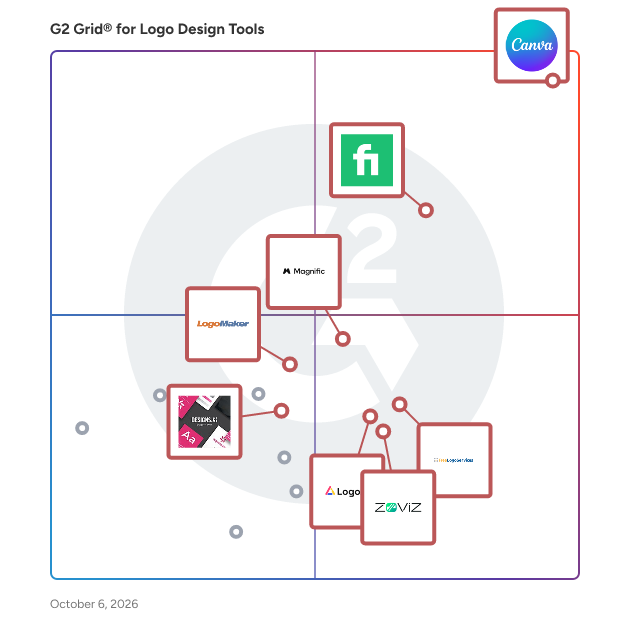
G2 Grid® for Logo Design Tools Software

G2 Grid® for Logo Design Tools Software plotting products by satisfaction and market presence

Highlighted products: Canva, Fiverr Logo Maker, Magnific, FreeLogoServices, logoai, zoviz, LogoMaker, and Logomaker.

Underlying data: [Grid® JSON](https://www.g2.com/categories/logo-design-tools/grids.json?focus%5B%5D=canva&focus%5B%5D=fiverr-logo-maker&focus%5B%5D=magnific&focus%5B%5D=freelogoservices&focus%5B%5D=logoai&focus%5B%5D=zoviz&focus%5B%5D=logomaker&focus%5B%5D=designs-ai-logomaker)

Canva

Canva is a visual communication platform that gives everyone a creative voice, no matter your design experience, team size, or budget. Whether you're a student making your first presentation, a marketer producing social graphics in minutes, or a global team creating on-brand content without touching a designer's inbox, Canva is where ideas become something you can actually show. Start with one of over a million professionally designed templates, or build from scratch with an AI-powered drag-and-drop editor. A library of stock images, videos, soundtracks, and fonts means you are easily equipped to create visual content at scale. Looking to work in Canva across your team? Real-time collaboration lets multiple people design simultaneously. Brand kits keep assets, colors, and fonts consistent across a one-person business or a Fortune 500 company. Canva AI helps you generate, resize, write, and edit visuals in a fraction of the time. Canva is used by more than 265 million people across 190 countries and trusted by 95% of Fortune 500 companies. Canva is available on the web, iOS and Android.

Average Rating: 4.7/5.0

Total Reviews: 6,514

Who Is the Company Behind Canva?

  • Seller: Canva
  • Company Website:
  • Year Founded: 2012
  • HQ Location: Sydney
  • Twitter: @canva
    339,250 Twitter followers
  • LinkedIn® Page: www.linkedin.com
    19,250 employees on LinkedIn®

Who Uses This Product?

  • Who Uses This: Owner, Marketing Manager
  • Top Industries: Marketing and Advertising, Information Technology and Services
  • Company Size: 66% Small, 23% Medium

What Do G2 Reviewers Say About Canva?

AI-generated summary from verified user reviews

Pros
  • Users appreciate the ease of use in Canva, enabling quick, intuitive designs on any device with minimal effort.
  • Users love the extensive templates in Canva, enabling quick and polished designs that suit varied needs effortlessly.
  • Users love Canva for its extensive design options, intuitive interface, and time-saving templates across devices.
  • Users love how Canva offers easy creation with intuitive templates and features, streamlining their design workflow effortlessly.
  • Users appreciate the wide variety of ready-made templates in Canva, enabling quick and easy design customization.
Cons
  • Users find Canva's limited features frustrating, especially with vector editing and costly premium options for essential tools.
  • Users find the limited options in Canva frustrating, especially for vector editing and bulk page creation.
  • Users express frustration over the missing features in Canva, impacting design capabilities and overall usability.
  • Users feel that the premium plan is expensive, especially for beginners who need essential features.
  • Users find the limited customization options in Canva restricts their creativity and flexibility in design projects.

What Are Recent G2 Reviews of Canva?

What Are G2 Users Discussing About Canva?

Fiverr Logo Maker

Fiverr Logo Maker is an online platform that utilizes AI technology to generate high-quality logos, crafted by top-tier professional designers. The tool offers a user-friendly interface and a streamlined process, allowing individuals and businesses to customize and create professional and unique logos.

Average Rating: 4.4/5.0

Total Reviews: 59

Who Is the Company Behind Fiverr Logo Maker?

  • Seller: Fiverr
  • Year Founded: 2010
  • HQ Location: Tel-Aviv
  • Twitter: @fiverr
    458,568 Twitter followers
  • LinkedIn® Page: www.linkedin.com
    228,387 employees on LinkedIn®

Who Uses This Product?

  • Top Industries: Consulting
  • Company Size: 85% Small, 10% Medium

What Do G2 Reviewers Say About Fiverr Logo Maker?

AI-generated summary from verified user reviews

Pros
  • Users love the ease of use of Fiverr Logo Maker, enjoying quick access to numerous logo design options.
  • Users value the quick and easy use of Fiverr Logo Maker, appreciating the plethora of logo design options available.
  • Users love the plethora of options available for brand logos on Fiverr Logo Maker, enhancing their design choices.

What Are Recent G2 Reviews of Fiverr Logo Maker?

Magnific

Founded in 2010 and formerly known as Freepik, Magnific is an AI creative platform for professional teams and individual creators. With over 100 million monthly visits and over 1 million paid subscribers, the platform integrates tools for creating images, videos, and audio. Precision camera, lighting control, and 3D model environments, backed by 250M+ creative assets and exclusive upscaling technology. Spaces, its collaborative canvas, supports end-to-end team production without losing precision or brand consistency. Magnific serves enterprise marketing teams, creative studios, production agencies, and independent professionals worldwide.

Average Rating: 4.7/5.0

Total Reviews: 173

Who Is the Company Behind Magnific?

  • Seller: Magnific
  • Company Website:
  • Year Founded: 2010
  • HQ Location: Malaga, Malaga
  • Twitter: @magnific
    86,279 Twitter followers
  • LinkedIn® Page: www.linkedin.com
    443 employees on LinkedIn®

Who Uses This Product?

  • Who Uses This: Graphic Designer
  • Top Industries: Marketing and Advertising, Graphic Design
  • Company Size: 74% Small, 20% Medium

What Do G2 Reviewers Say About Magnific?

AI-generated summary from verified user reviews

Pros
  • Users appreciate the ease of use of Freepik, enabling quick access to high-quality design assets.
  • Users love the high quality visuals provided by Magnific, enhancing overall user experience and efficiency in design projects.
  • Users value the seamless integration of features in Freepik, enhancing efficiency and creativity in design projects.
  • Users value the extensive high-quality asset library of Freepik Pro, enhancing convenience for design projects.
  • Users appreciate the extensive library of high-quality assets and integrated AI tools that enhance productivity and creativity.
Cons
  • Users find the missing features of Magnific frustrating, especially with repetitive assets and inconvenient subscription changes.
  • Users find Magnific to be quite expensive, especially with potential costs from multiple iterations and premium accounts.
  • Users find the subscription costs to be high, along with fast depletion of usage limits causing frustration.
  • Users express frustration over limited features in Freepik's new pricing model and AI tools' lack of transparency.
  • Users find the limited options in Magnific can lead to a repetitive experience and difficulty in finding variety.

What Are Recent G2 Reviews of Magnific?

What Are G2 Users Discussing About Magnific?

AI can help you find the answers. G2 helps you trust them.

Connect G2 to Claude or ChatGPT for answers grounded in G2's trusted reviews, comparisons, and pricing from real user insights.

How it works

FreeLogoServices

The easiest, most powerful logo maker online. All designs are saved, for free, in our design cloud. Choose your logo design from 1,000s of templates. Easily make custom business cards with your logo.

Average Rating: 4.3/5.0

Total Reviews: 53

Who Is the Company Behind FreeLogoServices?

  • Seller: FreeLogoServices
  • HQ Location: Minneapolis, Minnesota
  • Twitter: @freelogoservice
    6,483 Twitter followers
  • LinkedIn® Page: www.linkedin.com
    3 employees on LinkedIn®

Who Uses This Product?

  • Top Industries: Information Technology and Services, Design
  • Company Size: 72% Small, 26% Medium

What Are Recent G2 Reviews of FreeLogoServices?

What Are G2 Users Discussing About FreeLogoServices?

logoai

LogoAI is an AI-powered logo and brand identity platform designed for startups, small businesses, entrepreneurs, and creators who want to build a professional brand quickly. LogoAI supports three ways to get started. Users can create a logo from just a brand name, start from an existing logo to expand and refine their brand identity, or turn an image into a logo through an image-to-logo workflow. This makes the platform flexible for both new businesses starting from scratch and existing brands that want to improve or extend their visual identity. Unlike traditional logo makers that mainly rely on template customization, LogoAI focuses on AI-generated logo creation and refinement. Users can explore original logo concepts, continue iterating on a preferred direction, and make more targeted adjustments without having to restart the process each time. A key part of LogoAI 2.0 is its multi-model AI workflow. Rather than relying on a single model for every task, LogoAI brings together multiple AI models for different creative needs across logo generation, image editing, mockups, logo animation, and video creation. This gives users more flexibility in how they create and refine branded assets while keeping the workflow in one platform. Once a logo direction is chosen, LogoAI can extend it into a broader Brand Kit with coordinated colors, typography, logo variations, and reusable brand assets. This helps businesses maintain a more consistent identity across websites, social media, marketing materials, and other brand touchpoints. Beyond logo creation, LogoAI also includes an AI Design Studio for generating and editing branded visual content. Users can create images, mockups, logo animations, and AI-generated videos while keeping their brand elements connected throughout the workflow. Instead of using separate tools for logo creation, brand identity, and marketing content, users can manage these tasks in one place. Overall, LogoAI is built to support a broader branding workflow — from a brand name, an existing logo, or an uploaded image, to a refined logo, a complete visual identity, and ongoing branded content creation.

Average Rating: 4.6/5.0

Total Reviews: 19

Who Is the Company Behind logoai?

Who Uses This Product?

  • Top Industries: Information Technology and Services
  • Company Size: 85% Small, 20% Medium

What Do G2 Reviewers Say About logoai?

AI-generated summary from verified user reviews

Pros
  • Users appreciate the ease of use of LogoAI, finding it simple enough for anyone to create logos effortlessly.
  • Users appreciate the ease of use and versatile features of LogoAI, streamlining logo creation and design projects.
  • Users appreciate the customization ease of LogoAI, finding it simple to tailor logos to their specific needs.
  • Users appreciate the wide variety of logo options provided by LogoAI, enhancing creativity and customization.
  • Users appreciate the easy creation of professional logos with diverse options and a user-friendly interface.
Cons
  • Users feel that the product is expensive compared to other logo solutions, suggesting a need for more affordable pricing.
  • Users find the missing features of LogoAI limiting, particularly in customization and branding options available.
  • Users find the limited customization options frustrating, desiring more variety in fonts and human input.
  • Users find the limited editing options restrict creative freedom and hinder logo customization with insufficient flexibility.
  • Users find the limited font options restrict creative flexibility and hinder design customization in LogoAI.

What Are Recent G2 Reviews of logoai?

zoviz

Zoviz is an innovative branding platform designed to assist entrepreneurs and businesses in creating professional and distinctive logos and comprehensive brand identities. This solution goes beyond traditional logo makers, which often rely on generic templates and stock icons. Instead, Zoviz focuses on delivering unique, high-quality logos and branding assets that are specifically tailored to meet the needs of each individual business. Targeted at small to medium-sized enterprises, startups, and individual entrepreneurs, Zoviz caters to users who seek to establish a strong brand presence without the complexities typically associated with professional branding services. The platform is particularly useful for those who may lack design expertise but still want to create a polished and cohesive brand identity. By simply entering their business name, users can access a complete branding package that includes a variety of essential assets. One of the key features of Zoviz is its ability to generate a comprehensive branding package with just a single click. This package includes high-resolution logos available in multiple formats such as PNG, JPG, SVG, and PDF, along with business cards, social media covers, favicons, email signatures, letterheads, and detailed brand guidelines. This streamlined process not only saves time but also ensures that users have all the necessary tools to promote their brand effectively. Zoviz distinguishes itself in the competitive branding landscape by ensuring that each logo is unique and professionally curated. Every design is reviewed by experienced designers, and upon purchase, users receive exclusive commercial licenses for their logos. This commitment to quality and originality helps businesses avoid the pitfalls of generic branding. Additionally, Zoviz supports multiple languages and offers seamless synchronization between its website and mobile applications, allowing users to manage their brand assets conveniently from anywhere. The platform's intuitive interface also provides extensive customization options, including multi-color and gradient support, enabling users to accurately reflect their brand vision. By combining ease of use with professional-grade results, Zoviz empowers businesses to establish a memorable and impactful brand identity that resonates with their target audience.

Average Rating: 4.7/5.0

Total Reviews: 11

Who Is the Company Behind zoviz?

  • Seller: Zoviz.com
  • HQ Location: Middletown, US
  • Twitter: @Zovizbranding
    1,681 Twitter followers
  • LinkedIn® Page: www.linkedin.com
    12 employees on LinkedIn®

Who Uses This Product?

  • Company Size: 55% Small, 9% Medium

What Do G2 Reviewers Say About zoviz?

AI-generated summary from verified user reviews

Pros
  • Users love the ease of use of Zoviz, praising its intuitive design and quick setup for all ages.
  • Users love the AI tools in Zoviz, making image creation easy and bringing their visions to life.
  • Users appreciate the beginner-friendly interface of Zoviz, noting its intuitiveness and ease of use for everyone.
  • Users love the free and intuitive services of Zoviz, making it accessible and easy for everyone.
  • Users love the easy logo creation process with Zoviz, transforming ideas into high-quality designs effortlessly.
Cons
  • Users feel that zoviz is expensive and suggest it could benefit from a lower price point.
  • Users feel that zoviz has a learning difficulty that makes it challenging to navigate and utilize effectively.

What Are Recent G2 Reviews of zoviz?

LogoMaker

LogoMaker is an intuitive online logo design tool that allows users to create beautiful and professional-looking logos in minutes. Creating a logo only takes four simple steps: Enter your business name and industry, choose from thousands of pre-made logo templates, customize the font, colors, orientation, and style of your design, then save your logo to edit again later or purchase it immediately to receive high-quality image files. Anyone can create a logo and there is no design experience needed to use our editor. The entire process to make a logo is free - just pay for the design you love. LogoMaker is also capable of fulfilling all your branding requirements. Use your new logo to create custom business cards, clothing, signage, stationery, and other promotional products. Purchase a domain name and business email, create a website, and add your business to online directories all available here at LogoMaker.

Average Rating: 4.2/5.0

Total Reviews: 46

Who Is the Company Behind LogoMaker?

  • Seller: HostPapa
  • Year Founded: 2006
  • HQ Location: Burlington, Ontario
  • Twitter: @HostPapa
    18,655 Twitter followers
  • LinkedIn® Page: www.linkedin.com
    312 employees on LinkedIn®

Who Uses This Product?

  • Top Industries: Computer Software, Graphic Design
  • Company Size: 67% Small, 30% Medium

What Are Recent G2 Reviews of LogoMaker?

Logomaker

Logomaker is a smart logo generation tool complete with a simplified editor and access to millions of content to enable users to create unique, professional logos for their business.

Average Rating: 4.4/5.0

Total Reviews: 65

Who Is the Company Behind Logomaker?

  • Seller: Designs.ai
  • Year Founded: 2019
  • HQ Location: Singapore, SG
  • Twitter: @DesignsdotAI
    1,903 Twitter followers
  • LinkedIn® Page: www.linkedin.com
    5 employees on LinkedIn®

Who Uses This Product?

  • Top Industries: Information Technology and Services, Marketing and Advertising
  • Company Size: 72% Small, 17% Medium

What Are Recent G2 Reviews of Logomaker?

LogoDesign.net

LogoDesign.net is a leading online platform offering AI-powered tools for logo creation and brand design. Designed specifically for startups, entrepreneurs, and small businesses, our platform features thousands of niche-based logo templates across industries like real estate, cleaning services, fitness, photography, beauty, restaurants, pet care, and more. With our easy-to-use DIY logo maker, users can design high-quality, professional logos in minutes—no design experience needed. In addition to logos, we provide a complete branding toolkit that includes a business card maker, flyer and postcard design, infographic builder, email signature creator, QR code generator, and even a website builder. We also offer custom logo design services for businesses looking for a unique, handcrafted brand identity created by our experienced in-house graphic designers. Whether you're launching a new business or upgrading your brand presence, LogoDesign.net is your one-stop solution for fast, affordable, and professional branding.

Average Rating: 3.8/5.0

Total Reviews: 13

Who Is the Company Behind LogoDesign.net?

  • Seller: LogoDesign.net
  • Year Founded: 2016
  • HQ Location: Yardley, Pennsylvania
  • Twitter: @LogoDesign_Net
    5,060 Twitter followers
  • LinkedIn® Page: www.linkedin.com
    13 employees on LinkedIn®

Who Uses This Product?

  • Company Size: 92% Small, 15% Medium

What Do G2 Reviewers Say About LogoDesign.net?

AI-generated summary from verified user reviews

Pros
  • Users love the ease of use of LogoDesign.net, making logo creation simple for those without design skills.
  • Users love the easy logo generation process of LogoDesign.net, making it ideal for beginners and professionals alike.
  • Users find LogoDesign.net to be an extremely beginner-friendly platform, making logo creation effortless and accessible.
  • Users value the customization ease offered by LogoDesign.net, enabling tailored designs that fit their brand perfectly.
  • Users love the varied design options offered by LogoDesign.net, making it perfect for client logo creation.
Cons
  • Users note a lack of creativity in LogoDesign.net, resulting in generic logos that don't meet their expectations.
  • Users criticize the design limitations of LogoDesign.net, citing poor quality and a lack of creativity in results.
  • Users find the editing difficulty challenging as specific logo requests often aren't accommodated, limiting design satisfaction.
  • Users find the pricing for high-resolution downloads steep, wishing for at least one free option.
  • Users find the export limitations frustrating, as low-resolution files restrict their design usage without a paid plan.

What Are Recent G2 Reviews of LogoDesign.net?

What Are G2 Users Discussing About LogoDesign.net?

Gravit

Gravit is a design platform that empowers users to create high-quality vector graphics, illustrations, and layouts with ease. Its intuitive interface and robust toolset cater to both beginners and professionals, facilitating the design of logos, presentations, and complex illustrations. Key features of Gravit include: - Cross-Platform Compatibility: Accessible on various operating systems, ensuring a seamless design experience across devices. - Advanced Vector Tools: Offers precision in creating and editing vector paths, shapes, and text. - Cloud Integration: Enables users to save and access their projects from anywhere, promoting collaboration and flexibility. - Extensive Asset Library: Provides a wide range of pre-designed elements, templates, and fonts to enhance creativity. - Non-Destructive Editing: Allows for adjustments without permanently altering the original design, preserving creative flexibility. The primary value of Gravit lies in its ability to streamline the design process, making professional-grade graphic design accessible to a broad audience. It addresses the need for an affordable, user-friendly, and feature-rich design tool that adapts to various creative requirements, from simple graphics to intricate illustrations.

Average Rating: 4.3/5.0

Total Reviews: 12

Who Is the Company Behind Gravit?

  • Seller: Gravit
  • Year Founded: 2015
  • HQ Location: Nuremberg
  • Twitter: @GravitDesigner
    4,483 Twitter followers
  • LinkedIn® Page: www.linkedin.com
    1 employees on LinkedIn®

Who Uses This Product?

  • Company Size: 83% Small, 17% Large

What Are Recent G2 Reviews of Gravit?

Free Logo Creator

Free Logo Creator is a website for businesses and entrepreneurs to create logos free of charge.

Average Rating: 4.1/5.0

Total Reviews: 16

Who Is the Company Behind Free Logo Creator?

  • Seller: Free Logo Creator
  • Year Founded: 2018
  • HQ Location: Titusville, US
  • Twitter: @FREELOGOCREATOR
    13 Twitter followers
  • LinkedIn® Page: www.linkedin.com
    3 employees on LinkedIn®

Who Uses This Product?

  • Company Size: 118% Small, 6% Large

What Are Recent G2 Reviews of Free Logo Creator?

Online Logo Maker

Create an amazing logo design for your brand. Right now. For free.

Average Rating: 4.1/5.0

Total Reviews: 41

Who Is the Company Behind Online Logo Maker?

Who Uses This Product?

  • Top Industries: Computer Software
  • Company Size: 84% Small, 9% Medium

What Are Recent G2 Reviews of Online Logo Maker?

MiriCanvas

🩵MiriCanvas is the ultimate platform that makes designing effortless and fun. This free, user-friendly tool offers a stunning collection of customizable templates for every need—whether it's presentations, social media graphics, marketing materials, or more. Perfect for individuals, businesses, and educators, MiriCanvas empowers you to create professional-quality designs in minutes, no design experience required! Say goodbye to complexity and hello to creativity with MiriCanvas.😉 Targeted at a diverse audience, MiriCanvas caters to students, small business owners, marketers, and anyone in need of quick and effective design solutions. The platform is particularly beneficial for those who may lack the time or resources to engage a professional designer. With its intuitive interface and extensive library of templates, users can quickly find a starting point for their projects, allowing them to focus on content rather than design intricacies. MiriCanvas stands out in the design platform category by integrating AI-powered tools that enhance the creative process. These tools assist users in generating unique design elements, suggesting color palettes, and even recommending layout adjustments based on the content provided. This feature not only streamlines the design process but also encourages users to experiment with their creativity, resulting in more personalized and engaging content. Key features of MiriCanvas include a vast selection of customizable templates, an easy-to-navigate interface, and robust AI tools that facilitate design creation. Users can choose from a variety of layouts tailored for different platforms, ensuring that their content is optimized for its intended audience. Additionally, the platform supports collaboration, allowing multiple users to work on a project simultaneously, which is particularly useful for teams and educational settings. By offering a comprehensive suite of design tools and resources, MiriCanvas adds significant value to users looking to create high-quality visuals quickly and efficiently. Its combination of accessibility, versatility, and innovative features makes it a noteworthy option for anyone seeking to enhance their design capabilities without the steep learning curve typically associated with graphic design software.

Average Rating: 4.7/5.0

Total Reviews: 87

Who Is the Company Behind MiriCanvas?

  • Seller: MIRIDIH
  • Year Founded: 2008
  • HQ Location: Seoul, KR
  • LinkedIn® Page: www.linkedin.com
    228 employees on LinkedIn®

Who Uses This Product?

  • Top Industries: Design, Higher Education
  • Company Size: 14% Small, 1% Medium

What Do G2 Reviewers Say About MiriCanvas?

AI-generated summary from verified user reviews

Pros
  • Users find MiriCanvas to be easy to use, allowing for quick and effortless project creation and presentations.
  • Users love the easy-to-use templates with plenty of themes, facilitating friendly edits and fulfilling requirements seamlessly.
  • Users love the intuitive design and ease of customization in MiriCanvas, making their creative process enjoyable and efficient.
  • Users find MiriCanvas to be a time-saving tool, simplifying design and video creation for their online stores.
  • Users love the AI image generator feature of MiriCanvas for its ease and efficiency in creating visuals.
Cons
  • Users wish for more limited templates, indicating a need for greater variety and customization options in MiriCanvas.
  • Users experience slow performance on MiriCanvas, with frequent freezing and extended approval times causing frustration.
  • Users find MiriCanvas to be expensive, especially when premium options dominate their search results despite filtering for free products.
  • Users report experiencing slow loading times with MiriCanvas, which hampers productivity and can lead to lost work.
  • Users find MiriCanvas has limited customization, affecting their experience, especially for larger and more complex projects.

What Are Recent G2 Reviews of MiriCanvas?

Wizlogo

Make a beautiful logo for your brand in minutes. No designers required.

Average Rating: 3.8/5.0

Total Reviews: 12

Who Is the Company Behind Wizlogo?

  • Seller: Wizlogo
  • Year Founded: 2019
  • HQ Location: Vilnius, Lithuania
  • LinkedIn® Page: www.linkedin.com
    1 employees on LinkedIn®

Who Uses This Product?

  • Company Size: 92% Small, 8% Medium

What Are Recent G2 Reviews of Wizlogo?

Looka

Looka is an AI-powered platform designed to simplify the process of creating professional logos and comprehensive brand identities for entrepreneurs, small businesses, and freelancers. By leveraging artificial intelligence, Looka enables users to generate custom logos tailored to their preferences, ensuring a unique and cohesive brand presence across various platforms. Key Features and Functionality: - AI-Powered Logo Generation: Users input their company name and select preferred styles, colors, and symbols. Looka's AI then generates multiple logo options based on these preferences. - Customization Tools: After selecting a design, users can refine their logos by adjusting fonts, layouts, colors, and symbols to achieve the desired look. - Brand Kit: Beyond logo creation, Looka offers a Brand Kit that includes over 300 branded templates for business cards, social media profiles, email signatures, letterheads, and more, all customized to match the user's logo and brand identity. - Website Builder: For users seeking an online presence, Looka provides a website builder integrated with the Brand Kit, allowing for the creation and hosting of websites that align with the established brand aesthetics. - High-Resolution Files: Upon finalizing a design, users receive high-resolution and vector files (PNG, SVG, EPS, PDF) suitable for both online and print use. Primary Value and User Solutions: Looka addresses the challenge many entrepreneurs and small businesses face in establishing a professional brand identity without the need for extensive design skills or significant financial investment. By automating the design process through AI, Looka offers a cost-effective and efficient solution for creating logos and brand materials that maintain consistency across various mediums. This empowers users to launch and market their businesses with confidence, ensuring a polished and cohesive brand image from the outset.

Average Rating: 2.7/5.0

Total Reviews: 16

Who Is the Company Behind Looka?

  • Seller: Looka
  • Year Founded: 2016
  • HQ Location: Toronto, Ontario
  • Twitter: @lookadesign
    11,857 Twitter followers
  • LinkedIn® Page: www.linkedin.com
    35 employees on LinkedIn®

Who Uses This Product?

  • Company Size: 94% Small, 13% Medium

What Do G2 Reviewers Say About Looka?

AI-generated summary from verified user reviews

Pros
  • Users find the logo creation process effective, appreciating its interesting capabilities despite some negative experiences.
Cons
  • Users find the Looka subscription expensive and misleading, as it offers limited logo creation for the high price.
  • Users express frustration over poor customer support, especially when handling cancellations and refund requests.
  • Users express frustration over the high Pro version cost that only allows for one logo, leading to dissatisfaction.

What Are Recent G2 Reviews of Looka?

What Are G2 Users Discussing About Looka?

Neeraja Prakash
NP
Researched and written by Neeraja Prakash
Updated October 3, 2024