Top Free Diagramming Software

How Many Diagramming Software Products Does G2 Track?

Total Products under this Category: 166

Category Stats (Oct 2026)

  • Average Rating: 4.41/5 The average rating of products in this category, based on all submitted ratings
  • Top Trending Product: Mermaid (+1.45%) - Among all products in this category, Mermaid recorded the largest rating increase compared to last month

Last updated: October 01, 2026

How Does G2 Rank Diagramming Software Products?

Why You Can Trust G2's Software Rankings:

  • 30 Analysts and Data Experts
  • 34,400+ Authentic Reviews
  • 166+ Products
  • Unbiased Rankings

G2's software rankings are built on verified user reviews, rigorous moderation, and a consistent research methodology maintained by a team of analysts and data experts. Each product is measured using the same transparent criteria, with no paid placement or vendor influence. While reviews reflect real user experiences, which can be subjective, they offer valuable insight into how software performs in the hands of professionals. Together, these inputs power the G2 Score, a standardized way to compare tools within every category.

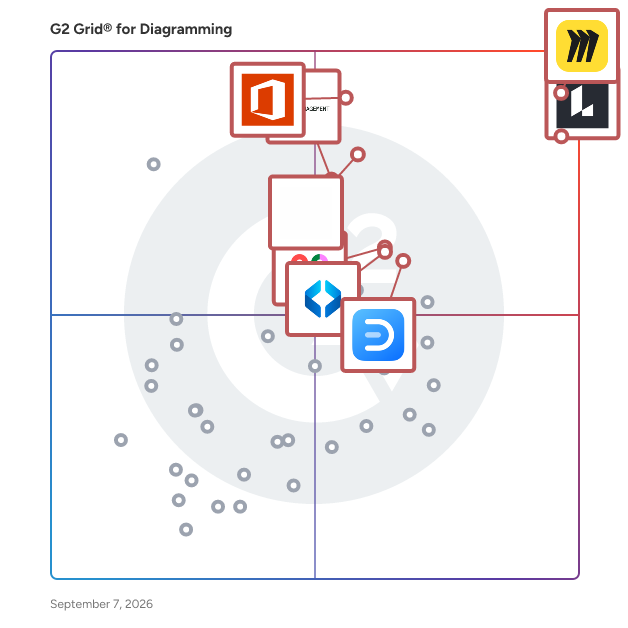
G2 Grid® for Diagramming Software

G2 Grid® for Diagramming Software plotting products by satisfaction and market presence

Highlighted products: Miro, Lucid Visual Collaboration Suite, Visio, FigJam, Cvent Event Marketing & Management, Mural, Wondershare EdrawMax, and SmartDraw.

Underlying data: [Grid® JSON](https://www.g2.com/categories/diagramming/grids.json?focus%5B%5D=miro&focus%5B%5D=lucid-software-inc-lucid-visual-collaboration-suite&focus%5B%5D=visio&focus%5B%5D=fig-jam&focus%5B%5D=cvent-event-marketing-management&focus%5B%5D=mural&focus%5B%5D=wondershare-edrawmax&focus%5B%5D=smartdraw)

Miro

Miro is the collaborative workspace where agents and teams converge to think, decide, and build together. As AI accelerates work, the challenge for organizations isn't doing more; it's turning individual output into scaled impact. Serving more than 100 million users across 250,000 customers, Miro’s shared, secure canvas surfaces the context that empowers teams to solve harder problems, make better decisions, and move work forward faster. Founded in 2011, Miro currently employs 1,600 people in 13 hubs around the world. To learn more, visit miro.com Key AI capabilities include Flows, which are visual AI workflows that automate multi-step processes while empowering teams with full visibility and control at every step; Sidekicks, which are conversational AI co-creators with expertise on specific tasks, jobs, or processes that move work forward; and Your AI and Knowledge, a collaborative integration layer that connects and enhances existing enterprise AI capabilities without leaving the platform. The Model Context Protocol (MCP) extends the ecosystem by accelerating agentic code, leveraging context from Miro to generate code in agents powered by Miro’s own MCP server. Miro for Product Acceleration is a comprehensive solution of integrated AI-first products designed to help product teams make smarter decisions about what to build and move faster. All of these capabilities are built on one platform with a shared data model, advanced security and compliance controls, and responsible AI certification at the forefront. By embedding AI where teamwork happens, Miro keeps teams in the flow of work, accelerates processes, and ultimately transforms organizations.

Average Rating: 4.6/5.0

Total Reviews: 13,447

G2 Deal: Get Miro free forever!

Miro is a visual workspace for innovation. Dream, design, and build the future together with your distributed team! Over 60 million users depend on Miro to collaborate on product development and speed up time to market. This free forever deal lets anyone start fast with our 2500+ Miro templates.

Price: Free forever

View this exclusive G2 deal

How Do G2 Users Rate Miro?

  • Quality of Support: 8.7/10 (Category avg: 8.7/10)
  • Ease of Use: 9.0/10 (Category avg: 8.8/10)
  • Has the product been a good partner in doing business?: 9.0/10 (Category avg: 9.0/10)

Who Is the Company Behind Miro?

  • Seller: Miro
  • Company Website:
  • Year Founded: 2011
  • HQ Location: San Francisco, California
  • Twitter: @MiroHQ
    38,406 Twitter followers
  • LinkedIn® Page: www.linkedin.com
    1,883 employees on LinkedIn®

Who Uses This Product?

  • Who Uses This: Product Manager, Project Manager
  • Top Industries: Computer Software, Information Technology and Services
  • Company Size: 39% Small, 29% Medium

What Do G2 Reviewers Say About Miro?

AI-generated summary from verified user reviews

Pros
  • Users praise Miro for its ease of use, making collaboration and idea sharing straightforward and efficient.
  • Users value the effortless collaboration Miro offers, facilitating seamless teamwork and idea management in one visual space.
  • Users value Miro's intuitive features and flexibility, enhancing productivity and creativity with seamless visualizations.
  • Users love the real-time collaboration feature of Miro, enabling effortless teamwork and idea sharing in a visual space.
  • Users love the real-time collaboration in Miro, enhancing teamwork and idea sharing seamlessly across projects.
Cons
  • Users express a need for missing features, particularly for a unified overview and better control on boards.
  • Users find Miro's limited features restrictive, especially on the free plan and for larger teams, increasing costs significantly.
  • Users find that Miro's embedding in Confluence pages appears cluttered, detracting from the overall presentation quality.
  • Users face a steep learning curve with Miro, making initial usage challenging despite its powerful functionality.

What Are Recent G2 Reviews of Miro?

What Are G2 Users Discussing About Miro?

Lucid Visual Collaboration Suite

Lucid is a Work Acceleration Platform powered by visual collaboration that helps teams see and build the future. Serving more than 100 million users and 99% of the Fortune 500, its enterprise offering is the Lucid Visual Collaboration Suite, which combines Lucidchart for intelligent diagramming and Lucidspark for virtual whiteboarding. With an infinite, universal canvas, cross-functional teams can switch seamlessly between purpose-built toolsets to visualize complex systems, ideate, plan, and build better ideas faster. Key enterprise capabilities include powerful optional accelerators that specialize the platform for specific initiatives. The Agility Accelerator surfaces insights on team health and enables data-backed capacity planning; the Cloud Accelerator automatically generates up-to-date, customizable cloud infrastructure documentation; and the Process Accelerator delivers increased governance and standardization for maintaining organizational processes. Additionally, both core applications feature built-in AI capabilities and extensive integrations with industry leaders like Atlassian, Google, Microsoft, and Slack. The Lucid Suite facilitates seamless remote and hybrid collaboration across the entire enterprise—from IT and engineering to marketing and operations. Organizations use team hubs as a virtual home base for creating and sharing documentation, keeping work visible to the right people. Backed by enhanced enterprise security and premium support options, the Lucid Suite accelerates strategic initiatives such as technology innovation, faster decision-making, and operational excellence, ultimately driving large-scale organizational change.

Average Rating: 4.5/5.0

Total Reviews: 8,889

How Do G2 Users Rate Lucid Visual Collaboration Suite?

  • Quality of Support: 8.9/10 (Category avg: 8.7/10)
  • Ease of Use: 8.9/10 (Category avg: 8.8/10)
  • Has the product been a good partner in doing business?: 9.0/10 (Category avg: 9.0/10)

Who Is the Company Behind Lucid Visual Collaboration Suite?

  • Seller: Lucid Software Inc.
  • Company Website:
  • Year Founded: 2010
  • HQ Location: South Jordan, UT
  • Twitter: @LucidSoftware
    14,511 Twitter followers
  • LinkedIn® Page: www.linkedin.com
    1,380 employees on LinkedIn®

Who Uses This Product?

  • Who Uses This: Software Engineer, Student
  • Top Industries: Information Technology and Services, Computer Software
  • Company Size: 40% Small, 35% Medium

What Do G2 Reviewers Say About Lucid Visual Collaboration Suite?

AI-generated summary from verified user reviews

Pros
  • Users appreciate the ease of use of Lucid Visual Collaboration Suite, finding it intuitive and simple for diagramming tasks.
  • Users value the intelligent diagramming capabilities of Lucid Visual Collaboration Suite, enhancing creativity and collaboration effortlessly.
  • Users find the ease of creation in Lucid Visual Collaboration Suite essential for efficient teamwork and project planning.
  • Users appreciate the user-friendly interface and extensive features of Lucid Visual Collaboration Suite for efficient diagram design.
  • Users appreciate the effective team collaboration features of Lucid Visual Collaboration Suite, enhancing productivity and seamless communication.
Cons
  • Users find a steep learning curve in mastering Lucid Visual Collaboration Suite, requiring time to fully utilize its features.
  • Users find the limited features for free accounts restrict their ability to fully explore the suite's potential.
  • Users face diagramming issues, including limited shapes and performance lags, hindering smooth collaboration and presentations.
  • Users often find the limited features in the basic plan restrictive, hindering their overall collaboration experience.
  • Users find Lucid's interface to be not intuitive, especially when transitioning from other collaboration tools like Figjam.

What Are Recent G2 Reviews of Lucid Visual Collaboration Suite?

What Are G2 Users Discussing About Lucid Visual Collaboration Suite?

Visio

Visio is an innovative solution that helps you visualize data-connected business process flows with dozens of ready-to-use templates and thousands of customizable shapes. Work visually from anywhere, at any time. Microsoft Visio helps professionals create detailed flowcharts, organizational charts, and network diagrams. With an intuitive interface and extensive templates, it simplifies visual data representation. Integrated with Microsoft 365, Visio supports real-time collaboration, making it ideal for business process modeling and IT infrastructure mapping.

Average Rating: 4.2/5.0

Total Reviews: 678

How Do G2 Users Rate Visio?

  • Quality of Support: 8.1/10 (Category avg: 8.7/10)
  • Ease of Use: 8.2/10 (Category avg: 8.8/10)
  • Has the product been a good partner in doing business?: 8.5/10 (Category avg: 9.0/10)

Who Is the Company Behind Visio?

  • Seller: Microsoft
  • Year Founded: 1975
  • HQ Location: Redmond, Washington
  • Twitter: @microsoft
    13,091,739 Twitter followers
  • LinkedIn® Page: www.linkedin.com
    232,750 employees on LinkedIn®
  • Ownership: MSFT

Who Uses This Product?

  • Who Uses This: Consultant, Graduate Engineering Trainee
  • Top Industries: Information Technology and Services, Hospital & Health Care
  • Company Size: 42% Large, 33% Medium

What Do G2 Reviewers Say About Visio?

AI-generated summary from verified user reviews

Pros
  • Users appreciate the ease of use of Visio, benefiting from its user-friendly interface and seamless Microsoft integration.
  • Users love the wide variety of templates and customization options available in Visio, enhancing their design experience.
  • Users love the variety of shapes in Visio, making it easy to create diverse diagrams and charts effectively.
  • Users find Visio to be simple and user-friendly, making diagram creation easy and efficient for various tasks.
  • Users enjoy the user-friendly interface of Visio, making professional diagram creation quick and seamless.
Cons
  • Users find the high cost of Visio to be a significant concern, impacting their overall satisfaction.
  • Users find the learning curve steep for beginners, impacting their initial experience with Visio.
  • Users find the limited features of Visio inconvenient, impacting usability and overall experience compared to competitors.
  • Users note the limited color options in Visio, hindering creativity and customization in their designs.
  • Users find the limited icons in Visio restricting, lacking essential symbols and requiring additional paid options.

What Are Recent G2 Reviews of Visio?

What Are G2 Users Discussing About Visio?

AI can help you find the answers. G2 helps you trust them.

Connect G2 to Claude or ChatGPT for answers grounded in G2's trusted reviews, comparisons, and pricing from real user insights.

How it works

Cvent Event Marketing & Management

Cvent delivers an all-in-one event platform for any event, and every event. Our platform simplifies the management of each stage of the event lifecycle while giving you the data and insights you need to maximize your value. Whether in-person, virtual, or hybrid, you’ll have a single platform with everything you need to find suppliers, engage attendees, maximize sponsor value, and capture important event data. As a global leader in event marketing and management technology, Cvent is uniquely positioned to support your events of all types, sizes, and complexities.

Average Rating: 4.3/5.0

Total Reviews: 2,332

How Do G2 Users Rate Cvent Event Marketing & Management?

  • Quality of Support: 8.7/10 (Category avg: 8.7/10)
  • Ease of Use: 7.9/10 (Category avg: 8.8/10)
  • Has the product been a good partner in doing business?: 8.4/10 (Category avg: 9.0/10)

Who Is the Company Behind Cvent Event Marketing & Management?

  • Seller: Cvent
  • Company Website:
  • Year Founded: 1999
  • HQ Location: Tysons Corner, VA
  • Twitter: @cvent
    42,011 Twitter followers
  • LinkedIn® Page: www.linkedin.com
    6,821 employees on LinkedIn®

Who Uses This Product?

  • Who Uses This: Event Manager, Event Coordinator
  • Top Industries: Non-Profit Organization Management, Events Services
  • Company Size: 37% Medium, 35% Small

What Do G2 Reviewers Say About Cvent Event Marketing & Management?

AI-generated summary from verified user reviews

Pros
  • Users commend the ease of use of Cvent, praising its intuitive navigation and efficient tools for event management.
  • Users value the innovative features of Cvent, which streamline event planning and enhance attendee management for large conferences.
  • Users value the efficient attendee management of Cvent, ensuring seamless planning and execution for large events.
  • Users appreciate the excellent customer support of Cvent, finding it reliable and always ready to assist.
  • Users value the easy setup of Cvent, finding it simple to customize and manage large events efficiently.
Cons
  • Users find Cvent Event Marketing & Management expensive, making it less accessible for smaller organizations.
  • Users find Cvent Event Marketing & Management not intuitive, facing challenges due to its complex user interface and steep learning curve.
  • Users find registration issues frustrating, including challenges with login, invoicing, and platform integration.
  • Users express frustration with limited customization options, which hinder their ability to tailor the platform to their needs.
  • Users note the limited features of Cvent, particularly regarding integration and mobile accessibility for event management.

What Are Recent G2 Reviews of Cvent Event Marketing & Management?

What Are G2 Users Discussing About Cvent Event Marketing & Management?

SmartDraw

SmartDraw makes professional drawings and diagrams accessible to everyone. Non-technical users can quickly create floor plans, while professionals get the precision and scale they require. With industry-leading floor planning tools, strong data integrations, and an intuitive interface for traditional diagramming, SmartDraw delivers enterprise-ready power without unnecessary complexity. 1. Easy to Get Expert Results SmartDraw makes it easy to create accurate scaled diagrams without requiring specialized CAD training. Create floor plans for both residential and commercial spaces, make accident reconstructions and crime scenes, build fire pre-plans and design landscapes easily. Your team doesn't need to be experts to get expert results. 2. Start with Existing Imagery While SmartDraw makes creating floor plans easy, you can skip that step and import an existing floor plan as a PDF or start with a Google Maps image to serve as the foundation for a new drawing. 3. Industry Standard Content Get thousands of industry-standard symbols to build anything from commercial floor plans, warehouse layouts to accident reconstructions and fire pre-plans. 4. Create Custom Symbol Libraries You can truly customize any floor plan using your own product catalog. Import symbols, apply scale, and add shape data. Plus, SmartDraw can count items automatically and generate visual manifests to support estimates and proposals. 5. Data-Enabled Shapes and Drawings With SmartDraw, you can turn ordinary diagrams into data-driven plans by attaching structured information to every symbol. Teams can generate manifests and summaries on demand for estimating, purchasing, or documentation. 6. A Solution for All Your Diagramming Needs Support your entire organization with flowcharts, organizational charts, mind maps, project charts, technical engineering diagrams, IT diagrams, and more. 7. Simple Administration SmartDraw works hand in glove with your existing IT infrastructure without disruption to maximize what you've already invested in. You can provision users with SSO, save files to your own preferred storage solution, and enjoy enterprise-level security. 8. Enterprise Support As an enterprise customer, you will have your own dedicated support rep for onboarding, training, and more. SmartDraw customers range from universities, police departments, fire departments and government agencies to over 85% of the Fortune 500.

Average Rating: 4.5/5.0

Total Reviews: 388

How Do G2 Users Rate SmartDraw?

  • Quality of Support: 9.1/10 (Category avg: 8.7/10)
  • Ease of Use: 8.7/10 (Category avg: 8.8/10)
  • Has the product been a good partner in doing business?: 9.5/10 (Category avg: 9.0/10)

Who Is the Company Behind SmartDraw?

  • Seller: SmartDraw
  • Company Website:
  • Year Founded: 1994
  • HQ Location: The Woodlands, Texas
  • Twitter: @SmartDraw
    3,069 Twitter followers
  • LinkedIn® Page: www.linkedin.com
    42 employees on LinkedIn®

Who Uses This Product?

  • Who Uses This: Owner, Project Manager
  • Top Industries: Construction, Information Technology and Services
  • Company Size: 43% Small, 36% Medium

What Do G2 Reviewers Say About SmartDraw?

AI-generated summary from verified user reviews

Pros
  • Users value the ease of use in SmartDraw, enabling efficient design and quick project initiation with templates.
  • Users highly value the ease of use of SmartDraw, enabling quick and professional diagram creation effortlessly.
  • Users greatly value the templates, enabling quick design creation and enhancing overall productivity with ease.
  • Users commend SmartDraw for its ease of use, making diagram creation quick and efficient for teams.
  • Users love the easy creation of diagrams with SmartDraw, benefiting from quick setup and extensive template options.
Cons
  • Users find the learning curve for advanced features steep, particularly for automation tools and complex functionalities.
  • Users find the limited shape options frustrating, wishing for more updates and 3D capabilities for better design flexibility.
  • Users feel the limited features of SmartDraw restrict their creativity and overall project capabilities, especially on mobile.
  • Users note a lack of essential features, like improved templates and mobile access, which affects functionality.
  • Users experience significant slow loading issues, especially on mobile, affecting accessibility and project management.

What Are Recent G2 Reviews of SmartDraw?

What Are G2 Users Discussing About SmartDraw?

Creately

Creately is an AI-powered diagramming and visual collaboration platform used by teams and professionals worldwide. From genograms and flowcharts to org charts, UML, and network diagrams, Creately makes complex visuals simple with its intuitive editor. It is also the first tool to introduce template-based AI diagram generation for advanced diagram types, saving hours of manual work. With real-time collaboration, smart templates, and integrations, Creately helps teams turn ideas into clear, actionable plans.

Average Rating: 4.4/5.0

Total Reviews: 1,381

G2 Deal: 50% Off Exclusive 3-Year Creately Subscription!

Creately is a visual collaboration platform. It enables teams to go from ideation to planning and execution in the same visual space. Grab your exclusive Creately 3-year subscription just for $89 instead of $180! - that's unbeatable 50% off, only for G2 Users.

Price: ~~$180~~ → $89 for 3 Years

View this exclusive G2 deal

How Do G2 Users Rate Creately?

  • Quality of Support: 8.5/10 (Category avg: 8.7/10)
  • Ease of Use: 8.5/10 (Category avg: 8.8/10)
  • Has the product been a good partner in doing business?: 9.2/10 (Category avg: 9.0/10)

Who Is the Company Behind Creately?

  • Seller: Creately
  • Year Founded: 2008
  • HQ Location: Melbourne, Australia
  • Twitter: @creately
    5,018 Twitter followers
  • LinkedIn® Page: www.linkedin.com
    29 employees on LinkedIn®

Who Uses This Product?

  • Who Uses This: Student, Software Engineer
  • Top Industries: Computer Software, Information Technology and Services
  • Company Size: 77% Small, 14% Medium

What Do G2 Reviewers Say About Creately?

AI-generated summary from verified user reviews

Pros
  • Users find Creately to be intuitive and user-friendly, enabling easy collaboration and diagram creation without prior experience.
  • Users love the user-friendly templates in Creately, making it easy to create professional diagrams effortlessly.
  • Users appreciate the versatile diagramming options of Creately, enhancing brainstorming and collaboration effectively across teams.
  • Users appreciate the real-time collaboration in Creately, enabling seamless editing and commenting in shared diagrams.
  • Users value the real-time collaboration in Creately, enhancing teamwork and productivity during brainstorming and diagramming tasks.
Cons
  • Users experience performance lags and inefficiencies with complex diagrams, impacting usability and offline functionality.
  • Users experience slow loading with Creately, especially involving large diagrams, impacting collaboration and workflow efficiency.
  • Users find the limited features of Creately restrictive, hindering their ability to effectively manage complex diagrams.
  • Users report performance issues with Creately, particularly with large diagrams causing slow loading and inefficiencies.
  • Users find the pricing structure of Creately expensive, especially for limited free tier access and no trial for premium features.

What Are Recent G2 Reviews of Creately?

What Are G2 Users Discussing About Creately?

Gliffy

Gliffy's diagramming applications make it easy to communicate and collaborate at the speed of your ideas. Whether you're using Gliffy in Confluence and Jira or jumping into our standalone diagramming tool, Gliffy Online, you'll find an intuitive way to draw diagrams. Drag and drop your way to professional-looking flowcharts, UML diagrams, entity-relationship diagrams, and more in just a few clicks. Plus, you can now build your diagrams using code with Mermaid js. Use a template to make a mind map or concept map while brainstorming. Embed an easy-to-update org chart in the tools your team already uses. Visualize your cloud architecture or IT networks and add them to your team's documentation and use Gliffy's data linking feature to add real life data directly into your diagrams. Whatever you're planning, project managing, or dreaming up, Gliffy can help you bring it to life. Diagram with your team in real time directly in Confluence Cloud for easier, more efficient working sessions. Gliffy is the most popular diagramming app in the Atlassian Ecosystem, with over 18 million users diagramming in Confluence alone. Gliffy is trusted by teams of all sizes — making it a leading enterprise diagramming solution. You can see if Gliffy is the right fit for your team by starting a trial via the Atlassian Marketplace or signing up for a two-week free trial of Gliffy Online on gliffy.com.

Average Rating: 4.4/5.0

Total Reviews: 221

How Do G2 Users Rate Gliffy?

  • Quality of Support: 8.8/10 (Category avg: 8.7/10)
  • Ease of Use: 8.9/10 (Category avg: 8.8/10)
  • Has the product been a good partner in doing business?: 8.7/10 (Category avg: 9.0/10)

Who Is the Company Behind Gliffy?

  • Seller: Perforce
  • Year Founded: 1995
  • HQ Location: Minneapolis, MN
  • Twitter: @perforce
    5,090 Twitter followers
  • LinkedIn® Page: www.linkedin.com
    2,009 employees on LinkedIn®

Who Uses This Product?

  • Who Uses This: Business Analyst, Software Engineer
  • Top Industries: Information Technology and Services, Computer Software
  • Company Size: 44% Small, 36% Medium

What Do G2 Reviewers Say About Gliffy?

AI-generated summary from verified user reviews

Pros
  • Users appreciate the automation features of Gliffy, making diagram creation effortless and efficient without clutter.
  • Users find Gliffy intuitive for creating diagrams, appreciating its smart guides and automatic MermaidCode conversion.
  • Users find Gliffy super intuitive, making it easy to create diagrams efficiently and with minimal effort.
  • Users love the easy creation of diagrams in Gliffy, benefiting from intuitive tools and automatic features.
  • Users find Gliffy to be super intuitive for creating diagrams, with easy features that enhance usability and maintain clarity.
Cons
  • Users often face line issues when importing, causing shifts in thickness, labels, and fonts that require additional adjustments.
  • Users experience missing features when importing from other tools, leading to frustrating tweaks needed for adjustments.
  • Users experience quality issues when importing from less-standardized tools, requiring extra tweaks for line thickness and fonts.

What Are Recent G2 Reviews of Gliffy?

What Are G2 Users Discussing About Gliffy?

Whimsical

Whimsical is the whiteboard for thinking and planning. It’s built for teams to move from chaos to clarity and turn ideas into action. Start from scratch or describe what you need and let AI build it. From sticky notes, sketches, and mind maps to process diagrams, flowcharts, wireframes, and presentations, Whimsical makes it seamless to create stunning visuals without the friction. It’s faster than heavy design tools built for high-fidelity prototyping and simpler than complex diagramming software tailored for formal documentation, so you go from 0 to 1 in record time. Whether you’re collaborating with your team, external stakeholders or clients, Whimsical lets you communicate high-level ideas without worrying about the pixels. Turn abstract concepts and messy thoughts into “aha moments” of shared understanding, and keep everybody aligned and moving in the same direction.

Average Rating: 4.6/5.0

Total Reviews: 183

How Do G2 Users Rate Whimsical?

  • Quality of Support: 8.7/10 (Category avg: 8.7/10)
  • Ease of Use: 9.3/10 (Category avg: 8.8/10)
  • Has the product been a good partner in doing business?: 9.7/10 (Category avg: 9.0/10)

Who Is the Company Behind Whimsical?

  • Seller: Whimsical
  • Year Founded: 2017
  • HQ Location: Denver, Colorado
  • Twitter: @whimsical
    14,428 Twitter followers
  • LinkedIn® Page: www.linkedin.com
    31 employees on LinkedIn®

Who Uses This Product?

  • Who Uses This: Product Manager, CEO
  • Top Industries: Computer Software, Information Technology and Services
  • Company Size: 57% Small, 31% Medium

What Do G2 Reviewers Say About Whimsical?

AI-generated summary from verified user reviews

Pros
  • Users love the ease of use in Whimsical, enabling quick mock-ups and effective team collaboration.
  • Users love the unique and versatile features of Whimsical, enhancing brainstorming and visual collaboration effortlessly.
  • Users find easy creation of flow charts and wireframes in Whimsical a significant advantage for project management.
  • Users love the user-friendly interface of Whimsical, facilitating collaborative and versatile visual project management.
  • Users appreciate the diverse range of visual collaboration tools and user-friendly interface of Whimsical for various projects.
Cons
  • Users find the limited customization options in Whimsical hinder their ability to effectively present their work.
  • Users find the limited free plan insufficient for their needs, impacting their experience with Whimsical.
  • Users desire more color customization options in Whimsical, hindering theme creation and company branding alignment.
  • Users find Whimsical expensive, especially for teams needing multiple licenses, which can be a barrier for some.
  • Users find insufficient learning resources hinder effective onboarding, making it challenging for newcomers to utilize Whimsical fully.

What Are Recent G2 Reviews of Whimsical?

What Are G2 Users Discussing About Whimsical?

Sketch

Sketch puts the focus back on you and your work. We’re not a do-everything product. We’re a toolkit for design, prototyping, and collaboration — made by designers, for designers. Create, prototype, collaborate and turn your ideas into incredible products with the definitive platform for digital design. Over one million designers — from freelancers, to some of the largest companies in the world — use Sketch to transform their ideas into incredible products, every day. With a powerful vector editor, built-in prototyping and more, Sketch makes it easier than ever to take your designs from ideation through to realization. And, with Workspaces you can take collaboration to the next level. Share designs and prototypes, provide feedback and collaborate with your whole team in a single space.

Average Rating: 4.5/5.0

Total Reviews: 1,210

How Do G2 Users Rate Sketch?

  • Quality of Support: 8.3/10 (Category avg: 8.7/10)
  • Ease of Use: 8.9/10 (Category avg: 8.8/10)
  • Has the product been a good partner in doing business?: 9.0/10 (Category avg: 9.0/10)

Who Is the Company Behind Sketch?

  • Seller: Sketch B.V.
  • Year Founded: 2008
  • HQ Location: Eindhoven, Netherlands
  • Twitter: @sketch
    161,170 Twitter followers
  • LinkedIn® Page: www.linkedin.com
    253 employees on LinkedIn®

Who Uses This Product?

  • Who Uses This: Product Designer, Graphic Designer
  • Top Industries: Design, Computer Software
  • Company Size: 53% Small, 29% Medium

What Do G2 Reviewers Say About Sketch?

AI-generated summary from verified user reviews

Pros
  • Users love the user-friendly design of Sketch, as it offers a seamless and enjoyable workflow for creativity.
  • Users love the fast, lightweight performance of Sketch, enjoying a seamless and enjoyable design experience.
  • Users love the clean, distraction-free interface of Sketch, enabling a seamless and enjoyable design experience.
  • Users appreciate the ease of organizing components in Sketch, enhancing their overall design workflow effortlessly.
  • Users value the easy creation process in Sketch, enabling quick and professional UI design without unnecessary complexity.
Cons
  • Users find the macOS exclusivity of Sketch limits collaboration and accessibility for cross-platform teammates.
  • Users find poor collaboration with Sketch due to macOS exclusivity and challenges in working with non-users.
  • Users report significant compatibility issues with Sketch, particularly due to its macOS exclusivity limiting collaborative efforts with Windows users.
  • Users struggle with sharing issues due to Sketch's macOS exclusivity, hindering collaboration with cross-platform teams.
  • Users experience incompatibility issues with Sketch due to its macOS exclusivity, hindering cross-platform collaboration.

What Are Recent G2 Reviews of Sketch?

What Are G2 Users Discussing About Sketch?

ChartDB

ChartDB is a powerful schema visualization and collaboration tool that instantly generates ER diagrams from a single SQL query or live database connection-whether cloud-hosted or self-hosted. Ideal for developers, data engineers, and small teams, ChartDB provides real-time multi-user editing with color-coded tables, AI-powered layout and relationship detection, a DBML editor with autocomplete, version history, and easy export of diagrams and DDL. With transparent pricing starting from a free individual plan to Pro ($19/user/month) and Team ($59 for five users/month) tiers, it offers scalable flexibility and strong support to streamline database design, documentation, and productivity.

Average Rating: 4.9/5.0

Total Reviews: 14

How Do G2 Users Rate ChartDB?

  • Quality of Support: 10.0/10 (Category avg: 8.7/10)
  • Ease of Use: 9.5/10 (Category avg: 8.8/10)
  • Has the product been a good partner in doing business?: 10.0/10 (Category avg: 9.0/10)

Who Is the Company Behind ChartDB?

  • Seller: ChartDB
  • HQ Location: N/A
  • Twitter: @chartdb
    211 Twitter followers
  • LinkedIn® Page: www.linkedin.com
    1 employees on LinkedIn®

Who Uses This Product?

  • Top Industries: Computer Software
  • Company Size: 86% Small, 14% Medium

What Do G2 Reviewers Say About ChartDB?

AI-generated summary from verified user reviews

Pros
  • Users appreciate the ease of use in ChartDB, enjoying intuitive design and quick visualizations for database management.
  • Users value the real-time collaboration features of ChartDB, enhancing teamwork and simplifying database design discussions.
  • Users love the easy sharing feature of ChartDB, facilitating seamless collaboration and alignment across teams.
  • Users appreciate how ChartDB provides effortless visualizations of database schemas, enhancing understanding and collaboration.
  • Users value the seamless team collaboration in ChartDB, enhancing alignment and efficiency without needing database access.
Cons
  • Users acknowledge some limitations with schema support in ChartDB, but appreciate the quick improvements made by the team.
  • Users are frustrated by data loss as change history lacks side-by-side version comparison and misses Jira integration.
  • Users find the API pricing unclear at times, expressing a desire for more clarity in this area.
  • Users find the integration difficulty with ChartDB problematic due to the lack of native Jira support and version comparison.
  • Users find the AI migration effective but desire more customization options for handling complex scenarios.

What Are Recent G2 Reviews of ChartDB?

Cacoo

Cacoo is a diagramming software solution designed to help users create a wide range of visual representations, including diagrams, flowcharts, and wireframes. This tool is particularly beneficial for teams and individual creators who seek to enhance their visual communication, whether they are working in a collaborative environment or independently. Cacoo's intuitive interface allows users to easily navigate its features, making it accessible to individuals with varying levels of design experience. Targeted at professionals across various industries, Cacoo serves a diverse audience, including project managers, designers, educators, and developers. The software is particularly useful for teams that require a clear and effective way to visualize processes, workflows, and concepts. With its cloud-based functionality, Cacoo enables real-time collaboration, allowing multiple users to work on diagrams simultaneously, regardless of their physical location. This feature is essential for remote teams or organizations with members spread across different geographical areas. Cacoo stands out in the diagramming category due to its extensive library of templates and shapes, which cater to a wide array of use cases. Users can choose from pre-designed templates or create custom diagrams from scratch. The ability to integrate with popular applications like Google Drive, Confluence, AWS, and Visio further enhances its usability, allowing users to streamline their workflow and access their work from multiple platforms. Key features of Cacoo include easy sharing options, such as embedding diagrams in websites, generating shareable links, and exporting diagrams in various formats. This flexibility ensures that users can present their work in a manner that suits their audience, whether for internal presentations or external communications. Additionally, Cacoo's user-friendly design allows for drag-and-drop functionality, making it simple to add and arrange elements within diagrams, which can significantly reduce the time spent on creating visual content. Overall, Cacoo provides a comprehensive solution for anyone looking to improve their visual communication through effective diagramming. Its combination of collaborative features, integration capabilities, and a rich library of resources makes it a valuable tool for both individual users and teams aiming to convey complex information clearly and efficiently.

Average Rating: 4.5/5.0

Total Reviews: 228

How Do G2 Users Rate Cacoo?

  • Quality of Support: 8.5/10 (Category avg: 8.7/10)
  • Ease of Use: 9.1/10 (Category avg: 8.8/10)
  • Has the product been a good partner in doing business?: 8.4/10 (Category avg: 9.0/10)

Who Is the Company Behind Cacoo?

  • Seller: Nulab Inc.
  • Year Founded: 2004
  • HQ Location: Fukuoka, Japan
  • Twitter: @nulabinc
    2,186 Twitter followers
  • LinkedIn® Page: www.linkedin.com
    119 employees on LinkedIn®

Who Uses This Product?

  • Who Uses This: Software Engineer, CEO
  • Top Industries: Computer Software, Information Technology and Services
  • Company Size: 60% Small, 28% Medium

What Do G2 Reviewers Say About Cacoo?

AI-generated summary from verified user reviews

Pros
  • Users love the variety of templates in Cacoo, enabling quick starts for collaborative projects and designs.
  • Users value the ease of use of Cacoo, allowing for quick onboarding and an intuitive interface.
  • Users find Cacoo to have a highly intuitive interface, making collaboration and diagram creation effortless and efficient.
  • Users value the easy and efficient team collaboration capabilities of Cacoo, enhancing communication and brainstorming sessions.
  • Users value the real-time collaboration features of Cacoo, enhancing teamwork and streamlining project development effectively.
Cons
  • Users find Cacoo's limited features frustrating, especially with basic needs like diagram variety and integration depth.
  • Users find the missing features in Cacoo, such as limited diagrams and integration options, quite frustrating.
  • Users find the difficult navigation of Cacoo time-consuming, especially when adding new items to concept maps.
  • Users find the limited templates in Cacoo's free account restrictive for their diagramming needs.
  • Users find Cacoo's complexity and limited advanced features can hinder productivity, especially with larger diagrams.

What Are Recent G2 Reviews of Cacoo?

What Are G2 Users Discussing About Cacoo?

ConceptDraw DIAGRAM

ConceptDraw DIAGRAM (previously known as ConceptDraw PRO) is a versatile diagramming tool which assists in team collaboration through a number of templates, presentations and many Import/Export options. It provides a complete range of business graphics Solutions with thousands of stencils for rapid diagramming. ConceptDraw Solutions offer business-specific add-ons to support an expansive variety of workflow requirements.

Average Rating: 4.4/5.0

Total Reviews: 24

How Do G2 Users Rate ConceptDraw DIAGRAM?

  • Quality of Support: 9.7/10 (Category avg: 8.7/10)
  • Ease of Use: 8.8/10 (Category avg: 8.8/10)
  • Has the product been a good partner in doing business?: 9.5/10 (Category avg: 9.0/10)

Who Is the Company Behind ConceptDraw DIAGRAM?

  • Seller: CS Odessa
  • Year Founded: 1993
  • HQ Location: Odessa, Ukraine
  • Twitter: @CSO_ConceptDraw
    955 Twitter followers
  • LinkedIn® Page: www.linkedin.com
    25 employees on LinkedIn®

Who Uses This Product?

  • Company Size: 67% Small, 25% Medium

What Are Recent G2 Reviews of ConceptDraw DIAGRAM?

What Are G2 Users Discussing About ConceptDraw DIAGRAM?

IBM Blueworks Live

IBM Blueworks Live is a cloud-based business process modeling and management solution designed to help organizations identify, document, and improve their business processes through intuitive mapping and real-time collaboration. As a type of Business Process Management (BPM) software, IBM Blueworks Live is built for any company that needs a unified solution to document, analyze, and optimize their workflows. This tool serves as a single source of truth for business process documentation, providing comprehensive support for process discovery, modeling, and management. It is particularly valuable for companies looking to standardize operations, enhance collaboration, and ensure compliance in highly regulated environments. IBM Blueworks Live stands out by offering built-in support for industry-standard diagrams, such as BPMN 2.0, and real-time editing features, making it easier for teams to communicate, make decisions, and drive process improvements effectively from anywhere. Key Features and Benefits: Intuitive Process Discovery and Mapping: - Drag-and-drop interface with pre-built templates for easy process mapping. - Built-in support for BPMN 2.0 ensures standardized and clear process diagrams. - Simplifies the identification and documentation of processes, reducing time and effort. Unified Single Source of Truth: - Comprehensive process modeling and decision modeling capabilities. - Consistent and accurate documentation across the organization. - Enhances decision-making with reliable and standardized information. Real-Time Collaboration and Governance: - Instant visibility of changes, integrated chat, and audit trails for better governance. - Supports role-based access and process integrity management. - Facilitates collaboration with team members, ensuring that everyone stays aligned. Compliance and Standardization: - Helps manage regulatory compliance through structured process documentation. - Reduces the risk of compliance breaches with up-to-date and accurate process information. - Supports governance with audit trails and revision histories. Cloud-Based Accessibility: - No need for complex software installations; accessible from anywhere with internet connectivity. - Scalable and adaptable to suit both small teams and large enterprises. IBM Blueworks Live is ideal for businesses that need a reliable starting point for process improvement initiatives, enabling teams to work more efficiently while maintaining control over their operations. Its ability to provide a unified view of business processes with robust collaboration features sets it apart from other tools, helping organizations achieve higher productivity and smoother operations.

Average Rating: 4.3/5.0

Total Reviews: 70

How Do G2 Users Rate IBM Blueworks Live?

  • Quality of Support: 7.9/10 (Category avg: 8.7/10)
  • Ease of Use: 8.4/10 (Category avg: 8.8/10)
  • Has the product been a good partner in doing business?: 8.5/10 (Category avg: 9.0/10)

Who Is the Company Behind IBM Blueworks Live?

  • Seller: IBM
  • Year Founded: 1911
  • HQ Location: Armonk, New York, United States
  • Twitter: @IBMSecurity
    74,660 Twitter followers
  • LinkedIn® Page: www.linkedin.com
    344,328 employees on LinkedIn®
  • Ownership: SWX:IBM

Who Uses This Product?

  • Top Industries: Information Technology and Services, Financial Services
  • Company Size: 61% Large, 32% Medium

What Do G2 Reviewers Say About IBM Blueworks Live?

AI-generated summary from verified user reviews

Pros
  • Users appreciate the efficient process management capabilities of IBM Blueworks Live, enhancing productivity and collaboration.
  • Users value the collaboration features of IBM Blueworks Live, enhancing teamwork and efficiency across projects.
  • Users appreciate the ease of use of IBM Blueworks Live, facilitated by user-friendly templates and helpful tutorials.
  • Users highlight the improved efficiency of IBM Blueworks Live, enhancing collaboration and simplifying workflows seamlessly.
  • Users value the real-time cloud collaboration of IBM Blueworks Live, enhancing efficiency in process management.
Cons
  • Users find the missing features of IBM Blueworks Live limit its usability and alignment with organizational needs.
  • Users find the cost to be high compared to other market options, particularly burdensome for smaller teams.
  • Users feel limited by the restricted options in IBM Blueworks Live, hindering their process workflow creation and collaboration.
  • Users find the complexity of IBM Blueworks Live challenging, particularly when starting out and managing larger projects.
  • Users experience connectivity issues with IBM Blueworks Live, as it relies heavily on a stable internet connection.

What Are Recent G2 Reviews of IBM Blueworks Live?

What Are G2 Users Discussing About IBM Blueworks Live?

Maptive

Maptive is a comprehensive set of mapping tools built with users in mind. Our mapping software provides businesses from small non-profits to enterprise-level corporations with a wide range of geospatial analysis and data visualization capabilities. Upload location data from spreadsheets or CRMs to Maptive's platform and apply our features to quickly create custom maps, including heat maps, color-coded pin maps, sales territory maps, optimized routes and directions, and demographic maps.

Average Rating: 4.7/5.0

Total Reviews: 34

How Do G2 Users Rate Maptive?

  • Quality of Support: 9.7/10 (Category avg: 8.7/10)
  • Ease of Use: 9.2/10 (Category avg: 8.8/10)
  • Has the product been a good partner in doing business?: 9.5/10 (Category avg: 9.0/10)

Who Is the Company Behind Maptive?

  • Seller: Maptive
  • Year Founded: 2013
  • HQ Location: San Francisco, CA
  • Twitter: @Maptive
    572 Twitter followers
  • LinkedIn® Page: www.linkedin.com
    5 employees on LinkedIn®

Who Uses This Product?

  • Company Size: 66% Small, 29% Medium

What Do G2 Reviewers Say About Maptive?

AI-generated summary from verified user reviews

Pros
  • Users value the quick and helpful customer support from Maptive, enhancing the overall user experience significantly.
  • Users value the ease of use of Maptive, enabling quick map creation and data analysis without extensive training.
  • Users appreciate Maptive's excellent service, citing quick support and helpful responses that enhance their experience.
  • Users value the powerful and easy-to-use features of Maptive, enabling effective data visualization and quicker decision-making.
  • Users find Maptive's helpful support invaluable, improving decision-making speed and enhancing map presentation for stakeholders.
Cons
  • Users face some learning difficulty initially, but tutorials and live chat help ease the transition swiftly.

What Are Recent G2 Reviews of Maptive?

What Are G2 Users Discussing About Maptive?

Excalidraw

Excalidraw is a free open-sourced collaborative whiteboard. Don't waste time searching for the best tool or the best template. Just draw. With no sign-up, no pop-ups or cookie consents. Simply the whiteboard, essential tools and AI features to create perfect results fast. Teams and Professionals often level up to Excalidraw+ with unlimited cloud workspace and plus-only features like presentations, voice hangouts, extra generative AI prompting, enhanced collaborative features, access management & more. Excalidraw+ is an effective tool for teams and individuals turning ideas and opportunities into reality through real-time online ideation, seamless visualization, versatile sharing options and other team & enterprise features. It's SOC 2 Type II compliant and has DPA in place. Learn more about Excalidraw+ https://plus.excalidraw.com/excalidraw-for-teams and try it with 14 days free trial.

Average Rating: 4.5/5.0

Total Reviews: 30

How Do G2 Users Rate Excalidraw?

  • Quality of Support: 9.0/10 (Category avg: 8.7/10)
  • Ease of Use: 9.9/10 (Category avg: 8.8/10)

Who Is the Company Behind Excalidraw?

  • Seller: Excalidraw s.r.o.
  • Year Founded: 2020
  • HQ Location: Brno, CZ
  • Twitter: @excalidraw
    40,991 Twitter followers
  • LinkedIn® Page: www.linkedin.com
    11 employees on LinkedIn®

Who Uses This Product?

  • Top Industries: Computer Software
  • Company Size: 52% Medium, 48% Small

What Do G2 Reviewers Say About Excalidraw?

AI-generated summary from verified user reviews

Pros
  • Users find Excalidraw very easy to use, appreciating its quick setup and straightforward sharing capabilities.
  • Users love the ease of diagramming in Excalidraw, enhancing team collaboration and quick project development.
  • Users love the easy setup of Excalidraw, as it requires just a browser to get started.
  • Users love the easy sharing capabilities of Excalidraw, enhancing collaboration and diagram creation with minimal setup.
  • Users value the easy accessibility of Excalidraw, as it requires only a browser to use.
Cons
  • Users report image limitations in Excalidraw, with resolution drops and file size restrictions affecting usability.
  • Users find the limited features in Excalidraw frustrating, especially with just one page in the free version.
  • Users face compatibility issues with image resolutions dropping when creating collages, impacting usability significantly.
  • Users report connection issues with Excalidraw, leading to frustration and interruptions during their workflow.
  • Users find Excalidraw to have diagramming issues due to its basic features lacking advanced capabilities and shapes.

What Are Recent G2 Reviews of Excalidraw?

Neeraja Prakash
NP
Researched and written by Neeraja Prakash
Updated October 3, 2024