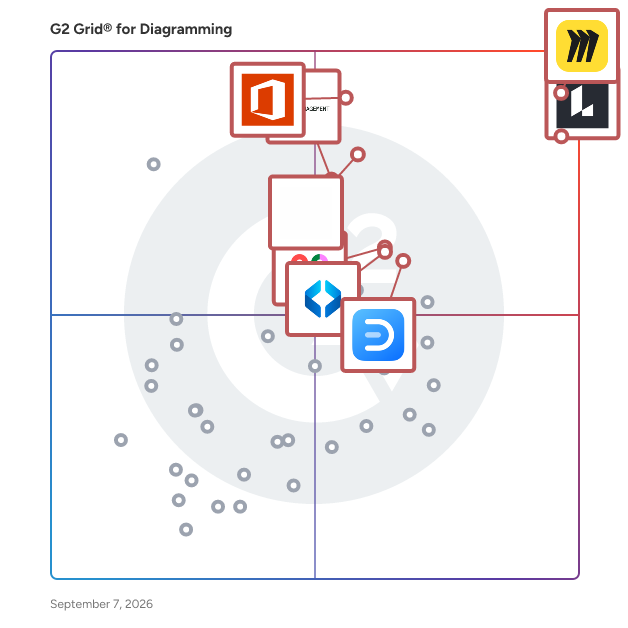
# Best Diagramming Software - Page 2

*By [Neeraja Prakash](https://research.g2.com/insights/author/neeraja-prakash)*


Diagramming software allows users to create detailed diagrams—such as flow charts and floor plans—out of data and images. Diagramming tools often include templates for building diagrams in addition to enabling users to create diagrams from scratch. Certain diagramming programs can integrate with other design tools, and may offer collaborative platforms so multiple users can view and edit diagram files at the same time.

To qualify for inclusion in the Diagramming category, a product must:

- Offer specialized tools for designing one or more types of diagrams, such as organizational charts and floorplans
- Provide industry-related shapes and elements for use in diagrams and allow users to create or import custom diagram components
- Allow specified users to view and interact with diagrams online during and after presentations


## Top Diagramming Software at a Glance
| # | Product | Rating | Best For | What Users Say |
|---|---------|--------|----------|----------------|
| 1 | [Miro](https://www.g2.com/products/miro/reviews) | 4.6/5.0 (13,073 reviews) | Collaborative visual diagramming with infinite canvas | "[Infinite Canvas Bliss: Seamless Jira Sync and AI-Powered Diagrams](https://www.g2.com/survey_responses/miro-review-13046840)" |
| 2 | [Lucid Visual Collaboration Suite](https://www.g2.com/products/lucid-software-inc-lucid-visual-collaboration-suite/reviews) | 4.5/5.0 (8,621 reviews) | Real-time visual diagramming with collaborative workflows | "[Lucid Makes Complex Customer Service Workflows Easy to Document and Standardize](https://www.g2.com/survey_responses/lucid-visual-collaboration-suite-review-12993204)" |
| 3 | [Visio](https://www.g2.com/products/visio/reviews) | 4.2/5.0 (676 reviews) | Microsoft-native process and network diagramming | "[A Crucial Tool for Regulatory Affairs](https://www.g2.com/survey_responses/visio-review-12734647)" |
| 4 | [FigJam](https://www.g2.com/products/fig-jam/reviews) | 4.6/5.0 (456 reviews) | Collaborative flow diagramming inside Figma | "[My Go-To Tool for Creating Flowcharts and Designs](https://www.g2.com/survey_responses/figjam-review-12629552)" |
| 5 | [Wondershare EdrawMax](https://www.g2.com/products/wondershare-edrawmax/reviews) | 4.5/5.0 (139 reviews) | Cross-domain diagramming with zero-learning-curve templates | "[Outstanding Application makes works easy](https://www.g2.com/survey_responses/wondershare-edrawmax-review-10942452)" |
| 6 | [SmartDraw](https://www.g2.com/products/smartdraw/reviews) | 4.5/5.0 (384 reviews) | Multi-format diagramming with Visio-compatible workflows | "[Clean, Easy-to-Use Interface That Streamlines Team Collaboration](https://www.g2.com/survey_responses/smartdraw-review-12917764)" |
| 7 | [Mural](https://www.g2.com/products/mural/reviews) | 4.6/5.0 (1,401 reviews) | Visual diagramming for real-time remote collaboration | "[Flexible Visual Canvas That Supercharges Remote Collaboration](https://www.g2.com/survey_responses/mural-review-12983512)" |
| 8 | [Creately](https://www.g2.com/products/creately/reviews) | 4.4/5.0 (1,378 reviews) | Collaborative visual diagramming with AI-assisted workflows | "[Great tool for quick and intuitive database modeling](https://www.g2.com/survey_responses/creately-review-12565759)" |
| 9 | [Draw.io](https://www.g2.com/products/draw-io/reviews) | 4.4/5.0 (442 reviews) | Browser-native flowchart and architecture diagramming | "[Powerful Diagramming Tool with Great Flexibility](https://www.g2.com/survey_responses/draw-io-review-12958091)" |
| 10 | [Gliffy](https://www.g2.com/products/gliffy/reviews) | 4.4/5.0 (221 reviews) | Drag-and-drop diagramming with Confluence integration | "[Gliffy versatility in diagramming helps drive deeper meaning of ideas by representing using diagrams](https://www.g2.com/survey_responses/gliffy-review-9213431)" |


## How Many Diagramming Software Products Does G2 Track?
**Total Products under this Category:** 135

### Category Stats (Jul 2026)
- **Average Rating**: 4.39/5 The average rating of products in this category, based on all submitted ratings
- **Top Trending Product**: LibreOffice Draw (+1.0%) - Among all products in this category, LibreOffice Draw recorded the largest rating increase compared to last month
*Last updated: July 01, 2026*


## How Does G2 Rank Diagramming Software Products?

**Why You Can Trust G2's Software Rankings:**

- 30 Analysts and Data Experts
- 31,300+ Authentic Reviews
- 135+ Products
- Unbiased Rankings

G2's software rankings are built on verified user reviews, rigorous moderation, and a consistent research methodology maintained by a team of analysts and data experts. Each product is measured using the same transparent criteria, with no paid placement or vendor influence. While reviews reflect real user experiences, which can be subjective, they offer valuable insight into how software performs in the hands of professionals. Together, these inputs power the G2 Score, a standardized way to compare tools within every category.


## Which Diagramming Software Is Best for Your Use Case?

- **Leader:** [Miro](https://www.g2.com/products/miro/reviews)
- **Highest Performer:** [Whimsical](https://www.g2.com/products/whimsical/reviews)
- **Easiest to Use:** [Creately](https://www.g2.com/products/creately/reviews)
- **Top Trending:** [Excalidraw](https://www.g2.com/products/excalidraw/reviews)
- **Best Free Software:** [Miro](https://www.g2.com/products/miro/reviews)


## What Are the Top-Rated Diagramming Software Products in 2026?
### 1. [LibreOffice Draw](https://www.g2.com/products/libreoffice-draw/reviews)
LibreOffice Draw is a vector graphics editor that enables users to create a wide range of visual content, from simple sketches to intricate technical drawings. As an integral component of the LibreOffice suite, it offers tools for producing flowcharts, organizational charts, network diagrams, brochures, posters, and photo albums. With a maximum page size of 300cm by 300cm, Draw is well-suited for both small-scale illustrations and large-format designs. Key Features and Functionality: - Vector Graphics Creation: Utilize lines, curves, and polygons to craft scalable and precise images. - 3D Object Manipulation: Design and modify three-dimensional objects, adjusting light sources and perspectives. - Smart Connectors: Easily build flowcharts and diagrams with connectors that attach to defined glue points, maintaining connections when objects are moved. - Dimension Lines: Automatically calculate and display linear dimensions, enhancing technical drawings. - Image Handling: Import, edit, and export images in various formats, including BMP, GIF, JPEG, PNG, and SVG. - Integration with LibreOffice Suite: Seamlessly insert tables, charts, formulas, and other elements from LibreOffice applications into your drawings. Primary Value and User Solutions: LibreOffice Draw empowers users to effectively communicate ideas through visual representations, catering to both novice and experienced designers. Its comprehensive set of tools addresses the needs of professionals requiring detailed technical diagrams and casual users creating personal projects. By supporting a wide array of file formats and integrating smoothly with other LibreOffice components, Draw enhances productivity and ensures compatibility across different platforms and applications.


**Average Rating:** 4.4/5.0
**Total Reviews:** 14
**How Do G2 Users Rate LibreOffice Draw?**

- **Quality of Support:** 7.1/10 (Category avg: 8.7/10)
- **Ease of Use:** 8.2/10 (Category avg: 8.7/10)
- **Has the product been a good partner in doing business?:** 8.3/10 (Category avg: 9.0/10)

**Who Is the Company Behind LibreOffice Draw?**

- **Seller:** [LibreOffice](https://www.g2.com/sellers/libreoffice)
- **Year Founded:** 2010
- **HQ Location:** Berlin, DE
- **Twitter:** @libreoffice (79,608 Twitter followers)
- **LinkedIn® Page:** https://www.linkedin.com/company/35565906/ (30 employees on LinkedIn®)

**Who Uses This Product?**
- **Company Size:** 71% Small-Business, 14% Mid-Market


#### What Are LibreOffice Draw's Pros and Cons?

**Pros:**

- Ease of Use (2 reviews)
- Drag (1 reviews)
- Easy Creation (1 reviews)
- Easy Drawing (1 reviews)
- Free Access (1 reviews)

**Cons:**

- Poor Customer Support (2 reviews)
- Adjustment Difficulties (1 reviews)
- Alignment Issues (1 reviews)
- Feature Complexity (1 reviews)
- Intuitiveness (1 reviews)


### What Do G2 Reviewers Say About LibreOffice Draw?
*AI-generated summary from verified user reviews*

**Pros:**

- Users love the **straightforward interface** of LibreOffice Draw, making it ideal for quick diagrams and flowcharts.
- Users appreciate the **user-friendly design** of LibreOffice Draw, making it ideal for quick diagrams and flowcharts.
- Users enjoy the **easy creation** of diagrams and flowcharts with LibreOffice Draw, appreciating its simplicity and free access.
- Users love the **straightforward design** of LibreOffice Draw, making it perfect for quick diagrams and flowcharts.
- Users enjoy the **free access** to LibreOffice Draw, finding it perfect for quick and easy diagram creation.

**Cons:**

- Users note the lack of **customer support** for LibreOffice Draw, which can hinder problem resolution for users.
- Users find the **adjustment difficulties** in LibreOffice Draw, especially compared to other drawing software, quite cumbersome.
- Users find **alignment issues** in LibreOffice Draw frustrating, making detailed projects more challenging to execute effectively.
- Users find the **feature complexity** of LibreOffice Draw challenging, especially for detailed or advanced projects.
- Users find the **interface clunky and outdated** , making it challenging for detailed projects in LibreOffice Draw.

#### What Are Recent G2 Reviews of LibreOffice Draw?

**"[A smooth, all-in-one solution for bringing ideas and plans to life.](https://www.g2.com/survey_responses/libreoffice-draw-review-11399080)"**

**Rating:** 5.0/5.0 stars
*— Verified User in Education Management*

[Read full review](https://www.g2.com/survey_responses/libreoffice-draw-review-11399080)

---

**"[Easy-to-Use PDF Editor with Plenty of Powerful Tools, for advance users](https://www.g2.com/survey_responses/libreoffice-draw-review-12998502)"**

**Rating:** 5.0/5.0 stars
*— Leonidas R.*

[Read full review](https://www.g2.com/survey_responses/libreoffice-draw-review-12998502)

---


### 2. [OpenOffice Draw](https://www.g2.com/products/openoffice-draw/reviews)
Makes drawing business processes and diagrams a snap!


**Average Rating:** 3.9/5.0
**Total Reviews:** 74
**How Do G2 Users Rate OpenOffice Draw?**

- **Quality of Support:** 6.9/10 (Category avg: 8.7/10)
- **Ease of Use:** 8.4/10 (Category avg: 8.7/10)
- **Has the product been a good partner in doing business?:** 7.8/10 (Category avg: 9.0/10)

**Who Is the Company Behind OpenOffice Draw?**

- **Seller:** [The Apache Software Foundation](https://www.g2.com/sellers/the-apache-software-foundation)
- **Year Founded:** 1999
- **HQ Location:** Wakefield, MA
- **Twitter:** @TheASF (66,168 Twitter followers)
- **LinkedIn® Page:** https://www.linkedin.com/company/215982/ (2,408 employees on LinkedIn®)

**Who Uses This Product?**
- **Top Industries:** Architecture &amp; Planning, Graphic Design
- **Company Size:** 74% Small-Business, 17% Mid-Market


#### What Are Recent G2 Reviews of OpenOffice Draw?

**"[Good range of graphics, diagrams, and designs](https://www.g2.com/survey_responses/openoffice-draw-review-7506314)"**

**Rating:** 4.0/5.0 stars
*— Miguel H.*

[Read full review](https://www.g2.com/survey_responses/openoffice-draw-review-7506314)

---

**"[Open Office Draws: Useful for Graphics](https://www.g2.com/survey_responses/openoffice-draw-review-5203718)"**

**Rating:** 4.5/5.0 stars
*— Verified User in Graphic Design*

[Read full review](https://www.g2.com/survey_responses/openoffice-draw-review-5203718)

---


#### What Are G2 Users Discussing About OpenOffice Draw?

- [What is OpenOffice Draw used for?](https://www.g2.com/discussions/what-is-openoffice-draw-used-for)
- [What is the use of Open Office?](https://www.g2.com/discussions/openoffice-draw-what-is-the-use-of-open-office)
- [What is included in Apache OpenOffice?](https://www.g2.com/discussions/what-is-included-in-apache-openoffice)
- [How do you draw on Open Office?](https://www.g2.com/discussions/how-do-you-draw-on-open-office)
- [What are the features of Open Office?](https://www.g2.com/discussions/what-are-the-features-of-open-office)

### 3. [Cloudcraft](https://www.g2.com/products/cloudcraft/reviews)
The #1 service for building, visualizing, and managing your cloud architecture for optimal performance. The Cloudcraft AWS Diagram Designer allows you to maximize efficiency with isometric or two-dimensional cloud architecture diagrams, all optimized for AWS with smart components. Get powerful cloud visualization right at your fingertips.


**Average Rating:** 4.5/5.0
**Total Reviews:** 190
**How Do G2 Users Rate Cloudcraft?**

- **Quality of Support:** 8.7/10 (Category avg: 8.7/10)
- **Ease of Use:** 9.0/10 (Category avg: 8.7/10)
- **Has the product been a good partner in doing business?:** 8.9/10 (Category avg: 9.0/10)

**Who Is the Company Behind Cloudcraft?**

- **Seller:** [Cloudcraft](https://www.g2.com/sellers/cloudcraft)
- **Year Founded:** 2016
- **HQ Location:** New York
- **Twitter:** @CloudcraftCo (1,192 Twitter followers)
- **LinkedIn® Page:** https://www.linkedin.com/company/cloudcraft-inc/ (13 employees on LinkedIn®)

**Who Uses This Product?**
- **Who Uses This:** DevOps Engineer
- **Top Industries:** Computer Software, Information Technology and Services
- **Company Size:** 63% Small-Business, 23% Mid-Market


#### What Are Cloudcraft's Pros and Cons?

**Pros:**

- Visual Appeal (1 reviews)


### What Do G2 Reviewers Say About Cloudcraft?
*AI-generated summary from verified user reviews*

**Pros:**

- Users love the **amazing visuals** of Cloudcraft, making cloud resource diagrams easy to create and understand.


#### What Are Recent G2 Reviews of Cloudcraft?

**"[Very elegant tool](https://www.g2.com/survey_responses/cloudcraft-review-5430271)"**

**Rating:** 4.5/5.0 stars
*— Verified User in Outsourcing/Offshoring*

[Read full review](https://www.g2.com/survey_responses/cloudcraft-review-5430271)

---

**"[Designing of Avensent Cloud Architecture in AWS Platfrom using Blueprint Features of Cloudcraft](https://www.g2.com/survey_responses/cloudcraft-review-5453494)"**

**Rating:** 4.0/5.0 stars
*— Ravi C.*

[Read full review](https://www.g2.com/survey_responses/cloudcraft-review-5453494)

---


#### What Are G2 Users Discussing About Cloudcraft?

- [What is Cloudcraft used for?](https://www.g2.com/discussions/what-is-cloudcraft-used-for)

### 4. [ProcessOn](https://www.g2.com/products/processon/reviews)
ProcessOn is One tool for diverse diagramming needs.Product capabilities are mainly divided into five aspects: Mind Map: It supports drawing mind maps, tree diagrams, timelines, fishbone diagrams, organizational charts, bracket diagrams, matrix diagrams, and more to unleash your inspiration. Flowchart: Supports drawing Flowcharts, Swimlane Diagrams, UML Diagrams, Gantt Charts, Network Topology Diagrams, and many other graphics. Whiteboard: A smart canvas enables innovation everywhere.A visual diagram makes work more efficient.A free space fosters closer teamwork. Mermaid: It supports generating flowcharts directly in the browser using Mermaid syntax code, with real-time preview of the results. Furthermore, it seamlessly integrates with ProcessOn, and the graphs generated by Mermaid support secondary editing. Formula Editor: This free online LaTeX formula editor includes a comprehensive collection of LaTeX symbols, covering mathematical, physical, and chemical formulas. It can download SVG, PNG, and JPG image formats and export various code formats. Most importantly, ProcessOn supports AI-powered graphing, empowering tools through intelligent AI.


**Average Rating:** 4.4/5.0
**Total Reviews:** 14
**How Do G2 Users Rate ProcessOn?**

- **Quality of Support:** 9.5/10 (Category avg: 8.7/10)
- **Ease of Use:** 9.3/10 (Category avg: 8.7/10)
- **Has the product been a good partner in doing business?:** 8.3/10 (Category avg: 9.0/10)

**Who Is the Company Behind ProcessOn?**

- **Seller:** [ProcessOn](https://www.g2.com/sellers/processon)
- **Year Founded:** 2012
- **HQ Location:** New York, US
- **Twitter:** @ProcessOn (536 Twitter followers)
- **LinkedIn® Page:** https://www.linkedin.com/company/processon/ (7 employees on LinkedIn®)

**Who Uses This Product?**
- **Company Size:** 71% Small-Business, 29% Mid-Market


#### What Are Recent G2 Reviews of ProcessOn?

**"[Efficient mind-mapping. A simple solution for complicated projects!](https://www.g2.com/survey_responses/processon-review-8965271)"**

**Rating:** 4.5/5.0 stars
*— Bashar H.*

[Read full review](https://www.g2.com/survey_responses/processon-review-8965271)

---

**"[One of the best mind mapping tools](https://www.g2.com/survey_responses/processon-review-9339551)"**

**Rating:** 5.0/5.0 stars
*— Gamil f.*

[Read full review](https://www.g2.com/survey_responses/processon-review-9339551)

---


#### What Are G2 Users Discussing About ProcessOn?

- [What is ProcessOn used for?](https://www.g2.com/discussions/what-is-processon-used-for)

### 5. [Slickplan](https://www.g2.com/products/slickplan/reviews)
Slickplan helps teams and agencies bring order to complex web projects—from first ideas to production-ready deliverables. Instead of juggling docs, spreadsheets and generic diagram tools, Slickplan gives you one hub to structure site architecture, map user flows, plan content and review designs together. The result: websites launch faster, with fewer revisions and smoother handoffs. Plan smarter, not harder \* Structure navigation: visual sitemaps clarify information architecture, align stakeholders early and lock approvals. Use AI to generate or refine structures, or import from your site. \* Map user flows and journeys: connect them to your sitemap so UX decisions match how the site is actually organized. \* Create production-ready content: real-time CMS-aligned blocks with inline comments, suggestive edits, page previews, plus early SEO checks (keywords, SERP previews, metadata fields). \* Review designs in context: upload mockups or sync from Figma and leave pinpoint, synced feedback tied to the project. Plus: accelerate client approvals with one shared workspace and reduce developer rework with clean, export-ready deliverables (XML, Word, PDF) and direct CMS integrations. Projects stay transparent with permission controls and version history. Slickplan replaces chaos with clarity—so teams ship structured, CMS-ready work at scale. Plan websites faster, together.


**Average Rating:** 4.3/5.0
**Total Reviews:** 17
**How Do G2 Users Rate Slickplan?**

- **Quality of Support:** 9.8/10 (Category avg: 8.7/10)
- **Ease of Use:** 9.3/10 (Category avg: 8.7/10)
- **Has the product been a good partner in doing business?:** 8.9/10 (Category avg: 9.0/10)

**Who Is the Company Behind Slickplan?**

- **Seller:** [Awmous LLC](https://www.g2.com/sellers/awmous-llc)
- **Year Founded:** 2012
- **HQ Location:** Sarasota, Florida
- **LinkedIn® Page:** https://www.linkedin.com/company/awmous/ (1 employees on LinkedIn®)

**Who Uses This Product?**
- **Top Industries:** Marketing and Advertising
- **Company Size:** 50% Small-Business, 39% Mid-Market


#### What Are Recent G2 Reviews of Slickplan?

**"[Makes UX audits and diagram making easier](https://www.g2.com/survey_responses/slickplan-review-4666990)"**

**Rating:** 5.0/5.0 stars
*— Ewelina S.*

[Read full review](https://www.g2.com/survey_responses/slickplan-review-4666990)

---

**"[Vital to Operational Success](https://www.g2.com/survey_responses/slickplan-review-5246119)"**

**Rating:** 5.0/5.0 stars
*— Ted W.*

[Read full review](https://www.g2.com/survey_responses/slickplan-review-5246119)

---


#### What Are G2 Users Discussing About Slickplan?

- [What is Slickplan used for?](https://www.g2.com/discussions/what-is-slickplan-used-for)

### 6. [yEd Graph Editor](https://www.g2.com/products/yed-graph-editor/reviews)
yEd is a powerful desktop application that can be used to quickly and effectively generate high-quality diagrams.


**Average Rating:** 4.4/5.0
**Total Reviews:** 22
**How Do G2 Users Rate yEd Graph Editor?**

- **Quality of Support:** 8.2/10 (Category avg: 8.7/10)
- **Ease of Use:** 8.0/10 (Category avg: 8.7/10)
- **Has the product been a good partner in doing business?:** 9.4/10 (Category avg: 9.0/10)

**Who Is the Company Behind yEd Graph Editor?**

- **Seller:** [yWorks](https://www.g2.com/sellers/yworks)
- **Year Founded:** 2000
- **HQ Location:** Tubingen, Germany
- **Twitter:** @yworks (1,127 Twitter followers)
- **LinkedIn® Page:** https://www.linkedin.com/company/10557222/ (28 employees on LinkedIn®)

**Who Uses This Product?**
- **Top Industries:** Information Technology and Services
- **Company Size:** 36% Mid-Market, 36% Small-Business


#### What Are Recent G2 Reviews of yEd Graph Editor?

**"[The only tool I need for design - almost all my professional life](https://www.g2.com/survey_responses/yed-graph-editor-review-5228977)"**

**Rating:** 5.0/5.0 stars
*— Muhammad A.*

[Read full review](https://www.g2.com/survey_responses/yed-graph-editor-review-5228977)

---

**"[simple diagram creator](https://www.g2.com/survey_responses/yed-graph-editor-review-9835738)"**

**Rating:** 4.5/5.0 stars
*— Manuel C.*

[Read full review](https://www.g2.com/survey_responses/yed-graph-editor-review-9835738)

---


#### What Are G2 Users Discussing About yEd Graph Editor?

- [What is yEd Graph Editor used for?](https://www.g2.com/discussions/what-is-yed-graph-editor-used-for)

### 7. [StarUML](https://www.g2.com/products/staruml/reviews)
StarUML is a sophisticated software modeler for agile and concise modeling


**Average Rating:** 4.2/5.0
**Total Reviews:** 23
**How Do G2 Users Rate StarUML?**

- **Quality of Support:** 7.8/10 (Category avg: 8.7/10)
- **Ease of Use:** 8.6/10 (Category avg: 8.7/10)
- **Has the product been a good partner in doing business?:** 8.8/10 (Category avg: 9.0/10)

**Who Is the Company Behind StarUML?**

- **Seller:** [StarUML](https://www.g2.com/sellers/staruml)
- **Year Founded:** 2017
- **HQ Location:** Cape Town, Western Cape
- **Twitter:** @starumlio (435 Twitter followers)
- **LinkedIn® Page:** https://www.linkedin.com/company/No-Linkedin-Presence-Added-Intentionally-By-DataOps (1 employees on LinkedIn®)

**Who Uses This Product?**
- **Top Industries:** Computer Software, Information Technology and Services
- **Company Size:** 50% Small-Business, 33% Enterprise


#### What Are Recent G2 Reviews of StarUML?

**"[Why I use StarUML?](https://www.g2.com/survey_responses/staruml-review-6916623)"**

**Rating:** 5.0/5.0 stars
*— Shehroz H.*

[Read full review](https://www.g2.com/survey_responses/staruml-review-6916623)

---

**"[Best tool for giving initial boost to project](https://www.g2.com/survey_responses/staruml-review-4728590)"**

**Rating:** 5.0/5.0 stars
*— Sanjay P.*

[Read full review](https://www.g2.com/survey_responses/staruml-review-4728590)

---


#### What Are G2 Users Discussing About StarUML?

- [How do you use StarUML in UML diagrams?](https://www.g2.com/discussions/how-do-you-use-staruml-in-uml-diagrams)
- [Is StarUML open source?](https://www.g2.com/discussions/is-staruml-open-source)
- [What are the features of UML?](https://www.g2.com/discussions/what-are-the-features-of-uml)
- [What is model in StarUML?](https://www.g2.com/discussions/what-is-model-in-staruml)

### 8. [Dia diagram editor](https://www.g2.com/products/dia-diagram-editor/reviews)
Dia is a program to draw structured diagrams.


**Average Rating:** 4.4/5.0
**Total Reviews:** 15
**How Do G2 Users Rate Dia diagram editor?**

- **Quality of Support:** 8.2/10 (Category avg: 8.7/10)
- **Ease of Use:** 8.9/10 (Category avg: 8.7/10)

**Who Is the Company Behind Dia diagram editor?**

- **Seller:** [The Dia Developers](https://www.g2.com/sellers/the-dia-developers)
- **HQ Location:** N/A
- **Twitter:** @diagramr (185 Twitter followers)
- **LinkedIn® Page:** https://www.linkedin.com/company/No-Linkedin-Presence-Added-Intentionally-By-DataOps (1 employees on LinkedIn®)

**Who Uses This Product?**
- **Company Size:** 73% Small-Business, 13% Mid-Market


#### What Are Recent G2 Reviews of Dia diagram editor?

**"[Easily diagram with DIA](https://www.g2.com/survey_responses/dia-diagram-editor-review-4459184)"**

**Rating:** 4.0/5.0 stars
*— Mathew S.*

[Read full review](https://www.g2.com/survey_responses/dia-diagram-editor-review-4459184)

---

**"[Simple &amp; Effective Diagram Creation Software](https://www.g2.com/survey_responses/dia-diagram-editor-review-6589452)"**

**Rating:** 4.5/5.0 stars
*— Ridham S.*

[Read full review](https://www.g2.com/survey_responses/dia-diagram-editor-review-6589452)

---


### 9. [Visual Paradigm Online Diagrams](https://www.g2.com/products/visual-paradigm-online-diagrams/reviews)
Visual Paradigm Online Diagrams is a comprehensive, web-based diagramming tool designed to facilitate the creation of a wide array of diagrams, including flowcharts, UML diagrams, ER diagrams, and more. Its intuitive drag-and-drop interface enables users to craft professional diagrams efficiently, catering to both casual drawing and detailed modeling needs. The platform supports over 150 types of diagrams, making it versatile for various industries and applications. Key Features and Functionality: - Versatile Diagramming Tools: Supports the creation of diverse diagrams such as UML, BPMN, ERD, and more, accommodating both formal modeling and casual drawing requirements. - AI-Powered Diagram Generation: Utilizes artificial intelligence to transform textual descriptions into accurate, presentation-ready diagrams, streamlining the initial design process. - Real-Time Collaboration: Enables multiple users to work simultaneously on the same project, enhancing teamwork and productivity. - Cross-Platform Accessibility: Being cloud-based, it allows users to access and edit diagrams from any device with an internet connection, ensuring flexibility and convenience. - Integration with Other Tools: Offers seamless interoperability with various CASE tools and leading IDEs, facilitating a smooth Model-Code-Deploy development process. Primary Value and User Solutions: Visual Paradigm Online Diagrams addresses the challenge of creating complex diagrams by providing an intuitive and efficient platform that simplifies the design process. Its AI-powered features eliminate the tedious task of manual drawing, allowing users to focus on refining and implementing their ideas. The real-time collaboration capabilities ensure that teams can work cohesively, regardless of their physical locations. By offering a wide range of diagram types and integration options, it serves as a one-stop solution for professionals seeking to visualize and communicate complex systems and processes effectively.


**Average Rating:** 4.3/5.0
**Total Reviews:** 16
**How Do G2 Users Rate Visual Paradigm Online Diagrams?**

- **Quality of Support:** 8.8/10 (Category avg: 8.7/10)
- **Ease of Use:** 8.8/10 (Category avg: 8.7/10)

**Who Is the Company Behind Visual Paradigm Online Diagrams?**

- **Seller:** [Visual Paradigm](https://www.g2.com/sellers/visual-paradigm)
- **Year Founded:** 2006
- **HQ Location:** Hong Kong
- **Twitter:** @visualparadigm (551 Twitter followers)
- **LinkedIn® Page:** https://www.linkedin.com/company/visual-paradigm/ (3 employees on LinkedIn®)

**Who Uses This Product?**
- **Company Size:** 44% Small-Business, 39% Mid-Market


#### What Are Visual Paradigm Online Diagrams's Pros and Cons?

**Pros:**

- Drag (1 reviews)
- Ease of Use (1 reviews)
- Helpful (1 reviews)
- Intuitive (1 reviews)
- Real-time Collaboration (1 reviews)

**Cons:**

- Performance Issues (1 reviews)
- Steep Learning Curve (1 reviews)


### What Do G2 Reviewers Say About Visual Paradigm Online Diagrams?
*AI-generated summary from verified user reviews*

**Pros:**

- Users value the **intuitive drag-and-drop interface** of Visual Paradigm Online, enhancing diagram creation with ease.
- Users appreciate the **intuitive drag-and-drop interface** of Visual Paradigm Online, making diagram creation effortless and efficient.
- Users value the **intuitive interface** of Visual Paradigm Online, simplifying the creation of professional diagrams effortlessly.
- Users find the **intuitive interface** of Visual Paradigm Online makes diagram creation straightforward and efficient.
- Users value the **real-time collaboration** features of Visual Paradigm Online, enhancing teamwork and efficiency in remote projects.

**Cons:**

- Users experience **performance issues** with Visual Paradigm Online, especially when dealing with large or complex diagrams.
- Users find the **steep learning curve** of Visual Paradigm Online Diagrams daunting, especially when navigating advanced features.

#### What Are Recent G2 Reviews of Visual Paradigm Online Diagrams?

**"[Visual Paradigm Online Diagrams: Empowering Creativity, Streamlining Workflows!](https://www.g2.com/survey_responses/visual-paradigm-online-diagrams-review-8265730)"**

**Rating:** 5.0/5.0 stars
*— Pankaj B.*

[Read full review](https://www.g2.com/survey_responses/visual-paradigm-online-diagrams-review-8265730)

---

**"[Easy and Powerful Diagramming Tool for Professionals](https://www.g2.com/survey_responses/visual-paradigm-online-diagrams-review-11738169)"**

**Rating:** 4.5/5.0 stars
*— Jesus F.*

[Read full review](https://www.g2.com/survey_responses/visual-paradigm-online-diagrams-review-11738169)

---


#### What Are G2 Users Discussing About Visual Paradigm Online Diagrams?

- [What is visual diagram?](https://www.g2.com/discussions/what-is-visual-diagram)
- [What is Visual Paradigm tool?](https://www.g2.com/discussions/what-is-visual-paradigm-tool)
- [What is the use of visual paradigm?](https://www.g2.com/discussions/what-is-the-use-of-visual-paradigm)
- [What is online visual paradigm?](https://www.g2.com/discussions/what-is-online-visual-paradigm)

### 10. [Octopus](https://www.g2.com/products/octopus-2019-04-03/reviews)
Octopus makes prototype websites and app structures, calculating project costs on the fly. Its lightning fast and easy to use.


**Average Rating:** 4.6/5.0
**Total Reviews:** 12
**How Do G2 Users Rate Octopus?**

- **Quality of Support:** 8.1/10 (Category avg: 8.7/10)
- **Ease of Use:** 9.3/10 (Category avg: 8.7/10)
- **Has the product been a good partner in doing business?:** 10.0/10 (Category avg: 9.0/10)

**Who Is the Company Behind Octopus?**

- **Seller:** [Octopus](https://www.g2.com/sellers/octopus-c6f93fcb-cb15-49e3-a596-a33fe5850914)
- **HQ Location:** N/A
- **Twitter:** @octopusdoHQ (570 Twitter followers)
- **LinkedIn® Page:** https://www.linkedin.com/company/No-Linkedin-Presence-Added-Intentionally-By-DataOps (1 employees on LinkedIn®)

**Who Uses This Product?**
- **Company Size:** 67% Small-Business, 25% Mid-Market


#### What Are Recent G2 Reviews of Octopus?

**"[Navigating Success: A Comprehensive Review of Octopus Business Solutions](https://www.g2.com/survey_responses/octopus-review-8516394)"**

**Rating:** 4.5/5.0 stars
*— Oscar C.*

[Read full review](https://www.g2.com/survey_responses/octopus-review-8516394)

---

**"[Great tool to help you put your website together](https://www.g2.com/survey_responses/octopus-review-7700895)"**

**Rating:** 5.0/5.0 stars
*— Maria Montserrat B.*

[Read full review](https://www.g2.com/survey_responses/octopus-review-7700895)

---


#### What Are G2 Users Discussing About Octopus?

- [Why do we need octopus?](https://www.g2.com/discussions/why-do-we-need-octopus) - 1 comment
- [What is the difference between Jenkins and octopus?](https://www.g2.com/discussions/what-is-the-difference-between-jenkins-and-octopus)
- [What does Octopus software do?](https://www.g2.com/discussions/what-does-octopus-software-do)

### 11. [Moqups](https://www.g2.com/products/moqups/reviews)
What is Moqups? Launched in 2012 as an online wireframing app, Moqups has evolved into a versatile tool for product and project management. With a single subscription, teams can wireframe, diagram, whiteboard, and prototype. Moqups is fast, lightweight and easy-to-learn, yet robust enough for even the most complex projects.  Moqups is used worldwide by over 2 million product managers, business analysts, UX professionals, founders, and agencies, and information technology companies. Who is Moqups for? Teams use Moqups to capture, explore and implement ideas. Made for both designers and non-designers, Moqups is the perfect collaboration tool for cross-functional teams. The app makes it easy to sketch out early-stage concepts, and then move seamlessly from lo-fi to hi-fi as projects evolve. A simple app for complex projects, Moqups is a perfect fit for teams that design and build software in health, energy, government, aerospace, logistics, finance, and industry. What can you build? You can build wireframes, flowcharts, whiteboards, mockups, timelines, dashboards, ERD and UML diagrams. Moqups is also great for annotation and documentation, whether you&#39;re specifying data, technical or UX requirements. It&#39;s the perfect app for getting ideas out of your head, giving them shape, and sharing them with stakeholders. What are the benefits of Moqups? Get going fast: Moqups is quick-to-learn, easy to use, and simple to share. Include everyone: Every member of the team can use Moqups, unlike complicated design tools like Figma. Consolidate tools: Why use different tools for wireframing, diagramming, whiteboarding? Moqups does it all. No limits workflow: With Moqups you can take your projects from low to high-fidelity, unlike narrow wireframing tools like Balsamiq. Collaborate sync or async: With commenting, annotations, and live editing, Moqups is the perfect tool for discussions and decisions. Single source of truth: With Moqups, all your brainstorming, ideation, wireframes, diagrams, mockups and prototypes can live in one project.


**Average Rating:** 4.2/5.0
**Total Reviews:** 91
**How Do G2 Users Rate Moqups?**

- **Quality of Support:** 8.4/10 (Category avg: 8.7/10)
- **Ease of Use:** 8.8/10 (Category avg: 8.7/10)
- **Has the product been a good partner in doing business?:** 9.1/10 (Category avg: 9.0/10)

**Who Is the Company Behind Moqups?**

- **Seller:** [Moqups](https://www.g2.com/sellers/moqups)
- **Year Founded:** 2012
- **HQ Location:** Cluj, Romania
- **Twitter:** @moqups (3,980 Twitter followers)
- **LinkedIn® Page:** https://www.linkedin.com/company/2993311/ (9 employees on LinkedIn®)

**Who Uses This Product?**
- **Top Industries:** Computer Software, Information Technology and Services
- **Company Size:** 57% Small-Business, 30% Mid-Market


#### What Are Recent G2 Reviews of Moqups?

**"[Even non-designers can create designs with Moqups](https://www.g2.com/survey_responses/moqups-review-4801004)"**

**Rating:** 4.0/5.0 stars
*— Verified User in Restaurants*

[Read full review](https://www.g2.com/survey_responses/moqups-review-4801004)

---

**"[Easy to use for non designers](https://www.g2.com/survey_responses/moqups-review-6793306)"**

**Rating:** 4.5/5.0 stars
*— Edoardo B.*

[Read full review](https://www.g2.com/survey_responses/moqups-review-6793306)

---


#### What Are G2 Users Discussing About Moqups?

- [What is your primary use case for Moqups, and how has it enhanced your design collaboration?](https://www.g2.com/discussions/what-is-your-primary-use-case-for-moqups-and-how-has-it-enhanced-your-design-collaboration)
- [What is Moqups used for?](https://www.g2.com/discussions/what-is-moqups-used-for)

### 12. [MySitemapGenerator](https://www.g2.com/products/mysitemapgenerator/reviews)
MySitemapGenerator is an online Sitemaps generator. XML Sitemap provides better indexing results for your website by search engines and guarantees that your pages will be included in the search engine indexes.


**Average Rating:** 4.5/5.0
**Total Reviews:** 12
**How Do G2 Users Rate MySitemapGenerator?**

- **Quality of Support:** 8.1/10 (Category avg: 8.7/10)
- **Ease of Use:** 9.2/10 (Category avg: 8.7/10)
- **Has the product been a good partner in doing business?:** 8.3/10 (Category avg: 9.0/10)

**Who Is the Company Behind MySitemapGenerator?**

- **Seller:** [Mysitemapgenerator](https://www.g2.com/sellers/mysitemapgenerator)
- **Year Founded:** 2010
- **HQ Location:** Kiev, UA
- **LinkedIn® Page:** https://www.linkedin.com/company/mysitemapgenerator/about

**Who Uses This Product?**
- **Company Size:** 67% Small-Business, 33% Mid-Market


#### What Are Recent G2 Reviews of MySitemapGenerator?

**"[simple, free, and easy to use](https://www.g2.com/survey_responses/mysitemapgenerator-review-8847000)"**

**Rating:** 5.0/5.0 stars
*— Allen E.*

[Read full review](https://www.g2.com/survey_responses/mysitemapgenerator-review-8847000)

---

**"[Effortless Sitemap Creation: MySitemapGenerator Review](https://www.g2.com/survey_responses/mysitemapgenerator-review-8833695)"**

**Rating:** 4.0/5.0 stars
*— Pankaj B.*

[Read full review](https://www.g2.com/survey_responses/mysitemapgenerator-review-8833695)

---


#### What Are G2 Users Discussing About MySitemapGenerator?

- [What is MySitemapGenerator used for?](https://www.g2.com/discussions/what-is-mysitemapgenerator-used-for) - 1 comment

### 13. [VisualSitemaps](https://www.g2.com/products/visualsitemaps/reviews)
Autogenerate Visual Sitemaps in Seconds. ↳ Plan Content ↳ Track QA &amp; Competitors ↳ Create Flows Automatically generate beautiful visual sitemaps + high-resolution screenshots of any public or private website, making it fast and easy to perform in-depth site audits for UI, UX, SEO, and marketing research. Simply enter a URL and get a thumbnail-based visual architecture of the entire site. Features Include: - \*\*Fast-Cloud Automated Crawling &amp; HD Screenshots\*\* Automate the creation of visual sitemaps for large websites using cloud-based crawling without coding. - \*\*Cloud-based Whiteboard Canvas\*\* Visualize user flows, funnels, and mindmaps with customizable templates. - \*\*Visual QA+ Scheduled Crawls\*\* Automatically track and flag visual changes on any public website to ensure design consistency. - \*\*Content &amp; SEO Planning\*\* Plan content and SEO within sitemaps, with integration for Google Drive collaboration. - \*\*Export Options\*\* Export sitemaps in various formats including PDF, Figma, XML, CSV, and JSON. - \*\*Multi-User Collaboration\*\* Collaborate with team members in real-time on the same project. - \*\*Auto-Pilot Crawl Scheduler\*\* Schedule automated sitemaps and crawl updates with the Auto-Pilot feature. - \*\*Interactive Sitemaps\*\* Create clickable and interactive sitemaps to better visualize the user journey. Share with clients/stakeholders quickly for faster buy-in. - \*\*Google Drive Integration\*\* Seamlessly connect with Google Drive to manage files and collaboration. For more detailed information, visit [VisualSitemaps Features](https://visualsitemaps.com/features/). Video Gallery of Key Features: https://www.youtube.com/playlist?list=PL5W5Klczg\_WP\_CCllktp\_Q-QHWvULFenx \_\_\_\_\_\_\_\_\_\_\_\_\_\_\_\_\_\_\_\_\_\_\_\_\_\_\_\_\_\_\_\_\_\_\_\_\_\_\_\_\_\_\_\_\_\_\_\_\_ 💥 NEW PRODUCT LAUNCH! \&gt;\&gt; https://VISUALFLOWS.io \_\_\_\_\_\_\_\_\_\_\_\_\_\_\_\_\_\_\_\_\_\_\_\_\_\_\_\_\_\_\_\_\_\_\_\_\_\_\_\_\_\_\_\_\_\_\_\_\_ + 100% ALWAYS FREE. Unlimited. + A free alternative to Miro/Figjam/LucidCharts + Generate user journeys, funnels, strategies, processes.


**Average Rating:** 4.8/5.0
**Total Reviews:** 22
**How Do G2 Users Rate VisualSitemaps?**

- **Quality of Support:** 8.7/10 (Category avg: 8.7/10)
- **Ease of Use:** 9.4/10 (Category avg: 8.7/10)
- **Has the product been a good partner in doing business?:** 9.2/10 (Category avg: 9.0/10)

**Who Is the Company Behind VisualSitemaps?**

- **Seller:** [VisualSitemaps](https://www.g2.com/sellers/visualsitemaps)
- **HQ Location:** New York, US
- **Twitter:** @visualsitemaps (735 Twitter followers)
- **LinkedIn® Page:** https://www.linkedin.com/company/visualsitemaps/ (1 employees on LinkedIn®)

**Who Uses This Product?**
- **Top Industries:** Marketing and Advertising
- **Company Size:** 83% Small-Business, 13% Mid-Market


#### What Are VisualSitemaps's Pros and Cons?

**Pros:**

- Ease of Use (5 reviews)
- Helpful (3 reviews)
- Useful (3 reviews)
- User Interface (2 reviews)
- Customer Support (1 reviews)

**Cons:**

- Movement Difficulty (3 reviews)
- Limited Features (1 reviews)
- Performance Issues (1 reviews)


### What Do G2 Reviewers Say About VisualSitemaps?
*AI-generated summary from verified user reviews*

**Pros:**

- Users find VisualSitemaps incredibly **easy to use** , appreciating its quick setup and intuitive visual representations.
- Users value the **visual representation** of websites in VisualSitemaps, making site structure assessment quick and intuitive.
- Users find VisualSitemaps **incredibly useful** for visually analyzing sites, enhancing both collaboration and client presentations.
- Users value the **user-friendly interface** of VisualSitemaps, finding it perfect for efficient web design and agency tasks.
- Users praise the **exceptional customer support** of VisualSitemaps, enhancing collaboration and client presentations effectively.

**Cons:**

- Users experience **movement difficulty** with large sitemaps, requiring excessive navigation to explore effectively.
- Users feel the **limited features** of VisualSitemaps hinder customization, lacking options like cropping screenshots effectively.
- Users suggest that **performance issues** could be improved, particularly in terms of speed and responsiveness.

#### What Are Recent G2 Reviews of VisualSitemaps?

**"[VisualSitemaps: A Unique and Invaluable Tool for Visual Website Mapping](https://www.g2.com/survey_responses/visualsitemaps-review-12126247)"**

**Rating:** 5.0/5.0 stars
*— Jeremy W.*

[Read full review](https://www.g2.com/survey_responses/visualsitemaps-review-12126247)

---

**"[Invaluable Tool for Visualizing Site Structures Instantly](https://www.g2.com/survey_responses/visualsitemaps-review-12303575)"**

**Rating:** 5.0/5.0 stars
*— Glen G.*

[Read full review](https://www.g2.com/survey_responses/visualsitemaps-review-12303575)

---


#### What Are G2 Users Discussing About VisualSitemaps?

- [What is VisualSitemaps used for?](https://www.g2.com/discussions/what-is-visualsitemaps-used-for) - 1 comment, 1 upvote

### 14. [MyDraw](https://www.g2.com/products/mydraw/reviews)
MyDraw is one of the most advanced diagramming software and vector graphics drawing tools on the market. MyDraw is an easy, affordable yet powerful tool that can help you create a large number of diagrams including flowcharts, organizational charts, mind maps, infographics, network diagrams, floor plans, family tree diagrams, business model diagrams, flyers, newsletters, certificates, and many more. MyDraw is cross-platform and works on both Windows and macOS. It also features class-leading Microsoft Visio® compatibility that allows you to both import and export files from different Visio formats. The software is packed with advanced features such as progressive drawing tools, unrivaled text and table formatting options, automatic layouts, import and export to various image formats (PDF, SVG, JPEG, BMP, etc.), smart shapes and connectors, and others. The software also includes a vast number of ready-made templates, thousands of clipart, and specialized shapes that help you get inspired and be more productive.


**Average Rating:** 4.4/5.0
**Total Reviews:** 12
**How Do G2 Users Rate MyDraw?**

- **Quality of Support:** 8.7/10 (Category avg: 8.7/10)
- **Ease of Use:** 8.2/10 (Category avg: 8.7/10)
- **Has the product been a good partner in doing business?:** 9.2/10 (Category avg: 9.0/10)

**Who Is the Company Behind MyDraw?**

- **Seller:** [Nevron Software](https://www.g2.com/sellers/nevron-software)
- **Year Founded:** 1998
- **HQ Location:** Wilmington, DE
- **Twitter:** @NevronSoftware (228 Twitter followers)
- **LinkedIn® Page:** https://www.linkedin.com/company/130361/ (13 employees on LinkedIn®)

**Who Uses This Product?**
- **Company Size:** 58% Small-Business, 33% Enterprise


#### What Are Recent G2 Reviews of MyDraw?

**"[Always a very good experience with  MyDraw, even if there are some little problems](https://www.g2.com/survey_responses/mydraw-review-4202018)"**

**Rating:** 4.0/5.0 stars
*— Alessandro S.*

[Read full review](https://www.g2.com/survey_responses/mydraw-review-4202018)

---

**"[Professional Data Visualization Software](https://www.g2.com/survey_responses/mydraw-review-4261029)"**

**Rating:** 4.5/5.0 stars
*— Verified User in Information Technology and Services*

[Read full review](https://www.g2.com/survey_responses/mydraw-review-4261029)

---


#### What Are G2 Users Discussing About MyDraw?

- [What is MyDraw used for?](https://www.g2.com/discussions/what-is-mydraw-used-for)

### 15. [Overflow.io](https://www.g2.com/products/overflow-io/reviews)
Overflow is the world’s first user flow diagramming tool tailored for product design teams. It offers a new, impactful way for designers to effectively communicate their work, while fully engaging their audience with an interactive user flow presentation.


**Average Rating:** 3.9/5.0
**Total Reviews:** 17
**How Do G2 Users Rate Overflow.io?**

- **Quality of Support:** 8.1/10 (Category avg: 8.7/10)
- **Ease of Use:** 8.3/10 (Category avg: 8.7/10)
- **Has the product been a good partner in doing business?:** 8.3/10 (Category avg: 9.0/10)

**Who Is the Company Behind Overflow.io?**

- **Seller:** [Proto.io](https://www.g2.com/sellers/proto-io)
- **Year Founded:** 2011
- **HQ Location:** San Francisco, CA
- **Twitter:** @protoio (32,738 Twitter followers)
- **LinkedIn® Page:** https://www.linkedin.com/company/2579368/ (9 employees on LinkedIn®)

**Who Uses This Product?**
- **Top Industries:** Computer Software
- **Company Size:** 47% Small-Business, 35% Enterprise


#### What Are Recent G2 Reviews of Overflow.io?

**"[An effective and easy to use tool for flow graph designing](https://www.g2.com/survey_responses/overflow-io-review-7614396)"**

**Rating:** 4.5/5.0 stars
*— Prabhakaran J.*

[Read full review](https://www.g2.com/survey_responses/overflow-io-review-7614396)

---

**"[Great software](https://www.g2.com/survey_responses/overflow-io-review-7603024)"**

**Rating:** 4.0/5.0 stars
*— Omar I.*

[Read full review](https://www.g2.com/survey_responses/overflow-io-review-7603024)

---


#### What Are G2 Users Discussing About Overflow.io?

- [What is Overflow.io used for?](https://www.g2.com/discussions/what-is-overflow-io-used-for)

### 16. [Pencil](https://www.g2.com/products/pencil/reviews)
An open-source GUI prototyping tool that&#39;s available for ALL platforms.


**Average Rating:** 4.0/5.0
**Total Reviews:** 20
**How Do G2 Users Rate Pencil?**

- **Quality of Support:** 6.9/10 (Category avg: 8.7/10)
- **Ease of Use:** 8.5/10 (Category avg: 8.7/10)
- **Has the product been a good partner in doing business?:** 8.3/10 (Category avg: 9.0/10)

**Who Is the Company Behind Pencil?**

- **Seller:** [Pencil Project](https://www.g2.com/sellers/pencil-project)
- **HQ Location:** N/A
- **Twitter:** @EvolusPencil (122 Twitter followers)
- **LinkedIn® Page:** https://www.linkedin.com/company/No-Linkedin-Presence-Added-Intentionally-By-DataOps (1 employees on LinkedIn®)

**Who Uses This Product?**
- **Top Industries:** Information Technology and Services
- **Company Size:** 65% Small-Business, 25% Mid-Market


#### What Are Recent G2 Reviews of Pencil?

**"[Review for &quot;Pencil&quot;](https://www.g2.com/survey_responses/pencil-review-838437)"**

**Rating:** 5.0/5.0 stars
*— Wong Y.*

[Read full review](https://www.g2.com/survey_responses/pencil-review-838437)

---

**"[&quot;&quot;The Best Tool is &quot;&quot;](https://www.g2.com/survey_responses/pencil-review-899555)"**

**Rating:** 5.0/5.0 stars
*— Deepak K.*

[Read full review](https://www.g2.com/survey_responses/pencil-review-899555)

---


### 17. [StoriesOnBoard](https://www.g2.com/products/storiesonboard/reviews)
StoriesOnBoard is a user story mapping tool.


**Average Rating:** 3.6/5.0
**Total Reviews:** 14
**How Do G2 Users Rate StoriesOnBoard?**

- **Quality of Support:** 8.3/10 (Category avg: 8.7/10)
- **Ease of Use:** 7.9/10 (Category avg: 8.7/10)
- **Has the product been a good partner in doing business?:** 6.7/10 (Category avg: 9.0/10)

**Who Is the Company Behind StoriesOnBoard?**

- **Seller:** [DevMads](https://www.g2.com/sellers/devmads)
- **Year Founded:** 2014
- **HQ Location:** Pécs, HU
- **Twitter:** @DevMads (3 Twitter followers)
- **LinkedIn® Page:** https://www.linkedin.com/company/storiesonboard/ (4 employees on LinkedIn®)

**Who Uses This Product?**
- **Company Size:** 50% Mid-Market, 50% Small-Business


#### What Are Recent G2 Reviews of StoriesOnBoard?

**"[A delightful storyboard](https://www.g2.com/survey_responses/storiesonboard-review-9119252)"**

**Rating:** 4.5/5.0 stars
*— Ram K.*

[Read full review](https://www.g2.com/survey_responses/storiesonboard-review-9119252)

---

**"[Brilliant Storyboarding Tool](https://www.g2.com/survey_responses/storiesonboard-review-9117649)"**

**Rating:** 4.5/5.0 stars
*— Verified User in Logistics and Supply Chain*

[Read full review](https://www.g2.com/survey_responses/storiesonboard-review-9117649)

---


#### What Are G2 Users Discussing About StoriesOnBoard?

- [What is StoriesOnBoard used for?](https://www.g2.com/discussions/what-is-storiesonboard-used-for)

### 18. [qlerify](https://www.g2.com/products/qlerify/reviews)
Qlerify is an AI powered software modeling tool helping organizations turn business workflows into system blueprints and code, up to 100X faster. Qlerify enables non-technical users to rapidly create technical specifications and visual models in a format that developers love and can use instantly to create better software faster. Qlerify supports proven methodologies such as Domain-Driven Design and Event Storming and combines a co-authoring workspace with AI generation of system requirements, process models, data models, software architecture design and source code – all the artefacts needed by developers, saving tons of time and cost. The code generated with the Qlerify tool is completely free. Some features of the Qlerify platform: 1. Ultrafast and user-friendly co-editing interface that allows many stake holders to co-create process models/user journeys, data models, domain models and gather system requirements concurrently at the speed of thought 2. AI generation of content increases speed even further, guides users and jumpstarts workshops 3. AI generation of boilerplate code and unit tests saves valuable dev time 4. Configurable artefacts needed by developers such as user stories, UI sketches, business rules, KPIs, data models, test cases, etc 5. Support for powerful agile frameworks to jumpstart development, such as Scrum, User Story Mapping, Event Storming, Event Modeling, Domain Driven Design and Simplified BPM. 5. Remote collaboration support, e.g. share content with guest users, undo/redo changes or unlimited rollback/rollforward between versions, clone content, add comments and likes or prioritize collectively using user story mapping, etc. Try for free at https://www.qlerify.com.


**Average Rating:** 4.6/5.0
**Total Reviews:** 11
**How Do G2 Users Rate qlerify?**

- **Quality of Support:** 9.1/10 (Category avg: 8.7/10)
- **Ease of Use:** 8.7/10 (Category avg: 8.7/10)
- **Has the product been a good partner in doing business?:** 10.0/10 (Category avg: 9.0/10)

**Who Is the Company Behind qlerify?**

- **Seller:** [Qlerify](https://www.g2.com/sellers/qlerify)
- **Year Founded:** 2020
- **HQ Location:** Stockholm, Sweden
- **LinkedIn® Page:** https://www.linkedin.com/company/qlerify/ (6 employees on LinkedIn®)

**Who Uses This Product?**
- **Company Size:** 55% Small-Business, 45% Mid-Market


#### What Are Recent G2 Reviews of qlerify?

**"[Disordered Data Import Slows Me Down](https://www.g2.com/survey_responses/qlerify-review-9673858)"**

**Rating:** 4.0/5.0 stars
*— Le V.*

[Read full review](https://www.g2.com/survey_responses/qlerify-review-9673858)

---

**"[Disorganized data import functionality](https://www.g2.com/survey_responses/qlerify-review-9685808)"**

**Rating:** 4.0/5.0 stars
*— Raul B.*

[Read full review](https://www.g2.com/survey_responses/qlerify-review-9685808)

---


### 19. [DYNO Mapper](https://www.g2.com/products/dyno-mapper/reviews)
Dyno Mapper&#39;s web governance suite gives you control of the web&#39;s most powerful visual site mapping tool. Our web crawler will create visual sitemaps that display your hierarchy of pages, content, internal linking, analytics, and comments for efficient collaboration. Use our sitemap editor to add your taxonomy, rearrange your hierarchy, and export your data for import into your CMS. Measure your visibility, accessibility, and content quality using our benchmark V.A.C.Q score.


**Average Rating:** 4.4/5.0
**Total Reviews:** 13
**How Do G2 Users Rate DYNO Mapper?**

- **Quality of Support:** 8.9/10 (Category avg: 8.7/10)
- **Ease of Use:** 8.5/10 (Category avg: 8.7/10)
- **Has the product been a good partner in doing business?:** 9.4/10 (Category avg: 9.0/10)

**Who Is the Company Behind DYNO Mapper?**

- **Seller:** [Dynomapper](https://www.g2.com/sellers/dynomapper)
- **Year Founded:** 2014
- **HQ Location:** Chicago, IL
- **Twitter:** @dynomapper (422 Twitter followers)
- **LinkedIn® Page:** https://www.linkedin.com/company/dyno-mapper/ (2 employees on LinkedIn®)

**Who Uses This Product?**
- **Company Size:** 43% Enterprise, 43% Mid-Market


#### What Are Recent G2 Reviews of DYNO Mapper?

**"[Improve Your Website With DynoMapper](https://www.g2.com/survey_responses/dyno-mapper-review-7984499)"**

**Rating:** 5.0/5.0 stars
*— SRAVANI K.*

[Read full review](https://www.g2.com/survey_responses/dyno-mapper-review-7984499)

---

**"[Clarity &amp; Structure for Website Overhauls with Accessibility Insights.](https://www.g2.com/survey_responses/dyno-mapper-review-8575200)"**

**Rating:** 5.0/5.0 stars
*— Michael G.*

[Read full review](https://www.g2.com/survey_responses/dyno-mapper-review-8575200)

---


### 20. [Boardmix](https://www.g2.com/products/boardmix/reviews)
Boardmix is an innovative online whiteboard that enables seamless brainstorming, discussion, and collaborative creation. Harness the power of AI and redefine your remote work experience.


**Average Rating:** 4.5/5.0
**Total Reviews:** 22
**How Do G2 Users Rate Boardmix?**

- **Quality of Support:** 8.9/10 (Category avg: 8.7/10)
- **Ease of Use:** 8.8/10 (Category avg: 8.7/10)
- **Has the product been a good partner in doing business?:** 8.9/10 (Category avg: 9.0/10)

**Who Is the Company Behind Boardmix?**

- **Seller:** [BOYUN TECHNOLOGY LIMITED](https://www.g2.com/sellers/boyun-technology-limited)
- **HQ Location:** Hong Kong, HK
- **LinkedIn® Page:** https://www.linkedin.com/company/boardmix/ (1 employees on LinkedIn®)

**Who Uses This Product?**
- **Company Size:** 64% Small-Business, 41% Mid-Market


#### What Are Boardmix's Pros and Cons?

**Pros:**

- Ease of Use (6 reviews)
- Team Collaboration (5 reviews)
- Brainstorming (4 reviews)
- Templates (4 reviews)
- Customer Support (3 reviews)

**Cons:**

- Expensive (2 reviews)
- Limited Features (2 reviews)
- Limited Templates (2 reviews)
- Overwhelming (2 reviews)
- Overwhelming Features (2 reviews)


### What Do G2 Reviewers Say About Boardmix?
*AI-generated summary from verified user reviews*

**Pros:**

- Users appreciate the **ease of use** of Boardmix, making collaboration and project management straightforward and efficient.
- Users enjoy the **real-time collaboration** features of Boardmix, enhancing teamwork and project management efficiently.
- Users find Boardmix&#39;s **all-in-one collaborative whiteboard** invaluable for effective brainstorming and real-time team collaboration.
- Users find the **wide variety of templates** in Boardmix essential for effective project planning and brainstorming.
- Users praise the **fast customer support** of Boardmix, which effectively resolves issues and enhances their overall experience.

**Cons:**

- Users find Boardmix **expensive** , with extra subscription fees and overwhelming templates affecting their experience and budget.
- Users find the **limited features** of Boardmix frustrating, as advanced services require extra subscriptions and can be overwhelming.
- Users find the **limited templates** in Boardmix inadequate for their needs, leading to feelings of overwhelm and frustration.
- Users find the **overwhelming number of tools** and templates in Boardmix daunting and challenging to navigate initially.
- Users find the **overwhelming features** of Boardmix daunting, complicating the learning process and limiting offline usability.

#### What Are Recent G2 Reviews of Boardmix?

**"[Similar to Miro and Lucid, but lifetime deals available.](https://www.g2.com/survey_responses/boardmix-review-11580674)"**

**Rating:** 5.0/5.0 stars
*— Nancy S.*

[Read full review](https://www.g2.com/survey_responses/boardmix-review-11580674)

---

**"[Versatile Mind Mapping with Integration Gaps](https://www.g2.com/survey_responses/boardmix-review-12701054)"**

**Rating:** 4.0/5.0 stars
*— Michael M.*

[Read full review](https://www.g2.com/survey_responses/boardmix-review-12701054)

---


### 21. [Ingentis org.manager](https://www.g2.com/products/ingentis-softwareentwicklung-gmbh-ingentis-org-manager/reviews)
Ingentis org.manager is a leading software solution for people and organizational analytics. It is already used by over 2,000 renowned corporations worldwide and ensures transparency and clarity by automatically and demand-oriented visualizing HR and organizational data from virtually any data source. Companies can use Ingentis org.manager to analyze their current organization, design target states, and optimize structures. Our software helps businesses uncover previously untapped potential and prepares them to tackle the rapidly changing business world with ever-growing demands on governance and performance. To learn more, check out www.ingentis.com or follow us on LinkedIn.


**Average Rating:** 4.7/5.0
**Total Reviews:** 14
**How Do G2 Users Rate Ingentis org.manager?**

- **Quality of Support:** 8.8/10 (Category avg: 8.7/10)
- **Ease of Use:** 9.0/10 (Category avg: 8.7/10)
- **Has the product been a good partner in doing business?:** 8.9/10 (Category avg: 9.0/10)

**Who Is the Company Behind Ingentis org.manager?**

- **Seller:** [Ingentis Softwareentwicklung GmbH](https://www.g2.com/sellers/ingentis-softwareentwicklung-gmbh)
- **Year Founded:** 1997
- **HQ Location:** Nuremberg, Germany
- **Twitter:** @ingentisgmbh (1,162 Twitter followers)
- **LinkedIn® Page:** https://www.linkedin.com/company/ingentis-group/ (1 employees on LinkedIn®)

**Who Uses This Product?**
- **Company Size:** 87% Enterprise, 13% Mid-Market


#### What Are Recent G2 Reviews of Ingentis org.manager?

**"[Extensive, easy, versatile: much more than just pretty orgcharts!](https://www.g2.com/survey_responses/ingentis-org-manager-review-4441259)"**

**Rating:** 5.0/5.0 stars
*— Jonas B.*

[Read full review](https://www.g2.com/survey_responses/ingentis-org-manager-review-4441259)

---

**"[Good Tool and Great Service](https://www.g2.com/survey_responses/ingentis-org-manager-review-4449016)"**

**Rating:** 5.0/5.0 stars
*— Verified User in Automotive*

[Read full review](https://www.g2.com/survey_responses/ingentis-org-manager-review-4449016)

---


#### What Are G2 Users Discussing About Ingentis org.manager?

- [What does Ingentis Org.Manager do?](https://www.g2.com/discussions/what-does-ingentis-org-manager-do)
- [What is the best free org chart software?](https://www.g2.com/discussions/what-is-the-best-free-org-chart-software)
- [What is the best software for organizational charts?](https://www.g2.com/discussions/what-is-the-best-software-for-organizational-charts)
- [What is org manager?](https://www.g2.com/discussions/what-is-org-manager)

### 22. [Flowcharts](https://www.g2.com/products/flowcharts/reviews)
Create and send smart surveys, forms, questionnaires, decision trees, flow charts and workflows via email, SMS, links and more. Use www.FlowCharts.ai for your own personal, business, company, enterprise, educational or organizational needs to obtain better data from your leads, customers, patients and clients. Common Uses and Examples of FlowCharts.ai •Boost Google, Facebook and Yelp Reviews -- Send text messages to your customers where they can generate positive online reviews which boost your search rankings and business. •Symptom Checker for Doctors, Dentists &amp; Psychologists -- Have patients do your flowchart to arrive at diagnoses and save time automating your chart notes •Providing Price Quotes &amp; Estimates -- Seal leads and clients by having them go through your dynamic questionnaire which will output estimates, quotes and price. •Send Forms. Collecting Information &amp; Data -- Decision trees are algorithms organizations use to assist them in making the best decision for their given objective. •Diagnosing a Problem and Finding Solutions -- Create a Flowchart, Decision Tree or Workflow that your users, employees, or clients can easily follow to arrive at a solution. •Screening &amp; Filtering Candidates -- Disqualify respondents who answer questions in your form a certain way, so you can screen out people (i.e. job applicants) who don&#39;t fit your needs. •Workflow and Decision Maker -- Help navigate your end-user to determine which forms and things they need to fill out And many more... We have developed a smart dynamic and interactive survey engine in which you can add your own questions and have your respondent be magically routed through your flowchart &amp; workflow depending on their answers to your questions. You can think of logic in terms of: if x is true, then show y. Design the perfect survey or workflow to achieve your objectives by getting started at https://www.FlowCharts.ai


**Average Rating:** 4.7/5.0
**Total Reviews:** 10
**How Do G2 Users Rate Flowcharts?**

- **Quality of Support:** 9.3/10 (Category avg: 8.7/10)
- **Ease of Use:** 8.9/10 (Category avg: 8.7/10)
- **Has the product been a good partner in doing business?:** 8.3/10 (Category avg: 9.0/10)

**Who Is the Company Behind Flowcharts?**

- **Seller:** [FlowCharts](https://www.g2.com/sellers/flowcharts)
- **HQ Location:** N/A
- **Twitter:** @AiForms
- **LinkedIn® Page:** https://www.linkedin.com/company/No-Linkedin-Presence-Added-Intentionally-By-DataOps (1 employees on LinkedIn®)

**Who Uses This Product?**
- **Company Size:** 40% Small-Business, 30% Enterprise


#### What Are Recent G2 Reviews of Flowcharts?

**"[Intelligent, Interactive, and Flexible Channel System](https://www.g2.com/survey_responses/flowcharts-review-8518755)"**

**Rating:** 5.0/5.0 stars
*— Syed M.*

[Read full review](https://www.g2.com/survey_responses/flowcharts-review-8518755)

---

**"[Best platfporm for making Flowcharts](https://www.g2.com/survey_responses/flowcharts-review-8510382)"**

**Rating:** 5.0/5.0 stars
*— Zayyan A.*

[Read full review](https://www.g2.com/survey_responses/flowcharts-review-8510382)

---


#### What Are G2 Users Discussing About Flowcharts?

- [What is FlowCharts used for?](https://www.g2.com/discussions/what-is-flowcharts-used-for) - 1 comment

### 23. [Jigsaw](https://www.g2.com/products/jigsaw/reviews)
Visualise your deals and business flows effortlessly Jigsaw transforms the creation, manipulation and presentation of the full spectrum of business diagrams - making diagramming easy, quick and visually impactful From corporate structure charts to steps plans, from organisational charts to privacy and data flows, Jigsaw lets you design and monitor every aspect, as well as the underlying information, like never before


**Average Rating:** 4.7/5.0
**Total Reviews:** 6
**How Do G2 Users Rate Jigsaw?**

- **Quality of Support:** 8.3/10 (Category avg: 8.7/10)
- **Ease of Use:** 7.7/10 (Category avg: 8.7/10)
- **Has the product been a good partner in doing business?:** 8.3/10 (Category avg: 9.0/10)

**Who Is the Company Behind Jigsaw?**

- **Seller:** [Jigsaw](https://www.g2.com/sellers/jigsaw)
- **HQ Location:** London, GB
- **LinkedIn® Page:** https://www.linkedin.com/company/jigsawcreate (147 employees on LinkedIn®)

**Who Uses This Product?**
- **Company Size:** 50% Mid-Market, 33% Enterprise


#### What Are Recent G2 Reviews of Jigsaw?

**"[Best and refined database for business growth](https://www.g2.com/survey_responses/jigsaw-review-4843353)"**

**Rating:** 4.5/5.0 stars
*— Rohit K.*

[Read full review](https://www.g2.com/survey_responses/jigsaw-review-4843353)

---

**"[Visualizing Data to conceptualize the businesses needs and tailor made services.](https://www.g2.com/survey_responses/jigsaw-review-4882660)"**

**Rating:** 5.0/5.0 stars
*— Verified User in Market Research*

[Read full review](https://www.g2.com/survey_responses/jigsaw-review-4882660)

---


#### What Are G2 Users Discussing About Jigsaw?

- [Is jigsaw worth trading?](https://www.g2.com/discussions/jigsaw-is-jigsaw-worth-trading)
- [Is jigsaw worth trading?](https://www.g2.com/discussions/is-jigsaw-worth-trading)
- [Is jigsaw a Web server?](https://www.g2.com/discussions/jigsaw-is-jigsaw-a-web-server)
- [Is jigsaw a Web server?](https://www.g2.com/discussions/is-jigsaw-a-web-server)
- [How do you use a jigsaw interactive?](https://www.g2.com/discussions/jigsaw-how-do-you-use-a-jigsaw-interactive)

### 24. [Mermaid Chart](https://www.g2.com/products/mermaid-chart/reviews)
Mermaid Chart is a visual diagramming software that harnesses the power of Mermaid AI and markdown style text to help users plan, document, and execute complex projects. Mermaid Chart simplifies the creation process and offers more efficiency than traditional drag-and-drop tools due to its rendering algorithms that design your diagram for you. The rendering algorithm allows easy reiteration on existing diagrams as users don’t have to reposition and redesign their diagram nodes every time they need to make a change. The Mermaid AI feature within Mermaid Chart allows users to build complex diagrams and documentation without extensive build time. The platform includes a range of key features that enhance communication and productivity such as real-time collaboration, team comments and notifications. Furthermore, it seamlessly integrates with several platforms including Microsoft PowerPoint, Word, JetBrains IDE, Visual Studio Code, Confluence, and ChatGPT making it easy to incorporate diagrams into existing documents. With its user-friendly interface and comprehensive features, Mermaid Chart is a valuable tool for anyone needing to create and manage visual diagrams effectively. Explore the possibilities with Mermaid Chart and experience a more efficient approach to diagramming.


**Average Rating:** 4.7/5.0
**Total Reviews:** 7
**How Do G2 Users Rate Mermaid Chart?**

- **Quality of Support:** 7.9/10 (Category avg: 8.7/10)
- **Ease of Use:** 8.6/10 (Category avg: 8.7/10)

**Who Is the Company Behind Mermaid Chart?**

- **Seller:** [Mermaid Chart](https://www.g2.com/sellers/mermaid-chart)
- **Year Founded:** 2022
- **HQ Location:** San Francisco, US
- **Twitter:** @MermaidChart (578 Twitter followers)
- **LinkedIn® Page:** https://www.linkedin.com/company/mermaid-chart/ (26 employees on LinkedIn®)

**Who Uses This Product?**
- **Company Size:** 43% Small-Business, 29% Enterprise


#### What Are Mermaid Chart's Pros and Cons?

**Pros:**

- Ease of Use (4 reviews)
- Easy Drawing (2 reviews)
- Efficiency Optimization (2 reviews)
- Integrations (2 reviews)
- Simple (2 reviews)

**Cons:**

- Software Bugs (2 reviews)
- Tool Limitations (2 reviews)
- Integration Difficulty (1 reviews)
- Learning Difficulty (1 reviews)
- Limited Customization (1 reviews)


### What Do G2 Reviewers Say About Mermaid Chart?
*AI-generated summary from verified user reviews*

**Pros:**

- Users praise the **ease of use** of Mermaid Chart, enjoying its simplicity and flexibility for diagram creation.
- Users praise the **easy drawing capabilities** of Mermaid Chart, facilitating quick diagram creation and collaboration.
- Users value the **efficiency optimization** of Mermaid Chart, streamlining diagram creation and enhancing collaboration with easy updates.
- Users value the **seamless integrations** of Mermaid Chart, enhancing collaboration and efficiency for technical documentation and workflow.
- Users love the **simplicity and flexibility** of Mermaid Charts, allowing easy creation of diagrams with plain text.

**Cons:**

- Users face **software bugs** with Mermaid Chart, particularly in debugging and handling large charts effectively.
- Users find **tool limitations** in Mermaid Chart, facing challenges with readability, formatting, and collaboration features.
- Users find **integration difficult** , especially due to limited collaboration features and challenges with complex diagrams.
- Users find that **learning difficulty** can hinder their ability to effectively manage and create complex diagrams.
- Users find the **limited customization** options of Mermaid Chart restrict their creative flexibility and diagram management.

#### What Are Recent G2 Reviews of Mermaid Chart?

**"[Effortless Diagramming for Technical Teams with Mermaid Charts](https://www.g2.com/survey_responses/mermaid-chart-review-12069206)"**

**Rating:** 4.5/5.0 stars
*— Kamal R.*

[Read full review](https://www.g2.com/survey_responses/mermaid-chart-review-12069206)

---

**"[Diagrams For The Graphic-Design Impaired](https://www.g2.com/survey_responses/mermaid-chart-review-12666423)"**

**Rating:** 5.0/5.0 stars
*— Verified User in Information Technology and Services*

[Read full review](https://www.g2.com/survey_responses/mermaid-chart-review-12666423)

---


### 25. [swimlanes.io](https://www.g2.com/products/swimlanes-io/reviews)
Swimlanes.io is a free, web-based application designed to simplify the creation of sequence diagrams. By editing text on the left side of the interface, users can see real-time updates to their diagrams on the right. The platform allows for easy downloading of diagrams as images or sharing them via direct links. Key Features and Functionality: - Real-Time Editing: Instantly visualize changes as you modify the text input. - Export Options: Download diagrams as images or share them through direct links. - Font Awesome Integration: Incorporate a wide range of icons into diagrams for enhanced visual representation. - Comprehensive Syntax Support: Utilize a full range of syntax options, including messages, notes, sections, dividers, icons, delays, and actor ordering, to create detailed and customized diagrams. Primary Value and User Solutions: Swimlanes.io addresses the need for a straightforward and efficient tool for creating sequence diagrams without the complexity of traditional diagramming software. Its real-time editing and comprehensive syntax support enable users to quickly draft, modify, and share diagrams, enhancing collaboration and communication in software development and project planning.


**Average Rating:** 4.2/5.0
**Total Reviews:** 5
**How Do G2 Users Rate swimlanes.io?**

- **Quality of Support:** 7.8/10 (Category avg: 8.7/10)
- **Ease of Use:** 8.3/10 (Category avg: 8.7/10)
- **Has the product been a good partner in doing business?:** 7.5/10 (Category avg: 9.0/10)

**Who Is the Company Behind swimlanes.io?**

- **Seller:** [swimlanes.io](https://www.g2.com/sellers/swimlanes-io)
- **HQ Location:** N/A
- **LinkedIn® Page:** https://www.linkedin.com/company/No-Linkedin-Presence-Added-Intentionally-By-DataOps (1 employees on LinkedIn®)

**Who Uses This Product?**
- **Company Size:** 80% Small-Business, 20% Enterprise


#### What Are swimlanes.io's Pros and Cons?

**Pros:**

- Ease of Use (1 reviews)
- Easy Creation (1 reviews)
- Easy Drawing (1 reviews)

**Cons:**

- Integration Difficulty (1 reviews)


### What Do G2 Reviewers Say About swimlanes.io?
*AI-generated summary from verified user reviews*

**Pros:**

- Users find swimlanes.io to be **easy to use** , enjoying the real-time visibility as they create diagrams.
- Users appreciate the **easy creation** of diagrams with swimlanes.io, enjoying real-time visualization as they build.
- Users love the **easy drawing** feature, allowing seamless creation of sequence diagrams in real-time.

**Cons:**

- Users find **integration with Confluence and GitHub challenging** , but improvements are expected in future updates.

#### What Are Recent G2 Reviews of swimlanes.io?

**"[Excellent tool for creating sequence diagrams. It allows you to share the url](https://www.g2.com/survey_responses/swimlanes-io-review-10260737)"**

**Rating:** 4.0/5.0 stars
*— Pradeep B.*

[Read full review](https://www.g2.com/survey_responses/swimlanes-io-review-10260737)

---

**"[Promising tool for sequence diagrams](https://www.g2.com/survey_responses/swimlanes-io-review-9962520)"**

**Rating:** 4.0/5.0 stars
*— Verified User in Financial Services*

[Read full review](https://www.g2.com/survey_responses/swimlanes-io-review-9962520)

---


## What Is Diagramming Software?

[Design Software](https://www.g2.com/categories/design)

## What Software Categories Are Similar to Diagramming Software?

- [Collaborative Whiteboard Software](https://www.g2.com/categories/collaborative-whiteboard)
- [Mind Mapping Software](https://www.g2.com/categories/mind-mapping-software)
- [Visual Collaboration Platforms](https://www.g2.com/categories/visual-collaboration-platforms)


---

## How Do You Choose the Right Diagramming Software?

### What You Should Know About Diagramming Software

### What is Diagramming Software?

Diagramming software, also known as flowchart software, provides users with a variety of tools to create organized and comprehensible flowcharts. These tools include shapes and arrows, varying colors, themes, fonts, and tools that help users arrange steps in a logical manner. Users can connect shapes and utilize drag and drop features to create an intuitive workflow. For users looking for less customizability, there are also a wide variety of premade templates users can choose from.

Key Benefits of Diagramming Software

- Create a repository of flowcharts that communicate best processes across the company
- Provide clarity to complex processes that are better explained with visual aids
- Identify roadblocks within certain processes
- Provide a reference point for new hires on how to identify best practices

### Why Use Diagramming Software?

Diagramming software helps make complex concepts more comprehensible for teams. Whether it’s a workflow that requires countless steps, or an IT network infrastructure, diagramming software can make these concepts more digestible for users. Not only do flowcharts make processes more efficient for those that view them, it can also be a tool used by teams to solve their own challenges. When users find it difficult to solve a particular issue they can use diagramming software to break down the problem using visual components and mind maps—greatly enhancing team efficiency.

**Improve processes —** Perhaps the most valuable use case for diagramming software is to better communicate processes between teams, project managers, and stakeholders. Providing a visual aid for workflows and processes allows teams to catch inefficiencies and identify blockers to particular tasks.

**Simplify organizational structure —** Organizations can greatly enhance the efficiency of their employees by placing them in positions where their talents are best utilized. Creating organizational charts that highlight team structures as well as job descriptions of each employee on that team is one of the easiest ways to do this.

### Who Uses Diagramming Software?

Diagramming software is a dynamic tool that can be applied across almost any department within a company. In general, diagramming software is used to document and analyze processes, standardize a process for efficiency, communicate processes for training, and identify bottlenecks and redundancies. As a result, it can be applied across a wide array of fields.

Aside from general purpose diagramming software, there are also use cases for specific fields. For example, sales and marketing teams may use diagramming software to plot out the flow of a survey, chart a sales process, plan research strategies, or show registration flows. Manufacturing teams may diagram the physical makeup of a product and illustrate the manufacturing process from start to finish. Below are some teams that use diagramming software for specific use cases.

**HR teams —** Creating a diagram is one of the best ways to keep track of organizational hierarchies. As teams scale and grow, HR teams must be able to make sense of organizational structure and hierarchical relationships to understand who reports to who. Diagramming software can provide a central location to organize employees by department, scrum team, job role, salaries, and other related fields.

**IT teams —** IT teams can use diagramming software to help them design and optimize network diagrams.This allows IT teams to display which networks connect where, which ultimately enhances the accuracy and visibility for the team.

**Project managers —** Project managers use diagramming software to accurately keep track of tasks, projects and ultimately create a more comprehensive view of a team’s workflow. This aids employees by simplifying their workflow management and aids project managers by simplifying workflow planning and scoping.

**Operations teams—** Similar to project managers communicating task workflows, it’s equally as important for operations teams to visually outline the workflows for processes. This creates a central repository for an operations team to reference, while enabling new hires to get up to speed.

### Kinds of Diagramming Software

Most diagramming software provides a variety of templates that users can tailor to fit most use cases. However some software offers templates that fit the use case for a particular business function. Some diagramming software allows users to create a diagram for networks, while others are more geared towards creating a diagram for project management. Ultimately it’s up to the user to decide from the countless uses cases for flowcharts and diagrams and apply it to the business processes they desire.

As mentioned previously, the use cases for this software are endless, however some of the most common diagrams created are website wireframes, sequence diagrams, mind maps, organization charts, network structures, and venn diagrams. Additionally there is a distinct difference between on-premise and open source diagramming software.

**Open source —** Open source diagramming software allows users to deploy their diagramming solution online. This provides users with accessibility from any computer, and often runs on a recurring subscription model. So although users pay a monthly or yearly fee, they would get benefits such as mobile accessibility, improved collaboration, and access to more updates.

**On-premise —** On-premise diagramming software requires users to install the software onto a desktop. On-premise solutions generally require users to pay a one time fee in which they then retain the total cost of ownership of the software. Some benefits include total ownership and not relying on internet connectivity.

### Diagramming Software Features

**Drag and drop —** One of the main functions of diagramming software is the drag and drop feature. This allows users to simply edit the organizational chart by dragging boxes to the correct position on the diagram.

**Templates —** Users can create new diagrams more efficiently when they’re using pre existing templates. Most Diagramming software provides users with a variety of flow chart templates that they can quickly pull to start creating their own diagrams.

**Collaboration —** Most diagramming software provides users with the ability to make comments and edits to diagrams in the process of being created. Some products even allow multiple users to edit the diagram together in real time, which is very useful for teams that have remote components.

**Dashboard —** Another key feature within diagramming software is the central dashboard that manages all documentation in one single place. This allows users to keep team assets organized with shared folders, and presents all diagrams in one easy to view location.

**Integrations —** Diagramming software provides users with a variety of integrations that can streamline the creation of most diagrams. For example, if a user wants to create an organizational diagram that displays employee hierarchy, they can integrate the diagramming software with HR systems to extract all employee names. Similarly, users can integrate the diagramming software with IT systems to create a more accurate network infrastructure.

**Themes and styles —** Diagramming software allows users to choose a variety of shapes, colors, and fonts to create a diagram that fits their desired vision. Whether it’s comprehensibility, or branding, users can truly customize the diagram to whatever they see fit.

**Import files —** Most diagramming software allows users to import files from other diagramming software vendors. So even if another user is working with a different software, they can still import diagrams. Additionally, most diagramming software allows users to export PDF files, image files, or SVG vectors.

**Track changes —** The track changes features allow users to access previous versions in revision history. This way, the software saves various iterations in case a previous workflow worked better than a current one.

### Trends Related to Diagramming Software

**Automation —** One of the major trends in diagramming software is automation. Automation in diagramming allows users to run queries on information from databases when the query will automatically create a diagram. So if a user ran a query to create an employee relationship diagram based on employees on a particular team, then the automation function could automatically perform that task. This helps users turn messy unorganized flow charts into legible ones that are easy to follow.

### Software and Services Related to Diagramming Software

**Wireframing software —** [Wireframing software](https://www.g2.com/categories/wireframing) is a type of diagramming software used to diagram and create the blueprints of a website, web page, or application during the early stages of development. It is a great tool for developers, or product designers.

**Business process management software —** [Business process management (BPM) software](https://www.g2.com/categories/business-process-management) helps define, automate, and report processes that help optimize businesses to deliver on company goals. Users can integrate diagramming software with BPM software to create logical business rules and capture business processes.

**Org chart software —** [Org chart software](https://www.g2.com/categories/org-chart) allows users to create organizational charts of all employees within a company. These tools are designed to facilitate improved internal communications within an organization by offering awareness about current employees. Org chart software can indicate specific roles, departments, and more, as well as enable the publication and updating of organizational charts as a business grows. Since org chart tools are designed specifically to create organizational charts, this might be a better option for users that are solely looking to create these types of diagrams.


