Best Cloud Content Collaboration Software - Page 9

How Many Cloud Content Collaboration Software Products Does G2 Track?

Total Products under this Category: 262

Category Stats (Oct 2026)

  • Average Rating: 4.35/5 (↑0.01 vs Sep 2026) The average rating of products in this category, based on all submitted ratings
  • Top Trending Product: FileOrbis (+3.7%) - Among all products in this category, FileOrbis recorded the largest rating increase compared to last month

Last updated: October 15, 2026

How Does G2 Rank Cloud Content Collaboration Software Products?

Why You Can Trust G2's Software Rankings:

  • 30 Analysts and Data Experts
  • 118,900+ Authentic Reviews
  • 262+ Products
  • Unbiased Rankings

G2's software rankings are built on verified user reviews, rigorous moderation, and a consistent research methodology maintained by a team of analysts and data experts. Each product is measured using the same transparent criteria, with no paid placement or vendor influence. While reviews reflect real user experiences, which can be subjective, they offer valuable insight into how software performs in the hands of professionals. Together, these inputs power the G2 Score, a standardized way to compare tools within every category.

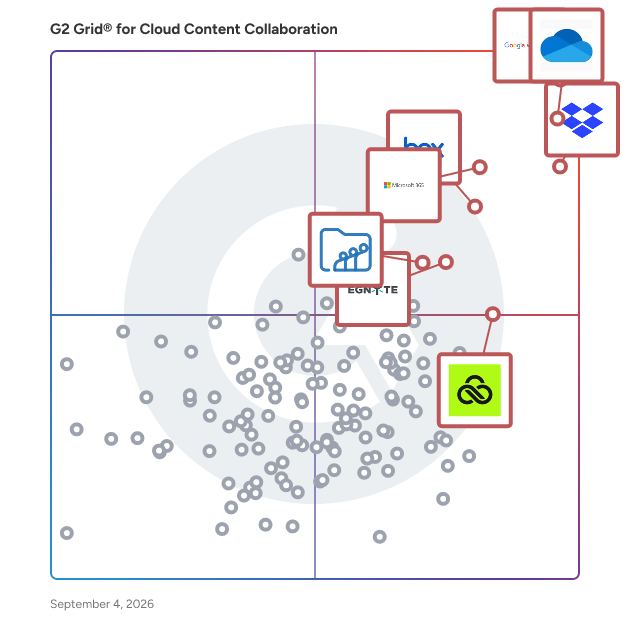
G2 Grid® for Cloud Content Collaboration Software

G2 Grid® for Cloud Content Collaboration Software plotting products by satisfaction and market presence

Highlighted products: Google Workspace, Microsoft OneDrive for Business, Dropbox, Microsoft 365, Box, Egnyte, LucidLink, and Zoho WorkDrive.

Underlying data: [Grid® JSON](https://www.g2.com/categories/cloud-content-collaboration/grids.json?focus%5B%5D=google-workspace&focus%5B%5D=microsoft-onedrive-for-business&focus%5B%5D=dropbox&focus%5B%5D=microsoft365&focus%5B%5D=box&focus%5B%5D=egnyte&focus%5B%5D=lucidlink&focus%5B%5D=zoho-workdrive)

AcceleWeb Files

Safe, secure, and easy to use file sharing, storage, and management for businesses and individuals. Pricing starts at $3.99/mo for 50 users and unlimited storage. Works on all modern mobile and computer browsers, including Blackberry, iOS, Android, Mac, and Windows.

Average Rating: 4.1/5.0

Total Reviews: 12

How Do G2 Users Rate AcceleWeb Files?

  • Has the product been a good partner in doing business?: 8.3/10 (Category avg: 8.8/10)
  • Performance and Reliability: 7.8/10 (Category avg: 8.7/10)
  • File following: 8.3/10 (Category avg: 8.8/10)
  • Device Syncing: 8.6/10 (Category avg: 8.8/10)

Who Is the Company Behind AcceleWeb Files?

  • Seller: AcceleWeb
  • HQ Location: NY, US
  • Twitter: @acceleweb
    2 Twitter followers
  • LinkedIn® Page: www.linkedin.com
    1 employees on LinkedIn®

Who Uses This Product?

  • Company Size: 69% Small, 23% Medium

What Do G2 Reviewers Say About AcceleWeb Files?

AI-generated summary from verified user reviews

Pros
  • Users praise the ease of use of AcceleWeb Files, appreciating its intuitive interface and efficient document management.
  • Users value the user-friendly interface of AcceleWeb Files, enabling effortless file management and organization for all.
  • Users appreciate the reliable and user-friendly cloud storage of AcceleWeb Files, making file management effortless and efficient.
  • Users praise the easy upload feature of AcceleWeb Files, appreciating its simple and user-friendly interface for smooth organization.
  • Users value the reliability of AcceleWeb Files, ensuring smooth and secure file storage and sharing for daily tasks.
Cons
  • Users find AcceleWeb Files to be a little bit costly, but they believe the value justifies the expense.
  • Users find the heavy internet dependency of AcceleWeb Files limits access, impacting their overall experience with the service.
  • Users feel that adding more customization options and features to AcceleWeb Files would enhance its overall performance.
  • Users desire more customization options in AcceleWeb Files to enhance functionality and improve their experience.
  • Users are frustrated with the limited storage offered by AcceleWeb Files, requiring paid plans for more space.

What Are Recent G2 Reviews of AcceleWeb Files?

What Are G2 Users Discussing About AcceleWeb Files?

Collabor8online

Collabor8online offers secure document sharing and virtual data room solutions.

Average Rating: 4.2/5.0

Total Reviews: 11

How Do G2 Users Rate Collabor8online?

  • Has the product been a good partner in doing business?: 10.0/10 (Category avg: 8.8/10)
  • Performance and Reliability: 6.7/10 (Category avg: 8.7/10)
  • File following: 9.2/10 (Category avg: 8.8/10)
  • Device Syncing: 9.2/10 (Category avg: 8.8/10)

Who Is the Company Behind Collabor8online?

  • Seller: Collabor8online
  • HQ Location: MANCHESTER, GB
  • Twitter: @Collabor8online
    834 Twitter followers
  • LinkedIn® Page: www.linkedin.com
    1 employees on LinkedIn®

Who Uses This Product?

  • Company Size: 50% Small, 25% Medium

What Are Recent G2 Reviews of Collabor8online?

What Are G2 Users Discussing About Collabor8online?

imDocShare

imDocShare is a comprehensive solution designed to seamlessly integrate iManage Work Server 10.2+ and iManage Cloud content into Microsoft platforms such as Teams, SharePoint, and OneDrive for Business. This integration enables users to live view, edit, add, attach, sync, search, and provision iManage content directly within these Microsoft environments, enhancing collaboration and productivity. Key Features and Functionality: - Live View and Edit: Access and modify iManage documents in real-time within Microsoft Teams and SharePoint. - Synchronization: Automatically perform bi-directional or one-way synchronization of selected folders and files, including metadata, between SharePoint, Teams Files, OneDrive Libraries, and iManage content. - Co-Authoring: Collaborate on Office documents (version 2013 or above) saved in iManage directly within SharePoint and Teams using Office Client applications like Word or Excel. - Hybrid Search: Conduct integrated searches across multiple iManage and SharePoint content sources from a single interface in SharePoint. - Provisioning: Enable Microsoft Teams administrators and knowledge managers to bulk create, edit, and update Teams, Channels, and Tabs with iManage content using imDocShare Tab and Sync. - Content Actions: Perform various actions on iManage content, including editing profiles, previewing documents, viewing in browser, adding to favorites, checking out, renaming files, downloading, deleting, starting co-authoring sessions, and posting. Primary Value and User Solutions: imDocShare addresses the challenge of integrating iManage's document management capabilities with Microsoft's collaboration tools, providing a unified platform for managing legal and professional documents. By embedding iManage content within Microsoft Teams, SharePoint, and OneDrive, it streamlines workflows, reduces the need to switch between applications, and enhances team collaboration. The solution's synchronization and co-authoring features ensure that teams can work on the most up-to-date documents simultaneously, improving efficiency and reducing errors. Additionally, the hybrid search functionality allows users to quickly locate relevant documents across multiple repositories, saving time and enhancing productivity.

Average Rating: 4.2/5.0

Total Reviews: 33

How Do G2 Users Rate imDocShare?

  • Has the product been a good partner in doing business?: 9.2/10 (Category avg: 8.8/10)
  • Performance and Reliability: 8.5/10 (Category avg: 8.7/10)
  • File following: 8.8/10 (Category avg: 8.8/10)
  • Device Syncing: 8.5/10 (Category avg: 8.8/10)

Who Is the Company Behind imDocShare?

  • Seller: imDocShare
  • Year Founded: 2020
  • HQ Location: Newark, New Jersey
  • Twitter: @imDocShare
    35 Twitter followers
  • LinkedIn® Page: www.linkedin.com
    1 employees on LinkedIn®

Who Uses This Product?

  • Top Industries: Information Technology and Services
  • Company Size: 47% Small, 35% Medium

What Do G2 Reviewers Say About imDocShare?

AI-generated summary from verified user reviews

Pros
  • Users appreciate the real-time collaboration feature of imDocShare, enjoying seamless document sharing and enhanced productivity.
  • Users appreciate the seamless integration of imDocShare, enhancing collaboration and simplifying document management within their teams.
  • Users value the customization options of imDocShare, enhancing collaboration and simplifying document management with their teams.
  • Users find imDocShare's ease of use enhances effective content management and secure document sharing effortlessly.
  • Users appreciate the effortless collaboration features of imDocShare, facilitating easy document sharing and teamwork.
Cons
  • Users find imDocShare to be quite expensive, wishing for more affordable pricing and customization options.
  • Users experience integration difficulties with imDocShare, feeling limited by its inability to connect with other essential tools.
  • Users feel limited customization options with imDocShare, restricting integration with essential tools for their specific needs.
  • Users find the setup complexity of imDocShare challenging, requiring significant time and effort to master.
  • Users find the initial setup and learning curve of imDocShare challenging, leading to a complicated experience.

What Are Recent G2 Reviews of imDocShare?

AI can help you find the answers. G2 helps you trust them.

Connect G2 to Claude or ChatGPT for answers grounded in G2's trusted reviews, comparisons, and pricing from real user insights.

How it works

CoralTree Qbox

QuickBooks Remote Access and File Sharing Don't hassle with Accountant Copies, emailing portable files, creating backups, or driving to your client's location any more. Qbox allows users to share and collaborate on QuickBooks Desktop files remotely, featuring file locks to ensure changes you make are protected, history tracking and rollback features.

Average Rating: 4.0/5.0

Total Reviews: 11

How Do G2 Users Rate CoralTree Qbox?

  • Has the product been a good partner in doing business?: 7.1/10 (Category avg: 8.8/10)
  • Performance and Reliability: 8.3/10 (Category avg: 8.7/10)
  • File following: 7.2/10 (Category avg: 8.8/10)
  • Device Syncing: 7.5/10 (Category avg: 8.8/10)

Who Is the Company Behind CoralTree Qbox?

Who Uses This Product?

  • Top Industries: Accounting
  • Company Size: 82% Small, 27% Medium

What Do G2 Reviewers Say About CoralTree Qbox?

AI-generated summary from verified user reviews

Pros
  • Users commend the effective team collaboration capabilities of CoralTree Qbox, enhancing secure communication and file sharing.
  • Users value the collaboration features of CoralTree Qbox, ensuring easy access to files when needed.
  • Users value the cross-platform compatibility of CoralTree Qbox, enabling seamless collaboration on QuickBooks from different locations.
  • Users appreciate the easy collaboration with Qbox, as it syncs changes seamlessly while preventing editing conflicts.
  • Users enjoy the secure file sharing capabilities of CoralTree Qbox, enhancing team collaboration and client communication.
Cons
  • Users feel CoralTree Qbox is lacking features that meet the demands of more advanced user needs.
  • Users experience limited real-time editing with Qbox, as only one person can edit a file at a time.
  • While users find it adequate, they seek improved security features like Cognito for enhanced protection.

What Are Recent G2 Reviews of CoralTree Qbox?

Cocoon Data

We work with Governments, Enterprises, and SMBs around the globe, to keep regulated and commercially sensitive data safe. Our patented, Secure Data Sharing Platform (SDSP) allows users to collaborate, share and control sensitive data outside firewalls, securely, and compliantly. Clients use our platform to strengthen their organization’s cyber and data security and meet strict compliance standards within a flexible and data-centric organization.

Average Rating: 4.3/5.0

Total Reviews: 19

How Do G2 Users Rate Cocoon Data?

  • Has the product been a good partner in doing business?: 10.0/10 (Category avg: 8.8/10)
  • Performance and Reliability: 9.4/10 (Category avg: 8.7/10)
  • File following: 9.8/10 (Category avg: 8.8/10)
  • Device Syncing: 8.3/10 (Category avg: 8.8/10)

Who Is the Company Behind Cocoon Data?

Who Uses This Product?

  • Company Size: 37% Small, 26% Medium

What Do G2 Reviewers Say About Cocoon Data?

AI-generated summary from verified user reviews

Pros
  • Users value the ease of use of Cocoon Data, making it accessible even for non-technical individuals.
  • Users commend Cocoon Data for its robust security measures and comprehensive control over sensitive information, enhancing compliance.
  • Users praise the easy collaboration features of Cocoon Data, enabling secure teamwork without compromising data control.
  • Users appreciate Cocoon Data's intuitive interface, making collaboration and data management effortless and effective.
  • Users value the seamless collaboration and security of Cocoon Data, enhancing confidence in handling sensitive information.
Cons
  • Users find the complexity of onboarding and advanced features can hinder smooth adoption and navigation.
  • Users find Cocoon Data's limited advanced collaboration features hinder their editing experience compared to mainstream platforms.
  • Users find the lack of advanced collaboration features in Cocoon Data limits their collaborative editing experience.
  • Users note that training is required for advanced features, creating challenges for new team member adoption.
  • Users feel that Cocoon Data offers limited customization, hindering efficiency and ease of use in their workflows.

What Are Recent G2 Reviews of Cocoon Data?

What Are G2 Users Discussing About Cocoon Data?

docMgt

DocMgt is a web-based document management system designed to streamline the entire document lifecycle—from creation and processing to management and secure destruction. Accessible on virtually any internet-enabled device, DocMgt leverages artificial intelligence to automate business applications, enhancing productivity and operational efficiency. Key Features and Functionality: - AI-Powered Automation: Utilizes advanced AI and machine learning technologies to automate data processing, reducing manual effort and minimizing errors. - Comprehensive Document Handling: Supports storage, organization, viewing, sharing, and retention of various digital assets, including scanned images, photographs, electronic documents (Office, PDF), and electronic forms. - Flexible Deployment Options: Offers both cloud-based hosting in Microsoft Azure and on-premise installations, providing flexibility to meet diverse organizational needs. - Enhanced Security: Provides robust security measures, ensuring that documents are protected and access is controlled, giving organizations peace of mind. - Seamless Integration: Integrates with popular platforms such as QuickBooks, DocuSign, and Adobe Sign, facilitating smooth workflows and collaboration. - User-Friendly Interface: Designed for accessibility on desktops, tablets, and smartphones, allowing users to manage documents efficiently from any location. Primary Value and Solutions Provided: DocMgt addresses the challenges organizations face in managing vast amounts of digital documents by offering a centralized, AI-enhanced platform that automates routine tasks, ensures secure storage, and facilitates easy retrieval. By streamlining document-related processes, DocMgt helps businesses improve productivity, maintain compliance, and reduce operational costs. Its flexible deployment options and seamless integrations make it a versatile solution suitable for various industries, including education, healthcare, human resources, and more.

Average Rating: 4.3/5.0

Total Reviews: 18

How Do G2 Users Rate docMgt?

  • Has the product been a good partner in doing business?: 8.3/10 (Category avg: 8.8/10)
  • Performance and Reliability: 7.9/10 (Category avg: 8.7/10)
  • File following: 8.5/10 (Category avg: 8.8/10)
  • Device Syncing: 7.9/10 (Category avg: 8.8/10)

Who Is the Company Behind docMgt?

  • Seller: Docmgt
  • Year Founded: 2014
  • HQ Location: Lincoln, Nebraska
  • Twitter: @docMgtHQ
    21 Twitter followers
  • LinkedIn® Page: www.linkedin.com
    4 employees on LinkedIn®

Who Uses This Product?

  • Company Size: 63% Small, 37% Medium

What Do G2 Reviewers Say About docMgt?

AI-generated summary from verified user reviews

Pros
  • Users appreciate the ease of use of docMgt, benefiting from quick document searches and a clean interface.
  • Users value the simplicity of docMgt, appreciating its easy document search and user-friendly interface.
  • Users appreciate the easy upload features of docMgt, finding it quick and efficient to organize files.
  • Users highlight the ease of use in file sharing with docMgt, enhancing document management and security.
  • Users appreciate the clean folder management in docMgt, making file organization quick and efficient.
Cons
  • Users find the cluttered interface of docMgt inconvenient, making simple tasks feel overly complicated and time-consuming.
  • Users experience slow uploads which complicate data migration and elongate workflow processes significantly.

What Are Recent G2 Reviews of docMgt?

Fleekdrive

[ECM]Rebuild Your Salesforce File Management Even Better, Practical. Accelerate Internal and External File Collaborations. [WebReport]With Cloud Report for Salesforce, both novice users and power-users can simply create various forms of reports.

Average Rating: 4.3/5.0

Total Reviews: 35

How Do G2 Users Rate Fleekdrive?

  • Has the product been a good partner in doing business?: 7.8/10 (Category avg: 8.8/10)
  • Performance and Reliability: 7.3/10 (Category avg: 8.7/10)
  • File following: 8.1/10 (Category avg: 8.8/10)
  • Device Syncing: 8.0/10 (Category avg: 8.8/10)

Who Is the Company Behind Fleekdrive?

  • Seller: Fleekdrive
  • HQ Location: N/A
  • Twitter: @Fleekdrive
    63 Twitter followers
  • LinkedIn® Page: www.linkedin.com
    1 employees on LinkedIn®

Who Uses This Product?

  • Top Industries: Information Technology and Services
  • Company Size: 50% Small, 31% Medium

What Are Recent G2 Reviews of Fleekdrive?

What Are G2 Users Discussing About Fleekdrive?

CentreStack

Enable remote access and collaboration without exposing your data to third party clouds and servers. Data stays on your servers for complete control of security and compliance. Combine the security of on-premise file servers with cloud productivity.

Average Rating: 3.7/5.0

Total Reviews: 18

How Do G2 Users Rate CentreStack?

  • Has the product been a good partner in doing business?: 8.9/10 (Category avg: 8.8/10)
  • Performance and Reliability: 8.3/10 (Category avg: 8.7/10)
  • File following: 9.0/10 (Category avg: 8.8/10)
  • Device Syncing: 9.5/10 (Category avg: 8.8/10)

Who Is the Company Behind CentreStack?

  • Seller: Gladinet
  • Year Founded: 2008
  • HQ Location: Boca Raton, FL
  • Twitter: @gladinet
    1,453 Twitter followers
  • LinkedIn® Page: www.linkedin.com
    12 employees on LinkedIn®

Who Uses This Product?

  • Top Industries: Information Technology and Services
  • Company Size: 50% Small, 41% Medium

What Are Recent G2 Reviews of CentreStack?

What Are G2 Users Discussing About CentreStack?

SideDrawer

SideDrawer is a user friendly, visually appealing organization and collaboration platform that allows enterprises and SMB professionals to provide an engaging client experience. SideDrawer is a cloud-based, multiple device, multi-language platform for digital documents, that users can use to organize, distribute, and support their clients. With a completely customizable experience that offers guided organization, file-specific meta-data that can be used for additional reminders, cross-linking of related and relevant files, secure inbox, sorting and filtering capabilities, next-generation collaboration capability with multiple permission settings offer a significant enhancement to the client-facing professional. From an enterprise perspective, our tool offers multi-tenant management, dashboards for program managers, a developer API with 350+ endpoints, and a fully compliant client communication platform.

Average Rating: 4.2/5.0

Total Reviews: 23

How Do G2 Users Rate SideDrawer?

  • Has the product been a good partner in doing business?: 3.3/10 (Category avg: 8.8/10)
  • Performance and Reliability: 8.3/10 (Category avg: 8.7/10)
  • File following: 8.6/10 (Category avg: 8.8/10)
  • Device Syncing: 9.2/10 (Category avg: 8.8/10)

Who Is the Company Behind SideDrawer?

  • Seller: SideDrawer
  • Year Founded: 2018
  • HQ Location: Toronto, Ontario
  • Twitter: @sidedrawerinc
    34 Twitter followers
  • LinkedIn® Page: www.linkedin.com
    31 employees on LinkedIn®

Who Uses This Product?

  • Company Size: 70% Small, 30% Medium

What Do G2 Reviewers Say About SideDrawer?

AI-generated summary from verified user reviews

Pros
  • Users value the secure and organized document management of SideDrawer, simplifying the retrieval and storage of crucial files.
  • Users value the organized folder management of SideDrawer, which simplifies the process of finding and managing documents.
  • Users value the robust security and privacy controls of SideDrawer, ensuring safe and organized document management.
  • Users find SideDrawer's ease of use impressive, benefitting from organized categories and a user-friendly interface.
  • Users value the easy collaboration features of SideDrawer, enhancing teamwork with organized access to shared documents.
Cons
  • Users are frustrated with the cost issues of SideDrawer, finding the pricing unclear and not fully upfront.
  • Users find the costly nature of SideDrawer disappointing, as it lacks full transparency on pricing.
  • Users find SideDrawer's layout and font color lacking features, feeling it's overly simplistic for their needs.
  • Users note that time delays in starting SideDrawer slightly hinder the otherwise smooth experience.

What Are Recent G2 Reviews of SideDrawer?

What Are G2 Users Discussing About SideDrawer?

Prostream

Prostream is a document management system designed for companies in the construction and manufacturing industry.

Average Rating: 4.1/5.0

Total Reviews: 14

How Do G2 Users Rate Prostream?

  • Has the product been a good partner in doing business?: 9.2/10 (Category avg: 8.8/10)
  • Performance and Reliability: 9.3/10 (Category avg: 8.7/10)
  • File following: 7.7/10 (Category avg: 8.8/10)
  • Device Syncing: 8.0/10 (Category avg: 8.8/10)

Who Is the Company Behind Prostream?

  • Seller: Pro4all
  • Year Founded: 2001
  • HQ Location: Woerden, NL
  • LinkedIn® Page: www.linkedin.com
    54 employees on LinkedIn®

Who Uses This Product?

  • Company Size: 71% Medium, 57% Small

What Do G2 Reviewers Say About Prostream?

AI-generated summary from verified user reviews

Pros
  • Users appreciate the reliability of Prostream, ensuring smooth streaming and consistent document management without confusion.
  • Users value Prostream's streamlined collaboration and secure document management, enhancing productivity and project outcomes in construction.
  • Users value the streamlined collaboration and secure data management that Prostream offers for construction professionals.
  • Users appreciate the ease of use of Prostream, finding the interface intuitive for smooth live streaming and management.
  • Users value the secure file sharing features of Prostream, enhancing collaboration and ensuring data safety in projects.
Cons
  • Users experience difficulties finding documents quickly in Prostream, particularly within large projects with many files.
  • Users find folder navigation time-consuming, preferring a cleaner interface offered by competing applications.
  • Users find Prostream's navigation somewhat time-consuming and prefer the cleaner UIs of its competitors.
  • Users experience inefficient searching when trying to locate documents quickly in large projects with numerous files.
  • Users find that the lack of comprehensive features makes it challenging to navigate and fully utilize Prostream.

What Are Recent G2 Reviews of Prostream?

What Are G2 Users Discussing About Prostream?

GreenAnt Nest

GreenAnt Nest is a comprehensive cloud storage and backup solution designed to provide secure, encrypted data storage with advanced ransomware protection. Tailored for organizations ranging from small offices to large data centers, GreenAnt Nest ensures rapid restoration of business operations in the event of data loss or cyberattacks. Key Features and Functionality: - Zero-Knowledge Encryption: All data is stored and snapshotted in a fully encrypted form, ensuring that only authorized users can access the information. - Ransomware Protection: The system offers integrated ransomware protection, enabling swift recovery and minimizing downtime during attacks. - Flexible Deployment Options: - Office Networks: A silent, small-form-factor appliance designed for daily or hourly encrypted snapshots, suitable for businesses with up to 20 concurrent users. - Data Centers: Rack-mounted appliances with scalable all-flash storage, supporting storage capacities from 30TB to 1PB. - Advanced Hardware Specifications: - Office Appliance: Features include EPYC™ 3251 CPU, 128GB ECC RAM, dual 10GbE network support, and NVMe drives in a redundant configuration. - Data Center Appliance: Equipped with EPYC™ 7002 CPUs, up to 2TB ECC RAM, and high-speed network capabilities up to 400GbE. - Comprehensive Management Dashboard: Provides dataset analytics, snapshot and replication scheduling, sharing via SMB, NFS, iSCSI, and support for Active Directory and LDAP. Primary Value and Solutions Provided: GreenAnt Nest addresses critical challenges in data security and business continuity by offering a robust backup solution that combines zero-knowledge encryption with proactive ransomware protection. This ensures that organizations can safeguard sensitive data, comply with privacy regulations, and quickly recover from cyber incidents, thereby maintaining operational integrity and trust.

Average Rating: 4.3/5.0

Total Reviews: 17

How Do G2 Users Rate GreenAnt Nest?

  • Has the product been a good partner in doing business?: 9.2/10 (Category avg: 8.8/10)
  • Performance and Reliability: 8.7/10 (Category avg: 8.7/10)
  • File following: 8.2/10 (Category avg: 8.8/10)
  • Device Syncing: 8.0/10 (Category avg: 8.8/10)

Who Is the Company Behind GreenAnt Nest?

Who Uses This Product?

  • Company Size: 47% Medium, 41% Small

What Do G2 Reviewers Say About GreenAnt Nest?

AI-generated summary from verified user reviews

Pros
  • Users appreciate the convenience of GreenAnt Nest, highlighting its easy setup and effortless file management.
  • Users praise the ease of use of GreenAnt Nest, noting simple setup and effortless file management.
  • Users enjoy the easy implementation of GreenAnt Nest, appreciating the simple setup and effortless file management.
Cons
  • Users note the integration difficulty with limited third-party options, hindering seamless connectivity with other tools.
  • Users experience slow performance with transfer speeds, impacting their overall satisfaction compared to competitors.

What Are Recent G2 Reviews of GreenAnt Nest?

What Are G2 Users Discussing About GreenAnt Nest?

Fluxiom

Fluxiom offers seamless online file management in the cloud.

Average Rating: 4.3/5.0

Total Reviews: 13

How Do G2 Users Rate Fluxiom?

  • Has the product been a good partner in doing business?: 8.9/10 (Category avg: 8.8/10)
  • Performance and Reliability: 8.3/10 (Category avg: 8.7/10)
  • File following: 8.0/10 (Category avg: 8.8/10)
  • Device Syncing: 8.0/10 (Category avg: 8.8/10)

Who Is the Company Behind Fluxiom?

  • Seller: Wollzelle
  • Year Founded: 2000
  • HQ Location: Vienna
  • Twitter: @wollzelle
    126 Twitter followers
  • LinkedIn® Page: www.linkedin.com
    2 employees on LinkedIn®

Who Uses This Product?

  • Company Size: 50% Medium, 44% Large

What Are Recent G2 Reviews of Fluxiom?

What Are G2 Users Discussing About Fluxiom?

Worldox GX4

Worldox GX4 is a comprehensive document and email management system designed to streamline the organization, retrieval, and security of digital content for law firms, corporate legal departments, and other professional services. With its intuitive interface and robust functionality, Worldox GX4 enhances productivity by simplifying document management processes. Key Features and Functionality: - Active Profiling® Technology: Utilizes recent and historical filing attributes to automate document profiling, reducing manual data entry and improving filing accuracy. - Seamless Integration: Integrates with Microsoft Office applications, allowing users to open, save, and manage documents directly within familiar software environments. - Enhanced Email Management: Monitors incoming and outgoing emails, assigns client matter information, and adds corresponding folders in Outlook, facilitating efficient email filing. - Mobile Accessibility: Through Worldox Web 3.0 and dedicated iOS applications, users can access and manage documents remotely from various devices, ensuring flexibility and continuity of work. - Advanced Search Capabilities: Offers broad document tagging and searching functionalities, enabling quick retrieval of files based on multiple criteria. Primary Value and Solutions Provided: Worldox GX4 addresses the challenges of managing vast amounts of digital documents and emails by providing a centralized, secure, and efficient system. It enhances collaboration among team members, ensures compliance with document retention policies, and reduces the time spent searching for files. By automating routine tasks and integrating seamlessly with existing tools, Worldox GX4 allows professionals to focus more on their core work, thereby increasing overall productivity and operational efficiency.

Average Rating: 3.8/5.0

Total Reviews: 52

How Do G2 Users Rate Worldox GX4?

  • Has the product been a good partner in doing business?: 7.8/10 (Category avg: 8.8/10)
  • Performance and Reliability: 7.6/10 (Category avg: 8.7/10)
  • File following: 8.2/10 (Category avg: 8.8/10)
  • Device Syncing: 7.7/10 (Category avg: 8.8/10)

Who Is the Company Behind Worldox GX4?

  • Seller: World Software
  • Year Founded: 1988
  • HQ Location: Glen Rock, NJ
  • Twitter: @worldox
    714 Twitter followers
  • LinkedIn® Page: www.linkedin.com
    17 employees on LinkedIn®

Who Uses This Product?

  • Who Uses This: Paralegal
  • Top Industries: Law Practice, Legal Services
  • Company Size: 47% Small, 42% Medium

What Do G2 Reviewers Say About Worldox GX4?

AI-generated summary from verified user reviews

Pros
  • Users find Worldox GX4 to be effortlessly manageable, enhancing productivity and simplifying document organization and collaboration.
  • Users value the efficient data management of Worldox GX4, enhancing organization and saving time in document retrieval.
  • Users love the simple and creative interface of Worldox GX4, enhancing accessibility and work efficiency.
  • Users value the easy collaboration capabilities of Worldox GX4, facilitating seamless teamwork and efficient document management.
  • Users value the robust security features of Worldox GX4, ensuring safe access to sensitive documents and files.
Cons
  • Users experience slow performance with Worldox GX4, particularly during searches and when handling large files.
  • Users find that training is required for Worldox GX4, complicating onboarding and limiting accessibility for new users.
  • Users find the version control system challenging, struggling to manage document changes and view history effectively.
  • Users find Worldox GX4 lacking features like modern integrations and usability improvements, hindering overall efficiency.
  • Users find the limited customization of version control in Worldox GX4 challenging for managing document changes effectively.

What Are Recent G2 Reviews of Worldox GX4?

What Are G2 Users Discussing About Worldox GX4?

netDocShare

netDocShare is an innovative solution designed for law firms to Live View, Edit, Add, Attach, Sync, Search & Provision NetDocuments content in Microsoft Teams, Microsoft SharePoint, and OneDrive for Business (incl. OneNote sync with NetDocuments).

Average Rating: 4.1/5.0

Total Reviews: 14

Who Is the Company Behind netDocShare?

  • Seller: netDocShare
  • Year Founded: 2019
  • HQ Location: Newark, US
  • Twitter: @netDocShare
    64 Twitter followers
  • LinkedIn® Page: www.linkedin.com
    1 employees on LinkedIn®

Who Uses This Product?

  • Top Industries: Information Technology and Services
  • Company Size: 43% Small, 36% Large

What Are Recent G2 Reviews of netDocShare?

Onlime

Onlime is a secure, privacy-focused cloud storage and backup service developed and operated in Denmark. Designed for individuals, families, and businesses seeking a trustworthy alternative to mainstream providers, Onlime offers a user-centric approach that prioritizes data protection, transparency, and ease of use. Key Features: - Automatic Backup & Sync: Seamlessly back up and synchronize files across Windows, macOS, iOS, and Android devices.​ - Photo Timeline & AI Search: Organize photos chronologically and utilize intelligent, privacy-respecting search capabilities to locate images by content or context.​ - File Sharing: Share files, folders, and albums securely via links or invitations, with customizable permissions.​ - Document Scanner: Scan and store documents directly from mobile devices, with features like auto-cropping and contrast adjustment.​ - Version History: Access the five most recent versions of any file, allowing for easy restoration of previous iterations.​ Privacy & Sustainability: Onlime is committed to user privacy and environmental responsibility. Data is stored in GDPR-compliant datacenters located in Norway, powered entirely by renewable energy. The service operates without external investors, ensuring that user data is never monetized or shared with third parties.​ Support & Accessibility: Users benefit from responsive customer support available directly within the app, as well as through email and chat. Onlime offers a free plan with 5 GB of storage, requiring no credit card for signup, and provides various subscription options to accommodate different storage needs.​ Why Choose Onlime: - European-Based: Developed and operated in Denmark, with data stored in Norway, ensuring compliance with strict European privacy laws.​ - User-Centric: Designed with a focus on simplicity and transparency, avoiding complex setups and hidden terms.​ - Environmentally Conscious: Utilizes 100% renewable energy for all data storage operations.​ For those seeking a reliable, ethical, and user-friendly cloud storage solution, Onlime presents a compelling choice that aligns with both personal and professional values.

Average Rating: 4.4/5.0

Total Reviews: 9

How Do G2 Users Rate Onlime?

  • File following: 10.0/10 (Category avg: 8.8/10)
  • Device Syncing: 9.7/10 (Category avg: 8.8/10)

Who Is the Company Behind Onlime?

  • Seller: Onlime
  • Year Founded: 2012
  • HQ Location: Middelfart, DK
  • Twitter: @OnlimeDK
    4 Twitter followers
  • LinkedIn® Page: dk.linkedin.com
    2 employees on LinkedIn®

Who Uses This Product?

  • Company Size: 56% Medium, 44% Small

What Are Recent G2 Reviews of Onlime?

What Are G2 Users Discussing About Onlime?

Neeraja Prakash
NP
Researched and written by Neeraja Prakash
Updated July 20, 2025