Best Cloud Content Collaboration Software - Page 6

How Many Cloud Content Collaboration Software Products Does G2 Track?

Total Products under this Category: 308

Category Stats (Nov 2026)

  • Average Rating: 4.35/5 (↑0.01 vs Oct 2026) The average rating of products in this category, based on all submitted ratings
  • Top Trending Product: FileOrbis (+3.7%) - Among all products in this category, FileOrbis recorded the largest rating increase compared to last month

Last updated: November 01, 2026

How Does G2 Rank Cloud Content Collaboration Software Products?

Why You Can Trust G2's Software Rankings:

  • 30 Analysts and Data Experts
  • 124,000+ Authentic Reviews
  • 308+ Products
  • Unbiased Rankings

G2's software rankings are built on verified user reviews, rigorous moderation, and a consistent research methodology maintained by a team of analysts and data experts. Each product is measured using the same transparent criteria, with no paid placement or vendor influence. While reviews reflect real user experiences, which can be subjective, they offer valuable insight into how software performs in the hands of professionals. Together, these inputs power the G2 Score, a standardized way to compare tools within every category.

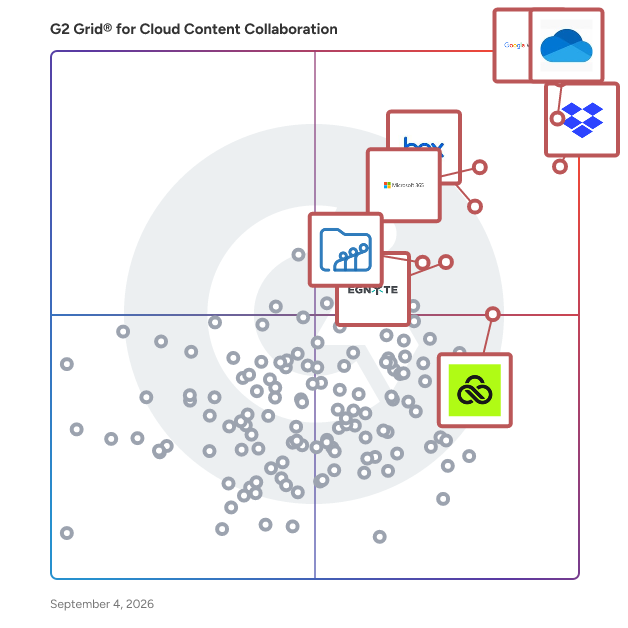
G2 Grid® for Cloud Content Collaboration Software

G2 Grid® for Cloud Content Collaboration Software plotting products by satisfaction and market presence

Highlighted products: Google Workspace, Microsoft OneDrive for Business, Dropbox, Microsoft 365, Box, Egnyte, LucidLink, and Zoho WorkDrive.

Underlying data: [Grid® JSON](https://www.g2.com/categories/cloud-content-collaboration/grids.json?focus%5B%5D=google-workspace&focus%5B%5D=microsoft-onedrive-for-business&focus%5B%5D=dropbox&focus%5B%5D=microsoft365&focus%5B%5D=box&focus%5B%5D=egnyte&focus%5B%5D=lucidlink&focus%5B%5D=zoho-workdrive)

SmartVault

SmartVault is the easiest and most secure way to optimize how you, your staff, and your clients gather, store, share, and eSign documents in the cloud. Streamline how you work, collaborate with clients more easily, and reduce costs — through one integrated document management and client portal solution.

Average Rating: 4.3/5.0

Total Reviews: 98

How Do G2 Users Rate SmartVault?

  • Has the product been a good partner in doing business?: 8.5/10 (Category avg: 8.8/10)
  • Performance and Reliability: 8.8/10 (Category avg: 8.7/10)
  • File following: 8.3/10 (Category avg: 8.8/10)
  • Device Syncing: 8.6/10 (Category avg: 8.7/10)

Who Is the Company Behind SmartVault?

  • Seller: GetBusy
  • Year Founded: 1998
  • HQ Location: CAMBRIDGE, Cambridgeshire
  • LinkedIn® Page: www.linkedin.com
    86 employees on LinkedIn®

Who Uses This Product?

  • Top Industries: Accounting, Financial Services
  • Company Size: 82% Small, 13% Medium

What Do G2 Reviewers Say About SmartVault?

AI-generated summary from verified user reviews

Pros
  • Users value the ease of use of SmartVault, highlighting its intuitive design and seamless functionality for clients.
  • Users appreciate the easy upload feature of SmartVault, making document management efficient and user-friendly for clients.
  • Users value the secure sharing features of SmartVault, appreciating its ease of use for document management.
  • Users appreciate the strong security measures of SmartVault, ensuring secure uploads and access for both staff and clients.
  • Users praise SmartVault for its secure file sharing, enabling easy and safe document management for all users.
Cons
  • Users find SmartVault's limited customization options hinder its effectiveness for specific office needs and preferences.
  • Users find SmartVault to be expensive, making it less suitable for smaller businesses or individual use.
  • Users find pricing concerns with SmartVault, especially for smaller businesses and individuals due to the higher costs.
  • Users find the high cost of SmartVault to be a barrier, particularly for smaller businesses and individuals.
  • Users faced integration issues with SmartVault, leading to the creation of numerous duplicate entries.

What Are Recent G2 Reviews of SmartVault?

What Are G2 Users Discussing About SmartVault?

SuiteFiles

SuiteFiles is an intelligent workspace solution specifically designed for professional service firms, aimed at streamlining the way teams manage their documents and client interactions. This comprehensive platform integrates essential functions such as document creation, review, approval, client collaboration, and digital signing into a single, cohesive system. By eliminating the need to juggle multiple folders, emails, and manual follow-ups, SuiteFiles provides a structured environment that enhances productivity and ensures efficient completion of work. The target audience for SuiteFiles encompasses a diverse range of professional service firms, including accounting firms, law firms, and consultancy agencies. These organizations often handle extensive documentation and require effective communication with clients. SuiteFiles addresses these challenges by creating a centralized workspace where all relevant documents, conversations, and approvals are easily accessible. This organization reduces the likelihood of important information being overlooked or lost, ultimately fostering better collaboration among team members and clients. Key features of SuiteFiles include seamless integration with widely-used tools such as Microsoft 365, Xero, Karbon, WorkflowMax, HubSpot, and QuickBooks Online. This compatibility allows firms to enhance their existing tech stack rather than complicate it with additional software. By connecting these tools, SuiteFiles helps create a more efficient workflow, enabling users to manage their tasks and client interactions without the hassle of switching between different applications. The platform’s ability to consolidate various functions into one interface simplifies the user experience and promotes a more streamlined approach to document management. The benefits of using SuiteFiles extend beyond mere organization; it empowers professional service firms to focus on their core competencies by minimizing busy work. With everything living in context, teams can spend less time chasing down documents or coordinating approvals and more time on delivering quality service to their clients. The platform promotes clarity and control, ensuring that all team members are aligned and that client confidence is maintained throughout the process. SuiteFiles is designed for firms that prioritize efficiency and client satisfaction. By providing an intelligent workspace that consolidates essential functions and integrates with existing tools, it enables professional service firms to work smarter, not harder, ultimately leading to more finished work and enhanced client relationships. This solution not only supports the operational needs of these firms but also contributes to a more collaborative and productive work environment.

Average Rating: 4.5/5.0

Total Reviews: 66

How Do G2 Users Rate SuiteFiles?

  • Has the product been a good partner in doing business?: 9.2/10 (Category avg: 8.8/10)
  • Performance and Reliability: 8.1/10 (Category avg: 8.7/10)
  • File following: 8.8/10 (Category avg: 8.8/10)
  • Device Syncing: 6.9/10 (Category avg: 8.7/10)

Who Is the Company Behind SuiteFiles?

  • Seller: SuiteFiles
  • Company Website:
  • Year Founded: 2012
  • HQ Location: Wellington, NZ
  • LinkedIn® Page: www.linkedin.com
    28 employees on LinkedIn®

Who Uses This Product?

  • Who Uses This: Director
  • Top Industries: Accounting
  • Company Size: 94% Small, 6% Medium

What Do G2 Reviewers Say About SuiteFiles?

AI-generated summary from verified user reviews

Pros
  • Users find that SuiteFiles enhances document organization, streamlining collaboration and providing easy access to necessary information.
  • Users find SuiteFiles to be incredibly easy to use, streamlining workflows and enhancing collaboration effortlessly.
  • Users appreciate the centralization of documents in SuiteFiles, enhancing collaboration and efficiency for teams and clients.
  • Users value the efficient email filing in SuiteFiles, ensuring important communications are securely organized and easily accessible.
  • Users appreciate the quick and reliable customer support of SuiteFiles, enhancing their overall experience and efficiency.
Cons
  • Users find the accessibility issues of SuiteFiles can make document retrieval somewhat frustrating and cumbersome.
  • Users find the difficult learning curve challenging, impacting their ability to adapt quickly to SuiteFiles.
  • Users find the difficult navigation in SuiteFiles can be cumbersome when accessing documents, affecting overall efficiency.
  • Users find the document access to be a bit chunky, which can hinder their efficiency and ease of use.
  • Users find the access to documents can be a bit chunky, leading to a less smooth experience.

What Are Recent G2 Reviews of SuiteFiles?

Discuss Greenbox

Greenbox is a remarkably unique document management system with an advanced integrated business process management system. It is a Document Management System that helps in storing, tracking, retrieving and managing documents while having centralized access. Anyone and everyone with permission can access a file irrespective of where they are. The system takes care of complete safety and confidentiality of the documents and is designed to simplify the otherwise complicated operations. Greenbox allows the user access to a variety of features like unlimited folders and subfolders, universal content search, Solr OCR/text search inside an image, document versioning and restoration, granular access control and advanced document control feature. Document approval workflow, smart handling of metadata and an attractive price bracket are some of its most notable features.

Average Rating: 4.7/5.0

Total Reviews: 16

How Do G2 Users Rate Discuss Greenbox?

  • Has the product been a good partner in doing business?: 8.3/10 (Category avg: 8.8/10)
  • Performance and Reliability: 8.6/10 (Category avg: 8.7/10)
  • File following: 9.5/10 (Category avg: 8.8/10)
  • Device Syncing: 9.8/10 (Category avg: 8.7/10)

Who Is the Company Behind Discuss Greenbox?

Who Uses This Product?

  • Company Size: 63% Medium, 31% Small

What Do G2 Reviewers Say About Discuss Greenbox?

AI-generated summary from verified user reviews

Pros
  • Users appreciate the reliability of Greenbox, ensuring efficient and secure handling of sensitive HR records.
  • Users value the efficient and secure handling of sensitive records that enhances HR collaboration and workflows.
  • Users value the efficient and secure collaboration tools that greatly streamline HR workflows and manage sensitive records.
Cons
  • Users find poor customer support frustrating, especially when needing timely responses for complex issues with Discuss Greenbox.

What Are Recent G2 Reviews of Discuss Greenbox?

What Are G2 Users Discussing About Discuss Greenbox?

AI can help you find the answers. G2 helps you trust them.

Connect G2 to Claude or ChatGPT for answers grounded in G2's trusted reviews, comparisons, and pricing from real user insights.

How it works

Bitrix24

Bitrix24 is an all-in-one business workspace that combines vibe coding platform, CRM, collaboration, and management tools in a single, easy-to-use platform – free for unlimited users. Whether you're a small team or a growing business, Bitrix24 helps you to: — Build working apps, internal tools, and web pages from plain-language prompts — Track leads and manage customer relationships with a built-in CRM — Stay on top of projects and tasks with Kanban boards, timelines, and time tracking — Communicate easily via team messenger, video calls, and shared calendars — Create and edit documents, manage files, and collect e-signatures — Run marketing campaigns and manage customer interactions through email, calls, and WhatsApp Bitrix24’s AI-powered assistant helps automate routine tasks, write emails, analyze data, and suggest next steps, saving time and boosting productivity. What makes Bitrix24 a great solution for businesses: — Free forever for unlimited users, with access to core features and 5 GB storage — No per-user fees – upgrade only when you need more storage or advanced tools — Accessible anywhere via web, desktop, and mobile apps — Scalable – grow your business without switching platforms or juggling tools Over 15 million companies trust Bitrix24 to simplify operations, cut costs, and get more done – all in one place.

Average Rating: 4.1/5.0

Total Reviews: 582

How Do G2 Users Rate Bitrix24?

  • Has the product been a good partner in doing business?: 7.8/10 (Category avg: 8.8/10)
  • Performance and Reliability: 8.8/10 (Category avg: 8.7/10)
  • File following: 8.7/10 (Category avg: 8.8/10)
  • Device Syncing: 8.6/10 (Category avg: 8.7/10)

Who Is the Company Behind Bitrix24?

  • Seller: Bitrix24
  • Company Website:
  • Year Founded: 1998
  • HQ Location: Alexandria, Virginia
  • LinkedIn® Page: www.linkedin.com
    269 employees on LinkedIn®

Who Uses This Product?

  • Who Uses This: Marketing Manager, Project Manager
  • Top Industries: Information Technology and Services, Marketing and Advertising
  • Company Size: 56% Small, 34% Medium

What Do G2 Reviewers Say About Bitrix24?

AI-generated summary from verified user reviews

Pros
  • Users appreciate the ease of use of Bitrix24, enabling streamlined project management and centralizing communication effectively.
  • Users appreciate the seamless team collaboration of Bitrix24, thanks to integrated tools and automation that enhance efficiency.
  • Users appreciate the centralized task management of Bitrix24, streamlining projects and boosting productivity effortlessly.
  • Users appreciate the integration of multiple tools in Bitrix24, simplifying project management and enhancing workflow efficiency.
  • Users love the feature abundance of Bitrix24, seamlessly managing leads, deals, and tasks in one platform.
Cons
  • Users often find the learning curve steep with Bitrix24, struggling with the complex and cluttered interface while navigating features.
  • Users find missing features like email automation and notification issues hinder performance and ease of use.
  • Users find limited features in Bitrix24, especially lacking in email automation and marketing insights integration.
  • Users find Bitrix24 lacking features for advanced tasks, requiring additional tools for effective email automation and complex operations.
  • Users experience performance issues with Bitrix24, including slow operation and delayed mobile app notifications, causing frustration.

What Are Recent G2 Reviews of Bitrix24?

What Are G2 Users Discussing About Bitrix24?

PSISafe

PSIsafe is a centralized repository where all documents are accessed and managed, eliminating the inefficiencies of filing cabinets, shared drives and local hard drives.

Average Rating: 4.0/5.0

Total Reviews: 16

How Do G2 Users Rate PSISafe?

  • Has the product been a good partner in doing business?: 8.9/10 (Category avg: 8.8/10)
  • Performance and Reliability: 8.5/10 (Category avg: 8.7/10)
  • File following: 9.3/10 (Category avg: 8.8/10)
  • Device Syncing: 7.9/10 (Category avg: 8.7/10)

Who Is the Company Behind PSISafe?

Who Uses This Product?

  • Company Size: 69% Medium, 38% Small

What Do G2 Reviewers Say About PSISafe?

AI-generated summary from verified user reviews

Pros
  • Users find PSISafe to have a user-friendly interface, making document management easy for everyone, even newcomers.
  • Users enjoy the easy access to documents on PSISafe, making sharing and management seamless and convenient.
  • Users value the advanced encryption and instant alerts of PSISafe, ensuring data security and prompt responses to threats.
  • Users appreciate the centralized database management of PSISafe, ensuring secure and easy access to documents anytime.
  • Users appreciate the convenience of accessing and managing documents easily on the all-in-one PSISafe platform.
Cons
  • Users find downloading or importing multiple documents simultaneously challenging, making the process time-consuming and less efficient.
  • Users find permissions management challenging due to the overwhelming complexity and lack of visual clarity in access configurations.
  • Users find the slow loading times of PSISafe to be a frustrating aspect that impacts usability.
  • Users often experience slow performance, encountering lags and pauses that disrupt their workflow with PSISafe.
  • Users experience time delays when downloading or importing multiple documents simultaneously, impacting their overall efficiency.

What Are Recent G2 Reviews of PSISafe?

What Are G2 Users Discussing About PSISafe?

PowerFolder

PowerFolder offers file sync, share and backup solutions for businesses.

Average Rating: 4.8/5.0

Total Reviews: 40

How Do G2 Users Rate PowerFolder?

  • Has the product been a good partner in doing business?: 10.0/10 (Category avg: 8.8/10)
  • Performance and Reliability: 10.0/10 (Category avg: 8.7/10)
  • File following: 9.6/10 (Category avg: 8.8/10)
  • Device Syncing: 9.5/10 (Category avg: 8.7/10)

Who Is the Company Behind PowerFolder?

Who Uses This Product?

  • Who Uses This: Account Manager
  • Top Industries: Accounting
  • Company Size: 83% Medium, 15% Small

What Do G2 Reviewers Say About PowerFolder?

AI-generated summary from verified user reviews

Pros
  • Users appreciate the secure and efficient file sharing capabilities of PowerFolder for collaboration with employees and third parties.
  • Users value the efficient folder management in PowerFolder, facilitating secure and dynamic file sharing with all parties.
  • Users value the secure sharing capabilities of PowerFolder, enabling efficient collaboration with updated files for all parties.
  • Users value the secure file sharing of PowerFolder, enabling efficient collaboration with real-time document updates.
Cons
  • Users experience slow file transfers and ineffective synchronization, making online document access inconvenient on mobile devices.
  • Users experience slow file transfers with PowerFolder, making online work and mobile access inconvenient.
  • Users find the slow file transfer and ineffective synchronization inconvenient, particularly when relying on mobile devices.
  • Users report permission issues, leading to inconveniences and inefficiencies when accessing documents online and via mobile.

What Are Recent G2 Reviews of PowerFolder?

What Are G2 Users Discussing About PowerFolder?

PaperTrail

Papertrail is an enterprise-grade document management and automation platform designed to digitize, process, and integrate documents into core business systems. Built for organizations handling high document volumes, Papertrail combines secure cloud storage, advanced OCR, workflow automation, and API-first integrations in a single platform. Documents can be captured from scanners, email, uploads, or APIs, automatically classified, indexed, and converted into structured data. Papertrail supports intelligent document processing for invoices, contracts, HR records, operational files, and customer documentation. Using OCR and rules-based automation, data is extracted, validated, enriched, and routed through configurable workflows such as approvals, exception handling, and downstream processing. The platform integrates directly with ERP, accounting, HR, and custom systems—including SAP S/4HANA—allowing extracted data and documents to flow seamlessly into existing business applications. REST APIs and webhook support enable tight integration with internal platforms and third-party software. Key platform capabilities include: • OCR-based data extraction and document classification • Centralized cloud document repository with full-text search • Workflow automation for routing, approvals, and validation • Version control and complete audit trails • Role-based access control and user permissions • Secure document sharing and collaboration • API-driven integrations and automated ingestion • Support for multi-branch and multi-entity deployments Security is built into every layer of the platform. Papertrail provides encrypted storage, granular access controls, activity logging, and traceability across the document lifecycle, helping organizations meet internal governance and compliance requirements. Papertrail is used across retail, automotive, healthcare, HR, and professional services to streamline invoice processing, employee onboarding, client file management, and legacy archive digitization. By eliminating manual data capture and disconnected systems, Papertrail reduces operational costs, improves accuracy, and accelerates document-driven workflows. Designed for scalability and flexibility, Papertrail supports both SMBs and large enterprises looking to modernize document operations and build a paperless, automation-first environment.

Average Rating: 4.4/5.0

Total Reviews: 47

How Do G2 Users Rate PaperTrail?

  • Has the product been a good partner in doing business?: 8.9/10 (Category avg: 8.8/10)
  • Performance and Reliability: 8.5/10 (Category avg: 8.7/10)
  • File following: 8.1/10 (Category avg: 8.8/10)
  • Device Syncing: 8.4/10 (Category avg: 8.7/10)

Who Is the Company Behind PaperTrail?

Who Uses This Product?

  • Top Industries: Information Technology and Services, Computer Software
  • Company Size: 43% Medium, 41% Small

What Do G2 Reviewers Say About PaperTrail?

AI-generated summary from verified user reviews

Pros
  • Users find SolarWinds PaperTrail's ease of use exceptional, facilitating quick setup and seamless log management across various platforms.
  • Users commend the effortless document tracking and management capabilities of PaperTrail, enhancing organization and security.
  • Users appreciate the easy setup of PaperTrail, allowing quick access to log management without complex configurations.
  • Users appreciate the easy setup of PaperTrail, allowing quick deployment without the need for technical expertise.
  • Users appreciate the effective document management of PaperTrail, enjoying clear organization and effortless tracking of documents.
Cons
  • Users express frustration with the limited customization options in PaperTrail, affecting their ability to analyze data effectively.
  • Users experience slow performance, especially when using PaperTrail excessively, impacting the overall user experience.
  • Users find PaperTrail expensive, particularly for small businesses, which may limit its overall accessibility.
  • Users face integration difficulties with PaperTrail, finding it challenging to connect with other technologies and manage errors effectively.
  • Users express frustration over the missing features in PaperTrail, particularly the lack of custom dashboards and aggregate analysis.

What Are Recent G2 Reviews of PaperTrail?

What Are G2 Users Discussing About PaperTrail?

Scan123

Scan123 allows you to spend less time dealing with paperwork and more time doing what your business does best. Scan123 is a document management solution that helps you digitize your paper files, secure your documents in the cloud, quickly find what you're looking for, and instantly share with those that need access. No more misplaced files. Now you can easily stay in compliance and end the struggle to find important documents.

Average Rating: 4.5/5.0

Total Reviews: 31

How Do G2 Users Rate Scan123?

  • Has the product been a good partner in doing business?: 9.2/10 (Category avg: 8.8/10)
  • Performance and Reliability: 8.7/10 (Category avg: 8.7/10)
  • File following: 8.9/10 (Category avg: 8.8/10)
  • Device Syncing: 8.6/10 (Category avg: 8.7/10)

Who Is the Company Behind Scan123?

  • Seller: Scan123
  • Year Founded: 1996
  • HQ Location: Portland, US
  • LinkedIn® Page: www.linkedin.com
    38 employees on LinkedIn®

Who Uses This Product?

  • Company Size: 53% Small, 25% Large

What Do G2 Reviewers Say About Scan123?

AI-generated summary from verified user reviews

Pros
  • Users commend the excellent customer support of Scan123, enhancing their overall experience and satisfaction.
  • Users value the reliability of Scan123, noting its efficiency and effective customer support that enhances their experience.
  • Users value the secure storage offered by Scan123, ensuring their documents are kept safe and easily accessible.
  • Users appreciate the security of Scan123, finding it easy to keep documents safe and secure.
  • Users love the speed efficiency of Scan123, which significantly streamlines and accelerates their document scanning process.
Cons
  • Users find Scan123 to be expensive, but many believe it justifies its cost with quality outcomes.

What Are Recent G2 Reviews of Scan123?

What Are G2 Users Discussing About Scan123?

OpenText Filr

Feels like Dropbox. Acts like Fort Knox.

Average Rating: 4.0/5.0

Total Reviews: 12

How Do G2 Users Rate OpenText Filr?

  • Has the product been a good partner in doing business?: 10.0/10 (Category avg: 8.8/10)
  • Performance and Reliability: 10.0/10 (Category avg: 8.7/10)
  • File following: 8.3/10 (Category avg: 8.8/10)
  • Device Syncing: 8.7/10 (Category avg: 8.7/10)

Who Is the Company Behind OpenText Filr?

  • Seller: OpenText
  • Year Founded: 1991
  • HQ Location: Waterloo, ON
  • LinkedIn® Page: www.linkedin.com
    22,835 employees on LinkedIn®
  • Ownership: NASDAQ:OTEX
  • Phone: +1-519-888-7111

Who Uses This Product?

  • Company Size: 50% Medium, 42% Large

What Are Recent G2 Reviews of OpenText Filr?

What Are G2 Users Discussing About OpenText Filr?

Resilio Sync

Resilio Sync is a peer-to-peer file synchronization tool that enables users to transfer and synchronize files directly between devices without relying on cloud services. This approach ensures enhanced privacy, as data remains stored on user devices and is not uploaded to external servers. Resilio Sync is compatible with multiple platforms, including Windows, macOS, Linux, Android, iOS, and FreeBSD, making it a versatile solution for personal and professional use. Key Features and Functionality: - Direct Device-to-Device Synchronization: Utilizes peer-to-peer technology to facilitate direct file transfers between devices, eliminating the need for intermediary cloud storage. - Cross-Platform Compatibility: Supports a wide range of operating systems, including Windows, macOS, Linux, Android, iOS, and FreeBSD, ensuring seamless synchronization across different devices. - Unlimited File Size Handling: Allows synchronization of files of any size, making it suitable for transferring large media files, scientific datasets, or engineering assets. - Enhanced Privacy and Security: Data is stored locally on user devices, reducing exposure to potential breaches associated with cloud storage. - Selective Sync and Bandwidth Control: Offers features like selective synchronization of specific files or folders and the ability to control bandwidth usage, providing users with greater flexibility and control over their data transfers. Primary Value and User Solutions: Resilio Sync addresses the limitations of traditional cloud-based synchronization services by offering a decentralized, secure, and efficient method for file transfer and synchronization. By eliminating reliance on third-party servers, it provides users with complete control over their data, ensuring privacy and reducing the risk of data breaches. Its cross-platform support and ability to handle files of any size make it an ideal solution for individuals and organizations that require reliable and fast file synchronization without the constraints of cloud storage.

Average Rating: 4.3/5.0

Total Reviews: 33

How Do G2 Users Rate Resilio Sync?

  • Has the product been a good partner in doing business?: 10.0/10 (Category avg: 8.8/10)
  • Performance and Reliability: 8.3/10 (Category avg: 8.7/10)
  • File following: 6.7/10 (Category avg: 8.8/10)
  • Device Syncing: 9.0/10 (Category avg: 8.7/10)

Who Is the Company Behind Resilio Sync?

  • Seller: Nasuni
  • Year Founded: 2009
  • HQ Location: Boston, MA
  • LinkedIn® Page: www.linkedin.com
    718 employees on LinkedIn®

Who Uses This Product?

  • Company Size: 48% Small, 33% Medium

What Do G2 Reviewers Say About Resilio Sync?

AI-generated summary from verified user reviews

Pros
  • Users value the unlimited sharing of large files, enjoying fast and private transfers through Resilio Sync's P2P functionality.
  • Users find Resilio Sync's ease of use exceptional, enjoying seamless setup and integration across various devices.
  • Users commend the reliability of Resilio Sync, ensuring files are always up to date and securely shared.
  • Users appreciate the security of Resilio Sync, ensuring private and reliable file sharing without cloud storage.
  • Users appreciate the seamless cross-platform support of Resilio Sync, enhancing workflow across different operating systems effortlessly.
Cons
  • Users struggle with syncing issues, noting difficulties in setup and monitoring, leading to occasional crashes and misreported disks.
  • Users are frustrated by the limited functionality in the free version, restricting device access and collaboration features.
  • Users experience permission issues that complicate initial setup and can confuse non-technical users during configuration.
  • Users find the initial setup confusing, especially for non-technical individuals managing keys and permissions.
  • Users find the pricing for Pro features in Resilio Sync quite high, especially when used on multiple devices.

What Are Recent G2 Reviews of Resilio Sync?

What Are G2 Users Discussing About Resilio Sync?

Documize

Community is the enterprise-ready wiki and knowledge-base software. Simple, elegant, usable by both technical and non-technical people alike.

Average Rating: 4.3/5.0

Total Reviews: 58

How Do G2 Users Rate Documize?

  • Has the product been a good partner in doing business?: 8.3/10 (Category avg: 8.8/10)
  • Performance and Reliability: 8.8/10 (Category avg: 8.7/10)
  • File following: 8.9/10 (Category avg: 8.8/10)
  • Device Syncing: 8.6/10 (Category avg: 8.7/10)

Who Is the Company Behind Documize?

Who Uses This Product?

  • Top Industries: Information Technology and Services
  • Company Size: 48% Medium, 34% Small

What Do G2 Reviewers Say About Documize?

AI-generated summary from verified user reviews

Pros
  • Users value the simple and clean interface of Documize, enabling easy organization and collaboration on documents.
  • Users value the easy collaboration features of Documize that enhance organization and streamline teamwork effectively.
  • Users praise Documize for its simple and clean interface, facilitating organization and efficient collaboration on documents.
  • Users value the effective team collaboration features in Documize, enhancing organization, sharing, and knowledge management.
  • Users value the full privacy and easy organization provided by Documize, enhancing their data management experience.
Cons
  • Users find the pricing expensive, with the Essential plan costing $900 annually, which feels excessive.
  • Users find integration difficulty with Documize due to its limited features compared to more established platforms.
  • Users criticize Documize for its limited features and lack of integrations compared to more established platforms.
  • Users find the limited customization options of Documize restrict their ability to tailor the tool efficiently.
  • Users find the limited functionality of Documize frustrating, particularly with outdated UI and confusing permissions.

What Are Recent G2 Reviews of Documize?

What Are G2 Users Discussing About Documize?

JUMBOmail

JUMBOmail is the professional file transfer platform designed for people who value their work, their brand, and their time. We go beyond just sending large files by transforming the entire delivery process into a secure, impressive, and stress-free experience. Built for creative professionals, agencies, and businesses, JUMBOmail empowers you to: Make a Great Impression: Deliver your work on a beautiful, custom-branded page that reflects your professionalism, not our logo. Receive Files, Not Hassle: Embed a custom JUMBOform on your own website, creating a simple and professional portal for clients or colleagues to send large files directly to you. Get Paid, Not Ignored: With JUMBO Pay, the awkward chase is over. Secure your work so clients pay upon delivery, allowing you to focus on your next project, not the last one. Share with Total Peace of Mind: Our commitment to security is the bedrock of our platform, proven by our SOC 2 Type II, ISO 27001, and ISO 27017 certifications. Your most important files are in safe hands. Always Know What's Happening: With clear analytics, you can stop wondering. See exactly when your files are viewed and downloaded for complete clarity. We started JUMBOmail in 2010 because we saw talented people getting bogged down by clunky tools. We knew there had to be a better way. Our whole approach is built on empathy—understanding that behind every file is a deadline, a client, or a critical public service. Our mission is to handle the complex logistics of digital delivery so you can stay focused on yours. Whether that’s creating exceptional work, growing a thriving business, or serving your community, we’re here to make sure your great work arrives perfectly, every time.

Average Rating: 4.6/5.0

Total Reviews: 22

How Do G2 Users Rate JUMBOmail?

  • Has the product been a good partner in doing business?: 8.9/10 (Category avg: 8.8/10)
  • Performance and Reliability: 10.0/10 (Category avg: 8.7/10)
  • File following: 8.3/10 (Category avg: 8.8/10)
  • Device Syncing: 8.7/10 (Category avg: 8.7/10)

Who Is the Company Behind JUMBOmail?

Who Uses This Product?

  • Company Size: 57% Small, 17% Medium

What Do G2 Reviewers Say About JUMBOmail?

AI-generated summary from verified user reviews

Pros
  • Users appreciate the convenience of JUMBOmail, enjoying its efficient and user-friendly large file transfer capabilities.
  • Users appreciate JUMBOmail's ability to transfer large files, enhancing efficiency for creative and collaborative workflows.
  • Users appreciate the ease of use of JUMBOmail, enhancing convenience and efficiency in file transfers.
  • Users value JUMBOmail's ease of transferring large files, enhancing efficiency and simplifying daily operational tasks.
  • Users value JUMBOmail’s efficient large file management, enhancing convenience and streamlining workflow in their daily operations.
Cons
  • Users find it bothersome that JUMBOmail requires sign-in to send files, adding an unnecessary step to the process.
  • Users find the login issues of JUMBOmail frustrating, making the file sending process cumbersome.

What Are Recent G2 Reviews of JUMBOmail?

What Are G2 Users Discussing About JUMBOmail?

OpenText Content Management

Organizations need to deliver timely and relevant information to boost productivity, collaboration and decision-making among increasingly distributed workforces. To reach peak performance, organizations must master information usage, access, and insight to drive end-to-end digital business processes. Connecting business content and business process is at the heart of OpenText Extended ECM. The solution integrates content management with process applications to drive new levels of business automation that bring content, processes and users together. It automatically delivers the right information at the right time directly into lead applications or systems used by employees daily. Behind the scenes, automated governance protects and secures content throughout its lifecycle. Information is quick to find, easy to act upon, and adds fuel to processes driving productivity within distributed, agile work processes.

Average Rating: 4.1/5.0

Total Reviews: 64

How Do G2 Users Rate OpenText Content Management?

  • Has the product been a good partner in doing business?: 7.2/10 (Category avg: 8.8/10)
  • Performance and Reliability: 8.2/10 (Category avg: 8.7/10)
  • File following: 7.9/10 (Category avg: 8.8/10)
  • Device Syncing: 8.0/10 (Category avg: 8.7/10)

Who Is the Company Behind OpenText Content Management?

  • Seller: OpenText
  • Year Founded: 1991
  • HQ Location: Waterloo, ON
  • LinkedIn® Page: www.linkedin.com
    22,835 employees on LinkedIn®
  • Ownership: NASDAQ:OTEX
  • Phone: +1-519-888-7111

Who Uses This Product?

  • Top Industries: Information Technology and Services, Computer Software
  • Company Size: 45% Large, 33% Medium

What Do G2 Reviewers Say About OpenText Content Management?

AI-generated summary from verified user reviews

Pros
  • Users value the seamless integration of OpenText Content Management, enhancing efficiency and collaboration across their organizations.
  • Users appreciate the robust features of OpenText Content Management for efficient document organization and collaboration across teams.
  • Users value the robust document management features of OpenText, enabling effective organization and collaboration across the organization.
  • Users value the ease of use of OpenText Content Management, simplifying document organization and collaboration across teams.
  • Users praise the seamless integration capabilities of OpenText Content Management, enhancing collaboration and efficiency across the organization.
Cons
  • Users find the training required for OpenText Content Management can be challenging, especially for those with limited IT skills.
  • Users face a steep learning curve with OpenText Content Management, which can hinder quick adoption and usage.
  • Users note the insufficient training for OpenText Content Management, highlighting a challenging learning curve for full feature utilization.
  • Users find the technical knowledge required for OpenText Content Management can create challenges for non-technical individuals.
  • Users find the difficult configuration of OpenText Content Management challenging, especially for organizations with limited IT resources.

What Are Recent G2 Reviews of OpenText Content Management?

What Are G2 Users Discussing About OpenText Content Management?

Infrarch Cloud Office

Infrarch Cloud Office is an online document management system

Average Rating: 4.6/5.0

Total Reviews: 16

How Do G2 Users Rate Infrarch Cloud Office?

  • Has the product been a good partner in doing business?: 9.4/10 (Category avg: 8.8/10)
  • Performance and Reliability: 9.0/10 (Category avg: 8.7/10)
  • File following: 8.3/10 (Category avg: 8.8/10)
  • Device Syncing: 9.3/10 (Category avg: 8.7/10)

Who Is the Company Behind Infrarch Cloud Office?

Who Uses This Product?

  • Company Size: 50% Small, 31% Large

What Are Recent G2 Reviews of Infrarch Cloud Office?

What Are G2 Users Discussing About Infrarch Cloud Office?

edoclink

The edoclink is an integrated document management, enabling the dematerialisation of processes and administrative decision

Average Rating: 4.4/5.0

Total Reviews: 14

How Do G2 Users Rate edoclink?

  • Has the product been a good partner in doing business?: 8.3/10 (Category avg: 8.8/10)
  • Performance and Reliability: 7.5/10 (Category avg: 8.7/10)
  • File following: 9.0/10 (Category avg: 8.8/10)
  • Device Syncing: 8.8/10 (Category avg: 8.7/10)

Who Is the Company Behind edoclink?

Who Uses This Product?

  • Company Size: 86% Medium, 29% Small

What Do G2 Reviewers Say About edoclink?

AI-generated summary from verified user reviews

Pros
  • Users love the ease of use of edoclink, finding it simple to manage and share documents efficiently.
  • Users value the advanced data management features of edoclink, enhancing organization, security, and accessibility for documents.
  • Users love the easy access to files from anywhere, enhancing their productivity and collaboration in remote work.
  • Users value the organized structure of edoclink, enhancing their ability to manage and access documents efficiently.
  • Users value the seamless collaboration features of edoclink, enhancing teamwork and document management in online environments.
Cons
  • Users find the offline document access cumbersome, hindering quick retrieval of important papers in various situations.
  • Users find the offline limitations of edoclink cumbersome, hindering access to important documents in low connectivity situations.
  • Users find the cost issues with edoclink burdensome, noting high expenses for both the software and maintenance.
  • Users find the delays in offline access of edoclink cumbersome, hindering their workflow and efficiency.
  • Users find the expensive pricing of edoclink a drawback, particularly with high maintenance costs associated.

What Are Recent G2 Reviews of edoclink?

What Are G2 Users Discussing About edoclink?

Neeraja Prakash
NP
Researched and written by Neeraja Prakash
Updated July 20, 2025