Top Free Calendar Software

How Many Calendar Software Products Does G2 Track?

Total Products under this Category: 153

Category Stats (Sep 2026)

  • Average Rating: 4.46/5 (↑0.01 vs Aug 2026) The average rating of products in this category, based on all submitted ratings
  • Top Trending Product: GlossGenius (+4.34%) - Among all products in this category, GlossGenius recorded the largest rating increase compared to last month

Last updated: September 01, 2026

How Does G2 Rank Calendar Software Products?

Why You Can Trust G2's Software Rankings:

  • 30 Analysts and Data Experts
  • 150,100+ Authentic Reviews
  • 153+ Products
  • Unbiased Rankings

G2's software rankings are built on verified user reviews, rigorous moderation, and a consistent research methodology maintained by a team of analysts and data experts. Each product is measured using the same transparent criteria, with no paid placement or vendor influence. While reviews reflect real user experiences, which can be subjective, they offer valuable insight into how software performs in the hands of professionals. Together, these inputs power the G2 Score, a standardized way to compare tools within every category.

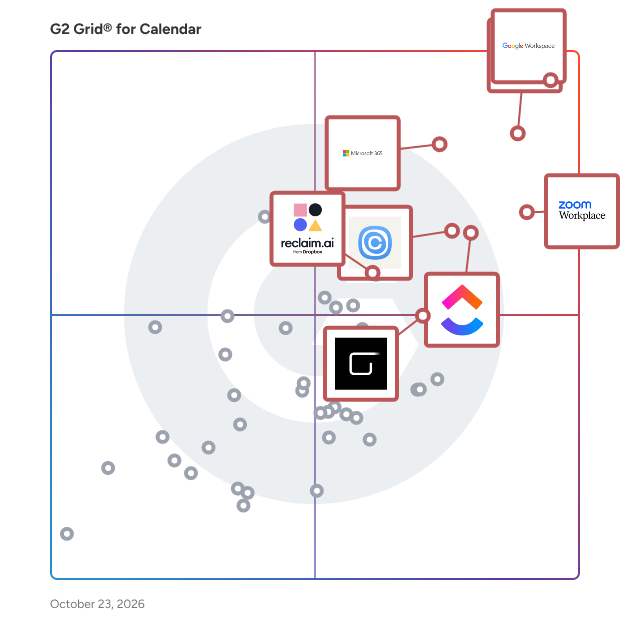
G2 Grid® for Calendar Software

G2 Grid® for Calendar Software plotting products by satisfaction and market presence

Highlighted products: Google Workspace, Microsoft Outlook, Zoom Workplace, Microsoft 365, Calendly, ClickUp, Zoho Mail, and Reclaim.ai.

Underlying data: [Grid® JSON](https://www.g2.com/categories/calendar-software/grids.json?focus%5B%5D=google-workspace&focus%5B%5D=microsoft-outlook&focus%5B%5D=zoom-workplace&focus%5B%5D=microsoft365&focus%5B%5D=calendly&focus%5B%5D=clickup&focus%5B%5D=zoho-mail&focus%5B%5D=reclaim-ai)

Google Workspace

Google Workspace is a comprehensive productivity and collaboration solution designed to help users streamline their work processes by integrating essential tools such as email, chat, file storage, and video conferencing into a unified platform. This suite of applications is tailored for businesses, educational institutions, and individuals looking to enhance their communication and collaboration efforts, all while leveraging the power of Google’s artificial intelligence. Targeted at a diverse audience, Google Workspace caters to teams of all sizes, from small startups to large enterprises. It is particularly beneficial for remote teams and organizations that prioritize collaboration across different locations. The platform supports various use cases, including project management, team communication, document sharing, and virtual meetings, making it an ideal choice for professionals who need to work together efficiently, regardless of their physical location. One of the key features of Google Workspace is its seamless integration of applications such as Gmail, Google Meet, Google Drive, and Google Docs. This interconnectedness allows users to switch effortlessly between tasks, whether they are sending emails, participating in video calls, or collaborating on documents in real-time. The AI capabilities embedded within the platform enhance user experience by providing smart suggestions, automating repetitive tasks, and improving search functionalities, ultimately saving time and increasing productivity. Additionally, Google Workspace prioritizes security and data protection, offering robust features such as two-factor authentication, advanced phishing protection, and customizable access controls. These measures ensure that sensitive information remains secure while allowing teams to collaborate freely. The platform also supports third-party integrations, enabling users to connect their favorite applications and tools, further enhancing their workflow. In summary, Google Workspace stands out in the productivity software category by providing a holistic approach to collaboration. Its user-friendly interface, combined with powerful AI-driven features and strong security protocols, makes it a valuable tool for anyone looking to improve their work processes and foster effective teamwork. Whether for managing projects, communicating with colleagues, or sharing files, Google Workspace is designed to meet the diverse needs of its users, making it an essential resource in today’s digital workplace.

Average Rating: 4.6/5.0

Total Reviews: 45,691

How Do G2 Users Rate Google Workspace?

  • Has the product been a good partner in doing business?: 9.0/10 (Category avg: 9.1/10)
  • Sync Multiple Calendars: 9.0/10 (Category avg: 8.7/10)
  • Software Integrations: 8.9/10 (Category avg: 8.2/10)
  • Customized Calendar Notifications: 9.0/10 (Category avg: 8.8/10)

Who Is the Company Behind Google Workspace?

  • Seller: Google
  • Year Founded: 1998
  • HQ Location: Mountain View, CA
  • Twitter: @google
    31,899,995 Twitter followers
  • LinkedIn® Page: www.linkedin.com
    301,144 employees on LinkedIn®
  • Ownership: NASDAQ:GOOG

Who Uses This Product?

  • Who Uses This: Student, Teacher
  • Top Industries: Information Technology and Services, Education Management
  • Company Size: 47% Small, 35% Medium

What Do G2 Reviewers Say About Google Workspace?

AI-generated summary from verified user reviews

Pros
  • Users appreciate the ease of use in Google Workspace, facilitating smooth and efficient workflow management.
  • Users love the seamless team collaboration in Google Workspace, enhancing communication and boosting productivity effortlessly.
  • Users love the seamless integrations in Google Workspace, enhancing efficiency with easy access to tools and scheduling.
  • Users praise the ease of use and integration in Google Workspace, enhancing productivity and collaboration seamlessly.
  • Users appreciate the seamless Google integration of Workspace, enhancing collaboration and efficiency across all tools.
Cons
  • Users face missing features in Google Workspace, such as limited offline capabilities and restrictions on accessing certain functionalities.
  • Users find the limited features of Google Workspace unnecessary for smaller teams, lacking essential tools for their needs.
  • Users find Google Workspace lacking features compared to other platforms, impacting effective campaign management and data handling.
  • Users find internet dependency challenging, as offline functionality is limited and issues with quality can arise.
  • Users find limited customization options in Google Workspace, particularly for calendars and forms, restricting flexibility and creativity.

What Are Recent G2 Reviews of Google Workspace?

What Are G2 Users Discussing About Google Workspace?

Zoom Workplace

Goodbye app overload. Hello effortless work. Work can be complicated. Your tools shouldn't be. Zoom Workplace connects all the ways you collaborate — from meetings to docs to chat and more — with built-in AI and seamless integrations that help teams focus and work flawlessly. Zoom Communications: Unified, Effortless Connection for Modern Work Bring every way your teams communicate—meetings, chat, calls, email, and scheduling—into one seamless experience. With Zoom, collaboration happens faster and more naturally across channels, without switching apps or losing context. From spontaneous chats to scheduled meetings and calls, everything stays connected, searchable, and secure—powered by one intuitive platform built for how modern teams work. Zoom Productivity: Workflows Connected, Work Effortless Transform how work gets done with AI-first collaboration that keeps people, content, and actions in one place. From brainstorming on whiteboards to co-creating in docs, sharing clips, and automating follow-ups, Zoom connects every step of your workflow. With Zoom Hub and integrated video management, knowledge stays organized, accessible, and actionable—so teams can move from idea to outcome without friction. Zoom Spaces: Smarter, Connected Workplaces for Every Team Bring your physical and hybrid environments to life with intelligent, connected spaces. Zoom Spaces unifies meeting rooms, desk reservations, digital signage, and visitor management into one seamless experience—making it simple to collaborate, navigate, and manage the workplace. Whether employees are remote, hybrid, or on-site, Zoom creates a consistent, secure, and flexible environment that keeps teams connected wherever work happens. Zoom Employee Engagement: Connect, Inspire, and Empower Every Employee Foster belonging and alignment with Workvivo by Zoom—a modern employee experience platform that unites communication, culture, and community in one place. From company-wide updates to recognition, feedback, and social engagement, Workvivo gives every employee a voice and a sense of connection. Built right into Zoom Workplace, it helps organizations strengthen culture, boost engagement, and keep teams informed and inspired—no matter where they work.

Average Rating: 4.5/5.0

Total Reviews: 53,598

How Do G2 Users Rate Zoom Workplace?

  • Has the product been a good partner in doing business?: 9.1/10 (Category avg: 9.1/10)
  • Sync Multiple Calendars: 8.3/10 (Category avg: 8.7/10)
  • Software Integrations: 8.5/10 (Category avg: 8.2/10)
  • Customized Calendar Notifications: 8.3/10 (Category avg: 8.8/10)

Who Is the Company Behind Zoom Workplace?

  • Seller: Zoom
  • Company Website:
  • Year Founded: 2011
  • HQ Location: San Jose, CA
  • Twitter: @zoom
    1,042,714 Twitter followers
  • LinkedIn® Page: www.linkedin.com
    14,013 employees on LinkedIn®

Who Uses This Product?

  • Who Uses This: Owner, Software Engineer
  • Top Industries: Information Technology and Services, Computer Software
  • Company Size: 51% Small, 31% Medium

What Do G2 Reviewers Say About Zoom Workplace?

AI-generated summary from verified user reviews

Pros
  • Users love the ease of use of Zoom Workplace, enjoying seamless access to features with just a click.
  • Users appreciate the ease of collaboration in Zoom Workplace, especially with breakout rooms and seamless screen sharing.
  • Users value the reliability of Zoom Workplace, ensuring seamless connectivity and stability even during adverse conditions.
  • Users find the ease of use for meetings in Zoom Workplace invaluable for seamless collaboration and productivity.
  • Users enjoy the easy-to-use video conferencing features of Zoom, facilitating smooth communication and collaboration in hybrid work settings.
Cons
  • Users note the limited features of Zoom Workplace, expressing a need for improved built-in collaboration tools.
  • Users experience Zoom issues like fatigue, connectivity problems, and confusing configurations that hinder their overall meeting effectiveness.
  • Users experience Zoom fatigue, notification overload, and connectivity issues, making long meetings feel overwhelming and impersonal.
  • Users find missing features in Zoom Workplace, like improved sharing links and chat access post-calls, frustrating.
  • Users often face connection issues with Zoom Workplace, leading to a frustrating and less seamless experience.

What Are Recent G2 Reviews of Zoom Workplace?

What Are G2 Users Discussing About Zoom Workplace?

Microsoft 365

Launch and grow your business with Microsoft 365. Do more, faster, with intelligent tools to create, send, share, and store professional, branded documents with your customers and team - securely in the cloud. Microsoft 365 is a cloud-based suite of software tools designed to help you do more—with best-in-class communication, design, and data management apps, intelligent cloud services, and advanced security. Access your data from anywhere, collaborate with team members in real time, meet with people virtually, and use thousands of predesigned templates to better communicate with customers and manage your business - all with built-in security technology that safeguards your data and devices from anywhere. Get the latest Office apps, such as Microsoft Teams, Word, Excel, PowerPoint, Outlook, OneDrive, and more.

Average Rating: 4.6/5.0

Total Reviews: 5,544

How Do G2 Users Rate Microsoft 365?

  • Has the product been a good partner in doing business?: 8.8/10 (Category avg: 9.1/10)
  • Sync Multiple Calendars: 8.8/10 (Category avg: 8.7/10)
  • Software Integrations: 8.8/10 (Category avg: 8.2/10)
  • Customized Calendar Notifications: 9.0/10 (Category avg: 8.8/10)

Who Is the Company Behind Microsoft 365?

  • Seller: Microsoft
  • Year Founded: 1975
  • HQ Location: Redmond, Washington
  • Twitter: @microsoft
    13,091,739 Twitter followers
  • LinkedIn® Page: www.linkedin.com
    232,750 employees on LinkedIn®
  • Ownership: MSFT

Who Uses This Product?

  • Who Uses This: Owner, Software Engineer
  • Top Industries: Information Technology and Services, Education Management
  • Company Size: 37% Medium, 35% Small

What Do G2 Reviewers Say About Microsoft 365?

AI-generated summary from verified user reviews

Pros
  • Users highlight the ease of use in Microsoft 365, enjoying straightforward implementation and seamless navigation.
  • Users appreciate the seamless team collaboration in Microsoft 365, enhancing efficiency and communication across various applications.
  • Users value the easy integration with Microsoft apps, enhancing data access and collaboration across devices.
  • Users value the easy integration of Microsoft 365 with other tools, enhancing collaboration and accessibility across devices.
  • Users love the seamless integration of Microsoft 365 with other apps, enhancing accessibility and collaboration.
Cons
  • Users find Microsoft 365 too expensive for small teams, encountering frustrating limitations and issues with updates.
  • Users find the missing features frustrating, as essential tools are locked behind higher-priced plans and updates disrupt functionality.
  • Users find the learning curve daunting with Microsoft 365, often feeling overwhelmed by its complexity and features.
  • Users find Microsoft 365 lacking essential features, especially with frequent updates that disrupt established workflows and settings.
  • Users are frustrated by limited features in Microsoft 365, often requiring costly plans for full functionality.

What Are Recent G2 Reviews of Microsoft 365?

What Are G2 Users Discussing About Microsoft 365?

Calendly

Calendly connects the entire meeting workflow — scheduling, payments, meeting notes, follow-ups, contacts, and more — to handle the work before, during and after meetings. Calendly brings together industry-leading scheduling features, 100+ integrations, and an AI assistant designed to supercharge the way you already work. From solo business owners to teams within large organizations, more than 50 million people across 240+ countries trust Calendly to help them get more out of every meeting and make space for what matters. Calendly Notetaker helps you make the most of every meeting by automatically summarizing key details, next steps, and follow-ups. Built into how you already schedule with clients, it acts as your personal meeting assistant before, during, and after every conversation. Callie is an AI assistant for the work before and after meetings. Over email, Callie handles calendar coordination right from your inbox. Within Calendly, you can ask Callie questions via interactive chat to prep for a meeting, recall past conversation details, or figure out what to do next. Learn more at https://calendly.com

Average Rating: 4.7/5.0

Total Reviews: 2,557

How Do G2 Users Rate Calendly?

  • Has the product been a good partner in doing business?: 9.3/10 (Category avg: 9.1/10)
  • Sync Multiple Calendars: 9.1/10 (Category avg: 8.7/10)
  • Software Integrations: 8.8/10 (Category avg: 8.2/10)
  • Customized Calendar Notifications: 9.0/10 (Category avg: 8.8/10)

Who Is the Company Behind Calendly?

  • Seller: Calendly
  • Company Website:
  • Year Founded: 2013
  • HQ Location: Atlanta, Georgia
  • Twitter: @Calendly
    21,838 Twitter followers
  • LinkedIn® Page: www.linkedin.com
    5,999 employees on LinkedIn®

Who Uses This Product?

  • Who Uses This: Owner, CEO
  • Top Industries: Computer Software, Information Technology and Services
  • Company Size: 60% Small, 28% Medium

What Do G2 Reviewers Say About Calendly?

AI-generated summary from verified user reviews

Pros
  • Users love the ease of use of Calendly, as it simplifies meeting scheduling with its intuitive interface.
  • Users value the ease of scheduling with Calendly, significantly reducing time spent on appointment coordination.
  • Users love the easy scheduling feature of Calendly, making it effortless to coordinate meetings and manage availability.
  • Users value the seamless calendar integration of Calendly, simplifying scheduling and reducing email exchanges.
  • Users highlight the easy setup of Calendly, significantly simplifying the appointment scheduling process and saving valuable time.
Cons
  • Users express frustrations with missing features, particularly limitations on the free version and lack of advanced options.
  • Users face calendar sync issues with Calendly, leading to instability and potential loss of scheduled meetings and revenue.
  • Users find Calendly to be expensive for advanced features, posing a challenge for small businesses and individuals.
  • Users experience scheduling issues due to unstable connections and manual management, leading to missed opportunities and frustration.
  • Users express frustration with integration issues, particularly lacking direct sync with Apple/iCloud and other tools like Thunderbird.

What Are Recent G2 Reviews of Calendly?

What Are G2 Users Discussing About Calendly?

ClickUp

ClickUp is the world’s first Converged AI Workspace, bringing together all work apps, data, and workflows. ClickUp eliminates all forms of work sprawl to provide 100% context and a single place for humans and agents to work, together. Trusted by more than 20 million users worldwide, ClickUp is on a mission to maximize human productivity.

Average Rating: 4.6/5.0

Total Reviews: 13,484

How Do G2 Users Rate ClickUp?

  • Has the product been a good partner in doing business?: 9.0/10 (Category avg: 9.1/10)
  • Sync Multiple Calendars: 8.7/10 (Category avg: 8.7/10)
  • Software Integrations: 7.9/10 (Category avg: 8.2/10)
  • Customized Calendar Notifications: 8.3/10 (Category avg: 8.8/10)

Who Is the Company Behind ClickUp?

  • Seller: ClickUp
  • Company Website:
  • Year Founded: 2017
  • HQ Location: San Diego, California
  • Twitter: @clickup
    69,539 Twitter followers
  • LinkedIn® Page: www.linkedin.com
    7,082 employees on LinkedIn®

Who Uses This Product?

  • Who Uses This: CEO, Project Manager
  • Top Industries: Marketing and Advertising, Computer Software
  • Company Size: 77% Small, 19% Medium

What Do G2 Reviewers Say About ClickUp?

AI-generated summary from verified user reviews

Pros
  • Users find ClickUp to be incredibly easy and simple to use, streamlining tasks and enhancing productivity effortlessly.
  • Users value the flexibility in task management, enabling customized workflows for personal, team, and project tasks.
  • Users appreciate the abundance of features in ClickUp, making task management seamless and efficient.
  • Users appreciate ClickUp for its streamlined management tasks, enabling better organization and efficiency in project handling.
  • Users appreciate ClickUp for its streamlined organization, making team management and project tracking efficient and effortless.
Cons
  • Users find the missing features in ClickUp frustrating, particularly the lack of basic tools like subfolders.
  • Users experience a learning curve with ClickUp, finding the plethora of features daunting at first.
  • Users note limited features in ClickUp, with missing basic options and a complex setup process hindering ease of use.
  • Users find ClickUp not intuitive, feeling overwhelmed by its many features and struggling with initial setup and performance.
  • Users experience slow loading times in ClickUp, which affects their productivity when managing multiple tasks and fields.

What Are Recent G2 Reviews of ClickUp?

What Are G2 Users Discussing About ClickUp?

Zoho Mail

What does Zoho Mail offer? With 16 million happy users and more than a decade of experience, Zoho Mail is packed with useful features. It nails down the basics and also caters to demanding businesses. Below are some of the bells and whistles that comprise Zoho Mail. ☑️ Custom domain as unique as you Give your brand or business that authentic exterior and increase brand awareness with the option to create a custom domain for your business email. Zoho Mail lets you purchase your own domain and set it up, if you don't own one already. ☑️ Supercharged email with a suite of apps Crush emails, keep an eye on your calendar, create contextual notes from emails, tick off your to-dos, and more with the suite of apps Zoho Mail comes with. These apps are tightly integrated and talk well with each other so that your workflow is frictionless. ☑️ A truck-load of integrations Zoho Mail cooperates with a host of other third-party applications. Now you can get your project details from Asana, jump into a Zoom meeting, or encrypt your emails using PGP, all within your Zoho Mail inbox. These integrations stay right inside your inbox so that you can quickly access them. ☑️ Take your collaboration up a notch Zoho Mail has a nifty feature called Streams that adds a flavor of social media to your emails. Everyone can come together, ideate, and execute a plan without the hassle of unending email threads. Email delegation ☑️ Delegate and conquer your day with the email delegation feature in Zoho Mail. You can assign people to take care of your inbox while maintaining control by giving role-based access to ensure security and privacy. ☑️ AI assistance Everyone needs a helping hand in their life and Zia does just that. Zia with Zoho Mail is your AI version of a knight in shining armor. With Zia by your side, email efficiency can vastly improve because it can help you with drafting responses and summarizing messages. ☑️ Robust security With great power comes great responsibility. This is where Zoho Mail takes much pride in following best-in-class security, compliance, and privacy practices. These make sure that your emailing experience is secure and your data remains yours truly. ✔️Other features ✔️Admin control ✔️Easy migration ✔️Offline emailing ✔️Native desktop and mobile apps ✔️24/7 support With a privacy-first approach, Zoho Mail can transform the way you go about your emails. Get started with Zoho Mail now!

Average Rating: 4.4/5.0

Total Reviews: 699

How Do G2 Users Rate Zoho Mail?

  • Has the product been a good partner in doing business?: 8.8/10 (Category avg: 9.1/10)
  • Sync Multiple Calendars: 8.9/10 (Category avg: 8.7/10)
  • Software Integrations: 9.3/10 (Category avg: 8.2/10)
  • Customized Calendar Notifications: 9.2/10 (Category avg: 8.8/10)

Who Is the Company Behind Zoho Mail?

  • Seller: Zoho
  • Year Founded: 1996
  • HQ Location: Austin, TX
  • Twitter: @Zoho
    137,880 Twitter followers
  • LinkedIn® Page: www.linkedin.com
    30,913 employees on LinkedIn®
  • Phone: +1 (888) 900-9646

Who Uses This Product?

  • Who Uses This: Founder, CEO
  • Top Industries: Information Technology and Services, Marketing and Advertising
  • Company Size: 75% Small, 21% Medium

What Do G2 Reviewers Say About Zoho Mail?

AI-generated summary from verified user reviews

Pros
  • Users appreciate the clean and easy-to-use interface of Zoho Mail, enhancing their daily work efficiency.
  • Users appreciate the clean and distraction-free email management of Zoho Mail, enhancing their productivity and professionalism.
  • Users value the seamless integrations of Zoho Mail with other applications, enhancing their overall communication experience.
  • Users appreciate the clean and intuitive interface of Zoho Mail, finding it fast and easy to use.
  • Users find Zoho Mail's intuitive interface enhances productivity and makes email management effortless and enjoyable.
Cons
  • Users experience slow performance, particularly with syncing emails and using the mobile app, affecting overall efficiency.
  • Users note that slow loading times can affect syncing and overall experience, especially on mobile devices.
  • Users experience sync delays and limitations on attachment sizes, making the email process less efficient and cumbersome.
  • Users express concern about limited storage in Zoho Mail's free plan, impacting their ability to manage emails effectively.
  • Users find the learning curve challenging, especially with navigation and initial configuration of Zoho Mail.

What Are Recent G2 Reviews of Zoho Mail?

What Are G2 Users Discussing About Zoho Mail?

Reclaim.ai

Reclaim is an AI calendar app that helps individuals and teams automatically plan their time and protect more space to get stuff done. The AI scheduling assistant optimizes meeting times across your workweek, flexibly defends focus time, prevents interruptions, and promotes work-life balance so your productivity thrives—without the burnout. Simply connect your Google Calendar or Outlook Calendar, set up a few AI-powered goals, and automatically start reclaiming your time every week. Reclaim’s AI continuously adapts your schedule as priorities shift — rescheduling tasks, protecting deep work time, and keeping your calendar optimized without the manual effort. On average, Reclaim saves busy people 7.6 hours/week through smarter AI scheduling – even across the most chaotic work environments. Get back up to 40% of the workweek with adaptive, real-time scheduling, while keeping your calendar flexible with predictive intelligence to dynamically defend priorities as your week fills up – so you always have time for focused work, while staying open to collaborate with your team. You get to tell Reclaim exactly how you want your priorities scheduled, just like you would a great assistant. And when plans change, it automatically realigns your schedule in seconds. Over 65,000 companies rely on Reclaim to get more out of their workweeks. Sign up and get started for free so you and your team can spend time where it matters most, every week. Want to learn more? Check out just some of Reclaim’s features below and visit our homepage at Reclaim.ai to get started today: • Focus Time: proactively defend a weekly focus time goal • Tasks: auto-schedule your to-dos in your calendar • Habits: block flexible time for recurring routines • Smart Meetings: find the best time for one-on-one meetings • Scheduling Links: book smarter with flexible meeting links • Calendar Sync: block your availability across calendars including Google Calendar & Microsoft Outlook Calendar • Buffer Time: auto-schedule breaks & travel time • Color Coding: automatically color-code your events by category • No-Meeting Days: prevent meetings & auto-schedule heads-down work • Team Analytics: track your team's time across meetings, tasks, wellness metrics, & more • Task Integrations: sync tasks from Asana, Todoist, Jira, ClickUp, Linear & Google Tasks to your calendar • Slack Integration: customize & sync your Slack status to your calendar in real time

Average Rating: 4.8/5.0

Total Reviews: 143

How Do G2 Users Rate Reclaim.ai?

  • Has the product been a good partner in doing business?: 9.6/10 (Category avg: 9.1/10)
  • Sync Multiple Calendars: 9.4/10 (Category avg: 8.7/10)
  • Software Integrations: 8.8/10 (Category avg: 8.2/10)
  • Customized Calendar Notifications: 8.9/10 (Category avg: 8.8/10)

Who Is the Company Behind Reclaim.ai?

  • Seller: Dropbox
  • Year Founded: 2007
  • HQ Location: San Francisco, California
  • Twitter: @Dropbox
    3,279,477 Twitter followers
  • LinkedIn® Page: www.linkedin.com
    4,183 employees on LinkedIn®
  • Ownership: NASDAQ: DBX

Who Uses This Product?

  • Top Industries: Computer Software, Information Technology and Services
  • Company Size: 75% Small, 15% Medium

What Do G2 Reviewers Say About Reclaim.ai?

AI-generated summary from verified user reviews

Pros
  • Users love how Reclaim.ai schedules personal time, ensuring they never miss important breaks or events in their busy lives.
  • Users appreciate the time-saving features of Reclaim.ai, allowing them to focus on tasks and enjoy life.
  • Users praise the ease of use of Reclaim.ai, facilitating effortless time management for busy professionals.
  • Users love the scheduling ease of Reclaim.ai, enabling seamless prioritization and optimal time management for busy professionals.
  • Users appreciate the scheduling flexibility of Reclaim.ai, enabling effective management across multiple calendars and groups.
Cons
  • Users note several missing features, including the lack of a mobile app and persistent syncing issues.
  • Users find the task management limited, struggling with rescheduling and the need for improved functionality.
  • Users find the poor calendar integration frustrating, especially when managing tasks and events on the go.
  • Users face scheduling issues with Reclaim.ai, particularly when trying to reschedule tasks on the fly.
  • Users face calendar issues with Reclaim.ai, finding synchronization and event management frustrating and cumbersome.

What Are Recent G2 Reviews of Reclaim.ai?

What Are G2 Users Discussing About Reclaim.ai?

Cal ID

Cal ID is a product of OneHash and caters to the need of people who are looking for scheduling App for Individual, Scheduling App for Teams, Collective Scheduling, wants to triggers events based on action, wants to set workflow. It can be used by Recruiters for scheduling interview. Sales & Marketing team for accommodate multiple time zones, round-robin scheduling, collective events, and private single-use links. Educationist for scheduling students, parents and staff. Telehealth and by hospitals for patients to book meetings with Doctors or for lab testing. Stores for in store bookings.

Average Rating: 4.7/5.0

Total Reviews: 221

How Do G2 Users Rate Cal ID?

  • Has the product been a good partner in doing business?: 9.3/10 (Category avg: 9.1/10)
  • Sync Multiple Calendars: 9.4/10 (Category avg: 8.7/10)
  • Software Integrations: 9.2/10 (Category avg: 8.2/10)
  • Customized Calendar Notifications: 9.4/10 (Category avg: 8.8/10)

Who Is the Company Behind Cal ID?

  • Seller: OneHash
  • Year Founded: 2020
  • HQ Location: Delaware
  • Twitter: @OneHash
    593 Twitter followers
  • LinkedIn® Page: www.linkedin.com
    28 employees on LinkedIn®

Who Uses This Product?

  • Who Uses This: Founder, CEO
  • Top Industries: Computer Software, Marketing and Advertising
  • Company Size: 90% Small, 8% Medium

What Do G2 Reviewers Say About Cal ID?

AI-generated summary from verified user reviews

Pros
  • Users love the ease of use of Cal ID, appreciating its straightforward interface and seamless integration for scheduling.
  • Users find that Cal ID simplifies scheduling, making it effortless to manage client calls and team meetings seamlessly.
  • Users value the simplicity and ease of use of Cal ID, enhancing scheduling and integration without overwhelm.
  • Users praise the clean and intuitive interface of Cal ID, which simplifies scheduling and enhances productivity effortlessly.
  • Users value the seamless calendar integration with Cal ID, enhancing organization and efficiency effortlessly.
Cons
  • Users find the limited customization options frustrating, wishing for more flexibility in design and external integrations.
  • Users find integration issues with Cal ID limiting, especially due to the lack of Hubspot CRM support.
  • Users report frequent calendar synchronization issues, which can hinder accurate availability and complicate scheduling processes.
  • Users find a noticeable learning curve with Cal ID, particularly when trying to navigate complex setups.
  • Users find the missing features in Cal ID disappointing, facing limitations in customization and mobile experience.

What Are Recent G2 Reviews of Cal ID?

Acuity Scheduling

Acuity Scheduling is flexible scheduling software designed to support anyone in the business of time. Whether you offer appointments, classes, consultations, or excursions, Acuity can help you create a seamless booking experience to match your online presence. Give clients the ability to book, reschedule, cancel, and pay for your services all on their own, while you take control of your calendar and automate workflows. Acuity is a part of Squarespace and integrates with leading third-party applications.

Average Rating: 4.6/5.0

Total Reviews: 401

How Do G2 Users Rate Acuity Scheduling?

  • Has the product been a good partner in doing business?: 9.3/10 (Category avg: 9.1/10)
  • Customized Calendar Notifications: 10.0/10 (Category avg: 8.8/10)

Who Is the Company Behind Acuity Scheduling?

  • Seller: Squarespace
  • Year Founded: 2003
  • HQ Location: New York
  • Twitter: @squarespace
    138,295 Twitter followers
  • LinkedIn® Page: www.linkedin.com
    2,174 employees on LinkedIn®
  • Ownership: NYSE: SQSP

Who Uses This Product?

  • Who Uses This: Owner, CEO
  • Top Industries: Health, Wellness and Fitness, Marketing and Advertising
  • Company Size: 91% Small, 7% Medium

What Do G2 Reviewers Say About Acuity Scheduling?

AI-generated summary from verified user reviews

Pros
  • Users love the ease of use in Acuity Scheduling, making appointment management and navigation simple and efficient.
  • Users appreciate the user-friendly interface of Acuity Scheduling, making appointment management and client scheduling effortless.
  • Users adore the easy appointment scheduling with Acuity, enhancing both administration and client experience.
  • Users love the scheduling ease of Acuity Scheduling, finding it simple to build and adjust appointments effortlessly.
  • Users love the scheduling efficiency of Acuity, finding it easy to adjust and manage appointments smoothly.
Cons
  • Users find Acuity Scheduling's limited features restrictive and problematic, particularly regarding data export and client management.
  • Users struggle with scheduling issues in Acuity, facing complexity and data export limitations that hinder usability.
  • Users find complexity in integration and appointment management, leading to frustration with data handling and client record issues.
  • Users face feature issues with Acuity Scheduling, struggling with inadequate reporting and problematic client record management.
  • Users face integration issues with Acuity Scheduling, complicating data export and client management effectively.

What Are Recent G2 Reviews of Acuity Scheduling?

What Are G2 Users Discussing About Acuity Scheduling?

Apollo.io

Apollo.io is an AI-powered go-to-market (GTM) platform that helps revenue teams find, engage, and manage B2B buyers across the entire sales cycle. Apollo.io is the company behind the industry’s first fully agentic GTM platform, transforming how revenue teams execute. Going beyond automation, Apollo’s intelligent agents actively drive results across the entire sales funnel – from prospecting to deal management – all in one place. Trusted by millions of users and hundreds of thousands of companies – including Anthropic, Autodesk, and Docusign – Apollo is making world-class go-to-market simple, intelligent, and accessible for all. Apollo serves sales development representatives, account executives, sales leaders, revenue operations, and marketing teams at B2B organizations of various sizes. Teams use Apollo to build and maintain target account lists, orchestrate outbound and inbound motions, manage opportunities, and understand which activities lead to qualified pipeline and closed revenue. Key capabilities include: Data and targeting: Access to a large B2B database with company and contact details, including firmographic, technographic, and buyer signal data, so users can define ideal customer profiles and create precise segments for outreach. Prospecting and enrichment: Tools to search, filter, and save prospect lists, plus enrichment workflows that keep contact and account records up to date in Apollo and connected systems such as CRM. Sales engagement: Multi-step, multi-channel sequences for email, calls, and tasks that standardize how reps follow up with prospects, with controls for timing, throttling, and deliverability. Agentic and AI-assisted workflows: Intelligent agents and AI features that help with account research, lead scoring, message generation, and next-step recommendations so reps can prioritize and personalize at scale. Deal and activity management: Basic CRM-style functionality for tracking opportunities, stages, activities, and notes, giving teams a single view of pipeline health and sales performance. By combining data, engagement, and deal execution in one platform, Apollo is designed to reduce the number of disconnected tools in a typical GTM stack and provide a consistent workflow for building pipeline and managing deals. This helps organizations improve data quality, increase seller productivity, and run more structured, measurable go-to-market programs.

Average Rating: 4.7/5.0

Total Reviews: 9,432

How Do G2 Users Rate Apollo.io?

  • Has the product been a good partner in doing business?: 9.1/10 (Category avg: 9.1/10)
  • Sync Multiple Calendars: 8.0/10 (Category avg: 8.7/10)
  • Software Integrations: 7.7/10 (Category avg: 8.2/10)
  • Customized Calendar Notifications: 7.7/10 (Category avg: 8.8/10)

Who Is the Company Behind Apollo.io?

  • Seller: Apollo.io
  • Company Website:
  • Year Founded: 2015
  • HQ Location: San Francisco, CA
  • LinkedIn® Page: www.linkedin.com
    1 employees on LinkedIn®

Who Uses This Product?

  • Who Uses This: Account Executive, Business Development Manager
  • Top Industries: Information Technology and Services, Computer Software
  • Company Size: 67% Small, 29% Medium

What Do G2 Reviewers Say About Apollo.io?

AI-generated summary from verified user reviews

Pros
  • Users value the ease of use of Apollo.io, enhancing their lead generation and CRM integration seamlessly.
  • Users value the user-friendly interface and automation features of Apollo.io, enhancing their lead generation efficiency.
  • Users value the robust search and filtering capabilities of Apollo.io, enhancing their outreach and campaign management efficiency.
  • Users appreciate the streamlined prospecting and outreach capabilities of Apollo.io, enhancing efficiency and targeting in lead generation.
  • Users appreciate the time-saving features of Apollo.io, streamlining their outreach and enhancing sales efficiency.
Cons
  • Users find missing features frustrating, particularly in layout customization, email templates, and integration options.
  • Users indicate that inaccurate data in Apollo.io can lead to frustrations with lead information and missing emails.
  • Users find the steep learning curve of Apollo.io challenging, hindering effective navigation and utilization of its features.
  • Users note limited features and variable accuracy, necessitating manual checks and selective outreach, which can overwhelm new users.
  • Users experience data inaccuracy with Apollo.io, leading to unreliable contact information that requires verification.

What Are Recent G2 Reviews of Apollo.io?

What Are G2 Users Discussing About Apollo.io?

OneCal

OneCal is a calendar platform that syncs iCloud, Outlook, and Google Calendars in real time, provides intuitive Scheduling Links that make booking meetings simple, and lets you view and manage all of your calendars in a unified calendar view. The service is cloud-based, so there is nothing to install, and the setup takes just a few minutes. Main features: • Calendar Synchronization: OneCal is the most advanced Calendar Sync software in the market. You can sync multiple iCloud, Google, and Outlook calendars in real time, so your availability is reflected everywhere and you never get double booked. Syncs can be one-way or multi-way, and you choose exactly which event details are copied, which keeps your personal life private. You can also exclude events from syncing by color or category, color-code the synced events, and add an identifier to cloned events so they are easy to recognize. Every plan includes unlimited sync configurations and unlimited synced events. • Scheduling Links: You can effortlessly manage your appointments, meetings, and events with our user-friendly Scheduling Links, and say goodbye to tedious back-and-forth communication. All plans include unlimited one-on-one and collective booking links. OneCal reads your availability from all of your connected calendars, so invitees only see times when you are truly free. Each link can be customized with meeting durations, time slot intervals, availability schedules, buffer times, minimum notice periods, and limits on how far in advance people can book. You can also ask invitees custom questions, require manual confirmation, show a custom confirmation message, and redirect invitees to your own page after they book. Booking pages can carry your own logo, they can be embedded on your website, and the Premium plan lets you remove OneCal branding completely. • Unified Calendar View: The Unified Calendar View lets you see and manage all of your iCloud, Outlook, and Google Calendars in one place. You can create, edit, and delete events, RSVP to invites, join meetings with one click, hide the clones created by OneCal Calendar Sync, and see when your teammates are available. Available on the App Store and Play Store.. • Mobile and Desktop Apps: You can use all of the OneCal features straight from your preferred device with our iOS, Android, and macOS apps. The mobile apps let you manage your calendar syncs, scheduling links, and calendars right from your phone. • Integrations: OneCal connects with the tools you already use. Zoom, Google Meet, and Microsoft Teams links are added to your bookings automatically, so every meeting is ready the moment it is scheduled. Through Zapier, you can connect OneCal to thousands of other apps using pre-built triggers and actions. • MCP Server: The OneCal MCP Server gives AI assistants like Claude and ChatGPT secure access to your calendars. Your assistant can list your events, check your availability, and create, update, or delete events for you. Built for teams and enterprises: • Admin Managed Accounts: Admins can fully manage the accounts of their team members, as long as each user allows it. • User Provisioning API: The API lets you programmatically invite users, remove users, retrieve existing team members along with their sync usage, and view pending invitations. • OIDC/SAML SSO: Your team can sign in to OneCal through your identity provider, such as Okta, Azure AD, or Google Workspace, using OpenID Connect or SAML. • SCIM Directory Sync: Team members are automatically provisioned and deprovisioned from your identity provider using the SCIM protocol. • Team management: Pricing is per user, team management is simple and intuitive, and team members can sign up on their own. • Dedicated support: Teams on the Premium plan get dedicated support through Slack or Discord, along with hands-on user onboarding assistance. Security and compliance: • OneCal is SOC 2 Type II certified and GDPR compliant, and a Data Processing Agreement (DPA) is included. • OneCal connects to your calendars through OAuth2 and never stores your passwords. All data is encrypted in transit and at rest. • OneCal does not store or analyze your calendar event data, and it only asks for the minimal permissions it needs to work. You can try OneCal free for 14 days, and no credit card is required.

Average Rating: 4.7/5.0

Total Reviews: 97

How Do G2 Users Rate OneCal?

  • Has the product been a good partner in doing business?: 10.0/10 (Category avg: 9.1/10)
  • Sync Multiple Calendars: 9.8/10 (Category avg: 8.7/10)
  • Software Integrations: 9.0/10 (Category avg: 8.2/10)
  • Customized Calendar Notifications: 9.4/10 (Category avg: 8.8/10)

Who Is the Company Behind OneCal?

  • Seller: OneCal
  • Year Founded: 2022
  • HQ Location: N/A
  • Twitter: @onecal_io
    48 Twitter followers
  • LinkedIn® Page: www.linkedin.com
    5 employees on LinkedIn®

Who Uses This Product?

  • Top Industries: Consulting, Computer Software
  • Company Size: 84% Small, 10% Medium

What Do G2 Reviewers Say About OneCal?

AI-generated summary from verified user reviews

Pros
  • Users commend the ease of use of OneCal, appreciating its seamless calendar synchronization and fantastic support.
  • Users value the seamless calendar integration of OneCal, effectively avoiding scheduling conflicts and saving time.
  • Users appreciate the simple setup of OneCal, making scheduling effortless and saving valuable time on rescheduling.
  • Users value the real-time syncing capabilities of OneCal, effectively managing availability across multiple calendars without conflicts.
  • Users praise the easy setup of OneCal, enabling seamless integration and effortless scheduling management.
Cons
  • Users find the 50 calendar limit restrictive, complicating management and sync processes, leading to inefficiencies.
  • Users note the missing features in OneCal's booking system, limiting its functionality compared to competitors.
  • Users find OneCal to be a bit expensive, particularly when connecting multiple calendars over five.
  • Users highlight the pricing issues for an unresponsive app that requires frequent unlinking and relinking of calendars.
  • Users experience scheduling issues with OneCal's less mature booking feature, affecting their overall satisfaction.

What Are Recent G2 Reviews of OneCal?

Brevo Marketing Platform

Trusted by over 500,000 businesses worldwide, Brevo (formerly Sendinblue) is the affordable, all-in-one marketing and CRM stack that helps growing businesses scale faster. It's easy to use and suitable for companies of all sizes. Build lasting customer relationships with Brevo's flexible toolkit. Products range from marketing to sales, chat, and transactional emails. Choose what you need — and only pay for what you use. Here are just some of the things you can do with Brevo: - Run multi-channel marketing campaigns across email, WhatsApp, SMS, web push, and Facebook ads - Trigger transactional emails, SMS, and WhatsApp notifications over Brevo SMTP and APIs - Automate marketing activities to deliver the right message at the right time, and efficiently manage your audience - Reduce the number of marketing and sales apps — and get a full view of customer interactions with tools that talk to each other - Engage customers in real-time and reply to FAQs 24/7 with live chat and chatbot - Track leads, automate tasks, and schedule meetings with the Brevo Sales Platform - Connect your e-commerce store to track web sales and use the Retention analysis to improve your marketing strategy. - Talk to customers anytime, anywhere with Brevo’s cloud-based phone system Learn more and start for free at https://www.brevo.com/products/marketing-platform/ Get a custom quote: https://www.brevo.com/plus/contact/

Average Rating: 4.5/5.0

Total Reviews: 2,492

How Do G2 Users Rate Brevo Marketing Platform?

  • Has the product been a good partner in doing business?: 8.9/10 (Category avg: 9.1/10)
  • Sync Multiple Calendars: 8.1/10 (Category avg: 8.7/10)
  • Software Integrations: 7.9/10 (Category avg: 8.2/10)
  • Customized Calendar Notifications: 8.8/10 (Category avg: 8.8/10)

Who Is the Company Behind Brevo Marketing Platform?

  • Seller: Brevo
  • Company Website:
  • Year Founded: 2012
  • HQ Location: Paris
  • Twitter: @brevo_official
    16,032 Twitter followers
  • LinkedIn® Page: www.linkedin.com
    880 employees on LinkedIn®

Who Uses This Product?

  • Who Uses This: CEO, Founder
  • Top Industries: Marketing and Advertising, Information Technology and Services
  • Company Size: 84% Small, 13% Medium

What Do G2 Reviewers Say About Brevo Marketing Platform?

AI-generated summary from verified user reviews

Pros
  • Users appreciate the ease of use of Brevo, finding it straightforward to navigate and manage their marketing efforts.
  • Users appreciate the easy campaign scheduling and automation features of Brevo, making email marketing efficient and effective.
  • Users find Brevo Marketing Platform's easy setup and automation features greatly enhance their email marketing experience.
  • Users appreciate the convenient and efficient email marketing features of Brevo, making automation and scheduling a breeze.
  • Users appreciate the simplicity of Brevo, noting its ease in creating effective marketing campaigns without complexity.
Cons
  • Users find the missing features in Brevo's automation and design limits frustrating for complex marketing tasks.
  • Users note the limited features in Brevo, particularly in customization and automation options, affecting functionality.
  • Users find the limited customization options restrict their ability to create unique and visually appealing designs.
  • Users find the learning curve steep initially, with some features feeling unintuitive for beginners.
  • Users find Brevo Marketing Platform expensive, especially with rising SMS costs and navigating complex pricing tiers.

What Are Recent G2 Reviews of Brevo Marketing Platform?

What Are G2 Users Discussing About Brevo Marketing Platform?

AddEvent

AddEvent is the leading no-code platform for calendar and event marketing. AddEvent helps businesses promote events, drive attendance, and reduce no-shows. With Add to Calendar buttons, embeddable widgets, followable calendars, and RSVP tools, AddEvent makes it simple to connect your events with your audience’s personal calendars. Create branded event and calendar landing pages without coding, embed calendars or event lists on your website, and use automated reminders to keep attendees engaged. AddEvent’s no-code tools are designed to help marketers, event professionals, and product teams maximize attendance and retention. Whether you’re promoting webinars, conferences, or recurring community events, AddEvent gives you the power to get on their calendars, improve engagement, and make sure your customers never miss what’s next. Add to Calendar Buttons and Links Use our beautiful Add to Calendar buttons and links on your website, landing pages, emails, social media, and SMS to give your users a quick and effortless way to add your events to their calendars. When your users click the button or link, our service quickly adds your event to their calendar of choice. Dynamic Add to Calendar Build dynamic Add to Calendar functionality into your booking confirmation and email campaign templates to give your users Add to Calendar buttons and links customized just for their appointment. Dynamic Add to Calendar is perfect for getting on their calendar during the time of booking. Calendar Marketing An Embeddable Calendar, a Subscription Calendar, and a subscriber data collection service all rolled into one. Calendar Marketing is a marketing channel that delivers content, events, and updates directly to a user’s digital calendar through Subscription Calendars. Simply share your calendar with your customer base and get on their calendars with 1-click. Include upgrade and upsell offers, new product releases, and more to their calendars to get your customers from interested to converted. Zapier Integration AddEvent has built out a robust Zapier app that allows customers to pair AddEvent with their tools of choice. Share RSVP updates in Slack, Create an Event by adding rows to a Google Sheet, or Create and Update Contact information in your CRM from an RSVP. Apps & Marketplace You can also find AddEvent in Webflow, Wix, WordPress, and Mailchimp marketplaces to display and share your calendar and events without needing to copy code over. Security & Trust At AddEvent, we’re committed to the security and privacy of your data. AddEvent is SOC 2 compliant and adheres to GDPR, CCPA and other privacy and security regulations. We also have policies and controls for you to manage security threats, keep your data safe and help you meet your compliance obligations. AddEvent began as simple, powerful API’s built for developers, by developers. Since our founding, we’ve expanded our offering to support no-code solutions such as no-code landing pages, no-code widgets, WYSIWYG automated emails, and more. AddEvent is used by companies and organizations that rely on us to drive attendance for events, campaigns, product launches, webinars, sales, appointments and more. So no important moment is ever missed.

Average Rating: 4.5/5.0

Total Reviews: 68

How Do G2 Users Rate AddEvent?

  • Has the product been a good partner in doing business?: 9.5/10 (Category avg: 9.1/10)
  • Sync Multiple Calendars: 7.7/10 (Category avg: 8.7/10)
  • Software Integrations: 7.9/10 (Category avg: 8.2/10)
  • Customized Calendar Notifications: 8.8/10 (Category avg: 8.8/10)

Who Is the Company Behind AddEvent?

  • Seller: AddEvent
  • Company Website:
  • Year Founded: 2015
  • HQ Location: San Francisco, California
  • Twitter: @addevent
    18 Twitter followers
  • LinkedIn® Page: www.linkedin.com
    20 employees on LinkedIn®

Who Uses This Product?

  • Top Industries: Computer Software, Marketing and Advertising
  • Company Size: 67% Small, 17% Medium

What Do G2 Reviewers Say About AddEvent?

AI-generated summary from verified user reviews

Pros
  • Users find AddEvent to be incredibly easy to use, streamlining workflows and enhancing attendee engagement effortlessly.
  • Users value the seamless calendar integration of AddEvent, enhancing convenience and attendance for diverse event participants.
  • Users appreciate the easy setup of AddEvent, enhancing convenience for guests and ensuring seamless event integration.
  • Users appreciate the consistent and simple UX/GUI of AddEvent, enhancing event management and guest engagement effectively.
  • Users love the automation of AddEvent, making it easy to manage events and enhance guest engagement seamlessly.
Cons
  • Users report serious calendar issues with AddEvent, including unreliable reminders and confusing update effects.
  • Users find AddEvent to be expensive for limited use, and feel stuck with rigid pricing and ineffective features.
  • Users express that there are limited options for customization and functionality in AddEvent, particularly for embedding calendars.
  • Users find some missing features in AddEvent, such as limited integrations and confusing naming conventions.
  • Users find limited customization options for landing pages and embeddable calendars, hindering their desired personalization.

What Are Recent G2 Reviews of AddEvent?

What Are G2 Users Discussing About AddEvent?

Vagaro

Vagaro is the #1 business management software built for professionals in the beauty, wellness, and fitness industries. Whether you're a solo professional, small business, or managing multiple locations, Vagaro provides everything you need to run and grow your business efficiently. Easily manage your schedule with customizable calendars and 24/7 online booking. Reduce no-shows with automated email and text reminders. Accept payments seamlessly using integrated POS tools, manage inventory in real time, and deliver a personalized client experience with detailed profiles, digital intake forms, and notes. Grow your brand with built-in marketing tools, including email and text campaigns, a customizable website, and exposure on the Vagaro Marketplace. Stay on top of performance with advanced reporting and payroll features. Plus, AI-powered tools help you create content, communicate with clients, and automate routine tasks. Join over 220,000 professionals who trust Vagaro to streamline operations, engage clients, and boost revenue—all from one powerful platform.

Average Rating: 4.6/5.0

Total Reviews: 390

How Do G2 Users Rate Vagaro?

  • Has the product been a good partner in doing business?: 7.1/10 (Category avg: 9.1/10)

Who Is the Company Behind Vagaro?

  • Seller: Vagaro
  • Company Website:
  • Year Founded: 2009
  • HQ Location: Pleasanton, California
  • Twitter: @Vagaro
    3,843 Twitter followers
  • LinkedIn® Page: www.linkedin.com
    711 employees on LinkedIn®

Who Uses This Product?

  • Who Uses This: Owner
  • Top Industries: Health, Wellness and Fitness, Consumer Services
  • Company Size: 66% Small, 1% Large

What Do G2 Reviewers Say About Vagaro?

AI-generated summary from verified user reviews

Pros
  • Users find Vagaro to be easy and practical, streamlining appointment booking and client communication effectively.
  • Users love the easy scheduling and reminder notifications that enhance client management and streamline business operations.
  • Users appreciate Vagaro for its comprehensive resources and 24/7 support, enabling seamless business management.
  • Users appreciate the booking ease of Vagaro, allowing clients to schedule and pay effortlessly online.
  • Users appreciate the easy online booking system of Vagaro, which simplifies scheduling and service options for clients.
Cons
  • Users are frustrated with missing features in Vagaro, impacting usability and employee motivation significantly.
  • Users express frustration over limited features, particularly regarding booking flexibility and service organization.
  • Users experience poor usability with Vagaro, facing challenges in website design, multiple service setups, and security concerns.
  • Users are disappointed by the lack of features in Vagaro, which limits functionality despite the high cost.
  • Users report app issues such as login troubles, hard service setups, and disruptive ads affecting their experience.

What Are Recent G2 Reviews of Vagaro?

What Are G2 Users Discussing About Vagaro?

Akiflow

Akiflow is a personal task manager + calendar desktop app (win+mac) that will help you keep yourself always organized. By becoming 10x faster on the basics, keeping yourself organized will not be a burden or require too much time throughout the day WHY AKIFLOW? We built Akiflow focusing on speeding up the fundamentals of productivity: capturing tasks, processing them, and always knowing what to work on. → Reduce the effort By becoming 10x faster on the basics, keeping yourself organised will not be a burden or require too much time throughout the day. → Prevent mistakes Akiflow is built to prevent the most common mistakes that affect productivity. Our features are designed to help you avoid cognitive overload, distractions, over-scheduling and context switching. → Peace of mind A single source of truth. A clear schedule. Notifications to guide you throughout the day. Everything one shortcut away. Akiflow is built to keep your mind clear and focused. OUR KEY FEATURES INCLUDE → Universal task Inbox - Capture anything, anywhere. Centralise your tasks. → Command Bar - Sort things out in seconds. Prioritise, Plan and Snooze with keyboard shortcuts. → One tool - No more context switching. Tasks + Calendars. Your single source of truth. → Tray Notification - Always know what to do next. Your day at a glance. PACKED WITH FEATURES → Share availability - No more ping-ping between email and calendar tabs to share your availability. Quickly select and share your slots in seconds. → Recurrent tasks - Create tasks with any recurrence: every day, every 1st of the month, custom - you name it. → Priority management - Set in Akiflow your real Goals - the tasks that will make you progress - and start executing. → Time blocking - Lock time in your calendar for your tasks. Akiflow will create an event in your calendar to let your colleagues know when you’re busy. → Timezones - Hit one shortcut to show every city's time zone in your calendar, side by side with your local time. → Smart lists - Custom labels to organize your work the way feels right for you. Easy to add, they help you have a visually clear view of your day. → Smart notifications - What you need, at the right time. Never miss a meeting, quick jump into a call. Better yet, totally customizable. INTEGRATED WITH ALL YOUR APPS Gmail, Calendar, Slack, Gmail, Zoom, Todoist, Trello, Asana, Superhuman and more. You can also request the integrations you want.

Average Rating: 4.8/5.0

Total Reviews: 99

How Do G2 Users Rate Akiflow?

  • Has the product been a good partner in doing business?: 10.0/10 (Category avg: 9.1/10)
  • Sync Multiple Calendars: 9.5/10 (Category avg: 8.7/10)
  • Software Integrations: 9.0/10 (Category avg: 8.2/10)
  • Customized Calendar Notifications: 8.6/10 (Category avg: 8.8/10)

Who Is the Company Behind Akiflow?

  • Seller: Akiflow
  • HQ Location: Remote, US
  • Twitter: @getAkiflow
    2,345 Twitter followers
  • LinkedIn® Page: www.linkedin.com
    19 employees on LinkedIn®

Who Uses This Product?

  • Top Industries: Information Technology and Services, Marketing and Advertising
  • Company Size: 70% Small, 7% Medium

What Do G2 Reviewers Say About Akiflow?

AI-generated summary from verified user reviews

Pros
  • Users find Akiflow to be easy to use, facilitating seamless task management and organization for enhanced productivity.
  • Users love seamless scheduling in Akiflow, effortlessly managing tasks and calendars in a unified, efficient workspace.
  • Users commend the exceptional customer support at Akiflow, highlighting proactive assistance and personalized onboarding experiences.
  • Users commend the easy setup of Akiflow, enabling effective workflows and efficient task management in no time.
  • Users highlight the efficiency of Akiflow, enabling quick task management and structured weekly planning with minimal effort.
Cons
  • Users find the missing features in Akiflow, such as limited Notion sync and lack of task dependencies, frustrating.
  • Users experience integration issues, wishing for deeper connections with tools like Notion and iOS calendar.
  • Users find the learning curve steep with Akiflow, struggling with its complexity and overwhelming setup process.
  • Users find the learning difficulty challenging, as it complicates project setup and initial usage.
  • Users express a desire for enhanced customization options in Akiflow, particularly regarding hotkeys and themes.

What Are Recent G2 Reviews of Akiflow?

What Are G2 Users Discussing About Akiflow?